Upwind Integration for Elastic
| Version | 0.1.0
|
| Managed integration release status |
|
| Subscription level What's this? |
Basic |
| Developed by What's this? |
Elastic |
| Ingestion method(s) | API |
| Minimum Kibana version(s) | 9.4.0 |
You can use this integration as an Elastic Managed integration on Elastic Cloud Hosted deployments running this version or later.
To use pre-release integrations, go to the Integrations page in Kibana, scroll down, and toggle on the Display beta integrations option.
The Upwind integration for Elastic collects runtime threat detections, vulnerability findings, and cloud configuration findings from the Upwind Cloud Security Platform via the Management REST API.
Elastic Managed integrations allow you to collect data without having to manage Elastic Agent in your cloud. They make manual agent deployment unnecessary, so you can focus on your data instead of the agent that collects it. For more information, refer to Elastic Managed integrations and the Elastic Managed integrations FAQ. Elastic Managed deployments are only supported in Elastic Serverless and Elastic Cloud environments. This functionality is in beta and is subject to change. Beta features are not subject to the support SLA of official GA features.
This integration is compatible with the Upwind Management REST API v1 list endpoints for threat detections, vulnerability findings, and configuration findings.
This integration periodically queries the Upwind Management API using OAuth2 client credentials. Each data stream polls its own list endpoint. Threat detections use a time bookmark on last_seen_time and page through each window with page and per-page. Vulnerability findings and configuration findings page through the full current list with a page token. Configuration findings run on a fixed 24-hour interval and collect the complete posture, including passed and failed checks.
The Upwind integration collects log messages of the following types:
Threat detections: Runtime, API security, and CloudTrail-correlated detections.Vulnerability findings: CVE findings with runtime reachability and exploitability context.Configuration findings: Full cloud security posture findings (CSPM), including passed and failed checks and compliance framework context. Each run lists all current findings.
Use threat detections to investigate runtime and cloud-control-plane alerts in Elastic Security. Use vulnerability findings to prioritize CVEs that are present on running workloads. Use configuration findings to review the current cloud configuration posture, including passed and failed checks and the frameworks they map to.
You need an Upwind organization and an API credential that can read threats, vulnerabilities, and configuration findings. To create the credential and collect the required values:
- Sign in to the Upwind console for your region.
- Open Settings → Credentials → Generate Credential.
- Choose credential type API.
- Grant read access to threat detections, vulnerability findings, and configuration findings.
- Copy the Client ID and Client Secret. The secret is shown only once.
- Copy the Organization ID from organization settings.
- Note the regional API URL:
https://api.upwind.io(US),https://api.eu.upwind.io(EU),https://api.me.upwind.io(ME), orhttps://api.au.upwind.io(AU).
Elastic Agent must be installed. For more details, check the Elastic Agent installation instructions. You can install only one Elastic Agent per host.
Elastic Agent is required to stream data from the Upwind API and ship the data to Elastic, where the events will then be processed via the integration's ingest pipelines.
Use the values collected in From Upwind.
- In Kibana, go to Management > Integrations.
- Search for Upwind.
- Click Add Upwind.
- Enter the API URL for your region. The OAuth audience uses this same URL.
- Leave Token URL as
https://auth.upwind.io/oauth/tokenunless Upwind provides a different token endpoint. - Enter the Client ID, Client Secret, and Organization ID.
- Enable Threat detections, Vulnerability findings, and/or Configuration findings. Set the interval for threat detections and vulnerability findings. Configuration findings synchronize the full posture every 24 hours.
- Click Save and continue.
- In the Upwind console, confirm the API credential can read threats, vulnerabilities, and configuration findings, and that the organization has recent detections or findings.
- In Kibana Discover, search
data_stream.dataset: "upwind.threat_detections",data_stream.dataset: "upwind.vulnerability_findings", anddata_stream.dataset: "upwind.configuration_findings".
- 401 Unauthorized: The client ID, client secret, or token URL is wrong, or the token audience does not match the API URL region. US credentials cannot call the EU, ME, or AU API.
- 403 Forbidden: The API credential does not have read access to that finding type. Update the credential roles in Settings → Credentials.
- 429 Rate limit exceeded: Upwind returned HTTP 429. Increase the polling interval for the affected data stream.
- No threat detections: Confirm detections exist in the lookback window (Initial interval). The list is filtered by last seen time.
- No vulnerability findings: The vulnerability list has no documented time filter and returns pages until the Link header has no rel="next". Confirm the credential can read vulnerabilities and that findings exist in the organization.
- No configuration findings: Confirm the credential can read configuration findings and that posture checks exist in the organization. Each run lists all current PASS and FAIL findings.
Threat detections are collected with a time window and page-based pagination (page, per-page, default 100). Vulnerability findings and configuration findings page with per-page (default 100). Configuration findings re-list the full posture every 24 hours. Prefer a shorter interval for threat detections than for a full vulnerability or configuration posture sync. Tokens last 24 hours and are refreshed on each poll.
For more information on architectures that can be used for scaling this integration, check the Ingest Architectures documentation.
The configuration_findings and vulnerability_findings data streams re-list the current posture on every polling interval (default 24 hours). Configuration findings index a new document for every finding on each run. Vulnerability findings set the document ID from a fingerprint of the finding, which drops an unchanged finding only while the same backing index is being written to. With the daily rollover of the ILM policy, an unchanged finding is indexed again about once a day.
The package bounds that growth with a 30-day retention that depends on the deployment type:
| Data stream | Self-managed and Elastic Cloud Hosted (ILM policy) | Serverless (data stream lifecycle) |
|---|---|---|
logs-upwind.configuration_findings-* |
logs-upwind.configuration_findings-default_policy: roll over after 1d, delete 29d after rollover |
delete 30d after rollover |
logs-upwind.vulnerability_findings-* |
logs-upwind.vulnerability_findings-default_policy: roll over after 1d, delete 29d after rollover |
delete 30d after rollover |
On self-managed and Elastic Cloud Hosted deployments the ILM policy applies. The data stream lifecycle shipped with the package is not used there. ILM counts the delete age from the rollover of a backing index, so a document can remain for up to the rollover age plus the delete age. On Serverless, ILM is not available and the data stream lifecycle applies instead. It also works per backing index: Elasticsearch rolls the write index over automatically on age, size, or document count, and deletes a backing index once the retention has passed since it rolled over. A document therefore stays for the retention plus up to one rollover interval. The rollover age is derived from the retention and is an implementation detail that Elasticsearch may change.
To keep data for a different period:
- Self-managed and Elastic Cloud Hosted: edit the ILM policy in Kibana under Stack Management → Index Lifecycle Policies, or with
PUT _ilm/policy/<policy name>. A package upgrade reinstalls the package's ILM policies, so check your change after upgrading. - Serverless: set the retention on the data stream, for example
PUT _data_stream/logs-upwind.configuration_findings-default/_lifecyclewith the body{"data_retention": "90d"}. Replacedefaultwith your namespace.
These inputs can be used with this integration:
cel
For more details about the CEL input settings, check the Filebeat documentation.
Before configuring the CEL input, make sure you have:
- Network connectivity to the target API endpoint
- Valid authentication credentials (API keys, tokens, or certificates as required)
- Appropriate permissions to read from the target data source
To configure the CEL input, you must specify the request.url value pointing to the API endpoint. The interval parameter controls how frequently requests are made and is the primary way to balance data freshness with API rate limits and costs. Authentication is often configured through the request.headers section using the appropriate method for the service.
To access the API service, make sure you have the necessary API credentials and that the Filebeat instance can reach the endpoint URL. Some services may require IP whitelisting or VPN access.
To collect logs via API endpoint, configure the following parameters:
- API Endpoint URL
- API credentials (tokens, keys, or username/password)
- Request interval (how often to fetch data)
These APIs are used with this integration:
- List threat detections —
GET /v1/organizations/{organization-id}/threat-detections - List vulnerability findings —
GET /v1/organizations/{organization-id}/vulnerability-findings - List configuration findings —
GET /v1/organizations/{organization-id}/configuration-findings - OAuth token —
POST https://auth.upwind.io/oauth/token(grant_type=client_credentials,audienceequal to the API URL)
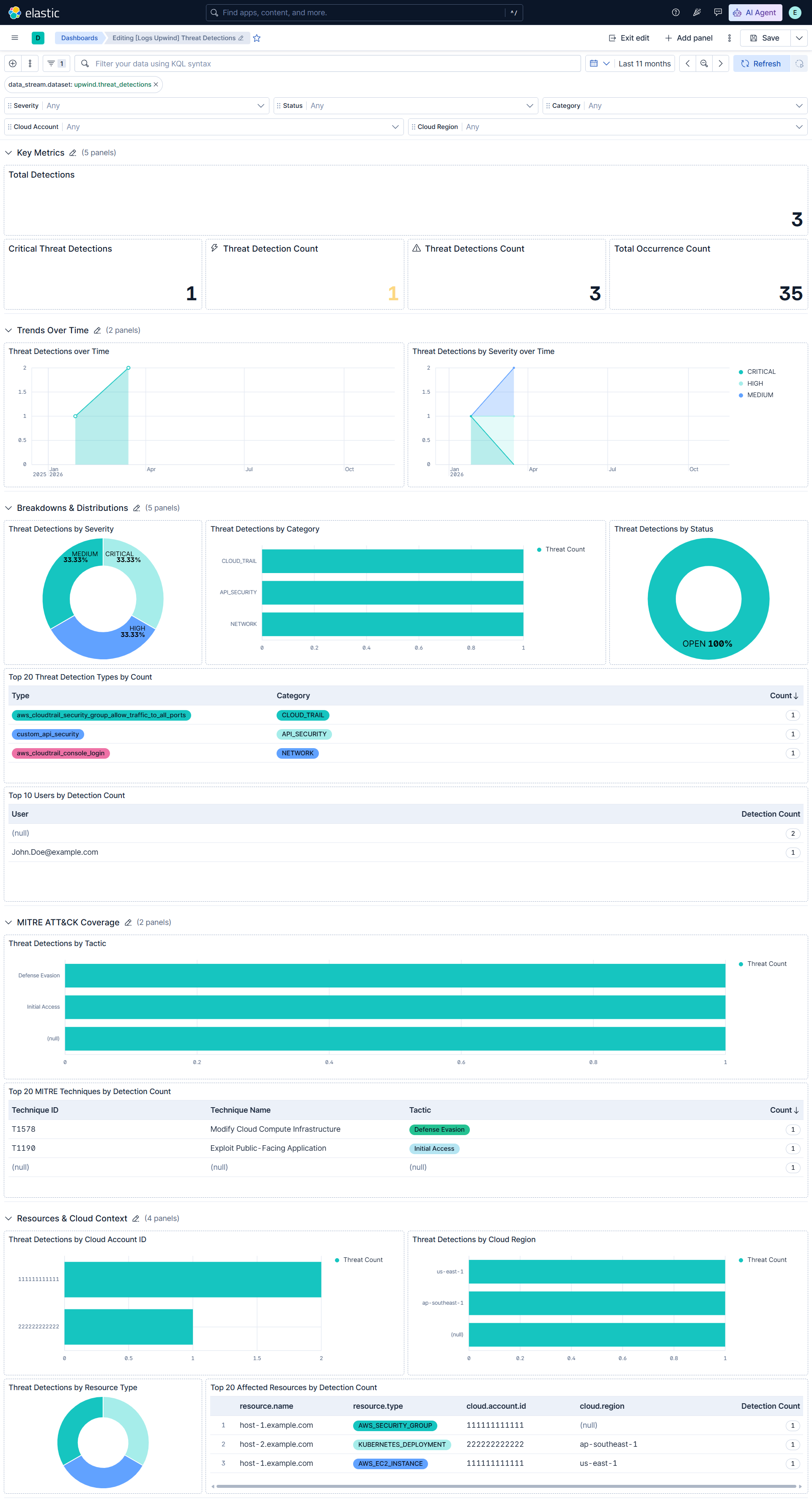
The threat_detections data stream collects runtime threat detections from GET /v1/organizations/{organization-id}/threat-detections.
Exported fields
| Field | Description | Type |
|---|---|---|
| @timestamp | Date/time when the event originated. This is the date/time extracted from the event, typically representing when the event was generated by the source. If the event source has no original timestamp, this value is typically populated by the first time the event was received by the pipeline. Required field for all events. | date |
| data_stream.dataset | The field can contain anything that makes sense to signify the source of the data. Examples include nginx.access, prometheus, endpoint etc. For data streams that otherwise fit, but that do not have dataset set we use the value "generic" for the dataset value. event.dataset should have the same value as data_stream.dataset. Beyond the Elasticsearch data stream naming criteria noted above, the dataset value has additional restrictions: * Must not contain - * No longer than 100 characters |
constant_keyword |
| data_stream.namespace | A user defined namespace. Namespaces are useful to allow grouping of data. Many users already organize their indices this way, and the data stream naming scheme now provides this best practice as a default. Many users will populate this field with default. If no value is used, it falls back to default. Beyond the Elasticsearch index naming criteria noted above, namespace value has the additional restrictions: * Must not contain - * No longer than 100 characters |
constant_keyword |
| data_stream.type | An overarching type for the data stream. Currently allowed values are "logs" and "metrics". We expect to also add "traces" and "synthetics" in the near future. | constant_keyword |
| event.dataset | Name of the dataset. If an event source publishes more than one type of log or events (e.g. access log, error log), the dataset is used to specify which one the event comes from. It's recommended but not required to start the dataset name with the module name, followed by a dot, then the dataset name. | constant_keyword |
| event.module | Name of the module this data is coming from. If your monitoring agent supports the concept of modules or plugins to process events of a given source (e.g. Apache logs), event.module should contain the name of this module. |
constant_keyword |
| input.type | Type of filebeat input. | keyword |
| log.offset | Log offset. | long |
| observer.vendor | Vendor name of the observer. | constant_keyword |
| organization.id | Unique identifier for the organization. | keyword |
| resource.id | The unique identifier of the resource affected by this detection. | keyword |
| resource.name | The name of the resource affected by this detection. | keyword |
| resource.type | The type of the resource affected by this detection. | keyword |
| upwind.threat_detections.category | The category of this detection. | keyword |
| upwind.threat_detections.evidences | The evidence records behind this detection, each serialized as a JSON string. | match_only_text |
| upwind.threat_detections.links | Hypermedia links related to this detection. | flattened |
| upwind.threat_detections.metadata.vendor_name | The vendor that produced this detection. | keyword |
| upwind.threat_detections.mitre_attack | One MITRE ATT&CK mapping as technique id, technique name, and tactic name, so dashboard aggregations do not cross-product separate multi-valued fields. | keyword |
| upwind.threat_detections.mitre_attacks.links | Links to the MITRE ATT&CK tactic and technique pages. | flattened |
| upwind.threat_detections.mitre_attacks.tactic_id | The MITRE ATT&CK tactic identifier related to this detection. | keyword |
| upwind.threat_detections.mitre_attacks.tactic_name | The MITRE ATT&CK tactic name related to this detection. | keyword |
| upwind.threat_detections.mitre_attacks.technique_id | The MITRE ATT&CK technique identifier related to this detection. | keyword |
| upwind.threat_detections.mitre_attacks.technique_name | The MITRE ATT&CK technique name related to this detection. | keyword |
| upwind.threat_detections.occurrence_count | The count of occurrences for this detection. | long |
| upwind.threat_detections.resource.cloud_account_tags | List of tags associated with the cloud account the resource belongs to. | flattened |
| upwind.threat_detections.resource.external_id | The external unique identifier for this resource. | keyword |
| upwind.threat_detections.resource.internet_exposure | Information about internet-facing communication activities of the resource. | flattened |
| upwind.threat_detections.resource.risk_categories | Risk categories associated with this resource. | keyword |
| upwind.threat_detections.resource.upwind_asset_id | The Upwind asset identifier for this resource. | keyword |
| upwind.threat_detections.severity | The severity level of this detection. | keyword |
| upwind.threat_detections.status | The status of this detection. | keyword |
| upwind.threat_detections.triggers | List of triggers associated with this detection. Each trigger indicates a policy violation that caused this detection. | flattened |
| upwind.threat_detections.type | The type of detection. | keyword |
Example
{
    "@timestamp": "2026-02-16T09:06:02.000Z",
    "agent": {
        "ephemeral_id": "7a842ca8-21ab-4f7a-b0e8-3ed39e1c5132",
        "id": "a1c7c438-9abd-48b4-b968-91cf66ae060c",
        "name": "elastic-agent-74915",
        "type": "filebeat",
        "version": "9.4.0"
    },
    "cloud": {
        "account": {
            "id": "222222222222"
        },
        "provider": "aws",
        "region": "ap-southeast-1"
    },
    "data_stream": {
        "dataset": "upwind.threat_detections",
        "namespace": "18637",
        "type": "logs"
    },
    "ecs": {
        "version": "9.5.0"
    },
    "elastic_agent": {
        "id": "a1c7c438-9abd-48b4-b968-91cf66ae060c",
        "snapshot": false,
        "version": "9.4.0"
    },
    "event": {
        "agent_id_status": "verified",
        "category": [
            "intrusion_detection"
        ],
        "dataset": "upwind.threat_detections",
        "end": "2026-02-16T09:06:02.000Z",
        "id": "uwd-22222222222222bb",
        "ingested": "2026-11-17T15:08:04Z",
        "kind": "alert",
        "module": "upwind",
        "original": "{\"category\":\"API_SECURITY\",\"description\":\"An XML input containing external entity references was detected.\",\"first_seen_time\":\"2026-01-31T03:03:11Z\",\"id\":\"uwd-22222222222222bb\",\"last_seen_time\":\"2026-02-16T09:06:02Z\",\"occurrence_count\":33,\"resource\":{\"cloud_account_id\":\"222222222222\",\"cloud_provider\":\"AWS\",\"cluster_id\":\"00000000-0000-0000-0000-000000000001\",\"id\":\"i-00000000000000000\",\"name\":\"host-2.example.com\",\"namespace\":\"app-stage\",\"region\":\"ap-southeast-1\",\"type\":\"KUBERNETES_DEPLOYMENT\"},\"severity\":\"CRITICAL\",\"status\":\"OPEN\",\"title\":\"OWASP API10:2023 XML External Entity (XXE) Injection Detected\",\"type\":\"custom_api_security\"}",
        "reason": "An XML input containing external entity references was detected.",
        "severity": 99,
        "start": "2026-01-31T03:03:11.000Z",
        "type": [
            "info"
        ]
    },
    "input": {
        "type": "cel"
    },
    "message": "OWASP API10:2023 XML External Entity (XXE) Injection Detected",
    "observer": {
        "vendor": "Upwind"
    },
    "organization": {
        "id": "org-example-0001"
    },
    "orchestrator": {
        "cluster": {
            "id": "00000000-0000-0000-0000-000000000001"
        },
        "namespace": "app-stage"
    },
    "resource": {
        "id": "i-00000000000000000",
        "name": "host-2.example.com",
        "type": "KUBERNETES_DEPLOYMENT"
    },
    "tags": [
        "preserve_original_event",
        "forwarded",
        "upwind-threat_detections"
    ],
    "upwind": {
        "threat_detections": {
            "category": "API_SECURITY",
            "occurrence_count": 33,
            "severity": "CRITICAL",
            "status": "OPEN",
            "type": "custom_api_security"
        }
    }
}
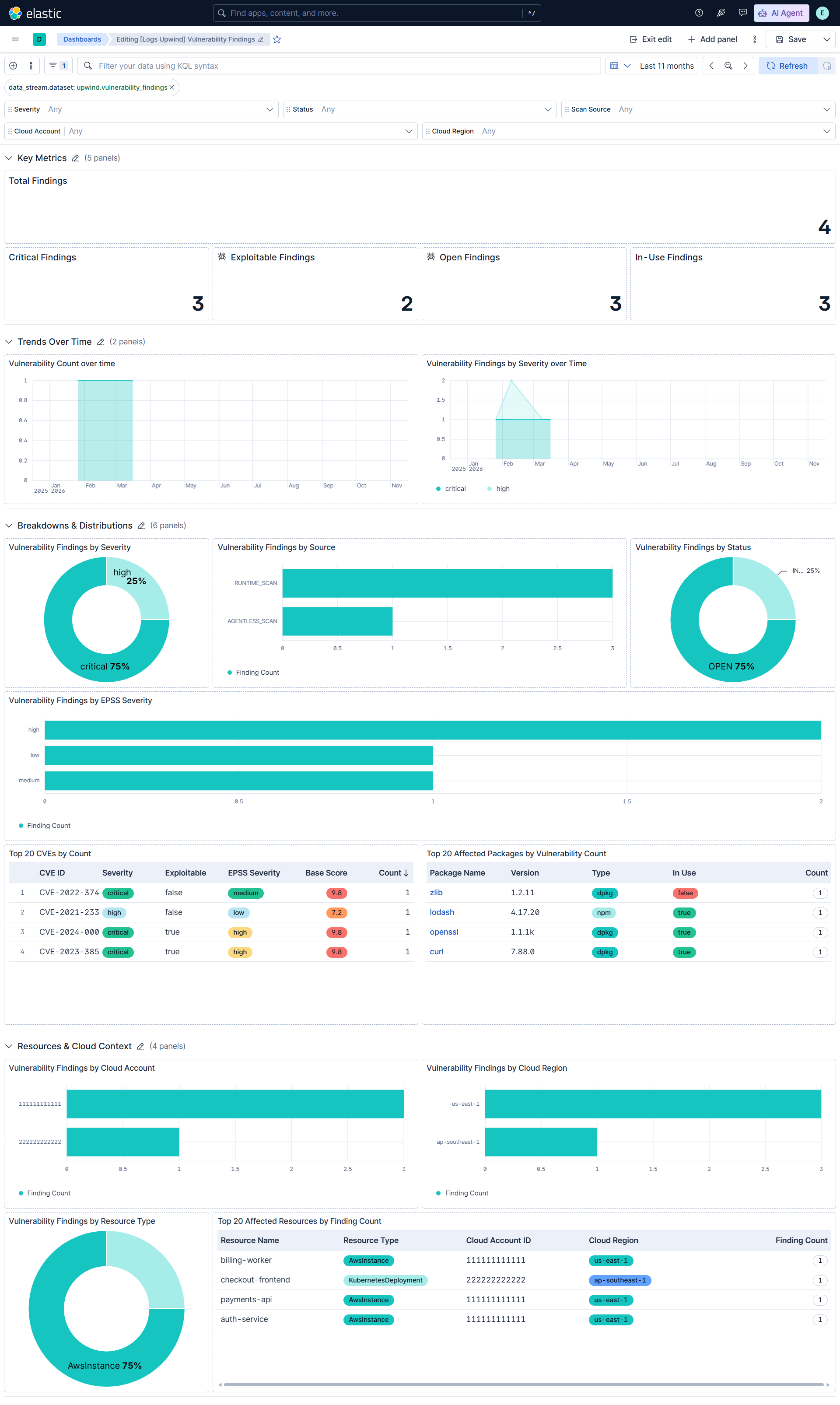
The vulnerability_findings data stream collects CVE findings from GET /v1/organizations/{organization-id}/vulnerability-findings.
Exported fields
| Field | Description | Type |
|---|---|---|
| @timestamp | Date/time when the event originated. This is the date/time extracted from the event, typically representing when the event was generated by the source. If the event source has no original timestamp, this value is typically populated by the first time the event was received by the pipeline. Required field for all events. | date |
| cloud.account.id | The cloud account or organization id used to identify different entities in a multi-tenant environment. Examples: AWS account id, Google Cloud ORG Id, or other unique identifier. | keyword |
| cloud.account.name | The cloud account name or alias used to identify different entities in a multi-tenant environment. Examples: AWS account name, Google Cloud ORG display name. | keyword |
| cloud.provider | Name of the cloud provider. Example values are aws, azure, gcp, or digitalocean. | keyword |
| cloud.region | Region in which this host, resource, or service is located. | keyword |
| container.image.hash.all | An array of digests of the image the container was built on. Each digest consists of the hash algorithm and value in this format: algorithm:value. Algorithm names should align with the field names in the ECS hash field set. |
keyword |
| container.image.name | Name of the image the container was built on. | keyword |
| container.image.tag | Container image tags. | keyword |
| data_stream.dataset | The field can contain anything that makes sense to signify the source of the data. Examples include nginx.access, prometheus, endpoint etc. For data streams that otherwise fit, but that do not have dataset set we use the value "generic" for the dataset value. event.dataset should have the same value as data_stream.dataset. Beyond the Elasticsearch data stream naming criteria noted above, the dataset value has additional restrictions: * Must not contain - * No longer than 100 characters |
constant_keyword |
| data_stream.namespace | A user defined namespace. Namespaces are useful to allow grouping of data. Many users already organize their indices this way, and the data stream naming scheme now provides this best practice as a default. Many users will populate this field with default. If no value is used, it falls back to default. Beyond the Elasticsearch index naming criteria noted above, namespace value has the additional restrictions: * Must not contain - * No longer than 100 characters |
constant_keyword |
| data_stream.type | An overarching type for the data stream. Currently allowed values are "logs" and "metrics". We expect to also add "traces" and "synthetics" in the near future. | constant_keyword |
| ecs.version | ECS version this event conforms to. ecs.version is a required field and must exist in all events. When querying across multiple indices -- which may conform to slightly different ECS versions -- this field lets integrations adjust to the schema version of the events. |
keyword |
| error.message | Error message. | match_only_text |
| event.category | This is one of four ECS Categorization Fields, and indicates the second level in the ECS category hierarchy. event.category represents the "big buckets" of ECS categories. For example, filtering on event.category:process yields all events relating to process activity. This field is closely related to event.type, which is used as a subcategory. This field is an array. This will allow proper categorization of some events that fall in multiple categories. |
keyword |
| event.dataset | Name of the dataset. If an event source publishes more than one type of log or events (e.g. access log, error log), the dataset is used to specify which one the event comes from. It's recommended but not required to start the dataset name with the module name, followed by a dot, then the dataset name. | constant_keyword |
| event.id | Unique ID to describe the event. | keyword |
| event.kind | This is one of four ECS Categorization Fields, and indicates the highest level in the ECS category hierarchy. event.kind gives high-level information about what type of information the event contains, without being specific to the contents of the event. For example, values of this field distinguish alert events from metric events. The value of this field can be used to inform how these kinds of events should be handled. They may warrant different retention, different access control, it may also help understand whether the data is coming in at a regular interval or not. |
keyword |
| event.module | Name of the module this data is coming from. If your monitoring agent supports the concept of modules or plugins to process events of a given source (e.g. Apache logs), event.module should contain the name of this module. |
constant_keyword |
| event.original | Raw text message of entire event. Used to demonstrate log integrity or where the full log message (before splitting it up in multiple parts) may be required, e.g. for reindex. This field is not indexed and doc_values are disabled. It cannot be searched, but it can be retrieved from _source. If users wish to override this and index this field, please see Field data types in the Elasticsearch Reference. |
keyword |
| event.severity | The numeric severity of the event according to your event source. What the different severity values mean can be different between sources and use cases. It's up to the implementer to make sure severities are consistent across events from the same source. The Syslog severity belongs in log.syslog.severity.code. event.severity is meant to represent the severity according to the event source (e.g. firewall, IDS). If the event source does not publish its own severity, you may optionally copy the log.syslog.severity.code to event.severity. |
long |
| event.start | event.start contains the date when the event started or when the activity was first observed. |
date |
| event.type | This is one of four ECS Categorization Fields, and indicates the third level in the ECS category hierarchy. event.type represents a categorization "sub-bucket" that, when used along with the event.category field values, enables filtering events down to a level appropriate for single visualization. This field is an array. This will allow proper categorization of some events that fall in multiple event types. |
keyword |
| input.type | Type of filebeat input. | keyword |
| log.offset | Log offset. | long |
| observer.vendor | Vendor name of the observer. | constant_keyword |
| orchestrator.cluster.id | Unique ID of the cluster. | keyword |
| orchestrator.cluster.name | Name of the cluster. | keyword |
| orchestrator.namespace | Namespace in which the action is taking place. | keyword |
| organization.id | Unique identifier for the organization. | keyword |
| package.name | Package name | keyword |
| package.type | Type of package. This should contain the package file type, rather than the package manager name. Examples: rpm, dpkg, brew, npm, gem, nupkg, jar. | keyword |
| package.version | Package version | keyword |
| related.hash | All the hashes seen on your event. Populating this field, then using it to search for hashes can help in situations where you're unsure what the hash algorithm is (and therefore which key name to search). | keyword |
| related.hosts | All hostnames or other host identifiers seen on your event. Example identifiers include FQDNs, domain names, workstation names, or aliases. | keyword |
| resource.id | The unique identifier of the resource affected by this finding. | keyword |
| resource.name | The name of the resource affected by this finding. | keyword |
| resource.type | The type of the resource affected by this finding. | keyword |
| tags | List of keywords used to tag each event. | keyword |
| upwind.vulnerability_findings.image.os_name | The operating system name of the container image. | keyword |
| upwind.vulnerability_findings.image.os_version | The operating system version of the container image. | keyword |
| upwind.vulnerability_findings.image.uri | The URI of the container image associated with this finding. | keyword |
| upwind.vulnerability_findings.last_scan_time | The timestamp of the most recent scan that observed this finding. | date |
| upwind.vulnerability_findings.package.framework | The framework of the affected package. | keyword |
| upwind.vulnerability_findings.package.in_use | Whether the affected package is in use at runtime. | boolean |
| upwind.vulnerability_findings.package.introduced_by_layers | The container image layers that introduced the affected package. | flattened |
| upwind.vulnerability_findings.remediation | Remediation actions suggested for this finding. | flattened |
| upwind.vulnerability_findings.resource.cloud_account_tags | List of tags associated with the cloud account the resource belongs to. | flattened |
| upwind.vulnerability_findings.resource.cloud_organization_id | The unique identifier for the cloud organization associated with this resource. | keyword |
| upwind.vulnerability_findings.resource.cloud_organization_unit_id | The unique identifier for the cloud organization unit associated with this resource. | keyword |
| upwind.vulnerability_findings.resource.external_id | The external unique identifier for this resource. | keyword |
| upwind.vulnerability_findings.resource.internet_exposure | Information about internet-facing communication activities of the resource. | flattened |
| upwind.vulnerability_findings.resource.resource_tags | List of tags associated with this resource. | flattened |
| upwind.vulnerability_findings.resource.risk_categories | Risk categories associated with this resource. | keyword |
| upwind.vulnerability_findings.resource.upwind_asset_id | The Upwind asset identifier for this resource. | keyword |
| upwind.vulnerability_findings.source | The scan source that produced this finding. | keyword |
| upwind.vulnerability_findings.status | The workflow status of this finding. | keyword |
| upwind.vulnerability_findings.vulnerability.cve_first_seen_time | The timestamp when the CVE was first seen. | date |
| upwind.vulnerability_findings.vulnerability.epss_score | The EPSS score of the vulnerability. | float |
| upwind.vulnerability_findings.vulnerability.epss_severity | The EPSS severity of the vulnerability. | keyword |
| upwind.vulnerability_findings.vulnerability.exploitable | Whether the vulnerability is known to be exploitable. | boolean |
| upwind.vulnerability_findings.vulnerability.exploitable_functions_in_use | Exploitable functions of the vulnerable package observed in use at runtime. | flattened |
| upwind.vulnerability_findings.vulnerability.known_exploit_sources | Sources that report known exploits for the vulnerability. | keyword |
| upwind.vulnerability_findings.vulnerability.name | The name of the vulnerability. | keyword |
| upwind.vulnerability_findings.vulnerability.nvd_cvss_v2_score | The NVD CVSS v2 score of the vulnerability. | float |
| upwind.vulnerability_findings.vulnerability.nvd_cvss_v2_severity | The NVD CVSS v2 severity of the vulnerability. | keyword |
| upwind.vulnerability_findings.vulnerability.nvd_cvss_v4_score | The NVD CVSS v4 score of the vulnerability. | float |
| upwind.vulnerability_findings.vulnerability.nvd_cvss_v4_severity | The NVD CVSS v4 severity of the vulnerability. | keyword |
| upwind.vulnerability_findings.vulnerability.nvd_description | The NVD description of the vulnerability. | match_only_text |
| upwind.vulnerability_findings.vulnerability.nvd_publish_time | The timestamp when the vulnerability was published in the NVD. | date |
| upwind.vulnerability_findings.vulnerability.sbom_artifact_locations | SBOM artifact locations of the vulnerable package. | keyword |
| vulnerability.classification | The classification of the vulnerability scoring system. For example (https://www.first.org/cvss/) | keyword |
| vulnerability.description | The description of the vulnerability that provides additional context of the vulnerability. For example (https://cve.mitre.org/about/faqs.html#cve_entry_descriptions_created) | keyword |
| vulnerability.description.text | Multi-field of vulnerability.description. |
match_only_text |
| vulnerability.enumeration | The type of identifier used for this vulnerability. For example (https://cve.mitre.org/about/) | keyword |
| vulnerability.id | The identification (ID) is the number portion of a vulnerability entry. It includes a unique identification number for the vulnerability. For example (https://cve.mitre.org/about/faqs.html#what_is_cve_id) | keyword |
| vulnerability.score.base | Scores can range from 0.0 to 10.0, with 10.0 being the most severe. Base scores cover an assessment for exploitability metrics (attack vector, complexity, privileges, and user interaction), impact metrics (confidentiality, integrity, and availability), and scope. For example (https://www.first.org/cvss/specification-document) | float |
| vulnerability.score.version | The National Vulnerability Database (NVD) provides qualitative severity rankings of "Low", "Medium", and "High" for CVSS v2.0 base score ranges in addition to the severity ratings for CVSS v3.0 as they are defined in the CVSS v3.0 specification. CVSS is owned and managed by FIRST.Org, Inc. (FIRST), a US-based non-profit organization, whose mission is to help computer security incident response teams across the world. For example (https://nvd.nist.gov/vuln-metrics/cvss) | keyword |
| vulnerability.severity | The severity of the vulnerability can help with metrics and internal prioritization regarding remediation. For example (https://nvd.nist.gov/vuln-metrics/cvss) | keyword |
Example
{
    "@timestamp": "2026-03-01T08:30:00.000Z",
    "agent": {
        "ephemeral_id": "aba0ea9e-471b-4e44-871e-eb95ebd0ce56",
        "id": "b04cde78-f84c-4242-8fef-0d7e7cb02aee",
        "name": "elastic-agent-61577",
        "type": "filebeat",
        "version": "9.4.0"
    },
    "cloud": {
        "account": {
            "id": "111111111111"
        },
        "provider": "aws",
        "region": "us-east-1"
    },
    "container": {
        "image": {
            "hash": {
                "all": [
                    "sha256:1111111111111111111111111111111111111111111111111111111111111111"
                ]
            },
            "name": "payments-api",
            "tag": [
                "1.4.2"
            ]
        }
    },
    "data_stream": {
        "dataset": "upwind.vulnerability_findings",
        "namespace": "92680",
        "type": "logs"
    },
    "ecs": {
        "version": "9.5.0"
    },
    "elastic_agent": {
        "id": "b04cde78-f84c-4242-8fef-0d7e7cb02aee",
        "snapshot": false,
        "version": "9.4.0"
    },
    "event": {
        "agent_id_status": "verified",
        "category": [
            "vulnerability"
        ],
        "dataset": "upwind.vulnerability_findings",
        "id": "uvf-11111111111111aa",
        "ingested": "2026-11-17T15:09:06Z",
        "kind": "state",
        "module": "upwind",
        "original": "{\"first_seen_time\":\"2026-02-01T10:00:00Z\",\"id\":\"uvf-11111111111111aa\",\"image\":{\"digest\":\"sha256:1111111111111111111111111111111111111111111111111111111111111111\",\"name\":\"payments-api\",\"tag\":\"1.4.2\"},\"last_scan_time\":\"2026-03-01T08:30:00Z\",\"package\":{\"in_use\":true,\"name\":\"openssl\",\"type\":\"dpkg\",\"version\":\"1.1.1k\"},\"remediation\":[{\"description\":\"Upgrade openssl to 1.1.1w or later.\",\"type\":\"UPGRADE_PACKAGE\"}],\"resource\":{\"cloud_account_id\":\"111111111111\",\"cloud_provider\":\"AWS\",\"id\":\"i-00000000000000000\",\"name\":\"payments-api\",\"namespace\":\"production\",\"region\":\"us-east-1\",\"type\":\"AwsInstance\",\"upwind_asset_id\":\"asset-example-001\"},\"source\":\"RUNTIME_SCAN\",\"status\":\"OPEN\",\"vulnerability\":{\"description\":\"Example vulnerability description.\",\"epss_score\":\"0.42\",\"epss_severity\":\"high\",\"exploitable\":true,\"known_exploit_sources\":[\"cisa\"],\"name\":\"CVE-2024-0000\",\"nvd_cve_id\":\"CVE-2024-0000\",\"nvd_cvss_v3_score\":\"9.8\",\"nvd_cvss_v3_severity\":\"critical\"}}",
        "severity": 99,
        "start": "2026-02-01T10:00:00.000Z",
        "type": [
            "info"
        ]
    },
    "input": {
        "type": "cel"
    },
    "observer": {
        "vendor": "Upwind"
    },
    "organization": {
        "id": "org-example-0001"
    },
    "orchestrator": {
        "namespace": "production"
    },
    "package": {
        "name": "openssl",
        "type": "dpkg",
        "version": "1.1.1k"
    },
    "related": {
        "hash": [
            "sha256:1111111111111111111111111111111111111111111111111111111111111111"
        ],
        "hosts": [
            "payments-api"
        ]
    },
    "resource": {
        "id": "i-00000000000000000",
        "name": "payments-api",
        "type": "AwsInstance"
    },
    "tags": [
        "preserve_original_event",
        "forwarded",
        "upwind-vulnerability_findings"
    ],
    "upwind": {
        "vulnerability_findings": {
            "last_scan_time": "2026-03-01T08:30:00.000Z",
            "package": {
                "in_use": true
            },
            "remediation": {
                "description": "Upgrade openssl to 1.1.1w or later.",
                "type": "UPGRADE_PACKAGE"
            },
            "resource": {
                "upwind_asset_id": "asset-example-001"
            },
            "source": "RUNTIME_SCAN",
            "status": "OPEN",
            "vulnerability": {
                "epss_score": 0.42,
                "epss_severity": "high",
                "exploitable": true,
                "known_exploit_sources": "cisa",
                "name": "CVE-2024-0000"
            }
        }
    },
    "vulnerability": {
        "classification": "CVSS",
        "description": "Example vulnerability description.",
        "enumeration": "CVE",
        "id": "CVE-2024-0000",
        "score": {
            "base": 9.8,
            "version": "3"
        },
        "severity": "Critical"
    }
}
The configuration_findings data stream collects the current CSPM posture from GET /v1/organizations/{organization-id}/configuration-findings. Each run lists all current passed and failed findings.
Exported fields
| Field | Description | Type |
|---|---|---|
| @timestamp | Date/time when the event originated. This is the date/time extracted from the event, typically representing when the event was generated by the source. If the event source has no original timestamp, this value is typically populated by the first time the event was received by the pipeline. Required field for all events. | date |
| data_stream.dataset | The field can contain anything that makes sense to signify the source of the data. Examples include nginx.access, prometheus, endpoint etc. For data streams that otherwise fit, but that do not have dataset set we use the value "generic" for the dataset value. event.dataset should have the same value as data_stream.dataset. Beyond the Elasticsearch data stream naming criteria noted above, the dataset value has additional restrictions: * Must not contain - * No longer than 100 characters |
constant_keyword |
| data_stream.namespace | A user defined namespace. Namespaces are useful to allow grouping of data. Many users already organize their indices this way, and the data stream naming scheme now provides this best practice as a default. Many users will populate this field with default. If no value is used, it falls back to default. Beyond the Elasticsearch index naming criteria noted above, namespace value has the additional restrictions: * Must not contain - * No longer than 100 characters |
constant_keyword |
| data_stream.type | An overarching type for the data stream. Currently allowed values are "logs" and "metrics". We expect to also add "traces" and "synthetics" in the near future. | constant_keyword |
| event.dataset | Name of the dataset. If an event source publishes more than one type of log or events (e.g. access log, error log), the dataset is used to specify which one the event comes from. It's recommended but not required to start the dataset name with the module name, followed by a dot, then the dataset name. | constant_keyword |
| event.module | Name of the module this data is coming from. If your monitoring agent supports the concept of modules or plugins to process events of a given source (e.g. Apache logs), event.module should contain the name of this module. |
constant_keyword |
| input.type | Type of filebeat input. | keyword |
| log.offset | Log offset. | long |
| observer.vendor | Vendor name of the observer. | constant_keyword |
| organization.id | Unique identifier for the organization. | keyword |
| resource.id | The unique identifier of the resource evaluated by this finding. | keyword |
| resource.name | The name of the resource evaluated by this finding. | keyword |
| resource.type | The type of the resource evaluated by this finding. | keyword |
| result.evaluation | The evaluation result of the configuration check, either passed or failed. | keyword |
| rule.remediation | Remediation guidance for the configuration check. | keyword |
| upwind.configuration_findings.framework.cloud_provider | The cloud provider the compliance framework applies to. | keyword |
| upwind.configuration_findings.framework.description | A description of the compliance framework. | keyword |
| upwind.configuration_findings.framework.id | The unique identifier for the compliance framework. | keyword |
| upwind.configuration_findings.framework.revision | The revision of the compliance framework. | keyword |
| upwind.configuration_findings.framework.status | The status of the compliance framework. | keyword |
| upwind.configuration_findings.framework.version | The version of the compliance framework. | keyword |
| upwind.configuration_findings.last_seen_time | The timestamp when this finding was last seen by Upwind. | date |
| upwind.configuration_findings.last_sync_time | The timestamp when this finding was last synchronized. | date |
| upwind.configuration_findings.resource.arn | The ARN of this resource. | keyword |
| upwind.configuration_findings.resource.cloud_account_tags | List of tags associated with the cloud account the resource belongs to. | flattened |
| upwind.configuration_findings.resource.risk_categories | Risk categories associated with this resource. | keyword |
| upwind.configuration_findings.resource.upwind_asset_id | The Upwind asset identifier for this resource. | keyword |
| upwind.configuration_findings.severity | The severity level of this finding. | keyword |
| upwind.configuration_findings.status | The evaluation status of this finding as reported by Upwind, PASS or FAIL. | keyword |
Example
{
    "@timestamp": "2026-03-20T06:00:00.000Z",
    "agent": {
        "ephemeral_id": "549648f5-defe-4b01-9c8a-a8b2a668966e",
        "id": "1784acff-c8b3-4ab5-8d35-9aa03e22052f",
        "name": "elastic-agent-12140",
        "type": "filebeat",
        "version": "9.4.0"
    },
    "cloud": {
        "account": {
            "id": "111111111111",
            "name": "production"
        },
        "provider": "aws",
        "region": "us-east-1"
    },
    "data_stream": {
        "dataset": "upwind.configuration_findings",
        "namespace": "59240",
        "type": "logs"
    },
    "ecs": {
        "version": "9.5.0"
    },
    "elastic_agent": {
        "id": "1784acff-c8b3-4ab5-8d35-9aa03e22052f",
        "snapshot": false,
        "version": "9.4.0"
    },
    "event": {
        "agent_id_status": "verified",
        "category": [
            "configuration"
        ],
        "dataset": "upwind.configuration_findings",
        "id": "ucf-11111111111111aa",
        "ingested": "2026-11-17T15:07:04Z",
        "kind": "state",
        "module": "upwind",
        "original": "{\"check\":{\"description\":\"Detects bucket policies or ACLs that expose objects publicly.\",\"id\":\"check-s3-public-read\",\"remediation\":\"Remove public principals from the bucket policy and enable Block Public Access.\",\"title\":\"S3 bucket should not allow public read access\"},\"description\":\"The S3 bucket policy grants public read access to objects.\",\"first_seen_time\":\"2026-01-15T12:00:00Z\",\"framework\":{\"cloud_provider\":\"AWS\",\"id\":\"cis-aws-v1\",\"status\":\"ENABLED\",\"title\":\"CIS AWS Foundations\",\"version\":\"1.5.0\"},\"id\":\"ucf-11111111111111aa\",\"last_seen_time\":\"2026-03-20T06:00:00Z\",\"last_sync_time\":\"2026-03-20T06:05:00Z\",\"resource\":{\"arn\":\"arn:aws:s3:::example-logs-bucket\",\"cloud_account_id\":\"111111111111\",\"cloud_account_name\":\"production\",\"cloud_provider\":\"AWS\",\"id\":\"arn:aws:s3:::example-logs-bucket\",\"name\":\"example-logs-bucket\",\"region\":\"us-east-1\",\"risk_categories\":[\"DATA_EXPOSURE\"],\"type\":\"AwsS3Bucket\",\"upwind_asset_id\":\"asset-s3-001\"},\"severity\":\"HIGH\",\"status\":\"FAIL\",\"title\":\"S3 bucket allows public read access\"}",
        "reason": "The S3 bucket policy grants public read access to objects.",
        "severity": 73,
        "start": "2026-01-15T12:00:00.000Z",
        "type": [
            "info"
        ]
    },
    "input": {
        "type": "cel"
    },
    "message": "S3 bucket allows public read access",
    "observer": {
        "vendor": "Upwind"
    },
    "organization": {
        "id": "org-example-0001"
    },
    "resource": {
        "id": "arn:aws:s3:::example-logs-bucket",
        "name": "example-logs-bucket",
        "type": "AwsS3Bucket"
    },
    "result": {
        "evaluation": "failed"
    },
    "rule": {
        "description": "Detects bucket policies or ACLs that expose objects publicly.",
        "id": "check-s3-public-read",
        "name": "S3 bucket should not allow public read access",
        "remediation": "Remove public principals from the bucket policy and enable Block Public Access.",
        "ruleset": "CIS AWS Foundations",
        "uuid": "check-s3-public-read"
    },
    "tags": [
        "preserve_original_event",
        "forwarded",
        "upwind-configuration_findings"
    ],
    "upwind": {
        "configuration_findings": {
            "framework": {
                "cloud_provider": "AWS",
                "id": "cis-aws-v1",
                "status": "ENABLED",
                "version": "1.5.0"
            },
            "last_seen_time": "2026-03-20T06:00:00.000Z",
            "last_sync_time": "2026-03-20T06:05:00.000Z",
            "resource": {
                "arn": "arn:aws:s3:::example-logs-bucket",
                "risk_categories": "DATA_EXPOSURE",
                "upwind_asset_id": "asset-s3-001"
            },
            "severity": "HIGH",
            "status": "FAIL"
        }
    }
}
This integration includes one or more Kibana dashboards that visualizes the data collected by the integration. The screenshots below illustrate how the ingested data is displayed.
Changelog
| Version | Details | Minimum Kibana version |
|---|---|---|
| 0.1.0 | Enhancement (View pull request) Initial release of the Upwind integration. |
9.4.0 |