BeyondTrust Identity Security Insights for Elastic
| Version | 0.2.0
|
| Subscription level What's this? |
Basic |
| Developed by What's this? |
Elastic |
| Ingestion method(s) | Webhook |
| Minimum Kibana version(s) | 9.0.0 8.18.0 |
To use pre-release integrations, go to the Integrations page in Kibana, scroll down, and toggle on the Display beta integrations option.
BeyondTrust ISI helps you understand and act on identity risk. It maps how access works—and how it can escalate—so you can detect threats, reduce privilege, and improve posture across hybrid environments. Built to fit into your existing identity stack, Insights gives you real-time visibility and contextual recommendations without requiring a reset.
The BeyondTrust ISI integration for Elastic collects incidents from BeyondTrust ISI using the Elastic Agent HTTP Endpoint input and also incidents that are sent directly to Elasticsearch via BeyondTrust ISI's native Elastic push. Events are normalized to Elastic Common Schema (ECS), enriched in ingest pipelines, and indexed in Elasticsearch so you can search, alert, and build dashboards in Kibana.
The BeyondTrust ISI integration is compatible with BeyondTrust ISI version 26.04.1.
This integration collects incidents from BeyondTrust ISI using HTTP Endpoint and BeyondTrust ISI pushes incidents directly to Elasticsearch in real-time using its native Elastic integration. BeyondTrust ISI incidents are forwarded to the Elastic Agent using HTTP Endpoint in real-time, processes them through ingest pipelines, indexes them in Elasticsearch.
This integration collects events of the following type:
Incidents: Collects BeyondTrust ISI incidents using the HTTP Endpoint.Events: BeyondTrust ISI incidents pushed directly to Elasticsearch via the native Elastic integration.
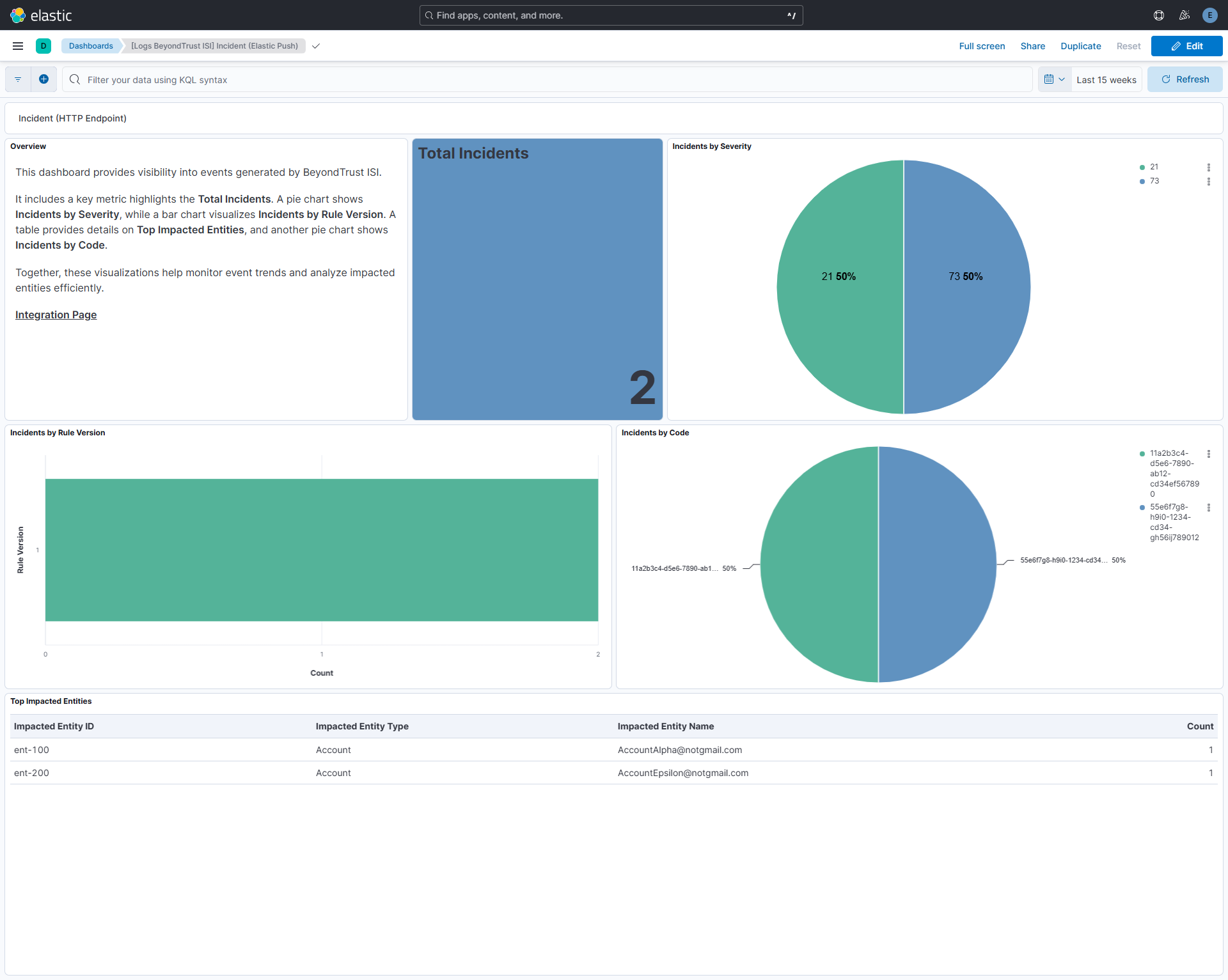
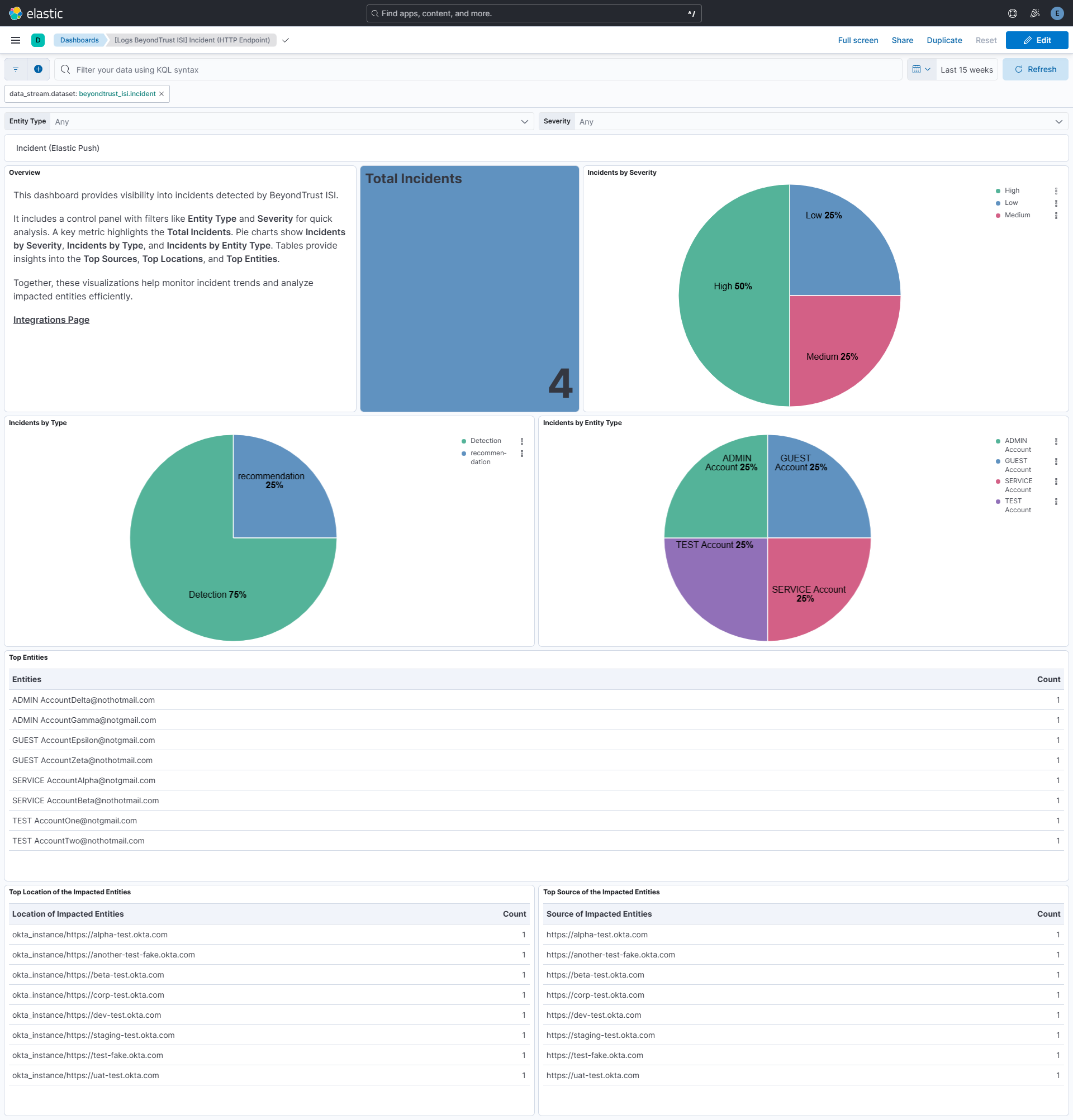
BeyondTrust ISI incident dashboards provide a unified view of identity risks and overall security posture by surfacing total incidents, severity breakdowns, incident types, rule versions, top sources, locations, and the most impacted entities. Integrating BeyondTrust ISI incident data into SIEM dashboards enables quick risk assessment, efficient investigation, and enhanced security monitoring through centralized visibility and actionable insights.
- In your BeyondTrust ISI instance, go to the main menu and select Insights > Integrations.
The Integrations page displays the available integrations. - Click Webhooks.
The Summary page displays. - Click Create Integration.
The Configure Integration page displays. - Provide the following information:
- Webhook Name: Enter your desired name for this webhook.
- Webhook URL: The URL where Insights will send information. This can represent the location of a Teams or Slack channel or other application URL.
- (Optional) Click Add Header, then enter the name and value of a custom header to add to every webhook.
- Authorization Type: If your webhook requires Basic or Bearer authorization, select it from the dropdown (see BeyondTrust webhook documentation):
- Bearer: Provide a long-lived access token in the Token field.
- Basic: Provide a username and password to use for authentication.
- Webhook Template: A JSON object, which represents the information sent from Insights. Add the following JSON:
{
"incidentType": "%%incidentType%%",
"incidentId": "%%incidentId%%",
"severity": "%%severity%%",
"definitionSummary": "%%definitionSummary%%",
"definitionId": "%%definitionId%%",
"entityType": "%%entityType%%",
"entityName": "%%entityName%%",
"source": "%%source%%",
"location": "%%location%%",
"tenantId": "%%tenantId%%",
"timestamp": "%%timestamp%%",
"link": "%%link%%"
}
Before configuring the integration, gather the following from your Elastic Cloud deployment:
- Cloud ID: From your Elastic Cloud deployment overview page.
- API Key: Generated under Elastic Security > API Keys.
Then, in BeyondTrust ISI:
- Open Insights and go to the menu > Integrations.
- Click Elastic.
- Click Create Integration.
- Enter the Elastic Cloud ID and API Key.
- Click Create Integration.
The integration will appear under the Configured section. Changes to the Cloud ID or API Key may take up to two minutes to take effect.
For more details, check documentation for HTTP Endpoint and Native Elastic Push.
This integration supports Agent-based installations. And for Event data streams no Elastic Agent is required, BeyondTrust ISI pushes incidents directly to your Elasticsearch cluster.
Elastic Agent must be installed. For more details, check the Elastic Agent installation instructions. You can install only one Elastic Agent per host.
- In Kibana navigate to Management > Integrations.
- In the search bar, type BeyondTrust ISI.
- Select the BeyondTrust ISI integration and add it.
- Configure all the required integration parameters, including the listen address, listen port, and authentication method along with its corresponding required fields for the HTTP Endpoint input type and configure the native Elastic integration with your Elastic Cloud ID and API Key as described above.
- Select Save and continue to save the integration.
- In the top search bar in Kibana, search for Dashboards.
- In the search bar, type BeyondTrust ISI.
- Select a dashboard for the dataset you are collecting, and verify the dashboard information is populated.
Data is sent directly to Elasticsearch by BeyondTrust ISIs Native Elastic integration.
For more information on architectures that can be used for scaling this integration, check the Ingest Architectures documentation.
This is the incident dataset.
Example
{
    "@timestamp": "2026-04-20T07:14:08.000Z",
    "agent": {
        "ephemeral_id": "9dc9de85-5d2b-4104-ada9-0076efa1ff2c",
        "id": "3e45c8ae-a4f7-4598-9051-39b6cc53c5c3",
        "name": "elastic-agent-19333",
        "type": "filebeat",
        "version": "8.18.0"
    },
    "beyondtrust_isi": {
        "incident": {
            "entity_name": [
                "TEST AccountOne@notgmail.com",
                "TEST AccountTwo@nothotmail.com"
            ],
            "entity_type": [
                "TEST Account",
                "TEST Account"
            ],
            "incident_type": "Detection",
            "location": [
                "okta_instance/https://test-fake.okta.com",
                "okta_instance/https://another-test-fake.okta.com"
            ],
            "severity": "Medium",
            "source": [
                "https://test-fake.okta.com",
                "https://another-test-fake.okta.com"
            ]
        }
    },
    "cloud": {
        "account": {
            "id": "TEST_f34a35b0-b34a-43ca-ac31-1a2ee7db38c3"
        }
    },
    "data_stream": {
        "dataset": "beyondtrust_isi.incident",
        "namespace": "53280",
        "type": "logs"
    },
    "ecs": {
        "version": "9.3.0"
    },
    "elastic_agent": {
        "id": "3e45c8ae-a4f7-4598-9051-39b6cc53c5c3",
        "snapshot": false,
        "version": "8.18.0"
    },
    "event": {
        "agent_id_status": "verified",
        "category": [
            "intrusion_detection"
        ],
        "dataset": "beyondtrust_isi.incident",
        "id": "TEST_70ca6c38-0175-435d-814a-a9121079c5e3",
        "ingested": "2026-06-06T10:56:54Z",
        "kind": "event",
        "original": "{\"definitionId\":\"TEST_06c0e85f-390b-4967-9e23-b0b1630b9f6b\",\"definitionSummary\":\"TEST Account Associated With Personal Email Address\",\"entityName\":\"TEST AccountOne@notgmail.com,TEST AccountTwo@nothotmail.com\",\"entityType\":\"TEST Account,TEST Account\",\"incidentId\":\"TEST_70ca6c38-0175-435d-814a-a9121079c5e3\",\"incidentType\":\"Detection\",\"link\":\"https://app.beyondtrust.io/insights/TEST_f34a35b0-b34a-43ca-ac31-1a2ee7db38c3/detections/details/TEST_06c0e85f-390b-4967-9e23-b0b1630b9f6b/instance/TEST_70ca6c38-0175-435d-814a-a9121079c5e3\",\"location\":\"okta_instance/https://test-fake.okta.com,okta_instance/https://another-test-fake.okta.com\",\"severity\":\"Medium\",\"source\":\"https://test-fake.okta.com,https://another-test-fake.okta.com\",\"tenantId\":\"TEST_f34a35b0-b34a-43ca-ac31-1a2ee7db38c3\",\"timestamp\":\"04/20/2026 07:14:08\"}",
        "severity": 47,
        "type": [
            "info"
        ],
        "url": "https://app.beyondtrust.io/insights/TEST_f34a35b0-b34a-43ca-ac31-1a2ee7db38c3/detections/details/TEST_06c0e85f-390b-4967-9e23-b0b1630b9f6b/instance/TEST_70ca6c38-0175-435d-814a-a9121079c5e3"
    },
    "input": {
        "type": "http_endpoint"
    },
    "message": "TEST Account Associated With Personal Email Address",
    "rule": {
        "description": "TEST Account Associated With Personal Email Address",
        "id": "TEST_06c0e85f-390b-4967-9e23-b0b1630b9f6b",
        "reference": "https://app.beyondtrust.io/insights/TEST_f34a35b0-b34a-43ca-ac31-1a2ee7db38c3/detections/details/TEST_06c0e85f-390b-4967-9e23-b0b1630b9f6b/instance/TEST_70ca6c38-0175-435d-814a-a9121079c5e3"
    },
    "tags": [
        "preserve_original_event",
        "forwarded",
        "beyondtrust_isi-incident"
    ]
}
Exported fields
| Field | Description | Type |
|---|---|---|
| @timestamp | Date/time when the event originated. This is the date/time extracted from the event, typically representing when the event was generated by the source. If the event source has no original timestamp, this value is typically populated by the first time the event was received by the pipeline. Required field for all events. | date |
| beyondtrust_isi.incident.definition_id | The name of the detection or recommendation. | keyword |
| beyondtrust_isi.incident.definition_summary | A high-level summary of the detection or recommendation. | keyword |
| beyondtrust_isi.incident.definition_summary.text | Multi-field of beyondtrust_isi.incident.definition_summary. |
match_only_text |
| beyondtrust_isi.incident.entity_name | A comma separated list of all the entity names of the impacted entities. | keyword |
| beyondtrust_isi.incident.entity_type | A comma separated list of all the entity types of the impacted entities (i.e., Identity or Account). | keyword |
| beyondtrust_isi.incident.incident_id | The internal ID of the detection or recommendation. | keyword |
| beyondtrust_isi.incident.incident_type | Whether the incident was a detection or recommendation. | keyword |
| beyondtrust_isi.incident.link | A deep link to the details page of the specific detection or recommendation. | keyword |
| beyondtrust_isi.incident.location | A comma separated list of all the locations of the impacted entities. | keyword |
| beyondtrust_isi.incident.severity | The severity of the detection or recommendation. | keyword |
| beyondtrust_isi.incident.source | A comma separated list of all the sources of the impacted entities. | keyword |
| beyondtrust_isi.incident.tenant_id | The ID of the tenant that the detection or recommendation was detected in. | keyword |
| beyondtrust_isi.incident.timestamp | The date and time the incident occurred. | date |
| data_stream.dataset | The field can contain anything that makes sense to signify the source of the data. Examples include nginx.access, prometheus, endpoint etc. For data streams that otherwise fit, but that do not have dataset set we use the value "generic" for the dataset value. event.dataset should have the same value as data_stream.dataset. Beyond the Elasticsearch data stream naming criteria noted above, the dataset value has additional restrictions: * Must not contain - * No longer than 100 characters |
constant_keyword |
| data_stream.namespace | A user defined namespace. Namespaces are useful to allow grouping of data. Many users already organize their indices this way, and the data stream naming scheme now provides this best practice as a default. Many users will populate this field with default. If no value is used, it falls back to default. Beyond the Elasticsearch index naming criteria noted above, namespace value has the additional restrictions: * Must not contain - * No longer than 100 characters |
constant_keyword |
| data_stream.type | An overarching type for the data stream. Currently allowed values are "logs" and "metrics". We expect to also add "traces" and "synthetics" in the near future. | constant_keyword |
| event.dataset | Name of the dataset. If an event source publishes more than one type of log or events (e.g. access log, error log), the dataset is used to specify which one the event comes from. It's recommended but not required to start the dataset name with the module name, followed by a dot, then the dataset name. | constant_keyword |
| event.module | Name of the module this data is coming from. If your monitoring agent supports the concept of modules or plugins to process events of a given source (e.g. Apache logs), event.module should contain the name of this module. |
constant_keyword |
| input.type | Type of Filebeat input. | keyword |
| log.offset | Log offset. | long |
| observer.product | The product name of the observer. | constant_keyword |
| observer.vendor | Vendor name of the observer. | constant_keyword |
This input is used in the integration::
This integration includes one or more Kibana dashboards that visualizes the data collected by the integration. The screenshots below illustrate how the ingested data is displayed.
Changelog
| Version | Details | Minimum Kibana version |
|---|---|---|
| 0.2.0 | Enhancement (View pull request) Add tags to ingest pipeline processors. |
9.0.0 8.18.0 |
| 0.1.0 | Enhancement (View pull request) Initial release of package. Enhancement (View pull request) Add dashboard and documentation for BeyondTrust ISI native Elastic push. Enhancement (View pull request) Add support for Incident data stream. |
9.0.0 8.18.0 |