Azure App Service Integration
| Version | 1.2.0 (View all) |
| Subscription level What's this? |
Basic |
| Developed by What's this? |
Elastic |
| Ingestion method(s) | Azure Event Hub |
| Minimum Kibana version(s) | 9.3.0 9.2.4 9.1.10 8.19.10 |
Azure App Service provides different logging to help you track, monitor, and debug your web application.
This integration currently collects one data stream: App Service Logs.
The Azure App Service logs integration retrieves different types of logs categories from Azure App Service:
- HTTPLogs help monitor application health, performance and usage patterns.
- AuditLogs provide insights when publishing users successfully log on via one of the App Service publishing protocols.
- IPSecAuditLogs are generated through your application and pushed to Azure Monitoring.
- PlatformLogs are generated through AppService platform for your application.
- ConsoleLogs are generated from application or container.
- AppLogs are generated through your application (for example, logging capabilities).
Refer to the Azure Logs page for more information on requirements and setup instructions.
Authentication (Event Hub): The Event Hub input supports two authentication methods: connection string (default) and client secret (Microsoft Entra ID). For setup steps, required RBAC roles (Azure Event Hubs Data Receiver, Storage Blob Data Contributor), and configuration options, see the Azure Logs integration or Filebeat azure-eventhub input documentation.
By default, the integration uses AMQP ports 5671 and 5672 to communicate with Event Hubs. If these ports are blocked, set Event Hubs transport protocol to AMQP-over-WebSockets in the advanced options. This tunnels AMQP over HTTPS on port 443.
This option requires the Event Hub processor v2 (Processor version set to v2, which is the default) and Elastic Agent 8.19.10, 9.1.10, 9.2.4, or later.
Proxy support is optional and requires Event Hubs transport protocol set to AMQP-over-WebSockets.
To enable it:
- In the advanced options, set Event Hubs transport protocol to AMQP-over-WebSockets.
- Define the
HTTPS_PROXYenvironment variable for the Elastic Agent process, for exampleHTTPS_PROXY=http://proxy.example.com:8080. Elastic Agent routes both Event Hubs and Storage Account traffic through the proxy.
This requires processor v2 and Elastic Agent 8.19.10, 9.1.10, 9.2.4, or later.
Collects different types of logs from Azure App Service via Event Hub.
Example
{
    "agent": {
        "name": "EPGETBIW05AD",
        "id": "e42ad9e7-fc37-4342-80cc-ee5bcb314f5d",
        "ephemeral_id": "65e0aae6-d877-4830-b9f0-10b0ccd39bb9",
        "type": "filebeat",
        "version": "8.18.3"
    },
    "@timestamp": "2025-10-28T09:39:57.805Z",
    "ecs": {
        "version": "8.11.0"
    },
    "data_stream": {
        "namespace": "default",
        "type": "logs",
        "dataset": "azure_app_service.app_service_logs"
    },
    "elastic_agent": {
        "id": "e42ad9e7-fc37-4342-80cc-ee5bcb314f5d",
        "version": "8.18.3",
        "snapshot": false
    },
    "event": {
        "agent_id_status": "verified",
        "ingested": "2025-10-28T09:40:37Z",
        "dataset": "azure_app_service.app_service_logs"
    },
    "tags": [
        "azure-appservice",
        "forwarded"
    ],
    "azure": {
        "resource": {
            "id": "/SUBSCRIPTIONS/12CABCB4-86E8-404F-A3D2-1DC9982F45CA/RESOURCEGROUPS/IMERLISHVILI-TEST/PROVIDERS/MICROSOFT.WEB/SITES/LEMON-FLOWER-AF075F43C47545E6B4248C46905E5188"
        },
        "app_service": {
            "result_description": "169.254.129.1 - - [28/Oct/2025:09:39:57 +0000] \"GET /static/favicon.ico HTTP/1.1\" 200 0 \"https://lemon-flower-af075f43c47545e6b4248c46905e5188.azurewebsites.net/\" \"Mozilla/5.0 (Macintosh; Intel Mac OS X 10_15_7) AppleWebKit/537.36 (KHTML, like Gecko) Chrome/141.0.0.0 Safari/537.36\"",
            "level": "Informational",
            "event_stamp_name": "waws-prod-fra-033",
            "operation_name": "Microsoft.Web/sites/log",
            "event_ip_address": "10.30.0.225",
            "event_primary_stamp_name": "waws-prod-fra-033",
            "event_stamp_type": "Stamp",
            "host": "10-30-0-225",
            "category": "AppServiceConsoleLogs",
            "container_id": "a9ea19c60625_lemon-flower-af075f43c47545e6b4248c46905e5188"
        }
    }
}
ECS Field Reference
Refer to the following document for detailed information on ECS fields.
Exported fields
| Field | Description | Type |
|---|---|---|
| @timestamp | Event timestamp. | date |
| azure.app_service.category | The category of the operation. | keyword |
| azure.app_service.container_id | Application container id | keyword |
| azure.app_service.event_ip_address | IP address of the event | keyword |
| azure.app_service.event_primary_stamp_name | Primary name of the service | keyword |
| azure.app_service.event_stamp_name | Name of the service | keyword |
| azure.app_service.event_stamp_type | Values that the service supports | keyword |
| azure.app_service.host | Host where the application is running | keyword |
| azure.app_service.level | Verbosity level of log | keyword |
| azure.app_service.log | Details about the event depending on level | keyword |
| azure.app_service.operation_name | The operation name. | keyword |
| azure.app_service.properties.client_ip | IP address of the client. | ip |
| azure.app_service.properties.client_port | IP address of the client. | long |
| azure.app_service.properties.computer_name | The name of the server on which the log file entry was generated. | keyword |
| azure.app_service.properties.cookie | Cookie on HTTP request. | keyword |
| azure.app_service.properties.cs_bytes | Number of bytes received by server. | long |
| azure.app_service.properties.cs_host | Host name header on HTTP request. | keyword |
| azure.app_service.properties.cs_method | keyword | |
| azure.app_service.properties.cs_uri_query | URI query on HTTP request. | keyword |
| azure.app_service.properties.cs_uri_stem | The target of the request. | keyword |
| azure.app_service.properties.cs_username | The name of the authenticated user on HTTP request. | keyword |
| azure.app_service.properties.details | Additional information | keyword |
| azure.app_service.properties.protocol | Authentication protocol. | keyword |
| azure.app_service.properties.referer | The site that the user last visited. This site provided a link to the current site. | keyword |
| azure.app_service.properties.result | Success / Failure of HTTP request. | keyword |
| azure.app_service.properties.s_port | Server port number. | keyword |
| azure.app_service.properties.sc_bytes | Number of bytes sent by server. | long |
| azure.app_service.properties.sc_status | HTTP status code. | long |
| azure.app_service.properties.sc_substatus | Substatus error code on HTTP request. | keyword |
| azure.app_service.properties.sc_win32status | Windows status code on HTTP request. | keyword |
| azure.app_service.properties.service_endpoint | This indicates whether the access is via Virtual Network Service Endpoint communication | keyword |
| azure.app_service.properties.source_system | The source system | keyword |
| azure.app_service.properties.time_generated | Time of the Http Request | keyword |
| azure.app_service.properties.time_taken | Time taken by HTTP request in milliseconds. | long |
| azure.app_service.properties.type | The name of the table | keyword |
| azure.app_service.properties.user | Username used for publishing access. | keyword |
| azure.app_service.properties.user_agent | User agent on HTTP request. | keyword |
| azure.app_service.properties.user_display_name | Email address of a user in case publishing was authorized via AAD authentication. | keyword |
| azure.app_service.properties.xazurefdid | X-Azure-FDID header (Azure Frontdoor Id) of the HTTP request | keyword |
| azure.app_service.properties.xfdhealth_probe | X-FD-HealthProbe (Azure Frontdoor Health Probe) of the HTTP request | keyword |
| azure.app_service.properties.xforwarded_for | X-Forwarded-For header of the HTTP request | keyword |
| azure.app_service.properties.xforwarded_host | X-Forwarded-Host header of the HTTP request | keyword |
| azure.app_service.result_description | Log message description | keyword |
| azure.correlation_id | Correlation ID | keyword |
| azure.resource.authorization_rule | Authorization rule | keyword |
| azure.resource.group | Resource group | keyword |
| azure.resource.id | Resource ID | keyword |
| azure.resource.name | Name | keyword |
| azure.resource.namespace | Resource type/namespace | keyword |
| azure.resource.provider | Resource type/namespace | keyword |
| azure.subscription_id | Azure subscription ID | keyword |
| azure.tenant_id | tenant ID | keyword |
| data_stream.dataset | Data stream dataset name. | constant_keyword |
| data_stream.namespace | Data stream namespace. | constant_keyword |
| data_stream.type | Data stream type. | constant_keyword |
| dataset.name | Dataset name. | constant_keyword |
| dataset.namespace | Dataset namespace. | constant_keyword |
| dataset.type | Dataset type. | constant_keyword |
| geo.city_name | City name. | keyword |
| geo.continent_name | Name of the continent. | keyword |
| geo.country_iso_code | Country ISO code. | keyword |
| geo.country_name | Country name. | keyword |
| geo.location | Longitude and latitude. | geo_point |
| geo.name | User-defined description of a location, at the level of granularity they care about. Could be the name of their data centers, the floor number, if this describes a local physical entity, city names. Not typically used in automated geolocation. | keyword |
| geo.region_iso_code | Region ISO code. | keyword |
| geo.region_name | Region name. | keyword |
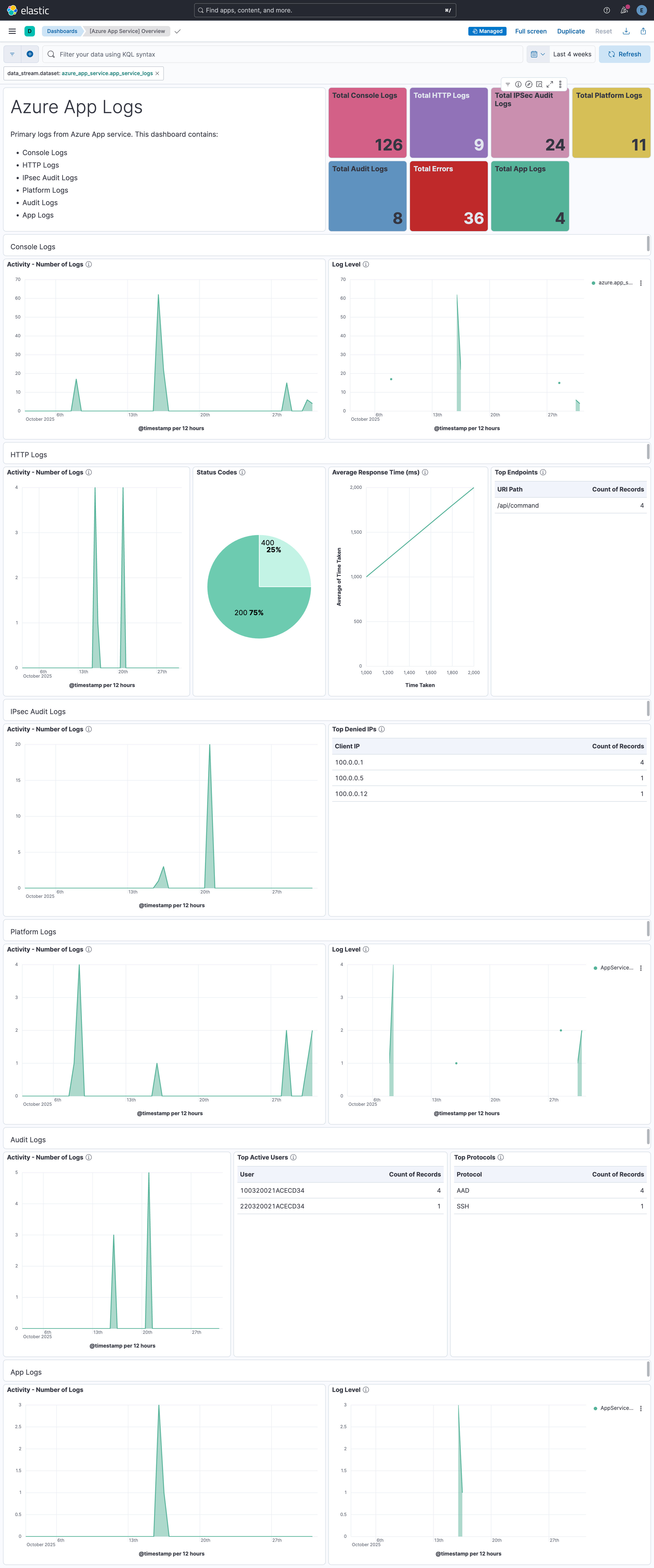
This integration includes one or more Kibana dashboards that visualizes the data collected by the integration. The screenshots below illustrate how the ingested data is displayed.
Changelog
| Version | Details | Minimum Kibana version |
|---|---|---|
| 1.2.0 | Enhancement (View pull request) Add AMQP-over-WebSockets transport, proxy support, and Event Hub processor v2 configuration options. |
9.3.0 9.2.4 9.1.10 8.19.10 |
| 1.1.0 | Enhancement (View pull request) Add client secret authentication support for Azure Event Hub with RBAC. |
9.3.0 9.2.4 9.1.10 8.19.10 |
| 1.0.0 | Enhancement (View pull request) Make Azure App Service Integration GA |
9.0.0 8.13.0 |
| 0.10.2 | Enhancement (View pull request) Review Azure App Service Integration documentation. |
9.0.0 8.13.0 |
| 0.10.1 | Bug fix (View pull request) Fix dashboard summary |
9.0.0 8.13.0 |
| 0.10.0 | Bug fix (View pull request) Fix json parsing and missing azure.subscription_id issues |
9.0.0 8.13.0 |
| 0.9.0 | Enhancement (View pull request) Update readme |
9.0.0 8.13.0 |
| 0.8.0 | Enhancement (View pull request) Add dashboard for log categories Application Logs, Audit Logs, Console Logs, HTTP Logs, IPsec Audit Logs and Platform Logs. |
9.0.0 8.13.0 |
| 0.7.0 | Enhancement (View pull request) Add a flag fips_compatible to control whether the package is allowed in the ECH FedRAMP High environment. |
9.0.0 8.13.0 |
| 0.6.0 | Enhancement (View pull request) Add support for Kibana 9.0.0. |
9.0.0 8.13.0 |
| 0.5.0 | Enhancement (View pull request) Allow the usage of deprecated log input and support for stack 9.0 |
8.13.0 |
| 0.4.2 | Enhancement (View pull request) Add observability category. |
8.13.0 |
| 0.4.1 | Bug fix (View pull request) Remove metrics reference from manifest. |
8.13.0 |
| 0.4.0 | Enhancement (View pull request) ECS version updated to 8.11.0. Update the kibana constraint to ^8.13.0. Modified the field definitions to remove ECS fields made redundant by the ecs@mappings component template. |
8.13.0 |
| 0.3.0 | Enhancement (View pull request) Enable secrets for sensitive fields. For more details, refer https://www.elastic.co/guide/en/fleet/current/agent-policy.html#agent-policy-secret-values |
8.12.0 |
| 0.2.1 | Bug fix (View pull request) Disable secrets for older stack versions due to errors. |
8.7.1 |
| 0.2.0 | Enhancement (View pull request) Enable 'secret' for the sensitive fields, supported from 8.12. |
8.7.1 |
| 0.1.0 | Enhancement (View pull request) Update the package format_version to 3.0.0. |
8.7.1 |
| 0.0.1 | Enhancement (View pull request) Initial release |
8.7.1 |