Anthropic
| Version | 1.1.3 (View all) |
| Managed integration release status |
|
| Subscription level What's this? |
Basic |
| Developed by What's this? |
Elastic |
| Ingestion method(s) | API |
| Minimum Kibana version(s) | 9.1.0 8.19.0 |
You can use this integration as an Elastic Managed integration on Elastic Cloud Hosted deployments running this version or later.
The Anthropic integration collects compliance activity logs from Claude's Compliance API. Claude Enterprise and Claude Platform organizations generate audit events for security-relevant activities such as user authentication, organization administration, role and permission changes, API key lifecycle, Claude.ai and Claude Code usage, MCP server configuration, billing updates, and Compliance API access. This integration enables security and compliance teams to monitor administrative activity, detect unauthorized changes, and maintain an audit trail of organization operations in Elasticsearch and Kibana.
This integration requires a Claude Enterprise or Claude Platform organization with the Compliance API enabled. Individual and consumer accounts cannot create the required API keys.
The integration polls the Anthropic Activity Feed at https://api.anthropic.com/v1/compliance/activities on a configurable schedule. Authentication requires the read:compliance_activities scope, which can be carried by either a Compliance Access Key (sk-ant-api01-...) or an Admin API Key (sk-ant-admin01-...).
The Anthropic integration collects compliance activity events covering 300+ activity types across these categories:
- Authentication events: Sign-ins, sign-outs, magic links, social login, and mobile login attempts.
- Organization administration: Organization settings, domains, invites, member management, data exports, IP restrictions, HIPAA settings, and parent/child organization relationships.
- Access control and RBAC: Role assignments, group membership, SSO and SCIM provisioning, directory sync, and workspace permissions.
- API key management: Admin API keys, platform API keys, and user API keys — creation, updates, and deletion.
- Claude.ai content: Chat lifecycle, artifacts, projects, file uploads, and sharing settings.
- Claude Code and security: Code review configuration, security scans, webhooks, and repository settings.
- MCP and integrations: MCP server configuration, connector requests, and desktop extension activity.
- Billing and subscription: Payment methods, billing emails, usage limits, and subscription changes.
- Compliance API usage: Access to the Compliance API itself via
compliance_api_accessedevents.
- Security monitoring: Track sign-ins, API key creation, RBAC changes, SSO/SCIM provisioning, and privileged admin actions on the Anthropic organization.
- Compliance auditing: Retain a queryable, ECS-aligned record of organization-level changes for regulatory and internal-review requirements.
- Operational visibility: Monitor Claude.ai and Claude Code usage patterns, MCP server changes, and billing configuration updates.
- Incident investigation: Correlate audit events with actor identity, organization context, and timestamps to investigate security incidents.
- A Claude Enterprise or Claude Platform organization with the Compliance API enabled.
- An Admin API Key or Compliance Access Key with the
read:compliance_activitiesscope. - Elastic Agent installed on a host with outbound HTTPS access to
api.anthropic.com.
For the full Anthropic-side setup, see Get access to the Compliance API.
Compliance API access is enabled on request by Anthropic. Contact your Anthropic representative to request enablement for your parent organization. After enablement:
- claude.ai organizations (Claude Enterprise): a Compliance access keys section appears at claude.ai → Organization settings → Data and privacy.
- Claude Console organizations: Admin API keys created after enablement automatically carry the
read:compliance_activitiesscope. Admin API keys created before enablement cannot call the Activity Feed and must be recreated.
This integration reads the Activity Feed only, so either key type in the following table works as long as it carries read:compliance_activities. Choose the key type that matches your organization:
| Key type | Created by | Where to create | Key prefix |
|---|---|---|---|
| Compliance Access Key | Primary owner | claude.ai → Organization settings → Data and privacy | sk-ant-api01-... |
| Admin API Key | Organization admin | Claude Console → Settings → Admin keys | sk-ant-admin01-... |
Claude Enterprise parent organizations do not appear in Claude Console. If your organization uses claude.ai, create a Compliance Access Key there rather than an Admin API Key in Claude Console.
- Sign in to claude.ai as the primary owner of the parent organization.
- Go to Organization settings → Data and privacy and find the Compliance access keys section.
- Click Create key, name the key, and select the
read:compliance_activitiesscope. This is the minimum scope required for this integration. - Click Create and copy the secret key immediately. Anthropic displays the full secret only once.
- Sign in to Claude Console as an organization admin.
- Go to Settings → Admin keys.
- Click Create key, name the key, and click Create.
- Copy the secret key immediately. Anthropic displays the full secret only once.
Admin API keys receive read:compliance_activities only when the Compliance API was enabled for the organization before the key was created. If you receive HTTP 403 errors, create a new Admin API Key after confirming Compliance API access is enabled.
Elastic Agent must be installed. For more details, check the Elastic Agent installation instructions. You can install only one Elastic Agent per host.
Elastic Agent polls the Anthropic Compliance API and ships collected events to Elasticsearch, where they are processed by the integration's ingest pipeline.
Elastic Managed deployments are only supported in Elastic Serverless and Elastic Cloud environments. This functionality is in beta and is subject to change. Refer to Elastic Managed integrations for more information.
Elastic Managed integrations allow you to collect data without having to manage Elastic Agent in your cloud. They make manual agent deployment unnecessary, so you can focus on your data instead of the underlying agent infrastructure.
To use an Elastic Managed deployment, select Anthropic in Management → Integrations, click Add Anthropic, and choose the Elastic Managed option when configuring the integration. Provide the Compliance Access Key or Admin API Key as described in Onboard / configure; Elastic manages the underlying collection infrastructure for you.
Complete the Anthropic-side setup before deploying — request Compliance API access and create an API key with the read:compliance_activities scope. See Get access to the Compliance API for key types, scope details, and rotation guidance.
- In Kibana, navigate to Management → Integrations and search for Anthropic.
- Click Add Anthropic and enter the Compliance Access Key or Admin API Key you created.
- Configure the polling interval (default: 5 minutes). The default initial lookback is 24 hours.
- Optionally filter collection by activity type, actor ID, or organization ID to scope events to specific users, event types, or child organizations.
- Save the integration policy and assign it to the Elastic Agent policy that should collect Anthropic data.
After deploying the integration:
- Wait one polling interval (default 5 minutes).
- In Kibana, open Discover and filter for
data_stream.dataset: "anthropic.audit". - Verify that events are being ingested with populated
@timestamp,event.action, and actor fields. - Generate an Anthropic admin action (for example, sign in to the console or create an API key) and confirm a corresponding event appears within roughly one polling interval.
For help with Elastic ingest tools, check Common problems.
HTTP 401 (authentication_error): The API key is invalid or has been revoked. Create a new key and update the integration policy.
HTTP 403 (permission_error): The key does not have the read:compliance_activities scope, or Compliance API access is not enabled on the organization. Re-enable Compliance API, recreate the key, and update the policy.
HTTP 429 (rate_limit_error): The parent organization has exceeded the Compliance API limit of 600 requests per minute (shared across all keys). Increase the polling interval or reduce the number of integration policies pointing at the same parent organization.
No new events: Check Elastic Agent logs for request errors and verify the API key and integration policy settings are correct.
For more information on architectures that can be used for scaling this integration, check the Ingest Architectures documentation.
The Compliance API rate limit of 600 requests per minute is enforced per Anthropic parent organization and shared across every key. Multiple Elastic deployments pulling from the same parent organization compete for this budget. For multi-tenant collection, configure one integration policy per Anthropic parent organization.
The audit data stream collects compliance activity events from the Anthropic Compliance API. It produces one document per activity, covering authentication, organization administration, RBAC, API key lifecycle, Claude.ai and Claude Code content, MCP servers, billing, and Compliance API access.
Exported fields
| Field | Description | Type |
|---|---|---|
| @timestamp | Date/time when the event originated. This is the date/time extracted from the event, typically representing when the event was generated by the source. If the event source has no original timestamp, this value is typically populated by the first time the event was received by the pipeline. Required field for all events. | date |
| anthropic.audit.access_level | Access level as reported in the activity payload. | keyword |
| anthropic.audit.account_id | Account id as reported in the activity payload. | keyword |
| anthropic.audit.action | Action as reported in the activity payload. | keyword |
| anthropic.audit.actor.admin_api_key_id | Admin API key ID for admin API key actors. | keyword |
| anthropic.audit.actor.api_key_id | API key ID for API actors. | keyword |
| anthropic.audit.actor.directory_id | Directory ID for SCIM directory sync actors. | keyword |
| anthropic.audit.actor.idp_connection_type | IdP connection type for SCIM directory sync actors. | keyword |
| anthropic.audit.actor.type | Actor type that indicates which other actor fields are present (for example, user_actor, api_actor, or admin_api_key_actor). |
keyword |
| anthropic.audit.actor.workos_event_id | WorkOS event ID for SCIM directory sync actors. | keyword |
| anthropic.audit.added_seats | Added seats as reported in the activity payload. | long |
| anthropic.audit.admin_api_key_id | Admin API key ID on admin key lifecycle activities. | keyword |
| anthropic.audit.alert_emails | Alert emails as reported in the activity payload. | keyword |
| anthropic.audit.alerted_roles | Alerted roles as reported in the activity payload. | keyword |
| anthropic.audit.algorithm | Algorithm as reported in the activity payload. | keyword |
| anthropic.audit.amount | Amount as reported in the activity payload. | long |
| anthropic.audit.api_key_id | API key ID on API-access activity types. | keyword |
| anthropic.audit.api_key_name | Api key name as reported in the activity payload. | keyword |
| anthropic.audit.approved | Approved as reported in the activity payload. | boolean |
| anthropic.audit.artifact_type | Artifact MIME type on Claude artifact activities. | keyword |
| anthropic.audit.audience | Audience as reported in the activity payload. | flattened |
| anthropic.audit.auth_method | Auth method as reported in the activity payload. | keyword |
| anthropic.audit.baa_content_hash | Baa content hash as reported in the activity payload. | keyword |
| anthropic.audit.baa_version_label | Baa version label as reported in the activity payload. | keyword |
| anthropic.audit.billing_address_updated | Billing address updated as reported in the activity payload. | boolean |
| anthropic.audit.billing_interval | Billing interval as reported in the activity payload. | keyword |
| anthropic.audit.billing_name_updated | Billing name updated as reported in the activity payload. | boolean |
| anthropic.audit.cadence | Cadence as reported in the activity payload. | keyword |
| anthropic.audit.cc_email_count | Cc email count as reported in the activity payload. | long |
| anthropic.audit.claude_artifact_id | Claude artifact id as reported in the activity payload. | keyword |
| anthropic.audit.claude_artifact_version_id | Claude artifact version id as reported in the activity payload. | keyword |
| anthropic.audit.claude_chat_id | Claude chat ID on chat lifecycle activities. | keyword |
| anthropic.audit.claude_chat_snapshot_id | Claude chat snapshot id as reported in the activity payload. | keyword |
| anthropic.audit.claude_file_id | Claude file id as reported in the activity payload. | keyword |
| anthropic.audit.claude_project_document_id | Claude project document id as reported in the activity payload. | keyword |
| anthropic.audit.claude_project_id | Claude project ID on chat lifecycle activities. | keyword |
| anthropic.audit.claude_published_artifact_id | Published artifact ID on Claude artifact activities. | keyword |
| anthropic.audit.cli_name | Cli name as reported in the activity payload. | keyword |
| anthropic.audit.command_id | Command id as reported in the activity payload. | keyword |
| anthropic.audit.command_name | Command name as reported in the activity payload. | keyword |
| anthropic.audit.compliance_api_enabled | Compliance api enabled as reported in the activity payload. | boolean |
| anthropic.audit.compliance_api_logging_enabled | Compliance api logging enabled as reported in the activity payload. | boolean |
| anthropic.audit.config_id | Configuration ID on integration configuration activities. | keyword |
| anthropic.audit.connection_id | Connection id as reported in the activity payload. | keyword |
| anthropic.audit.connection_type | Connection type as reported in the activity payload. | keyword |
| anthropic.audit.consent_id | Consent id as reported in the activity payload. | keyword |
| anthropic.audit.consent_type | Consent type as reported in the activity payload. | keyword |
| anthropic.audit.current_role | Current role as reported in the activity payload. | keyword |
| anthropic.audit.current_value | Current value as reported in the activity payload. | keyword |
| anthropic.audit.current_version | Current version as reported in the activity payload. | long |
| anthropic.audit.decision | Decision as reported in the activity payload. | keyword |
| anthropic.audit.domain | Domain name on organization domain activities. | keyword |
| anthropic.audit.enabled | Enabled as reported in the activity payload. | boolean |
| anthropic.audit.entity_id | Entity id as reported in the activity payload. | keyword |
| anthropic.audit.entity_type | Entity type as reported in the activity payload. | keyword |
| anthropic.audit.environment_id | Environment id as reported in the activity payload. | keyword |
| anthropic.audit.extension_id | Extension id as reported in the activity payload. | keyword |
| anthropic.audit.federation_issuer_id | Federation issuer id as reported in the activity payload. | keyword |
| anthropic.audit.federation_rule_id | Federation rule id as reported in the activity payload. | keyword |
| anthropic.audit.file_id | File id as reported in the activity payload. | keyword |
| anthropic.audit.folder_id | Folder id as reported in the activity payload. | keyword |
| anthropic.audit.from_date | Lower bound of the date window referenced by the activity payload (for example, an audit log export's from_date). |
date |
| anthropic.audit.ghe_configuration_id | GitHub Enterprise configuration ID on GHE integration activities. | keyword |
| anthropic.audit.github_webhook_id | GitHub-assigned webhook ID returned by the activity payload. The Compliance API returns this as a number; it is stored as a keyword identifier. | keyword |
| anthropic.audit.group_id | Group id as reported in the activity payload. | keyword |
| anthropic.audit.group_name | Group name as reported in the activity payload. | keyword |
| anthropic.audit.idp_saml_config_updated | Idp saml config updated as reported in the activity payload. | boolean |
| anthropic.audit.ignore | Ignore as reported in the activity payload. | boolean |
| anthropic.audit.installation_preference | Installation preference as reported in the activity payload. | keyword |
| anthropic.audit.integration_id | Integration id as reported in the activity payload. | keyword |
| anthropic.audit.integration_type | Integration type as reported in the activity payload. | keyword |
| anthropic.audit.invite_id | Invite ID on organization user invite activities. | keyword |
| anthropic.audit.invited_role | Invited user role on organization user invite activities. | keyword |
| anthropic.audit.is_enabled | Is enabled as reported in the activity payload. | boolean |
| anthropic.audit.is_service_created | Is service created as reported in the activity payload. | boolean |
| anthropic.audit.item_allocations | Item allocations as reported in the activity payload. | flattened |
| anthropic.audit.key_backing_type | Key backing type as reported in the activity payload. | keyword |
| anthropic.audit.key_group_identifier | Key group identifier as reported in the activity payload. | keyword |
| anthropic.audit.key_name | Key name as reported in the activity payload. | keyword |
| anthropic.audit.limit_action | Limit action as reported in the activity payload. | keyword |
| anthropic.audit.limit_type | Limit type as reported in the activity payload. | keyword |
| anthropic.audit.limit_usd | Limit usd as reported in the activity payload. | long |
| anthropic.audit.limiter_type | Limiter type as reported in the activity payload. | keyword |
| anthropic.audit.lti_platform_id | Lti platform id as reported in the activity payload. | keyword |
| anthropic.audit.lti_platform_issuer | Lti platform issuer as reported in the activity payload. | keyword |
| anthropic.audit.magic_link_enabled | Magic link enabled as reported in the activity payload. | boolean |
| anthropic.audit.magic_link_toggled | Magic link toggled as reported in the activity payload. | boolean |
| anthropic.audit.marketplace_id | Marketplace id as reported in the activity payload. | keyword |
| anthropic.audit.max_permission | Max permission as reported in the activity payload. | keyword |
| anthropic.audit.mcp_server_id | MCP server ID on MCP server lifecycle activities. | keyword |
| anthropic.audit.mcp_server_name | MCP server name on MCP server lifecycle activities. | keyword |
| anthropic.audit.member_ids | Member ids as reported in the activity payload. | keyword |
| anthropic.audit.metadata | Catch-all for any unmapped top-level activity field (forward-compat safety net; expected to be empty for the documented activity set). | flattened |
| anthropic.audit.mfa_method | Mfa method as reported in the activity payload. | keyword |
| anthropic.audit.model | Model as reported in the activity payload. | keyword |
| anthropic.audit.model_group | Model group as reported in the activity payload. | keyword |
| anthropic.audit.new_collection_method | New collection method as reported in the activity payload. | keyword |
| anthropic.audit.new_limit_usd | New limit usd as reported in the activity payload. | long |
| anthropic.audit.new_mode | New mode as reported in the activity payload. | keyword |
| anthropic.audit.new_owner_id | New owner id as reported in the activity payload. | keyword |
| anthropic.audit.new_plan | New plan as reported in the activity payload. | keyword |
| anthropic.audit.new_quantity | New quantity as reported in the activity payload. | long |
| anthropic.audit.new_signing_key_id | New signing key id as reported in the activity payload. | keyword |
| anthropic.audit.old_plan | Old plan as reported in the activity payload. | keyword |
| anthropic.audit.old_signing_key_id | Old signing key id as reported in the activity payload. | keyword |
| anthropic.audit.op_name | Op name as reported in the activity payload. | keyword |
| anthropic.audit.org_id | Org id as reported in the activity payload. | keyword |
| anthropic.audit.organization_uuid | Deprecated organization UUID associated with the activity, when present. | keyword |
| anthropic.audit.per_review_limit_usd | Per review limit usd as reported in the activity payload. | keyword |
| anthropic.audit.plan_type | Plan type as reported in the activity payload. | keyword |
| anthropic.audit.plugin_id | Plugin id as reported in the activity payload. | keyword |
| anthropic.audit.plugin_name | Plugin name as reported in the activity payload. | keyword |
| anthropic.audit.preview_only | Preview only as reported in the activity payload. | boolean |
| anthropic.audit.previous_mode | Previous mode as reported in the activity payload. | keyword |
| anthropic.audit.previous_owner_id | Previous owner id as reported in the activity payload. | keyword |
| anthropic.audit.previous_quantity | Previous quantity as reported in the activity payload. | long |
| anthropic.audit.previous_role | Previous role as reported in the activity payload. | keyword |
| anthropic.audit.previous_value | Previous value as reported in the activity payload. | keyword |
| anthropic.audit.previous_version | Previous version as reported in the activity payload. | long |
| anthropic.audit.primary_email_set | Primary email set as reported in the activity payload. | boolean |
| anthropic.audit.principal_id | Principal ID on RBAC role assignment activities. | keyword |
| anthropic.audit.principal_type | Principal type on RBAC role assignment activities. | keyword |
| anthropic.audit.provider | Provider as reported in the activity payload. | keyword |
| anthropic.audit.repo_name | Repository name on Claude Code review activities. | keyword |
| anthropic.audit.repo_owner | Repository owner on Claude Code review activities. | keyword |
| anthropic.audit.repository_name | Repository name as reported in the activity payload. | keyword |
| anthropic.audit.request_body | Request body on API access activities, when present. | keyword |
| anthropic.audit.request_type | Request type as reported in the activity payload. | keyword |
| anthropic.audit.resolved_count | Resolved count as reported in the activity payload. | long |
| anthropic.audit.resource_id | Resource id as reported in the activity payload. | keyword |
| anthropic.audit.resource_type | Resource type as reported in the activity payload. | keyword |
| anthropic.audit.resync_uuid | Resync uuid as reported in the activity payload. | keyword |
| anthropic.audit.role | Role as reported in the activity payload. | keyword |
| anthropic.audit.role_id | Role ID on RBAC role assignment activities. | keyword |
| anthropic.audit.role_name | Role name as reported in the activity payload. | keyword |
| anthropic.audit.scan_project_id | Scan project ID on Claude Code security scan activities. | keyword |
| anthropic.audit.scans_cancelled | Scans cancelled as reported in the activity payload. | long |
| anthropic.audit.scopes | Scope list on admin API key lifecycle activities. | keyword |
| anthropic.audit.seat_count | Seat count as reported in the activity payload. | long |
| anthropic.audit.service_account_id | Service account id as reported in the activity payload. | keyword |
| anthropic.audit.service_key_id | Service key id as reported in the activity payload. | keyword |
| anthropic.audit.service_name | Service name as reported in the activity payload. | keyword |
| anthropic.audit.session_id | Session id as reported in the activity payload. | keyword |
| anthropic.audit.setting_metadata | Setting metadata as reported in the activity payload. | flattened |
| anthropic.audit.settings_uuid | Settings uuid as reported in the activity payload. | keyword |
| anthropic.audit.setup_guide_content_hash | Setup guide content hash as reported in the activity payload. | keyword |
| anthropic.audit.share_id | Share id as reported in the activity payload. | keyword |
| anthropic.audit.shipping_address_updated | Shipping address updated as reported in the activity payload. | boolean |
| anthropic.audit.shipping_name_updated | Shipping name updated as reported in the activity payload. | boolean |
| anthropic.audit.signing_key_id | Signing key id as reported in the activity payload. | keyword |
| anthropic.audit.skill_id | Skill id as reported in the activity payload. | keyword |
| anthropic.audit.skill_name | Skill name as reported in the activity payload. | keyword |
| anthropic.audit.spend_limit_id | Spend limit id as reported in the activity payload. | keyword |
| anthropic.audit.spend_limit_increase_request_id | Spend limit increase request id as reported in the activity payload. | keyword |
| anthropic.audit.status | Status as reported in the activity payload. | keyword |
| anthropic.audit.sync_destinations | Sync destinations as reported in the activity payload. | keyword |
| anthropic.audit.taint | Taint as reported in the activity payload. | keyword |
| anthropic.audit.target_amount | Target amount as reported in the activity payload. | long |
| anthropic.audit.target_id | Target id as reported in the activity payload. | keyword |
| anthropic.audit.target_type | Target type as reported in the activity payload. | keyword |
| anthropic.audit.threshold_amount | Threshold amount as reported in the activity payload. | long |
| anthropic.audit.title | Artifact title on Claude artifact activities. | keyword |
| anthropic.audit.to_date | Upper bound of the date window referenced by the activity payload (for example, an audit log export's to_date). |
date |
| anthropic.audit.to_email_count | To email count as reported in the activity payload. | long |
| anthropic.audit.token_id | Token id as reported in the activity payload. | keyword |
| anthropic.audit.token_name | Token name as reported in the activity payload. | keyword |
| anthropic.audit.tool_name | Tool name as reported in the activity payload. | keyword |
| anthropic.audit.trigger_mode | Trigger mode as reported in the activity payload. | keyword |
| anthropic.audit.updates | Array of setting-change objects on \*_updated activities, each with type, previous_value, and current_value as reported in the activity payload. |
flattened |
| anthropic.audit.value | Value as reported in the activity payload. | long |
| anthropic.audit.version | Version as reported in the activity payload. | keyword |
| anthropic.audit.webhook_id | Webhook ID on webhook lifecycle activities. | keyword |
| anthropic.audit.workspace_id | Workspace ID on platform workspace activities. | keyword |
| data_stream.dataset | The field can contain anything that makes sense to signify the source of the data. Examples include nginx.access, prometheus, endpoint etc. For data streams that otherwise fit, but that do not have dataset set we use the value "generic" for the dataset value. event.dataset should have the same value as data_stream.dataset. Beyond the Elasticsearch data stream naming criteria noted above, the dataset value has additional restrictions: * Must not contain - * No longer than 100 characters |
constant_keyword |
| data_stream.namespace | A user defined namespace. Namespaces are useful to allow grouping of data. Many users already organize their indices this way, and the data stream naming scheme now provides this best practice as a default. Many users will populate this field with default. If no value is used, it falls back to default. Beyond the Elasticsearch index naming criteria noted above, namespace value has the additional restrictions: * Must not contain - * No longer than 100 characters |
constant_keyword |
| data_stream.type | An overarching type for the data stream. Currently allowed values are "logs" and "metrics". We expect to also add "traces" and "synthetics" in the near future. | constant_keyword |
| ecs.version | ECS version this event conforms to. ecs.version is a required field and must exist in all events. When querying across multiple indices -- which may conform to slightly different ECS versions -- this field lets integrations adjust to the schema version of the events. |
keyword |
| error.message | Error message. | match_only_text |
| event.action | The action captured by the event. This describes the information in the event. It is more specific than event.category. Examples are group-add, process-started, file-created. The value is normally defined by the implementer. |
keyword |
| event.category | This is one of four ECS Categorization Fields, and indicates the second level in the ECS category hierarchy. event.category represents the "big buckets" of ECS categories. For example, filtering on event.category:process yields all events relating to process activity. This field is closely related to event.type, which is used as a subcategory. This field is an array. This will allow proper categorization of some events that fall in multiple categories. |
keyword |
| event.dataset | Name of the dataset. If an event source publishes more than one type of log or events (e.g. access log, error log), the dataset is used to specify which one the event comes from. It's recommended but not required to start the dataset name with the module name, followed by a dot, then the dataset name. | constant_keyword |
| event.id | Unique ID to describe the event. | keyword |
| event.kind | This is one of four ECS Categorization Fields, and indicates the highest level in the ECS category hierarchy. event.kind gives high-level information about what type of information the event contains, without being specific to the contents of the event. For example, values of this field distinguish alert events from metric events. The value of this field can be used to inform how these kinds of events should be handled. They may warrant different retention, different access control, it may also help understand whether the data is coming in at a regular interval or not. |
keyword |
| event.module | Name of the module this data is coming from. If your monitoring agent supports the concept of modules or plugins to process events of a given source (e.g. Apache logs), event.module should contain the name of this module. |
constant_keyword |
| event.original | Raw text message of entire event. Used to demonstrate log integrity or where the full log message (before splitting it up in multiple parts) may be required, e.g. for reindex. This field is not indexed and doc_values are disabled. It cannot be searched, but it can be retrieved from _source. If users wish to override this and index this field, please see Field data types in the Elasticsearch Reference. |
keyword |
| event.outcome | This is one of four ECS Categorization Fields, and indicates the lowest level in the ECS category hierarchy. event.outcome simply denotes whether the event represents a success or a failure from the perspective of the entity that produced the event. Note that when a single transaction is described in multiple events, each event may populate different values of event.outcome, according to their perspective. Also note that in the case of a compound event (a single event that contains multiple logical events), this field should be populated with the value that best captures the overall success or failure from the perspective of the event producer. Further note that not all events will have an associated outcome. For example, this field is generally not populated for metric events, events with event.type:info, or any events for which an outcome does not make logical sense. |
keyword |
| event.reason | Reason why this event happened, according to the source. This describes the why of a particular action or outcome captured in the event. Where event.action captures the action from the event, event.reason describes why that action was taken. For example, a web proxy with an event.action which denied the request may also populate event.reason with the reason why (e.g. blocked site). |
keyword |
| event.type | This is one of four ECS Categorization Fields, and indicates the third level in the ECS category hierarchy. event.type represents a categorization "sub-bucket" that, when used along with the event.category field values, enables filtering events down to a level appropriate for single visualization. This field is an array. This will allow proper categorization of some events that fall in multiple event types. |
keyword |
| file.name | Name of the file including the extension, without the directory. | keyword |
| http.request.id | A unique identifier for each HTTP request to correlate logs between clients and servers in transactions. The id may be contained in a non-standard HTTP header, such as X-Request-ID or X-Correlation-ID. |
keyword |
| http.request.method | HTTP request method. The value should retain its casing from the original event. For example, GET, get, and GeT are all considered valid values for this field. |
keyword |
| http.response.status_code | HTTP response status code. | long |
| input.type | Type of filebeat input. | keyword |
| log.offset | Log offset. | long |
| organization.id | Unique identifier for the organization. | keyword |
| organization.name | Organization name. | keyword |
| organization.name.text | Multi-field of organization.name. |
match_only_text |
| related.hosts | All hostnames or other host identifiers seen on your event. Example identifiers include FQDNs, domain names, workstation names, or aliases. | keyword |
| related.ip | All of the IPs seen on your event. | ip |
| related.user | All the user names or other user identifiers seen on the event. | keyword |
| source.as.number | Unique number allocated to the autonomous system. The autonomous system number (ASN) uniquely identifies each network on the Internet. | long |
| source.as.organization.name | Organization name. | keyword |
| source.as.organization.name.text | Multi-field of source.as.organization.name. |
match_only_text |
| source.geo.city_name | City name. | keyword |
| source.geo.continent_name | Name of the continent. | keyword |
| source.geo.country_iso_code | Country ISO code. | keyword |
| source.geo.country_name | Country name. | keyword |
| source.geo.location | Longitude and latitude. | geo_point |
| source.geo.region_iso_code | Region ISO code. | keyword |
| source.geo.region_name | Region name. | keyword |
| source.ip | IP address of the source (IPv4 or IPv6). | ip |
| tags | List of keywords used to tag each event. | keyword |
| url.domain | Domain of the url, such as "www.elastic.co". In some cases a URL may refer to an IP and/or port directly, without a domain name. In this case, the IP address would go to the domain field. If the URL contains a literal IPv6 address enclosed by [ and ] (IETF RFC 2732), the [ and ] characters should also be captured in the domain field. |
keyword |
| url.full | If full URLs are important to your use case, they should be stored in url.full, whether this field is reconstructed or present in the event source. |
wildcard |
| url.full.text | Multi-field of url.full. |
match_only_text |
| url.original | Unmodified original url as seen in the event source. Note that in network monitoring, the observed URL may be a full URL, whereas in access logs, the URL is often just represented as a path. This field is meant to represent the URL as it was observed, complete or not. | wildcard |
| url.original.text | Multi-field of url.original. |
match_only_text |
| url.path | Path of the request, such as "/search". | wildcard |
| url.query | The field contains the entire query string, excluding the leading ? character, such as "q=elasticsearch". If a URL contains no ?, there is no query field. If there is a ? but no query, the query field exists with an empty string. The exists query can be used to differentiate between the two cases. |
keyword |
| url.scheme | Scheme of the request, such as "https". Note: The : is not part of the scheme. |
keyword |
| user.email | User email address. | keyword |
| user.id | Unique identifier of the user. | keyword |
| user.name | Short name or login of the user. | keyword |
| user.name.text | Multi-field of user.name. |
match_only_text |
| user.target.email | User email address. | keyword |
| user.target.id | Unique identifier of the user. | keyword |
| user.target.roles | Array of user roles at the time of the event. | keyword |
| user_agent.device.name | Name of the device. | keyword |
| user_agent.name | Name of the user agent. | keyword |
| user_agent.original | Unparsed user_agent string. | keyword |
| user_agent.original.text | Multi-field of user_agent.original. |
match_only_text |
| user_agent.os.name | Operating system name, without the version. | keyword |
| user_agent.os.name.text | Multi-field of user_agent.os.name. |
match_only_text |
| user_agent.os.version | Operating system version as a raw string. | keyword |
| user_agent.version | Version of the user agent. | keyword |
Example
{
    "@timestamp": "2026-05-22T09:00:00.000Z",
    "agent": {
        "ephemeral_id": "4abb0374-f25a-408a-a4f3-254ddd13c46f",
        "id": "497dcb88-5d3d-474f-9a92-8c57df6b0ca8",
        "name": "elastic-agent-24394",
        "type": "filebeat",
        "version": "8.19.0"
    },
    "anthropic": {
        "audit": {
            "actor": {
                "type": "user_actor"
            },
            "claude_chat_id": "claude_chat_01EXAMPLEconv01",
            "claude_project_id": "claude_proj_01EXAMPLEproj01",
            "organization_uuid": "91011112-1314-4151-6171-8191a1b1c1d1"
        }
    },
    "data_stream": {
        "dataset": "anthropic.audit",
        "namespace": "65544",
        "type": "logs"
    },
    "ecs": {
        "version": "9.3.0"
    },
    "elastic_agent": {
        "id": "497dcb88-5d3d-474f-9a92-8c57df6b0ca8",
        "snapshot": false,
        "version": "8.19.0"
    },
    "event": {
        "action": "claude_chat_created",
        "agent_id_status": "verified",
        "category": [
            "web"
        ],
        "dataset": "anthropic.audit",
        "id": "activity_01MOCKpage03a",
        "ingested": "2026-05-29T05:10:18Z",
        "kind": "event",
        "outcome": "success",
        "type": [
            "info"
        ]
    },
    "input": {
        "type": "cel"
    },
    "organization": {
        "id": "org_01EXAMPLEabcdef123456789"
    },
    "related": {
        "ip": [
            "198.51.100.10"
        ],
        "user": [
            "alice.johnson@example.com",
            "user_01EXAMPLEalice01"
        ]
    },
    "source": {
        "as": {
            "number": 64501,
            "organization": {
                "name": "Documentation ASN"
            }
        },
        "geo": {
            "city_name": "Amsterdam",
            "continent_name": "Europe",
            "country_iso_code": "NL",
            "country_name": "Netherlands",
            "location": {
                "lat": 52.37404,
                "lon": 4.88969
            },
            "region_iso_code": "NL-NH",
            "region_name": "North Holland"
        },
        "ip": "198.51.100.10"
    },
    "tags": [
        "forwarded",
        "anthropic-audit"
    ],
    "user": {
        "email": "alice.johnson@example.com",
        "id": "user_01EXAMPLEalice01",
        "name": "alice.johnson"
    },
    "user_agent": {
        "device": {
            "name": "Other"
        },
        "name": "Other",
        "original": "Mozilla/5.0 (Windows NT 10.0; Win64; x64) AppleWebKit/537.36",
        "os": {
            "full": "Windows 10",
            "name": "Windows",
            "version": "10"
        }
    }
}
These inputs can be used with this integration:
cel
For more details about the CEL input settings, check the Filebeat documentation.
Before configuring the CEL input, make sure you have:
- Network connectivity to the target API endpoint
- Valid authentication credentials (API keys, tokens, or certificates as required)
- Appropriate permissions to read from the target data source
To configure the CEL input, you must specify the request.url value pointing to the API endpoint. The interval parameter controls how frequently requests are made and is the primary way to balance data freshness with API rate limits and costs. Authentication is often configured through the request.headers section using the appropriate method for the service.
To access the API service, make sure you have the necessary API credentials and that the Filebeat instance can reach the endpoint URL. Some services may require IP whitelisting or VPN access.
To collect logs via API endpoint, configure the following parameters:
- API Endpoint URL
- API credentials (tokens, keys, or username/password)
- Request interval (how often to fetch data)
These APIs are used with this integration:
- Query the Activity Feed — Activity Feed behavior, filtering, pagination, and activity object schema.
- List Compliance Activities — API reference for
GET /v1/compliance/activities. - Get access to the Compliance API — request access, create keys, and choose between Compliance Access Keys and Admin API Keys.
- Compliance API errors — error types, rate limits, and retry behavior.
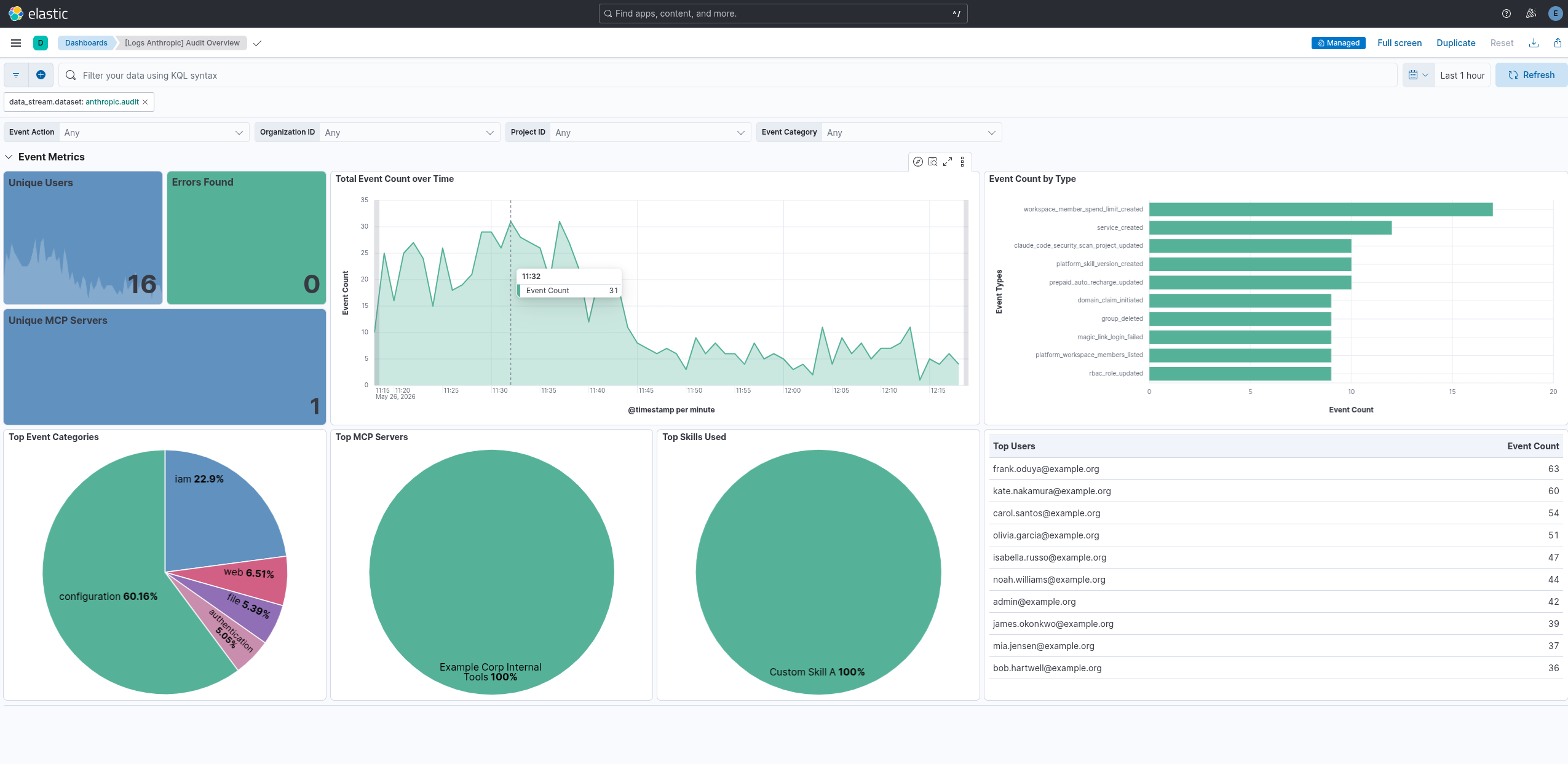
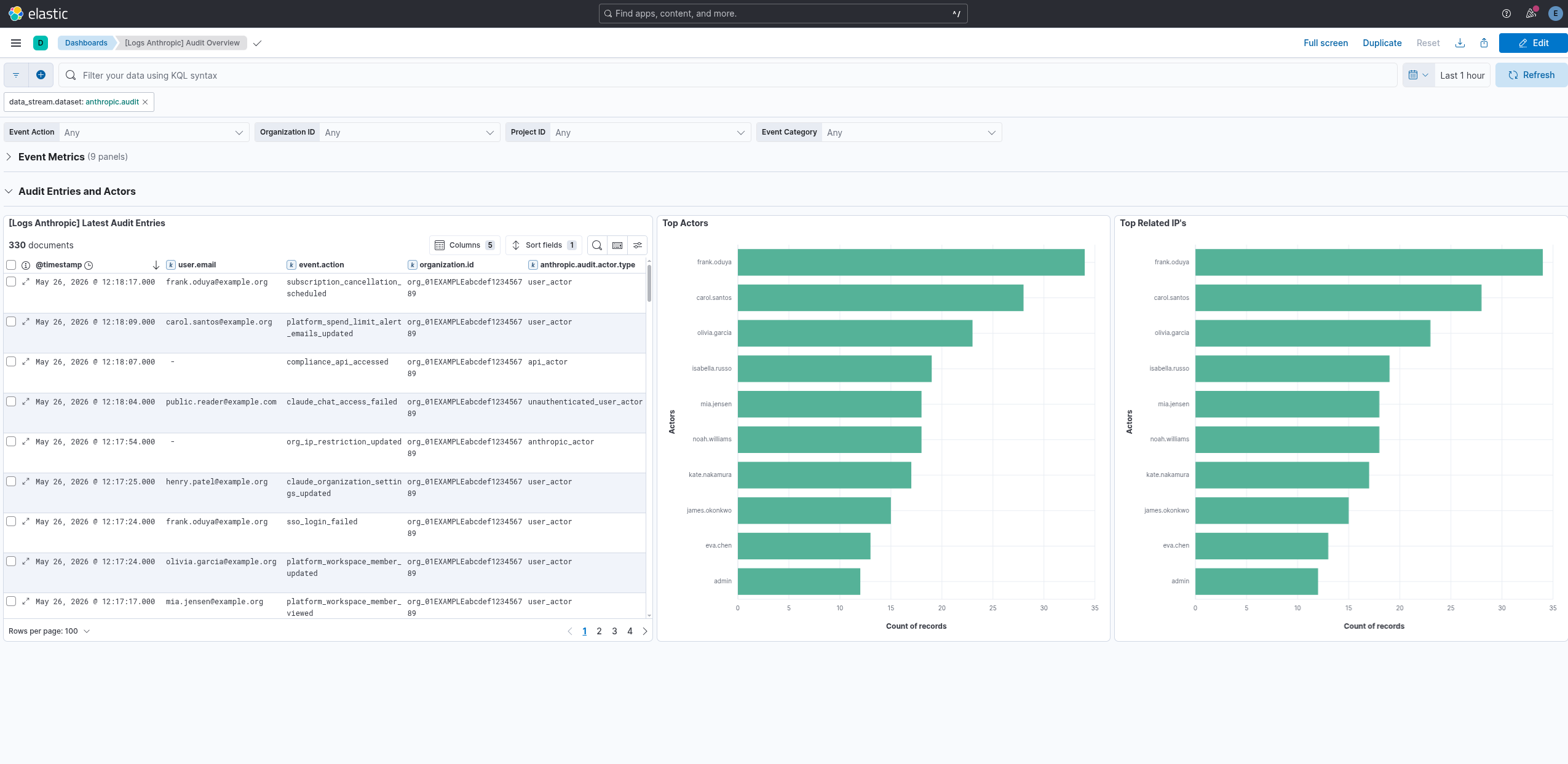
This integration includes one or more Kibana dashboards that visualizes the data collected by the integration. The screenshots below illustrate how the ingested data is displayed.
Changelog
| Version | Details | Minimum Kibana version |
|---|---|---|
| 1.1.3 | Bug fix (View pull request) Clarify that the Compliance API is not available with the Claude Team plan. |
9.1.0 8.19.0 |
| 1.1.2 | Bug fix (View pull request) Fix incorrect pagination cursor on subsequent pages. |
9.1.0 8.19.0 |
| 1.1.1 | Bug fix (View pull request) Remove empty ILM policies section from the README. |
9.1.0 8.19.0 |
| 1.1.0 | Enhancement (View pull request) Publish Agentless to Elastic Managed integrations name change. |
9.1.0 8.19.0 |
| 1.0.0 | Enhancement (View pull request) Promote the Anthropic integration to GA. Bug fix (View pull request) Remap anthropic.audit.updates from keyword to flattened to match the array-of-objects, and update description in manifest and README file. |
9.1.0 8.19.0 |
| 0.2.0 | Enhancement (View pull request) Use new release field for agentless deployment mode to establish as beta. |
9.1.0 8.19.0 |
| 0.1.0 | Enhancement (View pull request) Initial release with the audit data stream for Anthropic Compliance Activities. |
9.1.0 8.19.0 |