Doppler Integration for Elastic
| Version | 0.2.0
|
| Subscription level What's this? |
Basic |
| Developed by What's this? |
Elastic |
| Ingestion method(s) | Webhook |
| Minimum Kibana version(s) | 9.0.0 8.16.0 |
To use pre-release integrations, go to the Integrations page in Kibana, scroll down, and toggle on the Display beta integrations option.
Doppler is a secrets management platform (SecretOps) that stores, syncs, and audits application secrets and configuration across environments. The Doppler integration for Elastic collects Doppler's activity logs and secret-access events, normalizes them to the Elastic Common Schema (ECS), and ships them to Elasticsearch so security teams can monitor secret access, detect anomalous identity behavior, and investigate workplace configuration changes.
This integration is compatible with Doppler's Generic HTTPS Log Stream, available on Doppler's Team and Enterprise plans. It is compatible with Elastic Stack 8.16 and later.
Doppler delivers these events by POSTing newline-delimited JSON to a single user-configured HTTPS destination (a "Log Stream"). This integration stands up an HTTP endpoint (the Elastic Agent http_endpoint input) that receives those events. Incoming requests are authenticated with a static Authorization header, parsed, mapped to ECS, and then routed:
- Activity events are stored in the
doppler.activitydata stream. - High-volume
security.secret_readevents are rerouted at ingest time to the dedicateddoppler.secret_readdata stream, so secret-access telemetry can be retained, indexed, and alerted on independently of general activity.
The Doppler integration collects two families of events:
- Activity logs — workplace and project lifecycle events such as project/config/environment creation and deletion, secret value changes, member and group management, role changes, service-account and token lifecycle, and access grants.
- Secret read events (
security.secret_read) — a record each time secrets are fetched (via the dashboard, CLI, API, or integrations), including which projects/configs/environments and secret names were accessed and the source session (IP, method, browser/OS where available).
Normalizing Doppler events to ECS in Elasticsearch makes the data searchable, visualizable, and correlatable alongside other sources. The collected fields support, for example:
- Secret-access analysis: which secrets, projects, configs, and environments were read, by whom, and from which source IP, geo, and user agent (the
doppler.secret_read.*,source.*, anduser_agent.*fields). - Identity and configuration history: actor, target, role, token, and group activity across workplace and project events (the
user.*,user.target.*, anddoppler.activity.*fields). - Long-term retention of an auditable record of secrets-platform activity.
- An Elastic deployment (self-managed, Elastic Cloud, or Serverless) and an Elastic Agent.
- A Doppler Team or Enterprise plan with permission to configure a workplace Log Stream.
- A network path that allows Doppler's servers to reach the Agent's HTTPS endpoint (a public ingress, load balancer, or reverse proxy terminating TLS in front of the Agent).
Elastic Agent must be installed. For more details, check the Elastic Agent installation instructions. You can install only one Elastic Agent per host.
Because Doppler requires the destination to be reachable over HTTPS from the public internet, terminate TLS either on the Agent (configure the SSL options on the input) or on a reverse proxy / load balancer placed in front of the Agent that forwards to the listener.
- In the Doppler dashboard, open your Workplace Settings and go to Logging.
- Add a new Log Stream of type Generic HTTPS.
- Set the Endpoint to the public HTTPS URL that reaches the Agent's listener (host/port plus the path configured below, e.g.
https://<your-host>/doppler). - Add an Authorization header whose value is a long, random shared secret. Doppler sends this header as
Authorization: <value>on every request; use the formBearer <token>and configure the same value in Kibana (below). - Save and send a test event.
- In Kibana, go to Management > Integrations, search for Doppler, and select Add Doppler.
- Configure the Collect Doppler logs via webhook input:
- Listen Address and Listen Port — the address/port the Agent binds (defaults
0.0.0.0and port9080). - URL — the request path Doppler posts to (e.g.
/doppler); it must match the endpoint set in Doppler. - Authorization Token — the exact value Doppler sends in the
Authorizationheader, e.g.Bearer <token>. The listener fixes the header name toAuthorization; requests whose header value does not match are rejected. - TLS — provide a certificate and key if the Agent terminates HTTPS directly.
- Listen Address and Listen Port — the address/port the Agent binds (defaults
- Save and deploy the integration to the Agent policy.
No separate input exists for secret-read events; they arrive on the same listener and are routed automatically to the doppler.secret_read data stream.
- In Doppler, trigger a test event from the Log Stream configuration, or perform an action (for example, read a secret) that generates an event.
- In Kibana, open Discover and select the
logs-doppler.activity-*data view to confirm activity events are arriving, andlogs-doppler.secret_read-*to confirm secret-read events are being routed. - Confirm fields such as
event.action,user.name,organization.name, and (for secret reads)source.geo.*anddoppler.secret_read.secret_namesare populated.
- No data is being collected: Confirm Doppler can reach the endpoint over HTTPS from the public internet, that the Agent is healthy, and that the listener address/port/path match the Doppler Log Stream configuration.
- All requests are rejected (401/403): Verify the Authorization Token in Kibana exactly matches the
Authorizationheader value configured in Doppler, including theBearerprefix. - Secret-read events missing from
doppler.activity: This is expected —security.secret_readevents are rerouted to thedoppler.secret_readdata stream. - Missing geo enrichment:
source.geo.*is derived fromsource.ip; private or non-routable source IPs will not resolve.
security.secret_read is typically the highest-volume Doppler event type. Routing it to its own data stream lets you size shards, retention (ILM), and alerting independently from lower-volume activity events. For more information on architectures that can be used for scaling this integration, check the Ingest Architectures documentation.
These inputs can be used with this integration:
http_endpoint
For more details about the HTTP Endpoint input settings, check the Filebeat documentation.
To collect logs via HTTP Endpoint, select Collect logs via HTTP Endpoint and configure the following parameters:
- Listen Address: Bind address for the HTTP listener. Use 0.0.0.0 to listen on all interfaces.
- Listen port: Bind port for the listener.
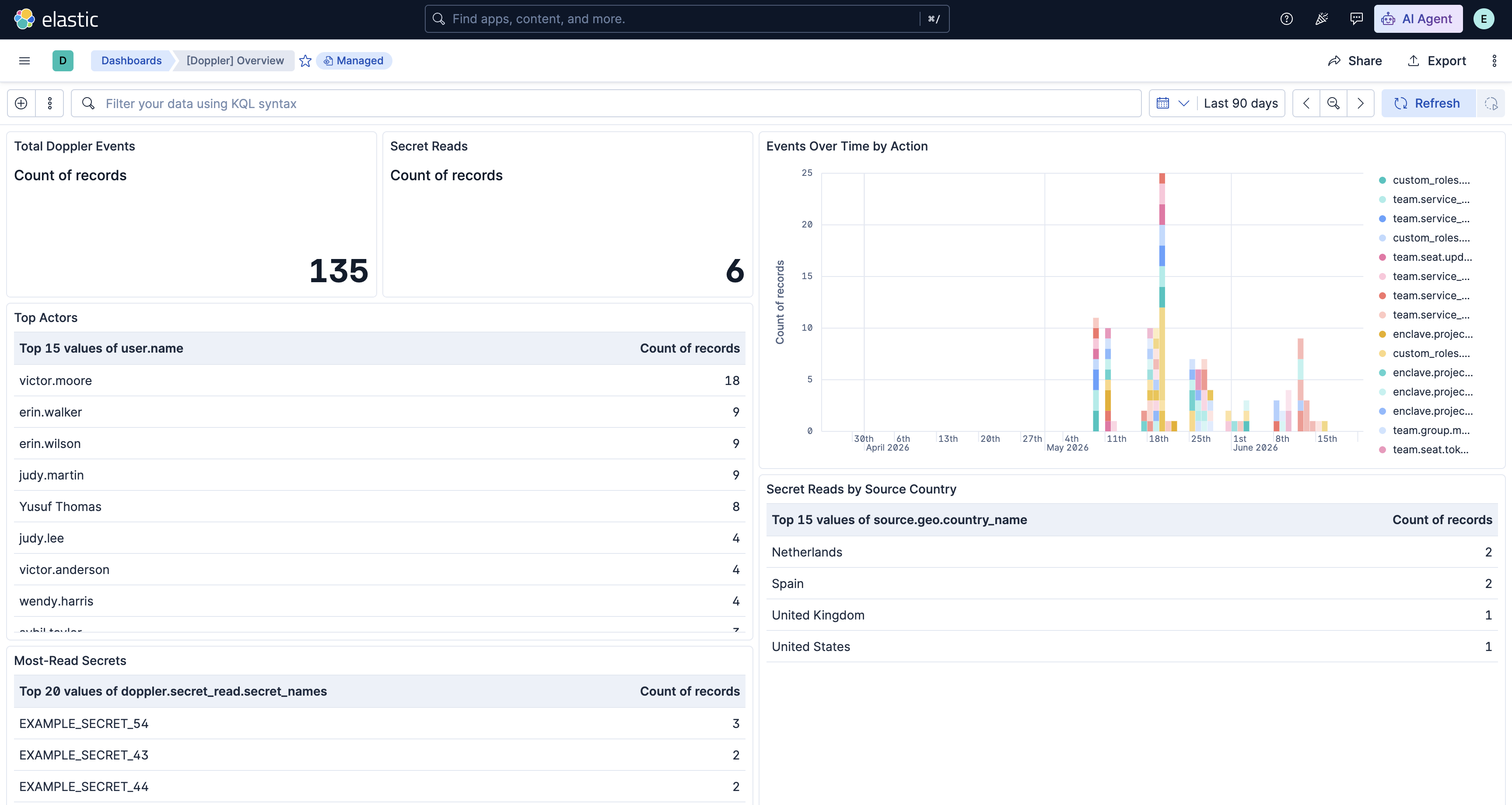
The integration ships a Doppler Overview dashboard that summarizes activity and secret-access events — event volume over time, top actors and actions, and a breakdown of secret reads by method and geography. It is tagged Security Solution, so it also appears in the Security app, and can be found in Kibana under Dashboards after installing the integration.
The activity data stream contains Doppler workplace and project activity events — project/config/environment lifecycle, secret changes, member/group management, role changes, and service-account/token lifecycle. The raw event is preserved (when enabled) in event.original, and Doppler-specific context is kept under doppler.activity.* and doppler.actor.*.
Exported fields
| Field | Description | Type | |
|---|---|---|---|
| @timestamp | Event timestamp. | date | |
| data_stream.dataset | Data stream dataset. | constant_keyword | |
| data_stream.namespace | Data stream namespace. | constant_keyword | |
| data_stream.type | Data stream type. | constant_keyword | |
| doppler.activity.config.name | Name of the config the activity relates to. | keyword | |
| doppler.activity.description | Human-readable description of the activity. Doppler emits this as dashboard HTML; the pipeline strips the markup to plain text for readability and search. The original HTML is preserved verbatim in event.original when the "Preserve original event" option is enabled. |
match_only_text | |
| doppler.activity.environment.id | Identifier of the environment the activity relates to. | keyword | |
| doppler.activity.environment.name | Name of the environment the activity relates to. | keyword | |
| doppler.activity.environment.old_id | Previous environment identifier on a rename event. | keyword | |
| doppler.activity.environment.old_name | Previous environment name on a rename event. | keyword | |
| doppler.activity.log_id | Doppler activity log identifier. | keyword | |
| doppler.activity.members_added | Email addresses of members added to a group (team.group.members.add). Multi-valued when several members are added at once; use MV_EXPAND in ES |
QL. | keyword |
| doppler.activity.metadata | Raw, per-event-type metadata as emitted by Doppler, retained after well-known keys are promoted to the typed doppler.activity.\* fields above. Useful for investigating uncommon event types; as a flattened field it is queryable in KQL/DSL but not in ES |
QL, so prefer the typed fields for detections. | flattened |
| doppler.activity.project.id | Identifier of the project the activity relates to. | keyword | |
| doppler.activity.project.name | Name of the project the activity relates to. | keyword | |
| doppler.activity.role.name | Role granted or referenced by the activity. Populated for project access grants (metadata.role) and custom role creation (custom_roles.\*). |
keyword | |
| doppler.activity.role.new | New role for a role-change activity. Covers both project role changes (metadata.newRole) and workplace seat role changes (metadata.newWorkplaceRole), so escalation detections can use one field for both. |
keyword | |
| doppler.activity.role.old | Previous role for a role-change activity (project metadata.oldRole or workplace metadata.oldWorkplaceRole). |
keyword | |
| doppler.activity.secrets_changed.added | Names of secrets added in a config secrets change (enclave.project.config.secrets.update). Multi-valued; use MV_EXPAND in ES |
QL. | keyword |
| doppler.activity.secrets_changed.removed | Names of secrets removed in a config secrets change. Multi-valued; use MV_EXPAND in ES |
QL. | keyword |
| doppler.activity.secrets_changed.updated | Names of secrets whose values changed in a config secrets change. Multi-valued; use MV_EXPAND in ES |
QL. | keyword |
| doppler.activity.service_token.read_access | Whether a created config service token was granted read access. | boolean | |
| doppler.activity.service_token.write_access | Whether a created config service token was granted write access. Write-capable tokens are higher risk and a useful detection signal. | boolean | |
| doppler.activity.token.id | Identifier of the token created by a service-account token-create event. | keyword | |
| doppler.activity.token.name | Name of the token created by a token-lifecycle event (service-account token or config service token). | keyword | |
| doppler.activity.url | Link to the activity log entry in the Doppler dashboard. | keyword | |
| doppler.actor.bot_type | Bot type, when the actor is a Doppler bot. | keyword | |
| doppler.actor.kind | Principal type of the actor that performed the action: user, apiToken, serviceAccount, or bot. Preserved from the vendor payload when doppler.user is renamed to doppler.actor. Use it to distinguish human from non-human (token/service-account/bot) activity in detections. |
keyword | |
| doppler.actor.token_type.id | Identifier of the API token type, when the actor is an API token. | keyword | |
| doppler.actor.token_type.name | Name of the API token type, when the actor is an API token. | keyword | |
| doppler.workplace.id | Identifier of the Doppler workplace (tenant) the event belongs to. Also copied to organization.id for ECS-normalized, cross-source tenant correlation. |
keyword | |
| doppler.workplace.name | Name of the Doppler workplace (tenant) the event belongs to. Also copied to organization.name. |
keyword | |
| event.dataset | Event dataset. | constant_keyword | |
| event.module | Event module. | constant_keyword | |
| input.type | Type of filebeat input. | keyword |
Example
{
    "@timestamp": "2026-05-11T20:12:43.104Z",
    "agent": {
        "ephemeral_id": "17a23276-8935-427e-83c7-8c0e1937e020",
        "id": "581ebf4b-a2a9-43ed-afa4-6c2112ef47e8",
        "name": "elastic-agent-87474",
        "type": "filebeat",
        "version": "9.4.2"
    },
    "data_stream": {
        "dataset": "doppler.activity",
        "namespace": "64566",
        "type": "logs"
    },
    "doppler": {
        "activity": {
            "description": "Created token example-service-account-4 for service account Yusuf Thomas",
            "log_id": "nzXovfNKOK837wck9ngWJjb5",
            "metadata": {
                "serviceAccountId": "64f61675-c2d9-4c8f-8b59-d1caf8debfb4",
                "serviceAccountName": "example-service-account-3",
                "serviceAccountTokenId": "b292275b-cf26-40be-85d8-0fe54f99aad3",
                "serviceAccountTokenName": "example-service-account-4",
                "serviceAccountUrl": "https://dashboard.doppler.com/workplace/efbd98ca78c68ffdced3/team/service_accounts/64f61675-c2d9-4c8f-8b59-d1caf8debfb4"
            },
            "token": {
                "id": "b292275b-cf26-40be-85d8-0fe54f99aad3",
                "name": "example-service-account-4"
            },
            "url": "https://dashboard.doppler.com/workplace/efbd98ca78c68ffdced3/logs?id=MwtgYglYXJ3uDpv4YkyjHKCG"
        },
        "actor": {
            "kind": "user"
        },
        "workplace": {
            "id": "efbd98ca78c68ffdced3",
            "name": "Example Corp"
        }
    },
    "ecs": {
        "version": "9.4.0"
    },
    "elastic_agent": {
        "id": "581ebf4b-a2a9-43ed-afa4-6c2112ef47e8",
        "snapshot": false,
        "version": "9.4.2"
    },
    "event": {
        "action": "team.service_account.token.create",
        "agent_id_status": "verified",
        "category": [
            "iam"
        ],
        "dataset": "doppler.activity",
        "id": "nzXovfNKOK837wck9ngWJjb5",
        "ingested": "2026-06-23T05:46:38Z",
        "kind": "event",
        "module": "doppler",
        "original": "{\"createdAt\":\"2026-05-11T20:12:43.104Z\",\"link\":\"https://dashboard.doppler.com/workplace/efbd98ca78c68ffdced3/logs?id=MwtgYglYXJ3uDpv4YkyjHKCG\",\"metadata\":{\"serviceAccountId\":\"64f61675-c2d9-4c8f-8b59-d1caf8debfb4\",\"serviceAccountName\":\"example-service-account-3\",\"serviceAccountTokenApiKeyPreview\":\"b540be76b8cf\",\"serviceAccountTokenId\":\"b292275b-cf26-40be-85d8-0fe54f99aad3\",\"serviceAccountTokenName\":\"example-service-account-4\",\"serviceAccountUrl\":\"https://dashboard.doppler.com/workplace/efbd98ca78c68ffdced3/team/service_accounts/64f61675-c2d9-4c8f-8b59-d1caf8debfb4\"},\"slug\":\"nzXovfNKOK837wck9ngWJjb5\",\"source\":\"doppler\",\"text\":\"Created token <strong>example-service-account-4</strong> for service account <a class=\\\"text-purple-500 hover:underline\\\" rel=\\\"noopener\\\" href=\\\"https://dashboard.doppler.com/workplace/efbd98ca78c68ffdced3/team/service_accounts/64f61675-c2d9-4c8f-8b59-d1caf8debfb4\\\">Yusuf Thomas</a>\",\"title\":\"Activity Log: nzXovfNKOK837wck9ngWJjb5\",\"type\":\"team.service_account.token.create\",\"user\":{\"email\":\"grace.moore@example.com\",\"kind\":\"user\",\"name\":\"Ivan Anderson\",\"profile_image_url\":\"https://www.gravatar.com/avatar/15c106ed034102804bb3d6924913101c?s=500&d=retro\",\"slug\":\"fcb8e8ff-0036-45c4-8a0b-6c16df16d9bd\",\"username\":\"victor.moore\"},\"workplace\":{\"id\":\"efbd98ca78c68ffdced3\",\"name\":\"Example Corp\"}}",
        "outcome": "success",
        "provider": "doppler",
        "type": [
            "creation",
            "user"
        ]
    },
    "input": {
        "type": "http_endpoint"
    },
    "observer": {
        "product": "Activity Logs",
        "vendor": "Doppler"
    },
    "organization": {
        "id": "efbd98ca78c68ffdced3",
        "name": "Example Corp"
    },
    "related": {
        "user": [
            "fcb8e8ff-0036-45c4-8a0b-6c16df16d9bd",
            "victor.moore",
            "grace.moore@example.com",
            "64f61675-c2d9-4c8f-8b59-d1caf8debfb4",
            "example-service-account-3"
        ]
    },
    "tags": [
        "forwarded",
        "preserve_original_event"
    ],
    "url": {
        "domain": "dashboard.doppler.com",
        "full": "https://dashboard.doppler.com/workplace/efbd98ca78c68ffdced3/logs?id=MwtgYglYXJ3uDpv4YkyjHKCG",
        "path": "/workplace/efbd98ca78c68ffdced3/logs",
        "query": "id=MwtgYglYXJ3uDpv4YkyjHKCG",
        "scheme": "https"
    },
    "user": {
        "email": "grace.moore@example.com",
        "full_name": "Ivan Anderson",
        "id": "fcb8e8ff-0036-45c4-8a0b-6c16df16d9bd",
        "name": "victor.moore",
        "target": {
            "id": "64f61675-c2d9-4c8f-8b59-d1caf8debfb4",
            "name": "example-service-account-3"
        }
    }
}
The secret_read data stream contains security.secret_read events, rerouted from the activity listener. Each event lists the secrets accessed (doppler.secret_read.secrets plus the convenience arrays secret_names, projects, environments, configs, and secret_count) and the source session, enriched with source.geo.*, source.as.*, and user_agent.* where available.
Exported fields
| Field | Description | Type | |
|---|---|---|---|
| @timestamp | Event timestamp. | date | |
| data_stream.dataset | Data stream dataset. | constant_keyword | |
| data_stream.namespace | Data stream namespace. | constant_keyword | |
| data_stream.type | Data stream type. | constant_keyword | |
| doppler.actor.bot_type | Bot type, when the actor is a Doppler bot. | keyword | |
| doppler.actor.kind | Principal type of the actor that performed the action: user, apiToken, serviceAccount, or bot. Preserved from the vendor payload when doppler.user is renamed to doppler.actor. Use it to distinguish human from non-human (token/service-account/bot) activity in detections. |
keyword | |
| doppler.actor.token_type.id | Identifier of the API token type, when the actor is an API token. | keyword | |
| doppler.actor.token_type.name | Name of the API token type, when the actor is an API token. | keyword | |
| doppler.secret_read.configs | Distinct configs whose secrets were read. Multi-valued. | keyword | |
| doppler.secret_read.environments | Distinct environments whose secrets were read. Multi-valued. | keyword | |
| doppler.secret_read.method | Access channel used to read the secrets: API, CLI, or Dashboard. |
keyword | |
| doppler.secret_read.projects | Distinct projects whose secrets were read. Multi-valued; a high cardinality in one event indicates a cross-project read. | keyword | |
| doppler.secret_read.secret_count | Number of secrets read in this event (count of well-formed entries, including any duplicates across projects/environments). Primary field for bulk-read detections. | long | |
| doppler.secret_read.secret_names | Distinct names of the secrets that were read. Multi-valued; use MV_EXPAND in ES |
QL to pivot on individual secrets. | keyword |
| doppler.secret_read.secrets | The expanded list of secrets that were read. Each entry has project, environment, config, name, version, and (for inherited values) an inherited_from reference of \{project, environment, config\}. Vendor sends abbreviated keys (p, e, c, s, v, r) which the pipeline expands. As a flattened field this is for investigation; prefer the sidecar arrays above for ES |
QL detections. | flattened |
| doppler.workplace.id | Identifier of the Doppler workplace (tenant) the event belongs to. | keyword | |
| doppler.workplace.name | Name of the Doppler workplace (tenant) the event belongs to. | keyword | |
| event.dataset | Event dataset. | constant_keyword | |
| event.module | Event module. | constant_keyword | |
| input.type | Type of filebeat input. | keyword |
Example
{
    "@timestamp": "2026-06-15T00:01:16.402Z",
    "agent": {
        "ephemeral_id": "17a23276-8935-427e-83c7-8c0e1937e020",
        "id": "581ebf4b-a2a9-43ed-afa4-6c2112ef47e8",
        "name": "elastic-agent-87474",
        "type": "filebeat",
        "version": "9.4.2"
    },
    "data_stream": {
        "dataset": "doppler.secret_read",
        "namespace": "64566",
        "type": "logs"
    },
    "doppler": {
        "actor": {
            "kind": "user"
        },
        "secret_read": {
            "configs": [
                "dev",
                "prod"
            ],
            "environments": [
                "dev",
                "prod"
            ],
            "method": "API",
            "projects": [
                "example-project-38",
                "example-project-16"
            ],
            "secret_count": 3,
            "secret_names": [
                "EXAMPLE_SECRET_43",
                "EXAMPLE_SECRET_44",
                "EXAMPLE_SECRET_54"
            ],
            "secrets": [
                {
                    "environment": "dev",
                    "name": "EXAMPLE_SECRET_43",
                    "project": "example-project-38",
                    "config": "dev",
                    "version": 3
                },
                {
                    "environment": "dev",
                    "name": "EXAMPLE_SECRET_44",
                    "project": "example-project-38",
                    "config": "dev",
                    "version": 1
                },
                {
                    "environment": "prod",
                    "inherited_from": {
                        "environment": "dev",
                        "project": "example-project-38",
                        "config": "dev"
                    },
                    "name": "EXAMPLE_SECRET_54",
                    "project": "example-project-16",
                    "config": "prod",
                    "version": 8
                }
            ]
        },
        "workplace": {
            "id": "efbd98ca78c68ffdced3",
            "name": "Example Corp"
        }
    },
    "ecs": {
        "version": "9.4.0"
    },
    "elastic_agent": {
        "id": "581ebf4b-a2a9-43ed-afa4-6c2112ef47e8",
        "snapshot": false,
        "version": "9.4.2"
    },
    "event": {
        "action": "security.secret_read",
        "agent_id_status": "verified",
        "category": [
            "configuration"
        ],
        "dataset": "doppler.secret_read",
        "id": "Hs7cG13YZKz7pq6n+0HjLwBOwWE=",
        "ingested": "2026-06-23T05:46:38Z",
        "kind": "event",
        "module": "doppler",
        "original": "{\"createdAt\":\"2026-06-15T00:01:16.402Z\",\"metadata\":{\"secrets\":[{\"c\":\"dev\",\"e\":\"dev\",\"m\":\"m\",\"p\":\"example-project-38\",\"s\":\"EXAMPLE_SECRET_43\",\"v\":3},{\"c\":\"dev\",\"e\":\"dev\",\"m\":\"m\",\"p\":\"example-project-38\",\"s\":\"EXAMPLE_SECRET_44\",\"v\":1},{\"c\":\"prod\",\"e\":\"prod\",\"m\":\"m\",\"p\":\"example-project-16\",\"r\":{\"c\":\"dev\",\"e\":\"dev\",\"p\":\"example-project-38\"},\"s\":\"EXAMPLE_SECRET_54\",\"v\":8}]},\"session\":{\"browser\":null,\"ip\":\"198.51.100.1\",\"method\":\"API\",\"os\":null},\"source\":\"doppler\",\"title\":\"Secret Read\",\"type\":\"security.secret_read\",\"user\":{\"email\":\"dave.wilson@example.com\",\"kind\":\"user\",\"name\":\"Ivan Martin\",\"profile_image_url\":\"https://www.gravatar.com/avatar/cb16299dced55e7ee984433be5293d5b?s=500&d=retro\",\"slug\":\"aa4c1c7a-83b6-46be-83ae-712102c616fc\",\"username\":\"mallory.white\"},\"workplace\":{\"id\":\"efbd98ca78c68ffdced3\",\"name\":\"Example Corp\"}}",
        "outcome": "success",
        "provider": "doppler",
        "type": [
            "access"
        ]
    },
    "input": {
        "type": "http_endpoint"
    },
    "network": {
        "type": "ipv4"
    },
    "observer": {
        "product": "Activity Logs",
        "vendor": "Doppler"
    },
    "organization": {
        "id": "efbd98ca78c68ffdced3",
        "name": "Example Corp"
    },
    "related": {
        "ip": [
            "198.51.100.1"
        ],
        "user": [
            "aa4c1c7a-83b6-46be-83ae-712102c616fc",
            "mallory.white",
            "dave.wilson@example.com"
        ]
    },
    "source": {
        "as": {
            "number": 64501,
            "organization": {
                "name": "Documentation ASN"
            }
        },
        "geo": {
            "city_name": "Amsterdam",
            "continent_name": "Europe",
            "country_iso_code": "NL",
            "country_name": "Netherlands",
            "location": {
                "lat": 52.37403995823115,
                "lon": 4.889689916744828
            },
            "region_iso_code": "NL-NH",
            "region_name": "North Holland"
        },
        "ip": "198.51.100.1"
    },
    "tags": [
        "forwarded",
        "preserve_original_event"
    ],
    "user": {
        "email": "dave.wilson@example.com",
        "full_name": "Ivan Martin",
        "id": "aa4c1c7a-83b6-46be-83ae-712102c616fc",
        "name": "mallory.white"
    }
}
This integration includes one or more Kibana dashboards that visualizes the data collected by the integration. The screenshots below illustrate how the ingested data is displayed.
Changelog
| Version | Details | Minimum Kibana version |
|---|---|---|
| 0.2.0 | Enhancement (View pull request) Add tags to ingest pipeline processors and add preserve_original_event to pipeline-level on_failure handlers. |
9.0.0 8.16.0 |
| 0.1.1 | Bug fix (View pull request) Standardize HTTP Endpoint capitalization in README file |
9.0.0 8.16.0 |
| 0.1.0 | Enhancement (View pull request) Initial release of the Doppler integration. |
9.0.0 8.16.0 |