Apache ActiveMQ OpenTelemetry Assets
| Version | 0.3.1
|
| Subscription level What's this? |
Basic |
| Developed by What's this? |
Elastic |
| Minimum Kibana version(s) | 9.4.0 |
To use pre-release integrations, go to the Integrations page in Kibana, scroll down, and toggle on the Display beta integrations option.
Apache ActiveMQ (Classic) is an open-source, Java-based message broker implementing the Java Message Service (JMS) API. It acts as an intermediary for asynchronous communication between distributed applications, decoupling producers from consumers.
This content pack provides pre-built dashboards, alert rules, and SLO templates that visualize and alert on Apache ActiveMQ JMX metrics collected using the OpenTelemetry JMX Scraper, covering broker health, capacity, message flow, destinations, and error signals.
The Apache ActiveMQ OpenTelemetry assets have been tested with the OpenTelemetry JMX Scraper v1.53.0 (otel.jmx.target.system=activemq) and OpenTelemetry Collector Contrib v0.145.0. Apache ActiveMQ (Classic) tested against versions 5.x and 6.x.
You need Elasticsearch for storing and searching your data and Kibana for visualizing and managing it. You can use our hosted Elasticsearch Service on Elastic Cloud, which is recommended, or self-manage the Elastic Stack on your own hardware.
You also need the OpenTelemetry JMX Scraper JAR and an OpenTelemetry Collector (or EDOT Collector) to receive metrics using OTLP and export them to Elasticsearch.
Enable JMX on the ActiveMQ broker so the JMX Scraper can connect and collect metrics. Set the following JVM options (for example in ACTIVEMQ_SUNJMX_START or your startup script):
-Dcom.sun.management.jmxremote
-Dcom.sun.management.jmxremote.port=1099
-Dcom.sun.management.jmxremote.rmi.port=1099
-Dcom.sun.management.jmxremote.ssl=false
-Dcom.sun.management.jmxremote.authenticate=true
-Dcom.sun.management.jmxremote.password.file=${ACTIVEMQ_CONF}/jmxremote.password
-Dcom.sun.management.jmxremote.access.file=${ACTIVEMQ_CONF}/jmxremote.access
Create jmxremote.password and jmxremote.access files with appropriate permissions.
The JMX Scraper runs as a standalone Java process that connects to ActiveMQ's JMX endpoint and exports metrics using OTLP to your collector. Download the latest release and run it with the following configuration:
java -jar opentelemetry-jmx-scraper.jar \
  -config \
  otel.jmx.service.url=service:jmx:rmi:///jndi/rmi://<ACTIVEMQ_HOST>:<JMX_PORT>/jmxrmi \
  otel.jmx.target.system=activemq \
  otel.jmx.username=<JMX_USERNAME> \
  otel.jmx.password=<JMX_PASSWORD> \
  otel.metric.export.interval=30s \
  otel.exporter.otlp.endpoint=http://<COLLECTOR_HOST>:4317
| Placeholder | Description | Example |
|---|---|---|
<ACTIVEMQ_HOST> |
Hostname or IP of the ActiveMQ broker | activemq-broker.local |
<JMX_PORT> |
JMX port (default 1099) | 1099 |
<JMX_USERNAME> |
JMX username (omit if authentication is deactivated) | monitor |
<JMX_PASSWORD> |
JMX password (omit if authentication is deactivated) | secret |
<COLLECTOR_HOST> |
Hostname of the OpenTelemetry Collector | otel-collector.local |
You can also configure the scraper using environment variables (for example OTEL_JMX_SERVICE_URL, OTEL_JMX_TARGET_SYSTEM) or a properties file. refer the JMX Scraper documentation for the full configuration reference.
You can verify JMX connectivity before starting collection by running java -jar opentelemetry-jmx-scraper.jar -test -config otel.jmx.service.url=service:jmx:rmi:///jndi/rmi://<ACTIVEMQ_HOST>:<JMX_PORT>/jmxrmi.
Configure your OpenTelemetry Collector or EDOT Collector to receive the OTLP metrics from the JMX Scraper and export them to Elasticsearch:
receivers:
  otlp:
    protocols:
      grpc:
        endpoint: 0.0.0.0:4317

processors:
  batch:
    timeout: 10s
    send_batch_size: 200
  resource:
    attributes:
      - key: data_stream.dataset
        value: activemq
        action: upsert

exporters:
  elasticsearch/otel:
    endpoints: [<ES_ENDPOINT>]
    api_key: ${env:ES_API_KEY}
    mapping:
      mode: otel

service:
  pipelines:
    metrics:
      receivers: [otlp]
      processors: [batch, resource]
      exporters: [elasticsearch/otel]
| Placeholder | Description | Example |
|---|---|---|
<ES_ENDPOINT> |
Elasticsearch endpoint | https://my-deployment.es.us-central1.gcp.cloud.es.io:443 |
${env:ES_API_KEY} |
Elasticsearch API key from environment variable | your-api-key |
Refer to the JMX Scraper and the ActiveMQ metrics definitions for details on available metrics. Data is written to the metrics-activemq.otel-* index pattern.
| Dashboard | Description |
|---|---|
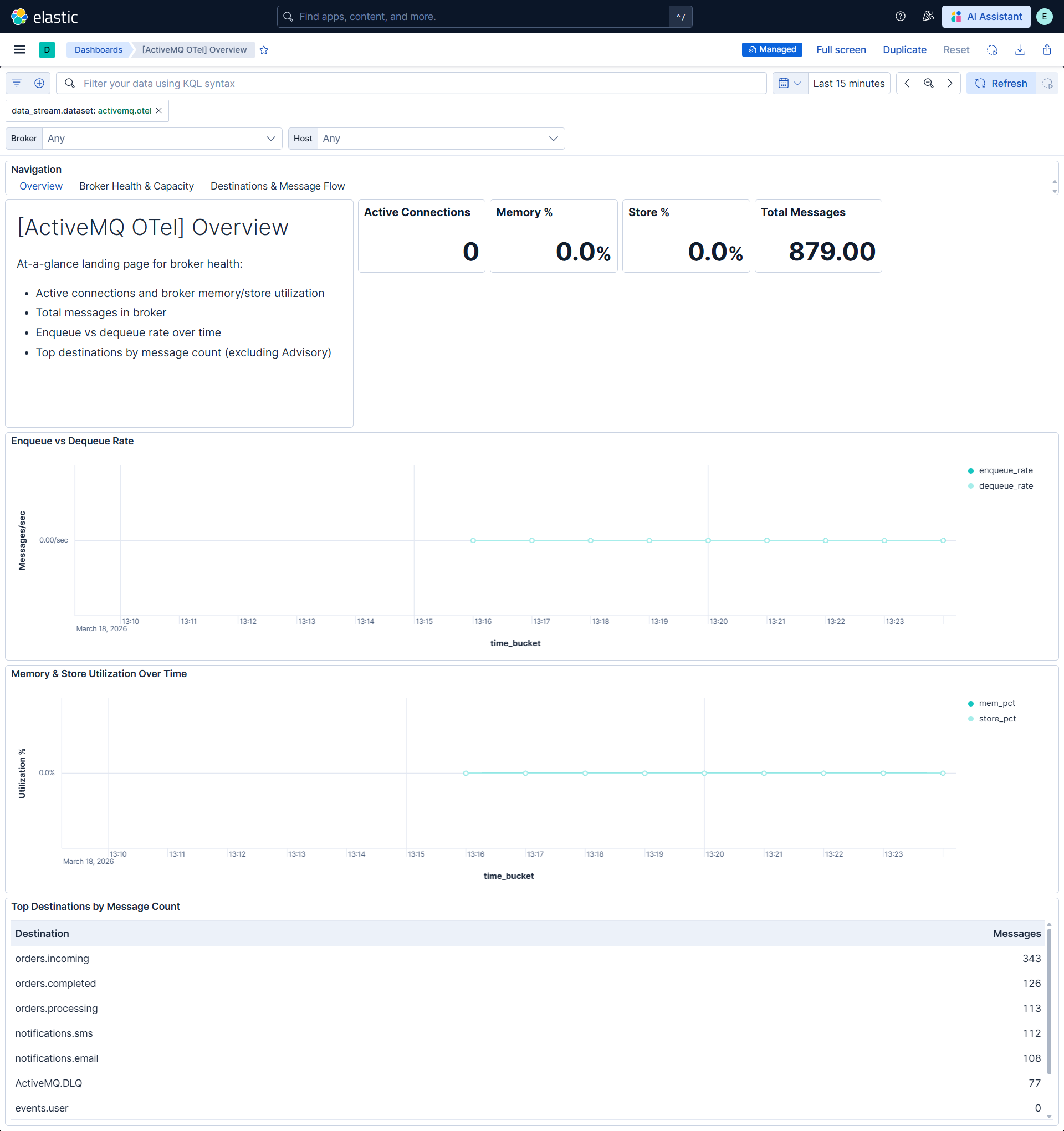
| [ActiveMQ OTel] Overview | At-a-glance broker health, connections, memory and store utilization, and message flow. |
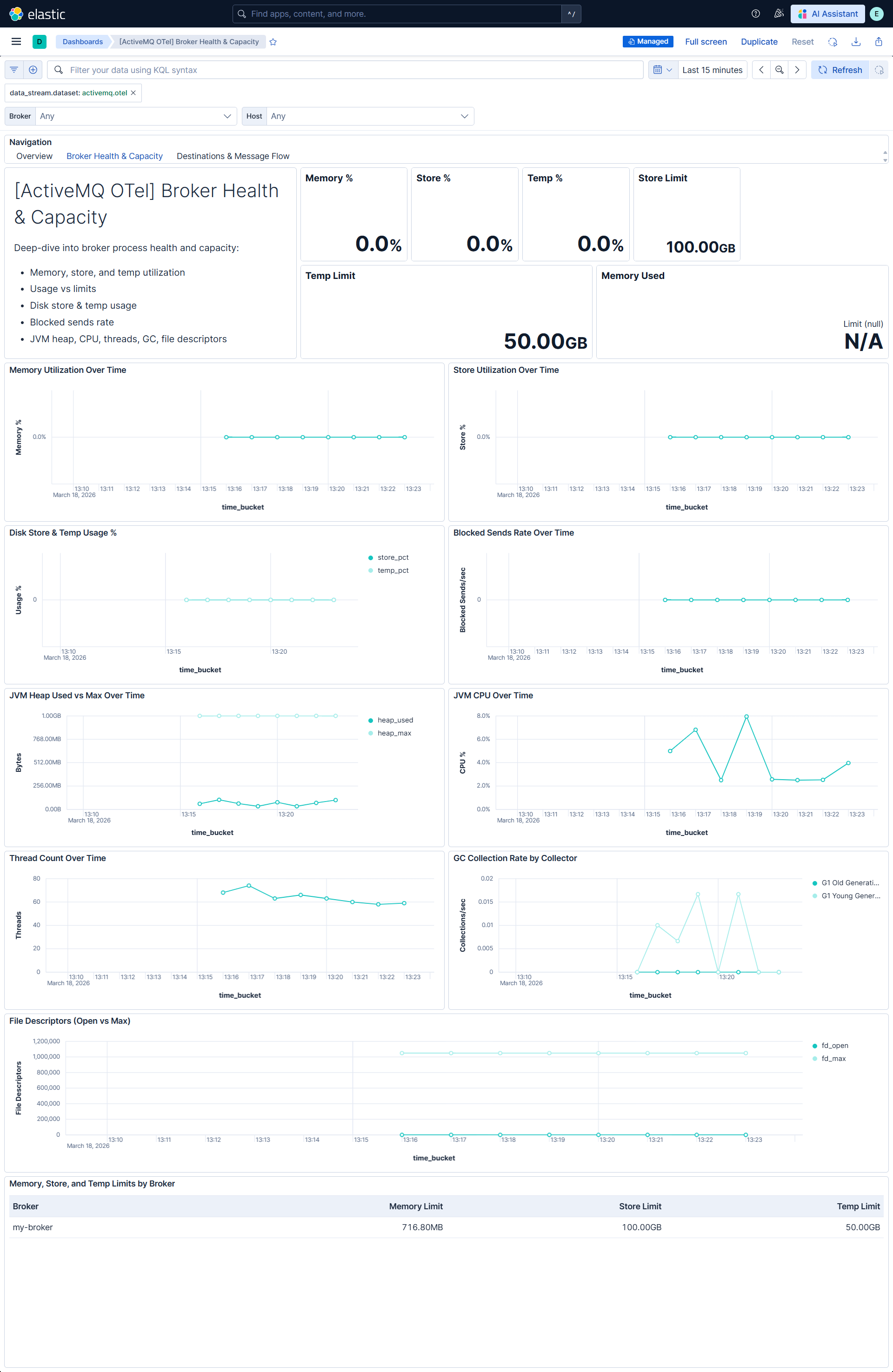
| [ActiveMQ OTel] Broker Health & Capacity | Broker process health, capacity headroom, JVM, and GC. |
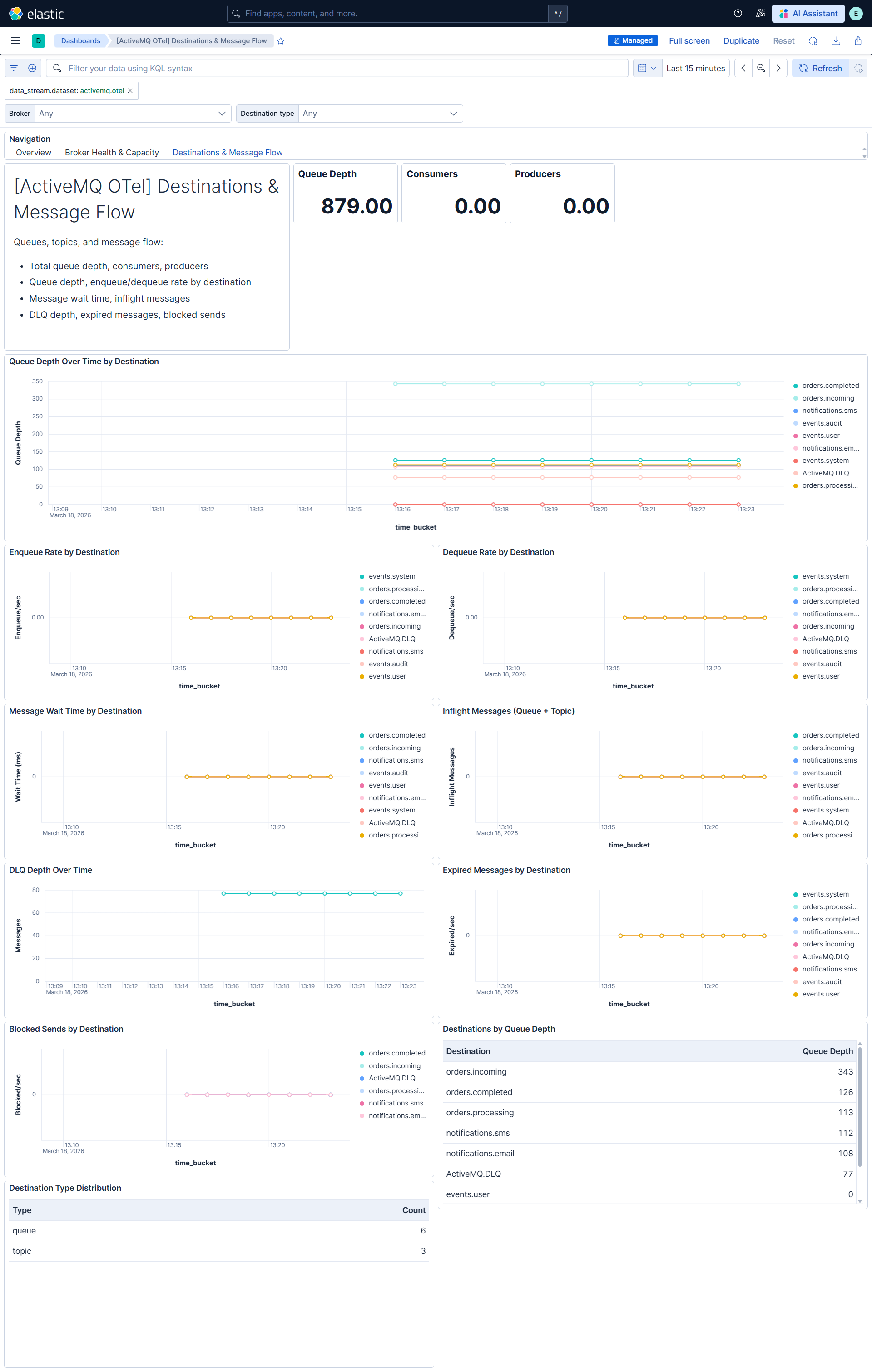
| [ActiveMQ OTel] Destinations & Message Flow | Queues, topics, message flow, and destination-level errors. |
| Alert | Trigger | Severity |
|---|---|---|
| [ActiveMQ OTel] Blocked sends detected | Any producer sends blocked due to memory pressure | Critical |
| [ActiveMQ OTel] Dead letter queue depth high | DLQ depth exceeds 100 messages | High |
| [ActiveMQ OTel] Broker memory utilization high | Broker memory utilization exceeds 85% | High |
| [ActiveMQ OTel] Persistent store utilization high | Persistent store utilization exceeds 90% | High |
| [ActiveMQ OTel] High JVM heap utilization | JVM heap utilization exceeds 85% | High |
| [ActiveMQ OTel] High JVM CPU utilization | JVM CPU utilization exceeds 85% | High |
| [ActiveMQ OTel] Queue depth high | Queue depth exceeds 1000 messages for a destination | Medium |
SLO templates require Elastic Stack version 9.4.0 or later.
| SLO | Target | Window | Description |
|---|---|---|---|
| [ActiveMQ OTel] Broker memory utilization 99.5% rolling 30 days | 99.5% | 30-day rolling | Broker memory utilization below 85% for 99.5% of 1-minute intervals. |
| [ActiveMQ OTel] Store utilization 99.5% rolling 30 days | 99.5% | 30-day rolling | Persistent store utilization below 90% for 99.5% of 1-minute intervals. |
| [ActiveMQ OTel] Zero blocked sends 99.5% rolling 30 days | 99.5% | 30-day rolling | No new blocked sends for 99.5% of 1-minute intervals. |
| [ActiveMQ OTel] Message wait time 99.5% rolling 30 days | 99.5% | 30-day rolling | Average message wait time below 1 second for 99.5% of 1-minute intervals. |
This integration includes one or more Kibana dashboards that visualizes the data collected by the integration. The screenshots below illustrate how the ingested data is displayed.
Changelog
| Version | Details | Minimum Kibana version |
|---|---|---|
| 0.3.1 | Bug fix (View pull request) Regenerate Kibana dashboards so ES|QL Lens panels include populated adHocDataViews, internalReferences, and per-layer index, fixing the broken "Explore in Discover" action on Kibana 9.3+. |
9.4.0 |
| 0.3.0 | Enhancement (View pull request) Add tags to Kibana assets |
9.4.0 |
| 0.2.0 | Enhancement (View pull request) Add description and artifact fields to alerting rule template. |
9.4.0 |
| 0.1.0 | Enhancement (View pull request) Initial draft of the package |
9.2.3 |