macOS Security Events Integration for Elastic
| Version | 1.0.2 (View all) |
| Subscription level What's this? |
Basic |
| Developed by What's this? |
Elastic |
| Minimum Kibana version(s) | 9.0.0 8.18.0 |
The macOS Security Events integration for Elastic allows you to collect and analyze unified logs from macOS systems. This integration leverages macOS's unified logging system to provide comprehensive visibility into system activities, security events, and application behaviors on macOS endpoints.
macOS unified logging is Apple's centralized logging system that captures log messages from the kernel, system processes, and applications. This integration enables security teams to monitor macOS endpoints for suspicious activities, troubleshoot system issues, and maintain compliance with security policies.
The macOS Security Events integration is compatible with macOS systems that support unified logging (macOS 10.12 Sierra and later).
This integration uses the unifiedlogs input to collect log data from the macOS unified logging system. It can collect logs in real-time or from archived log files, with configurable filtering based on predicates, processes, and log levels.
This integration collects unified log messages from macOS systems using configurable predicates to filter specific event types, including:
- Authentication logs: User login/logout events, authentication failures, and credential-related activities
- 'process contains "sudo" OR composedMessage CONTAINS "sudo" OR process contains "su"' - 'process contains "loginwindow" and composedMessage CONTAINS "sessionDidLogin"' - 'process == "sshd"' - User & Account management: User account creation, modification, and deletion events
- 'process == "sysadminctl" AND composedMessage CONTAINS "Creating user"' - 'process == "dscl" AND composedMessage CONTAINS "create"' - 'process == "sysadminctl" AND composedMessage CONTAINS "Deleting user"' - 'process == "dscl" AND composedMessage CONTAINS "delete"' - '(process == "dscl" OR process == "opendirectoryd") AND composedMessage CONTAINS "admin"' - Process execution monitoring: Process creation, termination, and execution details
- 'eventMessage CONTAINS[c] "exec" OR eventMessage CONTAINS[c] "fork" OR eventMessage CONTAINS[c] "exited" OR eventMessage CONTAINS[c] "terminated"' - 'subsystem == "com.apple.securityd" AND (composedMessage CONTAINS "code signing" OR composedMessage CONTAINS "not valid")' - Network activity: Network connections, DNS queries, and network-related events
- 'composedMessage CONTAINS "connect" AND (composedMessage CONTAINS "TCP" OR composedMessage CONTAINS "UDP")' - 'composedMessage CONTAINS "disconnect" OR composedMessage CONTAINS "closed connection"' - 'subsystem == "com.apple.necp" AND composedMessage CONTAINS "new connection"' - 'eventMessage CONTAINS[c] "listening" AND eventMessage CONTAINS[c] "service"' - File reads/writes: File system access, modifications, and permission changes
- '(eventMessage CONTAINS "open" OR eventMessage CONTAINS "write" OR eventMessage CONTAINS "unlink" OR eventMessage CONTAINS "rename") AND ((processImagePath BEGINSWITH "/System") OR (processImagePath BEGINSWITH "/bin") OR (processImagePath BEGINSWITH "/sbin") OR (processImagePath BEGINSWITH "/usr" AND NOT processImagePath BEGINSWITH "/usr/local") OR (processImagePath BEGINSWITH "/etc"))' - 'subsystem == "com.apple.quarantine" OR eventMessage CONTAINS "com.apple.quarantine"' - System changes: System configuration changes, software installations, and updates
- 'subsystem == "com.apple.security" OR subsystem == "com.apple.systempolicy" OR subsystem == "com.apple.installer" OR process == "Installer" OR (process == "softwareupdated" AND subsystem != "com.apple.network") OR eventMessage CONTAINS[c] "removed package" OR eventMessage CONTAINS[c] "forget package"' - Advanced monitoring: Detailed system and application behavior logs
- 'subsystem == "com.apple.xpc" OR subsystem == "com.apple.launchd"'
- 'category == "performance" OR category == "diagnostics"'
- 'messageType == 16 OR messageType == 17'
The macOS Security Events integration in Elastic enables comprehensive monitoring and analysis of system activities, network traffic, and application behavior across macOS devices. It supports use cases such as detecting security incidents, tracking network usage, auditing system events, and analyzing performance trends. By collecting and visualizing unified logs, it helps security and IT teams gain real-time visibility, identify anomalies, ensure compliance, and enhance overall endpoint security within macOS environments.
This integration also provides visibility into third-party enterprise applications that use unified logging as their logging backend, including privilege management tools, MDM agents, security software, and custom macOS applications, enabling centralized monitoring of the entire macOS application ecosystem.
- Elastic Agent must be installed on the macOS system you want to monitor
- Appropriate permissions to read system logs on the macOS system
The integration requires:
- macOS 10.12 Sierra or later (for unified logging support)
- Appropriate system permissions to access unified logs
- For some log categories, administrative privileges may be required
This integration requires Elastic Agent to be installed on the macOS systems you want to monitor.
Elastic Agent must be installed. For more details, check the Elastic Agent installation instructions. You can install only one Elastic Agent per host.
For comprehensive visibility, yes. Elastic Defend isn't designed to provide a complete capture of all system events and it's recommended to supplement it with the macOS Security Events integration. Specifically, Elastic Defend on macOS does not capture:
- All user login/logout events
- Every user account creation, deletion, or modification
- Complete system service registration and changes
- Application diagnostic logs
This integration fills those gaps, similar to how Windows users supplement Elastic Defend with Custom Windows Event Logs integration.
In the top search bar in Kibana, search for Integrations.
In the search bar, type macOS Security Events.
Select the macOS Security Events integration from the search results.
Select Add macOS Security Events to add the integration.
Enable and configure only the collection methods which you will use.
Basic Configuration:
- Enable the log categories you want to collect:
- Authentication
- User & Account management
- Process execution monitoring
- Network activity
- File reads/writes
- System changes
- Advanced monitoring
Advanced Configuration (Optional):
- Predicate: Use NSPredicate-based filtering to collect specific log messages
- Process: Specify particular processes to monitor (by PID or name)
- Start/End dates: Define time ranges for historical log collection
- Log levels: Configure which log levels to include (info, debug, backtrace, signpost)
- Archive/Trace files: Specify log archive or trace files to process
- Enable the log categories you want to collect:
Select Save and continue to save the integration.
- In the top search bar in Kibana, search for Dashboards.
- In the search bar, type macOS Security Events.
- Select a dashboard for the dataset you are collecting, and verify the dashboard information is populated.
- Unified log collection can generate significant data volume, especially with debug-level logging enabled
- Consider using predicates to filter logs and reduce data volume
- Monitor system performance impact when collecting high-volume log categories
For more information on architectures that can be used for scaling this integration, check the Ingest Architectures documentation.
Exported fields
| Field | Description | Type |
|---|---|---|
| @timestamp | Date/time when the event originated. This is the date/time extracted from the event, typically representing when the event was generated by the source. If the event source has no original timestamp, this value is typically populated by the first time the event was received by the pipeline. Required field for all events. | date |
| data_stream.dataset | The field can contain anything that makes sense to signify the source of the data. Examples include nginx.access, prometheus, endpoint etc. For data streams that otherwise fit, but that do not have dataset set we use the value "generic" for the dataset value. event.dataset should have the same value as data_stream.dataset. Beyond the Elasticsearch data stream naming criteria noted above, the dataset value has additional restrictions: * Must not contain - * No longer than 100 characters |
constant_keyword |
| data_stream.namespace | A user defined namespace. Namespaces are useful to allow grouping of data. Many users already organize their indices this way, and the data stream naming scheme now provides this best practice as a default. Many users will populate this field with default. If no value is used, it falls back to default. Beyond the Elasticsearch index naming criteria noted above, namespace value has the additional restrictions: * Must not contain - * No longer than 100 characters |
constant_keyword |
| data_stream.type | An overarching type for the data stream. Currently allowed values are "logs" and "metrics". We expect to also add "traces" and "synthetics" in the near future. | constant_keyword |
| event.dataset | Name of the dataset. If an event source publishes more than one type of log or events (e.g. access log, error log), the dataset is used to specify which one the event comes from. It's recommended but not required to start the dataset name with the module name, followed by a dot, then the dataset name. | constant_keyword |
| event.module | Name of the module this data is coming from. If your monitoring agent supports the concept of modules or plugins to process events of a given source (e.g. Apache logs), event.module should contain the name of this module. |
constant_keyword |
| input.type | Type of Filebeat input. | keyword |
| log.offset | Log offset. | long |
| macos.activity_identifier | keyword | |
| macos.backtrace.frames.image.offset | keyword | |
| macos.backtrace.frames.image.uuid | keyword | |
| macos.boot_uuid | keyword | |
| macos.category | keyword | |
| macos.event.category | keyword | |
| macos.event.message.description | keyword | |
| macos.event.message.direct_logout_type | long | |
| macos.event.message.guest_account | long | |
| macos.event.message.home_directory_path | keyword | |
| macos.event.message.session_agent_pid | keyword | |
| macos.event.type | keyword | |
| macos.format_string | keyword | |
| macos.mach_timestamp | double | |
| macos.parent_activity_identifier | keyword | |
| macos.process.image_path | keyword | |
| macos.process.image_uuid | keyword | |
| macos.sender.image_path | keyword | |
| macos.sender.image_uuid | keyword | |
| macos.sender.program_counter | long | |
| macos.source | keyword | |
| macos.subsystem | keyword | |
| macos.timezone_name | keyword | |
| macos.trace_id | keyword |
Exported fields
| Field | Description | Type |
|---|---|---|
| @timestamp | Date/time when the event originated. This is the date/time extracted from the event, typically representing when the event was generated by the source. If the event source has no original timestamp, this value is typically populated by the first time the event was received by the pipeline. Required field for all events. | date |
| data_stream.dataset | The field can contain anything that makes sense to signify the source of the data. Examples include nginx.access, prometheus, endpoint etc. For data streams that otherwise fit, but that do not have dataset set we use the value "generic" for the dataset value. event.dataset should have the same value as data_stream.dataset. Beyond the Elasticsearch data stream naming criteria noted above, the dataset value has additional restrictions: * Must not contain - * No longer than 100 characters |
constant_keyword |
| data_stream.namespace | A user defined namespace. Namespaces are useful to allow grouping of data. Many users already organize their indices this way, and the data stream naming scheme now provides this best practice as a default. Many users will populate this field with default. If no value is used, it falls back to default. Beyond the Elasticsearch index naming criteria noted above, namespace value has the additional restrictions: * Must not contain - * No longer than 100 characters |
constant_keyword |
| data_stream.type | An overarching type for the data stream. Currently allowed values are "logs" and "metrics". We expect to also add "traces" and "synthetics" in the near future. | constant_keyword |
| event.dataset | Name of the dataset. If an event source publishes more than one type of log or events (e.g. access log, error log), the dataset is used to specify which one the event comes from. It's recommended but not required to start the dataset name with the module name, followed by a dot, then the dataset name. | constant_keyword |
| event.module | Name of the module this data is coming from. If your monitoring agent supports the concept of modules or plugins to process events of a given source (e.g. Apache logs), event.module should contain the name of this module. |
constant_keyword |
| input.type | Type of Filebeat input. | keyword |
| log.offset | Log offset. | long |
| macos.activity_identifier | keyword | |
| macos.backtrace.frames.image.offset | keyword | |
| macos.backtrace.frames.image.uuid | keyword | |
| macos.boot_uuid | keyword | |
| macos.category | keyword | |
| macos.event.category | keyword | |
| macos.event.message.description | keyword | |
| macos.event.type | keyword | |
| macos.format_string | keyword | |
| macos.mach_timestamp | double | |
| macos.parent_activity_identifier | keyword | |
| macos.process.image_path | keyword | |
| macos.process.image_uuid | keyword | |
| macos.sender.image_path | keyword | |
| macos.sender.image_uuid | keyword | |
| macos.sender.program_counter | long | |
| macos.source | keyword | |
| macos.subsystem | keyword | |
| macos.timezone_name | keyword | |
| macos.trace_id | keyword |
Exported fields
| Field | Description | Type |
|---|---|---|
| @timestamp | Date/time when the event originated. This is the date/time extracted from the event, typically representing when the event was generated by the source. If the event source has no original timestamp, this value is typically populated by the first time the event was received by the pipeline. Required field for all events. | date |
| data_stream.dataset | The field can contain anything that makes sense to signify the source of the data. Examples include nginx.access, prometheus, endpoint etc. For data streams that otherwise fit, but that do not have dataset set we use the value "generic" for the dataset value. event.dataset should have the same value as data_stream.dataset. Beyond the Elasticsearch data stream naming criteria noted above, the dataset value has additional restrictions: * Must not contain - * No longer than 100 characters |
constant_keyword |
| data_stream.namespace | A user defined namespace. Namespaces are useful to allow grouping of data. Many users already organize their indices this way, and the data stream naming scheme now provides this best practice as a default. Many users will populate this field with default. If no value is used, it falls back to default. Beyond the Elasticsearch index naming criteria noted above, namespace value has the additional restrictions: * Must not contain - * No longer than 100 characters |
constant_keyword |
| data_stream.type | An overarching type for the data stream. Currently allowed values are "logs" and "metrics". We expect to also add "traces" and "synthetics" in the near future. | constant_keyword |
| event.dataset | Name of the dataset. If an event source publishes more than one type of log or events (e.g. access log, error log), the dataset is used to specify which one the event comes from. It's recommended but not required to start the dataset name with the module name, followed by a dot, then the dataset name. | constant_keyword |
| event.module | Name of the module this data is coming from. If your monitoring agent supports the concept of modules or plugins to process events of a given source (e.g. Apache logs), event.module should contain the name of this module. |
constant_keyword |
| input.type | Type of Filebeat input. | keyword |
| log.offset | Log offset. | long |
| macos.activity_identifier | keyword | |
| macos.backtrace.frames.image.offset | keyword | |
| macos.backtrace.frames.image.uuid | keyword | |
| macos.boot_uuid | keyword | |
| macos.category | keyword | |
| macos.event.category | keyword | |
| macos.event.message.account_id | keyword | |
| macos.event.message.accurate_ecn_client | keyword | |
| macos.event.message.accurate_ecn_server | keyword | |
| macos.event.message.ack | keyword | |
| macos.event.message.acks_compressed | long | |
| macos.event.message.acks_delayed | long | |
| macos.event.message.alpn | keyword | |
| macos.event.message.attribution | keyword | |
| macos.event.message.base_rtt_ms | keyword | |
| macos.event.message.bundle_id | keyword | |
| macos.event.message.cache_hit | boolean | |
| macos.event.message.cipher_suite | keyword | |
| macos.event.message.connection | long | |
| macos.event.message.connection_detail | keyword | |
| macos.event.message.connection_duration_ms | long | |
| macos.event.message.connection_id | keyword | |
| macos.event.message.connection_identifier | keyword | |
| macos.event.message.connection_time | keyword | |
| macos.event.message.connection_uuid | keyword | |
| macos.event.message.delayed_acks_sent | long | |
| macos.event.message.description | keyword | |
| macos.event.message.dns_duration | keyword | |
| macos.event.message.dns_start | keyword | |
| macos.event.message.domain_lookup_duration_ms | long | |
| macos.event.message.duration | keyword | |
| macos.event.message.ecn_acked | long | |
| macos.event.message.ecn_in | long | |
| macos.event.message.ecn_lost | long | |
| macos.event.message.ecn_marked | long | |
| macos.event.message.ecn_miss | long | |
| macos.event.message.ecn_out | long | |
| macos.event.message.ecn_sent | long | |
| macos.event.message.expected_workload | keyword | |
| macos.event.message.false_started | boolean | |
| macos.event.message.flags | keyword | |
| macos.event.message.flight_time | keyword | |
| macos.event.message.group | keyword | |
| macos.event.message.hostname_port | long | |
| macos.event.message.init_flag | long | |
| macos.event.message.interface | keyword | |
| macos.event.message.listener | boolean | |
| macos.event.message.mach | boolean | |
| macos.event.message.name | keyword | |
| macos.event.message.ocsp_received | boolean | |
| macos.event.message.offered_ticket | boolean | |
| macos.event.message.out_of_order_bytes | long | |
| macos.event.message.pake | keyword | |
| macos.event.message.path_status | keyword | |
| macos.event.message.peer | boolean | |
| macos.event.message.privacy_stance | keyword | |
| macos.event.message.private_relay | boolean | |
| macos.event.message.protocol | keyword | |
| macos.event.message.rcv_nxt | keyword | |
| macos.event.message.rd_t_in | long | |
| macos.event.message.rd_t_out | long | |
| macos.event.message.read_stalls | long | |
| macos.event.message.request_duration_ms | long | |
| macos.event.message.request_start_ms | long | |
| macos.event.message.response_duration_ms | long | |
| macos.event.message.response_start_ms | long | |
| macos.event.message.resumed | boolean | |
| macos.event.message.retransmitted_bytes | long | |
| macos.event.message.rtt | keyword | |
| macos.event.message.rtt_cache | keyword | |
| macos.event.message.rtt_nc_ms | keyword | |
| macos.event.message.rtt_updates | long | |
| macos.event.message.rtt_var_ms | keyword | |
| macos.event.message.rtt_var_nc_ms | keyword | |
| macos.event.message.sct_received | boolean | |
| macos.event.message.secure_connection_duration_ms | long | |
| macos.event.message.seq | keyword | |
| macos.event.message.server_id | keyword | |
| macos.event.message.session_uuid | keyword | |
| macos.event.message.snd_una | keyword | |
| macos.event.message.state | keyword | |
| macos.event.message.syns | long | |
| macos.event.message.task_uid | keyword | |
| macos.event.message.tcp_duration | keyword | |
| macos.event.message.tcp_start | keyword | |
| macos.event.message.tfo_in | long | |
| macos.event.message.tfo_miss | long | |
| macos.event.message.tfo_out | long | |
| macos.event.message.timestamp_enabled | long | |
| macos.event.message.tls_duration | keyword | |
| macos.event.message.tls_version | keyword | |
| macos.event.message.traffic_class | keyword | |
| macos.event.message.transaction_duration_ms | long | |
| macos.event.message.tso_enabled | long | |
| macos.event.message.url_hash | keyword | |
| macos.event.message.win | keyword | |
| macos.event.message.wr_t_in | long | |
| macos.event.message.wr_t_out | long | |
| macos.event.message.write_stalls | long | |
| macos.event.type | keyword | |
| macos.format_string | keyword | |
| macos.mach_timestamp | double | |
| macos.parent_activity_identifier | keyword | |
| macos.process.image_path | keyword | |
| macos.process.image_uuid | keyword | |
| macos.sender.image_path | keyword | |
| macos.sender.image_uuid | keyword | |
| macos.sender.program_counter | long | |
| macos.source | keyword | |
| macos.subsystem | keyword | |
| macos.timezone_name | keyword | |
| macos.trace_id | keyword |
Exported fields
| Field | Description | Type |
|---|---|---|
| @timestamp | Date/time when the event originated. This is the date/time extracted from the event, typically representing when the event was generated by the source. If the event source has no original timestamp, this value is typically populated by the first time the event was received by the pipeline. Required field for all events. | date |
| data_stream.dataset | The field can contain anything that makes sense to signify the source of the data. Examples include nginx.access, prometheus, endpoint etc. For data streams that otherwise fit, but that do not have dataset set we use the value "generic" for the dataset value. event.dataset should have the same value as data_stream.dataset. Beyond the Elasticsearch data stream naming criteria noted above, the dataset value has additional restrictions: * Must not contain - * No longer than 100 characters |
constant_keyword |
| data_stream.namespace | A user defined namespace. Namespaces are useful to allow grouping of data. Many users already organize their indices this way, and the data stream naming scheme now provides this best practice as a default. Many users will populate this field with default. If no value is used, it falls back to default. Beyond the Elasticsearch index naming criteria noted above, namespace value has the additional restrictions: * Must not contain - * No longer than 100 characters |
constant_keyword |
| data_stream.type | An overarching type for the data stream. Currently allowed values are "logs" and "metrics". We expect to also add "traces" and "synthetics" in the near future. | constant_keyword |
| event.dataset | Name of the dataset. If an event source publishes more than one type of log or events (e.g. access log, error log), the dataset is used to specify which one the event comes from. It's recommended but not required to start the dataset name with the module name, followed by a dot, then the dataset name. | constant_keyword |
| event.module | Name of the module this data is coming from. If your monitoring agent supports the concept of modules or plugins to process events of a given source (e.g. Apache logs), event.module should contain the name of this module. |
constant_keyword |
| input.type | Type of Filebeat input. | keyword |
| log.offset | Log offset. | long |
| macos.activity_identifier | keyword | |
| macos.backtrace.frames.image.offset | keyword | |
| macos.backtrace.frames.image.uuid | keyword | |
| macos.boot_uuid | keyword | |
| macos.category | keyword | |
| macos.event.category | keyword | |
| macos.event.message.description | keyword | |
| macos.event.type | keyword | |
| macos.format_string | keyword | |
| macos.mach_timestamp | double | |
| macos.parent_activity_identifier | keyword | |
| macos.process.image_path | keyword | |
| macos.process.image_uuid | keyword | |
| macos.sender.image_path | keyword | |
| macos.sender.image_uuid | keyword | |
| macos.sender.program_counter | long | |
| macos.source | keyword | |
| macos.subsystem | keyword | |
| macos.timezone_name | keyword | |
| macos.trace_id | keyword |
Exported fields
| Field | Description | Type |
|---|---|---|
| @timestamp | Date/time when the event originated. This is the date/time extracted from the event, typically representing when the event was generated by the source. If the event source has no original timestamp, this value is typically populated by the first time the event was received by the pipeline. Required field for all events. | date |
| data_stream.dataset | The field can contain anything that makes sense to signify the source of the data. Examples include nginx.access, prometheus, endpoint etc. For data streams that otherwise fit, but that do not have dataset set we use the value "generic" for the dataset value. event.dataset should have the same value as data_stream.dataset. Beyond the Elasticsearch data stream naming criteria noted above, the dataset value has additional restrictions: * Must not contain - * No longer than 100 characters |
constant_keyword |
| data_stream.namespace | A user defined namespace. Namespaces are useful to allow grouping of data. Many users already organize their indices this way, and the data stream naming scheme now provides this best practice as a default. Many users will populate this field with default. If no value is used, it falls back to default. Beyond the Elasticsearch index naming criteria noted above, namespace value has the additional restrictions: * Must not contain - * No longer than 100 characters |
constant_keyword |
| data_stream.type | An overarching type for the data stream. Currently allowed values are "logs" and "metrics". We expect to also add "traces" and "synthetics" in the near future. | constant_keyword |
| event.dataset | Name of the dataset. If an event source publishes more than one type of log or events (e.g. access log, error log), the dataset is used to specify which one the event comes from. It's recommended but not required to start the dataset name with the module name, followed by a dot, then the dataset name. | constant_keyword |
| event.module | Name of the module this data is coming from. If your monitoring agent supports the concept of modules or plugins to process events of a given source (e.g. Apache logs), event.module should contain the name of this module. |
constant_keyword |
| input.type | Type of Filebeat input. | keyword |
| log.offset | Log offset. | long |
| macos.activity_identifier | keyword | |
| macos.backtrace.frames.image.offset | keyword | |
| macos.backtrace.frames.image.uuid | keyword | |
| macos.boot_uuid | keyword | |
| macos.category | keyword | |
| macos.event.category | keyword | |
| macos.event.message.account_id | keyword | |
| macos.event.message.accurate_ecn_client | keyword | |
| macos.event.message.accurate_ecn_server | keyword | |
| macos.event.message.ack | keyword | |
| macos.event.message.acks_compressed | long | |
| macos.event.message.acks_delayed | long | |
| macos.event.message.alpn | keyword | |
| macos.event.message.attribution | keyword | |
| macos.event.message.base_rtt_ms | keyword | |
| macos.event.message.bundle_id | keyword | |
| macos.event.message.cache_hit | boolean | |
| macos.event.message.cipher_suite | keyword | |
| macos.event.message.connection | long | |
| macos.event.message.connection_detail | keyword | |
| macos.event.message.connection_duration_ms | long | |
| macos.event.message.connection_id | keyword | |
| macos.event.message.connection_identifier | keyword | |
| macos.event.message.connection_time | keyword | |
| macos.event.message.connection_uuid | keyword | |
| macos.event.message.delayed_acks_sent | long | |
| macos.event.message.description | keyword | |
| macos.event.message.dns_duration | keyword | |
| macos.event.message.dns_start | keyword | |
| macos.event.message.domain_lookup_duration_ms | long | |
| macos.event.message.duration | keyword | |
| macos.event.message.ecn_acked | long | |
| macos.event.message.ecn_in | long | |
| macos.event.message.ecn_lost | long | |
| macos.event.message.ecn_marked | long | |
| macos.event.message.ecn_miss | long | |
| macos.event.message.ecn_out | long | |
| macos.event.message.ecn_sent | long | |
| macos.event.message.expected_workload | keyword | |
| macos.event.message.false_started | boolean | |
| macos.event.message.flags | keyword | |
| macos.event.message.flight_time | keyword | |
| macos.event.message.group | keyword | |
| macos.event.message.hostname_port | long | |
| macos.event.message.init_flag | long | |
| macos.event.message.interface | keyword | |
| macos.event.message.listener | boolean | |
| macos.event.message.mach | boolean | |
| macos.event.message.name | keyword | |
| macos.event.message.ocsp_received | boolean | |
| macos.event.message.offered_ticket | boolean | |
| macos.event.message.out_of_order_bytes | long | |
| macos.event.message.pake | keyword | |
| macos.event.message.path_status | keyword | |
| macos.event.message.peer | boolean | |
| macos.event.message.privacy_stance | keyword | |
| macos.event.message.private_relay | boolean | |
| macos.event.message.protocol | keyword | |
| macos.event.message.rcv_nxt | keyword | |
| macos.event.message.rd_t_in | long | |
| macos.event.message.rd_t_out | long | |
| macos.event.message.read_stalls | long | |
| macos.event.message.request_duration_ms | long | |
| macos.event.message.request_start_ms | long | |
| macos.event.message.response_duration_ms | long | |
| macos.event.message.response_start_ms | long | |
| macos.event.message.resumed | boolean | |
| macos.event.message.retransmitted_bytes | long | |
| macos.event.message.rtt | keyword | |
| macos.event.message.rtt_cache | keyword | |
| macos.event.message.rtt_nc_ms | keyword | |
| macos.event.message.rtt_updates | long | |
| macos.event.message.rtt_var_ms | keyword | |
| macos.event.message.rtt_var_nc_ms | keyword | |
| macos.event.message.sct_received | boolean | |
| macos.event.message.secure_connection_duration_ms | long | |
| macos.event.message.seq | keyword | |
| macos.event.message.server_id | keyword | |
| macos.event.message.session_uuid | keyword | |
| macos.event.message.snd_una | keyword | |
| macos.event.message.state | keyword | |
| macos.event.message.syns | long | |
| macos.event.message.task_uid | keyword | |
| macos.event.message.tcp_duration | keyword | |
| macos.event.message.tcp_start | keyword | |
| macos.event.message.tfo_in | long | |
| macos.event.message.tfo_miss | long | |
| macos.event.message.tfo_out | long | |
| macos.event.message.timestamp_enabled | long | |
| macos.event.message.tls_duration | keyword | |
| macos.event.message.tls_version | keyword | |
| macos.event.message.traffic_class | keyword | |
| macos.event.message.transaction_duration_ms | long | |
| macos.event.message.tso_enabled | long | |
| macos.event.message.url_hash | keyword | |
| macos.event.message.win | keyword | |
| macos.event.message.wr_t_in | long | |
| macos.event.message.wr_t_out | long | |
| macos.event.message.write_stalls | long | |
| macos.event.type | keyword | |
| macos.format_string | keyword | |
| macos.mach_timestamp | double | |
| macos.parent_activity_identifier | keyword | |
| macos.process.image_path | keyword | |
| macos.process.image_uuid | keyword | |
| macos.sender.image_path | keyword | |
| macos.sender.image_uuid | keyword | |
| macos.sender.program_counter | long | |
| macos.source | keyword | |
| macos.subsystem | keyword | |
| macos.timezone_name | keyword | |
| macos.trace_id | keyword |
Exported fields
| Field | Description | Type |
|---|---|---|
| @timestamp | Date/time when the event originated. This is the date/time extracted from the event, typically representing when the event was generated by the source. If the event source has no original timestamp, this value is typically populated by the first time the event was received by the pipeline. Required field for all events. | date |
| data_stream.dataset | The field can contain anything that makes sense to signify the source of the data. Examples include nginx.access, prometheus, endpoint etc. For data streams that otherwise fit, but that do not have dataset set we use the value "generic" for the dataset value. event.dataset should have the same value as data_stream.dataset. Beyond the Elasticsearch data stream naming criteria noted above, the dataset value has additional restrictions: * Must not contain - * No longer than 100 characters |
constant_keyword |
| data_stream.namespace | A user defined namespace. Namespaces are useful to allow grouping of data. Many users already organize their indices this way, and the data stream naming scheme now provides this best practice as a default. Many users will populate this field with default. If no value is used, it falls back to default. Beyond the Elasticsearch index naming criteria noted above, namespace value has the additional restrictions: * Must not contain - * No longer than 100 characters |
constant_keyword |
| data_stream.type | An overarching type for the data stream. Currently allowed values are "logs" and "metrics". We expect to also add "traces" and "synthetics" in the near future. | constant_keyword |
| event.dataset | Name of the dataset. If an event source publishes more than one type of log or events (e.g. access log, error log), the dataset is used to specify which one the event comes from. It's recommended but not required to start the dataset name with the module name, followed by a dot, then the dataset name. | constant_keyword |
| event.module | Name of the module this data is coming from. If your monitoring agent supports the concept of modules or plugins to process events of a given source (e.g. Apache logs), event.module should contain the name of this module. |
constant_keyword |
| input.type | Type of Filebeat input. | keyword |
| log.offset | Log offset. | long |
| macos.activity_identifier | keyword | |
| macos.backtrace.frames.image.offset | keyword | |
| macos.backtrace.frames.image.uuid | keyword | |
| macos.boot_uuid | keyword | |
| macos.category | keyword | |
| macos.event.category | keyword | |
| macos.event.message.description | keyword | |
| macos.event.type | keyword | |
| macos.format_string | keyword | |
| macos.mach_timestamp | double | |
| macos.parent_activity_identifier | keyword | |
| macos.process.image_path | keyword | |
| macos.process.image_uuid | keyword | |
| macos.sender.image_path | keyword | |
| macos.sender.image_uuid | keyword | |
| macos.sender.program_counter | long | |
| macos.source | keyword | |
| macos.subsystem | keyword | |
| macos.timezone_name | keyword | |
| macos.trace_id | keyword |
These inputs can be used in this integration:
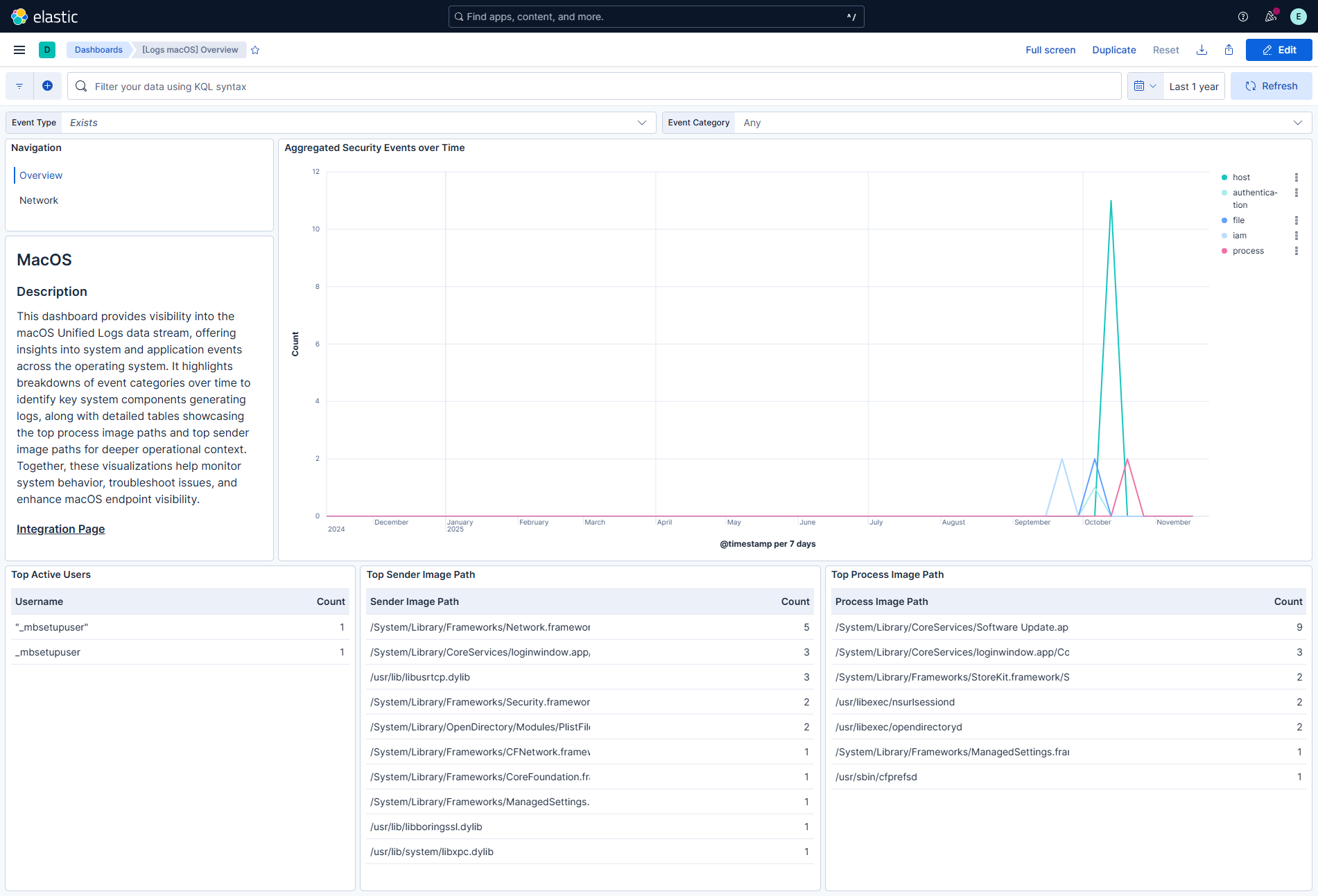
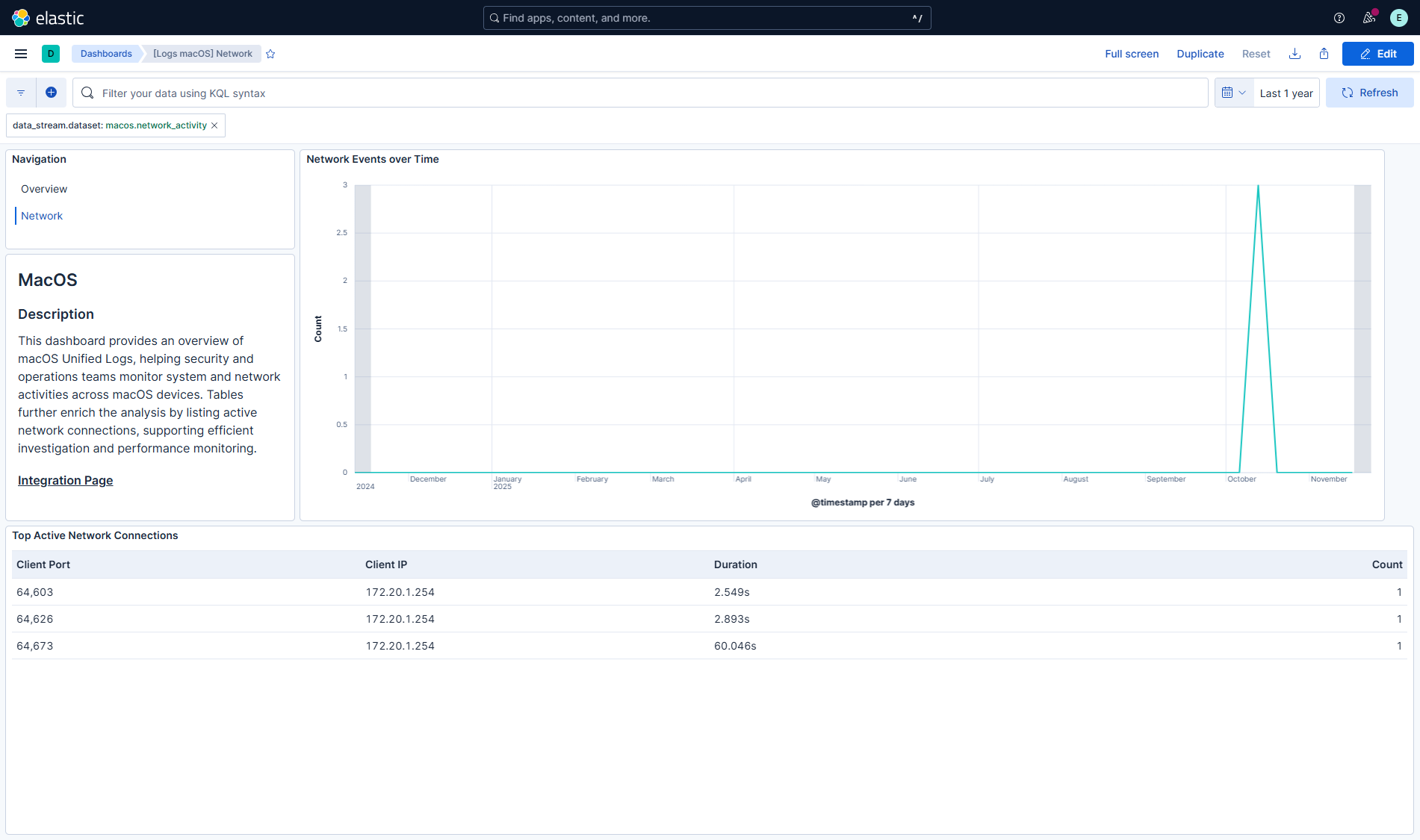
This integration includes one or more Kibana dashboards that visualizes the data collected by the integration. The screenshots below illustrate how the ingested data is displayed.
Changelog
| Version | Details | Minimum Kibana version |
|---|---|---|
| 1.0.2 | Bug fix (View pull request) Add darwin platform condition to all unifiedlogs data stream inputs to prevent failures on non-macOS agents in mixed policies. |
9.0.0 8.18.0 |
| 1.0.1 | Enhancement (View pull request) Transfer package ownership to elastic/security-service-integrations. |
9.0.0 8.18.0 |
| 1.0.0 | Enhancement (View pull request) GA release. Renamed integration to macOS Security Events. |
9.0.0 8.18.0 |
| 0.1.0 | Enhancement (View pull request) Initial release. |
9.0.0 8.18.0 |