Jamf Pro integration
| Version | 3.0.0 (View all) |
| Managed integration release status | GA |
| Subscription level What's this? |
Basic |
| Developed by What's this? |
Elastic |
| Ingestion method(s) | API, AWS S3, Webhook |
| Minimum Kibana version(s) | 9.0.5 8.19.2 |
You can use this integration as an Elastic Managed integration on Elastic Cloud Hosted deployments running this version or later.
Jamf Pro is a comprehensive management solution designed to help organizations deploy, configure, secure, and manage Apple devices. This integration enables organizations to seamlessly monitor and protect their Mac fleet through Elastic, providing a unified view of security events across all endpoints and facilitating a more effective response to threats. This integration encompasses both event and inventory data ingestion from Jamf Pro.
Agentless integrations allow you to collect data without having to manage Elastic Agent in your cloud. They make manual agent deployment unnecessary, so you can focus on your data instead of the agent that collects it. For more information, refer to Agentless integrations and the Agentless integrations FAQ. Agentless deployments are only supported in Elastic Serverless and Elastic Cloud environments. This functionality is in beta and is subject to change. Beta features are not subject to the support SLA of official GA features.
When using this integration as an Elastic Managed integration, only the Inventory data data stream is available. This data stream uses inputs compatible with the Elastic Managed deployment mode. Other data streams (Jamf Pro Access Logs and Jamf Pro Events) require AWS S3 or HTTP Endpoint inputs, which are not supported in the Elastic Managed deployment mode. To collect data from these data streams, use Elastic Agent.
inventoryProvides Inventory data for computers. Includes: hardware, OS, etc. Saves each device as a separate log record.
This data stream utilizes the Jamf Pro API's/v1/computers-inventoryendpoint.eventsReceives events sent by Jamf Pro Webhooks.
This data stream requires opening a port on the Elastic Agent host.accessCollects Jamf Pro Log Stream access logs (logins, logouts, API token operations) delivered to AWS S3, read directly or via SQS.change_managementReceives Jamf Pro Log Stream change management logs. These arrive on theaccessinput and are rerouted to this data stream by ingest routing rules; no separate input is configured.
- Jamf Pro Active License and OAuth2 Credentials
This connector utilizes Jamf Pro API, therefore an active license - either Jamf Business or Enterprise - is required (Jamf Now does not have access to the API)
HTTP(S) port open for incoming connections
A port for incoming connections (9202by default) will be set during policy configuration. This port on host must be accessible from the Jamf server.Jamf Pro webhooks
Please refer to the Jamf Pro documentation about Setting up webhooks.
NOTE: For HTTPS usage, a valid, trusted certificate is essential; Jamf Pro webhooks cannot accept a self-signed certificate. If necessary, the HTTP protocol may serve as a fallback option. Although Jamf Pro webhooks do not require HTTPS, its use is strongly recommended for security reasons.
To create a connection to Jamf Pro, an application must be created first. Credentials generated during this process are required for the subsequent steps.
Permissions required by the Jamf Pro application:
- Read Computer Inventory Collection: Access to read inventory data from the computer collection.
- Read Computers: Allows the application to access and read data from computers.
Jamf Pro API Credentials
client_idis an app specific ID generated during app creation, and is available in the app settings.client_secretis only available once after app creation. Can be regenerated if lost.
Permissions can be set up on app creation or can be updated for existing app
To set up the inventory data stream these three fields are required:
api_host(the Jamf Pro host)client_idclient_secret
The events data stream is a passive listener, it should be set up before webhooks are created in the Jamf Pro Dashboard.
The following network settings should be confirmed by an IT or security person:
- Listen Address
- Listen Port
- URL
Auth settings will be required for the Jamf Pro Webhook settings:
- Secret Header
- Secret Value
Please follow the Jamf Pro Webhooks documentation.
You will require the following settings:
Webhook URL: must be in form
https://your-elastic-agent:9202/jamf-pro-events
Note:9202is a port and/jamf-pro-eventsare default values and can be changed this connector's setup.Authentication type: "None" and "Header Authentication" are supported.
"None" means the (target) Webhook URL is available without authentication, so no secret header or secret value were set during integration policy configuration.
"Header Authentication" will require an auth token name and value, set during integration policy configuration.
| Jamf Pro setting | Corresponding integration setting | Example value |
|---|---|---|
| Webhook URL | Port + URL | https://your-elastic-agent:${PORT}${URL} |
| Authentication type | Header Authentication | |
| Header Authentication | Secret Header + Secret Value | {"${Header}":"${Value}"} |
Content Type:
JSONWebhook Event: Event to be selected. In case set of events is required, 1:1 webhooks should be created.
The access and change management data streams collect logs from the Jamf Pro Log Stream via AWS S3. To set them up:
- In Jamf Pro, navigate to Settings > System > Jamf Pro Log Stream and enable log streaming to AWS S3. Select the Access and Change Management log types.
- Create or reuse the S3 bucket that Jamf Pro will write to.
- (SQS mode, default) Create an SQS queue and add an S3 event notification
for
s3:ObjectCreated:*that targets the queue. In the integration policy, provide the Queue URL. - (S3 polling mode) Enable Collect logs via S3 Bucket in the integration policy and provide the Bucket ARN instead.
- Grant the credentials used by Elastic Agent the following IAM permissions:
s3:GetObjectands3:ListBucketon the bucket.- For SQS mode:
sqs:ReceiveMessage,sqs:DeleteMessage, andsqs:ChangeMessageVisibilityon the queue.
Inventory documents can be found in logs-* by setting the filter event.dataset :"jamf_pro.inventory".
By default these sections are included inventory documents:
GENERALHARDWAREOPERATING_SYSTEM
All the sections can be enabled or disabled on the integration policy settings page.
This integration includes a latest transform that maintains a single up-to-date
document per device in a dedicated index. The transform destination is accessible
via the logs-jamf_pro_latest.inventory alias.
The source data stream accumulates all inventory snapshots (one per device per
report cycle). A default ILM policy rolls the source index over every 7 days and
deletes each rolled-over index 30 days later. The transform's retention policy
removes devices from the latest index whose @timestamp is more than 30 days
old.
Here is an example inventory document:
Example
{
    "@timestamp": "2025-09-11T06:28:58.396Z",
    "agent": {
        "ephemeral_id": "69860cc1-6d27-47ce-9f09-fee5748b03d8",
        "id": "cb6bd8dd-e2fb-46d0-9849-66f25eb830d9",
        "name": "elastic-agent-79227",
        "type": "filebeat",
        "version": "8.15.0"
    },
    "data_stream": {
        "dataset": "jamf_pro.inventory",
        "namespace": "47676",
        "type": "logs"
    },
    "ecs": {
        "version": "8.17.0"
    },
    "elastic_agent": {
        "id": "cb6bd8dd-e2fb-46d0-9849-66f25eb830d9",
        "snapshot": false,
        "version": "8.15.0"
    },
    "event": {
        "agent_id_status": "verified",
        "dataset": "jamf_pro.inventory",
        "ingested": "2025-09-11T06:29:01Z",
        "kind": "asset"
    },
    "host": {
        "id": "5982CE36-4526-580B-B4B9-ECC6782535BB",
        "name": "acme-C07DM3AZQ6NV",
        "ip": [
            "10.122.26.87"
        ]
    },
    "input": {
        "type": "cel"
    },
    "jamf_pro": {
        "inventory": {
            "general": {
                "barcode1": "null",
                "declarative_device_management_enabled": false,
                "enrolled_via_automated_device_enrollment": false,
                "initial_entry_date": "2024-06-19",
                "itunes_store_account_active": false,
                "jamf_binary_version": "11.4.1-t1712591696",
                "last_contact_time": "2024-04-18T14:26:51.514Z",
                "last_enrolled_date": "2023-02-22T10:46:17.199Z",
                "last_ip_address": "10.122.26.87",
                "last_reported_ip": "10.122.26.87",
                "management_id": "1a59c510-b3a9-41cb-8afa-3d4187ac60d0",
                "mdm_capable": {
                    "capable": false
                },
                "name": "acme-C07DM3AZQ6NV",
                "platform": "Mac",
                "remote_management": {
                    "managed": true
                },
                "report_date": "2024-06-19T15:54:37.68Z",
                "site": {
                    "id": "-1",
                    "name": "None"
                },
                "supervised": false,
                "user_approved_mdm": false
            },
            "id": "3",
            "udid": "5982CE36-4526-580B-B4B9-ECC6782535BB"
        }
    },
    "os": {
        "platform": "Mac"
    },
    "related": {
        "ip": [
            "10.122.26.87"
        ]
    },
    "tags": [
        "forwarded"
    ]
}
The following non-ECS fields are used in inventory documents:
Exported fields
| Field | Description | Type |
|---|---|---|
| @timestamp | Date/time when the event originated. This is the date/time extracted from the event, typically representing when the event was generated by the source. If the event source has no original timestamp, this value is typically populated by the first time the event was received by the pipeline. Required field for all events. | date |
| data_stream.dataset | The field can contain anything that makes sense to signify the source of the data. Examples include nginx.access, prometheus, endpoint etc. For data streams that otherwise fit, but that do not have dataset set we use the value "generic" for the dataset value. event.dataset should have the same value as data_stream.dataset. Beyond the Elasticsearch data stream naming criteria noted above, the dataset value has additional restrictions: * Must not contain - * No longer than 100 characters |
constant_keyword |
| data_stream.namespace | A user defined namespace. Namespaces are useful to allow grouping of data. Many users already organize their indices this way, and the data stream naming scheme now provides this best practice as a default. Many users will populate this field with default. If no value is used, it falls back to default. Beyond the Elasticsearch index naming criteria noted above, namespace value has the additional restrictions: * Must not contain - * No longer than 100 characters |
constant_keyword |
| data_stream.type | An overarching type for the data stream. Currently allowed values are "logs" and "metrics". We expect to also add "traces" and "synthetics" in the near future. | constant_keyword |
| event.dataset | Name of the dataset. If an event source publishes more than one type of log or events (e.g. access log, error log), the dataset is used to specify which one the event comes from. It's recommended but not required to start the dataset name with the module name, followed by a dot, then the dataset name. | constant_keyword |
| event.module | Name of the module this data is coming from. If your monitoring agent supports the concept of modules or plugins to process events of a given source (e.g. Apache logs), event.module should contain the name of this module. |
constant_keyword |
| host.entity.attributes.managed | Indicates whether the entity is managed by an external administration or control system. Typically applicable to Host and Service entities. | boolean |
| host.entity.lifecycle.last_activity | Timestamp of the most recent action performed by or attributed to this entity (active use). Distinct from entity.last_seen_timestamp, which records when the entity was last observed in data; last_activity implies the entity was active, not only seen. Typically applicable to User, Host, and Service entities. |
date |
| input.type | Input type | keyword |
| jamf_pro.inventory.applications.bundle_id | keyword | |
| jamf_pro.inventory.applications.external_version_id | keyword | |
| jamf_pro.inventory.applications.mac_app_store | boolean | |
| jamf_pro.inventory.applications.name | keyword | |
| jamf_pro.inventory.applications.path | keyword | |
| jamf_pro.inventory.applications.size_megabytes | float | |
| jamf_pro.inventory.applications.update_available | boolean | |
| jamf_pro.inventory.applications.version | keyword | |
| jamf_pro.inventory.attachments | nested | |
| jamf_pro.inventory.certificates | nested | |
| jamf_pro.inventory.configuration_profiles.display_name | keyword | |
| jamf_pro.inventory.configuration_profiles.id | keyword | |
| jamf_pro.inventory.configuration_profiles.last_installed | date | |
| jamf_pro.inventory.configuration_profiles.profile_identifier | keyword | |
| jamf_pro.inventory.configuration_profiles.removable | boolean | |
| jamf_pro.inventory.configuration_profiles.username | keyword | |
| jamf_pro.inventory.disk_encryption.boot_partition_encryption_details.partition_file_vault2percent | float | |
| jamf_pro.inventory.disk_encryption.boot_partition_encryption_details.partition_file_vault2state | keyword | |
| jamf_pro.inventory.disk_encryption.boot_partition_encryption_details.partition_name | keyword | |
| jamf_pro.inventory.disk_encryption.disk_encryption_configuration_name | keyword | |
| jamf_pro.inventory.disk_encryption.file_vault2eligibility_message | text | |
| jamf_pro.inventory.disk_encryption.file_vault2enabled_user_names | keyword | |
| jamf_pro.inventory.disk_encryption.individual_recovery_key_validity_status | keyword | |
| jamf_pro.inventory.disk_encryption.institutional_recovery_key_present | boolean | |
| jamf_pro.inventory.error.message | text | |
| jamf_pro.inventory.extension_attributes | nested | |
| jamf_pro.inventory.fonts | nested | |
| jamf_pro.inventory.general.asset_tag | keyword | |
| jamf_pro.inventory.general.barcode1 | keyword | |
| jamf_pro.inventory.general.barcode2 | keyword | |
| jamf_pro.inventory.general.declarative_device_management_enabled | boolean | |
| jamf_pro.inventory.general.distribution_point | keyword | |
| jamf_pro.inventory.general.enrolled_via_automated_device_enrollment | boolean | |
| jamf_pro.inventory.general.enrollment_method.id | keyword | |
| jamf_pro.inventory.general.enrollment_method.object_name | keyword | |
| jamf_pro.inventory.general.enrollment_method.object_type | keyword | |
| jamf_pro.inventory.general.initial_entry_date | date | |
| jamf_pro.inventory.general.itunes_store_account_active | boolean | |
| jamf_pro.inventory.general.jamf_binary_version | keyword | |
| jamf_pro.inventory.general.last_cloud_backup_date | date | |
| jamf_pro.inventory.general.last_contact_time | date | |
| jamf_pro.inventory.general.last_enrolled_date | date | |
| jamf_pro.inventory.general.last_ip_address | ip | |
| jamf_pro.inventory.general.last_ip_address_geo.city_name | keyword | |
| jamf_pro.inventory.general.last_ip_address_geo.continent_name | keyword | |
| jamf_pro.inventory.general.last_ip_address_geo.country_iso_code | keyword | |
| jamf_pro.inventory.general.last_ip_address_geo.country_name | keyword | |
| jamf_pro.inventory.general.last_ip_address_geo.location | geo_point | |
| jamf_pro.inventory.general.last_ip_address_geo.region_iso_code | keyword | |
| jamf_pro.inventory.general.last_ip_address_geo.region_name | keyword | |
| jamf_pro.inventory.general.last_reported_ip | ip | |
| jamf_pro.inventory.general.management_id | keyword | |
| jamf_pro.inventory.general.mdm_capable.capable | boolean | |
| jamf_pro.inventory.general.mdm_capable.capable_users | keyword | |
| jamf_pro.inventory.general.mdm_profile_expiration | date | |
| jamf_pro.inventory.general.name | keyword | |
| jamf_pro.inventory.general.platform | keyword | |
| jamf_pro.inventory.general.remote_management.managed | boolean | |
| jamf_pro.inventory.general.remote_management.management_username | keyword | |
| jamf_pro.inventory.general.report_date | date | |
| jamf_pro.inventory.general.site.id | keyword | |
| jamf_pro.inventory.general.site.name | keyword | |
| jamf_pro.inventory.general.supervised | boolean | |
| jamf_pro.inventory.general.user_approved_mdm | boolean | |
| jamf_pro.inventory.group_memberships.group_id | keyword | |
| jamf_pro.inventory.group_memberships.group_name | keyword | |
| jamf_pro.inventory.group_memberships.smart_group | boolean | |
| jamf_pro.inventory.hardware.alt_mac_address | keyword | |
| jamf_pro.inventory.hardware.alt_network_adapter_type | keyword | |
| jamf_pro.inventory.hardware.apple_silicon | boolean | |
| jamf_pro.inventory.hardware.battery_capacity_percent | integer | |
| jamf_pro.inventory.hardware.ble_capable | boolean | |
| jamf_pro.inventory.hardware.boot_rom | keyword | |
| jamf_pro.inventory.hardware.bus_speed_mhz | long | |
| jamf_pro.inventory.hardware.cache_size_kilobytes | long | |
| jamf_pro.inventory.hardware.core_count | integer | |
| jamf_pro.inventory.hardware.mac_address | keyword | |
| jamf_pro.inventory.hardware.make | keyword | |
| jamf_pro.inventory.hardware.model | keyword | |
| jamf_pro.inventory.hardware.model_identifier | keyword | |
| jamf_pro.inventory.hardware.network_adapter_type | keyword | |
| jamf_pro.inventory.hardware.nic_speed | keyword | |
| jamf_pro.inventory.hardware.open_ram_slots | integer | |
| jamf_pro.inventory.hardware.optical_drive | keyword | |
| jamf_pro.inventory.hardware.processor_architecture | keyword | |
| jamf_pro.inventory.hardware.processor_count | integer | |
| jamf_pro.inventory.hardware.processor_speed_mhz | long | |
| jamf_pro.inventory.hardware.processor_type | keyword | |
| jamf_pro.inventory.hardware.serial_number | keyword | |
| jamf_pro.inventory.hardware.smc_version | keyword | |
| jamf_pro.inventory.hardware.supports_ios_app_installs | boolean | |
| jamf_pro.inventory.hardware.total_ram_megabytes | long | |
| jamf_pro.inventory.ibeacons | nested | |
| jamf_pro.inventory.id | keyword | |
| jamf_pro.inventory.licensed_software | nested | |
| jamf_pro.inventory.local_user_accounts.admin | boolean | |
| jamf_pro.inventory.local_user_accounts.azure_active_directory_id | keyword | |
| jamf_pro.inventory.local_user_accounts.computer_azure_active_directory_id | keyword | |
| jamf_pro.inventory.local_user_accounts.email | keyword | |
| jamf_pro.inventory.local_user_accounts.file_vault2enabled | boolean | |
| jamf_pro.inventory.local_user_accounts.full_name | keyword | |
| jamf_pro.inventory.local_user_accounts.fullname | keyword | |
| jamf_pro.inventory.local_user_accounts.home_directory | keyword | |
| jamf_pro.inventory.local_user_accounts.home_directory_size_mb | float | |
| jamf_pro.inventory.local_user_accounts.password_history_depth | integer | |
| jamf_pro.inventory.local_user_accounts.password_max_age | integer | |
| jamf_pro.inventory.local_user_accounts.password_min_complex_characters | integer | |
| jamf_pro.inventory.local_user_accounts.password_min_length | integer | |
| jamf_pro.inventory.local_user_accounts.password_require_alphanumeric | boolean | |
| jamf_pro.inventory.local_user_accounts.uid | keyword | |
| jamf_pro.inventory.local_user_accounts.user_account_type | keyword | |
| jamf_pro.inventory.local_user_accounts.user_azure_active_directory_id | keyword | |
| jamf_pro.inventory.local_user_accounts.user_guid | keyword | |
| jamf_pro.inventory.local_user_accounts.username | keyword | |
| jamf_pro.inventory.operating_system.active_directory_status | keyword | |
| jamf_pro.inventory.operating_system.build | keyword | |
| jamf_pro.inventory.operating_system.file_vault2status | keyword | |
| jamf_pro.inventory.operating_system.name | keyword | |
| jamf_pro.inventory.operating_system.rapid_security_response | keyword | |
| jamf_pro.inventory.operating_system.software_update_device_id | keyword | |
| jamf_pro.inventory.operating_system.supplemental_build_version | keyword | |
| jamf_pro.inventory.operating_system.version | keyword | |
| jamf_pro.inventory.package_receipts.cached | keyword | |
| jamf_pro.inventory.package_receipts.installed_by_installer_swu | keyword | |
| jamf_pro.inventory.package_receipts.installed_by_jamf_pro | keyword | |
| jamf_pro.inventory.plugins | nested | |
| jamf_pro.inventory.printers | nested | |
| jamf_pro.inventory.purchasing.apple_care_id | keyword | |
| jamf_pro.inventory.purchasing.extension_attributes | nested | |
| jamf_pro.inventory.purchasing.lease_date | date | |
| jamf_pro.inventory.purchasing.leased | boolean | |
| jamf_pro.inventory.purchasing.life_expectancy | integer | |
| jamf_pro.inventory.purchasing.po_date | date | |
| jamf_pro.inventory.purchasing.po_number | keyword | |
| jamf_pro.inventory.purchasing.purchase_price | float | |
| jamf_pro.inventory.purchasing.purchased | boolean | |
| jamf_pro.inventory.purchasing.purchasing_account | keyword | |
| jamf_pro.inventory.purchasing.purchasing_contact | keyword | |
| jamf_pro.inventory.purchasing.vendor | keyword | |
| jamf_pro.inventory.purchasing.warranty_date | date | |
| jamf_pro.inventory.security.activation_lock_enabled | boolean | |
| jamf_pro.inventory.security.auto_login_disabled | boolean | |
| jamf_pro.inventory.security.bootstrap_token_allowed | boolean | |
| jamf_pro.inventory.security.bootstrap_token_escrowed_status | keyword | |
| jamf_pro.inventory.security.external_boot_level | keyword | |
| jamf_pro.inventory.security.firewall_enabled | boolean | |
| jamf_pro.inventory.security.gatekeeper_status | keyword | |
| jamf_pro.inventory.security.recovery_lock_enabled | boolean | |
| jamf_pro.inventory.security.remote_desktop_enabled | boolean | |
| jamf_pro.inventory.security.secure_boot_level | keyword | |
| jamf_pro.inventory.security.sip_status | keyword | |
| jamf_pro.inventory.security.xprotect_version | keyword | |
| jamf_pro.inventory.services | nested | |
| jamf_pro.inventory.software_updates.name | keyword | |
| jamf_pro.inventory.software_updates.package_name | keyword | |
| jamf_pro.inventory.software_updates.version | keyword | |
| jamf_pro.inventory.storage.boot_drive_available_space_megabytes | long | |
| jamf_pro.inventory.storage.disks.device | keyword | |
| jamf_pro.inventory.storage.disks.id | keyword | |
| jamf_pro.inventory.storage.disks.model | keyword | |
| jamf_pro.inventory.udid | keyword | |
| jamf_pro.inventory.user_and_location.building_id | keyword | |
| jamf_pro.inventory.user_and_location.department_id | keyword | |
| jamf_pro.inventory.user_and_location.email | keyword | |
| jamf_pro.inventory.user_and_location.extension_attributes | nested | |
| jamf_pro.inventory.user_and_location.phone | keyword | |
| jamf_pro.inventory.user_and_location.position | keyword | |
| jamf_pro.inventory.user_and_location.realname | keyword | |
| jamf_pro.inventory.user_and_location.room | keyword | |
| jamf_pro.inventory.user_and_location.username | keyword | |
| labels.is_transform_source | Distinguishes between documents that are a source for a transform and documents that are an output of a transform, to facilitate easier filtering. | constant_keyword |
Documents from events data_stream are saved under logs-* and can be found on discover page with filtering by event.dataset :"jamf_pro.events"
Here is an example real-time event document:
Example
{
    "@timestamp": "2026-07-29T03:47:37.429Z",
    "agent": {
        "ephemeral_id": "14d3d101-ec1d-4152-be66-ea3a0103cf37",
        "id": "da3cee98-ea12-42e4-bed8-53fa9ca483e0",
        "name": "elastic-agent-22239",
        "type": "filebeat",
        "version": "8.19.2"
    },
    "data_stream": {
        "dataset": "jamf_pro.events",
        "namespace": "20970",
        "type": "logs"
    },
    "ecs": {
        "version": "8.17.0"
    },
    "elastic_agent": {
        "id": "da3cee98-ea12-42e4-bed8-53fa9ca483e0",
        "snapshot": false,
        "version": "8.19.2"
    },
    "event": {
        "action": "ComputerAdded",
        "agent_id_status": "verified",
        "category": [
            "host"
        ],
        "dataset": "jamf_pro.events",
        "ingested": "2026-07-29T03:47:38Z",
        "kind": "event",
        "original": "{\"event\":{\"alternateMacAddress\":\"be:aa:e5:54:94:db\",\"building\":\"1S8NPV\",\"department\":\"XDO4C5\",\"deviceName\":\"VPNYC\",\"emailAddress\":\"kghrqq@email.com\",\"ipAddress\":\"89.160.20.156\",\"jssID\":\"1500747557\",\"macAddress\":\"be:aa:e5:54:94:db\",\"managementId\":\"6319330669\",\"model\":\"LJ68RT\",\"osBuild\":\"26.6913\",\"osVersion\":\"92.5786\",\"phone\":\"2183546\",\"position\":\"B64JIO\",\"realName\":\"CPK79\",\"reportedIpAddress\":\"89.160.20.156\",\"room\":\"HQC6S9\",\"serialNumber\":\"7967177\",\"udid\":\"7265694772\",\"userDirectory_id\":\"0389771137\",\"username\":\"John Doe\"},\"webhook\":{\"eventTimestamp\":1725443872001,\"id\":\"8131946016\",\"name\":\"PU17M\",\"webhookEvent\":\"ComputerAdded\"}}",
        "type": [
            "change"
        ]
    },
    "host": {
        "entity": {
            "lifecycle": {
                "last_activity": "2024-09-04T09:57:52.001Z"
            }
        },
        "geo": {
            "city_name": "Linköping",
            "continent_name": "Europe",
            "country_iso_code": "SE",
            "country_name": "Sweden",
            "location": {
                "lat": 58.4167,
                "lon": 15.6167
            },
            "region_iso_code": "SE-E",
            "region_name": "Östergötland County"
        },
        "ip": [
            "89.160.20.156"
        ],
        "os": {
            "version": "92.5786"
        }
    },
    "input": {
        "type": "http_endpoint"
    },
    "jamf_pro": {
        "events": {
            "event": {
                "alternate_mac_address": "be:aa:e5:54:94:db",
                "building": "1S8NPV",
                "department": "XDO4C5",
                "device_name": "VPNYC",
                "email_address": "kghrqq@email.com",
                "ip_address": "89.160.20.156",
                "jss_id": "1500747557",
                "mac_address": "be:aa:e5:54:94:db",
                "management_id": "6319330669",
                "model": "LJ68RT",
                "os_build": "26.6913",
                "os_version": "92.5786",
                "phone": "2183546",
                "position": "B64JIO",
                "real_name": "CPK79",
                "reported_ip_address": "89.160.20.156",
                "room": "HQC6S9",
                "serial_number": "7967177",
                "udid": "7265694772",
                "user_directory_id": "0389771137",
                "username": "John Doe"
            },
            "webhook": {
                "event_timestamp": "2024-09-04T09:57:52.001Z",
                "id": "8131946016",
                "name": "PU17M",
                "webhook_event": "ComputerAdded"
            }
        }
    },
    "related": {
        "user": [
            "John Doe",
            "kghrqq@email.com"
        ]
    },
    "tags": [
        "preserve_original_event",
        "preserve_duplicate_custom_fields",
        "forwarded",
        "jamf_pro-events"
    ],
    "user": {
        "email": "kghrqq@email.com",
        "name": "John Doe"
    }
}
The following non-ECS fields are used in real-time event documents:
Exported fields
| Field | Description | Type |
|---|---|---|
| @timestamp | Date/time when the event originated. This is the date/time extracted from the event, typically representing when the event was generated by the source. If the event source has no original timestamp, this value is typically populated by the first time the event was received by the pipeline. Required field for all events. | date |
| data_stream.dataset | The field can contain anything that makes sense to signify the source of the data. Examples include nginx.access, prometheus, endpoint etc. For data streams that otherwise fit, but that do not have dataset set we use the value "generic" for the dataset value. event.dataset should have the same value as data_stream.dataset. Beyond the Elasticsearch data stream naming criteria noted above, the dataset value has additional restrictions: * Must not contain - * No longer than 100 characters |
constant_keyword |
| data_stream.namespace | A user defined namespace. Namespaces are useful to allow grouping of data. Many users already organize their indices this way, and the data stream naming scheme now provides this best practice as a default. Many users will populate this field with default. If no value is used, it falls back to default. Beyond the Elasticsearch index naming criteria noted above, namespace value has the additional restrictions: * Must not contain - * No longer than 100 characters |
constant_keyword |
| data_stream.type | An overarching type for the data stream. Currently allowed values are "logs" and "metrics". We expect to also add "traces" and "synthetics" in the near future. | constant_keyword |
| event.dataset | Name of the dataset. If an event source publishes more than one type of log or events (e.g. access log, error log), the dataset is used to specify which one the event comes from. It's recommended but not required to start the dataset name with the module name, followed by a dot, then the dataset name. | constant_keyword |
| event.module | Name of the module this data is coming from. If your monitoring agent supports the concept of modules or plugins to process events of a given source (e.g. Apache logs), event.module should contain the name of this module. |
constant_keyword |
| host.entity.lifecycle.last_activity | Timestamp of the most recent action performed by or attributed to this entity (active use). Distinct from entity.last_seen_timestamp, which records when the entity was last observed in data; last_activity implies the entity was active, not only seen. Typically applicable to User, Host, and Service entities. |
date |
| input.type | keyword | |
| jamf_pro.events.event.alternate_mac_address | keyword | |
| jamf_pro.events.event.asset_tag | keyword | |
| jamf_pro.events.event.authorized_username | keyword | |
| jamf_pro.events.event.bluetooth_mac_address | keyword | |
| jamf_pro.events.event.building | keyword | |
| jamf_pro.events.event.computer.alternate_mac_address | keyword | |
| jamf_pro.events.event.computer.building | keyword | |
| jamf_pro.events.event.computer.department | keyword | |
| jamf_pro.events.event.computer.device_name | keyword | |
| jamf_pro.events.event.computer.email_address | keyword | |
| jamf_pro.events.event.computer.ip_address | ip | |
| jamf_pro.events.event.computer.jss_id | integer | |
| jamf_pro.events.event.computer.mac_address | keyword | |
| jamf_pro.events.event.computer.management_id | keyword | |
| jamf_pro.events.event.computer.model | keyword | |
| jamf_pro.events.event.computer.os_build | keyword | |
| jamf_pro.events.event.computer.os_version | keyword | |
| jamf_pro.events.event.computer.phone | keyword | |
| jamf_pro.events.event.computer.position | keyword | |
| jamf_pro.events.event.computer.real_name | keyword | |
| jamf_pro.events.event.computer.reported_ip_address | ip | |
| jamf_pro.events.event.computer.room | keyword | |
| jamf_pro.events.event.computer.serial_number | keyword | |
| jamf_pro.events.event.computer.udid | keyword | |
| jamf_pro.events.event.computer.user_directory_id | keyword | |
| jamf_pro.events.event.computer.username | keyword | |
| jamf_pro.events.event.department | keyword | |
| jamf_pro.events.event.deployed_version | keyword | |
| jamf_pro.events.event.description | keyword | |
| jamf_pro.events.event.device_assigned_date | integer | |
| jamf_pro.events.event.device_enrollment_program_instance_id | integer | |
| jamf_pro.events.event.device_name | keyword | |
| jamf_pro.events.event.email_address | keyword | |
| jamf_pro.events.event.event_actions.action | keyword | |
| jamf_pro.events.event.group_added_devices | flattened | |
| jamf_pro.events.event.group_added_devices_ids | keyword | |
| jamf_pro.events.event.group_added_user_ids | keyword | |
| jamf_pro.events.event.group_removed_devices | flattened | |
| jamf_pro.events.event.group_removed_devices_ids | keyword | |
| jamf_pro.events.event.group_removed_user_ids | keyword | |
| jamf_pro.events.event.host_address | keyword | |
| jamf_pro.events.event.icci_id | keyword | |
| jamf_pro.events.event.imei | keyword | |
| jamf_pro.events.event.institution | keyword | |
| jamf_pro.events.event.ip_address | ip | |
| jamf_pro.events.event.is_cluster_master | boolean | |
| jamf_pro.events.event.is_computer | boolean | |
| jamf_pro.events.event.jss_id | integer | |
| jamf_pro.events.event.jss_url | keyword | |
| jamf_pro.events.event.jssid | integer | |
| jamf_pro.events.event.last_update | date | |
| jamf_pro.events.event.latest_version | keyword | |
| jamf_pro.events.event.mac_address | keyword | |
| jamf_pro.events.event.management_id | keyword | |
| jamf_pro.events.event.model | keyword | |
| jamf_pro.events.event.model_display | keyword | |
| jamf_pro.events.event.name | keyword | |
| jamf_pro.events.event.object_id | integer | |
| jamf_pro.events.event.object_name | keyword | |
| jamf_pro.events.event.object_type_name | keyword | |
| jamf_pro.events.event.operation_successful | boolean | |
| jamf_pro.events.event.os_build | keyword | |
| jamf_pro.events.event.os_version | keyword | |
| jamf_pro.events.event.patch_policy_id | integer | |
| jamf_pro.events.event.patch_policy_name | keyword | |
| jamf_pro.events.event.payload_identifier | keyword | |
| jamf_pro.events.event.payload_types | keyword | |
| jamf_pro.events.event.phone | keyword | |
| jamf_pro.events.event.policy_id | integer | |
| jamf_pro.events.event.position | keyword | |
| jamf_pro.events.event.product | keyword | |
| jamf_pro.events.event.real_name | keyword | |
| jamf_pro.events.event.report_urls | keyword | |
| jamf_pro.events.event.reported_ip_address | ip | |
| jamf_pro.events.event.rest_api_operation_type | keyword | |
| jamf_pro.events.event.room | keyword | |
| jamf_pro.events.event.scep_server_url | keyword | |
| jamf_pro.events.event.serial_number | keyword | |
| jamf_pro.events.event.smart_group | boolean | |
| jamf_pro.events.event.software_title_id | integer | |
| jamf_pro.events.event.successful | boolean | |
| jamf_pro.events.event.target_device.bluetooth_mac_address | keyword | |
| jamf_pro.events.event.target_device.device_name | keyword | |
| jamf_pro.events.event.target_device.icci_id | keyword | |
| jamf_pro.events.event.target_device.imei | keyword | |
| jamf_pro.events.event.target_device.model | keyword | |
| jamf_pro.events.event.target_device.model_display | keyword | |
| jamf_pro.events.event.target_device.os_build | keyword | |
| jamf_pro.events.event.target_device.os_version | keyword | |
| jamf_pro.events.event.target_device.product | keyword | |
| jamf_pro.events.event.target_device.room | keyword | |
| jamf_pro.events.event.target_device.serial_number | keyword | |
| jamf_pro.events.event.target_device.udid | keyword | |
| jamf_pro.events.event.target_device.user_directory_id | keyword | |
| jamf_pro.events.event.target_device.version | keyword | |
| jamf_pro.events.event.target_device.wifi_mac_address | keyword | |
| jamf_pro.events.event.target_user.building_id | integer | |
| jamf_pro.events.event.target_user.department_id | integer | |
| jamf_pro.events.event.target_user.dn | keyword | |
| jamf_pro.events.event.target_user.email | keyword | |
| jamf_pro.events.event.target_user.password | keyword | |
| jamf_pro.events.event.target_user.phone | keyword | |
| jamf_pro.events.event.target_user.position | keyword | |
| jamf_pro.events.event.target_user.realname | keyword | |
| jamf_pro.events.event.target_user.room | keyword | |
| jamf_pro.events.event.target_user.uid | keyword | |
| jamf_pro.events.event.target_user.username | keyword | |
| jamf_pro.events.event.target_user.uuid | keyword | |
| jamf_pro.events.event.trigger | keyword | |
| jamf_pro.events.event.type | keyword | |
| jamf_pro.events.event.udid | keyword | |
| jamf_pro.events.event.user_directory_id | keyword | |
| jamf_pro.events.event.username | keyword | |
| jamf_pro.events.event.version | keyword | |
| jamf_pro.events.event.web_application_path | keyword | |
| jamf_pro.events.event.wifi_mac_address | keyword | |
| jamf_pro.events.webhook.event_timestamp | date | |
| jamf_pro.events.webhook.id | integer | |
| jamf_pro.events.webhook.name | keyword | |
| jamf_pro.events.webhook.webhook_event | keyword |
The access data stream collects Jamf Pro Log Stream access logs delivered via
AWS S3. These logs record authentication events such as user logins, logouts,
and API token operations. Both access and change management logs arrive on this
data stream; change management events are automatically rerouted to the
change_management data stream by ingest routing rules.
To collect Jamf Pro Log Stream logs, configure the Jamf Pro Log Stream to deliver logs to an AWS S3 bucket, then configure the integration to read from that bucket (either directly or via an SQS queue).
Documents from the access data stream can be found with the filter
event.dataset: "jamf_pro.access".
Example
{
    "@timestamp": "2026-09-23T19:56:19.086595497Z",
    "ecs": {
        "version": "9.4.0"
    },
    "observer": {
        "vendor": "Jamf",
        "product": "Jamf Pro"
    },
    "event": {
        "kind": "event",
        "category": [
            "authentication"
        ],
        "type": [
            "start"
        ],
        "action": "Successful Login",
        "outcome": "success",
        "original": "{\"time\":\"2026-09-23T19:56:19.086595497Z\",\"message\":\"[JSSACCESSLOG] 2026-09-23T19:56:19,086 - username=kftyfgicvdsbhx@buqprrmmj.com, status=Successful Login, ipAddress=89.160.20.128, entryPoint=Single Sign On (OIDC)\"}",
        "module": "jamf_pro",
        "dataset": "jamf_pro.access"
    },
    "user": {
        "name": "kftyfgicvdsbhx@buqprrmmj.com"
    },
    "source": {
        "as": {
            "number": 29518,
            "organization": {
                "name": "Bredband2 AB"
            }
        },
        "geo": {
            "city_name": "Linköping",
            "continent_name": "Europe",
            "country_iso_code": "SE",
            "country_name": "Sweden",
            "location": {
                "lat": 58.4167,
                "lon": 15.6167
            },
            "region_iso_code": "SE-E",
            "region_name": "Östergötland County"
        },
        "ip": "89.160.20.128"
    },
    "related": {
        "ip": [
            "89.160.20.128"
        ],
        "user": [
            "kftyfgicvdsbhx@buqprrmmj.com"
        ]
    },
    "jamf_pro": {
        "access": {
            "username": "kftyfgicvdsbhx@buqprrmmj.com",
            "status": "Successful Login",
            "ip_address": "89.160.20.128",
            "entry_point": "Single Sign On (OIDC)"
        }
    },
    "tags": [
        "forwarded",
        "jamf_pro-access"
    ]
}
The following non-ECS fields are used in access documents:
Exported fields
| Field | Description | Type |
|---|---|---|
| @timestamp | Event timestamp. | date |
| aws.s3.bucket.arn | ARN of the S3 bucket that this log retrieved from. | keyword |
| aws.s3.bucket.name | Name of the S3 bucket that this log retrieved from. | keyword |
| aws.s3.object.key | Name of the S3 object that this log retrieved from. | keyword |
| data_stream.dataset | Data stream dataset. | constant_keyword |
| data_stream.namespace | Data stream namespace. | constant_keyword |
| data_stream.type | Data stream type. | constant_keyword |
| ecs.version | ECS version this event conforms to. ecs.version is a required field and must exist in all events. When querying across multiple indices -- which may conform to slightly different ECS versions -- this field lets integrations adjust to the schema version of the events. |
keyword |
| error.message | Error message. | match_only_text |
| event.action | The action captured by the event. This describes the information in the event. It is more specific than event.category. Examples are group-add, process-started, file-created. The value is normally defined by the implementer. |
keyword |
| event.category | This is one of four ECS Categorization Fields, and indicates the second level in the ECS category hierarchy. event.category represents the "big buckets" of ECS categories. For example, filtering on event.category:process yields all events relating to process activity. This field is closely related to event.type, which is used as a subcategory. This field is an array. This will allow proper categorization of some events that fall in multiple categories. |
keyword |
| event.dataset | Event dataset. | constant_keyword |
| event.kind | This is one of four ECS Categorization Fields, and indicates the highest level in the ECS category hierarchy. event.kind gives high-level information about what type of information the event contains, without being specific to the contents of the event. For example, values of this field distinguish alert events from metric events. The value of this field can be used to inform how these kinds of events should be handled. They may warrant different retention, different access control, it may also help understand whether the data is coming in at a regular interval or not. |
keyword |
| event.module | Event module. | constant_keyword |
| event.original | Raw text message of entire event. Used to demonstrate log integrity or where the full log message (before splitting it up in multiple parts) may be required, e.g. for reindex. This field is not indexed and doc_values are disabled. It cannot be searched, but it can be retrieved from _source. If users wish to override this and index this field, please see Field data types in the Elasticsearch Reference. |
keyword |
| event.outcome | This is one of four ECS Categorization Fields, and indicates the lowest level in the ECS category hierarchy. event.outcome simply denotes whether the event represents a success or a failure from the perspective of the entity that produced the event. Note that when a single transaction is described in multiple events, each event may populate different values of event.outcome, according to their perspective. Also note that in the case of a compound event (a single event that contains multiple logical events), this field should be populated with the value that best captures the overall success or failure from the perspective of the event producer. Further note that not all events will have an associated outcome. For example, this field is generally not populated for metric events, events with event.type:info, or any events for which an outcome does not make logical sense. |
keyword |
| event.type | This is one of four ECS Categorization Fields, and indicates the third level in the ECS category hierarchy. event.type represents a categorization "sub-bucket" that, when used along with the event.category field values, enables filtering events down to a level appropriate for single visualization. This field is an array. This will allow proper categorization of some events that fall in multiple event types. |
keyword |
| input.type | Type of filebeat input. | keyword |
| jamf_pro.access.entry_point | The interface through which the access was made, such as Universal API (OAuth), Single Sign On (OIDC), JSS, or Self Service (macOS). | keyword |
| jamf_pro.access.ip_address | The IP address of the client that performed the access action. | keyword |
| jamf_pro.access.status | The result status of the access attempt, such as Successful Login or Failed token creation. | keyword |
| jamf_pro.access.username | The username that performed the access action. | keyword |
| log.offset | Log offset. | long |
| message | For log events the message field contains the log message, optimized for viewing in a log viewer. For structured logs without an original message field, other fields can be concatenated to form a human-readable summary of the event. If multiple messages exist, they can be combined into one message. | match_only_text |
| observer.product | The product name of the observer. | keyword |
| observer.vendor | Vendor name of the observer. | keyword |
| related.ip | All of the IPs seen on your event. | ip |
| related.user | All the user names or other user identifiers seen on the event. | keyword |
| source.as.number | Unique number allocated to the autonomous system. The autonomous system number (ASN) uniquely identifies each network on the Internet. | long |
| source.as.organization.name | Organization name. | keyword |
| source.as.organization.name.text | Multi-field of source.as.organization.name. |
match_only_text |
| source.geo.city_name | City name. | keyword |
| source.geo.continent_name | Name of the continent. | keyword |
| source.geo.country_iso_code | Country ISO code. | keyword |
| source.geo.country_name | Country name. | keyword |
| source.geo.location | Longitude and latitude. | geo_point |
| source.geo.region_iso_code | Region ISO code. | keyword |
| source.geo.region_name | Region name. | keyword |
| source.ip | IP address of the source (IPv4 or IPv6). | ip |
| tags | List of keywords used to tag each event. | keyword |
| user.name | Short name or login of the user. | keyword |
| user.name.text | Multi-field of user.name. |
match_only_text |
The change management data stream collects Jamf Pro Log Stream change management logs. These logs record configuration changes such as creating, reading, updating, or deleting objects in Jamf Pro (computers, policies, configuration profiles, etc.).
Change management events are automatically rerouted from the access data stream. No separate input configuration is required.
Documents from the change management data stream can be found with the filter
event.dataset: "jamf_pro.change_management".
Example
{
    "@timestamp": "2026-09-23T19:56:45.940685642Z",
    "ecs": {
        "version": "9.4.0"
    },
    "event": {
        "action": "DELETE",
        "category": [
            "configuration"
        ],
        "dataset": "jamf_pro.change_management",
        "kind": "event",
        "module": "jamf_pro",
        "original": "{\"time\":\"2026-09-23T19:56:45.940685642Z\",\"message\":\"[CHANGEMANAGEMENT] 2026-09-23T19:56:45,940 [INFO ] [eralPool-47] [file                     ] - [dnopnmcns@buqprrmmj.com (ID: -1)] [DELETE] [Computer] [2026-09-23T19:56:45.940+0000]\\n\\tID             2430\\n\\tName ......... ZO-RFLEIOF03I-Z\"}",
        "type": [
            "deletion"
        ]
    },
    "jamf_pro": {
        "change_management": {
            "actor": {
                "id": "-1",
                "name": "dnopnmcns@buqprrmmj.com"
            },
            "detail": "ID             2430\n\tName ......... ZO-RFLEIOF03I-Z",
            "log_level": "INFO",
            "object": {
                "id": "2430",
                "name": "ZO-RFLEIOF03I-Z"
            },
            "object_type": "Computer",
            "operation": "DELETE",
            "thread": "eralPool-47"
        }
    },
    "observer": {
        "product": "Jamf Pro",
        "vendor": "Jamf"
    },
    "related": {
        "user": [
            "dnopnmcns@buqprrmmj.com"
        ]
    },
    "user": {
        "id": "-1",
        "name": "dnopnmcns@buqprrmmj.com"
    },
    "tags": [
        "forwarded",
        "jamf_pro-change_management"
    ]
}
The following non-ECS fields are used in change management documents:
Exported fields
| Field | Description | Type |
|---|---|---|
| @timestamp | Event timestamp. | date |
| aws.s3.bucket.arn | ARN of the S3 bucket that this log retrieved from. | keyword |
| aws.s3.bucket.name | Name of the S3 bucket that this log retrieved from. | keyword |
| aws.s3.object.key | Name of the S3 object that this log retrieved from. | keyword |
| data_stream.dataset | Data stream dataset. | constant_keyword |
| data_stream.namespace | Data stream namespace. | constant_keyword |
| data_stream.type | Data stream type. | constant_keyword |
| ecs.version | ECS version this event conforms to. ecs.version is a required field and must exist in all events. When querying across multiple indices -- which may conform to slightly different ECS versions -- this field lets integrations adjust to the schema version of the events. |
keyword |
| error.message | Error message. | match_only_text |
| event.action | The action captured by the event. This describes the information in the event. It is more specific than event.category. Examples are group-add, process-started, file-created. The value is normally defined by the implementer. |
keyword |
| event.category | This is one of four ECS Categorization Fields, and indicates the second level in the ECS category hierarchy. event.category represents the "big buckets" of ECS categories. For example, filtering on event.category:process yields all events relating to process activity. This field is closely related to event.type, which is used as a subcategory. This field is an array. This will allow proper categorization of some events that fall in multiple categories. |
keyword |
| event.dataset | Event dataset. | constant_keyword |
| event.kind | This is one of four ECS Categorization Fields, and indicates the highest level in the ECS category hierarchy. event.kind gives high-level information about what type of information the event contains, without being specific to the contents of the event. For example, values of this field distinguish alert events from metric events. The value of this field can be used to inform how these kinds of events should be handled. They may warrant different retention, different access control, it may also help understand whether the data is coming in at a regular interval or not. |
keyword |
| event.module | Event module. | constant_keyword |
| event.original | Raw text message of entire event. Used to demonstrate log integrity or where the full log message (before splitting it up in multiple parts) may be required, e.g. for reindex. This field is not indexed and doc_values are disabled. It cannot be searched, but it can be retrieved from _source. If users wish to override this and index this field, please see Field data types in the Elasticsearch Reference. |
keyword |
| event.type | This is one of four ECS Categorization Fields, and indicates the third level in the ECS category hierarchy. event.type represents a categorization "sub-bucket" that, when used along with the event.category field values, enables filtering events down to a level appropriate for single visualization. This field is an array. This will allow proper categorization of some events that fall in multiple event types. |
keyword |
| input.type | Type of filebeat input. | keyword |
| jamf_pro.change_management.actor.id | The Jamf Pro internal ID of the actor (-1 for system, 0 for API clients, positive integers for human users). | keyword |
| jamf_pro.change_management.actor.name | The name or email of the actor who performed the change. | keyword |
| jamf_pro.change_management.detail | The full detail block of the change management entry, containing configuration settings or object properties. | text |
| jamf_pro.change_management.log_level | The log level of the change management entry (typically INFO). | keyword |
| jamf_pro.change_management.object.id | The ID of the object affected by the change, extracted from the detail block. | keyword |
| jamf_pro.change_management.object.name | The name of the object affected by the change, extracted from the detail block. | keyword |
| jamf_pro.change_management.object_type | The type of object affected by the change, such as Computer, Policy, or Smart Computer Group. | keyword |
| jamf_pro.change_management.operation | The change management operation performed (CREATE, READ, UPDATE, DELETE). | keyword |
| jamf_pro.change_management.thread | The application thread that generated the log entry. | keyword |
| log.offset | Log offset. | long |
| observer.product | The product name of the observer. | keyword |
| observer.vendor | Vendor name of the observer. | keyword |
| related.user | All the user names or other user identifiers seen on the event. | keyword |
| tags | List of keywords used to tag each event. | keyword |
| user.id | Unique identifier of the user. | keyword |
| user.name | Short name or login of the user. | keyword |
| user.name.text | Multi-field of user.name. |
match_only_text |
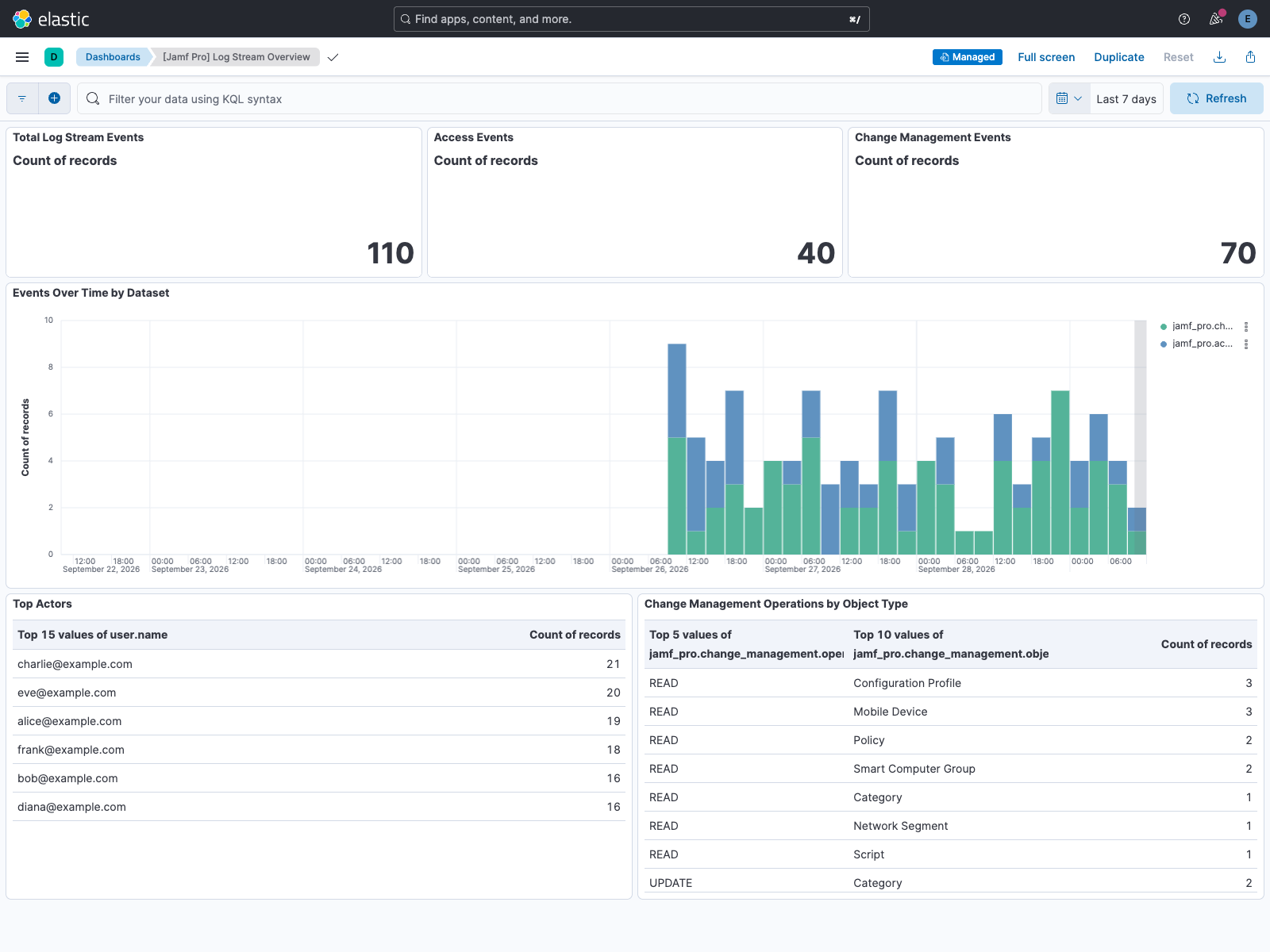
The integration ships a Log Stream Overview dashboard that summarizes access and change management events — event volume over time, top actors, and a breakdown of change management operations by object type. It is tagged Security Solution, so it also appears in the Security app, and can be found in Kibana under Dashboards after installing the integration.
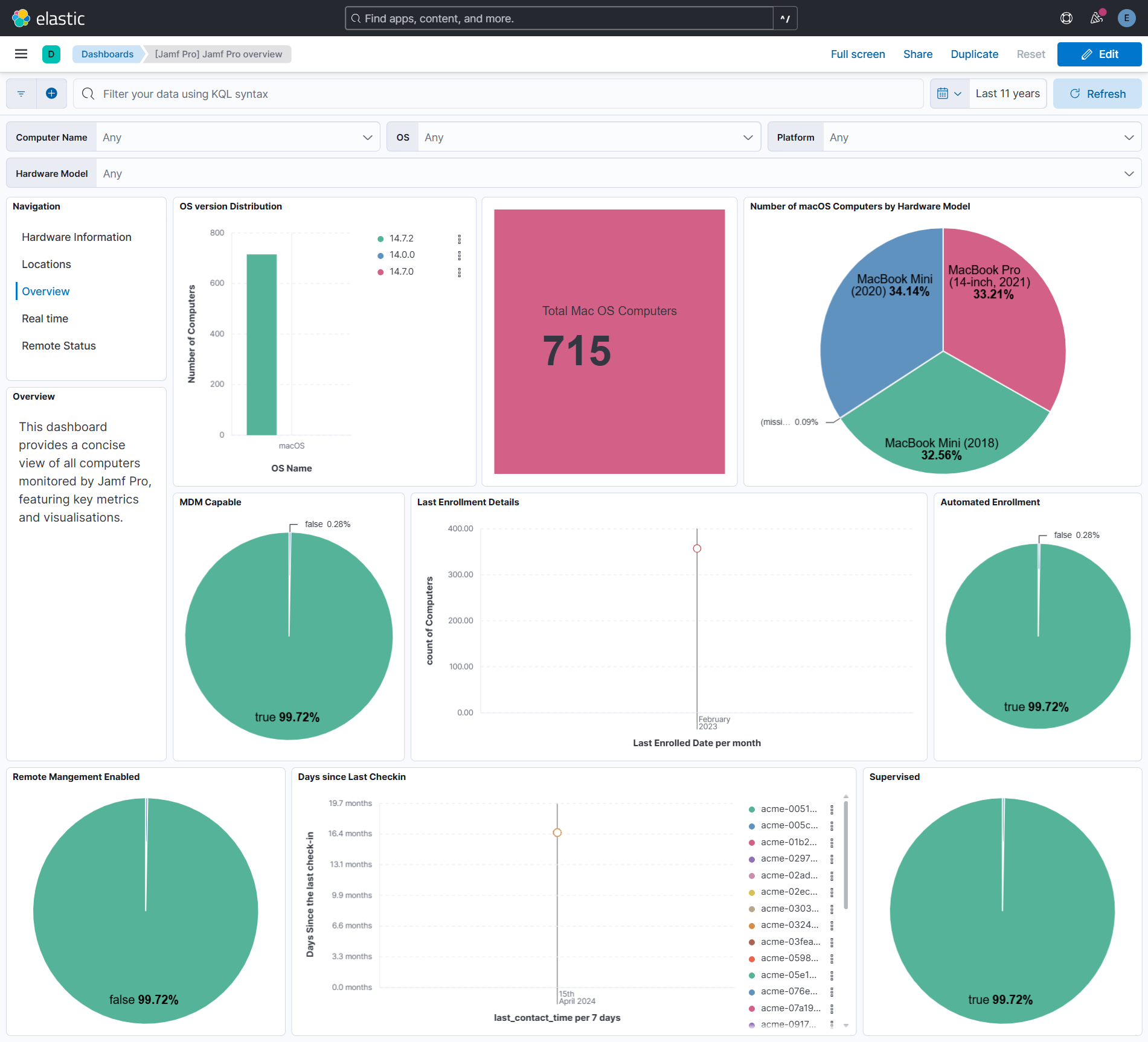
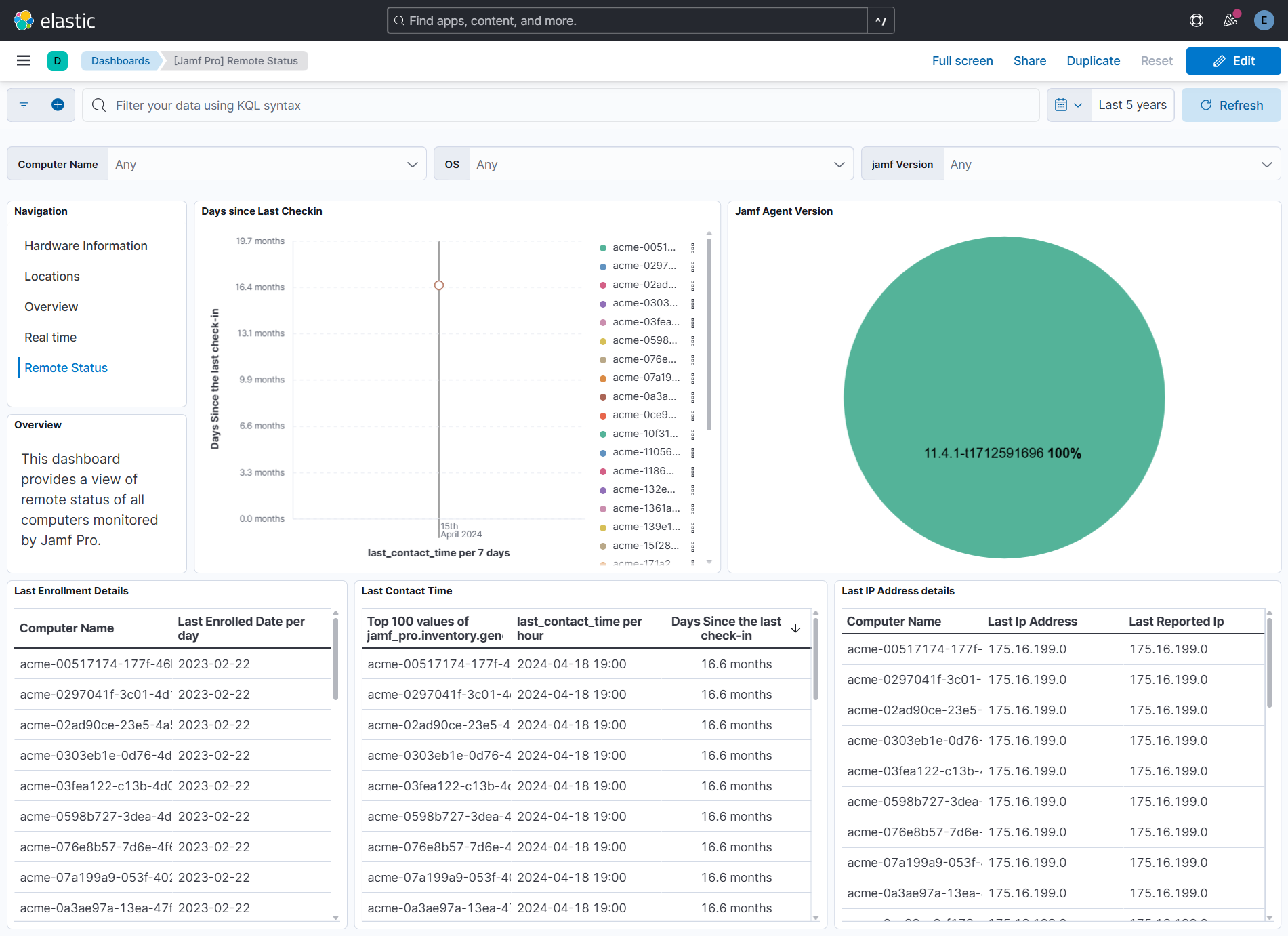
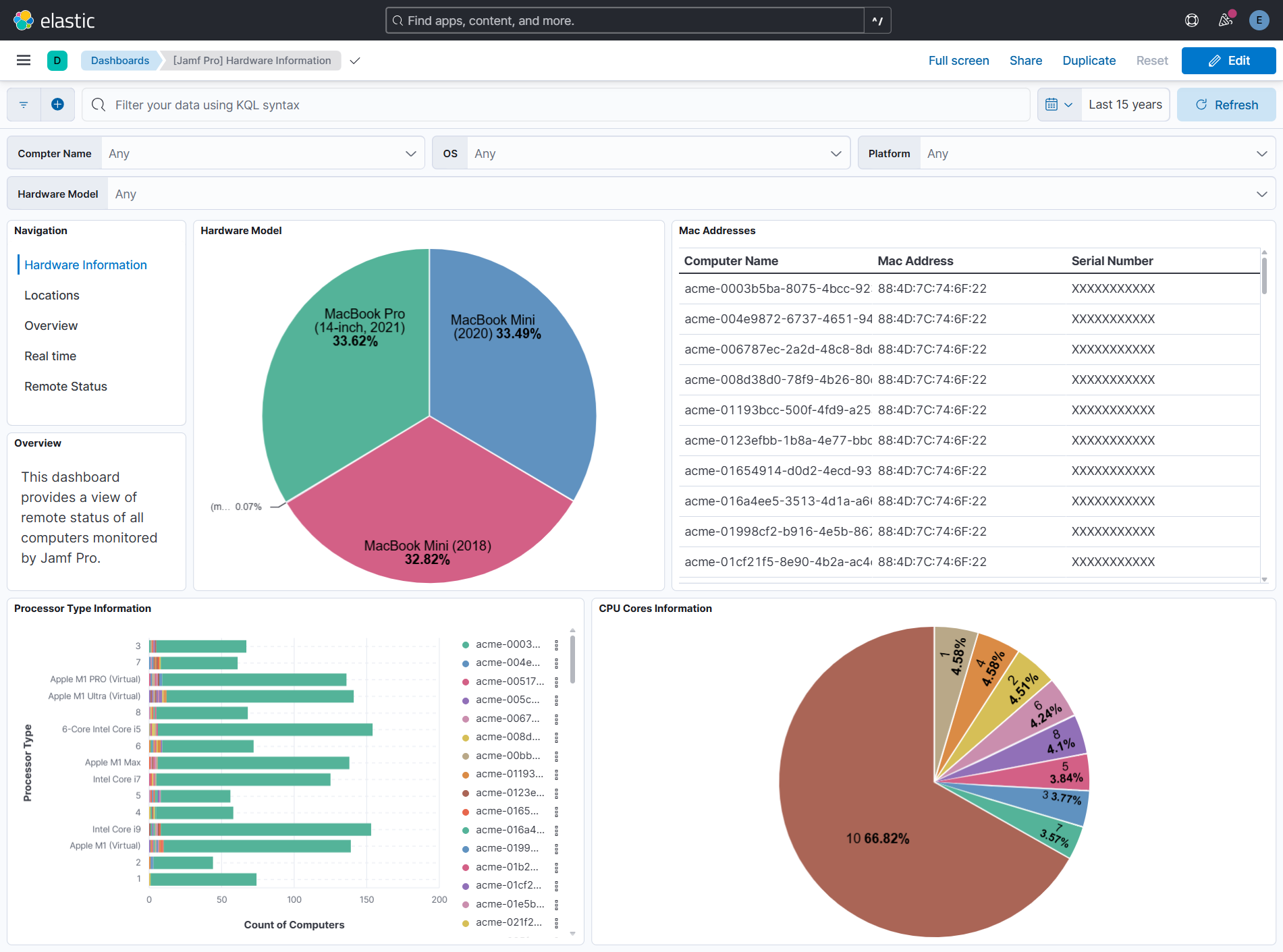
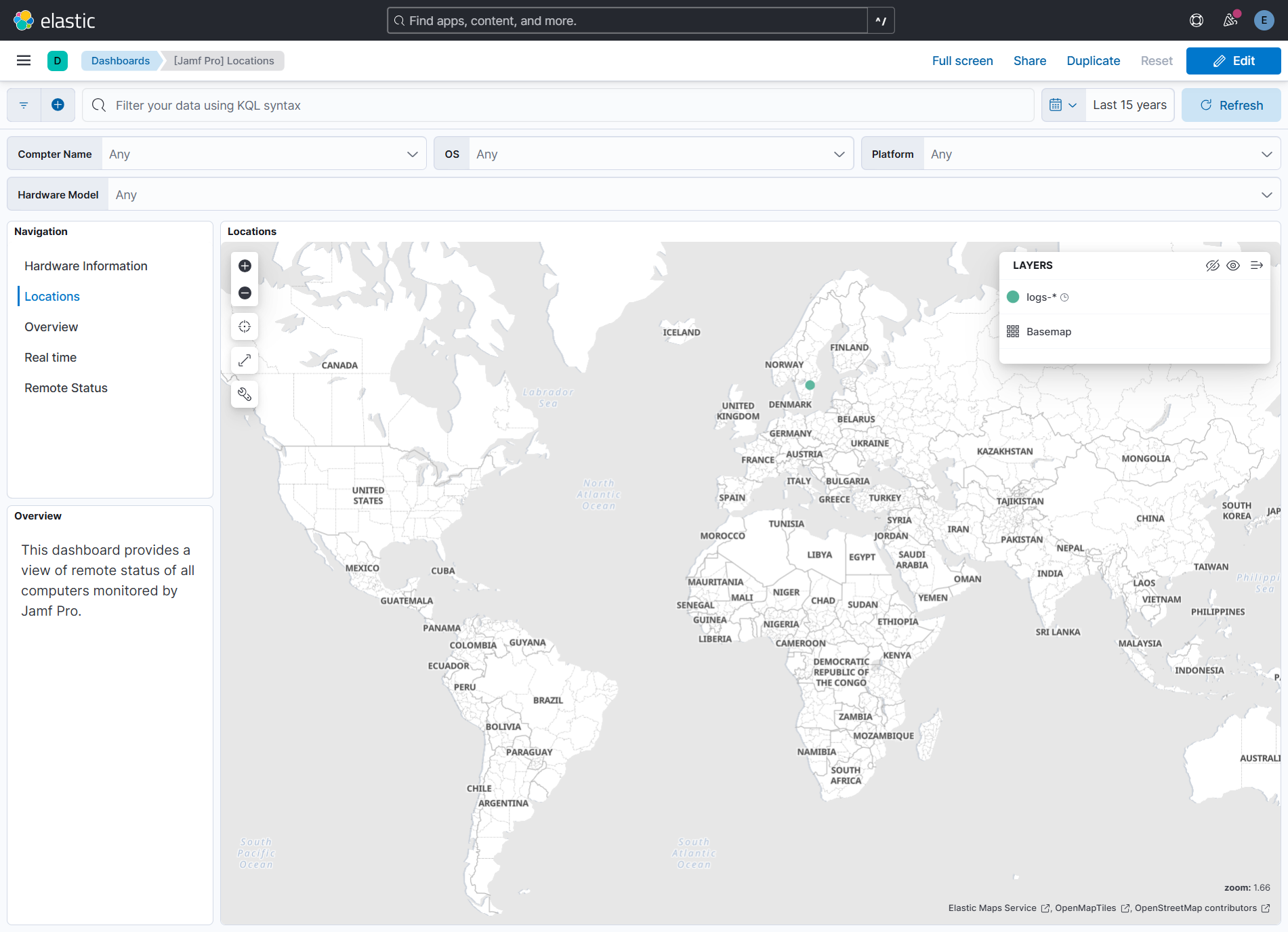
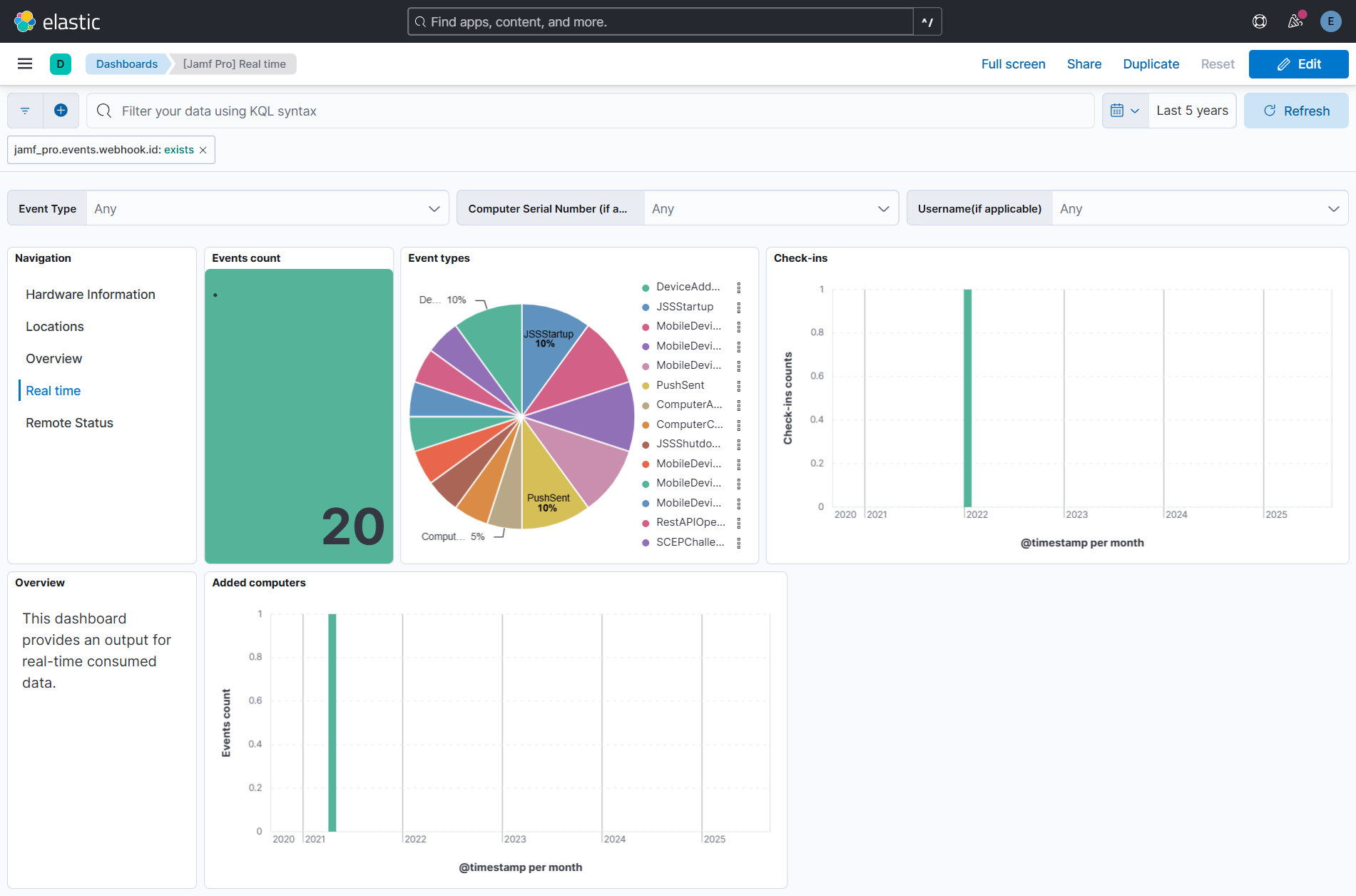
This integration includes one or more Kibana dashboards that visualizes the data collected by the integration. The screenshots below illustrate how the ingested data is displayed.
Changelog
| Version | Details | Minimum Kibana version |
|---|---|---|
| 3.0.0 | Breaking change (View pull request) Remove the non-ECS host.address field from the events and inventory data streams. It held a copy of host.ip; use host.ip instead. |
9.0.5 8.19.2 |
| 2.2.0 | Enhancement (View pull request) Add Jamf Log Stream data streams for Access and Change Management logs via AWS S3. |
9.0.5 8.19.2 |
| 2.1.1 | Bug fix (View pull request) Stop links panels forwarding dashboard-level filters so that navigating between dashboards does not combine conflicting filters. |
9.0.5 8.19.2 |
| 2.1.0 | Enhancement (View pull request) Add tags to ingest pipeline processors. |
9.0.5 8.19.2 |
| 2.0.0 | Enhancement (View pull request) Add latest transform to the inventory data stream. Enhancement (View pull request) Expand fingerprint to include report date so inventory updates are preserved in the source index. Enhancement (View pull request) Add default ILM policy to the inventory data stream (30-day retention). Breaking change (View pull request) Inventory data that was previously retained indefinitely is now deleted after 30 days by the new ILM policy. |
9.0.5 8.19.2 |
| 1.3.2 | Enhancement (View pull request) Set agentless deployment mode release field to ga. |
9.0.5 8.19.2 |
| 1.3.1 | Bug fix (View pull request) Add ECS event categorization fields to the events data stream. |
9.0.5 8.19.2 |
| 1.3.0 | Enhancement (View pull request) Enable Agentless deployment. |
9.0.5 8.19.2 |
| 1.2.0 | Enhancement (View pull request) Add support for ECS entity fields. |
9.0.0 8.15.0 |
| 1.1.0 | Enhancement (View pull request) Add host.id and host.name fields to the inventory data stream. |
9.0.0 8.15.0 |
| 1.0.0 | Enhancement (View pull request) Release package as GA. Enhancement (View pull request) ECS version updated to 8.17.0. |
9.0.0 8.15.0 |
| 0.7.0 | Enhancement (View pull request) Use the standard request trace file name. |
9.0.0 8.15.0 |
| 0.6.0 | Enhancement (View pull request) Tidy variable descriptions and input configuration. |
9.0.0 8.15.0 |
| 0.5.3 | Bug fix (View pull request) Add event.module definition for the events data stream. |
9.0.0 8.13.4 |
| 0.5.2 | Bug fix (View pull request) Fix flattened field types for non-object values. |
9.0.0 8.13.4 |
| 0.5.1 | Bug fix (View pull request) Fix empty string issue for date query param in filter for Jamf Pro inventory data stream. |
9.0.0 8.13.4 |
| 0.5.0 | Enhancement (View pull request) Update Kibana constraint to support 9.0.0. |
9.0.0 8.13.4 |
| 0.4.0 | Enhancement (View pull request) Improve host, source and event ECS mappings. |
8.13.4 |
| 0.3.1 | Bug fix (View pull request) Fix related users containing empty string. |
8.13.4 |
| 0.3.0 | Enhancement (View pull request) Normalize jamf_pro.inventory.operating_system.version and os.version to three-part versions.Enhancement (View pull request) Add os.full for known OS versions. |
8.13.4 |
| 0.2.6 | Bug fix (View pull request) Updated SSL description in package manifest.yml to be uniform and to include links to documentation. |
8.13.4 |
| 0.2.5 | Bug fix (View pull request) Make host.mac in inventory data stream conform to ECS definition. |
8.13.4 |
| 0.2.4 | Bug fix (View pull request) Add page size limitation description. Bug fix (View pull request) Remove unused max_executions variable.Bug fix (View pull request) Avoid repeated API requests when last report filter cannot progress for the Inventory data stream. |
8.13.4 |
| 0.2.3 | Bug fix (View pull request) Fix mapping of jamf_pro.inventory.general.enrollment_method. |
8.13.4 |
| 0.2.2 | Bug fix (View pull request) Inventory date formatting for filter. |
8.13.4 |
| 0.2.1 | Bug fix (View pull request) Inventory pagination fix. |
8.13.4 |
| 0.2.0 | Enhancement (View pull request) Add "preserve_original_event" tag to documents with event.kind set to "pipeline_error". |
8.13.4 |
| 0.1.3 | Bug fix (View pull request) Fix type mapping for jamf_pro.inventory.general.mdm_capable.capable_users. |
8.13.4 |
| 0.1.2 | Bug fix (View pull request) Fix instructions for Header Authentication configuration. |
8.13.4 |
| 0.1.1 | Bug fix (View pull request) Various minor improvements and fixes |
8.13.4 |
| 0.1.0 | Enhancement (View pull request) Initial Release of Jamf Pro integration |
8.13.4 |