OpenAI ChatGPT Enterprise Integration for Elastic
| Version | 0.2.0
|
| Managed integration release status |
|
| Subscription level What's this? |
Basic |
| Developed by What's this? |
Elastic |
| Ingestion method(s) | API |
| Minimum Kibana version(s) | 9.1.0 8.19.0 |
You can use this integration as an Elastic Managed integration on Elastic Cloud Hosted deployments running this version or later.
To use pre-release integrations, go to the Integrations page in Kibana, scroll down, and toggle on the Display beta integrations option.
OpenAI ChatGPT Enterprise is the enterprise offering of ChatGPT, giving organizations administrative controls, security, and compliance capabilities for their use of ChatGPT and Codex. The OpenAI Compliance Logs Platform exposes an API that lets enterprises export compliance logs of activity across their workspace or organization, including Authentication Log activity such as user logins, token issuance, and logouts; Application Authentication Log activity such as connecting (linking) and disconnecting (unlinking) apps and connectors; Application Log activity such as in-app requests and responses to connected apps; Codex Log activity such as tool calls, prompts and responses, plugins, environments, and access tokens; Audit Log activity such as role changes, invitations, and workspace policy updates; Custom Agents Log (Workspace Agents) activity such as agent lifecycle changes, runs, memory access, connector calls, and trigger management; Conversation Message exchanged between users and the assistant; and Codex Security Log findings and scan-configuration activity.
This integration for Elastic allows you to collect ChatGPT Enterprise compliance logs using the OpenAI Compliance Logs Platform API, then visualize the data in Kibana.
This integration collects data from the OpenAI Compliance Logs Platform API and requires a ChatGPT Enterprise plan with the Compliance Logs Platform enabled.
This integration periodically queries the OpenAI Compliance Logs Platform API to retrieve Authentication Log, Application Authentication Log, Application Log, Codex Log, Codex Security Log, Audit Log, Custom Agents Log, and Conversation Message. Collection can be scoped to a single workspace or an entire organization, and follows a two-step (chained) flow:
- The integration calls the list endpoint (
GET /v1/compliance/{workspaces|organizations}/{resource_id}/logs) with theevent_type, and paginates forward using thelast_end_timecursor andhas_moreflag returned by the API. This returns metadata for each available log file. - For each listed file, the integration downloads its contents (
GET /v1/compliance/{workspaces|organizations}/{resource_id}/logs/{log_file_id}). This endpoint redirects to a signed download URL that serves the log file as JSON Lines, and each line is ingested as a separate event.
On the first run, logs are pulled back as far as the configured initial interval. From the second collection onward, each run resumes from the last_end_time cursor returned by the previous request, so events are collected without gaps or duplication.
By default, each data stream polls every 1 minute, matching updated OpenAI guidance for Compliance Logs. Increase the Interval to reduce API calls if you don't need the freshest data.
Keep Batch Size at its default of 100 to limit list requests, which OpenAI caps at 200 per minute across all event types.
HTTP 429 (rate limit) errors: The integration retries with backoff and honors Retry-After when OpenAI returns it, so occasional 429s are expected and need no action. If they persist, increase the Interval.
OpenAI retains compliance logs for a limited window (up to 30 days). Configure the initial interval accordingly when first enabling the integration.
This integration collects log messages of the following types:
Authentication Log: Collect ChatGPT EnterpriseAUTH_LOGevents, covering user authentication activity such as logins, token issuance, and logouts, along with the client and request context (IP, geo, user agent, and TLS fingerprints) associated with each action (endpoints:GET /v1/compliance/{workspaces|organizations}/{resource_id}/logs?event_type=AUTH_LOGandGET /v1/compliance/{workspaces|organizations}/{resource_id}/logs/{log_file_id}).Application Authentication Log: Collect ChatGPT EnterpriseAPP_AUTH_LOGevents, covering application authentication activity such as linking and unlinking apps and connectors (endpoints:GET /v1/compliance/{workspaces|organizations}/{resource_id}/logs?event_type=APP_AUTH_LOGandGET /v1/compliance/{workspaces|organizations}/{resource_id}/logs/{log_file_id}).Application Log: Collects ChatGPT EnterpriseAPP_LOGevents — in-app connector requests and responses, including the app/connector identity and type, the acting user, the conversation, the request input, any returned result items, and client context such as user agent and source geolocation (endpoints:GET /v1/compliance/{workspaces|organizations}/{resource_id}/logs?event_type=APP_LOGandGET /v1/compliance/{workspaces|organizations}/{resource_id}/logs/{log_file_id}).Codex Log: Collect ChatGPT EnterpriseCODEX_LOGevents, covering Codex activity such as tool calls, prompts and responses, plugins, environments, and access tokens (endpoints:GET /v1/compliance/{workspaces|organizations}/{resource_id}/logs?event_type=CODEX_LOGandGET /v1/compliance/{workspaces|organizations}/{resource_id}/logs/{log_file_id}).Codex Security Log: Collects ChatGPT EnterpriseCODEX_SECURITY_LOGevents — Codex Security findings and scan-configuration changes, including scan configuration create/update details (repository, environment, lookback window, notification rules), finding updates (status, criticality, resolution reason, assignee), and proposed patch pull requests, along with the acting user, Codex client, and workspace context (endpoints:GET /v1/compliance/{workspaces|organizations}/{resource_id}/logs?event_type=CODEX_SECURITY_LOGandGET /v1/compliance/{workspaces|organizations}/{resource_id}/logs/{log_file_id}).Audit Log: Collect ChatGPT EnterpriseAUDIT_LOGevents, covering administrative and workspace audit activity such as role changes, application access grants, feature toggles, invitations, and workspace policy updates, along with request metadata such as client IP and user agent (endpoint:GET /v1/compliance/{workspaces|organizations}/{resource_id}/logswithevent_type=AUDIT_LOG, followed byGET /v1/compliance/{workspaces|organizations}/{resource_id}/logs/{log_file_id}).Custom Agents Log: Collect ChatGPT EnterpriseCUSTOM_AGENTS_LOGevents, covering Workspace Agents (Custom Agents) activity such as agent lifecycle changes, agent runs and messages, memory access, connector calls, skill usage, and trigger management, including the acting user or agent, agent metadata, and per-event details (endpoint:GET /v1/compliance/{workspaces|organizations}/{resource_id}/logswithevent_type=CUSTOM_AGENTS_LOG, followed byGET /v1/compliance/{workspaces|organizations}/{resource_id}/logs/{log_file_id}).Conversation Message: Collect ChatGPT EnterpriseCONVERSATION_MESSAGEevents — individual user and assistant messages exchanged in ChatGPT Enterprise conversations, including author, client surface, model, tools and skills used, message content, and conversation metadata (endpoint:GET /v1/compliance/{workspaces|organizations}/{resource_id}/logswithevent_type=CONVERSATION_MESSAGE, followed byGET /v1/compliance/{workspaces|organizations}/{resource_id}/logs/{log_file_id}).
Bringing ChatGPT Enterprise Authentication Log, Application Authentication Log, Application Log, Codex Log, Codex Security Log, Audit Log, Custom Agents Log, and Conversation Message into Elastic lets security, compliance, and platform teams search, correlate, and investigate sign-in, app-connection, in-app connector, AI-assisted development, administrative, agent, conversation, and Codex Security scanning activity in one place instead of moving between separate tools.
The Authentication Log data stream provides visibility into who signed in, when, from where, and with what client, including the action outcome and source geolocation. Use it to monitor login, token issuance, and logout activity, detect sign-ins from unexpected locations, and surface anomalous or high-risk authentication behavior to support security oversight and auditing.
The Application Authentication Log data stream provides visibility into which apps and connectors are linked or unlinked, who performed the action, and the client and request context associated with it. Use it to audit connector lifecycle changes, monitor app-authorization activity, and surface anomalous or high-risk link/unlink actions to support security oversight and auditing.
The Application Log data stream provides visibility into how connected apps and connectors are used inside ChatGPT Enterprise. Use it to monitor which apps users invoke and how often, review the requests sent to connectors and the responses returned, attribute connector activity to specific users and conversations, and add source geolocation and user-agent context to investigations.
The Codex Log data stream provides visibility into who is using Codex and how, including tool calls and their outcomes, prompts and responses, plugin and environment lifecycle changes, model and token usage, and access token creation and revocation. Use it to audit Codex usage, monitor prompt and response activity, track model and token consumption, and surface anomalous or high-risk actions to support security oversight, auditing, and usage analysis.
The Codex Security Log data stream provides visibility into Codex-driven security scanning and finding management. Use it to track scan configurations being created and changed, follow the lifecycle of security findings (triage, criticality, resolution, and remediation via proposed patch PRs), attribute activity to specific users and Codex clients, and correlate findings with the rest of your security data in Elastic.
The Audit Log data stream provides a searchable, correlatable record of administrative and workspace activity. Audit events describe who performed which action, on which resource, from where, and whether the action succeeded, was blocked, or failed. Use it to monitor privileged administrative actions, investigate suspicious activity by user, IP, or geography, and track outcome trends over time.
The Custom Agents Log data stream supports monitoring how Workspace Agents are built, published, and operated: which users create, update, publish, or delete agents; how agents run and which models they use; which connectors, skills, and tools they invoke; how they read and write memory; and how triggers are configured. Actor, agent, and event details help track adoption, spot risky or failing activity, and add agent context to broader security investigations in Elastic Security and Kibana.
The Conversation Message data stream supports monitoring how users interact with ChatGPT Enterprise: which users and workspaces are most active, which models and client surfaces are used, how conversations flow between users and the assistant, and which tools, skills, and citations the assistant applies. Message and conversation metadata help track engagement, spot unusual activity, and add conversation context to broader security investigations in Elastic Security and Kibana.
You need Elasticsearch for storing and searching your data and Kibana for visualizing and managing it. You can use our hosted Elasticsearch Service on Elastic Cloud, which is recommended, or self-manage the Elastic Stack on your own hardware.
To collect data through the OpenAI Compliance Logs Platform API, you need to provide the Compliance API key and the workspace or organization ID whose logs you want to collect. Authentication is handled using the Compliance API key, which serves as the required credential.
- Ensure your organization has a ChatGPT Enterprise plan with the Compliance Logs Platform enabled.
- Request a Compliance API key from OpenAI and ensure it is authorized for enterprise logs (contact OpenAI support to grant the key the
chatgpt.enterprise.compliance_export.readscope). - Identify the workspace ID or organization ID whose compliance logs you want to collect.
- Copy both the Compliance API key and the resource ID and store them securely for use in the integration configuration.
See Compliance API for enterprise customers for more details.
This integration supports both Elastic Agentless-based and Agent-based installations.
Elastic Agent must be installed. For more details, check the Elastic Agent installation instructions. You can install only one Elastic Agent per host.
Agentless deployments are only supported in Elastic Serverless and Elastic Cloud environments. Agentless deployments provide a means to ingest data while avoiding the orchestration, management, and maintenance needs associated with standard ingest infrastructure. Using an agentless deployment makes manual agent deployment unnecessary, allowing you to focus on your data instead of the agent that collects it.
For more information, refer to Agentless integrations and Agentless integrations FAQ.
In the top search bar in Kibana, search for Integrations.
In the search bar, type OpenAI ChatGPT Enterprise.
Select the OpenAI ChatGPT Enterprise integration from the search results.
Select Add OpenAI ChatGPT Enterprise to add the integration.
Configure the integration:
To Collect ChatGPT Enterprise compliance logs, you'll need to:
- Configure the URL (default
https://api.chatgpt.com) and Compliance API key. - Set the Scope to
workspaceororganization. - Set the Workspace / Organization ID to the resource whose compliance logs are collected.
- Adjust the integration configuration parameters if required, including the Initial Interval, Interval, HTTP Client Timeout and so on to enable data collection.
- Configure the URL (default
Select Save and continue to save the integration.
- In the top search bar in Kibana, search for Dashboards.
- In the search bar, type OpenAI ChatGPT Enterprise, and verify the dashboard information is populated.
For help with Elastic ingest tools, check Common problems.
For more information on architectures that can be used for scaling this integration, check the Ingest Architectures documentation.
The auth_log data stream captures ChatGPT Enterprise AUTH_LOG events (user authentication activity such as logins, token issuance, and logouts, including client and request context).
Exported fields
| Field | Description | Type |
|---|---|---|
| @timestamp | Date/time when the event originated. This is the date/time extracted from the event, typically representing when the event was generated by the source. If the event source has no original timestamp, this value is typically populated by the first time the event was received by the pipeline. Required field for all events. | date |
| data_stream.dataset | The field can contain anything that makes sense to signify the source of the data. Examples include nginx.access, prometheus, endpoint etc. For data streams that otherwise fit, but that do not have dataset set we use the value "generic" for the dataset value. event.dataset should have the same value as data_stream.dataset. Beyond the Elasticsearch data stream naming criteria noted above, the dataset value has additional restrictions: * Must not contain - * No longer than 100 characters |
constant_keyword |
| data_stream.namespace | A user defined namespace. Namespaces are useful to allow grouping of data. Many users already organize their indices this way, and the data stream naming scheme now provides this best practice as a default. Many users will populate this field with default. If no value is used, it falls back to default. Beyond the Elasticsearch index naming criteria noted above, namespace value has the additional restrictions: * Must not contain - * No longer than 100 characters |
constant_keyword |
| data_stream.type | An overarching type for the data stream. Currently allowed values are "logs" and "metrics". We expect to also add "traces" and "synthetics" in the near future. | constant_keyword |
| event.dataset | Name of the dataset. If an event source publishes more than one type of log or events (e.g. access log, error log), the dataset is used to specify which one the event comes from. It's recommended but not required to start the dataset name with the module name, followed by a dot, then the dataset name. | constant_keyword |
| event.module | Name of the module this data is coming from. If your monitoring agent supports the concept of modules or plugins to process events of a given source (e.g. Apache logs), event.module should contain the name of this module. |
constant_keyword |
| input.type | Type of filebeat input. | keyword |
| observer.product | The product name of the observer. | constant_keyword |
| observer.vendor | Vendor name of the observer. | constant_keyword |
| openai_chatgpt_enterprise.auth_log.action_data.role | Role of the acting user at the time of the authentication event (for example, standard-user). | keyword |
| openai_chatgpt_enterprise.auth_log.actor.type | Type of actor that performed the action (for example, ACCOUNT_USER, API_KEY). | keyword |
| openai_chatgpt_enterprise.auth_log.principal.type | Principal that owns the event (for example, CHATGPT_WORKSPACE). | keyword |
| openai_chatgpt_enterprise.auth_log.request_metadata.client_ja4 | JA4 TLS client fingerprint captured at request time. | keyword |
| openai_chatgpt_enterprise.auth_log.type | Top-level event category (for example, AUTH_LOG). | keyword |
Example
{
    "@timestamp": "2026-07-15T10:53:18.000Z",
    "agent": {
        "ephemeral_id": "a6486907-b3a0-408c-8283-ecc9513fda79",
        "id": "9256ce2b-4a99-40e1-be58-267095cfe6df",
        "name": "elastic-agent-76548",
        "type": "filebeat",
        "version": "8.19.0"
    },
    "data_stream": {
        "dataset": "openai_chatgpt_enterprise.auth_log",
        "namespace": "48288",
        "type": "logs"
    },
    "ecs": {
        "version": "9.5.0"
    },
    "elastic_agent": {
        "id": "9256ce2b-4a99-40e1-be58-267095cfe6df",
        "snapshot": false,
        "version": "8.19.0"
    },
    "event": {
        "action": "login_success",
        "agent_id_status": "verified",
        "category": [
            "authentication"
        ],
        "dataset": "openai_chatgpt_enterprise.auth_log",
        "id": "9532e1b4-e44a-42c7-a52a-083c345e0001",
        "ingested": "2026-09-01T12:29:32Z",
        "kind": "event",
        "original": "{\"event_id\":\"9532e1b4-e44a-42c7-a52a-083c345e0001\",\"type\":\"AUTH_LOG\",\"principal\":{\"id\":\"11111111-2222-3333-4444-555555555555\",\"type\":\"CHATGPT_WORKSPACE\"},\"actor\":{\"type\":\"ACCOUNT_USER\",\"user_id\":\"user-Aaaaaaaaaaaaaaaaaaaaaaa1\",\"user_email\":\"alice.martin@example.org\"},\"timestamp\":\"2026-07-15T10:53:18Z\",\"request_metadata\":{\"client_ip\":\"81.2.69.142\",\"client_ip_details\":{\"country\":\"GB\",\"city\":\"London\",\"region\":\"England\",\"region_code\":\"ENG\",\"latitude\":\"51.50853\",\"longitude\":\"-0.12574\"},\"client_ja3\":\"f90ffded875933863a95a1a84285c922\",\"client_ja4\":\"q13d0311h3_55b375c5d22e_653d80c3fe9d\"},\"action_data\":{\"action\":\"login_success\",\"role\":\"standard-user\"}}",
        "outcome": "success",
        "type": [
            "start"
        ]
    },
    "gen_ai": {
        "provider": {
            "name": "openai"
        }
    },
    "input": {
        "type": "cel"
    },
    "openai_chatgpt_enterprise": {
        "auth_log": {
            "action_data": {
                "role": "standard-user"
            },
            "actor": {
                "type": "ACCOUNT_USER"
            },
            "principal": {
                "type": "CHATGPT_WORKSPACE"
            },
            "request_metadata": {
                "client_ja4": "q13d0311h3_55b375c5d22e_653d80c3fe9d"
            },
            "type": "AUTH_LOG"
        }
    },
    "organization": {
        "id": "11111111-2222-3333-4444-555555555555"
    },
    "related": {
        "ip": [
            "81.2.69.142"
        ],
        "user": [
            "alice.martin@example.org",
            "user-Aaaaaaaaaaaaaaaaaaaaaaa1"
        ]
    },
    "source": {
        "geo": {
            "city_name": "London",
            "country_iso_code": "GB",
            "location": "51.50853,-0.12574",
            "region_iso_code": "ENG",
            "region_name": "England"
        },
        "ip": "81.2.69.142"
    },
    "tags": [
        "preserve_original_event",
        "forwarded",
        "openai_chatgpt_enterprise-auth_log"
    ],
    "tls": {
        "client": {
            "ja3": "f90ffded875933863a95a1a84285c922"
        }
    },
    "user": {
        "domain": "example.org",
        "email": "alice.martin@example.org",
        "id": "user-Aaaaaaaaaaaaaaaaaaaaaaa1"
    }
}
The app_auth_log data stream captures ChatGPT Enterprise APP_AUTH_LOG events (application authentication activity such as linking and unlinking apps and connectors).
Exported fields
| Field | Description | Type |
|---|---|---|
| @timestamp | Date/time when the event originated. This is the date/time extracted from the event, typically representing when the event was generated by the source. If the event source has no original timestamp, this value is typically populated by the first time the event was received by the pipeline. Required field for all events. | date |
| data_stream.dataset | The field can contain anything that makes sense to signify the source of the data. Examples include nginx.access, prometheus, endpoint etc. For data streams that otherwise fit, but that do not have dataset set we use the value "generic" for the dataset value. event.dataset should have the same value as data_stream.dataset. Beyond the Elasticsearch data stream naming criteria noted above, the dataset value has additional restrictions: * Must not contain - * No longer than 100 characters |
constant_keyword |
| data_stream.namespace | A user defined namespace. Namespaces are useful to allow grouping of data. Many users already organize their indices this way, and the data stream naming scheme now provides this best practice as a default. Many users will populate this field with default. If no value is used, it falls back to default. Beyond the Elasticsearch index naming criteria noted above, namespace value has the additional restrictions: * Must not contain - * No longer than 100 characters |
constant_keyword |
| data_stream.type | An overarching type for the data stream. Currently allowed values are "logs" and "metrics". We expect to also add "traces" and "synthetics" in the near future. | constant_keyword |
| event.dataset | Name of the dataset. If an event source publishes more than one type of log or events (e.g. access log, error log), the dataset is used to specify which one the event comes from. It's recommended but not required to start the dataset name with the module name, followed by a dot, then the dataset name. | constant_keyword |
| event.module | Name of the module this data is coming from. If your monitoring agent supports the concept of modules or plugins to process events of a given source (e.g. Apache logs), event.module should contain the name of this module. |
constant_keyword |
| input.type | Type of filebeat input. | keyword |
| observer.product | The product name of the observer. | constant_keyword |
| observer.vendor | Vendor name of the observer. | constant_keyword |
| openai_chatgpt_enterprise.app_auth_log.actor.type | Type of actor that performed the action (e.g. ACCOUNT_USER, API_KEY). | keyword |
| openai_chatgpt_enterprise.app_auth_log.app_id | Identifier of the connected app / connector. | keyword |
| openai_chatgpt_enterprise.app_auth_log.link_id | Identifier of the app connection (link) that was linked/unlinked. | keyword |
| openai_chatgpt_enterprise.app_auth_log.principal.type | Principal that owns the event (e.g. CHATGPT_WORKSPACE). | keyword |
| openai_chatgpt_enterprise.app_auth_log.type | Top-level event category (e.g. APP_AUTH_LOG). | keyword |
Example
{
    "@timestamp": "2026-07-09T10:10:00.000Z",
    "agent": {
        "ephemeral_id": "1632cc7c-d30a-4088-8cfd-e5c55fb8a9c0",
        "id": "6c2980f6-5df2-4521-af29-41bcd8103c5d",
        "name": "elastic-agent-26642",
        "type": "filebeat",
        "version": "8.19.0"
    },
    "data_stream": {
        "dataset": "openai_chatgpt_enterprise.app_auth_log",
        "namespace": "46263",
        "type": "logs"
    },
    "ecs": {
        "version": "9.5.0"
    },
    "elastic_agent": {
        "id": "6c2980f6-5df2-4521-af29-41bcd8103c5d",
        "snapshot": false,
        "version": "8.19.0"
    },
    "event": {
        "action": "link",
        "agent_id_status": "verified",
        "category": [
            "configuration"
        ],
        "dataset": "openai_chatgpt_enterprise.app_auth_log",
        "id": "7b3e4de1-2219-4d6c-9d6e-8f4d40c7c001",
        "ingested": "2026-09-01T12:27:03Z",
        "kind": "event",
        "original": "{\"event_id\":\"7b3e4de1-2219-4d6c-9d6e-8f4d40c7c001\",\"type\":\"APP_AUTH_LOG\",\"timestamp\":\"2026-07-09T10:10:00.000000Z\",\"principal\":{\"id\":\"be545252-ad04-4cfa-9ca5-deca58416151\",\"type\":\"CHATGPT_WORKSPACE\"},\"actor\":{\"type\":\"ACCOUNT_USER\",\"user_id\":\"user-AbCdEf1234567890\",\"user_email\":\"user@example.org\"},\"app_id\":\"asdk_app_0123456789abcdef0123456789abcdef\",\"link_id\":\"link_00112233445566778899aabbccddeeff\",\"action\":\"link\"}",
        "type": [
            "change"
        ]
    },
    "gen_ai": {
        "provider": {
            "name": "openai"
        }
    },
    "input": {
        "type": "cel"
    },
    "openai_chatgpt_enterprise": {
        "app_auth_log": {
            "actor": {
                "type": "ACCOUNT_USER"
            },
            "app_id": "asdk_app_0123456789abcdef0123456789abcdef",
            "link_id": "link_00112233445566778899aabbccddeeff",
            "principal": {
                "type": "CHATGPT_WORKSPACE"
            },
            "type": "APP_AUTH_LOG"
        }
    },
    "organization": {
        "id": "be545252-ad04-4cfa-9ca5-deca58416151"
    },
    "related": {
        "user": [
            "user@example.org",
            "user-AbCdEf1234567890"
        ]
    },
    "tags": [
        "preserve_original_event",
        "forwarded",
        "openai_chatgpt_enterprise-app_auth_log"
    ],
    "user": {
        "domain": "example.org",
        "email": "user@example.org",
        "id": "user-AbCdEf1234567890"
    }
}
The app_log data stream captures ChatGPT Enterprise APP_LOG events (in-app connector requests and responses).
Exported fields
| Field | Description | Type |
|---|---|---|
| @timestamp | Date/time when the event originated. This is the date/time extracted from the event, typically representing when the event was generated by the source. If the event source has no original timestamp, this value is typically populated by the first time the event was received by the pipeline. Required field for all events. | date |
| data_stream.dataset | The field can contain anything that makes sense to signify the source of the data. Examples include nginx.access, prometheus, endpoint etc. For data streams that otherwise fit, but that do not have dataset set we use the value "generic" for the dataset value. event.dataset should have the same value as data_stream.dataset. Beyond the Elasticsearch data stream naming criteria noted above, the dataset value has additional restrictions: * Must not contain - * No longer than 100 characters |
constant_keyword |
| data_stream.namespace | A user defined namespace. Namespaces are useful to allow grouping of data. Many users already organize their indices this way, and the data stream naming scheme now provides this best practice as a default. Many users will populate this field with default. If no value is used, it falls back to default. Beyond the Elasticsearch index naming criteria noted above, namespace value has the additional restrictions: * Must not contain - * No longer than 100 characters |
constant_keyword |
| data_stream.type | An overarching type for the data stream. Currently allowed values are "logs" and "metrics". We expect to also add "traces" and "synthetics" in the near future. | constant_keyword |
| event.dataset | Name of the dataset. If an event source publishes more than one type of log or events (e.g. access log, error log), the dataset is used to specify which one the event comes from. It's recommended but not required to start the dataset name with the module name, followed by a dot, then the dataset name. | constant_keyword |
| event.module | Name of the module this data is coming from. If your monitoring agent supports the concept of modules or plugins to process events of a given source (e.g. Apache logs), event.module should contain the name of this module. |
constant_keyword |
| input.type | Type of filebeat input. | keyword |
| observer.product | The product name of the observer. | constant_keyword |
| observer.vendor | Vendor name of the observer. | constant_keyword |
| openai_chatgpt_enterprise.app_log.actor.type | Type of actor that performed the action (e.g. ACCOUNT_USER, API_KEY). | keyword |
| openai_chatgpt_enterprise.app_log.app_id | Identifier of the connected app / connector. | keyword |
| openai_chatgpt_enterprise.app_log.app_name | Friendly name of the app / connector. | keyword |
| openai_chatgpt_enterprise.app_log.app_type | App backend type (e.g. SERVICE, MCP, FIRST_PARTY_ECOSYSTEM, OPEN_API). | keyword |
| openai_chatgpt_enterprise.app_log.conversation_id | Conversation in which the app was invoked. | keyword |
| openai_chatgpt_enterprise.app_log.input | Raw, free-form request input arguments sent to the app. | flattened |
| openai_chatgpt_enterprise.app_log.log_type | APP_LOG sub-type (request or response). | keyword |
| openai_chatgpt_enterprise.app_log.meta.locale | Locale of the client that issued the request. | keyword |
| openai_chatgpt_enterprise.app_log.meta.organization | Opaque organization identifier of the client that issued the request. | keyword |
| openai_chatgpt_enterprise.app_log.meta.session | Opaque session identifier of the client that issued the request. | keyword |
| openai_chatgpt_enterprise.app_log.meta.subject | Opaque subject identifier of the client that issued the request. | keyword |
| openai_chatgpt_enterprise.app_log.meta.timezone | Timezone reported by the client that issued the request. | keyword |
| openai_chatgpt_enterprise.app_log.output | Raw, free-form response output returned by the app. | flattened |
| openai_chatgpt_enterprise.app_log.principal.type | Principal that owns the event (e.g. CHATGPT_WORKSPACE). | keyword |
| openai_chatgpt_enterprise.app_log.query | Query/input sent to the app on a request log. | keyword |
| openai_chatgpt_enterprise.app_log.type | Top-level event category (e.g. APP_LOG). | keyword |
Example
{
    "@timestamp": "2026-07-15T15:39:18.154Z",
    "agent": {
        "ephemeral_id": "16ae5bd8-ff1d-4dab-a2a0-d8fefc394404",
        "id": "197f55ab-99d3-4fb5-9427-bf86886d7823",
        "name": "elastic-agent-63366",
        "type": "filebeat",
        "version": "8.19.0"
    },
    "data_stream": {
        "dataset": "openai_chatgpt_enterprise.app_log",
        "namespace": "46402",
        "type": "logs"
    },
    "ecs": {
        "version": "9.5.0"
    },
    "elastic_agent": {
        "id": "197f55ab-99d3-4fb5-9427-bf86886d7823",
        "snapshot": false,
        "version": "8.19.0"
    },
    "event": {
        "agent_id_status": "verified",
        "category": [
            "api"
        ],
        "dataset": "openai_chatgpt_enterprise.app_log",
        "id": "3f1a9c02-1111-4a11-8b11-000000000001",
        "ingested": "2026-09-01T12:27:51Z",
        "kind": "event",
        "original": "{\"event_id\":\"3f1a9c02-1111-4a11-8b11-000000000001\",\"type\":\"APP_LOG\",\"principal\":{\"id\":\"11111111-2222-3333-4444-555555555555\",\"type\":\"CHATGPT_WORKSPACE\"},\"actor\":{\"type\":\"ACCOUNT_USER\",\"user_id\":\"user-Aaaaaaaaaaaaaaaaaaaaaaa1\",\"user_email\":\"alice.martin@example.org\"},\"timestamp\":\"2026-07-15T15:39:18.154524Z\",\"app_id\":\"asdk_app_1111111111111111aaaa\",\"app_name\":\"Slack\",\"app_type\":\"MCP\",\"conversation_id\":\"c-1111-aaaa-2222-bbbb\",\"log_type\":\"request\",\"input\":{\"query\":\"in:general after:2026-07-14\",\"limit\":20,\"include_bots\":true,\"sort\":\"timestamp\",\"sort_dir\":\"desc\",\"response_format\":\"concise\",\"_meta\":{\"openai/userAgent\":\"ChatGPT/1.2026.183 (Mac OS X 26.5.2; arm64; build 1783607847)\",\"openai/locale\":\"en-GB\",\"openai/userLocation\":{\"city\":\"London\",\"region\":\"England\",\"country\":\"GB\",\"timezone\":\"Europe/London\",\"latitude\":\"51.50853\",\"longitude\":\"-0.12574\"},\"timezone\":\"Europe/London\",\"openai/subject\":\"v1/mock-subject-aaaaaaaaaaaaaaaa\",\"openai/session\":\"v1/mock-session-aaaaaaaaaaaaaaaa\",\"openai/organization\":\"v1/mock-org-aaaaaaaaaaaaaaaa\"}}}",
        "type": [
            "access"
        ]
    },
    "gen_ai": {
        "provider": {
            "name": "openai"
        }
    },
    "input": {
        "type": "cel"
    },
    "openai_chatgpt_enterprise": {
        "app_log": {
            "actor": {
                "type": "ACCOUNT_USER"
            },
            "app_id": "asdk_app_1111111111111111aaaa",
            "app_name": "Slack",
            "app_type": "MCP",
            "conversation_id": "c-1111-aaaa-2222-bbbb",
            "input": {
                "include_bots": true,
                "limit": 20,
                "query": "in:general after:2026-07-14",
                "response_format": "concise",
                "sort": "timestamp",
                "sort_dir": "desc"
            },
            "log_type": "request",
            "meta": {
                "locale": "en-GB",
                "organization": "v1/mock-org-aaaaaaaaaaaaaaaa",
                "session": "v1/mock-session-aaaaaaaaaaaaaaaa",
                "subject": "v1/mock-subject-aaaaaaaaaaaaaaaa",
                "timezone": "Europe/London"
            },
            "principal": {
                "type": "CHATGPT_WORKSPACE"
            },
            "query": "in:general after:2026-07-14",
            "type": "APP_LOG"
        }
    },
    "organization": {
        "id": "11111111-2222-3333-4444-555555555555"
    },
    "related": {
        "user": [
            "alice.martin@example.org",
            "user-Aaaaaaaaaaaaaaaaaaaaaaa1"
        ]
    },
    "source": {
        "geo": {
            "city_name": "London",
            "country_iso_code": "GB",
            "location": "51.50853,-0.12574",
            "region_name": "England"
        }
    },
    "tags": [
        "preserve_original_event",
        "forwarded",
        "openai_chatgpt_enterprise-app_log"
    ],
    "user": {
        "domain": "example.org",
        "email": "alice.martin@example.org",
        "id": "user-Aaaaaaaaaaaaaaaaaaaaaaa1"
    },
    "user_agent": {
        "device": {
            "name": "Mac"
        },
        "name": "Other",
        "original": "ChatGPT/1.2026.183 (Mac OS X 26.5.2; arm64; build 1783607847)",
        "os": {
            "full": "Mac OS X 26.5.2",
            "name": "Mac OS X",
            "version": "26.5.2"
        }
    }
}
The codex_log data stream captures ChatGPT Enterprise CODEX_LOG events.
Exported fields
| Field | Description | Type |
|---|---|---|
| @timestamp | Date/time when the event originated. This is the date/time extracted from the event, typically representing when the event was generated by the source. If the event source has no original timestamp, this value is typically populated by the first time the event was received by the pipeline. Required field for all events. | date |
| data_stream.dataset | The field can contain anything that makes sense to signify the source of the data. Examples include nginx.access, prometheus, endpoint etc. For data streams that otherwise fit, but that do not have dataset set we use the value "generic" for the dataset value. event.dataset should have the same value as data_stream.dataset. Beyond the Elasticsearch data stream naming criteria noted above, the dataset value has additional restrictions: * Must not contain - * No longer than 100 characters |
constant_keyword |
| data_stream.namespace | A user defined namespace. Namespaces are useful to allow grouping of data. Many users already organize their indices this way, and the data stream naming scheme now provides this best practice as a default. Many users will populate this field with default. If no value is used, it falls back to default. Beyond the Elasticsearch index naming criteria noted above, namespace value has the additional restrictions: * Must not contain - * No longer than 100 characters |
constant_keyword |
| data_stream.type | An overarching type for the data stream. Currently allowed values are "logs" and "metrics". We expect to also add "traces" and "synthetics" in the near future. | constant_keyword |
| event.dataset | Name of the dataset. If an event source publishes more than one type of log or events (e.g. access log, error log), the dataset is used to specify which one the event comes from. It's recommended but not required to start the dataset name with the module name, followed by a dot, then the dataset name. | constant_keyword |
| event.module | Name of the module this data is coming from. If your monitoring agent supports the concept of modules or plugins to process events of a given source (e.g. Apache logs), event.module should contain the name of this module. |
constant_keyword |
| gen_ai.input.messages | The chat history provided to the model as an input. | flattened |
| gen_ai.output.messages | Messages returned by the model where each message represents a specific model response (choice, candidate). | flattened |
| gen_ai.tool.call.arguments | Parameters passed to the tool call. | flattened |
| gen_ai.tool.call.result | The result returned by the tool call (if any and if execution was successful). | flattened |
| input.type | Type of filebeat input. | keyword |
| observer.product | The product name of the observer. | constant_keyword |
| observer.vendor | Vendor name of the observer. | constant_keyword |
| openai_chatgpt_enterprise.codex_log.actor.redacted_id | Redacted identifier of the API key (present when actor.type = API_KEY). | keyword |
| openai_chatgpt_enterprise.codex_log.actor.type | Type of actor that performed the action (e.g. ACCOUNT_USER, API_KEY). | keyword |
| openai_chatgpt_enterprise.codex_log.app_id | Identifier of the connected app / connector. | keyword |
| openai_chatgpt_enterprise.codex_log.client_id | Codex client identifier associated with the event. | keyword |
| openai_chatgpt_enterprise.codex_log.event_details.access_token_id | Codex access token identifier. | keyword |
| openai_chatgpt_enterprise.codex_log.event_details.access_token_name | User-provided access token name. | keyword |
| openai_chatgpt_enterprise.codex_log.event_details.call_id | Identifier of the MCP/tool call. | keyword |
| openai_chatgpt_enterprise.codex_log.event_details.created_by_user_id | Auth user ID that created the resource. | keyword |
| openai_chatgpt_enterprise.codex_log.event_details.current_settings.default_model | Default model after the change. | keyword |
| openai_chatgpt_enterprise.codex_log.event_details.current_settings.network_access | Network-access policy after the change. | keyword |
| openai_chatgpt_enterprise.codex_log.event_details.decision | Approval decision for a suggested tool call (e.g. approved, denied). | keyword |
| openai_chatgpt_enterprise.codex_log.event_details.detail_type | Discriminator identifying the specific Codex event-details schema. | keyword |
| openai_chatgpt_enterprise.codex_log.event_details.elicitation_type | Type of MCP elicitation (e.g. oauth_consent). | keyword |
| openai_chatgpt_enterprise.codex_log.event_details.environment_fields.agent_settings.model | Model configured for the environment's agent. | keyword |
| openai_chatgpt_enterprise.codex_log.event_details.environment_fields.cache_settings.enabled | Whether environment caching is enabled. | boolean |
| openai_chatgpt_enterprise.codex_log.event_details.environment_fields.description | Environment description. | text |
| openai_chatgpt_enterprise.codex_log.event_details.environment_fields.env_var_keys | Names (keys only) of configured environment variables. | keyword |
| openai_chatgpt_enterprise.codex_log.event_details.environment_fields.label | Environment label / name. | keyword |
| openai_chatgpt_enterprise.codex_log.event_details.environment_fields.permissions.network_access | Environment network-access permission. | keyword |
| openai_chatgpt_enterprise.codex_log.event_details.environment_fields.repos | Repositories attached to the environment. | keyword |
| openai_chatgpt_enterprise.codex_log.event_details.environment_id | Codex environment identifier. | keyword |
| openai_chatgpt_enterprise.codex_log.event_details.expires_at | Expiration time, e.g. for access tokens (RFC3339). | date |
| openai_chatgpt_enterprise.codex_log.event_details.marketplace_name | Marketplace source for a plugin. | keyword |
| openai_chatgpt_enterprise.codex_log.event_details.phase | Turn phase (e.g. prompt). | keyword |
| openai_chatgpt_enterprise.codex_log.event_details.plugin_creator_account_user_id | Account user ID that created the plugin. | keyword |
| openai_chatgpt_enterprise.codex_log.event_details.plugin_display_name | Plugin display name. | keyword |
| openai_chatgpt_enterprise.codex_log.event_details.plugin_id | Plugin identifier. | keyword |
| openai_chatgpt_enterprise.codex_log.event_details.plugin_name | Plugin (technical) name. | keyword |
| openai_chatgpt_enterprise.codex_log.event_details.plugin_release_id | Plugin release identifier. | keyword |
| openai_chatgpt_enterprise.codex_log.event_details.plugin_scope | Plugin scope (e.g. WORKSPACE). | keyword |
| openai_chatgpt_enterprise.codex_log.event_details.plugin_version | Plugin version. | keyword |
| openai_chatgpt_enterprise.codex_log.event_details.previous_settings.default_model | Default model before the change. | keyword |
| openai_chatgpt_enterprise.codex_log.event_details.previous_settings.network_access | Network-access policy before the change. | keyword |
| openai_chatgpt_enterprise.codex_log.event_details.prompt_text | Prompt text submitted by the user (sensitive content). | text |
| openai_chatgpt_enterprise.codex_log.event_details.reasoning_effort | Reasoning effort setting (e.g. low/medium/high). | keyword |
| openai_chatgpt_enterprise.codex_log.event_details.response_text | Model response text (sensitive content). | text |
| openai_chatgpt_enterprise.codex_log.event_details.service_tier | Service tier used for the request. | keyword |
| openai_chatgpt_enterprise.codex_log.event_details.session_id | Codex session identifier. | keyword |
| openai_chatgpt_enterprise.codex_log.event_details.status | Outcome status (e.g. success, error). | keyword |
| openai_chatgpt_enterprise.codex_log.event_details.token_usage.cached_input_tokens | Cached input tokens used. | long |
| openai_chatgpt_enterprise.codex_log.event_details.token_usage.reasoning_output_tokens | Reasoning output tokens generated. | long |
| openai_chatgpt_enterprise.codex_log.event_details.tool_input | Input passed to the tool (shape varies). | text |
| openai_chatgpt_enterprise.codex_log.event_details.tool_meta.connector_id | Connector identifier associated with the tool. | keyword |
| openai_chatgpt_enterprise.codex_log.event_details.tool_meta.resource_id | Resource identifier associated with the tool. | keyword |
| openai_chatgpt_enterprise.codex_log.event_details.turn_id | Identifier of the conversation turn. | keyword |
| openai_chatgpt_enterprise.codex_log.principal.type | Principal that owns the event (e.g. CHATGPT_WORKSPACE). | keyword |
| openai_chatgpt_enterprise.codex_log.type | Top-level event category (e.g. CODEX_LOG). | keyword |
| openai_chatgpt_enterprise.codex_log.workspace_id | Workspace identifier associated with the event. | keyword |
Example
{
    "@timestamp": "2026-07-09T10:08:44.000Z",
    "agent": {
        "ephemeral_id": "f1396ec7-cb20-48be-b459-a85be0a4291d",
        "id": "af2ed71e-b93a-413e-a594-64c71fe1dec4",
        "name": "elastic-agent-35520",
        "type": "filebeat",
        "version": "8.19.0"
    },
    "data_stream": {
        "dataset": "openai_chatgpt_enterprise.codex_log",
        "namespace": "78893",
        "type": "logs"
    },
    "ecs": {
        "version": "9.5.0"
    },
    "elastic_agent": {
        "id": "af2ed71e-b93a-413e-a594-64c71fe1dec4",
        "snapshot": false,
        "version": "8.19.0"
    },
    "event": {
        "action": "prompt_response_received",
        "agent_id_status": "verified",
        "category": [
            "api"
        ],
        "dataset": "openai_chatgpt_enterprise.codex_log",
        "id": "cd000000-0000-0000-0000-000000000006",
        "ingested": "2026-09-01T12:30:21Z",
        "kind": "event",
        "original": "{\"event_id\":\"cd000000-0000-0000-0000-000000000006\",\"type\":\"CODEX_LOG\",\"timestamp\":\"2026-07-09T10:08:44.000000Z\",\"principal\":{\"id\":\"be545252-ad04-4cfa-9ca5-deca58416151\",\"type\":\"CHATGPT_WORKSPACE\"},\"actor\":{\"type\":\"ACCOUNT_USER\",\"user_id\":\"user-TUvqhBX7HbQPRgHyEBt5WRcI\",\"user_email\":\"user@example.org\"},\"event_type\":\"PROMPT_RESPONSE_RECEIVED\",\"client_id\":\"CODEX_CLI\",\"workspace_id\":\"be545252-ad04-4cfa-9ca5-deca58416151\",\"event_details\":{\"detail_type\":\"PROMPT_RESPONSE_RECEIVED\",\"session_id\":\"session-123\",\"response_text\":\"Refactored timeline.tsx and split the remediation view.\",\"status\":\"success\",\"turn_id\":\"turn-1\",\"call_id\":\"call-1\",\"model\":\"gpt-5.1-codex-max\",\"service_tier\":\"default\",\"reasoning_effort\":\"medium\",\"token_usage\":{\"input_tokens\":4200,\"output_tokens\":1800,\"cached_input_tokens\":900,\"reasoning_output_tokens\":600},\"environment_id\":\"env-123\"}}",
        "outcome": "success",
        "type": [
            "info"
        ]
    },
    "gen_ai": {
        "operation": {
            "name": "chat"
        },
        "output": {
            "messages": [
                {
                    "parts": [
                        {
                            "content": "Refactored timeline.tsx and split the remediation view.",
                            "type": "text"
                        }
                    ],
                    "role": "assistant"
                }
            ],
            "type": "text"
        },
        "provider": {
            "name": "openai"
        },
        "request": {
            "model": "gpt-5.1-codex-max"
        },
        "response": {
            "model": "gpt-5.1-codex-max"
        },
        "tool": {
            "call": {
                "id": "call-1"
            }
        },
        "usage": {
            "input_tokens": 4200,
            "output_tokens": 1800
        }
    },
    "input": {
        "type": "cel"
    },
    "openai_chatgpt_enterprise": {
        "codex_log": {
            "actor": {
                "type": "ACCOUNT_USER"
            },
            "client_id": "CODEX_CLI",
            "event_details": {
                "call_id": "call-1",
                "detail_type": "PROMPT_RESPONSE_RECEIVED",
                "environment_id": "env-123",
                "reasoning_effort": "medium",
                "response_text": "Refactored timeline.tsx and split the remediation view.",
                "service_tier": "default",
                "session_id": "session-123",
                "status": "success",
                "token_usage": {
                    "cached_input_tokens": 900,
                    "reasoning_output_tokens": 600
                },
                "turn_id": "turn-1"
            },
            "principal": {
                "type": "CHATGPT_WORKSPACE"
            },
            "type": "CODEX_LOG",
            "workspace_id": "be545252-ad04-4cfa-9ca5-deca58416151"
        }
    },
    "organization": {
        "id": "be545252-ad04-4cfa-9ca5-deca58416151"
    },
    "related": {
        "user": [
            "user@example.org",
            "user-TUvqhBX7HbQPRgHyEBt5WRcI"
        ]
    },
    "tags": [
        "preserve_original_event",
        "forwarded",
        "openai_chatgpt_enterprise-codex_log"
    ],
    "user": {
        "domain": "example.org",
        "email": "user@example.org",
        "id": "user-TUvqhBX7HbQPRgHyEBt5WRcI"
    }
}
The codex_security_log data stream captures ChatGPT Enterprise CODEX_SECURITY_LOG events (Codex Security findings and scan-configuration changes).
Exported fields
| Field | Description | Type |
|---|---|---|
| @timestamp | Date/time when the event originated. This is the date/time extracted from the event, typically representing when the event was generated by the source. If the event source has no original timestamp, this value is typically populated by the first time the event was received by the pipeline. Required field for all events. | date |
| data_stream.dataset | The field can contain anything that makes sense to signify the source of the data. Examples include nginx.access, prometheus, endpoint etc. For data streams that otherwise fit, but that do not have dataset set we use the value "generic" for the dataset value. event.dataset should have the same value as data_stream.dataset. Beyond the Elasticsearch data stream naming criteria noted above, the dataset value has additional restrictions: * Must not contain - * No longer than 100 characters |
constant_keyword |
| data_stream.namespace | A user defined namespace. Namespaces are useful to allow grouping of data. Many users already organize their indices this way, and the data stream naming scheme now provides this best practice as a default. Many users will populate this field with default. If no value is used, it falls back to default. Beyond the Elasticsearch index naming criteria noted above, namespace value has the additional restrictions: * Must not contain - * No longer than 100 characters |
constant_keyword |
| data_stream.type | An overarching type for the data stream. Currently allowed values are "logs" and "metrics". We expect to also add "traces" and "synthetics" in the near future. | constant_keyword |
| event.dataset | Name of the dataset. If an event source publishes more than one type of log or events (e.g. access log, error log), the dataset is used to specify which one the event comes from. It's recommended but not required to start the dataset name with the module name, followed by a dot, then the dataset name. | constant_keyword |
| event.module | Name of the module this data is coming from. If your monitoring agent supports the concept of modules or plugins to process events of a given source (e.g. Apache logs), event.module should contain the name of this module. |
constant_keyword |
| input.type | Type of filebeat input. | keyword |
| observer.product | The product name of the observer. | constant_keyword |
| observer.vendor | Vendor name of the observer. | constant_keyword |
| openai_chatgpt_enterprise.codex_security_log.actor.type | Type of actor that performed the action (e.g. ACCOUNT_USER, API_KEY). | keyword |
| openai_chatgpt_enterprise.codex_security_log.client_id | Codex client identifier associated with the event (e.g. CODEX_CLI, CODEX_WEB, CODEX_IDE_VSCODE). | keyword |
| openai_chatgpt_enterprise.codex_security_log.event_details.detail_type | Discriminator identifying the specific Codex security event-details schema. | keyword |
| openai_chatgpt_enterprise.codex_security_log.event_details.scan_configuration_fields.environment_id | Environment the scan configuration targets. | keyword |
| openai_chatgpt_enterprise.codex_security_log.event_details.scan_configuration_fields.lookback_days | Scan lookback window in days. | long |
| openai_chatgpt_enterprise.codex_security_log.event_details.scan_configuration_fields.notification_rules_created_count | Count of notification rules created. | long |
| openai_chatgpt_enterprise.codex_security_log.event_details.scan_configuration_fields.notification_rules_deleted_count | Count of notification rules deleted. | long |
| openai_chatgpt_enterprise.codex_security_log.event_details.scan_configuration_fields.notification_rules_updated_count | Count of notification rules updated. | long |
| openai_chatgpt_enterprise.codex_security_log.event_details.scan_configuration_fields.owner_id | Owner (auth user ID) of the scan configuration. | keyword |
| openai_chatgpt_enterprise.codex_security_log.event_details.scan_configuration_fields.repo_id | Repository identifier scanned. | keyword |
| openai_chatgpt_enterprise.codex_security_log.event_details.scan_configuration_fields.repo_url | Repository URL scanned. | keyword |
| openai_chatgpt_enterprise.codex_security_log.event_details.scan_configuration_fields.scan_type | Type of scan (e.g. secrets). | keyword |
| openai_chatgpt_enterprise.codex_security_log.event_details.scan_configuration_fields.state | Scan configuration state (e.g. active). | keyword |
| openai_chatgpt_enterprise.codex_security_log.event_details.scan_configuration_fields.workspace_id | Workspace of the scan configuration. | keyword |
| openai_chatgpt_enterprise.codex_security_log.event_details.scan_configuration_id | Scan configuration identifier. | keyword |
| openai_chatgpt_enterprise.codex_security_log.event_details.updated_fields.assignee_user_email | Email of the finding assignee after update. | keyword |
| openai_chatgpt_enterprise.codex_security_log.event_details.updated_fields.criticality_reason | Reason for the criticality. | keyword |
| openai_chatgpt_enterprise.codex_security_log.event_details.updated_fields.criticality_reason_updated | Whether criticality_reason changed in this update. | boolean |
| openai_chatgpt_enterprise.codex_security_log.event_details.updated_fields.environment_id | Environment identifier (updated field). | keyword |
| openai_chatgpt_enterprise.codex_security_log.event_details.updated_fields.lookback_days | Lookback days (updated field). | long |
| openai_chatgpt_enterprise.codex_security_log.event_details.updated_fields.notification_rules_created_count | Notification rules created count (updated field). | long |
| openai_chatgpt_enterprise.codex_security_log.event_details.updated_fields.notification_rules_deleted_count | Notification rules deleted count (updated field). | long |
| openai_chatgpt_enterprise.codex_security_log.event_details.updated_fields.notification_rules_updated_count | Notification rules updated count (updated field). | long |
| openai_chatgpt_enterprise.codex_security_log.event_details.updated_fields.owner_id | Owner id (updated field). | keyword |
| openai_chatgpt_enterprise.codex_security_log.event_details.updated_fields.project_overview_length | Length of the project overview text (updated). | long |
| openai_chatgpt_enterprise.codex_security_log.event_details.updated_fields.project_overview_updated | Whether the project overview changed. | boolean |
| openai_chatgpt_enterprise.codex_security_log.event_details.updated_fields.resolution_reason | Reason recorded when resolving the finding. | keyword |
| openai_chatgpt_enterprise.codex_security_log.event_details.updated_fields.resolution_reason_updated | Whether resolution_reason changed. | boolean |
| openai_chatgpt_enterprise.codex_security_log.event_details.updated_fields.state | State (updated field). | keyword |
| openai_chatgpt_enterprise.codex_security_log.event_details.updated_fields.status | Finding status after update (e.g. wontfix). | keyword |
| openai_chatgpt_enterprise.codex_security_log.principal.type | Principal that owns the event (e.g. CHATGPT_WORKSPACE). | keyword |
| openai_chatgpt_enterprise.codex_security_log.type | Top-level event category (CODEX_SECURITY_LOG). | keyword |
| openai_chatgpt_enterprise.codex_security_log.workspace_id | Workspace identifier associated with the event. | keyword |
Example
{
    "@timestamp": "2026-07-09T12:00:00.000Z",
    "agent": {
        "ephemeral_id": "b16f9a77-673f-4b3f-b4e9-f4e388eefb23",
        "id": "575ca69d-b4b7-494d-b7ae-aaf583042e9b",
        "name": "elastic-agent-45242",
        "type": "filebeat",
        "version": "8.19.0"
    },
    "data_stream": {
        "dataset": "openai_chatgpt_enterprise.codex_security_log",
        "namespace": "48227",
        "type": "logs"
    },
    "ecs": {
        "version": "9.5.0"
    },
    "elastic_agent": {
        "id": "575ca69d-b4b7-494d-b7ae-aaf583042e9b",
        "snapshot": false,
        "version": "8.19.0"
    },
    "event": {
        "action": "scan_configuration_created",
        "agent_id_status": "verified",
        "category": [
            "configuration"
        ],
        "dataset": "openai_chatgpt_enterprise.codex_security_log",
        "id": "cs000000-1111-4a11-8b11-000000000002",
        "ingested": "2026-09-02T10:33:46Z",
        "kind": "event",
        "original": "{\"event_id\":\"cs000000-1111-4a11-8b11-000000000002\",\"type\":\"CODEX_SECURITY_LOG\",\"timestamp\":\"2026-07-09T12:00:00.000000Z\",\"principal\":{\"id\":\"11111111-2222-3333-4444-555555555555\",\"type\":\"CHATGPT_WORKSPACE\"},\"actor\":{\"type\":\"ACCOUNT_USER\",\"user_id\":\"user-Aaaaaaaaaaaaaaaaaaaaaaa1\",\"user_email\":\"alice.martin@example.org\"},\"event_type\":\"SCAN_CONFIGURATION_CREATED\",\"client_id\":\"CODEX_WEB\",\"workspace_id\":\"11111111-2222-3333-4444-555555555555\",\"event_details\":{\"detail_type\":\"SCAN_CONFIGURATION_CREATED\",\"scan_configuration_id\":\"scfg-mock-1\",\"scan_configuration_fields\":{\"scan_type\":\"secrets\",\"owner_id\":\"user-Aaaaaaaaaaaaaaaaaaaaaaa1\",\"workspace_id\":\"11111111-2222-3333-4444-555555555555\",\"repo_id\":\"repo-mock-9\",\"repo_url\":\"https://github.com/example-org/example-repo\",\"environment_id\":\"env-mock-123\",\"state\":\"active\",\"lookback_days\":30,\"notification_rules_created_count\":2,\"notification_rules_updated_count\":0,\"notification_rules_deleted_count\":0}}}",
        "type": [
            "creation"
        ]
    },
    "gen_ai": {
        "provider": {
            "name": "openai"
        }
    },
    "input": {
        "type": "cel"
    },
    "openai_chatgpt_enterprise": {
        "codex_security_log": {
            "actor": {
                "type": "ACCOUNT_USER"
            },
            "client_id": "CODEX_WEB",
            "event_details": {
                "detail_type": "SCAN_CONFIGURATION_CREATED",
                "scan_configuration_fields": {
                    "environment_id": "env-mock-123",
                    "lookback_days": 30,
                    "notification_rules_created_count": 2,
                    "notification_rules_deleted_count": 0,
                    "notification_rules_updated_count": 0,
                    "owner_id": "user-Aaaaaaaaaaaaaaaaaaaaaaa1",
                    "repo_id": "repo-mock-9",
                    "repo_url": "https://github.com/example-org/example-repo",
                    "scan_type": "secrets",
                    "state": "active",
                    "workspace_id": "11111111-2222-3333-4444-555555555555"
                },
                "scan_configuration_id": "scfg-mock-1"
            },
            "principal": {
                "type": "CHATGPT_WORKSPACE"
            },
            "type": "CODEX_SECURITY_LOG",
            "workspace_id": "11111111-2222-3333-4444-555555555555"
        }
    },
    "organization": {
        "id": "11111111-2222-3333-4444-555555555555"
    },
    "related": {
        "user": [
            "alice.martin@example.org",
            "user-Aaaaaaaaaaaaaaaaaaaaaaa1"
        ]
    },
    "tags": [
        "preserve_original_event",
        "forwarded",
        "openai_chatgpt_enterprise-codex_security_log"
    ],
    "user": {
        "domain": "example.org",
        "email": "alice.martin@example.org",
        "id": "user-Aaaaaaaaaaaaaaaaaaaaaaa1"
    }
}
The audit_log data stream provides administrative and workspace audit events from the OpenAI ChatGPT Enterprise Compliance Logs Platform.
Exported fields
| Field | Description | Type |
|---|---|---|
| @timestamp | Date/time when the event originated. This is the date/time extracted from the event, typically representing when the event was generated by the source. If the event source has no original timestamp, this value is typically populated by the first time the event was received by the pipeline. Required field for all events. | date |
| data_stream.dataset | The field can contain anything that makes sense to signify the source of the data. Examples include nginx.access, prometheus, endpoint etc. For data streams that otherwise fit, but that do not have dataset set we use the value "generic" for the dataset value. event.dataset should have the same value as data_stream.dataset. Beyond the Elasticsearch data stream naming criteria noted above, the dataset value has additional restrictions: * Must not contain - * No longer than 100 characters |
constant_keyword |
| data_stream.namespace | A user defined namespace. Namespaces are useful to allow grouping of data. Many users already organize their indices this way, and the data stream naming scheme now provides this best practice as a default. Many users will populate this field with default. If no value is used, it falls back to default. Beyond the Elasticsearch index naming criteria noted above, namespace value has the additional restrictions: * Must not contain - * No longer than 100 characters |
constant_keyword |
| data_stream.type | An overarching type for the data stream. Currently allowed values are "logs" and "metrics". We expect to also add "traces" and "synthetics" in the near future. | constant_keyword |
| event.dataset | Name of the dataset. If an event source publishes more than one type of log or events (e.g. access log, error log), the dataset is used to specify which one the event comes from. It's recommended but not required to start the dataset name with the module name, followed by a dot, then the dataset name. | constant_keyword |
| event.module | Name of the module this data is coming from. If your monitoring agent supports the concept of modules or plugins to process events of a given source (e.g. Apache logs), event.module should contain the name of this module. |
constant_keyword |
| input.type | Type of filebeat input. | keyword |
| observer.product | The product name of the observer. | constant_keyword |
| observer.vendor | Vendor name of the observer. | constant_keyword |
| openai_chatgpt_enterprise.audit_log.action_data.affected_connector_ids | Connector IDs whose workspace permissions were affected (APP_PUBLISH / WORKSPACE_TOGGLE_FEATURE). | keyword |
| openai_chatgpt_enterprise.audit_log.action_data.after | Pagination cursor for list actions (RFC3339 timestamp). | date |
| openai_chatgpt_enterprise.audit_log.action_data.after_string | Pagination cursor for list actions (Opaque token). | keyword |
| openai_chatgpt_enterprise.audit_log.action_data.agent_id | Workspace agent identifier. | keyword |
| openai_chatgpt_enterprise.audit_log.action_data.alert_recipients.email | Recipient email for usage alerts (SUBSCRIPTION_SET_USAGE_ALERTS). | keyword |
| openai_chatgpt_enterprise.audit_log.action_data.alert_recipients.type | Recipient type. | keyword |
| openai_chatgpt_enterprise.audit_log.action_data.alert_thresholds.credits | Credit threshold amount. | long |
| openai_chatgpt_enterprise.audit_log.action_data.alert_thresholds.type | Threshold type. | keyword |
| openai_chatgpt_enterprise.audit_log.action_data.allow_all_in_workspace | Whether the app is visible to the whole workspace (APP_UPDATE_ACCESS_POLICY). | boolean |
| openai_chatgpt_enterprise.audit_log.action_data.allowed_ips | CIDR entries in the IP allowlist (WORKSPACE_SET_*_IP_ALLOWLIST). | keyword |
| openai_chatgpt_enterprise.audit_log.action_data.already_exists | True if a shared conversation already existed (CONVERSATION_SHARE). | boolean |
| openai_chatgpt_enterprise.audit_log.action_data.app_id | App / connector identifier. | keyword |
| openai_chatgpt_enterprise.audit_log.action_data.app_name | App / connector friendly name. | keyword |
| openai_chatgpt_enterprise.audit_log.action_data.auth_user_id | Auth user ID of a memory owner (DELETE_MEMORY). | keyword |
| openai_chatgpt_enterprise.audit_log.action_data.automation_id | Automation identifier. | keyword |
| openai_chatgpt_enterprise.audit_log.action_data.before | Pagination cursor upper bound for list actions (RFC3339 timestamp). | date |
| openai_chatgpt_enterprise.audit_log.action_data.before_string | Pagination cursor upper bound for list actions (Opaque token). | keyword |
| openai_chatgpt_enterprise.audit_log.action_data.changed_fields | List of fields changed by the request. | keyword |
| openai_chatgpt_enterprise.audit_log.action_data.changed_fields_by_connector | Map of connector ID -> changed fields (keys are connector IDs). | flattened |
| openai_chatgpt_enterprise.audit_log.action_data.classification | FedRAMP banner classification string (WORKSPACE_SET_FEDRAMP_BANNER). | keyword |
| openai_chatgpt_enterprise.audit_log.action_data.client_id | Codex remote-control client identifier. | keyword |
| openai_chatgpt_enterprise.audit_log.action_data.codex_environment_id | Codex environment identifier (GET_CODE_ENVIRONMENT). | keyword |
| openai_chatgpt_enterprise.audit_log.action_data.context_plugin_id | Plugin whose UI initiated the action. | keyword |
| openai_chatgpt_enterprise.audit_log.action_data.conversation_id | Conversation identifier. | keyword |
| openai_chatgpt_enterprise.audit_log.action_data.created_by_user_id | Auth user ID that created the service account (nullable). | keyword |
| openai_chatgpt_enterprise.audit_log.action_data.credential_id | Credential / personal access token identifier. | keyword |
| openai_chatgpt_enterprise.audit_log.action_data.credential_name | User-provided credential name. | keyword |
| openai_chatgpt_enterprise.audit_log.action_data.credential_type | Credential type. | keyword |
| openai_chatgpt_enterprise.audit_log.action_data.cursor | Pagination cursor (list actions). | keyword |
| openai_chatgpt_enterprise.audit_log.action_data.domain_id | Managed domain identifier. | keyword |
| openai_chatgpt_enterprise.audit_log.action_data.domains | Allowed action domains for a GPT (may be null to clear). | keyword |
| openai_chatgpt_enterprise.audit_log.action_data.email_address | Single email address (invite actions). | keyword |
| openai_chatgpt_enterprise.audit_log.action_data.email_addresses | List of email addresses (invite / group actions). | keyword |
| openai_chatgpt_enterprise.audit_log.action_data.enabled | Enabled / active state after the change. | boolean |
| openai_chatgpt_enterprise.audit_log.action_data.environment_id | Environment identifier. | keyword |
| openai_chatgpt_enterprise.audit_log.action_data.event_type | Compliance event category. | keyword |
| openai_chatgpt_enterprise.audit_log.action_data.feature | Feature / flag identifier toggled (WORKSPACE_TOGGLE_FEATURE / WORKSPACE_SET_SHARING_PERMISSION). | keyword |
| openai_chatgpt_enterprise.audit_log.action_data.file_format | File output mode. | keyword |
| openai_chatgpt_enterprise.audit_log.action_data.file_id | File identifier. | keyword |
| openai_chatgpt_enterprise.audit_log.action_data.gpt_id | GPT identifier. | keyword |
| openai_chatgpt_enterprise.audit_log.action_data.hostname | Domain hostname added (DOMAIN_CREATE). | keyword |
| openai_chatgpt_enterprise.audit_log.action_data.id | Resource identifier (GPT / project) for the action. | keyword |
| openai_chatgpt_enterprise.audit_log.action_data.include_summary | Whether recording summary sections are included (DOWNLOAD_RECORDING_TRANSCRIPT). | boolean |
| openai_chatgpt_enterprise.audit_log.action_data.installation_policy | Plugin installation policy after the update. | keyword |
| openai_chatgpt_enterprise.audit_log.action_data.installation_policy_before | Plugin installation policy before the update. | keyword |
| openai_chatgpt_enterprise.audit_log.action_data.installed_by_default_role_ids | Role IDs the plugin is installed for by default (after). | keyword |
| openai_chatgpt_enterprise.audit_log.action_data.installed_by_default_role_ids_before | Role IDs the plugin was installed for by default (before). | keyword |
| openai_chatgpt_enterprise.audit_log.action_data.knowledge_app_type | App backend / type provisioned (APP_CREATE). | keyword |
| openai_chatgpt_enterprise.audit_log.action_data.limit | Requested page size (list actions). | long |
| openai_chatgpt_enterprise.audit_log.action_data.log_file_id | Compliance log file identifier (download actions). | keyword |
| openai_chatgpt_enterprise.audit_log.action_data.markdown | FedRAMP banner markdown body. | text |
| openai_chatgpt_enterprise.audit_log.action_data.memory_context_id | Memory context identifier (DELETE_MEMORY). | keyword |
| openai_chatgpt_enterprise.audit_log.action_data.memory_id | Memory identifier. | keyword |
| openai_chatgpt_enterprise.audit_log.action_data.message_id | Message identifier (rating actions). | keyword |
| openai_chatgpt_enterprise.audit_log.action_data.name | Resource / service-account / credential name. | keyword |
| openai_chatgpt_enterprise.audit_log.action_data.new_name | New / updated name. | keyword |
| openai_chatgpt_enterprise.audit_log.action_data.new_role | Role assigned to the user (USER_ROLE_UPDATED). | keyword |
| openai_chatgpt_enterprise.audit_log.action_data.new_workspace_permissions_by_connector | Map of connector ID -> permission snapshot after the change. | flattened |
| openai_chatgpt_enterprise.audit_log.action_data.old_name | Previous name before the change. | keyword |
| openai_chatgpt_enterprise.audit_log.action_data.order | Sort order (list directory actions). | keyword |
| openai_chatgpt_enterprise.audit_log.action_data.overage_limit_credits | Credit overage limit, integer or the string unlimited. | keyword |
| openai_chatgpt_enterprise.audit_log.action_data.owner_id | Owner filter / owner user ID (list agents etc.). | keyword |
| openai_chatgpt_enterprise.audit_log.action_data.owner_user_id | Auth user ID of the credential owner. | keyword |
| openai_chatgpt_enterprise.audit_log.action_data.plugin_id | Plugin identifier. | keyword |
| openai_chatgpt_enterprise.audit_log.action_data.previous_enabled | Service account active state before the update. | boolean |
| openai_chatgpt_enterprise.audit_log.action_data.previous_name | Service account name before the update (nullable). | keyword |
| openai_chatgpt_enterprise.audit_log.action_data.previous_role | Previous role for a share target (nullable) (SKILL_SHARE). | keyword |
| openai_chatgpt_enterprise.audit_log.action_data.previous_workspace_permissions_by_connector | Map of connector ID -> permission snapshot before the change. | flattened |
| openai_chatgpt_enterprise.audit_log.action_data.principal_id | Principal (user or group) identifier for a share target. | keyword |
| openai_chatgpt_enterprise.audit_log.action_data.principal_type | Principal type: user or group. | keyword |
| openai_chatgpt_enterprise.audit_log.action_data.project_id | Project identifier. | keyword |
| openai_chatgpt_enterprise.audit_log.action_data.public_display_name | External display name (WORKSPACE_SET_IS_DISCOVERABLE). | keyword |
| openai_chatgpt_enterprise.audit_log.action_data.rating | Message rating. | keyword |
| openai_chatgpt_enterprise.audit_log.action_data.recording_id | Recording identifier. | keyword |
| openai_chatgpt_enterprise.audit_log.action_data.remote_thread_id | Codex remote-control thread identifier. | keyword |
| openai_chatgpt_enterprise.audit_log.action_data.requested_access_removals.recipient_type | Recipient type requested for removal (PROJECT_UPDATE_SHARING). | keyword |
| openai_chatgpt_enterprise.audit_log.action_data.requested_access_removals.user_id | User ID requested for removal. | keyword |
| openai_chatgpt_enterprise.audit_log.action_data.requested_access_updates.capabilities | Capabilities requested for the recipient. | keyword |
| openai_chatgpt_enterprise.audit_log.action_data.requested_access_updates.recipient_type | Recipient type requested to add/update. | keyword |
| openai_chatgpt_enterprise.audit_log.action_data.requested_access_updates.user_id | User ID requested to add/update. | keyword |
| openai_chatgpt_enterprise.audit_log.action_data.revoked_unified_sessions | Unified session IDs revoked (SESSION_REVOKE). | keyword |
| openai_chatgpt_enterprise.audit_log.action_data.role | Role granted / removed (manager or user; or invite role). | keyword |
| openai_chatgpt_enterprise.audit_log.action_data.room_id | Project chat room identifier. | keyword |
| openai_chatgpt_enterprise.audit_log.action_data.scope_id | Connector scope identifier (DELETE_PROJECT_CONNECTOR_SCOPE). | keyword |
| openai_chatgpt_enterprise.audit_log.action_data.scopes | Product-access scopes on the credential (sorted, deduplicated). | keyword |
| openai_chatgpt_enterprise.audit_log.action_data.service_account_id | Service account auth user ID. | keyword |
| openai_chatgpt_enterprise.audit_log.action_data.session_id | Session identifier (SESSION_REVOKE). | keyword |
| openai_chatgpt_enterprise.audit_log.action_data.shared_conversation_id | Shared conversation identifier (CONVERSATION_SHARE / view). | keyword |
| openai_chatgpt_enterprise.audit_log.action_data.shared_to.capabilities | Capabilities granted to the recipient segment. | keyword |
| openai_chatgpt_enterprise.audit_log.action_data.shared_to.group_id | Group ID recipient (sharing). | keyword |
| openai_chatgpt_enterprise.audit_log.action_data.shared_to.recipient_type | Recipient type (UPDATE_SHARING). | keyword |
| openai_chatgpt_enterprise.audit_log.action_data.shared_to.type | Recipient segment type (CHANGE_VISIBILITY). | keyword |
| openai_chatgpt_enterprise.audit_log.action_data.sign_in_endpoint | SAML sign-in endpoint URL / SCIM connection identifier. | keyword |
| openai_chatgpt_enterprise.audit_log.action_data.since_timestamp | Lower-bound timestamp filter (list actions). | date |
| openai_chatgpt_enterprise.audit_log.action_data.skill_id | Skill identifier. | keyword |
| openai_chatgpt_enterprise.audit_log.action_data.skill_name | Skill name. | keyword |
| openai_chatgpt_enterprise.audit_log.action_data.source_surface | Admin surface that initiated the action (admin_apps or admin_plugins). | keyword |
| openai_chatgpt_enterprise.audit_log.action_data.state_changed | Whether the successful request performed the initial revoke transition. | boolean |
| openai_chatgpt_enterprise.audit_log.action_data.system_instruction | Workspace default system prompt (WORKSPACE_SET_SYSTEM_INSTRUCTION). | text |
| openai_chatgpt_enterprise.audit_log.action_data.task_id | Codex task identifier. | keyword |
| openai_chatgpt_enterprise.audit_log.action_data.textdoc_id | Canvas text document identifier. | keyword |
| openai_chatgpt_enterprise.audit_log.action_data.third_party_gizmo_id | Third-party GPT identifier. | keyword |
| openai_chatgpt_enterprise.audit_log.action_data.total_requested | Count of join requests approved (INVITE_ACCEPT_ALL). | long |
| openai_chatgpt_enterprise.audit_log.action_data.use_workspace_name_for_discovery | Whether the workspace name is reused for discovery. | boolean |
| openai_chatgpt_enterprise.audit_log.action_data.user_id | Auth user ID targeted by the action. | keyword |
| openai_chatgpt_enterprise.audit_log.action_data.value | Generic value payload (boolean/string) for toggle/set actions. | keyword |
| openai_chatgpt_enterprise.audit_log.action_data.value_bool | Boolean form of action_data.value (populated when the changed value is a boolean). | boolean |
| openai_chatgpt_enterprise.audit_log.action_data.workspace_access_state | Skill workspace access state: restricted / discoverable / enabled. | keyword |
| openai_chatgpt_enterprise.audit_log.action_data.workspace_id | Workspace identifier. | keyword |
| openai_chatgpt_enterprise.audit_log.action_data.workspace_policy | Workspace policy document or identifier (WORKSPACE_SET_POLICY). | text |
| openai_chatgpt_enterprise.audit_log.action_privilege | Privilege level for the action: ADMIN or STANDARD_USER. | keyword |
| openai_chatgpt_enterprise.audit_log.action_result | Outcome of the action: SUCCESS, BLOCKED, or ERROR. | keyword |
| openai_chatgpt_enterprise.audit_log.actor.redacted_id | Redacted identifier of the API key (present when actor.type = API_KEY). | keyword |
| openai_chatgpt_enterprise.audit_log.actor.type | Type of actor that performed the action (e.g. ACCOUNT_USER, API_KEY). | keyword |
| openai_chatgpt_enterprise.audit_log.app_id | Identifier of the connected app / connector. | keyword |
| openai_chatgpt_enterprise.audit_log.client_id | Codex client identifier associated with the event. | keyword |
| openai_chatgpt_enterprise.audit_log.event_details.detail_type | Discriminator identifying the specific Codex event-details schema. | keyword |
| openai_chatgpt_enterprise.audit_log.principal.id | Identifier of the principal that owns the event. | keyword |
| openai_chatgpt_enterprise.audit_log.principal.type | Principal that owns the event (e.g. CHATGPT_WORKSPACE). | keyword |
| openai_chatgpt_enterprise.audit_log.request_metadata.client_ip_details.asn | Autonomous System Number resolved from the client IP. | keyword |
| openai_chatgpt_enterprise.audit_log.request_metadata.client_ip_details.city | City resolved from the client IP. | keyword |
| openai_chatgpt_enterprise.audit_log.request_metadata.client_ip_details.country | Country resolved from the client IP. | keyword |
| openai_chatgpt_enterprise.audit_log.request_metadata.client_ip_details.latitude | Latitude resolved from the client IP. | keyword |
| openai_chatgpt_enterprise.audit_log.request_metadata.client_ip_details.longitude | Longitude resolved from the client IP. | keyword |
| openai_chatgpt_enterprise.audit_log.request_metadata.client_ip_details.region | Region / state resolved from the client IP. | keyword |
| openai_chatgpt_enterprise.audit_log.request_metadata.client_ip_details.region_code | Region / state code resolved from the client IP. | keyword |
| openai_chatgpt_enterprise.audit_log.request_metadata.client_ja4 | JA4 TLS fingerprint of the client (may be empty). | keyword |
| openai_chatgpt_enterprise.audit_log.type | Top-level event category (APP_LOG, APP_AUTH_LOG, AUDIT_LOG, AUTH_LOG, CODEX_LOG, CODEX_SECURITY_LOG). | keyword |
| openai_chatgpt_enterprise.audit_log.workspace_id | Workspace identifier associated with the event. | keyword |
Example
{
    "@timestamp": "2026-07-09T11:05:09.077Z",
    "agent": {
        "ephemeral_id": "4ee658f8-8957-45ad-bb94-31c223abe449",
        "id": "31746025-4ea5-40d1-b99b-d493cb18d3f9",
        "name": "elastic-agent-90412",
        "type": "filebeat",
        "version": "8.19.0"
    },
    "data_stream": {
        "dataset": "openai_chatgpt_enterprise.audit_log",
        "namespace": "91195",
        "type": "logs"
    },
    "destination": {
        "domain": "api.chatgpt.com"
    },
    "ecs": {
        "version": "9.5.0"
    },
    "elastic_agent": {
        "id": "31746025-4ea5-40d1-b99b-d493cb18d3f9",
        "snapshot": false,
        "version": "8.19.0"
    },
    "event": {
        "action": "list_workspace_log_files",
        "agent_id_status": "verified",
        "category": [
            "iam"
        ],
        "dataset": "openai_chatgpt_enterprise.audit_log",
        "id": "92b7dea7-9ff4-485e-b0a0-74efa627f15b",
        "ingested": "2026-09-01T12:28:42Z",
        "kind": "event",
        "original": "{\"event_id\":\"92b7dea7-9ff4-485e-b0a0-74efa627f15b\",\"type\":\"AUDIT_LOG\",\"principal\":{\"id\":\"be545252-ad04-4cfa-9ca5-deca58416151\",\"type\":\"CHATGPT_WORKSPACE\"},\"actor\":{\"type\":\"API_KEY\",\"redacted_id\":\"sk-...RxIA\"},\"timestamp\":\"2026-07-09T11:05:09.077133Z\",\"action_result\":\"SUCCESS\",\"action_privilege\":\"ADMIN\",\"request_metadata\":{\"client_ip\":\"81.2.69.142\",\"client_ip_details\":{\"country\":\"GB\",\"city\":\"London\",\"region\":\"England\",\"region_code\":\"ENG\",\"asn\":\"\",\"latitude\":\"51.50853\",\"longitude\":\"-0.12574\"},\"client_user_agent\":\"python-requests/2.34.2\",\"client_ja3\":\"86dab2109182b6bbaa644647d7db2997\",\"client_ja4\":\"t13d1713h1_ab0a1bf427ad_8537cf56674e\",\"destination_hostname\":\"api.chatgpt.com\"},\"action_data\":{\"limit\":\"100\",\"after\":\"2026-07-09T10:24:53.814285Z\",\"event_type\":\"AUDIT_LOG\"},\"action\":\"LIST_WORKSPACE_LOG_FILES\"}",
        "outcome": "success",
        "type": [
            "info"
        ]
    },
    "gen_ai": {
        "provider": {
            "name": "openai"
        }
    },
    "input": {
        "type": "cel"
    },
    "openai_chatgpt_enterprise": {
        "audit_log": {
            "action_data": {
                "after": "2026-07-09T10:24:53.814Z",
                "event_type": "AUDIT_LOG",
                "limit": 100
            },
            "action_privilege": "ADMIN",
            "action_result": "SUCCESS",
            "actor": {
                "redacted_id": "sk-...RxIA",
                "type": "API_KEY"
            },
            "principal": {
                "id": "be545252-ad04-4cfa-9ca5-deca58416151",
                "type": "CHATGPT_WORKSPACE"
            },
            "request_metadata": {
                "client_ip_details": {
                    "city": "London",
                    "country": "GB",
                    "latitude": "51.50853",
                    "longitude": "-0.12574",
                    "region": "England",
                    "region_code": "ENG"
                },
                "client_ja4": "t13d1713h1_ab0a1bf427ad_8537cf56674e"
            },
            "type": "AUDIT_LOG"
        }
    },
    "related": {
        "hosts": [
            "api.chatgpt.com"
        ],
        "ip": [
            "81.2.69.142"
        ]
    },
    "source": {
        "geo": {
            "city_name": "London",
            "continent_name": "Europe",
            "country_iso_code": "GB",
            "country_name": "United Kingdom",
            "location": {
                "lat": 51.5142,
                "lon": -0.0931
            },
            "region_iso_code": "GB-ENG",
            "region_name": "England"
        },
        "ip": "81.2.69.142"
    },
    "tags": [
        "preserve_original_event",
        "forwarded",
        "openai_chatgpt_enterprise-audit_log"
    ],
    "tls": {
        "client": {
            "ja3": "86dab2109182b6bbaa644647d7db2997"
        }
    },
    "user_agent": {
        "device": {
            "name": "Other"
        },
        "name": "Python Requests",
        "original": "python-requests/2.34.2",
        "version": "2.34"
    }
}
The custom_agents_log data stream provides Workspace Agents (Custom Agents) activity events from the OpenAI ChatGPT Enterprise Compliance Logs Platform.
Exported fields
| Field | Description | Type |
|---|---|---|
| @timestamp | Date/time when the event originated. This is the date/time extracted from the event, typically representing when the event was generated by the source. If the event source has no original timestamp, this value is typically populated by the first time the event was received by the pipeline. Required field for all events. | date |
| data_stream.dataset | The field can contain anything that makes sense to signify the source of the data. Examples include nginx.access, prometheus, endpoint etc. For data streams that otherwise fit, but that do not have dataset set we use the value "generic" for the dataset value. event.dataset should have the same value as data_stream.dataset. Beyond the Elasticsearch data stream naming criteria noted above, the dataset value has additional restrictions: * Must not contain - * No longer than 100 characters |
constant_keyword |
| data_stream.namespace | A user defined namespace. Namespaces are useful to allow grouping of data. Many users already organize their indices this way, and the data stream naming scheme now provides this best practice as a default. Many users will populate this field with default. If no value is used, it falls back to default. Beyond the Elasticsearch index naming criteria noted above, namespace value has the additional restrictions: * Must not contain - * No longer than 100 characters |
constant_keyword |
| data_stream.type | An overarching type for the data stream. Currently allowed values are "logs" and "metrics". We expect to also add "traces" and "synthetics" in the near future. | constant_keyword |
| event.dataset | Name of the dataset. If an event source publishes more than one type of log or events (e.g. access log, error log), the dataset is used to specify which one the event comes from. It's recommended but not required to start the dataset name with the module name, followed by a dot, then the dataset name. | constant_keyword |
| event.module | Name of the module this data is coming from. If your monitoring agent supports the concept of modules or plugins to process events of a given source (e.g. Apache logs), event.module should contain the name of this module. |
constant_keyword |
| gen_ai.input.messages | The chat history provided to the model as an input. | flattened |
| gen_ai.output.messages | Messages returned by the model where each message represents a specific model response (choice, candidate). | flattened |
| gen_ai.system_instructions | The system message or instructions provided to the GenAI model separately from the chat history. | flattened |
| input.type | Type of filebeat input. | keyword |
| observer.product | The product name of the observer. | constant_keyword |
| observer.vendor | Vendor name of the observer. | constant_keyword |
| openai_chatgpt_enterprise.custom_agents_log.actor.agent_runtime.delegator.type | Type of the principal that delegated the agent run. | keyword |
| openai_chatgpt_enterprise.custom_agents_log.actor.agent_runtime.id | Agent runtime identifier. | keyword |
| openai_chatgpt_enterprise.custom_agents_log.actor.agent_task.id | Agent task identifier. | keyword |
| openai_chatgpt_enterprise.custom_agents_log.actor.id | Agent harness identifier for an AGENT actor. | keyword |
| openai_chatgpt_enterprise.custom_agents_log.actor.name | Display name of an AGENT actor. | keyword |
| openai_chatgpt_enterprise.custom_agents_log.actor.product_id | Product (agent) identifier for an AGENT actor. | keyword |
| openai_chatgpt_enterprise.custom_agents_log.actor.product_type | Product type of an AGENT actor. | keyword |
| openai_chatgpt_enterprise.custom_agents_log.actor.redacted_id | Redacted identifier of the API key (present when actor.type = API_KEY). | keyword |
| openai_chatgpt_enterprise.custom_agents_log.actor.type | Type of actor that performed the action (for example ACCOUNT_USER or AGENT). | keyword |
| openai_chatgpt_enterprise.custom_agents_log.client_id | Normalized Workspace Agents client identifier. | keyword |
| openai_chatgpt_enterprise.custom_agents_log.event_details.access_method | Memory access mode. | keyword |
| openai_chatgpt_enterprise.custom_agents_log.event_details.action_name | Connector action name. | keyword |
| openai_chatgpt_enterprise.custom_agents_log.event_details.agent_fields.category | Agent category. | keyword |
| openai_chatgpt_enterprise.custom_agents_log.event_details.agent_fields.file_tree_id | Snapshot file tree identifier. | keyword |
| openai_chatgpt_enterprise.custom_agents_log.event_details.agent_fields.model_spec.reasoning_effort | Reasoning effort configured for the agent model. | keyword |
| openai_chatgpt_enterprise.custom_agents_log.event_details.agent_fields.prompt | Agent system prompt snapshot. | text |
| openai_chatgpt_enterprise.custom_agents_log.event_details.agent_fields.skills.id | Attached skill identifier. | keyword |
| openai_chatgpt_enterprise.custom_agents_log.event_details.agent_fields.skills.name | Attached skill name. | keyword |
| openai_chatgpt_enterprise.custom_agents_log.event_details.agent_fields.skills.source | Origin of the attached skill (for example pluto_created). | keyword |
| openai_chatgpt_enterprise.custom_agents_log.event_details.agent_fields.skills.type | Attached skill type. | keyword |
| openai_chatgpt_enterprise.custom_agents_log.event_details.agent_fields.starter_prompts.icon | Icon shown alongside the starter prompt. | keyword |
| openai_chatgpt_enterprise.custom_agents_log.event_details.agent_fields.starter_prompts.prompt | Prompt text submitted when the starter prompt is selected. | text |
| openai_chatgpt_enterprise.custom_agents_log.event_details.agent_fields.starter_prompts.source | Origin of the starter prompt (for example manual). | keyword |
| openai_chatgpt_enterprise.custom_agents_log.event_details.agent_fields.starter_prompts.title | Display title of the starter prompt. | keyword |
| openai_chatgpt_enterprise.custom_agents_log.event_details.agent_fields.store_visible | Whether the agent is visible in the store. | boolean |
| openai_chatgpt_enterprise.custom_agents_log.event_details.agent_fields.tagline | Agent tagline. | keyword |
| openai_chatgpt_enterprise.custom_agents_log.event_details.agent_fields.tools.connectors.allowed_tools | Tools allowed for the connector. | keyword |
| openai_chatgpt_enterprise.custom_agents_log.event_details.agent_fields.tools.connectors.auth_variant_type | Connector auth variant type. | keyword |
| openai_chatgpt_enterprise.custom_agents_log.event_details.agent_fields.tools.connectors.connector_id | Connector identifier configured on the agent. | keyword |
| openai_chatgpt_enterprise.custom_agents_log.event_details.agent_fields.tools.connectors.link_id | Connector link identifier. | keyword |
| openai_chatgpt_enterprise.custom_agents_log.event_details.agent_fields.tools.connectors.user_approvals | User approval policy for the connector. | keyword |
| openai_chatgpt_enterprise.custom_agents_log.event_details.agent_fields.tools.image_generation | Image generation tool configuration. | keyword |
| openai_chatgpt_enterprise.custom_agents_log.event_details.agent_fields.tools.image_generation_enabled | Whether image generation is enabled. | boolean |
| openai_chatgpt_enterprise.custom_agents_log.event_details.agent_fields.tools.web_search | Web search tool configuration. | keyword |
| openai_chatgpt_enterprise.custom_agents_log.event_details.agent_fields.tools.widget_tools | Configured widget tools. | keyword |
| openai_chatgpt_enterprise.custom_agents_log.event_details.agent_fields.workspace_capability | Workspace capability of the agent. | keyword |
| openai_chatgpt_enterprise.custom_agents_log.event_details.changes_count | Count of included changes in a publish. | long |
| openai_chatgpt_enterprise.custom_agents_log.event_details.connector_id | Connector identifier. | keyword |
| openai_chatgpt_enterprise.custom_agents_log.event_details.conversation_id | Conversation identifier for ChatGPT custom-agent invocations. | keyword |
| openai_chatgpt_enterprise.custom_agents_log.event_details.detail_type | Discriminator identifying the specific Custom Agents event-details schema. | keyword |
| openai_chatgpt_enterprise.custom_agents_log.event_details.elicitation_type | Elicitation mode. | keyword |
| openai_chatgpt_enterprise.custom_agents_log.event_details.failure_message | Terminal failure string for incident triage. | text |
| openai_chatgpt_enterprise.custom_agents_log.event_details.had_published_version | Whether the agent had a published version at deletion time. | boolean |
| openai_chatgpt_enterprise.custom_agents_log.event_details.interaction_id | Interaction identifier. | keyword |
| openai_chatgpt_enterprise.custom_agents_log.event_details.invoker.case_name | Optional case name on the invoker. | keyword |
| openai_chatgpt_enterprise.custom_agents_log.event_details.invoker.connector_id | Connector identifier for webhook trigger invocations. | keyword |
| openai_chatgpt_enterprise.custom_agents_log.event_details.invoker.initiator.auth_user_id | Auth user identifier of the initiator when available. | keyword |
| openai_chatgpt_enterprise.custom_agents_log.event_details.invoker.initiator.display_name | Initiator display name. | keyword |
| openai_chatgpt_enterprise.custom_agents_log.event_details.invoker.initiator.id | Initiator identifier. | keyword |
| openai_chatgpt_enterprise.custom_agents_log.event_details.invoker.initiator.kind | Initiator kind. | keyword |
| openai_chatgpt_enterprise.custom_agents_log.event_details.invoker.is_shared_invocation | Whether this is a shared-agent invocation. | boolean |
| openai_chatgpt_enterprise.custom_agents_log.event_details.invoker.schedule_id | Schedule identifier for scheduled trigger invocations. | keyword |
| openai_chatgpt_enterprise.custom_agents_log.event_details.invoker.type | Invoker type. | keyword |
| openai_chatgpt_enterprise.custom_agents_log.event_details.invoker.user_message_text | End-user message text that started a ChatGPT custom-agent run. | text |
| openai_chatgpt_enterprise.custom_agents_log.event_details.invoker.webhook_name | Webhook name for webhook trigger invocations. | keyword |
| openai_chatgpt_enterprise.custom_agents_log.event_details.link_id | Connector link identifier. | keyword |
| openai_chatgpt_enterprise.custom_agents_log.event_details.memory_path | Memory file or directory path relative to the agent Memory root. | keyword |
| openai_chatgpt_enterprise.custom_agents_log.event_details.message_id | Runtime message identifier. | keyword |
| openai_chatgpt_enterprise.custom_agents_log.event_details.phase | Agent message phase. | keyword |
| openai_chatgpt_enterprise.custom_agents_log.event_details.publish_type | Publication mode. | keyword |
| openai_chatgpt_enterprise.custom_agents_log.event_details.release_description | Release description. | text |
| openai_chatgpt_enterprise.custom_agents_log.event_details.release_name | Release title. | keyword |
| openai_chatgpt_enterprise.custom_agents_log.event_details.requires_elicitation | Whether the agent determined the tool call needs elicitation before execution. | boolean |
| openai_chatgpt_enterprise.custom_agents_log.event_details.run_id | Stable runtime identifier used to correlate later activity for the same run. | keyword |
| openai_chatgpt_enterprise.custom_agents_log.event_details.save_source | Save source label. | keyword |
| openai_chatgpt_enterprise.custom_agents_log.event_details.skill_id | Identifier for the attached skill on the agent version. | keyword |
| openai_chatgpt_enterprise.custom_agents_log.event_details.skill_name | Display name of the attached skill. | keyword |
| openai_chatgpt_enterprise.custom_agents_log.event_details.skill_type | Skill source type. | keyword |
| openai_chatgpt_enterprise.custom_agents_log.event_details.status | Completion status reported for the connector call. | keyword |
| openai_chatgpt_enterprise.custom_agents_log.event_details.text | Extracted displayable agent-authored message text. | keyword |
| openai_chatgpt_enterprise.custom_agents_log.event_details.trigger_count | Count of triggers linked to the agent at delete time. | long |
| openai_chatgpt_enterprise.custom_agents_log.event_details.trigger_fields.connector_id | Connector identifier for a connector trigger. | keyword |
| openai_chatgpt_enterprise.custom_agents_log.event_details.trigger_fields.enabled | Whether the trigger is enabled. | boolean |
| openai_chatgpt_enterprise.custom_agents_log.event_details.trigger_fields.instructions | Trigger instructions. | keyword |
| openai_chatgpt_enterprise.custom_agents_log.event_details.trigger_fields.link_id | Connector link identifier for a trigger. | keyword |
| openai_chatgpt_enterprise.custom_agents_log.event_details.trigger_fields.param_keys | Parameter keys (keys only) for a trigger. | keyword |
| openai_chatgpt_enterprise.custom_agents_log.event_details.trigger_fields.required_actions | Required actions for a connector trigger. | keyword |
| openai_chatgpt_enterprise.custom_agents_log.event_details.trigger_fields.webhook_name | Webhook name for a trigger. | keyword |
| openai_chatgpt_enterprise.custom_agents_log.event_details.trigger_id | Identifier for the trigger. | keyword |
| openai_chatgpt_enterprise.custom_agents_log.event_details.trigger_type | Trigger type string. | keyword |
| openai_chatgpt_enterprise.custom_agents_log.event_details.version_id | Identifier for the saved, runtime, or published version. | keyword |
| openai_chatgpt_enterprise.custom_agents_log.event_type | Specific Custom Agents event type (for example AGENT_PUBLISHED or AGENT_RUN_COMPLETED). | keyword |
| openai_chatgpt_enterprise.custom_agents_log.principal.type | Principal that owns the event (for example CHATGPT_WORKSPACE). | keyword |
| openai_chatgpt_enterprise.custom_agents_log.type | Top-level event category. Always CUSTOM_AGENTS_LOG for this data stream. | keyword |
| openai_chatgpt_enterprise.custom_agents_log.workspace_id | Workspace identifier associated with the event. | keyword |
Example
{
    "@timestamp": "2026-02-28T20:43:58.762Z",
    "agent": {
        "ephemeral_id": "1b70cdd3-e56f-4fb7-a4c0-9322609449f9",
        "id": "12740954-bcec-446a-bb26-d6f629875b5b",
        "name": "elastic-agent-39152",
        "type": "filebeat",
        "version": "8.19.0"
    },
    "data_stream": {
        "dataset": "openai_chatgpt_enterprise.custom_agents_log",
        "namespace": "70090",
        "type": "logs"
    },
    "ecs": {
        "version": "9.5.0"
    },
    "elastic_agent": {
        "id": "12740954-bcec-446a-bb26-d6f629875b5b",
        "snapshot": false,
        "version": "8.19.0"
    },
    "event": {
        "action": "agent_published",
        "agent_id_status": "verified",
        "category": [
            "api"
        ],
        "dataset": "openai_chatgpt_enterprise.custom_agents_log",
        "id": "ca000000-0000-0000-0000-000000000003",
        "ingested": "2026-09-02T10:35:27Z",
        "kind": "event",
        "original": "{\"event_id\":\"ca000000-0000-0000-0000-000000000003\",\"type\":\"CUSTOM_AGENTS_LOG\",\"timestamp\":\"2026-02-28T20:43:58.762392Z\",\"principal\":{\"id\":\"9f1c2e3a-0b1d-4c2e-8a3f-1122334455aa\",\"type\":\"CHATGPT_WORKSPACE\"},\"actor\":{\"type\":\"ACCOUNT_USER\",\"user_id\":\"user-Aa11QwErTyUiOp\",\"user_email\":\"alice.martin@example.com\"},\"event_type\":\"AGENT_PUBLISHED\",\"client_id\":\"AGENT_BUILDER_WEB\",\"workspace_id\":\"9f1c2e3a-0b1d-4c2e-8a3f-1122334455aa\",\"event_details\":{\"detail_type\":\"AGENT_PUBLISHED\",\"agent_id\":\"agent-123\",\"version_id\":\"version-7\",\"publish_type\":\"changes\",\"changes_count\":4,\"release_name\":\"v2\",\"release_description\":\"Workflow and connector updates\",\"agent_fields\":{\"model_spec\":{\"name\":\"gpt-5\",\"reasoning_effort\":\"medium\"},\"name\":\"Sales Ops Agent\",\"description\":\"Workspace sales assistant\",\"category\":\"operations\",\"workspace_capability\":\"discover\",\"store_visible\":true,\"skills\":[{\"id\":\"skill-1\",\"type\":\"uploaded_skill\",\"name\":\"crm-guide\"}],\"file_tree_id\":\"snapshot-99\",\"tools\":{\"image_generation_enabled\":false,\"widget_tools\":[],\"connectors\":[{\"connector_id\":\"salesforce\",\"auth_variant_type\":\"LINK\",\"link_id\":\"link-1\",\"allowed_tools\":[\"read\"],\"user_approvals\":\"never\"}]}}}}",
        "type": [
            "change"
        ]
    },
    "gen_ai": {
        "agent": {
            "description": "Workspace sales assistant",
            "id": "agent-123",
            "name": "Sales Ops Agent"
        },
        "provider": {
            "name": "openai"
        },
        "request": {
            "model": "gpt-5"
        }
    },
    "input": {
        "type": "cel"
    },
    "openai_chatgpt_enterprise": {
        "custom_agents_log": {
            "actor": {
                "type": "ACCOUNT_USER"
            },
            "client_id": "AGENT_BUILDER_WEB",
            "event_details": {
                "agent_fields": {
                    "category": "operations",
                    "file_tree_id": "snapshot-99",
                    "model_spec": {
                        "reasoning_effort": "medium"
                    },
                    "skills": [
                        {
                            "id": "skill-1",
                            "name": "crm-guide",
                            "type": "uploaded_skill"
                        }
                    ],
                    "store_visible": true,
                    "tools": {
                        "connectors": [
                            {
                                "allowed_tools": [
                                    "read"
                                ],
                                "auth_variant_type": "LINK",
                                "connector_id": "salesforce",
                                "link_id": "link-1",
                                "user_approvals": "never"
                            }
                        ],
                        "image_generation_enabled": false
                    },
                    "workspace_capability": "discover"
                },
                "changes_count": 4,
                "detail_type": "AGENT_PUBLISHED",
                "publish_type": "changes",
                "release_description": "Workflow and connector updates",
                "release_name": "v2",
                "version_id": "version-7"
            },
            "event_type": "AGENT_PUBLISHED",
            "principal": {
                "type": "CHATGPT_WORKSPACE"
            },
            "type": "CUSTOM_AGENTS_LOG",
            "workspace_id": "9f1c2e3a-0b1d-4c2e-8a3f-1122334455aa"
        }
    },
    "organization": {
        "id": "9f1c2e3a-0b1d-4c2e-8a3f-1122334455aa"
    },
    "related": {
        "user": [
            "alice.martin@example.com",
            "user-Aa11QwErTyUiOp"
        ]
    },
    "tags": [
        "preserve_original_event",
        "forwarded",
        "openai_chatgpt_enterprise-custom_agents_log"
    ],
    "user": {
        "domain": "example.com",
        "email": "alice.martin@example.com",
        "id": "user-Aa11QwErTyUiOp"
    }
}
The conversation_message data stream provides conversation message events from the OpenAI ChatGPT Enterprise Compliance Logs Platform.
Exported fields
| Field | Description | Type |
|---|---|---|
| @timestamp | Date/time when the event originated. This is the date/time extracted from the event, typically representing when the event was generated by the source. If the event source has no original timestamp, this value is typically populated by the first time the event was received by the pipeline. Required field for all events. | date |
| data_stream.dataset | The field can contain anything that makes sense to signify the source of the data. Examples include nginx.access, prometheus, endpoint etc. For data streams that otherwise fit, but that do not have dataset set we use the value "generic" for the dataset value. event.dataset should have the same value as data_stream.dataset. Beyond the Elasticsearch data stream naming criteria noted above, the dataset value has additional restrictions: * Must not contain - * No longer than 100 characters |
constant_keyword |
| data_stream.namespace | A user defined namespace. Namespaces are useful to allow grouping of data. Many users already organize their indices this way, and the data stream naming scheme now provides this best practice as a default. Many users will populate this field with default. If no value is used, it falls back to default. Beyond the Elasticsearch index naming criteria noted above, namespace value has the additional restrictions: * Must not contain - * No longer than 100 characters |
constant_keyword |
| data_stream.type | An overarching type for the data stream. Currently allowed values are "logs" and "metrics". We expect to also add "traces" and "synthetics" in the near future. | constant_keyword |
| event.dataset | Name of the dataset. If an event source publishes more than one type of log or events (e.g. access log, error log), the dataset is used to specify which one the event comes from. It's recommended but not required to start the dataset name with the module name, followed by a dot, then the dataset name. | constant_keyword |
| event.module | Name of the module this data is coming from. If your monitoring agent supports the concept of modules or plugins to process events of a given source (e.g. Apache logs), event.module should contain the name of this module. |
constant_keyword |
| gen_ai.input.messages | The chat history provided to the model as an input. | flattened |
| gen_ai.output.messages | Messages returned by the model where each message represents a specific model response (choice, candidate). | flattened |
| input.type | Type of filebeat input. | keyword |
| observer.product | The product name of the observer. | constant_keyword |
| observer.vendor | Vendor name of the observer. | constant_keyword |
| openai_chatgpt_enterprise.conversation_message.actor.type | Type of actor that performed the action (for example ACCOUNT_USER or API_KEY). | keyword |
| openai_chatgpt_enterprise.conversation_message.conversation.created_at | ISO 8601 timestamp for conversation creation. | date |
| openai_chatgpt_enterprise.conversation_message.conversation.id | Conversation identifier. | keyword |
| openai_chatgpt_enterprise.conversation_message.conversation.is_pinned | Whether the conversation was pinned at the time of the event. | boolean |
| openai_chatgpt_enterprise.conversation_message.conversation.is_temporary_chat | Whether the conversation was a temporary chat at the time of the event. | boolean |
| openai_chatgpt_enterprise.conversation_message.conversation.title | Conversation title. | keyword |
| openai_chatgpt_enterprise.conversation_message.message.author.client_type | Client surface associated with a user message. | keyword |
| openai_chatgpt_enterprise.conversation_message.message.author.skills_used | Skill IDs associated with the message. | keyword |
| openai_chatgpt_enterprise.conversation_message.message.author.tools_used | Assistant tools invoked for the response. | keyword |
| openai_chatgpt_enterprise.conversation_message.message.author.type | Author variant discriminator (for example user or assistant). | keyword |
| openai_chatgpt_enterprise.conversation_message.message.content.annotations.type | Annotation type on text content (for example url_citation). | keyword |
| openai_chatgpt_enterprise.conversation_message.message.content.annotations.urls | URLs cited in the text. | keyword |
| openai_chatgpt_enterprise.conversation_message.message.content.type | Content payload discriminator (for example text). | keyword |
| openai_chatgpt_enterprise.conversation_message.message.content.value | Message text/value; may be null when no displayable text exists. | keyword |
| openai_chatgpt_enterprise.conversation_message.message.created_at | ISO 8601 timestamp for when the message was created, when available. | date |
| openai_chatgpt_enterprise.conversation_message.message.id | Stable message identifier. | keyword |
| openai_chatgpt_enterprise.conversation_message.previous_message_id | The message.id of the previous message in the conversation. Omitted for the first message. | keyword |
| openai_chatgpt_enterprise.conversation_message.principal.type | Principal that owns the event (for example CHATGPT_WORKSPACE). | keyword |
| openai_chatgpt_enterprise.conversation_message.type | Top-level event category. Always CONVERSATION_MESSAGE for this data stream. | keyword |
Example
{
    "@timestamp": "2026-07-15T15:29:00.243Z",
    "agent": {
        "ephemeral_id": "cc583746-a85d-48d4-8ad1-18d13a565839",
        "id": "d29b6db9-5a21-4e65-9ddd-c5e889536df2",
        "name": "elastic-agent-21577",
        "type": "filebeat",
        "version": "8.19.0"
    },
    "data_stream": {
        "dataset": "openai_chatgpt_enterprise.conversation_message",
        "namespace": "71711",
        "type": "logs"
    },
    "ecs": {
        "version": "9.5.0"
    },
    "elastic_agent": {
        "id": "d29b6db9-5a21-4e65-9ddd-c5e889536df2",
        "snapshot": false,
        "version": "8.19.0"
    },
    "event": {
        "agent_id_status": "verified",
        "category": [
            "session"
        ],
        "dataset": "openai_chatgpt_enterprise.conversation_message",
        "id": "9d6bb4e9-3882-4dbe-9d4c-2668b692f9a1",
        "ingested": "2026-09-02T10:34:36Z",
        "kind": "event",
        "original": "{\"event_id\":\"9d6bb4e9-3882-4dbe-9d4c-2668b692f9a1\",\"type\":\"CONVERSATION_MESSAGE\",\"principal\":{\"id\":\"9f1c2e3a-0b1d-4c2e-8a3f-1122334455aa\",\"type\":\"CHATGPT_WORKSPACE\"},\"actor\":{\"type\":\"ACCOUNT_USER\",\"user_id\":\"user-Aa11QwErTyUiOp\",\"user_email\":\"alice.martin@example.com\"},\"timestamp\":\"2026-07-15T15:29:00.243000Z\",\"message\":{\"id\":\"39adf8b1-e281-42c0-920b-9d8f63426fc8\",\"created_at\":\"2026-07-15T15:29:00.243000Z\",\"author\":{\"type\":\"user\",\"client_type\":\"desktop_web\"},\"content\":{\"type\":\"text\",\"value\":\"Draft a concise release note for v2.3.\"}},\"conversation\":{\"id\":\"6a57a2e4-ba84-832d-9604-9567f8223bc6\",\"title\":\"Release notes\",\"created_at\":\"2026-07-15T15:10:34.219710Z\",\"is_pinned\":false,\"is_temporary_chat\":false}}",
        "type": [
            "info"
        ]
    },
    "gen_ai": {
        "input": {
            "messages": [
                {
                    "parts": [
                        {
                            "content": "Draft a concise release note for v2.3.",
                            "type": "text"
                        }
                    ],
                    "role": "user"
                }
            ]
        },
        "operation": {
            "name": "chat"
        },
        "output": {
            "type": "text"
        },
        "provider": {
            "name": "openai"
        }
    },
    "input": {
        "type": "cel"
    },
    "message": "Draft a concise release note for v2.3.",
    "openai_chatgpt_enterprise": {
        "conversation_message": {
            "actor": {
                "type": "ACCOUNT_USER"
            },
            "conversation": {
                "created_at": "2026-07-15T15:10:34.219Z",
                "id": "6a57a2e4-ba84-832d-9604-9567f8223bc6",
                "is_pinned": false,
                "is_temporary_chat": false,
                "title": "Release notes"
            },
            "message": {
                "author": {
                    "client_type": "desktop_web",
                    "type": "user"
                },
                "content": {
                    "type": "text"
                },
                "created_at": "2026-07-15T15:29:00.243Z",
                "id": "39adf8b1-e281-42c0-920b-9d8f63426fc8"
            },
            "principal": {
                "type": "CHATGPT_WORKSPACE"
            },
            "type": "CONVERSATION_MESSAGE"
        }
    },
    "organization": {
        "id": "9f1c2e3a-0b1d-4c2e-8a3f-1122334455aa"
    },
    "related": {
        "user": [
            "alice.martin@example.com",
            "user-Aa11QwErTyUiOp"
        ]
    },
    "tags": [
        "preserve_original_event",
        "forwarded",
        "openai_chatgpt_enterprise-conversation_message"
    ],
    "user": {
        "domain": "example.com",
        "email": "alice.martin@example.com",
        "id": "user-Aa11QwErTyUiOp"
    }
}
These inputs can be used with this integration:
cel
For more details about the CEL input settings, check the Filebeat documentation.
Before configuring the CEL input, make sure you have:
- Network connectivity to the target API endpoint
- Valid authentication credentials (API keys, tokens, or certificates as required)
- Appropriate permissions to read from the target data source
To configure the CEL input, you must specify the request.url value pointing to the API endpoint. The interval parameter controls how frequently requests are made and is the primary way to balance data freshness with API rate limits and costs. Authentication is often configured through the request.headers section using the appropriate method for the service.
To access the API service, make sure you have the necessary API credentials and that the Filebeat instance can reach the endpoint URL. Some services may require IP whitelisting or VPN access.
To collect logs via API endpoint, configure the following parameters:
- API Endpoint URL
- API credentials (tokens, keys, or username/password)
- Request interval (how often to fetch data)
These APIs are used with this integration:
- Application Authentication Log:
- List log files (endpoint:
GET /v1/compliance/{workspaces|organizations}/{resource_id}/logs?event_type=APP_AUTH_LOG) - Download log file (endpoint:
GET /v1/compliance/{workspaces|organizations}/{resource_id}/logs/{log_file_id})
- List log files (endpoint:
- Application Log:
- List log files (endpoint:
GET /v1/compliance/{workspaces|organizations}/{resource_id}/logs?event_type=APP_LOG) - Download log file (endpoint:
GET /v1/compliance/{workspaces|organizations}/{resource_id}/logs/{log_file_id})
- List log files (endpoint:
- Audit Log:
- List log files (endpoint:
GET /v1/compliance/{workspaces|organizations}/{resource_id}/logs?event_type=AUDIT_LOG) - Download log file (endpoint:
GET /v1/compliance/{workspaces|organizations}/{resource_id}/logs/{log_file_id})
- List log files (endpoint:
- Authentication Log:
- List log files (endpoint:
GET /v1/compliance/{workspaces|organizations}/{resource_id}/logs?event_type=AUTH_LOG) - Download log file (endpoint:
GET /v1/compliance/{workspaces|organizations}/{resource_id}/logs/{log_file_id})
- List log files (endpoint:
- Codex Log:
- List log files (endpoint:
GET /v1/compliance/{workspaces|organizations}/{resource_id}/logs?event_type=CODEX_LOG) - Download log file (endpoint:
GET /v1/compliance/{workspaces|organizations}/{resource_id}/logs/{log_file_id})
- List log files (endpoint:
- Codex Security Log:
- List log files (endpoint:
GET /v1/compliance/{workspaces|organizations}/{resource_id}/logs?event_type=CODEX_SECURITY_LOG) - Download log file (endpoint:
GET /v1/compliance/{workspaces|organizations}/{resource_id}/logs/{log_file_id})
- List log files (endpoint:
- Conversation Message:
- List log files (endpoint:
GET /v1/compliance/{workspaces|organizations}/{resource_id}/logs?event_type=CONVERSATION_MESSAGE) - Download log file (endpoint:
GET /v1/compliance/{workspaces|organizations}/{resource_id}/logs/{log_file_id})
- List log files (endpoint:
- Custom Agents Log:
- List log files (endpoint:
GET /v1/compliance/{workspaces|organizations}/{resource_id}/logs?event_type=CUSTOM_AGENTS_LOG) - Download log file (endpoint:
GET /v1/compliance/{workspaces|organizations}/{resource_id}/logs/{log_file_id})
- List log files (endpoint:
This integration includes one or more Kibana dashboards that visualizes the data collected by the integration. The screenshots below illustrate how the ingested data is displayed.
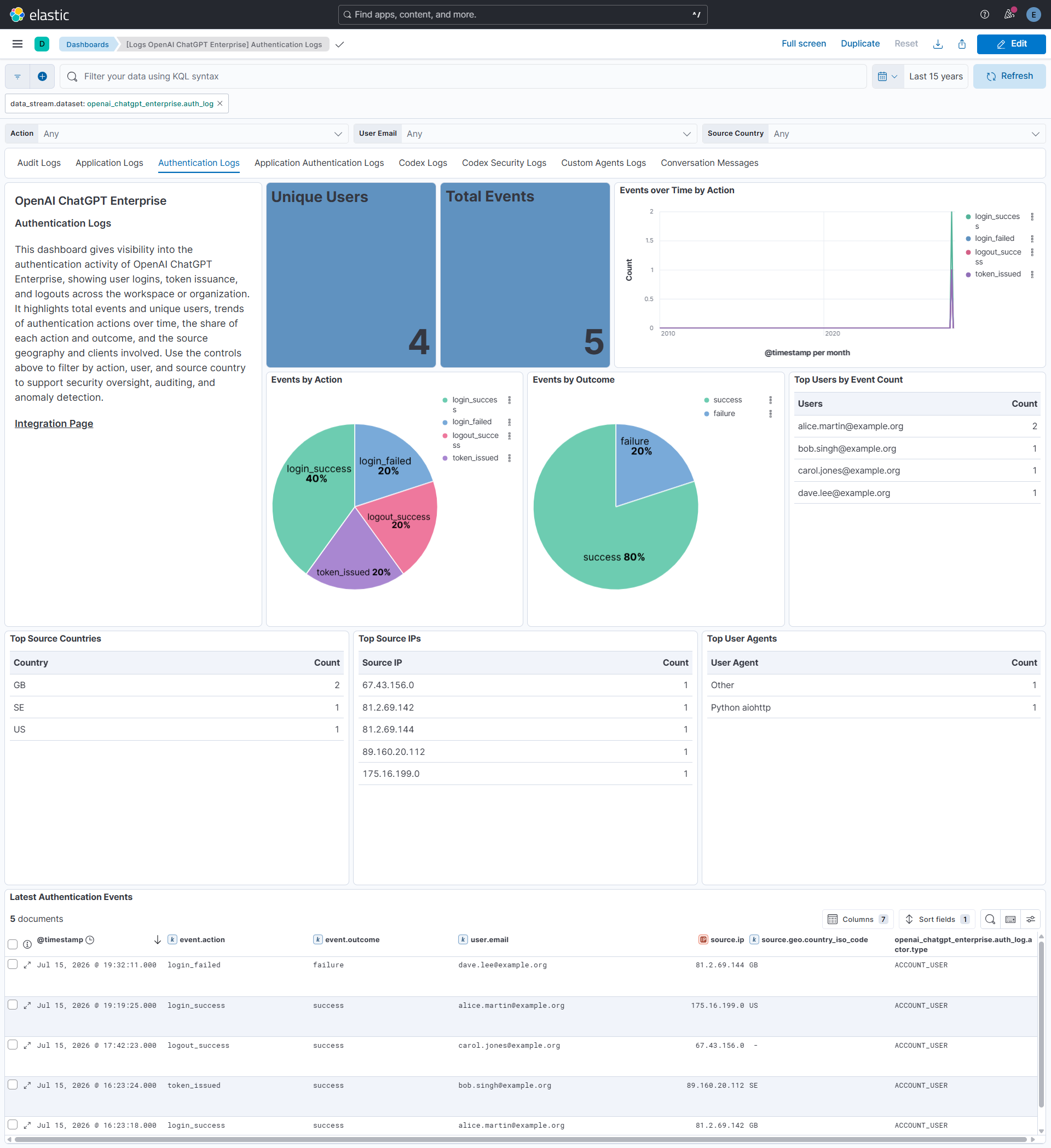
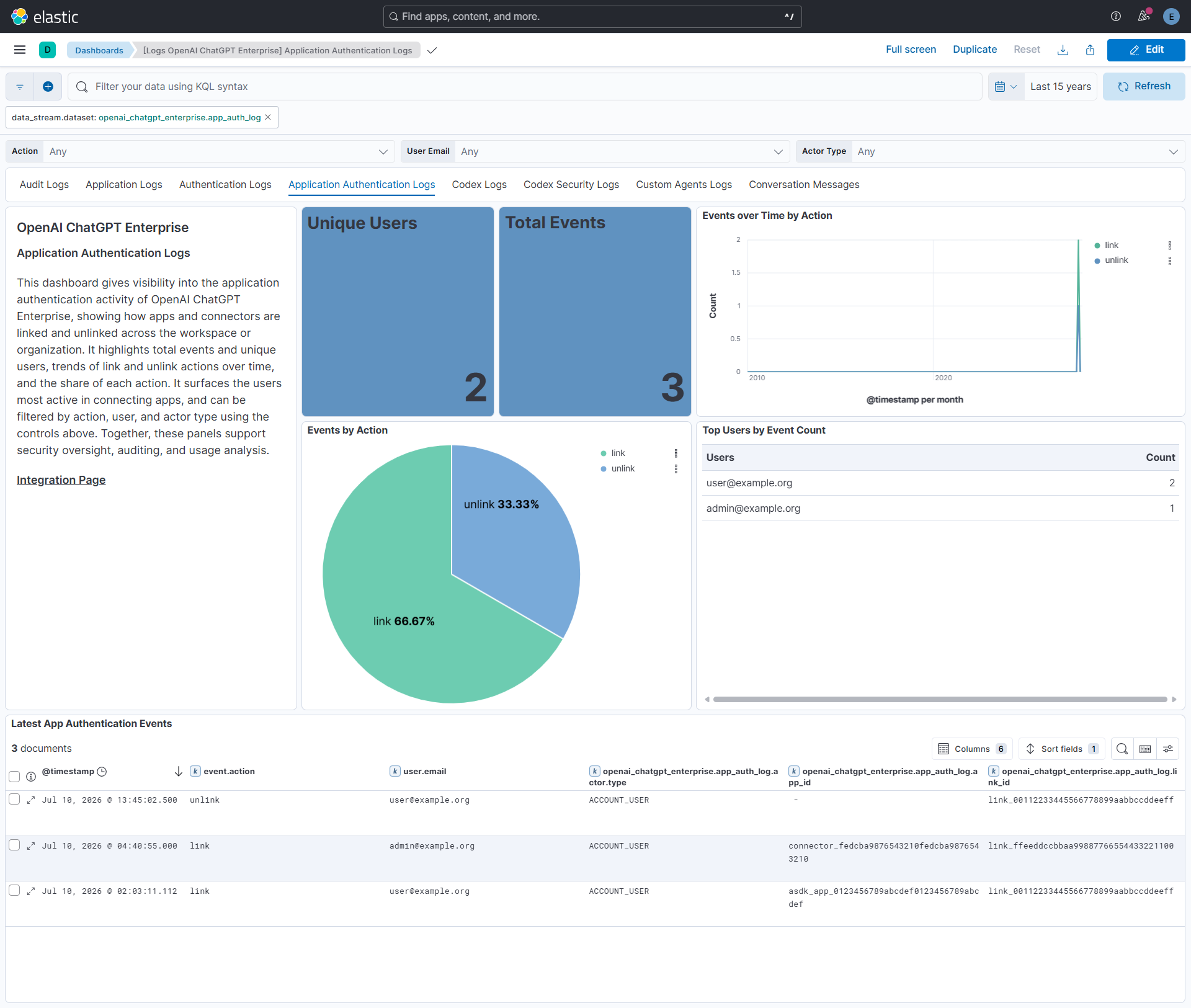
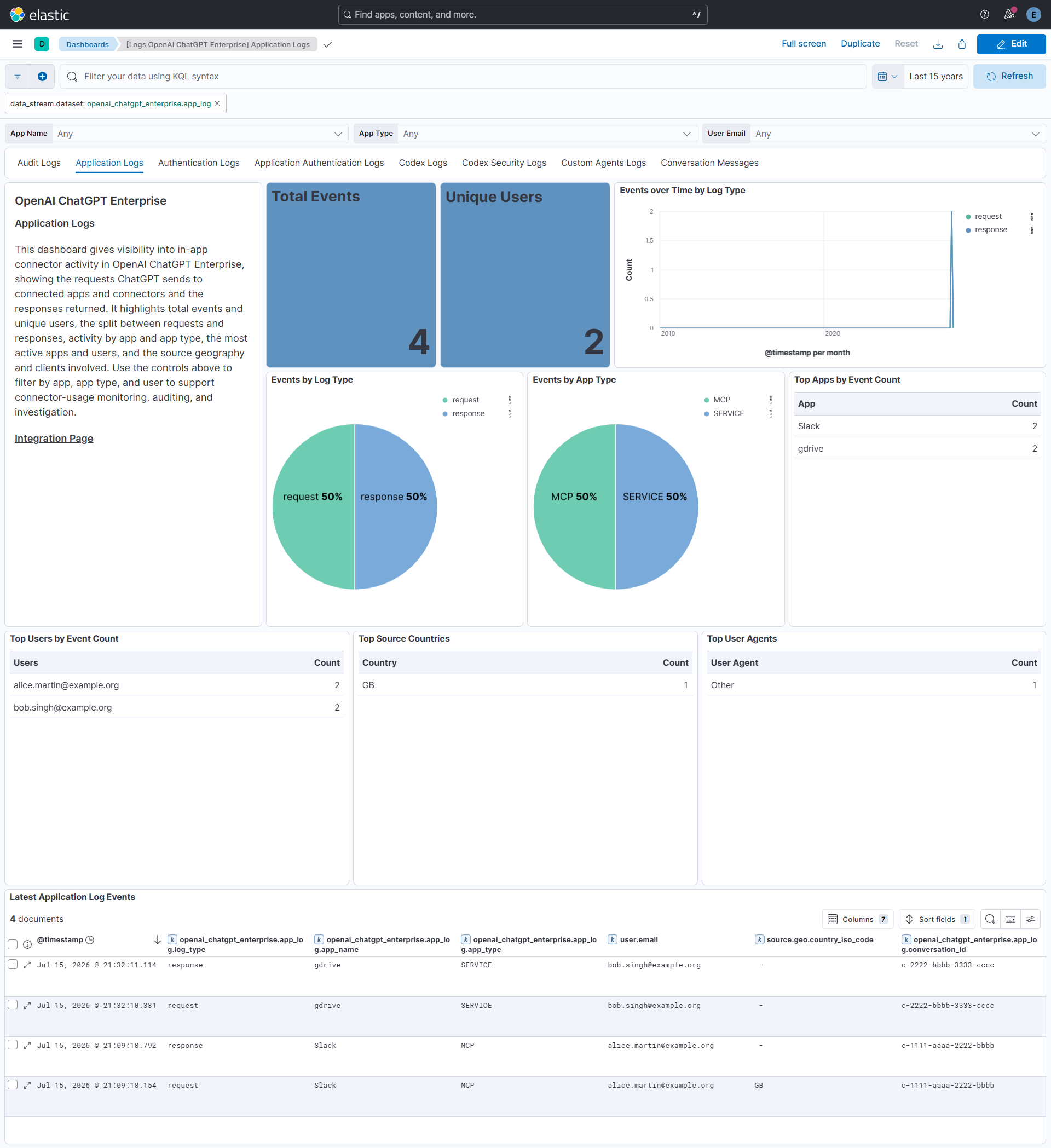
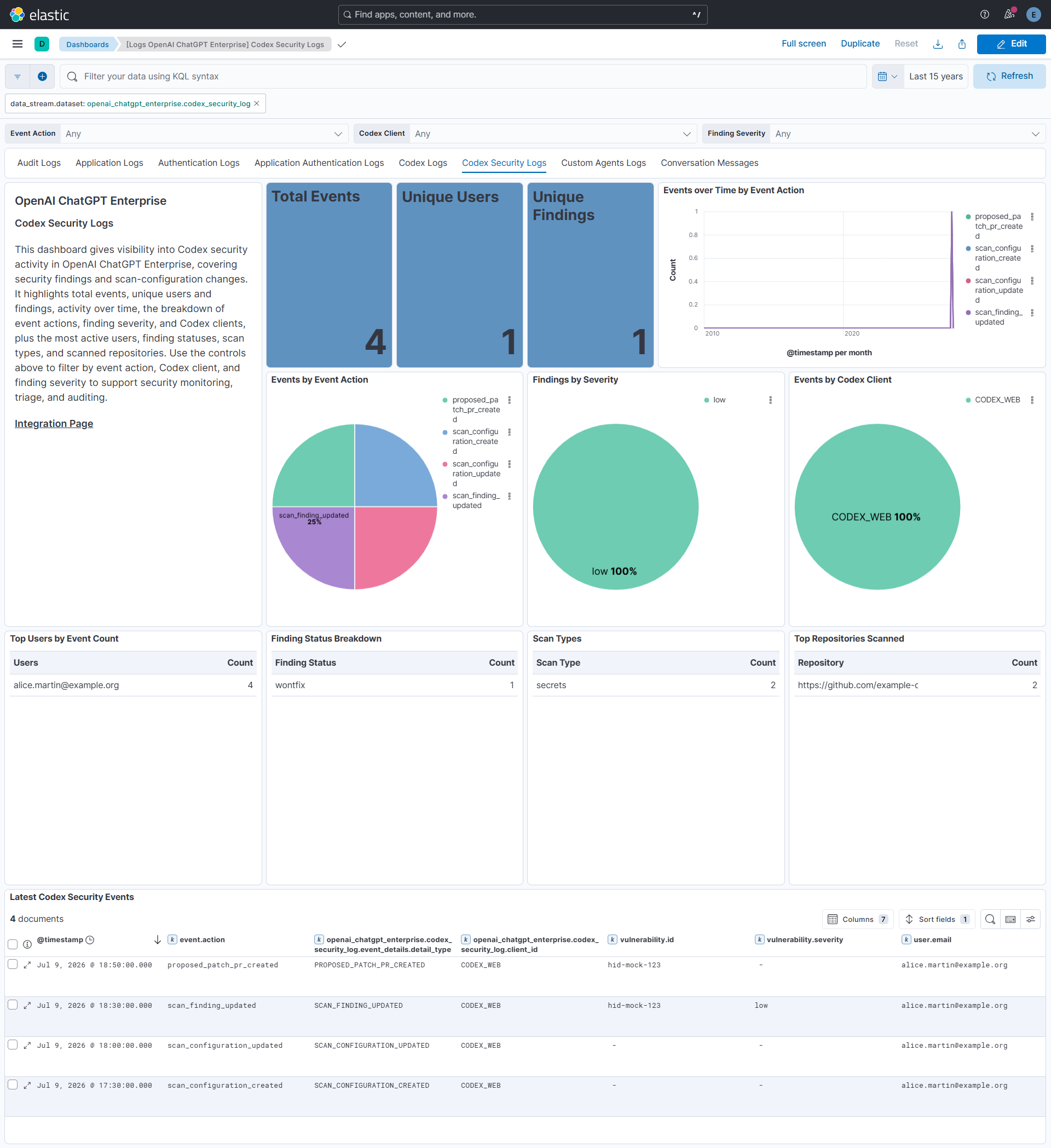
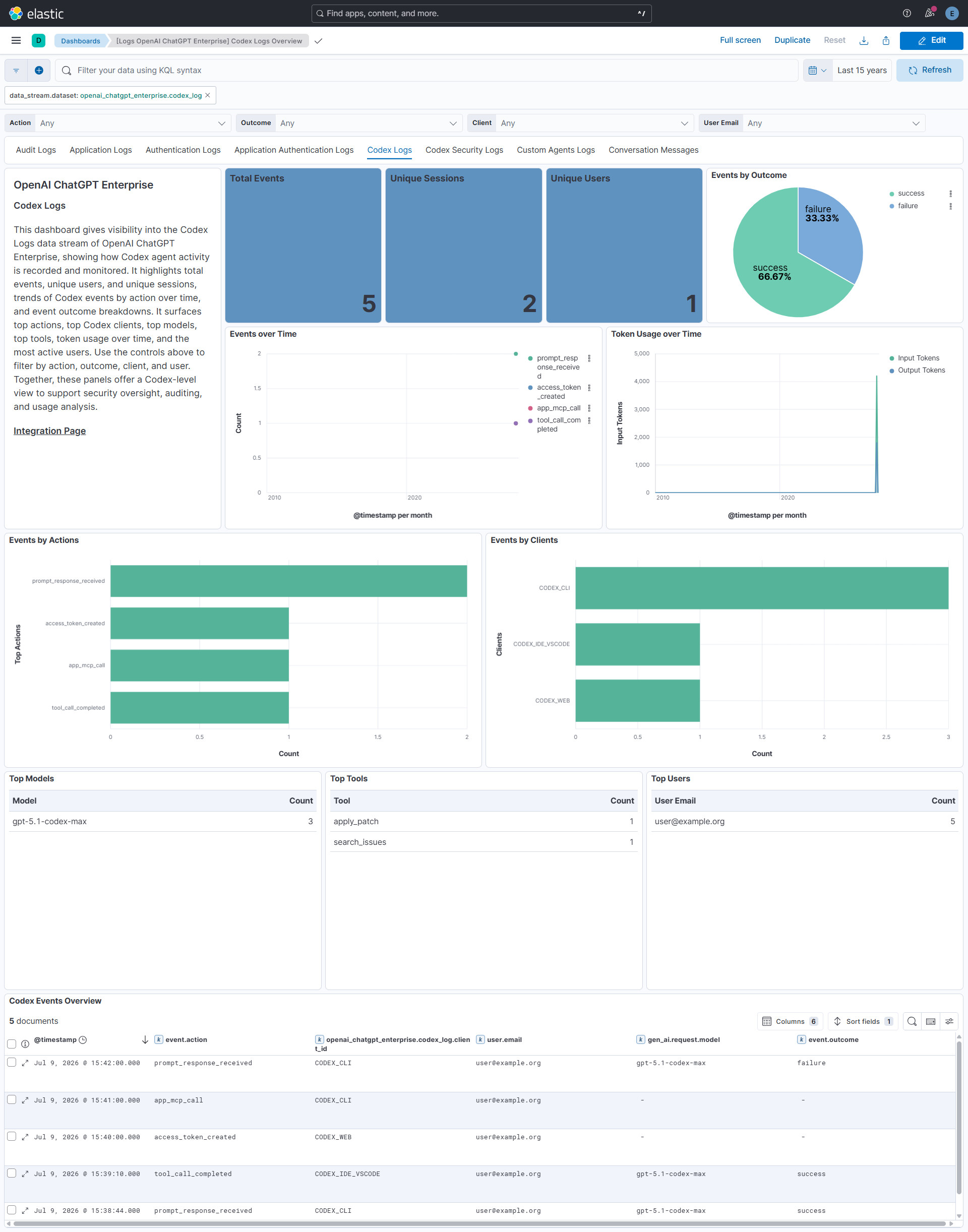
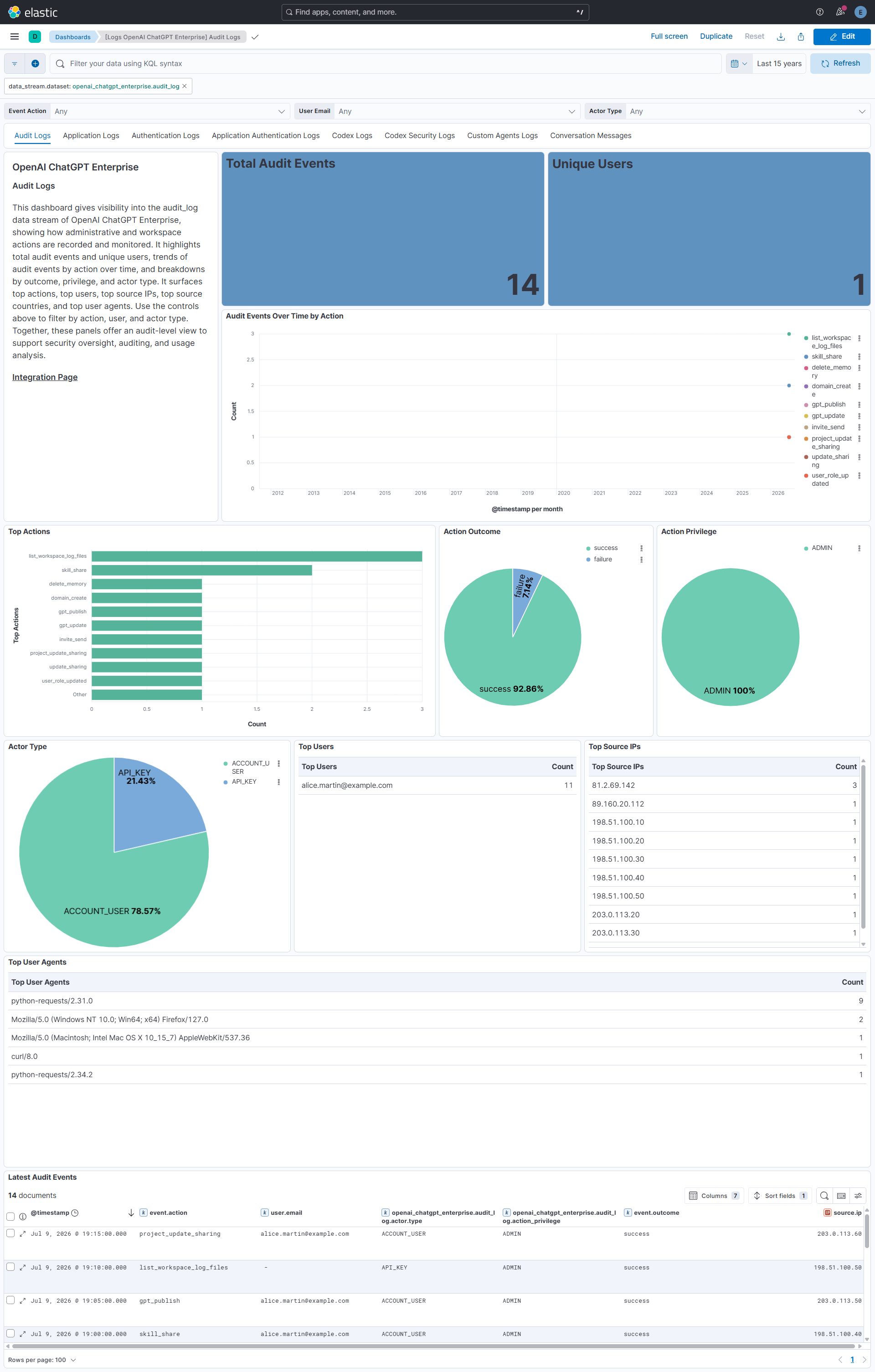
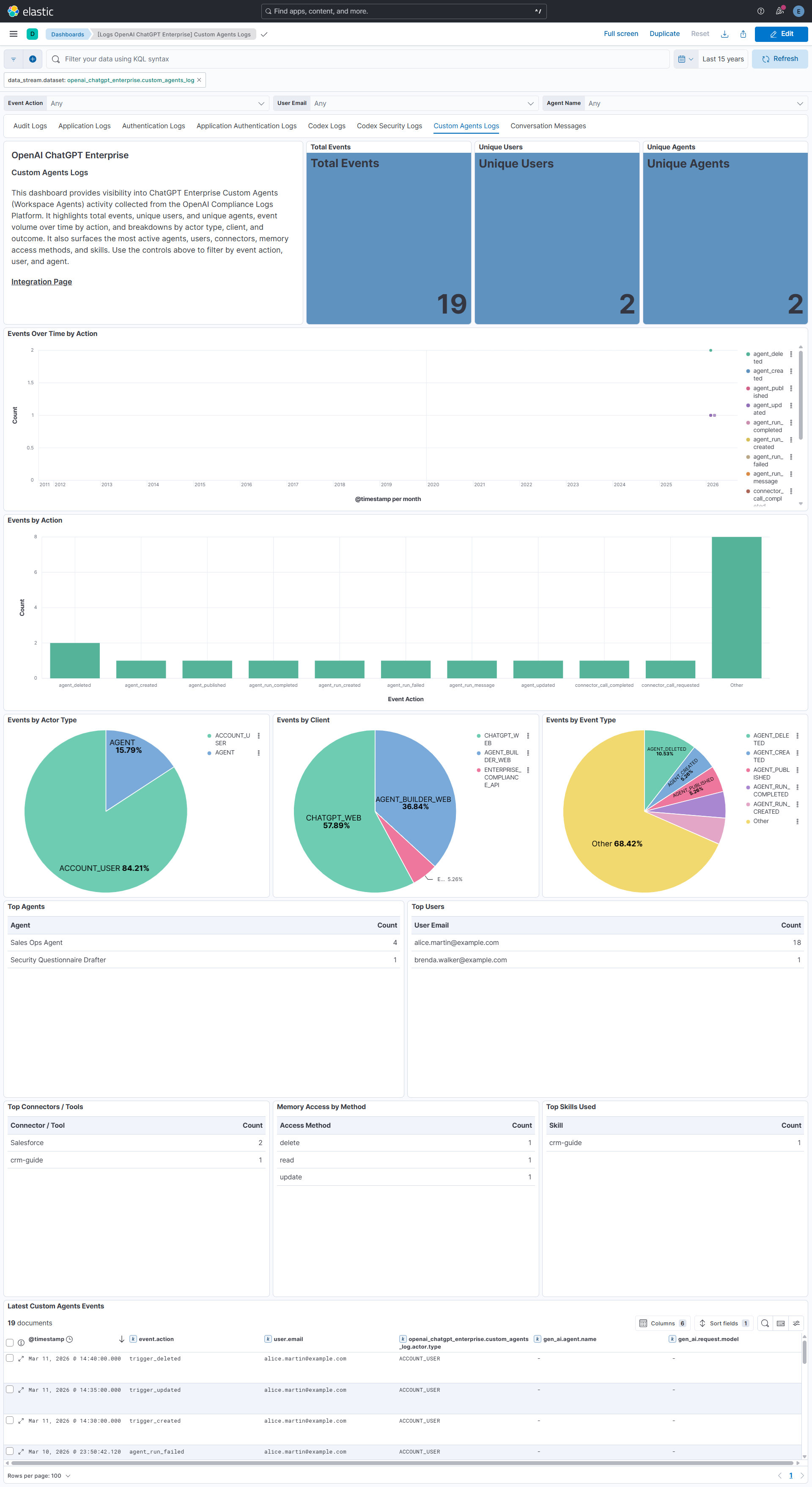
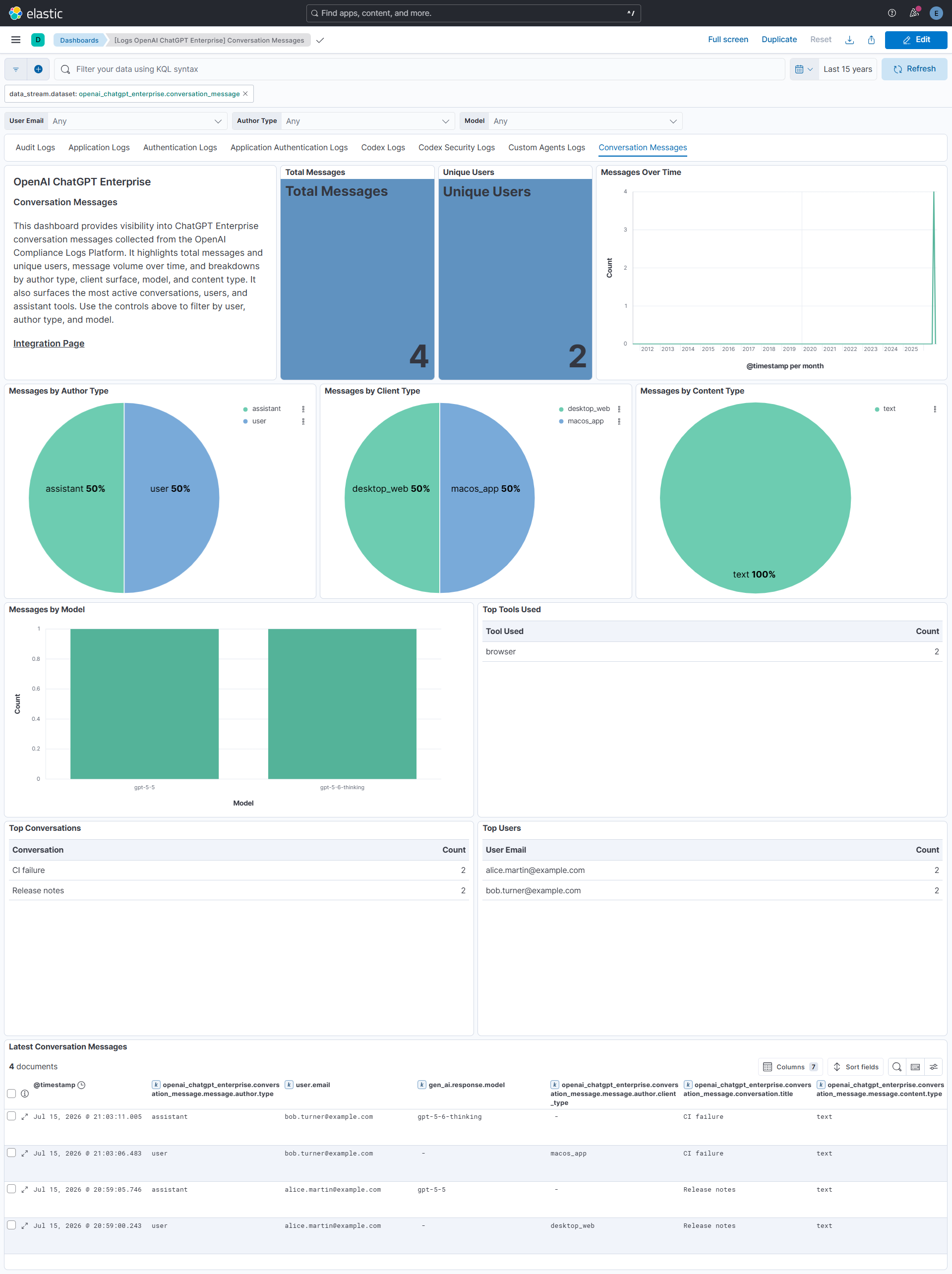
Changelog
| Version | Details | Minimum Kibana version |
|---|---|---|
| 0.2.0 | Enhancement (View pull request) Reduce the default polling interval to 1m and add client-side rate limiting for the Compliance API. |
9.1.0 8.19.0 |
| 0.1.0 | Enhancement (View pull request) Initial release of the OpenAI ChatGPT Enterprise Codex Logs, Codex Security, Audit, Custom Agents Logs, and Conversation Message data streams. Enhancement (View pull request) Initial release of the OpenAI ChatGPT Enterprise Application Logs data stream. Enhancement (View pull request) Initial release of the OpenAI ChatGPT Enterprise Application Authentication Logs data stream. Enhancement (View pull request) Initial release of the OpenAI ChatGPT Enterprise Authentication Logs data stream. |
9.1.0 8.19.0 |