SOCRadar Threat Feeds
| Version | 0.2.0
|
| Managed integration release status |
|
| Subscription level What's this? |
Basic |
| Developed by What's this? |
Partner |
| Ingestion method(s) | API |
| Minimum Kibana version(s) | 9.1.0 8.19.0 |
You can use this integration as an Elastic Managed integration on Elastic Cloud Hosted deployments running this version or later.
To use pre-release integrations, go to the Integrations page in Kibana, scroll down, and toggle on the Display beta integrations option.
The SOCRadar Threat Feeds integration polls the SOCRadar Platform's curated threat intelligence feed collections via the /api/threat/intelligence/feed_list/{collection_id}.json REST endpoint, normalizing indicators (IP, domain, file hash, URL, email) into the Elastic Common Schema (ECS) for ingestion into Elasticsearch.
This integration is compatible with the SOCRadar Platform Feed API v2 and has been tested against Elastic Stack 8.18.0 and later.
The Elastic Agent uses the CEL input to poll SOCRadar feed collections in round-robin fashion. On each interval tick, one collection is processed: the agent fetches the collection JSON, filters indicators by latest_seen_date against either the configured initial_interval window (first run) or the last processed timestamp (subsequent runs), and forwards the matching indicators to the ingest pipeline. The pipeline maps each indicator to threat.indicator.* ECS fields based on its feed_type (ip, hostname, hash, url, email).
This integration collects a single data stream:
- feed: Threat intelligence indicators from SOCRadar curated feed collections. Each indicator is emitted with
event.kind: enrichmentand mapped to ECSthreat.indicator.*fields. Supported indicator types: IPv4/IPv6 addresses, domain names, file hashes (MD5, SHA-1, SHA-256, SHA-512), URLs, and email addresses.
The integration also installs a latest_ioc transform that deduplicates the source stream into logs-ti_socradar_feeds_latest.feed, keeping the most recently seen state per indicator value for use in indicator-match detection rules.
- Enriching alerts in Elastic Security with up-to-date threat indicators.
- Driving indicator-match detection rules from the deduplicated latest-state index.
- Building dashboards and reports over current threat landscape activity.
- A self-managed or Cloud Elastic deployment with Elastic Stack 8.18.0 or later.
- An Elastic Agent enrolled in Fleet (Fleet-managed deployment is recommended; agentless deployment is also supported).
- A SOCRadar Platform account with API access.
- A SOCRadar Platform API key (obtainable from Settings → API Key in the SOCRadar Platform).
This integration is deployed using the Elastic Agent. See the general Observability getting started guide for an end-to-end overview of installing the Agent and adding integrations.
- In Kibana, navigate to Management > Integrations and search for "SOCRadar Threat Feeds".
- Click Add SOCRadar Threat Feeds.
- Configure the following settings:
- API Key: Your SOCRadar Platform API key. Stored as a policy secret and masked in the UI.
- SOCRadar Platform URL: Base URL of the SOCRadar Platform. Default
https://platform.socradar.com. Change only if SOCRadar provides a different host. - Collections Configuration: YAML list of feed collections to poll. Each entry requires an
idand aname. The agent polls one collection perIntervaltick in round-robin fashion. The default value contains seven recommended collections. - Interval: Time between polling cycles (default
5m). With N collections, each individual collection is refreshed roughly everyN × Interval. - Initial Interval: How far back to look on first start (default
10h). Indicators with alatest_seen_dateolder than this window are skipped on the first poll. - IOC Expiration Duration: How long indicators remain valid after their last seen timestamp (default
90d). - Proxy URL (optional): If you need to connect through a proxy.
- SSL Configuration (optional): Custom SSL settings if needed.
- Both Fleet-managed and agentless deployment modes are supported.
- Click Save and continue to deploy the integration.
After deployment, verify that data is flowing:
- In Kibana, open Discover and select the
logs-ti_socradar_feeds.feed-*data view. Documents should start appearing within oneInterval. - Check the
latest_ioctransform under Stack Management → Transforms: state should bestartedanddocuments_processedshould grow over time. - Open the [SOCRadar Threat Feeds] Overview dashboard to see indicator counts, types, and feed sources.
The first poll happens after one Interval (default 5m). With seven recommended collections processed in round-robin, every collection refreshes roughly every 35 minutes. If logs-ti_socradar_feeds.feed-default stays empty for more than 10 minutes:
- Verify the agent is online and on the correct policy revision. Fleet → Agents → your agent should be
Healthywith the latest policy revision. - Enable agent monitoring to see CEL polling logs. Fleet → Agent policies → your policy → Settings → Agent monitoring → enable "Collect agent logs". Then Fleet → Agents → your agent → Logs and search for
celorsocradar. A successful poll logsstatus: 200.401/403indicates an invalid or expired API key;timeoutindicates network/proxy issues. - Verify the API key in policy secrets. Integration policy → API Key → Replace api key, then paste the value from the SOCRadar Platform.
Check the failure store: GET .fs-logs-ti_socradar_feeds.feed-*/_count. The expected value is 0. If non-zero, query the failure store for error.message to see which field failed to map.
The logs-ti_socradar_feeds.latest_ioc-default-0.1.0 transform deduplicates indicators into the logs-ti_socradar_feeds_latest.feed-* index. If documents_processed stays at 0 for more than Interval × 2, restart the transform from Stack Management → Transforms.
For SOCRadar-side issues (collection availability, API key permissions), consult the SOCRadar Platform documentation.
The CEL input fetches one collection per Interval tick; the polling cost scales linearly with the number of configured collections. For environments with many collections, increase Interval rather than running many tightly-packed ticks, and split very large collection sets across multiple integration policies on separate agents.
The SOCRadar Feed API returns each collection as a single JSON array (no server-side pagination); response size is bounded by the collection's indicator count. For high-volume collections, ensure the Elastic Agent host has enough memory to decode the full response.
The latest_ioc transform runs every 60 seconds and indexes one document per unique indicator; cluster sizing should account for the deduplicated indicator count rather than the raw event volume.
Exported fields
| Field | Description | Type |
|---|---|---|
| @timestamp | Event timestamp. | date |
| cloud.image.id | Image ID for the cloud instance. | keyword |
| data_stream.dataset | Data stream dataset. | constant_keyword |
| data_stream.namespace | Data stream namespace. | constant_keyword |
| data_stream.type | Data stream type. | constant_keyword |
| event.dataset | Event dataset | constant_keyword |
| event.module | Event module | constant_keyword |
| host.containerized | If the host is a container. | boolean |
| host.os.build | OS build information. | keyword |
| host.os.codename | OS codename, if any. | keyword |
| input.type | Input type | keyword |
| labels.is_ioc_transform_source | Indicates whether an IOC is in the raw source data stream, or the in latest destination index. | constant_keyword |
| threat.feed.name | The name of the threat feed in UI friendly format. | keyword |
| threat.feed.reference | Reference information for the threat feed in a UI friendly format. | keyword |
| threat.indicator.confidence | Identifies the vendor-neutral confidence rating using the None/Low/Medium/High scale defined in Appendix A of the STIX 2.1 framework. Vendor-specific confidence scales may be added as custom fields. | keyword |
| threat.indicator.description | Describes the type of action conducted by the threat. | keyword |
| threat.indicator.email.address | Identifies a threat indicator as an email address (irrespective of direction). | keyword |
| threat.indicator.file.hash.md5 | MD5 hash. | keyword |
| threat.indicator.file.hash.sha1 | SHA1 hash. | keyword |
| threat.indicator.file.hash.sha256 | SHA256 hash. | keyword |
| threat.indicator.file.hash.sha512 | SHA512 hash. | keyword |
| threat.indicator.ip | Identifies a threat indicator as an IP address (irrespective of direction). | ip |
| threat.indicator.provider | The name of the indicator's provider. | keyword |
| threat.indicator.type | Type of indicator as represented by Cyber Observable in STIX 2.0. | keyword |
| threat.indicator.url.domain | Domain of the url, such as "www.elastic.co". In some cases a URL may refer to an IP and/or port directly, without a domain name. In this case, the IP address would go to the domain field. If the URL contains a literal IPv6 address enclosed by [ and ] (IETF RFC 2732), the [ and ] characters should also be captured in the domain field. |
keyword |
| threat.indicator.url.full | If full URLs are important to your use case, they should be stored in url.full, whether this field is reconstructed or present in the event source. |
wildcard |
| threat.indicator.url.full.text | Multi-field of threat.indicator.url.full. |
match_only_text |
| threat.indicator.url.original | Unmodified original url as seen in the event source. Note that in network monitoring, the observed URL may be a full URL, whereas in access logs, the URL is often just represented as a path. This field is meant to represent the URL as it was observed, complete or not. | wildcard |
| threat.indicator.url.original.text | Multi-field of threat.indicator.url.original. |
match_only_text |
| ti_socradar_feeds.feed.collection_id | SOCRadar feed collection UUID. | keyword |
| ti_socradar_feeds.feed.collection_name | SOCRadar feed collection display name. | keyword |
| ti_socradar_feeds.feed.extra_info | Additional metadata from the feed. | flattened |
| ti_socradar_feeds.feed.first_seen_date | First seen date from SOCRadar feed. | date |
| ti_socradar_feeds.feed.ioc_expiration_date | Calculated indicator expiration date. | date |
| ti_socradar_feeds.feed.ioc_expiration_duration | Configured IOC expiration duration. | keyword |
| ti_socradar_feeds.feed.ioc_expiration_reason | Reason for IOC expiration setting. | keyword |
| ti_socradar_feeds.feed.latest_seen_date | Latest seen date from SOCRadar feed. | date |
| ti_socradar_feeds.feed.maintainer_name | Feed maintainer identifier. | keyword |
| ti_socradar_feeds.feed.type | Feed indicator type from SOCRadar (ip, hostname, hash, url, email). | keyword |
| ti_socradar_feeds.feed.value | The indicator value (IP, domain, hash, URL, email). | keyword |
Example
{
    "@timestamp": "2026-02-20T08:30:00.000Z",
    "ecs": {
        "version": "8.17.0"
    },
    "event": {
        "category": [
            "threat"
        ],
        "created": "2026-02-20T08:30:00.000Z",
        "kind": "enrichment",
        "type": [
            "indicator"
        ]
    },
    "labels": {
        "is_ioc_transform_source": "true"
    },
    "related": {
        "ip": [
            "203.0.113.50"
        ]
    },
    "ti_socradar_feeds": {
        "feed": {
            "collection_id": "4d7a69ce6e7c49ff8c916da5d7343916",
            "collection_name": "SOCRadar-APT-Recommended-Block-IP",
            "extra_info": {
                "score": 72.5,
                "seen_count": 3
            },
            "first_seen_date": "2026-02-19T10:00:00.000Z",
            "ioc_expiration_date": "2026-05-21T08:30:00.000Z",
            "ioc_expiration_duration": "90d",
            "ioc_expiration_reason": "Expiration set by configuration",
            "latest_seen_date": "2026-02-20T08:30:00.000Z",
            "maintainer_name": "SOCRadar",
            "type": "ip",
            "value": "203.0.113.50"
        }
    },
    "tags": [
        "forwarded",
        "ti_socradar_feeds-feed"
    ],
    "threat": {
        "feed": {
            "name": "SOCRadar Threat Feeds",
            "reference": "https://platform.socradar.com"
        },
        "indicator": {
            "confidence": "High",
            "description": "SOCRadar feed: SOCRadar-APT-Recommended-Block-IP",
            "first_seen": "2026-02-19T10:00:00.000Z",
            "ip": "203.0.113.50",
            "last_seen": "2026-02-20T08:30:00.000Z",
            "modified_at": "2026-02-20T08:30:00.000Z",
            "provider": "SOCRadar",
            "type": "ipv4-addr"
        }
    }
}
- CEL input: Polls the SOCRadar
/api/threat/intelligence/feed_list/{collection_id}.jsonendpoint with round-robin collection selection and client-side timestamp filtering.
GET /api/threat/intelligence/feed_list/{collection_id}.json?key={apiKey}&v=2— Returns the full set of indicators for a single SOCRadar feed collection as a JSON array.
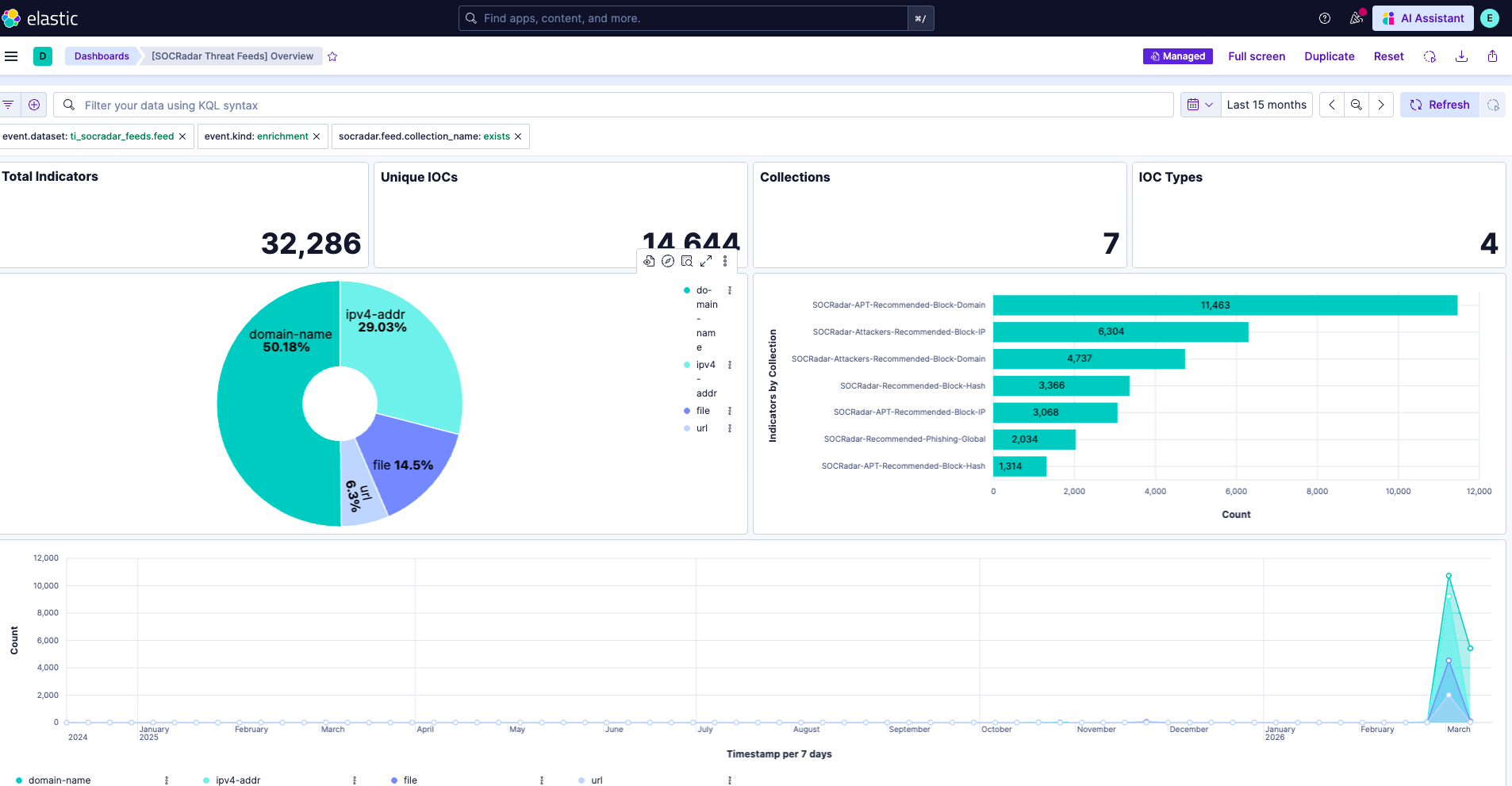
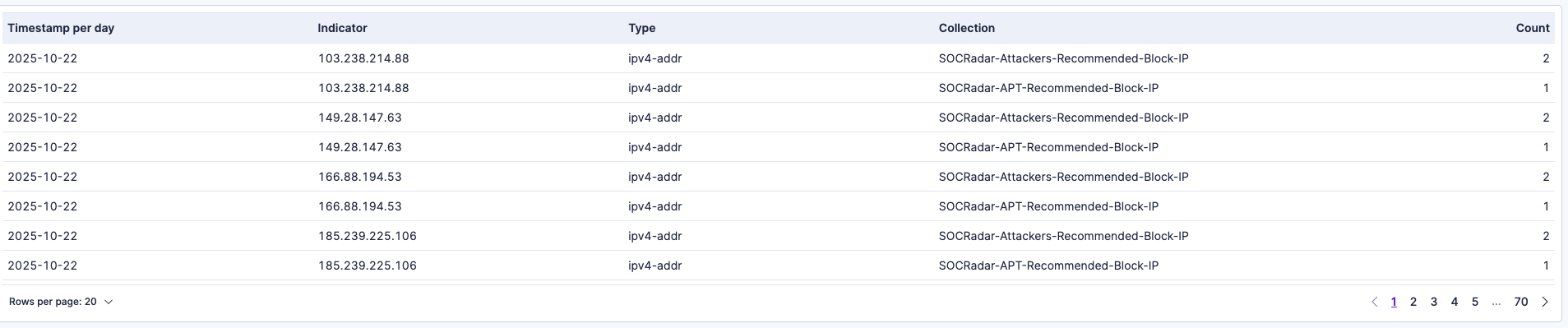
- [SOCRadar Threat Feeds] Overview — KPI metrics (Total Indicators, Unique IOCs, Collections, IOC Types) and visualizations (Indicators by Type, Indicators by Collection, Indicators Over Time, Recent Indicators).
This integration includes one or more Kibana dashboards that visualizes the data collected by the integration. The screenshots below illustrate how the ingested data is displayed.
Changelog
| Version | Details | Minimum Kibana version |
|---|---|---|
| 0.2.0 | Enhancement (View pull request) Remove redundant ECS field definitions and the catch-all dynamic template from the transforms, relying on the ecs@mappings component template. |
9.1.0 8.19.0 |
| 0.1.2 | Bug fix (View pull request) Set agentless deployment mode release field to beta. |
9.0.0 8.18.0 |
| 0.1.1 | Bug fix (View pull request) Fix transform destination to use keyword for data_stream.namespace, allowing multi-namespace deployments. |
9.0.0 8.18.0 |
| 0.1.0 | Enhancement (View pull request) Initial release. |
9.0.0 8.18.0 |