Apache CouchDB OpenTelemetry Assets
| Version | 0.3.1
|
| Subscription level What's this? |
Basic |
| Developed by What's this? |
Elastic |
| Minimum Kibana version(s) | 9.4.0 |
To use pre-release integrations, go to the Integrations page in Kibana, scroll down, and toggle on the Display beta integrations option.
Apache CouchDB is an open-source NoSQL document database that exposes a RESTful HTTP API for all operations. This content pack provides dashboards, alert rules, and SLO templates for CouchDB metrics collected using the OpenTelemetry CouchDB receiver, covering latency, traffic, errors, and saturation.
The CouchDB OpenTelemetry assets have been tested with:
OpenTelemetry CouchDB receiver v0.145.0
- CouchDB 3.5.1
You need Elasticsearch for storing and searching your data and Kibana for visualizing and managing it. You can use our hosted Elasticsearch Service on Elastic Cloud, which is recommended, or self-manage the Elastic Stack on your own hardware.
The CouchDB receiver scrapes metrics from the /_node/{node-name}/_stats/couchdb endpoint. Ensure CouchDB is running and the collector host can reach it. Create a CouchDB user with read access to the stats endpoint, or use an existing admin account. No additional CouchDB configuration is required — the stats API is enabled by default.
Configure the OpenTelemetry Collector (or Elastic Distribution of OpenTelemetry Collector) to receive CouchDB metrics and export them to Elasticsearch. Use the following placeholders in the configuration:
<COUCHDB_ENDPOINT>— CouchDB base URL (for example,http://localhost:5984).<COUCHDB_USERNAME>— CouchDB username for authentication.<COUCHDB_PASSWORD>— CouchDB password. Useenv:COUCHDB_PASSWORDand set the variable in your environment.<ES_ENDPOINT>— Elasticsearch ingest endpoint (for example,https://elasticsearch:9200).<ES_API_KEY>— Elasticsearch API key for authentication. Preferenv:ES_API_KEYand set the variable in your environment.
receivers:
  couchdb:
    endpoint: <COUCHDB_ENDPOINT>
    username: <COUCHDB_USERNAME>
    password: ${env:COUCHDB_PASSWORD}
    collection_interval: 10s

exporters:
  elasticsearch/otel:
    endpoints: [<ES_ENDPOINT>]
    api_key: ${env:ES_API_KEY}
    mapping:
      mode: otel

service:
  pipelines:
    metrics:
      receivers: [couchdb]
      exporters: [elasticsearch/otel]
Refer to the metadata.yaml of the OpenTelemetry CouchDB receiver for details on available metrics.
| Dashboard | Description |
|---|---|
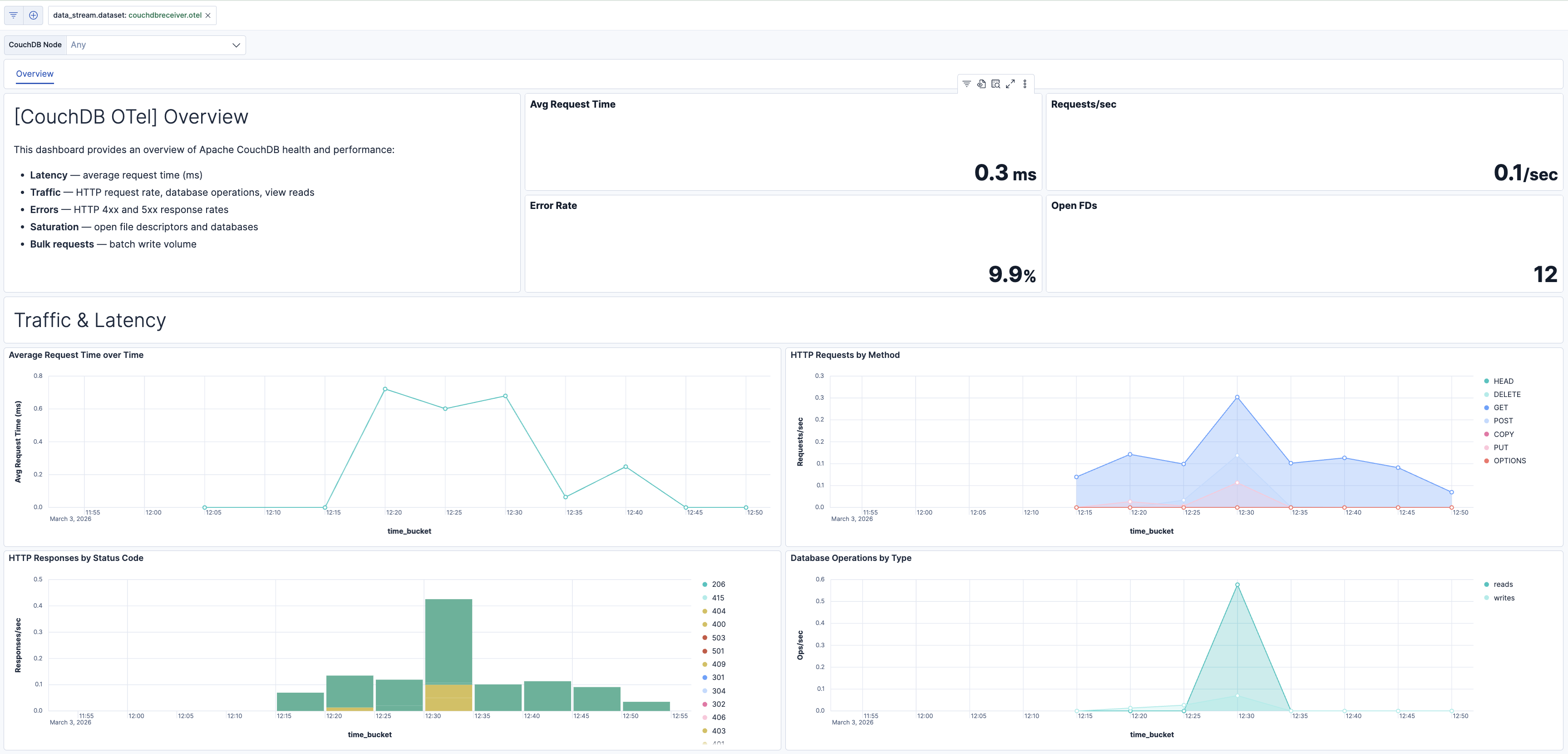
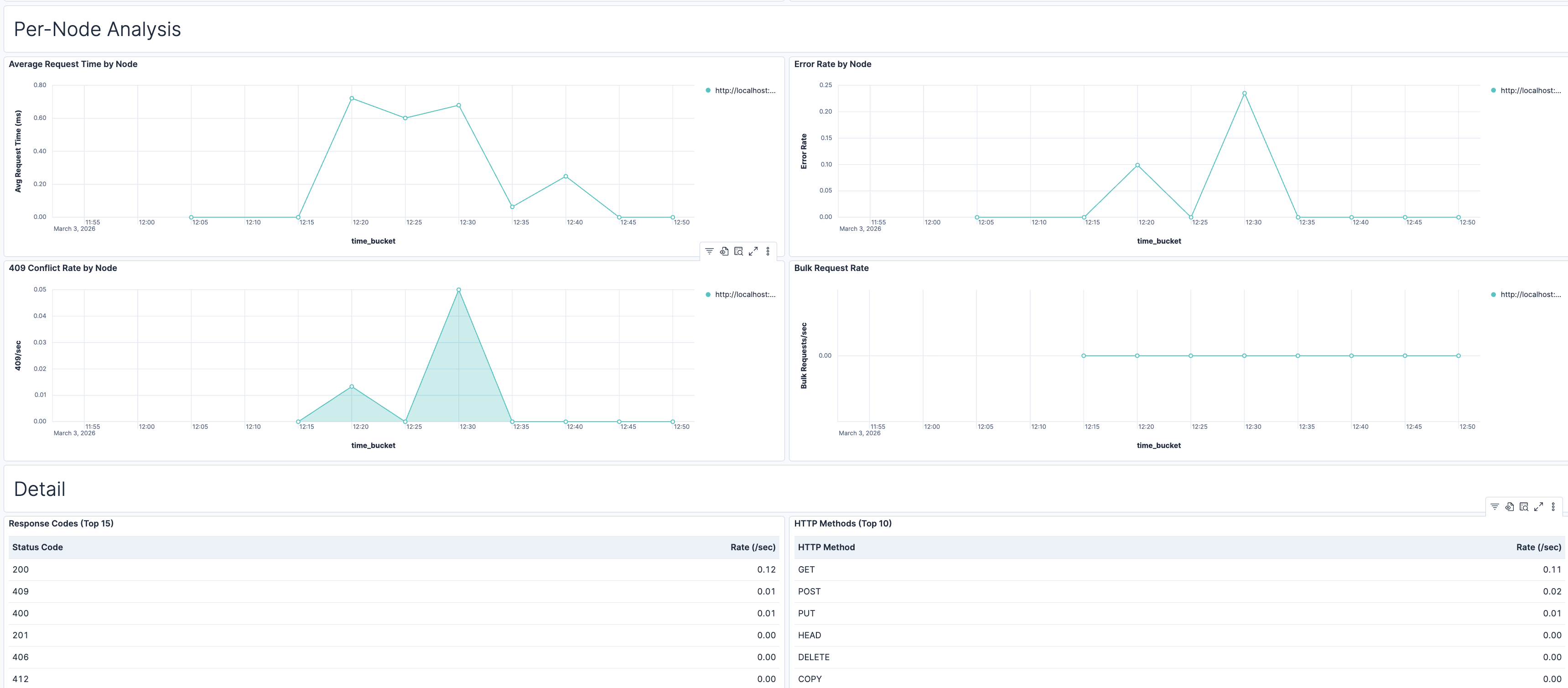
| [CouchDB OTel] Overview | Overview of Apache CouchDB health and performance: request latency, HTTP traffic, error rates, database operations, view reads, and resource saturation (file descriptors, open databases). |
| Alert | Trigger | Severity |
|---|---|---|
| [CouchDB OTel] Conflict storm (elevated 409 responses) | 409 response rate exceeds 10/s per node, indicating write contention on same documents. | Medium |
| [CouchDB OTel] File descriptor exhaustion risk | Open file descriptors exceed 1000 per node. | Critical |
| [CouchDB OTel] High 5xx server error rate | 5xx responses exceed 5% of total responses per node. | Critical |
| [CouchDB OTel] High average request time (latency) | Average request time exceeds 1000 ms per node. | High |
| [CouchDB OTel] High error rate (4xx and 5xx) | Error responses (4xx + 5xx) exceed 10% of total per node. | High |
| [CouchDB OTel] Open databases count high | Open databases exceed 100 per node. | Medium |
SLO templates require Elastic Stack version 9.4.0 or later.
| SLO | Target | Window | Description |
|---|---|---|---|
| [CouchDB OTel] Average request latency 99.5% rolling 30 days | 99.5% | 30-day rolling | Tracks that average request latency stays below 200 ms for 99.5% of 1-minute intervals. |
| [CouchDB OTel] File descriptor headroom 99.5% rolling 30 days | 99.5% | 30-day rolling | Tracks that open file descriptors stay below 1000 for 99.5% of 1-minute intervals. |
This integration includes one or more Kibana dashboards that visualizes the data collected by the integration. The screenshots below illustrate how the ingested data is displayed.
Changelog
| Version | Details | Minimum Kibana version |
|---|---|---|
| 0.3.1 | Bug fix (View pull request) Regenerate Kibana dashboards so ES|QL Lens panels include populated adHocDataViews, internalReferences, and per-layer index, fixing the broken "Explore in Discover" action on Kibana 9.3+. |
9.4.0 |
| 0.3.0 | Enhancement (View pull request) Add tags to Kibana assets |
9.4.0 |
| 0.2.0 | Enhancement (View pull request) Add description and artifact fields to alerting rule template. |
9.4.0 |
| 0.1.0 | Enhancement (View pull request) Initial draft of the package |
9.3.0 |