Cursor
| Version | 0.3.0
|
| Managed integration release status |
|
| Subscription level What's this? |
Basic |
| Developed by What's this? |
Elastic |
| Ingestion method(s) | API, AWS S3 |
| Minimum Kibana version(s) | 9.1.0 8.19.0 |
You can use this integration as an Elastic Managed integration on Elastic Cloud Hosted deployments running this version or later.
To use pre-release integrations, go to the Integrations page in Kibana, scroll down, and toggle on the Display beta integrations option.
The Cursor integration collects audit logs from Cursor, an AI-native code editor built as a fork of Visual Studio Code. Cursor Enterprise teams generate audit events for security-relevant activities such as user authentication, role changes, team configuration updates, API key management, directory group operations, and security controls. This integration enables security and compliance teams to monitor administrative activity, detect unauthorized changes, and maintain an audit trail of team operations.
This integration requires a Cursor Enterprise plan. The Admin API and S3 streaming delivery are available only to Enterprise-tier teams.
This integration supports two methods for collecting Cursor audit logs:
- Admin API (CEL input): the Elastic Agent polls the Cursor Admin API at
https://api.cursor.comon a configurable schedule. The Cursor Admin API only retains audit events for the last 30 days. - S3 Streaming (AWS S3 input): Cursor delivers audit logs to a customer-owned S3 bucket as gzip-compressed NDJSON files (
.jsonl.gz) in date-partitioned paths (YYYY/MM/DD/). S3 streaming must be enabled on the Cursor side; contacthi@cursor.comto request it.
Both input methods feed the same audit data stream and share a common ingest pipeline that normalizes events from either source into a unified schema.
The Cursor integration collects audit log events covering 30+ event types across these categories:
- Authentication events: User logins (
login) and logouts (logout), including login type and success/failure status (S3 format only). - User lifecycle events: Adding (
add_user), removing (remove_user), and changing roles (update_user_role) of team members. - Team configuration events: Settings changes (
team_settings), privacy mode toggles (privacy_mode), spend limit adjustments (user_spend_limit), team rules (team_rule), repository settings (team_repo), webhooks (team_hook), custom commands (team_command), and cloud agent user settings (cloud_agent_user_settings). - API key management: Team (
team_api_key), user (user_api_key), and organization (organization_api_key) API key creation and revocation. - Directory group management: Creating, updating, deleting directory groups, modifying permissions, and managing group membership.
- Bugbot operations: Installation, settings, repository configuration, team rules, team settings, and bulk repository updates for the Bugbot CI assistant.
- Security and access control events: Protected git scope management (
protected_git_scope), access checks (protected_git_scope_access_check), service accounts (service_account), cloud agent secrets (cloud_agent_secret), invite links (invite_link), and invite emails (invite_email_sent).
- Security monitoring: Track authentication patterns, detect unauthorized access attempts (the S3 format captures login failures), and monitor privileged operations such as API key management and role changes.
- Compliance auditing: Maintain a complete audit trail of administrative actions for regulatory compliance (SOC 2 Type II). All events include actor identity, source IP, and timestamp.
- Operational visibility: Monitor team configuration changes, directory group management, and Bugbot operations to understand who changed what and when.
- Incident investigation: Correlate audit events with GeoIP-enriched source IPs and related user identities to investigate security incidents.
- A Cursor Enterprise plan (the Admin API and S3 streaming are not available on lower tiers).
- An Admin API key (for the CEL input) or an S3 streaming configuration (for the AWS S3 input).
- Elastic Agent installed on a host with outbound HTTPS access to
api.cursor.com(CEL input) or access to the S3 bucket and SQS queue (S3 input).
Elastic Agent must be installed. For more details, check the Elastic Agent installation instructions. You can install only one Elastic Agent per host.
Elastic Agent is required to stream data and ship it to Elastic, where the events will then be processed via the integration's ingest pipelines.
- Log in to cursor.com/dashboard with a team administrator (owner) account.
- Navigate to Settings → Advanced → Admin API Keys.
- Click Create New API Key, provide a descriptive name, and copy the generated key immediately (it cannot be retrieved later). The key format is
key_followed by hexadecimal characters. - In Kibana, add the Cursor integration and select the Collect Cursor audit logs via the Admin API input.
- Enter the API key and configure the polling interval (default: 5 minutes). The default initial lookback is 24 hours.
- Optionally filter by event types using a comma-separated list (for example,
login,add_user,team_settings).
- Contact Cursor (
hi@cursor.com) to arrange S3 streaming delivery of audit logs to your AWS S3 bucket. - Cursor writes gzip-compressed NDJSON files (
.jsonl.gz) to a date-partitioned path structure (YYYY/MM/DD/) in your bucket. - Optionally configure S3 event notifications to an SQS queue for near-real-time processing (recommended over bucket polling).
- Ensure IAM permissions are configured:
s3:GetObjectands3:ListBucketfor bucket polling; addsqs:ReceiveMessage,sqs:DeleteMessage, andsqs:GetQueueAttributesif using SQS. - In Kibana, add the Cursor integration and select the Collect Cursor audit logs via AWS S3 or AWS SQS input.
- Configure either the S3 bucket name (for direct polling) or the SQS queue URL (for notification-based processing) along with AWS credentials.
After deploying the integration:
- Navigate to Discover in Kibana and filter for
data_stream.dataset: "cursor.audit". - Verify that events are being ingested with correct
event.actionvalues (for example,login,add_user,team_settings). - Check that
@timestamp,source.ip,user.email, and ECS categorization fields (event.category,event.type) are populated.
For help with Elastic ingest tools, check Common problems.
Rate limits (CEL input): The Cursor Admin API enforces a limit of 20 requests per minute per team. The default polling interval of 5 minutes keeps usage well within this limit. If you encounter 429 errors, increase the polling interval.
30-day retention (CEL input): The Cursor Admin API only serves audit events from the last 30 days. The integration automatically clamps the initial lookback to a maximum of 30 days, so configuring a larger Initial Lookback Interval will still produce a valid backfill — it simply collects the previous 30 days.
"unknown" values (S3 input): System-initiated events (for example, auto-enrolled users or automated removals) can have ip_address and user_email set to "unknown". The pipeline handles this gracefully and does not attempt IP conversion on these sentinel values.
Multiple agents: Run a single Elastic Agent instance per Cursor team to avoid rate limit contention. Multiple agents polling the same team share the 20 requests-per-minute budget.
For more information on architectures that can be used for scaling this integration, check the Ingest Architectures documentation.
For high-volume teams, the S3 streaming input is recommended as it is not subject to API rate limits and provides near-real-time delivery.
The audit data stream collects audit log events from Cursor covering authentication, user management, team configuration, API key lifecycle, directory group operations, Bugbot management, and security controls. It supports two input methods: Admin API polling and S3 streaming via AWS S3/SQS.
Exported fields
| Field | Description | Type |
|---|---|---|
| @timestamp | Event timestamp. | date |
| cursor.audit.action | Sub-action reported inside the event payload (for example, create, revoke, install, disconnect). | keyword |
| cursor.audit.api_key_id | API key identifier (also used for the Admin API alias key_id). |
keyword |
| cursor.audit.api_key_name | API key name. | keyword |
| cursor.audit.auth_id | Auth identity from event metadata context. | keyword |
| cursor.audit.bugbot_enabled | Whether Bugbot was enabled or disabled in a bulk repo update. | boolean |
| cursor.audit.command_id | Team command identifier. | keyword |
| cursor.audit.command_name | Team command name. | keyword |
| cursor.audit.creator_email | Email of the user who created/revoked the invite link. | keyword |
| cursor.audit.creator_user_id | User ID of the invite link creator. | keyword |
| cursor.audit.directory_group_name | Directory group name (for group settings events). | keyword |
| cursor.audit.enabled | Whether a single-value toggle is enabled (Bugbot repo settings, privacy_mode API). | boolean |
| cursor.audit.event_data | Unknown or unmapped event-type payload fields. Known fields are promoted to dedicated cursor.audit.* fields. | flattened |
| cursor.audit.expires_in_seconds | Duration after which the invite expires, in seconds. | long |
| cursor.audit.ghost_mode | Whether ghost mode was enabled for the request. | boolean |
| cursor.audit.git_enterprise_uuid | Enterprise UUID for GitHub Enterprise installations. | keyword |
| cursor.audit.git_org_owner | Git organization or owner name. | keyword |
| cursor.audit.git_provider | Git provider (for example, github). | keyword |
| cursor.audit.github_app_type | Bugbot GitHub App type (dotcom or enterprise). | keyword |
| cursor.audit.github_hostname | Bugbot GitHub Enterprise hostname. | keyword |
| cursor.audit.hook_id | Team hook identifier. | keyword |
| cursor.audit.hook_step | Team hook step name. | keyword |
| cursor.audit.hook_type | Team hook type (command or prompt). | keyword |
| cursor.audit.installation_id | Bugbot GitHub App installation identifier. | keyword |
| cursor.audit.invite_id | Truncated invite code for correlation. | keyword |
| cursor.audit.invited_by_email | Email of the user who created the invite. | keyword |
| cursor.audit.invited_by_user_id | User ID of the invite creator. | keyword |
| cursor.audit.is_active | Whether the rule, hook, or command is active. | boolean |
| cursor.audit.is_required | Whether the rule is required. | boolean |
| cursor.audit.login_type | Login type reported by login events. | keyword |
| cursor.audit.metadata | Free-form metadata string (team_repo, create_directory_group). | keyword |
| cursor.audit.new_limit_cents | New user spend limit in cents. | long |
| cursor.audit.new_privacy_mode | New privacy mode setting. | keyword |
| cursor.audit.new_role | New role (update_user_role). | keyword |
| cursor.audit.new_value | New value for setting changes. | keyword |
| cursor.audit.old_limit_cents | Previous user spend limit in cents. | long |
| cursor.audit.old_privacy_mode | Previous privacy mode setting. | keyword |
| cursor.audit.old_role | Previous role (update_user_role). | keyword |
| cursor.audit.old_value | Previous value for setting changes. | keyword |
| cursor.audit.operating_systems | Operating systems targeted by a team hook. | keyword |
| cursor.audit.operation | Operation label (for example, enable, disable) for bulk repo updates. | keyword |
| cursor.audit.organization_id | Organization identifier for organization_api_key events. | keyword |
| cursor.audit.permissions | Permissions granted to a directory group. | keyword |
| cursor.audit.personal_message | Indicator of whether a personal message was attached (yes/no), not the actual content. | keyword |
| cursor.audit.privacy_mode | Privacy mode enum extracted from embedded context JSON. | keyword |
| cursor.audit.prompt_content | Team hook prompt content. | keyword |
| cursor.audit.prompt_model | Team hook prompt model. | keyword |
| cursor.audit.provider | Provider (for example, github) reported by Bugbot installation events. | keyword |
| cursor.audit.reason | Reason string for access-check results. | keyword |
| cursor.audit.repo_name | Repository name for team_repo events. | keyword |
| cursor.audit.repo_node_id | GitHub node ID of the repository. | keyword |
| cursor.audit.repo_scope | Repositories the API key is scoped to. | keyword |
| cursor.audit.repo_scope_enabled | Whether repo scoping is enabled for the API key. | boolean |
| cursor.audit.repo_url | Repository URL (Bugbot repo settings, team_repo). | keyword |
| cursor.audit.repos_updated | Number of repos updated in a bulk operation. | long |
| cursor.audit.request_id | Request correlation identifier. | keyword |
| cursor.audit.result | Raw access-check result (allowed or blocked). Mirrors event.outcome. |
keyword |
| cursor.audit.role | Role assigned to the user (lower-cased for add_user). | keyword |
| cursor.audit.rule_id | Team/Bugbot rule identifier. | keyword |
| cursor.audit.rule_name | Team/Bugbot rule name. | keyword |
| cursor.audit.scope | Scope qualifier (for example, team, user). | keyword |
| cursor.audit.scope_id | Protected git scope identifier. | keyword |
| cursor.audit.scoped_to_repos | Repositories a cloud agent secret is scoped to. | keyword |
| cursor.audit.script_content | Team hook script content. | keyword |
| cursor.audit.script_name | Team hook script name. | keyword |
| cursor.audit.secret_name | Cloud agent secret name. | keyword |
| cursor.audit.sender_email | Email of the user who sent an invite email. | keyword |
| cursor.audit.sender_user_id | User ID of the invite email sender. | keyword |
| cursor.audit.server_name | MCP server display name (mcp_server_config events). | keyword |
| cursor.audit.server_type | MCP server transport type (for example, HTTP) for mcp_server_config events. | keyword |
| cursor.audit.service_account_id | Service account identifier. | keyword |
| cursor.audit.service_account_name | Service account name. | keyword |
| cursor.audit.setting_name | Name of the setting that changed. | keyword |
| cursor.audit.source | How an action was initiated (for example, invite, autoAdd, dashboard, slack, ide, manual). | keyword |
| cursor.audit.spend_limit_dollars | Spend limit reported by the Admin API in dollars. | long |
| cursor.audit.success | Raw success flag reported for login events. |
boolean |
| cursor.audit.team_id | Cursor team identifier (numeric string). | keyword |
| cursor.audit.user_id | User identifier reported inside the event payload (actor for protected_git_scope events). | keyword |
| data_stream.dataset | Data stream dataset. | constant_keyword |
| data_stream.namespace | Data stream namespace. | constant_keyword |
| data_stream.type | Data stream type. | constant_keyword |
| ecs.version | ECS version this event conforms to. ecs.version is a required field and must exist in all events. When querying across multiple indices -- which may conform to slightly different ECS versions -- this field lets integrations adjust to the schema version of the events. |
keyword |
| error.message | Error message. | match_only_text |
| event.action | The action captured by the event. This describes the information in the event. It is more specific than event.category. Examples are group-add, process-started, file-created. The value is normally defined by the implementer. |
keyword |
| event.category | This is one of four ECS Categorization Fields, and indicates the second level in the ECS category hierarchy. event.category represents the "big buckets" of ECS categories. For example, filtering on event.category:process yields all events relating to process activity. This field is closely related to event.type, which is used as a subcategory. This field is an array. This will allow proper categorization of some events that fall in multiple categories. |
keyword |
| event.dataset | Event dataset. | constant_keyword |
| event.id | Unique ID to describe the event. | keyword |
| event.kind | This is one of four ECS Categorization Fields, and indicates the highest level in the ECS category hierarchy. event.kind gives high-level information about what type of information the event contains, without being specific to the contents of the event. For example, values of this field distinguish alert events from metric events. The value of this field can be used to inform how these kinds of events should be handled. They may warrant different retention, different access control, it may also help understand whether the data is coming in at a regular interval or not. |
keyword |
| event.module | Event module. | constant_keyword |
| event.original | Raw text message of entire event. Used to demonstrate log integrity or where the full log message (before splitting it up in multiple parts) may be required, e.g. for reindex. This field is not indexed and doc_values are disabled. It cannot be searched, but it can be retrieved from _source. If users wish to override this and index this field, please see Field data types in the Elasticsearch Reference. |
keyword |
| event.outcome | This is one of four ECS Categorization Fields, and indicates the lowest level in the ECS category hierarchy. event.outcome simply denotes whether the event represents a success or a failure from the perspective of the entity that produced the event. Note that when a single transaction is described in multiple events, each event may populate different values of event.outcome, according to their perspective. Also note that in the case of a compound event (a single event that contains multiple logical events), this field should be populated with the value that best captures the overall success or failure from the perspective of the event producer. Further note that not all events will have an associated outcome. For example, this field is generally not populated for metric events, events with event.type:info, or any events for which an outcome does not make logical sense. |
keyword |
| event.provider | Source of the event. Event transports such as Syslog or the Windows Event Log typically mention the source of an event. It can be the name of the software that generated the event (e.g. Sysmon, httpd), or of a subsystem of the operating system (kernel, Microsoft-Windows-Security-Auditing). | keyword |
| event.type | This is one of four ECS Categorization Fields, and indicates the third level in the ECS category hierarchy. event.type represents a categorization "sub-bucket" that, when used along with the event.category field values, enables filtering events down to a level appropriate for single visualization. This field is an array. This will allow proper categorization of some events that fall in multiple event types. |
keyword |
| input.type | Type of filebeat input. | keyword |
| log.offset | Log offset. | long |
| related.ip | All of the IPs seen on your event. | ip |
| related.user | All the user names or other user identifiers seen on the event. | keyword |
| source.as.number | Unique number allocated to the autonomous system. The autonomous system number (ASN) uniquely identifies each network on the Internet. | long |
| source.as.organization.name | Organization name. | keyword |
| source.as.organization.name.text | Multi-field of source.as.organization.name. |
match_only_text |
| source.geo.city_name | City name. | keyword |
| source.geo.continent_name | Name of the continent. | keyword |
| source.geo.country_iso_code | Country ISO code. | keyword |
| source.geo.country_name | Country name. | keyword |
| source.geo.location | Longitude and latitude. | geo_point |
| source.geo.region_iso_code | Region ISO code. | keyword |
| source.geo.region_name | Region name. | keyword |
| source.geo.timezone | The time zone of the location, such as IANA time zone name. | keyword |
| source.ip | IP address of the source (IPv4 or IPv6). | ip |
| tags | List of keywords used to tag each event. | keyword |
| url.domain | Domain of the url, such as "www.elastic.co". In some cases a URL may refer to an IP and/or port directly, without a domain name. In this case, the IP address would go to the domain field. If the URL contains a literal IPv6 address enclosed by [ and ] (IETF RFC 2732), the [ and ] characters should also be captured in the domain field. |
keyword |
| url.extension | The field contains the file extension from the original request url, excluding the leading dot. The file extension is only set if it exists, as not every url has a file extension. The leading period must not be included. For example, the value must be "png", not ".png". Note that when the file name has multiple extensions (example.tar.gz), only the last one should be captured ("gz", not "tar.gz"). | keyword |
| url.fragment | Portion of the url after the #, such as "top". The # is not part of the fragment. |
keyword |
| url.original | Unmodified original url as seen in the event source. Note that in network monitoring, the observed URL may be a full URL, whereas in access logs, the URL is often just represented as a path. This field is meant to represent the URL as it was observed, complete or not. | wildcard |
| url.original.text | Multi-field of url.original. |
match_only_text |
| url.password | Password of the request. | keyword |
| url.path | Path of the request, such as "/search". | wildcard |
| url.port | Port of the request, such as 443. | long |
| url.query | The field contains the entire query string, excluding the leading ? character, such as "q=elasticsearch". If a URL contains no ?, there is no query field. If there is a ? but no query, the query field exists with an empty string. The exists query can be used to differentiate between the two cases. |
keyword |
| url.scheme | Scheme of the request, such as "https". Note: The : is not part of the scheme. |
keyword |
| url.username | Username of the request. | keyword |
| user.email | User email address. | keyword |
| user.target.email | User email address. | keyword |
| user.target.group.id | Unique identifier for the group on the system/platform. | keyword |
| user.target.id | Unique identifier of the user. | keyword |
Example
{
    "@timestamp": "2026-05-04T10:00:00.000Z",
    "agent": {
        "ephemeral_id": "26ee43e7-86a0-481f-bbf5-366d8b9a4f68",
        "id": "b24bc813-db38-4922-997f-bc8921a442ad",
        "name": "elastic-agent-52014",
        "type": "filebeat",
        "version": "8.19.0"
    },
    "cursor": {
        "audit": {
            "login_type": "LOGIN_TYPE_WEB",
            "success": true
        }
    },
    "data_stream": {
        "dataset": "cursor.audit",
        "namespace": "81196",
        "type": "logs"
    },
    "ecs": {
        "version": "9.3.0"
    },
    "elastic_agent": {
        "id": "b24bc813-db38-4922-997f-bc8921a442ad",
        "snapshot": false,
        "version": "8.19.0"
    },
    "event": {
        "action": "login",
        "agent_id_status": "verified",
        "category": [
            "authentication"
        ],
        "dataset": "cursor.audit",
        "id": "aaaaaaaa-aaaa-aaaa-aaaa-aaaaaaaa0001",
        "ingested": "2026-05-06T18:22:54Z",
        "kind": "event",
        "outcome": "success",
        "provider": "cursor",
        "type": [
            "start"
        ]
    },
    "input": {
        "type": "cel"
    },
    "related": {
        "ip": [
            "198.51.100.10"
        ],
        "user": [
            "alice@example.com"
        ]
    },
    "source": {
        "as": {
            "number": 64501,
            "organization": {
                "name": "Documentation ASN"
            }
        },
        "geo": {
            "city_name": "Amsterdam",
            "continent_name": "Europe",
            "country_iso_code": "NL",
            "country_name": "Netherlands",
            "location": {
                "lat": 52.37404,
                "lon": 4.88969
            },
            "region_iso_code": "NL-NH",
            "region_name": "North Holland"
        },
        "ip": "198.51.100.10"
    },
    "tags": [
        "forwarded",
        "cursor-audit"
    ],
    "user": {
        "email": "alice@example.com"
    }
}
These inputs can be used with this integration:
aws-s3
Set up an Amazon S3 To create an Amazon S3 bucket, follow these steps.
You can set the parameter "Bucket List Prefix" according to the requirement.
AWS S3 polling mode: Writes data to S3, and Elastic Agent polls the S3 bucket by listing its contents and reading new files.
AWS S3 SQS mode: Writes data to S3; S3 sends a notification of a new object to SQS; the Elastic Agent receives the notification from SQS and then reads the S3 object. Multiple agents can be used in this mode.
When log collection from an S3 bucket is enabled, you can access logs from S3 objects referenced by S3 notification events received through an SQS queue or by directly polling the list of S3 objects within the bucket.
The use of SQS notification is preferred: polling list of S3 objects is expensive in terms of performance and costs and should be used only when no SQS notification can be attached to the S3 buckets. This input integration also supports S3 notification from SNS to SQS, or from EventBridge to SQS.
To enable the SQS notification method, set the queue_url configuration value. To enable the S3 bucket list polling method, configure both the bucket_arn and number_of_workers values. Note that queue_url and bucket_arn cannot be set simultaneously, and at least one of these values must be specified. The number_of_workers parameter is the primary way to control ingestion throughput for both S3 polling and SQS modes. This parameter determines how many parallel workers process S3 objects simultaneously.
To access SQS and S3, these specific AWS permissions are required.
To collect logs via AWS S3, configure the following parameters:
- Collect logs via S3 Bucket toggled on
- Access Key ID
- Secret Access Key
- Bucket ARN or Access Point ARN
- Session Token
Alternatively, to collect logs via AWS SQS, configure the following parameters:
- Collect logs via S3 Bucket toggled off
- Queue URL
- Secret Access Key
- Access Key ID
- Session Token
cel
For more details about the CEL input settings, check the Filebeat documentation.
Before configuring the CEL input, make sure you have:
- Network connectivity to the target API endpoint
- Valid authentication credentials (API keys, tokens, or certificates as required)
- Appropriate permissions to read from the target data source
To configure the CEL input, you must specify the request.url value pointing to the API endpoint. The interval parameter controls how frequently requests are made and is the primary way to balance data freshness with API rate limits and costs. Authentication is often configured through the request.headers section using the appropriate method for the service.
To access the API service, make sure you have the necessary API credentials and that the Filebeat instance can reach the endpoint URL. Some services may require IP whitelisting or VPN access.
To collect logs via API endpoint, configure the following parameters:
- API Endpoint URL
- API credentials (tokens, keys, or username/password)
- Request interval (how often to fetch data)
These APIs and services are used with this integration:
- Cursor Admin API — Get Audit Logs: retrieves audit log events with time-based filtering. Optional filtering by event type is supported. Audit events are retained for 30 days.
- Cursor S3 Streaming: Enterprise customers can arrange streaming delivery of audit logs to an S3 bucket. Files are gzip-compressed NDJSON (
.jsonl.gz) organized inYYYY/MM/DD/date-partitioned paths.
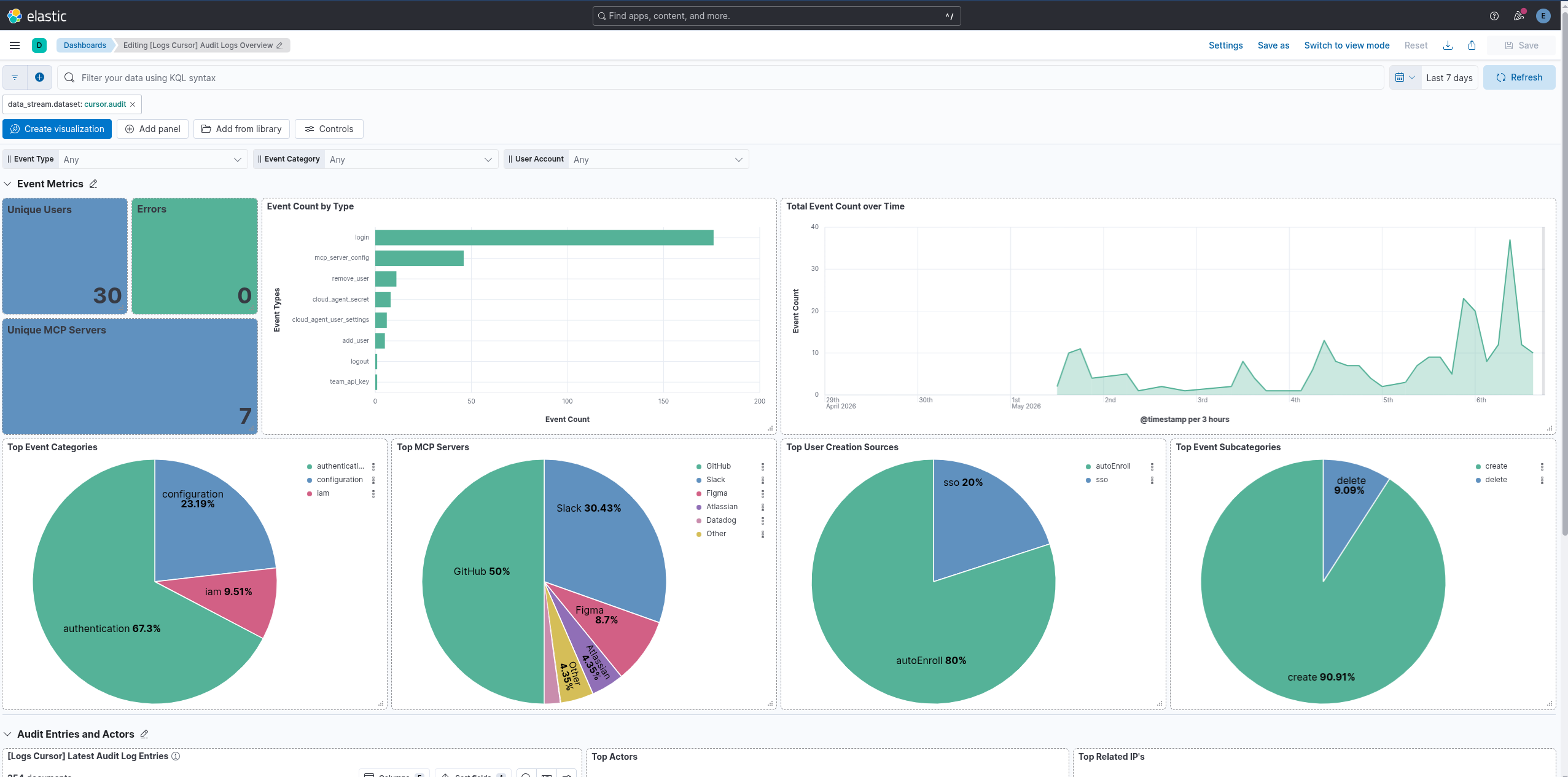
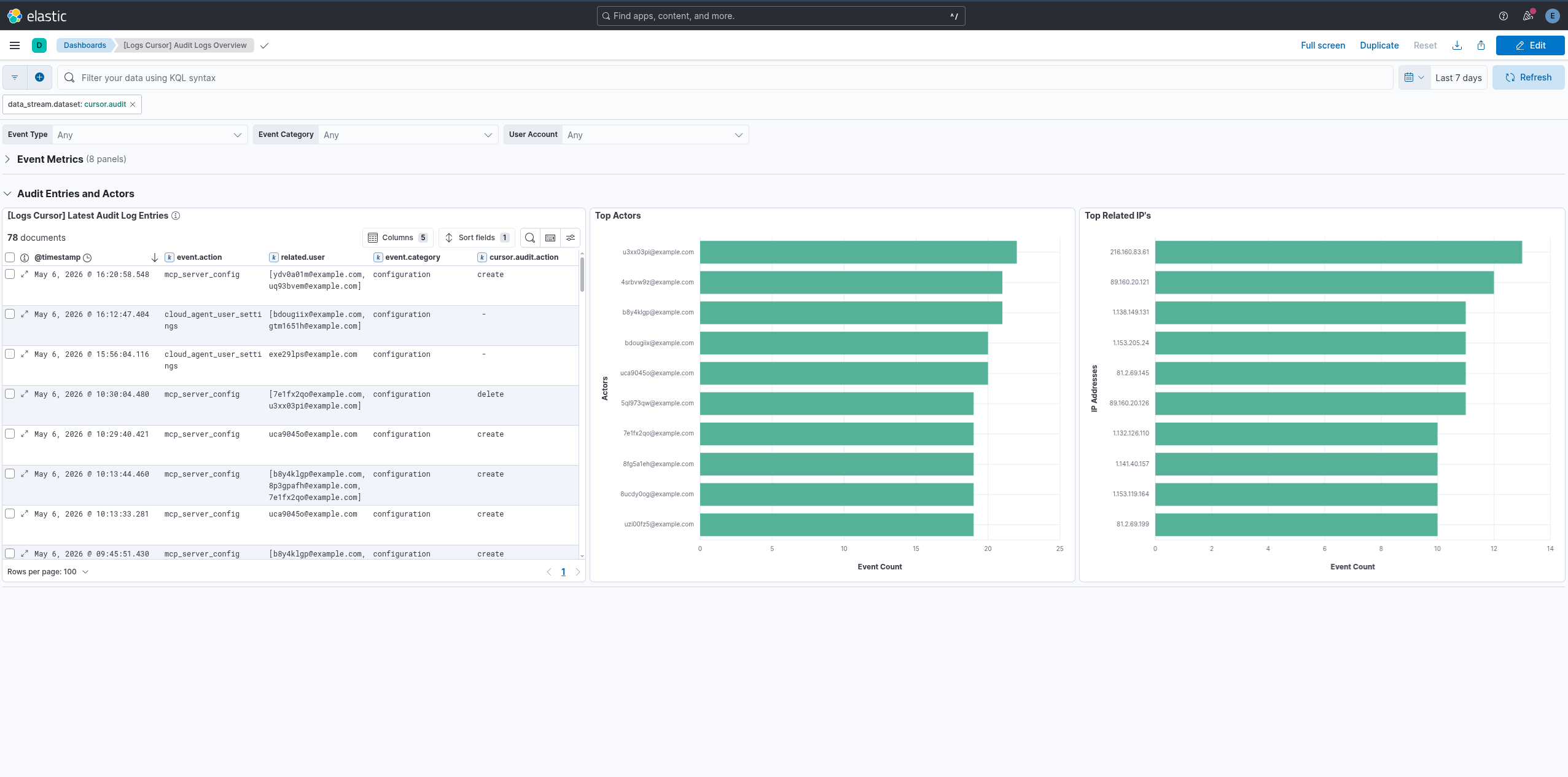
This integration includes one or more Kibana dashboards that visualizes the data collected by the integration. The screenshots below illustrate how the ingested data is displayed.
Changelog
| Version | Details | Minimum Kibana version |
|---|---|---|
| 0.3.0 | Enhancement (View pull request) Changed owners. |
9.1.0 8.19.0 |
| 0.2.2 | Bug fix (View pull request) Remove empty ILM policies section from the README. |
9.1.0 8.19.0 |
| 0.2.1 | Bug fix (View pull request) Add missing default false value for enable_request_tracer configuration variable. |
9.1.0 8.19.0 |
| 0.2.0 | Enhancement (View pull request) Use new release field for agentless deployment mode to establish as beta. |
9.1.0 8.19.0 |
| 0.1.0 | Enhancement (View pull request) Initial release. |
9.1.0 8.19.0 |