ANY.RUN Threat Intelligence Feeds integration
| Version | 1.4.0 (View all) |
| Managed integration release status | GA |
| Subscription level What's this? |
Basic |
| Developed by What's this? |
Partner |
| Ingestion method(s) | API |
| Minimum Kibana version(s) | 9.1.0 8.19.0 |
You can use this integration as an Elastic Managed integration on Elastic Cloud Hosted deployments running this version or later.
The ANY.RUN Threat Intelligence Feeds integration for Elastic provides users with continuously updated, high-fidelity IOCs (malicious IPs, domains, and URLs) extracted from live sandbox analyses across 15,000+ SOCs. This enables proactive defense against emerging threats with rich context including sandbox session links for faster triage and response.
Supports the ANY.RUN Threat Intelligence Feeds API (v1).
This integration fetches threat intelligence indicators from ANY.RUN TI Feeds API at scheduled intervals.
The ANY.RUN Threat Intelligence Feeds integration ingests a single data stream: ioc. This stream consists of time-stamped records, where each event serves as an indicator to detect suspicious or malicious activity. The ingested data can also support threat hunting, enrich alerts with threat context, and visualize known threats via dashboards.
- Credentials (API Key) are required to access the ANY.RUN TI Feeds API. To use this integration, you need an active ANY.RUN TI Feeds subscription
- Elastic Agent must be installed. For more details, check the Elastic Agent installation instructions. Elastic Agent is required to stream data from the ANY.RUN TI API and ship the data to Elastic, where the events will then be processed via the integration's ingest pipelines
- Follow ANY.RUN
- Profile > [2] API and Limits > [3] Generate > [4] Copy
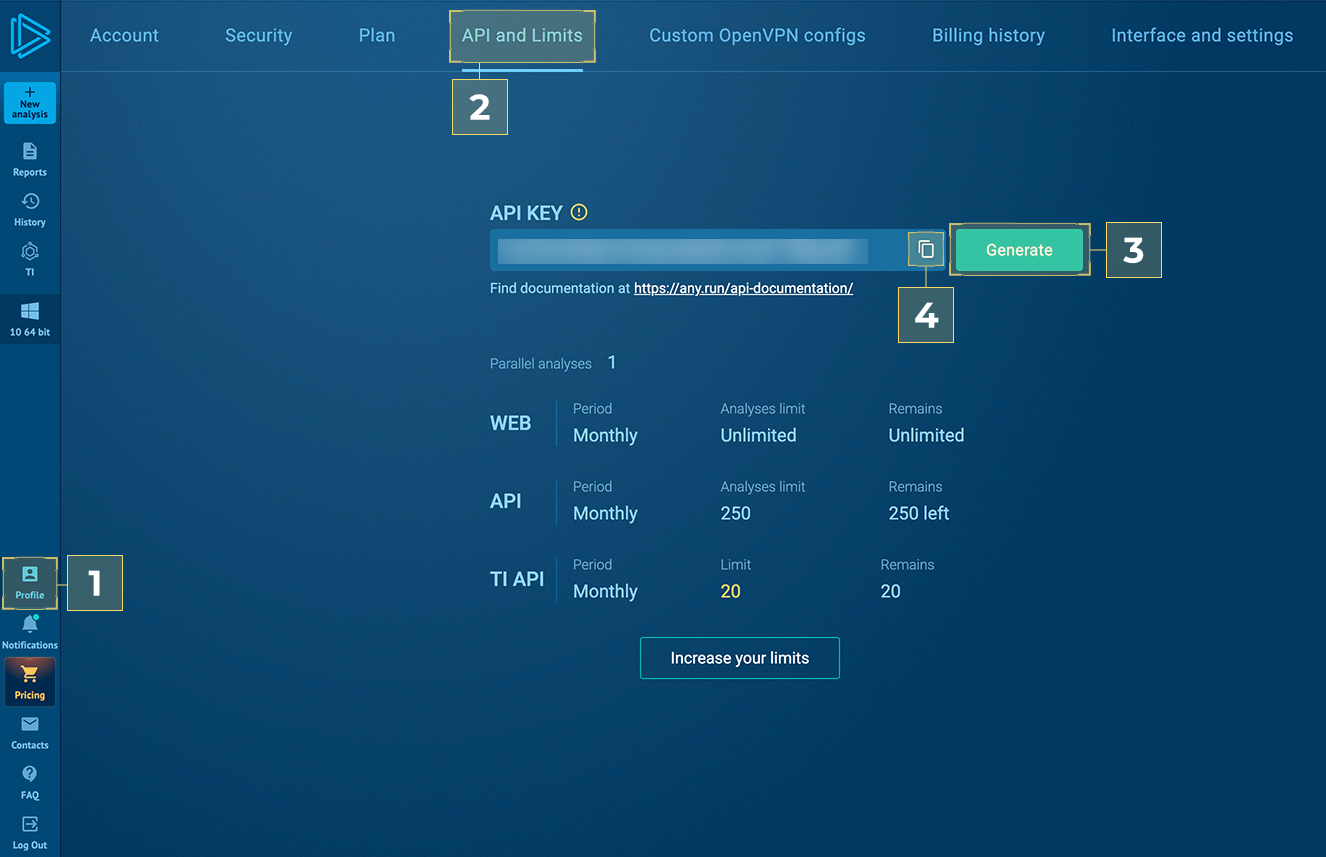
To configure the ANY.RUN Threat Intelligence Feeds integration, you will need to provide the following parameters:
- API Key: The API key used to authenticate with the ANY.RUN API (e.g., "NS9sY..FwvfR");
- Feed fetch depth: How far back to look for indicators on first request. Supported units for this parameter are h/m/s (e.g., 1440h for ~60 days);
- Interval: Interval between requests to the ANY.RUN TI Feeds API. Supported units for this parameter are h/m/s (e.g,. 2h);
- IOC Expiration Duration: Enforces all indicators to expire after this duration. Using only days, hours, or minutes (e.g., 90d);
- ANY.RUN TI API URL: Base URL of the ANY.RUN Threat Intelligence API. Defaults to
https://api.any.run; - Proxy URL: Optional. URL to proxy connections in the form of
http[s]://<user>:<password>@<server name/ip>:<port>.
Once the integration is running and pulling data, it automatically maps threat indicator fields from STIX to ECS. Verify that the imported indicators align with your detection rules.
This integration supports both Elastic Agentless-based and Agent-based installations.
Agentless integrations allow you to collect data without having to manage Elastic Agent in your cloud. They make manual agent deployment unnecessary, so you can focus on your data instead of the agent that collects it. For more information, refer to Agentless integrations and the Agentless integrations FAQ.
Agentless deployments are only supported in Elastic Serverless and Elastic Cloud environments. This functionality is in beta and is subject to change. Beta features are not subject to the support SLA of official GA features.
Elastic Agent must be installed. For more details, check the Elastic Agent installation instructions. You can install only one Elastic Agent per host.
The ANY.RUN Threat Intelligence Feeds integration supports IOC expiration by using latest transform:
- All the indicators are retrieved into source indices named
logs-ti_anyrun.ioc-*using CEL input and processed via ingest pipelines. These indicators have a property named expiration which is a timestamp such as "2026-01-01T00:00:00". If the timestamp value is less than current timestamp now(), the indicator is not expired, and hence is still active. - A latest transform is continuosly run on source indices. The purpose of this transform is to:
- Move only the active indicators from source indices into destination indices named
logs-ti_anyrun_latest.dest_ioc-*; - Delete expired indicators based on the expiration timestamp value.
- Move only the active indicators from source indices into destination indices named
- All the active indicators can be retrieved using destination index alias
logs-ti_anyrun_latest.iocwhich points to the latest destination index version.
To configure IOC expiration and prevent false positives, use the IOC Expiration Duration parameter when setting up the integration. This parameter deletes any indicator ingested into destination indices logs-ti_anyrun_latest.dest_ioc-* after the specified duration is reached (defaults to 90d from the source's @timestamp field).
Do not use the source indices logs-ti_anyrun.ioc-*, because when the indicators expire, the source indices will contain duplicates. Always use the destination index alias: logs-ti_anyrun_latest.ioc to query all active indicators.
To facilitate IOC expiration, source datastream-backed indices .ds-logs-ti_anyrun.ioc-* are allowed to contain duplicates from each polling interval. ILM policy is added to these source indices so it doesn't lead to unbounded growth. This means data in these source indices will be deleted after 5 days from ingested date.
- All the ANY.RUN TI Feeds API errors are captured inside the
errorfields:- ANY.RUN TI Feeds API returns HTTP status
401 Unauthorizedwhen the API Key is invalid. In such case, the error.message field is populated with message:GET:{"status":"error","message":"Authorization is required to access this resource."}. To resolve this issue, please verify that the provided API Key is correct.
- ANY.RUN TI Feeds API returns HTTP status
- Since this integration supports the expiration of Indicators of Compromise (IoCs) using Elastic latest transform, the threat indicators are present in both source and destination indices. While this may appear to be duplicate ingestion, it is an implementation detail necessary for properly expiring threat indicators.
- For help with Elastic ingest tools, check Common problems.
Example
{
    "@timestamp": "2024-02-23T12:59:14.320Z",
    "event": {
        "category": [
            "threat"
        ],
        "kind": "enrichment",
        "original": "{\"id\":\"indicator--8b2de5a5-29a2-56a3-9089-94bef2464a7c\",\"created\":\"2024-02-23T12:59:14.320Z\",\"created_by_ref\":\"identity--96a9cd9c-2f73-5ad3-a2ab-c14b3eba65c7\",\"external_references\":[],\"labels\":[\"trickbot\"],\"modified\":\"2024-02-23T13:15:32.276Z\",\"pattern\":\"[ipv4-addr:value = '67.43.156.93']\",\"pattern_type\":\"stix\",\"revoked\":false,\"spec_version\":\"2.1\",\"type\":\"indicator\",\"valid_from\":\"2024-02-23T12:59:14.320Z\",\"confidence\":90}",
        "type": [
            "indicator"
        ]
    },
    "related": {
        "ip": [
            "67.43.156.93"
        ]
    },
    "stix": {
        "confidence": 90,
        "created": "2024-02-23T12:59:14.320Z",
        "created_by_ref": "identity--96a9cd9c-2f73-5ad3-a2ab-c14b3eba65c7",
        "id": "indicator--8b2de5a5-29a2-56a3-9089-94bef2464a7c",
        "ioc_expiration_date": "2024-02-28T13:15:32.276Z",
        "ioc_expiration_duration": "5d",
        "ioc_expiration_reason": "Expiration set by Elastic from the integration's parameter `IOC Expiration Duration`",
        "modified": "2024-02-23T13:15:32.276Z",
        "pattern": "[ipv4-addr:value = '67.43.156.93']",
        "pattern_type": "stix",
        "revoked": false,
        "spec_version": "2.1",
        "type": "indicator",
        "valid_from": "2024-02-23T12:59:14.320Z"
    },
    "tags": [
        "trickbot"
    ],
    "threat": {
        "feed": {
            "name": "ANY.RUN",
            "description": "Indicator from the ANY.RUN TI Feeds",
            "reference": "https://intelligence.any.run/feeds"
        },
        "indicator": {
            "confidence": "High",
            "first_seen": "2024-02-23T12:59:14.320Z",
            "id": [
                "indicator--8b2de5a5-29a2-56a3-9089-94bef2464a7c"
            ],
            "ip": [
                "67.43.156.93"
            ],
            "last_seen": "2024-02-23T13:15:32.276Z",
            "modified_at": "2024-02-23T13:15:32.276Z",
            "provider": "ANY.RUN",
            "type": "ipv4-addr"
        }
    }
}
Exported fields
| Field | Description | Type |
|---|---|---|
| @timestamp | Event timestamp. | date |
| data_stream.dataset | Data stream dataset. | constant_keyword |
| data_stream.namespace | Data stream namespace. | constant_keyword |
| data_stream.type | Data stream type. | constant_keyword |
| event.dataset | Event dataset. | constant_keyword |
| event.module | Event module. | constant_keyword |
| input.type | Input type. | keyword |
| labels.is_ioc_transform_source | Indicates whether an IOC is in the raw source data stream, or the in latest destination index. | constant_keyword |
| log.file.device_id | ID of the device containing the filesystem where the file resides. | keyword |
| log.file.fingerprint | The sha256 fingerprint identity of the file when fingerprinting is enabled. | keyword |
| log.file.inode | Inode number of the log file. | keyword |
| log.file.path | Path to the log file. | keyword |
| log.flags | Flags for the log file. | keyword |
| log.offset | Offset of the entry in the log file. | long |
| stix.confidence | The confidence property identifies the confidence that the creator has in the correctness of their data. The confidence value MUST be a number in the range of 0-100. | integer |
| stix.created | The time at which the STIX Indicator Object was originally created. | date |
| stix.created_by_ref | The created_by_ref property specifies the id property of the identity object that describes the entity that created this object. | keyword |
| stix.extensions | Specifies any extensions of the object, as a dictionary. | flattened |
| stix.external_references | The external_references property specifies a list of external references which refers to non-STIX information. This property is used to provide one or more URLs, descriptions, or IDs to records in other systems. | flattened |
| stix.id | The ID of the indicator. | keyword |
| stix.indicator_types | The indicator_types property specifies a set of categorizations for the indicator. This is an open vocabulary and values SHOULD come from the STIX indicator-type-ov vocabulary. | keyword |
| stix.ioc_expiration_date | The expiration date of the indicator. It can be defined from the source event, by the revoked or valid_until fields, or from the integration configuration by ioc_expiration_duration. | date |
| stix.ioc_expiration_duration | The configured expiration duration for the indicator. | keyword |
| stix.ioc_expiration_reason | Reason why the indicator is expired. Defined by the integration in the ingest pipeline. | keyword |
| stix.modified | Date of the last modification. | date |
| stix.object_marking_refs | The object_marking_refs property specifies a list of id properties of marking-definition objects that apply to this object. | keyword |
| stix.pattern | The detection pattern for the indicator. | keyword |
| stix.pattern_type | The pattern language used in this indicator, which is always "stix". | keyword |
| stix.pattern_version | The version of the pattern language that is used in this indicator. | keyword |
| stix.revoked | The revoked property is only used by STIX Objects that support versioning and indicates whether the object has been revoked. Revoked objects are no longer considered valid by the object creator. Revoking an object is permanent; future versions of the object with this id must not be created. | boolean |
| stix.spec_version | The version of the STIX specification used to represent this object. The value of this property must be 2.1. | keyword |
| stix.type | Type of the STIX Object. | keyword |
| stix.valid_from | The time from which the indicator is considered a valid indicator. | date |
| stix.valid_until | The time at which the indicator should no longer be considered a valid indicator. | date |
| threat.indicator.first_seen | The date and time when intelligence source first reported sighting this indicator. | date |
| threat.indicator.last_seen | The date and time when intelligence source last reported sighting this indicator. | date |
| threat.indicator.modified_at | The date and time when intelligence source last modified information for this indicator. | date |
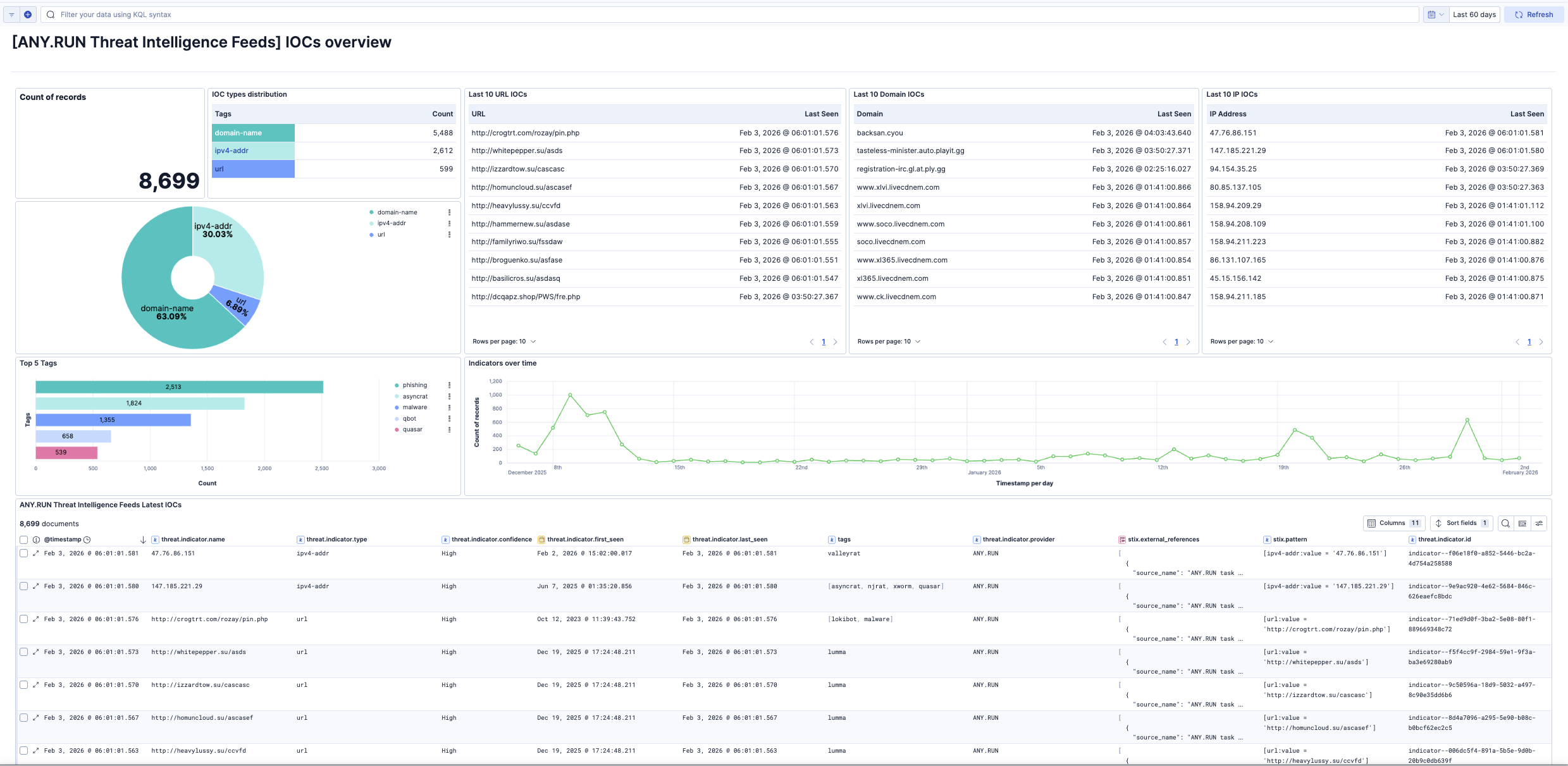
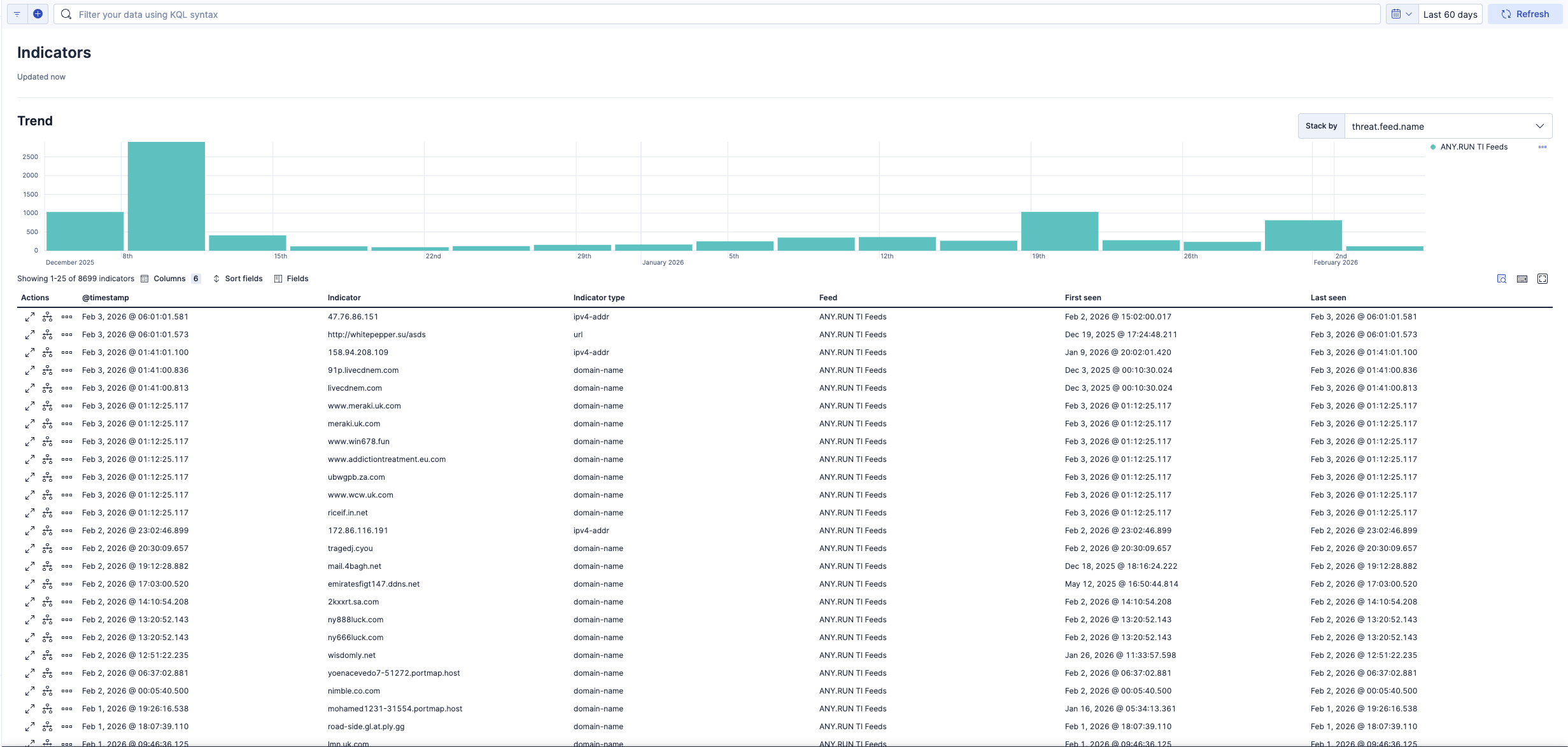
This integration includes one or more Kibana dashboards that visualizes the data collected by the integration. The screenshots below illustrate how the ingested data is displayed.
Changelog
| Version | Details | Minimum Kibana version |
|---|---|---|
| 1.4.0 | Enhancement (View pull request) Remove redundant ECS field definitions and the catch-all dynamic template from the transforms, relying on the ecs@mappings component template. |
9.1.0 8.19.0 |
| 1.3.0 | Enhancement (View pull request) Add tags to ingest pipeline processors and add preserve_original_event to pipeline-level on_failure handlers. |
9.0.5 8.19.2 |
| 1.2.3 | Enhancement (View pull request) Set agentless deployment mode release field to ga. |
9.0.5 8.19.2 |
| 1.2.2 | Bug fix (View pull request) Fix transform destination to use keyword for data_stream.namespace, allowing multi-namespace deployments. |
9.0.5 8.19.2 |
| 1.2.1 | Bug fix (View pull request) Fix latest IOC transform destination mapping for host.ip to use ECS. |
9.0.5 8.19.2 |
| 1.2.0 | Enhancement (View pull request) Enable Agentless deployment. |
9.0.5 8.19.2 |
| 1.1.2 | Bug fix (View pull request) Fix TAXII response handling when the objects key is omitted. |
9.0.0 8.19.0 |
| 1.1.1 | Bug fix (View pull request) Fix X-Taxii-Date-Modified-Last header capitalization to match to RFC7230. |
9.0.0 8.19.0 |
| 1.1.0 | Enhancement (View pull request) Use num_failure_retries instead of unattended mode for transform failure recovery. |
9.0.0 8.19.0 |
| 1.0.1 | Enhancement (View pull request) Update UTM tags in documentation links |
9.0.0 8.19.0 |
| 1.0.0 | Enhancement (View pull request) Initial release of ANY.RUN Threat Intelligence Feeds package |
9.0.0 8.19.0 |