Azure AD Graph Activity Logs
| Version | 1.40.3 (View all) |
| Subscription level What's this? |
Basic |
| Ingestion method(s) | Azure Event Hub |
| Minimum Kibana version(s) | 9.3.0 9.2.4 9.1.10 8.19.10 |
Azure AD Graph Activity Logs provide an audit trail of all HTTP requests that the legacy Azure AD Graph service (graph.windows.net) has received and processed for a tenant. Although Microsoft has deprecated Azure AD Graph in favor of Microsoft Graph, the API is still actively used by Microsoft first-party tooling, older line-of-business applications, third-party SaaS connectors, and adversary tooling (for example ROADtools, AzureHound v1, AADInternals). Refer to the AADGraphActivityLogs table reference for the canonical schema.
Tenant administrators can configure the collection and storage destinations of Azure AD Graph Activity Logs through Diagnostic Setting in the Entra Portal. This integration uses Azure Event Hubs destination to stream Azure AD Graph Activity Logs to Elastic.
The following privileges are required to collect Azure AD Graph Activity Logs:
- A Microsoft Entra ID P1 or P2 tenant license in your tenant.
- A
Security AdministratororGlobal AdministratorMicrosoft Entra ID role to configure the diagnostic settings.
Refer to the Azure Logs page for more information about setting up and using this integration.
- Activities of multi-tenant applications belonging to another tenant are not available.
- In rare cases, events might take up to 2 hours to be delivered to Event Hubs.
- Azure AD Graph is deprecated by Microsoft. New workloads should target Microsoft Graph; this dataset is intended for visibility into legacy traffic that still exists in the tenant.
eventhub :
string
It is a fully managed, real-time data ingestion service. Elastic recommends using only letters, numbers, and the hyphen (-) character for Event Hub names to maximize compatibility. You can use existing Event Hubs having underscores (_) in the Event Hub name. In this case, the integration will replace underscores with hyphens (-) when it uses the Event Hub name to create dependent Azure resources behind the scenes (for example, the storage account container to store Event Hub consumer offsets). Elastic also recommends using a separate event hub for each log type as the field mappings of each log type differ.
Default value insights-operational-logs.
consumer_group :
string
The publish/subscribe mechanism of Event Hubs is enabled through consumer groups. A consumer group is a view (state, position, or offset) of an entire event hub. Consumer groups enable multiple consuming applications to each have a separate view of the event stream, and to read the stream independently at their own pace and with their own offsets.
Default value: $Default
connection_string :
string
The connection string required to communicate with Event Hubs, steps here.
A Blob Storage account is required to store, retrieve, and update the offset or state of the eventhub messages. This means that after stopping the filebeat azure module it can start back up at the spot that it stopped processing messages.
storage_account :
string
The name of the storage account the state/offsets will be stored and updated.
storage_account_key :
string
The storage account key, this key will be used to authorize access to data in your storage account.
storage_account_container :
string
The storage account container where the integration stores the checkpoint data for the consumer group. It is an advanced option to use with extreme care. You MUST use a dedicated storage account container for each Azure log type (activity, sign-in, audit logs, and others). DO NOT REUSE the same container name for more than one Azure log type. See Container Names for details on naming rules from Microsoft. The integration generates a default container name if not specified.
resource_manager_endpoint :
string
Optional. By default the integration uses the Azure public environment. To override, provide a specific resource manager endpoint to use a different Azure environment.
Resource manager endpoints:
# Azure ChinaCloud
https://management.chinacloudapi.cn/

# Azure GermanCloud
https://management.microsoftazure.de/

# Azure PublicCloud
https://management.azure.com/

# Azure USGovernmentCloud
https://management.usgovcloudapi.net/
The aadgraphactivitylogs data stream of the Azure Logs package collects Azure AD Graph activity events that have been streamed through an Azure event hub. The events ingest pipeline matches category == "AzureADGraphActivityLogs" and sets event.dataset = azure.aadgraphactivitylogs. The events data stream's routing rules then reroute the document from logs-azure.events-* directly to logs-azure.aadgraphactivitylogs-*, where this data stream's pipeline applies full ECS field extraction.
Before this data stream existed, AAD Graph events had no specific override in the events router and fell through to the azure.platformlogs catch-all, landing in logs-azure.platformlogs-default with only generic platform-log parsing. Those previously-indexed events are not backfilled. Only new events are routed to the dedicated dataset.
Example
{
    "@timestamp": "2026-05-07T15:19:33.536Z",
    "azure": {
        "aadgraphactivitylogs": {
            "category": "AzureADGraphActivityLogs",
            "operation_name": "AAD Graph Activity",
            "properties": {
                "actor_type": "User",
                "api_version": "1.6",
                "app_id": "04b07795-8ddb-461a-bbee-02f9e1bf7b46",
                "client_auth_method": 0,
                "direct_access_source": "Gateway",
                "env_cloud_role": "restdirectoryservice",
                "identity_provider": "https://sts.windows.net/ab30785b-417f-42a4-b5dc-8f9051718acb/",
                "scopes": [
                    "62e90394-69f5-4237-9190-012177145e10"
                ],
                "session_id": "5a5a5a5a-5a5a-5a5a-5a5a-5a5a5a5a5a5a",
                "sign_in_activity_id": "AAAAAAAAAAAAAAAAAAAAAA==",
                "time_generated": "2026-05-07T15:19:33.536Z",
                "token_issued_at": "2026-05-07T13:50:39.000Z"
            }
        },
        "tenant_id": "ab30785b-417f-42a4-b5dc-8f9051718acb"
    },
    "client": {
        "geo": {
            "city_name": "London",
            "continent_name": "Europe",
            "country_iso_code": "GB",
            "country_name": "United Kingdom",
            "location": {
                "lat": 51.5142,
                "lon": -0.0931
            },
            "region_iso_code": "GB-ENG",
            "region_name": "England"
        },
        "ip": "81.2.69.143",
        "user": {
            "id": "b37ec517-0a34-4266-b627-f7bb0d679d70"
        }
    },
    "cloud": {
        "account": {
            "id": "ab30785b-417f-42a4-b5dc-8f9051718acb"
        },
        "provider": "azure",
        "region": "WestUS",
        "service": {
            "name": "Azure AD Graph"
        }
    },
    "destination": {
        "geo": {
            "region_name": "WestUS"
        }
    },
    "ecs": {
        "version": "8.11.0"
    },
    "event": {
        "action": "users-read",
        "category": [
            "iam",
            "web"
        ],
        "duration": 59000000,
        "id": "00000001-0001-0001-0001-000000000001",
        "kind": "event",
        "original": "{\"category\":\"AzureADGraphActivityLogs\",\"location\":\"WestUS\",\"operationName\":\"AAD Graph Activity\",\"properties\":{\"__UDI_RequiredFields_EventTime\":639140000000000000,\"__UDI_RequiredFields_RegionScope\":\"NA\",\"__UDI_RequiredFields_TenantId\":\"ab30785b-417f-42a4-b5dc-8f9051718acb\",\"__UDI_RequiredFields_UniqueId\":\"00000001-0001-0001-0001-000000000001\",\"actorType\":\"User\",\"apiVersion\":\"1.6\",\"appId\":\"04b07795-8ddb-461a-bbee-02f9e1bf7b46\",\"callerIpAddress\":\"81.2.69.143\",\"clientAuthMethod\":0,\"deviceId\":\"\",\"directAccessSource\":\"Gateway\",\"durationMs\":59,\"env_cloud_role\":\"restdirectoryservice\",\"httpMethod\":\"GET\",\"httpStatusCode\":200,\"identityProvider\":\"https://sts.windows.net/ab30785b-417f-42a4-b5dc-8f9051718acb/\",\"issuedAt\":\"5/7/2026 1:50:39 PM\",\"location\":\"WestUS\",\"requestId\":\"00000001-0001-0001-0001-000000000001\",\"requestUri\":\"/v2/ab30785b-417f-42a4-b5dc-8f9051718acb/users\",\"responseSizeBytes\":54662,\"roles\":\"\",\"scopes\":\"62e90394-69f5-4237-9190-012177145e10\",\"servicePrincipalId\":\"\",\"sessionId\":\"5a5a5a5a-5a5a-5a5a-5a5a-5a5a5a5a5a5a\",\"signInActivityId\":\"AAAAAAAAAAAAAAAAAAAAAA==\",\"tenantId\":\"ab30785b-417f-42a4-b5dc-8f9051718acb\",\"timeGenerated\":\"2026-05-07T15:19:33.5368860Z\",\"userAgent\":\"azure-graph-test-client/1.0\",\"userId\":\"b37ec517-0a34-4266-b627-f7bb0d679d70\",\"wids\":\"\"},\"tenantId\":\"ab30785b-417f-42a4-b5dc-8f9051718acb\"}",
        "outcome": "success",
        "type": [
            "access",
            "info"
        ]
    },
    "http": {
        "request": {
            "id": "00000001-0001-0001-0001-000000000001",
            "method": "GET"
        },
        "response": {
            "bytes": 54662,
            "status_code": 200
        }
    },
    "related": {
        "ip": [
            "81.2.69.143"
        ],
        "user": [
            "b37ec517-0a34-4266-b627-f7bb0d679d70",
            "04b07795-8ddb-461a-bbee-02f9e1bf7b46"
        ]
    },
    "session": {
        "id": "5a5a5a5a-5a5a-5a5a-5a5a-5a5a5a5a5a5a"
    },
    "source": {
        "geo": {
            "city_name": "London",
            "continent_name": "Europe",
            "country_iso_code": "GB",
            "country_name": "United Kingdom",
            "location": {
                "lat": 51.5142,
                "lon": -0.0931
            },
            "region_iso_code": "GB-ENG",
            "region_name": "England"
        },
        "ip": "81.2.69.143"
    },
    "tags": [
        "preserve_original_event"
    ],
    "url": {
        "original": "/v2/ab30785b-417f-42a4-b5dc-8f9051718acb/users",
        "path": "/v2/ab30785b-417f-42a4-b5dc-8f9051718acb/users"
    },
    "user": {
        "id": "b37ec517-0a34-4266-b627-f7bb0d679d70"
    },
    "user_agent": {
        "device": {
            "name": "Other"
        },
        "name": "Other",
        "original": "azure-graph-test-client/1.0"
    }
}
ECS Field Reference
Refer to the following document for detailed information on ECS fields.
Exported fields
| Field | Description | Type |
|---|---|---|
| @timestamp | Event timestamp. | date |
| azure.aadgraphactivitylogs.category | Azure Event Category. For Azure AD Graph Activity Logs, this is AzureADGraphActivityLogs. |
keyword |
| azure.aadgraphactivitylogs.operation_name | Operation name. For this category the value is always the literal string AAD Graph Activity; rely on the derived event.action (HTTP method + directory collection from requestUri) for detection. |
keyword |
| azure.aadgraphactivitylogs.properties.actor_type | Type of identity that issued the request, for example User, ServicePrincipal. |
keyword |
| azure.aadgraphactivitylogs.properties.api_version | The API version of the event. | keyword |
| azure.aadgraphactivitylogs.properties.app_id | The identifier for the application. | keyword |
| azure.aadgraphactivitylogs.properties.billed_size | The record size in bytes. | double |
| azure.aadgraphactivitylogs.properties.client_auth_method | Indicates how the client was authenticated. For a public client, the value is 0. If client ID and client secret are used, the value is 1. If a client certificate was used for authentication, the value is 2. | integer |
| azure.aadgraphactivitylogs.properties.device_id | The identifier of the device from which the authentication request originated. | keyword |
| azure.aadgraphactivitylogs.properties.direct_access_source | The path through which the request reached the AAD Graph service (for example, Gateway). |
keyword |
| azure.aadgraphactivitylogs.properties.env_cloud_role | The Microsoft cloud role identifier for the service handling the request (for example, restdirectoryservice). Useful for distinguishing first-party Microsoft service traffic from third-party callers. |
keyword |
| azure.aadgraphactivitylogs.properties.identity_provider | The identity provider that authenticated the subject of the token. | keyword |
| azure.aadgraphactivitylogs.properties.is_billable | Specifies whether ingesting the data is billable. When _IsBillable is false ingestion isn't billed to your Azure account. | boolean |
| azure.aadgraphactivitylogs.properties.request_uri | The URI of the request. | keyword |
| azure.aadgraphactivitylogs.properties.roles | The roles in token claims. | keyword |
| azure.aadgraphactivitylogs.properties.scopes | The scopes in token claims. | keyword |
| azure.aadgraphactivitylogs.properties.service_principal_id | The identifier of the servicePrincipal making the request. | keyword |
| azure.aadgraphactivitylogs.properties.session_id | The unique identifier for the authentication session. | keyword |
| azure.aadgraphactivitylogs.properties.sign_in_activity_id | Identifier of the Microsoft Entra ID sign-in event that established the authentication context for this AAD Graph request. Correlates this request with an entry in Entra ID Sign-In Logs. | keyword |
| azure.aadgraphactivitylogs.properties.source_system | The type of agent the event was collected by. For example, OpsManager for Windows agent, either direct connect or Operations Manager, Linux for all Linux agents, or Azure for Azure Diagnostics. | keyword |
| azure.aadgraphactivitylogs.properties.time_generated | The date and time the request was received. | date |
| azure.aadgraphactivitylogs.properties.token_issued_at | The timestamp the token was issued at. | date |
| azure.aadgraphactivitylogs.properties.type | The name of the table. | keyword |
| azure.aadgraphactivitylogs.properties.user_agent | The user agent information related to request. | keyword |
| azure.aadgraphactivitylogs.properties.wids | Denotes the tenant-wide roles assigned to this user. | keyword |
| azure.correlation_id | Correlation ID. | keyword |
| azure.resource.authorization_rule | Authorization rule. | keyword |
| azure.resource.group | Resource group. | keyword |
| azure.resource.id | Resource ID. | keyword |
| azure.resource.name | Name. | keyword |
| azure.resource.namespace | Resource type/namespace. | keyword |
| azure.resource.provider | Resource type/namespace. | keyword |
| azure.subscription_id | Azure subscription ID. | keyword |
| azure.tenant_id | tenant ID. | keyword |
| client.geo.location | Longitude and latitude. | geo_point |
| cloud.image.id | Image ID for the cloud instance. | keyword |
| data_stream.dataset | Data stream dataset name. | constant_keyword |
| data_stream.namespace | Data stream namespace. | constant_keyword |
| data_stream.type | Data stream type. | constant_keyword |
| destination.geo.region_name | Region name. | keyword |
| event.dataset | Event dataset | constant_keyword |
| event.module | Event module | constant_keyword |
| host.containerized | If the host is a container. | boolean |
| host.os.build | OS build information. | keyword |
| host.os.codename | OS codename, if any. | keyword |
| session.id | The unique identifier for the authentication session. | keyword |
| source.geo.location | Longitude and latitude. | geo_point |
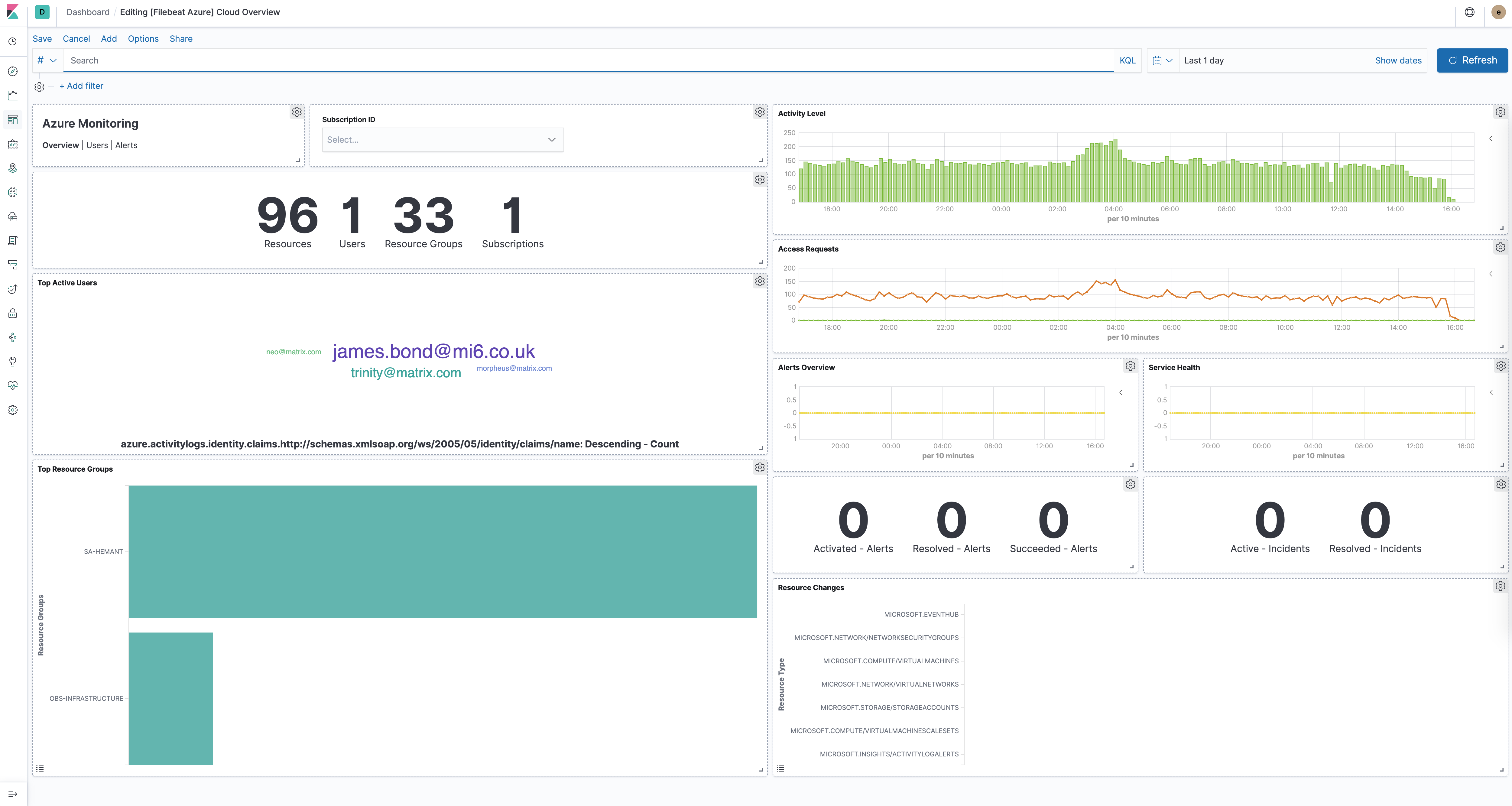
This integration includes one or more Kibana dashboards that visualizes the data collected by the integration. The screenshots below illustrate how the ingested data is displayed.
Changelog
| Version | Details | Minimum Kibana version |
|---|---|---|
| 1.40.3 | Enhancement (View pull request) Align field descriptions and log input template formatting between the firewall_logs and graphactivitylogs data streams. |
9.3.0 9.2.4 9.1.10 8.19.10 |
| 1.40.2 | Bug fix (View pull request) Fix pipeline error in aadgraphactivitylogs and graphactivitylogs when Microsoft PII tags in requestUri cause the uri_parts processor to fail. Strip the markers into a temporary field before parsing so url fields and event.action are derived correctly; url.original retains the original value including the markers. |
9.3.0 9.2.4 9.1.10 8.19.10 |
| 1.40.1 | Bug fix (View pull request) Fix application_gateway pipeline to handle ResourceHealth events where properties.details is a plain string instead of a nested object, preventing a Painless runtime exception in the WAF firewall log rename processor. |
9.3.0 9.2.4 9.1.10 8.19.10 |
| 1.40.0 | Enhancement (View pull request) Add routing system test for the events data stream and a storage_account_connection_string package variable for pointing at a custom blob endpoint. |
9.3.0 9.2.4 9.1.10 8.19.10 |
| 1.39.0 | Enhancement (View pull request) Add tags to ingest pipeline processors. Bug fix (View pull request) Remove a redundant no-op rename processor for properties.activity_datetime in the provisioning data stream. |
9.3.0 9.2.4 9.1.10 8.19.10 |
| 1.38.1 | Bug fix (View pull request) Add ECS event categorization fields to the graphactivitylogs data stream. |
9.3.0 9.2.4 9.1.10 8.19.10 |
| 1.38.0 | Enhancement (View pull request) Map Azure auditlogs initiated_by user fields to ECS user fields and populate related.user. |
9.3.0 9.2.4 9.1.10 8.19.10 |
| 1.37.1 | Bug fix (View pull request) Reduce degraded documents in azure.auditlogs by raising the keyword ignore_above limit to 8191 on result_description, result_reason, additional_details.value, and modified_properties leaf fields; fix the ingest pipeline to normalize the top-level resultDescription field to snake_case so it is correctly mapped; declare the missing properties.result_description field mapping as well. |
9.3.0 9.2.4 9.1.10 8.19.10 |
| 1.37.0 | Enhancement (View pull request) Add azure.aadgraphactivitylogs dataset to ingest legacy Azure AD Graph (graph.windows.net) AzureADGraphActivityLogs diagnostic events. |
9.3.0 9.2.4 9.1.10 8.19.10 |
| 1.36.1 | Bug fix (View pull request) Add missing event.kind pipeline_error handling to ingest pipeline on_failure handlers. |
9.3.0 9.2.4 9.1.10 8.19.10 |
| 1.36.0 | Enhancement (View pull request) Add client secret authentication support for Azure Event Hub with RBAC. |
9.3.0 9.2.4 9.1.10 8.19.10 |
| 1.35.1 | Bug fix (View pull request) Fix pipeline error when the category field is missing. |
9.2.4 9.1.10 8.19.10 |
| 1.35.0 | Enhancement (View pull request) Add support for AMQP-over-WebSockets transport protocol and proxy configuration. |
9.2.4 9.1.10 8.19.10 |
| 1.34.1 | Bug fix (View pull request) Fix durationMs parsing in auditlogs data stream. |
9.0.0 8.15.1 |
| 1.34.0 | Enhancement (View pull request) Switch default processor version to v2. |
9.0.0 8.15.1 |
| 1.33.0 | Enhancement (View pull request) Support log event routing overrides in Azure Logs v2. |
9.0.0 8.15.1 |
| 1.32.0 | Enhancement (View pull request) Update Events v2 routing of signinlogs and springcloud logs. |
9.0.0 8.15.1 |
| 1.31.1 | Bug fix (View pull request) Expand date formats for parsing time fields: ISO8601, M/d/yyyy h:mm:ss a XXX, M/d/yyyy h:mm:ss a, M/d/yyyy H:mm:ss, yyyy-MM-ddTH:mm:ss.SSSZ. |
9.0.0 8.15.1 |
| 1.31.0 | Breaking change (View pull request) Remove destination.ip and destination.port mapping of TranslatedIp and TranslatedPort.Enhancement (View pull request) Add destination.ip to destination.address and source.ip to source.address.Add TranslatedIp and TranslatedPort to destination.nat.ip and destination.nat.port.Update event type mappings for AZFWNetworkRule and AZFWApplicationRule categories in firewall_logs data stream. |
9.0.0 8.15.1 |
| 1.30.0 | Enhancement (View pull request) Add processor version options for the Raw Events (v1) integration. |
9.0.0 8.15.1 |
| 1.29.1 | Bug fix (View pull request) Update time formats parsing and fix durationMs parsing in signinlogs data stream. |
9.0.0 8.15.1 |
| 1.29.0 | Enhancement (View pull request) Parse responseBody and requestBody json in activitylogs. |
9.0.0 8.15.1 |
| 1.28.7 | Bug fix (View pull request) Interim fix to support non-standard log events. |
9.0.0 8.15.1 |
| 1.28.6 | Enhancement (View pull request) Add FAQ section to Azure Logs integration v2. |
9.0.0 8.15.1 |
| 1.28.5 | Enhancement (View pull request) Add support to override Endpoint Suffix based on deployment environment. |
9.0.0 8.15.1 |
| 1.28.4 | Bug fix (View pull request) Workaround the invalid field names from Azure Native ISV |
9.0.0 8.15.1 |
| 1.28.3 | Bug fix (View pull request) Handle invalid log events (empty fields and properties as string) from Azure services. |
9.0.0 8.15.1 |
| 1.28.2 | Bug fix (View pull request) Fix Azure platformlogs ingest pipeline for function app logs |
9.0.0 8.15.1 |
| 1.28.1 | Bug fix (View pull request) Support routing with invalid fields. |
9.0.0 8.15.1 |
| 1.28.0 | Enhancement (View pull request) Add a flag fips_compatible to control whether the package is allowed in the ECH FedRAMP High environment. |
9.0.0 8.15.1 |
| 1.27.1 | Bug fix (View pull request) Add missing pattern for DNAT request messages for AzureFirewallNetworkRuleLog in firewall_logs data stream. |
9.0.0 8.15.1 |
| 1.27.0 | Enhancement (View pull request) Standardize user fields processing across integrations. |
9.0.0 8.15.1 |
| 1.26.1 | Bug fix (View pull request) Fix dashboard link. |
9.0.0 8.15.1 |
| 1.26.0 | Enhancement (View pull request) Standardize user fields for identity_protection and signinlogs data stream. |
9.0.0 8.15.1 |
| 1.25.0 | Enhancement (View pull request) Add Grok processor for AzureFirewallThreatIntelLog in azure.firewall_logs. |
9.0.0 8.15.1 |
| 1.24.0 | Enhancement (View pull request) Set service.id, device.id, user.id, session.id, and token.id in graphactivitylogs dataset. |
9.0.0 8.15.1 |
| 1.23.3 | Enhancement (View pull request) Improve Azure logs documentation with more details on log categories routing rules. |
9.0.0 8.15.1 |
| 1.23.2 | Bug fix (View pull request) Fix Grok processor error in ingest pipeline for AzureFirewallNetworkRuleLog in azure.firewall_logs. |
9.0.0 8.15.1 |
| 1.23.1 | Bug fix (View pull request) Map azure.signinlogs.properties.location.state field to geo.region_name instead of geo.country_name. |
9.0.0 8.15.1 |
| 1.23.0 | Enhancement (View pull request) Enable Event Hub processor v2. |
9.0.0 8.15.1 |
| 1.22.2 | Bug fix (View pull request) Fix Platform Logs pipeline inconsistent casing for subscription_id field. |
9.0.0 8.13.0 |
| 1.22.1 | Bug fix (View pull request) Fix the custom storage container description for the Azure Logs integration v2. |
9.0.0 8.13.0 |
| 1.22.0 | Enhancement (View pull request) Add support for Kibana 9.0.0 |
9.0.0 8.13.0 |
| 1.21.0 | Enhancement (View pull request) Allow the usage of deprecated log input and support for stack 9.0 |
8.13.0 |
| 1.20.3 | Enhancement (View pull request) Add missing category. |
8.13.0 |
| 1.20.2 | Bug fix (View pull request) Fix casting & naming issues in Graph Activity Logs related to the event.duration field. |
8.13.0 |
| 1.20.1 | Bug fix (View pull request) Fix string literals in painless scripts. |
8.13.0 |
| 1.20.0 | Enhancement (View pull request) Add Azure Logs integration v2 (preview) |
8.13.0 |
| 1.19.4 | Bug fix (View pull request) Fix destination.geo.region_name mapping. |
8.13.0 |
| 1.19.3 | Bug fix (View pull request) Rename the Identity field to identity for consistency. |
8.13.0 |
| 1.19.2 | Bug fix (View pull request) Rename the properties field to properties.raw to avoid parse errors when the properties field contains a string. |
8.13.0 |
| 1.19.1 | Bug fix (View pull request) Fix an error and clarify the docs about the Storage Account container. |
8.13.0 |
| 1.18.0 | Enhancement (View pull request) Add entity identifiers to related.entity. |
8.13.0 |
| 1.17.0 | Enhancement (View pull request) Add event.reason log field for exact data found in requests that matches a firewall rule. |
8.13.0 |
| 1.16.0 | Enhancement (View pull request) Allow @custom pipeline access to event.original without setting preserve_original_event. |
8.13.0 |
| 1.15.1 | Bug fix (View pull request) Fix [client|source].geo.location ECS field mapping |
8.13.0 |
| 1.15.0 | Enhancement (View pull request) Add new section on Azure Functions hosting plans. |
8.13.0 |
| 1.14.0 | Enhancement (View pull request) Add global dataset filter for dashboards to improve performance. |
8.13.0 |
| 1.13.1 | Enhancement (View pull request) Expand docs with more details on the Event Hub partitions configuration. |
8.13.0 |
| 1.13.0 | Enhancement (View pull request) Add structured log categories to Azure Firewall. |
8.13.0 |
| 1.12.0 | Enhancement (View pull request) ECS version updated to 8.11.0. Update the kibana constraint to ^8.13.0. Modified the field definitions to remove ECS fields made redundant by the ecs@mappings component template. Breaking change (View pull request) Updated "event.outcome" values from "Succeeded" to "success" and "Failed" to "failure". |
8.13.0 |
| 1.11.4 | Bug fix (View pull request) Replace Azure AD with Microsoft Entra ID. |
8.12.0 |
| 1.11.3 | Bug fix (View pull request) Update Azure Audit Logs pipeline with support for initiated_by user fields. |
8.12.0 |
| 1.11.2 | Bug fix (View pull request) Add missing ECS field definitions. |
8.12.0 |
| 1.11.1 | Enhancement (View pull request) Update description for event hub parameter name recommendations. |
8.12.0 |
| 1.11.0 | Enhancement (View pull request) Use ecs definition of the 'event.dataset' field for eventhub |
8.12.0 |
| 1.10.0 | Enhancement (View pull request) Add Microsoft Graph Activity Logs |
8.12.0 |
| 1.9.2 | Enhancement (View pull request) Add docs for running the integration behind a firewall. |
8.12.0 |
| 1.9.1 | Bug fix (View pull request) Set field type to password on secret fields. |
8.12.0 |
| 1.9.0 | Enhancement (View pull request) Add support for integration secrets |
8.12.0 |
| 1.8.3 | Enhancement (View pull request) Add caller_ip_address field in pipeline for Azure sign-in logs. |
8.8.0 |
| 1.8.2 | Enhancement (View pull request) Update Azure logs documentation. |
8.8.0 |
| 1.8.1 | Enhancement (View pull request) Update AD Logs documentation. |
8.8.0 |
| 1.8.0 | Enhancement (View pull request) Allow rerouting of Azure logs events to a different data stream. |
8.8.0 |
| 1.7.0 | Enhancement (View pull request) Rebrand Azure Spring Cloud Logs to Azure Spring Apps |
8.6.0 |
| 1.6.0 | Enhancement (View pull request) Update the package format_version to 3.0.0. |
8.6.0 |
| 1.5.33 | Bug fix (View pull request) Handle json.properties.clientIp as an alias of json.properties.clientIP in application gateway logs |
8.6.0 |
| 1.5.32 | Bug fix (View pull request) Fix mappings for azure.activitylogs.claims.*. |
8.6.0 |
| 1.5.31 | Enhancement (View pull request) Migration of Azure AD Identity Protection dashboard to Lens. |
8.6.0 |
| 1.5.30 | Enhancement (View pull request) Migration of Azure AD Provisioning Logs dashboard to Lens. |
8.6.0 |
| 1.5.29 | Enhancement (View pull request) Fix Azure dashboards descriptions and titles. |
8.6.0 |
| 1.5.28 | Enhancement (View pull request) Migration Alerts Overview dashboard to Lens |
8.6.0 |
| 1.5.27 | Bug fix (View pull request) Fix in Firewall dashboards |
8.6.0 |
| 1.5.26 | Bug fix (View pull request) Handle duplicate user_agent.original field in signinlogs logs |
8.6.0 |
| 1.5.25 | Bug fix (View pull request) Handle duplicate url.path field in application gateway logs |
8.6.0 |
| 1.5.24 | Bug fix (View pull request) Handle firewall events for DNAT'ed requests with attributes |
8.6.0 |
| 1.5.23 | Enhancement (View pull request) Update Azure Logs screenshot |
8.6.0 |
| 1.5.22 | Enhancement (View pull request) Migration of Azure Cloud Overview dashboard to Lens and style changes |
8.6.0 |
| 1.5.21 | Enhancement (View pull request) Migration of User Activity Dashboard to Lens |
8.6.0 |
| 1.5.20 | Enhancement (View pull request) Integration settings UI for sanitization |
8.6.0 |
| 1.5.17 | Enhancement (View pull request) Migration of Spring Cloud Overview dashboard to Lens |
8.6.0 |
| 1.5.16 | Enhancement (View pull request) Migration of Azure Spring Cloud Logs Application Cloud Logs dashboard to Lens |
8.6.0 |
| 1.5.15 | Enhancement (View pull request) Migration of Spring Cloud System Logs dashboard to Lens |
8.6.0 |
| 1.5.14 | Enhancement (View pull request) Enhancement/Improving performance of the dashboards |
8.6.0 |
| 1.5.13 | Enhancement (View pull request) Extend the Storage Account container documentation and add link to requiements and setup instructions |
8.0.0 7.16.0 |
| 1.5.12 | Enhancement (View pull request) Added categories and/or subcategories. |
8.0.0 7.16.0 |
| 1.5.11 | Enhancement (View pull request) Add a new message format to the AzureFirewallNetworkRule log category |
8.0.0 7.16.0 |
| 1.5.10 | Bug fix (View pull request) Check for 'event.original' already existing in Application Gateway and Event Hub ingest pipelines |
8.0.0 7.16.0 |
| 1.5.9 | Bug fix (View pull request) Check for 'event.original' already existing in firewall logs ingest pipeline |
8.0.0 7.16.0 |
| 1.5.8 | Bug fix (View pull request) Add storage_account_container option to the Application Gateway integration |
8.0.0 7.16.0 |
| 1.5.7 | Bug fix (View pull request) Fix parsing of authentication_processing_details field in signin logs |
8.0.0 7.16.0 |
| 1.5.6 | Bug fix (View pull request) Fix parsing error client port is blank and adjust for timeStamp |
8.0.0 7.16.0 |
| 1.5.5 | Bug fix (View pull request) Rename identity as identity_name when the value is a string |
8.0.0 7.16.0 |
| 1.5.4 | Enhancement (View pull request) Enable Event Hub integration by default and improve documentation |
8.0.0 7.16.0 |
| 1.5.3 | Enhancement (View pull request) Data streams start as disabled on new installs |
8.0.0 7.16.0 |
| 1.5.2 | Bug fix (View pull request) Fix PR link in changelog |
8.0.0 7.16.0 |
| 1.5.1 | Bug fix (View pull request) Fix documentations formatting (remove extra 'Overview' heading) |
8.0.0 7.16.0 |
| 1.5.0 | Enhancement (View pull request) Add Azure Application Gatewaty data stream |
8.0.0 7.16.0 |
| 1.4.1 | Enhancement (View pull request) Update Azure Logs documentation |
8.0.0 7.16.0 |
| 1.4.0 | Enhancement (View pull request) Add two new data streams to the Azure AD logs integration: Azure Identity Protection logs and Provisioning logs |
8.0.0 7.16.0 |
| 1.3.0 | Enhancement (View pull request) Add the possibility to override the default generated storage account container |
8.0.0 7.16.0 |
| 1.2.3 | Enhancement (View pull request) Update docs with recommended Event Hub configuration |
8.0.0 7.16.0 |
| 1.2.2 | Enhancement (View pull request) Update package name and description to align with standard wording |
8.0.0 7.16.0 |
| 1.2.1 | Bug fix (View pull request) Fix Azure Sign-in logs ingest pipeline bug |
8.0.0 7.16.0 |
| 1.2.0 | Enhancement (View pull request) Support Azure firewall logs |
— |
| 1.1.11 | Bug fix (View pull request) Improve support for event.original field from upstream forwarders. |
— |
| 1.1.10 | Enhancement (View pull request) Update readme with links to Microsoft documentation |
8.0.0 7.16.0 |
| 1.1.9 | Bug fix (View pull request) Improve handling of IPv6 IP addresses. |
— |
| 1.1.8 | Enhancement (View pull request) Update docs with details about Event Hub name recommendations |
8.0.0 7.16.0 |
| 1.1.7 | Bug fix (View pull request) Add geo.name and result_description fields in platformlogs |
8.0.0 7.16.0 |
| 1.1.6 | Bug fix (View pull request) Fix azure.activitylogs.identity with a a concrete value Bug fix (View pull request) Add identity_name, tenant_id, level and operation_version into activity logs |
8.0.0 7.16.0 |
| 1.1.5 | Enhancement (View pull request) Add documentation for multi-fields |
— |
| 1.1.4 | Bug fix (View pull request) Fix event.duration field mapping conflict in all Azure data streams. |
— |
| 1.1.3 | Enhancement (View pull request) Added the forwarded tag by default to all log types. |
— |
| 1.1.2 | Bug fix (View pull request) Add device_detail.is_compliant and device_detail.is_managed fields Bug fix (View pull request) Change authentication_requirement_policies to flattened type |
8.0.0 7.16.0 |
| 1.1.1 | Bug fix (View pull request) Fix field mapping conflict in the auditlogs data stream for client.ip. Changed azure-eventhub.offset and azure-eventhub.sequence_number to longs from keyword in the eventhub data stream. |
— |
| 1.1.0 | Enhancement (View pull request) Support new Azure audit logs and signin logs |
— |
| 1.0.1 | Enhancement (View pull request) Remove beta release tag from data streams |
8.0.0 7.16.0 |
| 1.0.0 | Enhancement (View pull request) Move azure package to GA |
8.0.0 7.16.0 |
| 0.12.3 | Enhancement (View pull request) Update to ECS 8.0 |
— |
| 0.12.2 | Bug fix (View pull request) Regenerate test files using the new GeoIP database |
— |
| 0.12.1 | Bug fix (View pull request) Change test public IPs to the supported subset |
— |
| 0.12.0 | Enhancement (View pull request) Release azure package for v8.0.0 |
8.0.0 7.16.0 |
| 0.11.0 | Enhancement (View pull request) Add Azure Event Hub Input |
7.16.0 |
| 0.10.1 | Enhancement (View pull request) Uniform with guidelines |
— |
| 0.10.0 | Enhancement (View pull request) signinlogs - Add support for ManagedIdentitySignInLogs, NonInteractiveUserSignInLogs, and ServicePrincipalSignInLogs. |
— |
| 0.9.2 | Bug fix (View pull request) Prevent pipeline script error |
— |
| 0.9.1 | Bug fix (View pull request) Fix logic that checks for the 'forwarded' tag |
— |
| 0.9.0 | Enhancement (View pull request) Update to ECS 1.12.0 |
— |
| 0.8.6 | Bug fix (View pull request) Add ECS client.ip mapping |
— |
| 0.8.5 | Enhancement (View pull request) Update docs and logo |
7.14.0 |
| 0.8.4 | Enhancement (View pull request) Convert to generated ECS fields |
— |
| 0.8.3 | Enhancement (View pull request) Import geo_points from ECS |
— |
| 0.8.2 | Enhancement (View pull request) Update error message |
7.14.0 |
| 0.8.1 | Enhancement (View pull request) Add support for springcloud logs inside the platformlogs pipeline |
— |
| 0.8.0 | Enhancement (View pull request) Import ECS field definitions |
— |
| 0.7.0 | Enhancement (View pull request) Add spring cloud logs |
— |
| 0.6.2 | Enhancement (View pull request) update to ECS 1.11.0 |
— |
| 0.6.1 | Enhancement (View pull request) Escape special characters in docs |
— |
| 0.6.0 | Enhancement (View pull request) Update integration description |
— |
| 0.5.1 | Enhancement (View pull request) Re-add pipeline changes for invalid json |
— |
| 0.5.0 | Enhancement (View pull request) Add input groups |
— |
| 0.4.0 | Enhancement (View pull request) Set "event.module" and "event.dataset" |
7.14.0 |
| 0.3.1 | Enhancement (View pull request) sync package with module changes |
— |
| 0.3.0 | Enhancement (View pull request) update to ECS 1.10.0 and adding event.original options |
— |
| 0.2.3 | Enhancement (View pull request) update to ECS 1.9.0 |
— |
| 0.2.2 | Bug fix (View pull request) Correct sample event file. |
— |
| 0.2.1 | Bug fix (View pull request) Add check for empty configuration options. |
— |
| 0.2.0 | Enhancement (View pull request) Add changes to use ECS 1.8 fields. |
— |
| 0.0.1 | Enhancement (View pull request) initial release |
— |