Doppel Integration for Elastic
| Version | 1.2.0 (View all) |
| Managed integration release status | GA |
| Subscription level What's this? |
Basic |
| Developed by What's this? |
Partner |
| Ingestion method(s) | API |
| Minimum Kibana version(s) | 9.3.3 8.19.14 |
You can use this integration as an Elastic Managed integration on Elastic Cloud Hosted deployments running this version or later.
The Doppel integration for Elastic enables the automated collection of security alerts directly from the Doppel API. By ingesting these alerts into the Elastic Common Schema (ECS), security teams can centralize their threat monitoring, perform cross-source correlation, and visualize Doppel data within Kibana dashboards.
This integration is compatible with the Doppel API v1 and v2. Refer to the version constraints shown in Kibana for the Elastic Stack versions this release supports.
This integration uses the cel input to periodically poll the Doppel alerts endpoint. It uses a cursor-based polling mechanism (stateful) to ensure that only new or updated alerts are ingested, minimizing API overhead and preventing data gaps.
The Doppel integration collects security alerts, including:
- Alert Metadata: IDs, creation timestamps, and last activity timestamps.
- Threat Indicators: Targeted entities, domains, and associated IP addresses.
- Contextual Data: Severity levels, brand information, and internal notes.
All data is mapped to the Elastic Common Schema (ECS) to ensure compatibility with Elastic Security apps.
- Threat Detection: Monitor for new brand-related threats detected by Doppel.
- Incident Response: Pivot from an Elastic Security alert directly to the Doppel dashboard using the provided reference links.
- Historical Analysis: Trend Doppel alert severity and volume over time to identify persistent threat patterns.
This integration supports two versions of the Doppel API. Choose one with the API Version setting:
V1 (API Key) — the default. You will need:
- A valid Doppel API Key.
- An optional User API Key.
- An optional Organization Code (if your user belongs to more than one organization).
V2 (OAuth 2.0) — client credentials. You will need:
- An OAuth Client ID and Client Secret issued by Doppel.
With V2 the integration requests an access token from Doppel and sends it as a bearer token on every request. The organization is taken from the token, so the User API Key and Organization Code do not apply. Contact Doppel to have OAuth credentials issued for your organization.
Elastic Agent must be installed on a host with outbound internet access to reach the Doppel API. For more details, refer to the Elastic Agent installation guide.
The agent will act as a centralized poller, fetching data from the API and shipping it to your Elastic cluster.
This integration supports Agentless deployment in Elastic Cloud environments. When using Agentless mode, Elastic manages the polling infrastructure for you, eliminating the need to install or maintain a local Elastic Agent.
- Navigate to Management > Integrations in Kibana.
- Search for Doppel and click Add Doppel.
- Select the API Version, then enter the credentials it requires — the API Key for V1, or the Client ID and Client Secret for V2 — and configure the Polling Interval.
- Choose your deployment mode (Agent-based or Agentless).
- Save the integration to begin ingesting data.
The alerts data stream provides security events from the Doppel API.
Exported fields
| Field | Description | Type |
|---|---|---|
| @timestamp | Event timestamp. | date |
| data_stream.dataset | Data stream dataset. | constant_keyword |
| data_stream.namespace | Data stream namespace. | constant_keyword |
| data_stream.type | Data stream type. | constant_keyword |
| doppel.alert_summary | AI-generated summary of the alert. | text |
| doppel.alert_updated_at | The timestamp when the alert was last updated. | date |
| doppel.app.bundle_id | The unique bundle identifier of the application. | keyword |
| doppel.app.developer_name | The listed developer name for the rogue application. | keyword |
| doppel.app.platform | The app store platform (e.g., iOS, Android) hosting the app. | keyword |
| doppel.app.title | The title of the rogue or impersonating application. | keyword |
| doppel.assignee | The analyst or user currently assigned to investigate the alert. | keyword |
| doppel.darkweb.cred_leaks_password | The exposed password associated with the credential leak. | keyword |
| doppel.darkweb.credential_url | The URL where the leaked credentials or data were found. | keyword |
| doppel.darkweb.leak_name | The name of the data breach or leak source. | keyword |
| doppel.domain.hosting_provider | The hosting provider for the malicious domain infrastructure. | keyword |
| doppel.domain.registrar | The domain registrar for the malicious or spoofed domain. | keyword |
| doppel.ecommerce.num_units | The number of units available in the fraudulent listing. | long |
| doppel.ecommerce.price | The listed price of the fraudulent item. | float |
| doppel.ecommerce.seller_name | The name of the seller offering the fraudulent item. | keyword |
| doppel.ecommerce.title | The title of the fraudulent or counterfeit e-commerce listing. | keyword |
| doppel.entity_state | The current status of the targeted entity (e.g., parked, active, offline). | keyword |
| doppel.notes | Internal notes, comments, or analyst observations added to the alert. | text |
| doppel.platform | The platform where the threat was detected. | keyword |
| doppel.product | The Doppel product category that generated the alert (e.g., domains, social). | keyword |
| doppel.queue_state | The current workflow queue state of the alert in Doppel (e.g., review, resolved). | keyword |
| doppel.social.num_followers | The number of followers the impersonating social media profile has. | long |
| doppel.social.profile_image_url | The URL of the malicious social media profile image. | keyword |
| doppel.social.profile_url | The URL of the malicious or impersonating social media profile. | keyword |
| doppel.tags | Custom tags associated with the alert for categorization. | keyword |
| doppel.telco.country_code | The country code associated with the telecommunications threat. | keyword |
| doppel.telco.provider | The telecommunications provider or carrier. | keyword |
| doppel.uploaded_by | The user or system account that uploaded the alert. | keyword |
| ecs.version | ECS version this event conforms to. | keyword |
| event.created | The time the alert was created in the Doppel system. | date |
| event.dataset | Event dataset. | constant_keyword |
| event.module | Event module. | constant_keyword |
| event.provider | The source or provider of the event (Doppel). | keyword |
| event.reference | A URL or link referencing the original alert in the Doppel dashboard. | keyword |
| event.risk_score | A normalized risk score for the alert. | float |
| event.severity | The numeric severity level of the alert. | long |
| event.url | The URL associated with the event or threat. | keyword |
| input.type | Type of Filebeat input. | keyword |
| labels.audit_logs | Flattened object containing audit history and state changes for the alert. | flattened |
| labels.entity_content | Flattened object containing raw details about the targeted entity. | flattened |
| labels.severity | The string representation of the severity level (e.g., high, medium, low). | keyword |
| message | The original raw message or a brief summary of the alert. | text |
| organization.name | The name of the organization or brand targeted by the threat. | keyword |
| related.ip | All of the IPs seen on the event. | ip |
| tags | User defined tags. | keyword |
| threat.indicator.ip | The IP address associated with the threat. | ip |
| threat.indicator.name | The name or value of the threat indicator. | keyword |
| threat.indicator.url.domain | The domain of the malicious or suspicious URL. | keyword |
| threat.indicator.url.full | The full malicious or suspicious URL. | keyword |
| url.domain | The parsed domain from the original URL. | keyword |
| url.original | The original URL string provided in the alert. | keyword |
| user.email | The email address of the user associated with the alert. | keyword |
| user.full_name | The full name of the user. | keyword |
| user.id | The unique identifier for the user. | keyword |
| user.name | The username or short name of the user. | keyword |
Example
{
    "@timestamp": "2025-01-15T09:00:00.000Z",
    "agent": {
        "ephemeral_id": "7a3db3fe-2a04-4c8a-9b5b-e0e90e31da9b",
        "id": "abafa173-6d7f-4f55-bbd3-5a848feca758",
        "name": "elastic-agent-37442",
        "type": "filebeat",
        "version": "8.19.0"
    },
    "data_stream": {
        "dataset": "doppel.alerts",
        "namespace": "36096",
        "type": "logs"
    },
    "doppel": {
        "alert_updated_at": "2025-01-15T09:00:00.000Z",
        "assignee": "analyst@example.com",
        "entity_state": "down",
        "notes": "Confirmed takedown",
        "platform": "domains",
        "product": "domains",
        "queue_state": "actioned",
        "tags": [
            "phishing",
            "takedown"
        ],
        "uploaded_by": "admin@example.com"
    },
    "ecs": {
        "version": "8.11.0"
    },
    "elastic_agent": {
        "id": "abafa173-6d7f-4f55-bbd3-5a848feca758",
        "snapshot": false,
        "version": "8.19.0"
    },
    "event": {
        "agent_id_status": "verified",
        "category": [
            "threat"
        ],
        "created": "2025-01-14T08:00:00.000Z",
        "dataset": "doppel.alerts",
        "id": "TST-1002",
        "ingested": "2026-05-21T23:18:05Z",
        "kind": "alert",
        "module": "doppel",
        "original": "{\"assignee\":\"analyst@example.com\",\"audit_logs\":[{\"changed_by\":\"analyst@example.com\",\"metadata\":{},\"timestamp\":\"2025-01-15T09:00:00.000000\",\"type\":\"queue_state\",\"value\":\"actioned\"},{\"changed_by\":\"admin@example.com\",\"metadata\":{},\"timestamp\":\"2025-01-14T08:00:00.000000\",\"type\":\"alert_create\",\"value\":\"needs_review\"}],\"brand\":\"test_brand\",\"created_at\":\"2025-01-14T08:00:00.000000\",\"doppel_link\":\"https://app.doppel.com/alerts/TST-1002\",\"entity\":\"http://fake-store.example.net\",\"entity_content\":{\"root_domain\":{\"contact_email\":null,\"country_code\":null,\"domain\":\"fake-store.example.net\",\"hosting_provider\":null,\"ip_address\":null,\"mx_records\":[],\"nameservers\":[],\"registrar\":null}},\"entity_state\":\"down\",\"id\":\"TST-1002\",\"last_activity_timestamp\":\"2025-01-15T09:00:00.000000\",\"message\":null,\"notes\":\"Confirmed takedown\",\"platform\":\"domains\",\"product\":\"domains\",\"queue_state\":\"actioned\",\"score\":75,\"screenshot_url\":null,\"severity\":\"medium\",\"source\":\"API Upload\",\"tags\":[{\"name\":\"phishing\"},{\"name\":\"takedown\"}],\"uploaded_by\":\"admin@example.com\"}",
        "provider": "API Upload",
        "risk_score": 75,
        "severity": 3,
        "type": [
            "indicator"
        ],
        "url": "https://app.doppel.com/alerts/TST-1002"
    },
    "host": {
        "architecture": "x86_64",
        "containerized": false,
        "hostname": "elastic-agent-37442",
        "ip": [
            "10.89.6.2",
            "fe80::a0d5:1cff:fe8f:2cc4",
            "10.89.0.185",
            "fe80::a08c:50ff:fea2:2e52"
        ],
        "mac": [
            "A2-8C-50-A2-2E-52",
            "A2-D5-1C-8F-2C-C4"
        ],
        "name": "elastic-agent-37442",
        "os": {
            "kernel": "6.17.0-14-generic",
            "name": "Wolfi",
            "platform": "wolfi",
            "type": "linux",
            "version": "20230201"
        }
    },
    "input": {
        "type": "cel"
    },
    "labels": {
        "audit_logs": [
            {
                "changed_by": "analyst@example.com",
                "timestamp": "2025-01-15T09:00:00.000000",
                "type": "queue_state",
                "value": "actioned"
            },
            {
                "changed_by": "admin@example.com",
                "timestamp": "2025-01-14T08:00:00.000000",
                "type": "alert_create",
                "value": "needs_review"
            }
        ],
        "entity_content": {
            "root_domain": {
                "domain": "fake-store.example.net"
            }
        },
        "severity": "Medium"
    },
    "organization": {
        "name": "test_brand"
    },
    "tags": [
        "preserve_original_event"
    ],
    "threat": {
        "indicator": {
            "url": {
                "domain": "fake-store.example.net",
                "full": "http://fake-store.example.net"
            }
        }
    },
    "url": {
        "domain": "fake-store.example.net",
        "original": "http://fake-store.example.net"
    }
}
These inputs can be used with this integration:
cel
For more details about the CEL input settings, check the Filebeat documentation.
Before configuring the CEL input, make sure you have:
- Network connectivity to the target API endpoint
- Valid authentication credentials (API keys, tokens, or certificates as required)
- Appropriate permissions to read from the target data source
To configure the CEL input, you must specify the request.url value pointing to the API endpoint. The interval parameter controls how frequently requests are made and is the primary way to balance data freshness with API rate limits and costs. Authentication is often configured through the request.headers section using the appropriate method for the service.
To access the API service, make sure you have the necessary API credentials and that the Filebeat instance can reach the endpoint URL. Some services may require IP whitelisting or VPN access.
To collect logs via API endpoint, configure the following parameters:
- API Endpoint URL
- API credentials (tokens, keys, or username/password)
- Request interval (how often to fetch data)
This integration interacts with the following Doppel API endpoints:
GET /v1/alerts: Used to fetch the list of alerts based on activity timestamps.
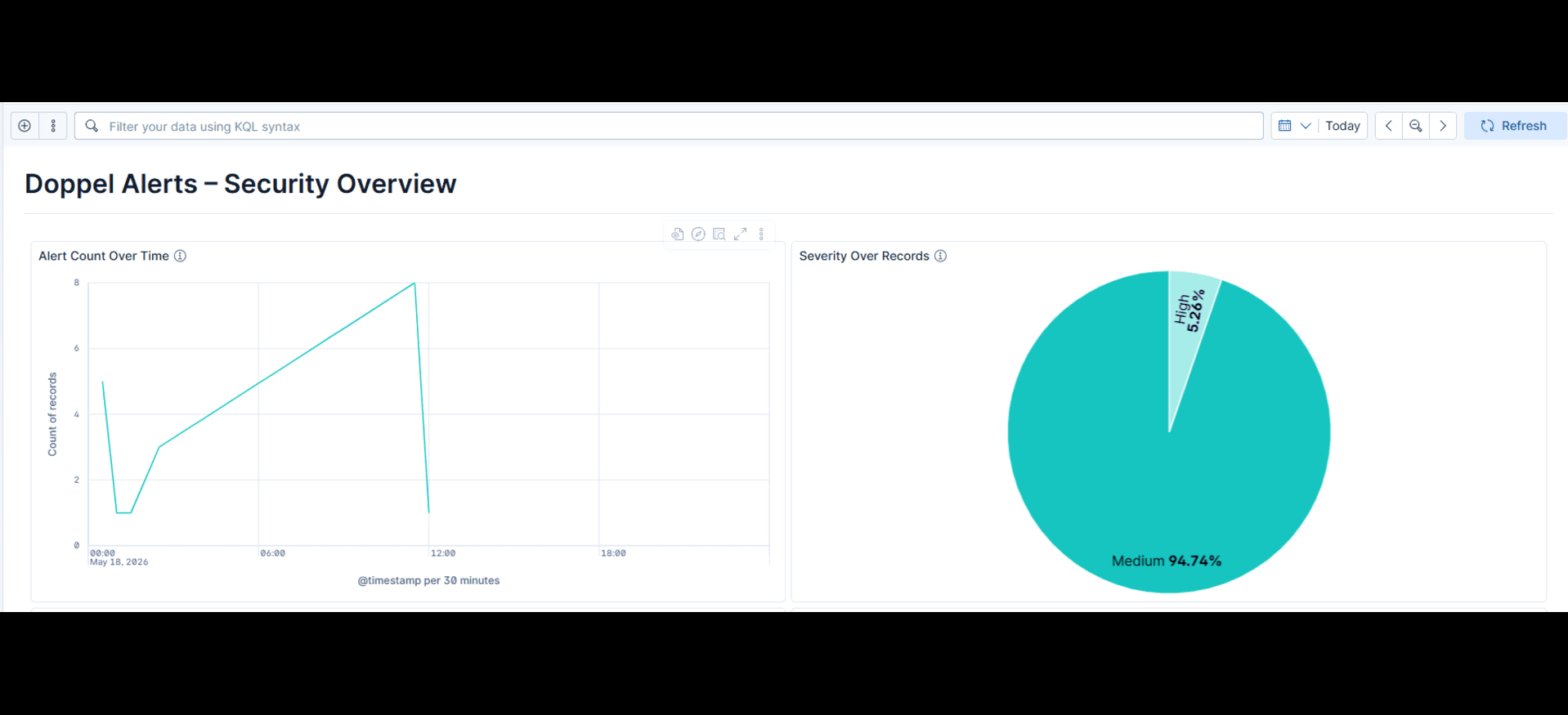
This integration includes one or more Kibana dashboards that visualizes the data collected by the integration. The screenshots below illustrate how the ingested data is displayed.
Changelog
| Version | Details | Minimum Kibana version |
|---|---|---|
| 1.2.0 | Enhancement (View pull request) Add support for Doppel API V2 using OAuth 2.0 client credentials. Enhancement (View pull request) Map the alert summary field to doppel.alert_summary.Enhancement (View pull request) Correct the README's input name, stack version claim, and agentless release stage. |
9.3.3 8.19.14 |
| 1.1.0 | Enhancement (View pull request) Add tags to ingest pipeline processors. |
9.3.3 8.19.14 |
| 1.0.1 | Enhancement (View pull request) Set agentless deployment mode release field to ga. |
9.3.3 8.19.14 |
| 1.0.0 | Enhancement (View pull request) Promote integration to GA. |
9.3.3 8.19.14 |
| 0.2.0 | Enhancement (View pull request) Use new release field for agentless deployment mode to establish as beta. |
9.3.3 8.19.14 |
| 0.1.1 | Bug fix (View pull request) Fix kibana.version constraints to allow v9 stack. Bug fix (View pull request) Fix default request trace enablement value. |
9.3.3 8.19.14 |
| 0.1.0 | Enhancement (View pull request) Initial Integration to fetch Doppel Alerts API in Elastic Security. |
8.19.0 |