Ticura Threat Intelligence Integration
| Version | 0.3.0
|
| Subscription level What's this? |
Basic |
| Developed by What's this? |
Partner |
| Ingestion method(s) | API |
| Minimum Kibana version(s) | 9.1.0 8.19.0 |
To use pre-release integrations, go to the Integrations page in Kibana, scroll down, and toggle on the Display beta integrations option.
The Ticura platform delivers the industry's only real-time view of global cyber threat intelligence that is objective, auditable, and continuously optimized to protect each subscriber's unique environment — at a fraction of the cost of legacy approaches.
Ticura's threat intelligence feeds are aggregated from hundreds of different public, private, and community sources, enriched using AI, and tailored to your specific needs. The IoC Scoring Algorithm applies a qualitative classification that changes dynamically over time.
This intelligence can be queried through a threat intelligence feed and delivered directly to Firewall, SOAR, SIEM, EDR, and other security platforms — for example, Elastic Security.
To use this integration, you need:
- Access to the Ticura web application
- An active Ticura subscription with at least one configured feed
- A supported Elastic Stack version with Elastic Security enabled
This integration requires Elastic Agent. If you have none, check the Elastic Agent installation instructions. You can install only one Elastic Agent per host. Elastic Agent streams data from the REST API and ships events to Elastic, where they are processed via the integration's ingest pipelines.
- Register for a Ticura account at https://app.ticura.io
- Create a Threat Intelligence feed based on your requirements and save the provided API key.
- Open Kibana and navigate to Integrations.
- Search for Ticura.
- Select Add Ticura.
- Enter your API key into Ticura API key.
- Select your Download Interval and your Agent, then click Save and continue to enable the integration.
After the integration is enabled, indicators are periodically retrieved and ingested into Elastic.
Each ingested event represents a single indicator of compromise (IOC) and includes metadata such as type, confidence, and scoring information.
- IPv4 addresses
- IPv6 addresses
- Ports
- Domains
- URLs
- File hashes (MD5, SHA-1, SHA-256)
- Email addresses
The integration keeps a deduplicated, automatically-expiring view of current indicators, so anything Ticura stops publishing disappears without manual cleanup.
- Latest-IOC transform — a continuous transform deduplicates the raw feed by
ticura.indicator.uuidinto thelogs-ti_ticura_latest.indicatorindex, keeping a single document per indicator (the newest version byevent.ingested, sincelast_seen/@timestampneed not change on a content-only update). Because the full feed is re-downloaded on every poll, this collapses the per-poll copies into one current document — the same pattern used by Elastic's other threat-intel integrations. - Per-indicator expiry — the transform's retention policy drops an indicator from the latest index once its source-provided
ticura.indicator.ages_outtimestamp passes, so expired indicators leave the active view automatically. - Raw-stream ILM — the raw
logs-ti_ticura.indicator-*data stream rolls over every 24 hours and is deleted 1 day after rollover for storage hygiene. The latest index — queried by dashboards, saved searches, and Elastic Security's Indicator Match rules — is the source of truth for "currently active" indicators.
Raw-stream documents are tagged labels.is_ioc_transform_source: "true" and the transform's deduplicated output "false"; dashboards and saved searches filter on labels.is_ioc_transform_source: "false" to show only the current, non-expired set. Each indicator's document _id is a fingerprint of ticura.indicator.uuid and Ticura's per-object content fingerprint (ticura.indicator.fingerprint). Because the raw stream is a data stream (indexed op_type=create), an unchanged indicator that is re-exported keeps the same _id and is rejected as a duplicate (no churn), while a content change yields a new fingerprint — and therefore a new _id — so the updated version is ingested. The latest-IOC transform keeps the newest version per ticura.indicator.uuid (ordered by event.ingested, since last_seen/@timestamp need not change on a content-only update) and collapses the duplicates that accumulate across index rollovers.
Important — keep the download interval below 24 hours. Every indicator is re-asserted on each download, and the active view expires on a ~24-hour window, so a longer interval can let still-active indicators briefly drop out of dashboards and Indicator Match rules between downloads. The same interval bounds deletion: an indicator Ticura removes from the feed leaves the active set within roughly a day of its last download, and never faster than one interval — so a shorter interval also removes deleted indicators sooner.
If you need to retain raw indicator history longer (for example, for forensic queries against retired IOCs), increase delete.min_age in the ILM policy logs-ti_ticura.indicator-default_policy.
If you run more than one Ticura feed, the latest-IOC transform deduplicates across all of them by ticura.indicator.uuid into the single logs-ti_ticura_latest.indicator index — the unified, deduplicated view every Elastic threat-intel integration provides. An indicator delivered by more than one feed is kept once, which avoids duplicate Indicator Match alerts for the same IOC. To break the deduplicated view down by source, slice on threat.feed.name (as the Overview's Indicators by origin panel does).
The "active" indicator set is defined by recency of download: an indicator stays in the latest index (logs-ti_ticura_latest.indicator) only while it keeps being re-asserted by the feed. The transform's retention policy removes an indicator once its ticura.indicator.ages_out (a sliding ~24-hour window, refreshed on each download) lapses.
A direct consequence: if downloads stop — agent down, network/API outage, expired or revoked API key — the latest index drains and is empty within roughly 24 hours of the last successful download. Dashboards and any Elastic Security Indicator Match rules built on it then stop matching. The failure is silent (no error in the active view — it simply empties), and the emptying tends to happen relatively abruptly around the 24-hour mark rather than gradually.
This is inherent to a feed that signals removal by omission (Ticura sends a full snapshot each download and does not emit explicit delete events), so "currently active" can only mean "seen in a recent download." It is not specific to a misconfiguration. Recommended practices:
- Monitor ingest freshness. Alert if no
ti_ticuradocuments have been ingested recently (well under 24 hours) — for example, watchevent.ingestedonlogs-ti_ticura.indicator-*, or the health of the integration's agent and thelogs-ti_ticura.latest_indicator-defaulttransform. Because the active view empties silently, this monitor is your early warning, not the dashboards. - Keep the download interval well below 24 hours (see above) — both so still-active indicators are refreshed before they expire, and so transient blips are absorbed by the CEL input's built-in retries.
- Do not shorten the retention window to delete removed indicators faster. The window doubles as your outage tolerance: a shorter window evicts removed indicators sooner but also empties the active set sooner during any outage (a short window would drop coverage during a brief network blip). The ~24-hour window is a deliberate balance for a feed that has no explicit delete signal.
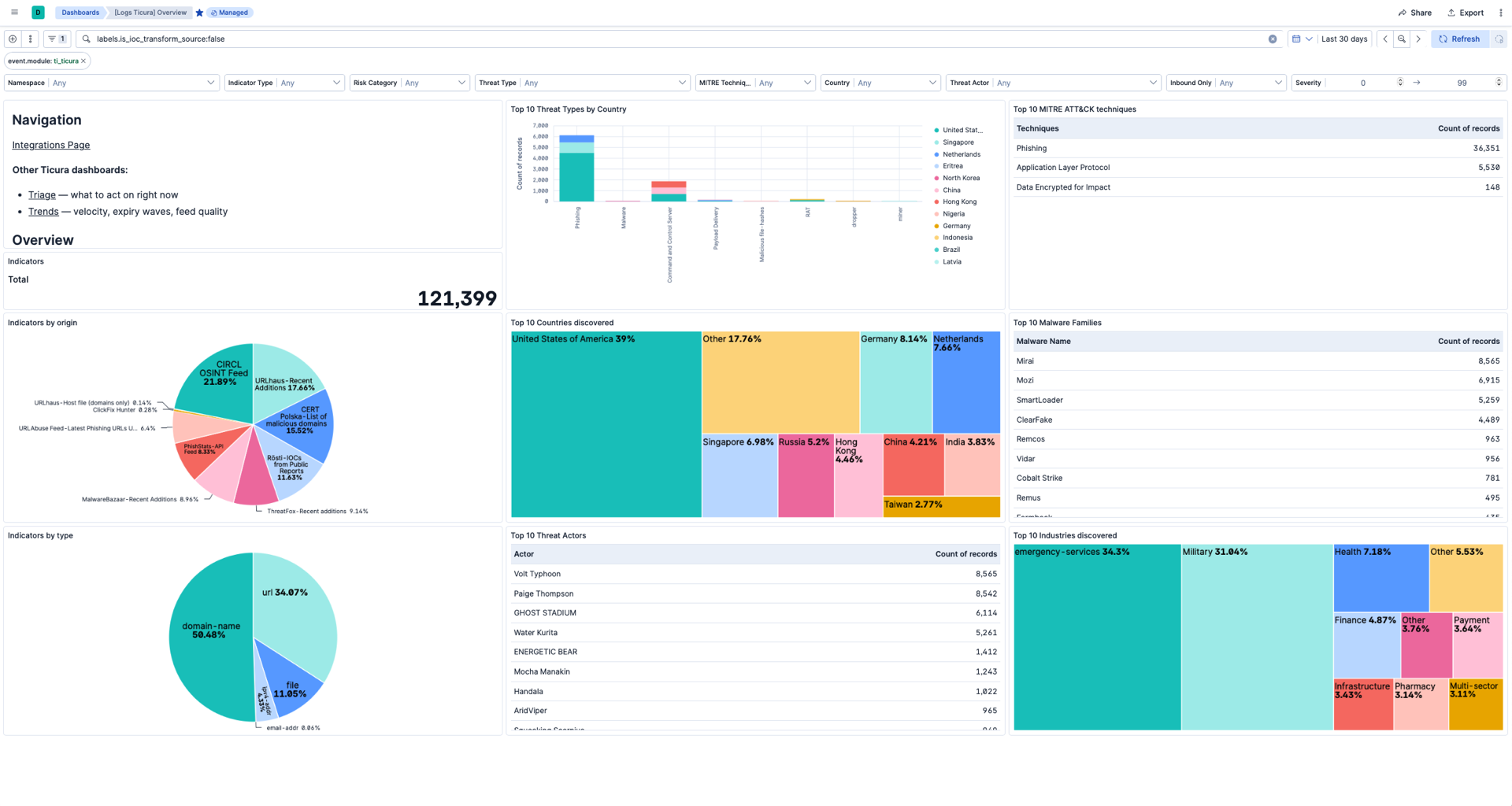
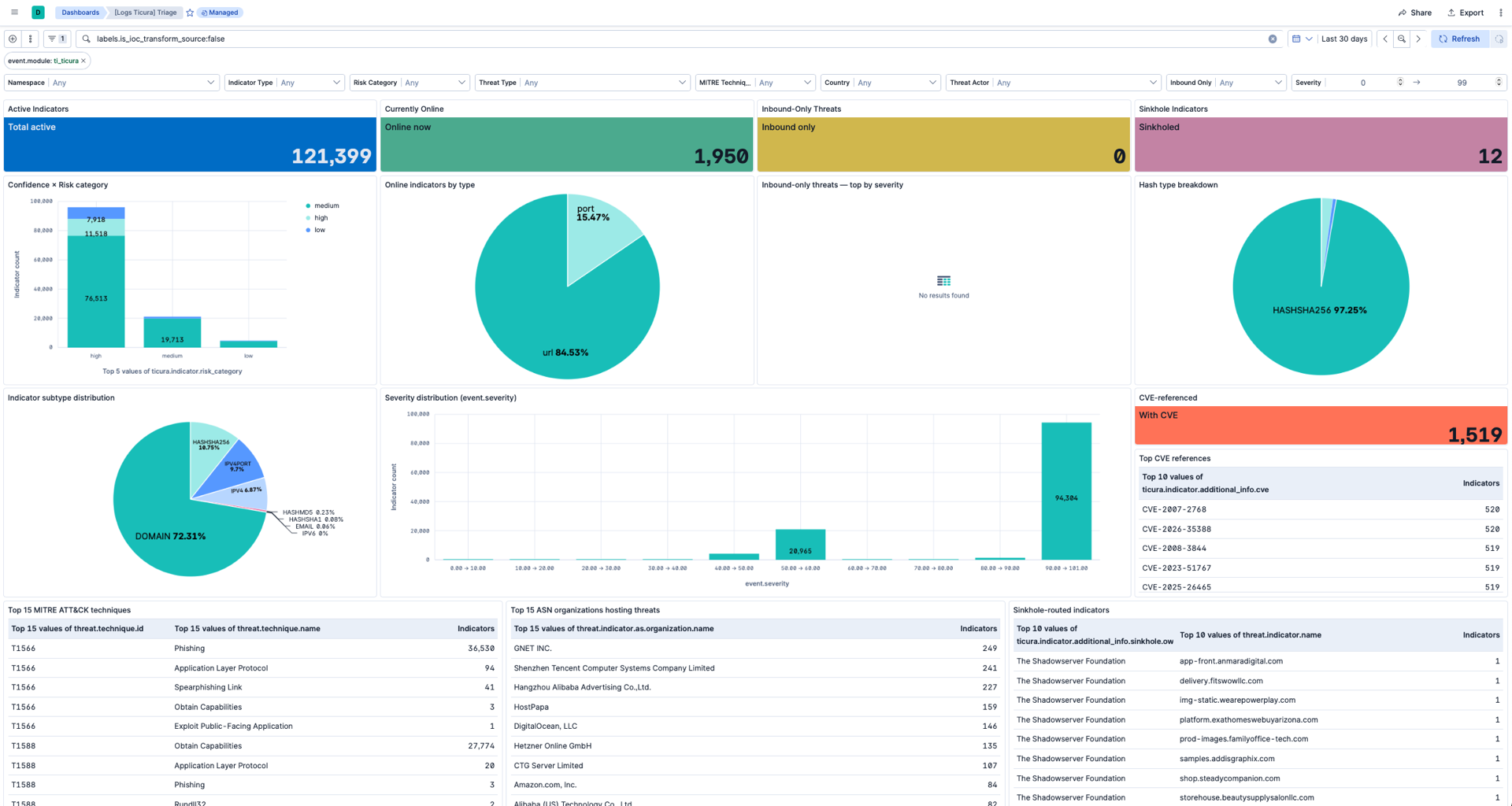
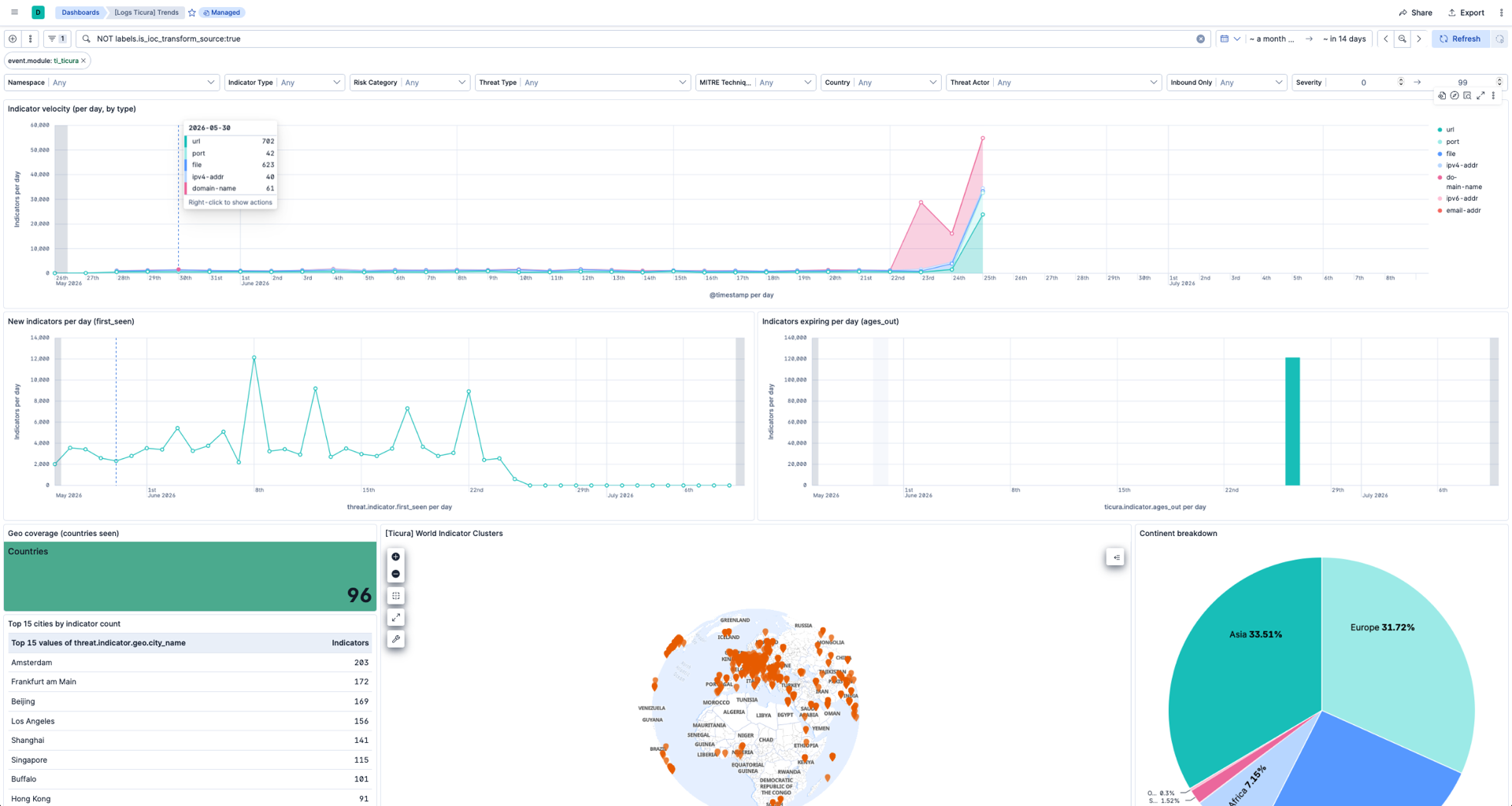
Three dashboards are bundled, all scoped to event.module: ti_ticura and labels.is_ioc_transform_source: "false" — the transform's deduplicated, non-expired latest set. The default time range on each is set wide (≥ 30 days) because @timestamp reflects per-indicator observation time (threat.indicator.last_seen → first_seen), which can be days or weeks old for still-active IOCs. The "currently active" semantics is enforced by the scope filters, not by the time range.
Strategic view of the current feed: counts and distributions by type, country, industry, actor, malware family, MITRE technique, and feed source.
The dashboard has eight interactive controls at the top, with hierarchical chaining — each control's options are filtered by selections made to its left:
| Control | Field | Use |
|---|---|---|
| Indicator Type | ticura.indicator.main_type |
IPV4 / IPV6 / DOMAIN / URL / HASH / EMAIL |
| Risk Category | ticura.indicator.risk_category |
low / medium / high / critical |
| Threat Type | ticura.indicator.additional_info.threat_types |
Command and Control Server, Phishing, Malware, … |
| MITRE Technique | threat.technique.id |
Filter by ATT&CK technique (T1190, T1486, …) |
| Country | threat.indicator.geo.country_iso_code |
Country of origin (GeoIP-derived) |
| Threat Actor | ticura.indicator.merged.actors |
Attribution to a known actor |
| Inbound Only | ticura.indicator.is_inbound |
Limit to indicators flagged as inbound-only |
| Severity (range slider) | event.severity |
Slide to a min/max severity window |
Tactical view focused on what to act on right now:
| Panel | Source field(s) | Purpose |
|---|---|---|
| Active indicators | count | Total count under the current scope |
| Currently online | ticura.indicator.additional_info.online.is_online:true count |
The most actionable subset — indicators confirmed live by Ticura |
| Inbound-only threats | ticura.indicator.is_inbound:true count |
Threats Ticura specifically flagged as ingress |
| Sinkhole indicators | ticura.indicator.additional_info.sinkhole.owner:* count |
Routed to a known sinkhole; valuable investigative context |
| Indicator subtype distribution | ticura.indicator.sub_type |
DOMAIN / HASHSHA256 / IPV4PORT / IPV4 / HASHSHA1 / HASHMD5 / IPV6 / EMAIL |
| Severity distribution | event.severity bucketed 0–100 |
Where the volume sits — informs alert thresholds |
| Hash type breakdown | ticura.indicator.sub_type (file indicators only) |
SHA-256 / SHA-1 / MD5 mix |
| Confidence × Risk category | ticura.indicator.risk_category × ticura.indicator.confidence_category cross-tab |
Priority quadrants — high-conf + high-risk indicators feed detection rules; low-conf + high-risk indicators need triage |
| CVE-referenced indicators | ticura.indicator.cve or ticura.indicator.additional_info.cve count |
Volume of vuln-linked IOCs |
| Top CVE references | ticura.indicator.additional_info.cve |
Which CVEs lead |
| Top 15 ASN organizations | threat.indicator.as.organization.name |
Pattern recognition — which hosting providers keep showing up |
| Top 15 MITRE ATT&CK techniques | threat.technique.{id, name} |
Technique-level prioritization with names |
| Inbound-only detail | top by severity, with country | Drill into inbound-only IOCs (populated only when the feed flags indicators as inbound) |
| Sinkhole-routed indicators | by sinkhole owner | Drill into which indicators are routed where |
| Online indicators by type | ticura.indicator.additional_info.online.is_online:true split by threat.indicator.type |
Which IOC types are currently live |
Strategic time-series view of how the feed is evolving:
| Panel | Source field(s) | Purpose |
|---|---|---|
| Indicator velocity | threat.indicator.first_seen per day, stacked by threat.indicator.type |
Daily new-indicator rate, broken out by IOC type |
| New indicators per day | threat.indicator.first_seen |
Fresh-intel velocity (line chart) |
| Indicators expiring per day | ticura.indicator.ages_out |
Forward-looking expiry wave (bar chart) |
| Top 30 countries by indicator count | threat.indicator.geo.country_iso_code |
Geographic distribution (richer than the Overview pie) |
| Feed quality matrix | threat.feed.name × {count, avg risk, avg confidence, online count} |
Which feeds deliver the highest-quality intel |
| Risk category trend over time | ticura.indicator.risk_category split, percentage-stacked area |
Are we seeing more critical IOCs over time? |
| Threat type proportions over time | ticura.indicator.additional_info.threat_types split, percentage-stacked area |
Shifting threat-type mix |
| Geo coverage (countries seen) | distinct threat.indicator.geo.country_iso_code |
How many distinct countries the feed currently spans |
| Top 15 cities | threat.indicator.geo.city_name |
City-level concentration of indicators |
| Continent breakdown | threat.indicator.geo.continent_name |
Indicator distribution by continent |
| World indicator clusters (map) | threat.indicator.geo.location |
Geographic clustering of IP indicators on a world map |
The integration ships nine pre-built saved searches under Discover. They are filterable, exportable, and ready to be embedded into custom dashboards or used as the source for Indicator Match detection rules.
| Saved search | What it shows |
|---|---|
[Ticura] High-risk indicators (last 24h) |
Severity ≥ 70, modified in the last 24 hours, not expired — sorted by severity. |
[Ticura] Active C2 indicators |
ticura.indicator.additional_info.threat_types contains Command and Control Server, not expired. Ready for outbound-connection detection. |
[Ticura] Active phishing URLs |
threat.indicator.type: url AND ticura.indicator.additional_info.threat_types contains "Phishing", not expired. |
[Ticura] Active malware file hashes |
threat.indicator.type: file, not expired. Covers SHA-256, SHA-1, MD5. |
[Ticura] Critical-risk indicators in EU |
Severity ≥ 80 attributed to an EU member state via GeoIP. |
[Ticura] Inbound-only threat indicators |
ticura.indicator.is_inbound: true — threats targeting your environment from outside. |
[Ticura] Indicators with MITRE ATT&CK enrichment |
threat.technique.id populated; useful for pivoting from the MITRE matrix to specific IOCs. |
[Ticura] Recently first-seen indicators |
Sorted by threat.indicator.first_seen. Fresh threat-intel monitoring. |
[Ticura] Indicators expiring in next 24h |
ticura.indicator.ages_out <= now+24h and not yet expired. Worth a quick triage glance. |
The integration maps indicators to the Elastic Common Schema using the threat.indicator.* field set.
| ECS Field | Description |
|---|---|
threat.indicator.type |
Indicator type (for example, ipv4-addr, url, file, domain-name) |
threat.indicator.description |
Short description of the indicator |
threat.indicator.first_seen |
Time when the indicator was first observed |
threat.indicator.last_seen |
Most recent observation time |
threat.indicator.modified_at |
Time when the indicator was last updated by Ticura (@timestamp is derived from last_seen/first_seen, not from this field) |
threat.indicator.confidence |
Confidence level assigned to the indicator |
threat.indicator.provider |
Indicator provider (Ticura) |
| Indicator Type | ECS Field |
|---|---|
| IPv4 / IPv6 address | threat.indicator.ip |
| Port (with IP) | threat.indicator.port |
| Domain | threat.indicator.url.domain |
| URL | threat.indicator.url.full (plus scheme, domain, path, … when Ticura supplies them) |
| File hash | threat.indicator.file.hash.{md5, sha1, sha256, ...} |
| Email address | threat.indicator.email.address |
| ECS Field | Hash Type |
|---|---|
threat.indicator.file.hash.md5 |
MD5 |
threat.indicator.file.hash.sha1 |
SHA-1 |
threat.indicator.file.hash.sha256 |
SHA-256 |
| ECS Field | Description |
|---|---|
event.risk_score |
Numeric risk score (0–100), supplied directly by Ticura (equals ticura.indicator.risk) |
event.severity |
Numeric severity (0–100) — mirrored directly from ticura.indicator.risk |
threat.indicator.marking.tlp |
Traffic Light Protocol marking, if provided |
threat.indicator.reference |
Reference or source URL |
tags |
Tags associated with the indicator |
| ECS Field | Value |
|---|---|
event.kind |
enrichment |
event.category |
["threat"] |
event.type |
["indicator"] |
event.action |
indicator-update (set with override: false, so a source-supplied value wins) |
event.dataset |
ti_ticura.indicator |
event.module |
ti_ticura |
event.provider |
Ticura |
observer.vendor |
Ticura |
observer.product |
Ticura |
ecs.version |
9.3.0 |
| Enrichment | Source | ECS Field(s) Populated |
|---|---|---|
| Event time | threat.indicator.last_seen, falling back to threat.indicator.first_seen |
@timestamp (so Discover shows real per-indicator temporal distribution; modified_at is deliberately not used because Ticura assigns it batch-uniformly per scoring run) |
| Expiry | ticura.indicator.ages_out |
The latest-IOC transform's retention policy removes indicators from logs-ti_ticura_latest.indicator once ages_out passes |
| GeoIP | threat.indicator.ip |
threat.indicator.geo.{country_name, city_name, location, ...} |
| ASN | threat.indicator.ip |
threat.indicator.as.number, threat.indicator.as.organization.name |
| Hash type | ticura.indicator.sub_type (HASHSHA256 / HASHMD5 / HASHSHA1) |
threat.indicator.file.hash.{sha256, md5, sha1} (defensive fallback when the source omits the typed field) |
| Correlation fields | threat.indicator.ip, threat.indicator.file.hash.{sha256, sha1, md5}, threat.indicator.url.domain |
related.ip, related.hash, related.hosts (deduplicated, so analysts and Indicator Match rules can pivot on a value without knowing which threat.indicator.* field holds it) |
GeoIP and ASN lookups use the GeoLite2 databases bundled with Elasticsearch — no external API calls or keys required. They apply only to IP-type indicators (IPV4 / IPV6 / IPV4PORT), which are usually a minority of a feed dominated by domains, URLs, and hashes; ASN resolves for almost all IPs, but GeoLite2 returns a country/city for only a subset. The geo-based dashboard panels therefore reflect that IP subset, not the whole feed.
The integration mirrors Ticura's MITRE ATT&CK enrichment into the canonical ECS threat.* field set so Elastic Security's MITRE matrix, detection rules, and timeline views pick it up automatically.
| ECS Field | Source |
|---|---|
threat.technique.id / name / reference |
ticura.indicator.technique.id / name / reference |
threat.technique.subtechnique.id / name / reference |
ticura.indicator.technique.subtechnique.* |
threat.software.id / name / type / platforms / alias / reference |
ticura.indicator.software.* |
threat.group.id / name / reference |
ticura.indicator.group.* |
Ticura's ECSV1 feed frequently populates the threat.* MITRE fields directly; the pipeline mirrors from the ticura.indicator.* namespace with override: false, so it only fills gaps the feed left (see Field Provenance). In practice most threat.technique.* and threat.software.* values arrive from the feed, and the ticura.indicator.technique.subtechnique.* / software.* mirrors may be sparse or empty even where their ECS threat.* counterparts are set.
Different indicator types populate different ECS fields. The integration always sets threat.indicator.type for filtering.
IPv4 / IPv6 indicators (ticura.indicator.main_type: IPV4 / IPV6)
threat.indicator.ip— the addressthreat.indicator.port— primarily forticura.indicator.sub_type: IPV4PORT(Ticura may also supply a port on other indicator types when relevant)threat.indicator.geo.{country_iso_code, country_name, city_name, region_name, location}— GeoIP-enrichedthreat.indicator.as.{number, organization.name}— ASN-enriched
Domain indicators (ticura.indicator.main_type: DOMAIN)
threat.indicator.url.domain— the domain namethreat.indicator.name— same as the domaindns.{question, answers, resolved_ip, type, response_code}— present when the source includes DNS resolution data
URL indicators (ticura.indicator.main_type: URL)
threat.indicator.url.full— the full URLthreat.indicator.url.{domain, scheme, path, original, …}— additional URL components are populated only when Ticura includes them in the feed; the pipeline stores them as-is and does not decomposeurl.full
Hash indicators (ticura.indicator.main_type: HASH)
threat.indicator.type: filethreat.indicator.file.hash.{sha256, sha1, md5}— populated based onticura.indicator.sub_type(HASHSHA256/HASHSHA1/HASHMD5)threat.indicator.file.{name, size}— when the source includes them
These are preserved alongside the ECS-mapped fields for per-field provenance (see Field Provenance below).
| Field | Type | Description |
|---|---|---|
ticura.indicator.uuid |
keyword | Stable Ticura indicator ID (with ticura.indicator.fingerprint, forms the document _id). |
ticura.indicator.fingerprint |
keyword | Ticura content fingerprint; changes on any content change, driving update detection via the _id. |
ticura.indicator.main_type / sub_type |
keyword | High-level type and subtype as classified by Ticura. |
ticura.indicator.risk / risk_category |
long / keyword | Numeric 0–100 risk and its categorical label (low / medium / high / critical). |
ticura.indicator.confidence / confidence_category |
long / keyword | Numeric 0–100 confidence and label. |
ticura.indicator.is_inbound |
boolean | True for threats originating outside, targeting the protected environment. |
ticura.indicator.ages_out |
date | Scheduled expiry timestamp. Drives the transform retention policy that removes expired indicators from the latest index. |
ticura.indicator.feed_ingest_timestamp |
date | Pipeline-set ingest time. Because an unchanged indicator re-exported on the next poll keeps the same _id and is rejected as a duplicate, the stored value reflects when this content version was first ingested; it only advances when the indicator's content changes (new fingerprint → new document). |
ticura.indicator.countries / industries / actors |
keyword | Ticura-supplied attribution lists. |
ticura.indicator.cve |
keyword | Associated CVE identifiers. |
ticura.indicator.filter_cats |
nested | Filter categorization metadata (populated only when the feed supplies it; frequently empty). |
ticura.indicator.technique.* / software.* / group.* |
group | MITRE ATT&CK enrichment, mirrored to canonical threat.* for Elastic Security. |
| Field | Type | Description |
|---|---|---|
ticura.indicator.additional_info.valid_from |
date | First time the indicator was considered valid. |
ticura.indicator.additional_info.threat_types |
keyword | Labels like Command and Control Server, Phishing, Malware. Used by the analyst saved searches. |
ticura.indicator.additional_info.dns_first_seen / dns_last_seen |
date | Earliest / most recent DNS resolution observed for the indicator. |
ticura.indicator.additional_info.malware.name |
keyword | Malware family name. |
ticura.indicator.additional_info.online.is_online / last_online |
boolean / date | Online-status enrichment. |
ticura.indicator.additional_info.sinkhole.owner |
keyword | Set for indicators routed to a known sinkhole. |
ticura.indicator.additional_info.countries / industries / actors |
keyword | Supplemental attribution lists. The countries / industries / actors lists are also unioned into ticura.indicator.merged.* for convenient querying (see below). |
ticura.indicator.additional_info.cve |
keyword | Supplemental CVE identifiers (kept as-is; not merged). |
The ticura.indicator.merged.{countries, industries, actors} fields are deduplicated, sorted unions of the ticura.indicator.* and ticura.indicator.additional_info.* equivalents — query these when you don't care which source the attribution came from.
The integration ships a single ILM policy logs-ti_ticura.indicator-default_policy with the following defaults:
hot:    rollover at max_age: 24h
warm:   min_age: 0s
delete: min_age: 1d
This is tuned for re-asserting threat-intel feeds — each ticura.indicator.uuid resolves to a single latest entry (the newest content version, deduplicated by the transform), while indicators Ticura removes from the feed age out within ~48h. If you need different retention semantics:
- Keep "removed" indicators queryable longer: increase
delete.min_age(for example, to7dto retain a week of dropped-indicator history in the warm tier). - Reduce storage overhead during normal operation: there isn't any with this policy — only one backing index is in hot at a time.
- More aggressive removal: set
hot.rollover.max_ageshorter (for example,12h) so dropped indicators are gone from storage within ~24h.
Edit the policy via Kibana's Stack Management → Index Lifecycle Policies. Changes apply immediately; existing backing indices pick up the new phase definitions on the next ILM poll (default 10 min).
Every document carries event.dataset: ti_ticura.indicator, event.module: ti_ticura, and observer.vendor: Ticura for whole-event provenance.
For ECS-canonical fields that the integration may populate by mapping from Ticura-specific fields (for example, threat.technique.*, event.severity), the original Ticura-namespaced field (ticura.indicator.technique.*, ticura.indicator.risk, …) is always preserved alongside. The mapping uses override: false, so a value Ticura supplied directly in the ECS namespace is never overwritten.
You can therefore distinguish three cases per field:
| ECS field | Ticura mirror | Meaning |
|---|---|---|
| set | absent | Ticura supplied this directly in the ECS namespace; pipeline did not enrich. |
| set | present, equal | Pipeline mirrored from the Ticura namespace into ECS. |
| set | present, different | Ticura supplied two values; the ECS-canonical value wins. The Ticura mirror shows the alternate. |
When preserve_original_event: true is enabled in the integration settings, the full raw JSON delivered by Ticura is also retained in event.original as an audit trail.
- Each feed is unique to the subscriber.
- Access is controlled using subscription-specific credentials. The API key is sent only over HTTPS, redacted from request-trace logs, and removed from any persisted in-memory state by the CEL input.
- Feed content reflects the configuration defined during the Ticura feed setup.
- Indicator relevance and confidence can change over time.
- The volume of ingested indicators depends on your feed configuration.
- Indicators are mapped to ECS
threat.indicator.*and are ready for use by Elastic Security's prebuilt threat-intel Indicator Match rules, or any custom Indicator Match rules you build.
This is the Indicator dataset.
Example
{
    "@timestamp": "2026-05-28T10:00:00.000Z",
    "agent": {
        "ephemeral_id": "358d3b95-fa75-46dd-85e5-241ee6bf8d87",
        "id": "90c88b35-7a07-4155-876f-ee05f8acf484",
        "name": "elastic-agent-39899",
        "type": "filebeat",
        "version": "9.4.2"
    },
    "data_stream": {
        "dataset": "ti_ticura.indicator",
        "namespace": "21612",
        "type": "logs"
    },
    "ecs": {
        "version": "9.3.0"
    },
    "elastic_agent": {
        "id": "90c88b35-7a07-4155-876f-ee05f8acf484",
        "snapshot": false,
        "version": "9.4.2"
    },
    "event": {
        "action": "indicator-update",
        "agent_id_status": "verified",
        "category": [
            "threat"
        ],
        "dataset": "ti_ticura.indicator",
        "ingested": "2026-06-26T12:25:49Z",
        "kind": "enrichment",
        "module": "ti_ticura",
        "provider": "Ticura",
        "risk_score": 80,
        "severity": 80,
        "type": [
            "indicator"
        ]
    },
    "input": {
        "type": "cel"
    },
    "labels": {
        "is_ioc_transform_source": "true"
    },
    "observer": {
        "product": "Ticura",
        "vendor": "Ticura"
    },
    "related": {
        "ip": [
            "192.0.2.10"
        ]
    },
    "tags": [
        "type:Curated"
    ],
    "threat": {
        "feed": {
            "description": "License: n/a",
            "name": "Ticura Curated",
            "reference": "https://www.ticura.io"
        },
        "indicator": {
            "confidence": "High",
            "description": "Test IPv4 malicious IP.",
            "first_seen": "2026-05-01T10:00:00.000Z",
            "id": [
                "aaaa0001-0001-0001-0001-000000000001"
            ],
            "ip": "192.0.2.10",
            "last_seen": "2026-05-28T10:00:00.000Z",
            "marking": {
                "tlp": "CLEAR",
                "tlp_version": "2.0"
            },
            "modified_at": "2026-05-28T12:00:00.000Z",
            "name": "192.0.2.10",
            "provider": "Ticura",
            "type": "ipv4-addr"
        }
    },
    "ticura": {
        "indicator": {
            "ages_out": "2026-06-28T12:00:00.000Z",
            "confidence": 75,
            "confidence_category": "high",
            "feed_ingest_timestamp": "2026-06-26T12:25:49.722Z",
            "fingerprint": "4210a52f45deada10decb7547d4f5804155ffe7e6ab179d9ce517ec3a849468d",
            "is_inbound": false,
            "main_type": "IPV4",
            "risk": 80,
            "risk_category": "high",
            "sub_type": "IPV4",
            "uuid": "aaaa0001-0001-0001-0001-000000000001"
        }
    }
}
Exported fields
| Field | Description | Type |
|---|---|---|
| @timestamp | Date/time when the event originated. This is the date/time extracted from the event, typically representing when the event was generated by the source. If the event source has no original timestamp, this value is typically populated by the first time the event was received by the pipeline. Required field for all events. | date |
| data_stream.dataset | The field can contain anything that makes sense to signify the source of the data. Examples include nginx.access, prometheus, endpoint etc. For data streams that otherwise fit, but that do not have dataset set we use the value "generic" for the dataset value. event.dataset should have the same value as data_stream.dataset. Beyond the Elasticsearch data stream naming criteria noted above, the dataset value has additional restrictions: * Must not contain - * No longer than 100 characters |
constant_keyword |
| data_stream.namespace | A user defined namespace. Namespaces are useful to allow grouping of data. Many users already organize their indices this way, and the data stream naming scheme now provides this best practice as a default. Many users will populate this field with default. If no value is used, it falls back to default. Beyond the Elasticsearch index naming criteria noted above, namespace value has the additional restrictions: * Must not contain - * No longer than 100 characters |
constant_keyword |
| data_stream.type | An overarching type for the data stream. Currently allowed values are "logs" and "metrics". We expect to also add "traces" and "synthetics" in the near future. | constant_keyword |
| event.dataset | Event dataset | constant_keyword |
| event.module | Event module | constant_keyword |
| input.type | Type of Filebeat input. | keyword |
| labels.is_ioc_transform_source | Indicates whether an IOC is in the raw source data stream, or in the latest destination index. | constant_keyword |
| threat.feed.dashboard_id | The saved object ID of the dashboard belonging to the threat feed for displaying dashboard links to threat feeds in Kibana. | keyword |
| threat.feed.description | Description of the threat feed in a UI friendly format. | keyword |
| threat.feed.name | The name of the threat feed in UI friendly format. | keyword |
| threat.feed.reference | Reference information for the threat feed in a UI friendly format. | keyword |
| ticura.indicator.actors | List of threat-actor identifiers associated with the indicator (as provided by Ticura). | keyword |
| ticura.indicator.additional_info.actors | List of threat-actor identifiers derived from supplemental enrichment. | keyword |
| ticura.indicator.additional_info.countries | List of country codes derived from supplemental enrichment. | keyword |
| ticura.indicator.additional_info.cve | List of CVE identifiers derived from supplemental enrichment. | keyword |
| ticura.indicator.additional_info.dns_first_seen | Earliest known DNS resolution timestamp for the indicator. | date |
| ticura.indicator.additional_info.dns_last_seen | Most recent known DNS resolution timestamp for the indicator. | date |
| ticura.indicator.additional_info.industries | List of industries derived from supplemental enrichment. | keyword |
| ticura.indicator.additional_info.malware.name | Malware family name. | keyword |
| ticura.indicator.additional_info.online.is_online | Whether the indicator was online at the last check. | boolean |
| ticura.indicator.additional_info.online.last_online | Most recent timestamp when the indicator was confirmed online. | date |
| ticura.indicator.additional_info.sinkhole.owner | Owner of the sinkhole. | keyword |
| ticura.indicator.additional_info.threat_types | List of threat-type labels (e.g., "Command and Control Server", "Phishing"). | keyword |
| ticura.indicator.additional_info.valid_from | Timestamp from which the indicator is considered valid. | date |
| ticura.indicator.ages_out | Timestamp at which the indicator is scheduled to expire from active feeds. | date |
| ticura.indicator.confidence | Numeric Ticura confidence score (0-100). | long |
| ticura.indicator.confidence_category | Categorical confidence label (e.g., low, medium, high). | keyword |
| ticura.indicator.countries | List of country codes associated with the indicator (as provided by Ticura). | keyword |
| ticura.indicator.cve | List of CVE identifiers associated with the indicator. | keyword |
| ticura.indicator.feed_ingest_timestamp | Ingest-time timestamp added when the document is processed by the pipeline. | date |
| ticura.indicator.filter_cats.category | Filter category name. | keyword |
| ticura.indicator.fingerprint | Content fingerprint (hash) of the indicator, supplied by Ticura. It changes whenever the indicator's content changes (and is stable across re-exports otherwise). Combined with ticura.indicator.uuid it forms the document _id, so content updates are ingested as new versions while unchanged re-exports are rejected as duplicates. |
keyword |
| ticura.indicator.group.id | MITRE group ID. | keyword |
| ticura.indicator.group.name | MITRE group name. | keyword |
| ticura.indicator.group.reference | MITRE group reference URL. | keyword |
| ticura.indicator.industries | List of industries associated with the indicator (as provided by Ticura). | keyword |
| ticura.indicator.is_inbound | Whether this indicator represents an inbound-only threat direction. | boolean |
| ticura.indicator.main_type | High-level indicator type (IPV4, IPV6, DOMAIN, URL, HASH). | keyword |
| ticura.indicator.merged.actors | Deduplicated, sorted union of ticura.indicator.actors and ticura.indicator.additional_info.actors. | keyword |
| ticura.indicator.merged.countries | Deduplicated, sorted union of ticura.indicator.countries and ticura.indicator.additional_info.countries. | keyword |
| ticura.indicator.merged.industries | Deduplicated, sorted union of ticura.indicator.industries and ticura.indicator.additional_info.industries. | keyword |
| ticura.indicator.normalizations.feed | Feed identifier used in score normalization. | keyword |
| ticura.indicator.normalizations.measures | Normalization measures applied. | keyword |
| ticura.indicator.risk | Numeric Ticura risk score (0-100). Higher values indicate greater threat. | long |
| ticura.indicator.risk_category | Categorical risk label (e.g., low, medium, high, critical). | keyword |
| ticura.indicator.software.alias | Known software aliases. | keyword |
| ticura.indicator.software.id | MITRE software ID. | keyword |
| ticura.indicator.software.name | MITRE software name. | keyword |
| ticura.indicator.software.platforms | Platforms targeted by the software. | keyword |
| ticura.indicator.software.reference | MITRE software reference URL. | keyword |
| ticura.indicator.software.type | Software type classification. | keyword |
| ticura.indicator.sub_type | Specific indicator subtype (e.g., IPV4PORT, HASHSHA256, HASHMD5, DOMAIN, URL). | keyword |
| ticura.indicator.technique.id | MITRE technique ID (e.g., T1588). | keyword |
| ticura.indicator.technique.name | MITRE technique name. | keyword |
| ticura.indicator.technique.reference | MITRE technique reference URL. | keyword |
| ticura.indicator.technique.subtechnique.id | MITRE sub-technique ID (e.g., T1588.001). | keyword |
| ticura.indicator.technique.subtechnique.name | MITRE sub-technique name. | keyword |
| ticura.indicator.technique.subtechnique.reference | MITRE sub-technique reference URL. | keyword |
| ticura.indicator.uuid | Stable Ticura-assigned UUID for the indicator. Combined with ticura.indicator.fingerprint it forms the document _id, so an unchanged indicator re-exported is deduplicated (data stream op_type=create rejects the identical _id) while a content change ingests as a new version; the latest_indicator transform keeps the newest version per UUID. |
keyword |
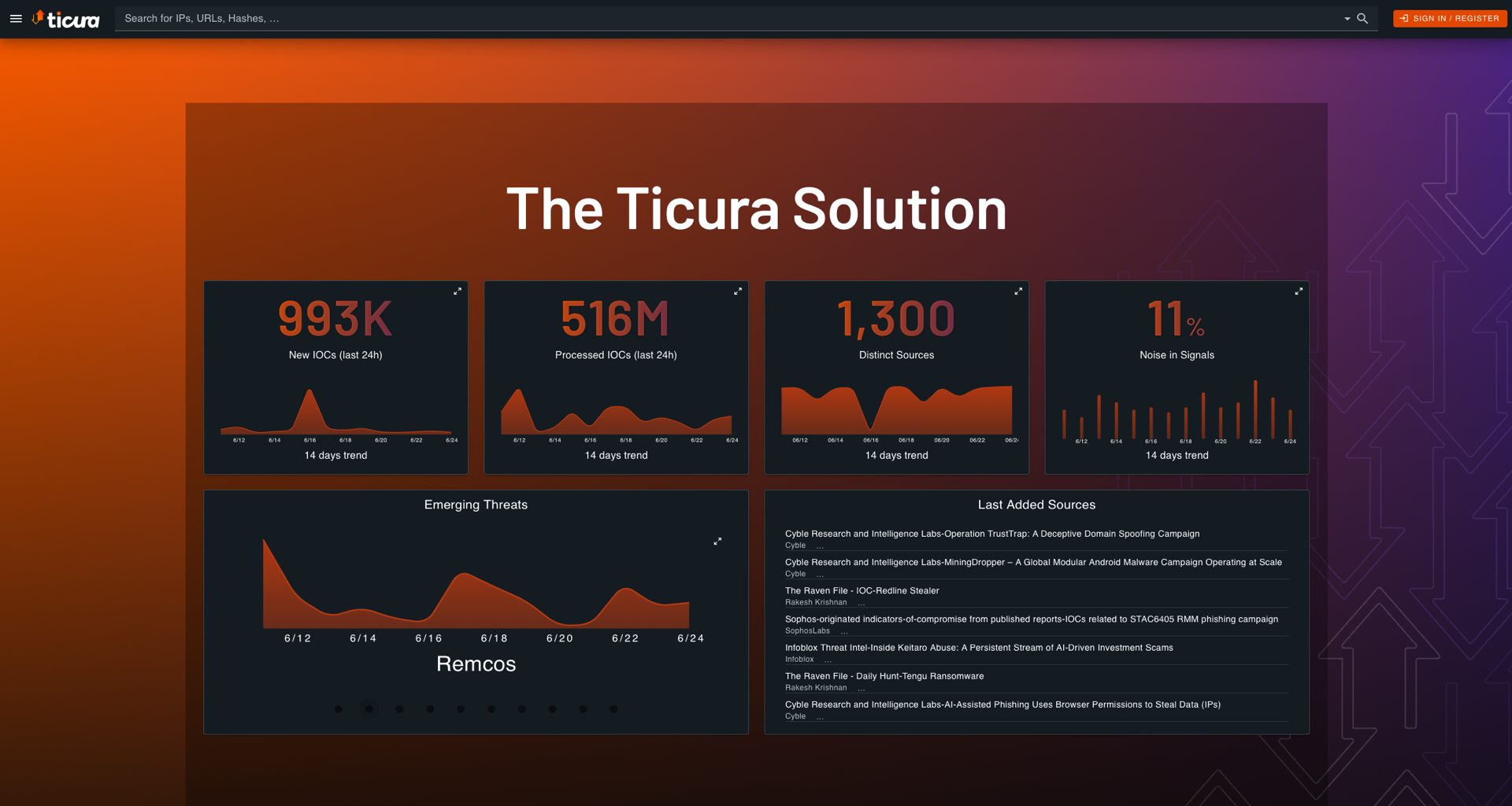
This integration includes one or more Kibana dashboards that visualizes the data collected by the integration. The screenshots below illustrate how the ingested data is displayed.
Changelog
| Version | Details | Minimum Kibana version |
|---|---|---|
| 0.3.0 | Enhancement (View pull request) Remove redundant ECS field definitions and the catch-all dynamic template from the transforms, relying on the ecs@mappings component template. |
9.1.0 8.19.0 |
| 0.2.0 | Enhancement (View pull request) Add tags to ingest pipeline processors and add preserve_original_event to pipeline-level on_failure handlers. |
9.0.0 8.19.0 |
| 0.1.1 | Bug fix (View pull request) Use the API's mode=url direct-download URL instead of following its 307 redirect, fixing read on closed response body failures on large feeds. |
9.0.0 8.19.0 |
| 0.1.0 | Enhancement (View pull request) Initial release of the Ticura threat intelligence integration. |
9.0.0 8.19.0 |