Apache ZooKeeper OpenTelemetry Assets
| Version | 0.3.0
|
| Subscription level What's this? |
Basic |
| Developed by What's this? |
Elastic |
| Minimum Kibana version(s) | 9.4.0 |
To use pre-release integrations, go to the Integrations page in Kibana, scroll down, and toggle on the Display beta integrations option.
Apache ZooKeeper is a centralized coordination service for distributed systems, providing primitives for configuration management, distributed synchronization, leader election, and group membership.
These assets include a dashboard, alert rules, and an SLO template built on data from the OpenTelemetry ZooKeeper receiver. They cover ensemble health, request latency, client connections, resource saturation, and replication status.
The Apache ZooKeeper OpenTelemetry assets have been tested with OpenTelemetry ZooKeeper receiver v0.121.0.
You need Elasticsearch for storing and searching your data and Kibana for visualizing and managing it. You can use our hosted Elasticsearch Service on Elastic Cloud, which is recommended, or self-manage the Elastic Stack on your own hardware.
ZooKeeper must be configured to accept four-letter word commands so the receiver can query metrics via the mntr command. In zoo.cfg, ensure the following setting includes mntr:
4lw.commands.whitelist=mntr,ruok
You can verify the setting by running:
echo mntr | nc <ZOOKEEPER_HOST> <ZOOKEEPER_CLIENT_PORT>
A successful response returns a list of key-value metric pairs.
Configure the OpenTelemetry Collector (or EDOT Collector) to scrape your ZooKeeper ensemble and export to Elasticsearch.
<ZOOKEEPER_ENDPOINT>— Thehost:portof a ZooKeeper node accepting four-letter word commands (e.g.localhost:2181).<ES_ENDPOINT>— Your Elasticsearch endpoint (e.g.https://my-deployment.es.us-east-1.aws.elastic.co:443).${env:ES_API_KEY}— An Elasticsearch API key with write permissions, provided via theES_API_KEYenvironment variable.
receivers:
  zookeeper:
    endpoint: <ZOOKEEPER_ENDPOINT>
    collection_interval: 30s

exporters:
  elasticsearch/otel:
    endpoints:
      - <ES_ENDPOINT>
    api_key: ${env:ES_API_KEY}
    mapping:
      mode: otel

service:
  pipelines:
    metrics:
      receivers:
        - zookeeper
      exporters:
        - elasticsearch/otel
If you are monitoring a multi-node ensemble, configure a separate zookeeper receiver instance for each node or deploy a collector sidecar alongside each ZooKeeper node. Each node must be scraped individually because four-letter word commands return per-node metrics only.
Refer to the metadata.yaml of the OpenTelemetry ZooKeeper receiver for details on available metrics.
| Dashboard | Description |
|---|---|
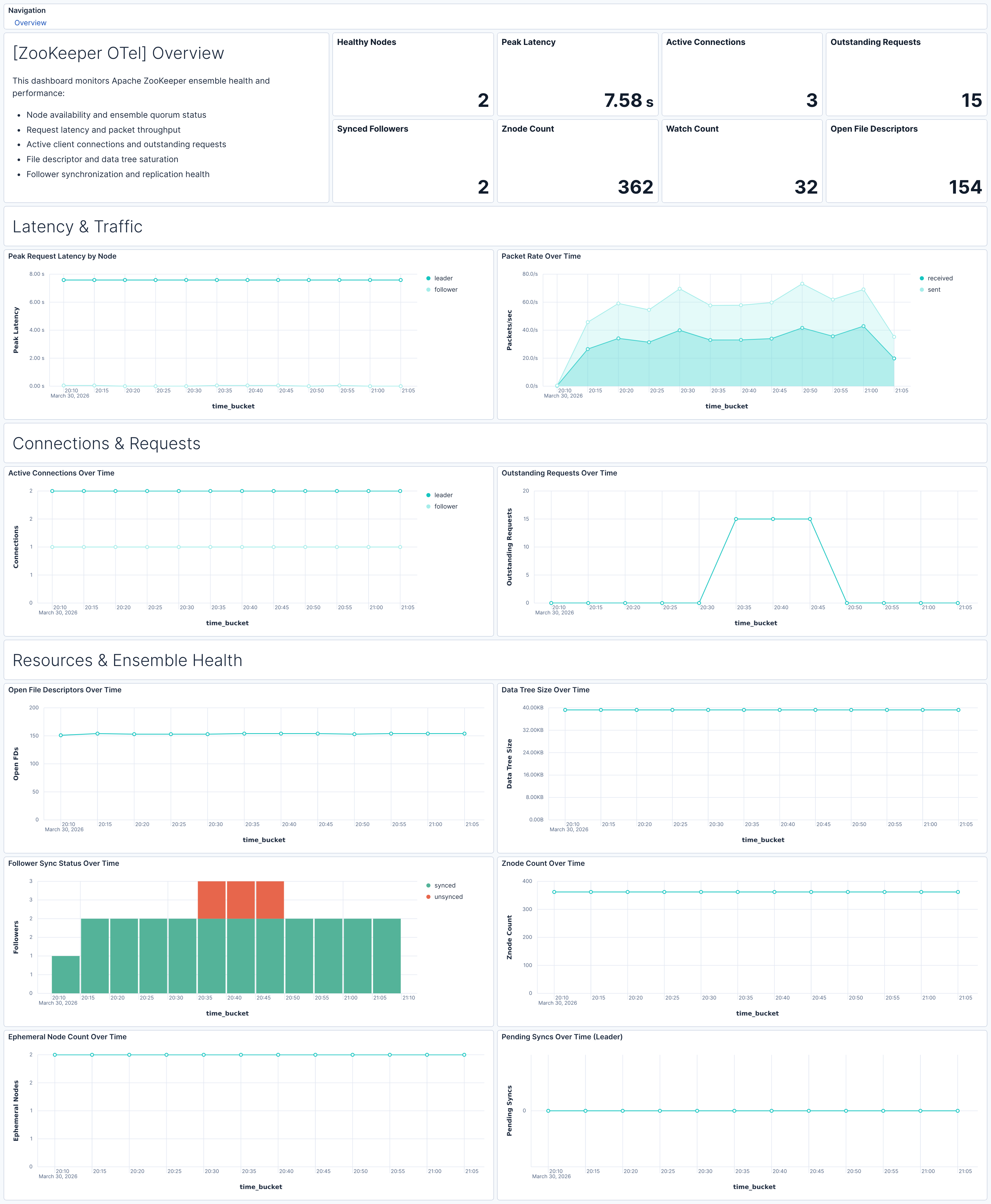
| [ZooKeeper OTel] Overview | Overview of Apache ZooKeeper ensemble health, performance, and resource utilization covering latency, traffic, connections, saturation, and replication health. |
| Alert | Trigger | Severity |
|---|---|---|
| [ZooKeeper OTel] Node health check failed | A node's ruok health check returns unhealthy (0) |
Critical |
| [ZooKeeper OTel] Unsynced followers detected | Leader reports one or more followers in an unsynced state | Critical |
| [ZooKeeper OTel] High request latency | Average peak request latency exceeds 500 ms over 5 minutes | High |
| [ZooKeeper OTel] Outstanding requests saturation | Average outstanding requests per node exceeds 10 over 5 minutes | High |
| [ZooKeeper OTel] Pending syncs buildup on leader | Average pending syncs on the leader exceeds 10 over 5 minutes | High |
| [ZooKeeper OTel] File descriptor utilization high | File descriptor utilization exceeds 80% of the configured limit | High |
| [ZooKeeper OTel] Excessive znode count | Znode count on a node exceeds 1,000,000 | Warning |
| [ZooKeeper OTel] Data tree size excessive | In-memory data tree size exceeds 1 GB | Warning |
| [ZooKeeper OTel] Excessive watch count | Watch count on a node exceeds 10,000 | Warning |
SLO templates require Elastic Stack version 9.4.0 or later.
| SLO | Target | Window | Description |
|---|---|---|---|
| [ZooKeeper OTel] Average request latency 99.5% rolling 30 days | 99.5% | 30-day rolling | Ensures 99.5% of 1-minute intervals show average request latency below 100 ms. |
This integration includes one or more Kibana dashboards that visualizes the data collected by the integration. The screenshots below illustrate how the ingested data is displayed.
Changelog
| Version | Details | Minimum Kibana version |
|---|---|---|
| 0.3.0 | Enhancement (View pull request) Add tags to Kibana assets |
9.4.0 |
| 0.2.0 | Enhancement (View pull request) Add description and artifact fields to alerting rule template. |
9.4.0 |
| 0.1.1 | Enhancement (View pull request) Update supported stack version for SLO templates. |
9.3.0 |
| 0.1.0 | Enhancement (View pull request) First release of the Zookeeper OTel Assets. |
9.3.0 |