Zscaler ZIA
| Version | 4.4.1 (View all) |
| Managed integration release status | GA |
| Subscription level What's this? |
Basic |
| Developed by What's this? |
Elastic |
| Ingestion method(s) | API, Network Protocol, Webhook |
| Minimum Kibana version(s) | 9.0.0 8.18.0 |
You can use this integration as an Elastic Managed integration on Elastic Cloud Hosted deployments running this version or later.
This integration is for Zscaler Internet Access logs ZIA. It can be used to receive logs sent by NSS log server on respective TCP ports, and Sandbox Report using API.
The log message is expected to be in JSON format. The data is mapped to ECS fields where applicable and the remaining fields are written under zscaler_zia.<data-stream-name>.*.
This module has been tested against the Zscaler Internet Access version 6.1 and API version v1.
Agentless integrations allow you to collect data without having to manage Elastic Agent in your cloud. They make manual agent deployment unnecessary, so you can focus on your data instead of the agent that collects it. For more information, refer to Agentless integrations and the Agentless integrations FAQ.
Agentless deployments are only supported in Elastic Serverless and Elastic Cloud environments. This functionality is in beta and is subject to change. Beta features are not subject to the support SLA of official GA features.
When using an agentless deployment, only the Sandbox Report data stream is available. Sandbox Report uses the API-based CEL input, which is compatible with agentless mode. Other data streams (Alerts, Audit, DNS, Endpoint DLP, Firewall, Tunnel, Web) require TCP or HTTP Endpoint inputs, which are not supported in agentless deployments. To collect data from these data streams, use Elastic Agent.
Elastic Agent must be installed. For more details, check the Elastic Agent installation instructions.
- Go to the Zscaler ZIA Portal and log in by entering your email address and password.
- Configure OAuth 2.0 for Okta or Microsoft Entra ID for generating OAuth2.0 Credentials.
- Add OAuth2.0 Authorization Server.
- Enable the integration with the TCP input.
- Configure the Zscaler NSS Server and NSS Feeds to send logs to the Elastic Agent that is running this integration. Check the Add NSS Server and Add NSS Feeds documentation. Use the IP address hostname of the Elastic Agent as the 'NSS Feed SIEM IP Address/FQDN', and use the listening port of the Elastic Agent as the 'SIEM TCP Port' on the Add NSS Feed configuration screen. To configure Zscaler NSS Server and NSS Feeds follow the following steps.
- In the ZIA Admin Portal, add an NSS Server.
- Log in to the ZIA Admin Portal using your admin account. If you're unable to log in, contact Support.
- Add an NSS server. Refer to Adding NSS Servers to set up an Add NSS Server for Web and/or Firewall.
- Verify that the state of the NSS Server is healthy.
- In the ZIA Admin Portal, go to Administration > Nanolog Streaming Service > NSS Servers.
- In the State column, confirm that the state of the NSS server is healthy.
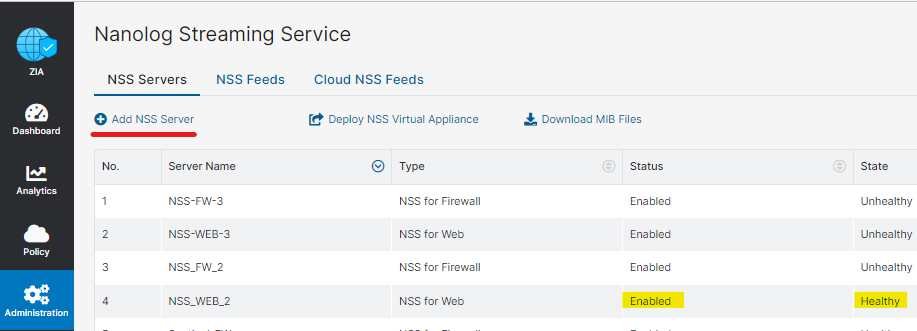
- In the ZIA Admin Portal, add an NSS Feed.
- Refer to Add NSS Feeds and select the type of feed you want to configure. The following fields require specific inputs:
- SIEM IP Address: Enter the IP address of the Elastic agent you’ll be assigning the Zscaler integration to.
- SIEM TCP Port: Enter the port number, depending on the logs associated with the NSS Feed. You will need to create an NSS Feed for each log type.
- Alerts: 9010
- Audit: 9029
- DNS: 9011
- Email DLP: 9025
- Endpoint DLP: 9023
- Firewall: 9012
- SaaS Security Activity: 9026
- SaaS Security: 9024
- Sandbox Verdict: 9027
- Tunnel: 9013
- Web: 9014
- Feed Output Type: Select Custom in Feed output type and paste the appropriate response format in Feed output format as follows:
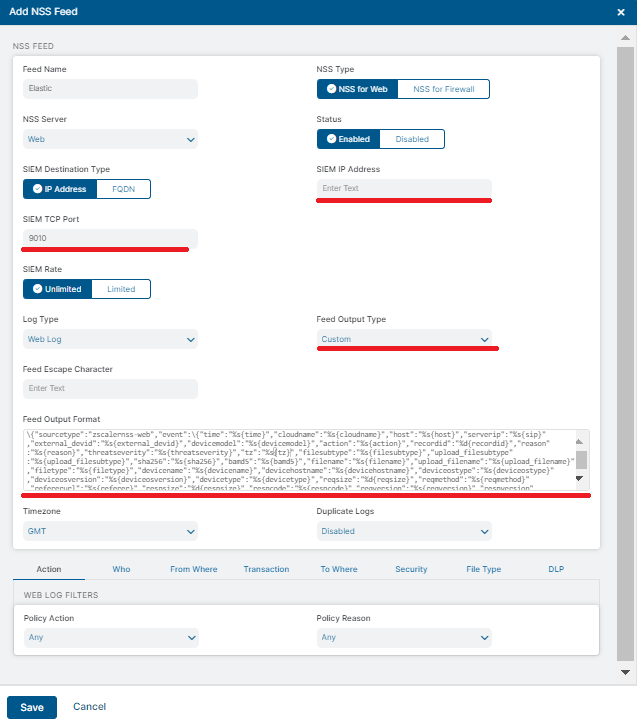
- Refer to Add NSS Feeds and select the type of feed you want to configure. The following fields require specific inputs:
- In the ZIA Admin Portal, add an NSS Server.
- Enable the integration with the HTTP Endpoint input.
- Configure the Zscaler Cloud NSS Feeds to send logs to the Elastic Agent that is running this integration. Provide API URL to send logs to the Elastic Agent. To configure Zscaler Cloud NSS Feeds follow the following steps.
- In the ZIA Admin Portal, add a Cloud NSS Feed.
- Log in to the ZIA Admin Portal using your admin account.
- Add a Cloud NSS Feed. See to Add Cloud NSS Feed.
- In the ZIA Admin Portal, go to Administration > Nanolog Streaming Service > Cloud NSS Feeds.
- Give Feed Name, change status to Enabled.
- Select NSS Type.
- Change SIEM Type to other.
- Add an API URL.
- Default ports:
- Audit: 9562
- DNS: 9556
- Email DLP: 9564
- Endpoint DLP: 9561
- Firewall: 9557
- SaaS Security Activity: 9565
- SaaS Security: 9563
- Sandbox Verdict: 9566
- Tunnel: 9558
- Web: 9559
- Select JSON as feed output type.
- Add same custom header along with its value on both the side for additional security.
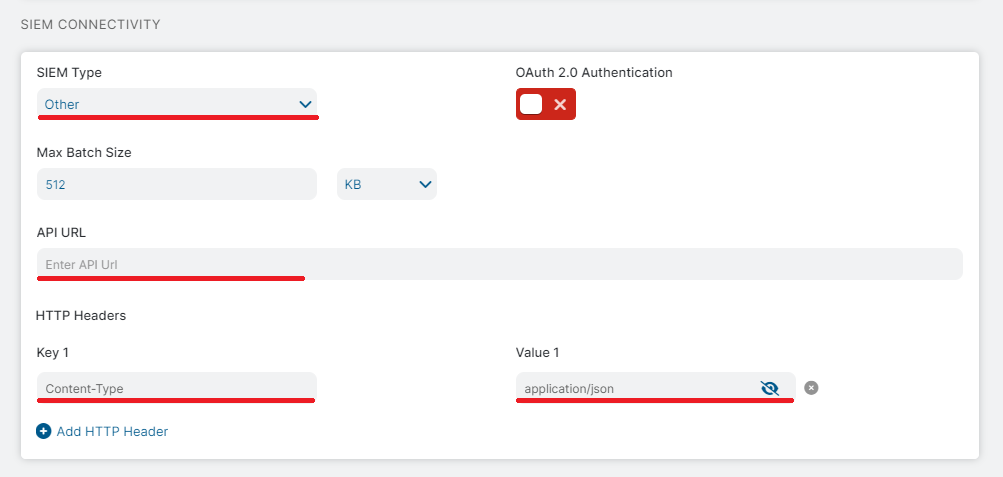
- In the ZIA Admin Portal, add a Cloud NSS Feed.
- Repeat step 2 for each log type.
Make sure to use the latest version of given response formats for NSS and Cloud NSS Feeds.
- Default port (NSS Feed): 9010
See: Zscaler Vendor documentation
Zscaler Alerts response format (v1):
<%d{syslogid}>%s{Monthname} %2d{Dayofmonth} %02d{Hour}:%02d{Minutes}:%02d{Seconds} [%s{Deviceip}] ZscalerNSS: %s{Eventinfo}\n
Sample Response:
<114>Dec 10 14:04:28 [175.16.199.1] ZscalerNSS: Zscaler cloud configuration connection to 175.16.199.1:443 lost and unavailable for the past 2325.00 minutes
- Default port (NSS Feed): 9029
- Default port (Cloud NSS Feed): 9562
See: Zscaler Vendor documentation
Zscaler Audit Log response format (v1):
\{"version":"v1","sourcetype":"zscalernss-audit","event":\{"time":"%s{time}","recordid":"%d{recordid}","action":"%s{action}","category":"%s{category}","subcategory":"%s{subcategory}","resource":"%s{resource}","interface":"%s{interface}","adminid":"%s{adminid}","clientip":"%s{clientip}","result":"%s{result}","errorcode":"%s{errorcode}","auditlogtype":"%s{auditlogtype}","preaction":%s{preaction},"postaction":%s{postaction}\}\}
Sample Response:
{"version":"v1","sourcetype":"zscalernss-audit","event":{"time":"Mon Oct 16 22:55:48 2023","recordid":"1234","action":"Activate","category":"DATA_LOSS_PREVENTION_RESOURCE","subcategory":"DLP_DICTIONARY","resource":"SSL Rule Name","interface":"API","adminid":"example@zscaler.com","clientip":"89.160.20.112","result":"SUCCESS","errorcode":"AUTHENTICATION_FAILED","auditlogtype":"ZIA Portal Audit Log","timezone":"UTC","preaction":{},"postaction":{}}}
- Default port (NSS Feed): 9011
- Default port (Cloud NSS Feed): 9556
See: Zscaler Vendor documentation
Zscaler DNS Log response format (v3):
\{"version":"v3","sourcetype":"zscalernss-dns","event":\{"user":"%s{elogin}","department":"%s{edepartment}","location":"%s{elocation}","clt_sip":"%s{cip}","cloudname":"%s{cloudname}","company":"%s{company}","datacenter":"%s{datacenter}","datacentercity":"%s{datacentercity}","datacentercountry":"%s{datacentercountry}","day_of_month":"%02d{dd}","dept":"%s{dept}","deviceappversion":"%s{deviceappversion}","devicehostname":"%s{devicehostname}","devicemodel":"%s{devicemodel}","devicename":"%s{devicename}","deviceostype":"%s{deviceostype}","deviceosversion":"%s{deviceosversion}","deviceowner":"%s{deviceowner}","devicetype":"%s{devicetype}","dnsapp":"%s{dnsapp}","dnsappcat":"%s{dnsappcat}","dns_gateway_status":"%s{dnsgw_flags}","dns_gateway_rule":"%s{dnsgw_slot}","dns_gateway_server_protocol":"%s{dnsgw_srv_proto}","category":"%s{domcat}","durationms":"%d{durationms}","ecs_prefix":"%s{ecs_prefix}","ecs_slot":"%s{ecs_slot}","ednsreq":"%s{ednsreq}","epochtime":"%d{epochtime}","error":"%s{error}","hour":"%02d{hh}","http_code":"%s{http_code}","istcp":"%d{istcp}","loc":"%s{location}","login":"%s{login}","minutes":"%02d{mm}","month":"%s{mon}","month_of_year":"%02d{mth}","odevicehostname":"%s{odevicehostname}","odevicename":"%s{odevicename}","odeviceowner":"%s{odeviceowner}","odomcat":"%s{odomcat}","protocol":"%s{protocol}","recordid":"%d{recordid}","dns_req":"%s{req}","reqaction":"%s{reqaction}","reqrulelabel":"%s{reqrulelabel}","dns_reqtype":"%s{reqtype}","dns_resp":"%s{res}","resaction":"%s{resaction}","respipcategory":"%s{respipcat}","resrulelabel":"%s{resrulelabel}","restype":"%s{restype}","srv_dip":"%s{sip}","srv_dport":"%d{sport}","second":"%02d{ss}","datetime":"%s{time}","tz":"%s{tz}","year":"%04d{yyyy}"\}\}
Sample Response:
{"version":"v3","sourcetype":"zscalernss-dns","event":{"cloudname":"zscaler.net","datetime":"Mon Oct 16 22:55:48 2023","devicemodel":"VMware7,1","restype":"IPv4","dns_req":"mail.safemarch.com","dns_reqtype":"A record","error":"EMPTY_RESP","durationms":"1000","recordid":"45648954","tz":"GMT","devicename":"admin","devicehostname":"THINKPADSMITH","deviceostype":"Windows OS","deviceosversion":"Microsoft Windows 10 Enterprise;64 bit","devicetype":"Zscaler Client Connector","http_code":"100","dnsapp":"Google DNS","dns_gateway_server_protocol":"TCP","protocol":"TCP","company":"Zscaler","reqrulelabel":"RULE_1","resrulelabel":"RULE_RES","clt_sip":"81.2.69.192","srv_dip":"175.16.199.0","srv_dport":"1025","user":"jdoe1@safemarch.com","datacentercity":"Sa","datacentercountry":"US","datacenter":"CA Client Node DC","day":"Mon","day_of_month":"16","department":"EDept","dept":"Sales","deviceappversion":"4.3.0.18","deviceowner":"jsmith","dnsappcat":"Network Service","dns_gateway_rule":"DNS GATEWAY Rule 1","dns_gateway_status":"PRIMARY_SERVER_RESPONSE_PASS","category":"Professional Services","ecs_prefix":"192.168.0.0","ecs_slot":"ECS Slot #17","ednsreq":"ABC123","eedone":"Yes","epochtime":"1578128400","hour":"22","istcp":"1","loc":"Headquarters","location":"ELocation","login":"jdoe@safemarch.com","minutes":"55","month":"Oct","month_of_year":"10","oclientsourceip":"9960223283","odevicename":"2175092224","odeviceowner":"10831489","odomcat":"4951704103","odevicehostname":"2168890624","reqaction":"REQ_ALLOW","dns_resp":"www.example.com","respipcategory":"Adult Themes","resaction":"RES_Action","respipcat":"Adult Themes","second":"48","year":"2023"}}
- Default port (NSS Feed): 9025
- Default port (Cloud NSS Feed): 9564
See: Zscaler Vendor documentation
To collect Email DLP logs, configure the NSS feed in the ZIA Admin Console using the Feed Output Format below. The format uses snake_case, nested JSON keys that the integration parses without additional field renaming, and includes a version token so the pipeline can validate the template at ingest time.
Zscaler Email DLP Log response format (v1):
\{"version":"v1","sourcetype":"zscalernss-emaildlp","time":"%s{time}","tz":"%s{tz}","feed_time":"%s{rtime}","record_id":"%llu{recordid}","log_type":"%s{logtype}","severity":"%s{severity}","actions":"%s{actions}","rule":\{"labels":"%s{rulelabels}"\},"company":\{"name":"%s{company}"\},"department":"%s{departmentname}","tenant":"%s{tenant}","application":\{"name":"%s{appname}"\},"datacenter":\{"name":"%s{datacenter}","city":"%s{datacentercity}","country":"%s{datacentercountry}"\},"user_name":"%s{username}","external_user_name":"%s{extusername}","owner":"%s{owner}","sender":"%s{sender}","dlp":\{"identifier":"%llu{dlpidentifier}","dict_names":"%s{dlpdictnames}","dict_counts":"%s{dlpdictcnts}","engine_names":"%s{dlpengnames}","scan_time":"%llu{scan_time}"\},"email":\{"mail_sent_time":"%s{mail_sent_time}","mail_sent_epoch":"%s{epochmail_sent_time}","zs_rcv_time":"%s{zs_rcv_time}","zs_sent_time":"%s{zs_sent_time}","subject":"%s{subject}","message_id":"%s{msgid}","triggered_recipients":"%s{trigg_rcpts}","other_recipients":"%s{other_rcpts}","triggered_recipient_domains":"%s{trigg_rcpt_doms}","other_recipient_domains":"%s{other_rcpt_doms}","attachments":\{"file_names":"%s{ac_names}","md5s":"%s{ac_md5s}","sizes":"%s{ac_sizes}","file_types":"%s{ac_filetypes}","doc_types":"%s{ac_doctypes}","doc_subtypes":"%s{ac_doc_subtypes}"\}\}\}
Sample Response (multi-attachment, mixed per-recipient dispositions):
{"version":"v1","sourcetype":"zscalernss-emaildlp","time":"Tue Jan 14 16:22:01 2026","tz":"GMT","feed_time":"Tue Jan 14 16:22:04 2026","record_id":"9012837465564738291","log_type":"DLP Incident","severity":"Medium Severity|Medium Severity","actions":"Block|Allow","rule":{"labels":"Outbound_Attachment_Rule|Encryption_Check_Rule"},"company":{"name":"Example Corp"},"department":"Operations","tenant":"example.onmicrosoft.com","application":{"name":"Gmail"},"datacenter":{"name":"Frankfurt DC","city":"Frankfurt","country":"DE"},"user_name":"ops.service@example.com","external_user_name":"None","owner":"ops.service@example.com","sender":"ops.service@example.com","dlp":{"identifier":"9012837464123456789","dict_names":"Technical Document|Tax Identification Number","dict_counts":"3|1","engine_names":"PCI|HIPAA","scan_time":"1823"},"email":{"mail_sent_time":"Tue Jan 14 16:22:01 2026","mail_sent_epoch":"1768487721","zs_rcv_time":"Tue Jan 14 16:22:02 2026","zs_sent_time":"Tue Jan 14 16:22:04 2026","subject":"Fw: Monthly metrics package","message_id":"<BEEFCAFE0102030405060708090A0B0C@mail.example.com>","triggered_recipients":"soc-queue@example.com|lead.engineer@example.com","other_recipients":"partner@guest.example.net","triggered_recipient_domains":"example.com|example.com","other_recipient_domains":"guest.example.net","attachments":{"file_names":"runbook.docx|customer_export.csv|architecture.png","md5s":"e2fc714c4727ee9395f324cd2e7f331f|5d41402abc4b2a76b9719d911017c592|098f6bcd4621d373cade4e832627b4f6","sizes":"14208|524288|98304","file_types":"docx|csv|png","doc_types":"Technical Document|Corporate Finance|Unknown","doc_subtypes":"None|None|None"}}}
- Default port (NSS Feed): 9023
- Default port (Cloud NSS Feed): 9561
See: Zscaler Vendor documentation
Zscaler Endpoint DLP Log response format (v1):
\{"version":"v1","sourcetype":"zscalernss-edlp","event":\{"actiontaken":"%s{actiontaken}","activitytype":"%s{activitytype}","additionalinfo":"%s{addinfo}","channel":"%s{channel}","confirmaction":"%s{confirmaction}","confirmjustification":"%s{confirmjust}","datacenter":"%s{datacenter}","datacentercity":"%s{datacentercity}","datacentercountry":"%s{datacentercountry}","day":"%s{day}","dd":"%02d{dd}","department":"%s{department}","deviceappversion":"%s{deviceappversion}","devicehostname":"%s{devicehostname}","devicemodel":"%s{devicemodel}","devicename":"%s{devicename}","deviceostype":"%s{deviceostype}","deviceosversion":"%s{deviceosversion}","deviceowner":"%s{deviceowner}","deviceplatform":"%s{deviceplatform}","devicetype":"%s{devicetype}","dlpdictcount":"%s{dlpcounts}","dlpdictnames":"%s{dlpdictnames}","dlpenginenames":"%s{dlpengnames}","dlpidentifier":"%llu{dlpidentifier}","dsttype":"%s{dsttype}","eventtime":"%s{eventtime}","expectedaction":"%s{expectedaction}","filedoctype":"%s{filedoctype}","filedstpath":"%s{filedstpath}","filemd5":"%s{filemd5}","filesha":"%s{filesha}","filesrcpath":"%s{filesrcpath}","filetypecategory":"%s{filetypecategory}","filetypename":"%s{filetypename}","hh":"%02d{hh}","itemdstname":"%s{itemdstname}","itemname":"%s{itemname}","itemsrcname":"%s{itemsrcname}","itemtype":"%s{itemtype}","logtype":"%s{logtype}","mm":"%02d{mm}","mon":"%s{mon}","mth":"%02d{mth}","numdlpdictids":"%u{numdlpdictids}","numdlpengineids":"%u{numdlpengids}","odepartment":"%s{odepartment}","odevicehostname":"%s{odevicehostname}","odevicename":"%s{odevicename}","odeviceowner":"%s{odeviceowner}","odlpdictnames":"%s{odlpdictnames}","odlpenginenames":"%s{odlpengnames}","ofiledstpath":"%s{ofiledstpath}","ofilesrcpath":"%s{ofilesrcpath}","oitemdstname":"%s{oitemdstname}","oitemname":"%s{oitemname}","oitemsrcname":"%s{oitemsrcname}","ootherrulelabels":"%s{ootherrulelabels}","otherrulelabels":"%s{otherrulelabels}","orulename":"%s{otriggeredrulelabel}","ouser":"%s{ouser}","recordid":"%llu{recordid}","feedtime":"%s{rtime}","scannedbytes":"%llu{scanned_bytes}","scantime":"%llu{scantime}","severity":"%s{severity}","srctype":"%s{srctype}","ss":"%02d{ss}","datetime":"%s{time}","rulename":"%s{triggeredrulelabel}","timezone":"%s{tz}","user":"%s{user}","yyyy":"%04d{yyyy}","zdpmode":"%s{zdpmode}"\}\}
Sample Response:
{"version":"v1","sourcetype":"zscalernss-edlp","event":{"actiontaken":"allow","activitytype":"email_sent","additionalinfo":"File already open by another application","channel":"Network Drive Transfer","confirmaction":"confirm","confirmjustification":"My manager approved it","datacenter":"Georgia","datacentercity":"Atlanta","datacentercountry":"US","day":"Mon","dd":"16","department":"TempDept","deviceappversion":"Ver-2199","devicehostname":"Host","devicemodel":"Model-2022","devicename":"Dev 1","deviceostype":"Windows","deviceosversion":"Win-11","deviceowner":"Administrator","deviceplatform":"Windows","devicetype":"WinUser","dlpdictcount":"12|13","dlpdictnames":"dlp: dlp discription|dlp1: dlp discription1|dlp2: dlp discription2","dlpenginenames":"dlpengine","dlpidentifier":"12","dsttype":"personal_cloud_storage","eventtime":"Mon Oct 16 22:55:48 2023","expectedaction":"block","filedoctype":"Medical","filedstpath":"dest_path","filemd5":"938c2cc0dcc05f2b68c4287040cfcf71","filesha":"076085239f3a10b8f387c4e5d4261abf8d109aa641be35a8d4ed2d775eb09612","filesrcpath":"source_path","filetypecategory":"PLS File (pls)","filetypename":"exe64","hh":"22","itemdstname":"nanolog","itemname":"endpoint_dlp","itemsrcname":"endpoint","itemtype":"email_attachment","logtype":"dlp_incident","mm":"55","mon":"Oct","mth":"10","numdlpdictids":"8","numdlpengineids":"12","recordid":"2","feedtime":"Mon Oct 16 22:55:48 2023","scannedbytes":"290812","scantime":"1210","severity":"High Severity","srctype":"network_share","ss":"48","datetime":"Mon Oct 16 22:55:48 2023","rulename":"configured_rule","timezone":"GMT","user":"TempUser","yyyy":"2023","zdpmode":"block mode","odepartment":"4094304256","odevicehostname":"4094304255","odevicename":"4094304251","odeviceowner":"4094304226","odlpdictnames":"4094304456","odlpenginenames":"4094364256","ofiledstpath":"4094304296","ofilesrcpath":"4094304206","oitemdstname":"409430476","oitemname":"40943042567","oitemsrcname":"4094305256","ootherrulelabels":"4036304256","orulename":"40943049956","ouser":"40943042569","otherrulelabels":"9094304256" } }
- Default port (NSS Feed): 9012
- Default port (Cloud NSS Feed): 9557
See: Zscaler Vendor documentation
Zscaler Firewall Log response format (v2):
\{"version":"v2","sourcetype":"zscalernss-fw","event":\{"datetime":"%s{time}","outbytes":"%ld{outbytes}","cltdomain":"%s{cdfqdn}","destcountry":"%s{destcountry}","cdip":"%s{cdip}","sdip":"%s{sdip}","cdport":"%d{cdport}","sdport":"%d{sdport}","devicemodel":"%s{devicemodel}","action":"%s{action}","duration":"%d{duration}","recordid":"%d{recordid}","tz":"%s{tz}","devicename":"%s{devicename}","devicehostname":"%s{devicehostname}","deviceostype":"%s{deviceostype}","deviceosversion":"%s{deviceosversion}","nwapp":"%s{nwapp}","nwsvc":"%s{nwsvc}","proto":"%s{ipproto}","ipsrulelabel":"%s{ipsrulelabel}","dnatrulelabel":"%s{dnatrulelabel}","rdr_rulename":"%s{rdr_rulename}","rule":"%s{rulelabel}","rulelabel":"%s{erulelabel}","inbytes":"%ld{inbytes}","srcipcountry":"%s{srcip_country}","csip":"%s{csip}","ssip":"%s{ssip}","csport":"%d{csport}","ssport":"%d{ssport}","user":"%s{elogin}","aggregate":"%s{aggregate}","bypassed_session":"%d{bypassed_session}","bypass_time":"%s{bypass_etime}","datacentercity":"%s{datacentercity}","datacentercountry":"%s{datacentercountry}","datacenter":"%s{datacenter}","day_of_month":"%02d{dd}","department":"%s{edepartment}","dept":"%s{dept}","deviceappversion":"%s{deviceappversion}","deviceowner":"%s{deviceowner}","avgduration":"%d{avgduration}","durationms":"%d{durationms}","epochtime":"%d{epochtime}","external_deviceid":"%s{external_deviceid}","flow_type":"%s{flow_type}","forward_gateway_name":"%s{fwd_gw_name}","hour":"%02d{hh}","ipcat":"%s{ipcat}","ips_custom_signature":"%d{ips_custom_signature}","location":"%s{location}","locationname":"%s{elocation}","login":"%s{login}","minute":"%02d{mm}","month":"%s{mon}","month_of_year":"%02d{mth}","dnat":"%s{dnat}","odevicename":"%s{odevicename}","odeviceowner":"%s{odeviceowner}","ofwd_gw_name":"%s{ofwd_gw_name}","odevicehostname":"%s{odevicehostname}","oipcat":"%s{oipcat}","oipsrulelabel":"%s{oipsrulelabel}","ordr_rulename":"%s{ordr_rulename}","orulelabel":"%s{orulelabel}","ozpa_app_seg_name":"%s{ozpa_app_seg_name}","second":"%02d{ss}","numsessions":"%d{numsessions}","stateful":"%s{stateful}","threat_name":"%s{threatname}","threatcat":"%s{threatcat}","threatname":"%s{ethreatname}","tsip":"%s{tsip}","tuntype":"%s{ttype}","year":"%04d{yyyy}","ztunnelversion":"%s{ztunnelversion}","zpa_app_seg_name":"%s{zpa_app_seg_name}"\}\}
Sample Response:
{"version":"v2","sourcetype":"zscalernss-fw","event":{"datetime":"Mon Oct 16 22:55:48 2023","cltdomain":"www.example.com","cdip":"2a02:cf40::","outbytes":"10000","cdport":"22","destcountry":"USA","devicemodel":"20L8S7WC08","sdip":"67.43.156.0","duration":"600","sdport":"443","tz":"GMT","action":"Blocked","devicehostname":"THINKPADSMITH","recordid":"123456","deviceosversion":"Version 10.14.2 (Build 18C54)","devicename":"admin","nwsvc":"HTTP","deviceostype":"iOS","ipsrulelabel":"Default IPS Rule","nwapp":"Skype","rdr_rulename":"FWD_Rule_1","proto":"TCP","rulelabel":"rule1","dnatrulelabel":"DNAT_Rule_1","srcipcountry":"United States","rule":"Default_Firewall_Filtering_Rule","ssip":"1.128.0.0","inbytes":"10000","ssport":"22","csip":"0.0.0.0","aggregate":"Yes","csport":"25","bypass_time":"Mon Oct 16 22:55:48 2023","user":"jdoe%40safemarch.com","datacentercountry":"US","bypassed_session":"1","day":"Mon","datacentercity":"Sa","department":"sales","datacenter":"CA Client Node DC","deviceappversion":"2.0.0.120","day_of_month":"16","avgduration":"600","dept":"Sales","eedone":"Yes","deviceowner":"jsmith","external_deviceid":"1234","durationms":"600","forward_gateway_name":"FWD_1","epochtime":"1578128400","ipcat":"Finance","flow_type":"Direct","location":"Headquarters","hour":"22","login":"jdo%40safemarch.com","ips_custom_signature":"0","month":"Oct","locationname":"Headquarters","dnat":"Yes","minute":"55","odevicename":"2175092224","month_of_year":"10","ofwd_gw_name":"8794487099","ocsip":"9960223283","oipcat":"5300295980","odeviceowner":"10831489","odnatlabel":"7956407282","odevicehostname":"2168890624","orulelabel":"624054738","oipsrulelabel":"6200694987","second":"48","ordr_rulename":"3399565100","stateful":"Yes","ozpa_app_seg_name":"7648246731","threatcat":"Botnet Callback","numsessions":"5","tsip":"89.160.20.128","threat_name":"Linux.Backdoor.Tsunami","year":"2023","threatname":"Linux.Backdoor","zpa_app_seg_name":"ZPA_test_app_segment","tuntype":"L2 tunnel","ztunnelversion":"ZTUNNEL_1_0"}}
- Default port (NSS Feed): 9026
- Default port (Cloud NSS Feed): 9565
See: Zscaler Vendor documentation
To collect SaaS Security Activity logs, configure the NSS feed in the ZIA Admin Console using the Feed Output Format below. The format uses snake_case nested JSON keys that the integration parses without additional field renaming, and includes a version token so the pipeline can validate the template at ingest time.
Zscaler SaaS Security Activity Log response format (v1):
\{"version":"v1","sourcetype":"zscalernss-saas_security_activity","time":"%s{time}","tz":"%s{tz}","event_time":"%s{eventtime}","activity":\{"type":"%s{act_type_name}","count":"%d{act_cnt}"\},"is_admin":"%s{is_admin_act}","application":\{"name":"%s{appname}"\},"tenant":"%s{tenant}","user_name":"%s{username}","external_owner":"%s{extownername}","object":\{"type":"%s{objtypename1}","subtype":"%s{objtypename2}","names":"%s{objnames1}","subnames":"%s{objnames2}"\},"src_ip":"%s{src_ip}"\}
Sample Response:
{"version":"v1","sourcetype":"zscalernss-saas_security_activity","time":"Tue Jan 14 16:22:01 2026","tz":"GMT","event_time":"Tue Jan 14 16:22:01 2026","activity":{"type":"Share","count":"3"},"is_admin":"0","application":{"name":"SALESFORCE"},"tenant":"example-corp.my.salesforce.com","user_name":"bob.smith@example.com","external_owner":"partner@guest.example.net","object":{"type":"Record","subtype":"Account","names":"[Acme-Corp-Account, Acme-Corp-Opportunity]","subnames":"None"},"src_ip":"81.2.69.144"}
- Default port (NSS Feed): 9024
- Default port (Cloud NSS Feed): 9563
See: Zscaler Vendor documentation
To integrate SaaS Security data, create a separate NSS Feed in the ZIA Admin Portal for each SaaS subtype. All feeds should point to the same Elastic Agent listening port (TCP input for NSS 9024; HTTP Endpoint input for Cloud NSS 9563).
The integration identifies and parses data from these multiple feeds (e.g., Collaboration, CRM, Email) by using the sourcesubtype field within the Feed Output Format. Ensure the sourcesubtype is correctly mapped to one of the supported values: collaboration, crm, email, file, genai, itsm, public_cloud_storage, and repository.
Troubleshooting —
Test Connectivity Failed: Zscaler Internal Error (0)orError found in the following segment: ...Some tokens in the templates below may not be enabled on every Zscaler tenant. When the ZIA Admin Portal rejects one, Test Connectivity fails or the UI flags the offending segment.
Fix: remove the rejected field from the Feed Output Format and save again. Dropping fields is safe — the ingest pipeline tolerates missing values and only the corresponding ECS mapping will be empty.
Recommended Feed Output Format — Zscaler SaaS Security (Collaboration), v1:
\{"version":"v1","sourcetype":"zscalernss-saas_security","sourcesubtype":"collaboration","time":"%d{epochtime}","tz":"%s{tz}","record_id":"%d{recordid}","message_id":"%s{msgid}","message_id_obfuscated":"%s{omsgid}","severity":"%s{severity}","is_incident":"%s{any_incident}","policy":"%s{policy}","rule":\{"label":"%s{rulelabel}","label_obfuscated":"%s{orulelabel}","type":"%s{ruletype}"\},"company":\{"name":"%s{company}"\},"datacenter":\{"name":"%s{datacenter}","city":"%s{datacentercity}","country":"%s{datacentercountry}"\},"tenant":"%s{tenant}","tenant_obfuscated":"%s{otenant}","threat":\{"indicator":\{"name":"%s{threatname}"\},"malware":"%s{malware}","malware_class":"%s{malwareclass}"\},"copilot_accessible":"%s{copilot_accessible}","accessibility_flags":"%s{accessibility_flags}","label_name":"%s{labelname}","department":"%s{department}","application":\{"name":"%s{applicationname}"\},"dlp":\{"identifier":"%llu{dlpidentifier}","dict_names":"%s{dlpdictnames}","dict_names_obfuscated":"%s{odlpdictnames}","dict_counts":"%s{dlpdictcount}","engine_names":"%s{dlpenginenames}","engine_names_obfuscated":"%s{odlpenginenames}"\},"document":\{"type":"%s{upload_doctypename}"\},"user_name":"%s{owner}","user_name_obfuscated":"%s{oowner}","collaboration":\{"channel":\{"name":"%s{channel_name}","name_obfuscated":"%s{ochannel_name}","hostname":"%s{sharedchannel_hostname}","hostname_obfuscated":"%s{osharedchannel_hostname}"\},"external_recipients":"%s{external_recptnames}","external_recipients_obfuscated":"%s{oexternal_recptnames}","internal_recipients":"%s{internal_recptnames}","internal_recipients_obfuscated":"%s{ointernal_recptnames}","sender":"%s{sender}","sender_obfuscated":"%s{osender}"\},"file":\{"owner":"%s{extownername}","owner_obfuscated":"%s{oextownername}"\}\}
Recommended Feed Output Format — Zscaler SaaS Security (Email), v1:
\{"version":"v1","sourcetype":"zscalernss-saas_security","sourcesubtype":"email","time":"%d{epochtime}","tz":"%s{tz}","record_id":"%d{recordid}","message_id":"%s{messageid}","message_id_obfuscated":"%s{omessageid}","severity":"%s{severity}","is_incident":"%s{any_incident}","policy":"%s{policy}","rule":\{"label":"%s{rulelabel}","label_obfuscated":"%s{orulelabel}","type":"%s{ruletype}"\},"company":\{"id":"%d{companyid}","name":"%s{company}"\},"datacenter":\{"name":"%s{datacenter}","city":"%s{datacentercity}","country":"%s{datacentercountry}"\},"tenant":"%s{tenant}","tenant_obfuscated":"%s{otenant}","threat":\{"indicator":\{"name":"%s{threatname}"\},"malware":"%s{malware}","malware_class":"%s{malwareclass}"\},"copilot_accessible":"%s{copilot_accessible}","accessibility_flags":"%s{accessibility_flags}","label_name":"%s{labelname}","department":"%s{department}","application":\{"name":"%s{applicationname}"\},"dlp":\{"identifier":"%llu{dlpidentifier}","dict_names":"%s{dlpdictnames}","dict_names_obfuscated":"%s{odlpdictnames}","dict_counts":"%s{dlpdictcount}","engine_names":"%s{dlpenginenames}","engine_names_obfuscated":"%s{odlpenginenames}"\},"document":\{"type":"%s{upload_doctypename}","subtype":"%s{upload_doc_subtype}"\},"user_name":"%s{owner}","user_name_obfuscated":"%s{oowner}","file":\{"owner":"%s{externalownername}","owner_obfuscated":"%s{oexternalownername}","download_time_ms":"%d{filedownloadtimems}","scan_time_ms":"%d{filescantimems}"\},"email":\{"is_inbound":"%s{is_inbound}","received_time":"%d{repochtime}","external_recipients_count":"%d{num_ext_recpts}","internal_recipients_count":"%d{num_int_recpts}","external_recipients":"%s{extrecptnames}","external_recipients_obfuscated":"%s{oextrecptnames}","internal_recipients":"%s{intrecptnames}","internal_recipients_obfuscated":"%s{ointrecptnames}","message_size_bytes":"%d{msgsize}","attachments":\{"file_names":"%s{attchcomponentfilenames}","file_names_obfuscated":"%s{oattchcomponentfilenames}","file_sizes":"%s{attchcomponentfilesizes}","file_types":"%s{attchcomponentfiletypes}","md5s":"%s{attchcomponentmd5s}"\}\}\}
Recommended Feed Output Format — Zscaler SaaS Security (File Sharing), v1:
\{"version":"v1","sourcetype":"zscalernss-saas_security","sourcesubtype":"file","time":"%d{epochtime}","tz":"%s{tz}","record_id":"%d{recordid}","severity":"%s{severity}","policy":"%s{policy}","rule":\{"label":"%s{rulelabel}","label_obfuscated":"%s{orulelabel}","type":"%s{ruletype}"\},"company":\{"name":"%s{company}"\},"datacenter":\{"name":"%s{datacenter}","city":"%s{datacentercity}","country":"%s{datacentercountry}"\},"tenant":"%s{tenant}","tenant_obfuscated":"%s{otenant}","threat":\{"indicator":\{"name":"%s{threatname}"\},"malware":"%s{malware}","malware_class":"%s{malwareclass}"\},"copilot_accessible":"%s{copilot_accessible}","accessibility_flags":"%s{accessibility_flags}","label_name":"%s{labelname}","department":"%s{department}","application":\{"name":"%s{applicationname}"\},"dlp":\{"identifier":"%llu{dlpidentifier}","dict_names":"%s{dlpdictnames}","dict_names_obfuscated":"%s{odlpdictnames}","dict_counts":"%s{dlpdictcount}","engine_names":"%s{dlpenginenames}","engine_names_obfuscated":"%s{odlpenginenames}"\},"document":\{"type":"%s{upload_doctypename}"\},"hostname":"%s{hostname}","hostname_obfuscated":"%s{ohostname}","user_name":"%s{user}","user_name_obfuscated":"%s{ouser}","external_collab_groups":"%s{extcollab_groups}","external_collab_groups_obfuscated":"%s{oextcollab_groups}","external_collab_names":"%s{extcollabnames}","external_collab_names_obfuscated":"%s{oextcollabnames}","internal_collab_groups":"%s{intcollab_groups}","internal_collab_groups_obfuscated":"%s{ointcollab_groups}","internal_collab_names":"%s{intcollabnames}","internal_collab_names_obfuscated":"%s{ointcollabnames}","file":\{"owner":"%s{extownername}","owner_obfuscated":"%s{oextownername}","id":"%s{fileid}","id_obfuscated":"%s{ofileid}","name":"%s{filename}","size":"%d{filesize}","directory":"%s{filesource}","extension":"%s{filetypename}","hash":\{"md5":"%s{filemd5}"\},"full_url":"%s{fullurl}","full_url_obfuscated":"%s{ofullurl}","sub_url":"%s{suburl}","last_modified_time":"%s{lastmodtime}","last_share_user":"%s{last_share_user}","last_shared_on":"%s{last_shared_on}","collaboration_scope":"%s{collabscope}","download_time_ms":"%d{filedownloadtimems}","scan_time_ms":"%d{filescantimems}"\}\}
Recommended Feed Output Format — Zscaler SaaS Security (Gen AI), v1:
\{"version":"v1","sourcetype":"zscalernss-saas_security","sourcesubtype":"genai","time":"%d{epochtime}","tz":"%s{tz}","record_id":"%d{recordid}","message_id":"%s{msgid}","severity":"%s{severity}","is_incident":"%s{any_incident}","policy":"%s{policy}","rule":\{"label":"%s{rulelabel}","type":"%s{ruletype}"\},"company":\{"name":"%s{company}"\},"datacenter":\{"name":"%s{datacenter}","city":"%s{datacentercity}","country":"%s{datacentercountry}"\},"tenant":"%s{tenant}","threat":\{"indicator":\{"name":"%s{threatname}"\},"malware":"%s{malware}","malware_class":"%s{malwareclass}"\},"department":"%s{departmentname}","application":\{"name":"%s{appname}"\},"dlp":\{"identifier":"%llu{dlpidentifier}","dict_names":"%s{dlpdictnames}","dict_counts":"%s{dlpdictcnts}","engine_names":"%s{dlpengnames}"\},"document":\{"type":"%s{file_doctype}"\},"component":"%s{component}","user_name":"%s{owner}","internal_user_name":"%s{username}","external_user_name":"%s{extusername}","genai":\{"bot_name":"%s{botname}","run_id":"%d{runid}","scan_id":"%d{scanid}","sender_type":"%s{sender_type}"\},"file":\{"name":"%s{filename}","size":"%d{filesize}","extension":"%s{filetype}","hash":\{"md5":"%s{filemd5}","sha256":"%s{filesha}"\},"download_time_ms":"%d{download_time}","scan_time_ms":"%d{scan_time}"\}\}
Recommended Feed Output Format — Zscaler SaaS Security (CRM), v1:
\{"version":"v1","sourcetype":"zscalernss-saas_security","sourcesubtype":"crm","time":"%d{epochtime}","tz":"%s{tz}","record_id":"%d{recordid}","message_id":"%s{file_msg_id}","message_id_obfuscated":"%s{ofile_msg_id}","severity":"%s{severity}","policy":"%s{policy}","rule":\{"label":"%s{rulelabel}","label_obfuscated":"%s{orulelabel}","type":"%s{ruletype}"\},"company":\{"name":"%s{company}"\},"datacenter":\{"name":"%s{datacenter}","city":"%s{datacentercity}","country":"%s{datacentercountry}"\},"tenant":"%s{tenant}","tenant_obfuscated":"%s{otenant}","threat":\{"indicator":\{"name":"%s{threatname}"\},"malware":"%s{malware}","malware_class":"%s{malwareclass}"\},"component":"%s{component}","department":"%s{department}","application":\{"name":"%s{applicationname}"\},"dlp":\{"identifier":"%llu{dlpidentifier}","dict_names":"%s{dlpdictnames}","dict_names_obfuscated":"%s{odlpdictnames}","dict_counts":"%s{dlpdictcount}","engine_names":"%s{dlpenginenames}","engine_names_obfuscated":"%s{odlpenginenames}"\},"document":\{"type":"%s{upload_doctypename}"\},"hostname":"%s{hostname}","hostname_obfuscated":"%s{ohostname}","user_name":"%s{owner}","user_name_obfuscated":"%s{oowner}","external_collab_count":"%d{num_external_collab}","internal_collab_count":"%d{num_internal_collab}","external_collab_names":"%s{external_collabnames}","external_collab_names_obfuscated":"%s{oexternal_collabnames}","internal_collab_names":"%s{internal_collabnames}","internal_collab_names_obfuscated":"%s{ointernal_collabnames}","object":\{"name":"%s{objectname}","type":"%s{objecttype}"\},"file":\{"owner":"%s{extownername}","owner_obfuscated":"%s{oextownername}","name":"%s{filename}","path":"%s{filepath}","size":"%d{filesize}","type_category":"%s{filetypecategory}","hash":\{"md5":"%s{filemd5}","sha256":"%s{sha}"\},"full_url":"%s{fullurl}","full_url_obfuscated":"%s{ofullurl}","last_modified_time":"%s{file_msg_mod_time}","collaboration_scope":"%s{collabscope}"\}\}
Recommended Feed Output Format — Zscaler SaaS Security (ITSM), v1:
\{"version":"v1","sourcetype":"zscalernss-saas_security","sourcesubtype":"itsm","time":"%d{epochtime}","tz":"%s{tz}","record_id":"%d{recordid}","message_id":"%s{file_msg_id}","message_id_obfuscated":"%s{ofile_msg_id}","severity":"%s{severity}","policy":"%s{policy}","rule":\{"label":"%s{rulelabel}","label_obfuscated":"%s{orulelabel}","type":"%s{ruletype}"\},"company":\{"name":"%s{company}"\},"datacenter":\{"name":"%s{datacenter}","city":"%s{datacentercity}","country":"%s{datacentercountry}"\},"tenant":"%s{tenant}","tenant_obfuscated":"%s{otenant}","threat":\{"indicator":\{"name":"%s{threatname}"\},"malware":"%s{malware}","malware_class":"%s{malwareclass}"\},"component":"%s{component}","department":"%s{department}","application":\{"name":"%s{applicationname}"\},"dlp":\{"identifier":"%llu{dlpidentifier}","dict_names":"%s{dlpdictnames}","dict_names_obfuscated":"%s{odlpdictnames}","dict_counts":"%s{dlpdictcount}","engine_names":"%s{dlpenginenames}","engine_names_obfuscated":"%s{odlpenginenames}"\},"document":\{"type":"%s{upload_doctypename}"\},"hostname":"%s{hostname}","hostname_obfuscated":"%s{ohostname}","user_name":"%s{owner}","user_name_obfuscated":"%s{oowner}","external_collab_count":"%d{num_external_collab}","internal_collab_count":"%d{num_internal_collab}","external_collab_names":"%s{external_collabnames}","external_collab_names_obfuscated":"%s{oexternal_collabnames}","internal_collab_names":"%s{internal_collabnames}","internal_collab_names_obfuscated":"%s{ointernal_collabnames}","object":\{"name":"%s{objectname}","type":"%s{objecttype}"\},"file":\{"owner":"%s{extownername}","owner_obfuscated":"%s{oextownername}","name":"%s{filename}","path":"%s{filepath}","size":"%d{filesize}","type_category":"%s{filetypecategory}","hash":\{"md5":"%s{filemd5}","sha256":"%s{sha}"\},"full_url":"%s{fullurl}","full_url_obfuscated":"%s{ofullurl}","last_modified_time":"%s{file_msg_mod_time}"\}\}
Recommended Feed Output Format — Zscaler SaaS Security (Public Cloud Storage), v1:
\{"version":"v1","sourcetype":"zscalernss-saas_security","sourcesubtype":"public_cloud_storage","time":"%d{epochtime}","tz":"%s{tz}","record_id":"%d{recordid}","severity":"%s{severity}","policy":"%s{policy}","rule":\{"label":"%s{rulelabel}","label_obfuscated":"%s{orulelabel}","type":"%s{ruletype}"\},"company":\{"name":"%s{company}"\},"datacenter":\{"name":"%s{datacenter}","city":"%s{datacentercity}","country":"%s{datacentercountry}"\},"tenant":"%s{tenant}","tenant_obfuscated":"%s{otenant}","threat":\{"indicator":\{"name":"%s{threatname}"\},"malware":"%s{malware}","malware_class":"%s{malwareclass}"\},"department":"%s{department}","application":\{"name":"%s{applicationname}"\},"dlp":\{"identifier":"%llu{dlpidentifier}","dict_names":"%s{dlpdictnames}","dict_names_obfuscated":"%s{odlpdictnames}","dict_counts":"%s{dlpdictcount}","engine_names":"%s{dlpenginenames}","engine_names_obfuscated":"%s{odlpenginenames}"\},"document":\{"type":"%s{upload_doctypename}"\},"hostname":"%s{hostname}","hostname_obfuscated":"%s{ohostname}","user_name":"%s{owner}","user_name_obfuscated":"%s{oowner}","collab_count":"%d{numcollab}","collab_names":"%s{collabnames}","collab_names_obfuscated":"%s{ocollabnames}","bucket":\{"id":"%d{bucketid}","name":"%s{bucketname}","name_obfuscated":"%s{obucketname}","owner":"%s{bucketowner}","owner_obfuscated":"%s{obucketowner}"\},"file":\{"owner":"%s{extownername}","owner_obfuscated":"%s{oextownername}","id":"%s{fileid}","id_obfuscated":"%s{ofileid}","full_url":"%s{fullurl}","full_url_obfuscated":"%s{ofullurl}"\}\}
Recommended Feed Output Format — Zscaler SaaS Security (Repository), v1:
\{"version":"v1","sourcetype":"zscalernss-saas_security","sourcesubtype":"repository","time":"%d{epochtime}","tz":"%s{tz}","record_id":"%d{recordid}","severity":"%s{severity}","policy":"%s{policy}","rule":\{"label":"%s{rulelabel}","label_obfuscated":"%s{orulelabel}","type":"%s{ruletype}"\},"company":\{"name":"%s{company}"\},"datacenter":\{"name":"%s{datacenter}","city":"%s{datacentercity}","country":"%s{datacentercountry}"\},"tenant":"%s{tenant}","tenant_obfuscated":"%s{otenant}","threat":\{"indicator":\{"name":"%s{threatname}"\},"malware":"%s{malware}","malware_class":"%s{malwareclass}"\},"department":"%s{department}","application":\{"name":"%s{applicationname}"\},"dlp":\{"identifier":"%llu{dlpidentifier}","dict_names":"%s{dlpdictnames}","dict_names_obfuscated":"%s{odlpdictnames}","dict_counts":"%s{dlpdictcount}","engine_names":"%s{dlpenginenames}","engine_names_obfuscated":"%s{odlpenginenames}"\},"document":\{"type":"%s{upload_doctypename}"\},"user_name":"%s{owner}","user_name_obfuscated":"%s{oowner}","external_collab_count":"%d{num_external_collab}","external_collab_names":"%s{external_collabnames}","external_collab_names_obfuscated":"%s{oexternal_collabnames}","internal_collab_names":"%s{internal_collabnames}","internal_collab_names_obfuscated":"%s{ointernal_collabnames}","repository":\{"name":"%s{reponame}","project_name":"%s{projectname}"\},"file":\{"owner":"%s{extownername}","owner_obfuscated":"%s{oextownername}","id":"%s{fileid}","id_obfuscated":"%s{ofileid}","name":"%s{filename}","path":"%s{filepath}","size":"%d{filesize}","type_category":"%s{filetypecategory}","hash":\{"md5":"%s{filemd5}","sha256":"%s{sha}"\}\}\}
- Default port (NSS Feed): 9027
- Default port (Cloud NSS Feed): 9566
See: Zscaler Vendor documentation
To collect Sandbox Verdict logs, configure the NSS feed in the ZIA Admin Console using the Feed Output Format below.
Zscaler Sandbox Verdict Log response format (v1):
\{"version":"v1","sourcetype":"zscalernss-sandbox_verdict","time":"%s{time}","tz":"%s{tz}","event_time":"%s{eventtime}","analysis_completed_time":"%s{analysis_completed_time}","feed_time":"%s{rtime}","record_id":"%llu{recordid}","company":\{"name":"%s{company}"\},"datacenter":\{"name":"%s{datacenter}","city":"%s{datacentercity}","country":"%s{datacentercountry}"\},"verdict":"%s{verdict}","threat":\{"indicator":\{"name":"%s{threatname}"\},"tactic":\{"id":"%s{mitre_tactics}"\},"technique":\{"id":"%s{mitre_tekniks}"\}\},"file":\{"extension":"%s{filetype}","type_category":"%s{filetypecategory}","ba_md5_url":"%s{bamd5url}","hash":\{"md5":"%s{file_md5}","sha256":"%s{file_sha256}","children_md5":"%s{children_md5_values}"\}\}\}
Sample Response:
{"version":"v1","sourcetype":"zscalernss-sandbox_verdict","time":"Thu Feb 13 16:13:12 2025","tz":"GMT","event_time":"Thu Feb 13 16:13:14 2025","analysis_completed_time":"Thu Feb 13 16:13:12 2025","feed_time":"Thu Feb 13 16:13:15 2025","record_id":"7353686396818817024","company":{"name":"Example Corp"},"datacenter":{"name":"Georgia","city":"Atlanta","country":"US"},"verdict":"Advance Threat Ransomware","threat":{"indicator":{"name":"Win32.Ransom.HardBit"},"tactic":{"id":"TAC028|TAC035|TAC016"},"technique":{"id":"T1005|T1543.002"}},"file":{"extension":"exe","type_category":"Windows Executable (exe)","ba_md5_url":"zsapi/v1/baSso?md5ReportId=8eb2dc2ea50d8b9b654810f11d3e6d93&sourceURL=admin.example.net/","hash":{"md5":"61bd49a3522de01c41d4ba107503d3d9","sha256":"1f80ee9949b0d09d4bd5d429435c384a0b75263b382133035bab58b04e4bfb7a","children_md5":"7940dd19117414265bd7156305bd8756|5e0063b16b916b53181d8ef73c954825"}}}
- Default port (NSS Feed): 9013
- Default port (Cloud NSS Feed): 9558
See: Zscaler Vendor documentation
Zscaler Tunnel Log response formats (v2):
- Tunnel Event:
\{"version":"v2","sourcetype":"zscalernss-tunnel","event":\{"datetime":"%s{datetime}","day":"%s{day}","dd":"%02d{dd}","destinationip":"%s{destvip}","event":"%s{event}","eventreason":"%s{eventreason}","hh":"%02d{hh}","locationname":"%s{locationname}","mm":"%02d{mm}","mon":"%s{mon}","mth":"%02d{mth}","olocationname":"%s{olocationname}","ovpncredentialname":"%s{ovpncredentialname}","recordid":"%d{recordid}","sourceip":"%s{sourceip}","sourceport":"%d{srcport}","ss":"%02d{ss}","Recordtype":"%s{tunnelactionname}","tunneltype":"%s{tunneltype}","timezone":"%s{tz}","user":"%s{vpncredentialname}","yyyy":"%04d{yyyy}"\}\} - Sample Event:
\{"version":"v2","sourcetype":"zscalernss-tunnel","event":\{"datetime":"%s{datetime}","day":"%s{day}","dd":"%02d{dd}","destinationip":"%s{destvip}","dpdrec":"%d{dpdrec}","hh":"%02d{hh}","locationname":"%s{locationname}","mm":"%02d{mm}","mon":"%s{mon}","mth":"%02d{mth}","olocationname":"%s{olocationname}","ovpncredentialname":"%s{ovpncredentialname}","recordid":"%d{recordid}","rxbytes":"%lu{rxbytes}","rxpackets":"%d{rxpackets}","sourceip":"%s{sourceip}","sourceport":"%d{srcport}","ss":"%02d{ss}","Recordtype":"%s{tunnelactionname}","tunneltype":"%s{tunneltype}","txbytes":"%lu{txbytes}","txpackets":"%d{txpackets}","timezone":"%s{tz}","user":"%s{vpncredentialname}","yyyy":"%04d{yyyy}"\}\} - IKE Phase 1
\{"version":"v2","sourcetype":"zscalernss-tunnel","event":\{"algo":"%s{algo}","authentication":"%s{authentication}","authtype":"%s{authtype}","datetime":"%s{datetime}","day":"%s{day}","dd":"%02d{dd}","destinationip":"%s{destvip}","destinationport":"%d{dstport}","hh":"%02d{hh}","ikeversion":"%d{ikeversion}","lifetime":"%d{lifetime}","locationname":"%s{locationname}","mm":"%02d{mm}","mon":"%s{mon}","mth":"%02d{mth}","olocationname":"%s{olocationname}","ovpncredentialname":"%s{ovpncredentialname}","recordid":"%d{recordid}","sourceip":"%s{sourceip}","spi_in":"%lu{spi_in}","spi_out":"%lu{spi_out}","sourceport":"%d{srcport}","ss":"%02d{ss}","Recordtype":"%s{tunnelactionname}","tunneltype":"IPSEC IKEV %d{ikeversion}","timezone":"%s{tz}","vendorname":"%s{vendorname}","user":"%s{vpncredentialname}","yyyy":"%04d{yyyy}"\}\} - IKE Phase 2
\{"version":"v2","sourcetype":"zscalernss-tunnel","event":\{"algo":"%s{algo}","authentication":"%s{authentication}","authtype":"%s{authtype}","datetime":"%s{datetime}","day":"%s{day}","dd":"%02d{dd}","destinationipend":"%s{destipend}","destinationipstart":"%s{destipstart}","destinationportstart":"%d{destportstart}","destinationip":"%s{destvip}","hh":"%02d{hh}","ikeversion":"%d{ikeversion}","lifebytes":"%d{lifebytes}","lifetime":"%d{lifetime}","locationname":"%s{locationname}","mm":"%02d{mm}","mon":"%s{mon}","mth":"%02d{mth}","olocationname":"%s{olocationname}","ovpncredentialname":"%s{ovpncredentialname}","protocol":"%s{protocol}","recordid":"%d{recordid}","sourceip":"%s{sourceip}","spi":"%d{spi}","srcipend":"%s{srcipend}","srcipstart":"%s{srcipstart}","sourceportstart":"%d{srcportstart}","ss":"%02d{ss}","Recordtype":"%s{tunnelactionname}","tunnelprotocol":"%s{tunnelprotocol}","tunneltype":"IPSEC IKEV %d{ikeversion}","timezone":"%s{tz}","user":"%s{vpncredentialname}","yyyy":"%04d{yyyy}"\}\}
Sample Response:
{"version":"v2","sourcetype":"zscalernss-tunnel","event":{"datetime":"Mon Oct 16 22:55:48 2023","destinationip":"67.43.156.1","destinationport":"500","recordid":"111234","timezone":"GMT","sourceip":"67.43.156.0","sourceport":"500","user":"jdoe@safemarch.com","authentication":"HMAC_MD5","authtype":"PSKEY","day":"Mon","dd":"16","algo":"DES_CBC","hh":"22","ikeversion":"IKE_VERSION_2","lifetime":"86400","locationname":"Headquarters","mm":"55","mon":"Oct","mth":"10","olocationname":"2168890624","ovpncredentialname":"4094304256","ss":"48","spi_in":"None","spi_out":"None","Recordtype":"None","vendorname":"CISCO","yyyy":"2023"}}
- Default port (NSS Feed): 9014
- Default port (Cloud NSS Feed): 9559
- Add characters " and \ in feed escape character while configuring Web Log.
 See: Zscaler Vendor documentation
Zscaler Web Log response format (v11):
\{"version":"v11","sourcetype":"zscalernss-web","event":\{"time":"%s{time}","cloudname":"%s{cloudname}","host":"%s{ehost}","serverip":"%s{sip}","external_devid":"%s{external_devid}","devicemodel":"%s{devicemodel}","action":"%s{action}","recordid":"%d{recordid}","reason":"%s{reason}","threatseverity":"%s{threatseverity}","tz":"%s{tz}","filesubtype":"%s{filesubtype}","upload_filesubtype":"%s{upload_filesubtype}","sha256":"%s{sha256}","bamd5":"%s{bamd5}","filename":"%s{efilename}","upload_filename":"%s{eupload_filename}","filetype":"%s{filetype}","devicename":"%s{edevicename}","devicehostname":"%s{devicehostname}","deviceostype":"%s{deviceostype}","deviceosversion":"%s{deviceosversion}","devicetype":"%s{devicetype}","reqsize":"%d{reqsize}","reqmethod":"%s{reqmethod}","b64referer":"%s{b64referer}","respsize":"%d{respsize}","respcode":"%s{respcode}","reqversion":"%s{reqversion}","respversion":"%s{respversion}","proto":"%s{proto}","company":"%s{company}","dlpmd5":"%s{dlpmd5}","apprulelabel":"%s{eapprulelabel}","dlprulename":"%s{dlprulename}","rulelabel":"%s{erulelabel}","urlfilterrulelabel":"%s{eurlfilterrulelabel}","cltip":"%s{cip}","cltintip":"%s{cintip}","cltsourceport":"%d{clt_sport}","threatname":"%s{threatname}","cltsslcipher":"%s{clientsslcipher}","clttlsversion":"%s{clienttlsversion}","b64url":"%s{b64url}","useragent":"%s{eua}","login":"%s{elogin}","applayerprotocol":"%s{alpnprotocol}","appclass":"%s{appclass}","appname":"%s{appname}","appriskscore":"%s{app_risk_score}","bandwidthclassname":"%s{bwclassname}","bandwidthrulename":"%s{bwrulename}","bwthrottle":"%s{bwthrottle}","bypassedtime":"%s{bypassed_etime}","bypassedtraffic":"%d{bypassed_traffic}","cltsslsessreuse":"%s{clientsslsessreuse}","cltpubip":"%s{cpubip}","cltsslfailcount":"%d{cltsslfailcount}","cltsslfailreason":"%s{cltsslfailreason}","client_tls_keyex_pqc_offers":"%d{client_tls_keyex_pqc_offers}","client_tls_keyex_non_pqc_offers":"%d{client_tls_keyex_non_pqc_offers}","client_tls_keyex_hybrid_offers":"%d{client_tls_keyex_hybrid_offers}","client_tls_keyex_unknown_offers":"%d{client_tls_keyex_unknown_offers}","client_tls_sig_pqc_offers":"%d{client_tls_sig_pqc_offers}","client_tls_sig_non_pqc_offers":"%d{client_tls_sig_non_pqc_offers}","client_tls_sig_hybrid_offers":"%d{client_tls_sig_hybrid_offers}","client_tls_sig_unknown_offers":"%d{client_tls_sig_unknown_offers}","client_tls_keyex_alg":"%s{client_tls_keyex_alg}","client_tls_sig_alg":"%s{client_tls_sig_alg}","contenttype":"%s{contenttype}","datacentercity":"%s{datacentercity}","datacentercountry":"%s{datacentercountry}","datacenter":"%s{datacenter}","day":"%s{day}","day_of_month":"%02d{dd}","dept":"%s{dept}","dstip_country":"%s{dstip_country}","deviceappversion":"%s{deviceappversion}","deviceowner":"%s{deviceowner}","df_hosthead":"%s{df_hosthead}","df_hostname":"%s{df_hostname}","dlpdicthitcount":"%s{dlpdicthitcount}","dlpdict":"%s{dlpdict}","dlpeng":"%s{dlpeng}","dlpidentifier":"%d{dlpidentifier}","eedone":"%s{eedone}","epochtime":"%d{epochtime}","fileclass":"%s{fileclass}","flow_type":"%s{flow_type}","forward_gateway_ip":"%s{fwd_gw_ip}","forward_gateway_name":"%s{fwd_gw_name}","forward_type":"%s{fwd_type}","ft_rulename":"%s{ft_rulename}","hour":"%02d{hh}","is_sslexpiredca":"%s{is_sslexpiredca}","is_sslselfsigned":"%s{is_sslselfsigned}","is_ssluntrustedca":"%s{is_ssluntrustedca}","is_src_cntry_risky":"%s{is_src_cntry_risky}","is_dst_cntry_risky":"%s{is_dst_cntry_risky}","keyprotectiontype":"%s{keyprotectiontype}","location":"%s{elocation}","malwarecategory":"%s{malwarecat}","malwareclass":"%s{malwareclass}","minute":"%02d{mm}","mobappcategory":"%s{mobappcat}","mobappname":"%s{emobappname}","mobdevtype":"%s{mobdevtype}","module":"%s{module}","month":"%s{mon}","month_of_year":"%02d{mth}","nssserviceip":"%s{nsssvcip}","oapprulelabel":"%s{oapprulelabel}","obwclassname":"%s{obwclassname}","ocip":"%d{ocip}","ocpubip":"%d{ocpubip}","odevicehostname":"%s{odevicehostname}","odevicename":"%s{odevicename}","odeviceowner":"%s{odeviceowner}","odlpdict":"%s{odlpdict}","odlpeng":"%s{odlpeng}","odlprulename":"%s{odlprulename}","ofwd_gw_name":"%s{ofwd_gw_name}","ologin":"%s{ologin}","ordr_rulename":"%s{ordr_rulename}","ourlcat":"%s{ourlcat}","ourlfilterrulelabel":"%s{ourlfilterrulelabel}","ozpa_app_seg_name":"%s{ozpa_app_seg_name}","externalsslpolicyreason":"%s{externalspr}","productversion":"%s{productversion}","prompt_req":"%s{prompt_req}","rdr_rulename":"%s{rdr_rulename}","refererhost":"%s{erefererhost}","reqheadersize":"%d{reqhdrsize}","reqdatasize":"%d{reqdatasize}","respheadersize":"%d{resphdrsize}","respdatasize":"%d{respdatasize}","riskscore":"%d{riskscore}","ruletype":"%s{ruletype}","second":"%02d{ss}","srcip_country":"%s{srcip_country}","srvcertchainvalpass":"%s{srvcertchainvalpass}","srvcertvalidationtype":"%s{srvcertvalidationtype}","srvcertvalidityperiod":"%s{srvcertvalidityperiod}","srvsslcipher":"%s{srvsslcipher}","serversslsessreuse":"%s{serversslsessreuse}","server_tls_keyex_alg":"%s{server_tls_keyex_alg}","server_tls_sig_alg":"%s{server_tls_sig_alg}","srvocspresult":"%s{srvocspresult}","srvtlsversion":"%s{srvtlsversion}","srvwildcardcert":"%s{srvwildcardcert}","ssldecrypted":"%s{ssldecrypted}","ssl_rulename":"%s{ssl_rulename}","throttlereqsize":"%d{throttlereqsize}","throttlerespsize":"%d{throttlerespsize}","totalsize":"%d{totalsize}","trafficredirectmethod":"%s{trafficredirectmethod}","unscannabletype":"%s{unscannabletype}","upload_doctypename":"%s{upload_doctypename}","upload_fileclass":"%s{upload_fileclass}","upload_filetype":"%s{upload_filetype}","urlcatmethod":"%s{urlcatmethod}","urlsubcat":"%s{urlcat}","urlsupercat":"%s{urlsupercat}","urlclass":"%s{urlclass}","useragentclass":"%s{uaclass}","useragenttoken":"%s{ua_token}","userlocationname":"%s{euserlocationname}","year":"%04d{yyyy}","ztunnelversion":"%s{ztunnelversion}","zpa_app_seg_name":"%s{zpa_app_seg_name}"\}\}
Sample Response:
{"version":"v11","sourcetype":"zscalernss-web","event":{"time":"Mon Oct 16 22:55:48 2023","cloudname":"zscaler.net","host":"mail.google.com","serverip":"81.2.69.142","external_devid":"1234","devicemodel":"20L8S7WC08","action":"Allowed","recordid":"123456789","reason":"File Attachment Cautioned","threatseverity":"Critical (90\u2013100)","tz":"GMT","filesubtype":"rar","upload_filesubtype":"rar","sha256":"81ec78bc8298568bb5ea66d3c2972b670d0f7459b6cdbbcaacce90ab417ab15c","bamd5":"196a3d797bfee07fe4596b69f4ce1141","filename":"nssfeed.txt","upload_filename":"nssfeed.exe","filetype":"RAR Files","devicename":"PC11NLPA:5F08D97BBF43257A8FB4BBF4061A38AE324EF734","devicehostname":"THINKPADSMITH","deviceostype":"iOS","deviceosversion":"Version 10.14.2 (Build 18C54)","devicetype":"Zscaler Client Connector","reqsize":"1300","reqmethod":"invalid","b64referer":"d3d3LmV4YW1wbGUuY29t","respsize":"10500","respcode":"100","reqversion":"1.1","respversion":"1","proto":"HTTP","company":"Zscaler","dlpmd5":"154f149b1443fbfa8c121d13e5c019a1","apprulelabel":"File_Sharing_1","dlprulename":"DLP_Rule_1","rulelabel":"URL_Filtering_1","urlfilterrulelabel":"URL_Filtering_1","cltip":"81.2.69.142","cltintip":"81.2.69.142","cltsourceport":"1235","threatname":"EICAR Test File","cltsslcipher":"SSL3_CK_RSA_NULL_MD5","clttlsversion":"SSL2","b64url":"d3d3LnRyeXRoaXNlbmNvZGV1cmwuY29tL2luZGV4","useragent":"Mozilla\/5.0","login":"jdoe@safemarch.com","applayerprotocol":"FTP","appclass":"Administration","appname":"Adobe Connect","appriskscore":"None","bandwidthclassname":"Entertainment","bandwidthrulename":"Office 365","bwthrottle":"Yes","bypassedtime":"Mon Oct 16 22:55:48 2023","bypassedtraffic":"0","cltsslsessreuse":"Unknown","cltpubip":"81.2.69.142","cltsslfailcount":"100","cltsslfailreason":"Bad Record Mac","client_tls_keyex_pqc_offers":0,"client_tls_keyex_non_pqc_offers":0,"client_tls_keyex_hybrid_offers":1,"client_tls_keyex_unknown_offers":1,"client_tls_sig_pqc_offers":1,"client_tls_sig_non_pqc_offers":0,"client_tls_sig_hybrid_offers":1,"client_tls_sig_unknown_offers":0,"client_tls_keyex_alg":"X23319LMKEM788","client_tls_sig_alg":"rsa_pss_rsae_sha256","contenttype":"application\/vnd_apple_keynote","datacentercity":"Sa","datacentercountry":"US","datacenter":"CA Client Node DC","day":"Mon","day_of_month":"16","dept":"Sales","dstip_country":"India","deviceappversion":"81.2.69.142","deviceowner":"jsmith","df_hosthead":"df_hosthead","df_hostname":"df_hostname","dlpdicthitcount":"4","dlpdict":"Credit Cards","dlpeng":"HIPAA","dlpidentifier":"6646484838839026000","eedone":"Yes","epochtime":"1578128400","fileclass":"Active Web Contents","flow_type":"Direct","forward_gateway_ip":"10.1.1.1","forward_gateway_name":"FWD_1","forward_type":"Direct","ft_rulename":"FT Name","hour":"22","is_sslexpiredca":"Yes","is_sslselfsigned":"Yes","is_ssluntrustedca":"Pass","is_src_cntry_risky":"Yes","is_dst_cntry_risky":"No","keyprotectiontype":"HSM Protection","location":"Headquarters","malwarecategory":"Adware","malwareclass":"Sandbox","minute":"55","mobappcategory":"Communication","mobappname":"Amazon","mobdevtype":"Google Android","module":"Administration","month":"Oct","month_of_year":"10","nssserviceip":"192.168.2.200","oapprulelabel":"5300295980","obwclassname":"10831489","ocip":"6200694987","ocpubip":"624054738","odevicehostname":"2168890624","odevicename":"2175092224","odeviceowner":"10831489","odlpdict":"10831489","odlpeng":"4094304256","odlprulename":"6857275752","ofwd_gw_name":"8794487099","ologin":"4094304256","ordr_rulename":"3399565100","ourlcat":"7956407282","ourlfilterrulelabel":"4951704103","ozpa_app_seg_name":"7648246731","externalsslpolicyreason":"Blocked","productversion":"5.0.902.95524_04","prompt_req":"Prompt","rdr_rulename":"FWD_Rule_1","refererhost":"www.example.com for http:\/\/www.example.com\/index.html","reqheadersize":"300","reqdatasize":"1000","respheadersize":"500","respdatasize":"10000","riskscore":"10","ruletype":"File Type Control","second":"48","srcip_country":"India","srvcertchainvalpass":"Unknown","srvcertvalidationtype":"EV (Extended Validation)","srvcertvalidityperiod":"Short","srvsslcipher":"SSL3_CK_RSA_NULL_MD5","serversslsessreuse":"Unknown","server_tls_keyex_alg":"X23319LMKEM788","server_tls_sig_alg":"rsa_pss_rsae_sha256","srvocspresult":"Good","srvtlsversion":"SSL2","srvwildcardcert":"Unknown","ssldecrypted":"Yes","ssl_rulename":"SSL Policy","throttlereqsize":"5","throttlerespsize":"7","totalsize":"11800","trafficredirectmethod":"DNAT (Destination Translation)","unscannabletype":"Encrypted File","upload_doctypename":"Corporate Finance","upload_fileclass":"upload_fileclass","upload_filetype":"RAR Files","urlcatmethod":"Database A","urlsubcat":"Entertainment","urlsupercat":"Travel","urlclass":"Bandwidth Loss","useragentclass":"Firefox","useragenttoken":"Google Chrome (0.x)","userlocationname":"userlocationname","year":"2023","ztunnelversion":"ZTUNNEL_1_0","zpa_app_seg_name":"ZPA_test_app_segment"}}
- In Kibana go to Management > Integrations.
- In "Search for integrations" search bar, type Zscaler ZIA.
- Click on the "Zscaler ZIA" integration from the search results.
- Click on the "Add Zscaler ZIA" button to add the integration.
- Configure all required integration parameters, including URL, Client ID, Client Secret, Scope, Token URL, Details and MD5, to enable data collection for Zscaler ZIA API. For TCP and HTTP Endpoint data collection, provide parameters such as listen address and listen port.
- Save the integration.
Caveats:
- To ensure that URLs are processed correctly, logs which have a
network.protocolvalue that is nothttporhttpswill be implicitly converted tohttpsfor the purposes of URL parsing. The original value ofnetwork.protocolwill be preserved.
This is the alerts dataset.
Example
{
    "@timestamp": "2024-12-10T13:40:32.000Z",
    "agent": {
        "ephemeral_id": "9c123331-181f-42a0-af82-70e49ce7aaa1",
        "id": "7a8d18bc-b73c-424e-a30b-120ddeb66eeb",
        "name": "docker-fleet-agent",
        "type": "filebeat",
        "version": "8.13.0"
    },
    "data_stream": {
        "dataset": "zscaler_zia.alerts",
        "namespace": "ep",
        "type": "logs"
    },
    "destination": {
        "address": "81.2.69.193",
        "ip": "81.2.69.193",
        "port": 9012
    },
    "ecs": {
        "version": "8.11.0"
    },
    "elastic_agent": {
        "id": "7a8d18bc-b73c-424e-a30b-120ddeb66eeb",
        "snapshot": false,
        "version": "8.13.0"
    },
    "event": {
        "agent_id_status": "verified",
        "dataset": "zscaler_zia.alerts",
        "ingested": "2024-07-04T11:58:59Z"
    },
    "input": {
        "type": "tcp"
    },
    "log": {
        "source": {
            "address": "192.168.243.6:40328"
        },
        "syslog": {
            "priority": 114
        }
    },
    "message": "ZscalerNSS: SIEM Feed connection \"DNS Logs Feed\" to 81.2.69.193:9012 lost and unavailable for the past 2440.00 minutes",
    "related": {
        "ip": [
            "81.2.69.193"
        ]
    },
    "tags": [
        "forwarded",
        "zscaler_zia-alerts"
    ],
    "zscaler_zia": {
        "alerts": {
            "connection_lost_minutes": 2440,
            "log_feed_name": "DNS Logs Feed"
        }
    }
}
Exported fields
| Field | Description | Type |
|---|---|---|
| @timestamp | Event timestamp. | date |
| data_stream.dataset | Data stream dataset. | constant_keyword |
| data_stream.namespace | Data stream namespace. | constant_keyword |
| data_stream.type | Data stream type. | constant_keyword |
| event.dataset | Event dataset. | constant_keyword |
| event.module | Event module. | constant_keyword |
| input.type | Type of Filebeat input. | keyword |
| log.offset | Log offset. | long |
| log.source.address | Source address from which the log event was read / sent from. | keyword |
| zscaler_zia.alerts.connection_lost_minutes | Amount of time after loosing connection to a server in Minutes. | double |
| zscaler_zia.alerts.destination.address | keyword | |
| zscaler_zia.alerts.destination.ip | ip | |
| zscaler_zia.alerts.destination.port | long | |
| zscaler_zia.alerts.log_feed_name | Name of the NSS log feed. | keyword |
| zscaler_zia.alerts.log_syslog_priority | long | |
| zscaler_zia.alerts.message | keyword | |
| zscaler_zia.alerts.timestamp | date |
This is the audit dataset.
Example
{
    "@timestamp": "2023-10-16T22:55:48.000Z",
    "agent": {
        "ephemeral_id": "8fbed883-d7e9-41ab-99d8-6fef7131d443",
        "id": "7a8d18bc-b73c-424e-a30b-120ddeb66eeb",
        "name": "docker-fleet-agent",
        "type": "filebeat",
        "version": "8.13.0"
    },
    "data_stream": {
        "dataset": "zscaler_zia.audit",
        "namespace": "ep",
        "type": "logs"
    },
    "ecs": {
        "version": "8.11.0"
    },
    "elastic_agent": {
        "id": "7a8d18bc-b73c-424e-a30b-120ddeb66eeb",
        "snapshot": false,
        "version": "8.13.0"
    },
    "error": {
        "code": "AUTHENTICATION_FAILED"
    },
    "event": {
        "action": "activate",
        "agent_id_status": "verified",
        "category": [
            "configuration"
        ],
        "dataset": "zscaler_zia.audit",
        "id": "1234",
        "ingested": "2024-07-04T12:01:12Z",
        "kind": "event",
        "outcome": "success",
        "timezone": "UTC",
        "type": [
            "change"
        ]
    },
    "input": {
        "type": "http_endpoint"
    },
    "related": {
        "ip": [
            "89.160.20.112"
        ],
        "user": [
            "example",
            "example@zscaler.com"
        ]
    },
    "rule": {
        "category": "DLP_DICTIONARY",
        "name": "SSL Rule Name",
        "ruleset": "DATA_LOSS_PREVENTION_RESOURCE"
    },
    "source": {
        "geo": {
            "city_name": "Linköping",
            "continent_name": "Europe",
            "country_iso_code": "SE",
            "country_name": "Sweden",
            "location": {
                "lat": 58.4167,
                "lon": 15.6167
            },
            "region_iso_code": "SE-E",
            "region_name": "Östergötland County"
        },
        "ip": "89.160.20.112"
    },
    "tags": [
        "forwarded",
        "zscaler_zia-audit"
    ],
    "user": {
        "domain": "zscaler.com",
        "email": "example@zscaler.com",
        "name": "example"
    },
    "zscaler_zia": {
        "audit": {
            "audit_log_type": "ZIA Portal Audit Log",
            "interface": "API",
            "result": "SUCCESS"
        }
    }
}
Exported fields
| Field | Description | Type |
|---|---|---|
| @timestamp | Event timestamp. | date |
| data_stream.dataset | Data stream dataset. | constant_keyword |
| data_stream.namespace | Data stream namespace. | constant_keyword |
| data_stream.type | Data stream type. | constant_keyword |
| event.dataset | Event dataset. | constant_keyword |
| event.module | Event module. | constant_keyword |
| input.type | Type of Filebeat input. | keyword |
| log.offset | Log offset. | long |
| log.source.address | Source address from which the log event was read / sent from. | keyword |
| zscaler_zia.audit.action | The action performed by the admin in the ZIA Admin Portal. | keyword |
| zscaler_zia.audit.admin_id | The admin's login ID. | keyword |
| zscaler_zia.audit.audit_log_type | The Admin Audit log type. | keyword |
| zscaler_zia.audit.category | The location in the ZIA Admin Portal where the action was performed. | keyword |
| zscaler_zia.audit.client_ip | The source IP address for the admin. | ip |
| zscaler_zia.audit.error_code | An optional field that exists only if the result is a failure. | keyword |
| zscaler_zia.audit.interface | The means by which the user performs their actions. | keyword |
| zscaler_zia.audit.post_action | Data after any policy or configuration changes. | flattened |
| zscaler_zia.audit.pre_action | Data before any policy or configuration changes. | flattened |
| zscaler_zia.audit.record.id | The unique record identifier for each log. | keyword |
| zscaler_zia.audit.resource | The specific location within a sub-category. | keyword |
| zscaler_zia.audit.result | The outcome of an action. | keyword |
| zscaler_zia.audit.sub_category | The sub-location in the ZIA Admin Portal where the action was performed. | keyword |
| zscaler_zia.audit.time | The time and date of the transaction. | date |
| zscaler_zia.audit.timezone | The time zone. | keyword |
This is the dns dataset.
Example
{
    "@timestamp": "2023-10-16T22:55:48.000Z",
    "agent": {
        "ephemeral_id": "189ba002-e0c4-4952-80d4-a8b37461decf",
        "id": "b7b8276c-fd97-4c9b-97b8-a4ab6497e132",
        "name": "elastic-agent-39582",
        "type": "filebeat",
        "version": "8.18.0"
    },
    "cloud": {
        "provider": "zscaler.net"
    },
    "data_stream": {
        "dataset": "zscaler_zia.dns",
        "namespace": "50410",
        "type": "logs"
    },
    "destination": {
        "geo": {
            "city_name": "Changchun",
            "continent_name": "Asia",
            "country_iso_code": "CN",
            "country_name": "China",
            "location": {
                "lat": 43.88,
                "lon": 125.3228
            },
            "region_iso_code": "CN-22",
            "region_name": "Jilin Sheng"
        },
        "ip": "175.16.199.0"
    },
    "device": {
        "model": {
            "name": "VMware7,1"
        }
    },
    "dns": {
        "answers": [
            {
                "data": "www.example.com",
                "type": "IPv4"
            }
        ],
        "question": {
            "name": "mail.safemarch.com",
            "type": "A record"
        },
        "response_code": "EMPTY_RESP"
    },
    "ecs": {
        "version": "8.11.0"
    },
    "elastic_agent": {
        "id": "b7b8276c-fd97-4c9b-97b8-a4ab6497e132",
        "snapshot": false,
        "version": "8.18.0"
    },
    "event": {
        "agent_id_status": "verified",
        "category": [
            "network"
        ],
        "dataset": "zscaler_zia.dns",
        "duration": 1000000000,
        "id": "45648954",
        "ingested": "2025-12-09T09:11:42Z",
        "kind": "event",
        "timezone": "GMT",
        "type": [
            "info"
        ]
    },
    "host": {
        "hostname": "admin",
        "name": "thinkpadsmith",
        "os": {
            "version": "Microsoft Windows 10 Enterprise;64 bit"
        },
        "type": "Zscaler Client Connector"
    },
    "input": {
        "type": "tcp"
    },
    "log": {
        "source": {
            "address": "192.168.246.3:40862"
        }
    },
    "network": {
        "application": "google dns",
        "protocol": "dns",
        "transport": [
            "tcp"
        ]
    },
    "organization": {
        "name": "Zscaler"
    },
    "related": {
        "hosts": [
            "thinkpadsmith",
            "admin"
        ],
        "ip": [
            "81.2.69.192",
            "175.16.199.0"
        ],
        "user": [
            "jsmith",
            "jdoe1",
            "jdoe1@safemarch.com"
        ]
    },
    "rule": {
        "name": [
            "RULE_1",
            "RULE_RES"
        ]
    },
    "source": {
        "geo": {
            "city_name": "London",
            "continent_name": "Europe",
            "country_iso_code": "GB",
            "country_name": "United Kingdom",
            "location": {
                "lat": 51.5142,
                "lon": -0.0931
            },
            "region_iso_code": "GB-ENG",
            "region_name": "England"
        },
        "ip": "81.2.69.192",
        "port": 1025
    },
    "tags": [
        "forwarded",
        "zscaler_zia-dns"
    ],
    "user": {
        "domain": "safemarch.com",
        "email": "jdoe1@safemarch.com",
        "name": "jdoe1"
    },
    "zscaler_zia": {
        "dns": {
            "datacenter": {
                "city": "Sa",
                "country": "US",
                "name": "CA Client Node DC"
            },
            "day": "Mon",
            "day_of_month": 16,
            "department": "EDept",
            "dept": "Sales",
            "device": {
                "appversion": "4.3.0.18",
                "os": {
                    "type": "Windows OS"
                },
                "owner": "jsmith"
            },
            "dns": {
                "category": "Network Service",
                "gateway": {
                    "rule": "DNS GATEWAY Rule 1",
                    "status": "PRIMARY_SERVER_RESPONSE_PASS"
                }
            },
            "dom": {
                "category": "Professional Services"
            },
            "ecs": {
                "prefix": "192.168.0.0",
                "slot": "ECS Slot #17"
            },
            "ednsreq": "XP44535PP",
            "eedone": "Yes",
            "epochtime": "2020-01-04T09:00:00.000Z",
            "hour": 22,
            "http_code": "100",
            "istcp": "1",
            "loc": "Headquarters",
            "location": "ELocation",
            "login": "jdoe@safemarch.com",
            "minutes": 55,
            "month": "Oct",
            "month_of_year": 10,
            "obfuscated": {
                "client_source_ip": "9960223283",
                "device": {
                    "name": "2175092224",
                    "owner": "10831489"
                },
                "dom": {
                    "category": "4951704103"
                },
                "host_name": "2168890624"
            },
            "request": {
                "action": "REQ_ALLOW"
            },
            "response": {
                "action": "RES_Action",
                "category": "Adult Themes"
            },
            "second": 48,
            "timezone": "GMT",
            "year": 2023
        }
    }
}
Exported fields
| Field | Description | Type |
|---|---|---|
| @timestamp | Event timestamp. | date |
| data_stream.dataset | Data stream dataset. | constant_keyword |
| data_stream.namespace | Data stream namespace. | constant_keyword |
| data_stream.type | Data stream type. | constant_keyword |
| event.dataset | Event dataset. | constant_keyword |
| event.module | Event module. | constant_keyword |
| input.type | Type of Filebeat input. | keyword |
| log.offset | Log offset. | long |
| log.source.address | Source address from which the log event was read / sent from. | keyword |
| zscaler_zia.dns.client.ip | The IP address of the user. | ip |
| zscaler_zia.dns.cloud.name | The Zscaler cloud name. | keyword |
| zscaler_zia.dns.company | The company name. | keyword |
| zscaler_zia.dns.datacenter.city | The city where the data center is located. | keyword |
| zscaler_zia.dns.datacenter.country | The country where the data center is located. | keyword |
| zscaler_zia.dns.datacenter.name | The name of the data center. | keyword |
| zscaler_zia.dns.day | The day of the week. | keyword |
| zscaler_zia.dns.day_of_month | The day of the month. | long |
| zscaler_zia.dns.department | keyword | |
| zscaler_zia.dns.dept | The department. | keyword |
| zscaler_zia.dns.device.appversion | The app version that the device uses. | keyword |
| zscaler_zia.dns.device.hostname | The host name of the device. | keyword |
| zscaler_zia.dns.device.model | The model of the device. | keyword |
| zscaler_zia.dns.device.name | The name of the device. | keyword |
| zscaler_zia.dns.device.os.type | The OS type of the device. | keyword |
| zscaler_zia.dns.device.os.version | The OS version that the device uses. | keyword |
| zscaler_zia.dns.device.owner | The owner of the device. | keyword |
| zscaler_zia.dns.device.type | The type of device. | keyword |
| zscaler_zia.dns.dns.category | The DNS tunnel or network application category. | keyword |
| zscaler_zia.dns.dns.gateway.rule | The name of the DNS Gateway rule. | keyword |
| zscaler_zia.dns.dns.gateway.server_protocol | The DNS Gateway server protocol. | keyword |
| zscaler_zia.dns.dns.gateway.status | Flags indicating the DNS Gateway status for the transaction. | keyword |
| zscaler_zia.dns.dns.type | The type of DNS tunnel or network application. | keyword |
| zscaler_zia.dns.dom.category | The URL Category of the FQDN in the DNS request. | keyword |
| zscaler_zia.dns.duration.milliseconds | The duration of the DNS request in milliseconds. | long |
| zscaler_zia.dns.ecs.prefix | The EDNS Client Subnet (ECS) prefix used in the DNS request. | keyword |
| zscaler_zia.dns.ecs.slot | The name of the EDNS Client Subnet (ECS) rule that was applied to the DNS transaction. | keyword |
| zscaler_zia.dns.ednsreq | This field is the hex-encoded version of DNS request. | keyword |
| zscaler_zia.dns.eedone | Indicates if the characters specified in the Feed Escape Character field of the NSS configuration page were hex encoded. | keyword |
| zscaler_zia.dns.epochtime | The epoch time of the transaction. | date |
| zscaler_zia.dns.error | The DNS error code. | keyword |
| zscaler_zia.dns.hour | Hours. | long |
| zscaler_zia.dns.http_code | The HTTP return code. | keyword |
| zscaler_zia.dns.istcp | Indicates if the DNS transaction uses TCP. | keyword |
| zscaler_zia.dns.loc | The gateway location or sub-location of the source. | keyword |
| zscaler_zia.dns.location | keyword | |
| zscaler_zia.dns.login | The login name in email address format. | keyword |
| zscaler_zia.dns.minutes | Minutes. | long |
| zscaler_zia.dns.month | The name of the month. | keyword |
| zscaler_zia.dns.month_of_year | The month of the year. | long |
| zscaler_zia.dns.obfuscated.client_source_ip | The obfuscated version of the client source IP address. | keyword |
| zscaler_zia.dns.obfuscated.device.name | The obfuscated version of the name of the device. | keyword |
| zscaler_zia.dns.obfuscated.device.owner | The obfuscated version of the owner of the device. | keyword |
| zscaler_zia.dns.obfuscated.dom.category | The obfuscated version of the FQDN in the DNS request. | keyword |
| zscaler_zia.dns.obfuscated.host_name | The obfuscated version of the host name of the device. | keyword |
| zscaler_zia.dns.protocol | The protocol type. | keyword |
| zscaler_zia.dns.record.id | The unique record identifier for each log. | keyword |
| zscaler_zia.dns.request.action | The name of the action that was applied to the DNS request. | keyword |
| zscaler_zia.dns.request.name | The Fully Qualified Domain Name (FQDN) in the DNS request. | keyword |
| zscaler_zia.dns.request.rule.label | The name of the rule that was applied to the DNS request. | keyword |
| zscaler_zia.dns.request.type | The DNS request type. | keyword |
| zscaler_zia.dns.response.action | The name of the action that was applied to the DNS response. | keyword |
| zscaler_zia.dns.response.category | The URL Category of the FQDN in the DNS response. | keyword |
| zscaler_zia.dns.response.ip | The resolved IP in the DNS response. | ip |
| zscaler_zia.dns.response.name | The NAME in the DNS response. | keyword |
| zscaler_zia.dns.response.rule.label | The name of the rule that was applied to the DNS response. | keyword |
| zscaler_zia.dns.response.type | The DNS response type. | keyword |
| zscaler_zia.dns.second | Seconds. | long |
| zscaler_zia.dns.server.ip | The server IP address of the request. | ip |
| zscaler_zia.dns.server.port | The server port of the request. | long |
| zscaler_zia.dns.time | The time and date of the transaction. | date |
| zscaler_zia.dns.timezone | The time zone. This is the same as the time zone you specified when you configured the NSS feed. | keyword |
| zscaler_zia.dns.user | keyword | |
| zscaler_zia.dns.year | Year. | long |
This is the email_dlp dataset.
Example
{
    "@timestamp": "2024-03-15T11:30:00.000Z",
    "agent": {
        "ephemeral_id": "cc383ad1-0a59-46b0-848b-c184068dde67",
        "id": "2d92333f-8868-46a3-aff7-fd1e86297d41",
        "name": "elastic-agent-13097",
        "type": "filebeat",
        "version": "8.18.0"
    },
    "data_stream": {
        "dataset": "zscaler_zia.email_dlp",
        "namespace": "64712",
        "type": "logs"
    },
    "ecs": {
        "version": "8.11.0"
    },
    "elastic_agent": {
        "id": "2d92333f-8868-46a3-aff7-fd1e86297d41",
        "snapshot": false,
        "version": "8.18.0"
    },
    "email": {
        "attachments": [
            {
                "file": {
                    "extension": "pdf",
                    "hash": {
                        "md5": "5d41402abc4b2a76b9719d911017c592"
                    },
                    "name": "contract.pdf",
                    "size": 189440
                }
            },
            {
                "file": {
                    "extension": "pdf",
                    "hash": {
                        "md5": "aab3238922bcc25a6f606eb525ffdc56"
                    },
                    "name": "w2-2023.pdf",
                    "size": 76800
                }
            }
        ],
        "delivery_timestamp": "2024-03-15T11:30:02.000Z",
        "from": {
            "address": [
                "hr.lead@example.com"
            ]
        },
        "message_id": "<HR2024031500001@mail.example.com>",
        "origination_timestamp": "2024-03-15T11:30:00.000Z",
        "subject": "Onboarding documents — confidential",
        "to": {
            "address": [
                "new.employee@example.com"
            ]
        },
        "x_mailer": "Exchange"
    },
    "event": {
        "action": [
            "block"
        ],
        "agent_id_status": "verified",
        "category": [
            "email",
            "intrusion_detection"
        ],
        "dataset": "zscaler_zia.email_dlp",
        "ingested": "2026-06-17T11:50:19Z",
        "kind": "event",
        "original": "{\"actions\":\"Block\",\"application\":{\"name\":\"Exchange\"},\"company\":{\"name\":\"Example Corp\"},\"datacenter\":{\"city\":\"Sydney\",\"country\":\"AU\",\"name\":\"Sydney DC\"},\"department\":\"Human Resources\",\"dlp\":{\"dict_counts\":\"4|2|3\",\"dict_names\":\"Social Security Number (US)|Bank Account Numbers|Credit Cards\",\"engine_names\":\"HIPAA|PCI|GLBA\",\"identifier\":\"6644778888776655443\",\"scan_time\":\"4521\"},\"email\":{\"attachments\":{\"doc_subtypes\":\"None|None\",\"doc_types\":\"Legal|Tax Forms\",\"file_names\":\"contract.pdf|w2-2023.pdf\",\"file_types\":\"pdf|pdf\",\"md5s\":\"5d41402abc4b2a76b9719d911017c592|aab3238922bcc25a6f606eb525ffdc56\",\"sizes\":\"189440|76800\"},\"mail_sent_epoch\":\"1710502200\",\"mail_sent_time\":\"Fri Mar 15 11:30:00 2024\",\"message_id\":\"\\u003cHR2024031500001@mail.example.com\\u003e\",\"other_recipient_domains\":\"None\",\"other_recipients\":\"None\",\"subject\":\"Onboarding documents — confidential\",\"triggered_recipient_domains\":\"example.com\",\"triggered_recipients\":\"new.employee@example.com\",\"zs_rcv_time\":\"Fri Mar 15 11:30:02 2024\",\"zs_sent_time\":\"Fri Mar 15 11:30:07 2024\"},\"external_user_name\":\"None\",\"feed_time\":\"Fri Mar 15 11:30:07 2024\",\"log_type\":\"DLP Incident\",\"owner\":\"hr.lead@example.com\",\"record_id\":\"6644778899001122334\",\"rule\":{\"labels\":\"PII_Block_Rule\"},\"sender\":\"hr.lead@example.com\",\"severity\":\"High Severity\",\"sourcetype\":\"zscalernss-emaildlp\",\"tenant\":\"example-corp\",\"time\":\"Fri Mar 15 11:30:00 2024\",\"tz\":\"GMT\",\"user_name\":\"hr.lead@example.com\",\"version\":\"v1\"}",
        "provider": "Zscaler",
        "severity": 73,
        "timezone": "GMT",
        "type": [
            "info"
        ]
    },
    "input": {
        "type": "http_endpoint"
    },
    "observer": {
        "geo": {
            "city_name": "Sydney",
            "country_iso_code": "AU",
            "name": "Sydney DC"
        },
        "name": "Sydney DC",
        "product": "Zscaler ZIA",
        "vendor": "Zscaler"
    },
    "organization": {
        "name": "Example Corp"
    },
    "related": {
        "hash": [
            "5d41402abc4b2a76b9719d911017c592",
            "aab3238922bcc25a6f606eb525ffdc56"
        ],
        "user": [
            "hr.lead@example.com",
            "new.employee@example.com"
        ]
    },
    "rule": {
        "name": [
            "PII_Block_Rule"
        ],
        "ruleset": [
            "HIPAA",
            "PCI",
            "GLBA"
        ]
    },
    "tags": [
        "preserve_original_event",
        "forwarded",
        "zscaler_zia-email_dlp"
    ],
    "user": {
        "domain": "example.com",
        "email": "hr.lead@example.com",
        "name": "hr.lead@example.com"
    },
    "zscaler_zia": {
        "email_dlp": {
            "department": "Human Resources",
            "dlp": {
                "dict_counts": [
                    4,
                    2,
                    3
                ],
                "dict_names": [
                    "Social Security Number (US)",
                    "Bank Account Numbers",
                    "Credit Cards"
                ],
                "dictionaries": [
                    {
                        "count": 4,
                        "name": "Social Security Number (US)"
                    },
                    {
                        "count": 2,
                        "name": "Bank Account Numbers"
                    },
                    {
                        "count": 3,
                        "name": "Credit Cards"
                    }
                ],
                "identifier": "6644778888776655443",
                "scan_time": 4521
            },
            "email": {
                "attachments": {
                    "doc_types": [
                        "Legal",
                        "Tax Forms"
                    ],
                    "file_names": [
                        "contract.pdf",
                        "w2-2023.pdf"
                    ],
                    "file_types": [
                        "pdf",
                        "pdf"
                    ],
                    "md5s": [
                        "5d41402abc4b2a76b9719d911017c592",
                        "aab3238922bcc25a6f606eb525ffdc56"
                    ],
                    "sizes": [
                        189440,
                        76800
                    ]
                },
                "mail_sent_epoch": "2024-03-15T11:30:00.000Z",
                "triggered_recipient_domains": [
                    "example.com"
                ],
                "triggered_recipients": [
                    "new.employee@example.com"
                ],
                "zs_sent_time": "2024-03-15T11:30:07.000Z"
            },
            "feed_time": "2024-03-15T11:30:07.000Z",
            "log_type": "DLP Incident",
            "record_id": "6644778899001122334",
            "severity": [
                "High Severity"
            ],
            "sourcetype": "zscalernss-emaildlp",
            "tenant": "example-corp",
            "user_name": "hr.lead@example.com",
            "version": "v1"
        }
    }
}
Exported fields
| Field | Description | Type | Unit |
|---|---|---|---|
| @timestamp | Date/time when the event originated. This is the date/time extracted from the event, typically representing when the event was generated by the source. If the event source has no original timestamp, this value is typically populated by the first time the event was received by the pipeline. Required field for all events. | date | |
| data_stream.dataset | The field can contain anything that makes sense to signify the source of the data. Examples include nginx.access, prometheus, endpoint etc. For data streams that otherwise fit, but that do not have dataset set we use the value "generic" for the dataset value. event.dataset should have the same value as data_stream.dataset. Beyond the Elasticsearch data stream naming criteria noted above, the dataset value has additional restrictions: * Must not contain - * No longer than 100 characters |
constant_keyword | |
| data_stream.namespace | A user defined namespace. Namespaces are useful to allow grouping of data. Many users already organize their indices this way, and the data stream naming scheme now provides this best practice as a default. Many users will populate this field with default. If no value is used, it falls back to default. Beyond the Elasticsearch index naming criteria noted above, namespace value has the additional restrictions: * Must not contain - * No longer than 100 characters |
constant_keyword | |
| data_stream.type | An overarching type for the data stream. Currently allowed values are "logs" and "metrics". We expect to also add "traces" and "synthetics" in the near future. | constant_keyword | |
| email.attachments | A list of objects describing the attachment files sent along with an email message. | nested | |
| email.attachments.file.extension | Attachment file extension, excluding the leading dot. | keyword | |
| email.attachments.file.hash.md5 | MD5 hash. | keyword | |
| email.attachments.file.name | Name of the attachment file including the file extension. | keyword | |
| email.attachments.file.size | Attachment file size in bytes. | long | |
| event.dataset | Name of the dataset. If an event source publishes more than one type of log or events (e.g. access log, error log), the dataset is used to specify which one the event comes from. It's recommended but not required to start the dataset name with the module name, followed by a dot, then the dataset name. | constant_keyword | |
| event.module | Name of the module this data is coming from. If your monitoring agent supports the concept of modules or plugins to process events of a given source (e.g. Apache logs), event.module should contain the name of this module. |
constant_keyword | |
| input.type | Type of Filebeat input. | keyword | |
| log.offset | Log offset. | long | |
| log.source.address | Source address from which the log event was read / sent from. | keyword | |
| zscaler_zia.email_dlp.actions | The action taken (i.e., Allow, Block, Custom Header Insertion). | keyword | |
| zscaler_zia.email_dlp.application.name | The name of the email application. | keyword | |
| zscaler_zia.email_dlp.company.name | The name of the company. | keyword | |
| zscaler_zia.email_dlp.datacenter.city | The city where the data center is located. | keyword | |
| zscaler_zia.email_dlp.datacenter.country | The country where the data center is located. | keyword | |
| zscaler_zia.email_dlp.datacenter.name | The name of the data center. | keyword | |
| zscaler_zia.email_dlp.department | The name of the department. | keyword | |
| zscaler_zia.email_dlp.dlp.dict_counts | The number of hits for each dictionary. | long | |
| zscaler_zia.email_dlp.dlp.dict_names | The name of the DLP dictionary. | keyword | |
| zscaler_zia.email_dlp.dlp.dictionaries.count | The number of hits for this DLP dictionary. | long | |
| zscaler_zia.email_dlp.dlp.dictionaries.name | The name of the DLP dictionary. | keyword | |
| zscaler_zia.email_dlp.dlp.engine_names | The name of the DLP engine. | keyword | |
| zscaler_zia.email_dlp.dlp.identifier | The unique DLP identifier. | keyword | |
| zscaler_zia.email_dlp.dlp.scan_time | DLP engine scan time, from when Zscaler received the email until policy evaluation completed, in milliseconds. | long | ms |
| zscaler_zia.email_dlp.email.attachments.doc_subtypes | The document subtype of each email attachment. | keyword | |
| zscaler_zia.email_dlp.email.attachments.doc_types | The document type of each email attachment. | keyword | |
| zscaler_zia.email_dlp.email.attachments.file_names | The file name of each email attachment. | keyword | |
| zscaler_zia.email_dlp.email.attachments.file_types | The file type of each email attachment. | keyword | |
| zscaler_zia.email_dlp.email.attachments.md5s | The MD5 hash of each email attachment. | keyword | |
| zscaler_zia.email_dlp.email.attachments.sizes | The size of each email attachment in bytes. | long | byte |
| zscaler_zia.email_dlp.email.mail_sent_epoch | The date and time at which the email was sent in epoch format. | keyword | |
| zscaler_zia.email_dlp.email.mail_sent_time | The date and time at which the user sent the email. | date | |
| zscaler_zia.email_dlp.email.message_id | The unique email message identifier. | keyword | |
| zscaler_zia.email_dlp.email.other_recipient_domains | Domains for the recipients where no DLP rule triggered. | keyword | |
| zscaler_zia.email_dlp.email.other_recipients | Recipients where no DLP rule triggered. | keyword | |
| zscaler_zia.email_dlp.email.subject | The subject of the email. | keyword | |
| zscaler_zia.email_dlp.email.triggered_recipient_domains | Domains for the recipients where a DLP rule triggered. | keyword | |
| zscaler_zia.email_dlp.email.triggered_recipients | Recipients where a DLP rule triggered (action taken). | keyword | |
| zscaler_zia.email_dlp.email.zs_rcv_time | The date and time at which Zscaler received the email. | date | |
| zscaler_zia.email_dlp.email.zs_sent_time | The date and time at which Zscaler sent the email. | date | |
| zscaler_zia.email_dlp.external_user_name | The user who sent the email but is not provisioned to Internet & SaaS. | keyword | |
| zscaler_zia.email_dlp.feed_time | The feed time (i.e., when a transaction is received by the NSS from the Nanolog). | date | |
| zscaler_zia.email_dlp.log_type | The type of record (i.e., DLP Incident, Sensitive Activity, or Scan). | keyword | |
| zscaler_zia.email_dlp.owner | The username or email address of the user who sent the email. | keyword | |
| zscaler_zia.email_dlp.record_id | The unique record identifier. | keyword | |
| zscaler_zia.email_dlp.rule.labels | The name of the DLP rule. | keyword | |
| zscaler_zia.email_dlp.sender | The username or email address of the user who sent the email. | keyword | |
| zscaler_zia.email_dlp.severity | The severity. A DLP incident violates a DLP rule and the severity (i.e., High, Medium, Low, Information) is based on the rule that was violated. A sensitive activity does not violate a rule but is reported for visibility (i.e., Information). A scan does not violate a rule and the field displays NA. | keyword | |
| zscaler_zia.email_dlp.sourcetype | NSS feed sourcetype identifier for Email DLP. | keyword | |
| zscaler_zia.email_dlp.tenant | The name of the email tenant. | keyword | |
| zscaler_zia.email_dlp.time | The log time (i.e., when a transaction is logged by the Zscaler Nanolog). | date | |
| zscaler_zia.email_dlp.tz | The time zone. This is the same as the time zone you specified when you configured the NSS feed. | keyword | |
| zscaler_zia.email_dlp.user_name | The user who sent the email and is provisioned to Internet & SaaS (ZIA). | keyword | |
| zscaler_zia.email_dlp.version | Feed Output Format template version expected by this integration. | keyword |
This is the endpoint_dlp dataset.
Example
{
    "@timestamp": "2023-10-16T22:55:48.000Z",
    "agent": {
        "ephemeral_id": "8455a4fe-aa90-48fd-9136-5bbf8e89473d",
        "id": "7a8d18bc-b73c-424e-a30b-120ddeb66eeb",
        "name": "docker-fleet-agent",
        "type": "filebeat",
        "version": "8.13.0"
    },
    "data_stream": {
        "dataset": "zscaler_zia.endpoint_dlp",
        "namespace": "ep",
        "type": "logs"
    },
    "device": {
        "model": {
            "identifier": "Model-2022"
        }
    },
    "ecs": {
        "version": "8.11.0"
    },
    "elastic_agent": {
        "id": "7a8d18bc-b73c-424e-a30b-120ddeb66eeb",
        "snapshot": false,
        "version": "8.13.0"
    },
    "event": {
        "action": "allow",
        "agent_id_status": "verified",
        "category": [
            "intrusion_detection"
        ],
        "dataset": "zscaler_zia.endpoint_dlp",
        "id": "2",
        "ingested": "2024-07-04T12:05:26Z",
        "kind": "alert",
        "timezone": "GMT",
        "type": [
            "allowed"
        ]
    },
    "file": {
        "hash": {
            "md5": "938c2cc0dcc05f2b68c4287040cfcf71",
            "sha256": "076085239f3a10b8f387c4e5d4261abf8d109aa641be35a8d4ed2d775eb09612"
        },
        "path": "dest_path",
        "type": "file"
    },
    "host": {
        "hostname": "Dev 1",
        "name": "host",
        "os": {
            "platform": "Windows",
            "version": "Win-11"
        },
        "type": "WinUser"
    },
    "input": {
        "type": "http_endpoint"
    },
    "related": {
        "hash": [
            "938c2cc0dcc05f2b68c4287040cfcf71",
            "076085239f3a10b8f387c4e5d4261abf8d109aa641be35a8d4ed2d775eb09612"
        ],
        "hosts": [
            "host",
            "Dev 1"
        ],
        "user": [
            "Administrator",
            "TempUser"
        ]
    },
    "rule": {
        "name": [
            "configured_rule"
        ]
    },
    "tags": [
        "forwarded",
        "zscaler_zia-endpoint_dlp"
    ],
    "user": {
        "name": "TempUser"
    },
    "zscaler_zia": {
        "endpoint_dlp": {
            "activity_type": "email_sent",
            "additional_info": "File already open by another application",
            "channel": "Network Drive Transfer",
            "confirm_action": "confirm",
            "confirm_just": "My manager approved it",
            "datacenter": {
                "city": "Atlanta",
                "country": "US",
                "name": "Georgia"
            },
            "day": "Mon",
            "day_of_month": 16,
            "department": "TempDept",
            "destination_type": "personal_cloud_storage",
            "device": {
                "appversion": "Ver-2199",
                "os": {
                    "type": "Windows"
                },
                "owner": "Administrator"
            },
            "dictionary": {
                "id": 8
            },
            "dictionary_names": [
                "[dlp]"
            ],
            "engine": {
                "id": 12
            },
            "engine_names": [
                "dlpengine"
            ],
            "event_time": "2023-10-16T22:55:48.000Z",
            "expected_action": "block",
            "feed_time": "2023-10-16T22:55:48.000Z",
            "file": {
                "doc_type": "Medical",
                "source_path": "source_path",
                "type": {
                    "name": "exe64"
                },
                "type_category": "PLS File (pls)"
            },
            "hour": 22,
            "identifier": "12",
            "item": {
                "destination_name": "nanolog",
                "name": "endpoint_dlp",
                "source_name": "endpoint",
                "type": "email_attachment"
            },
            "log_type": "dlp_incident",
            "minute": 55,
            "month": "Oct",
            "month_of_year": 10,
            "scan_time": 1210,
            "scanned_bytes": 290812,
            "second": 48,
            "severity": "High Severity",
            "source_type": "network_share",
            "timezone": "GMT",
            "year": 2023,
            "zdp_mode": "block mode"
        }
    }
}
Exported fields
| Field | Description | Type |
|---|---|---|
| @timestamp | Event timestamp. | date |
| data_stream.dataset | Data stream dataset. | constant_keyword |
| data_stream.namespace | Data stream namespace. | constant_keyword |
| data_stream.type | Data stream type. | constant_keyword |
| event.dataset | Event dataset. | constant_keyword |
| event.module | Event module. | constant_keyword |
| input.type | Type of Filebeat input. | keyword |
| log.offset | Log offset. | long |
| log.source.address | Source address from which the log event was read / sent from. | keyword |
| zscaler_zia.endpoint_dlp.action_taken | The action taken by Zscaler Data Protection. | keyword |
| zscaler_zia.endpoint_dlp.activity_type | The activity type. | keyword |
| zscaler_zia.endpoint_dlp.additional_info | Additional information. | keyword |
| zscaler_zia.endpoint_dlp.channel | The channel. | keyword |
| zscaler_zia.endpoint_dlp.confirm_action | The confirmation action by the user. | keyword |
| zscaler_zia.endpoint_dlp.confirm_just | The confirmation action justification by the user. | keyword |
| zscaler_zia.endpoint_dlp.counts | The number of hits for each of the DLP dictionaries. | long |
| zscaler_zia.endpoint_dlp.datacenter.city | The city where the data center is located. | keyword |
| zscaler_zia.endpoint_dlp.datacenter.country | The country where the data center is located. | keyword |
| zscaler_zia.endpoint_dlp.datacenter.name | The name of the data center. | keyword |
| zscaler_zia.endpoint_dlp.day | The day of the week. | keyword |
| zscaler_zia.endpoint_dlp.day_of_month | The day of the month. | long |
| zscaler_zia.endpoint_dlp.department | The name of the department. | keyword |
| zscaler_zia.endpoint_dlp.destination_type | The destination type. | keyword |
| zscaler_zia.endpoint_dlp.device.appversion | The device application version. | keyword |
| zscaler_zia.endpoint_dlp.device.hostname | The device host name. | keyword |
| zscaler_zia.endpoint_dlp.device.model | The device model. | keyword |
| zscaler_zia.endpoint_dlp.device.name | The device name. | keyword |
| zscaler_zia.endpoint_dlp.device.os.type | The device OS type. | keyword |
| zscaler_zia.endpoint_dlp.device.os.version | The device OS version. | keyword |
| zscaler_zia.endpoint_dlp.device.owner | The device owner. | keyword |
| zscaler_zia.endpoint_dlp.device.platform | The device platform. | keyword |
| zscaler_zia.endpoint_dlp.device.type | The device type. | keyword |
| zscaler_zia.endpoint_dlp.dictionary.id | The number of DLP dictionaries hit. | long |
| zscaler_zia.endpoint_dlp.dictionary_names | The DLP dictionary names. | keyword |
| zscaler_zia.endpoint_dlp.engine.id | The number of DLP engines hit. | long |
| zscaler_zia.endpoint_dlp.engine_names | The DLP engine names. | keyword |
| zscaler_zia.endpoint_dlp.event_time | The event time. | date |
| zscaler_zia.endpoint_dlp.expected_action | The expected action by ZDP. | keyword |
| zscaler_zia.endpoint_dlp.feed_time | The feed time. | date |
| zscaler_zia.endpoint_dlp.file.destination_path | The file destination path. | keyword |
| zscaler_zia.endpoint_dlp.file.doc_type | The file document type. | keyword |
| zscaler_zia.endpoint_dlp.file.md5 | The file MD5 hash. | keyword |
| zscaler_zia.endpoint_dlp.file.sha256 | The file SHA256 hash. | keyword |
| zscaler_zia.endpoint_dlp.file.source_path | The file source path. | keyword |
| zscaler_zia.endpoint_dlp.file.type.name | The file type. | keyword |
| zscaler_zia.endpoint_dlp.file.type_category | The file type category. | keyword |
| zscaler_zia.endpoint_dlp.hour | Hours. | long |
| zscaler_zia.endpoint_dlp.identifier | The unique DLP identifier. | keyword |
| zscaler_zia.endpoint_dlp.item.destination_name | The item destination name. | keyword |
| zscaler_zia.endpoint_dlp.item.name | The item name. | keyword |
| zscaler_zia.endpoint_dlp.item.source_name | The item source name. | keyword |
| zscaler_zia.endpoint_dlp.item.type | The item type. | keyword |
| zscaler_zia.endpoint_dlp.log_type | The type of record. | keyword |
| zscaler_zia.endpoint_dlp.minute | Minutes. | long |
| zscaler_zia.endpoint_dlp.month | The name of the month. | keyword |
| zscaler_zia.endpoint_dlp.month_of_year | The month of the year. | long |
| zscaler_zia.endpoint_dlp.obfuscated.department | The obfuscated version of the department name. | keyword |
| zscaler_zia.endpoint_dlp.obfuscated.device.hostname | The obfuscated version of the device host name. | keyword |
| zscaler_zia.endpoint_dlp.obfuscated.device.name | The obfuscated version of the device name. | keyword |
| zscaler_zia.endpoint_dlp.obfuscated.device.owner | The obfuscated version of the device owner. | keyword |
| zscaler_zia.endpoint_dlp.obfuscated.dlp.dictionary_names | The obfuscated version of the DLP dictionary names. | keyword |
| zscaler_zia.endpoint_dlp.obfuscated.dlp.engine_names | The obfuscated version of the DLP engine names. | keyword |
| zscaler_zia.endpoint_dlp.obfuscated.file.destination_path | The obfuscated version of the file destination path. | keyword |
| zscaler_zia.endpoint_dlp.obfuscated.file.source_path | The obfuscated version of the file source path. | keyword |
| zscaler_zia.endpoint_dlp.obfuscated.item.destination_names | The obfuscated version of the item destination name. | keyword |
| zscaler_zia.endpoint_dlp.obfuscated.item.name | The obfuscated version of the item name. | keyword |
| zscaler_zia.endpoint_dlp.obfuscated.item.source_names | The obfuscated version of the item source name. | keyword |
| zscaler_zia.endpoint_dlp.obfuscated.other_rule_labels | The obfuscated version of the other rule labels. | keyword |
| zscaler_zia.endpoint_dlp.obfuscated.triggered_rule_label | The obfuscated version of the triggered DLP rule. | keyword |
| zscaler_zia.endpoint_dlp.obfuscated.user | The obfuscated version of the username. | keyword |
| zscaler_zia.endpoint_dlp.other_rule_labels | The labels of other rules that were triggered. | keyword |
| zscaler_zia.endpoint_dlp.record.id | The unique record identifier. | keyword |
| zscaler_zia.endpoint_dlp.scan_time | The scan time in milliseconds. | long |
| zscaler_zia.endpoint_dlp.scanned_bytes | The scanned item size in bytes. | long |
| zscaler_zia.endpoint_dlp.second | Seconds. | long |
| zscaler_zia.endpoint_dlp.severity | The severity of the event. | keyword |
| zscaler_zia.endpoint_dlp.source_type | The source type. | keyword |
| zscaler_zia.endpoint_dlp.time | The log time. | date |
| zscaler_zia.endpoint_dlp.timezone | The time zone. | keyword |
| zscaler_zia.endpoint_dlp.triggered_rule_label | The DLP rule that was triggered. | keyword |
| zscaler_zia.endpoint_dlp.user | The username. | keyword |
| zscaler_zia.endpoint_dlp.year | Year. | long |
| zscaler_zia.endpoint_dlp.zdp_mode | The ZDP mode. | keyword |
This is the firewall dataset.
Example
{
    "@timestamp": "2022-12-31T02:22:22.000Z",
    "agent": {
        "ephemeral_id": "e9bfb284-65f1-4d68-8a50-004b259d481f",
        "id": "c484a04a-ca60-4ebd-a941-425901026a2c",
        "name": "elastic-agent-76313",
        "type": "filebeat",
        "version": "8.13.0"
    },
    "data_stream": {
        "dataset": "zscaler_zia.firewall",
        "namespace": "35906",
        "type": "logs"
    },
    "destination": {
        "bytes": 0,
        "ip": "0.0.0.0",
        "port": [
            120,
            0
        ]
    },
    "ecs": {
        "version": "8.11.0"
    },
    "elastic_agent": {
        "id": "c484a04a-ca60-4ebd-a941-425901026a2c",
        "snapshot": false,
        "version": "8.13.0"
    },
    "event": {
        "action": "outofrange",
        "agent_id_status": "verified",
        "category": [
            "network"
        ],
        "dataset": "zscaler_zia.firewall",
        "duration": 0,
        "ingested": "2024-11-01T08:59:18Z",
        "kind": "event",
        "timezone": "UTC",
        "type": [
            "info"
        ]
    },
    "input": {
        "type": "http_endpoint"
    },
    "network": {
        "application": "notavailable",
        "bytes": 0,
        "transport": "ip"
    },
    "observer": {
        "product": "ZIA",
        "type": "firewall",
        "vendor": "Zscaler"
    },
    "related": {
        "ip": [
            "0.0.0.0"
        ]
    },
    "source": {
        "bytes": 0,
        "ip": "0.0.0.0",
        "nat": {
            "ip": "0.0.0.0"
        },
        "port": [
            0
        ]
    },
    "tags": [
        "forwarded",
        "zscaler_zia-firewall"
    ],
    "zscaler_zia": {
        "firewall": {
            "aggregate": "No",
            "client": {
                "destination": {
                    "ip": "0.0.0.0"
                },
                "source": {
                    "ip": "0.0.0.0"
                }
            },
            "department": "Unknown",
            "duration": {
                "average_duration": 0,
                "seconds": 0
            },
            "ip_category": "Other",
            "location_name": "Unknown",
            "nat": "No",
            "server": {
                "destination": {
                    "ip": "0.0.0.0"
                },
                "source": {
                    "ip": "0.0.0.0"
                }
            },
            "session": {
                "count": 1
            },
            "stateful": "Yes",
            "tunnel": {
                "ip": "0.0.0.0",
                "type": "OutOfRange"
            }
        }
    }
}
Exported fields
| Field | Description | Type |
|---|---|---|
| @timestamp | Event timestamp. | date |
| data_stream.dataset | Data stream dataset. | constant_keyword |
| data_stream.namespace | Data stream namespace. | constant_keyword |
| data_stream.type | Data stream type. | constant_keyword |
| event.dataset | Event dataset. | constant_keyword |
| event.module | Event module. | constant_keyword |
| input.type | Type of Filebeat input. | keyword |
| log.offset | Log offset. | long |
| log.source.address | Source address from which the log event was read / sent from. | keyword |
| zscaler_zia.firewall.action | The action that the service took on the transaction. | keyword |
| zscaler_zia.firewall.aggregate | Indicates whether the Firewall session is aggregated. | keyword |
| zscaler_zia.firewall.bypassed.session | Indicates whether the traffic bypassed the Zscaler Client Connector. | keyword |
| zscaler_zia.firewall.bypassed.time | The date and time when the traffic bypassed the Zscaler Client Connector. | date |
| zscaler_zia.firewall.bytes_in | The number of bytes sent from the server to the client. | long |
| zscaler_zia.firewall.client.destination.ip | The client destination IP address. | ip |
| zscaler_zia.firewall.client.destination.port | The client destination port. | long |
| zscaler_zia.firewall.client.domain | The client destination FDQN. | keyword |
| zscaler_zia.firewall.client.source.ip | The client source IP address. | ip |
| zscaler_zia.firewall.client.source.port | The client source port. | long |
| zscaler_zia.firewall.datacenter.city | The city where the data center is located. | keyword |
| zscaler_zia.firewall.datacenter.country | The country where the data center is located. | keyword |
| zscaler_zia.firewall.datacenter.name | The name of the data center. | keyword |
| zscaler_zia.firewall.day | The day of the week. | keyword |
| zscaler_zia.firewall.day_of_month | The day of the month. | long |
| zscaler_zia.firewall.department | keyword | |
| zscaler_zia.firewall.dept | The department of the user. | keyword |
| zscaler_zia.firewall.destination.country | The abbreviated code of the country of the destination IP address. | keyword |
| zscaler_zia.firewall.device.appversion | The app version that the device app uses. | keyword |
| zscaler_zia.firewall.device.hostname | The host name of the device. | keyword |
| zscaler_zia.firewall.device.model | The model of the device. | keyword |
| zscaler_zia.firewall.device.name | The name of the device. | keyword |
| zscaler_zia.firewall.device.os.type | The OS type of the device. | keyword |
| zscaler_zia.firewall.device.os.version | The OS version that the device uses. | keyword |
| zscaler_zia.firewall.device.owner | The owner of the device. | keyword |
| zscaler_zia.firewall.duration.average_duration | The average session duration, in milliseconds, if the sessions were aggregated. | long |
| zscaler_zia.firewall.duration.milliseconds | The session or request duration in milliseconds. | long |
| zscaler_zia.firewall.duration.seconds | The session or request duration in seconds. | long |
| zscaler_zia.firewall.eedone | Indicates if the characters specified in the Feed Escape Character field of the NSS feed configuration page were hex encoded. | keyword |
| zscaler_zia.firewall.epochtime | The epoch time of the transaction. | date |
| zscaler_zia.firewall.external_device_id | The external device ID that associates a user’s device with the mobile device management (MDM) solution. | keyword |
| zscaler_zia.firewall.flow_type | The flow type of the transaction. | keyword |
| zscaler_zia.firewall.forward_gateway_name | The name of the gateway defined in a forwarding rule. | keyword |
| zscaler_zia.firewall.hour | Hours. | long |
| zscaler_zia.firewall.ip_category | The URL category that corresponds to the server IP address. | keyword |
| zscaler_zia.firewall.ip_protocol | The type of IP protocol. | keyword |
| zscaler_zia.firewall.ips.custom_signature | Indicates if a custom IPS signature rule was applied. | keyword |
| zscaler_zia.firewall.ips.rule_label | The name of the IPS policy that was applied to the Firewall session. | keyword |
| zscaler_zia.firewall.location | The name of the location from which the session was initiated. | keyword |
| zscaler_zia.firewall.location_name | keyword | |
| zscaler_zia.firewall.login | The user's login name in email address format. | keyword |
| zscaler_zia.firewall.minutes | Minutes. | long |
| zscaler_zia.firewall.month | The name of the month. | keyword |
| zscaler_zia.firewall.month_of_year | The month of the year. | long |
| zscaler_zia.firewall.nat | Indicates if the destination NAT policy was applied. | keyword |
| zscaler_zia.firewall.nat_rule_label | The name of the destination NAT policy that was applied. | keyword |
| zscaler_zia.firewall.network.application | The network application that was accessed. | keyword |
| zscaler_zia.firewall.network.service | The network service that was used. | keyword |
| zscaler_zia.firewall.obfuscated.client_source_ip | The obfuscated version of the client source IP address. | keyword |
| zscaler_zia.firewall.obfuscated.device.name | The obfuscated version of the name of the device. | keyword |
| zscaler_zia.firewall.obfuscated.device.owner | The obfuscated version of the owner of the device. | keyword |
| zscaler_zia.firewall.obfuscated.forward_gateway_name | The obfuscated version of the gateway defined in a forwarding rule. | keyword |
| zscaler_zia.firewall.obfuscated.host_name | The obfuscated version of the host name of the device. | keyword |
| zscaler_zia.firewall.obfuscated.ip.category | The obfuscated version of the URL category that corresponds to the server IP address. | keyword |
| zscaler_zia.firewall.obfuscated.ips_rule_label | The obfuscated version of the name of the IPS policy that was applied to the Firewall session. | keyword |
| zscaler_zia.firewall.obfuscated.nat_label | The obfuscated version of the name of the destination NAT policy that was applied. | keyword |
| zscaler_zia.firewall.obfuscated.redirect_policy_name | The obfuscated version of the name of the redirect/forwarding policy. | keyword |
| zscaler_zia.firewall.obfuscated.rule_label | The obfuscated version of the name of the rule that was applied to the transaction. | keyword |
| zscaler_zia.firewall.obfuscated.zpa_app_segment | The obfuscated version of the ZPA application segment. | keyword |
| zscaler_zia.firewall.out_bytes | The number of bytes sent from the client to the server. | long |
| zscaler_zia.firewall.record.id | The record ID. | keyword |
| zscaler_zia.firewall.redirect_policy_name | The name of the redirect/forwarding policy. | keyword |
| zscaler_zia.firewall.rule | The name of the rule that was applied to the transaction. | keyword |
| zscaler_zia.firewall.rule_label | keyword | |
| zscaler_zia.firewall.second | Seconds. | long |
| zscaler_zia.firewall.server.destination.ip | The server destination IP address. | ip |
| zscaler_zia.firewall.server.destination.port | The server destination port. | long |
| zscaler_zia.firewall.server.source.ip | The server source IP address. | ip |
| zscaler_zia.firewall.server.source.port | The server source port. | long |
| zscaler_zia.firewall.session.count | The number of sessions that were aggregated. | long |
| zscaler_zia.firewall.source_ip_country | The traffic's source country, which is determined by the client IP address location. | keyword |
| zscaler_zia.firewall.stateful | Indicates if the Firewall session is stateful. | keyword |
| zscaler_zia.firewall.threat.category | The category of the threat in the Firewall session by the IPS engine. | keyword |
| zscaler_zia.firewall.threat.name | keyword | |
| zscaler_zia.firewall.threat_name | The name of the threat detected in the Firewall session by the IPS engine. | keyword |
| zscaler_zia.firewall.time | The time and date of the transaction. | date |
| zscaler_zia.firewall.timezone | The time zone. | keyword |
| zscaler_zia.firewall.tunnel.ip | The tunnel IP address of the client (source). | ip |
| zscaler_zia.firewall.tunnel.type | The traffic forwarding method used to send the traffic to the Firewall. | keyword |
| zscaler_zia.firewall.user | keyword | |
| zscaler_zia.firewall.year | Year. | long |
| zscaler_zia.firewall.z_tunnel_version | The Z-Tunnel version. | keyword |
| zscaler_zia.firewall.zpa_app_segment | The name of the Zscaler Private Access (ZPA) application segment. | keyword |
This is the saas_security_activity dataset.
Example
{
    "@timestamp": "2024-03-15T11:30:00.000Z",
    "agent": {
        "ephemeral_id": "b29c5410-623b-42c9-a787-06f7986404ba",
        "id": "213c4a4d-0280-41fb-a648-98539fccf384",
        "name": "elastic-agent-24278",
        "type": "filebeat",
        "version": "8.18.0"
    },
    "data_stream": {
        "dataset": "zscaler_zia.saas_security_activity",
        "namespace": "89548",
        "type": "logs"
    },
    "ecs": {
        "version": "8.11.0"
    },
    "elastic_agent": {
        "id": "213c4a4d-0280-41fb-a648-98539fccf384",
        "snapshot": false,
        "version": "8.18.0"
    },
    "event": {
        "action": "upload",
        "agent_id_status": "verified",
        "category": [
            "iam"
        ],
        "dataset": "zscaler_zia.saas_security_activity",
        "ingested": "2026-06-02T06:32:41Z",
        "kind": "event",
        "original": "{\"activity\":{\"count\":\"1\",\"type\":\"Upload\"},\"application\":{\"name\":\"GOOGLE_DRIVE\"},\"event_time\":\"Fri Mar 15 11:30:00 2024\",\"external_owner\":\"vendor@partner.example.org\",\"is_admin\":\"0\",\"object\":{\"names\":\"[invoice-2024-Q1.xlsx]\",\"subnames\":\"[Shared with Vendors]\",\"subtype\":\"Folder\",\"type\":\"File\"},\"sourcetype\":\"zscalernss-saas_security_activity\",\"src_ip\":\"89.160.20.112\",\"tenant\":\"example.com\",\"time\":\"Fri Mar 15 11:30:00 2024\",\"tz\":\"GMT\",\"user_name\":\"finance.robot@example.com\",\"version\":\"v1\"}",
        "provider": "Zscaler",
        "timezone": "GMT",
        "type": [
            "change"
        ]
    },
    "input": {
        "type": "http_endpoint"
    },
    "observer": {
        "product": "Zscaler ZIA",
        "vendor": "Zscaler"
    },
    "related": {
        "ip": [
            "89.160.20.112"
        ],
        "user": [
            "finance.robot@example.com",
            "vendor@partner.example.org"
        ]
    },
    "source": {
        "as": {
            "number": 29518,
            "organization": {
                "name": "Bredband2 AB"
            }
        },
        "geo": {
            "city_name": "Linköping",
            "continent_name": "Europe",
            "country_iso_code": "SE",
            "country_name": "Sweden",
            "location": {
                "lat": 58.4167,
                "lon": 15.6167
            },
            "region_iso_code": "SE-E",
            "region_name": "Östergötland County"
        },
        "ip": "89.160.20.112"
    },
    "tags": [
        "preserve_original_event",
        "forwarded",
        "zscaler_zia-saas_security_activity"
    ],
    "user": {
        "domain": "example.com",
        "email": "finance.robot@example.com",
        "name": "finance.robot@example.com"
    },
    "zscaler_zia": {
        "saas_security_activity": {
            "activity": {
                "count": 1,
                "type": "Upload"
            },
            "application": {
                "name": "GOOGLE_DRIVE"
            },
            "event_time": "2024-03-15T11:30:00.000Z",
            "external_owner": "vendor@partner.example.org",
            "is_admin": false,
            "object": {
                "names": "[invoice-2024-Q1.xlsx]",
                "subnames": "[Shared with Vendors]",
                "subtype": "Folder",
                "type": "File"
            },
            "sourcetype": "zscalernss-saas_security_activity",
            "tenant": "example.com",
            "version": "v1"
        }
    }
}
Exported fields
| Field | Description | Type |
|---|---|---|
| @timestamp | Date/time when the event originated. This is the date/time extracted from the event, typically representing when the event was generated by the source. If the event source has no original timestamp, this value is typically populated by the first time the event was received by the pipeline. Required field for all events. | date |
| data_stream.dataset | The field can contain anything that makes sense to signify the source of the data. Examples include nginx.access, prometheus, endpoint etc. For data streams that otherwise fit, but that do not have dataset set we use the value "generic" for the dataset value. event.dataset should have the same value as data_stream.dataset. Beyond the Elasticsearch data stream naming criteria noted above, the dataset value has additional restrictions: * Must not contain - * No longer than 100 characters |
constant_keyword |
| data_stream.namespace | A user defined namespace. Namespaces are useful to allow grouping of data. Many users already organize their indices this way, and the data stream naming scheme now provides this best practice as a default. Many users will populate this field with default. If no value is used, it falls back to default. Beyond the Elasticsearch index naming criteria noted above, namespace value has the additional restrictions: * Must not contain - * No longer than 100 characters |
constant_keyword |
| data_stream.type | An overarching type for the data stream. Currently allowed values are "logs" and "metrics". We expect to also add "traces" and "synthetics" in the near future. | constant_keyword |
| event.dataset | Name of the dataset. If an event source publishes more than one type of log or events (e.g. access log, error log), the dataset is used to specify which one the event comes from. It's recommended but not required to start the dataset name with the module name, followed by a dot, then the dataset name. | constant_keyword |
| event.module | Name of the module this data is coming from. If your monitoring agent supports the concept of modules or plugins to process events of a given source (e.g. Apache logs), event.module should contain the name of this module. |
constant_keyword |
| input.type | Type of Filebeat input. | keyword |
| log.offset | Log offset. | long |
| log.source.address | Source address from which the log event was read / sent from. | keyword |
| zscaler_zia.saas_security_activity.activity.count | The activity count. | long |
| zscaler_zia.saas_security_activity.activity.type | The type of activity performed by the user. | keyword |
| zscaler_zia.saas_security_activity.application.name | The SaaS application name associated with the activity. | keyword |
| zscaler_zia.saas_security_activity.event_time | The event time of the activity. | date |
| zscaler_zia.saas_security_activity.external_owner | The external owner of the SaaS application. | keyword |
| zscaler_zia.saas_security_activity.is_admin | Indicates whether the user who performed the activity is an administrator. | boolean |
| zscaler_zia.saas_security_activity.object.names | The names or identifiers associated with the primary object type. | keyword |
| zscaler_zia.saas_security_activity.object.subnames | The names or identifiers associated with the secondary object type, if applicable. | keyword |
| zscaler_zia.saas_security_activity.object.subtype | The second object type associated with the activity, if applicable. | keyword |
| zscaler_zia.saas_security_activity.object.type | The object type associated with the activity. | keyword |
| zscaler_zia.saas_security_activity.sourcetype | NSS feed sourcetype identifier for SaaS Security Activity. | keyword |
| zscaler_zia.saas_security_activity.src_ip | The IP address associated with the activity. | ip |
| zscaler_zia.saas_security_activity.tenant | The SaaS application tenant associated with the activity. | keyword |
| zscaler_zia.saas_security_activity.time | The time and date of the transaction. This excludes the time zone. | date |
| zscaler_zia.saas_security_activity.tz | The time zone. This is the same as the time zone you specified when you configured the NSS feed. | keyword |
| zscaler_zia.saas_security_activity.user_name | The user who performed the activity. | keyword |
| zscaler_zia.saas_security_activity.version | Feed Output Format template version expected by this integration. | keyword |
This is the saas_security dataset.
Example
{
    "@timestamp": "2024-11-01T09:55:48.000Z",
    "agent": {
        "ephemeral_id": "9b4f8728-89a4-494b-9e96-833c36bd8337",
        "id": "43cc9f88-ed20-4024-abcd-01e25da67e15",
        "name": "elastic-agent-74083",
        "type": "filebeat",
        "version": "8.18.0"
    },
    "data_stream": {
        "dataset": "zscaler_zia.saas_security",
        "namespace": "22530",
        "type": "logs"
    },
    "destination": {
        "user": {
            "email": [
                "jane.doe@example.org",
                "john.public@example.org",
                "alice.smith@example.com",
                "bob.jones@example.com"
            ]
        }
    },
    "ecs": {
        "version": "8.11.0"
    },
    "elastic_agent": {
        "id": "43cc9f88-ed20-4024-abcd-01e25da67e15",
        "snapshot": false,
        "version": "8.18.0"
    },
    "event": {
        "agent_id_status": "verified",
        "category": [
            "network",
            "intrusion_detection"
        ],
        "dataset": "zscaler_zia.saas_security",
        "id": "7379788644480581634",
        "ingested": "2026-05-20T06:26:58Z",
        "kind": "event",
        "original": "{\"application\":{\"name\":\"Slack\"},\"collaboration\":{\"channel\":{\"hostname\":\"teams.example.com\",\"hostname_obfuscated\":\"6389711095\",\"name\":\"engineering-private\",\"name_obfuscated\":\"9769110224\"},\"external_recipients\":\"jane.doe@example.org|john.public@example.org\",\"external_recipients_obfuscated\":\"7531480912|0912753148\",\"internal_recipients\":\"alice.smith@example.com|bob.jones@example.com\",\"internal_recipients_obfuscated\":\"2435617791|7791162435\",\"sender\":\"alice.smith@example.com\",\"sender_obfuscated\":\"6200694987\"},\"company\":{\"name\":\"Example Corp\"},\"copilot_accessible\":\"Yes\",\"datacenter\":{\"city\":\"San Jose\",\"country\":\"US\",\"name\":\"CA Client Node DC\"},\"department\":\"Engineering\",\"dlp\":{\"dict_counts\":\"4|2\",\"dict_names\":\"Credit Cards|Social Security Numbers\",\"engine_names\":\"PCI|HIPAA\",\"identifier\":\"6646484838839025669\"},\"document\":{\"type\":\"Corporate Finance\"},\"file\":{\"owner\":\"jane.doe@example.org\",\"owner_obfuscated\":\"7531480912\"},\"is_incident\":\"Yes\",\"label_name\":\"Confidential\",\"message_id\":\"01U7H7LGKE6AEZ7DPW7ZEYU2WADV7ET3CV\",\"message_id_obfuscated\":\"5300295980\",\"policy\":\"Make internal sharing read only\",\"record_id\":\"7379788644480581634\",\"rule\":{\"label\":\"DLP-Rule-Collab-1\",\"label_obfuscated\":\"3399565100\",\"type\":\"OfflineCASBDLPCOLLAB\"},\"severity\":\"High\",\"sourcesubtype\":\"collaboration\",\"sourcetype\":\"zscalernss-saas_security\",\"tenant\":\"example-tenant\",\"tenant_obfuscated\":\"8794487099\",\"threat\":{\"indicator\":{\"name\":\"None\"},\"malware\":\"None\",\"malware_class\":\"None\"},\"time\":\"1730454948\",\"tz\":\"GMT\",\"user_name\":\"alice.smith@example.com\",\"user_name_obfuscated\":\"6200694987\",\"version\":\"v1\"}",
        "provider": "Zscaler",
        "severity": 73,
        "timezone": "GMT",
        "type": [
            "denied",
            "info"
        ]
    },
    "file": {
        "owner": "jane.doe@example.org"
    },
    "input": {
        "type": "http_endpoint"
    },
    "observer": {
        "geo": {
            "city_name": "San Jose",
            "country_iso_code": "US",
            "name": "CA Client Node DC"
        },
        "name": "CA Client Node DC",
        "product": "Zscaler ZIA",
        "vendor": "Zscaler"
    },
    "organization": {
        "name": "Example Corp"
    },
    "related": {
        "hosts": [
            "teams.example.com"
        ],
        "user": [
            "alice.smith@example.com",
            "jane.doe@example.org",
            "john.public@example.org",
            "bob.jones@example.com"
        ]
    },
    "rule": {
        "name": "DLP-Rule-Collab-1",
        "ruleset": "OfflineCASBDLPCOLLAB"
    },
    "source": {
        "user": {
            "email": "alice.smith@example.com"
        }
    },
    "tags": [
        "preserve_original_event",
        "forwarded",
        "zscaler_zia-saas_security"
    ],
    "user": {
        "email": "alice.smith@example.com",
        "name": "alice.smith@example.com"
    },
    "zscaler_zia": {
        "saas_security": {
            "application": {
                "name": "Slack"
            },
            "collaboration": {
                "channel": {
                    "hostname": "teams.example.com",
                    "hostname_obfuscated": "6389711095",
                    "name": "engineering-private",
                    "name_obfuscated": "9769110224"
                },
                "external_recipients_obfuscated": [
                    "7531480912",
                    "0912753148"
                ],
                "internal_recipients_obfuscated": [
                    "2435617791",
                    "7791162435"
                ],
                "sender_obfuscated": "6200694987"
            },
            "copilot_accessible": true,
            "department": "Engineering",
            "dlp": {
                "dict_counts": [
                    4,
                    2
                ],
                "dict_names": [
                    "Credit Cards",
                    "Social Security Numbers"
                ],
                "engine_names": [
                    "PCI",
                    "HIPAA"
                ],
                "identifier": "6646484838839025669"
            },
            "document": {
                "type": "Corporate Finance"
            },
            "file": {
                "owner_obfuscated": "7531480912"
            },
            "is_incident": true,
            "label_name": "Confidential",
            "message_id": "01U7H7LGKE6AEZ7DPW7ZEYU2WADV7ET3CV",
            "message_id_obfuscated": "5300295980",
            "policy": "Make internal sharing read only",
            "rule": {
                "label_obfuscated": "3399565100"
            },
            "severity": "High",
            "sourcesubtype": "collaboration",
            "sourcetype": "zscalernss-saas_security",
            "tenant": "example-tenant",
            "tenant_obfuscated": "8794487099",
            "user_name_obfuscated": "6200694987",
            "version": "v1"
        }
    }
}
Exported fields
| Field | Description | Type | |
|---|---|---|---|
| @timestamp | Date/time when the event originated. This is the date/time extracted from the event, typically representing when the event was generated by the source. If the event source has no original timestamp, this value is typically populated by the first time the event was received by the pipeline. Required field for all events. | date | |
| data_stream.dataset | The field can contain anything that makes sense to signify the source of the data. Examples include nginx.access, prometheus, endpoint etc. For data streams that otherwise fit, but that do not have dataset set we use the value "generic" for the dataset value. event.dataset should have the same value as data_stream.dataset. Beyond the Elasticsearch data stream naming criteria noted above, the dataset value has additional restrictions: * Must not contain - * No longer than 100 characters |
constant_keyword | |
| data_stream.namespace | A user defined namespace. Namespaces are useful to allow grouping of data. Many users already organize their indices this way, and the data stream naming scheme now provides this best practice as a default. Many users will populate this field with default. If no value is used, it falls back to default. Beyond the Elasticsearch index naming criteria noted above, namespace value has the additional restrictions: * Must not contain - * No longer than 100 characters |
constant_keyword | |
| data_stream.type | An overarching type for the data stream. Currently allowed values are "logs" and "metrics". We expect to also add "traces" and "synthetics" in the near future. | constant_keyword | |
| email.attachments | A list of objects describing the attachment files sent along with an email message. | nested | |
| email.attachments.file.hash.md5 | MD5 hash. | keyword | |
| email.attachments.file.name | Name of the attachment file including the file extension. | keyword | |
| email.attachments.file.size | Attachment file size in bytes. | long | |
| event.dataset | Name of the dataset. If an event source publishes more than one type of log or events (e.g. access log, error log), the dataset is used to specify which one the event comes from. It's recommended but not required to start the dataset name with the module name, followed by a dot, then the dataset name. | constant_keyword | |
| event.module | Name of the module this data is coming from. If your monitoring agent supports the concept of modules or plugins to process events of a given source (e.g. Apache logs), event.module should contain the name of this module. |
constant_keyword | |
| input.type | Type of Filebeat input. | keyword | |
| log.offset | Log offset. | long | |
| log.source.address | Source address from which the log event was read / sent from. | keyword | |
| zscaler_zia.saas_security.accessibility_flags | A multivalue flag that provides the accessibility information of the asset. | keyword | |
| zscaler_zia.saas_security.application.name | The name of the sanctioned SaaS application. | keyword | |
| zscaler_zia.saas_security.bucket.id | The bucket ID. | keyword | |
| zscaler_zia.saas_security.bucket.name | The bucket name. | keyword | |
| zscaler_zia.saas_security.bucket.name_obfuscated | The obfuscated version of the bucket name. | keyword | |
| zscaler_zia.saas_security.bucket.owner | The bucket owner. | keyword | |
| zscaler_zia.saas_security.bucket.owner_obfuscated | The obfuscated version of the bucket name. | keyword | |
| zscaler_zia.saas_security.collab_count | The number of collaborators. | long | |
| zscaler_zia.saas_security.collab_names | The names of the collaborators. | keyword | |
| zscaler_zia.saas_security.collab_names_obfuscated | The obfuscated version of the names of the collaborators. | keyword | |
| zscaler_zia.saas_security.collaboration.channel.hostname | The hostname of the shared channel. | keyword | |
| zscaler_zia.saas_security.collaboration.channel.hostname_obfuscated | The obfuscated version of the hostname of the shared channel. | keyword | |
| zscaler_zia.saas_security.collaboration.channel.name | The name of the channel. | keyword | |
| zscaler_zia.saas_security.collaboration.channel.name_obfuscated | The obfuscated version of the channel name. | keyword | |
| zscaler_zia.saas_security.collaboration.external_recipients | The names of the external recipient names. | keyword | |
| zscaler_zia.saas_security.collaboration.external_recipients_obfuscated | The obfuscated version of the external recipient names. | keyword | |
| zscaler_zia.saas_security.collaboration.internal_recipients | The names of the internal recipients. | keyword | |
| zscaler_zia.saas_security.collaboration.internal_recipients_obfuscated | The obfuscated version of the internal recipient names. | keyword | |
| zscaler_zia.saas_security.collaboration.sender | The sender's email. | keyword | |
| zscaler_zia.saas_security.collaboration.sender_obfuscated | The obfuscated version of the sender's email. | keyword | |
| zscaler_zia.saas_security.company.id | The numeric ID given to a company by Zscaler. | keyword | |
| zscaler_zia.saas_security.company.name | The company name. | keyword | |
| zscaler_zia.saas_security.component | The type of component recorded. | keyword | |
| zscaler_zia.saas_security.copilot_accessible | Indicates whether the asset is accessible by the Microsoft Copilot Readiness Assessment. | boolean | |
| zscaler_zia.saas_security.datacenter.city | The city where the data center is located. | keyword | |
| zscaler_zia.saas_security.datacenter.country | The country where the data center is located. | keyword | |
| zscaler_zia.saas_security.datacenter.name | The name of the data center. | keyword | |
| zscaler_zia.saas_security.department | The user's department. If authentication is not required and the traffic comes from a location specified in the service, this field displays the name of the gateway location. | keyword | |
| zscaler_zia.saas_security.dlp.dict_counts | The number of hits for each of the DLP dictionaries that were matched in the transaction. This displays a string field separated by a vertical line (" | "). | long |
| zscaler_zia.saas_security.dlp.dict_names | The Data Loss Prevention (DLP) dictionary names. | keyword | |
| zscaler_zia.saas_security.dlp.dict_names_obfuscated | The obfuscated version of the DLP dictionary names. | keyword | |
| zscaler_zia.saas_security.dlp.engine_names | The DLP engine names. | keyword | |
| zscaler_zia.saas_security.dlp.engine_names_obfuscated | The obfuscated version of the DLP engine names. | keyword | |
| zscaler_zia.saas_security.dlp.identifier | The DLP identifier. Whenever a DLP rule is hit, and the appropriate alert is configured, an email containing this ID is sent to your auditors. | keyword | |
| zscaler_zia.saas_security.document.subtype | The subtype of the document uploaded or downloaded during the transaction. | keyword | |
| zscaler_zia.saas_security.document.type | The type of document uploaded or downloaded during the transaction. | keyword | |
| zscaler_zia.saas_security.email.attachments.file_names | The name of the suspicious file detected by the Data at Rest Scanning policy. | keyword | |
| zscaler_zia.saas_security.email.attachments.file_names_obfuscated | The obfuscated version of the name of the suspicious file detected by the Data at Rest Scanning policy. | keyword | |
| zscaler_zia.saas_security.email.attachments.file_sizes | The size of the file in bytes. | long | |
| zscaler_zia.saas_security.email.attachments.file_types | The component file type. | keyword | |
| zscaler_zia.saas_security.email.attachments.md5s | The component file MD5. | keyword | |
| zscaler_zia.saas_security.email.external_recipients | The names of external recipients. | keyword | |
| zscaler_zia.saas_security.email.external_recipients_count | The number of external recipients. | long | |
| zscaler_zia.saas_security.email.external_recipients_obfuscated | The obfuscated version of the names of external recipients. | keyword | |
| zscaler_zia.saas_security.email.internal_recipients | The names of internal recipients. | keyword | |
| zscaler_zia.saas_security.email.internal_recipients_count | The number of internal recipients. | long | |
| zscaler_zia.saas_security.email.internal_recipients_obfuscated | The obfuscated version of the names of internal recipients. | keyword | |
| zscaler_zia.saas_security.email.is_inbound | Indicates whether the email was sent or received or not. | boolean | |
| zscaler_zia.saas_security.email.message_size_bytes | The size of the message in bytes. | long | |
| zscaler_zia.saas_security.email.received_time | The time at which the transaction was recorded. | date | |
| zscaler_zia.saas_security.external_collab_count | The number of external collaborators. | long | |
| zscaler_zia.saas_security.external_collab_groups | The group of collaborators outside your organization with whom the user shares assets. The field can have up to 8 values separated by a vertical line (" | "). | keyword |
| zscaler_zia.saas_security.external_collab_groups_obfuscated | The obfuscated version of the group of collaborators outside your organization with whom the user shares assets. The field can have up to 8 values separated by a vertical line (" | "). | keyword |
| zscaler_zia.saas_security.external_collab_names | The names of external collaborators. | keyword | |
| zscaler_zia.saas_security.external_collab_names_obfuscated | The obfuscated version of external collaborator names. | keyword | |
| zscaler_zia.saas_security.external_user_name | The username or email address of the external user who performs the transaction. | keyword | |
| zscaler_zia.saas_security.file.collaboration_scope | The collaboration scope and permissions for SaaS application tenant files. | keyword | |
| zscaler_zia.saas_security.file.directory | The source location of the files containing sensitive data that were detected by the Data at Rest Scanning DLP or Malware Detection policy. | keyword | |
| zscaler_zia.saas_security.file.download_time_ms | The download time (in milliseconds) of the suspicious file detected by the Data at Rest Scanning policy. | long | |
| zscaler_zia.saas_security.file.extension | The type of file that was either uploaded or downloaded. | keyword | |
| zscaler_zia.saas_security.file.full_url | The SaaS Security public URL used to access a shared file. | keyword | |
| zscaler_zia.saas_security.file.full_url_obfuscated | The obfuscated version of the full URL. | keyword | |
| zscaler_zia.saas_security.file.hash.md5 | The MD5 hash for the file. | keyword | |
| zscaler_zia.saas_security.file.hash.sha256 | The SHA-256 hash for the file. | keyword | |
| zscaler_zia.saas_security.file.id | The file ID value in a string format. | keyword | |
| zscaler_zia.saas_security.file.id_obfuscated | The obfuscated version of the file ID value in a string format. | keyword | |
| zscaler_zia.saas_security.file.last_modified_time | The last modification time of the file/message. | date | |
| zscaler_zia.saas_security.file.last_share_user | The user who last shared the file that triggered the DLP violation. | keyword | |
| zscaler_zia.saas_security.file.last_shared_on | The date and time when the file was shared. | date | |
| zscaler_zia.saas_security.file.name | The name of the suspicious file detected by the Data at Rest Scanning policy. | keyword | |
| zscaler_zia.saas_security.file.owner | The file owners (inside or outside your organization) who are not provisioned to Internet & SaaS (ZIA). | keyword | |
| zscaler_zia.saas_security.file.owner_obfuscated | The obfuscated version of the file owners (inside or outside your organization) who are not provisioned to Internet & SaaS. | keyword | |
| zscaler_zia.saas_security.file.path | The file path. | keyword | |
| zscaler_zia.saas_security.file.scan_time_ms | The amount of time (in milliseconds) the Data at Rest Scanning policy took to scan content within the tenant. | long | |
| zscaler_zia.saas_security.file.size | The size of the file in bytes. | long | |
| zscaler_zia.saas_security.file.sub_url | The URI portion of the full URL. | keyword | |
| zscaler_zia.saas_security.file.type_category | The category of the file type. | keyword | |
| zscaler_zia.saas_security.genai.bot_name | The name of the bot. | keyword | |
| zscaler_zia.saas_security.genai.run_id | The unique identifier of the run (i.e., when a scan is stopped and started). | keyword | |
| zscaler_zia.saas_security.genai.scan_id | The unique identifier of the scan defined in the Historic Scan Configuration. | keyword | |
| zscaler_zia.saas_security.genai.sender_type | The type of sender (i.e., bot, system, or user). | keyword | |
| zscaler_zia.saas_security.hostname | The hostname of the recorded internal URL. | keyword | |
| zscaler_zia.saas_security.hostname_obfuscated | The obfuscated version of the hostname. | keyword | |
| zscaler_zia.saas_security.internal_collab_count | The number of internal collaborators. | long | |
| zscaler_zia.saas_security.internal_collab_groups | The group of collaborators within your organization with whom the user shares assets. The field can have up to 8 values separated by a vertical line (" | "). | keyword |
| zscaler_zia.saas_security.internal_collab_groups_obfuscated | The obfuscated version of the group of collaborators within your organization with whom the user shares assets. The field can have up to 8 values separated by a vertical line (" | "). | keyword |
| zscaler_zia.saas_security.internal_collab_names | The names of internal collaborators. | keyword | |
| zscaler_zia.saas_security.internal_collab_names_obfuscated | The obfuscated version of the internal collaborator names. | keyword | |
| zscaler_zia.saas_security.internal_user_name | The username or email address of the internal user who performs the transaction. If an internet gateway location is specified and authentication is not required, this field displays the name of the gateway location. | keyword | |
| zscaler_zia.saas_security.is_incident | Indicates whether the transaction was an incident or not. | boolean | |
| zscaler_zia.saas_security.label_name | The type of Microsoft Information Protection (MIP) label applied to the assets. | keyword | |
| zscaler_zia.saas_security.message_id | The message ID assigned by the application. | keyword | |
| zscaler_zia.saas_security.message_id_obfuscated | The obfuscated version of the message ID assigned by the application. | keyword | |
| zscaler_zia.saas_security.object.name | The name of the object logged. | keyword | |
| zscaler_zia.saas_security.object.type | The type of the object logged. | keyword | |
| zscaler_zia.saas_security.policy | The Data at Rest Scanning policy rule action. | keyword | |
| zscaler_zia.saas_security.record_id | The unique record identifier for each log. | keyword | |
| zscaler_zia.saas_security.repository.name | The name of the repository. | keyword | |
| zscaler_zia.saas_security.repository.project_name | The name of the project. | keyword | |
| zscaler_zia.saas_security.rule.label | The name of the rule that triggered on the session or aggregated sessions. | keyword | |
| zscaler_zia.saas_security.rule.label_obfuscated | The obfuscated name of the rule that triggered on the session or aggregated sessions. | keyword | |
| zscaler_zia.saas_security.rule.type | The type of policy that took action during the transaction. | keyword | |
| zscaler_zia.saas_security.severity | The severity level of the incident detected by the Data at Rest Scanning DLP policy. | keyword | |
| zscaler_zia.saas_security.sourcesubtype | keyword | ||
| zscaler_zia.saas_security.sourcetype | keyword | ||
| zscaler_zia.saas_security.tenant | The sanctioned SaaS application tenant integrated with the Zscaler service. | keyword | |
| zscaler_zia.saas_security.tenant_obfuscated | The obfuscated version of the SaaS application tenant. | keyword | |
| zscaler_zia.saas_security.threat.indicator.name | If the service detects a threat in the transaction, it displays the name of the threat. | keyword | |
| zscaler_zia.saas_security.threat.malware | If the service detects a threat in the transaction, it displays the virus or spyware type, if applicable. | keyword | |
| zscaler_zia.saas_security.threat.malware_class | If the service detects a threat in the transaction, it displays the virus and spyware super category, if applicable. | keyword | |
| zscaler_zia.saas_security.time | The time of the incident in epoch format. | date | |
| zscaler_zia.saas_security.tz | The time zone. This is the same as the time zone you specified when you configured the NSS feed. | keyword | |
| zscaler_zia.saas_security.user_name | The username or email address of the user who performs the transaction. | keyword | |
| zscaler_zia.saas_security.user_name_obfuscated | The obfuscated username or email address of the user who performs the transaction. | keyword | |
| zscaler_zia.saas_security.version | keyword |
This is the sandbox_report dataset.
Example
{
    "@timestamp": "2024-07-04T12:08:18.143Z",
    "agent": {
        "ephemeral_id": "d12fe3a6-bd2e-4729-9303-bdbbc18f187e",
        "id": "7a8d18bc-b73c-424e-a30b-120ddeb66eeb",
        "name": "docker-fleet-agent",
        "type": "filebeat",
        "version": "8.13.0"
    },
    "data_stream": {
        "dataset": "zscaler_zia.sandbox_report",
        "namespace": "ep",
        "type": "logs"
    },
    "ecs": {
        "version": "8.11.0"
    },
    "elastic_agent": {
        "id": "7a8d18bc-b73c-424e-a30b-120ddeb66eeb",
        "snapshot": false,
        "version": "8.13.0"
    },
    "event": {
        "action": "completed",
        "agent_id_status": "verified",
        "category": [
            "malware"
        ],
        "dataset": "zscaler_zia.sandbox_report",
        "duration": 454557000000,
        "ingested": "2024-07-04T12:08:30Z",
        "kind": "alert",
        "original": "{\"Classification\":{\"Category\":\"MALWARE_BOTNET\",\"DetectedMalware\":\"\",\"Max Score\":100,\"Score\":86,\"Type\":\"MALICIOUS\"},\"FileProperties\":{\"DigitalCerificate\":\"\",\"FileSize\":9810,\"FileType\":\"CMD\",\"Issuer\":\"\",\"MD5\":\"8350ded6d39df158e51d6cfbe36fb012\",\"RootCA\":\"\",\"SHA1\":\"f4dd1d176975c70ba8963ebc654a78a6e345cfb6\",\"SSDeep\":\"192:+cgNT7Zj4tvl2Drc+gEakjqBT1W431lXXH1TR8J:InZjevl2Drc+gEakmBT44rXVR8J\",\"Sha256\":\"aff2d40828597fbf482753bec73cc9fc2714484262258875cc23c7d5a7372cee\"},\"Summary\":{\"Analysis\":\"0\",\"Category\":\"SCRIPT\",\"Duration\":454557,\"FileType\":\"CMD\",\"StartTime\":1509567511,\"Status\":\"COMPLETED\",\"TimeUnit\":\"ms\",\"Url\":\"\"},\"SystemSummary\":{\"Risk\":\"LOW\",\"Signature\":\"Allocates memory within range which is reserved for system DLLs\",\"SignatureSources\":[\"\",\"76F90000 page execute and read and write\"]}}",
        "risk_score": 86,
        "start": "2017-11-01T20:18:31.000Z",
        "type": [
            "info"
        ]
    },
    "file": {
        "hash": {
            "md5": "8350ded6d39df158e51d6cfbe36fb012",
            "sha1": "f4dd1d176975c70ba8963ebc654a78a6e345cfb6",
            "sha256": "aff2d40828597fbf482753bec73cc9fc2714484262258875cc23c7d5a7372cee",
            "ssdeep": "192:+cgNT7Zj4tvl2Drc+gEakjqBT1W431lXXH1TR8J:InZjevl2Drc+gEakmBT44rXVR8J"
        },
        "size": 9810
    },
    "input": {
        "type": "cel"
    },
    "related": {
        "hash": [
            "8350ded6d39df158e51d6cfbe36fb012",
            "f4dd1d176975c70ba8963ebc654a78a6e345cfb6",
            "aff2d40828597fbf482753bec73cc9fc2714484262258875cc23c7d5a7372cee",
            "192:+cgNT7Zj4tvl2Drc+gEakjqBT1W431lXXH1TR8J:InZjevl2Drc+gEakmBT44rXVR8J"
        ]
    },
    "tags": [
        "preserve_original_event",
        "preserve_duplicate_custom_fields",
        "forwarded",
        "zscaler_zia-sandbox_report"
    ],
    "threat": {
        "indicator": {
            "type": "file"
        }
    },
    "zscaler_zia": {
        "sandbox_report": {
            "classification": {
                "category": "MALWARE_BOTNET",
                "max_score": 100,
                "score": 86,
                "type": "MALICIOUS"
            },
            "file_properties": {
                "file_size": 9810,
                "file_type": "CMD",
                "md5": "8350ded6d39df158e51d6cfbe36fb012",
                "sha1": "f4dd1d176975c70ba8963ebc654a78a6e345cfb6",
                "sha256": "aff2d40828597fbf482753bec73cc9fc2714484262258875cc23c7d5a7372cee",
                "ssdeep": "192:+cgNT7Zj4tvl2Drc+gEakjqBT1W431lXXH1TR8J:InZjevl2Drc+gEakmBT44rXVR8J"
            },
            "summary": {
                "analysis": "0",
                "category": "SCRIPT",
                "duration": 454557,
                "file": {
                    "type": "CMD"
                },
                "start_time": "2017-11-01T20:18:31.000Z",
                "status": "COMPLETED",
                "time_unit": "ms"
            },
            "system_summary": {
                "risk": "LOW",
                "signature": "Allocates memory within range which is reserved for system DLLs",
                "signature_sources": [
                    "76F90000 page execute and read and write"
                ]
            }
        }
    }
}
Exported fields
| Field | Description | Type |
|---|---|---|
| @timestamp | Event timestamp. | date |
| data_stream.dataset | Data stream dataset. | constant_keyword |
| data_stream.namespace | Data stream namespace. | constant_keyword |
| data_stream.type | Data stream type. | constant_keyword |
| event.dataset | Event dataset. | constant_keyword |
| event.module | Event module. | constant_keyword |
| input.type | Type of Filebeat input. | keyword |
| log.offset | Log offset. | long |
| zscaler_zia.sandbox_report.classification.category | keyword | |
| zscaler_zia.sandbox_report.classification.detected_malware | keyword | |
| zscaler_zia.sandbox_report.classification.max_score | double | |
| zscaler_zia.sandbox_report.classification.score | double | |
| zscaler_zia.sandbox_report.classification.type | keyword | |
| zscaler_zia.sandbox_report.exploit.risk | keyword | |
| zscaler_zia.sandbox_report.exploit.signature | keyword | |
| zscaler_zia.sandbox_report.exploit.signature_sources | keyword | |
| zscaler_zia.sandbox_report.file_properties.digital_cerificate | keyword | |
| zscaler_zia.sandbox_report.file_properties.file_size | long | |
| zscaler_zia.sandbox_report.file_properties.file_type | keyword | |
| zscaler_zia.sandbox_report.file_properties.issuer | keyword | |
| zscaler_zia.sandbox_report.file_properties.md5 | keyword | |
| zscaler_zia.sandbox_report.file_properties.root_ca | keyword | |
| zscaler_zia.sandbox_report.file_properties.sha1 | keyword | |
| zscaler_zia.sandbox_report.file_properties.sha256 | keyword | |
| zscaler_zia.sandbox_report.file_properties.ssdeep | keyword | |
| zscaler_zia.sandbox_report.networking.risk | keyword | |
| zscaler_zia.sandbox_report.networking.signature | keyword | |
| zscaler_zia.sandbox_report.networking.signature_sources | keyword | |
| zscaler_zia.sandbox_report.origin.country | keyword | |
| zscaler_zia.sandbox_report.origin.language | keyword | |
| zscaler_zia.sandbox_report.origin.risk | keyword | |
| zscaler_zia.sandbox_report.persistence.risk | keyword | |
| zscaler_zia.sandbox_report.persistence.signature | keyword | |
| zscaler_zia.sandbox_report.persistence.signature_sources | keyword | |
| zscaler_zia.sandbox_report.security_bypass.risk | keyword | |
| zscaler_zia.sandbox_report.security_bypass.signature | keyword | |
| zscaler_zia.sandbox_report.security_bypass.signature_sources | keyword | |
| zscaler_zia.sandbox_report.stealth.risk | keyword | |
| zscaler_zia.sandbox_report.stealth.signature | keyword | |
| zscaler_zia.sandbox_report.stealth.signature_sources | keyword | |
| zscaler_zia.sandbox_report.summary.analysis | keyword | |
| zscaler_zia.sandbox_report.summary.category | keyword | |
| zscaler_zia.sandbox_report.summary.duration | long | |
| zscaler_zia.sandbox_report.summary.file.type | keyword | |
| zscaler_zia.sandbox_report.summary.start_time | date | |
| zscaler_zia.sandbox_report.summary.start_time_unix | date | |
| zscaler_zia.sandbox_report.summary.status | keyword | |
| zscaler_zia.sandbox_report.summary.time_unit | keyword | |
| zscaler_zia.sandbox_report.summary.url | keyword | |
| zscaler_zia.sandbox_report.system_summary.risk | keyword | |
| zscaler_zia.sandbox_report.system_summary.signature | keyword | |
| zscaler_zia.sandbox_report.system_summary.signature_sources | keyword |
This is the sandbox_verdict dataset.
Example
{
    "@timestamp": "2025-01-15T09:30:01.000Z",
    "agent": {
        "ephemeral_id": "8c5aa7f2-e5ab-4a15-96ba-67e0b9f3602c",
        "id": "ddfaf50e-310f-4d90-b10f-92e616bec2f9",
        "name": "elastic-agent-29786",
        "type": "filebeat",
        "version": "8.18.0"
    },
    "data_stream": {
        "dataset": "zscaler_zia.sandbox_verdict",
        "namespace": "93269",
        "type": "logs"
    },
    "ecs": {
        "version": "8.11.0"
    },
    "elastic_agent": {
        "id": "ddfaf50e-310f-4d90-b10f-92e616bec2f9",
        "snapshot": false,
        "version": "8.18.0"
    },
    "event": {
        "agent_id_status": "verified",
        "category": [
            "malware"
        ],
        "dataset": "zscaler_zia.sandbox_verdict",
        "id": "7353686396818817200",
        "ingested": "2026-06-23T05:25:43Z",
        "kind": "event",
        "original": "{\"analysis_completed_time\":\"Wed Jan 15 09:30:01 2025\",\"company\":{\"name\":\"Example Corp\"},\"datacenter\":{\"city\":\"Sydney\",\"country\":\"AU\",\"name\":\"Sydney\"},\"event_time\":\"Wed Jan 15 09:30:03 2025\",\"feed_time\":\"Wed Jan 15 09:30:04 2025\",\"file\":{\"ba_md5_url\":\"zsapi/v1/baSso?md5ReportId=098f6bcd4621d373cade4e832627b4f6\\u0026sourceURL=admin.example.net/\",\"extension\":\"zip\",\"hash\":{\"children_md5\":\"5d41402abc4b2a76b9719d911017c592|aab3238922bcc25a6f606eb525ffdc56\",\"md5\":\"098f6bcd4621d373cade4e832627b4f6\",\"sha256\":\"9f86d081884c7d659a2feaa0c55ad015a3bf4f1b2b0b822cd15d6c15b0f00a08\"},\"type_category\":\"Archive (zip)\"},\"record_id\":\"7353686396818817200\",\"sourcetype\":\"zscalernss-sandbox_verdict\",\"threat\":{\"indicator\":{\"name\":\"Suspicious.Generic\"},\"tactic\":{\"id\":\"TAC001\"},\"technique\":{\"id\":\"T1059\"}},\"time\":\"Wed Jan 15 09:30:01 2025\",\"tz\":\"GMT\",\"verdict\":\"Suspicious\",\"version\":\"v1\"}",
        "provider": "Zscaler",
        "timezone": "GMT",
        "type": [
            "info"
        ]
    },
    "file": {
        "extension": "zip",
        "hash": {
            "md5": "098f6bcd4621d373cade4e832627b4f6",
            "sha256": "9f86d081884c7d659a2feaa0c55ad015a3bf4f1b2b0b822cd15d6c15b0f00a08"
        }
    },
    "input": {
        "type": "http_endpoint"
    },
    "observer": {
        "geo": {
            "city_name": "Sydney",
            "country_iso_code": "AU",
            "name": "Sydney"
        },
        "name": "Sydney",
        "product": "Zscaler ZIA",
        "vendor": "Zscaler"
    },
    "organization": {
        "name": "Example Corp"
    },
    "related": {
        "hash": [
            "098f6bcd4621d373cade4e832627b4f6",
            "9f86d081884c7d659a2feaa0c55ad015a3bf4f1b2b0b822cd15d6c15b0f00a08",
            "5d41402abc4b2a76b9719d911017c592",
            "aab3238922bcc25a6f606eb525ffdc56"
        ]
    },
    "tags": [
        "preserve_original_event",
        "forwarded",
        "zscaler_zia-sandbox_verdict"
    ],
    "threat": {
        "indicator": {
            "name": "Suspicious.Generic"
        },
        "tactic": {
            "id": [
                "TAC001"
            ]
        },
        "technique": {
            "id": [
                "T1059"
            ]
        }
    },
    "url": {
        "original": "zsapi/v1/baSso?md5ReportId=098f6bcd4621d373cade4e832627b4f6&sourceURL=admin.example.net/"
    },
    "zscaler_zia": {
        "sandbox_verdict": {
            "analysis_completed_time": "2025-01-15T09:30:01.000Z",
            "event_time": "2025-01-15T09:30:03.000Z",
            "feed_time": "2025-01-15T09:30:04.000Z",
            "file": {
                "hash": {
                    "children_md5": [
                        "5d41402abc4b2a76b9719d911017c592",
                        "aab3238922bcc25a6f606eb525ffdc56"
                    ]
                },
                "type_category": "Archive (zip)"
            },
            "sourcetype": "zscalernss-sandbox_verdict",
            "verdict": "Suspicious",
            "version": "v1"
        }
    }
}
Exported fields
| Field | Description | Type |
|---|---|---|
| @timestamp | Date/time when the event originated. This is the date/time extracted from the event, typically representing when the event was generated by the source. If the event source has no original timestamp, this value is typically populated by the first time the event was received by the pipeline. Required field for all events. | date |
| data_stream.dataset | The field can contain anything that makes sense to signify the source of the data. Examples include nginx.access, prometheus, endpoint etc. For data streams that otherwise fit, but that do not have dataset set we use the value "generic" for the dataset value. event.dataset should have the same value as data_stream.dataset. Beyond the Elasticsearch data stream naming criteria noted above, the dataset value has additional restrictions: * Must not contain - * No longer than 100 characters |
constant_keyword |
| data_stream.namespace | A user defined namespace. Namespaces are useful to allow grouping of data. Many users already organize their indices this way, and the data stream naming scheme now provides this best practice as a default. Many users will populate this field with default. If no value is used, it falls back to default. Beyond the Elasticsearch index naming criteria noted above, namespace value has the additional restrictions: * Must not contain - * No longer than 100 characters |
constant_keyword |
| data_stream.type | An overarching type for the data stream. Currently allowed values are "logs" and "metrics". We expect to also add "traces" and "synthetics" in the near future. | constant_keyword |
| event.dataset | Name of the dataset. If an event source publishes more than one type of log or events (e.g. access log, error log), the dataset is used to specify which one the event comes from. It's recommended but not required to start the dataset name with the module name, followed by a dot, then the dataset name. | constant_keyword |
| event.module | Name of the module this data is coming from. If your monitoring agent supports the concept of modules or plugins to process events of a given source (e.g. Apache logs), event.module should contain the name of this module. |
constant_keyword |
| input.type | Type of Filebeat input. | keyword |
| log.offset | Log offset. | long |
| log.source.address | Source address from which the log event was read / sent from. | keyword |
| zscaler_zia.sandbox_verdict.analysis_completed_time | The timestamp of when the Sandbox analysis of the payload completed. | date |
| zscaler_zia.sandbox_verdict.company.name | The name of the company that the NSS feed belongs to. | keyword |
| zscaler_zia.sandbox_verdict.datacenter.city | The city where the Zscaler data center is located. | keyword |
| zscaler_zia.sandbox_verdict.datacenter.country | The country where the Zscaler data center is located. | keyword |
| zscaler_zia.sandbox_verdict.datacenter.name | The name of the Zscaler data center. | keyword |
| zscaler_zia.sandbox_verdict.event_time | The event time of the Sandbox verdict (when the Public Service Edge processes the Sandbox analysis response). | date |
| zscaler_zia.sandbox_verdict.feed_time | The feed time (i.e., when the transaction is received by the NSS from the Nanolog). | date |
| zscaler_zia.sandbox_verdict.file.ba_md5_url | The encoded link to the Sandbox MD5 report, retrievable through the Sandbox Submission API. | keyword |
| zscaler_zia.sandbox_verdict.file.extension | The file extension (e.g. exe, pdf, dll) of the analyzed file. | keyword |
| zscaler_zia.sandbox_verdict.file.hash.children_md5 | MD5 hashes of child files for archive payloads. Pipe-delimited in the source feed. | keyword |
| zscaler_zia.sandbox_verdict.file.hash.md5 | The MD5 hash of the analyzed file. | keyword |
| zscaler_zia.sandbox_verdict.file.hash.sha256 | The SHA-256 hash of the analyzed file. | keyword |
| zscaler_zia.sandbox_verdict.file.type_category | The file type category (e.g. "Windows Executable (exe)"). | keyword |
| zscaler_zia.sandbox_verdict.record_id | The unique record identifier for the Sandbox verdict log. | keyword |
| zscaler_zia.sandbox_verdict.sourcetype | NSS feed sourcetype identifier for Sandbox Verdict. | keyword |
| zscaler_zia.sandbox_verdict.threat.indicator.name | The name of the threat detected by the Sandbox analysis, if any. | keyword |
| zscaler_zia.sandbox_verdict.threat.tactic.id | The MITRE ATT&CK Tactic IDs associated with the Sandbox verdict. Pipe-delimited in the source feed. | keyword |
| zscaler_zia.sandbox_verdict.threat.technique.id | The MITRE ATT&CK Technique IDs associated with the Sandbox verdict. Pipe-delimited in the source feed. | keyword |
| zscaler_zia.sandbox_verdict.time | The log time (when the transaction is logged by the Zscaler Nanolog). This excludes the time zone. | date |
| zscaler_zia.sandbox_verdict.tz | The time zone. This is the same as the time zone you specified when you configured the NSS feed. | keyword |
| zscaler_zia.sandbox_verdict.verdict | The verdict of the Sandbox analysis. | keyword |
| zscaler_zia.sandbox_verdict.version | Feed Output Format template version expected by this integration. | keyword |
This is the tunnel dataset.
Example
{
    "@timestamp": "2021-12-30T11:20:12.000Z",
    "agent": {
        "ephemeral_id": "85f8a4ec-94a7-4111-9cab-36896851bb15",
        "id": "7a8d18bc-b73c-424e-a30b-120ddeb66eeb",
        "name": "docker-fleet-agent",
        "type": "filebeat",
        "version": "8.13.0"
    },
    "data_stream": {
        "dataset": "zscaler_zia.tunnel",
        "namespace": "ep",
        "type": "logs"
    },
    "destination": {
        "ip": "81.2.69.143"
    },
    "ecs": {
        "version": "8.11.0"
    },
    "elastic_agent": {
        "id": "7a8d18bc-b73c-424e-a30b-120ddeb66eeb",
        "snapshot": false,
        "version": "8.13.0"
    },
    "event": {
        "agent_id_status": "verified",
        "category": [
            "network"
        ],
        "dataset": "zscaler_zia.tunnel",
        "id": "1111111111111111111",
        "ingested": "2024-07-04T12:10:30Z",
        "kind": "event",
        "timezone": "UTC",
        "type": [
            "info"
        ]
    },
    "input": {
        "type": "tcp"
    },
    "log": {
        "source": {
            "address": "192.168.243.6:36470"
        }
    },
    "related": {
        "ip": [
            "81.2.69.143",
            "81.2.69.145"
        ]
    },
    "source": {
        "ip": "81.2.69.145",
        "port": 0
    },
    "tags": [
        "forwarded",
        "zscaler_zia-tunnel"
    ],
    "zscaler_zia": {
        "tunnel": {
            "action": {
                "type": "IPSec Phase2"
            },
            "authentication": {
                "algorithm": "HMAC-SHA-1"
            },
            "destination": {
                "end": {
                    "ip": "81.2.69.143"
                },
                "start": {
                    "ip": "81.2.69.143",
                    "port": 0
                }
            },
            "encryption": {
                "algorithm": "AES"
            },
            "ikeversion": "1",
            "life": {
                "bytes": 0,
                "time": 3600
            },
            "policy": {
                "protocol": "Any"
            },
            "protocol": "ESP",
            "source": {
                "end": {
                    "ip": "81.2.69.145"
                },
                "start": {
                    "ip": "81.2.69.145",
                    "port": 0
                }
            },
            "spi": "123456789",
            "type": "IPSEC IKEV 1",
            "user_ip": "81.2.69.145"
        }
    }
}
Exported fields
| Field | Description | Type |
|---|---|---|
| @timestamp | Event timestamp. | date |
| data_stream.dataset | Data stream dataset. | constant_keyword |
| data_stream.namespace | Data stream namespace. | constant_keyword |
| data_stream.type | Data stream type. | constant_keyword |
| event.dataset | Event dataset. | constant_keyword |
| event.module | Event module. | constant_keyword |
| input.type | Type of Filebeat input. | keyword |
| log.offset | Log offset. | long |
| log.source.address | Source address from which the log event was read / sent from. | keyword |
| zscaler_zia.tunnel.action.type | The action type. | keyword |
| zscaler_zia.tunnel.authentication.algorithm | The authentication algorithm. | keyword |
| zscaler_zia.tunnel.authentication.type | The authentication type. | keyword |
| zscaler_zia.tunnel.bytes.received | The bytes received in a 60-second sample window by Zscaler from the customer. | long |
| zscaler_zia.tunnel.bytes.sent | The bytes transmitted in a 60-second sample window from Zscaler to the customer. | long |
| zscaler_zia.tunnel.datetime | The date and time of the event. | date |
| zscaler_zia.tunnel.day | The day of the week. | keyword |
| zscaler_zia.tunnel.day_of_month | The day of the month. | long |
| zscaler_zia.tunnel.destination.end.ip | Phase 2 policy proposal - Destination IP end. | ip |
| zscaler_zia.tunnel.destination.port | The tunnel destination port. | long |
| zscaler_zia.tunnel.destination.start.ip | Phase 2 policy proposal - Destination IP start. | ip |
| zscaler_zia.tunnel.destination.start.port | Phase 2 policy proposal - Destination port start. | long |
| zscaler_zia.tunnel.destination.vip.address | The tunnel destination VIP address. | ip |
| zscaler_zia.tunnel.dpd_packets | The number of DPD packets received in a 60-second sample window. | long |
| zscaler_zia.tunnel.encryption.algorithm | The encryption algorithm. | keyword |
| zscaler_zia.tunnel.event | The tunnel status. | keyword |
| zscaler_zia.tunnel.event_reason | The reason for the tunnel status change. | keyword |
| zscaler_zia.tunnel.hour | Hours. | long |
| zscaler_zia.tunnel.ikeversion | The IKE version. | keyword |
| zscaler_zia.tunnel.life.bytes | Life bytes. | long |
| zscaler_zia.tunnel.life.time | The lifetime of IKE Phase 2 (seconds). | long |
| zscaler_zia.tunnel.locationname | The location name. | keyword |
| zscaler_zia.tunnel.minute | Minutes. | long |
| zscaler_zia.tunnel.month | The name of the month. | keyword |
| zscaler_zia.tunnel.month_of_year | The month of the year. | long |
| zscaler_zia.tunnel.obfuscated.location_name | The obfuscated version of the location name. | keyword |
| zscaler_zia.tunnel.obfuscated.vpn_credential_name | The obfuscated version of the VPN credential name for the IPSec tunnel. | keyword |
| zscaler_zia.tunnel.packets.received | The packets received in a 60-second sample window by Zscaler from the customer. | long |
| zscaler_zia.tunnel.packets.sent | The packets transmitted in a 60-second sample window from Zscaler to the customer. | long |
| zscaler_zia.tunnel.policy.protocol | Phase 2 policy proposal - Protocol. | keyword |
| zscaler_zia.tunnel.protocol | The IPSec tunnel protocol type. | keyword |
| zscaler_zia.tunnel.record.id | The unique record identifier for each log. | keyword |
| zscaler_zia.tunnel.second | Seconds. | long |
| zscaler_zia.tunnel.source.end.ip | Phase 2 policy proposal - Source IP end. | ip |
| zscaler_zia.tunnel.source.ip | The tunnel source IP address. | ip |
| zscaler_zia.tunnel.source.port | The tunnel source port. | long |
| zscaler_zia.tunnel.source.start.ip | Phase 2 policy proposal - Source IP start. | ip |
| zscaler_zia.tunnel.source.start.port | Phase 2 policy proposal - Source port start. | long |
| zscaler_zia.tunnel.spi | The Security Parameter Index. | keyword |
| zscaler_zia.tunnel.spi_in | The initiator cookie. | keyword |
| zscaler_zia.tunnel.spi_out | The responder cookie. | keyword |
| zscaler_zia.tunnel.timezone | The time zone. | keyword |
| zscaler_zia.tunnel.type | The tunnel type. | keyword |
| zscaler_zia.tunnel.user_ip | ip | |
| zscaler_zia.tunnel.vendor.name | The vendor name of the edge device. | keyword |
| zscaler_zia.tunnel.vpn_credential_name | The VPN credential name for the IPSec tunnel. | keyword |
| zscaler_zia.tunnel.year | Year. | long |
This is the web dataset.
Example
{
    "@timestamp": "2023-10-16T22:55:48.000Z",
    "agent": {
        "ephemeral_id": "d4f0fcd9-3b74-4e1f-83b9-fd0c8d451d61",
        "id": "6a071209-1c3e-4c0e-8b84-0c1066ac57fe",
        "name": "elastic-agent-58206",
        "type": "filebeat",
        "version": "8.18.0"
    },
    "cloud": {
        "provider": "zscaler.net"
    },
    "data_stream": {
        "dataset": "zscaler_zia.web",
        "namespace": "36135",
        "type": "logs"
    },
    "destination": {
        "domain": "mail.google.com",
        "ip": "10.0.0.1"
    },
    "device": {
        "id": "1234",
        "model": {
            "identifier": "20L8S7WC08"
        }
    },
    "ecs": {
        "version": "8.11.0"
    },
    "elastic_agent": {
        "id": "6a071209-1c3e-4c0e-8b84-0c1066ac57fe",
        "snapshot": false,
        "version": "8.18.0"
    },
    "event": {
        "action": "allowed",
        "agent_id_status": "verified",
        "category": [
            "web"
        ],
        "dataset": "zscaler_zia.web",
        "id": "123456789",
        "ingested": "2025-12-09T09:09:09Z",
        "kind": "event",
        "outcome": "success",
        "reason": "File Attachment Cautioned",
        "timezone": "GMT",
        "type": [
            "access"
        ]
    },
    "file": {
        "extension": [
            "rar"
        ],
        "hash": {
            "md5": "196a3d797bfee07fe4596b69f4ce1141",
            "sha256": "81ec78bc8298568bb5ea66d3c2972b670d0f7459b6cdbbcaacce90ab417ab15c"
        },
        "name": [
            "nssfeed.txt",
            "nssfeed.exe"
        ],
        "type": "file"
    },
    "host": {
        "hostname": "PC11NLPA:5F08D97BBF43257A8FB4BBF4061A38AE324EF734",
        "name": "thinkpadsmith",
        "os": {
            "type": "ios",
            "version": "Version 10.14.2 (Build 18C54)"
        },
        "type": "Zscaler Client Connector"
    },
    "http": {
        "request": {
            "bytes": 1300,
            "method": "invalid",
            "referrer": "www.example.com"
        },
        "response": {
            "bytes": 10500
        },
        "version": [
            "1.1",
            "1"
        ]
    },
    "input": {
        "type": "tcp"
    },
    "log": {
        "source": {
            "address": "192.168.246.3:42412"
        }
    },
    "network": {
        "protocol": "http"
    },
    "organization": {
        "name": "Zscaler"
    },
    "related": {
        "hash": [
            "154f149b1443fbfa8c121d13e5c019a1",
            "196a3d797bfee07fe4596b69f4ce1141",
            "81ec78bc8298568bb5ea66d3c2972b670d0f7459b6cdbbcaacce90ab417ab15c"
        ],
        "hosts": [
            "thinkpadsmith",
            "PC11NLPA:5F08D97BBF43257A8FB4BBF4061A38AE324EF734"
        ],
        "ip": [
            "192.168.1.10",
            "10.0.0.3",
            "10.1.1.1",
            "192.168.2.200",
            "10.0.0.2",
            "10.0.0.1"
        ],
        "user": [
            "jsmith",
            "jdoe",
            "jdoe@safemarch.com"
        ]
    },
    "rule": {
        "name": [
            "File_Sharing_1",
            "DLP_Rule_1",
            "URL_Filtering_1"
        ]
    },
    "source": {
        "ip": "10.0.0.2",
        "nat": {
            "ip": "192.168.1.10"
        },
        "port": 1235
    },
    "tags": [
        "forwarded",
        "zscaler_zia-web"
    ],
    "threat": {
        "indicator": {
            "name": "196a3d797bfee07fe4596b69f4ce1141"
        }
    },
    "tls": {
        "cipher": "SSL3_CK_RSA_NULL_MD5"
    },
    "url": {
        "domain": "www.trythisencodeurl.com",
        "full": "http://www.trythisencodeurl.com/index",
        "original": "http://www.trythisencodeurl.com/index",
        "path": "/index",
        "scheme": "http"
    },
    "user": {
        "domain": "safemarch.com",
        "email": "jdoe@safemarch.com",
        "name": "jdoe"
    },
    "user_agent": {
        "device": {
            "name": "Other"
        },
        "name": "Other",
        "original": "Mozilla/5.0"
    },
    "zscaler_zia": {
        "web": {
            "alpn_protocol": "FTP",
            "app": {
                "class": "Administration",
                "name": "Adobe Connect"
            },
            "bandwidth_class_name": "Entertainment",
            "bandwidth_rule_name": "Office 365",
            "bandwidth_throttle": "Yes",
            "bypassed": {
                "time": "2023-10-16T22:55:48.000Z",
                "traffic": "0"
            },
            "client": {
                "cipher_reuse": "Unknown",
                "public_ip": "10.0.0.3",
                "ssl": {
                    "fail_count": 100,
                    "fail_reason": "Bad Record Mac"
                },
                "tls_keyex_alg": "X23319LMKEM788",
                "tls_keyex_hybrid_offers": 1,
                "tls_keyex_non_pqc_offers": 0,
                "tls_keyex_pqc_offers": 0,
                "tls_keyex_unknown_offers": 1,
                "tls_sig_alg": "rsa_pss_rsae_sha256",
                "tls_sig_hybrid_offers": 1,
                "tls_sig_non_pqc_offers": 0,
                "tls_sig_pqc_offers": 1,
                "tls_sig_unknown_offers": 0,
                "tls_version": "SSL2"
            },
            "content_type": "application/vnd_apple_keynote",
            "datacenter": {
                "city": "Sa",
                "country": "US",
                "name": "CA Client Node DC"
            },
            "day": "Mon",
            "day_of_month": 16,
            "department": "Sales",
            "device": {
                "appversion": "192.168.1.100",
                "os": {
                    "type": "iOS"
                },
                "owner": "jsmith"
            },
            "df": {
                "host": {
                    "head": "df_hosthead",
                    "name": "df_hostname"
                }
            },
            "dlp": {
                "dictionaries": {
                    "hit_count": "4",
                    "name": "Credit Cards"
                },
                "engine": "HIPAA",
                "identifier": "6646484838839026000",
                "md5": "154f149b1443fbfa8c121d13e5c019a1"
            },
            "dstip_country": "India",
            "eedone": "Yes",
            "epochtime": "2020-01-04T09:00:00.000Z",
            "file": {
                "class": "Active Web Contents",
                "type": "RAR Files"
            },
            "flow_type": "Direct",
            "forward_gateway": {
                "ip": "10.1.1.1",
                "name": "FWD_1"
            },
            "forward_type": "Direct",
            "ft_rulename": "FT Name",
            "hour": 22,
            "is_dst_cntry_risky": "No",
            "is_src_cntry_risky": "Yes",
            "is_ssl_certificate_expired": "Yes",
            "is_ssl_certificate_selfsigned": "Yes",
            "is_ssl_certificate_untrusted": "Pass",
            "key_protection_type": "HSM Protection",
            "location": "Headquarters",
            "malware": {
                "category": "Adware",
                "class": "Sandbox"
            },
            "minute": 55,
            "mobile": {
                "application": {
                    "category": "Communication",
                    "name": "Amazon"
                },
                "dev": {
                    "type": "Google Android"
                }
            },
            "module": "Administration",
            "month": "Oct",
            "month_of_year": 10,
            "nss": {
                "service": {
                    "ip": "192.168.2.200"
                }
            },
            "obfuscated": {
                "app_rule_label": "5300295980",
                "bendwidth": {
                    "class_name": "10831489"
                },
                "client": {
                    "ip": "6200694987",
                    "public": {
                        "ip": "624054738"
                    }
                },
                "device": {
                    "host_name": "2168890624",
                    "name": "2175092224",
                    "owner": "10831489"
                },
                "dlp": {
                    "dictionaries": "10831489",
                    "engine": "4094304256",
                    "rule": {
                        "name": "6857275752"
                    }
                },
                "forward_gateway_name": "8794487099",
                "login": "4094304256",
                "rule": {
                    "name": "3399565100"
                },
                "url": {
                    "category": "7956407282",
                    "filter_rule_label": "4951704103"
                },
                "zpa_app_segment": "7648246731"
            },
            "policy": {
                "reason": "Blocked"
            },
            "product_version": "5.0.902.95524_04",
            "prompt_req": "Prompt",
            "redirect_policy_name": "FWD_Rule_1",
            "referer": {
                "host": "www.example.com for http://www.example.com/index.html"
            },
            "request": {
                "header_size": 300,
                "payload": 1000
            },
            "response": {
                "code": "100",
                "header_size": 500,
                "payload": 10000
            },
            "risk": {
                "score": 10
            },
            "rule": {
                "type": "File Type Control"
            },
            "second": 48,
            "server": {
                "certificate": {
                    "validation": {
                        "period": "Short"
                    }
                },
                "certificate_validation_chain": "Unknown",
                "certificate_validation_type": "EV (Extended Validation)",
                "cipher": "SSL3_CK_RSA_NULL_MD5",
                "cipher_reuse": "Unknown",
                "ocsp_result": "Good",
                "tls_keyex_alg": "X23319LMKEM788",
                "tls_sig_alg": "rsa_pss_rsae_sha256",
                "tls_version": "SSL2",
                "wildcard_certificate": "Unknown"
            },
            "srcip_country": "India",
            "ssl_decrypted": "Yes",
            "ssl_rulename": "SSL Policy",
            "threat": {
                "name": "EICAR Test File",
                "severity": "Critical (90–100)"
            },
            "throttle": {
                "request_size": 5,
                "response_size": 7
            },
            "timezone": "GMT",
            "total": {
                "size": 11800
            },
            "traffic_redirect_method": "DNAT (Destination Translation)",
            "unscannable": {
                "type": "Encrypted File"
            },
            "upload": {
                "doc": {
                    "type_name": "Corporate Finance"
                },
                "file": {
                    "class": "upload_fileclass",
                    "type": "RAR Files"
                }
            },
            "url": {
                "category": {
                    "sub": "Entertainment",
                    "super": "Travel"
                },
                "category_method": "Database A",
                "class": "Bandwidth Loss"
            },
            "user_agent": {
                "class": "Firefox",
                "token": "Google Chrome (0.x)"
            },
            "user_location_name": "userlocationname",
            "year": 2023,
            "z_tunnel_version": "ZTUNNEL_1_0",
            "zpa_app_segment": "ZPA_test_app_segment"
        }
    }
}
Exported fields
| Field | Description | Type |
|---|---|---|
| @timestamp | Event timestamp. | date |
| data_stream.dataset | Data stream dataset. | constant_keyword |
| data_stream.namespace | Data stream namespace. | constant_keyword |
| data_stream.type | Data stream type. | constant_keyword |
| event.dataset | Event dataset. | constant_keyword |
| event.module | Event module. | constant_keyword |
| input.type | Type of Filebeat input. | keyword |
| log.offset | Log offset. | long |
| log.source.address | Source address from which the log event was read / sent from. | keyword |
| zscaler_zia.web.action | The action that the service took on the transaction. | keyword |
| zscaler_zia.web.alpn_protocol | The Application-Layer Protocol Negotiation (ALPN) protocol. | keyword |
| zscaler_zia.web.app.class | The web application class of the application that was accessed. | keyword |
| zscaler_zia.web.app.name | The name of the cloud application. | keyword |
| zscaler_zia.web.app.risk_score | The computed or assigned risk index for the cloud application. | keyword |
| zscaler_zia.web.app.rule_label | The name of the rule that was applied to the application. | keyword |
| zscaler_zia.web.bandwidth_class_name | The name of the bandwidth class. | keyword |
| zscaler_zia.web.bandwidth_rule_name | The name of the bandwidth rule. | keyword |
| zscaler_zia.web.bandwidth_throttle | Indicates whether the transaction was throttled due to a configured bandwidth policy. | keyword |
| zscaler_zia.web.bypassed.time | The date and time when the traffic bypassed the Zscaler Client Connector. | date |
| zscaler_zia.web.bypassed.traffic | Indicates whether the traffic bypassed the Zscaler Client Connector or not. | keyword |
| zscaler_zia.web.client.cipher | The negotiated cipher suite for communication between the client and Zscaler. | keyword |
| zscaler_zia.web.client.cipher_reuse | Client cipher reuse information. | keyword |
| zscaler_zia.web.client.internet.ip | The client's Internet (NATed Public) IP address. | ip |
| zscaler_zia.web.client.ip | The IP address of the user. | ip |
| zscaler_zia.web.client.public_ip | The client public IP address. | ip |
| zscaler_zia.web.client.source_port | The client source port. | long |
| zscaler_zia.web.client.ssl.fail_count | The number of failed client SSL handshake attempts. | long |
| zscaler_zia.web.client.ssl.fail_reason | The reason for the client SSL handshake failure. | keyword |
| zscaler_zia.web.client.tls_keyex_alg | The TLS client key exchange algorithm. | keyword |
| zscaler_zia.web.client.tls_keyex_hybrid_offers | Indicates if the TLS client offered a hybrid key exchange algorithm. | long |
| zscaler_zia.web.client.tls_keyex_non_pqc_offers | Indicates if the TLS client offered a non-PQC key exchange algorithm. | long |
| zscaler_zia.web.client.tls_keyex_pqc_offers | Indicates if the TLS client offered a post-quantum cryptography (PQC) key exchange algorithm. | long |
| zscaler_zia.web.client.tls_keyex_unknown_offers | Indicates if the TLS client offered an unknown key exchange algorithm. | long |
| zscaler_zia.web.client.tls_sig_alg | The TLS client digital signature algorithm. | keyword |
| zscaler_zia.web.client.tls_sig_hybrid_offers | Indicates if the TLS client offered a hybrid digital signature algorithm. | long |
| zscaler_zia.web.client.tls_sig_non_pqc_offers | Indicates if the TLS client offered a non-PQC digital signature algorithm. | long |
| zscaler_zia.web.client.tls_sig_pqc_offers | Indicates if the TLS client offered a PQC digital signature algorithm. | long |
| zscaler_zia.web.client.tls_sig_unknown_offers | Indicates if the TLS client offered an unknown digital signature algorithm. | long |
| zscaler_zia.web.client.tls_version | The TLS version used for communication between the client and Zscaler. | keyword |
| zscaler_zia.web.cloud_name | The name of the Zscaler cloud. | keyword |
| zscaler_zia.web.company | The name of the company. | keyword |
| zscaler_zia.web.content_type | The name of the content type. | keyword |
| zscaler_zia.web.datacenter.city | The city where the data center is located. | keyword |
| zscaler_zia.web.datacenter.country | The country where the data center is located. | keyword |
| zscaler_zia.web.datacenter.name | The name of the data center. | keyword |
| zscaler_zia.web.day | The day of the week. | keyword |
| zscaler_zia.web.day_of_month | The day of the month. | long |
| zscaler_zia.web.department | The department of the user. | keyword |
| zscaler_zia.web.device.appversion | The app version the device uses. | keyword |
| zscaler_zia.web.device.hostname | The hostname of the device. | keyword |
| zscaler_zia.web.device.model | The model of the device. | keyword |
| zscaler_zia.web.device.name | The name of the device. | keyword |
| zscaler_zia.web.device.os.type | The OS type of the device. | keyword |
| zscaler_zia.web.device.os.version | The OS version the device uses. | keyword |
| zscaler_zia.web.device.owner | The owner of the device. | keyword |
| zscaler_zia.web.device.type | The type of device. | keyword |
| zscaler_zia.web.df.host.head | The field contains HTTP/S transactions that indicate domain fronting due to an FQDN mismatch between the request URL and the request's host header. | keyword |
| zscaler_zia.web.df.host.name | An optional field that contains the TLS connection's Server Name Indication (SNI). | keyword |
| zscaler_zia.web.dlp.dictionaries.hit_count | The number of hits for each of the dictionaries that were matched in the transaction. | keyword |
| zscaler_zia.web.dlp.dictionaries.name | The DLP dictionaries that were matched. | keyword |
| zscaler_zia.web.dlp.engine | The DLP engine that was matched. | keyword |
| zscaler_zia.web.dlp.identifier | The unique identifier of the DLP incident. | keyword |
| zscaler_zia.web.dlp.md5 | The MD5 hash of the transaction. | keyword |
| zscaler_zia.web.dlp.rule.name | The name of the DLP rule applied to the transaction. | keyword |
| zscaler_zia.web.dstip_country | The country associated with the destination IP address. | keyword |
| zscaler_zia.web.eedone | Indicates if the characters specified in the Feed Escape Character field of the NSS feed configuration page were hex encoded. | keyword |
| zscaler_zia.web.epochtime | The epoch time of the transaction. | date |
| zscaler_zia.web.external.device.id | The external device ID that associates a user’s device with the mobile device management (MDM) solution. | keyword |
| zscaler_zia.web.file.class | The class of file downloaded during the transaction. | keyword |
| zscaler_zia.web.file.name | The name of downloaded files during the transaction. | keyword |
| zscaler_zia.web.file.subtype | Applicable to the web traffic processed via Isolation. | keyword |
| zscaler_zia.web.file.type | The type of file downloaded during the transaction. | keyword |
| zscaler_zia.web.flow_type | The flow type of the transaction. | keyword |
| zscaler_zia.web.forward_gateway.ip | The IP address of the gateway used. | ip |
| zscaler_zia.web.forward_gateway.name | The name of the gateway defined in a forwarding rule. | keyword |
| zscaler_zia.web.forward_type | The type of forwarding method used. | keyword |
| zscaler_zia.web.ft_rulename | The name of the File Type Control rule applied to the transaction. Applies only to Allow rules, not Block. | keyword |
| zscaler_zia.web.host | The destination hostname. | keyword |
| zscaler_zia.web.hour | Hours. | long |
| zscaler_zia.web.is_dst_cntry_risky | Indicates whether the country associated with the destination IP address is risky or not. | keyword |
| zscaler_zia.web.is_src_cntry_risky | Indicates whether the country associated with the source IP address is risky or not. | keyword |
| zscaler_zia.web.is_ssl_certificate_expired | Indicates whether the certificate presented by the server is expired or not. | keyword |
| zscaler_zia.web.is_ssl_certificate_selfsigned | Indicates whether the certificate presented by the server to the ZIA Public Service Edge was self-signed. | keyword |
| zscaler_zia.web.is_ssl_certificate_untrusted | Indicates whether the server certificate is signed by a Zscaler-trusted certificate authority or not. | keyword |
| zscaler_zia.web.key_protection_type | Indicates whether an HSM Protection or a Software Protection intermediate CA certificate is used for the TLS interception. | keyword |
| zscaler_zia.web.location | The gateway location or sub-location of the source. | keyword |
| zscaler_zia.web.login | The user's login name in email address format. | keyword |
| zscaler_zia.web.malware.category | The category of malware that was detected in the transaction. | keyword |
| zscaler_zia.web.malware.class | The class of malware that was detected in the transaction. | keyword |
| zscaler_zia.web.md5_hash | The MD5 hash of the malware file that was detected in the transaction, or the MD5 of the file that was sent for analysis to the Sandbox engine. | keyword |
| zscaler_zia.web.minute | Minutes. | long |
| zscaler_zia.web.mobile.application.category | The category of the mobile app. | keyword |
| zscaler_zia.web.mobile.application.name | The name of the mobile app. | keyword |
| zscaler_zia.web.mobile.dev.type | The type of mobile device. | keyword |
| zscaler_zia.web.module | The web application class of the application that was accessed. | keyword |
| zscaler_zia.web.month | The name of the month. | keyword |
| zscaler_zia.web.month_of_year | The month of the year. | long |
| zscaler_zia.web.nss.service.ip | The service IP address of the NSS. | ip |
| zscaler_zia.web.obfuscated.app_rule_label | The obfuscated version of the name of the rule that was applied to the application. | keyword |
| zscaler_zia.web.obfuscated.bendwidth.class_name | The obfuscated version of the name of the bandwidth class. | keyword |
| zscaler_zia.web.obfuscated.client.ip | The obfuscated version of the IP address of the user. | keyword |
| zscaler_zia.web.obfuscated.client.public.ip | The obfuscated version of the client public IP address. | keyword |
| zscaler_zia.web.obfuscated.device.host_name | The obfuscated version of the hostname of the device. | keyword |
| zscaler_zia.web.obfuscated.device.name | The obfuscated version of the name of the device. | keyword |
| zscaler_zia.web.obfuscated.device.owner | The obfuscated version of the owner of the device. | keyword |
| zscaler_zia.web.obfuscated.dlp.dictionaries | The obfuscated version of the DLP dictionaries that were matched. | keyword |
| zscaler_zia.web.obfuscated.dlp.engine | The obfuscated version of the DLP engine that was matched. | keyword |
| zscaler_zia.web.obfuscated.dlp.rule.name | The obfuscated version of the name of the DLP rule that was applied. | keyword |
| zscaler_zia.web.obfuscated.forward_gateway_name | The obfuscated version of the gateway defined in a forwarding rule. | keyword |
| zscaler_zia.web.obfuscated.login | The obfuscated version of the user's login name. | keyword |
| zscaler_zia.web.obfuscated.rule.name | The obfuscated version of the name of the redirect/forwarding policy. | keyword |
| zscaler_zia.web.obfuscated.url.category | The obfuscated version of the category of the destination URL. | keyword |
| zscaler_zia.web.obfuscated.url.filter_rule_label | The obfuscated version of the name of the rule that was applied to the URL filter. | keyword |
| zscaler_zia.web.obfuscated.zpa_app_segment | The obfuscated version of the ZPA application segment. | keyword |
| zscaler_zia.web.policy.reason | The SSL policy reasons. | keyword |
| zscaler_zia.web.product_version | The current version of the product. | keyword |
| zscaler_zia.web.prompt_req | The prompt entered by the user in the generative AI application. | keyword |
| zscaler_zia.web.prototype | The protocol type of the transaction. | keyword |
| zscaler_zia.web.reason | The action that the service took and the policy that was applied. | keyword |
| zscaler_zia.web.record.id | The unique record identifier for each log. | keyword |
| zscaler_zia.web.redirect_policy_name | The name of the redirect/forwarding policy. | keyword |
| zscaler_zia.web.referer.host | The hostname of the referer URL. | keyword |
| zscaler_zia.web.referer.name | The HTTP referer URL. | keyword |
| zscaler_zia.web.request.header_size | The size of the HTTP request header in bytes. | long |
| zscaler_zia.web.request.method | The HTTP request method. | keyword |
| zscaler_zia.web.request.payload | The size of the HTTP request payload. | long |
| zscaler_zia.web.request.size | The request size in bytes. | long |
| zscaler_zia.web.request.version | The HTTP request version. | keyword |
| zscaler_zia.web.response.code | The HTTP response code sent to the client. | keyword |
| zscaler_zia.web.response.header_size | The size of the HTTP response header in bytes. | long |
| zscaler_zia.web.response.payload | The size of the HTTP response payload. | long |
| zscaler_zia.web.response.size | The total size of the HTTP response in bytes. | long |
| zscaler_zia.web.response.version | The HTTP response version. | keyword |
| zscaler_zia.web.risk.score | The Page Risk Index score of the destination URL. | double |
| zscaler_zia.web.rule.name | The name of the rule that was applied to the transaction. | keyword |
| zscaler_zia.web.rule.type | The type of policy. | keyword |
| zscaler_zia.web.second | Seconds. | long |
| zscaler_zia.web.server.certificate.validation.period | The expiration of the server certificate. | keyword |
| zscaler_zia.web.server.certificate_validation_chain | The validation of the certificate chain. | keyword |
| zscaler_zia.web.server.certificate_validation_type | The validation method of the server certificate. | keyword |
| zscaler_zia.web.server.cipher | The negotiated cipher suite for communication between Zscaler and the server. | keyword |
| zscaler_zia.web.server.cipher_reuse | Server cipher reuse information. | keyword |
| zscaler_zia.web.server.ip | The destination server IP address. | ip |
| zscaler_zia.web.server.ocsp_result | The OCSP result/certificate revocation result. | keyword |
| zscaler_zia.web.server.tls_keyex_alg | The TLS server key exchange algorithm. | keyword |
| zscaler_zia.web.server.tls_sig_alg | The TLS client digital signature algorithm. | keyword |
| zscaler_zia.web.server.tls_version | The TLS/SSL version used for communication between the ZIA Public Service Edge and the server. | keyword |
| zscaler_zia.web.server.wildcard_certificate | The server wildcard certificate. | keyword |
| zscaler_zia.web.sha256 | The hash of identical files. | keyword |
| zscaler_zia.web.srcip_country | The country associated with the source IP address. | keyword |
| zscaler_zia.web.ssl_decrypted | Indicates whether the transaction was SSL inspected or not. | keyword |
| zscaler_zia.web.ssl_rulename | The name of the SSL Inspection policy rule that was applied to the transaction. | keyword |
| zscaler_zia.web.threat.name | The name of the threat that was detected in the transaction. | keyword |
| zscaler_zia.web.threat.severity | The severity of the threat that was detected in the transaction. | keyword |
| zscaler_zia.web.throttle.request_size | The throttled transaction size in the Uplink direction (Upload) in bytes. | long |
| zscaler_zia.web.throttle.response_size | The throttled transaction size in the Downlink direction (Download) in bytes. | long |
| zscaler_zia.web.time | The time and date of the transaction. | date |
| zscaler_zia.web.timezone | The time zone. | keyword |
| zscaler_zia.web.total.size | The total size of the HTTP transaction in bytes. | long |
| zscaler_zia.web.traffic_redirect_method | The traffic forwarding method to ZIA Public Service Edges. | keyword |
| zscaler_zia.web.unscannable.type | The unscannable file type. | keyword |
| zscaler_zia.web.upload.doc.type_name | The type of document uploaded or downloaded during the transaction. | keyword |
| zscaler_zia.web.upload.file.class | The class of file uploaded during the transaction. | keyword |
| zscaler_zia.web.upload.file.name | The name of uploaded files during the transaction. | keyword |
| zscaler_zia.web.upload.file.subtype | The subtype of the uploaded file (extension name). | keyword |
| zscaler_zia.web.upload.file.type | The type of file uploaded during the transaction. | keyword |
| zscaler_zia.web.url.category.sub | The category of the destination URL. | keyword |
| zscaler_zia.web.url.category.super | The super category of the destination URL. | keyword |
| zscaler_zia.web.url.category_method | Refers to the source of the URL's category. | keyword |
| zscaler_zia.web.url.class | The class of the destination URL. | keyword |
| zscaler_zia.web.url.filter_rule_label | The name of the rule that was applied to the URL filter. | keyword |
| zscaler_zia.web.url.name | The destination URL. | keyword |
| zscaler_zia.web.user_agent.class | The user agent class. | keyword |
| zscaler_zia.web.user_agent.name | The full user agent string for both known and unknown agents. | keyword |
| zscaler_zia.web.user_agent.token | The user agent token. | keyword |
| zscaler_zia.web.user_location_name | Applicable to the web traffic processed via Isolation. | keyword |
| zscaler_zia.web.year | Year. | long |
| zscaler_zia.web.z_tunnel_version | The Z-Tunnel version. | keyword |
| zscaler_zia.web.zpa_app_segment | The name of the Zscaler Private Access (ZPA) application segment. | keyword |
This integration includes one or more Kibana dashboards that visualizes the data collected by the integration. The screenshots below illustrate how the ingested data is displayed.
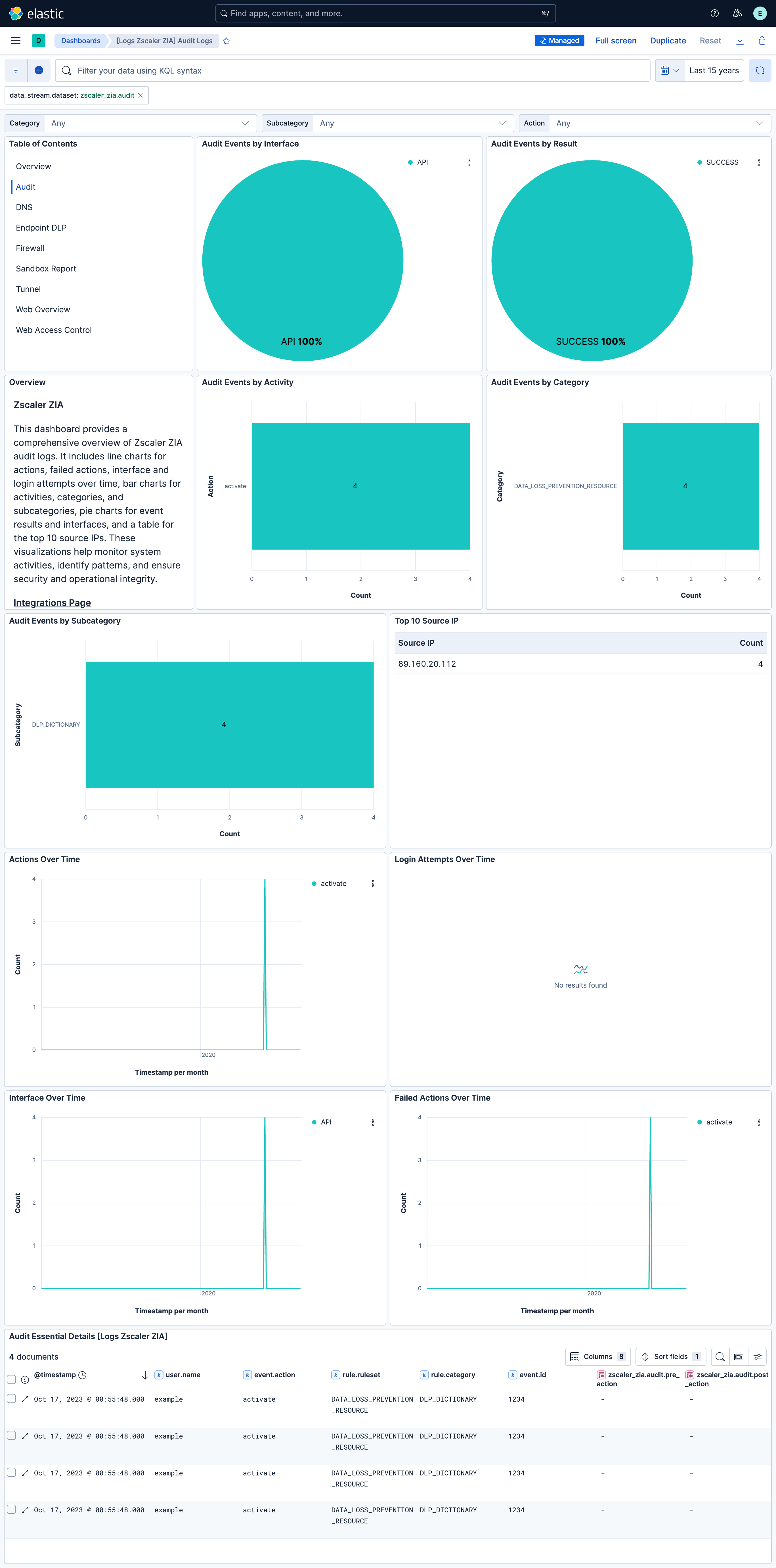
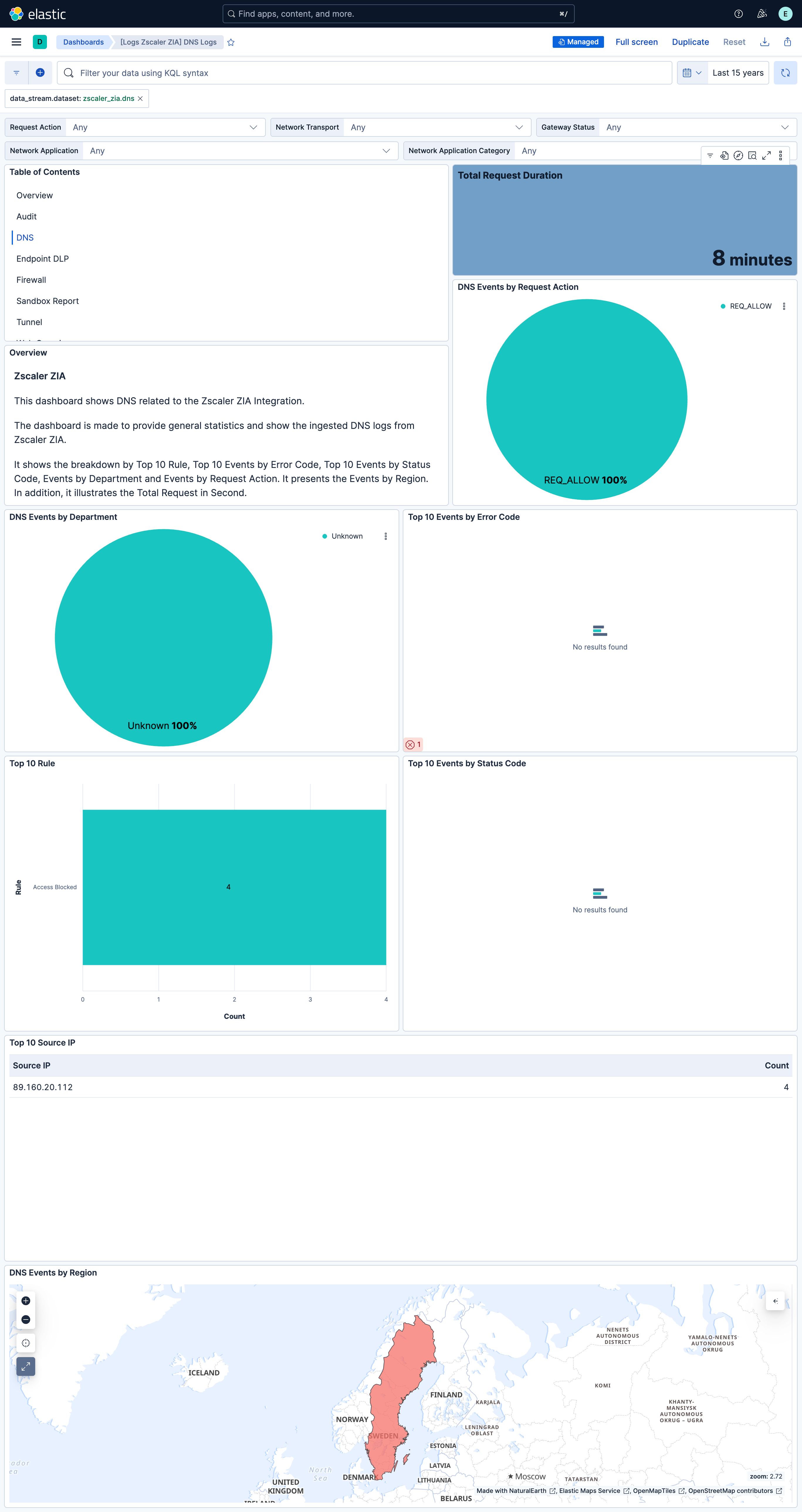
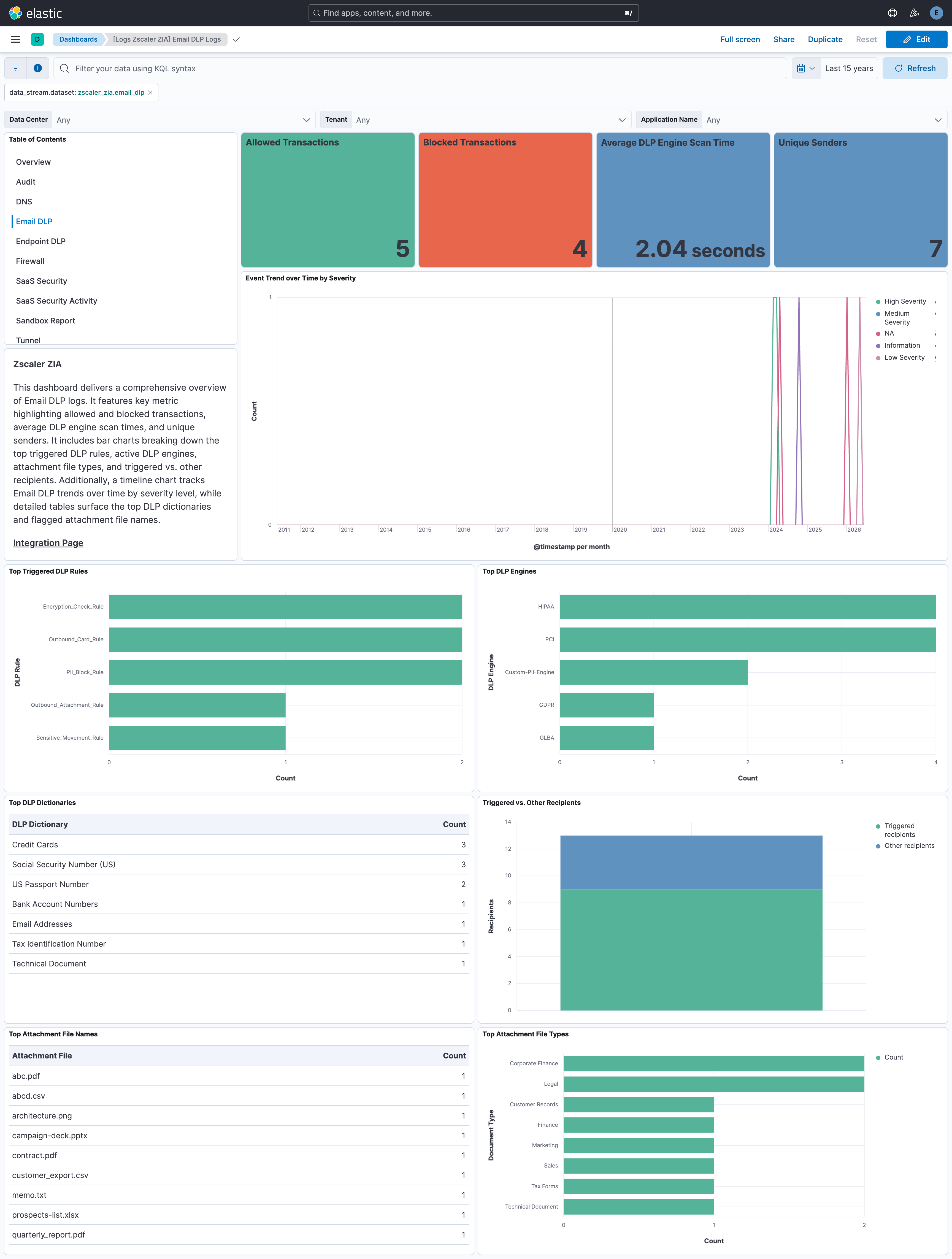
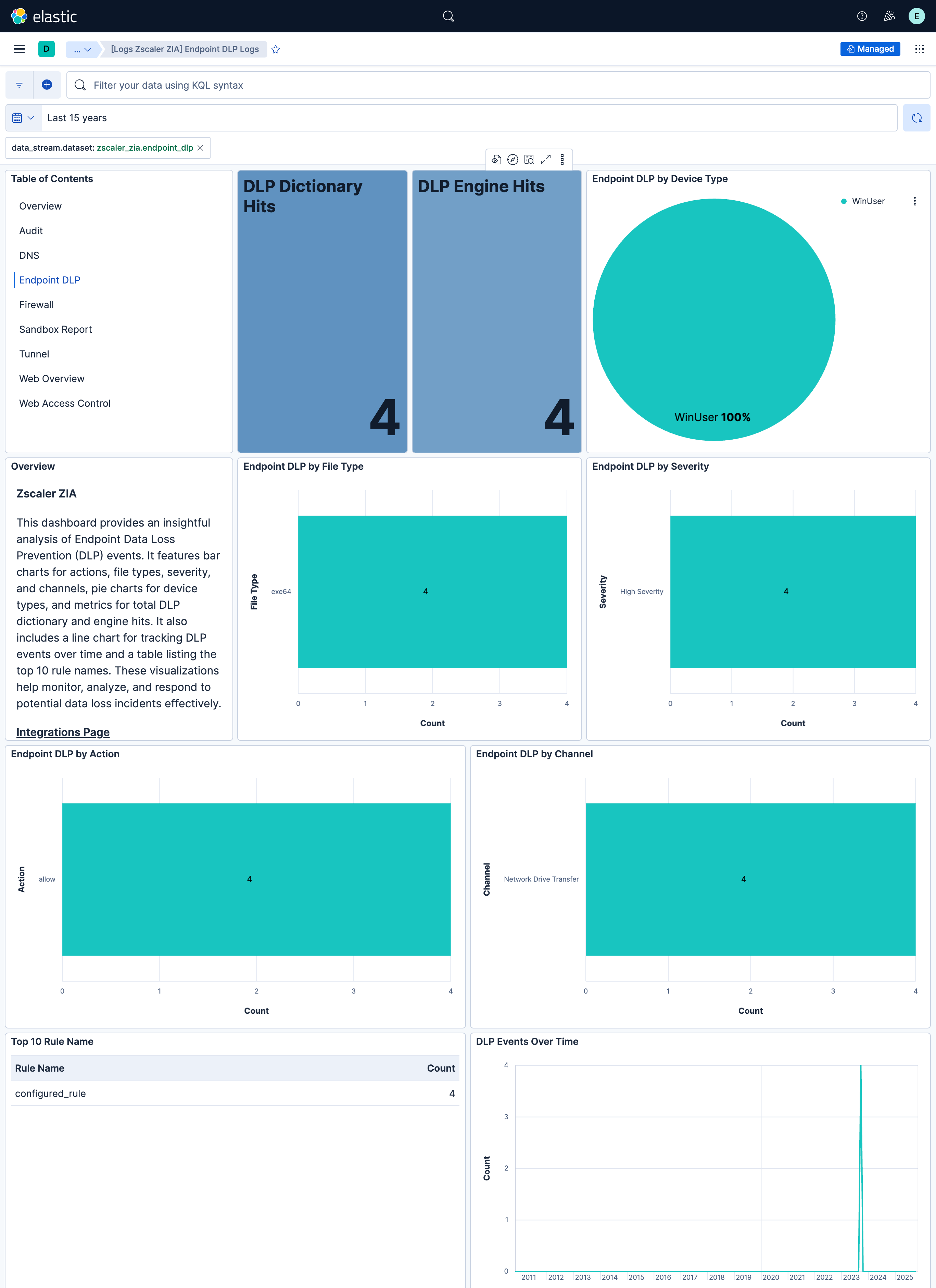
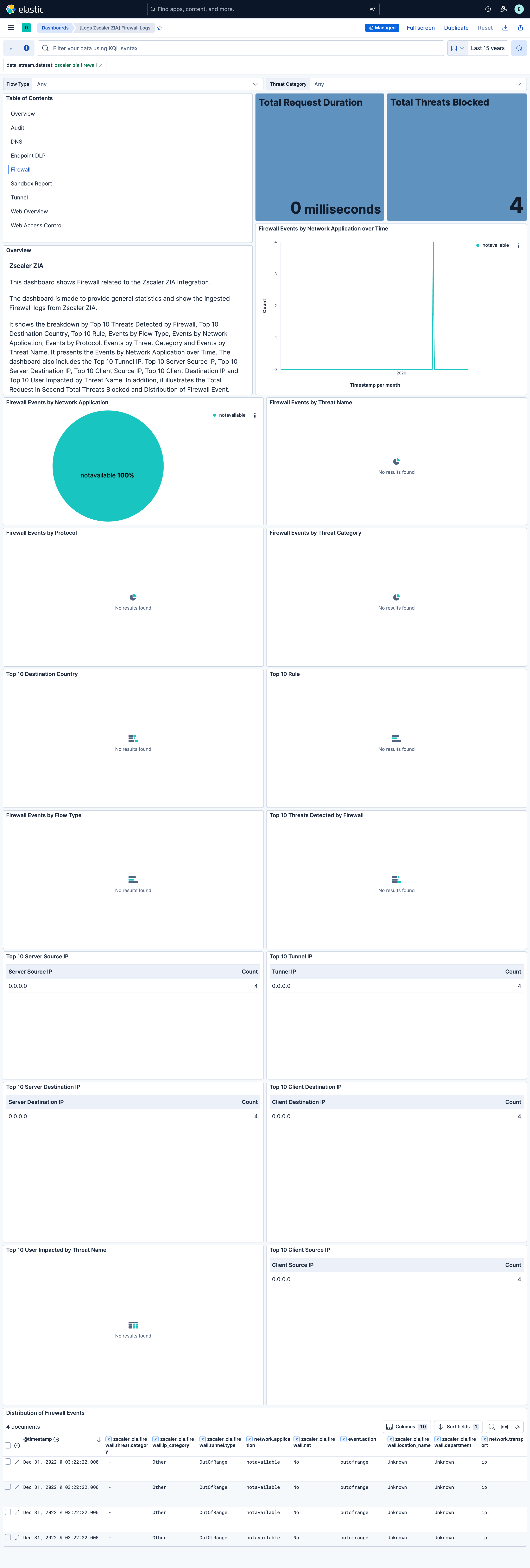
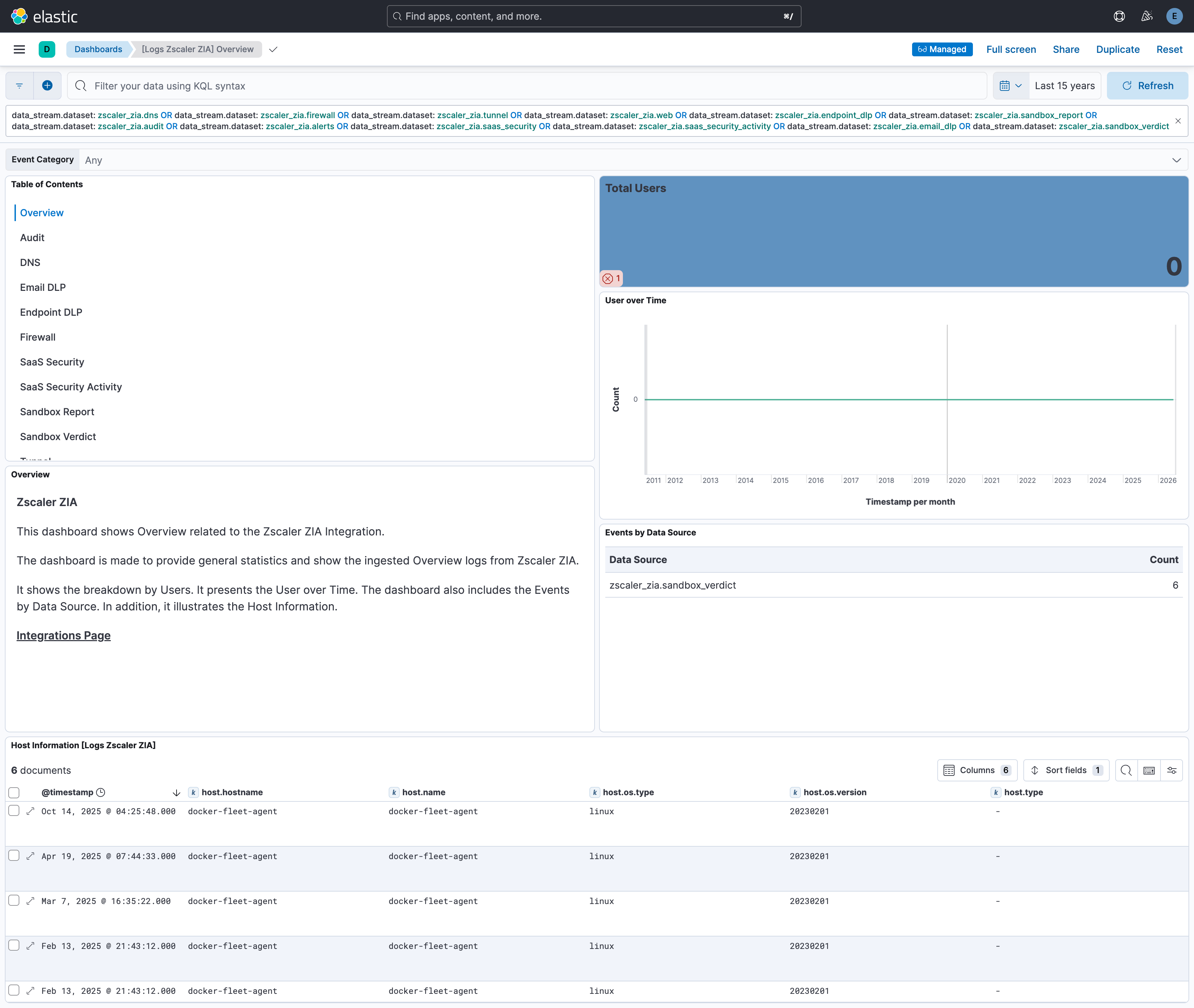
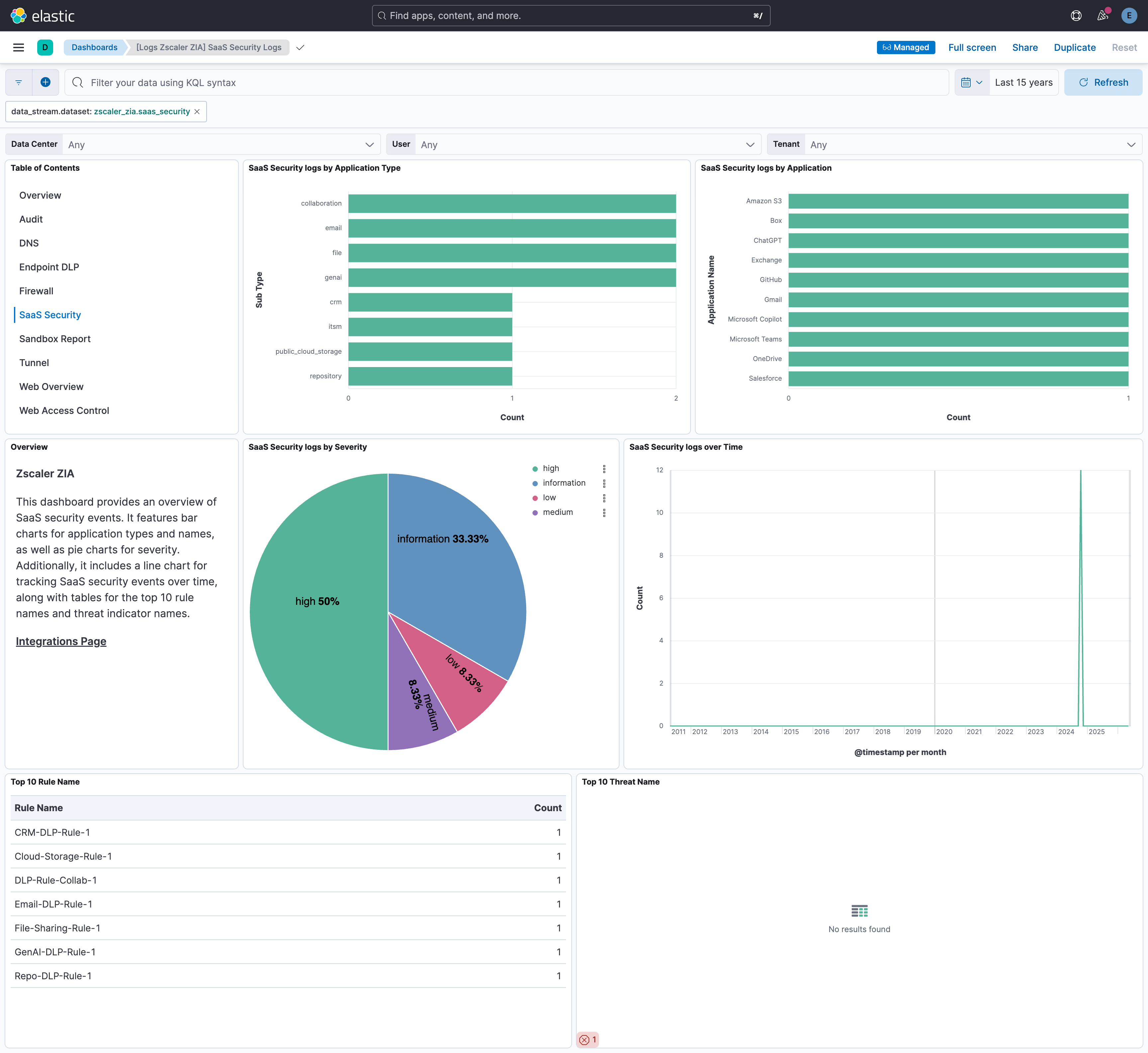
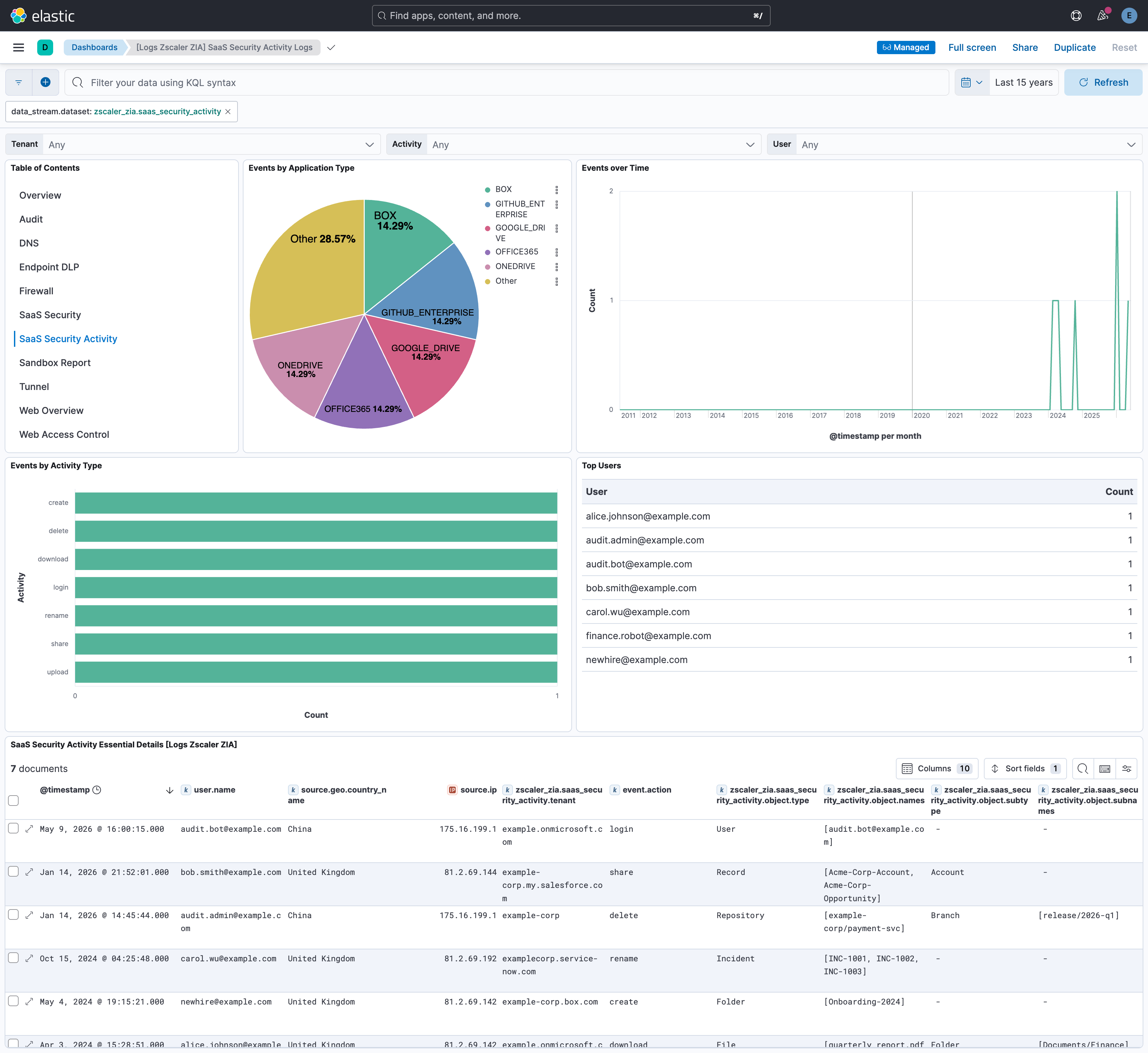
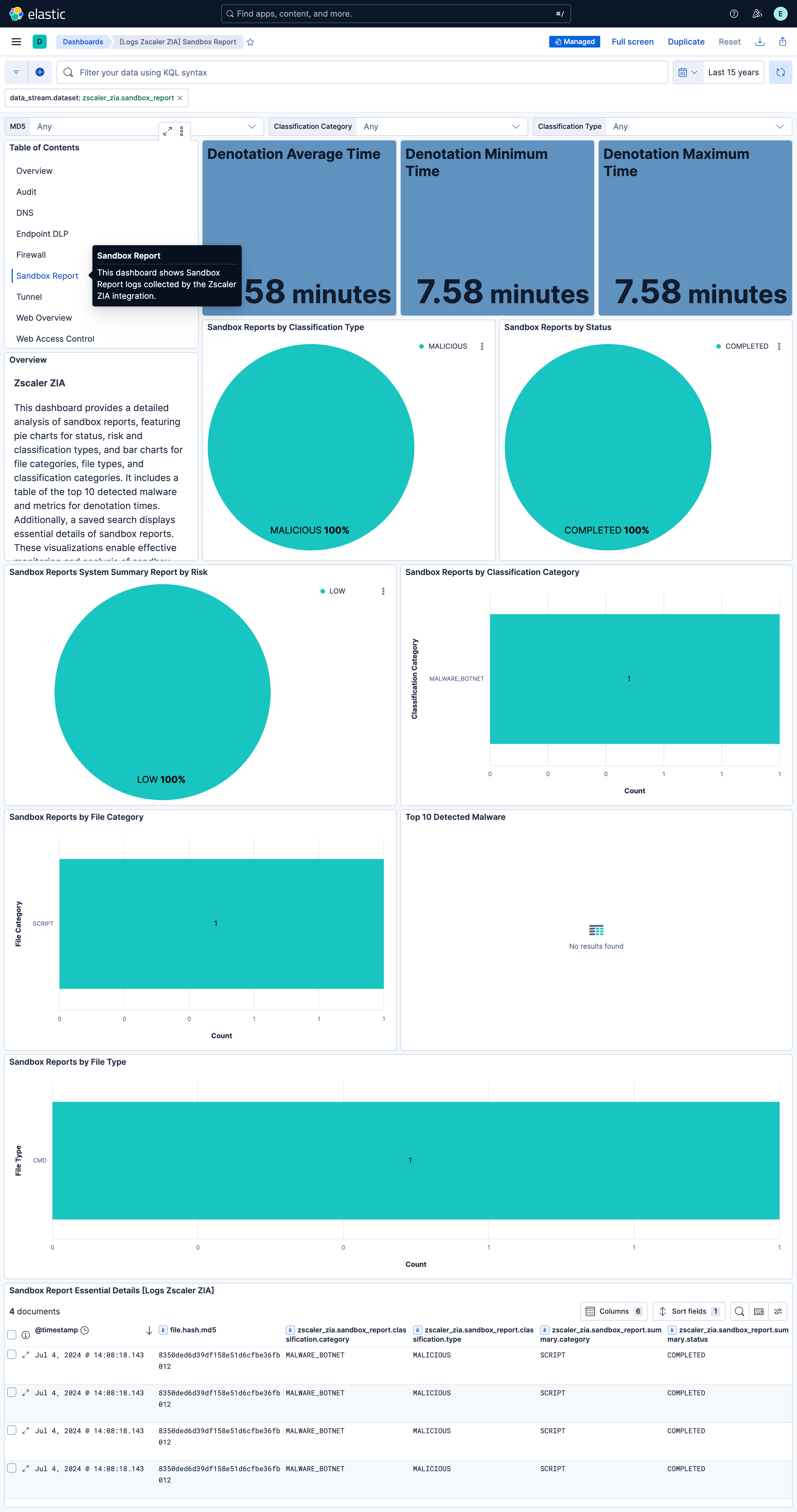
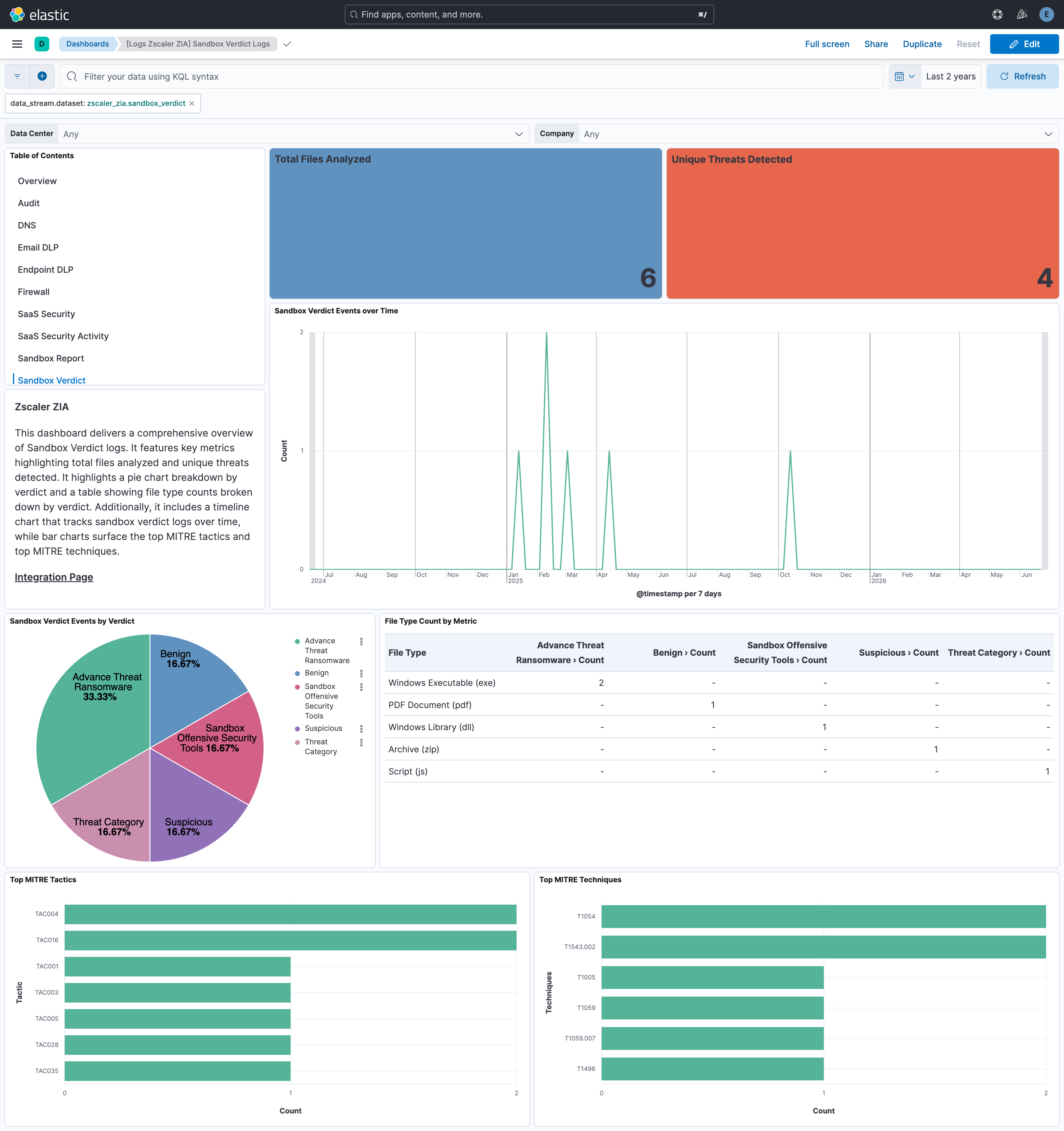
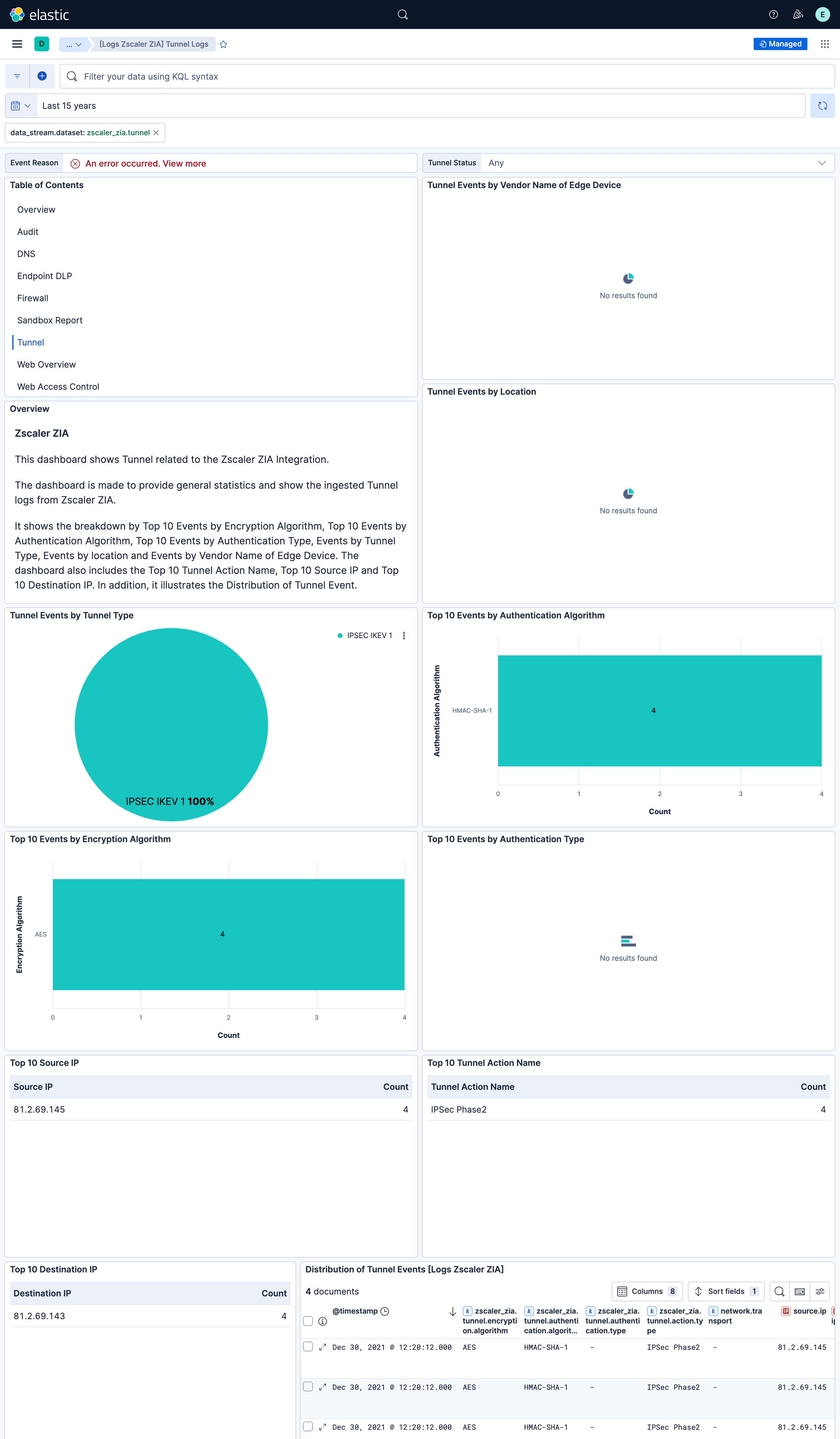
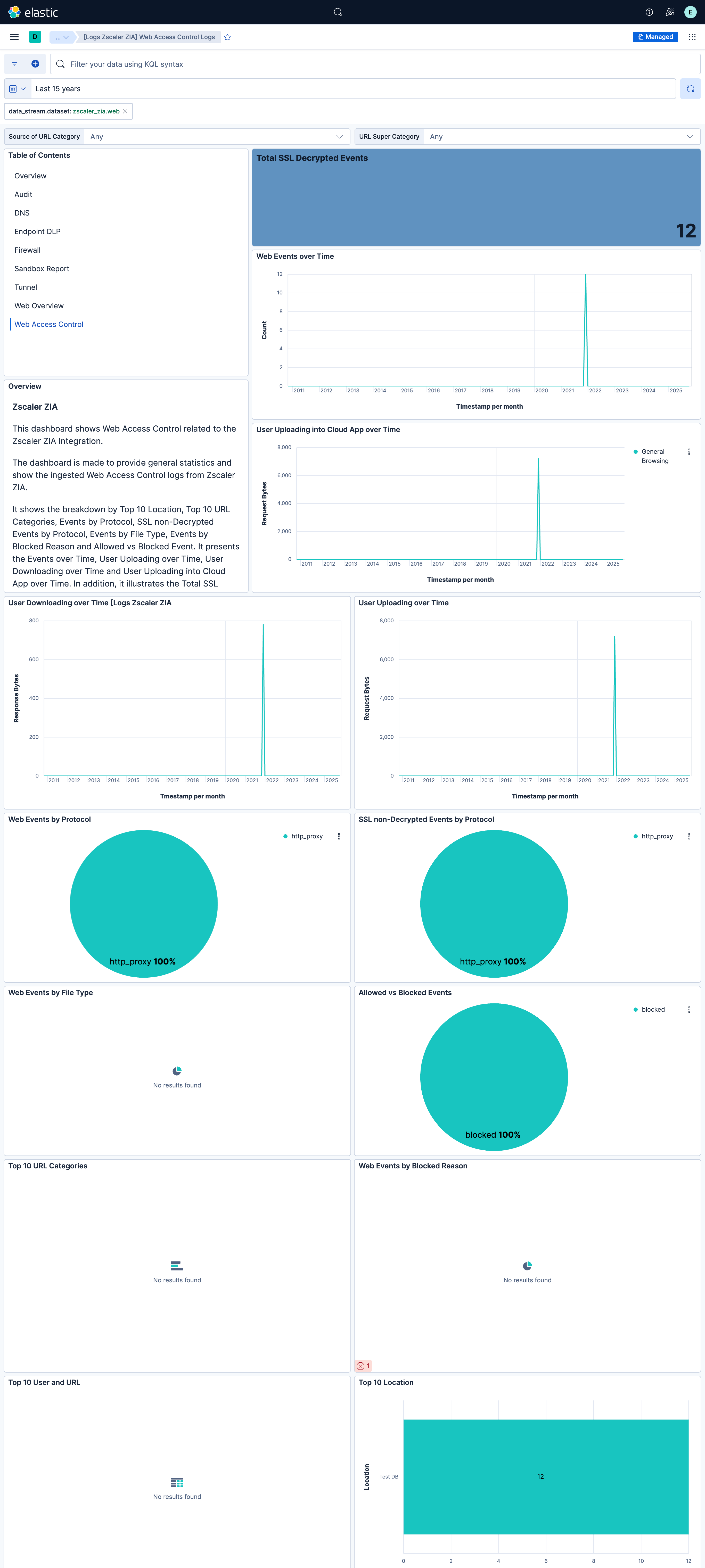
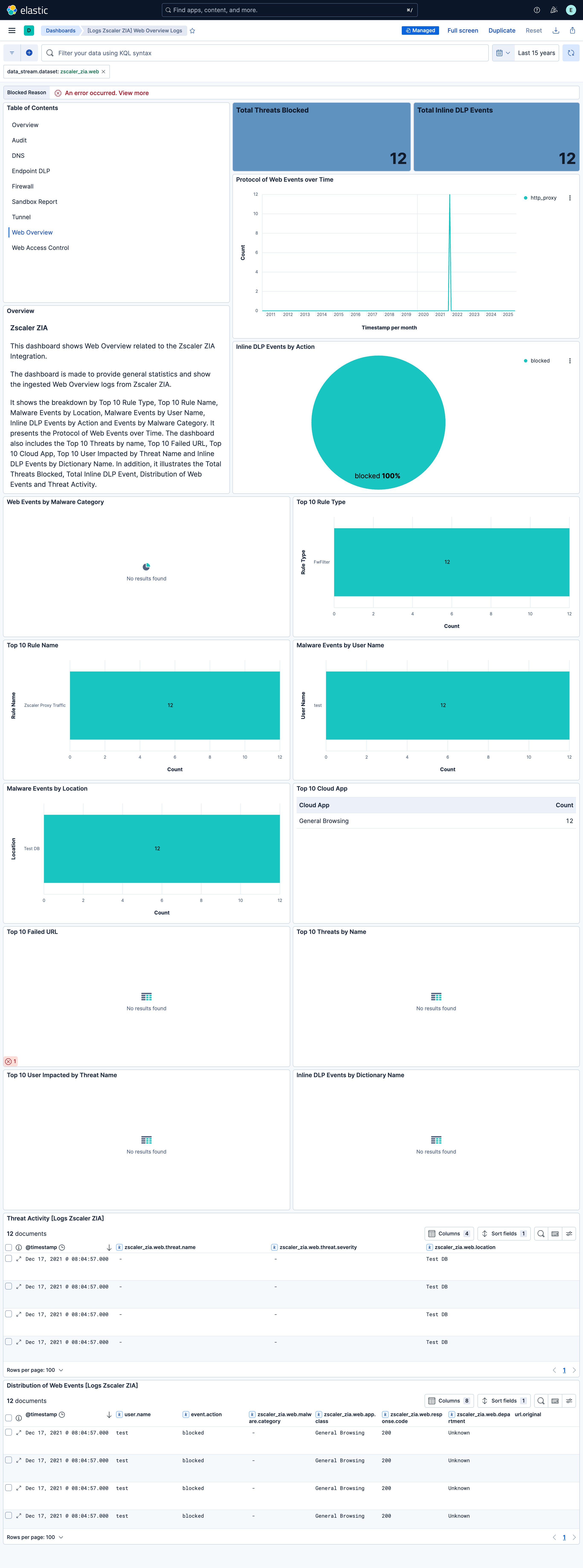
Changelog
| Version | Details | Minimum Kibana version |
|---|---|---|
| 4.4.1 | Bug fix (View pull request) Fix timestamp parsing for NSS feeds customized to emit numeric yyyy-MM-dd HH:mm:ss timestamps in the Audit, DNS, Email DLP, Endpoint DLP, Firewall, SaaS Security, and Tunnel data streams. |
9.0.0 8.18.0 |
| 4.4.0 | Enhancement (View pull request) Remove unused agentless tag cleanup from data streams that do not support agentless. |
9.0.0 8.18.0 |
| 4.3.0 | Enhancement (View pull request) Add tags to ingest pipeline processors and add preserve_original_event to pipeline-level on_failure handlers. |
9.0.0 8.18.0 |
| 4.2.1 | Enhancement (View pull request) Set agentless deployment mode release field to ga. |
9.0.0 8.18.0 |
| 4.2.0 | Enhancement (View pull request) Add support for Sandbox Verdict data stream. |
9.0.0 8.18.0 |
| 4.1.0 | Enhancement (View pull request) Add support for Email DLP data stream. |
9.0.0 8.18.0 |
| 4.0.0 | Bug fix (View pull request) Fix reversed source.bytes/destination.bytes mapping in firewall data stream. Zscaler's outbytes (client-to-server) now correctly maps to source.bytes and inbytes (server-to-client) to destination.bytes. Breaking change (View pull request) The firewall data stream now maps outbytes to source.bytes and inbytes to destination.bytes, reversing the previous assignment. Dashboards, alerts, or detection rules that reference source.bytes or destination.bytes from firewall logs will see swapped values after upgrading. |
9.0.0 8.18.0 |
| 3.22.1 | Bug fix (View pull request) Use the ECS definition for email.attachments. |
9.0.0 8.18.0 |
| 3.22.0 | Enhancement (View pull request) Enable request trace log removal. Bug fix (View pull request) Fix the package version string in the ingest pipeline to correctly display the link present in error.message for saas_security data stream. |
9.0.0 8.18.0 |
| 3.21.0 | Enhancement (View pull request) Add support for SaaS Security Activity data stream. |
9.0.0 8.18.0 |
| 3.20.0 | Enhancement (View pull request) Use new release field for agentless deployment mode to establish as beta. |
9.0.0 8.18.0 |
| 3.19.0 | Enhancement (View pull request) Add support for SaaS Security data stream. |
9.0.0 8.18.0 |
| 3.18.0 | Enhancement (View pull request) Adds note about unsupported agentless streams to Zscaler ZIA integration |
9.0.0 8.18.0 |
| 3.17.1 | Bug fix (View pull request) Remove duplicate security-solution-default tag references |
9.0.0 8.18.0 |
| 3.17.0 | Enhancement (View pull request) Add support for new fields in the DNS and Web Dataset. |
9.0.0 8.18.0 |
| 3.16.0 | Enhancement (View pull request) Use links panels in the dashboards. |
9.0.0 8.18.0 |
| 3.15.1 | Bug fix (View pull request) Fix pkg_version parameter in the check_template_version script in ingest pipelines. |
9.0.0 8.18.0 |
| 3.15.0 | Enhancement (View pull request) Add prompt_req, is_src_cntry_risky and is_dst_cntry_risky fields in web logs.Users ingesting web logs must update to the latest response format in Zscalar ZIA. |
9.0.0 8.18.0 |
| 3.14.0 | Enhancement (View pull request) Use terminate processor instead of fail processor to handle agent errors. |
9.0.0 8.18.0 |
| 3.13.0 | Enhancement (View pull request) Remove duplicated installation instructions from the documentation |
9.0.0 8.18.0 |
| 3.12.1 | Bug fix (View pull request) Add temporary processor to remove the fields added by the Agentless policy. |
9.0.0 8.18.0 |
| 3.12.0 | Enhancement (View pull request) Add strict field template mode for TCP and HTTP Endpoint input data streams. |
9.0.0 8.18.0 |
| 3.11.0 | Enhancement (View pull request) Update event.type from info to access, and add the event.outcome ECS field. |
9.0.0 8.18.0 |
| 3.10.1 | Bug fix (View pull request) Fix default request trace enabled behavior. |
9.0.0 8.18.0 |
| 3.10.0 | Enhancement (View pull request) Enable request trace log removal. |
9.0.0 8.18.0 |
| 3.9.0 | Enhancement (View pull request) Added request tracing config option for http_endpoint input. |
9.0.0 8.18.0 |
| 3.8.0 | Bug fix (View pull request) Add agentless deployment. |
9.0.0 8.18.0 |
| 3.7.2 | Bug fix (View pull request) Added description to ssl nodes in package level manifest.yml file to including links to documentation. |
9.0.0 8.13.0 |
| 3.7.1 | Bug fix (View pull request) Updated SSL description in package manifest.yml to be uniform and to include links to documentation. |
9.0.0 8.13.0 |
| 3.7.0 | Enhancement (View pull request) Update Kibana constraint to support 9.0.0. |
9.0.0 8.13.0 |
| 3.6.3 | Bug fix (View pull request) Use source.nat.ip as alternate for geo IPs in firewall and web logs. |
8.13.0 |
| 3.6.2 | Bug fix (View pull request) Drop 'Unknown' values in the audit data stream. |
8.13.0 |
| 3.6.1 | Bug fix (View pull request) Defensively copy list parameters in 'Set ECS categorization fields' script. |
8.13.0 |
| 3.6.0 | Enhancement (View pull request) Add "preserve_original_event" tag to documents with event.kind manually set to "pipeline_error". |
8.13.0 |
| 3.5.0 | Enhancement (View pull request) Add "preserve_original_event" tag to documents with event.kind set to "pipeline_error". |
8.13.0 |
| 3.4.0 | Enhancement (View pull request) Add custom input options to HTTP endpoint |
8.13.0 |
| 3.3.0 | Bug fix (View pull request) Fix source/destination ip mapping in firewall logs. Enhancement (View pull request) Add geoip processor to source and destination ip. |
8.13.0 |
| 3.2.4 | Bug fix (View pull request) Improve data processing in the web pipeline. |
8.13.0 |
| 3.2.3 | Bug fix (View pull request) Remove department field and add on_failure clauses. |
8.13.0 |
| 3.2.2 | Bug fix (View pull request) Sanitize unwanted characters in firewall. |
8.13.0 |
| 3.2.1 | Bug fix (View pull request) In web v8, use b64 fields to avoid encoding issues. |
8.13.0 |
| 3.2.0 | Enhancement (View pull request) Add hex-encoded fields in web logs. |
8.13.0 |
| 3.1.0 | Enhancement (View pull request) Remove url field from web logs. |
8.13.0 |
| 3.0.4 | Bug fix (View pull request) Update response format version numbers. |
8.13.0 |
| 3.0.3 | Bug fix (View pull request) Add eurl hex-encoded field for url parsing. |
8.13.0 |
| 3.0.2 | Bug fix (View pull request) Fix url parsing in Web logs. |
8.13.0 |
| 3.0.1 | Bug fix (View pull request) Update NSS Feed Screenshot with updated Feed Output Format of Web. |
8.13.0 |
| 3.0.0 | Enhancement (View pull request) Add Audit data-stream. Enhancement (View pull request) Add Endpoint DLP data-stream. Enhancement (View pull request) Add Sandbox Report data-stream. Enhancement (View pull request) Add support for new fields for existing data streams. |
8.13.0 |
| 2.20.2 | Bug fix (View pull request) Add additional condition for failure processor. |
8.13.0 |
| 2.20.1 | Bug fix (View pull request) Prevent failure on not encoded URLs. |
8.13.0 |
| 2.20.0 | Enhancement (View pull request) Removed import_mappings. Update the kibana constraint to ^8.13.0. Modified the field definitions to remove ECS fields made redundant by the ecs@mappings component template. |
8.13.0 |
| 2.19.2 | Bug fix (View pull request) Include cintip field to web log template. |
8.12.0 |
| 2.19.1 | Bug fix (View pull request) Fix mapping of source.ip and source.nat.ip |
8.12.0 |
| 2.19.0 | Enhancement (View pull request) Set sensitive values as secret. |
8.12.0 |
| 2.18.3 | Bug fix (View pull request) Remove ignore_failure clause in web events. |
8.3.0 |
| 2.18.2 | Bug fix (View pull request) Fix mapping of user identities. |
8.3.0 |
| 2.18.1 | Enhancement (View pull request) Changed owners |
8.3.0 |
| 2.18.0 | Enhancement (View pull request) ECS version updated to 8.11.0. |
8.3.0 |
| 2.17.0 | Enhancement (View pull request) Add question and answer names, and response data to relate.hosts and related.ip. |
8.3.0 |
| 2.16.0 | Enhancement (View pull request) Improve 'event.original' check to avoid errors if set. |
8.3.0 |
| 2.15.0 | Enhancement (View pull request) ECS version updated to 8.10.0. |
8.3.0 |
| 2.14.0 | Enhancement (View pull request) The format_version in the package manifest changed from 2.11.0 to 3.0.0. Removed dotted YAML keys from package manifest. Added 'owner.type: elastic' to package manifest. |
8.3.0 |
| 2.13.0 | Enhancement (View pull request) Add tags.yml file so that integration's dashboards and saved searches are tagged with "Security Solution" and displayed in the Security Solution UI. |
8.3.0 |
| 2.12.0 | Enhancement (View pull request) Update package to ECS 8.9.0. |
8.3.0 |
| 2.11.1 | Bug fix (View pull request) Update the mapping for user.name and host.name fields. |
8.3.0 |
| 2.11.0 | Enhancement (View pull request) Ensure event.kind is correctly set for pipeline errors. |
8.3.0 |
| 2.10.0 | Enhancement (View pull request) Update package to ECS 8.8.0. |
8.3.0 |
| 2.9.0 | Enhancement (View pull request) Update package-spec version to 2.7.0. |
8.3.0 |
| 2.8.0 | Enhancement (View pull request) Update package to ECS 8.7.0. |
8.3.0 |
| 2.7.3 | Enhancement (View pull request) Map web login user details to ECS. |
8.3.0 |
| 2.7.2 | Enhancement (View pull request) Added categories and/or subcategories. |
— |
| 2.7.1 | Enhancement (View pull request) Add support for dynamic ECS mapping. Bug fix (View pull request) Resolve the issue related to the user agent field. Bug fix (View pull request) Resolve the issue related to fields that contain a NA value. |
8.3.0 |
| 2.7.0 | Enhancement (View pull request) Update package to ECS 8.6.0. |
8.3.0 |
| 2.6.1 | Bug fix (View pull request) Remove duplicate fields. |
8.3.0 |
| 2.6.0 | Enhancement (View pull request) Update Aggregation visualizations to Lens, Add an on_failure processor to the convert, geo_ip, uri_parts and date processors, remove unnecessary white spaces, mapped to related ecs field and convert double quotes to single quotes. |
8.3.0 |
| 2.5.0 | Enhancement (View pull request) Update package to ECS 8.5.0. |
8.3.0 |
| 2.4.1 | Bug fix (View pull request) Remap network.protocol to valid values for web data stream. |
8.3.0 |
| 2.4.0 | Enhancement (View pull request) Update package to ECS 8.4.0 |
8.3.0 |
| 2.3.1 | Enhancement (View pull request) Updated the documentation links in README file |
8.3.0 |
| 2.3.0 | Bug fix (View pull request) Fix issue related URI parts processor. Enhancement (View pull request) Added support for optionally configuring secret header and secret value for cloud NSS input. |
8.3.0 |
| 2.2.0 | Enhancement (View pull request) Update package to ECS 8.3.0. |
8.3.0 |
| 2.1.0 | Enhancement (View pull request) Make GA |
8.3.0 |
| 2.0.0 | Enhancement (View pull request) Added input for Cloud NSS using HTTP Endpoint input type. |
8.3.0 |
| 0.2.0 | Enhancement (View pull request) Update ECS to 8.2 |
— |
| 0.1.3 | Enhancement (View pull request) Updated the image file reference in README file. |
8.0.0 7.16.2 |
| 0.1.2 | Enhancement (View pull request) Add documentation for multi-fields. |
8.0.0 7.16.2 |
| 0.1.1 | Enhancement (View pull request) Updated the README to describe the Zscaler ZIA setup process in detail. |
8.0.0 7.16.2 |
| 0.1.0 | Enhancement (View pull request) Initial draft of the package. |
8.0.0 7.16.2 |