BeyondTrust EPM Integration for Elastic
| Version | 0.2.1
|
| Managed integration release status | GA |
| Subscription level What's this? |
Basic |
| Developed by What's this? |
Elastic |
| Ingestion method(s) | API, AWS S3 |
| Minimum Kibana version(s) | 9.0.0 8.18.0 |
You can use this integration as an Elastic Managed integration on Elastic Cloud Hosted deployments running this version or later.
To use pre-release integrations, go to the Integrations page in Kibana, scroll down, and toggle on the Display beta integrations option.
BeyondTrust Endpoint Privilege Management (EPM) is a security solution that enforces least-privilege policies across endpoints, controls application usage, audits privileged activity, and tracks event activity. It helps organizations reduce their attack surface by managing and monitoring privilege escalation, application control, event activity, and configuration changes across users and devices.
The BeyondTrust EPM integration for Elastic collects audit and event logs using the BeyondTrust EPM Management API or through AWS S3/SQS cloud storage, and visualizes them in Kibana.
The BeyondTrust EPM integration is compatible with BeyondTrust EPM version 26.1 and Management API version v3.
This integration supports two collection methods:
- Direct API polling via CEL input, which periodically queries the BeyondTrust EPM Management API using OAuth 2.0 (Client Credentials) authentication.
- Cloud storage via AWS S3/SQS, for organizations that export audit and event logs from BeyondTrust EPM to an AWS S3 bucket using the built-in SIEM integration.
This integration collects log messages of the following type:
Audit: Collects audit logs via the BeyondTrust EPM Management API (endpoint:/management-api/v3/ActivityAudits/Details) or via AWS S3/SQS for organizations that export logs from BeyondTrust EPM to an S3 bucket.Event: Collects event logs via the BeyondTrust EPM Management API (endpoint:/management-api/v3/Events/search) or via AWS S3/SQS for organizations that export logs from BeyondTrust EPM to an S3 bucket.
Integrating BeyondTrust EPM with Elastic provides centralized visibility into privileged activity and configuration changes across your endpoints, enabling efficient monitoring, investigation, and compliance reporting within Kibana dashboards.
To collect data via the Management API, you need a Client ID and Client Secret with OAuth 2.0 Client Credentials authentication.
- Sign in to
app.beyondtrust.io. - Navigate to Configuration > API Registration.
- Create or select an API client and copy the Client ID and Client Secret.
For more information on configuring API registration in BeyondTrust EPM, refer to the API Settings guide in the BeyondTrust documentation.
To collect data using AWS S3, configure BeyondTrust EPM to export logs to an S3 bucket, then point Elastic at that bucket.
- Create an S3 bucket and note the bucket name and region.
- Create an IAM access policy with these permissions:
- List:
ListAllMyBuckets - Write:
PutObject - Read:
GetBucketAcl,GetBucketLocation,GetUser,SimulatePrincipalPolicy
- List:
- Create an IAM user with programmatic access, attach the policy, and save the Access Key ID and Secret Access Key.
- Sign in to app.beyondtrust.io.
- Navigate to Endpoint Privilege Management for Windows and Mac > Configuration > SIEM Settings.
- Select Enable SIEM Integration, then choose S3 as the Integration Type.
- Enter the Access Key ID, Secret Access Key, Bucket name, and Region.
- Set the data format to ECS - Elastic Common Schema.
- Click Validate Settings, then Save Settings.
Only one SIEM integration can be configured at a time. Events are batched and exported to S3 in one-minute intervals in JSON format.
For more information on configuring SIEM settings in BeyondTrust EPM, refer to the SIEM Settings guide in the BeyondTrust documentation.
This integration supports both Elastic Agentless-based and Agent-based installations.
Agentless integrations allow you to collect data without having to manage Elastic Agent in your cloud. They make manual agent deployment unnecessary, so you can focus on your data instead of the agent that collects it. For more information, refer to Agentless integrations and the Agentless integrations FAQ.
Agentless deployments are only supported in Elastic Serverless and Elastic Cloud environments. This functionality is in beta and is subject to change. Beta features are not subject to the support SLA of official GA features.
Elastic Agent must be installed. For more details, check the Elastic Agent installation instructions. You can install only one Elastic Agent per host.
In the top search bar in Kibana, search for Integrations.
In the search bar, type BeyondTrust EPM.
Select the BeyondTrust EPM integration from the search results.
Select Add BeyondTrust EPM to add the integration.
Enable and configure only the collection methods which you will use.
To Collect logs using BeyondTrust EPM API (CEL):
- Set the URL to the base URL of your BeyondTrust EPM instance (e.g.,
https://app.beyondtrust.io). - Set the Client ID and Client Secret obtained from API Registration.
- Optionally adjust Initial Interval, Interval, Page Size, and HTTP Client Timeout.
- Set the URL to the base URL of your BeyondTrust EPM instance (e.g.,
To Collect logs using AWS S3:
- Set the Bucket ARN of the S3 bucket configured in BeyondTrust EPM SIEM Settings.
- Set AWS Access Key ID and Secret Access Key for an IAM user with read access to the bucket.
- Optionally configure Queue URL (SQS) if using event-driven notifications instead of bucket polling.
Select Save and continue to save the integration.
For help with Elastic ingest tools, check Common problems.
- In the top search bar in Kibana, search for Dashboards.
- In the search bar, type BeyondTrust EPM, and verify the dashboard information is populated.
For more information on architectures that can be used for scaling this integration, check the Ingest Architectures documentation.
Exported fields
| Field | Description | Type |
|---|---|---|
| @timestamp | Date/time when the event originated. This is the date/time extracted from the event, typically representing when the event was generated by the source. If the event source has no original timestamp, this value is typically populated by the first time the event was received by the pipeline. Required field for all events. | date |
| aws.s3.bucket.arn | The AWS S3 bucket ARN. | keyword |
| aws.s3.bucket.name | The AWS S3 bucket name. | keyword |
| aws.s3.object.key | The AWS S3 Object key. | keyword |
| beyondtrust_epm.audit.agent_data_auditing.new_adapter_version | Adapter version installed in the computer. | keyword |
| beyondtrust_epm.audit.agent_data_auditing.new_agent_id | Guid to store the new Agent Id assigned to the computer. | keyword |
| beyondtrust_epm.audit.agent_data_auditing.new_computer_group_id | The computer group Id that the agent is going to be assigned to. | keyword |
| beyondtrust_epm.audit.agent_data_auditing.new_computer_group_name | The computer group name that the agent is going to be assigned to. | keyword |
| beyondtrust_epm.audit.agent_data_auditing.new_host_type | The host type detected for the agent. | keyword |
| beyondtrust_epm.audit.agent_data_auditing.new_os_name | Os Name assigned detected by the adapter. | keyword |
| beyondtrust_epm.audit.agent_data_auditing.new_timestamp | TimeStamp of the audit event. | date |
| beyondtrust_epm.audit.agent_data_auditing.old_adapter_version | Present adapter version, in case of updating, this value can reflect the last adapter version used. | keyword |
| beyondtrust_epm.audit.agent_data_auditing.old_agent_id | Guid to store the old Agent Id if there is a change in Agent Id. | keyword |
| beyondtrust_epm.audit.agent_data_auditing.old_computer_group_id | The computer group Id that the agent was assigned to. | keyword |
| beyondtrust_epm.audit.agent_data_auditing.old_computer_group_name | The computer group name that the agent was assigned to. | keyword |
| beyondtrust_epm.audit.agent_data_auditing.old_host_type | The present Host type found by the adapter. | keyword |
| beyondtrust_epm.audit.agent_data_auditing.old_os_name | The present Os Name detected by the adapter. | keyword |
| beyondtrust_epm.audit.agent_data_auditing.old_timestamp | TimeStamp of a previous audit event. | date |
| beyondtrust_epm.audit.api_client_data_auditing.deleted | boolean | |
| beyondtrust_epm.audit.api_client_data_auditing.new_description | keyword | |
| beyondtrust_epm.audit.api_client_data_auditing.new_description.text | Multi-field of beyondtrust_epm.audit.api_client_data_auditing.new_description. |
match_only_text |
| beyondtrust_epm.audit.api_client_data_auditing.new_name | keyword | |
| beyondtrust_epm.audit.api_client_data_auditing.old_description | keyword | |
| beyondtrust_epm.audit.api_client_data_auditing.old_description.text | Multi-field of beyondtrust_epm.audit.api_client_data_auditing.old_description. |
match_only_text |
| beyondtrust_epm.audit.api_client_data_auditing.old_name | keyword | |
| beyondtrust_epm.audit.api_client_data_auditing.secret_updated | boolean | |
| beyondtrust_epm.audit.audit_type | audit type. | keyword |
| beyondtrust_epm.audit.authorization_request_data_auditing.auth_request_api_client_id | Authorization Request API Client ID. | keyword |
| beyondtrust_epm.audit.authorization_request_data_auditing.auth_request_api_client_secret | Authorization Request Client Secret. | keyword |
| beyondtrust_epm.audit.authorization_request_data_auditing.auth_request_client_id | Authorization Request ClientId. | keyword |
| beyondtrust_epm.audit.authorization_request_data_auditing.auth_request_client_secret | Authorization Request Client Secret. | keyword |
| beyondtrust_epm.audit.authorization_request_data_auditing.auth_request_config_changed | Is Authorization Request Config changed?. | boolean |
| beyondtrust_epm.audit.authorization_request_data_auditing.auth_request_host_name | Authorization Requests Hostname. | keyword |
| beyondtrust_epm.audit.authorization_request_data_auditing.auth_request_integration_enabled | Old Value is Authorization Request Integration Enabled?. | boolean |
| beyondtrust_epm.audit.authorization_request_data_auditing.auth_request_password | Authorization Request Password. | keyword |
| beyondtrust_epm.audit.authorization_request_data_auditing.auth_request_user_name | Authorization Request User Name. | keyword |
| beyondtrust_epm.audit.authorization_request_data_auditing.old_auth_request_api_client_id | Old Value Authorization Request API Client ID. | keyword |
| beyondtrust_epm.audit.authorization_request_data_auditing.old_auth_request_api_client_secret | Old Value Authorization Request Client Secret. | keyword |
| beyondtrust_epm.audit.authorization_request_data_auditing.old_auth_request_client_id | Old Value Authorization Request ClientId. | keyword |
| beyondtrust_epm.audit.authorization_request_data_auditing.old_auth_request_client_secret | Old Value Authorization Request Client Secret. | keyword |
| beyondtrust_epm.audit.authorization_request_data_auditing.old_auth_request_host_name | Old Value Authorization Requests Hostname. | keyword |
| beyondtrust_epm.audit.authorization_request_data_auditing.old_auth_request_integration_enabled | Old Value is Authorization Request Integration Enabled?. | boolean |
| beyondtrust_epm.audit.authorization_request_data_auditing.old_auth_request_password | Old Value Authorization Request Password. | keyword |
| beyondtrust_epm.audit.authorization_request_data_auditing.old_auth_request_user_name | Old Value Authorization Request User Name. | keyword |
| beyondtrust_epm.audit.auto_update_group_client_settings_data_auditing.new_app_event_log_type | New value of application event log type. | keyword |
| beyondtrust_epm.audit.auto_update_group_client_settings_data_auditing.new_beyond_insight_cert_name | New value of Beyond insight certificate name. | keyword |
| beyondtrust_epm.audit.auto_update_group_client_settings_data_auditing.new_beyond_insight_url | New value of Beyond insight URL. | keyword |
| beyondtrust_epm.audit.auto_update_group_client_settings_data_auditing.new_beyond_insight_work_group | New value of Beyond insight group. | keyword |
| beyondtrust_epm.audit.auto_update_group_client_settings_data_auditing.new_cert_mode | New value of certificate mode. | keyword |
| beyondtrust_epm.audit.auto_update_group_client_settings_data_auditing.new_config_audit_enabled | New value of config audit enabled. | keyword |
| beyondtrust_epm.audit.auto_update_group_client_settings_data_auditing.new_config_audit_mode | New value of config audit mode. | keyword |
| beyondtrust_epm.audit.auto_update_group_client_settings_data_auditing.new_crl_fail_open | New value of crl fail open. | keyword |
| beyondtrust_epm.audit.auto_update_group_client_settings_data_auditing.new_download_audit_mode | New value of download audit mode. | keyword |
| beyondtrust_epm.audit.auto_update_group_client_settings_data_auditing.new_hook_load_method | New value of hook load method. | keyword |
| beyondtrust_epm.audit.auto_update_group_client_settings_data_auditing.new_policy_enabled | New value of policy enabled. | keyword |
| beyondtrust_epm.audit.auto_update_group_client_settings_data_auditing.new_policy_precedence | New value of policy precedence. | keyword |
| beyondtrust_epm.audit.auto_update_group_client_settings_data_auditing.new_ps_mode | New value of ps mode. | keyword |
| beyondtrust_epm.audit.auto_update_group_client_settings_data_auditing.old_app_event_log_type | Old value of app event log type. | keyword |
| beyondtrust_epm.audit.auto_update_group_client_settings_data_auditing.old_beyond_insight_cert_name | Old value of Beyond insight certificate name. | keyword |
| beyondtrust_epm.audit.auto_update_group_client_settings_data_auditing.old_beyond_insight_url | Old value of Beyond insight URL. | keyword |
| beyondtrust_epm.audit.auto_update_group_client_settings_data_auditing.old_beyond_insight_work_group | Old value of Beyond insight group. | keyword |
| beyondtrust_epm.audit.auto_update_group_client_settings_data_auditing.old_cert_mode | Old value of certificate mode. | keyword |
| beyondtrust_epm.audit.auto_update_group_client_settings_data_auditing.old_config_audit_enabled | Old value of config audit enabled. | keyword |
| beyondtrust_epm.audit.auto_update_group_client_settings_data_auditing.old_config_audit_mode | Old value of config audit mode. | keyword |
| beyondtrust_epm.audit.auto_update_group_client_settings_data_auditing.old_crl_fail_open | Old value of crl fail open. | keyword |
| beyondtrust_epm.audit.auto_update_group_client_settings_data_auditing.old_download_audit_mode | Old value of download audit mode. | keyword |
| beyondtrust_epm.audit.auto_update_group_client_settings_data_auditing.old_hook_load_method | Old value of hook load method. | keyword |
| beyondtrust_epm.audit.auto_update_group_client_settings_data_auditing.old_policy_enabled | Old value of policy enabled. | keyword |
| beyondtrust_epm.audit.auto_update_group_client_settings_data_auditing.old_policy_precedence | Old value of policy precedence. | keyword |
| beyondtrust_epm.audit.auto_update_group_client_settings_data_auditing.old_ps_mode | Old value of ps mode. | keyword |
| beyondtrust_epm.audit.auto_update_group_config_settings_data_auditing.new_adapter_version | New value of adapter version for package manager. | keyword |
| beyondtrust_epm.audit.auto_update_group_config_settings_data_auditing.new_client_version | New value of client version for package manager. | keyword |
| beyondtrust_epm.audit.auto_update_group_config_settings_data_auditing.new_enable_auto_update | New value of Enable auto update for package manager. | keyword |
| beyondtrust_epm.audit.auto_update_group_config_settings_data_auditing.new_use_latest_version | New value of use latest version for package manager. | keyword |
| beyondtrust_epm.audit.auto_update_group_config_settings_data_auditing.old_adapter_version | Old value of adapter version for package manager. | keyword |
| beyondtrust_epm.audit.auto_update_group_config_settings_data_auditing.old_client_version | Old value of client version for package manager. | keyword |
| beyondtrust_epm.audit.auto_update_group_config_settings_data_auditing.old_enable_auto_update | Old value of Enable auto update for package manager. | keyword |
| beyondtrust_epm.audit.auto_update_group_config_settings_data_auditing.old_use_latest_version | Old value of use latest version for package manager. | keyword |
| beyondtrust_epm.audit.auto_update_group_mac_client_settings_data_auditing.new_anti_tamper | keyword | |
| beyondtrust_epm.audit.auto_update_group_mac_client_settings_data_auditing.new_badge_icons | keyword | |
| beyondtrust_epm.audit.auto_update_group_mac_client_settings_data_auditing.new_biometric_authentication_enabled | keyword | |
| beyondtrust_epm.audit.auto_update_group_mac_client_settings_data_auditing.new_mount_assist | keyword | |
| beyondtrust_epm.audit.auto_update_group_mac_client_settings_data_auditing.new_sudo_enabled | keyword | |
| beyondtrust_epm.audit.auto_update_group_mac_client_settings_data_auditing.old_anti_tamper | keyword | |
| beyondtrust_epm.audit.auto_update_group_mac_client_settings_data_auditing.old_badge_icons | keyword | |
| beyondtrust_epm.audit.auto_update_group_mac_client_settings_data_auditing.old_biometric_authentication_enabled | keyword | |
| beyondtrust_epm.audit.auto_update_group_mac_client_settings_data_auditing.old_mount_assist | keyword | |
| beyondtrust_epm.audit.auto_update_group_mac_client_settings_data_auditing.old_sudo_enabled | keyword | |
| beyondtrust_epm.audit.auto_update_rate_limit_data_auditing.old_pm_requests_limit_minutes | Old Value Auto update request limits in minutes. | long |
| beyondtrust_epm.audit.auto_update_rate_limit_data_auditing.old_pm_requests_limits | Old Value Auto update request limits. | long |
| beyondtrust_epm.audit.auto_update_rate_limit_data_auditing.pm_requests_limit_minutes | Auto update request limits in minutes. | long |
| beyondtrust_epm.audit.auto_update_rate_limit_data_auditing.pm_requests_limits | Auto update request limits. | long |
| beyondtrust_epm.audit.azure_ad_integration_data_auditing.azure_ad_client_id | Azure AD Client Id used in the integration. | keyword |
| beyondtrust_epm.audit.azure_ad_integration_data_auditing.azure_ad_client_secret | Azure AD Client Secret. | keyword |
| beyondtrust_epm.audit.azure_ad_integration_data_auditing.azure_ad_config_changed | Is Azure AD Configuration changed?. | boolean |
| beyondtrust_epm.audit.azure_ad_integration_data_auditing.azure_ad_integration_enabled | Is Microsoft Entra ID Integration enabled?. | boolean |
| beyondtrust_epm.audit.azure_ad_integration_data_auditing.azure_ad_tenant_id | Old Value Azure AD Tenant ID. | keyword |
| beyondtrust_epm.audit.azure_ad_integration_data_auditing.azure_ad_use_certificate_auth | Azure AD Use Certified Authorization. | boolean |
| beyondtrust_epm.audit.azure_ad_integration_data_auditing.old_azure_ad_client_id | Old Value Azure AD Client Id used in the integration. | keyword |
| beyondtrust_epm.audit.azure_ad_integration_data_auditing.old_azure_ad_client_secret | Old Value Azure AD Client Secret. | keyword |
| beyondtrust_epm.audit.azure_ad_integration_data_auditing.old_azure_ad_integration_enabled | Old Value Is Microsoft Entra ID Integration enabled?. | boolean |
| beyondtrust_epm.audit.azure_ad_integration_data_auditing.old_azure_ad_tenant_id | Old Value Azure AD Tenant ID. | keyword |
| beyondtrust_epm.audit.azure_ad_integration_data_auditing.old_azure_ad_use_certificate_auth | Old Value Azure AD Use Certified Authorization. | boolean |
| beyondtrust_epm.audit.changed_by | Changed by enum used for activity audits. | keyword |
| beyondtrust_epm.audit.computer_data_auditing.deactivated_agents | flattened | |
| beyondtrust_epm.audit.computer_data_auditing.new_deleted_agents | keyword | |
| beyondtrust_epm.audit.computer_data_auditing.updated_policies_on | flattened | |
| beyondtrust_epm.audit.computer_policy_data_auditing.deactivated_agent_deletion_days | Deactivated Agent Deletion Days. | long |
| beyondtrust_epm.audit.computer_policy_data_auditing.enable_deactivated_agent_deletion | Is enable deactivated Agent Deletion. | boolean |
| beyondtrust_epm.audit.computer_policy_data_auditing.inactivity_agent_deactivation_days | Deactivation Days for inactivity. | long |
| beyondtrust_epm.audit.computer_policy_data_auditing.old_deactivated_agent_deletion_days | Old Value Deactivated Agent Deletion Days. | long |
| beyondtrust_epm.audit.computer_policy_data_auditing.old_enable_deactivated_agent_deletion | Old Value Is enable deactivated Agent Deletion. | boolean |
| beyondtrust_epm.audit.computer_policy_data_auditing.old_inactivity_agent_deactivation_days | Old Value Deactivation Days for inactivity. | long |
| beyondtrust_epm.audit.created | created. | date |
| beyondtrust_epm.audit.details | Details. | keyword |
| beyondtrust_epm.audit.details.text | Multi-field of beyondtrust_epm.audit.details. |
match_only_text |
| beyondtrust_epm.audit.entity | Entity. | keyword |
| beyondtrust_epm.audit.entity_name | Name of the entity that was modified. | keyword |
| beyondtrust_epm.audit.error_info | flattened | |
| beyondtrust_epm.audit.group_data_auditing.add_policy_revisions | flattened | |
| beyondtrust_epm.audit.group_data_auditing.new_agents | flattened | |
| beyondtrust_epm.audit.group_data_auditing.new_description | keyword | |
| beyondtrust_epm.audit.group_data_auditing.new_description.text | Multi-field of beyondtrust_epm.audit.group_data_auditing.new_description. |
match_only_text |
| beyondtrust_epm.audit.group_data_auditing.new_is_default | boolean | |
| beyondtrust_epm.audit.group_data_auditing.new_name | keyword | |
| beyondtrust_epm.audit.group_data_auditing.old_description | keyword | |
| beyondtrust_epm.audit.group_data_auditing.old_description.text | Multi-field of beyondtrust_epm.audit.group_data_auditing.old_description. |
match_only_text |
| beyondtrust_epm.audit.group_data_auditing.old_is_default | boolean | |
| beyondtrust_epm.audit.group_data_auditing.old_name | keyword | |
| beyondtrust_epm.audit.group_data_auditing.remove_agents | flattened | |
| beyondtrust_epm.audit.group_data_auditing.remove_policy_revisions | flattened | |
| beyondtrust_epm.audit.id | Id. | keyword |
| beyondtrust_epm.audit.installation_key_data_auditing.deleted | boolean | |
| beyondtrust_epm.audit.installation_key_data_auditing.new_disabled | boolean | |
| beyondtrust_epm.audit.installation_key_data_auditing.new_label | keyword | |
| beyondtrust_epm.audit.installation_key_data_auditing.old_disabled | boolean | |
| beyondtrust_epm.audit.installation_key_data_auditing.old_label | keyword | |
| beyondtrust_epm.audit.locked | boolean | |
| beyondtrust_epm.audit.management_rule_data_auditing.new_priority | New Priority Value for rule. | long |
| beyondtrust_epm.audit.management_rule_data_auditing.old_priority | Old priority value for rule. | long |
| beyondtrust_epm.audit.mmc_remote_client_data_auditing.client_id | ClientId selected. | keyword |
| beyondtrust_epm.audit.mmc_remote_client_data_auditing.enabled | Is Remote Client enabled?. | boolean |
| beyondtrust_epm.audit.mmc_remote_client_data_auditing.old_client_id | Old Value ClientId selected. | keyword |
| beyondtrust_epm.audit.mmc_remote_client_data_auditing.old_enabled | Old Value Is Remote Client enabled?. | boolean |
| beyondtrust_epm.audit.open_id_config_data_auditing.new_authentication_type | New Authentication Type. | keyword |
| beyondtrust_epm.audit.open_id_config_data_auditing.new_client_id | New ClientId. | keyword |
| beyondtrust_epm.audit.open_id_config_data_auditing.new_domain | New Domain. | keyword |
| beyondtrust_epm.audit.open_id_config_data_auditing.new_open_id_connect_provider | New OpenIdProvider. | keyword |
| beyondtrust_epm.audit.open_id_config_data_auditing.old_authentication_type | Old Authentication Type. | keyword |
| beyondtrust_epm.audit.open_id_config_data_auditing.old_client_id | Old client ID. | keyword |
| beyondtrust_epm.audit.open_id_config_data_auditing.old_domain | Old domain. | keyword |
| beyondtrust_epm.audit.open_id_config_data_auditing.old_open_id_connect_provider | Old OpenId Provider. | keyword |
| beyondtrust_epm.audit.open_id_config_data_auditing.secret_updated | Is Secret Updated?. | boolean |
| beyondtrust_epm.audit.permission_group_data_auditing.new_description | keyword | |
| beyondtrust_epm.audit.permission_group_data_auditing.new_description.text | Multi-field of beyondtrust_epm.audit.permission_group_data_auditing.new_description. |
match_only_text |
| beyondtrust_epm.audit.permission_group_data_auditing.new_name | keyword | |
| beyondtrust_epm.audit.permission_group_data_auditing.new_number_of_users | keyword | |
| beyondtrust_epm.audit.permission_group_data_auditing.old_description | keyword | |
| beyondtrust_epm.audit.permission_group_data_auditing.old_description.text | Multi-field of beyondtrust_epm.audit.permission_group_data_auditing.old_description. |
match_only_text |
| beyondtrust_epm.audit.permission_group_data_auditing.old_name | keyword | |
| beyondtrust_epm.audit.permission_group_data_auditing.old_number_of_users | keyword | |
| beyondtrust_epm.audit.permission_group_data_auditing.permission_set_id | keyword | |
| beyondtrust_epm.audit.policy_data_auditing.new_description | keyword | |
| beyondtrust_epm.audit.policy_data_auditing.new_description.text | Multi-field of beyondtrust_epm.audit.policy_data_auditing.new_description. |
match_only_text |
| beyondtrust_epm.audit.policy_data_auditing.new_name | keyword | |
| beyondtrust_epm.audit.policy_data_auditing.old_description | keyword | |
| beyondtrust_epm.audit.policy_data_auditing.old_description.text | Multi-field of beyondtrust_epm.audit.policy_data_auditing.old_description. |
match_only_text |
| beyondtrust_epm.audit.policy_data_auditing.old_name | keyword | |
| beyondtrust_epm.audit.policy_revision_data_auditing.new_annotation_note | keyword | |
| beyondtrust_epm.audit.policy_revision_data_auditing.new_annotation_note.text | Multi-field of beyondtrust_epm.audit.policy_revision_data_auditing.new_annotation_note. |
match_only_text |
| beyondtrust_epm.audit.policy_revision_data_auditing.new_groups | flattened | |
| beyondtrust_epm.audit.reputation_settings_data_auditing.old_reputation_integration_api_key | Old Value Reputation Integration Key. | keyword |
| beyondtrust_epm.audit.reputation_settings_data_auditing.old_reputation_integration_enabled | Old Value Is reputation integration enabled?. | boolean |
| beyondtrust_epm.audit.reputation_settings_data_auditing.reputation_config_changed | Reputation Configuration changed. | boolean |
| beyondtrust_epm.audit.reputation_settings_data_auditing.reputation_integration_api_key | Reputation Integration Key. | keyword |
| beyondtrust_epm.audit.reputation_settings_data_auditing.reputation_integration_enabled | Is reputation integration enabled?. | boolean |
| beyondtrust_epm.audit.security_settings_data_auditing.old_token_timeout | Old Value Token Timeout. | long |
| beyondtrust_epm.audit.security_settings_data_auditing.token_timeout | Token Timeout. | long |
| beyondtrust_epm.audit.settings_data_auditing.add_domain | keyword | |
| beyondtrust_epm.audit.settings_data_auditing.modify_domain_new_value | keyword | |
| beyondtrust_epm.audit.settings_data_auditing.modify_domain_old_value | keyword | |
| beyondtrust_epm.audit.settings_data_auditing.remove_domain | keyword | |
| beyondtrust_epm.audit.siem_integration_base_detail_model.siem_format | Data format selected. | keyword |
| beyondtrust_epm.audit.siem_integration_base_detail_model.siem_integration_enabled | Is siem integration enabled?. | boolean |
| beyondtrust_epm.audit.siem_integration_base_detail_model.siem_integration_type | Type of integration selected. | keyword |
| beyondtrust_epm.audit.siem_integration_qradar_auditing.cert | Cert. | keyword |
| beyondtrust_epm.audit.siem_integration_qradar_auditing.cert.text | Multi-field of beyondtrust_epm.audit.siem_integration_qradar_auditing.cert. |
match_only_text |
| beyondtrust_epm.audit.siem_integration_qradar_auditing.host_name | Hostname. | keyword |
| beyondtrust_epm.audit.siem_integration_qradar_auditing.port | Port. | keyword |
| beyondtrust_epm.audit.siem_integration_qradar_auditing.siem_format | Data format selected. | keyword |
| beyondtrust_epm.audit.siem_integration_qradar_auditing.siem_integration_enabled | Is siem integration enabled?. | boolean |
| beyondtrust_epm.audit.siem_integration_qradar_auditing.siem_integration_type | Type of integration selected. | keyword |
| beyondtrust_epm.audit.siem_integration_s3_auditing.siem_access_key_id | AccessKeyId. | keyword |
| beyondtrust_epm.audit.siem_integration_s3_auditing.siem_bucket_name | AWS Bucket name. | keyword |
| beyondtrust_epm.audit.siem_integration_s3_auditing.siem_codec | Codec. | keyword |
| beyondtrust_epm.audit.siem_integration_s3_auditing.siem_format | Data format selected. | keyword |
| beyondtrust_epm.audit.siem_integration_s3_auditing.siem_integration_enabled | Is siem integration enabled?. | boolean |
| beyondtrust_epm.audit.siem_integration_s3_auditing.siem_integration_type | Type of integration selected. | keyword |
| beyondtrust_epm.audit.siem_integration_s3_auditing.siem_region_name | Region. | keyword |
| beyondtrust_epm.audit.siem_integration_s3_auditing.siem_sse_enabled | Is SSE enabled. | boolean |
| beyondtrust_epm.audit.siem_integration_sentinel_auditing.siem_format | Data format selected. | keyword |
| beyondtrust_epm.audit.siem_integration_sentinel_auditing.siem_integration_enabled | Is siem integration enabled?. | boolean |
| beyondtrust_epm.audit.siem_integration_sentinel_auditing.siem_integration_type | Type of integration selected. | keyword |
| beyondtrust_epm.audit.siem_integration_sentinel_auditing.table_name | TableName. | keyword |
| beyondtrust_epm.audit.siem_integration_sentinel_auditing.workspace_id | WorkspaceId. | keyword |
| beyondtrust_epm.audit.siem_integration_splunk_auditing.host_name | Hostname. | keyword |
| beyondtrust_epm.audit.siem_integration_splunk_auditing.index | Index. | keyword |
| beyondtrust_epm.audit.siem_integration_splunk_auditing.siem_format | Data format selected. | keyword |
| beyondtrust_epm.audit.siem_integration_splunk_auditing.siem_integration_enabled | Is siem integration enabled?. | boolean |
| beyondtrust_epm.audit.siem_integration_splunk_auditing.siem_integration_type | Type of integration selected. | keyword |
| beyondtrust_epm.audit.user | user name. | keyword |
| beyondtrust_epm.audit.user_data_auditing.deleted_at | Deleted date of the user. | date |
| beyondtrust_epm.audit.user_data_auditing.new_date_time_display_format | New Datetime Display Format. | keyword |
| beyondtrust_epm.audit.user_data_auditing.new_disabled | New Disabled. | boolean |
| beyondtrust_epm.audit.user_data_auditing.new_email_address | New Email Address. | keyword |
| beyondtrust_epm.audit.user_data_auditing.new_olson_time_zone_id | New Timezone. | keyword |
| beyondtrust_epm.audit.user_data_auditing.new_permission_sets.permission_set_id | The Id of the permission set. | keyword |
| beyondtrust_epm.audit.user_data_auditing.new_permission_sets.permission_set_name | The name of the permission set. | keyword |
| beyondtrust_epm.audit.user_data_auditing.new_preferred_language | New Preferred Language. | keyword |
| beyondtrust_epm.audit.user_data_auditing.new_user_type | new user type. | keyword |
| beyondtrust_epm.audit.user_data_auditing.old_date_time_display_format | Old Datetime Display Format. | keyword |
| beyondtrust_epm.audit.user_data_auditing.old_disabled | Old Disabled. | boolean |
| beyondtrust_epm.audit.user_data_auditing.old_email_address | Old Email Address. | keyword |
| beyondtrust_epm.audit.user_data_auditing.old_olson_time_zone_id | Old Timezone. | keyword |
| beyondtrust_epm.audit.user_data_auditing.old_permission_sets.permission_set_id | The Id of the permission set. | keyword |
| beyondtrust_epm.audit.user_data_auditing.old_permission_sets.permission_set_name | The name of the permission set. | keyword |
| beyondtrust_epm.audit.user_data_auditing.old_preferred_language | Old Preferred Language. | keyword |
| beyondtrust_epm.audit.user_data_auditing.old_user_type | old user type. | keyword |
| beyondtrust_epm.audit.user_data_auditing.roles.new_roles.role_id | role id. | keyword |
| beyondtrust_epm.audit.user_data_auditing.roles.new_roles.role_name | role name. | keyword |
| beyondtrust_epm.audit.user_data_auditing.roles.old_roles.role_id | role id. | keyword |
| beyondtrust_epm.audit.user_data_auditing.roles.old_roles.role_name | role name. | keyword |
| beyondtrust_epm.audit.user_data_auditing.roles.resource_id | Id of the resource. | keyword |
| beyondtrust_epm.audit.user_data_auditing.roles.resource_name | Resource name. | keyword |
| beyondtrust_epm.audit.user_data_auditing.roles.resource_type | Type of resource. | keyword |
| beyondtrust_epm.audit.user_id | User id. | keyword |
| data_stream.dataset | The field can contain anything that makes sense to signify the source of the data. Examples include nginx.access, prometheus, endpoint etc. For data streams that otherwise fit, but that do not have dataset set we use the value "generic" for the dataset value. event.dataset should have the same value as data_stream.dataset. Beyond the Elasticsearch data stream naming criteria noted above, the dataset value has additional restrictions: * Must not contain - * No longer than 100 characters |
constant_keyword |
| data_stream.namespace | A user defined namespace. Namespaces are useful to allow grouping of data. Many users already organize their indices this way, and the data stream naming scheme now provides this best practice as a default. Many users will populate this field with default. If no value is used, it falls back to default. Beyond the Elasticsearch index naming criteria noted above, namespace value has the additional restrictions: * Must not contain - * No longer than 100 characters |
constant_keyword |
| data_stream.type | An overarching type for the data stream. Currently allowed values are "logs" and "metrics". We expect to also add "traces" and "synthetics" in the near future. | constant_keyword |
| event.dataset | Name of the dataset. If an event source publishes more than one type of log or events (e.g. access log, error log), the dataset is used to specify which one the event comes from. It's recommended but not required to start the dataset name with the module name, followed by a dot, then the dataset name. | constant_keyword |
| event.module | Name of the module this data is coming from. If your monitoring agent supports the concept of modules or plugins to process events of a given source (e.g. Apache logs), event.module should contain the name of this module. |
constant_keyword |
| input.type | Type of Filebeat input. | keyword |
| log.offset | Log offset. | long |
| observer.product | The product name of the observer. | constant_keyword |
| observer.vendor | Vendor name of the observer. | constant_keyword |
Example
{
"@timestamp": "2026-04-08T14:32:15.234Z",
"agent": {
"ephemeral_id": "811aab89-56c0-4970-b01e-85b41c56e6b2",
"id": "869883ad-4a20-41a5-868b-e4450f4de69f",
"name": "elastic-agent-74696",
"type": "filebeat",
"version": "8.18.0"
},
"aws": {
"s3": {
"bucket": {
"arn": "arn:aws:s3:::elastic-package-beyondtrust-epm-bucket-11922",
"name": "elastic-package-beyondtrust-epm-bucket-11922"
},
"object": {
"key": "audit.log"
}
}
},
"beyondtrust_epm": {
"audit": {
"agent_data_auditing": {
"new_adapter_version": "25.1.0.234",
"new_agent_id": "f5g6h7i8-9j0k-1l2m-3n4o-p5q6r7s8t9u0",
"new_computer_group_id": "g6h7i8j9-0k1l-2m3n-4o5p-q6r7s8t9u0v1",
"new_computer_group_name": "Production_Servers",
"new_host_type": "Windows Server",
"new_os_name": "Windows Server 2022",
"new_timestamp": "2026-04-08T14:30:00.000Z",
"old_adapter_version": "25.0.1.198",
"old_agent_id": "e4f5g6h7-8i9j-0k1l-2m3n-o4p5q6r7s8t9",
"old_computer_group_id": "f5g6h7i8-9j0k-1l2m-3n4o-p5q6r7s8t9u0",
"old_computer_group_name": "Workstations",
"old_host_type": "Windows Workstation",
"old_os_name": "Windows 10 Enterprise",
"old_timestamp": "2026-04-08T14:00:00.000Z"
},
"api_client_data_auditing": {
"deleted": false,
"new_description": "Production environment API client for automated deployments",
"new_name": "ProductionAPIClient_v2",
"old_description": "Production API client",
"old_name": "ProductionAPIClient",
"secret_updated": false
},
"audit_type": "PolicyModification",
"authorization_request_data_auditing": {
"auth_request_api_client_id": "api-client-v2",
"auth_request_api_client_secret": "***",
"auth_request_client_id": "bt-auth-client-v2",
"auth_request_client_secret": "***",
"auth_request_config_changed": true,
"auth_request_host_name": "auth.example.com",
"auth_request_integration_enabled": true,
"auth_request_password": "***",
"auth_request_user_name": "bt_service_account_v2",
"old_auth_request_api_client_id": "api-client-v1",
"old_auth_request_api_client_secret": "***",
"old_auth_request_client_id": "bt-auth-client-v1",
"old_auth_request_client_secret": "***",
"old_auth_request_host_name": "auth-old.company.local",
"old_auth_request_integration_enabled": false,
"old_auth_request_password": "***",
"old_auth_request_user_name": "bt_service_account"
},
"auto_update_group_client_settings_data_auditing": {
"new_app_event_log_type": "Information",
"new_beyond_insight_cert_name": "BeyondInsight_Prod_2026",
"new_beyond_insight_url": "https://beyondinsight.example.com",
"new_beyond_insight_work_group": "DOMAIN",
"new_cert_mode": "Subject",
"new_config_audit_enabled": "true",
"new_config_audit_mode": "Detailed",
"new_crl_fail_open": "true",
"new_download_audit_mode": "Verbose",
"new_hook_load_method": "Advanced",
"new_policy_enabled": "true",
"new_policy_precedence": "Central",
"new_ps_mode": "Full",
"old_app_event_log_type": "Warning",
"old_beyond_insight_cert_name": "BeyondInsight_Prod_2025",
"old_beyond_insight_url": "https://beyondinsight.company.local",
"old_beyond_insight_work_group": "WORKGROUP",
"old_cert_mode": "Thumbprint",
"old_config_audit_enabled": "false",
"old_config_audit_mode": "Basic",
"old_crl_fail_open": "false",
"old_download_audit_mode": "Minimal",
"old_hook_load_method": "Standard",
"old_policy_enabled": "true",
"old_policy_precedence": "Local",
"old_ps_mode": "Restricted"
},
"auto_update_group_config_settings_data_auditing": {
"new_adapter_version": "25.1.0.234",
"new_client_version": "25.1.0",
"new_enable_auto_update": "true",
"new_use_latest_version": "true",
"old_adapter_version": "25.0.1.198",
"old_client_version": "25.0.0",
"old_enable_auto_update": "false",
"old_use_latest_version": "false"
},
"auto_update_group_mac_client_settings_data_auditing": {
"new_anti_tamper": "enabled",
"new_badge_icons": "visible",
"new_biometric_authentication_enabled": "true",
"new_mount_assist": "enabled",
"new_sudo_enabled": "true",
"old_anti_tamper": "disabled",
"old_badge_icons": "hidden",
"old_biometric_authentication_enabled": "false",
"old_mount_assist": "disabled",
"old_sudo_enabled": "false"
},
"auto_update_rate_limit_data_auditing": {
"old_pm_requests_limit_minutes": 60,
"old_pm_requests_limits": 100,
"pm_requests_limit_minutes": 30,
"pm_requests_limits": 200
},
"azure_ad_integration_data_auditing": {
"azure_ad_client_id": "fedcba98-7654-3210-fedc-ba9876543210",
"azure_ad_client_secret": "***",
"azure_ad_config_changed": true,
"azure_ad_integration_enabled": true,
"azure_ad_tenant_id": "87654321-4321-4321-4321-210987654321",
"azure_ad_use_certificate_auth": true,
"old_azure_ad_client_id": "abcdef01-2345-6789-abcd-ef0123456789",
"old_azure_ad_client_secret": "***",
"old_azure_ad_integration_enabled": false,
"old_azure_ad_tenant_id": "12345678-1234-1234-1234-123456789012",
"old_azure_ad_use_certificate_auth": false
},
"changed_by": "Portal",
"computer_data_auditing": {
"deactivated_agents": {
"desktop-178": "Hardware decommissioned",
"laptop-042": "Agent inactive for 30 days"
},
"new_deleted_agents": [
"LAPTOP-042",
"DESKTOP-178"
],
"updated_policies_on": {
"server-db-01": "Server_Hardening_Policy_v3",
"workstation-001": "Windows_Security_Policy_v2"
}
},
"computer_policy_data_auditing": {
"deactivated_agent_deletion_days": 60,
"enable_deactivated_agent_deletion": true,
"inactivity_agent_deactivation_days": 30,
"old_deactivated_agent_deletion_days": 90,
"old_enable_deactivated_agent_deletion": false,
"old_inactivity_agent_deactivation_days": 60
},
"entity": "PolicyRevision",
"entity_name": "Windows_Security_Policy_v2",
"group_data_auditing": {
"add_policy_revisions": {
"data_protection_policy": "Revision 2.1",
"finance_access_policy": "Revision 3.2"
},
"new_agents": {
"workstation-501": "Finance_WS_01",
"workstation-502": "Finance_WS_02"
},
"new_description": "All finance department users including contractors",
"new_is_default": false,
"new_name": "Finance_Department_Users",
"old_description": "Finance department users",
"old_is_default": false,
"old_name": "Finance_Users",
"remove_agents": {
"workstation-401": "Migrated to new group"
},
"remove_policy_revisions": {
"legacy_finance_policy": "Revision 1.0"
}
},
"installation_key_data_auditing": {
"deleted": false,
"new_disabled": false,
"new_label": "Production_Key_2026",
"old_disabled": false,
"old_label": "Production_Key_2025"
},
"management_rule_data_auditing": {
"new_priority": 100,
"old_priority": 50
},
"mmc_remote_client_data_auditing": {
"client_id": "e2f3g4h5-6i7j-8k9l-0m1n-o2p3q4r5s6t7",
"enabled": true,
"old_client_id": "d1e2f3g4-5h6i-7j8k-9l0m-n1o2p3q4r5s6",
"old_enabled": false
},
"open_id_config_data_auditing": {
"new_authentication_type": "OAuth2",
"new_client_id": "beyondtrust-client-prod-v2",
"new_domain": "auth.example.com",
"new_open_id_connect_provider": "https://login.example.com",
"old_authentication_type": "SAML",
"old_client_id": "beyondtrust-client-prod-v1",
"old_domain": "auth.company.local",
"old_open_id_connect_provider": "https://login.company.local",
"secret_updated": true
},
"permission_group_data_auditing": {
"new_description": "Full security administration permissions including audit and compliance",
"new_name": "Advanced_Security_Permissions",
"new_number_of_users": "25",
"old_description": "Basic security permissions for viewing",
"old_name": "Basic_Security_Permissions",
"old_number_of_users": "50",
"permission_set_id": "h7i8j9k0-1l2m-3n4o-5p6q-r7s8t9u0v1w2"
},
"policy_data_auditing": {
"new_description": "Enhanced security policy with additional privilege management rules",
"new_name": "Enhanced_Security_Policy",
"old_description": "Standard security policy for general users",
"old_name": "Standard_Security_Policy"
},
"policy_revision_data_auditing": {
"new_annotation_note": "Updated policy to include new CVE-2026-1234 mitigation",
"new_groups": {
"it_administrators": "Full access",
"security_team": "Audit access"
}
},
"reputation_settings_data_auditing": {
"old_reputation_integration_api_key": "***",
"old_reputation_integration_enabled": false,
"reputation_config_changed": true,
"reputation_integration_api_key": "***",
"reputation_integration_enabled": true
},
"security_settings_data_auditing": {
"old_token_timeout": 7200,
"token_timeout": 3600
},
"settings_data_auditing": {
"add_domain": "subsidiary.example.com",
"modify_domain_new_value": "example.com",
"modify_domain_old_value": "company.local",
"remove_domain": "subsi.example.com"
},
"siem_integration_base_detail_model": {
"siem_format": "JSON",
"siem_integration_enabled": true,
"siem_integration_type": "Splunk"
},
"siem_integration_qradar_auditing": {
"cert": "-----BEGIN CERTIFICATE-----\nMIID...certificate...content\n-----END CERTIFICATE-----",
"host_name": "qradar.example.com",
"port": "514",
"siem_format": "LEEF",
"siem_integration_enabled": false,
"siem_integration_type": "QRadar"
},
"siem_integration_s3_auditing": {
"siem_access_key_id": "AKIAIOSFODNN7EXAMPLE",
"siem_bucket_name": "company-beyondtrust-logs",
"siem_codec": "gzip",
"siem_format": "JSON",
"siem_integration_enabled": true,
"siem_integration_type": "AWS",
"siem_region_name": "us-east-1",
"siem_sse_enabled": true
},
"siem_integration_sentinel_auditing": {
"siem_format": "JSON",
"siem_integration_enabled": true,
"siem_integration_type": "Sentinel",
"table_name": "BeyondTrustAuditLogs",
"workspace_id": "a1b2c3d4-e5f6-7890-abcd-ef1234567890"
},
"siem_integration_splunk_auditing": {
"host_name": "splunk-hec.example.com",
"index": "beyondtrust_audit",
"siem_format": "JSON",
"siem_integration_enabled": true,
"siem_integration_type": "Splunk"
},
"user_data_auditing": {
"deleted_at": "2026-04-08T14:32:15.234Z",
"new_date_time_display_format": "MM/dd/yyyy HH:mm:ss",
"new_disabled": false,
"new_email_address": "john.doe@example.com",
"new_olson_time_zone_id": "America/New_York",
"new_permission_sets": [
{
"permission_set_id": "d1e2f3g4-5h6i-7j8k-9l0m-n1o2p3q4r5s6",
"permission_set_name": "Full_Admin_Access"
}
],
"new_preferred_language": "en-US",
"new_user_type": "Administrator",
"old_date_time_display_format": "yyyy-MM-dd HH:mm:ss",
"old_disabled": false,
"old_email_address": "j.doe@example.com",
"old_olson_time_zone_id": "UTC",
"old_permission_sets": [
{
"permission_set_id": "c0d1e2f3-4g5h-6i7j-8k9l-m0n1o2p3q4r5",
"permission_set_name": "Read_Only_Access"
}
],
"old_preferred_language": "en-GB",
"old_user_type": "Standard",
"roles": [
{
"new_roles": [
{
"role_id": "b8c6d4e2-9f3a-5b7c-0d4e-f6g8b3c5d7e9",
"role_name": "Security Administrator"
}
],
"old_roles": [
{
"role_id": "a5b6c7d8-1e2f-3g4h-5i6j-k7l8m9n0o1p2",
"role_name": "Policy Viewer"
}
],
"resource_id": "f4g7h8i9-2j3k-4l5m-6n7o-p8q9r0s1t2u3",
"resource_name": "Global_Policy_Manager",
"resource_type": "PolicyManagement"
}
]
}
}
},
"cloud": {
"region": "us-east-1"
},
"data_stream": {
"dataset": "beyondtrust_epm.audit",
"namespace": "12250",
"type": "logs"
},
"ecs": {
"version": "9.3.0"
},
"elastic_agent": {
"id": "869883ad-4a20-41a5-868b-e4450f4de69f",
"snapshot": false,
"version": "8.18.0"
},
"event": {
"agent_id_status": "verified",
"category": [
"configuration"
],
"created": "2026-04-08T14:32:15.234Z",
"dataset": "beyondtrust_epm.audit",
"id": "10574823",
"ingested": "2026-05-28T11:05:04Z",
"kind": "event",
"original": "{\"id\":10574823,\"details\":\"User john.doe modified security policy settings for Windows Defender Exclusions\",\"userId\":\"a7b5c3d1-8f2e-4a6b-9c3d-e5f7a2b4c6d8\",\"user\":\"john.doe@example.com\",\"entity\":\"PolicyRevision\",\"entityName\":\"Windows_Security_Policy_v2\",\"auditType\":\"PolicyModification\",\"created\":\"2026-04-08T14:32:15.2340000\",\"changedBy\":\"Portal\",\"apiClientDataAuditing\":{\"newName\":\"ProductionAPIClient_v2\",\"oldName\":\"ProductionAPIClient\",\"newDescription\":\"Production environment API client for automated deployments\",\"oldDescription\":\"Production API client\",\"secretUpdated\":false,\"deleted\":false},\"computerDataAuditing\":{\"updatedPoliciesOn\":{\"WORKSTATION-001\":\"Windows_Security_Policy_v2\",\"SERVER-DB-01\":\"Server_Hardening_Policy_v3\"},\"deactivatedAgents\":{\"LAPTOP-042\":\"Agent inactive for 30 days\",\"DESKTOP-178\":\"Hardware decommissioned\"},\"newDeletedAgents\":[\"LAPTOP-042\",\"DESKTOP-178\"]},\"groupDataAuditing\":{\"newName\":\"Finance_Department_Users\",\"oldName\":\"Finance_Users\",\"newDescription\":\"All finance department users including contractors\",\"oldDescription\":\"Finance department users\",\"newIsDefault\":false,\"oldIsDefault\":false,\"addPolicyRevisions\":{\"Finance_Access_Policy\":\"Revision 3.2\",\"Data_Protection_Policy\":\"Revision 2.1\"},\"removePolicyRevisions\":{\"Legacy_Finance_Policy\":\"Revision 1.0\"},\"newAgents\":{\"WORKSTATION-501\":\"Finance_WS_01\",\"WORKSTATION-502\":\"Finance_WS_02\"},\"removeAgents\":{\"WORKSTATION-401\":\"Migrated to new group\"}},\"installationKeyDataAuditing\":{\"oldLabel\":\"Production_Key_2025\",\"newLabel\":\"Production_Key_2026\",\"newDisabled\":false,\"oldDisabled\":false,\"deleted\":false},\"policyDataAuditing\":{\"newName\":\"Enhanced_Security_Policy\",\"oldName\":\"Standard_Security_Policy\",\"newDescription\":\"Enhanced security policy with additional privilege management rules\",\"oldDescription\":\"Standard security policy for general users\"},\"policyRevisionDataAuditing\":{\"newGroups\":{\"IT_Administrators\":\"Full access\",\"Security_Team\":\"Audit access\"},\"newAnnotationNote\":\"Updated policy to include new CVE-2026-1234 mitigation\"},\"settingsDataAuditing\":{\"addDomain\":\"subsidiary.example.com\",\"removeDomain\":\"subsi.example.com\",\"modifyDomainOldValue\":\"company.local\",\"modifyDomainNewValue\":\"example.com\"},\"userDataAuditing\":{\"newEmailAddress\":\"john.doe@example.com\",\"oldEmailAddress\":\"j.doe@example.com\",\"newOlsonTimeZoneId\":\"America/New_York\",\"oldOlsonTimeZoneId\":\"UTC\",\"newDateTimeDisplayFormat\":\"MM/dd/yyyy HH:mm:ss\",\"oldDateTimeDisplayFormat\":\"yyyy-MM-dd HH:mm:ss\",\"newPreferredLanguage\":\"en-US\",\"oldPreferredLanguage\":\"en-GB\",\"newDisabled\":false,\"oldDisabled\":false,\"newUserType\":\"Administrator\",\"oldUserType\":\"Standard\",\"deletedAt\":\"2026-04-08T14:32:15.2340000\",\"roles\":[{\"resourceType\":\"PolicyManagement\",\"resourceId\":\"f4g7h8i9-2j3k-4l5m-6n7o-p8q9r0s1t2u3\",\"resourceName\":\"Global_Policy_Manager\",\"newRoles\":[{\"roleId\":\"b8c6d4e2-9f3a-5b7c-0d4e-f6g8b3c5d7e9\",\"roleName\":\"Security Administrator\"}],\"oldRoles\":[{\"roleId\":\"a5b6c7d8-1e2f-3g4h-5i6j-k7l8m9n0o1p2\",\"roleName\":\"Policy Viewer\"}]}],\"newPermissionSets\":[{\"permissionSetId\":\"d1e2f3g4-5h6i-7j8k-9l0m-n1o2p3q4r5s6\",\"permissionSetName\":\"Full_Admin_Access\"}],\"oldPermissionSets\":[{\"permissionSetId\":\"c0d1e2f3-4g5h-6i7j-8k9l-m0n1o2p3q4r5\",\"permissionSetName\":\"Read_Only_Access\"}]},\"openIdConfigDataAuditing\":{\"oldAuthenticationType\":\"SAML\",\"newAuthenticationType\":\"OAuth2\",\"oldDomain\":\"auth.company.local\",\"newDomain\":\"auth.example.com\",\"oldClientId\":\"beyondtrust-client-prod-v1\",\"newClientId\":\"beyondtrust-client-prod-v2\",\"secretUpdated\":true,\"oldOpenIDConnectProvider\":\"https://login.company.local\",\"newOpenIDConnectProvider\":\"https://login.example.com\"},\"mmcRemoteClientDataAuditing\":{\"enabled\":true,\"oldEnabled\":false,\"clientId\":\"e2f3g4h5-6i7j-8k9l-0m1n-o2p3q4r5s6t7\",\"oldClientId\":\"d1e2f3g4-5h6i-7j8k-9l0m-n1o2p3q4r5s6\"},\"computerPolicyDataAuditing\":{\"oldInactivityAgentDeactivationDays\":60,\"oldEnableDeactivatedAgentDeletion\":false,\"oldDeactivatedAgentDeletionDays\":90,\"inactivityAgentDeactivationDays\":30,\"enableDeactivatedAgentDeletion\":true,\"deactivatedAgentDeletionDays\":60},\"azureADIntegrationDataAuditing\":{\"oldAzureAdTenantId\":\"12345678-1234-1234-1234-123456789012\",\"oldAzureAdClientId\":\"abcdef01-2345-6789-abcd-ef0123456789\",\"oldAzureAdClientSecret\":\"***\",\"oldAzureAdUseCertificateAuth\":false,\"oldAzureAdIntegrationEnabled\":false,\"azureAdTenantId\":\"87654321-4321-4321-4321-210987654321\",\"azureAdClientId\":\"fedcba98-7654-3210-fedc-ba9876543210\",\"azureAdClientSecret\":\"***\",\"azureAdUseCertificateAuth\":true,\"azureAdIntegrationEnabled\":true,\"azureAdConfigChanged\":true},\"authorizationRequestDataAuditing\":{\"oldAuthRequestIntegrationEnabled\":false,\"oldAuthRequestHostName\":\"auth-old.company.local\",\"oldAuthRequestClientId\":\"bt-auth-client-v1\",\"oldAuthRequestClientSecret\":\"***\",\"oldAuthRequestPassword\":\"***\",\"oldAuthRequestUserName\":\"bt_service_account\",\"oldAuthRequestApiClientId\":\"api-client-v1\",\"oldAuthRequestApiClientSecret\":\"***\",\"authRequestIntegrationEnabled\":true,\"authRequestHostName\":\"auth.example.com\",\"authRequestClientId\":\"bt-auth-client-v2\",\"authRequestClientSecret\":\"***\",\"authRequestPassword\":\"***\",\"authRequestUserName\":\"bt_service_account_v2\",\"authRequestApiClientId\":\"api-client-v2\",\"authRequestApiClientSecret\":\"***\",\"authRequestConfigChanged\":true},\"reputationSettingsDataAuditing\":{\"oldReputationIntegrationEnabled\":false,\"oldReputationIntegrationApiKey\":\"***\",\"reputationIntegrationEnabled\":true,\"reputationIntegrationApiKey\":\"***\",\"reputationConfigChanged\":true},\"securitySettingsDataAuditing\":{\"tokenTimeout\":3600,\"oldTokenTimeout\":7200},\"siemIntegrationBaseDetailModel\":{\"siemIntegrationEnabled\":true,\"siemIntegrationType\":\"Splunk\",\"siemFormat\":\"JSON\"},\"siemIntegrationQradarAuditing\":{\"siemIntegrationEnabled\":false,\"siemIntegrationType\":\"QRadar\",\"siemFormat\":\"LEEF\",\"hostName\":\"qradar.example.com\",\"port\":\"514\",\"cert\":\"-----BEGIN CERTIFICATE-----\\nMIID...certificate...content\\n-----END CERTIFICATE-----\"},\"siemIntegrationS3Auditing\":{\"siemIntegrationEnabled\":true,\"siemIntegrationType\":\"AWS\",\"siemFormat\":\"JSON\",\"siemAccessKeyId\":\"AKIAIOSFODNN7EXAMPLE\",\"siemBucketName\":\"company-beyondtrust-logs\",\"siemCodec\":\"gzip\",\"siemRegionName\":\"us-east-1\",\"siemSseEnabled\":true},\"siemIntegrationSentinelAuditing\":{\"siemIntegrationEnabled\":true,\"siemIntegrationType\":\"Sentinel\",\"siemFormat\":\"JSON\",\"tableName\":\"BeyondTrustAuditLogs\",\"workspaceId\":\"a1b2c3d4-e5f6-7890-abcd-ef1234567890\"},\"siemIntegrationSplunkAuditing\":{\"siemIntegrationEnabled\":true,\"siemIntegrationType\":\"Splunk\",\"siemFormat\":\"JSON\",\"hostName\":\"splunk-hec.example.com\",\"index\":\"beyondtrust_audit\"},\"agentDataAuditing\":{\"newAgentId\":\"f5g6h7i8-9j0k-1l2m-3n4o-p5q6r7s8t9u0\",\"oldAgentId\":\"e4f5g6h7-8i9j-0k1l-2m3n-o4p5q6r7s8t9\",\"newTimestamp\":\"2026-04-08T14:30:00.0000000\",\"oldTimestamp\":\"2026-04-08T14:00:00.0000000\",\"newHostType\":\"Windows Server\",\"oldHostType\":\"Windows Workstation\",\"newOsName\":\"Windows Server 2022\",\"oldOsName\":\"Windows 10 Enterprise\",\"newAdapterVersion\":\"25.1.0.234\",\"oldAdapterVersion\":\"25.0.1.198\",\"newComputerGroupId\":\"g6h7i8j9-0k1l-2m3n-4o5p-q6r7s8t9u0v1\",\"oldComputerGroupId\":\"f5g6h7i8-9j0k-1l2m-3n4o-p5q6r7s8t9u0\",\"newComputerGroupName\":\"Production_Servers\",\"oldComputerGroupName\":\"Workstations\"},\"managementRuleDataAuditing\":{\"newPriority\":100,\"oldPriority\":50},\"autoUpdateRateLimitDataAuditing\":{\"oldPmRequestsLimits\":100,\"oldPmRequestsLimitMinutes\":60,\"pmRequestsLimits\":200,\"pmRequestsLimitMinutes\":30},\"autoUpdateGroupConfigSettingsDataAuditing\":{\"newEnableAutoUpdate\":\"true\",\"newUseLatestVersion\":\"true\",\"newClientVersion\":\"25.1.0\",\"newAdapterVersion\":\"25.1.0.234\",\"oldEnableAutoUpdate\":\"false\",\"oldUseLatestVersion\":\"false\",\"oldClientVersion\":\"25.0.0\",\"oldAdapterVersion\":\"25.0.1.198\"},\"autoUpdateGroupClientSettingsDataAuditing\":{\"oldAppEventLogType\":\"Warning\",\"oldBeyondInsightCertName\":\"BeyondInsight_Prod_2025\",\"oldBeyondInsightUrl\":\"https://beyondinsight.company.local\",\"oldBeyondInsightWorkGroup\":\"WORKGROUP\",\"oldCertMode\":\"Thumbprint\",\"oldConfigAuditEnabled\":\"false\",\"oldConfigAuditMode\":\"Basic\",\"oldCrlFailOpen\":\"false\",\"oldDownloadAuditMode\":\"Minimal\",\"oldHookLoadMethod\":\"Standard\",\"oldPolicyEnabled\":\"true\",\"oldPolicyPrecedence\":\"Local\",\"oldPsMode\":\"Restricted\",\"newPsMode\":\"Full\",\"newBeyondInsightCertName\":\"BeyondInsight_Prod_2026\",\"newBeyondInsightUrl\":\"https://beyondinsight.example.com\",\"newBeyondInsightWorkGroup\":\"DOMAIN\",\"newAppEventLogType\":\"Information\",\"newHookLoadMethod\":\"Advanced\",\"newCertMode\":\"Subject\",\"newConfigAuditEnabled\":\"true\",\"newConfigAuditMode\":\"Detailed\",\"newCrlFailOpen\":\"true\",\"newDownloadAuditMode\":\"Verbose\",\"newPolicyEnabled\":\"true\",\"newPolicyPrecedence\":\"Central\"},\"permissionGroupDataAuditing\":{\"permissionSetId\":\"h7i8j9k0-1l2m-3n4o-5p6q-r7s8t9u0v1w2\",\"newName\":\"Advanced_Security_Permissions\",\"oldName\":\"Basic_Security_Permissions\",\"newDescription\":\"Full security administration permissions including audit and compliance\",\"oldDescription\":\"Basic security permissions for viewing\",\"newNumberOfUsers\":\"25\",\"oldNumberOfUsers\":\"50\"},\"autoUpdateGroupMacClientSettingsDataAuditing\":{\"newAntiTamper\":\"enabled\",\"newMountAssist\":\"enabled\",\"newSudoEnabled\":\"true\",\"newBiometricAuthenticationEnabled\":\"true\",\"newBadgeIcons\":\"visible\",\"oldAntiTamper\":\"disabled\",\"oldMountAssist\":\"disabled\",\"oldSudoEnabled\":\"false\",\"oldBiometricAuthenticationEnabled\":\"false\",\"oldBadgeIcons\":\"hidden\"}}",
"type": [
"change"
]
},
"input": {
"type": "aws-s3"
},
"log": {
"file": {
"path": "https://elastic-package-beyondtrust-epm-bucket-11922.s3.us-east-1.amazonaws.com/audit.log"
},
"offset": 0
},
"message": "User john.doe modified security policy settings for Windows Defender Exclusions",
"related": {
"user": [
"a7b5c3d1-8f2e-4a6b-9c3d-e5f7a2b4c6d8",
"john.doe@example.com",
"Portal"
]
},
"tags": [
"collect_sqs_logs",
"preserve_original_event",
"forwarded",
"beyondtrust_epm-audit"
],
"user": {
"id": "a7b5c3d1-8f2e-4a6b-9c3d-e5f7a2b4c6d8",
"name": "john.doe@example.com"
}
}
These inputs are used in the integration:
This integration dataset uses the following API:
- List Activity Audit Details (endpoint:
/management-api/v3/ActivityAudits/Details) - List Event Details (endpoint:
/management-api/v3/Events/search)
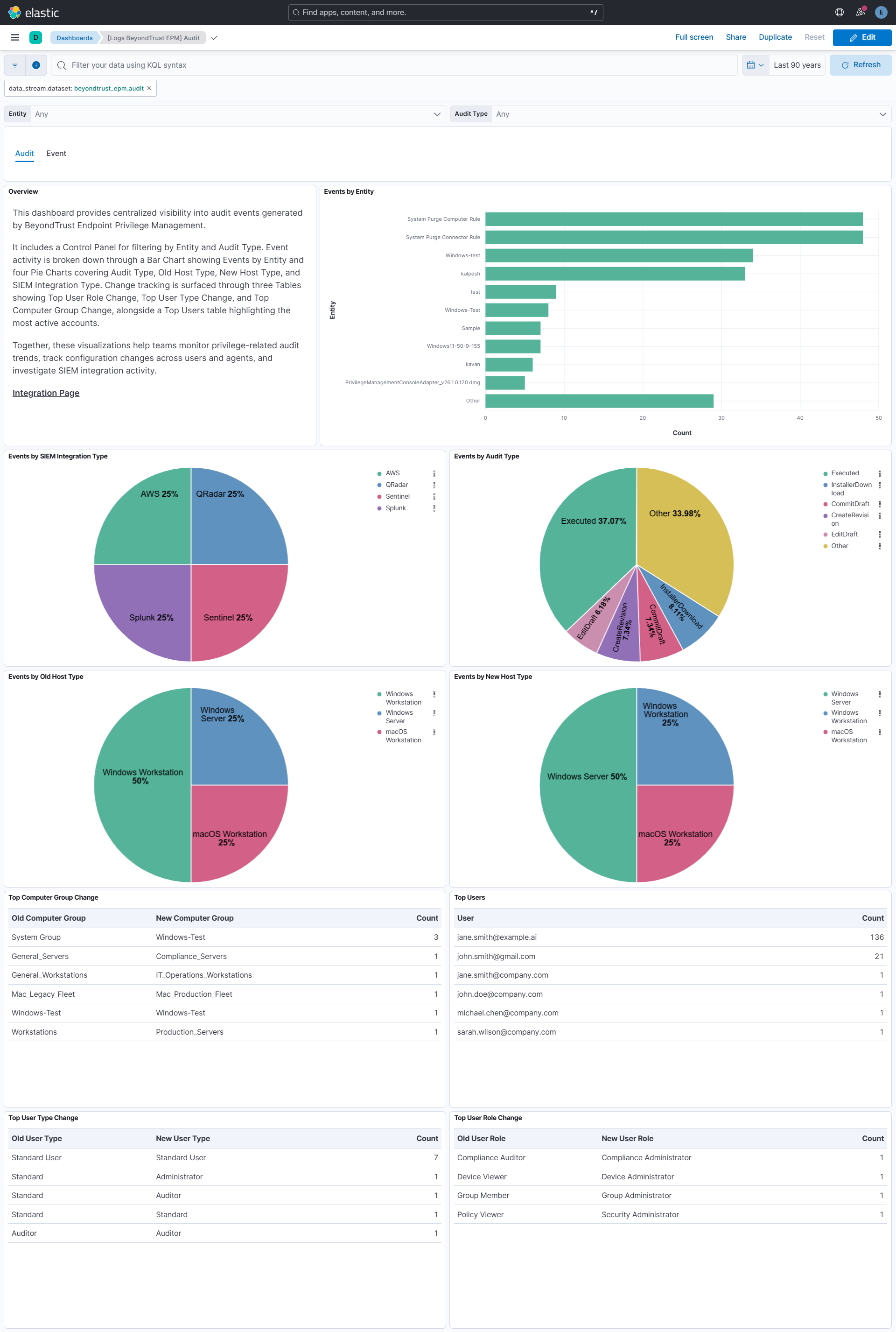
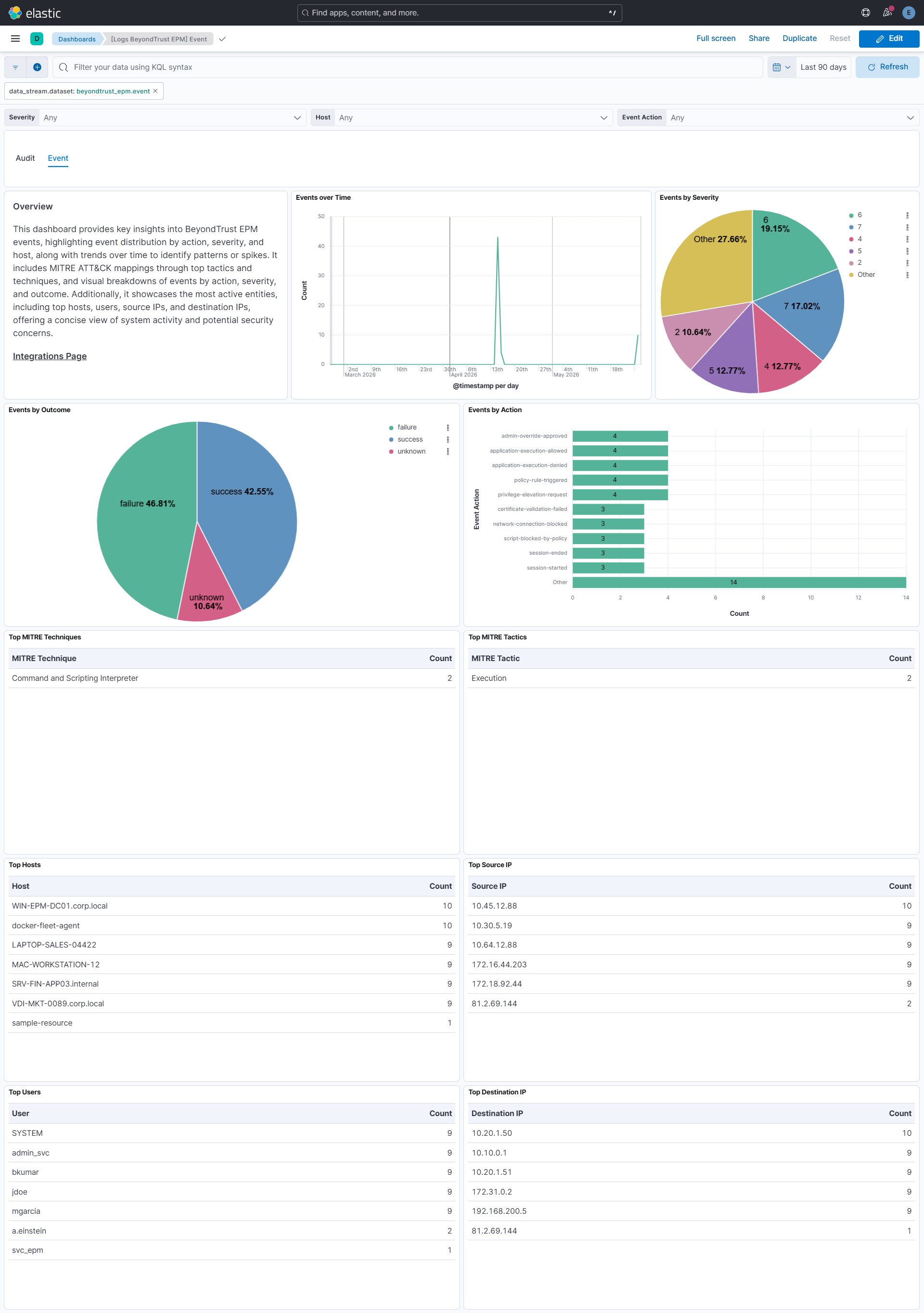
This integration includes one or more Kibana dashboards that visualizes the data collected by the integration. The screenshots below illustrate how the ingested data is displayed.
Changelog
| Version | Details | Minimum Kibana version |
|---|---|---|
| 0.2.1 | Enhancement (View pull request) Align Beats field descriptions between the audit and event data streams. |
9.0.0 8.18.0 |
| 0.2.0 | Enhancement (View pull request) Add tags to ingest pipeline processors. |
9.0.0 8.18.0 |
| 0.1.1 | Enhancement (View pull request) Set agentless deployment mode release field to ga. |
9.0.0 8.18.0 |
| 0.1.0 | Enhancement (View pull request) Initial release of package. Enhancement (View pull request) Add support for Event Data Stream. Enhancement (View pull request) Remove preserve_duplicate_custom_fields config param and add access_point_arn config option.Enhancement (View pull request) Add support for Audit Data Stream. |
9.0.0 8.18.0 |