Veeam Integration for Elastic
| Version | 0.1.0
|
| Subscription level What's this? |
Basic |
| Developed by What's this? |
Elastic |
| Ingestion method(s) | Network Protocol |
| Minimum Kibana version(s) | 9.1.0 8.19.0 |
To use pre-release integrations, go to the Integrations page in Kibana, scroll down, and toggle on the Display beta integrations option.
Veeam Backup & Replication (VBR) is the backup, replication, and recovery engine of Veeam Data Platform. It creates image-level backups of virtual, physical, and cloud workloads, runs restore and SureBackup verification, and writes a first-party Event ID catalog covering job outcomes, malware detection, authentication, configuration changes, and infrastructure health.
This integration collects that Event Forwarding syslog over TCP or UDP using the Elastic Agent syslog input. It provides visibility into backup and restore job health, ransomware activity against backup infrastructure, user and credential changes, MFA and four-eyes authorization, Cloud Connect tenant activity, and Security & Compliance Analyzer results.
The Veeam integration is compatible with Veeam Backup & Replication 12.1 and later Event Forwarding syslog (RFC 5424). Event catalog coverage is based on VBR 13.1 (338 Event IDs across 12 official categories).
This integration collects Veeam Backup & Replication Event Forwarding syslog over the network.
Veeam Backup & Replication pushes every catalog event to one syslog destination as it is written. The integration uses the Elastic Agent TCP or UDP input with the syslog processor. Each collection cycle:
- Receives RFC 5424 syslog from the backup server on the configured listen address and port (TCP, UDP, or TCP with TLS).
- Parses the syslog envelope for timestamp, hostname, APP-NAME (
Veeam_MP,Veeam_Security, orVeeam_Backup), and theoriginstructured-data element (enterpriseId="31023"). - Extracts the optional
[INF]/[WRN]/[ERR]severity token and the event payload (categoryId,instanceId, and PascalCase parameters, including nested XML such asUserFullInfo). - Maps
instanceIdtoevent.code, copies structured-data parameters underveeam.event.*, applies ECS mappings, categorizes the event using the 12 official Event Reference categories, and emits one document per syslog line.
The Veeam integration collects the following types of data:
| Data stream | Description |
|---|---|
event |
Event Forwarding syslog generated by Veeam Backup & Replication, including backup and restore job outcomes, malware detection, user and MFA activity, four-eyes authorization, credential and configuration changes, infrastructure component health, agent management, licenses, plug-ins for enterprise applications, Cloud Connect tenant activity, and Security & Compliance Analyzer results. |
Backup and restore monitoring: Track job start and finish events, task results, and restore-point lifecycle to see whether backups and restores succeed, warn, or fail.
Ransomware and malware detection: Detect malware activity in backups, restore-point deletion, entropy analysis sessions, and Security & Compliance Analyzer findings against the backup infrastructure.
Identity and access auditing: Audit MFA enablement and failures, four-eyes authorization requests, user and role changes, credential record updates, and OAuth token activity.
Configuration and infrastructure changes: Monitor general settings, syslog forwarding, repository and proxy changes, High Availability cluster events, and Cloud Connect tenant, quota, and gateway activity.
License and plug-in visibility: Track license installation and remaining days, and application backup policy activity for enterprise plug-ins.
- Elastic Agent version 8.19+ or 9.1.0+ with Fleet enrollment.
- Veeam Backup & Replication 12.1 or later with a paid license. Community Edition does not include Event Forwarding.
- Event Forwarding configured to the Elastic Agent host using UDP, TCP, or TLS.
- Network path from the backup server to the Agent listen address and port. Event Forwarding supports IPv4 or FQDN destinations only (IPv6 is not supported).
- TCP framing that matches both sides. Veeam defaults to newline-delimited messages (
SyslogTcpUseOctetCount=0). Use RFC 6587 octet-counting only if that setting is enabled on the backup server. - TLS certificate when Veeam Event Forwarding transport is TLS. Veeam is the TLS client; the Agent presents the server certificate. Veeam does not document mTLS.
- Linux binds to ports below 1024 typically require elevated privileges. This integration defaults to TCP 9604 and UDP 9605. Configure the same port in Veeam Event Forwarding. Veeam product defaults are 514 (UDP/TCP) and 6514 (TLS).
On Veeam Software Appliance, Event Forwarding is configured from the web UI. Elastic Agent cannot be installed on the appliance; the listener must run on a reachable remote host.
Elastic Agent must be installed. For more details, check the Elastic Agent installation instructions. You can install only one Elastic Agent per host.
Elastic Agent is required to receive Event Forwarding syslog and ship the data to Elastic, where the events are processed by the integration ingest pipeline.
Before configuring the integration, enable Event Forwarding on the backup server so Veeam can reach the Elastic Agent listener.
- In the VBR console, open Options → Event Forwarding → Add, or in the web UI open the gear menu → Event Forwarding → Syslog Servers → New. You can also use
Add-VBRSyslogServeror RESTPUT /api/v1/generalOptions/eventForwarding. - Set the syslog server to the Elastic Agent host FQDN or IPv4 address.
- Set the port and transport to match this integration: UDP or TCP on the configured listen port, or TLS if you enable SSL on the TCP input.
- VBR allows one syslog destination per backup server. Adding the server sends a test event; the UI reports an error if the listener is unreachable.
- Confirm TCP framing. Leave Veeam at newline-delimited messages unless
SyslogTcpUseOctetCountis set to1(KB4522).
In Kibana, navigate to Fleet → Integrations and search for Veeam.
Click Add Veeam.
Configure the integration settings:
- Enable Collect Veeam events via TCP and/or Collect Veeam events via UDP to match the transport configured in VBR.
- Listen Address: Bind address the backup server can reach. Use
0.0.0.0to listen on all interfaces.localhostblocks remote VBR. - Listen Port: Must match Event Forwarding. Defaults are
9604(TCP) and9605(UDP). - For TCP with VBR Transport = TLS, configure the SSL server certificate and key under SSL Configuration. Do not require client certificates.
- Enable Preserve original event if you want a raw copy of the syslog line in
event.original. - Configure any optional TCP/UDP options or processors as required.
Select Save and continue to save the integration.
Add the integration to an existing Agent policy or create a new one.
Verify that Veeam Event Forwarding events are being ingested into Elasticsearch.
- In the top search bar in Kibana, search for Dashboards.
- In the search bar, type Veeam, and verify the dashboard information is populated.
VBR allows one syslog destination per backup server. Multiple backup servers can send to the same Elastic Agent listener. Prefer TCP or TLS over UDP; UDP is lossy, and Veeam documents 10-second TCP timeouts before dropping events.
For more information on architectures that can be used for scaling this integration, check the Ingest Architectures documentation.
- No data collected: Confirm VBR Event Forwarding points at the Agent IPv4 address or FQDN and port, the Agent is healthy and listening, and the listen address is not
localhostwhen VBR is remote. - TCP framing issues: Check that both sides use the same framing method (newline vs RFC 6587 octet-counting per KB4522).
- TLS handshake failures: Confirm the TCP input SSL certificate is the server certificate Veeam trusts, and that client certificate authentication is not required.
- Privileged port bind failures: Use the integration default high ports (
9604/9605) and set the same port in VBR, rather than binding the Agent to 514 without elevated rights. - Mixed appliance syslog: Do not point Veeam Software Appliance Observability → Syslog (OS and audit logs) at this data stream. That payload is not Event Forwarding.
- IPv6 destination: Event Forwarding does not support IPv6 syslog destinations. Use IPv4 or an FQDN that resolves to IPv4.
For help with Elastic ingest tools, check Common problems.
- Veeam Backup & Replication user guide
- Event Forwarding
- Events and event IDs
- Syslog message format (Event Reference)
- Add-VBRSyslogServer
- KB4522 SyslogTcpUseOctetCount
The event data stream provides Event Forwarding syslog from Veeam Backup & Replication. Each document is one catalog event. event.code is the Veeam Event ID (instanceId). Events span the 12 official Event Reference categories: Backup, Restore, Infrastructure Components, Agent Management, Licenses, Cloud Connect, Credential Records, Configuration, Users, Plug-Ins for Enterprise Applications, Malware Detection, and Security & Compliance Analyzer.
Example
{
    "@timestamp": "2026-07-25T12:21:33.216Z",
    "agent": {
        "ephemeral_id": "3ddd43e3-70a9-40b9-9648-c0c1812d00f3",
        "id": "e2306d90-1d10-48e8-b108-24852156d458",
        "name": "elastic-agent-94177",
        "type": "filebeat",
        "version": "8.19.0"
    },
    "data_stream": {
        "dataset": "veeam.event",
        "namespace": "84264",
        "type": "logs"
    },
    "ecs": {
        "version": "9.5.0"
    },
    "elastic_agent": {
        "id": "e2306d90-1d10-48e8-b108-24852156d458",
        "snapshot": false,
        "version": "8.19.0"
    },
    "event": {
        "agent_id_status": "verified",
        "category": [
            "iam"
        ],
        "code": "42400",
        "dataset": "veeam.event",
        "ingested": "2026-09-23T09:46:08Z",
        "kind": "event",
        "original": "<14>1 2026-07-25T05:21:33.216714-07:00 vbr-01 Veeam_MP - - [origin enterpriseId=\"31023\"] [INF] [categoryId=0 instanceId=42400 Operation=\"Four-eyes authorization has been enabled\" OperationId=\"0\" InitiatorFullInfo=\"<ModifiedUserInfo fullName=\"EXAMPLE\\alice.johnson\" loginType=\"0\" />\" VbrHostName=\"vbr-01.example.local\" VbrVersion=\"13.1.0.411\" Version=\"1\" Description=\"Four-eyes authorization has been enabled by EXAMPLE\\alice.johnson.\"]",
        "provider": "Veeam_MP",
        "type": [
            "info"
        ]
    },
    "host": {
        "name": "vbr-01.example.local"
    },
    "input": {
        "type": "udp"
    },
    "log": {
        "level": "info",
        "source": {
            "address": "172.19.0.3:45010"
        },
        "syslog": {
            "appname": "Veeam_MP",
            "facility": {
                "code": 1,
                "name": "user-level"
            },
            "hostname": "vbr-01",
            "priority": 14,
            "severity": {
                "code": 6,
                "name": "Informational"
            },
            "structured_data": {
                "origin": {
                    "enterpriseId": "31023"
                }
            },
            "version": "1"
        }
    },
    "message": "Four-eyes authorization has been enabled by EXAMPLE\\alice.johnson.",
    "observer": {
        "hostname": "vbr-01",
        "version": "13.1.0.411"
    },
    "related": {
        "hosts": [
            "vbr-01.example.local",
            "vbr-01"
        ],
        "user": [
            "alice.johnson"
        ]
    },
    "tags": [
        "preserve_original_event",
        "forwarded",
        "veeam-event"
    ],
    "user": {
        "domain": "EXAMPLE",
        "name": "alice.johnson"
    },
    "veeam": {
        "event": {
            "category_id": "0",
            "enterprise_id": "31023",
            "initiator_full_info": {
                "full_name": "EXAMPLE\\alice.johnson",
                "login_type": "0",
                "original": "<ModifiedUserInfo fullName=\"EXAMPLE\\alice.johnson\" loginType=\"0\" />"
            },
            "operation": "Four-eyes authorization has been enabled",
            "operation_id": "0",
            "version": "1"
        }
    }
}
Exported fields
| Field | Description | Type | Unit | Metric Type |
|---|---|---|---|---|
| @timestamp | Date/time when the event originated. This is the date/time extracted from the event, typically representing when the event was generated by the source. If the event source has no original timestamp, this value is typically populated by the first time the event was received by the pipeline. Required field for all events. | date | ||
| data_stream.dataset | The field can contain anything that makes sense to signify the source of the data. Examples include nginx.access, prometheus, endpoint etc. For data streams that otherwise fit, but that do not have dataset set we use the value "generic" for the dataset value. event.dataset should have the same value as data_stream.dataset. Beyond the Elasticsearch data stream naming criteria noted above, the dataset value has additional restrictions: * Must not contain - * No longer than 100 characters |
constant_keyword | ||
| data_stream.namespace | A user defined namespace. Namespaces are useful to allow grouping of data. Many users already organize their indices this way, and the data stream naming scheme now provides this best practice as a default. Many users will populate this field with default. If no value is used, it falls back to default. Beyond the Elasticsearch index naming criteria noted above, namespace value has the additional restrictions: * Must not contain - * No longer than 100 characters |
constant_keyword | ||
| data_stream.type | An overarching type for the data stream. Currently allowed values are "logs" and "metrics". We expect to also add "traces" and "synthetics" in the near future. | constant_keyword | ||
| event.dataset | Name of the dataset. If an event source publishes more than one type of log or events (e.g. access log, error log), the dataset is used to specify which one the event comes from. It's recommended but not required to start the dataset name with the module name, followed by a dot, then the dataset name. | constant_keyword | ||
| event.module | Name of the module this data is coming from. If your monitoring agent supports the concept of modules or plugins to process events of a given source (e.g. Apache logs), event.module should contain the name of this module. |
constant_keyword | ||
| input.type | Type of filebeat input. | keyword | ||
| log.offset | Log offset. | long | ||
| log.source.address | Source address from which the log event was read / sent from. | keyword | ||
| observer.product | The product name of the observer. | constant_keyword | ||
| observer.vendor | Vendor name of the observer. | constant_keyword | ||
| veeam.event.accelerator_id | Veeam AcceleratorID structured-data parameter. |
keyword | ||
| veeam.event.accelerator_name | Veeam AcceleratorName structured-data parameter. |
keyword | ||
| veeam.event.account_name | Credential account user name. | keyword | ||
| veeam.event.added_object_ids | Veeam AddedObjectIDs structured-data parameter. |
keyword | ||
| veeam.event.added_object_names | Veeam AddedObjectNames structured-data parameter. |
keyword | ||
| veeam.event.app_group_id | Veeam AppGroupID structured-data parameter. |
keyword | ||
| veeam.event.archive_policy | Veeam ArchivePolicy structured-data parameter. |
keyword | ||
| veeam.event.archive_repository_id | Veeam ArchiveRepositoryID structured-data parameter. |
keyword | ||
| veeam.event.backup_id | Backup GUID. | keyword | ||
| veeam.event.backup_name | Backup display name. | keyword | ||
| veeam.event.barcode | Veeam Barcode structured-data parameter. |
keyword | ||
| veeam.event.category_id | Veeam syslog category identifier. Samples use 0; this is not ECS event.category. | keyword | ||
| veeam.event.certificate_thumbprint | Veeam CertificateThumbprint structured-data parameter. |
keyword | ||
| veeam.event.chain_id | Veeam ChainId structured-data parameter. |
keyword | ||
| veeam.event.changes_xml | Opaque XML describing configuration or analyzer changes. | wildcard | ||
| veeam.event.client_id | OAuth or REST client identifier. | keyword | ||
| veeam.event.cluster_description | Veeam ClusterDescription structured-data parameter. |
keyword | ||
| veeam.event.cluster_endpoint | Veeam ClusterEndpoint structured-data parameter. |
keyword | ||
| veeam.event.cluster_name | Veeam ClusterName structured-data parameter. |
keyword | ||
| veeam.event.component_display_name | Veeam ComponentDisplayName structured-data parameter. |
keyword | ||
| veeam.event.configuration_backup_spec_xml | Configuration backup session data as XML. | wildcard | ||
| veeam.event.connection_code | Veeam ConnectionCode structured-data parameter. |
keyword | ||
| veeam.event.creation_time | When a restore point was created, as MM/DD/YYYY HH:MM:SS without offset. | date | ||
| veeam.event.creation_time_utc | When a malware detection event was created, as MM/DD/YYYY HH:MM:SS without offset. | date | ||
| veeam.event.credentials_id | Credential record GUID. | keyword | ||
| veeam.event.database_name | Veeam DatabaseName structured-data parameter. |
keyword | ||
| veeam.event.datastore_name | Veeam DatastoreName structured-data parameter. |
keyword | ||
| veeam.event.date_time | Restore-point timestamp as MM/DD/YYYY HH:MM:SS without offset. | date | ||
| veeam.event.days_left | Days remaining before the licence expires. | long | ||
| veeam.event.destination | Restore destination details, often XML. | wildcard | ||
| veeam.event.details | Additional event details. | wildcard | ||
| veeam.event.detection_time_utc | When malware activity was detected, as MM/DD/YYYY HH:MM:SS without offset. | date | ||
| veeam.event.edition | Veeam Edition structured-data parameter. |
keyword | ||
| veeam.event.encryption_type | Veeam EncryptionType structured-data parameter. |
keyword | ||
| veeam.event.endpoint | Client endpoint, typically ip:port or [ipv6]:port. | keyword | ||
| veeam.event.enterprise_id | IANA private enterprise number from the origin structured-data element. Veeam is 31023. | keyword | ||
| veeam.event.esx_name | Veeam ESXName structured-data parameter. |
keyword | ||
| veeam.event.event_type | Vendor event type string. | keyword | ||
| veeam.event.event_type_id | Veeam EventTypeID structured-data parameter. |
keyword | ||
| veeam.event.expected_resource_ids | Resource identifiers expected by the Veeam service. | keyword | ||
| veeam.event.expiration_time_utc | Access token expiration time as a locale datetime string. | date | ||
| veeam.event.expiration_utc | Veeam ExpirationUTC structured-data parameter. |
date | ||
| veeam.event.extent_id | Veeam ExtentID structured-data parameter. |
keyword | ||
| veeam.event.extent_name | Veeam ExtentName structured-data parameter. |
keyword | ||
| veeam.event.extra_data | Additional operation summary. | keyword | ||
| veeam.event.failover_plan_id | Veeam FailoverPlanID structured-data parameter. |
keyword | ||
| veeam.event.failover_plan_name | Veeam FailoverPlanName structured-data parameter. |
keyword | ||
| veeam.event.failure_message | Veeam FailureMessage structured-data parameter. |
keyword | ||
| veeam.event.false_positive | Whether a malware detection event is a false positive. | boolean | ||
| veeam.event.file_server_id | Veeam FileServerID structured-data parameter. |
keyword | ||
| veeam.event.file_share_id | Veeam FileShareID structured-data parameter. |
keyword | ||
| veeam.event.flags | Job flags. Documentation describes whether the job was started by a user. | keyword | ||
| veeam.event.folder_ref | Veeam FolderRef structured-data parameter. |
keyword | ||
| veeam.event.friendly_name | Login or friendly name on token and authorization events. | keyword | ||
| veeam.event.gateway_id | Veeam GatewayID structured-data parameter. |
keyword | ||
| veeam.event.gateway_name | Veeam GatewayName structured-data parameter. |
keyword | ||
| veeam.event.gateway_pool_id | Veeam GatewayPoolID structured-data parameter. |
keyword | ||
| veeam.event.gateway_pool_name | Veeam GatewayPoolName structured-data parameter. |
keyword | ||
| veeam.event.grant_type | OAuth grant type. | keyword | ||
| veeam.event.hardware_plan_id | Veeam HardwarePlanID structured-data parameter. |
keyword | ||
| veeam.event.hint | Veeam Hint structured-data parameter. |
keyword | ||
| veeam.event.host_id | Veeam HostID structured-data parameter. |
keyword | ||
| veeam.event.host_name | Infrastructure component hostname. | keyword | ||
| veeam.event.id | User, group, or role object GUID. | keyword | ||
| veeam.event.idp_entity_id | Veeam IdpEntityId structured-data parameter. |
keyword | ||
| veeam.event.infrastructure_id | Veeam InfrastructureID structured-data parameter. |
keyword | ||
| veeam.event.initiator_full_info.full_name | User full name parsed from ModifiedUserInfo XML, or the plain-text value when the field is not XML. | keyword | ||
| veeam.event.initiator_full_info.login_type | Numeric loginType from ModifiedUserInfo XML. | keyword | ||
| veeam.event.initiator_full_info.original | Original InitiatorFullInfo value, XML or plain text. | wildcard | ||
| veeam.event.initiator_name | Name of the user who initiated the operation. | keyword | ||
| veeam.event.initiator_user_name | Veeam InitiatorUserName structured-data parameter. |
keyword | ||
| veeam.event.installation_id | Veeam InstallationID structured-data parameter. |
keyword | ||
| veeam.event.is_corrupted | Whether the restore point is corrupted. | boolean | ||
| veeam.event.is_disabled | Whether the object is disabled. | boolean | ||
| veeam.event.is_full | Whether the restore point is a full backup. | boolean | ||
| veeam.event.is_install_or_upgrade | Veeam IsInstallOrUpgrade structured-data parameter. |
boolean | ||
| veeam.event.is_manual_run | Whether Security and Compliance Analyzer ran manually. | boolean | ||
| veeam.event.is_retry | Whether this task is a retry. | boolean | ||
| veeam.event.is_sure_replica | Veeam IsSureReplica structured-data parameter. |
boolean | ||
| veeam.event.is_throttling_enabled | Veeam IsThrottlingEnabled structured-data parameter. |
boolean | ||
| veeam.event.job_description | Job description text. | wildcard | ||
| veeam.event.job_id | GUID of the Veeam job. | keyword | ||
| veeam.event.job_name | Display name of the Veeam job. | keyword | ||
| veeam.event.job_result | Job finish result: 0 Success, 1 Warning, 2 Failed. | keyword | ||
| veeam.event.job_session_id | GUID of the Veeam job session. | keyword | ||
| veeam.event.job_type | Numeric Veeam job type. Official integer tables are not published. | keyword | ||
| veeam.event.kms_server_id | Veeam KMSServerID structured-data parameter. |
keyword | ||
| veeam.event.last_known_host_name | Veeam LastKnownHostName structured-data parameter. |
keyword | ||
| veeam.event.location | Veeam Location structured-data parameter. |
keyword | ||
| veeam.event.log_export_spec_xml | Log export session data as XML. | wildcard | ||
| veeam.event.maintenance_mode | Veeam MaintenanceMode structured-data parameter. |
keyword | ||
| veeam.event.media_pool_id | Veeam MediaPoolID structured-data parameter. |
keyword | ||
| veeam.event.media_set_id | Veeam MediaSetID structured-data parameter. |
keyword | ||
| veeam.event.modified_object_ids | Veeam ModifiedObjectIDs structured-data parameter. |
keyword | ||
| veeam.event.modified_object_names | Veeam ModifiedObjectNames structured-data parameter. |
keyword | ||
| veeam.event.mount_id | Veeam MountID structured-data parameter. |
keyword | ||
| veeam.event.mount_server | Veeam MountServer structured-data parameter. |
keyword | ||
| veeam.event.name | User, group, or object name. | keyword | ||
| veeam.event.new_password_hint | Veeam NewPasswordHint structured-data parameter. |
keyword | ||
| veeam.event.new_password_id | Veeam NewPasswordId structured-data parameter. |
keyword | ||
| veeam.event.new_primary_node_name | Veeam NewPrimaryNodeName structured-data parameter. |
keyword | ||
| veeam.event.new_quota_in_megabytes | Veeam NewQuotaInMegabytes structured-data parameter. |
long | ||
| veeam.event.new_secondary_node_name | Veeam NewSecondaryNodeName structured-data parameter. |
keyword | ||
| veeam.event.new_status | Veeam NewStatus structured-data parameter. |
keyword | ||
| veeam.event.not_implemented | Count of analyzer checks with Not implemented status. | long | gauge | |
| veeam.event.note | Comment specified in a Note field. | keyword | ||
| veeam.event.object_id | Protected object GUID. | keyword | ||
| veeam.event.object_name | Protected object name. | keyword | ||
| veeam.event.oib_id | Restore-point / machine (OIB) GUID. | keyword | ||
| veeam.event.old_status | Veeam OldStatus structured-data parameter. |
keyword | ||
| veeam.event.operation | Display name of the four-eyes or related operation. | keyword | ||
| veeam.event.operation_id | Four-eyes or other operation identifier. | keyword | ||
| veeam.event.operation_summary | Tape or operation summary text. | wildcard | ||
| veeam.event.original_oib_id | Original restore-point / machine GUID. | keyword | ||
| veeam.event.original_password_hint | Veeam OriginalPasswordHint structured-data parameter. |
keyword | ||
| veeam.event.original_password_id | Veeam OriginalPasswordId structured-data parameter. |
keyword | ||
| veeam.event.param3 | Additional vendor parameter. | keyword | ||
| veeam.event.parameters | Veeam Parameters structured-data parameter. |
keyword | ||
| veeam.event.password_matched | Whether the supplied password matched the stored credential record. | boolean | ||
| veeam.event.platform | Numeric platform type. Official integer tables are not published. | keyword | ||
| veeam.event.point_id | Restore point GUID. | keyword | ||
| veeam.event.policy_name | Veeam PolicyName structured-data parameter. |
keyword | ||
| veeam.event.port | Veeam Port structured-data parameter. |
long | ||
| veeam.event.protection_group_id | Veeam ProtectionGroupID structured-data parameter. |
keyword | ||
| veeam.event.protection_group_name | Veeam ProtectionGroupName structured-data parameter. |
keyword | ||
| veeam.event.provider_id | Veeam ProviderID structured-data parameter. |
keyword | ||
| veeam.event.provider_name | Veeam ProviderName structured-data parameter. |
keyword | ||
| veeam.event.proxy_id | Veeam ProxyID structured-data parameter. |
keyword | ||
| veeam.event.proxy_name | Veeam ProxyName structured-data parameter. |
keyword | ||
| veeam.event.proxy_server | Veeam ProxyServer structured-data parameter. |
keyword | ||
| veeam.event.quota_id | Veeam QuotaID structured-data parameter. |
keyword | ||
| veeam.event.quota_in_megabytes | Veeam QuotaInMegabytes structured-data parameter. |
long | ||
| veeam.event.reason | Reason code or reason text for the operation. | keyword | ||
| veeam.event.redirect_uri | Veeam RedirectUri structured-data parameter. |
keyword | ||
| veeam.event.refresh_token_chain_id | Refresh token chain identifier. | keyword | ||
| veeam.event.related_creds_id | Veeam RelatedCredsID structured-data parameter. |
keyword | ||
| veeam.event.related_creds_name | Veeam RelatedCredsName structured-data parameter. |
keyword | ||
| veeam.event.removed_object_ids | Veeam RemovedObjectIDs structured-data parameter. |
keyword | ||
| veeam.event.removed_object_names | Veeam RemovedObjectNames structured-data parameter. |
keyword | ||
| veeam.event.repo_access_group_id | Veeam RepoAccessGroupID structured-data parameter. |
keyword | ||
| veeam.event.repository_id | Backup repository GUID. | keyword | ||
| veeam.event.repository_name | Backup repository display name. | keyword | ||
| veeam.event.repository_oib_id | Veeam RepositoryOibID structured-data parameter. |
keyword | ||
| veeam.event.request_id | Veeam RequestID structured-data parameter. |
keyword | ||
| veeam.event.reset_count | Number of configuration parameters returned to the checklist. | long | gauge | |
| veeam.event.resource_id | Resource identifier for token and authorization events. | keyword | ||
| veeam.event.restore_point_id | Veeam RestorePointID structured-data parameter. |
keyword | ||
| veeam.event.restore_point_time | Veeam RestorePointTime structured-data parameter. |
date | ||
| veeam.event.restore_point_time_stamp | Restore-point creation timestamp as MM/DD/YYYY HH:MM:SS without offset. | date | ||
| veeam.event.restore_type | Numeric restore operation type. | keyword | ||
| veeam.event.result | Session result. Samples use 0 Success, 1 Warning, 2 Failed, or the string Success. | keyword | ||
| veeam.event.scan_time_utc | When a scan session started, as MM/DD/YYYY HH:MM:SS without offset. | date | ||
| veeam.event.secondary_node_name | Veeam SecondaryNodeName structured-data parameter. |
keyword | ||
| veeam.event.sequence_number | Veeam SequenceNumber structured-data parameter. |
keyword | ||
| veeam.event.server_id | Veeam ServerID structured-data parameter. |
keyword | ||
| veeam.event.server_name | Server name associated with the restore point or object. | keyword | ||
| veeam.event.session_id | Session GUID. | keyword | ||
| veeam.event.source_location | Veeam SourceLocation structured-data parameter. |
keyword | ||
| veeam.event.source_location_id | Veeam SourceLocationID structured-data parameter. |
keyword | ||
| veeam.event.source_name | Veeam SourceName structured-data parameter. |
keyword | ||
| veeam.event.source_objects | Comma-separated source object identifiers. | keyword | ||
| veeam.event.source_type | Numeric job source type. Official integer tables are not published. | keyword | ||
| veeam.event.state | Veeam State structured-data parameter. |
keyword | ||
| veeam.event.status | Task or session status. Task-finished samples use 0 Success, 2 Failed, 3 Warning. | keyword | ||
| veeam.event.storage_id | Veeam StorageID structured-data parameter. |
keyword | ||
| veeam.event.storage_size | Restore-point size in bytes. | long | byte | gauge |
| veeam.event.subject | Subject identifier on token and authorization events. | keyword | ||
| veeam.event.subtenant_id | Veeam SubtenantID structured-data parameter. |
keyword | ||
| veeam.event.subtenant_name | Veeam SubtenantName structured-data parameter. |
keyword | ||
| veeam.event.success | Count of analyzer checks with Passed status. | long | gauge | |
| veeam.event.supervisor_full_info.full_name | User full name parsed from ModifiedUserInfo XML, or the plain-text value when the field is not XML. | keyword | ||
| veeam.event.supervisor_full_info.login_type | Numeric loginType from ModifiedUserInfo XML. | keyword | ||
| veeam.event.supervisor_full_info.original | Original SupervisorFullInfo value, XML or plain text. | wildcard | ||
| veeam.event.support_left | Days of support remaining; -1 when not applicable. | long | ||
| veeam.event.suppressed | Count of analyzer checks excluded from the checklist. | long | gauge | |
| veeam.event.suppressed_count | Number of configuration parameters excluded from the checklist. | long | gauge | |
| veeam.event.tape_id | Veeam TapeID structured-data parameter. |
keyword | ||
| veeam.event.tape_ids | Tape identifiers. | keyword | ||
| veeam.event.tape_library_id | Veeam TapeLibraryID structured-data parameter. |
keyword | ||
| veeam.event.tape_object_id | Veeam TapeObjectID structured-data parameter. |
keyword | ||
| veeam.event.tape_object_name | Veeam TapeObjectName structured-data parameter. |
keyword | ||
| veeam.event.tape_oib_id | Veeam TapeOibID structured-data parameter. |
keyword | ||
| veeam.event.tape_storage_creation_time | Veeam TapeStorageCreationTime structured-data parameter. |
date | ||
| veeam.event.tape_storage_id | Veeam TapeStorageID structured-data parameter. |
keyword | ||
| veeam.event.tape_used_size | Veeam TapeUsedSize structured-data parameter. |
long | byte | gauge |
| veeam.event.target_event_id | Veeam TargetEventID structured-data parameter. |
keyword | ||
| veeam.event.target_ip_address | Target machine name or IP for entropy analysis download. | keyword | ||
| veeam.event.target_location | Veeam TargetLocation structured-data parameter. |
keyword | ||
| veeam.event.target_location_id | Veeam TargetLocationID structured-data parameter. |
keyword | ||
| veeam.event.target_media_pool_id | Veeam TargetMediaPoolID structured-data parameter. |
keyword | ||
| veeam.event.target_name | Veeam TargetName structured-data parameter. |
keyword | ||
| veeam.event.target_object_id | Target object GUID. | keyword | ||
| veeam.event.task_session_id | Task session GUID. | keyword | ||
| veeam.event.task_session_type | Veeam TaskSessionType structured-data parameter. |
keyword | ||
| veeam.event.tenant_id | Veeam TenantID structured-data parameter. |
keyword | ||
| veeam.event.tenant_name | Veeam TenantName structured-data parameter. |
keyword | ||
| veeam.event.throttling_speed_limit | Veeam ThrottlingSpeedLimit structured-data parameter. |
keyword | ||
| veeam.event.throttling_speed_unit | Veeam ThrottlingSpeedUnit structured-data parameter. |
keyword | ||
| veeam.event.token_id | Veeam TokenID structured-data parameter. |
keyword | ||
| veeam.event.total_status | Veeam TotalStatus structured-data parameter. |
keyword | ||
| veeam.event.transferred_gb | Data transferred by a backup task, in decimal gigabytes. | double | gauge | |
| veeam.event.type | Numeric type for repositories, storage, or similar objects. | keyword | ||
| veeam.event.unable_to_check | Count of analyzer checks that could not be detected. | long | gauge | |
| veeam.event.user_full_info.full_name | User full name parsed from ModifiedUserInfo XML, or the plain-text value when the field is not XML. | keyword | ||
| veeam.event.user_full_info.login_type | Numeric loginType from ModifiedUserInfo XML. | keyword | ||
| veeam.event.user_full_info.original | Original UserFullInfo value, XML or plain text. | wildcard | ||
| veeam.event.user_id | User identifier. Samples may contain a GUID or a SID depending on the event. | keyword | ||
| veeam.event.version | Event schema version from the structured-data Version parameter. | keyword | ||
| veeam.event.virtual_lab_id | Veeam VirtualLabID structured-data parameter. |
keyword | ||
| veeam.event.vm_id | Veeam VmID structured-data parameter. |
keyword | ||
| veeam.event.vm_location | Veeam VmLocation structured-data parameter. |
keyword | ||
| veeam.event.vm_name | Protected virtual machine name. | keyword | ||
| veeam.event.vm_ref | Platform reference for the virtual machine. | keyword | ||
| veeam.event.wan_accelerator_id | Veeam WanAcceleratorID structured-data parameter. |
keyword | ||
| veeam.event.wan_accelerator_name | Veeam WanAcceleratorName structured-data parameter. |
keyword | ||
| veeam.event.will_be_retried | Whether Veeam plans to retry the job. | boolean | ||
| veeam.event.xml_change | Updated data in XML format. | wildcard |
These inputs can be used with this integration:
tcp
For more details about the TCP input settings, check the Filebeat documentation.
To collect logs via TCP, select Collect logs via TCP and configure the following parameters:
Required Settings:
- Host
- Port
Common Optional Settings:
- Max Message Size - Maximum size of incoming messages
- Max Connections - Maximum number of concurrent connections
- Timeout - How long to wait for data before closing idle connections
- Line Delimiter - Character(s) that separate log messages
To enable encrypted connections, configure the following SSL settings:
SSL Settings:
- Enable SSL - Toggle to enable SSL/TLS encryption
- Certificate - Path to the SSL certificate file (
.crtor.pem) - Certificate Key - Path to the private key file (
.key) - Certificate Authorities - Path to CA certificate file for client certificate validation (optional)
- Client Authentication - Require client certificates (
none,optional, orrequired) - Supported Protocols - TLS versions to support (e.g.,
TLSv1.2,TLSv1.3)
Example SSL Configuration:
ssl.enabled: true
ssl.certificate: "/path/to/server.crt"
ssl.key: "/path/to/server.key"
ssl.certificate_authorities: ["/path/to/ca.crt"]
ssl.client_authentication: "optional"
udp
For more details about the UDP input settings, check the Filebeat documentation.
To collect logs via UDP, select Collect logs via UDP and configure the following parameters:
Required Settings:
- Host
- Port
Common Optional Settings:
- Max Message Size - Maximum size of UDP packets to accept (default: 10KB, max: 64KB)
- Read Buffer - UDP socket read buffer size for handling bursts of messages
- Read Timeout - How long to wait for incoming packets before checking for shutdown
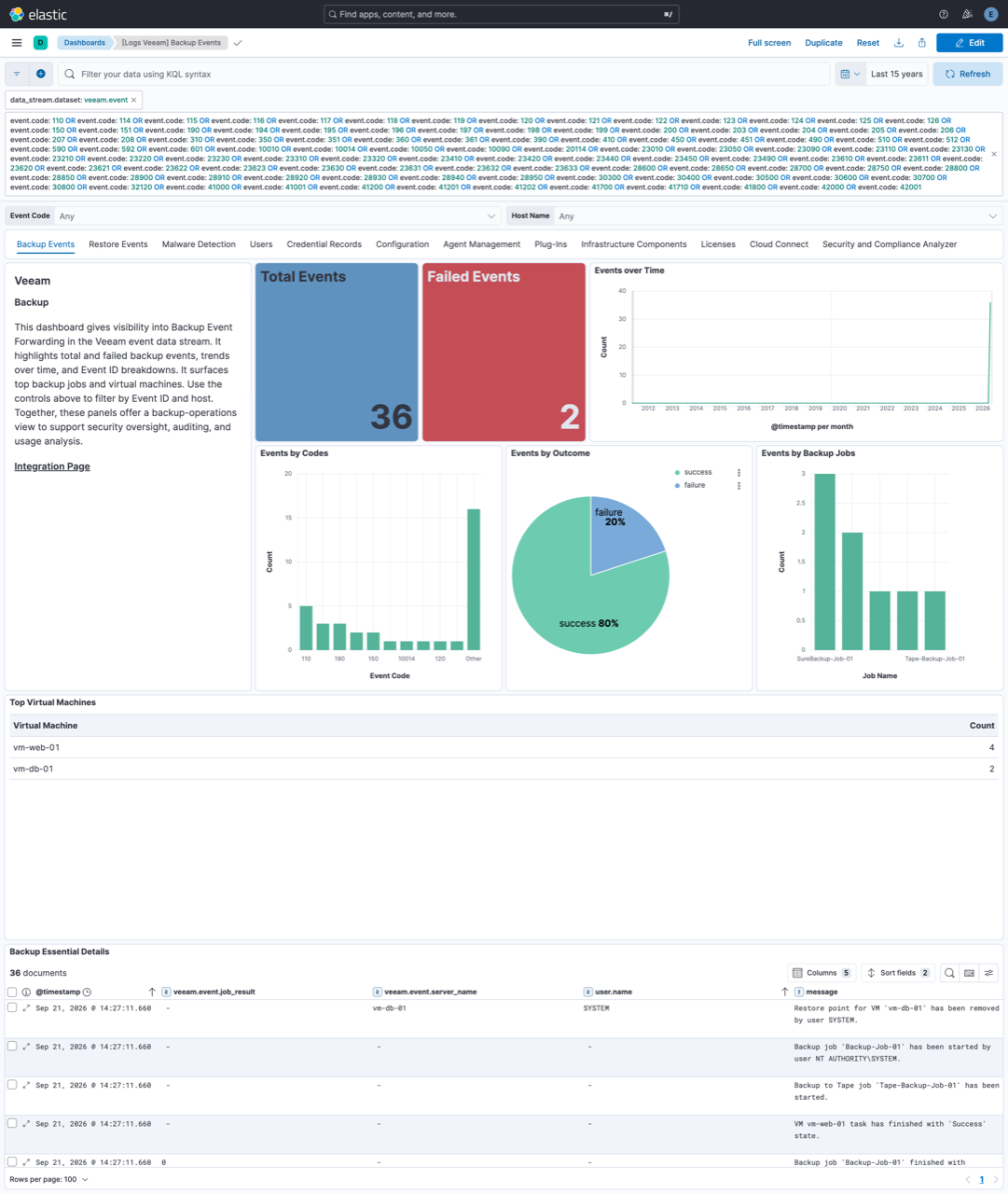
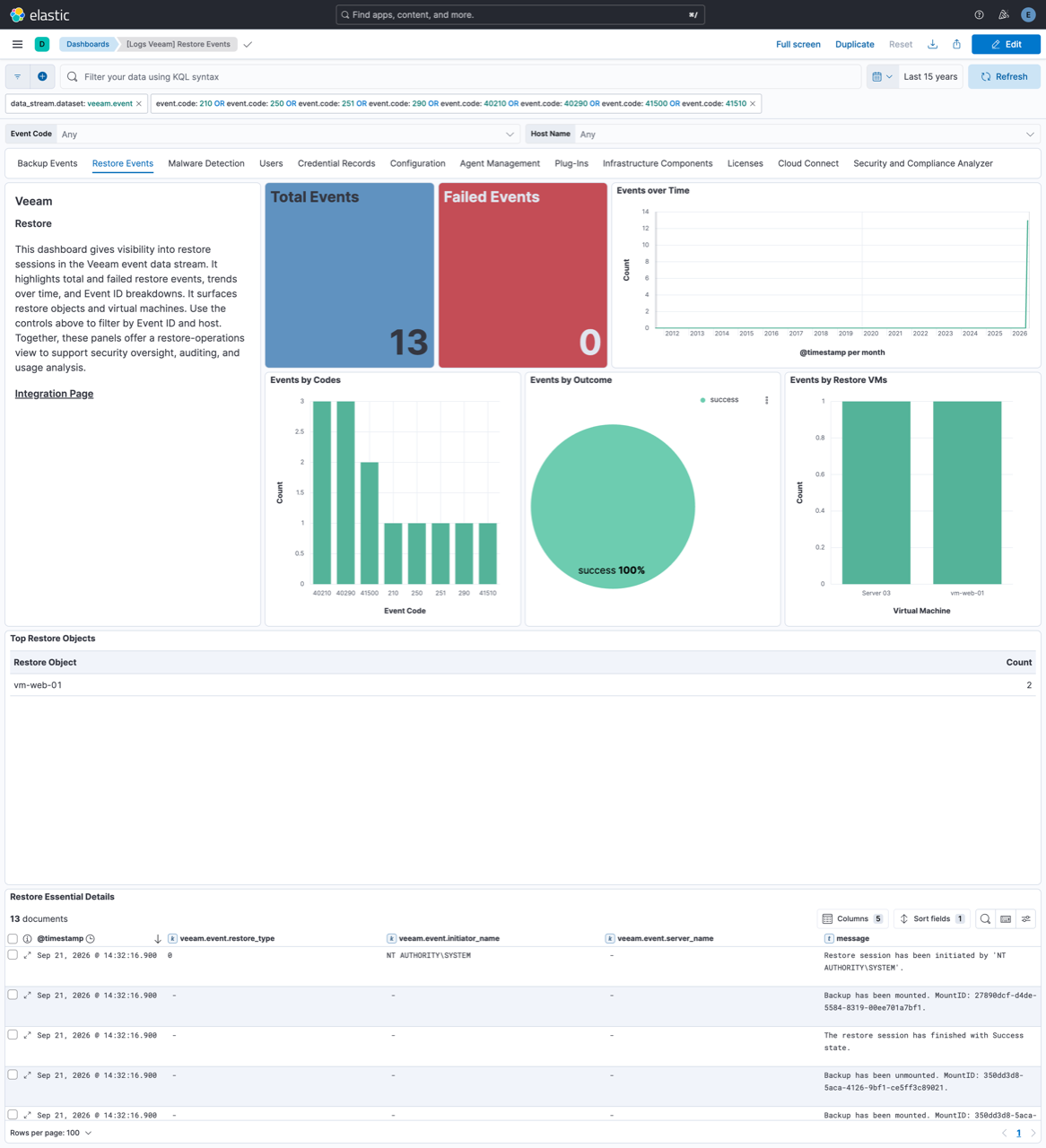
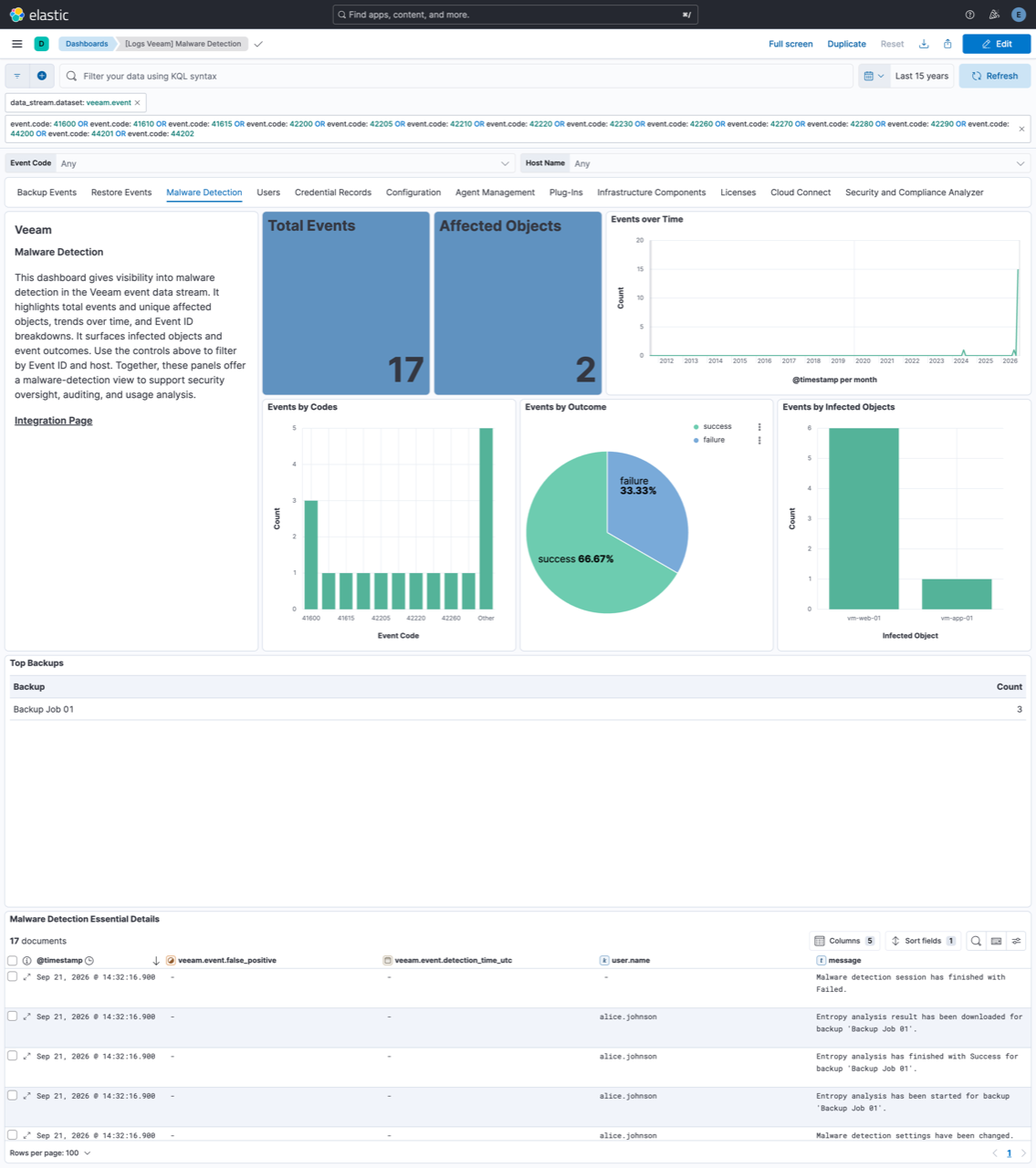
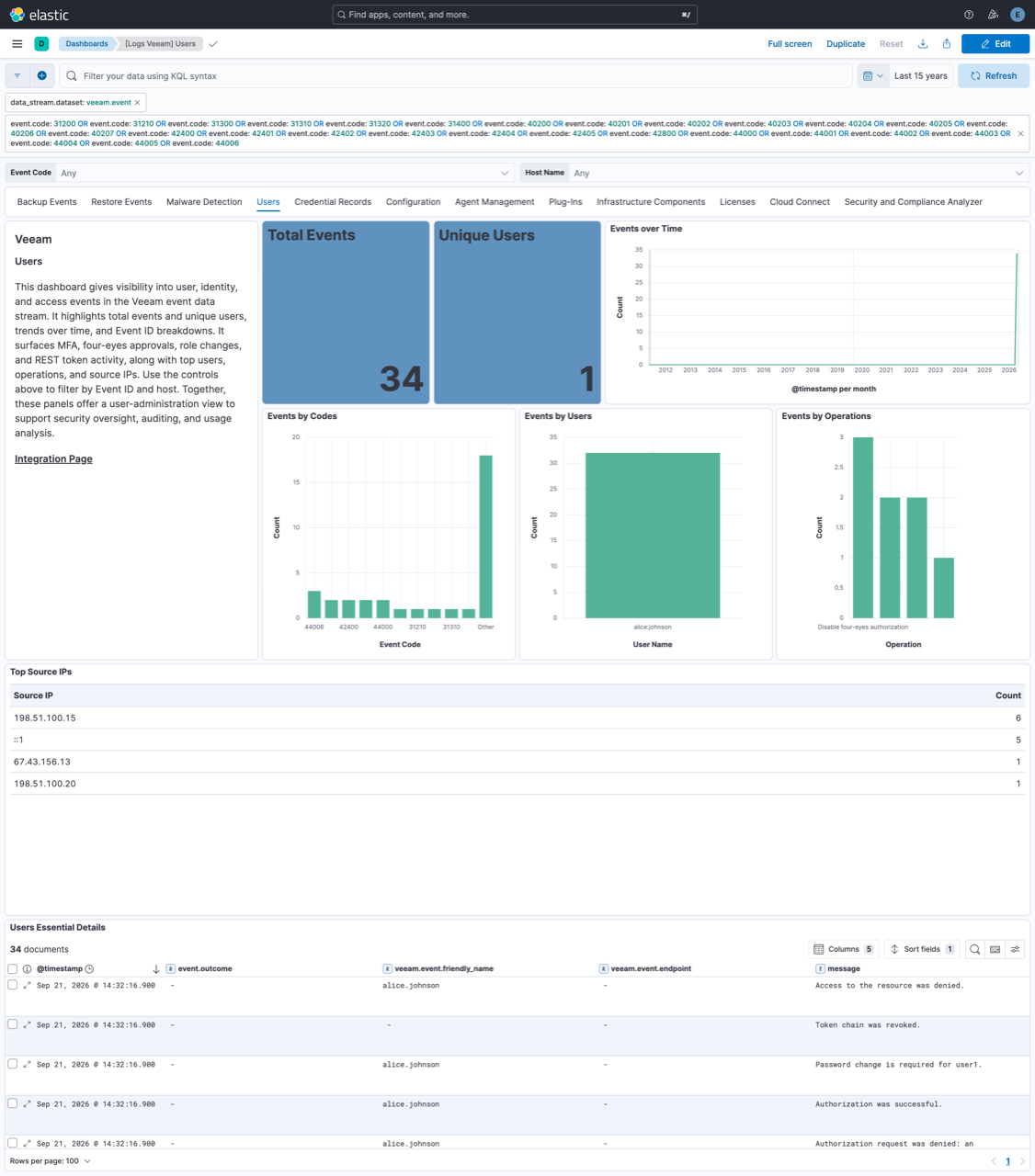
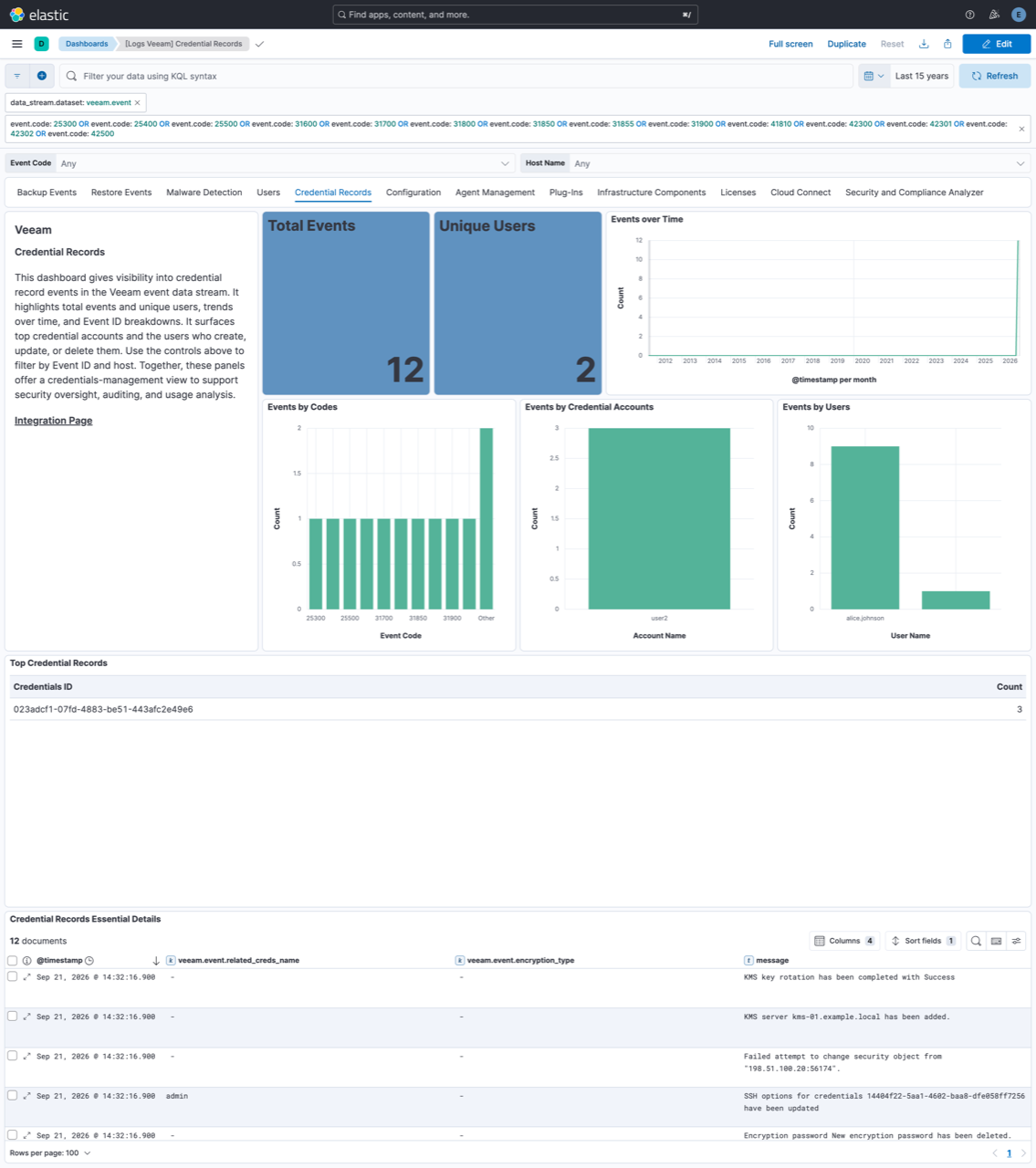
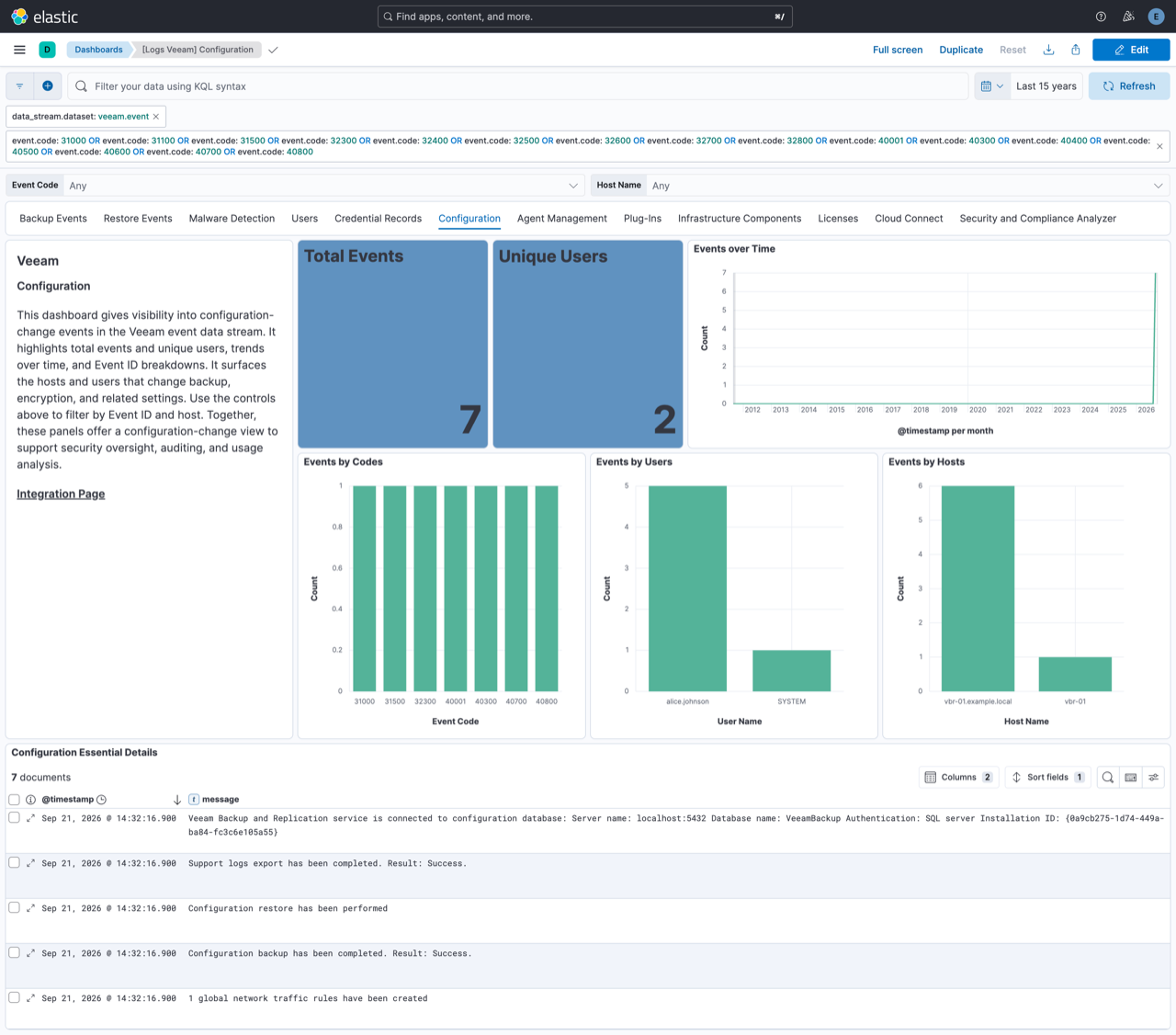
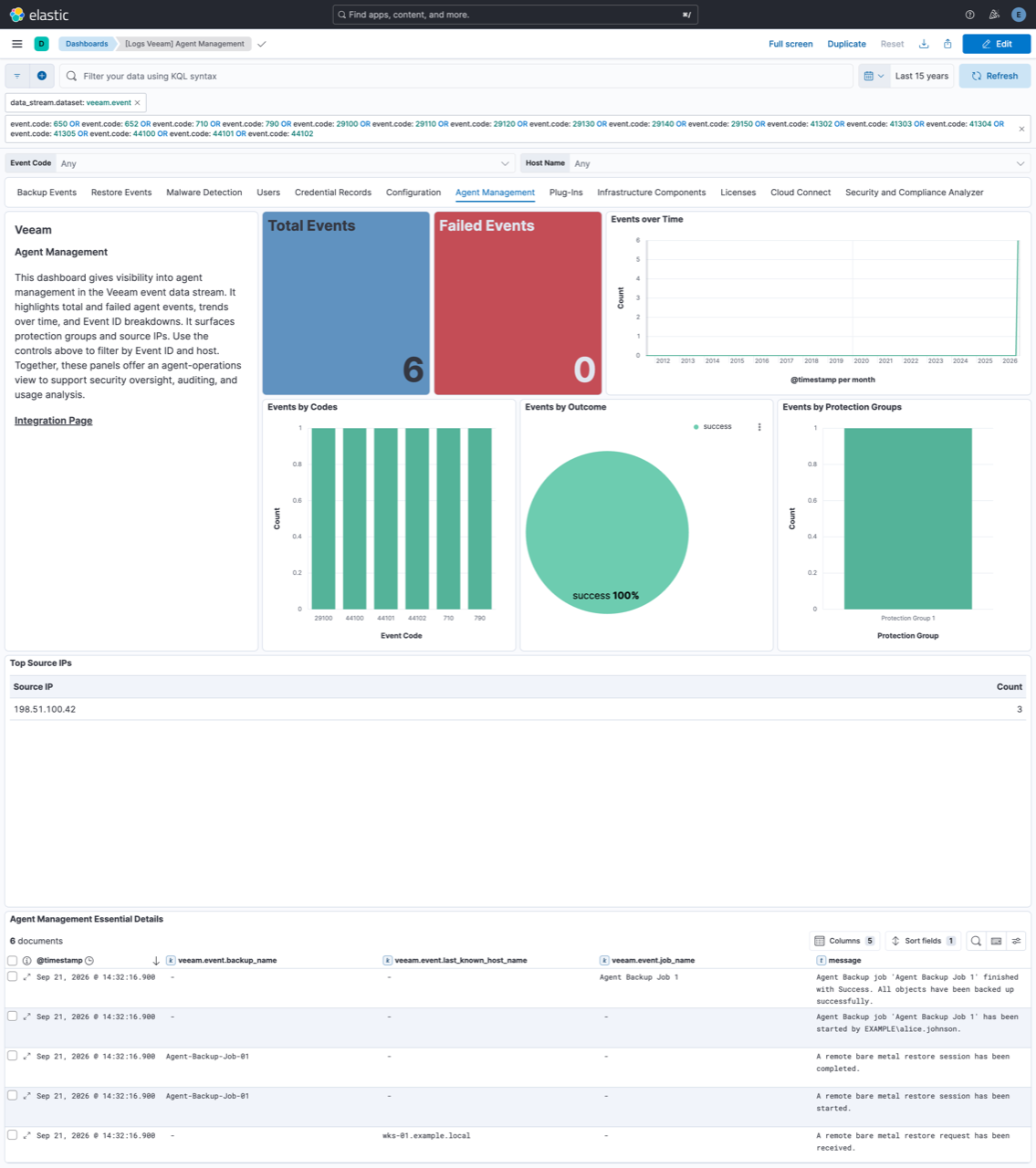
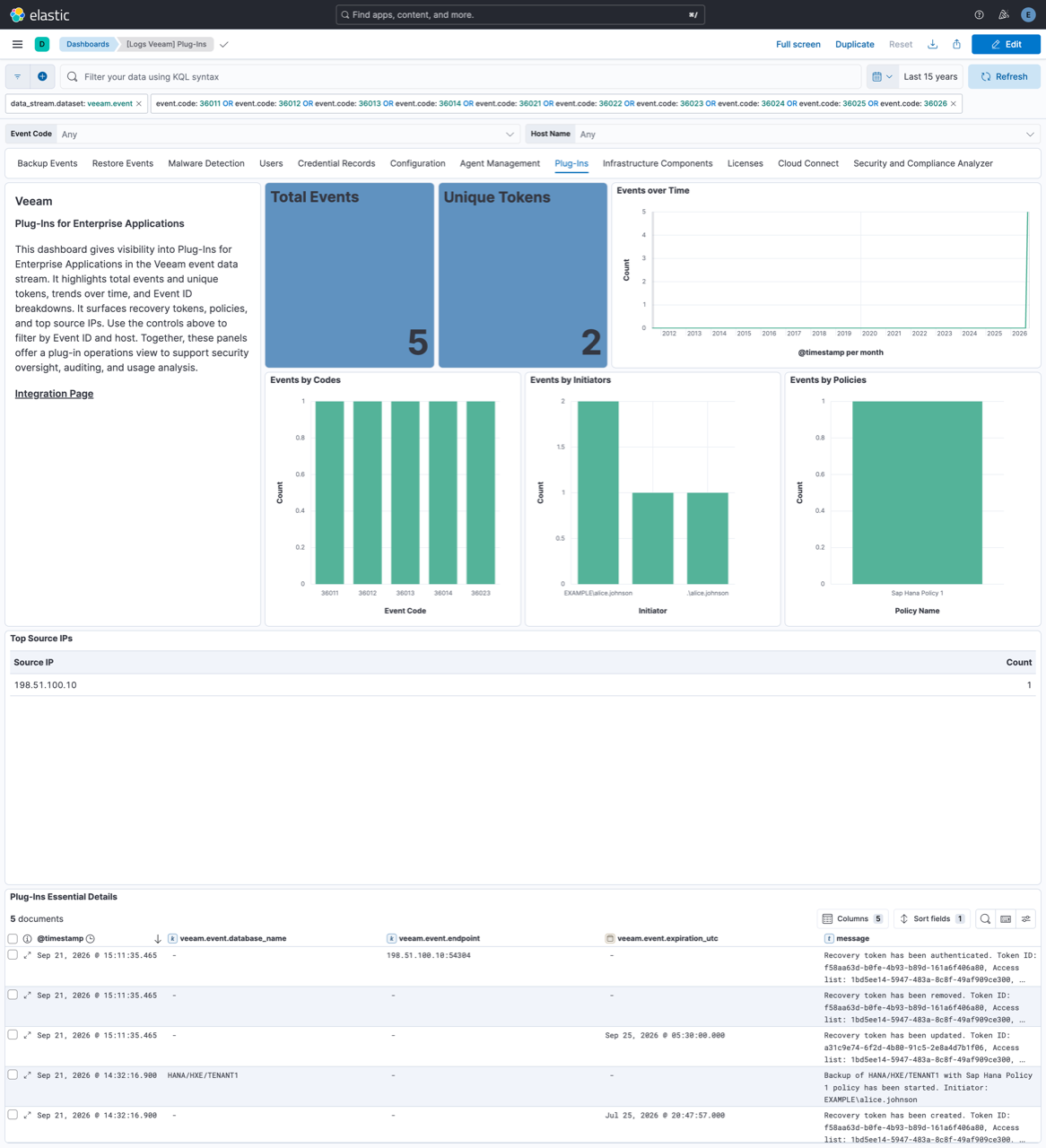
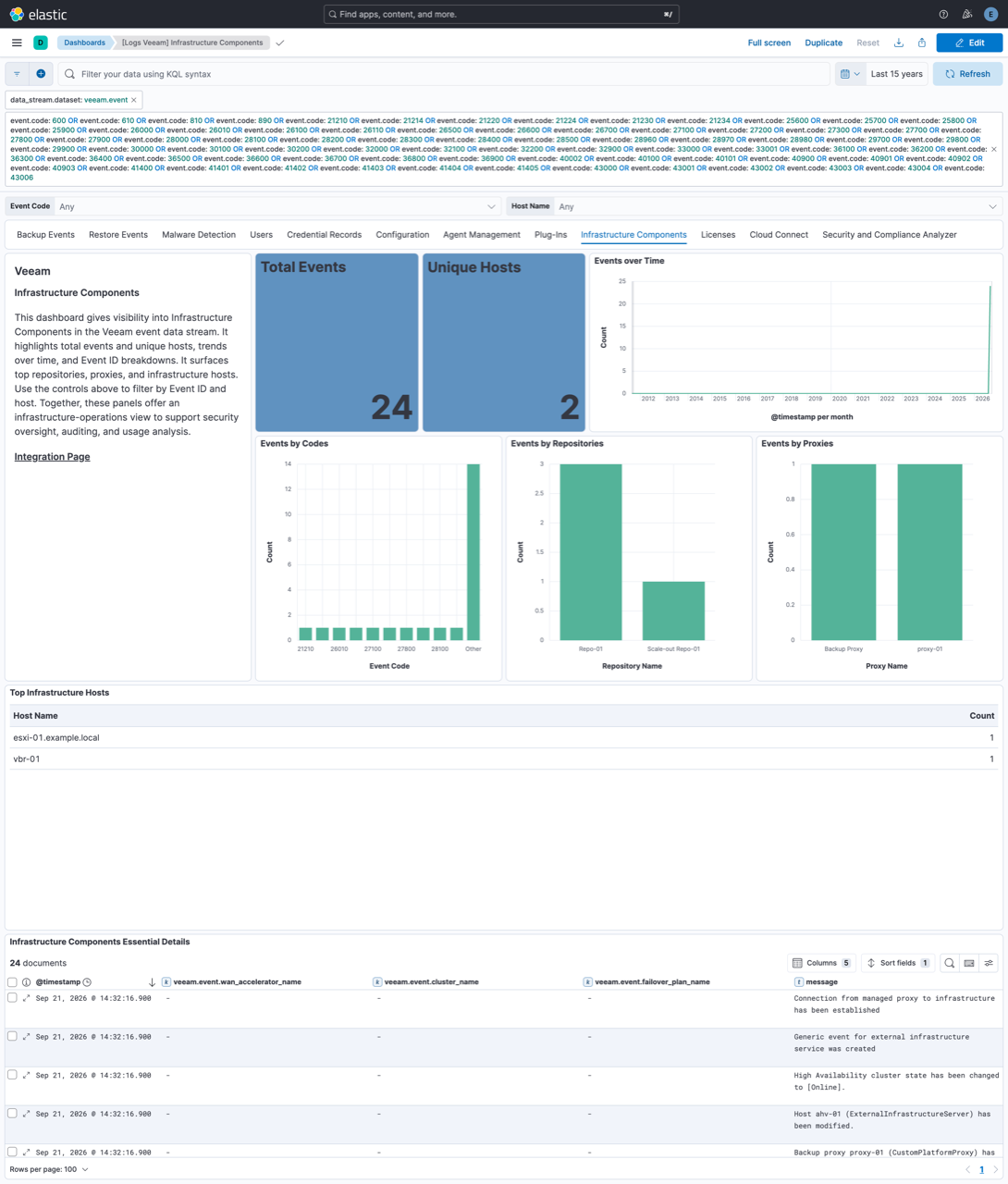
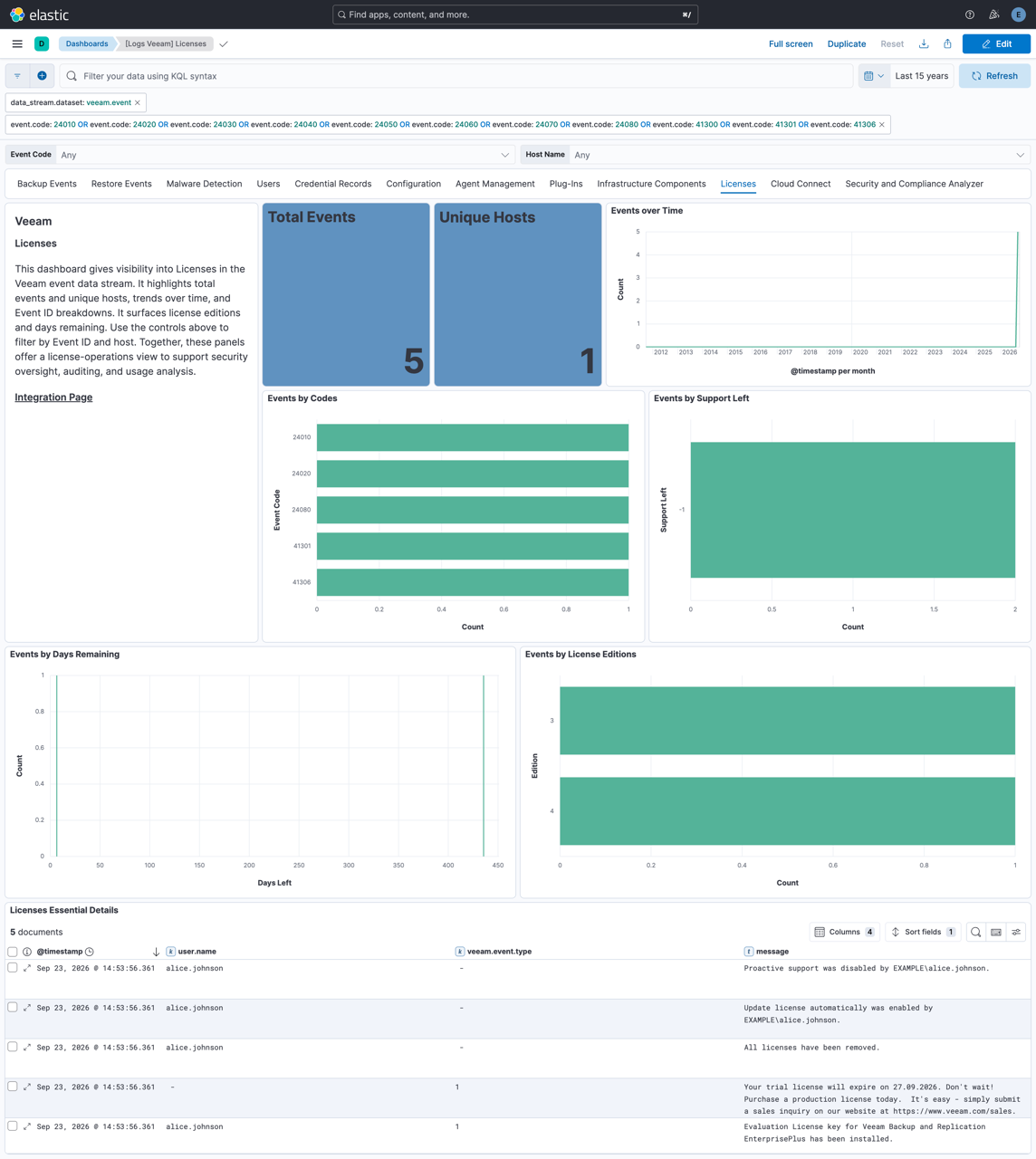
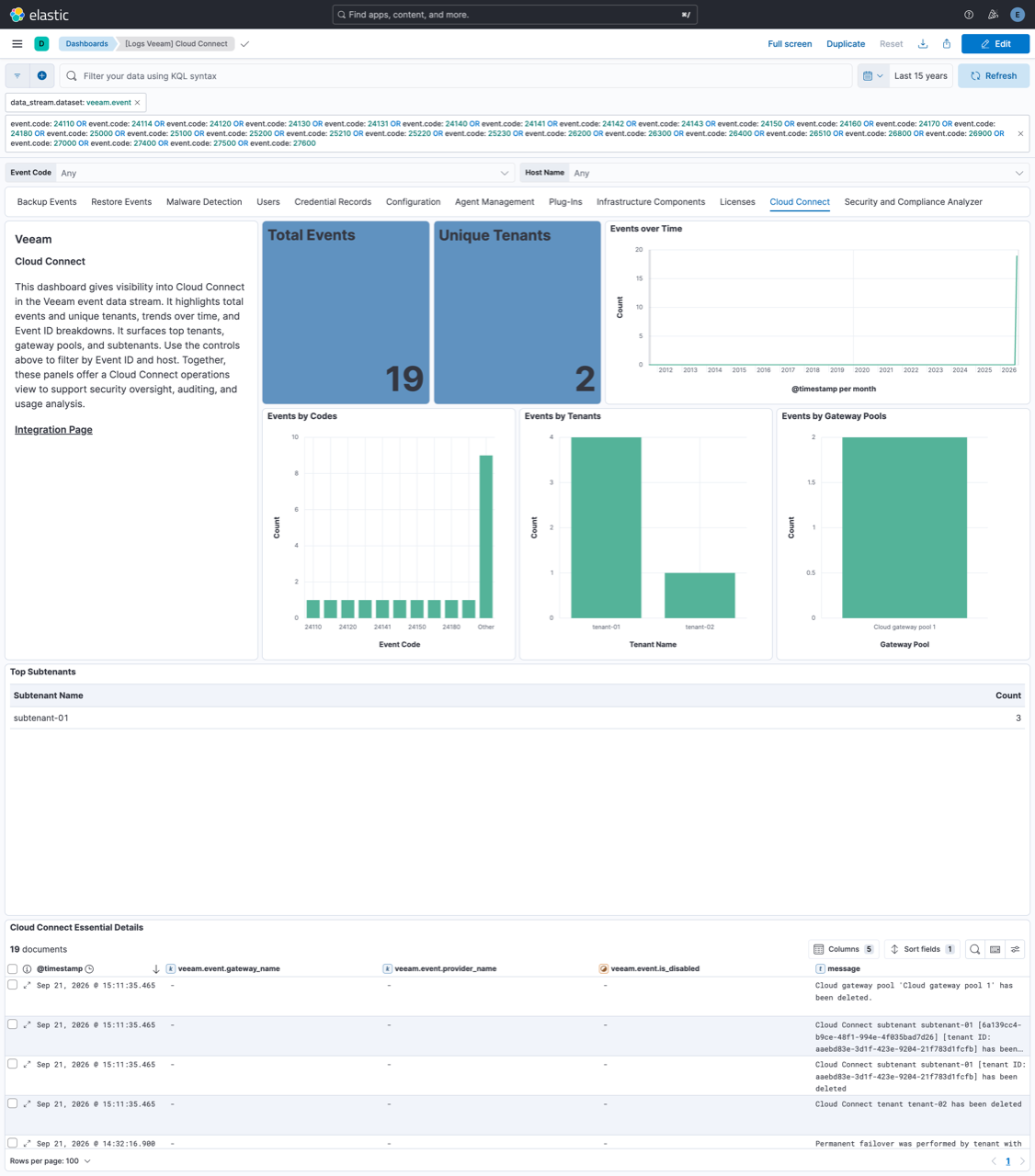
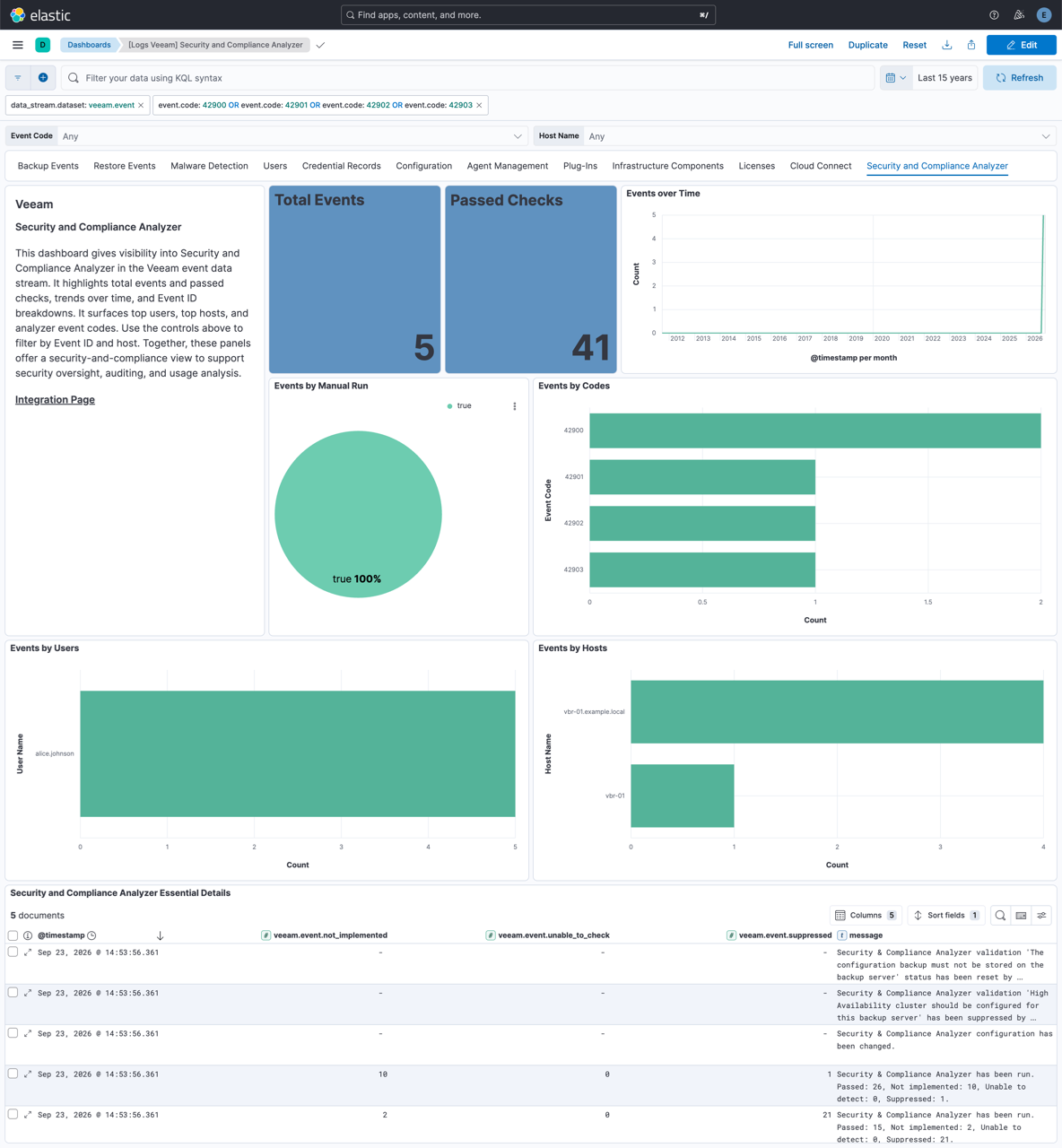
This integration includes one or more Kibana dashboards that visualizes the data collected by the integration. The screenshots below illustrate how the ingested data is displayed.
Changelog
| Version | Details | Minimum Kibana version |
|---|---|---|
| 0.1.0 | Enhancement (View pull request) Initial release of the Veeam integration. |
9.1.0 8.19.0 |