LiteLLM Integration
| Version | 0.1.0
|
| Managed integration release status |
|
| Subscription level What's this? |
Basic |
| Developed by What's this? |
Elastic |
| Ingestion method(s) | API, AWS S3 |
| Minimum Kibana version(s) | 9.1.0 8.19.0 |
You can use this integration as an Elastic Managed integration on Elastic Cloud Hosted deployments running this version or later.
To use pre-release integrations, go to the Integrations page in Kibana, scroll down, and toggle on the Display beta integrations option.
LiteLLM is a unified LLM gateway and proxy that provides a unified interface for accessing multiple large language models (LLMs) from different providers. It offers comprehensive audit logging, rate limiting, and cost tracking across hybrid LLM deployments — combining authentication, authorization, and detailed audit trails into a unified platform for critical LLM infrastructure monitoring and compliance.
The LiteLLM integration for Elastic collects logs using the LiteLLM API or through AWS S3/SQS cloud storage, and visualizes them in Kibana.
The LiteLLM integration is compatible with LiteLLM version 1.91.0 and above.
This integration supports two collection methods:
- Direct API polling via the CEL input, which periodically queries the LiteLLM API using API key authentication with cursor-based pagination.
- Cloud storage via AWS S3/SQS, for organizations that export logs from LiteLLM to an AWS S3 bucket.
The LiteLLM integration collects the following types of data:
| Data stream | Description | Source |
|---|---|---|
spend_tracking |
Spend and usage tracking records retrieved from the LiteLLM /spend/logs/v2 API or S3 buckets, including token usage, costs, errors, and authentication events for each LLM request. |
/spend/logs/v2 API or AWS S3 |
audit |
Audit log records retrieved from the LiteLLM /audit API or S3 buckets, including API usage, authentication events, configuration changes, and user actions across LiteLLM_VerificationToken, LiteLLM_UserTable, and LiteLLM_TeamTable entities. |
/audit API or AWS S3 |
Integrating LiteLLM with Elastic provides centralized visibility into LLM API usage, cost tracking, and error events across your LiteLLM deployment, enabling efficient cost monitoring, investigation, and compliance reporting within Kibana dashboards.
To collect data via the API, you need an API key with permission to access the /spend/logs/v2 and /audit endpoints.
- Sign in to your LiteLLM deployment admin panel.
- Navigate to API Keys or Credentials.
- Create or select an API key with permission to read from the
/spend/logs/v2and/auditendpoints.
For more information on configuring API keys in LiteLLM, refer to the LiteLLM API documentation.
To collect data using AWS S3, configure LiteLLM to export logs to an S3 bucket, then point Elastic at that bucket.
- Create an S3 bucket and note the bucket name and region.
- Create an IAM access policy with these permissions:
- Read:
GetObject,ListBucket - SQS (optional):
ReceiveMessage,DeleteMessage
- Read:
- Create an IAM user with programmatic access, attach the policy, and save the Access Key ID and Secret Access Key.
- Sign in to your LiteLLM deployment admin panel.
- Navigate to Configuration > S3 Export or Cloud Storage Settings.
- Select Enable S3 Export and choose your bucket.
- Enter the Access Key ID, Secret Access Key, Bucket name, and Region.
- Set the data format to ECS - Elastic Common Schema.
- Click Validate Settings, then Save Settings.
Spend tracking and audit logs are exported to S3 in JSON format at regular intervals.
For more information on configuring S3 export in LiteLLM, refer to the LiteLLM S3 export documentation.
This integration supports both Elastic Agentless-based and Agent-based installations.
Agentless integrations allow you to collect data without having to manage Elastic Agent in your cloud. They make manual agent deployment unnecessary, so you can focus on your data instead of the agent that collects it. For more information, refer to Agentless integrations and the Agentless integrations FAQ.
Agentless deployments are only supported in Elastic Serverless and Elastic Cloud environments. This functionality is in beta and is subject to change. Beta features are not subject to the support SLA of official GA features.
Elastic Agent must be installed. For more details, check the Elastic Agent installation instructions. You can install only one Elastic Agent per host.
In the top search bar in Kibana, search for Integrations.
In the search bar, type LiteLLM.
Select the LiteLLM integration from the search results.
Select Add LiteLLM to add the integration.
Enable and configure only the collection methods which you will use.
To Collect logs using LiteLLM API (CEL):
- Set the URL to the base URL of your LiteLLM instance (e.g.,
https://litellm.example.com). - Set the API Key obtained from your LiteLLM admin panel.
- Optionally adjust Initial Interval, Interval, Batch Size, and HTTP Client Timeout.
- Set the URL to the base URL of your LiteLLM instance (e.g.,
To Collect logs using AWS S3:
- Set the Bucket ARN of the S3 bucket configured in LiteLLM S3 Export Settings.
- Set AWS Access Key ID and Secret Access Key for an IAM user with read access to the bucket.
- Optionally configure Queue URL (SQS) if using event-driven notifications instead of bucket polling.
Select Save and continue to save the integration.
- No data collected (CEL): Verify that the LiteLLM API is enabled and reachable from the Elastic Agent host. Confirm that the configured URL and API key are correct.
- No data collected (S3): Verify that the S3 bucket exists and is accessible from the Elastic Agent host. Confirm that AWS credentials have S3:GetObject and S3:ListBucket permissions.
- Authentication failures (CEL): Ensure the API key has permission to read logs from the endpoint. Verify the key has not been revoked or expired.
- Authentication failures (S3): Verify AWS credentials are correct and have appropriate S3 permissions. Check that cross-account role assumption is configured correctly if using a role in a different account.
- SSL certificate errors: If LiteLLM or AWS endpoints use self-signed certificates, extract the certificate and configure it under the SSL settings of the integration, or add it to the Elastic Agent's trusted certificate store.
- Pagination or rate limiting (CEL): If data collection is incomplete, verify batch size and interval settings. LiteLLM may enforce rate limits on the endpoint.
- S3 access denied: Verify IAM permissions include S3:GetObject, S3:ListBucket, and optionally SQS:ReceiveMessage, SQS:DeleteMessage (for SQS-based collection).
- SQS visibility timeout: If messages are being reprocessed, increase the visibility timeout to allow sufficient processing time.
For help with Elastic ingest tools, check Common problems.
- In the top search bar in Kibana, search for Dashboards.
- In the search bar, type LiteLLM, and verify the dashboard information is populated.
For more information on architectures that can be used for scaling this integration, check the Ingest Architectures documentation.
- LiteLLM Proxy Server Documentation
- LiteLLM API Authentication
- LiteLLM API Reference (OpenAPI)
- LiteLLM Model Hub
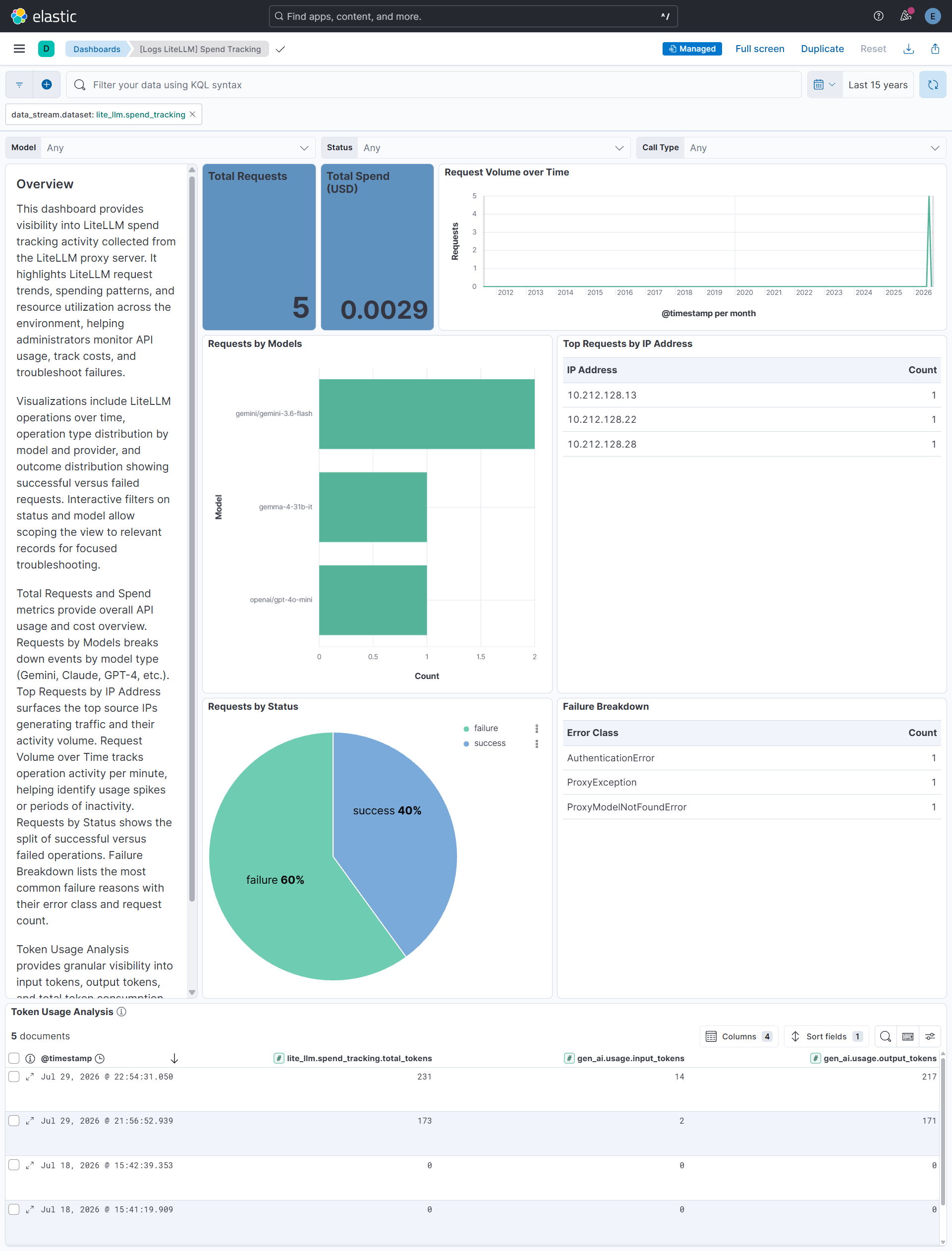
The spend_tracking data stream provides LLM request usage and cost records collected from LiteLLM via API or S3.
Exported fields
| Field | Description | Type |
|---|---|---|
| @timestamp | Date and time when the event occurred. | date |
| aws.s3.bucket.arn | The AWS S3 bucket ARN. | keyword |
| aws.s3.bucket.name | The AWS S3 bucket name. | keyword |
| aws.s3.object.key | The AWS S3 Object key. | keyword |
| data_stream.dataset | Dataset name associated with the data stream. | constant_keyword |
| data_stream.namespace | Namespace used to group related data streams. | constant_keyword |
| data_stream.type | Type of data stream, such as logs or metrics. | constant_keyword |
| event.dataset | Identifies the LiteLLM spend tracking log dataset. | constant_keyword |
| event.module | Module that generated the event. | constant_keyword |
| gen_ai.conversation.id | Identifier grouping related generative AI requests into one conversation. | keyword |
| gen_ai.usage.cache_read.input_tokens | Number of input tokens read from the prompt cache. | long |
| input.type | Type of filebeat input. | keyword |
| lite_llm.spend_tracking.api_key | Serialized API-key identifier stored with the spend log; LiteLLM hashes real keys before persistence. | keyword |
| lite_llm.spend_tracking.cache_hit | String representation of whether the response was served from cache. | keyword |
| lite_llm.spend_tracking.cache_key | LiteLLM cache key or cache-disabled sentinel for the request. | keyword |
| lite_llm.spend_tracking.completion_start_time | Timestamp when completion generation or the first streamed token began. | date |
| lite_llm.spend_tracking.messages | Serialized request messages sent to the model; LiteLLM may also emit list or object forms. | keyword |
| lite_llm.spend_tracking.metadata.additional_usage_values.completion_tokens_details.accepted_prediction_tokens | Number of accepted predicted-output tokens in the completion. | long |
| lite_llm.spend_tracking.metadata.additional_usage_values.completion_tokens_details.audio_tokens | Number of audio tokens in the completion. | long |
| lite_llm.spend_tracking.metadata.additional_usage_values.completion_tokens_details.image_tokens | Number of image tokens in the completion. | long |
| lite_llm.spend_tracking.metadata.additional_usage_values.completion_tokens_details.reasoning_tokens | Number of reasoning tokens in the completion. | long |
| lite_llm.spend_tracking.metadata.additional_usage_values.completion_tokens_details.rejected_prediction_tokens | Number of rejected predicted-output tokens in the completion. | long |
| lite_llm.spend_tracking.metadata.additional_usage_values.completion_tokens_details.text_tokens | Number of text tokens in the completion. | long |
| lite_llm.spend_tracking.metadata.additional_usage_values.completion_tokens_details.video_tokens | Number of video tokens in the completion. | long |
| lite_llm.spend_tracking.metadata.additional_usage_values.prompt_tokens_details.audio_tokens | Number of audio tokens in the prompt. | long |
| lite_llm.spend_tracking.metadata.additional_usage_values.prompt_tokens_details.cached_tokens | Number of prompt tokens served from cache. | long |
| lite_llm.spend_tracking.metadata.additional_usage_values.prompt_tokens_details.image_tokens | Number of image tokens in the prompt. | long |
| lite_llm.spend_tracking.metadata.additional_usage_values.prompt_tokens_details.text_tokens | Number of text tokens in the prompt. | long |
| lite_llm.spend_tracking.metadata.additional_usage_values.prompt_tokens_details.video_tokens | Number of video tokens in the prompt. | long |
| lite_llm.spend_tracking.metadata.applied_guardrails | Names of guardrails applied to the request. | keyword |
| lite_llm.spend_tracking.metadata.attempted_retries | Number of retries attempted for the request. | long |
| lite_llm.spend_tracking.metadata.batch_models | Models used for batch cost calculation. | keyword |
| lite_llm.spend_tracking.metadata.cold_storage_object_key | S3 or GCS object key used to retrieve archived request data. | keyword |
| lite_llm.spend_tracking.metadata.cost_breakdown.discount_amount | Discount amount applied to the request in US dollars. | double |
| lite_llm.spend_tracking.metadata.cost_breakdown.discount_percent | Discount percentage applied to the request, such as 0.05 for 5%. | double |
| lite_llm.spend_tracking.metadata.cost_breakdown.input_cost | Cost of raw (non-cached) input tokens only. | double |
| lite_llm.spend_tracking.metadata.cost_breakdown.margin_fixed_amount | Fixed margin amount added to the request in US dollars. | double |
| lite_llm.spend_tracking.metadata.cost_breakdown.margin_percent | Margin percentage applied to the request, such as 0.10 for 10%. | double |
| lite_llm.spend_tracking.metadata.cost_breakdown.margin_total_amount | Total margin amount added to the request in US dollars. | double |
| lite_llm.spend_tracking.metadata.cost_breakdown.original_cost | Cost of the request before any discount was applied. | double |
| lite_llm.spend_tracking.metadata.cost_breakdown.output_cost | Cost of output/completion tokens, including reasoning tokens if applicable. | double |
| lite_llm.spend_tracking.metadata.cost_breakdown.tool_usage_cost | Cost of usage of built-in tools. | double |
| lite_llm.spend_tracking.metadata.cost_breakdown.total_cost | Total cost of the request, including input, output, and tool usage. | double |
| lite_llm.spend_tracking.metadata.error_information.error_message | Human-readable message for the failed request. | text |
| lite_llm.spend_tracking.metadata.error_information.error_rate_limit_category | Source category of a rate-limit failure, such as provider or LiteLLM rate limiting. | keyword |
| lite_llm.spend_tracking.metadata.error_information.error_rate_limit_type | Rate-limit dimension exceeded, such as requests, tokens, concurrency, budget, or iterations. | keyword |
| lite_llm.spend_tracking.metadata.error_information.llm_provider | LLM provider associated with the error. | keyword |
| lite_llm.spend_tracking.metadata.eval_information | Inferred: Evaluation metadata associated with the request. | flattened |
| lite_llm.spend_tracking.metadata.guardrail_information.guardrail_mode | Guardrail execution hook or mode; the observed value is a scalar, while LiteLLM also permits list or object forms. | keyword |
| lite_llm.spend_tracking.metadata.guardrail_information.guardrail_response.detected_entities | Inferred: Entity categories detected by the PII guardrail. | keyword |
| lite_llm.spend_tracking.metadata.guardrail_information.guardrail_response.flagged | Inferred: Whether the guardrail response flagged the request content. | boolean |
| lite_llm.spend_tracking.metadata.guardrail_information.guardrail_status | Guardrail execution status; current LiteLLM definitions use success, guardrail_intervened, guardrail_failed_to_respond, or not_run, while this sample also contains blocked. | keyword |
| lite_llm.spend_tracking.metadata.litellm_overhead_time_ms | LiteLLM processing overhead in milliseconds. | double |
| lite_llm.spend_tracking.metadata.max_retries | Maximum number of retries configured for the request. | long |
| lite_llm.spend_tracking.metadata.mcp_tool_call_metadata | Inferred: MCP tool-call arguments, result, server identity, and cost metadata; not yet observed populated in sample data. | flattened |
| lite_llm.spend_tracking.metadata.model_map_information.model_map_key | LiteLLM model-map key used to resolve model information. | keyword |
| lite_llm.spend_tracking.metadata.model_map_information.model_map_value.annotation_cost_per_page | Cost per page for annotation on OCR models. | double |
| lite_llm.spend_tracking.metadata.model_map_information.model_map_value.bedrock_output_config_effort_ceiling | Maximum reasoning effort ceiling for Bedrock output config, such as low, medium, high, max, or xhigh. | keyword |
| lite_llm.spend_tracking.metadata.model_map_information.model_map_value.cache_creation_input_token_cost | Cost per cache-write input token, at the premium rate. | double |
| lite_llm.spend_tracking.metadata.model_map_information.model_map_value.cache_creation_input_token_cost_above_1hr | Cache-write input token cost for cache entries held above one hour. | double |
| lite_llm.spend_tracking.metadata.model_map_information.model_map_value.cache_creation_input_token_cost_above_200k_tokens | Cache-write input token cost above a 200k-token context window. | double |
| lite_llm.spend_tracking.metadata.model_map_information.model_map_value.cache_read_input_token_cost | Cost per cache-read input token, at the discounted rate. | double |
| lite_llm.spend_tracking.metadata.model_map_information.model_map_value.cache_read_input_token_cost_above_200k_tokens | Cache-read input token cost above a 200k-token context window. | double |
| lite_llm.spend_tracking.metadata.model_map_information.model_map_value.cache_read_input_token_cost_above_200k_tokens_priority | Cache-read input token cost above a 200k-token context window under OpenAI priority service tier pricing. | double |
| lite_llm.spend_tracking.metadata.model_map_information.model_map_value.cache_read_input_token_cost_above_272k_tokens | Cache-read input token cost above a 272k-token context window. | double |
| lite_llm.spend_tracking.metadata.model_map_information.model_map_value.cache_read_input_token_cost_above_272k_tokens_priority | Cache-read input token cost above a 272k-token context window under OpenAI priority service tier pricing. | double |
| lite_llm.spend_tracking.metadata.model_map_information.model_map_value.cache_read_input_token_cost_above_512k_tokens | Cache-read input token cost above a 512k-token context window. | double |
| lite_llm.spend_tracking.metadata.model_map_information.model_map_value.cache_read_input_token_cost_flex | Cache-read input token cost under OpenAI flex service tier pricing. | double |
| lite_llm.spend_tracking.metadata.model_map_information.model_map_value.cache_read_input_token_cost_priority | Cache-read input token cost under OpenAI priority service tier pricing. | double |
| lite_llm.spend_tracking.metadata.model_map_information.model_map_value.citation_cost_per_token | Cost per citation token, for Perplexity models. | double |
| lite_llm.spend_tracking.metadata.model_map_information.model_map_value.input_cost_per_audio_per_second | Input cost per second of audio, for Vertex AI models. | double |
| lite_llm.spend_tracking.metadata.model_map_information.model_map_value.input_cost_per_audio_token | Input cost per audio token. | double |
| lite_llm.spend_tracking.metadata.model_map_information.model_map_value.input_cost_per_character | Input cost per character, for Vertex AI models. | double |
| lite_llm.spend_tracking.metadata.model_map_information.model_map_value.input_cost_per_image | Input cost per image, for Vertex AI models. | double |
| lite_llm.spend_tracking.metadata.model_map_information.model_map_value.input_cost_per_image_token | Input cost per image token, for image-generation models. | double |
| lite_llm.spend_tracking.metadata.model_map_information.model_map_value.input_cost_per_query | Input cost per query, for rerank models. | double |
| lite_llm.spend_tracking.metadata.model_map_information.model_map_value.input_cost_per_second | Input cost per second, for OpenAI Speech models. | double |
| lite_llm.spend_tracking.metadata.model_map_information.model_map_value.input_cost_per_token | Input cost per token. | double |
| lite_llm.spend_tracking.metadata.model_map_information.model_map_value.input_cost_per_token_above_128k_tokens | Input cost per token above a 128k-token context window, for Vertex AI models. | double |
| lite_llm.spend_tracking.metadata.model_map_information.model_map_value.input_cost_per_token_above_200k_tokens | Input cost per token above a 200k-token context window. | double |
| lite_llm.spend_tracking.metadata.model_map_information.model_map_value.input_cost_per_token_above_200k_tokens_priority | Input cost per token above a 200k-token context window under OpenAI priority service tier pricing. | double |
| lite_llm.spend_tracking.metadata.model_map_information.model_map_value.input_cost_per_token_above_272k_tokens | Input cost per token above a 272k-token context window. | double |
| lite_llm.spend_tracking.metadata.model_map_information.model_map_value.input_cost_per_token_above_272k_tokens_priority | Input cost per token above a 272k-token context window under OpenAI priority service tier pricing. | double |
| lite_llm.spend_tracking.metadata.model_map_information.model_map_value.input_cost_per_token_above_512k_tokens | Input cost per token above a 512k-token context window. | double |
| lite_llm.spend_tracking.metadata.model_map_information.model_map_value.input_cost_per_token_batches | Input cost per token for batch API requests. | double |
| lite_llm.spend_tracking.metadata.model_map_information.model_map_value.input_cost_per_token_flex | Input cost per token under OpenAI flex service tier pricing. | double |
| lite_llm.spend_tracking.metadata.model_map_information.model_map_value.input_cost_per_token_priority | Input cost per token under OpenAI priority service tier pricing. | double |
| lite_llm.spend_tracking.metadata.model_map_information.model_map_value.input_cost_per_video_per_second | Input cost per second of video, for Vertex AI models. | double |
| lite_llm.spend_tracking.metadata.model_map_information.model_map_value.key | The litellm.model_cost key this model information was resolved from. | keyword |
| lite_llm.spend_tracking.metadata.model_map_information.model_map_value.litellm_provider | LiteLLM provider identifier for the model. | keyword |
| lite_llm.spend_tracking.metadata.model_map_information.model_map_value.max_input_tokens | Maximum input tokens supported by the model. | long |
| lite_llm.spend_tracking.metadata.model_map_information.model_map_value.max_output_tokens | Maximum output tokens supported by the model. | long |
| lite_llm.spend_tracking.metadata.model_map_information.model_map_value.max_tokens | Maximum total tokens supported by the model. | long |
| lite_llm.spend_tracking.metadata.model_map_information.model_map_value.mode | Call mode the model supports, such as chat, completion, or embedding. | keyword |
| lite_llm.spend_tracking.metadata.model_map_information.model_map_value.ocr_cost_per_credit | Cost per credit for OCR models priced by credit. | double |
| lite_llm.spend_tracking.metadata.model_map_information.model_map_value.ocr_cost_per_page | Cost per page for OCR models. | double |
| lite_llm.spend_tracking.metadata.model_map_information.model_map_value.output_cost_per_audio_token | Output cost per audio token. | double |
| lite_llm.spend_tracking.metadata.model_map_information.model_map_value.output_cost_per_character | Output cost per character, for Vertex AI models. | double |
| lite_llm.spend_tracking.metadata.model_map_information.model_map_value.output_cost_per_character_above_128k_tokens | Output cost per character above a 128k-token context window, for Vertex AI models. | double |
| lite_llm.spend_tracking.metadata.model_map_information.model_map_value.output_cost_per_image | Output cost per image. | double |
| lite_llm.spend_tracking.metadata.model_map_information.model_map_value.output_cost_per_image_token | Output cost per image token. | double |
| lite_llm.spend_tracking.metadata.model_map_information.model_map_value.output_cost_per_reasoning_token | Output cost per reasoning token. | double |
| lite_llm.spend_tracking.metadata.model_map_information.model_map_value.output_cost_per_second | Output cost per second, for OpenAI Speech models. | double |
| lite_llm.spend_tracking.metadata.model_map_information.model_map_value.output_cost_per_second_1080p | Output cost per second for 1080p video generation. | double |
| lite_llm.spend_tracking.metadata.model_map_information.model_map_value.output_cost_per_token | Output cost per token. | double |
| lite_llm.spend_tracking.metadata.model_map_information.model_map_value.output_cost_per_token_above_128k_tokens | Output cost per token above a 128k-token context window, for Vertex AI models. | double |
| lite_llm.spend_tracking.metadata.model_map_information.model_map_value.output_cost_per_token_above_200k_tokens | Output cost per token above a 200k-token context window. | double |
| lite_llm.spend_tracking.metadata.model_map_information.model_map_value.output_cost_per_token_above_200k_tokens_priority | Output cost per token above a 200k-token context window under OpenAI priority service tier pricing. | double |
| lite_llm.spend_tracking.metadata.model_map_information.model_map_value.output_cost_per_token_above_272k_tokens | Output cost per token above a 272k-token context window. | double |
| lite_llm.spend_tracking.metadata.model_map_information.model_map_value.output_cost_per_token_above_272k_tokens_priority | Output cost per token above a 272k-token context window under OpenAI priority service tier pricing. | double |
| lite_llm.spend_tracking.metadata.model_map_information.model_map_value.output_cost_per_token_above_512k_tokens | Output cost per token above a 512k-token context window. | double |
| lite_llm.spend_tracking.metadata.model_map_information.model_map_value.output_cost_per_token_batches | Output cost per token for batch API requests. | double |
| lite_llm.spend_tracking.metadata.model_map_information.model_map_value.output_cost_per_token_flex | Output cost per token under OpenAI flex service tier pricing. | double |
| lite_llm.spend_tracking.metadata.model_map_information.model_map_value.output_cost_per_token_priority | Output cost per token under OpenAI priority service tier pricing. | double |
| lite_llm.spend_tracking.metadata.model_map_information.model_map_value.output_cost_per_video_per_second | Output cost per second of video, for Vertex AI models. | double |
| lite_llm.spend_tracking.metadata.model_map_information.model_map_value.output_vector_size | Output vector size for embedding models. | long |
| lite_llm.spend_tracking.metadata.model_map_information.model_map_value.provider_specific_entry | Free-form provider-specific cost entries. | flattened |
| lite_llm.spend_tracking.metadata.model_map_information.model_map_value.regional_processing_uplift_multiplier_eu | Cost multiplier applied for EU data-residency processing. | double |
| lite_llm.spend_tracking.metadata.model_map_information.model_map_value.regional_processing_uplift_multiplier_us | Cost multiplier applied for US data-residency processing. | double |
| lite_llm.spend_tracking.metadata.model_map_information.model_map_value.rpm | Requests-per-minute limit configured for the model. | long |
| lite_llm.spend_tracking.metadata.model_map_information.model_map_value.search_context_cost_per_query.search_context_size_high | Cost per query at high search context size. | double |
| lite_llm.spend_tracking.metadata.model_map_information.model_map_value.search_context_cost_per_query.search_context_size_low | Cost per query at low search context size. | double |
| lite_llm.spend_tracking.metadata.model_map_information.model_map_value.search_context_cost_per_query.search_context_size_medium | Cost per query at medium search context size. | double |
| lite_llm.spend_tracking.metadata.model_map_information.model_map_value.supported_openai_params | OpenAI request parameters supported by the model. | keyword |
| lite_llm.spend_tracking.metadata.model_map_information.model_map_value.supports_assistant_prefill | Whether the model supports assistant message prefill. | boolean |
| lite_llm.spend_tracking.metadata.model_map_information.model_map_value.supports_audio_input | Whether the model supports audio input. | boolean |
| lite_llm.spend_tracking.metadata.model_map_information.model_map_value.supports_audio_output | Whether the model supports audio output. | boolean |
| lite_llm.spend_tracking.metadata.model_map_information.model_map_value.supports_computer_use | Whether the model supports computer-use tooling. | boolean |
| lite_llm.spend_tracking.metadata.model_map_information.model_map_value.supports_embedding_image_input | Whether the model supports image input for embeddings. | boolean |
| lite_llm.spend_tracking.metadata.model_map_information.model_map_value.supports_function_calling | Whether the model supports function calling. | boolean |
| lite_llm.spend_tracking.metadata.model_map_information.model_map_value.supports_image_size | Whether the model supports configurable image size. | boolean |
| lite_llm.spend_tracking.metadata.model_map_information.model_map_value.supports_low_reasoning_effort | Whether the model supports low reasoning effort. | boolean |
| lite_llm.spend_tracking.metadata.model_map_information.model_map_value.supports_max_reasoning_effort | Whether the model supports max reasoning effort. | boolean |
| lite_llm.spend_tracking.metadata.model_map_information.model_map_value.supports_minimal_reasoning_effort | Whether the model supports minimal reasoning effort. | boolean |
| lite_llm.spend_tracking.metadata.model_map_information.model_map_value.supports_native_streaming | Whether the model supports native streaming. | boolean |
| lite_llm.spend_tracking.metadata.model_map_information.model_map_value.supports_native_structured_output | Whether the model supports native structured output. | boolean |
| lite_llm.spend_tracking.metadata.model_map_information.model_map_value.supports_none_reasoning_effort | Whether the model supports disabling reasoning effort. | boolean |
| lite_llm.spend_tracking.metadata.model_map_information.model_map_value.supports_pdf_input | Whether the model supports PDF input. | boolean |
| lite_llm.spend_tracking.metadata.model_map_information.model_map_value.supports_prompt_caching | Whether the model supports prompt caching. | boolean |
| lite_llm.spend_tracking.metadata.model_map_information.model_map_value.supports_reasoning | Whether the model supports reasoning. | boolean |
| lite_llm.spend_tracking.metadata.model_map_information.model_map_value.supports_response_schema | Whether the model supports response schema enforcement. | boolean |
| lite_llm.spend_tracking.metadata.model_map_information.model_map_value.supports_system_messages | Whether the model supports system messages. | boolean |
| lite_llm.spend_tracking.metadata.model_map_information.model_map_value.supports_tool_choice | Whether the model supports the tool_choice parameter. | boolean |
| lite_llm.spend_tracking.metadata.model_map_information.model_map_value.supports_url_context | Whether the model supports URL context. | boolean |
| lite_llm.spend_tracking.metadata.model_map_information.model_map_value.supports_vision | Whether the model supports vision/image inputs. | boolean |
| lite_llm.spend_tracking.metadata.model_map_information.model_map_value.supports_web_search | Whether the model supports the web search tool. | boolean |
| lite_llm.spend_tracking.metadata.model_map_information.model_map_value.supports_xhigh_reasoning_effort | Whether the model supports extra-high reasoning effort. | boolean |
| lite_llm.spend_tracking.metadata.model_map_information.model_map_value.tiered_pricing | Tiered pricing structure for models with volume-based pricing tiers. | flattened |
| lite_llm.spend_tracking.metadata.model_map_information.model_map_value.tpm | Tokens-per-minute limit configured for the model. | long |
| lite_llm.spend_tracking.metadata.model_map_information.model_map_value.uses_embed_content | Whether the model uses embed-content style requests. | boolean |
| lite_llm.spend_tracking.metadata.proxy_server_request | Inferred: Serialized proxy request information retained with the spend log. | keyword |
| lite_llm.spend_tracking.metadata.requester_ip_address | Requester IP address copied into LiteLLM metadata. | ip |
| lite_llm.spend_tracking.metadata.spend_logs_metadata | Custom key-value metadata supplied for spend logging. | flattened |
| lite_llm.spend_tracking.metadata.status | Status copied into LiteLLM spend metadata. | keyword |
| lite_llm.spend_tracking.metadata.usage_object.completion_tokens | Number of completion tokens used by the call, as reported by the LLM provider. | long |
| lite_llm.spend_tracking.metadata.usage_object.completion_tokens_details.accepted_prediction_tokens | Number of accepted predicted-output tokens in the completion. | long |
| lite_llm.spend_tracking.metadata.usage_object.completion_tokens_details.audio_tokens | Number of audio tokens in the completion. | long |
| lite_llm.spend_tracking.metadata.usage_object.completion_tokens_details.image_tokens | Number of image tokens in the completion. | long |
| lite_llm.spend_tracking.metadata.usage_object.completion_tokens_details.reasoning_tokens | Number of reasoning tokens in the completion. | long |
| lite_llm.spend_tracking.metadata.usage_object.completion_tokens_details.rejected_prediction_tokens | Number of rejected predicted-output tokens in the completion. | long |
| lite_llm.spend_tracking.metadata.usage_object.completion_tokens_details.text_tokens | Number of text tokens in the completion. | long |
| lite_llm.spend_tracking.metadata.usage_object.completion_tokens_details.video_tokens | Number of video tokens in the completion. | long |
| lite_llm.spend_tracking.metadata.usage_object.prompt_tokens | Number of prompt tokens used by the call, as reported by the LLM provider. | long |
| lite_llm.spend_tracking.metadata.usage_object.prompt_tokens_details.audio_tokens | Number of audio tokens in the prompt. | long |
| lite_llm.spend_tracking.metadata.usage_object.prompt_tokens_details.cached_tokens | Number of prompt tokens served from cache. | long |
| lite_llm.spend_tracking.metadata.usage_object.prompt_tokens_details.image_tokens | Number of image tokens in the prompt. | long |
| lite_llm.spend_tracking.metadata.usage_object.prompt_tokens_details.text_tokens | Number of text tokens in the prompt. | long |
| lite_llm.spend_tracking.metadata.usage_object.prompt_tokens_details.video_tokens | Number of video tokens in the prompt. | long |
| lite_llm.spend_tracking.metadata.usage_object.total_tokens | Total number of tokens used by the call, as reported by the LLM provider. | long |
| lite_llm.spend_tracking.metadata.user_api_key | API-key identifier retained in spend metadata. | keyword |
| lite_llm.spend_tracking.metadata.user_api_key_alias | Human-readable alias of the LiteLLM virtual API key. | keyword |
| lite_llm.spend_tracking.metadata.user_api_key_org_id | Organization identifier associated with the API key. | keyword |
| lite_llm.spend_tracking.metadata.user_api_key_project_alias | Human-readable alias of the project associated with the API key. | keyword |
| lite_llm.spend_tracking.metadata.user_api_key_project_id | Identifier of the project associated with the API key. | keyword |
| lite_llm.spend_tracking.metadata.user_api_key_team_id | Team identifier associated with the API key. | keyword |
| lite_llm.spend_tracking.metadata.vector_store_request_metadata | Inferred: Vector-store request metadata associated with the LLM call (vector store ID, provider, query, response, timing); not yet observed populated in sample data. | flattened |
| lite_llm.spend_tracking.model_group | LiteLLM routing model group used for the request. | keyword |
| lite_llm.spend_tracking.model_id | Identifier of the LiteLLM model deployment used for the call. | keyword |
| lite_llm.spend_tracking.request_duration_ms | Total request duration stored in milliseconds. | long |
| lite_llm.spend_tracking.request_tags | Tags attached to the request by the LiteLLM caller. | keyword |
| lite_llm.spend_tracking.response | Model response retained in the spend log; LiteLLM may also emit list or object forms. | keyword |
| lite_llm.spend_tracking.response_cost | Calculated response cost in US dollars. | double |
| lite_llm.spend_tracking.response_time | Total response time in seconds; for streaming calls this may represent time to first token. | double |
| lite_llm.spend_tracking.spend | Spend charged for the request in US dollars. | double |
| lite_llm.spend_tracking.total_tokens | Total number of input and output tokens used by the call. | long |
| lite_llm.spend_tracking.user_api_key_hash | Hash of the LiteLLM virtual API key used for the request. | keyword |
| log.offset | Log offset. | long |
| observer.product | The product name of the observer. | constant_keyword |
| observer.vendor | Vendor name of the observer. | constant_keyword |
Example
{
    "@timestamp": "2026-07-18T10:11:19.909Z",
    "agent": {
        "ephemeral_id": "9cdbf985-ddb5-4eea-9f23-60134664eae0",
        "id": "2cc4b23e-176d-4ea3-9bec-8e6c84e57604",
        "name": "elastic-agent-88630",
        "type": "filebeat",
        "version": "8.19.0"
    },
    "aws": {
        "s3": {
            "bucket": {
                "arn": "arn:aws:s3:::elastic-package-lite-llm-spend-tracking-bucket-77881",
                "name": "elastic-package-lite-llm-spend-tracking-bucket-77881"
            },
            "object": {
                "key": "spend-tracking.log"
            }
        }
    },
    "cloud": {
        "region": "us-east-2"
    },
    "data_stream": {
        "dataset": "lite_llm.spend_tracking",
        "namespace": "50636",
        "type": "logs"
    },
    "ecs": {
        "version": "9.5.0"
    },
    "elastic_agent": {
        "id": "2cc4b23e-176d-4ea3-9bec-8e6c84e57604",
        "snapshot": false,
        "version": "8.19.0"
    },
    "error": {
        "code": "400",
        "type": "ProxyModelNotFoundError"
    },
    "event": {
        "agent_id_status": "verified",
        "category": [
            "api"
        ],
        "dataset": "lite_llm.spend_tracking",
        "duration": 0,
        "end": "2026-07-18T10:11:19.909Z",
        "id": "7d8f7a77-9f46-47b2-997e-0a0892fe2c7a",
        "ingested": "2026-08-25T13:27:21Z",
        "kind": "event",
        "original": "{\"request_id\":\"7d8f7a77-9f46-47b2-997e-0a0892fe2c7a\",\"call_type\":\"\",\"api_key\":\"8de15ff28eedf53bd4cf2e65b8e980b9231acc3f894648a9fa3c2dbf0ab1a6d9\",\"spend\":0,\"total_tokens\":0,\"prompt_tokens\":0,\"completion_tokens\":0,\"start_time\":\"2026-07-18T10:11:19.909+00:00\",\"end_time\":\"2026-07-18T10:11:19.909+00:00\",\"model\":\"gemma-4-31b-it\",\"user\":\"default_user_id\",\"status\":\"failure\",\"metadata\":{\"error_information\":{\"error_code\":\"400\",\"error_class\":\"ProxyModelNotFoundError\",\"error_message\":\"Invalid model name passed in model=gemma-4-31b-it\"}}}",
        "outcome": "failure",
        "start": "2026-07-18T10:11:19.909Z",
        "type": [
            "access"
        ]
    },
    "gen_ai": {
        "request": {
            "model": "gemma-4-31b-it"
        },
        "response": {
            "id": "7d8f7a77-9f46-47b2-997e-0a0892fe2c7a"
        },
        "usage": {
            "input_tokens": 0,
            "output_tokens": 0
        }
    },
    "input": {
        "type": "aws-s3"
    },
    "lite_llm": {
        "spend_tracking": {
            "api_key": "8de15ff28eedf53bd4cf2e65b8e980b9231acc3f894648a9fa3c2dbf0ab1a6d9",
            "metadata": {
                "error_information": {
                    "error_message": "Invalid model name passed in model=gemma-4-31b-it"
                }
            },
            "spend": 0,
            "total_tokens": 0
        }
    },
    "log": {
        "file": {
            "path": "https://elastic-package-lite-llm-spend-tracking-bucket-77881.s3.us-east-2.amazonaws.com/spend-tracking.log"
        },
        "offset": 1900
    },
    "related": {
        "user": [
            "default_user_id"
        ]
    },
    "tags": [
        "collect_sqs_logs",
        "preserve_original_event",
        "forwarded",
        "litellm-spend_tracking"
    ],
    "user": {
        "id": "default_user_id"
    }
}
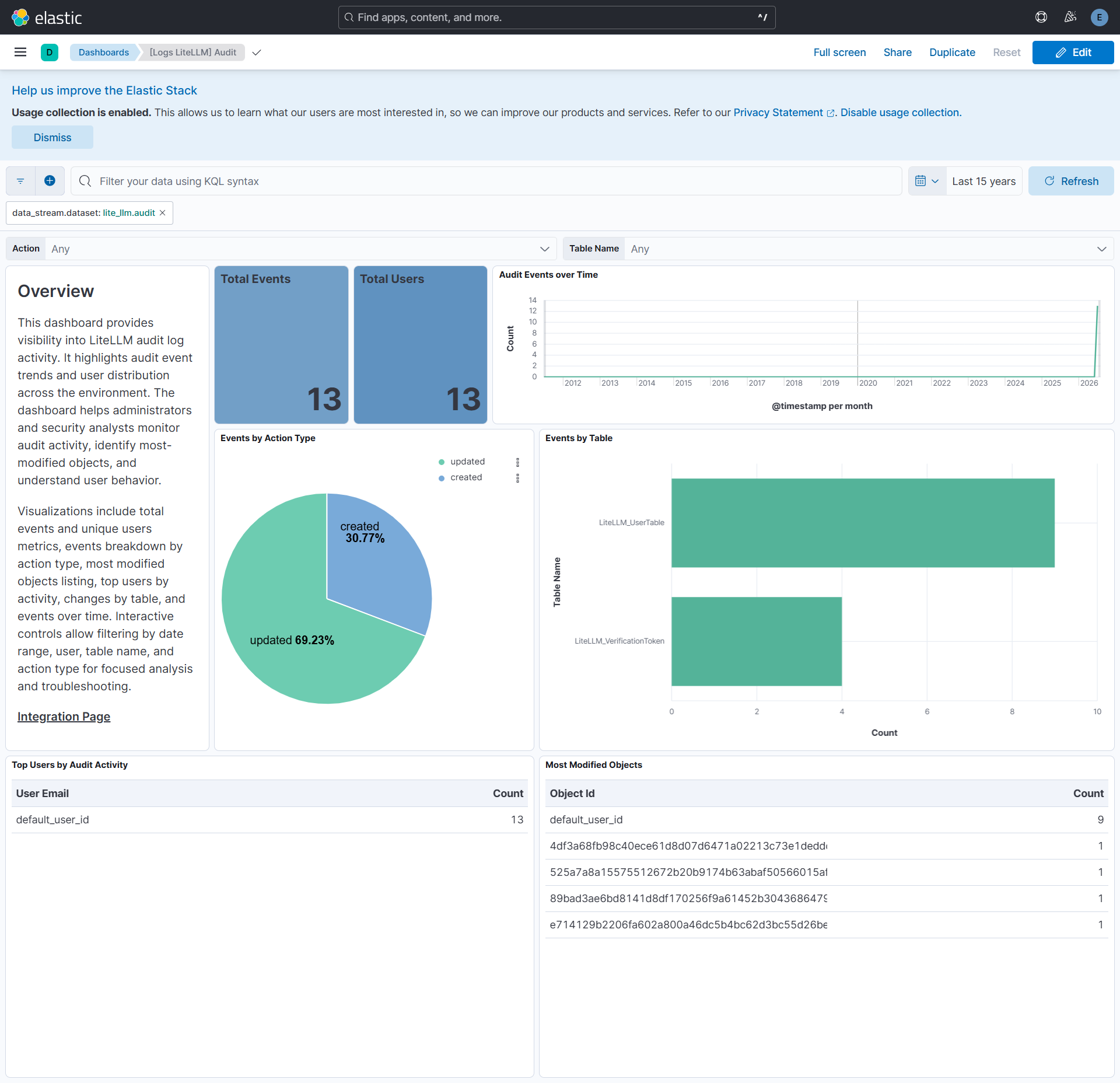
The audit data stream provides audit log records collected from LiteLLM via API or S3.
Exported fields
| Field | Description | Type |
|---|---|---|
| @timestamp | Date and time when the event occurred. | date |
| aws.s3.bucket.arn | The AWS S3 bucket ARN. | keyword |
| aws.s3.bucket.name | The AWS S3 bucket name. | keyword |
| aws.s3.object.key | The AWS S3 Object key. | keyword |
| data_stream.dataset | Dataset name associated with the data stream. | constant_keyword |
| data_stream.namespace | Namespace used to group related data streams. | constant_keyword |
| data_stream.type | Type of data stream, such as logs or metrics. | constant_keyword |
| event.dataset | Identifies the LiteLLM audit log dataset. | constant_keyword |
| event.module | Module that generated the event. | constant_keyword |
| input.type | Type of filebeat input. | keyword |
| lite_llm.audit.before_value.access_group_ids | List of access group IDs. | keyword |
| lite_llm.audit.before_value.aliases | Aliases mapping. | flattened |
| lite_llm.audit.before_value.allowed_cache_controls | List of allowed cache controls. | keyword |
| lite_llm.audit.before_value.allowed_routes | List of allowed routes (VerificationToken only). | keyword |
| lite_llm.audit.before_value.auto_rotate | Auto rotation flag (VerificationToken only). | boolean |
| lite_llm.audit.before_value.config | Configuration object. | flattened |
| lite_llm.audit.before_value.created_at | Creation timestamp. | date |
| lite_llm.audit.before_value.created_by | Created by user. | keyword |
| lite_llm.audit.before_value.key_alias | Key alias (VerificationToken only). | keyword |
| lite_llm.audit.before_value.key_name | Key name (VerificationToken only). | keyword |
| lite_llm.audit.before_value.max_budget | Maximum budget for the team. | long |
| lite_llm.audit.before_value.metadata | Custom metadata. | flattened |
| lite_llm.audit.before_value.model_max_budget | Per-model max budget. | flattened |
| lite_llm.audit.before_value.model_spend | Per-model spend tracking. | flattened |
| lite_llm.audit.before_value.models | List of models. | keyword |
| lite_llm.audit.before_value.permissions | Permissions mapping (VerificationToken only). | flattened |
| lite_llm.audit.before_value.policies | List of policies. | keyword |
| lite_llm.audit.before_value.rotation_count | Number of rotations (VerificationToken only). | long |
| lite_llm.audit.before_value.router_settings | Router settings (VerificationToken only). | flattened |
| lite_llm.audit.before_value.soft_budget_cooldown | Soft budget cooldown flag (VerificationToken only). | boolean |
| lite_llm.audit.before_value.spend | Spend value. | double |
| lite_llm.audit.before_value.teams | List of teams (UserTable only). | keyword |
| lite_llm.audit.before_value.token | Token identifier (VerificationToken only). | keyword |
| lite_llm.audit.before_value.updated_at | Last update timestamp. | date |
| lite_llm.audit.before_value.updated_by | Updated by user. | keyword |
| lite_llm.audit.before_value.user_id | User ID (UserTable only). | keyword |
| lite_llm.audit.before_value.user_role | User role (UserTable only). | keyword |
| lite_llm.audit.changed_by_api_key | API key that was used to perform the action. | keyword |
| lite_llm.audit.object_id | ID of the affected entity (team, user, key, or model UUID). No single ECS entity fits across all table_name values, so this is kept as a custom field rather than mapped to a \*.id field. |
keyword |
| lite_llm.audit.table_name | Table where the change occurred (LiteLLM_UserTable or LiteLLM_VerificationToken). | keyword |
| lite_llm.audit.updated_values.access_group_ids | List of access group IDs. | keyword |
| lite_llm.audit.updated_values.aliases | Aliases mapping. | flattened |
| lite_llm.audit.updated_values.allowed_cache_controls | List of allowed cache controls. | keyword |
| lite_llm.audit.updated_values.allowed_routes | List of allowed routes (VerificationToken only). | keyword |
| lite_llm.audit.updated_values.auto_rotate | Auto rotation flag (VerificationToken only). | boolean |
| lite_llm.audit.updated_values.config | Configuration object. | flattened |
| lite_llm.audit.updated_values.created_at | Creation timestamp. | date |
| lite_llm.audit.updated_values.created_by | Created by user (set when action is created). | keyword |
| lite_llm.audit.updated_values.key | API key value (VerificationToken only). | keyword |
| lite_llm.audit.updated_values.key_alias | Key alias (VerificationToken only). | keyword |
| lite_llm.audit.updated_values.key_name | Key name (VerificationToken only). | keyword |
| lite_llm.audit.updated_values.max_budget | Maximum budget for the team. | long |
| lite_llm.audit.updated_values.metadata | Custom metadata. | flattened |
| lite_llm.audit.updated_values.model_max_budget | Per-model max budget. | flattened |
| lite_llm.audit.updated_values.model_spend | Per-model spend tracking. | flattened |
| lite_llm.audit.updated_values.models | List of models. | keyword |
| lite_llm.audit.updated_values.object_permission.agent_access_groups | List of agent access group IDs. | keyword |
| lite_llm.audit.updated_values.object_permission.agents | List of agent IDs. | keyword |
| lite_llm.audit.updated_values.object_permission.mcp_access_groups | List of MCP access group IDs. | keyword |
| lite_llm.audit.updated_values.object_permission.mcp_servers | List of MCP server IDs. | keyword |
| lite_llm.audit.updated_values.object_permission.mcp_toolsets | List of MCP toolset IDs. | keyword |
| lite_llm.audit.updated_values.permissions | Permissions mapping (VerificationToken only). | flattened |
| lite_llm.audit.updated_values.policies | List of policies. | keyword |
| lite_llm.audit.updated_values.rotation_count | Number of rotations (VerificationToken only). | long |
| lite_llm.audit.updated_values.router_settings.model_group_alias | Model group alias mapping. | flattened |
| lite_llm.audit.updated_values.soft_budget_cooldown | Soft budget cooldown flag (VerificationToken only). | boolean |
| lite_llm.audit.updated_values.spend | Spend value. | double |
| lite_llm.audit.updated_values.team_id | ID of the team (TeamTable only). | keyword |
| lite_llm.audit.updated_values.teams | List of teams (UserTable only). | keyword |
| lite_llm.audit.updated_values.token | Token identifier (VerificationToken only). | keyword |
| lite_llm.audit.updated_values.token_id | Token ID (VerificationToken only). | keyword |
| lite_llm.audit.updated_values.updated_at | Last update timestamp. | date |
| lite_llm.audit.updated_values.updated_by | Updated by user (set when action is created). | keyword |
| lite_llm.audit.updated_values.user_id | User ID (UserTable only). | keyword |
| lite_llm.audit.updated_values.user_role | User role (UserTable only). | keyword |
| log.offset | Log offset. | long |
| observer.product | The product name of the observer. | constant_keyword |
| observer.vendor | Vendor name of the observer. | constant_keyword |
Example
{
    "@timestamp": "2026-07-03T11:30:59.385Z",
    "agent": {
        "ephemeral_id": "ad1967af-42ff-4c2f-a96e-1dc1a3dc11b9",
        "id": "4fa77f61-1d5c-4d03-8b8e-26abc7747295",
        "name": "elastic-agent-70751",
        "type": "filebeat",
        "version": "8.19.0"
    },
    "aws": {
        "s3": {
            "bucket": {
                "arn": "arn:aws:s3:::elastic-package-lite-llm-audit-bucket-83514",
                "name": "elastic-package-lite-llm-audit-bucket-83514"
            },
            "object": {
                "key": "audit.log"
            }
        }
    },
    "cloud": {
        "region": "us-east-2"
    },
    "data_stream": {
        "dataset": "lite_llm.audit",
        "namespace": "51846",
        "type": "logs"
    },
    "ecs": {
        "version": "9.5.0"
    },
    "elastic_agent": {
        "id": "4fa77f61-1d5c-4d03-8b8e-26abc7747295",
        "snapshot": false,
        "version": "8.19.0"
    },
    "event": {
        "action": "updated",
        "agent_id_status": "verified",
        "category": [
            "configuration"
        ],
        "created": "2026-06-26T11:03:33.193Z",
        "dataset": "lite_llm.audit",
        "id": "f6bbb635-8079-46bc-a7c7-49b38bfceb7a",
        "ingested": "2026-08-25T10:43:55Z",
        "kind": "event",
        "original": "{\"id\": \"f6bbb635-8079-46bc-a7c7-49b38bfceb7a\", \"updated_at\": \"2026-07-03T11:30:59.385000Z\", \"changed_by\": \"ops@example.com\", \"changed_by_api_key\": \"\", \"action\": \"updated\", \"table_name\": \"LiteLLM_UserTable\", \"object_id\": \"default_user_id\", \"before_value\": {\"spend\": 0.01098520000000001, \"teams\": [\"45d1cbaf-cf75-4052-9f51-a241d2518873\"], \"models\": [], \"user_id\": \"default_user_id\", \"metadata\": {}, \"policies\": [], \"user_role\": \"proxy_admin\", \"created_at\": \"2026-06-26T11:03:33.193000Z\", \"updated_at\": \"2026-07-03T11:12:06.577000Z\", \"model_spend\": {}, \"model_max_budget\": {}, \"allowed_cache_controls\": []}, \"updated_values\": {\"spend\": 0.01098520000000001, \"teams\": [\"45d1cbaf-cf75-4052-9f51-a241d2518873\"], \"models\": [], \"user_id\": \"default_user_id\", \"metadata\": {}, \"policies\": [], \"user_role\": \"proxy_admin\", \"created_at\": \"2026-06-26T11:03:33.193000Z\", \"updated_at\": \"2026-07-03T11:30:59.375000Z\", \"model_spend\": {}, \"model_max_budget\": {}, \"allowed_cache_controls\": []}}",
        "type": [
            "change"
        ]
    },
    "input": {
        "type": "aws-s3"
    },
    "lite_llm": {
        "audit": {
            "before_value": {
                "created_at": "2026-06-26T11:03:33.193Z",
                "spend": 0.01098520000000001,
                "teams": [
                    "45d1cbaf-cf75-4052-9f51-a241d2518873"
                ],
                "updated_at": "2026-07-03T11:12:06.577Z",
                "user_id": "default_user_id",
                "user_role": "proxy_admin"
            },
            "object_id": "default_user_id",
            "table_name": "LiteLLM_UserTable",
            "updated_values": {
                "created_at": "2026-06-26T11:03:33.193Z",
                "spend": 0.01098520000000001,
                "teams": [
                    "45d1cbaf-cf75-4052-9f51-a241d2518873"
                ],
                "updated_at": "2026-07-03T11:30:59.375Z",
                "user_id": "default_user_id",
                "user_role": "proxy_admin"
            }
        }
    },
    "log": {
        "file": {
            "path": "https://elastic-package-lite-llm-audit-bucket-83514.s3.us-east-2.amazonaws.com/audit.log"
        },
        "offset": 1478
    },
    "related": {
        "user": [
            "ops@example.com",
            "default_user_id"
        ]
    },
    "tags": [
        "collect_sqs_logs",
        "preserve_original_event",
        "forwarded",
        "litellm-audit"
    ],
    "user": {
        "domain": "example.com",
        "email": "ops@example.com",
        "id": "default_user_id"
    }
}
These inputs are used in the integration:
This integration uses the following APIs:
Spend Tracking: Collects spend tracking records via the LiteLLM Spend Tracking API (endpoint:/spend/logs/v2) or via AWS S3/SQS for organizations that export spend tracking data from LiteLLM to an S3 bucket.Audit: Collects audit logs via the LiteLLM Audit API (endpoint:/audit) or via AWS S3/SQS for organizations that export logs from LiteLLM to an S3 bucket.
This integration includes one or more Kibana dashboards that visualizes the data collected by the integration. The screenshots below illustrate how the ingested data is displayed.
Changelog
| Version | Details | Minimum Kibana version |
|---|---|---|
| 0.1.0 | Enhancement (View pull request) Initial release of the Lite LLM integration. Enhancement (View pull request) Add support of spend_tracking datastream. Enhancement (View pull request) Add support of audit datastream. |
9.1.0 8.19.0 |