Apache Airflow OpenTelemetry Assets
| Version | 0.3.0
|
| Subscription level What's this? |
Basic |
| Developed by What's this? |
Elastic |
| Minimum Kibana version(s) | 9.4.0 |
To use pre-release integrations, go to the Integrations page in Kibana, scroll down, and toggle on the Display beta integrations option.
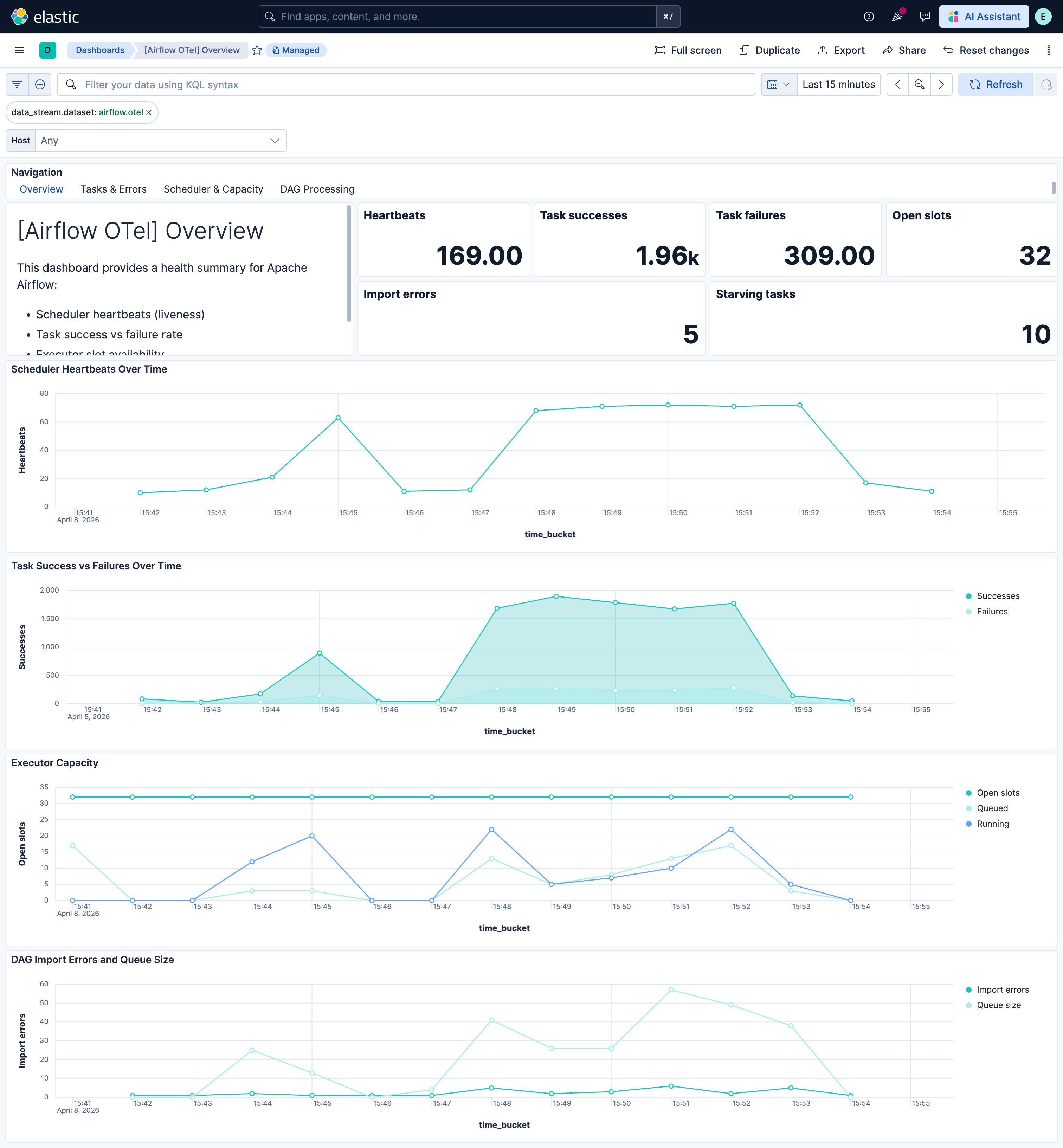
Apache Airflow is a platform for programmatically authoring, scheduling, and monitoring workflows expressed as Directed Acyclic Graphs (DAGs). These assets provide prebuilt dashboards, alert rules, and SLO templates for Airflow metrics collected via the OpenTelemetry StatsD receiver, covering scheduler health, task execution, DAG processing, and capacity utilization.
The Apache Airflow OpenTelemetry assets have been tested with OpenTelemetry Collector Contrib StatsD receiver v0.146.x.
Apache Airflow tested against:
- Apache Airflow 2.6, 2.7, 2.8, 3.0
You need Elasticsearch for storing and searching your data and Kibana for visualizing and managing it. You can use our hosted Elasticsearch Service on Elastic Cloud, which is recommended, or self-manage the Elastic Stack on your own hardware.
Enable StatsD metrics in Airflow and point them at the OpenTelemetry Collector. In your airflow.cfg or via environment variables:
[metrics]
statsd_on = True
statsd_host = <COLLECTOR_HOST>
statsd_port = 8125
statsd_prefix = airflow
Set statsd_host to the hostname or IP of the machine running the collector where the StatsD receiver listens (default port 8125). For tagged metrics (recommended for dashboards and alerts), enable Datadog or InfluxDB-style tags in Airflow:
[metrics]
statsd_datadog_enabled = True
# or
statsd_influxdb_enabled = True
Install the StatsD extra if needed: pip install 'apache-airflow[statsd]'.
Configure the OpenTelemetry Collector or Elastic Distribution of OpenTelemetry Collector (EDOT) to receive StatsD metrics from Airflow and export them to Elasticsearch. The example below shows a minimal pipeline.
Placeholder table:
| Placeholder | Description | Example |
|---|---|---|
<ES_ENDPOINT> |
Elasticsearch URL | https://my-deployment.es.us-central1.gcp.cloud.es.io:443 |
${env:ELASTICSEARCH_API_KEY} |
Elasticsearch API key for authentication (from environment) | Set ELASTICSEARCH_API_KEY in your environment |
receivers:
  statsd:
    endpoint: 0.0.0.0:8125
    transport: udp

processors:
  resource/dataset:
    attributes:
      - key: data_stream.dataset
        value: airflow
        action: upsert
  batch:
    timeout: 10s
    send_batch_size: 1024

exporters:
  elasticsearch/otel:
    endpoints: [<ES_ENDPOINT>]
    api_key: ${env:ELASTICSEARCH_API_KEY}
    mapping:
      mode: otel
    metrics_dynamic_index:
      enabled: true

service:
  pipelines:
    metrics:
      receivers: [statsd]
      processors: [resource/dataset, batch]
      exporters: [elasticsearch/otel]
Refer to the metadata.yaml of the OpenTelemetry StatsD receiver for details on how StatsD metrics are mapped to OpenTelemetry. Airflow-specific metric names, types, and attributes are documented in the Apache Airflow Metrics documentation.
| Dashboard | Description |
|---|---|
| [Airflow OTel] Overview | Scheduler health, task outcomes, executor capacity, and DAG processing at a glance. |
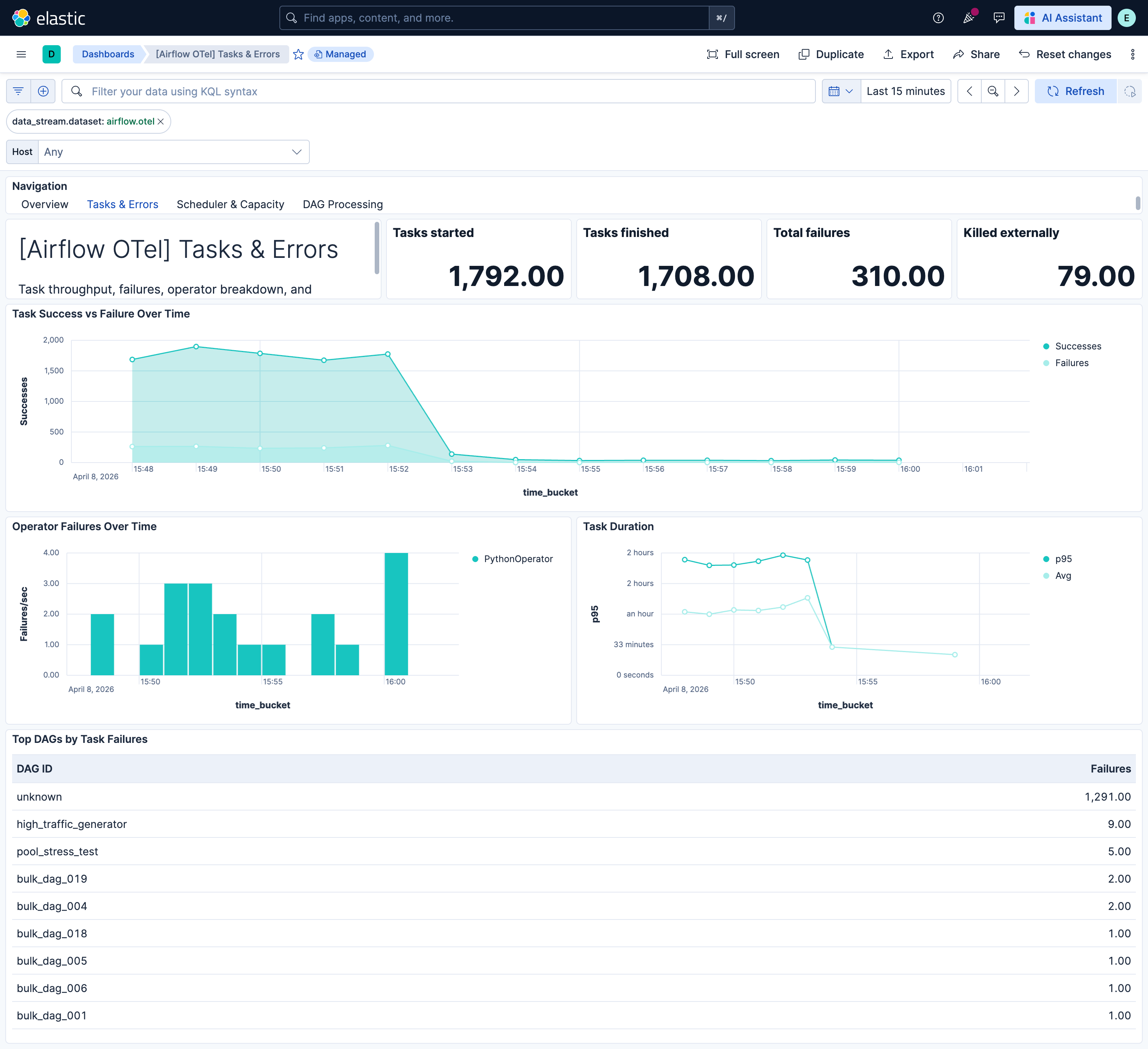
| [Airflow OTel] Tasks & Errors | Task throughput, failure rate, operator breakdown, and duration metrics. |
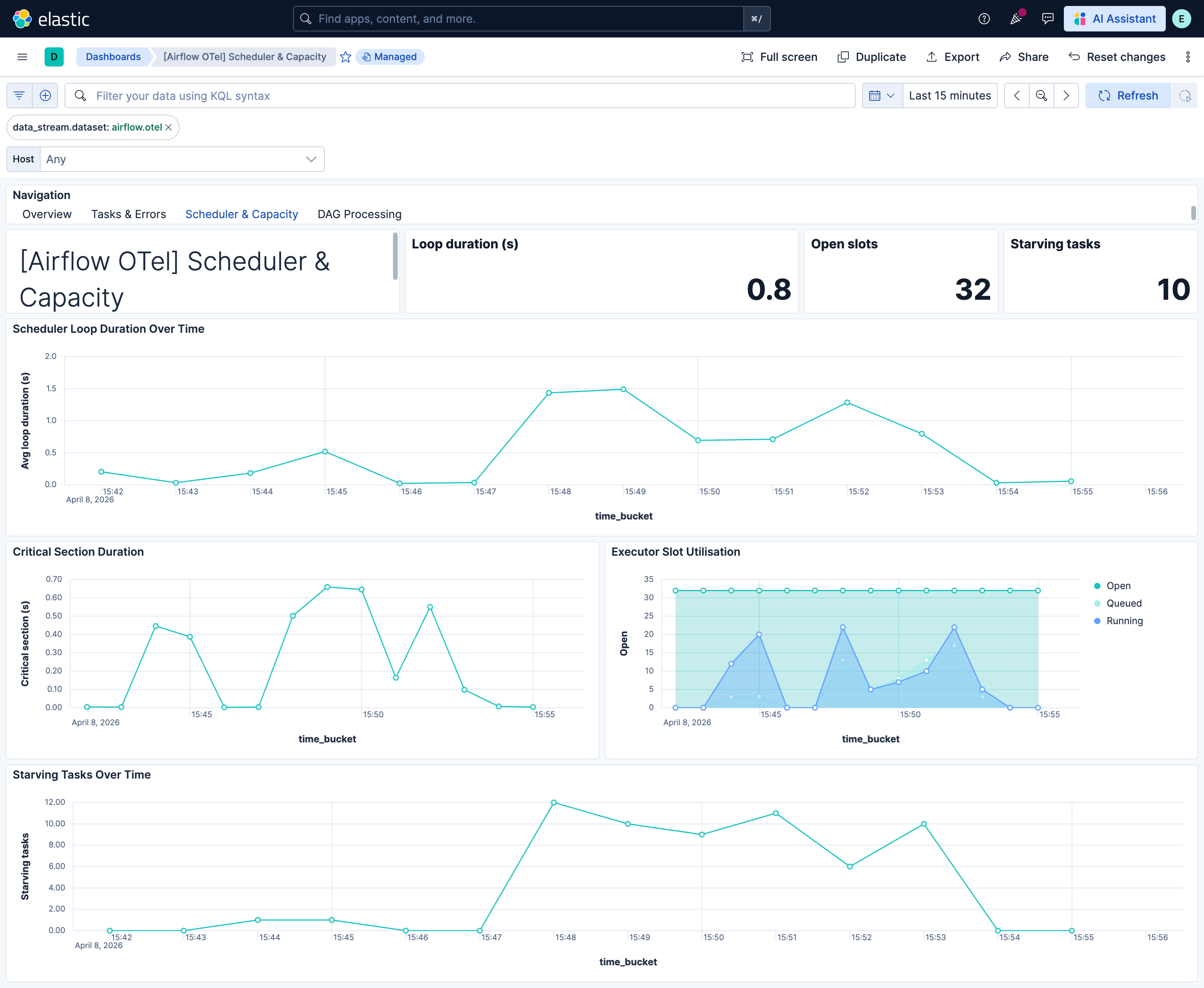
| [Airflow OTel] Scheduler & Capacity | Scheduler loop duration, critical section contention, executor and pool utilization. |
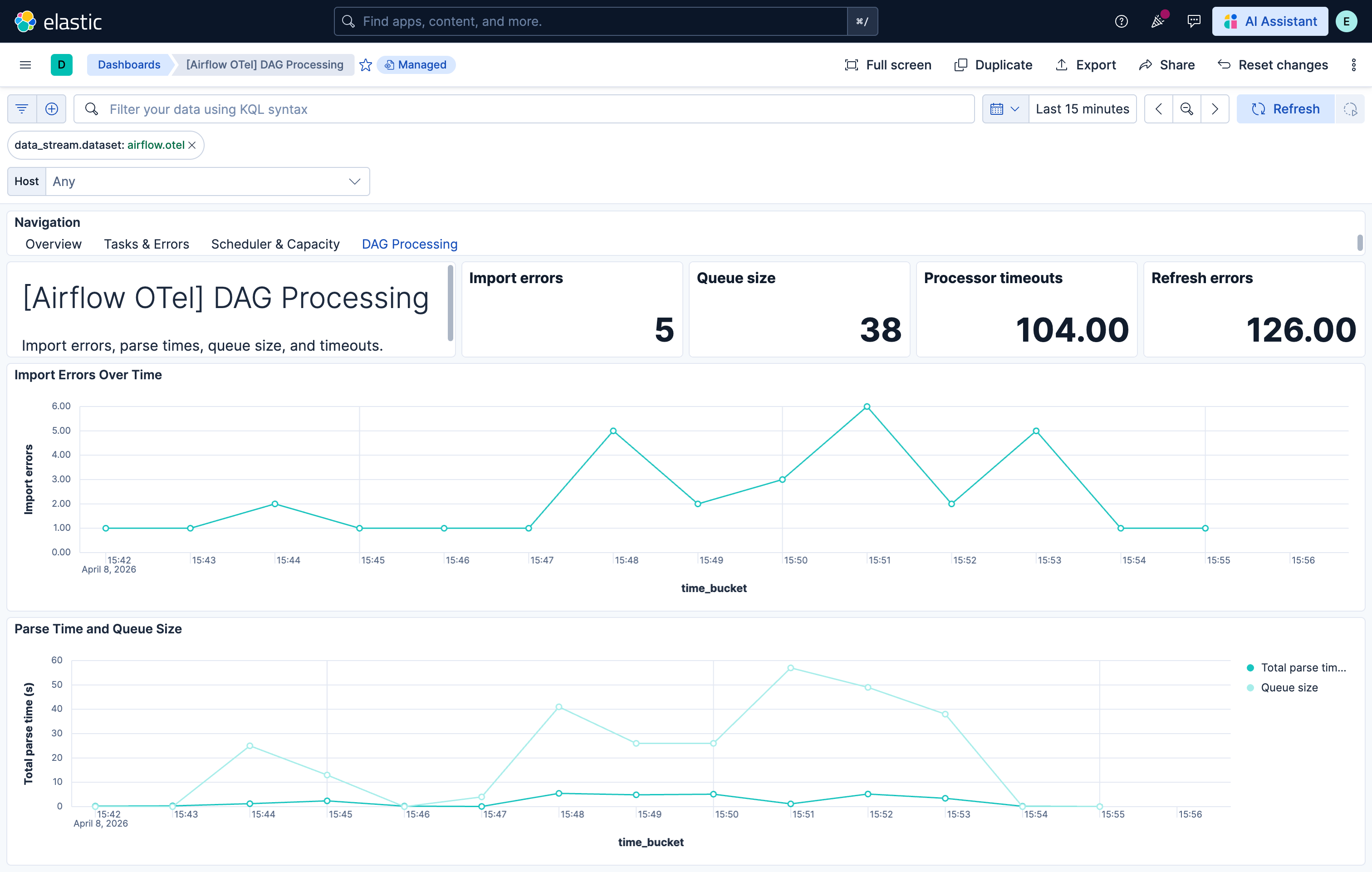
| [Airflow OTel] DAG Processing | DAG file import errors, parse times, queue size, and processor timeouts. |
| Alert | Trigger | Severity |
|---|---|---|
| [Airflow OTel] Scheduler heartbeats critically low | No scheduler heartbeats received in the evaluation window. | Critical |
| [Airflow OTel] Executor open slots exhausted | Executor open slots are zero on at least one host. | Critical |
| [Airflow OTel] Scheduler job heartbeat failures | SchedulerJob heartbeat failure count is non-zero. | High |
| [Airflow OTel] Task failures above threshold | One or more task instance failures observed. | High |
| [Airflow OTel] Tasks killed externally | Tasks killed by external processes (OOM, eviction). | High |
| [Airflow OTel] DAG import errors present | DAG import errors are non-zero. | High |
| [Airflow OTel] DAG processor timeouts | DAG processor timeouts detected. | High |
| [Airflow OTel] DAG run schedule delay high | DAG run schedule delay exceeds 5 minutes. | Medium |
| [Airflow OTel] Scheduler loop duration excessive | Scheduler loop duration exceeds 60 seconds. | Medium |
| [Airflow OTel] Tasks starving due to pool limits | Starving tasks (blocked by pool limits) exceed threshold. | Medium |
| [Airflow OTel] DAG file processing queue large | DAG file processing queue size exceeds 50. | Medium |
SLO templates require Elastic Stack version 9.4.0 or later.
| SLO | Target | Window | Description |
|---|---|---|---|
| [Airflow OTel] Task success rate 99.5% rolling 30 days | 99.5% | 30-day rolling | Proportion of task instances that complete successfully vs failures. |
| [Airflow OTel] DAG import errors zero 99.5% rolling 30 days | 99.5% | 30-day rolling | DAG files parse without import errors. |
| [Airflow OTel] Scheduler loop duration 99.5% rolling 30 days | 99.5% | 30-day rolling | Scheduler loop completes within acceptable duration. |
This integration includes one or more Kibana dashboards that visualizes the data collected by the integration. The screenshots below illustrate how the ingested data is displayed.
Changelog
| Version | Details | Minimum Kibana version |
|---|---|---|
| 0.3.0 | Enhancement (View pull request) Add tags to Kibana assets |
9.4.0 |
| 0.2.0 | Enhancement (View pull request) Add description and artifact fields to alerting rule template. |
9.4.0 |
| 0.1.0 | Enhancement (View pull request) initial release |
9.3.0 |