Proofpoint 365 Total Protection Integration for Elastic
| Version | 0.1.1
|
| Subscription level What's this? |
Basic |
| Developed by What's this? |
Partner |
| Ingestion method(s) | API |
| Minimum Kibana version(s) | 9.2.0 |
To use pre-release integrations, go to the Integrations page in Kibana, scroll down, and toggle on the Display beta integrations option.
The Proofpoint 365 Total Protection integration for Elastic collects detailed email security and delivery logs via a REST API. It provides security teams with centralized visibility into email traffic, threat activity, and message disposition directly in Elastic.
This integration enables teams to detect, investigate, and respond to email-based threats while supporting compliance, auditing, and operational monitoring use cases.
Key capabilities
- With this integration, security teams can:
- Monitor spam, malware, phishing, and advanced email threats
- Track message delivery outcomes, including failures and SMTP errors
- Analyze email traffic volume and patterns over time
- Investigate email-related security incidents in Elastic SIEM
- Maintain detailed audit logs for regulatory and compliance requirements
This integration is compatible with:
- Proofpoint 365 Total Protection
This integration uses the Proofpoint REST API (/api/v0/emails/_search/) to fetch email log data.
Elastic Agent polls the API at a configurable interval (default: 5 minutes) and ingests structured email metadata, including sender, recipient, subject, classification, delivery status, and security verdicts.
To ensure data integrity, events are automatically deduplicated using the unique message ID, preventing duplicate ingestion when polling overlapping time ranges.
The email data stream includes detailed records across the following categories :
- Message ID, subject, timestamp
- Sender, recipient, owner
- Message size and attachment details
- Classification (clean, spam, malware, phishing)
- Threat detection reasons
- URL rewriting status
- Encryption type
- Delivery status and gateway verdict
- Source and destination IP addresses and hostnames
- SMTP status codes and dialog details
- Email security monitoring: Real-time visibility into spam, malware, and phishing activity
- Threat hunting: Identify suspicious patterns and correlate email threats with other security signals
- Incident response: Investigate email-based attacks using Elastic SIEM workflows
- Operational visibility: Monitor mail flow, gateway health, and delivery issues
- Compliance and audit: Retain searchable email logs to meet regulatory requirements
To use this integration, you need:
- An active Proofpoint 365 Total Protection subscription with API access enabled
- An API token generated in the Control Panel
- Log in to https://cp.proofpoint.com
- Navigate to My Settings → API token
- Create a new API token
- A domain name or email address to monitor
This integration uses an agent-based deployment model.
- Install Elastic Agent on a supported host
- In Kibana, navigate to Fleet → Integrations
- Search for Proofpoint 365 Total Protection and click Add
- Configure the integration:
- API key
- Domain or email address
- Polling interval (default: 5 minutes)
- Save the configuration and assign it to an Agent policy
Data ingestion begins automatically after deployment.
After deployment, confirm the integration is working correctly:
- Verify the Elastic Agent status is Healthy in Fleet
- Open Discover in Kibana and select the appropriate data view
- Search for logs-proofpoint_365totalprotection.email-*
- Confirm that new email events appear with recent timestamps
- Verify that email activity exists during the selected time range
- Confirm the configured domain or email address is correct
- Ensure the API token has sufficient permissions
- Increase the polling interval to 10 or 15 minutes
- Verify API rate limits with Proofpoint 365 Total Protection support
- Consider splitting high-volume domains across multiple integrations
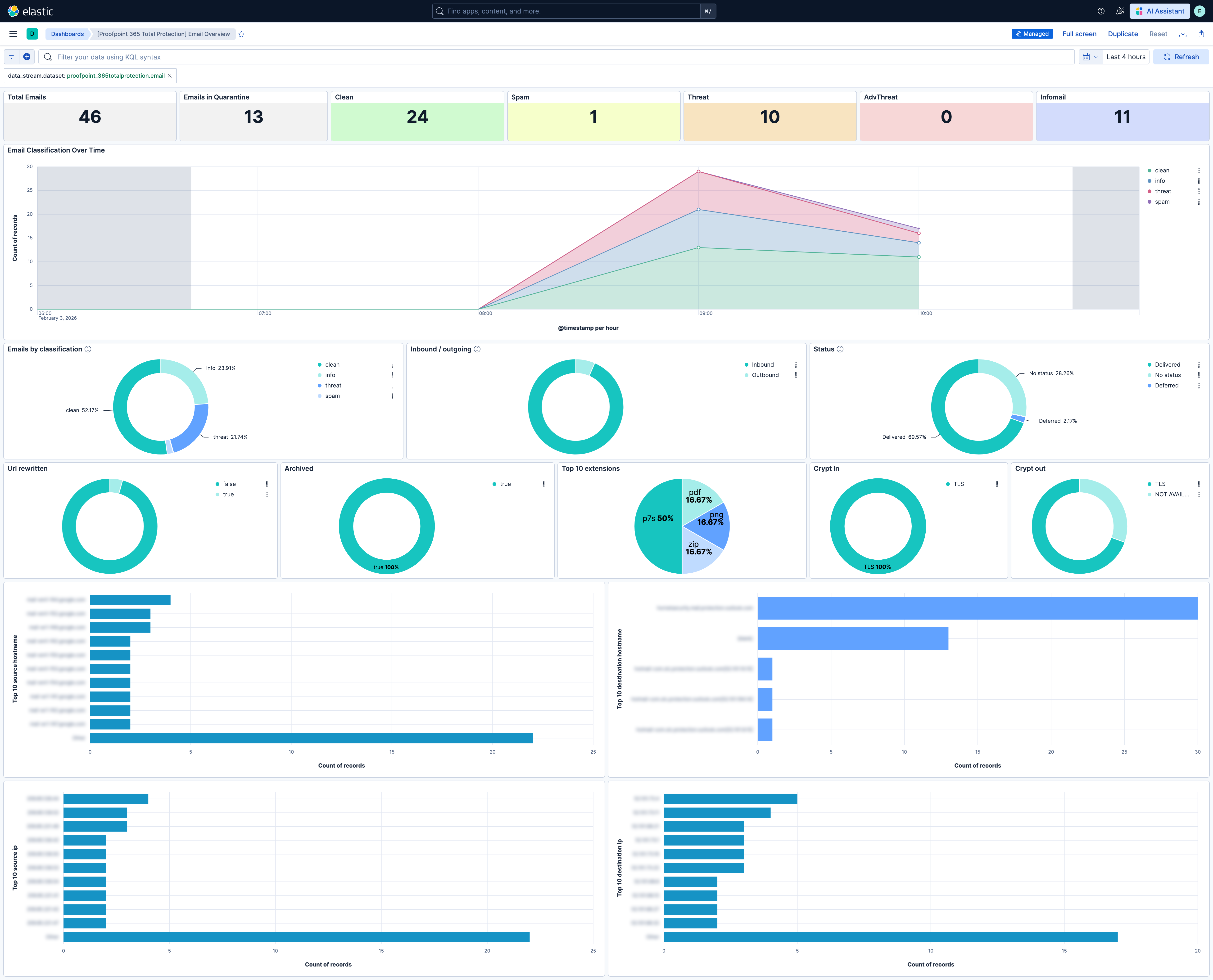
This integration includes one or more Kibana dashboards that visualizes the data collected by the integration. The screenshots below illustrate how the ingested data is displayed.
Changelog
| Version | Details | Minimum Kibana version |
|---|---|---|
| 0.1.1 | Bug fix (View pull request) Use the ECS definition for email.attachments. |
9.2.0 |
| 0.1.0 | Enhancement (View pull request) Initial public release of Proofpoint 365 Total Protection integration for Elastic. |
9.2.0 |