Flashpoint Integration for Elastic
| Version | 0.5.0
|
| Managed integration release status | GA |
| Subscription level What's this? |
Basic |
| Developed by What's this? |
Elastic |
| Ingestion method(s) | API |
| Minimum Kibana version(s) | 9.1.0 8.19.0 |
You can use this integration as an Elastic Managed integration on Elastic Cloud Hosted deployments running this version or later.
To use pre-release integrations, go to the Integrations page in Kibana, scroll down, and toggle on the Display beta integrations option.
Flashpoint is a comprehensive threat intelligence platform that delivers actionable insights from dark web, deep web, and technical sources. It combines human-curated intelligence with automated collection to help organizations identify emerging threats, monitor adversary activity, and assess cyber risk with enriched context.
The Flashpoint integration for Elastic collects alerts, indicators and vulnerabilities from the Flashpoint Ignite API and visualizes them in Kibana.
The Flashpoint integration is compatible with Ignite API version 1.2.
This integration periodically queries the Flashpoint Ignite API to retrieve logs.
This integration collects log messages of the following type:
Alert: Collectsalertlogs from the Flashpoint Ignite API (endpoint:/alert-management/v1/notifications),Indicator: Collectsindicatorlogs from the Flashpoint Ignite API (endpoint:/technical-intelligence/v2/indicators),Vulnerabilities: Collectsvulnerabilitylogs from the Flashpoint Ignite API (endpoint:/vulnerability-intelligence/v1/vulnerabilities),
This integration uses Elastic transforms to deduplicate incident data and maintain the latest view of each incident for analysis and reporting.
Integrating Flashpoint with Elastic SIEM provides centralized visibility into threat intelligence Alerts, Indicators, and Vulnerabilities, enabling efficient monitoring, investigation, and risk assessment within Kibana dashboards.
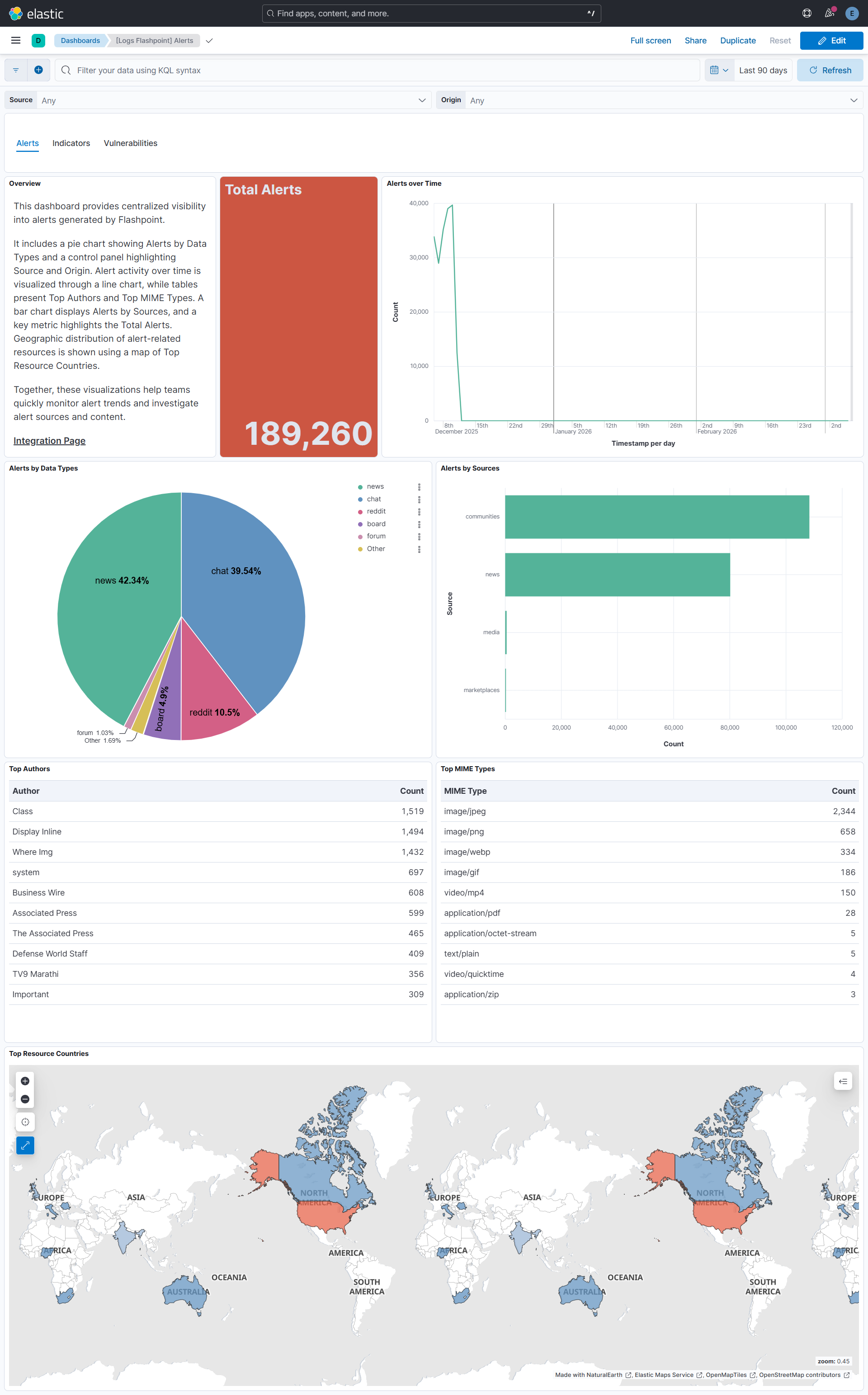
For Alerts, the dashboard presents key metrics such as Total Alerts and Alert Trends Over Time, helping analysts quickly detect activity spikes and monitor evolving threat patterns.
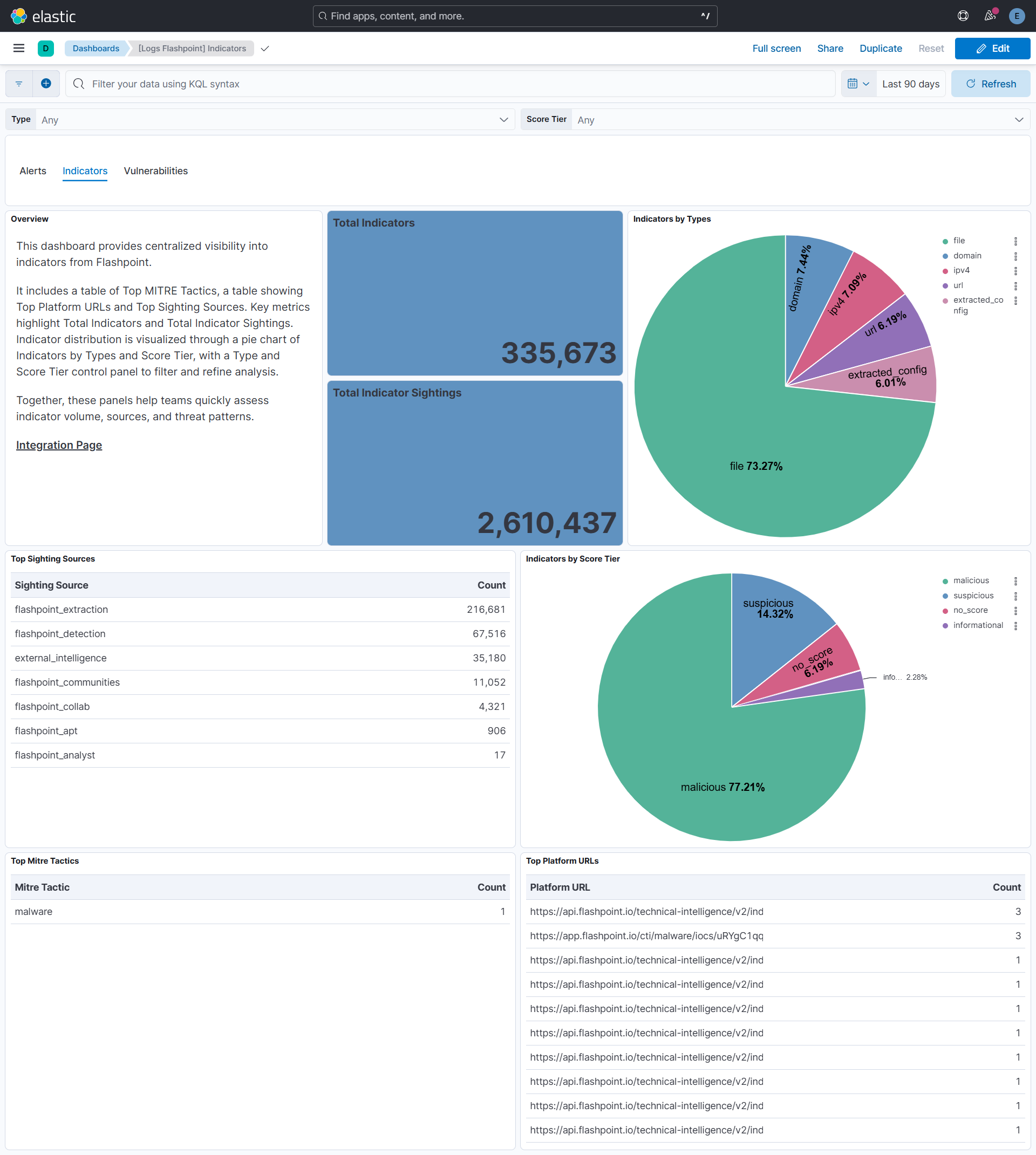
For Indicators, the dashboard highlights Total Indicators and Indicators by Type, providing insight into indicator volume and classification for effective threat analysis.
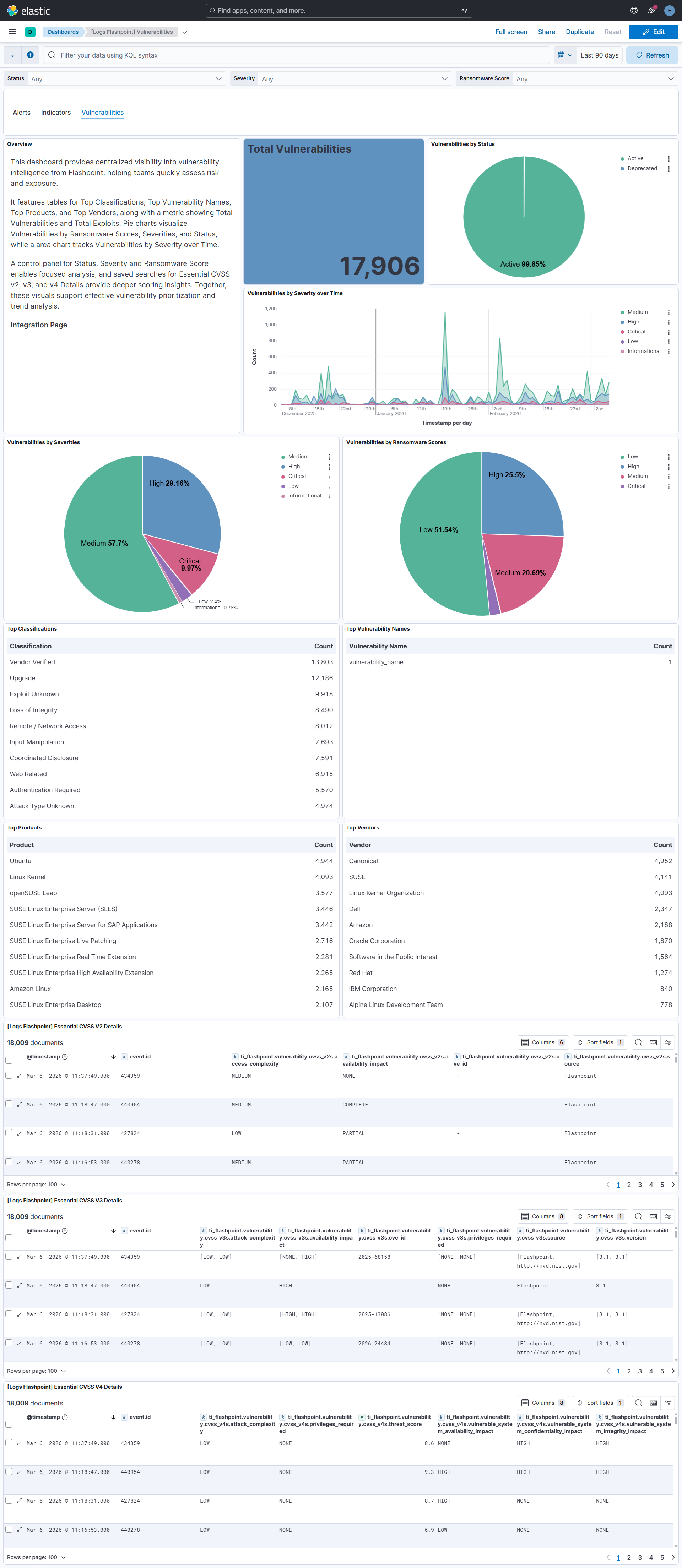
For Vulnerabilities, the dashboard presents Total Vulnerabilities and key breakdowns by Severity and Status, helping security teams assess exposure levels and prioritize remediation efforts.
Interactive filtering controls allow analysts to drill down across alerts, indicators, and vulnerabilities, supporting streamlined investigation and prioritization workflows within a unified threat intelligence view.
This integration installs Elastic latest transforms. For more details, check the Transform setup and requirements.
To collect data through the Flashpoint Ignite API, you need to provide an API Token. Authentication is handled using the API Token, which serves as the required credential.
- Log in to the Flashpoint Instance.
- Click on your profile icon in the top-right corner and select Manage API Tokens.
- Click Generate Token.
- Enter a name for the API token and click Generate Token.
- Copy and securely store the generated API token for use in the integration configuration.
This integration supports both Elastic Agentless-based and Agent-based installations.
Agentless integrations allow you to collect data without having to manage Elastic Agent in your cloud. They make manual agent deployment unnecessary, so you can focus on your data instead of the agent that collects it. For more information, refer to Agentless integrations and the Agentless integrations FAQ.
Agentless deployments are only supported in Elastic Serverless and Elastic Cloud environments. This functionality is in beta and is subject to change. Beta features are not subject to the support SLA of official GA features.
Elastic Agent must be installed. For more details, check the Elastic Agent installation instructions. You can install only one Elastic Agent per host.
In the top search bar in Kibana, search for Integrations.
In the search bar, type Flashpoint.
Select the Flashpoint integration from the search results.
Select Add Flashpoint to add the integration.
Enable and configure only the collection methods which you will use.
To Collect logs from Flashpoint API, you'll need to:
- Configure API Token.
- Adjust the integration configuration parameters if required, including the Initial Interval, Interval, Page Size etc. to enable data collection.
Select Save and continue to save the integration.
- If vulnerability data collection is slow or fails with
context deadline exceeded, reduce thePage Sizeand increase theHTTP Client Timeout.
- In the top search bar in Kibana, search for Dashboards.
- In the search bar, type Flashpoint, and verify the dashboard information is populated.
- In the top search bar in Kibana, search for Transforms.
- Select the Data / Transforms from the search results.
- In the search bar, type ti_flashpoint.
- All transforms from the search results should indicate Healthy under the Health column.
For more information on architectures that can be used for scaling this integration, check the Ingest Architectures documentation.
Exported fields
| Field | Description | Type |
|---|---|---|
| @timestamp | Date/time when the event originated. This is the date/time extracted from the event, typically representing when the event was generated by the source. If the event source has no original timestamp, this value is typically populated by the first time the event was received by the pipeline. Required field for all events. | date |
| data_stream.dataset | The field can contain anything that makes sense to signify the source of the data. Examples include nginx.access, prometheus, endpoint etc. For data streams that otherwise fit, but that do not have dataset set we use the value "generic" for the dataset value. event.dataset should have the same value as data_stream.dataset. Beyond the Elasticsearch data stream naming criteria noted above, the dataset value has additional restrictions: * Must not contain - * No longer than 100 characters |
constant_keyword |
| data_stream.namespace | A user defined namespace. Namespaces are useful to allow grouping of data. Many users already organize their indices this way, and the data stream naming scheme now provides this best practice as a default. Many users will populate this field with default. If no value is used, it falls back to default. Beyond the Elasticsearch index naming criteria noted above, namespace value has the additional restrictions: * Must not contain - * No longer than 100 characters |
constant_keyword |
| data_stream.type | An overarching type for the data stream. Currently allowed values are "logs" and "metrics". We expect to also add "traces" and "synthetics" in the near future. | constant_keyword |
| event.dataset | Name of the dataset. If an event source publishes more than one type of log or events (e.g. access log, error log), the dataset is used to specify which one the event comes from. It's recommended but not required to start the dataset name with the module name, followed by a dot, then the dataset name. | constant_keyword |
| event.module | Name of the module this data is coming from. If your monitoring agent supports the concept of modules or plugins to process events of a given source (e.g. Apache logs), event.module should contain the name of this module. |
constant_keyword |
| input.type | Type of filebeat input. | keyword |
| log.offset | Log offset. | long |
| observer.product | The product name of the observer. | constant_keyword |
| observer.vendor | Vendor name of the observer. | constant_keyword |
| ti_flashpoint.alert.created_at | date | |
| ti_flashpoint.alert.data_type | keyword | |
| ti_flashpoint.alert.generated_at | date | |
| ti_flashpoint.alert.highlight_text | keyword | |
| ti_flashpoint.alert.highlights.body.text/plain | keyword | |
| ti_flashpoint.alert.highlights.container.name | keyword | |
| ti_flashpoint.alert.highlights.description | keyword | |
| ti_flashpoint.alert.highlights.site.title | keyword | |
| ti_flashpoint.alert.highlights.site_actor.names.aliases | keyword | |
| ti_flashpoint.alert.highlights.site_actor.names.handle | keyword | |
| ti_flashpoint.alert.highlights.title | keyword | |
| ti_flashpoint.alert.id | keyword | |
| ti_flashpoint.alert.is_read | boolean | |
| ti_flashpoint.alert.parent_data_type | keyword | |
| ti_flashpoint.alert.reason.details.params.exclude | flattened | |
| ti_flashpoint.alert.reason.details.params.include.date.end | keyword | |
| ti_flashpoint.alert.reason.details.params.include.date.label | keyword | |
| ti_flashpoint.alert.reason.details.params.include.date.start | keyword | |
| ti_flashpoint.alert.reason.details.sources | keyword | |
| ti_flashpoint.alert.reason.entity | flattened | |
| ti_flashpoint.alert.reason.id | keyword | |
| ti_flashpoint.alert.reason.name | keyword | |
| ti_flashpoint.alert.reason.origin | keyword | |
| ti_flashpoint.alert.reason.text | keyword | |
| ti_flashpoint.alert.resource.author | keyword | |
| ti_flashpoint.alert.resource.authors | keyword | |
| ti_flashpoint.alert.resource.basetypes | keyword | |
| ti_flashpoint.alert.resource.container.container.name | keyword | |
| ti_flashpoint.alert.resource.container.container.native_id | keyword | |
| ti_flashpoint.alert.resource.container.container.title | keyword | |
| ti_flashpoint.alert.resource.container.name | keyword | |
| ti_flashpoint.alert.resource.container.native_id | keyword | |
| ti_flashpoint.alert.resource.container.server | keyword | |
| ti_flashpoint.alert.resource.container.title | keyword | |
| ti_flashpoint.alert.resource.country | keyword | |
| ti_flashpoint.alert.resource.created_at | date | |
| ti_flashpoint.alert.resource.description | keyword | |
| ti_flashpoint.alert.resource.id | keyword | |
| ti_flashpoint.alert.resource.link | keyword | |
| ti_flashpoint.alert.resource.media_v2.image_enrichment.enrichments.v1.image_analysis.safe_search.adult | long | |
| ti_flashpoint.alert.resource.media_v2.image_enrichment.enrichments.v1.image_analysis.safe_search.medical | long | |
| ti_flashpoint.alert.resource.media_v2.image_enrichment.enrichments.v1.image_analysis.safe_search.racy | long | |
| ti_flashpoint.alert.resource.media_v2.image_enrichment.enrichments.v1.image_analysis.safe_search.spoof | long | |
| ti_flashpoint.alert.resource.media_v2.image_enrichment.enrichments.v1.image_analysis.safe_search.violence | long | |
| ti_flashpoint.alert.resource.media_v2.media_type | keyword | |
| ti_flashpoint.alert.resource.media_v2.mime_type | keyword | |
| ti_flashpoint.alert.resource.media_v2.phash | keyword | |
| ti_flashpoint.alert.resource.media_v2.phash256 | keyword | |
| ti_flashpoint.alert.resource.media_v2.sha1 | keyword | |
| ti_flashpoint.alert.resource.media_v2.storage_uri | keyword | |
| ti_flashpoint.alert.resource.parent_basetypes | keyword | |
| ti_flashpoint.alert.resource.report.summary | keyword | |
| ti_flashpoint.alert.resource.report.title | keyword | |
| ti_flashpoint.alert.resource.section | keyword | |
| ti_flashpoint.alert.resource.site.title | keyword | |
| ti_flashpoint.alert.resource.site_actor.names.handle | keyword | |
| ti_flashpoint.alert.resource.site_actor.native_id | keyword | |
| ti_flashpoint.alert.resource.sort_date | date | |
| ti_flashpoint.alert.resource.title | keyword | |
| ti_flashpoint.alert.source | keyword | |
| ti_flashpoint.alert.status | keyword | |
| ti_flashpoint.alert.tags | flattened |
Example
{
    "@timestamp": "2025-12-12T11:41:37.775Z",
    "agent": {
        "ephemeral_id": "fe828f18-6ee6-4c80-ba23-4e05f7ac3655",
        "id": "581405cc-6161-4ad5-853b-43a910e3824f",
        "name": "elastic-agent-71469",
        "type": "filebeat",
        "version": "8.18.0"
    },
    "container": {
        "id": "966491148640211034",
        "name": "newbies-2"
    },
    "data_stream": {
        "dataset": "ti_flashpoint.alert",
        "namespace": "75359",
        "type": "logs"
    },
    "ecs": {
        "version": "9.3.0"
    },
    "elastic_agent": {
        "id": "581405cc-6161-4ad5-853b-43a910e3824f",
        "snapshot": false,
        "version": "8.18.0"
    },
    "event": {
        "agent_id_status": "verified",
        "created": "2025-12-12T11:41:37.775Z",
        "dataset": "ti_flashpoint.alert",
        "id": "1fc0fc04-5a85-41ff-970d-acda1c0dd390",
        "ingested": "2026-02-16T06:22:52Z",
        "kind": "alert",
        "original": "{\"created_at\":\"2025-12-12T11:41:37.775301Z\",\"data_type\":\"news\",\"generated_at\":\"2025-12-12T11:41:35.896396Z\",\"highlight_text\":\"16\\nImage \\u003cmark\\u003eCredit\\u003c/mark\\u003e :\",\"highlights\":{\"body.text/plain\":[\"16\\nImage \\u003cmark\\u003eCredit\\u003c/mark\\u003e.\"]},\"id\":\"1fc0fc04-5a85-41ff-970d-acda1c0dd390\",\"is_read\":false,\"parent_data_type\":null,\"reason\":{\"details\":{\"params\":{\"exclude\":{},\"include\":{\"date\":{\"end\":\"now\",\"label\":\"Last 30 Days\",\"start\":\"now-30d\"}}},\"sources\":[\"communities\",\"media\",\"marketplaces\",\"news\"]},\"entity\":null,\"id\":\"0f325ca9-a28f-421b-8d0c-db3329366e5f\",\"name\":\"credit\",\"origin\":\"searches\",\"text\":\"credit\"},\"resource\":{\"author\":\"Alias Doe\",\"authors\":[\"Alias Doe\"],\"basetypes\":[\"article\",\"news\",\"newscatcher\"],\"container\":{\"name\":\"newbies-2\",\"native_id\":\"966491148640211034\"},\"country\":\"IN\",\"created_at\":{\"date-time\":\"2025-12-12T09:06:06+00:00\",\"raw\":\"2025-12-12 09:06:06\",\"timestamp\":1765530366},\"description\":\"Rajinikanth, who has ruled both South and Bollywood cinema, turns 75 today. Born on December 12, 1950, the superstar continues to deliver box-office blockbusters and is now gearing up for several exciting upcoming films.\",\"id\":\"c4FF4mbNV7m2vBWPIaV0uw\",\"link\":\"https://example.com\",\"media_v2\":[{\"mime_type\":\"image/jpeg\",\"phash\":\"9a996984a473e3c7\",\"phash256\":\"9abe917a69c984a6a4d47368e34cc526ed85658cc913cdb3986b9b4cd31c3673\",\"sha1\":\"ddc7b1f8b32056803bdce609c1262e59836bec87\",\"storage_uri\":\"gs://kraken-datalake-media/artifacts/71/71a2a7e557b989f25b89a7cbd9ec3a65183a4717bc2a05ede89971064f177b58\"}],\"site\":{\"title\":\"example.com\"},\"sort_date\":\"2025-12-12T09:06:06Z\",\"title\":\"Jailer 2 to Coolie 2: Rajinikanth at 75 Ready to Thrill Fans with Upcoming Hits\"},\"source\":\"news\",\"status\":null,\"tags\":{}}",
        "reason": "credit",
        "url": "https://example.com"
    },
    "file": {
        "hash": {
            "sha1": [
                "ddc7b1f8b32056803bdce609c1262e59836bec87"
            ]
        },
        "mime_type": [
            "image/jpeg"
        ]
    },
    "input": {
        "type": "cel"
    },
    "related": {
        "hash": [
            "9a996984a473e3c7",
            "9abe917a69c984a6a4d47368e34cc526ed85658cc913cdb3986b9b4cd31c3673",
            "ddc7b1f8b32056803bdce609c1262e59836bec87"
        ],
        "user": [
            "Alias Doe"
        ]
    },
    "tags": [
        "preserve_original_event",
        "preserve_duplicate_custom_fields",
        "forwarded",
        "ti_flashpoint-alert"
    ],
    "ti_flashpoint": {
        "alert": {
            "created_at": "2025-12-12T11:41:37.775Z",
            "data_type": "news",
            "generated_at": "2025-12-12T11:41:35.896Z",
            "highlight_text": "16\nImage <mark>Credit</mark> :",
            "highlights": {
                "body.text/plain": [
                    "16\nImage <mark>Credit</mark>."
                ]
            },
            "id": "1fc0fc04-5a85-41ff-970d-acda1c0dd390",
            "is_read": false,
            "reason": {
                "details": {
                    "params": {
                        "include": {
                            "date": {
                                "end": "now",
                                "label": "Last 30 Days",
                                "start": "now-30d"
                            }
                        }
                    },
                    "sources": [
                        "communities",
                        "media",
                        "marketplaces",
                        "news"
                    ]
                },
                "id": "0f325ca9-a28f-421b-8d0c-db3329366e5f",
                "name": "credit",
                "origin": "searches",
                "text": "credit"
            },
            "resource": {
                "author": "Alias Doe",
                "authors": [
                    "Alias Doe"
                ],
                "basetypes": [
                    "article",
                    "news",
                    "newscatcher"
                ],
                "container": {
                    "name": "newbies-2",
                    "native_id": "966491148640211034"
                },
                "country": "IN",
                "created_at": "2025-12-12T09:06:06.000Z",
                "description": "Rajinikanth, who has ruled both South and Bollywood cinema, turns 75 today. Born on December 12, 1950, the superstar continues to deliver box-office blockbusters and is now gearing up for several exciting upcoming films.",
                "id": "c4FF4mbNV7m2vBWPIaV0uw",
                "link": "https://example.com",
                "media_v2": [
                    {
                        "mime_type": "image/jpeg",
                        "phash": "9a996984a473e3c7",
                        "phash256": "9abe917a69c984a6a4d47368e34cc526ed85658cc913cdb3986b9b4cd31c3673",
                        "sha1": "ddc7b1f8b32056803bdce609c1262e59836bec87",
                        "storage_uri": "gs://kraken-datalake-media/artifacts/71/71a2a7e557b989f25b89a7cbd9ec3a65183a4717bc2a05ede89971064f177b58"
                    }
                ],
                "site": {
                    "title": "example.com"
                },
                "sort_date": "2025-12-12T09:06:06.000Z",
                "title": "Jailer 2 to Coolie 2: Rajinikanth at 75 Ready to Thrill Fans with Upcoming Hits"
            },
            "source": "news"
        }
    },
    "user": {
        "name": "Alias Doe"
    }
}
Exported fields
| Field | Description | Type |
|---|---|---|
| @timestamp | Date/time when the event originated. This is the date/time extracted from the event, typically representing when the event was generated by the source. If the event source has no original timestamp, this value is typically populated by the first time the event was received by the pipeline. Required field for all events. | date |
| data_stream.dataset | The field can contain anything that makes sense to signify the source of the data. Examples include nginx.access, prometheus, endpoint etc. For data streams that otherwise fit, but that do not have dataset set we use the value "generic" for the dataset value. event.dataset should have the same value as data_stream.dataset. Beyond the Elasticsearch data stream naming criteria noted above, the dataset value has additional restrictions: * Must not contain - * No longer than 100 characters |
constant_keyword |
| data_stream.namespace | A user defined namespace. Namespaces are useful to allow grouping of data. Many users already organize their indices this way, and the data stream naming scheme now provides this best practice as a default. Many users will populate this field with default. If no value is used, it falls back to default. Beyond the Elasticsearch index naming criteria noted above, namespace value has the additional restrictions: * Must not contain - * No longer than 100 characters |
constant_keyword |
| data_stream.type | An overarching type for the data stream. Currently allowed values are "logs" and "metrics". We expect to also add "traces" and "synthetics" in the near future. | constant_keyword |
| event.dataset | Name of the dataset. If an event source publishes more than one type of log or events (e.g. access log, error log), the dataset is used to specify which one the event comes from. It's recommended but not required to start the dataset name with the module name, followed by a dot, then the dataset name. | constant_keyword |
| event.module | Name of the module this data is coming from. If your monitoring agent supports the concept of modules or plugins to process events of a given source (e.g. Apache logs), event.module should contain the name of this module. |
constant_keyword |
| input.type | Type of filebeat input. | keyword |
| labels.is_transform_source | Distinguishes between documents that are a source for a transform and documents that are an output of a transform, to facilitate easier filtering. | constant_keyword |
| log.offset | Log offset. | long |
| observer.product | The product name of the observer. | constant_keyword |
| observer.vendor | Vendor name of the observer. | constant_keyword |
| ti_flashpoint.indicator.apt_description | A description of the related threat actor. | keyword |
| ti_flashpoint.indicator.created_at | The date and time the indicator was created within Flashpoint's dataset. | date |
| ti_flashpoint.indicator.entity_type | The entity type of the object. | keyword |
| ti_flashpoint.indicator.external_references.source_name | The name of the reference's source. | keyword |
| ti_flashpoint.indicator.external_references.url | The URL of the reference. | keyword |
| ti_flashpoint.indicator.hashes.md5 | keyword | |
| ti_flashpoint.indicator.hashes.sha1 | keyword | |
| ti_flashpoint.indicator.hashes.sha256 | keyword | |
| ti_flashpoint.indicator.href | The URL to the indicator's full context data. | keyword |
| ti_flashpoint.indicator.id | The unique identifier for this indicator within Flashpoint's dataset. | keyword |
| ti_flashpoint.indicator.last_seen_at | The date and time the indicator was last seen by related sources. | date |
| ti_flashpoint.indicator.latest_sighting.apt_description | A description of the APT associated with the sighting. | keyword |
| ti_flashpoint.indicator.latest_sighting.description | keyword | |
| ti_flashpoint.indicator.latest_sighting.href | The href of the sighting. | keyword |
| ti_flashpoint.indicator.latest_sighting.id | Unique identifier of the sighting. | keyword |
| ti_flashpoint.indicator.latest_sighting.malware_description | A description of the malware associated with the sighting. | keyword |
| ti_flashpoint.indicator.latest_sighting.mitre_attack_ids.id | keyword | |
| ti_flashpoint.indicator.latest_sighting.mitre_attack_ids.name | keyword | |
| ti_flashpoint.indicator.latest_sighting.mitre_attack_ids.tactics | A list of tactics associated with the MITRE ATT&CK technique. | keyword |
| ti_flashpoint.indicator.latest_sighting.related_iocs.href | The URL to the indicator's full context data. | keyword |
| ti_flashpoint.indicator.latest_sighting.related_iocs.id | The unique identifier for this indicator within Flashpoint's dataset. | keyword |
| ti_flashpoint.indicator.latest_sighting.related_iocs.score.last_scored_at | The date and time the indicator was last scored. | date |
| ti_flashpoint.indicator.latest_sighting.related_iocs.score.raw_score | The raw score of the indicator. | long |
| ti_flashpoint.indicator.latest_sighting.related_iocs.score.value | The score tier of the indicator. | keyword |
| ti_flashpoint.indicator.latest_sighting.related_iocs.type | Defines what type of indicator this is. | keyword |
| ti_flashpoint.indicator.latest_sighting.related_iocs.value | The value of the indicator. | keyword |
| ti_flashpoint.indicator.latest_sighting.sighted_at | The date and time the indicator was seen by the source. | date |
| ti_flashpoint.indicator.latest_sighting.source | The source of the sighting. | keyword |
| ti_flashpoint.indicator.latest_sighting.tags | A list of tags associated with the Sighting. | keyword |
| ti_flashpoint.indicator.malware_description | keyword | |
| ti_flashpoint.indicator.mitre_attack_ids.id | keyword | |
| ti_flashpoint.indicator.mitre_attack_ids.name | keyword | |
| ti_flashpoint.indicator.mitre_attack_ids.tactics | A list of tactics associated with the MITRE ATT&CK technique. | keyword |
| ti_flashpoint.indicator.modified_at | The date and time the indicator was last modified within Flashpoint's dataset. | date |
| ti_flashpoint.indicator.platform_urls.ignite | Links to the indicator in various Flashpoint platforms. | keyword |
| ti_flashpoint.indicator.relationships.iocs.href | The URL to the indicator's full context data. | keyword |
| ti_flashpoint.indicator.relationships.iocs.id | The unique identifier for this indicator within Flashpoint's dataset. | keyword |
| ti_flashpoint.indicator.relationships.iocs.type | Defines what type of indicator this is. | keyword |
| ti_flashpoint.indicator.relationships.iocs.value | The value of the indicator. | keyword |
| ti_flashpoint.indicator.score.last_scored_at | The date and time the indicator was last scored. | date |
| ti_flashpoint.indicator.score.raw_score | The raw score of the indicator. | keyword |
| ti_flashpoint.indicator.score.value | The score tier of the indicator. | keyword |
| ti_flashpoint.indicator.sightings.apt_description | A description of the APT associated with the sighting. | keyword |
| ti_flashpoint.indicator.sightings.description | keyword | |
| ti_flashpoint.indicator.sightings.href | The href of the sighting. | keyword |
| ti_flashpoint.indicator.sightings.id | Unique identifier of the sighting. | keyword |
| ti_flashpoint.indicator.sightings.malware_description | A description of the malware associated with the sighting. | keyword |
| ti_flashpoint.indicator.sightings.mitre_attack_ids.id | keyword | |
| ti_flashpoint.indicator.sightings.mitre_attack_ids.name | keyword | |
| ti_flashpoint.indicator.sightings.mitre_attack_ids.tactics | A list of tactics associated with the MITRE ATT&CK technique. | keyword |
| ti_flashpoint.indicator.sightings.related_iocs.href | The URL to the indicator's full context data. | keyword |
| ti_flashpoint.indicator.sightings.related_iocs.id | The unique identifier for this indicator within Flashpoint's dataset. | keyword |
| ti_flashpoint.indicator.sightings.related_iocs.score.last_scored_at | The date and time the indicator was last scored. | keyword |
| ti_flashpoint.indicator.sightings.related_iocs.score.raw_score | The raw score of the indicator. | long |
| ti_flashpoint.indicator.sightings.related_iocs.score.value | The score tier of the indicator. | keyword |
| ti_flashpoint.indicator.sightings.related_iocs.type | Defines what type of indicator this is. | keyword |
| ti_flashpoint.indicator.sightings.related_iocs.value | The value of the indicator. | keyword |
| ti_flashpoint.indicator.sightings.sighted_at | The date and time the indicator was seen by the source. | date |
| ti_flashpoint.indicator.sightings.source | The source of the sighting. | keyword |
| ti_flashpoint.indicator.sightings.tags | A list of tags associated with the Sighting. | keyword |
| ti_flashpoint.indicator.sort_date | The date and time defaulted for sorting indicators. This is the same value as last_seen_at. | date |
| ti_flashpoint.indicator.total_sightings | The total number of sightings for the indicator. | long |
| ti_flashpoint.indicator.type | Defines what type of indicator. | keyword |
| ti_flashpoint.indicator.value | The value of the indicator. | keyword |
Example
{
    "@timestamp": "2025-12-23T10:58:20.798Z",
    "agent": {
        "ephemeral_id": "fb292815-193e-4385-b8fd-874bec678aa1",
        "id": "f8d04f25-1e2d-4a99-bdf0-3a210b15d23e",
        "name": "elastic-agent-81532",
        "type": "filebeat",
        "version": "8.18.0"
    },
    "data_stream": {
        "dataset": "ti_flashpoint.indicator",
        "namespace": "97654",
        "type": "logs"
    },
    "ecs": {
        "version": "9.3.0"
    },
    "elastic_agent": {
        "id": "f8d04f25-1e2d-4a99-bdf0-3a210b15d23e",
        "snapshot": false,
        "version": "8.18.0"
    },
    "event": {
        "agent_id_status": "verified",
        "category": [
            "threat"
        ],
        "created": "2025-11-03T08:35:08.714Z",
        "dataset": "ti_flashpoint.indicator",
        "id": "EtniFes7WyWvawEXcL2fmQ",
        "ingested": "2026-03-26T06:34:57Z",
        "kind": "enrichment",
        "original": "{\"created_at\":\"2025-11-03T08:35:08.714000Z\",\"entity_type\":\"indicator\",\"href\":\"https://api.flashpoint.io/technical-intelligence/v2/indicators/EtniFes7WyWvawEXcL2fmQ\",\"id\":\"EtniFes7WyWvawEXcL2fmQ\",\"last_seen_at\":\"2025-12-23T10:47:29.731000Z\",\"latest_sighting\":{\"description\":\"Observation: xworm [2025-12-23T10:47:29.731Z]\",\"href\":\"https://api.flashpoint.io/technical-intelligence/v2/sightings/-mQDA1JEVYiXKTSenQuSbg\",\"id\":\"-mQDA1JEVYiXKTSenQuSbg\",\"sighted_at\":\"2025-12-23T10:47:29.731000Z\",\"source\":\"flashpoint_extraction\",\"tags\":[\"aes_key:be7b7befe99d381fbe34ef443b3179be7b7befe99d381fbe34ef443b31790e00\",\"extracted_config:true\",\"group:feturednew\",\"malware:xworm\",\"mutex:hr5unzmp8fhkimje\",\"source:flashpoint_extraction\",\"type:trojan\"]},\"modified_at\":\"2025-12-23T10:58:20.798000Z\",\"platform_urls\":{\"ignite\":\"https://app.flashpoint.io/cti/malware/iocs/EtniFes7WyWvawEXcL2fmQ\"},\"score\":{\"last_scored_at\":\"2025-11-03T08:46:17.620389Z\",\"value\":\"informational\"},\"sightings\":[{\"description\":\"Observation: xworm [2025-12-23T10:47:29.731Z]\",\"href\":\"https://api.flashpoint.io/technical-intelligence/v2/sightings/-mQDA1JEVYiXKTSenQuSbg\",\"id\":\"-mQDA1JEVYiXKTSenQuSbg\",\"sighted_at\":\"2025-12-23T10:47:29.731000Z\",\"source\":\"flashpoint_extraction\",\"tags\":[\"aes_key:be7b7befe99d381fbe34ef443b3179be7b7befe99d381fbe34ef443b31790e00\",\"extracted_config:true\",\"group:feturednew\",\"malware:xworm\",\"mutex:hr5unzmp8fhkimje\",\"source:flashpoint_extraction\",\"type:trojan\"]}],\"sort_date\":\"2025-12-23T10:47:29.731000Z\",\"total_sightings\":11,\"type\":\"domain\",\"value\":\"featured.xyz\"}",
        "type": [
            "indicator"
        ]
    },
    "input": {
        "type": "cel"
    },
    "tags": [
        "preserve_original_event",
        "preserve_duplicate_custom_fields",
        "forwarded",
        "ti_flashpoint-indicator"
    ],
    "threat": {
        "indicator": {
            "id": [
                "EtniFes7WyWvawEXcL2fmQ"
            ],
            "last_seen": "2025-12-23T10:47:29.731Z",
            "modified_at": "2025-12-23T10:58:20.798Z",
            "reference": [
                "https://app.flashpoint.io/cti/malware/iocs/EtniFes7WyWvawEXcL2fmQ",
                "https://api.flashpoint.io/technical-intelligence/v2/indicators/EtniFes7WyWvawEXcL2fmQ"
            ],
            "type": "domain-name"
        }
    },
    "ti_flashpoint": {
        "indicator": {
            "created_at": "2025-11-03T08:35:08.714Z",
            "entity_type": "indicator",
            "href": "https://api.flashpoint.io/technical-intelligence/v2/indicators/EtniFes7WyWvawEXcL2fmQ",
            "id": "EtniFes7WyWvawEXcL2fmQ",
            "last_seen_at": "2025-12-23T10:47:29.731Z",
            "latest_sighting": {
                "description": "Observation: xworm [2025-12-23T10:47:29.731Z]",
                "href": "https://api.flashpoint.io/technical-intelligence/v2/sightings/-mQDA1JEVYiXKTSenQuSbg",
                "id": "-mQDA1JEVYiXKTSenQuSbg",
                "sighted_at": "2025-12-23T10:47:29.731Z",
                "source": "flashpoint_extraction",
                "tags": [
                    "aes_key:be7b7befe99d381fbe34ef443b3179be7b7befe99d381fbe34ef443b31790e00",
                    "extracted_config:true",
                    "group:feturednew",
                    "malware:xworm",
                    "mutex:hr5unzmp8fhkimje",
                    "source:flashpoint_extraction",
                    "type:trojan"
                ]
            },
            "modified_at": "2025-12-23T10:58:20.798Z",
            "platform_urls": {
                "ignite": "https://app.flashpoint.io/cti/malware/iocs/EtniFes7WyWvawEXcL2fmQ"
            },
            "score": {
                "last_scored_at": "2025-11-03T08:46:17.620Z",
                "value": "informational"
            },
            "sightings": [
                {
                    "description": "Observation: xworm [2025-12-23T10:47:29.731Z]",
                    "href": "https://api.flashpoint.io/technical-intelligence/v2/sightings/-mQDA1JEVYiXKTSenQuSbg",
                    "id": "-mQDA1JEVYiXKTSenQuSbg",
                    "sighted_at": "2025-12-23T10:47:29.731Z",
                    "source": "flashpoint_extraction",
                    "tags": [
                        "aes_key:be7b7befe99d381fbe34ef443b3179be7b7befe99d381fbe34ef443b31790e00",
                        "extracted_config:true",
                        "group:feturednew",
                        "malware:xworm",
                        "mutex:hr5unzmp8fhkimje",
                        "source:flashpoint_extraction",
                        "type:trojan"
                    ]
                }
            ],
            "sort_date": "2025-12-23T10:47:29.731Z",
            "total_sightings": 11,
            "type": "domain",
            "value": "featured.xyz"
        }
    }
}
Exported fields
| Field | Description | Type |
|---|---|---|
| @timestamp | Date/time when the event originated. This is the date/time extracted from the event, typically representing when the event was generated by the source. If the event source has no original timestamp, this value is typically populated by the first time the event was received by the pipeline. Required field for all events. | date |
| data_stream.dataset | The field can contain anything that makes sense to signify the source of the data. Examples include nginx.access, prometheus, endpoint etc. For data streams that otherwise fit, but that do not have dataset set we use the value "generic" for the dataset value. event.dataset should have the same value as data_stream.dataset. Beyond the Elasticsearch data stream naming criteria noted above, the dataset value has additional restrictions: * Must not contain - * No longer than 100 characters |
constant_keyword |
| data_stream.namespace | A user defined namespace. Namespaces are useful to allow grouping of data. Many users already organize their indices this way, and the data stream naming scheme now provides this best practice as a default. Many users will populate this field with default. If no value is used, it falls back to default. Beyond the Elasticsearch index naming criteria noted above, namespace value has the additional restrictions: * Must not contain - * No longer than 100 characters |
constant_keyword |
| data_stream.type | An overarching type for the data stream. Currently allowed values are "logs" and "metrics". We expect to also add "traces" and "synthetics" in the near future. | constant_keyword |
| event.dataset | Name of the dataset. If an event source publishes more than one type of log or events (e.g. access log, error log), the dataset is used to specify which one the event comes from. It's recommended but not required to start the dataset name with the module name, followed by a dot, then the dataset name. | constant_keyword |
| event.module | Name of the module this data is coming from. If your monitoring agent supports the concept of modules or plugins to process events of a given source (e.g. Apache logs), event.module should contain the name of this module. |
constant_keyword |
| input.type | Type of filebeat input. | keyword |
| log.offset | Log offset. | long |
| observer.product | The product name of the observer. | constant_keyword |
| observer.vendor | Vendor name of the observer. | constant_keyword |
| ti_flashpoint.vulnerability.classifications.description | keyword | |
| ti_flashpoint.vulnerability.classifications.longname | keyword | |
| ti_flashpoint.vulnerability.classifications.name | keyword | |
| ti_flashpoint.vulnerability.cve_ids | keyword | |
| ti_flashpoint.vulnerability.cvss_v2s.access_complexity | The Common Vulnerabilities and Exposures (CVE) IDs associated with the vulnerability. | keyword |
| ti_flashpoint.vulnerability.cvss_v2s.access_vector | keyword | |
| ti_flashpoint.vulnerability.cvss_v2s.authentication | keyword | |
| ti_flashpoint.vulnerability.cvss_v2s.availability_impact | keyword | |
| ti_flashpoint.vulnerability.cvss_v2s.calculated_cvss_base_score | double | |
| ti_flashpoint.vulnerability.cvss_v2s.confidentiality_impact | keyword | |
| ti_flashpoint.vulnerability.cvss_v2s.cve_id | keyword | |
| ti_flashpoint.vulnerability.cvss_v2s.generated_at | The CVE ID assigned by a CNA (CVE Numbering Authority). | date |
| ti_flashpoint.vulnerability.cvss_v2s.integrity_impact | keyword | |
| ti_flashpoint.vulnerability.cvss_v2s.score | double | |
| ti_flashpoint.vulnerability.cvss_v2s.source | keyword | |
| ti_flashpoint.vulnerability.cvss_v3s.attack_complexity | keyword | |
| ti_flashpoint.vulnerability.cvss_v3s.attack_vector | keyword | |
| ti_flashpoint.vulnerability.cvss_v3s.availability_impact | keyword | |
| ti_flashpoint.vulnerability.cvss_v3s.calculated_cvss_base_score | double | |
| ti_flashpoint.vulnerability.cvss_v3s.confidentiality_impact | keyword | |
| ti_flashpoint.vulnerability.cvss_v3s.cve_id | keyword | |
| ti_flashpoint.vulnerability.cvss_v3s.exploit_code_maturity | The CVE ID assigned by a CNA (CVE Numbering Authority). | keyword |
| ti_flashpoint.vulnerability.cvss_v3s.generated_at | date | |
| ti_flashpoint.vulnerability.cvss_v3s.integrity_impact | keyword | |
| ti_flashpoint.vulnerability.cvss_v3s.privileges_required | keyword | |
| ti_flashpoint.vulnerability.cvss_v3s.remediation_level | keyword | |
| ti_flashpoint.vulnerability.cvss_v3s.report_confidence | keyword | |
| ti_flashpoint.vulnerability.cvss_v3s.scope | keyword | |
| ti_flashpoint.vulnerability.cvss_v3s.score | double | |
| ti_flashpoint.vulnerability.cvss_v3s.source | keyword | |
| ti_flashpoint.vulnerability.cvss_v3s.temporal_score | double | |
| ti_flashpoint.vulnerability.cvss_v3s.updated_at | date | |
| ti_flashpoint.vulnerability.cvss_v3s.user_interaction | keyword | |
| ti_flashpoint.vulnerability.cvss_v3s.vector_string | keyword | |
| ti_flashpoint.vulnerability.cvss_v3s.version | keyword | |
| ti_flashpoint.vulnerability.cvss_v4s.attack_complexity | keyword | |
| ti_flashpoint.vulnerability.cvss_v4s.attack_requirements | keyword | |
| ti_flashpoint.vulnerability.cvss_v4s.attack_vector | keyword | |
| ti_flashpoint.vulnerability.cvss_v4s.cve_id | keyword | |
| ti_flashpoint.vulnerability.cvss_v4s.exploit_maturity | keyword | |
| ti_flashpoint.vulnerability.cvss_v4s.generated_at | date | |
| ti_flashpoint.vulnerability.cvss_v4s.privileges_required | keyword | |
| ti_flashpoint.vulnerability.cvss_v4s.score | double | |
| ti_flashpoint.vulnerability.cvss_v4s.source | keyword | |
| ti_flashpoint.vulnerability.cvss_v4s.subsequent_system_availability_impact | keyword | |
| ti_flashpoint.vulnerability.cvss_v4s.subsequent_system_confidentiality_impact | keyword | |
| ti_flashpoint.vulnerability.cvss_v4s.subsequent_system_integrity_impact | keyword | |
| ti_flashpoint.vulnerability.cvss_v4s.threat_score | double | |
| ti_flashpoint.vulnerability.cvss_v4s.updated_at | date | |
| ti_flashpoint.vulnerability.cvss_v4s.user_interaction | keyword | |
| ti_flashpoint.vulnerability.cvss_v4s.vector_string | keyword | |
| ti_flashpoint.vulnerability.cvss_v4s.version | keyword | |
| ti_flashpoint.vulnerability.cvss_v4s.vulnerable_system_availability_impact | keyword | |
| ti_flashpoint.vulnerability.cvss_v4s.vulnerable_system_confidentiality_impact | keyword | |
| ti_flashpoint.vulnerability.cvss_v4s.vulnerable_system_integrity_impact | keyword | |
| ti_flashpoint.vulnerability.cwes.cve_ids | keyword | |
| ti_flashpoint.vulnerability.cwes.cwe_id | keyword | |
| ti_flashpoint.vulnerability.cwes.name | The CWE ID assigned by Mitre. | keyword |
| ti_flashpoint.vulnerability.cwes.source | keyword | |
| ti_flashpoint.vulnerability.description | keyword | |
| ti_flashpoint.vulnerability.exploits_count | long | |
| ti_flashpoint.vulnerability.ext_references.created_at | A text description of the software, nature of the vulnerability, and the direct impact if exploited. | date |
| ti_flashpoint.vulnerability.ext_references.description | keyword | |
| ti_flashpoint.vulnerability.ext_references.type | keyword | |
| ti_flashpoint.vulnerability.ext_references.url | keyword | |
| ti_flashpoint.vulnerability.ext_references.value | keyword | |
| ti_flashpoint.vulnerability.id | keyword | |
| ti_flashpoint.vulnerability.keywords | The unique numeric identifier assigned by Flashpoint for a single vulnerability. | keyword |
| ti_flashpoint.vulnerability.name | Any words, numeric strings, or other identifiers that relate to the vulnerability that do not otherwise appear in the entry. | keyword |
| ti_flashpoint.vulnerability.products.id | keyword | |
| ti_flashpoint.vulnerability.products.name | The unique numeric identifier assigned by Flashpoint for a single product. | keyword |
| ti_flashpoint.vulnerability.scores.cvssv3_score | double | |
| ti_flashpoint.vulnerability.scores.epss_score | The Common Vulnerability Scoring System (CVSS version 3) score for the vulnerability. | double |
| ti_flashpoint.vulnerability.scores.epss_v1_score | The epss score from first.org for vulnerabilities with a CVE-ID. | double |
| ti_flashpoint.vulnerability.scores.ransomware_score | The epss score version 1 for all vulnerabilities including those that do not have a CVE-ID. | keyword |
| ti_flashpoint.vulnerability.scores.severity | The likelihood a vulnerability will be used in a ransomware attack. | keyword |
| ti_flashpoint.vulnerability.solution | keyword | |
| ti_flashpoint.vulnerability.tags | A brief description of how the vulnerability can be mitigated or resolved. | keyword |
| ti_flashpoint.vulnerability.technical_description | keyword | |
| ti_flashpoint.vulnerability.timelines.disclosed_at | Additional notes, usually of a technical nature, that further explain the issue, exploitation caveats or requirements, and further analysis or observations by Flashpoint. | date |
| ti_flashpoint.vulnerability.timelines.discovered_at | The date when the vulnerability was disclosed. | date |
| ti_flashpoint.vulnerability.timelines.exploit_published_at | The date when the vulnerability was discovered. | date |
| ti_flashpoint.vulnerability.timelines.exploited_in_the_wild_at | The date when an exploit was published for the vulnerability. | date |
| ti_flashpoint.vulnerability.timelines.last_modified_at | The date when the vulnerability was exploited in the wild. | date |
| ti_flashpoint.vulnerability.timelines.published_at | The date when the vulnerability was last edited on the system. | date |
| ti_flashpoint.vulnerability.timelines.solution_provided_at | The date when the vulnerability was published on the system. | date |
| ti_flashpoint.vulnerability.timelines.third_party_solution_provided_at | The earliest date when a solution was provided for the vulnerability. | date |
| ti_flashpoint.vulnerability.timelines.vendor_acknowledged_at | The date a third party solution was provided for the vulnerability. | date |
| ti_flashpoint.vulnerability.timelines.vendor_informed_at | The date the vendor acknowledged the vulnerability. | date |
| ti_flashpoint.vulnerability.title | The date the vendor was informed of the vulnerability. | keyword |
| ti_flashpoint.vulnerability.vendors.id | A concise title describing the vulnerability. | keyword |
| ti_flashpoint.vulnerability.vendors.name | The unique numeric identifier assigned by Flashpoint for a single vendor. | keyword |
| ti_flashpoint.vulnerability.vuln_status | keyword | |
| vulnerability.cve | The CVE id of the vulnerability. | keyword |
| vulnerability.published_date | When the vulnerability was published. | date |
| vulnerability.scanner.vendor | The name of the vulnerability scanner vendor. | constant_keyword |
Example
{
    "@timestamp": "2025-12-29T23:00:01.000Z",
    "agent": {
        "ephemeral_id": "a731b22a-997d-4b91-add8-54e3bcbed26e",
        "id": "464a3ca4-9a12-4a88-8083-7d2a364dc9d8",
        "name": "elastic-agent-10945",
        "type": "filebeat",
        "version": "8.18.0"
    },
    "data_stream": {
        "dataset": "ti_flashpoint.vulnerability",
        "namespace": "21891",
        "type": "logs"
    },
    "ecs": {
        "version": "9.3.0"
    },
    "elastic_agent": {
        "id": "464a3ca4-9a12-4a88-8083-7d2a364dc9d8",
        "snapshot": false,
        "version": "8.18.0"
    },
    "event": {
        "agent_id_status": "verified",
        "category": [
            "vulnerability"
        ],
        "created": "2025-12-29T22:49:59.000Z",
        "dataset": "ti_flashpoint.vulnerability",
        "id": "432898",
        "ingested": "2026-03-09T07:06:13Z",
        "kind": "state",
        "original": "{\"classifications\":[{\"description\":\"Local access is required to exploit this vulnerability (e.g., unix shell, windows user).\",\"longname\":\"Local Access Required\",\"name\":\"location_local\"},{\"description\":\"A vulnerability that cannot be defined by any other Attack Type classification.\",\"longname\":\"Other\",\"name\":\"attack_type_other\"},{\"description\":\"Assurance that data is protected and not disclosed to unauthorized party.\\r\\nExamples: password disclosures, server information, environment variables, confirmation of file existance, path dislcosure, file content access, some SQL injection.\",\"longname\":\"Loss of Confidentiality\",\"name\":\"impact_confidential\"},{\"description\":\"Assurance that data is unaltered by unauthorized persons and authorization has not been exceeded.\\r\\nExamples: XSS, arbitrary command execution, most overflows, most format strings, SQL injection, unauthorized file modification/deletion/creation, remote file inclusion, etc.\",\"longname\":\"Loss of Integrity\",\"name\":\"impact_integrity\"},{\"description\":\"The status of a working exploit is unknown.\",\"longname\":\"Exploit Unknown\",\"name\":\"exploit_unknown\"},{\"description\":\"The vulnerability can be mitigated by installing the vendor-supplied upgrade.\",\"longname\":\"Upgrade\",\"name\":\"solution_upgrade\"},{\"description\":\"The vendor has verified this vulnerability.\",\"longname\":\"Vendor Verified\",\"name\":\"disclosure_verified\"},{\"description\":\"The researcher and vendor coordinated disclosure so that vulnerability details were released in conjunction with a solution.\",\"longname\":\"Coordinated Disclosure\",\"name\":\"disclosure_coordinated_disclosure\"},{\"description\":\"This vulnerability can only be exploited after successful authentication.\",\"longname\":\"Authentication Required\",\"name\":\"vuln_authentication_required\"}],\"cve_ids\":[\"CVE-2025-13326\"],\"cvss_v2s\":[{\"access_complexity\":\"MEDIUM\",\"access_vector\":\"LOCAL\",\"authentication\":\"NONE\",\"availability_impact\":\"NONE\",\"calculated_cvss_base_score\":1.9,\"confidentiality_impact\":\"NONE\",\"cve_id\":null,\"generated_at\":\"2025-12-29T20:10:04Z\",\"integrity_impact\":\"PARTIAL\",\"score\":1.9,\"source\":\"Flashpoint\"}],\"cvss_v3s\":[{\"attack_complexity\":\"LOW\",\"attack_vector\":\"LOCAL\",\"availability_impact\":\"NONE\",\"calculated_cvss_base_score\":3.9,\"confidentiality_impact\":\"LOW\",\"cve_id\":null,\"exploit_code_maturity\":\"UNPROVEN\",\"generated_at\":\"2025-12-29T20:10:04Z\",\"integrity_impact\":\"LOW\",\"privileges_required\":\"LOW\",\"remediation_level\":\"OFFICIAL_FIX\",\"report_confidence\":\"CONFIRMED\",\"scope\":\"UNCHANGED\",\"score\":3.9,\"source\":\"Flashpoint\",\"temporal_score\":3.4,\"updated_at\":\"2025-12-29T22:49:59Z\",\"user_interaction\":\"REQUIRED\",\"vector_string\":\"CVSS:3.1/AV:L/AC:L/PR:L/UI:R/S:U/C:L/I:L/A:N/E:U/RL:O/RC:C\",\"version\":\"3.1\"}],\"cvss_v4s\":[{\"attack_complexity\":\"LOW\",\"attack_requirements\":\"NONE\",\"attack_vector\":\"LOCAL\",\"cve_id\":null,\"exploit_maturity\":\"NOT_DEFINED\",\"generated_at\":\"2025-12-29T20:10:04.144000Z\",\"privileges_required\":\"LOW\",\"score\":2.4,\"source\":\"Flashpoint\",\"subsequent_system_availability_impact\":\"NONE\",\"subsequent_system_confidentiality_impact\":\"NONE\",\"subsequent_system_integrity_impact\":\"NONE\",\"threat_score\":2.4,\"updated_at\":\"2025-12-29T20:10:04.254000Z\",\"user_interaction\":\"PASSIVE\",\"vector_string\":\"CVSS:4.0/AV:L/AC:L/AT:N/PR:L/UI:P/VC:L/VI:L/VA:N/SC:N/SI:N/SA:N/E:X\",\"version\":\"4.0\",\"vulnerable_system_availability_impact\":\"NONE\",\"vulnerable_system_confidentiality_impact\":\"LOW\",\"vulnerable_system_integrity_impact\":\"LOW\"}],\"cwes\":[{\"cve_ids\":\"2025-13326\",\"cwe_id\":693,\"name\":\"Protection Mechanism Failure\",\"source\":\"mitre\"}],\"description\":\"Mattermost Desktop contains a flaw that is triggered as the program fails to enable the Hardened Runtime setting when packaged for Mac App Store. This may allow a local attacker to inherit TCC permissions via copying the binary to a tmp folder.\",\"exploits_count\":0,\"ext_references\":[{\"created_at\":\"2020-09-09T19:57:14Z\",\"description\":null,\"type\":\"Vendor Specific Advisory URL\",\"url\":\"https://mattermost.com/security-updates/\",\"value\":\"https://mattermost.com/security-updates/\"},{\"created_at\":\"2025-12-23T17:58:58Z\",\"description\":null,\"type\":\"Generic Informational URL\",\"url\":\"https://www.cisa.gov/news-events/bulletins/sb25-356\",\"value\":\"https://www.cisa.gov/news-events/bulletins/sb25-356\"},{\"created_at\":\"2025-12-17T18:20:42Z\",\"description\":null,\"type\":\"CVE ID\",\"url\":\"https://www.cve.org/CVERecord?id=CVE-2025-13326\",\"value\":\"2025-13326\"}],\"id\":432898,\"keywords\":\"MMSA-2025-00504\",\"products\":[{\"id\":2985883,\"name\":\"Mattermost Desktop\"}],\"scores\":{\"cvssv3_score\":3.9,\"epss_score\":0.00013,\"epss_v1_score\":0,\"ransomware_score\":\"Low\",\"severity\":\"Low\"},\"solution\":\"It has been reported that this has been fixed. Please refer to the product listing for upgraded versions that address this vulnerability.\",\"tags\":[\"oss\"],\"technical_description\":\"\",\"timelines\":{\"disclosed_at\":\"2025-11-17T00:00:00Z\",\"discovered_at\":null,\"exploit_published_at\":null,\"exploited_in_the_wild_at\":null,\"last_modified_at\":\"2025-12-29T23:00:01Z\",\"published_at\":\"2025-12-29T22:49:59Z\",\"solution_provided_at\":\"2025-11-17T00:00:00Z\",\"third_party_solution_provided_at\":null,\"vendor_acknowledged_at\":null,\"vendor_informed_at\":null},\"title\":\"Mattermost Desktop Hardened Runtime Protection Mechanism Failure Local TCC Privilege Escalation\",\"vendors\":[{\"id\":2803312,\"name\":\"Mattermost\"}],\"vuln_status\":\"Active\"}",
        "type": [
            "info"
        ]
    },
    "input": {
        "type": "cel"
    },
    "message": "Mattermost Desktop contains a flaw that is triggered as the program fails to enable the Hardened Runtime setting when packaged for Mac App Store. This may allow a local attacker to inherit TCC permissions via copying the binary to a tmp folder.",
    "tags": [
        "preserve_original_event",
        "preserve_duplicate_custom_fields",
        "forwarded",
        "ti_flashpoint-vulnerability"
    ],
    "ti_flashpoint": {
        "vulnerability": {
            "classifications": [
                {
                    "description": "Local access is required to exploit this vulnerability (e.g., unix shell, windows user).",
                    "longname": "Local Access Required",
                    "name": "location_local"
                },
                {
                    "description": "A vulnerability that cannot be defined by any other Attack Type classification.",
                    "longname": "Other",
                    "name": "attack_type_other"
                },
                {
                    "description": "Assurance that data is protected and not disclosed to unauthorized party.\r\nExamples: password disclosures, server information, environment variables, confirmation of file existance, path dislcosure, file content access, some SQL injection.",
                    "longname": "Loss of Confidentiality",
                    "name": "impact_confidential"
                },
                {
                    "description": "Assurance that data is unaltered by unauthorized persons and authorization has not been exceeded.\r\nExamples: XSS, arbitrary command execution, most overflows, most format strings, SQL injection, unauthorized file modification/deletion/creation, remote file inclusion, etc.",
                    "longname": "Loss of Integrity",
                    "name": "impact_integrity"
                },
                {
                    "description": "The status of a working exploit is unknown.",
                    "longname": "Exploit Unknown",
                    "name": "exploit_unknown"
                },
                {
                    "description": "The vulnerability can be mitigated by installing the vendor-supplied upgrade.",
                    "longname": "Upgrade",
                    "name": "solution_upgrade"
                },
                {
                    "description": "The vendor has verified this vulnerability.",
                    "longname": "Vendor Verified",
                    "name": "disclosure_verified"
                },
                {
                    "description": "The researcher and vendor coordinated disclosure so that vulnerability details were released in conjunction with a solution.",
                    "longname": "Coordinated Disclosure",
                    "name": "disclosure_coordinated_disclosure"
                },
                {
                    "description": "This vulnerability can only be exploited after successful authentication.",
                    "longname": "Authentication Required",
                    "name": "vuln_authentication_required"
                }
            ],
            "cve_ids": [
                "CVE-2025-13326"
            ],
            "cvss_v2s": [
                {
                    "access_complexity": "MEDIUM",
                    "access_vector": "LOCAL",
                    "authentication": "NONE",
                    "availability_impact": "NONE",
                    "calculated_cvss_base_score": 1.9,
                    "confidentiality_impact": "NONE",
                    "generated_at": "2025-12-29T20:10:04.000Z",
                    "integrity_impact": "PARTIAL",
                    "score": 1.9,
                    "source": "Flashpoint"
                }
            ],
            "cvss_v3s": [
                {
                    "attack_complexity": "LOW",
                    "attack_vector": "LOCAL",
                    "availability_impact": "NONE",
                    "calculated_cvss_base_score": 3.9,
                    "confidentiality_impact": "LOW",
                    "exploit_code_maturity": "UNPROVEN",
                    "generated_at": "2025-12-29T20:10:04.000Z",
                    "integrity_impact": "LOW",
                    "privileges_required": "LOW",
                    "remediation_level": "OFFICIAL_FIX",
                    "report_confidence": "CONFIRMED",
                    "scope": "UNCHANGED",
                    "score": 3.9,
                    "source": "Flashpoint",
                    "temporal_score": 3.4,
                    "updated_at": "2025-12-29T22:49:59.000Z",
                    "user_interaction": "REQUIRED",
                    "vector_string": "CVSS:3.1/AV:L/AC:L/PR:L/UI:R/S:U/C:L/I:L/A:N/E:U/RL:O/RC:C",
                    "version": "3.1"
                }
            ],
            "cvss_v4s": [
                {
                    "attack_complexity": "LOW",
                    "attack_requirements": "NONE",
                    "attack_vector": "LOCAL",
                    "exploit_maturity": "NOT_DEFINED",
                    "generated_at": "2025-12-29T20:10:04.144Z",
                    "privileges_required": "LOW",
                    "score": 2.4,
                    "source": "Flashpoint",
                    "subsequent_system_availability_impact": "NONE",
                    "subsequent_system_confidentiality_impact": "NONE",
                    "subsequent_system_integrity_impact": "NONE",
                    "threat_score": 2.4,
                    "updated_at": "2025-12-29T20:10:04.254Z",
                    "user_interaction": "PASSIVE",
                    "vector_string": "CVSS:4.0/AV:L/AC:L/AT:N/PR:L/UI:P/VC:L/VI:L/VA:N/SC:N/SI:N/SA:N/E:X",
                    "version": "4.0",
                    "vulnerable_system_availability_impact": "NONE",
                    "vulnerable_system_confidentiality_impact": "LOW",
                    "vulnerable_system_integrity_impact": "LOW"
                }
            ],
            "cwes": [
                {
                    "cve_ids": "2025-13326",
                    "cwe_id": "693",
                    "name": "Protection Mechanism Failure",
                    "source": "mitre"
                }
            ],
            "description": "Mattermost Desktop contains a flaw that is triggered as the program fails to enable the Hardened Runtime setting when packaged for Mac App Store. This may allow a local attacker to inherit TCC permissions via copying the binary to a tmp folder.",
            "exploits_count": 0,
            "ext_references": [
                {
                    "created_at": "2020-09-09T19:57:14.000Z",
                    "type": "Vendor Specific Advisory URL",
                    "url": "https://mattermost.com/security-updates/",
                    "value": "https://mattermost.com/security-updates/"
                },
                {
                    "created_at": "2025-12-23T17:58:58.000Z",
                    "type": "Generic Informational URL",
                    "url": "https://www.cisa.gov/news-events/bulletins/sb25-356",
                    "value": "https://www.cisa.gov/news-events/bulletins/sb25-356"
                },
                {
                    "created_at": "2025-12-17T18:20:42.000Z",
                    "type": "CVE ID",
                    "url": "https://www.cve.org/CVERecord?id=CVE-2025-13326",
                    "value": "2025-13326"
                }
            ],
            "id": "432898",
            "keywords": "MMSA-2025-00504",
            "products": [
                {
                    "id": "2985883",
                    "name": "Mattermost Desktop"
                }
            ],
            "scores": {
                "cvssv3_score": 3.9,
                "epss_score": 0.00013,
                "epss_v1_score": 0,
                "ransomware_score": "Low",
                "severity": "Low"
            },
            "solution": "It has been reported that this has been fixed. Please refer to the product listing for upgraded versions that address this vulnerability.",
            "tags": [
                "oss"
            ],
            "timelines": {
                "disclosed_at": "2025-11-17T00:00:00.000Z",
                "last_modified_at": "2025-12-29T23:00:01.000Z",
                "published_at": "2025-12-29T22:49:59.000Z",
                "solution_provided_at": "2025-11-17T00:00:00.000Z"
            },
            "title": "Mattermost Desktop Hardened Runtime Protection Mechanism Failure Local TCC Privilege Escalation",
            "vendors": [
                {
                    "id": "2803312",
                    "name": "Mattermost"
                }
            ],
            "vuln_status": "Active"
        }
    },
    "vulnerability": {
        "classification": "CVSS",
        "cve": [
            "CVE-2025-13326"
        ],
        "description": "Mattermost Desktop contains a flaw that is triggered as the program fails to enable the Hardened Runtime setting when packaged for Mac App Store. This may allow a local attacker to inherit TCC permissions via copying the binary to a tmp folder.",
        "id": [
            "CVE-2025-13326"
        ],
        "published_date": "2025-12-29T22:49:59.000Z",
        "reference": [
            "https://mattermost.com/security-updates/",
            "https://www.cisa.gov/news-events/bulletins/sb25-356",
            "https://www.cve.org/CVERecord?id=CVE-2025-13326"
        ],
        "scanner": {
            "vendor": "Flashpoint"
        },
        "score": {
            "base": [
                2.4
            ],
            "temporal": [
                3.4
            ],
            "version": [
                "4.0"
            ]
        },
        "severity": "Low"
    }
}
These input is used in the integration:
This integration dataset uses the following API:
- List Alerts (endpoint:
/alert-management/v1/notifications)| - List Indicators (endpoint:
/technical-intelligence/v2/indicators) - List Vulberabilities (endpoint:
/vulnerability-intelligence/v1/vulnerabilities)
This integration includes one or more Kibana dashboards that visualizes the data collected by the integration. The screenshots below illustrate how the ingested data is displayed.
Changelog
| Version | Details | Minimum Kibana version |
|---|---|---|
| 0.5.0 | Enhancement (View pull request) Remove redundant ECS field definitions and the catch-all dynamic template from the transforms, relying on the ecs@mappings component template. |
9.1.0 8.19.0 |
| 0.4.0 | Enhancement (View pull request) Add X-FP-IntegrationPlatform, X-FP-IntegrationVersion and X-FP-IntegrationPlatformVersion client identification headers to all API requests. |
9.0.0 8.18.0 |
| 0.3.2 | Enhancement (View pull request) Set agentless deployment mode release field to ga. |
9.0.0 8.18.0 |
| 0.3.1 | Bug fix (View pull request) Fix transform destination to use keyword for data_stream.namespace, allowing multi-namespace deployments. |
9.0.0 8.18.0 |
| 0.3.0 | Enhancement (View pull request) Use new release field for agentless deployment mode to establish as beta. |
9.0.0 8.18.0 |
| 0.2.0 | Enhancement (View pull request) Use num_failure_retries instead of unattended mode for transform failure recovery. |
9.0.0 8.18.0 |
| 0.1.0 | Enhancement (View pull request) Initial release. |
9.0.0 8.18.0 |