OpenAI
| Version | 2.4.0 (View all) |
| Managed integration release status |
|
| Subscription level What's this? |
Basic |
| Developed by What's this? |
Elastic |
| Ingestion method(s) | API |
| Minimum Kibana version(s) | 9.4.0 |
You can use this integration as an Elastic Managed integration on Elastic Cloud Hosted deployments running this version or later.
The OpenAI integration allows you to monitor OpenAI API usage metrics and collect organization audit logs. OpenAI is an AI research and deployment company that offers API platform for their industry-leading foundation models.
With the OpenAI integration, you can track API usage metrics across their models, as well as for vector store and code interpreter. You can also collect audit logs from the OpenAI platform to monitor user actions, API key lifecycle events, and organization configuration changes. You will use Kibana to visualize your data, create alerts if usage limits are approaching, view metrics when you troubleshoot issues, and analyze audit events for security and compliance. For example, you can track token usage and API calls per model, as well as login attempts, API key creation/deletion, and role assignments.
The OpenAI integration leverages the following OpenAI APIs for data collection:
Usage API: The OpenAI Usage API delivers comprehensive insights into your API activity, helping you understand and optimize your organization's OpenAI API usage.
Audit Logs API: The OpenAI Audit Logs API collects organization audit logs, providing visibility into user actions, API key lifecycle events, login attempts, role assignments, and other platform activity for security oversight and compliance.
Rate Limits API: The OpenAI Rate Limits API collects the configured per-project, per-model rate limits (requests, tokens and images per minute, plus daily and batch limits). Combined with usage data, this lets you monitor how close each project is to being throttled.
The OpenAI integration collects the following data streams:
audit: Collects organization audit logs.audio_speeches: Collects audio speeches usage metrics.audio_transcriptions: Collects audio transcriptions usage metrics.code_interpreter_sessions: Collects code interpreter sessions usage metrics.completions: Collects completions usage metrics.embeddings: Collects embeddings usage metrics.images: Collects images usage metrics.moderations: Collects moderations usage metrics.rate_limits: Collects per-project, per-model rate limits.vector_stores: Collects vector stores usage metrics.
Users can view OpenAI metrics in the logs-* index pattern using Kibana Discover.
You need Elasticsearch for storing and searching your data and Kibana for visualizing and managing it.
You need an OpenAI account with a valid Admin key for programmatic access to the OpenAI Usage API and OpenAI Audit Logs API. To fetch audit logs, you must enable audit logging on the OpenAI platform in your organization settings under Data controls > Data retention. Audit logs also require Organization Owner permissions.
For step-by-step instructions on how to set up an integration, see the Getting started guide.
To generate an Admin key, please generate a key or use an existing one from the Admin keys page. Use the Admin key to configure the OpenAI integration.
Among the configuration options for the OpenAI integration, the following settings are particularly relevant: "Initial interval", "Bucket width" and "Finalization grace period" for usage metrics, and "Initial interval" and "Interval" for audit logs.
- Controls the historical data collection window at startup
- Default value: 24 hours (
24h) - Purpose: Loads historical context when you first set up the integration
A "bucket" refers to a time interval where OpenAI usage data is grouped together for reporting purposes. For example, with a 1-minute bucket width, usage metrics are aggregated minute by minute. With a 1-hour bucket width, all activity during that hour is consolidated into a single bucket. The bucket width determines your data's granularity and level of detail in your usage reporting.
- Controls the time-based aggregation of metrics
- Default:
1m(1 minute) - Options:
1m(1 minute),1h(1 hour),1d(1 day) - Affects API request frequency and data resolution
1mbuckets provide the highest resolution metrics, with data arriving in near real-time (1-minute delay)1hbuckets aggregate hourly, with data arriving less frequently (1-hour delay)1dbuckets aggregate daily, with data arriving once per day (24-hour delay)
Data granularity relationship: 1m > 1h > 1d
Bucket width choice affects storage usage (in Elasticsearch) and data resolution:
1m: Maximum granularity, higher storage needs, ideal for detailed analysis.1h: Medium granularity, moderate storage needs, good for hourly patterns.1d: Minimum granularity, lowest storage needs, suitable for long-term analysis.
Example: For 100 API calls to a particular model per hour:
1mbuckets: Up to 100 documents1hbuckets: 1 aggregated document1dbuckets: 1 daily document
"Bucket width" and "Initial interval" directly affect API request frequency. When using a 1-minute bucket width, it's strongly recommended to set the "Initial interval" to a shorter duration, optimally 1-day, to ensure smooth performance. While our extensive testing demonstrates excellent results with a 6-month initial interval paired with a 1-day bucket width, the same level of success isn't achievable with 1-minute or 1-hour bucket widths. This is because the OpenAI Usage API returns different bucket quantities based on width (60 buckets per call for 1-minute, 24 for 1-hour, and 7 for 1-day widths). To achieve the best results when gathering historical data over long periods, using 1-day bucket width is the most effective method, ensuring a balance between data granularity and API limitations.
For optimal results with historical data, use 1-day bucket widths for long periods (15+ days), 1-hour for medium periods (1-15 days), and 1-minute only for the most recent 24 hours of data.
OpenAI's Usage API does not finalize a per-minute bucket the moment it ends — a bucket's token and request counts keep climbing for several minutes afterward as late usage is accounted for. To avoid ingesting these partial, still-changing counts, each of the six token- and request-based usage data streams — completions, embeddings, moderations, images, audio_speeches, and audio_transcriptions — waits a configurable finalization grace period before treating a bucket as final. (The code_interpreter_sessions and vector_stores streams do not report token or request counts, do not feed the rate limit headroom dashboard, and have no grace setting.)
This finalization lag is observed behavior, not a documented OpenAI guarantee. The Usage API reference does not specify a revision window or finalization delay, so the recommended 15m value below is an empirically chosen buffer, not a figure published by OpenAI; the lag may change without notice.
- Controls how long to wait after a bucket's end time before the bucket is ingested
- Default value:
0s. Buckets are ingested as soon as they are read, with no added delay. This keeps usage data fresh and is the least disruptive setting for existing deployments, but it can undercount usage during heavy bursts, because OpenAI is still revising a bucket's counts for several minutes after its end time and the bucket is read before those counts settle. - Recommended for accurate counts:
15m. Setting the grace to 15 minutes gives each per-minute bucket time to finalize before it is ingested, so the stored token and request counts match what OpenAI eventually reports. Choose this when accurate usage and rate limit headroom matter more than freshness — for example, when reconciling against the OpenAI dashboard or driving the headroom alert. - How it works: buckets whose end time is younger than the grace period are skipped and re-fetched on a later poll, so only finalized counts are stored.
- Trade-off: a longer grace period is safer against undercounting (heavy bursts take OpenAI longer to finalize) but delays when usage first appears in Elasticsearch by up to the grace period. With
15m, these six usage data streams — and the rate limit headroom panels and alert that read from them — trail real time by roughly 15 minutes. With the default0sthere is no added lag, but the most recent minutes can be permanently undercounted: each bucket is ingested as soon as its minute closes — before OpenAI finishes revising it — and is not re-read afterward, so later upward revisions are never reflected. - Where to change it: use the Finalization grace period setting for each of these six usage data streams.
If usage metrics read lower than the OpenAI dashboard under high-volume bursts, increase the finalization grace period —
15mis recommended. If you need the freshest possible dashboards and can tolerate undercounting the most recent minutes, keep the default0s.
The finalization grace period eliminates the bulk of the undercount, but it cannot fully remove it. OpenAI's per-minute usage finalization is non-monotonic: during high-volume bursts a bucket's counts can continue to be revised upward for hours — beyond any fixed grace period. Because each bucket is ingested once and not re-fetched after it is treated as final, those late revisions are not reflected, so a small residual undercount (observed at a few percent of a single minute's volume) may remain for the busiest buckets. This does not affect the headroom dashboard's ability to flag over-limit conditions, since the gap is small relative to the limit. If you require usage counts that exactly match the OpenAI dashboard, prefer a larger bucket width (1h or 1d), which OpenAI finalizes more stably than 1m.
With default settings (Interval: 5m, Bucket width: 1m, Initial interval: 24h), the OpenAI integration follows this collection pattern:
- Starts collection from (current_time - initial_interval)
- Collects data up to (current_time - finalization_grace)
- Skips buckets OpenAI has not yet finalized (those whose end time is within the finalization grace period) and re-fetches them on a later poll once they are final
- Runs every 5 minutes by default (configurable)
- From the second collection onward, resumes from the oldest not-yet-finalized bucket so late-arriving counts are captured without duplication
With these settings (Interval: 5m, Bucket width: 1m, Initial interval: 24h) and a finalization grace period of 15m (the recommended setting for accurate counts):
The integration starts at 10:00 AM and collects data from 10:00 AM the previous day up to 9:45 AM the current day — the most recent 15 minutes are still finalizing and are skipped. The next collection starts at 10:05 AM and resumes from the 9:45 AM bucket, re-fetching any of those buckets that have since been finalized and continuing up to 9:50 AM.
With the default grace period of 0s, collection instead runs all the way up to the current time and no buckets are skipped — each bucket is ingested as soon as its minute closes. Those buckets appear immediately, but because they are read before OpenAI finishes revising them and are not re-read once ingested, any later upward revisions are not reflected and the counts can stay undercounted.
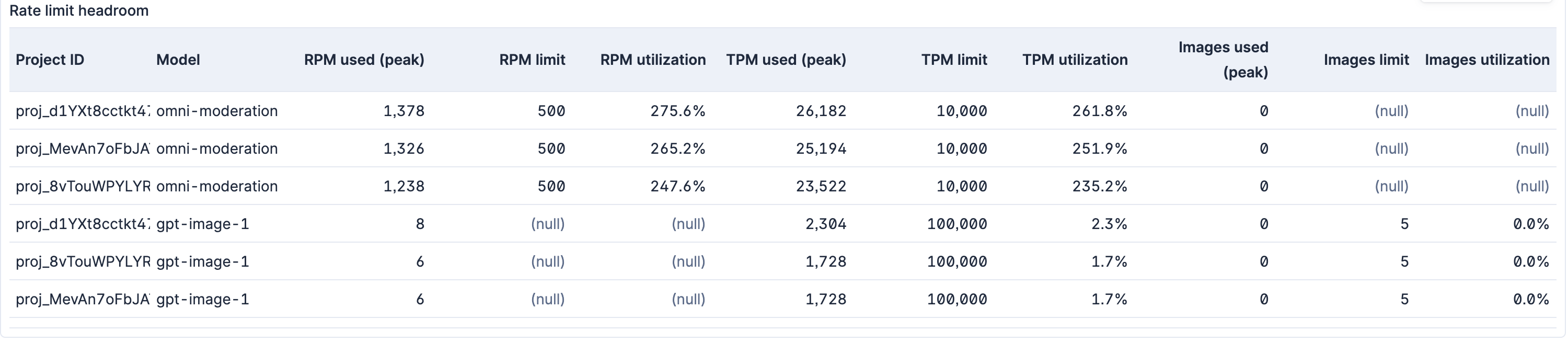
The rate_limits data stream collects the per-project, per-model limits OpenAI enforces (requests, tokens and images per minute, plus daily and batch limits). On its own a limit is just a number; it becomes actionable when compared against actual usage. The OpenAI dashboard ships two Rate limit headroom panels — one broken down per project and model, and an org-wide rollup by model across all active projects — plus a prebuilt [OpenAI] Rate limit headroom low threshold alert that do exactly this.
Limits and usage are joined on the exact project_id, but the model is normalized before joining: a trailing dated snapshot suffix (-YYYY-MM-DD) is stripped from both sides so that each model collapses to its base family. The Usage API reports per dated snapshot (for example gpt-image-1-2025-04-23, omni-moderation-2024-09-26), while the Rate Limits API often lists only the base family name (gpt-image-1, omni-moderation). Without normalization the dated usage row would find no matching limit and be dropped from the join, so the queries apply REPLACE(<model>, "-[0-9]{4}-[0-9]{2}-[0-9]{2}$", "") to align dated usage snapshots with base rate-limit names. When the Rate Limits API does report the dated snapshot as its own row, normalization simply collapses it onto the same base key as the family row.
Utilization is computed as usage / limit, where usage is the peak value over the look-back window:
- Usage is summed per project, model and 1-minute bucket.
- The peak (maximum) minute in the window is taken.
- That peak is divided by the configured limit.
Only matching units are compared:
- tokens ↔ tokens per minute (TPM)
- requests ↔ requests per minute (RPM)
- images ↔ images per minute
Audio is deliberately left out. OpenAI enforces an audio limit (max_audio_megabytes_per_1_minute), but the Usage API reports audio only in seconds (audio_transcriptions) and characters (audio_speeches) — never in megabytes — so there is no comparable usage figure to divide by the limit. Audio therefore stays usage-only until a megabyte-denominated usage metric is available. Usage measured in characters or sessions likewise has no corresponding rate limit and stays usage-only.
Hard requirement: the peak 1-minute calculation depends on the usage streams (
completions,embeddings,moderations, ...) running withbucket_width: 1m. This is the default, but the value is user-editable — if it is changed to1hor1d, the headroom numbers will be wrong because a wider bucket smears per-minute peaks.
Note on aggregation: OpenAI returns identical limits for both the model family (
gpt-4o-mini) and its dated snapshot (gpt-4o-mini-2024-07-18). After normalization both collapse onto the same basemodelkey, so the per-minute aggregation takes the limit asMAX(...)over the rows in eachproject_id/model/minute bucket.MAX(notSUM) is what prevents the duplicated family and snapshot limit rows from double-counting capacity — they report the same number, so the max equals either one. A base model that has a limit but no usage in the window appears as a 0%-utilization row.
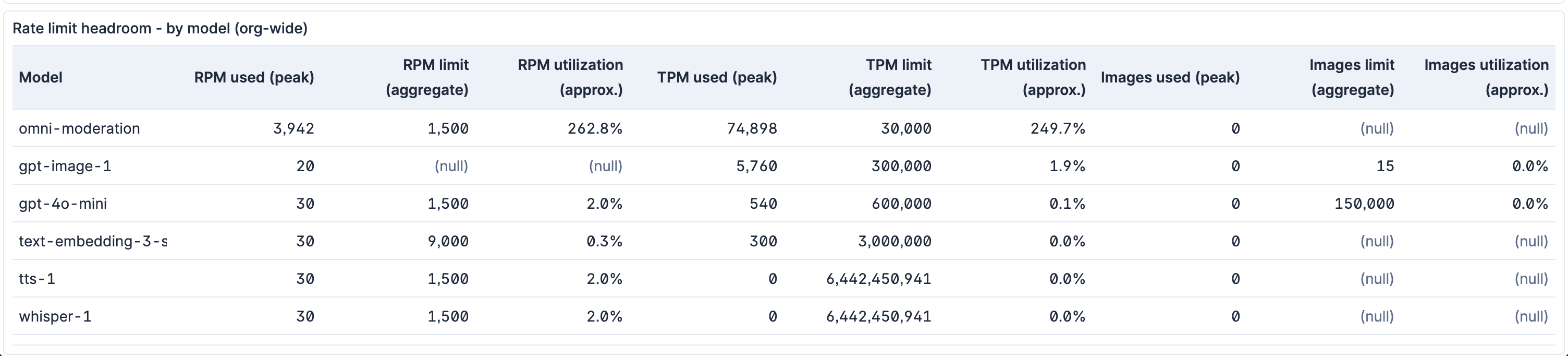
The Rate limit headroom - by model (org-wide) panel answers a different question: "how is model X doing across the whole org?" It drops the project_id breakdown and aggregates by model alone. For each project it first takes that project's peak 1-minute usage over the window (exactly as the per-project panel does), then sums those per-project peaks into the org-wide usage figure.
Because each project's peak can fall in a different minute, this sum-of-peaks is an indicative upper bound rather than a true simultaneous org-wide peak — it assumes every project peaked at once, so it can read higher than the actual combined load in any single minute. This is intentional: it keeps the usage rollup aligned with the limit rollup (see below) and errs toward flagging pressure rather than hiding it.
OpenAI enforces rate limits per project, so there is no single org-wide throttle boundary to divide against. The rollup therefore presents its limit columns as a synthetic aggregate (each project's limit stabilized as the max over the window, then summed across projects) and labels both the limit and utilization columns accordingly (limit (aggregate), utilization (approx.)). Use these for relative comparison and trend-spotting across models; the exact throttle distance for any individual project still lives in the per-project panel and the alert.
The [OpenAI] Rate limit headroom low rule fires when peak 1-minute token usage (TPM) reaches 80% or more of the configured limit for a project and model. It is grouped by project_id::model and re-examines the most recent 15-minute window every 5 minutes.
The rule keys on the peak minute in that window, so even a single 1-minute spike at or above the threshold is enough to fire it — usage does not have to stay high. Because the 15-minute look-back is three times the 5-minute schedule, one breaching minute stays in view across the three consecutive runs that the alertDelay of 3 requires, so it satisfies the delay on its own. The net effect is that the alert fires roughly 10–15 minutes after a breaching minute rather than only on sustained pressure; the delay suppresses an alert from a breach seen on just one or two runs, not from a single high minute.
Scope: this rule tracks token utilization (TPM) only. Request-per-minute (RPM) and image-per-minute headroom appear on the dashboard panels but are not alerted — a project can approach its RPM or image limit without firing this rule. Use the panels to watch those dimensions.
Dependency: the comparison needs a current limit. If the
rate_limitsstream stops collecting (for example, an expired admin key or a projects-list API error), the limit ages out of the window, every utilization becomes null, and this rule silently stops firing rather than alerting on the gap. If you rely on the alert, also monitor the freshness ofevent.dataset: openai.rate_limits.
To tune the threshold, edit the WHERE tpm_utilization >= 0.8 line in the rule's ES|QL query.
ECS Field Reference
Refer to this document for detailed information on ECS fields.
The audit data stream captures organization audit logs.
Example
{
    "@timestamp": "2026-02-09T05:50:27.000Z",
    "agent": {
        "ephemeral_id": "673d5468-31d6-4fbd-9620-144246698edd",
        "id": "91b27281-9bde-42a5-a100-529612a7e293",
        "name": "elastic-agent-35386",
        "type": "filebeat",
        "version": "8.18.0"
    },
    "data_stream": {
        "dataset": "openai.audit",
        "namespace": "91451",
        "type": "logs"
    },
    "ecs": {
        "version": "9.3.0"
    },
    "elastic_agent": {
        "id": "91b27281-9bde-42a5-a100-529612a7e293",
        "snapshot": false,
        "version": "8.18.0"
    },
    "event": {
        "action": "login-succeeded",
        "agent_id_status": "verified",
        "category": [
            "iam"
        ],
        "dataset": "openai.audit",
        "id": "audit_log-iakaJWnLdMLe89Ml5xayb4RJ",
        "ingested": "2026-05-22T11:51:38Z",
        "kind": "event",
        "original": "{\"actor\":{\"session\":{\"ip_address\":\"163.116.213.142\",\"ip_address_details\":{\"asn\":\"55256\",\"city\":\"Mumbai\",\"country\":\"IN\",\"latitude\":\"19.07283\",\"longitude\":\"72.88261\",\"region\":\"Maharashtra\",\"region_code\":\"MH\"},\"ja3\":\"353a03072e841d5004dfaa78561ccc70\",\"ja4\":\"t13d691100_8b2139ff7677_f0e8fcc46740\",\"user\":{\"email\":\"muskan.agarwal@crestdata.ai\",\"id\":\"user-nuEwi8Vsrrddq53RTzEQ9p3c\"},\"user_agent\":\"Mozilla/5.0 (Windows NT 10.0; Win64; x64) AppleWebKit/537.36 (KHTML, like Gecko) Chrome/144.0.0.0 Safari/537.36\"},\"type\":\"session\"},\"effective_at\":1770616227,\"id\":\"audit_log-iakaJWnLdMLe89Ml5xayb4RJ\",\"object\":\"organization.audit_log\",\"type\":\"login.succeeded\"}",
        "type": [
            "change"
        ]
    },
    "input": {
        "type": "cel"
    },
    "observer": {
        "product": "OpenAI",
        "vendor": "OpenAI"
    },
    "openai": {
        "audit": {
            "actor": {
                "session": {
                    "ip_address": "163.116.213.142",
                    "ip_address_details": {
                        "asn": 55256,
                        "city": "Mumbai",
                        "country": "IN",
                        "latitude": 19.07283,
                        "longitude": 72.88261,
                        "region": "Maharashtra",
                        "region_code": "MH"
                    },
                    "ja3": "353a03072e841d5004dfaa78561ccc70",
                    "ja4": "t13d691100_8b2139ff7677_f0e8fcc46740",
                    "user": {
                        "email": "muskan.agarwal@crestdata.ai",
                        "id": "user-nuEwi8Vsrrddq53RTzEQ9p3c"
                    },
                    "user_agent": "Mozilla/5.0 (Windows NT 10.0; Win64; x64) AppleWebKit/537.36 (KHTML, like Gecko) Chrome/144.0.0.0 Safari/537.36"
                },
                "type": "session"
            },
            "effective_at": "2026-02-09T05:50:27.000Z",
            "id": "audit_log-iakaJWnLdMLe89Ml5xayb4RJ",
            "object": "organization.audit_log",
            "type": "login.succeeded"
        }
    },
    "related": {
        "ip": [
            "163.116.213.142"
        ],
        "user": [
            "muskan.agarwal@crestdata.ai",
            "user-nuEwi8Vsrrddq53RTzEQ9p3c"
        ]
    },
    "source": {
        "as": {
            "number": 55256
        },
        "geo": {
            "city_name": "Mumbai",
            "country_iso_code": "IN",
            "location": {
                "lat": 19.07283,
                "lon": 72.88261
            },
            "region_iso_code": "MH",
            "region_name": "Maharashtra"
        },
        "ip": "163.116.213.142"
    },
    "tags": [
        "preserve_original_event",
        "preserve_duplicate_custom_fields",
        "forwarded",
        "openai-audit"
    ],
    "tls": {
        "client": {
            "ja3": "353a03072e841d5004dfaa78561ccc70"
        }
    },
    "user": {
        "domain": "crestdata.ai",
        "email": "muskan.agarwal@crestdata.ai",
        "id": "user-nuEwi8Vsrrddq53RTzEQ9p3c"
    },
    "user_agent": {
        "original": "Mozilla/5.0 (Windows NT 10.0; Win64; x64) AppleWebKit/537.36 (KHTML, like Gecko) Chrome/144.0.0.0 Safari/537.36"
    }
}
Exported fields
| Field | Description | Type |
|---|---|---|
| @timestamp | Date/time when the event originated. This is the date/time extracted from the event, typically representing when the event was generated by the source. If the event source has no original timestamp, this value is typically populated by the first time the event was received by the pipeline. Required field for all events. | date |
| data_stream.dataset | The field can contain anything that makes sense to signify the source of the data. Examples include nginx.access, prometheus, endpoint etc. For data streams that otherwise fit, but that do not have dataset set we use the value "generic" for the dataset value. event.dataset should have the same value as data_stream.dataset. Beyond the Elasticsearch data stream naming criteria noted above, the dataset value has additional restrictions: * Must not contain - * No longer than 100 characters |
constant_keyword |
| data_stream.namespace | A user defined namespace. Namespaces are useful to allow grouping of data. Many users already organize their indices this way, and the data stream naming scheme now provides this best practice as a default. Many users will populate this field with default. If no value is used, it falls back to default. Beyond the Elasticsearch index naming criteria noted above, namespace value has the additional restrictions: * Must not contain - * No longer than 100 characters |
constant_keyword |
| data_stream.type | An overarching type for the data stream. Currently allowed values are "logs" and "metrics". We expect to also add "traces" and "synthetics" in the near future. | constant_keyword |
| event.dataset | Name of the dataset. If an event source publishes more than one type of log or events (e.g. access log, error log), the dataset is used to specify which one the event comes from. It's recommended but not required to start the dataset name with the module name, followed by a dot, then the dataset name. | constant_keyword |
| event.module | Name of the module this data is coming from. If your monitoring agent supports the concept of modules or plugins to process events of a given source (e.g. Apache logs), event.module should contain the name of this module. |
constant_keyword |
| input.type | Type of filebeat input. | keyword |
| log.offset | Log offset. | long |
| observer.product | The product name of the observer. | constant_keyword |
| observer.vendor | Vendor name of the observer. | constant_keyword |
| openai.audit.actor.api_key.id | The tracking id of the API key. | keyword |
| openai.audit.actor.api_key.service_account.id | The service account that performed the audit logged action. | keyword |
| openai.audit.actor.api_key.type | The type of API key. Can be either user or service_account. | keyword |
| openai.audit.actor.api_key.user.email | The user who performed the audit logged action. | keyword |
| openai.audit.actor.api_key.user.id | The user who performed the audit logged action. | keyword |
| openai.audit.actor.session.ip_address | The IP address from which the action was performed. | ip |
| openai.audit.actor.session.ip_address_details.asn | long | |
| openai.audit.actor.session.ip_address_details.city | keyword | |
| openai.audit.actor.session.ip_address_details.country | keyword | |
| openai.audit.actor.session.ip_address_details.latitude | double | |
| openai.audit.actor.session.ip_address_details.longitude | double | |
| openai.audit.actor.session.ip_address_details.region | keyword | |
| openai.audit.actor.session.ip_address_details.region_code | keyword | |
| openai.audit.actor.session.ja3 | keyword | |
| openai.audit.actor.session.ja4 | keyword | |
| openai.audit.actor.session.user.email | The session in which the audit logged action was performed. The user who performed the audit logged action. The user email. | keyword |
| openai.audit.actor.session.user.id | The session in which the audit logged action was performed. The user who performed the audit logged action. The user id. | keyword |
| openai.audit.actor.session.user_agent | keyword | |
| openai.audit.actor.type | The type of actor. Is either session or api_key. | keyword |
| openai.audit.effective_at | The Unix timestamp (in seconds) of the event. | date |
| openai.audit.id | The ID of this log. | keyword |
| openai.audit.object | keyword | |
| openai.audit.type | The event type. | keyword |
The audio_speeches data stream captures audio speeches usage metrics.
Example
{
    "openai": {
        "audio_speeches": {
            "characters": 45
        },
        "base": {
            "start_time": "2024-09-05T00:00:00.000Z",
            "num_model_requests": 1,
            "project_id": "proj_dummy",
            "user_id": "user-dummy",
            "end_time": "2024-09-06T00:00:00.000Z",
            "model": "tts-1",
            "api_key_id": "key_dummy",
            "usage_object_type": "organization.usage.audio_speeches.result"
        }
    },
    "@timestamp": "2024-09-05T00:00:00.000Z",
    "ecs": {
        "version": "9.3.0"
    },
    "data_stream": {
        "namespace": "default",
        "type": "logs",
        "dataset": "openai.audio_speeches"
    },
    "event": {
        "agent_id_status": "verified",
        "ingested": "2025-01-28T21:56:19Z",
        "created": "2025-01-28T21:56:18.550Z",
        "kind": "metric",
        "dataset": "openai.audio_speeches"
    },
    "tags": [
        "forwarded",
        "openai-audio-speeches"
    ]
}
Exported fields
| Field | Description | Type | Unit |
|---|---|---|---|
| @timestamp | Event timestamp. | date | |
| data_stream.dataset | Data stream dataset. | constant_keyword | |
| data_stream.namespace | Data stream namespace. | constant_keyword | |
| data_stream.type | Data stream type. | constant_keyword | |
| openai.audio_speeches.characters | Number of characters processed | long | |
| openai.audio_transcriptions.seconds | Number of seconds processed | long | s |
| openai.base.api_key_id | Identifier for the API key used | keyword | |
| openai.base.end_time | End timestamp of the usage bucket | date | |
| openai.base.model | Name of the OpenAI model used | keyword | |
| openai.base.num_model_requests | Number of requests made to the model | long | |
| openai.base.project_id | Identifier of the project | keyword | |
| openai.base.start_time | Start timestamp of the usage bucket | date | |
| openai.base.usage_object_type | Type of the usage record | keyword | |
| openai.base.user_id | Identifier of the user | keyword | |
| openai.completions.input_audio_tokens | Number of audio input tokens used, including cached tokens | long | |
| openai.completions.input_cached_tokens | Number of text input tokens that has been cached from previous requests. For customers subscribe to scale tier, this includes scale tier tokens | long | |
| openai.completions.input_tokens | Number of text input tokens used, including cached tokens. For customers subscribe to scale tier, this includes scale tier tokens | long | |
| openai.completions.output_audio_tokens | Number of audio output tokens used | long | |
| openai.completions.output_tokens | Number of text output tokens used. For customers subscribe to scale tier, this includes scale tier tokens | long | |
| openai.embeddings.input_tokens | Number of input tokens used. | long | |
| openai.images.images | Number of images processed | long | |
| openai.images.size | Image size (dimension of the generated image) | keyword | |
| openai.moderations.input_tokens | Number of input tokens used. | long |
The audio_transcriptions data stream captures audio transcriptions usage metrics.
Example
{
    "openai": {
        "audio_transcriptions": {
            "seconds": 2
        },
        "base": {
            "start_time": "2024-11-04T00:00:00.000Z",
            "num_model_requests": 1,
            "project_id": "proj_dummy",
            "user_id": "user-dummy",
            "end_time": "2024-11-05T00:00:00.000Z",
            "model": "whisper-1",
            "api_key_id": "key_dummy",
            "usage_object_type": "organization.usage.audio_transcriptions.result"
        }
    },
    "@timestamp": "2024-11-04T00:00:00.000Z",
    "ecs": {
        "version": "9.3.0"
    },
    "data_stream": {
        "namespace": "default",
        "type": "logs",
        "dataset": "openai.audio_transcriptions"
    },
    "event": {
        "agent_id_status": "verified",
        "ingested": "2025-01-28T21:56:24Z",
        "created": "2025-01-28T21:56:24.113Z",
        "kind": "metric",
        "dataset": "openai.audio_transcriptions"
    },
    "tags": [
        "forwarded",
        "openai-audio-transcriptions"
    ]
}
Exported fields
| Field | Description | Type | Unit |
|---|---|---|---|
| @timestamp | Event timestamp. | date | |
| data_stream.dataset | Data stream dataset. | constant_keyword | |
| data_stream.namespace | Data stream namespace. | constant_keyword | |
| data_stream.type | Data stream type. | constant_keyword | |
| openai.audio_speeches.characters | Number of characters processed | long | |
| openai.audio_transcriptions.seconds | Number of seconds processed | long | s |
| openai.base.api_key_id | Identifier for the API key used | keyword | |
| openai.base.end_time | End timestamp of the usage bucket | date | |
| openai.base.model | Name of the OpenAI model used | keyword | |
| openai.base.num_model_requests | Number of requests made to the model | long | |
| openai.base.project_id | Identifier of the project | keyword | |
| openai.base.start_time | Start timestamp of the usage bucket | date | |
| openai.base.usage_object_type | Type of the usage record | keyword | |
| openai.base.user_id | Identifier of the user | keyword | |
| openai.completions.input_audio_tokens | Number of audio input tokens used, including cached tokens | long | |
| openai.completions.input_cached_tokens | Number of text input tokens that has been cached from previous requests. For customers subscribe to scale tier, this includes scale tier tokens | long | |
| openai.completions.input_tokens | Number of text input tokens used, including cached tokens. For customers subscribe to scale tier, this includes scale tier tokens | long | |
| openai.completions.output_audio_tokens | Number of audio output tokens used | long | |
| openai.completions.output_tokens | Number of text output tokens used. For customers subscribe to scale tier, this includes scale tier tokens | long | |
| openai.embeddings.input_tokens | Number of input tokens used. | long | |
| openai.images.images | Number of images processed | long | |
| openai.images.size | Image size (dimension of the generated image) | keyword | |
| openai.moderations.input_tokens | Number of input tokens used. | long |
The code_interpreter_sessions data stream captures code interpreter sessions usage metrics.
Example
{
    "openai": {
        "code_interpreter_sessions": {
            "sessions": 16
        },
        "base": {
            "start_time": "2024-09-04T00:00:00.000Z",
            "project_id": "",
            "end_time": "2024-09-05T00:00:00.000Z",
            "usage_object_type": "organization.usage.code_interpreter_sessions.<dummy>"
        }
    },
    "@timestamp": "2024-09-04T00:00:00.000Z",
    "ecs": {
        "version": "9.3.0"
    },
    "data_stream": {
        "namespace": "default",
        "type": "logs",
        "dataset": "openai.code_interpreter_sessions"
    },
    "event": {
        "agent_id_status": "verified",
        "ingested": "2025-01-28T21:56:19Z",
        "created": "2025-01-28T21:56:17.099Z",
        "kind": "metric",
        "dataset": "openai.code_interpreter_sessions"
    },
    "tags": [
        "forwarded",
        "openai-code-interpreter-sessions"
    ]
}
Exported fields
| Field | Description | Type |
|---|---|---|
| @timestamp | Event timestamp. | date |
| data_stream.dataset | Data stream dataset. | constant_keyword |
| data_stream.namespace | Data stream namespace. | constant_keyword |
| data_stream.type | Data stream type. | constant_keyword |
| openai.base.end_time | End timestamp of the usage bucket | date |
| openai.base.project_id | Identifier of the project | keyword |
| openai.base.start_time | Start timestamp of the usage bucket | date |
| openai.base.usage_object_type | Type of the usage record | keyword |
| openai.code_interpreter_sessions.sessions | Number of code interpreter sessions | long |
The completions data stream captures completions usage metrics.
Example
{
    "openai": {
        "completions": {
            "output_audio_tokens": 0,
            "batch": false,
            "input_audio_tokens": 0,
            "input_cached_tokens": 0,
            "input_tokens": 22,
            "output_tokens": 149
        },
        "base": {
            "start_time": "2025-01-27T00:00:00.000Z",
            "num_model_requests": 1,
            "project_id": "proj_dummy",
            "user_id": "user-dummy",
            "end_time": "2025-01-28T00:00:00.000Z",
            "model": "gpt-4o-mini-2024-07-18",
            "api_key_id": "key_dummy",
            "usage_object_type": "organization.usage.completions.result"
        }
    },
    "@timestamp": "2025-01-27T00:00:00.000Z",
    "ecs": {
        "version": "9.3.0"
    },
    "data_stream": {
        "namespace": "default",
        "type": "logs",
        "dataset": "openai.completions"
    },
    "event": {
        "agent_id_status": "verified",
        "ingested": "2025-01-28T21:56:30Z",
        "created": "2025-01-28T21:56:29.346Z",
        "kind": "metric",
        "dataset": "openai.completions"
    },
    "tags": [
        "forwarded",
        "openai-completions"
    ]
}
Exported fields
| Field | Description | Type | Unit |
|---|---|---|---|
| @timestamp | Event timestamp. | date | |
| data_stream.dataset | Data stream dataset. | constant_keyword | |
| data_stream.namespace | Data stream namespace. | constant_keyword | |
| data_stream.type | Data stream type. | constant_keyword | |
| openai.audio_speeches.characters | Number of characters processed | long | |
| openai.audio_transcriptions.seconds | Number of seconds processed | long | s |
| openai.base.api_key_id | Identifier for the API key used | keyword | |
| openai.base.end_time | End timestamp of the usage bucket | date | |
| openai.base.model | Name of the OpenAI model used | keyword | |
| openai.base.num_model_requests | Number of requests made to the model | long | |
| openai.base.project_id | Identifier of the project | keyword | |
| openai.base.start_time | Start timestamp of the usage bucket | date | |
| openai.base.usage_object_type | Type of the usage record | keyword | |
| openai.base.usage_tokens | Total tokens consumed by this usage record, normalized across usage data streams for rate-limit headroom calculations. | long | |
| openai.base.user_id | Identifier of the user | keyword | |
| openai.completions.batch | Whether the request was processed as a batch | boolean | |
| openai.completions.input_audio_tokens | Number of audio input tokens used, including cached tokens | long | |
| openai.completions.input_cached_tokens | Number of text input tokens that has been cached from previous requests. For customers subscribe to scale tier, this includes scale tier tokens | long | |
| openai.completions.input_tokens | Number of text input tokens used, including cached tokens. For customers subscribe to scale tier, this includes scale tier tokens | long | |
| openai.completions.output_audio_tokens | Number of audio output tokens used | long | |
| openai.completions.output_tokens | Number of text output tokens used. For customers subscribe to scale tier, this includes scale tier tokens | long | |
| openai.embeddings.input_tokens | Number of input tokens used. | long | |
| openai.images.images | Number of images processed | long | |
| openai.images.size | Image size (dimension of the generated image) | keyword | |
| openai.moderations.input_tokens | Number of input tokens used. | long |
The embeddings data stream captures embeddings usage metrics.
Example
{
    "openai": {
        "embeddings": {
            "input_tokens": 16
        },
        "base": {
            "start_time": "2024-09-04T00:00:00.000Z",
            "num_model_requests": 2,
            "project_id": "",
            "user_id": "user-dummy",
            "end_time": "2024-09-05T00:00:00.000Z",
            "model": "text-embedding-ada-002-v2",
            "api_key_id": "key_dummy",
            "usage_object_type": "organization.usage.embeddings.result"
        }
    },
    "@timestamp": "2024-09-04T00:00:00.000Z",
    "ecs": {
        "version": "9.3.0"
    },
    "data_stream": {
        "namespace": "default",
        "type": "logs",
        "dataset": "openai.embeddings"
    },
    "event": {
        "agent_id_status": "verified",
        "ingested": "2025-01-28T21:56:19Z",
        "created": "2025-01-28T21:56:17.149Z",
        "kind": "metric",
        "dataset": "openai.embeddings"
    },
    "tags": [
        "forwarded",
        "openai-embeddings"
    ]
}
Exported fields
| Field | Description | Type | Unit |
|---|---|---|---|
| @timestamp | Event timestamp. | date | |
| data_stream.dataset | Data stream dataset. | constant_keyword | |
| data_stream.namespace | Data stream namespace. | constant_keyword | |
| data_stream.type | Data stream type. | constant_keyword | |
| openai.audio_speeches.characters | Number of characters processed | long | |
| openai.audio_transcriptions.seconds | Number of seconds processed | long | s |
| openai.base.api_key_id | Identifier for the API key used | keyword | |
| openai.base.end_time | End timestamp of the usage bucket | date | |
| openai.base.model | Name of the OpenAI model used | keyword | |
| openai.base.num_model_requests | Number of requests made to the model | long | |
| openai.base.project_id | Identifier of the project | keyword | |
| openai.base.start_time | Start timestamp of the usage bucket | date | |
| openai.base.usage_object_type | Type of the usage record | keyword | |
| openai.base.usage_tokens | Total tokens consumed by this usage record, normalized across usage data streams for rate-limit headroom calculations. | long | |
| openai.base.user_id | Identifier of the user | keyword | |
| openai.completions.input_audio_tokens | Number of audio input tokens used, including cached tokens | long | |
| openai.completions.input_cached_tokens | Number of text input tokens that has been cached from previous requests. For customers subscribe to scale tier, this includes scale tier tokens | long | |
| openai.completions.input_tokens | Number of text input tokens used, including cached tokens. For customers subscribe to scale tier, this includes scale tier tokens | long | |
| openai.completions.output_audio_tokens | Number of audio output tokens used | long | |
| openai.completions.output_tokens | Number of text output tokens used. For customers subscribe to scale tier, this includes scale tier tokens | long | |
| openai.embeddings.input_tokens | Number of input tokens used. | long | |
| openai.images.images | Number of images processed | long | |
| openai.images.size | Image size (dimension of the generated image) | keyword | |
| openai.moderations.input_tokens | Number of input tokens used. | long |
The images data stream captures images usage metrics.
Example
{
    "openai": {
        "images": {
            "images": 1,
            "size": "1024x1024",
            "source": "image.generation"
        },
        "base": {
            "start_time": "2024-09-04T00:00:00.000Z",
            "num_model_requests": 1,
            "project_id": "",
            "user_id": "user-dummy",
            "end_time": "2024-09-05T00:00:00.000Z",
            "model": "dall-e-3",
            "api_key_id": "key_dummy",
            "usage_object_type": "organization.usage.images.result"
        }
    },
    "@timestamp": "2024-09-04T00:00:00.000Z",
    "ecs": {
        "version": "9.3.0"
    },
    "data_stream": {
        "namespace": "default",
        "type": "logs",
        "dataset": "openai.images"
    },
    "event": {
        "agent_id_status": "verified",
        "ingested": "2025-01-28T21:56:19Z",
        "created": "2025-01-28T21:56:17.758Z",
        "kind": "metric",
        "dataset": "openai.images"
    },
    "tags": [
        "forwarded",
        "openai-images"
    ]
}
Exported fields
| Field | Description | Type | Unit |
|---|---|---|---|
| @timestamp | Event timestamp. | date | |
| data_stream.dataset | Data stream dataset. | constant_keyword | |
| data_stream.namespace | Data stream namespace. | constant_keyword | |
| data_stream.type | Data stream type. | constant_keyword | |
| openai.audio_speeches.characters | Number of characters processed | long | |
| openai.audio_transcriptions.seconds | Number of seconds processed | long | s |
| openai.base.api_key_id | Identifier for the API key used | keyword | |
| openai.base.end_time | End timestamp of the usage bucket | date | |
| openai.base.model | Name of the OpenAI model used | keyword | |
| openai.base.num_model_requests | Number of requests made to the model | long | |
| openai.base.project_id | Identifier of the project | keyword | |
| openai.base.start_time | Start timestamp of the usage bucket | date | |
| openai.base.usage_images | Number of images processed by a usage record, normalized across usage data streams. | long | |
| openai.base.usage_object_type | Type of the usage record | keyword | |
| openai.base.user_id | Identifier of the user | keyword | |
| openai.completions.input_audio_tokens | Number of audio input tokens used, including cached tokens | long | |
| openai.completions.input_cached_tokens | Number of text input tokens that has been cached from previous requests. For customers subscribe to scale tier, this includes scale tier tokens | long | |
| openai.completions.input_tokens | Number of text input tokens used, including cached tokens. For customers subscribe to scale tier, this includes scale tier tokens | long | |
| openai.completions.output_audio_tokens | Number of audio output tokens used | long | |
| openai.completions.output_tokens | Number of text output tokens used. For customers subscribe to scale tier, this includes scale tier tokens | long | |
| openai.embeddings.input_tokens | Number of input tokens used. | long | |
| openai.images.images | Number of images processed | long | |
| openai.images.size | Image size (dimension of the generated image) | keyword | |
| openai.images.source | Source of the grouped usage result, possible values are image.generation, image.edit, image.variation |
keyword | |
| openai.moderations.input_tokens | Number of input tokens used. | long |
The moderations data stream captures moderations usage metrics.
Example
{
    "openai": {
        "moderations": {
            "input_tokens": 16
        },
        "base": {
            "start_time": "2024-09-04T00:00:00.000Z",
            "num_model_requests": 2,
            "project_id": "",
            "user_id": "user-dummy",
            "end_time": "2024-09-05T00:00:00.000Z",
            "model": "text-moderation:2023-10-25",
            "api_key_id": "key_dummy",
            "usage_object_type": "organization.usage.moderations.result"
        }
    },
    "@timestamp": "2024-09-04T00:00:00.000Z",
    "ecs": {
        "version": "9.3.0"
    },
    "data_stream": {
        "namespace": "default",
        "type": "logs",
        "dataset": "openai.moderations"
    },
    "event": {
        "agent_id_status": "verified",
        "ingested": "2025-01-28T21:56:19Z",
        "created": "2025-01-28T21:56:17.099Z",
        "kind": "metric",
        "dataset": "openai.moderations"
    },
    "tags": [
        "forwarded",
        "openai-moderations"
    ]
}
Exported fields
| Field | Description | Type | Unit |
|---|---|---|---|
| @timestamp | Event timestamp. | date | |
| data_stream.dataset | Data stream dataset. | constant_keyword | |
| data_stream.namespace | Data stream namespace. | constant_keyword | |
| data_stream.type | Data stream type. | constant_keyword | |
| openai.audio_speeches.characters | Number of characters processed | long | |
| openai.audio_transcriptions.seconds | Number of seconds processed | long | s |
| openai.base.api_key_id | Identifier for the API key used | keyword | |
| openai.base.end_time | End timestamp of the usage bucket | date | |
| openai.base.model | Name of the OpenAI model used | keyword | |
| openai.base.num_model_requests | Number of requests made to the model | long | |
| openai.base.project_id | Identifier of the project | keyword | |
| openai.base.start_time | Start timestamp of the usage bucket | date | |
| openai.base.usage_object_type | Type of the usage record | keyword | |
| openai.base.usage_tokens | Total tokens consumed by this usage record, normalized across usage data streams for rate-limit headroom calculations. | long | |
| openai.base.user_id | Identifier of the user | keyword | |
| openai.completions.input_audio_tokens | Number of audio input tokens used, including cached tokens | long | |
| openai.completions.input_cached_tokens | Number of text input tokens that has been cached from previous requests. For customers subscribe to scale tier, this includes scale tier tokens | long | |
| openai.completions.input_tokens | Number of text input tokens used, including cached tokens. For customers subscribe to scale tier, this includes scale tier tokens | long | |
| openai.completions.output_audio_tokens | Number of audio output tokens used | long | |
| openai.completions.output_tokens | Number of text output tokens used. For customers subscribe to scale tier, this includes scale tier tokens | long | |
| openai.embeddings.input_tokens | Number of input tokens used. | long | |
| openai.images.images | Number of images processed | long | |
| openai.images.size | Image size (dimension of the generated image) | keyword | |
| openai.moderations.input_tokens | Number of input tokens used. | long |
The rate_limits data stream captures per-project, per-model rate limits.
Example
{
    "@timestamp": "2026-05-26T06:40:21.000Z",
    "openai": {
        "rate_limits": {
            "id": "rl_gpt4o_mini",
            "object": "project.rate_limit",
            "model": "gpt-4o-mini-2024-07-18",
            "project_id": "proj_test_a",
            "project_name": "Test Project A",
            "project_status": "active",
            "max_requests_per_1_minute": 500,
            "max_tokens_per_1_minute": 200000,
            "max_images_per_1_minute": 50000,
            "max_requests_per_1_day": 10000,
            "max_tokens_per_1_day": 9000000,
            "batch_1_day_max_input_tokens": 2000000,
            "collected_at": "2026-05-26T06:40:21Z"
        }
    },
    "ecs": {
        "version": "9.3.0"
    },
    "data_stream": {
        "namespace": "default",
        "type": "logs",
        "dataset": "openai.rate_limits"
    },
    "event": {
        "agent_id_status": "verified",
        "ingested": "2026-05-26T06:40:30Z",
        "created": "2026-05-26T06:40:21.000Z",
        "kind": "metric",
        "dataset": "openai.rate_limits"
    },
    "tags": [
        "forwarded",
        "openai-rate-limits"
    ]
}
Exported fields
| Field | Description | Type |
|---|---|---|
| @timestamp | Event timestamp. | date |
| data_stream.dataset | Data stream dataset. | constant_keyword |
| data_stream.namespace | Data stream namespace. | constant_keyword |
| data_stream.type | Data stream type. | constant_keyword |
| event.dataset | Event dataset. | constant_keyword |
| input.type | Input type. | keyword |
| openai.base.model | Name of the OpenAI model used. | keyword |
| openai.base.num_model_requests | Number of requests made to the model. | long |
| openai.base.project_id | Identifier of the project. | keyword |
| openai.base.usage_images | Number of images processed by a usage record, normalized across usage data streams. | long |
| openai.base.usage_tokens | Total tokens consumed by a usage record, normalized across usage data streams. | long |
| openai.rate_limits.batch_1_day_max_input_tokens | Maximum batch input tokens per day, when provided by OpenAI. | long |
| openai.rate_limits.collected_at | Time when the rate-limit document was collected. | date |
| openai.rate_limits.id | OpenAI rate limit identifier. | keyword |
| openai.rate_limits.max_audio_megabytes_per_1_minute | Maximum audio megabytes per minute, when provided by OpenAI. | long |
| openai.rate_limits.max_images_per_1_minute | Maximum images per minute, when provided by OpenAI. | long |
| openai.rate_limits.max_requests_per_1_day | Maximum requests per day, when provided by OpenAI. | long |
| openai.rate_limits.max_requests_per_1_minute | Maximum requests per minute. | long |
| openai.rate_limits.max_tokens_per_1_day | Maximum tokens per day, when provided by OpenAI. | long |
| openai.rate_limits.max_tokens_per_1_minute | Maximum tokens per minute. | long |
| openai.rate_limits.model | OpenAI model name this limit applies to. | keyword |
| openai.rate_limits.object | OpenAI object type. Expected value is project.rate_limit. | keyword |
| openai.rate_limits.project_id | OpenAI project ID (injected from projects list). | keyword |
| openai.rate_limits.project_name | OpenAI project name (injected from projects list). | keyword |
| openai.rate_limits.project_status | OpenAI project status (injected from projects list). | keyword |
The vector_stores data stream captures vector stores usage metrics.
Example
{
    "openai": {
        "vector_stores": {
            "usage_bytes": 16
        },
        "base": {
            "start_time": "2024-09-04T00:00:00.000Z",
            "project_id": "",
            "end_time": "2024-09-05T00:00:00.000Z",
            "usage_object_type": "organization.usage.vector_stores.<dummy>"
        }
    },
    "@timestamp": "2024-09-04T00:00:00.000Z",
    "ecs": {
        "version": "9.3.0"
    },
    "data_stream": {
        "namespace": "default",
        "type": "logs",
        "dataset": "openai.vector_stores"
    },
    "event": {
        "agent_id_status": "verified",
        "ingested": "2025-01-28T21:56:19Z",
        "created": "2025-01-28T21:56:17.099Z",
        "kind": "metric",
        "dataset": "openai.vector_stores"
    },
    "tags": [
        "forwarded",
        "openai-vector-stores"
    ]
}
Exported fields
| Field | Description | Type | Unit |
|---|---|---|---|
| @timestamp | Event timestamp. | date | |
| data_stream.dataset | Data stream dataset. | constant_keyword | |
| data_stream.namespace | Data stream namespace. | constant_keyword | |
| data_stream.type | Data stream type. | constant_keyword | |
| openai.base.end_time | End timestamp of the usage bucket | date | |
| openai.base.project_id | Identifier of the project | keyword | |
| openai.base.start_time | Start timestamp of the usage bucket | date | |
| openai.base.usage_object_type | Type of the usage record | keyword | |
| openai.vector_stores.usage_bytes | Vector stores usage in bytes | long | byte |
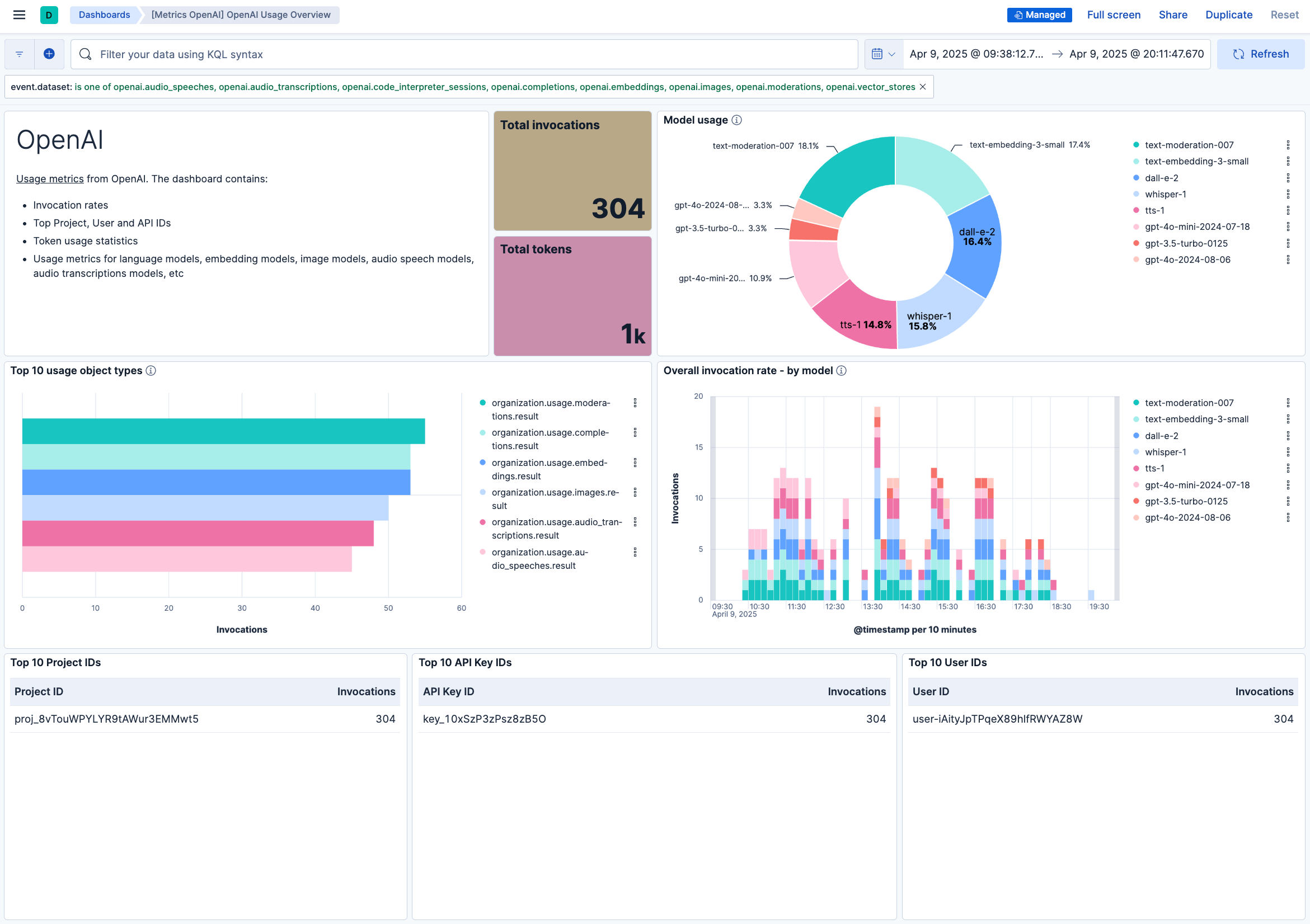
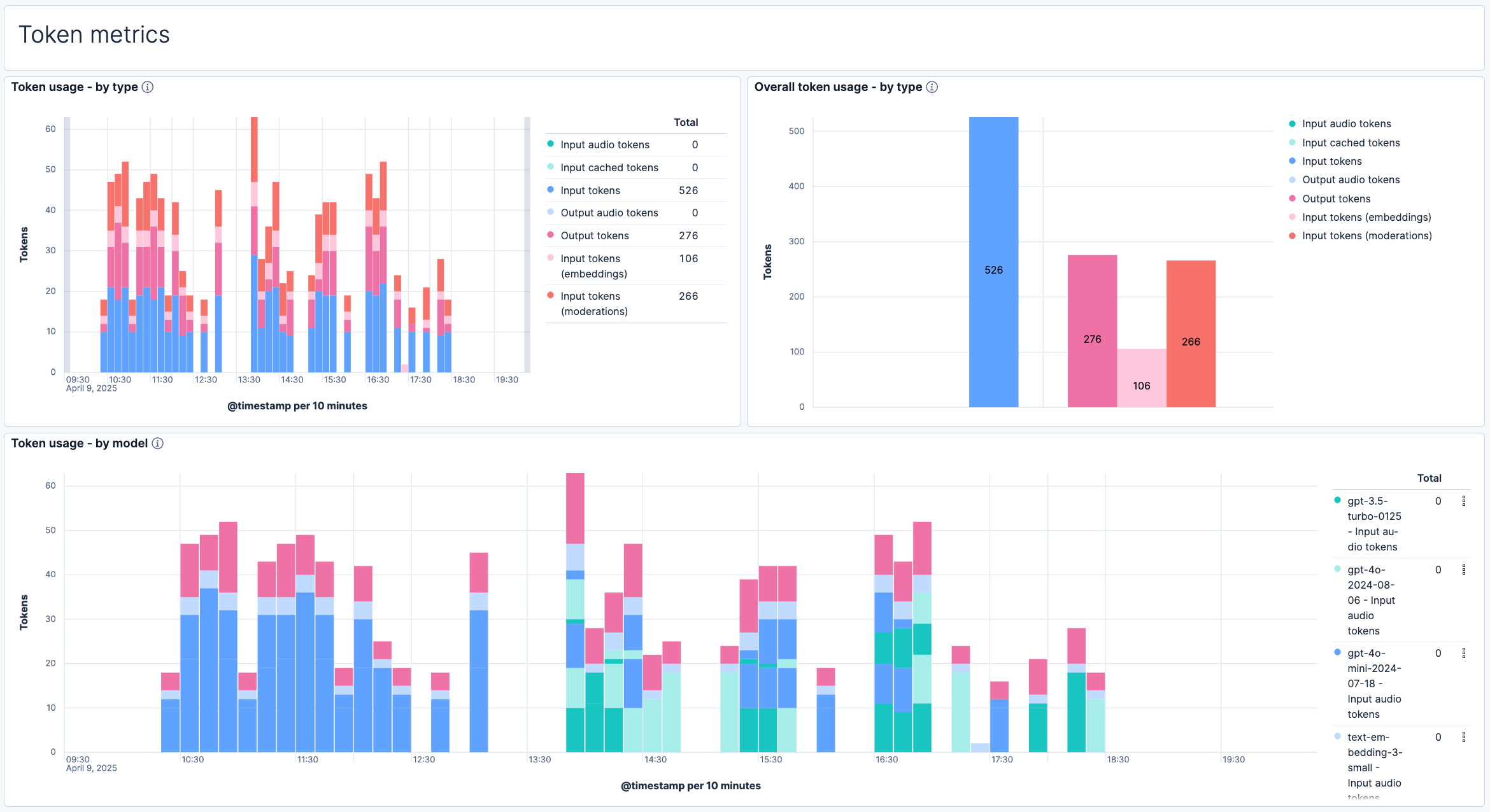
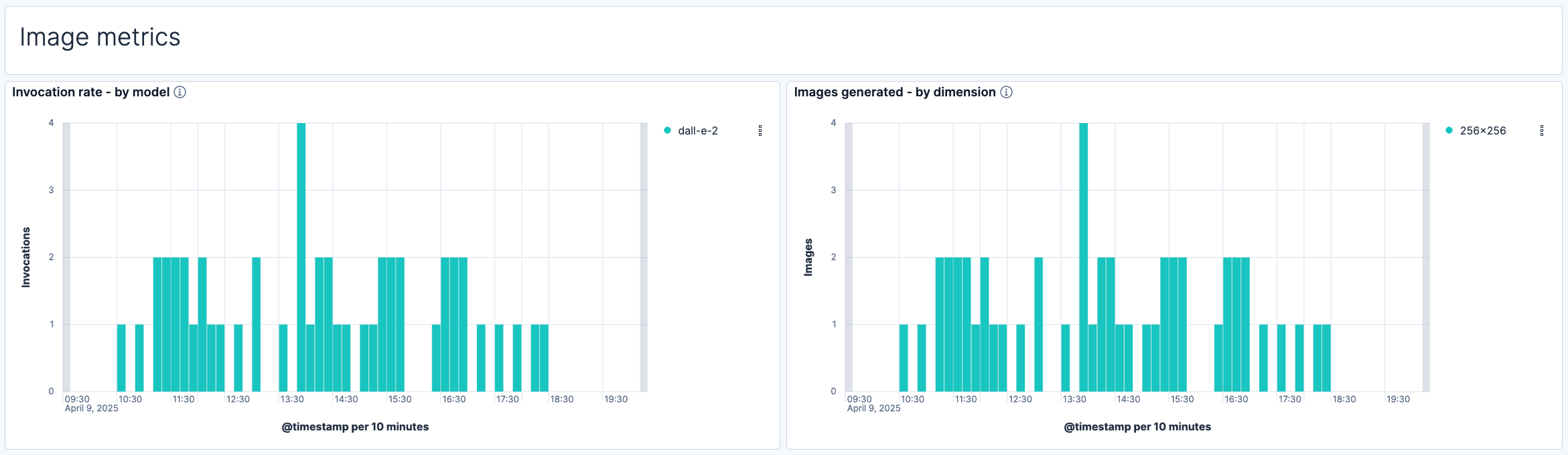
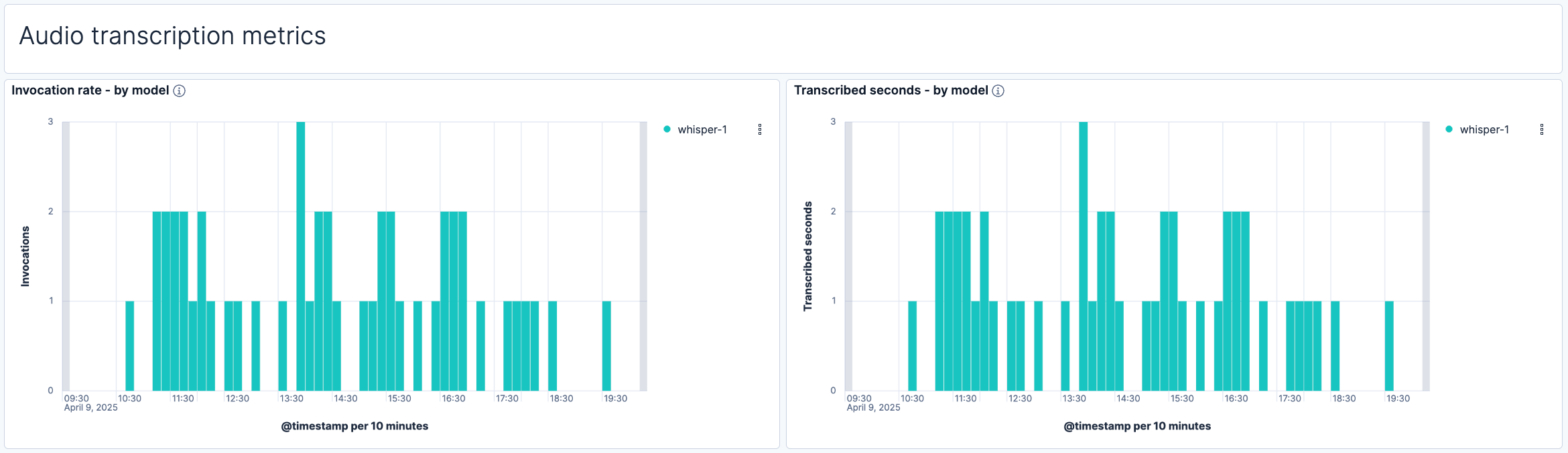
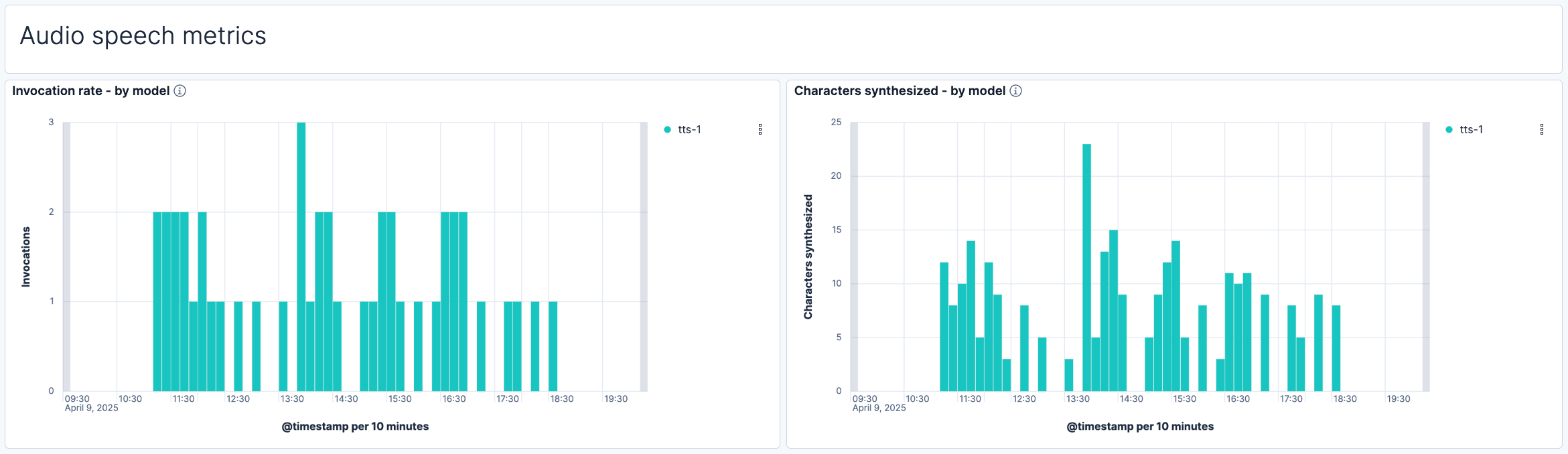
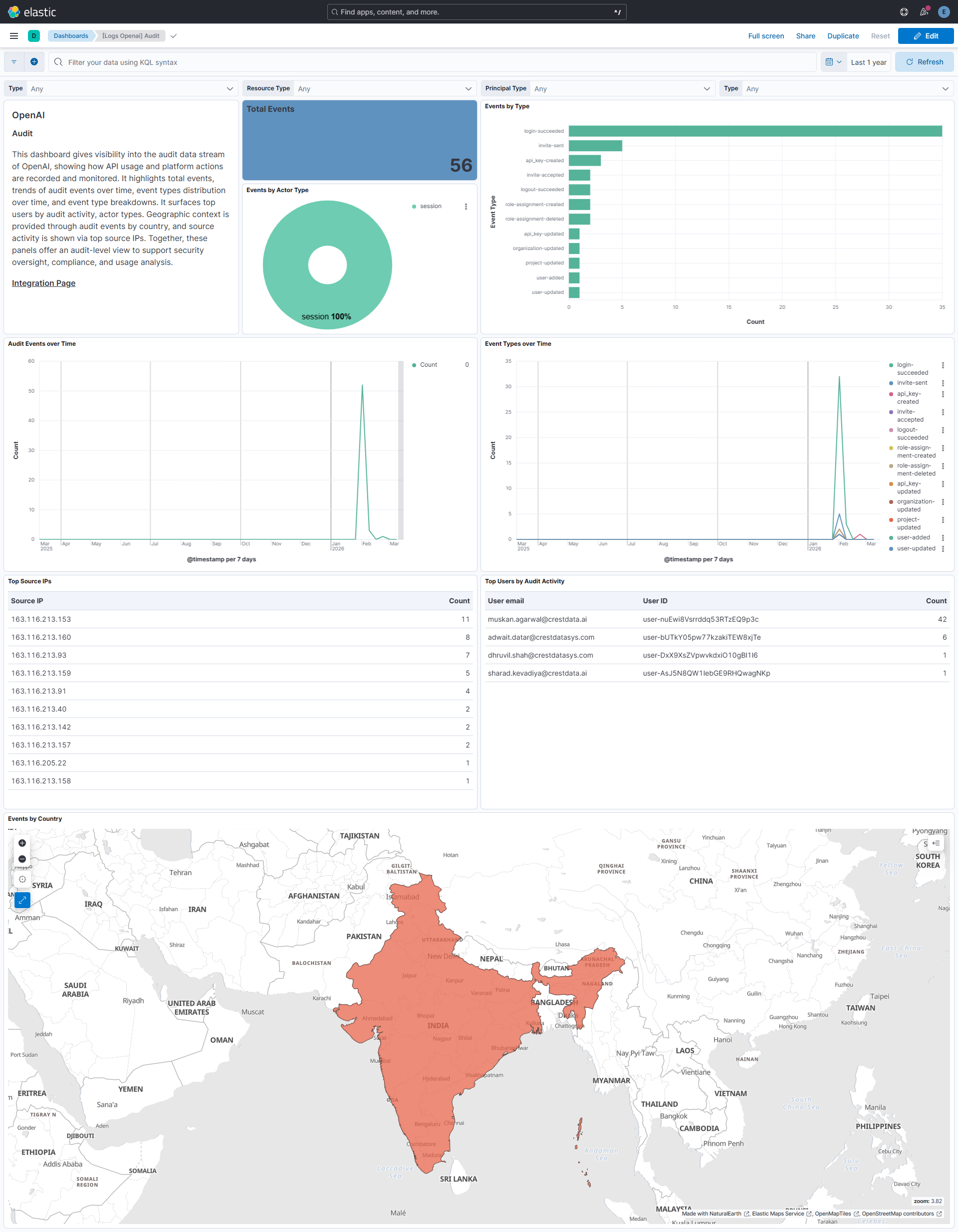
This integration includes one or more Kibana dashboards that visualizes the data collected by the integration. The screenshots below illustrate how the ingested data is displayed.
Changelog
| Version | Details | Minimum Kibana version |
|---|---|---|
| 2.4.0 | Enhancement (View pull request) Add alerting rule template back and increase kibana version restriction. |
9.4.0 |
| 2.3.1 | Bug fix (View pull request) Remove alerting rule template to support older kibana versions. |
9.0.0 8.18.0 |
| 2.3.0 | Enhancement (View pull request) Map usage fields across the metric data streams (completions, embeddings, moderations, images, audio_transcriptions and audio_speeches) so the OpenAI Usage Overview dashboard panels render correctly when only a subset of the usage collections is enabled. |
9.0.0 8.18.0 |
| 2.2.0 | Enhancement (View pull request) Add rate_limits data stream, a rate limit headroom dashboard panel, and a prebuilt rate limit headroom alert. Enhancement (View pull request) Add a configurable finalization grace period (default 0s) to the token- and request-based usage data streams (completions, embeddings, moderations, images, audio_speeches, audio_transcriptions). With the default, buckets are ingested as soon as their minute closes, which keeps usage data fresh and is the least disruptive setting, but may undercount during heavy bursts because a bucket is read before OpenAI finishes revising it and is not re-read afterward. Set each stream's Finalization grace period to 15m to ingest only finalized buckets for accurate counts, at the cost of delaying usage data, the rate limit headroom panels, and the headroom alert by roughly the grace period. Bug fix (View pull request) Fix usage-stream cursor drop on API error that caused window rewind and double-counting of already-ingested buckets on the next poll. |
9.0.0 8.18.0 |
| 2.1.0 | Enhancement (View pull request) Use new release field for agentless deployment mode to establish as beta. |
9.0.0 8.18.0 |
| 2.0.0 | Enhancement (View pull request) Add audit data stream to fetch audit logs. |
9.0.0 8.18.0 |
| 1.2.1 | Enhancement (View pull request) Relax internal filters for image, audio transcription and audio speech charts |
9.0.0 8.16.3 |
| 1.2.0 | Enhancement (View pull request) Update OpenAI dashboard screenshots. |
9.0.0 8.16.3 |
| 1.1.0 | Enhancement (View pull request) Update OpenAI logo and the documentation. |
9.0.0 8.16.3 |
| 1.0.0 | Enhancement (View pull request) Release OpenAI integration as Generally Available (GA). |
9.0.0 8.16.3 |
| 0.3.0 | Enhancement (View pull request) Update default values and improve documentation and field descriptions. |
9.0.0 8.16.3 |
| 0.2.0 | Enhancement (View pull request) Add support for Kibana 9.0.0. |
9.0.0 8.16.3 |
| 0.1.0 | Enhancement (View pull request) Initial draft of the OpenAI integration. |
8.16.3 |