Axonius Integration for Elastic
| Version | 0.3.1
|
| Managed integration release status | GA |
| Subscription level What's this? |
Basic |
| Developed by What's this? |
Elastic |
| Ingestion method(s) | API |
| Minimum Kibana version(s) | 9.4.3 9.3.6 8.19.17 |
You can use this integration as an Elastic Managed integration on Elastic Cloud Hosted deployments running this version or later.
To use pre-release integrations, go to the Integrations page in Kibana, scroll down, and toggle on the Display beta integrations option.
Axonius is a cybersecurity asset management platform that automatically collects data from hundreds of IT and security tools through adapters, merges that information, and builds a unified inventory of all assets including devices, users, SaaS apps, cloud instances, and more. By correlating data from multiple systems, Axonius helps organizations identify visibility gaps, missing security controls, risky configurations, and compliance issues. It lets you create powerful queries to answer any security or IT question and automate actions such as sending alerts, creating tickets, or enforcing policies.
This integration for Elastic allows you to collect assets and security events data using the Axonius API, then visualize the data in Kibana.
The Axonius integration is compatible with product version 7.0.
This integration periodically queries the Axonius API to retrieve logs.
This integration collects log messages of the following type:
Adapter: Collect details of all adapters (endpoint:/api/v2/assets/adapters).User: Collect details of all user 55s (endpoint:/api/v2/assets/users).Gateway: Collect details of all Gateway (endpoint:/api/v2/assets/gateway).Exposure: Collect details of all exposure assets including:- vulnerability_instances (endpoint:
/api/v2/assets/vulnerability_instances) - vulnerabilities (endpoint:
/api/v2/assets/vulnerabilities) - vulnerabilities_repository (endpoint:
/api/v2/assets/vulnerabilities_repository)
- vulnerability_instances (endpoint:
Alert Findings: Collect details of all alert findings and incident assets including:- alert_findings (endpoint:
/api/v2/assets/alert_findings)
- alert_findings (endpoint:
Incidents: Collect details of all incident assets including:- incidents (endpoint:
/api/v2/assets/incidents)
- incidents (endpoint:
Storage: Collect details of all storage assets including:- object_storages (endpoint:
/api/v2/assets/object_storages) - file_systems (endpoint:
/api/v2/assets/file_systems) - disks (endpoint:
/api/v2/assets/disks)
- object_storages (endpoint:
Ticket: Collect details of all ticket assets including:- tickets (endpoint:
/api/v2/assets/tickets) - cases (endpoint:
/api/v2/assets/cases)
- tickets (endpoint:
Network: Collect details of all identity assets including:- networks (endpoint:
/api/v2/assets/networks) - load_balancers (endpoint:
/api/v2/assets/load_balancers) - network_services (endpoint:
/api/v2/assets/network_services) - network_devices (endpoint:
/api/v2/assets/network_devices) - firewalls (endpoint:
/api/v2/assets/firewalls) - nat_rules (endpoint:
/api/v2/assets/nat_rules) - network_routes (endpoint:
/api/v2/assets/network_routes)
- networks (endpoint:
Identity: Collect details of all identity assets including:- users (endpoint:
/api/v2/assets/users) - groups (endpoint:
/api/v2/assets/groups) - security_roles (endpoint:
/api/v2/assets/security_roles) - organizational_units (endpoint:
/api/v2/assets/organizational_units) - accounts (endpoint:
/api/v2/assets/accounts) - certificates (endpoint:
/api/v2/assets/certificates) - permissions (endpoint:
/api/v2/assets/permissions) - latest_rules (endpoint:
/api/v2/assets/latest_rules) - profiles (endpoint:
/api/v2/assets/profiles) - job_titles (endpoint:
/api/v2/assets/job_titles) - access_review_campaign_instances (endpoint:
/api/v2/assets/access_review_campaign_instances) - access_review_approval_items (endpoint:
/api/v2/assets/access_review_approval_items)
- users (endpoint:
Compute: Collect details of all compute assets including:- devices (endpoint:
/api/v2/assets/devices) - compute_services (endpoint:
/api/v2/assets/compute_services) - databases (endpoint:
/api/v2/assets/databases) - containers (endpoint:
/api/v2/assets/containers) - serverless_functions (endpoint:
/api/v2/assets/serverless_functions) - compute_images (endpoint:
/api/v2/assets/compute_images) - configurations (endpoint:
/api/v2/assets/configurations)
- devices (endpoint:
Application: Collect details of all application assets including:- software (endpoint:
/api/v2/assets/software) - saas_applications (endpoint:
/api/v2/assets/saas_applications) - application_settings (endpoint:
/api/v2/assets/application_settings) - licenses (endpoint:
/api/v2/assets/licenses) - expenses (endpoint:
/api/v2/assets/expenses) - admin_managed_extensions (endpoint:
/api/v2/assets/admin_managed_extensions) - user_initiated_extensions (endpoint:
/api/v2/assets/user_initiated_extensions) - application_addons (endpoint:
/api/v2/assets/application_addons) - admin_managed_extension_instances (endpoint:
/api/v2/assets/admin_managed_extension_instances) - user_initiated_extension_instances (endpoint:
/api/v2/assets/user_initiated_extension_instances) - application_addon_instances (endpoint:
/api/v2/assets/application_addon_instances) - application_keys (endpoint:
/api/v2/assets/application_keys) - audit_activities (endpoint:
/api/v2/assets/audit_activities) - business_applications (endpoint:
/api/v2/assets/business_applications) - urls (endpoint:
/api/v2/assets/urls) - application_resources (endpoint:
/api/v2/assets/application_resources) - secrets (endpoint:
/api/v2/assets/secrets)
- software (endpoint:
This integration brings Axonius asset and security data into Elastic so teams can search, correlate, and investigate in one place instead of moving between separate tools. Use it to maintain a current view of what Axonius is collecting, how adapters and ingestion are performing, and how that inventory connects to alerts, tickets, identity, and infrastructure context in Elastic Security and Kibana.
Adapter and User data streams support integration health and user-oriented reporting from Axonius. Adapter data helps confirm which sources are connected and ingesting as expected. User data supports population and account-oriented views that complement identity and access analysis elsewhere in the package.
Compute, Network, Gateway, and Storage data streams cover core infrastructure and connectivity. Compute includes devices, cloud services, databases, containers, and related configuration. Network covers networks, load balancers, services, devices, firewalls, routes, and NAT rules. Gateway adds gateway-level visibility. Storage covers object storage, file systems, and disks. Together they support asset inventory, segmentation review, and investigations that need host, cloud, or data-store context.
Exposure, Alert Finding, and Incident data streams support vulnerability and security-operations workflows. Exposure brings vulnerability instances, vulnerability records, and repository context into Elastic. Alert Finding and Incident data help track detections, severity, status, and progression from alert to case so analysts can prioritize and respond with less context switching.
Ticket data streams support IT and security operations processes with tickets and cases, including status, priority, and queue-oriented views for backlog and workload tracking.
Identity data streams enrich access and governance use cases with users, groups, roles, organizational units, accounts, permissions, certificates, profiles, job titles, and access-review artifacts. Teams can review account states, role and permission patterns, and access-review activity alongside other security data.
Application data streams focus on software and SaaS posture: business applications, installed software, licenses, expenses, extensions, audit activity, and related application assets. Use them to understand application usage and distribution, validate SaaS and business-application activity, spot unusual or dormant applications, and add application context to investigations.
Bundled dashboards summarize these data streams for day-to-day monitoring, risk and backlog sizing, access hygiene checks, and incident investigation with correlated operational, identity, asset, and event context.
This integration installs Elastic latest transforms. For more details, check the Transform setup and requirements.
To collect data through the Axonius APIs, you need to provide the URL, API Key and API Secret. Authentication is handled using the API Key and API Secret, which serves as the required credential.
- Log in to the Axonius instance.
- Your instance URL is your Base URL.
- Navigate to User Settings > API Key.
- Generate an API Key.
- If you do not see the API Key tab in your user settings, follow these steps:
- Go to System Settings > User and Role Management > Service Accounts.
- Create a Service Account, and then generate an API Key.
- Copy both values including API Key and Secret Key and store them securely for use in the Integration configuration.
Note: To generate or reset an API key, your role must be Admin, and you must have API Access permissions, which include API Access Enabled and Reset API Key.
This integration supports both Elastic Managed-based and Agent-based installations.
Elastic Agent must be installed. For more details, check the Elastic Agent installation instructions. You can install only one Elastic Agent per host.
Elastic Agent is required to stream data from the syslog or log file receiver and ship the data to Elastic, where the events will then be processed via the integration's ingest pipelines.
Elastic Managed deployments are only supported in Elastic Serverless and Elastic Cloud environments. Elastic Managed deployments provide a means to ingest data while avoiding the orchestration, management, and maintenance needs associated with standard ingest infrastructure. Using an Elastic Managed deployment makes manual agent deployment unnecessary, allowing you to focus on your data instead of the agent that collects it.
For more information, refer to Elastic Managed integrations and Elastic Managed integrations FAQ
In the top search bar in Kibana, search for Integrations.
In the search bar, type Axonius.
Select the Axonius integration from the search results.
Select Add Axonius to add the integration.
Enable and configure only the collection methods which you will use.
To Collect logs from Axonius API, you'll need to:
- Configure URL, API Key and API Secret.
- Adjust the integration configuration parameters if required, including the Interval, HTTP Client Timeout etc. to enable data collection.
Select Save and continue to save the integration.
- In the top search bar in Kibana, search for Dashboards.
- In the search bar, type Axonius, and verify the dashboard information is populated.
- In the top search bar in Kibana, search for Transforms.
- Select the Data / Transforms from the search results.
- In the search bar, type Axonius.
- All transforms from the search results should indicate Healthy under the Health column.
An Elastic Transform is created for each data stream, to provide a view of the most recent, active Axonius data. Use the relevant destination alias from the table below to access the latest data, whether for use in dashboards, rules, or elsewhere.
Destinations indices are aliased to logs-axonius_latest.<data_stream_name>.
| Source Data stream | Destination Index Pattern | Destination Alias |
|---|---|---|
logs-axonius.adapter-* |
logs-axonius_latest.dest_adapter-* |
logs-axonius_latest.adapter |
logs-axonius.alert_finding-* |
logs-axonius_latest.dest_alert_finding-* |
logs-axonius_latest.alert_finding |
logs-axonius.exposure-* |
logs-axonius_latest.dest_exposure-* |
logs-axonius_latest.exposure |
logs-axonius.gateway-* |
logs-axonius_latest.dest_gateway-* |
logs-axonius_latest.gateway |
logs-axonius.incident-* |
logs-axonius_latest.dest_incident-* |
logs-axonius_latest.incident |
logs-axonius.user-* |
logs-axonius_latest.dest_user-* |
logs-axonius_latest.user |
logs-axonius.storage-* |
logs-axonius_latest.dest_storage-* |
logs-axonius_latest.storage |
logs-axonius.ticket-* |
logs-axonius_latest.dest_ticket-* |
logs-axonius_latest.ticket |
logs-axonius.network-* |
logs-axonius_latest.dest_network-* |
logs-axonius_latest.network |
logs-axonius.identity-* |
logs-axonius_latest.dest_identity-* |
logs-axonius_latest.identity |
logs-axonius.compute-* |
logs-axonius_latest.dest_compute-* |
logs-axonius_latest.compute |
logs-axonius.application-* |
logs-axonius_latest.dest_application-* |
logs-axonius_latest.application |
Assets deleted from Axonius may reappear in a future discovery cycle if they are still present in connected data sources and get re-detected. Because the exact duration for which a deleted asset may remain dormant before being rediscovered is unknown, the transform retention period is set to 90 days to reduce the risk of data loss for such assets. This means deleted assets will continue to appear in dashboards for up to 90 days after deletion.
The assets destination indices are a content-based deduplicated view, not an entity-level latest-state view like the other data streams (for example user and gateway), which rely on a unique entity identifier and reflect the latest state of each entity.
For help with Elastic ingest tools, check Common problems.
For more information on architectures that can be used for scaling this integration, check the Ingest Architectures documentation.
The adapter data stream provides adapter logs from axonius.
Exported fields
| Field | Description | Type |
|---|---|---|
| @timestamp | Date/time when the event originated. This is the date/time extracted from the event, typically representing when the event was generated by the source. If the event source has no original timestamp, this value is typically populated by the first time the event was received by the pipeline. Required field for all events. | date |
| axonius.adapter.adapter_configs | All the adapter level configuration. | flattened |
| axonius.adapter.connections.active | Indicates whether the connection is active or not. | boolean |
| axonius.adapter.connections.adapter_name | Name of the adapter. | keyword |
| axonius.adapter.connections.connection_adapter_config | Adapter configuration. Connection level configuration. | flattened |
| axonius.adapter.connections.connection_advanced_config | Advanced configuration of the adapter. | flattened |
| axonius.adapter.connections.connection_config | Basic adapter configuration of the connection. | flattened |
| axonius.adapter.connections.connection_discovery | Discovery configuration of the adapter. | flattened |
| axonius.adapter.connections.connection_id | Unique ID of the connection. | keyword |
| axonius.adapter.connections.curl | Curl command to test. Available only if curl command is known for the received error. | keyword |
| axonius.adapter.connections.did_notify_error | Indicates whether the connection notified an error or not. | boolean |
| axonius.adapter.connections.error | Error of the connection. | keyword |
| axonius.adapter.connections.failed_connections_limit_exceeded | Indicating if the connection attempts limit has been exceeded. | boolean |
| axonius.adapter.connections.id | Unique ID of the connection. | keyword |
| axonius.adapter.connections.last_fetch_time | Last time the connection fetched data from the adapter. | date |
| axonius.adapter.connections.last_successful_fetch | Last date and time the connection successfully fetched data. | date |
| axonius.adapter.connections.node_id | Unique ID of the node. | keyword |
| axonius.adapter.connections.note | Notes of the connection. | keyword |
| axonius.adapter.connections.status | Status of the connection. | keyword |
| axonius.adapter.connections.tunnel_id | Unique ID of the tunnel used for the connection. | keyword |
| axonius.adapter.connections.uuid | Unique ID of the connection. | keyword |
| axonius.adapter.connections_count.error_count | long | |
| axonius.adapter.connections_count.inactive_count | long | |
| axonius.adapter.connections_count.success_count | long | |
| axonius.adapter.connections_count.total_count | long | |
| axonius.adapter.connections_count.warning_count | long | |
| axonius.adapter.id | The ID of the adapter. | keyword |
| axonius.adapter.is_master | Whether the adapter is running on the primary Axonius server. | boolean |
| axonius.adapter.node_id | The Axonius server node ID. | keyword |
| axonius.adapter.node_name | The Axonius server node name. | keyword |
| axonius.adapter.plugin_name | The name of the adapter. | keyword |
| axonius.adapter.status | The current status of the adapter. | keyword |
| axonius.adapter.unique_plugin_name | The unique name of the adapter. | keyword |
| data_stream.dataset | The field can contain anything that makes sense to signify the source of the data. Examples include nginx.access, prometheus, endpoint etc. For data streams that otherwise fit, but that do not have dataset set we use the value "generic" for the dataset value. event.dataset should have the same value as data_stream.dataset. Beyond the Elasticsearch data stream naming criteria noted above, the dataset value has additional restrictions: * Must not contain - * No longer than 100 characters |
constant_keyword |
| data_stream.namespace | A user defined namespace. Namespaces are useful to allow grouping of data. Many users already organize their indices this way, and the data stream naming scheme now provides this best practice as a default. Many users will populate this field with default. If no value is used, it falls back to default. Beyond the Elasticsearch index naming criteria noted above, namespace value has the additional restrictions: * Must not contain - * No longer than 100 characters |
constant_keyword |
| data_stream.type | An overarching type for the data stream. Currently allowed values are "logs" and "metrics". We expect to also add "traces" and "synthetics" in the near future. | constant_keyword |
| event.dataset | Name of the dataset. If an event source publishes more than one type of log or events (e.g. access log, error log), the dataset is used to specify which one the event comes from. It's recommended but not required to start the dataset name with the module name, followed by a dot, then the dataset name. | constant_keyword |
| event.module | Name of the module this data is coming from. If your monitoring agent supports the concept of modules or plugins to process events of a given source (e.g. Apache logs), event.module should contain the name of this module. |
constant_keyword |
| input.type | Type of filebeat input. | keyword |
| labels.is_transform_source | Distinguishes between documents that are a source for a transform and documents that are an output of a transform, to facilitate easier filtering. | constant_keyword |
| observer.vendor | Vendor name of the observer. | constant_keyword |
Example
{
    "@timestamp": "2026-06-03T07:42:08.732Z",
    "agent": {
        "ephemeral_id": "3b5e0382-2578-41d9-aa9e-b67afb5fda1f",
        "id": "14821fc1-2179-4137-b70d-b1273d706291",
        "name": "elastic-agent-29859",
        "type": "filebeat",
        "version": "8.18.0"
    },
    "axonius": {
        "adapter": {
            "connections": [
                {
                    "active": true,
                    "adapter_name": "a_cloud_guru_adapter",
                    "connection_id": "conn_12345",
                    "did_notify_error": false,
                    "failed_connections_limit_exceeded": false,
                    "id": "conn_12345",
                    "last_fetch_time": "2025-03-08T18:53:09.000Z",
                    "last_successful_fetch": "2025-03-08T18:53:09.000Z",
                    "node_id": "c69070d9e5e145e4861f2843d1951ab2",
                    "status": "success",
                    "tunnel_id": "khnsjhgvcskdbvnksdjahubnkvdhb",
                    "uuid": "c69070fgredffedfgrfedcfd9e5e145e4861f2843d1951ab2"
                }
            ],
            "connections_count": {
                "error_count": 0,
                "inactive_count": 0,
                "success_count": 1,
                "total_count": 1,
                "warning_count": 0
            },
            "is_master": true,
            "node_id": "c69070d9e5e145e4861f2843d1951ab2",
            "node_name": "Primary",
            "plugin_name": "a_cloud_guru_adapter",
            "status": "success",
            "unique_plugin_name": "a_cloud_guru_adapter_0"
        }
    },
    "data_stream": {
        "dataset": "axonius.adapter",
        "namespace": "75866",
        "type": "logs"
    },
    "ecs": {
        "version": "9.3.0"
    },
    "elastic_agent": {
        "id": "14821fc1-2179-4137-b70d-b1273d706291",
        "snapshot": false,
        "version": "8.18.0"
    },
    "event": {
        "agent_id_status": "verified",
        "dataset": "axonius.adapter",
        "id": "a_cloud_guru_adapter",
        "ingested": "2026-06-03T07:42:11Z",
        "kind": "event",
        "original": "{\"adapter_configs\":{},\"connections\":[{\"active\":true,\"adapter_name\":\"a_cloud_guru_adapter\",\"connection_adapter_config\":{},\"connection_advanced_config\":{},\"connection_config\":{},\"connection_discovery\":{},\"connection_id\":\"conn_12345\",\"curl\":null,\"did_notify_error\":false,\"error\":null,\"failed_connections_limit_exceeded\":false,\"id\":\"conn_12345\",\"last_fetch_time\":\"Sat, 08 Mar 2025 18:53:09 GMT\",\"last_successful_fetch\":\"Sat, 08 Mar 2025 18:53:09 GMT\",\"node_id\":\"c69070d9e5e145e4861f2843d1951ab2\",\"note\":\"\",\"status\":\"success\",\"tunnel_id\":\"khnsjhgvcskdbvnksdjahubnkvdhb\",\"uuid\":\"c69070fgredffedfgrfedcfd9e5e145e4861f2843d1951ab2\"}],\"connections_count\":{\"error_count\":0,\"inactive_count\":0,\"success_count\":1,\"total_count\":1,\"warning_count\":0},\"id\":\"a_cloud_guru_adapter\",\"is_master\":true,\"node_id\":\"c69070d9e5e145e4861f2843d1951ab2\",\"node_name\":\"Primary\",\"plugin_name\":\"a_cloud_guru_adapter\",\"status\":\"success\",\"unique_plugin_name\":\"a_cloud_guru_adapter_0\"}",
        "outcome": "success"
    },
    "input": {
        "type": "cel"
    },
    "tags": [
        "preserve_original_event",
        "forwarded",
        "axonius-adapter"
    ]
}
The user data stream provides user events from axonius.
Exported fields
| Field | Description | Type |
|---|---|---|
| @timestamp | Date/time when the event originated. This is the date/time extracted from the event, typically representing when the event was generated by the source. If the event source has no original timestamp, this value is typically populated by the first time the event was received by the pipeline. Required field for all events. | date |
| axonius.user.allowed_scopes_impersonation | keyword | |
| axonius.user.data_scope_id | keyword | |
| axonius.user.data_scope_name | keyword | |
| axonius.user.department | keyword | |
| axonius.user.email | keyword | |
| axonius.user.first_name | keyword | |
| axonius.user.last_login | date | |
| axonius.user.last_name | keyword | |
| axonius.user.last_updated | date | |
| axonius.user.role_id | keyword | |
| axonius.user.role_name | keyword | |
| axonius.user.source | keyword | |
| axonius.user.title | keyword | |
| axonius.user.user_name | keyword | |
| axonius.user.uuid | keyword | |
| data_stream.dataset | The field can contain anything that makes sense to signify the source of the data. Examples include nginx.access, prometheus, endpoint etc. For data streams that otherwise fit, but that do not have dataset set we use the value "generic" for the dataset value. event.dataset should have the same value as data_stream.dataset. Beyond the Elasticsearch data stream naming criteria noted above, the dataset value has additional restrictions: * Must not contain - * No longer than 100 characters |
constant_keyword |
| data_stream.namespace | A user defined namespace. Namespaces are useful to allow grouping of data. Many users already organize their indices this way, and the data stream naming scheme now provides this best practice as a default. Many users will populate this field with default. If no value is used, it falls back to default. Beyond the Elasticsearch index naming criteria noted above, namespace value has the additional restrictions: * Must not contain - * No longer than 100 characters |
constant_keyword |
| data_stream.type | An overarching type for the data stream. Currently allowed values are "logs" and "metrics". We expect to also add "traces" and "synthetics" in the near future. | constant_keyword |
| event.dataset | Name of the dataset. If an event source publishes more than one type of log or events (e.g. access log, error log), the dataset is used to specify which one the event comes from. It's recommended but not required to start the dataset name with the module name, followed by a dot, then the dataset name. | constant_keyword |
| event.module | Name of the module this data is coming from. If your monitoring agent supports the concept of modules or plugins to process events of a given source (e.g. Apache logs), event.module should contain the name of this module. |
constant_keyword |
| input.type | Type of filebeat input. | keyword |
| labels.is_transform_source | Indicates whether a user is in the raw source data stream, or in the latest destination index. | constant_keyword |
| observer.vendor | Vendor name of the observer. | constant_keyword |
Example
{
    "@timestamp": "2026-06-03T08:32:50.343Z",
    "agent": {
        "ephemeral_id": "a1c19a6d-3aa1-47d3-a3bb-a16a21544746",
        "id": "e51be873-4470-4ac9-b544-f8d1cd55df45",
        "name": "elastic-agent-19686",
        "type": "filebeat",
        "version": "8.18.0"
    },
    "axonius": {
        "user": {
            "allowed_scopes_impersonation": [
                "63622d93d27cvdsfa4d9489db6a1cf",
                "63622d93d2dvfwe74d9489db6a1cc"
            ],
            "data_scope_id": "fgreg63622d93d274d9489db6a1cf",
            "data_scope_name": "test data scope",
            "department": "test",
            "first_name": "alias",
            "last_login": "2025-03-09T18:53:09.000Z",
            "last_name": "doe",
            "last_updated": "2025-03-11T18:53:09.000Z",
            "role_id": "63622vfed93d274d9489dbbgresdcv6a1cf",
            "role_name": "test role",
            "source": "test source",
            "title": "Security Analyst"
        }
    },
    "data_stream": {
        "dataset": "axonius.user",
        "namespace": "57839",
        "type": "logs"
    },
    "ecs": {
        "version": "9.3.0"
    },
    "elastic_agent": {
        "id": "e51be873-4470-4ac9-b544-f8d1cd55df45",
        "snapshot": false,
        "version": "8.18.0"
    },
    "event": {
        "agent_id_status": "verified",
        "dataset": "axonius.user",
        "ingested": "2026-06-03T08:32:53Z",
        "kind": "event",
        "original": "{\"allowed_scopes_impersonation\":[\"63622d93d27cvdsfa4d9489db6a1cf\",\"63622d93d2dvfwe74d9489db6a1cc\"],\"data_scope_id\":\"fgreg63622d93d274d9489db6a1cf\",\"data_scope_name\":\"test data scope\",\"department\":\"test\",\"email\":\"alias.doe@example.com\",\"first_name\":\"alias\",\"last_login\":\"Sun, 09 Mar 2025 18:53:09 GMT\",\"last_name\":\"doe\",\"last_updated\":\"Sun, 11 Mar 2025 18:53:09 GMT\",\"role_id\":\"63622vfed93d274d9489dbbgresdcv6a1cf\",\"role_name\":\"test role\",\"source\":\"test source\",\"title\":\"Security Analyst\",\"user_name\":\"alias.doe\",\"uuid\":\"63622d93d274ihvbngvbhd9489db6a1cf\"}"
    },
    "input": {
        "type": "cel"
    },
    "related": {
        "user": [
            "alias doe",
            "alias.doe@example.com",
            "alias.doe",
            "63622d93d274ihvbngvbhd9489db6a1cf"
        ]
    },
    "tags": [
        "preserve_original_event",
        "forwarded",
        "axonius-user"
    ],
    "user": {
        "domain": "example.com",
        "email": "alias.doe@example.com",
        "full_name": "alias doe",
        "id": "63622d93d274ihvbngvbhd9489db6a1cf",
        "name": "alias.doe",
        "roles": [
            "test role"
        ]
    }
}
The gateway data stream provides gateway events from axonius.
Exported fields
| Field | Description | Type |
|---|---|---|
| @timestamp | Date/time when the event originated. This is the date/time extracted from the event, typically representing when the event was generated by the source. If the event source has no original timestamp, this value is typically populated by the first time the event was received by the pipeline. Required field for all events. | date |
| axonius.gateway.backup_ids | A list of backup gateway IDs. | keyword |
| axonius.gateway.default | Indicates if this gateway is the default gateway connection. | boolean |
| axonius.gateway.dns_server | The IP of the DNS server. | ip |
| axonius.gateway.email_recipients | A list of recipient email addresses. | keyword |
| axonius.gateway.email_when_connected | Notify by email when gateway is connected. | boolean |
| axonius.gateway.email_when_disconnected | Notify by email when gateway is disconnected. | boolean |
| axonius.gateway.id | Gateway ID. | keyword |
| axonius.gateway.name | Gateway name. | keyword |
| axonius.gateway.status | The gateway's connection status. | keyword |
| axonius.gateway.tunnel_proxy_settings.enabled | boolean | |
| axonius.gateway.tunnel_proxy_settings.tunnel_proxy_addr | keyword | |
| axonius.gateway.tunnel_proxy_settings.tunnel_proxy_port | keyword | |
| axonius.gateway.tunnel_proxy_settings.tunnel_proxy_user | keyword | |
| data_stream.dataset | The field can contain anything that makes sense to signify the source of the data. Examples include nginx.access, prometheus, endpoint etc. For data streams that otherwise fit, but that do not have dataset set we use the value "generic" for the dataset value. event.dataset should have the same value as data_stream.dataset. Beyond the Elasticsearch data stream naming criteria noted above, the dataset value has additional restrictions: * Must not contain - * No longer than 100 characters |
constant_keyword |
| data_stream.namespace | A user defined namespace. Namespaces are useful to allow grouping of data. Many users already organize their indices this way, and the data stream naming scheme now provides this best practice as a default. Many users will populate this field with default. If no value is used, it falls back to default. Beyond the Elasticsearch index naming criteria noted above, namespace value has the additional restrictions: * Must not contain - * No longer than 100 characters |
constant_keyword |
| data_stream.type | An overarching type for the data stream. Currently allowed values are "logs" and "metrics". We expect to also add "traces" and "synthetics" in the near future. | constant_keyword |
| event.dataset | Name of the dataset. If an event source publishes more than one type of log or events (e.g. access log, error log), the dataset is used to specify which one the event comes from. It's recommended but not required to start the dataset name with the module name, followed by a dot, then the dataset name. | constant_keyword |
| event.module | Name of the module this data is coming from. If your monitoring agent supports the concept of modules or plugins to process events of a given source (e.g. Apache logs), event.module should contain the name of this module. |
constant_keyword |
| input.type | Type of filebeat input. | keyword |
| labels.is_transform_source | Indicates whether a gateway is in the raw source data stream, or in the latest destination index. | constant_keyword |
| observer.vendor | Vendor name of the observer. | constant_keyword |
Example
{
    "@timestamp": "2026-06-03T07:47:09.781Z",
    "agent": {
        "ephemeral_id": "201b3384-8891-496c-ac31-7112d8998e07",
        "id": "48b8f756-211b-4384-876b-8344e3695645",
        "name": "elastic-agent-38396",
        "type": "filebeat",
        "version": "8.18.0"
    },
    "axonius": {
        "gateway": {
            "backup_ids": [
                "backup1",
                "backup2"
            ],
            "default": false,
            "dns_server": "1.128.0.0",
            "email_when_connected": false,
            "email_when_disconnected": false,
            "name": "Gateway_1",
            "status": "pending",
            "tunnel_proxy_settings": {
                "enabled": false,
                "tunnel_proxy_addr": "addr",
                "tunnel_proxy_port": "8080",
                "tunnel_proxy_user": "tunnel-proxy-01"
            }
        }
    },
    "data_stream": {
        "dataset": "axonius.gateway",
        "namespace": "36604",
        "type": "logs"
    },
    "ecs": {
        "version": "9.3.0"
    },
    "elastic_agent": {
        "id": "48b8f756-211b-4384-876b-8344e3695645",
        "snapshot": false,
        "version": "8.18.0"
    },
    "email": {
        "to": {
            "address": [
                "john.doe@example.com"
            ]
        }
    },
    "event": {
        "agent_id_status": "verified",
        "dataset": "axonius.gateway",
        "id": "tunnel3",
        "ingested": "2026-06-03T07:47:12Z",
        "kind": "event",
        "original": "{\"backup_ids\":[\"backup1\",\"backup2\"],\"default\":false,\"dns_server\":\"1.128.0.0\",\"email_recipients\":[\"john.doe@example.com\"],\"email_when_connected\":false,\"email_when_disconnected\":false,\"id\":\"tunnel3\",\"name\":\"Gateway_1\",\"status\":\"pending\",\"tunnel_proxy_settings\":{\"enabled\":false,\"tunnel_proxy_addr\":\"addr\",\"tunnel_proxy_port\":8080,\"tunnel_proxy_user\":\"tunnel-proxy-01\"}}"
    },
    "input": {
        "type": "cel"
    },
    "related": {
        "ip": [
            "1.128.0.0"
        ],
        "user": [
            "tunnel-proxy-01"
        ]
    },
    "tags": [
        "preserve_original_event",
        "forwarded",
        "axonius-gateway"
    ]
}
The exposure data stream provides exposure logs from axonius.
Exported fields
| Field | Description | Type |
|---|---|---|
| @timestamp | Date/time when the event originated. This is the date/time extracted from the event, typically representing when the event was generated by the source. If the event source has no original timestamp, this value is typically populated by the first time the event was received by the pipeline. Required field for all events. | date |
| axonius.exposure.accurate_for_datetime | date | |
| axonius.exposure.action | keyword | |
| axonius.exposure.adapter_list_length | long | |
| axonius.exposure.adapters | keyword | |
| axonius.exposure.added | date | |
| axonius.exposure.asset_type | keyword | |
| axonius.exposure.associated_asset_type | keyword | |
| axonius.exposure.associated_asset_type_name | keyword | |
| axonius.exposure.axonius_remediation_date | date | |
| axonius.exposure.axonius_risk_score | double | |
| axonius.exposure.axonius_status | keyword | |
| axonius.exposure.axonius_status_last_update | date | |
| axonius.exposure.cisa.action | keyword | |
| axonius.exposure.cisa.added | date | |
| axonius.exposure.cisa.cve_id | keyword | |
| axonius.exposure.cisa.desc | keyword | |
| axonius.exposure.cisa.due_date | date | |
| axonius.exposure.cisa.notes | keyword | |
| axonius.exposure.cisa.product | keyword | |
| axonius.exposure.cisa.used_in_ransomware | boolean | |
| axonius.exposure.cisa.vendor | keyword | |
| axonius.exposure.cisa.vulnerability_name | keyword | |
| axonius.exposure.cisa_date_added | date | |
| axonius.exposure.creation_date | date | |
| axonius.exposure.custom_business_unit | keyword | |
| axonius.exposure.cve_description | keyword | |
| axonius.exposure.cve_from_sw_analysis | keyword | |
| axonius.exposure.cve_id | keyword | |
| axonius.exposure.cve_list | keyword | |
| axonius.exposure.cve_references.tags | keyword | |
| axonius.exposure.cve_references.url | keyword | |
| axonius.exposure.cve_severity | keyword | |
| axonius.exposure.cve_synopsis | keyword | |
| axonius.exposure.cvss | float | |
| axonius.exposure.cvss2_score | float | |
| axonius.exposure.cvss2_score_num | float | |
| axonius.exposure.cvss3_score | float | |
| axonius.exposure.cvss3_score_num | float | |
| axonius.exposure.cvss_str | keyword | |
| axonius.exposure.cvss_vector | keyword | |
| axonius.exposure.cvss_version | keyword | |
| axonius.exposure.cwe_id | keyword | |
| axonius.exposure.desc | keyword | |
| axonius.exposure.device_internal_axon_id | keyword | |
| axonius.exposure.due_date | date | |
| axonius.exposure.epss.creation_date | date | |
| axonius.exposure.epss.cve_id | keyword | |
| axonius.exposure.epss.percentile | double | |
| axonius.exposure.epss.score | double | |
| axonius.exposure.event.accurate_for_datetime | date | |
| axonius.exposure.event.associated_adapter_plugin_name | keyword | |
| axonius.exposure.event.association_type | keyword | |
| axonius.exposure.event.client_used | keyword | |
| axonius.exposure.event.initial_plugin_unique_name | keyword | |
| axonius.exposure.event.name | keyword | |
| axonius.exposure.event.plugin_name | keyword | |
| axonius.exposure.event.plugin_type | keyword | |
| axonius.exposure.event.plugin_unique_name | keyword | |
| axonius.exposure.event.quick_id | keyword | |
| axonius.exposure.event.type | keyword | |
| axonius.exposure.exploitability_score | double | |
| axonius.exposure.fields_to_unset | keyword | |
| axonius.exposure.first_fetch_time | date | |
| axonius.exposure.first_seen | date | |
| axonius.exposure.hash_id | keyword | |
| axonius.exposure.id | keyword | |
| axonius.exposure.impact_score | float | |
| axonius.exposure.internal_axon_id | keyword | |
| axonius.exposure.is_cve | boolean | |
| axonius.exposure.last_fetch | date | |
| axonius.exposure.last_fetch_time | date | |
| axonius.exposure.last_modified_date | date | |
| axonius.exposure.mitigated | boolean | |
| axonius.exposure.msrc.creation_date | date | |
| axonius.exposure.msrc.cve_id | keyword | |
| axonius.exposure.msrc.title | keyword | |
| axonius.exposure.msrc_remediations.affected_files | keyword | |
| axonius.exposure.msrc_remediations.description | text | |
| axonius.exposure.msrc_remediations.fixed_build | keyword | |
| axonius.exposure.msrc_remediations.supercedence | keyword | |
| axonius.exposure.msrc_remediations.url | keyword | |
| axonius.exposure.name | keyword | |
| axonius.exposure.notes | keyword | |
| axonius.exposure.nvd_publish_age | long | |
| axonius.exposure.nvd_status | keyword | |
| axonius.exposure.percentile | double | |
| axonius.exposure.plugin | keyword | |
| axonius.exposure.potential_applications_names.software_name | keyword | |
| axonius.exposure.potential_applications_names.vendor_name | keyword | |
| axonius.exposure.product | keyword | |
| axonius.exposure.publish_date | date | |
| axonius.exposure.qualys_agent_vuln.first_found | date | |
| axonius.exposure.qualys_agent_vuln.last_found | date | |
| axonius.exposure.qualys_agent_vuln.qid | keyword | |
| axonius.exposure.qualys_agent_vuln.qualys_cve_id | keyword | |
| axonius.exposure.qualys_agent_vuln.qualys_solution | keyword | |
| axonius.exposure.qualys_agent_vuln.severity | long | |
| axonius.exposure.qualys_agent_vuln.vuln_id | keyword | |
| axonius.exposure.score | double | |
| axonius.exposure.short_description | keyword | |
| axonius.exposure.software_name | keyword | |
| axonius.exposure.software_type | keyword | |
| axonius.exposure.software_vendor | keyword | |
| axonius.exposure.software_version | keyword | |
| axonius.exposure.solution_hash_id | keyword | |
| axonius.exposure.status | keyword | |
| axonius.exposure.suggested_remediations.description | text | |
| axonius.exposure.tags_from_associated_asset | keyword | |
| axonius.exposure.tenable_vuln.cve | keyword | |
| axonius.exposure.tenable_vuln.has_been_mitigated | boolean | |
| axonius.exposure.tenable_vuln.mitigated | boolean | |
| axonius.exposure.tenable_vuln.plugin | keyword | |
| axonius.exposure.tenable_vuln.solution | keyword | |
| axonius.exposure.title | keyword | |
| axonius.exposure.transform_unique_id | keyword | |
| axonius.exposure.used_in_ransomware | boolean | |
| axonius.exposure.vector.access_complexity | keyword | |
| axonius.exposure.vector.access_vector | keyword | |
| axonius.exposure.vector.attack_complexity | keyword | |
| axonius.exposure.vector.attack_vector | keyword | |
| axonius.exposure.vector.authentication | keyword | |
| axonius.exposure.vector.availability | keyword | |
| axonius.exposure.vector.confidentiality | keyword | |
| axonius.exposure.vector.integrity | keyword | |
| axonius.exposure.vector.privileges_required | keyword | |
| axonius.exposure.vector.scope | keyword | |
| axonius.exposure.vector.user_interaction | keyword | |
| axonius.exposure.vector.version | keyword | |
| axonius.exposure.vendor | keyword | |
| axonius.exposure.vendor_project | keyword | |
| axonius.exposure.version_raw | keyword | |
| axonius.exposure.vulnerability_name | keyword | |
| axonius.exposure.vulnerability_status | keyword | |
| data_stream.dataset | The field can contain anything that makes sense to signify the source of the data. Examples include nginx.access, prometheus, endpoint etc. For data streams that otherwise fit, but that do not have dataset set we use the value "generic" for the dataset value. event.dataset should have the same value as data_stream.dataset. Beyond the Elasticsearch data stream naming criteria noted above, the dataset value has additional restrictions: * Must not contain - * No longer than 100 characters |
constant_keyword |
| data_stream.namespace | A user defined namespace. Namespaces are useful to allow grouping of data. Many users already organize their indices this way, and the data stream naming scheme now provides this best practice as a default. Many users will populate this field with default. If no value is used, it falls back to default. Beyond the Elasticsearch index naming criteria noted above, namespace value has the additional restrictions: * Must not contain - * No longer than 100 characters |
constant_keyword |
| data_stream.type | An overarching type for the data stream. Currently allowed values are "logs" and "metrics". We expect to also add "traces" and "synthetics" in the near future. | constant_keyword |
| event.dataset | Name of the dataset. If an event source publishes more than one type of log or events (e.g. access log, error log), the dataset is used to specify which one the event comes from. It's recommended but not required to start the dataset name with the module name, followed by a dot, then the dataset name. | constant_keyword |
| event.module | Name of the module this data is coming from. If your monitoring agent supports the concept of modules or plugins to process events of a given source (e.g. Apache logs), event.module should contain the name of this module. |
constant_keyword |
| input.type | Type of filebeat input. | keyword |
| labels.is_transform_source | Indicates whether a compute event is in the raw source data stream, or in the latest destination index. | constant_keyword |
| observer.vendor | Vendor name of the observer. | constant_keyword |
Example
{
    "@timestamp": "2025-12-03T00:02:28.000Z",
    "agent": {
        "ephemeral_id": "8be1125a-7f38-427d-80dc-d3b478d821e6",
        "id": "c984995b-1d3f-4883-bb15-c9434aca184b",
        "name": "elastic-agent-78702",
        "type": "filebeat",
        "version": "8.18.0"
    },
    "axonius": {
        "exposure": {
            "accurate_for_datetime": "2025-12-03T00:02:28.000Z",
            "adapters": [
                "aws_adapter",
                "adapter_01"
            ],
            "asset_type": "vulnerabilities",
            "cvss3_score": 5,
            "event": {
                "client_used": "67fd09ab731ccb57309230fc",
                "initial_plugin_unique_name": "aws_adapter_0",
                "plugin_name": "aws_adapter",
                "plugin_type": "Adapter",
                "plugin_unique_name": "aws_adapter_0",
                "quick_id": "aws_adapter_0!CVE-2024-32021",
                "type": "entitydata"
            },
            "fields_to_unset": [
                "other"
            ],
            "first_seen": "2025-04-29T12:00:39.000Z",
            "id": "CVE-2024-32021",
            "internal_axon_id": "e018a2831e3ab36e86dd7a4a0782c892",
            "is_cve": true,
            "last_fetch": "2025-12-03T00:02:17.000Z",
            "software_name": [
                "Git"
            ],
            "software_vendor": [
                "The Git Project"
            ],
            "software_version": [
                "2.39.2"
            ],
            "transform_unique_id": "7oVTQrrn+0WjVHu/4YZCgjIyM60="
        }
    },
    "data_stream": {
        "dataset": "axonius.exposure",
        "namespace": "21987",
        "type": "logs"
    },
    "ecs": {
        "version": "9.3.0"
    },
    "elastic_agent": {
        "id": "c984995b-1d3f-4883-bb15-c9434aca184b",
        "snapshot": false,
        "version": "8.18.0"
    },
    "event": {
        "agent_id_status": "verified",
        "category": [
            "vulnerability"
        ],
        "dataset": "axonius.exposure",
        "ingested": "2026-06-03T07:46:11Z",
        "kind": "event",
        "type": [
            "info"
        ]
    },
    "input": {
        "type": "cel"
    },
    "tags": [
        "forwarded",
        "axonius-exposure"
    ],
    "vulnerability": {
        "id": [
            "CVE-2024-32021"
        ],
        "score": {
            "base": 5
        },
        "severity": "LOW"
    }
}
The alert_finding data stream provides alert findings asset logs from axonius.
Exported fields
| Field | Description | Type |
|---|---|---|
| @timestamp | Date/time when the event originated. This is the date/time extracted from the event, typically representing when the event was generated by the source. If the event source has no original timestamp, this value is typically populated by the first time the event was received by the pipeline. Required field for all events. | date |
| axonius.alert_finding.adapter_list_length | long | |
| axonius.alert_finding.adapters | keyword | |
| axonius.alert_finding.alert_config_id | keyword | |
| axonius.alert_finding.alert_id | keyword | |
| axonius.alert_finding.asset_type | keyword | |
| axonius.alert_finding.event.plugin_name | keyword | |
| axonius.alert_finding.event.plugin_unique_name | keyword | |
| axonius.alert_finding.event.quick_id | keyword | |
| axonius.alert_finding.finding_asset_type | keyword | |
| axonius.alert_finding.finding_check_and_notify | keyword | |
| axonius.alert_finding.finding_message | keyword | |
| axonius.alert_finding.finding_name | keyword | |
| axonius.alert_finding.finding_severity | keyword | |
| axonius.alert_finding.friendly_name | keyword | |
| axonius.alert_finding.id | keyword | |
| axonius.alert_finding.id_raw | keyword | |
| axonius.alert_finding.internal_axon_id | keyword | |
| axonius.alert_finding.plugin_unique_name | keyword | |
| axonius.alert_finding.source | keyword | |
| axonius.alert_finding.status | keyword | |
| axonius.alert_finding.transform_unique_id | keyword | |
| axonius.alert_finding.trigger_date | date | |
| data_stream.dataset | The field can contain anything that makes sense to signify the source of the data. Examples include nginx.access, prometheus, endpoint etc. For data streams that otherwise fit, but that do not have dataset set we use the value "generic" for the dataset value. event.dataset should have the same value as data_stream.dataset. Beyond the Elasticsearch data stream naming criteria noted above, the dataset value has additional restrictions: * Must not contain - * No longer than 100 characters |
constant_keyword |
| data_stream.namespace | A user defined namespace. Namespaces are useful to allow grouping of data. Many users already organize their indices this way, and the data stream naming scheme now provides this best practice as a default. Many users will populate this field with default. If no value is used, it falls back to default. Beyond the Elasticsearch index naming criteria noted above, namespace value has the additional restrictions: * Must not contain - * No longer than 100 characters |
constant_keyword |
| data_stream.type | An overarching type for the data stream. Currently allowed values are "logs" and "metrics". We expect to also add "traces" and "synthetics" in the near future. | constant_keyword |
| event.dataset | Name of the dataset. If an event source publishes more than one type of log or events (e.g. access log, error log), the dataset is used to specify which one the event comes from. It's recommended but not required to start the dataset name with the module name, followed by a dot, then the dataset name. | constant_keyword |
| event.module | Name of the module this data is coming from. If your monitoring agent supports the concept of modules or plugins to process events of a given source (e.g. Apache logs), event.module should contain the name of this module. |
constant_keyword |
| input.type | Type of filebeat input. | keyword |
| labels.is_transform_source | Indicates whether an alert and incident are in the raw source data stream, or in the latest destination index. | constant_keyword |
| observer.vendor | Vendor name of the observer. | constant_keyword |
Example
{
    "@timestamp": "2025-04-14T13:38:49.000Z",
    "agent": {
        "ephemeral_id": "102b0833-134b-4648-92ed-1070a95f71b2",
        "id": "a06a56bf-4d9f-43fe-b5de-7e0a8ef420a7",
        "name": "elastic-agent-30390",
        "type": "filebeat",
        "version": "8.18.0"
    },
    "axonius": {
        "alert_finding": {
            "adapter_list_length": 1,
            "adapters": [
                "axonius_findings_adapter"
            ],
            "alert_config_id": "66447fe5e6c4840f32a5b94f",
            "alert_id": "984",
            "asset_type": "alert_findings",
            "event": {
                "plugin_name": "axonius_findings_adapter",
                "plugin_unique_name": "axonius_findings_adapter",
                "quick_id": "axonius_findings_adapter!d919d74b380c16c8ea9d"
            },
            "finding_asset_type": "adapters_fetch_history",
            "finding_check_and_notify": "Every global discovery cycle",
            "finding_name": "Failed Adapters",
            "finding_severity": "high",
            "friendly_name": "Failed Adapters",
            "id": "d919d74b380c16c8ea9d",
            "id_raw": "67fd0fe9c0cc9f012ad936ad",
            "internal_axon_id": "f8b16b93ecf0c0c4d7d10b797b9f839a",
            "plugin_unique_name": "axonius_findings_adapter",
            "source": "alert_rule",
            "status": "open",
            "transform_unique_id": "w1+34emZxJa3DZk0q9QeacisnaY="
        }
    },
    "data_stream": {
        "dataset": "axonius.alert_finding",
        "namespace": "95597",
        "type": "logs"
    },
    "ecs": {
        "version": "9.3.0"
    },
    "elastic_agent": {
        "id": "a06a56bf-4d9f-43fe-b5de-7e0a8ef420a7",
        "snapshot": false,
        "version": "8.18.0"
    },
    "event": {
        "agent_id_status": "verified",
        "dataset": "axonius.alert_finding",
        "id": "66447fe5e6c4840f32a5b94f",
        "ingested": "2026-06-03T07:43:10Z",
        "kind": "alert"
    },
    "input": {
        "type": "cel"
    },
    "tags": [
        "forwarded",
        "axonius-alert_finding"
    ]
}
The incident data stream provides incident asset logs from axonius.
Exported fields
| Field | Description | Type |
|---|---|---|
| @timestamp | Date/time when the event originated. This is the date/time extracted from the event, typically representing when the event was generated by the source. If the event source has no original timestamp, this value is typically populated by the first time the event was received by the pipeline. Required field for all events. | date |
| axonius.incident.accurate_for_datetime | date | |
| axonius.incident.adapter_list_length | long | |
| axonius.incident.adapters | keyword | |
| axonius.incident.alert_labels | keyword | |
| axonius.incident.alert_source | keyword | |
| axonius.incident.alert_state.alert_created_at | date | |
| axonius.incident.alert_state.alert_high_since | date | |
| axonius.incident.alert_state.alert_last_seen | date | |
| axonius.incident.alert_state.alert_orca_score_number | double | |
| axonius.incident.alert_state.alert_risk_level | keyword | |
| axonius.incident.alert_state.alert_score | long | |
| axonius.incident.alert_state.alert_severity | keyword | |
| axonius.incident.alert_state.alert_status | keyword | |
| axonius.incident.alert_state.alert_status_time | date | |
| axonius.incident.alert_type | keyword | |
| axonius.incident.application_and_account_name | keyword | |
| axonius.incident.asset_distribution_major_version | keyword | |
| axonius.incident.asset_distribution_name | keyword | |
| axonius.incident.asset_distribution_version | keyword | |
| axonius.incident.asset_type | keyword | |
| axonius.incident.description | text | |
| axonius.incident.details | keyword | |
| axonius.incident.event.accurate_for_datetime | date | |
| axonius.incident.event.adapter_categories | keyword | |
| axonius.incident.event.client_used | keyword | |
| axonius.incident.event.initial_plugin_unique_name | keyword | |
| axonius.incident.event.plugin_name | keyword | |
| axonius.incident.event.plugin_type | keyword | |
| axonius.incident.event.plugin_unique_name | keyword | |
| axonius.incident.event.quick_id | keyword | |
| axonius.incident.event.type | keyword | |
| axonius.incident.fetch_time | date | |
| axonius.incident.first_fetch_time | date | |
| axonius.incident.from_last_fetch | boolean | |
| axonius.incident.id | keyword | |
| axonius.incident.id_raw | keyword | |
| axonius.incident.internal_axon_id | keyword | |
| axonius.incident.is_fetched_from_adapter | boolean | |
| axonius.incident.last_fetch_connection_id | keyword | |
| axonius.incident.last_fetch_connection_label | keyword | |
| axonius.incident.not_fetched_count | long | |
| axonius.incident.pretty_id | keyword | |
| axonius.incident.recommendation | keyword | |
| axonius.incident.source_application | keyword | |
| axonius.incident.tenant_number | The tenant or organization number associated with the incident. | long |
| axonius.incident.transform_unique_id | keyword | |
| axonius.incident.type | keyword | |
| data_stream.dataset | The field can contain anything that makes sense to signify the source of the data. Examples include nginx.access, prometheus, endpoint etc. For data streams that otherwise fit, but that do not have dataset set we use the value "generic" for the dataset value. event.dataset should have the same value as data_stream.dataset. Beyond the Elasticsearch data stream naming criteria noted above, the dataset value has additional restrictions: * Must not contain - * No longer than 100 characters |
constant_keyword |
| data_stream.namespace | A user defined namespace. Namespaces are useful to allow grouping of data. Many users already organize their indices this way, and the data stream naming scheme now provides this best practice as a default. Many users will populate this field with default. If no value is used, it falls back to default. Beyond the Elasticsearch index naming criteria noted above, namespace value has the additional restrictions: * Must not contain - * No longer than 100 characters |
constant_keyword |
| data_stream.type | An overarching type for the data stream. Currently allowed values are "logs" and "metrics". We expect to also add "traces" and "synthetics" in the near future. | constant_keyword |
| event.dataset | Name of the dataset. If an event source publishes more than one type of log or events (e.g. access log, error log), the dataset is used to specify which one the event comes from. It's recommended but not required to start the dataset name with the module name, followed by a dot, then the dataset name. | constant_keyword |
| event.module | Name of the module this data is coming from. If your monitoring agent supports the concept of modules or plugins to process events of a given source (e.g. Apache logs), event.module should contain the name of this module. |
constant_keyword |
| input.type | Type of filebeat input. | keyword |
| labels.is_transform_source | Indicates whether an alert and incident are in the raw source data stream, or in the latest destination index. | constant_keyword |
| observer.vendor | Vendor name of the observer. | constant_keyword |
Example
{
    "@timestamp": "2025-12-07T12:02:42.000Z",
    "agent": {
        "ephemeral_id": "58bf479d-b404-4080-bf2b-c64ed1a3b780",
        "id": "4a19befd-dfeb-490a-ae01-9c5af81e6225",
        "name": "elastic-agent-64283",
        "type": "filebeat",
        "version": "8.18.0"
    },
    "axonius": {
        "incident": {
            "accurate_for_datetime": "2025-12-07T12:02:42.000Z",
            "adapter_list_length": 1,
            "adapters": [
                "orca_adapter"
            ],
            "alert_labels": [
                "easy_exploitation",
                "fix_available",
                "mitre: initial access",
                "remote_code_execution"
            ],
            "alert_state": {
                "alert_high_since": "2025-02-20T15:09:00.000Z",
                "alert_orca_score_number": 5.7,
                "alert_risk_level": "medium",
                "alert_severity": "hazardous",
                "alert_status": "open",
                "alert_status_time": "2025-02-20T15:09:00.000Z"
            },
            "alert_type": "Service Vulnerability",
            "application_and_account_name": "orca/orca-demo",
            "asset_distribution_major_version": "20",
            "asset_distribution_name": "Ubuntu",
            "asset_distribution_version": "20.04",
            "asset_type": "incidents",
            "event": {
                "adapter_categories": [
                    "Cloud Security",
                    "VA Tool"
                ],
                "client_used": "67fd09bc731ccb5730923102",
                "initial_plugin_unique_name": "orca_adapter_0",
                "plugin_name": "orca_adapter",
                "plugin_type": "Adapter",
                "plugin_unique_name": "orca_adapter_0",
                "quick_id": "orca_adapter_0!008f93f11614b34c1604",
                "type": "entitydata"
            },
            "fetch_time": "2025-12-07T12:02:41.000Z",
            "first_fetch_time": "2025-04-14T13:27:14.000Z",
            "from_last_fetch": true,
            "id": "008f93f11614b34c1604",
            "id_raw": "5feaae27-359a-4d78-960c-41b29075cdd7",
            "internal_axon_id": "ba839822a8de6bb63318af3184434ae1",
            "is_fetched_from_adapter": true,
            "last_fetch_connection_id": "67fd09bc731ccb5730923102",
            "last_fetch_connection_label": "orca-demo",
            "not_fetched_count": 0,
            "pretty_id": "AX-3129186338",
            "recommendation": "Patch the listed packages",
            "source_application": "Orca",
            "tenant_number": [
                2
            ],
            "transform_unique_id": "C/glUmsoIRqZIqJLnK9BZo1KeAI=",
            "type": "Incidents"
        }
    },
    "data_stream": {
        "dataset": "axonius.incident",
        "namespace": "60016",
        "type": "logs"
    },
    "ecs": {
        "version": "9.3.0"
    },
    "elastic_agent": {
        "id": "4a19befd-dfeb-490a-ae01-9c5af81e6225",
        "snapshot": false,
        "version": "8.18.0"
    },
    "event": {
        "agent_id_status": "verified",
        "created": "2025-02-17T21:01:22.000Z",
        "dataset": "axonius.incident",
        "end": "2025-03-30T18:30:48.000Z",
        "ingested": "2026-06-03T07:49:09Z",
        "kind": "alert",
        "provider": "sshd",
        "reason": "We have found vulnerabilities on service: sshd 8.2p1",
        "risk_score": 3
    },
    "input": {
        "type": "cel"
    },
    "message": "The following vulnerabilities were found on service: sshd 8.2p1",
    "tags": [
        "forwarded",
        "axonius-incident"
    ]
}
The storage data stream provides storage asset logs from axonius.
Exported fields
| Field | Description | Type |
|---|---|---|
| @timestamp | Date/time when the event originated. This is the date/time extracted from the event, typically representing when the event was generated by the source. If the event source has no original timestamp, this value is typically populated by the first time the event was received by the pipeline. Required field for all events. | date |
| axonius.storage.accurate_for_datetime | date | |
| axonius.storage.adapter_list_length | long | |
| axonius.storage.adapters | keyword | |
| axonius.storage.application_and_account_name | keyword | |
| axonius.storage.asset_type | keyword | |
| axonius.storage.create_time | date | |
| axonius.storage.creation_date | date | |
| axonius.storage.data_asset_type | keyword | |
| axonius.storage.event.accurate_for_datetime | date | |
| axonius.storage.event.adapter_categories | keyword | |
| axonius.storage.event.client_used | keyword | |
| axonius.storage.event.initial_plugin_unique_name | keyword | |
| axonius.storage.event.plugin_name | keyword | |
| axonius.storage.event.plugin_type | keyword | |
| axonius.storage.event.plugin_unique_name | keyword | |
| axonius.storage.event.quick_id | keyword | |
| axonius.storage.event.type | keyword | |
| axonius.storage.fetch_time | date | |
| axonius.storage.first_fetch_time | date | |
| axonius.storage.from_last_fetch | boolean | |
| axonius.storage.id | keyword | |
| axonius.storage.id_raw | keyword | |
| axonius.storage.internal_axon_id | keyword | |
| axonius.storage.is_fetched_from_adapter | boolean | |
| axonius.storage.last_fetch_connection_id | keyword | |
| axonius.storage.last_fetch_connection_label | keyword | |
| axonius.storage.name | keyword | |
| axonius.storage.not_fetched_count | long | |
| axonius.storage.size | double | |
| axonius.storage.source_application | keyword | |
| axonius.storage.tenant_number | long | |
| axonius.storage.transform_unique_id | keyword | |
| axonius.storage.type | keyword | |
| axonius.storage.urls | keyword | |
| data_stream.dataset | The field can contain anything that makes sense to signify the source of the data. Examples include nginx.access, prometheus, endpoint etc. For data streams that otherwise fit, but that do not have dataset set we use the value "generic" for the dataset value. event.dataset should have the same value as data_stream.dataset. Beyond the Elasticsearch data stream naming criteria noted above, the dataset value has additional restrictions: * Must not contain - * No longer than 100 characters |
constant_keyword |
| data_stream.namespace | A user defined namespace. Namespaces are useful to allow grouping of data. Many users already organize their indices this way, and the data stream naming scheme now provides this best practice as a default. Many users will populate this field with default. If no value is used, it falls back to default. Beyond the Elasticsearch index naming criteria noted above, namespace value has the additional restrictions: * Must not contain - * No longer than 100 characters |
constant_keyword |
| data_stream.type | An overarching type for the data stream. Currently allowed values are "logs" and "metrics". We expect to also add "traces" and "synthetics" in the near future. | constant_keyword |
| event.dataset | Name of the dataset. If an event source publishes more than one type of log or events (e.g. access log, error log), the dataset is used to specify which one the event comes from. It's recommended but not required to start the dataset name with the module name, followed by a dot, then the dataset name. | constant_keyword |
| event.module | Name of the module this data is coming from. If your monitoring agent supports the concept of modules or plugins to process events of a given source (e.g. Apache logs), event.module should contain the name of this module. |
constant_keyword |
| input.type | Type of filebeat input. | keyword |
| labels.is_transform_source | Indicates whether a storage is in the raw source data stream, or in the latest destination index. | constant_keyword |
| observer.vendor | Vendor name of the observer. | constant_keyword |
Example
{
    "@timestamp": "2025-12-09T00:02:07.000Z",
    "agent": {
        "ephemeral_id": "3b94b470-a638-445f-b513-7e99edec75cb",
        "id": "309c48b0-7459-46eb-a2f8-dcde33d565ba",
        "name": "elastic-agent-15395",
        "type": "filebeat",
        "version": "8.18.0"
    },
    "axonius": {
        "storage": {
            "accurate_for_datetime": "2025-12-09T00:02:07.000Z",
            "adapter_list_length": 1,
            "adapters": [
                "aws_adapter"
            ],
            "application_and_account_name": "aws/aws-demo",
            "asset_type": "object_storages",
            "data_asset_type": "AWS S3",
            "event": {
                "adapter_categories": [
                    "Cloud Infra"
                ],
                "client_used": "67fd09ab731ccb57309230fc",
                "initial_plugin_unique_name": "aws_adapter_0",
                "plugin_name": "aws_adapter",
                "plugin_type": "Adapter",
                "plugin_unique_name": "aws_adapter_0",
                "quick_id": "aws_adapter_0!cda46c83bf39105ee904",
                "type": "entitydata"
            },
            "fetch_time": "2025-12-09T00:02:06.000Z",
            "first_fetch_time": "2025-04-14T13:27:03.000Z",
            "from_last_fetch": true,
            "id": "cda46c83bf39105ee904",
            "id_raw": "20d8a9b6-7ca0-4545-b6bd-7158eb8c4a42",
            "internal_axon_id": "056df4f2bde18a1547d5fae22098d64d",
            "is_fetched_from_adapter": true,
            "last_fetch_connection_id": "67fd09ab731ccb57309230fc",
            "last_fetch_connection_label": "aws-demo",
            "name": "dacFdDeed650092F-core-dev",
            "not_fetched_count": 0,
            "source_application": "AWS",
            "tenant_number": [
                3
            ],
            "transform_unique_id": "F4v8WC8HAVaWiuI1JMnuCrtPcl8=",
            "type": "ObjectStorage",
            "urls": [
                "https://dacFdDeed650092F-core-dev.s3.amazonaws.com"
            ]
        }
    },
    "data_stream": {
        "dataset": "axonius.storage",
        "namespace": "71306",
        "type": "logs"
    },
    "ecs": {
        "version": "9.3.0"
    },
    "elastic_agent": {
        "id": "309c48b0-7459-46eb-a2f8-dcde33d565ba",
        "snapshot": false,
        "version": "8.18.0"
    },
    "event": {
        "agent_id_status": "verified",
        "category": [
            "file",
            "host"
        ],
        "created": "2024-12-25T22:16:51.000Z",
        "dataset": "axonius.storage",
        "ingested": "2026-06-03T07:51:11Z",
        "kind": "event",
        "type": [
            "info"
        ]
    },
    "input": {
        "type": "cel"
    },
    "tags": [
        "forwarded",
        "axonius-storage"
    ]
}
The ticket data stream provides ticket asset logs from axonius.
Exported fields
| Field | Description | Type |
|---|---|---|
| @timestamp | Date/time when the event originated. This is the date/time extracted from the event, typically representing when the event was generated by the source. If the event source has no original timestamp, this value is typically populated by the first time the event was received by the pipeline. Required field for all events. | date |
| axonius.ticket.accurate_for_datetime | Timestamp indicating when this asset information was accurate. | date |
| axonius.ticket.adapter_list_length | How many adapters contributed to this asset. | long |
| axonius.ticket.adapters | List of adapters that created this asset. | keyword |
| axonius.ticket.application_and_account_name | The application and account name associated with the ticket. | keyword |
| axonius.ticket.asset_type | The type of asset. | keyword |
| axonius.ticket.category | The category or classification of the ticket. | keyword |
| axonius.ticket.closed | The date and time when the ticket was closed. | date |
| axonius.ticket.created | The date and time when the ticket was created. | date |
| axonius.ticket.data_accurate_for_datetime | Timestamp indicating when the ticket data was last accurate. | date |
| axonius.ticket.data_type | The type of data contained in the ticket. | keyword |
| axonius.ticket.description | Detailed description or body content of the ticket. | text |
| axonius.ticket.display_id | Human readable identifier for the ticket displayed to users. | keyword |
| axonius.ticket.event.accurate_for_datetime | Timestamp indicating when the event data was accurate. | date |
| axonius.ticket.event.adapter_categories | List of adapter categories that this event belongs to. | keyword |
| axonius.ticket.event.client_used | The client identifier that was used to process the event. | keyword |
| axonius.ticket.event.initial_plugin_unique_name | The initial plugin name that created or processed the event. | keyword |
| axonius.ticket.event.plugin_name | The name of the plugin that processed the event. | keyword |
| axonius.ticket.event.plugin_type | The type or category of the plugin that processed the event. | keyword |
| axonius.ticket.event.plugin_unique_name | The unique identifier of the plugin instance that processed the event. | keyword |
| axonius.ticket.event.quick_id | A quick reference identifier combining plugin and entity information. | keyword |
| axonius.ticket.event.type | The type or classification of the event data. | keyword |
| axonius.ticket.fetch_time | The date and time when the ticket data was last fetched. | date |
| axonius.ticket.first_fetch_time | The date and time when the ticket was first fetched. | date |
| axonius.ticket.from_last_fetch | Indicates whether this ticket was modified since the last fetch. | boolean |
| axonius.ticket.id | Unique identifier for the ticket. | keyword |
| axonius.ticket.internal_axon_id | Internal ID of this asset. This ID may change in the future. | keyword |
| axonius.ticket.is_fetched_from_adapter | Indicates whether this ticket was fetched from an adapter. | boolean |
| axonius.ticket.last_fetch_connection_id | The connection ID of the adapter that last fetched this ticket. | keyword |
| axonius.ticket.last_fetch_connection_label | The label of the connection that last fetched this ticket. | keyword |
| axonius.ticket.not_fetched_count | The number of times this ticket failed to be fetched. | long |
| axonius.ticket.priority | The priority level of the ticket. | keyword |
| axonius.ticket.reporter | The user or entity that reported the ticket. | keyword |
| axonius.ticket.source_application | The application system where the ticket originated. | keyword |
| axonius.ticket.status | The current status of the ticket. | keyword |
| axonius.ticket.summary | Brief summary or title of the ticket. | text |
| axonius.ticket.sys_class_name | The system class name or type of the ticket in the source system. | keyword |
| axonius.ticket.tenant_number | The tenant or organization number associated with the ticket. | long |
| axonius.ticket.ticket_id | The unique identifier of the ticket in the source system. | keyword |
| axonius.ticket.transform_unique_id | Unique identifier for this asset in the transformation process. | keyword |
| axonius.ticket.type | The type or category of the ticket entity. | keyword |
| axonius.ticket.updated | The date and time when the ticket was last updated. | date |
| data_stream.dataset | The field can contain anything that makes sense to signify the source of the data. Examples include nginx.access, prometheus, endpoint etc. For data streams that otherwise fit, but that do not have dataset set we use the value "generic" for the dataset value. event.dataset should have the same value as data_stream.dataset. Beyond the Elasticsearch data stream naming criteria noted above, the dataset value has additional restrictions: * Must not contain - * No longer than 100 characters |
constant_keyword |
| data_stream.namespace | A user defined namespace. Namespaces are useful to allow grouping of data. Many users already organize their indices this way, and the data stream naming scheme now provides this best practice as a default. Many users will populate this field with default. If no value is used, it falls back to default. Beyond the Elasticsearch index naming criteria noted above, namespace value has the additional restrictions: * Must not contain - * No longer than 100 characters |
constant_keyword |
| data_stream.type | An overarching type for the data stream. Currently allowed values are "logs" and "metrics". We expect to also add "traces" and "synthetics" in the near future. | constant_keyword |
| event.dataset | Name of the dataset. If an event source publishes more than one type of log or events (e.g. access log, error log), the dataset is used to specify which one the event comes from. It's recommended but not required to start the dataset name with the module name, followed by a dot, then the dataset name. | constant_keyword |
| event.module | Name of the module this data is coming from. If your monitoring agent supports the concept of modules or plugins to process events of a given source (e.g. Apache logs), event.module should contain the name of this module. |
constant_keyword |
| input.type | Type of filebeat input. | keyword |
| labels.is_transform_source | Indicates whether a ticket is in the raw source data stream, or in the latest destination index. | constant_keyword |
| observer.vendor | Vendor name of the observer. | constant_keyword |
Example
{
    "@timestamp": "2024-08-10T16:21:10.000Z",
    "agent": {
        "ephemeral_id": "39dde3db-cf29-4d14-a136-c802246dd246",
        "id": "adf692ff-579e-49bd-88bc-fa14bf027e3b",
        "name": "elastic-agent-96346",
        "type": "filebeat",
        "version": "8.18.0"
    },
    "axonius": {
        "ticket": {
            "accurate_for_datetime": "2025-12-08T00:02:48.000Z",
            "adapter_list_length": 1,
            "adapters": [
                "service_now_adapter"
            ],
            "application_and_account_name": "servicenow/servicenow-dev",
            "asset_type": "tickets",
            "category": "Access Reviewer",
            "display_id": "INC3566938",
            "event": {
                "accurate_for_datetime": "2025-12-08T00:02:48.000Z",
                "adapter_categories": [
                    "CMDB",
                    "ITAM/ITSM",
                    "Ticketing",
                    "SaaS Management"
                ],
                "client_used": "67fd0999fe1c8e812a176ba2",
                "initial_plugin_unique_name": "service_now_adapter_0",
                "plugin_name": "service_now_adapter",
                "plugin_type": "Adapter",
                "plugin_unique_name": "service_now_adapter_0",
                "quick_id": "service_now_adapter_0!b59da9ea-6814-4ee9-b7b1-ad9088b601cd",
                "type": "entitydata"
            },
            "fetch_time": "2025-12-08T00:02:42.000Z",
            "first_fetch_time": "2025-08-30T12:00:42.000Z",
            "from_last_fetch": true,
            "id": "b59da9ea-6814-4ee9-b7b1-ad9088b601cd",
            "internal_axon_id": "3bd6051f3dd4493796aaf0d55dbcbe1f",
            "is_fetched_from_adapter": true,
            "last_fetch_connection_id": "67fd0999fe1c8e812a176ba2",
            "last_fetch_connection_label": "servicenow-dev",
            "not_fetched_count": 0,
            "priority": "5 - Planning",
            "reporter": "Randy Mason",
            "source_application": "ServiceNow",
            "status": "Resolved",
            "summary": "Access Reviewer",
            "sys_class_name": "incident",
            "tenant_number": [
                1
            ],
            "ticket_id": "b59da9ea-6814-4ee9-b7b1-ad9088b601cd",
            "transform_unique_id": "17k4++79l2/seCorLsaz4cuv6tA=",
            "type": "Tickets"
        }
    },
    "data_stream": {
        "dataset": "axonius.ticket",
        "namespace": "30457",
        "type": "logs"
    },
    "ecs": {
        "version": "9.3.0"
    },
    "elastic_agent": {
        "id": "adf692ff-579e-49bd-88bc-fa14bf027e3b",
        "snapshot": false,
        "version": "8.18.0"
    },
    "event": {
        "agent_id_status": "verified",
        "created": "2024-07-14T23:21:10.000Z",
        "dataset": "axonius.ticket",
        "end": "2024-08-10T16:21:10.000Z",
        "ingested": "2026-06-03T07:52:12Z",
        "kind": "event"
    },
    "input": {
        "type": "cel"
    },
    "message": "Access Reviewer - Needs addressing",
    "related": {
        "user": [
            "Randy Mason"
        ]
    },
    "tags": [
        "forwarded",
        "axonius-ticket"
    ]
}
The network data stream provides network events from axonius.
Exported fields
| Field | Description | Type |
|---|---|---|
| @timestamp | Date/time when the event originated. This is the date/time extracted from the event, typically representing when the event was generated by the source. If the event source has no original timestamp, this value is typically populated by the first time the event was received by the pipeline. Required field for all events. | date |
| axonius.network._keep_hostname_empty | Internal flag to indicate if hostname should be kept empty. | boolean |
| axonius.network.access | Access type or control level for the network entity. | keyword |
| axonius.network.accurate_for_datetime | Timestamp indicating when this asset information was accurate. | date |
| axonius.network.action | Action or rule action associated with the network entity. | keyword |
| axonius.network.adapter_list_length | How many adapters contributed to this asset. | long |
| axonius.network.adapter_properties | Properties or metadata from the adapter that collected this data. | keyword |
| axonius.network.adapters | List of adapters that created this asset. | keyword |
| axonius.network.agent_version | Version of the agent that collected this data. | keyword |
| axonius.network.agent_versions.adapter_name | The name of the adapter. | keyword |
| axonius.network.agent_versions.agent_version | The version of the agent. | keyword |
| axonius.network.agent_versions.agent_version_raw | The raw version string of the agent. | keyword |
| axonius.network.all_associated_email_addresses | All email addresses associated with this asset. | keyword |
| axonius.network.allow_nat | Indicates if Network Address Translation (NAT) is allowed. | boolean |
| axonius.network.anti_malware_agent_status | The status of the anti-malware agent on this asset. | keyword |
| axonius.network.anti_malware_agent_status_message | Status message from the anti-malware agent. | keyword |
| axonius.network.anti_malware_state | The current state of anti-malware protection. | keyword |
| axonius.network.application_and_account_name | The application and account name associated with the asset. | keyword |
| axonius.network.applications | List of applications running or associated with this asset. | keyword |
| axonius.network.arp_interface | The ARP (Address Resolution Protocol) interface identifier. | keyword |
| axonius.network.arp_port | The port associated with the ARP interface. | keyword |
| axonius.network.arp_status | The operational status of the ARP protocol on this interface. | keyword |
| axonius.network.arp_ttl | The Time-To-Live (TTL) value for ARP packets. | long |
| axonius.network.assessed_for_policies | Indicates whether this asset has been assessed for policies. | boolean |
| axonius.network.assessed_for_vulnerabilities | Indicates whether this asset has been assessed for vulnerabilities. | boolean |
| axonius.network.asset_entity_info | Information about the asset entity and its properties. | keyword |
| axonius.network.asset_install_status | The installation status of software or services on this asset. | keyword |
| axonius.network.asset_tag | A custom tag or label assigned to this asset. | keyword |
| axonius.network.asset_type | The type of asset. | keyword |
| axonius.network.asset_user_name | keyword | |
| axonius.network.associated_device_users.internal_axon_id | Internal Axonius ID of the associated user. | keyword |
| axonius.network.associated_device_users.is_latest_used_user | Indicates if this is the most recently used user on the device. | boolean |
| axonius.network.associated_device_users.last_used_departments | Departments associated with the last used user. | keyword |
| axonius.network.associated_device_users.last_used_email | Email address of the last used user. | keyword |
| axonius.network.associated_device_users.last_used_email_domain | Email domain of the last used user. | keyword |
| axonius.network.associated_device_users.last_used_user_manager | Manager of the last used user. | keyword |
| axonius.network.associated_saas_applications.internal_axon_id | Internal Axonius ID of the SaaS application. | keyword |
| axonius.network.associated_saas_applications.name | Name of the SaaS application. | keyword |
| axonius.network.axon_id | The unique Axonius identifier for this asset. | keyword |
| axonius.network.axonius_instance_name | The name of the Axonius instance that collected this data. | keyword |
| axonius.network.balanced_integer_ips | Integer representation of balanced IP addresses. | long |
| axonius.network.balanced_ips | IP addresses that are load-balanced on this asset. | ip |
| axonius.network.browsers.channel | The distribution channel of the browser (e.g., stable, beta). | keyword |
| axonius.network.browsers.version | The version of the browser. | keyword |
| axonius.network.category | The category or classification of the network asset or entity. | keyword |
| axonius.network.certificate_expiry_date | The date when the SSL/TLS certificate expires. | date |
| axonius.network.chrome_device_type | The type of Chrome device (for Chrome OS devices). | keyword |
| axonius.network.cidr_blocks | CIDR (Classless Inter-Domain Routing) blocks associated with this network. | keyword |
| axonius.network.cisa_vulnerabilities.action | Recommended action for this vulnerability. | keyword |
| axonius.network.cisa_vulnerabilities.added | Date when this vulnerability was added to CISA list. | date |
| axonius.network.cisa_vulnerabilities.cve_id | CVE (Common Vulnerabilities and Exposures) identifier. | keyword |
| axonius.network.cisa_vulnerabilities.desc | Description of the vulnerability. | text |
| axonius.network.cisa_vulnerabilities.due_date | Due date for remediation of this vulnerability. | date |
| axonius.network.cisa_vulnerabilities.notes | Additional notes about the vulnerability. | keyword |
| axonius.network.cisa_vulnerabilities.product | Product affected by this vulnerability. | keyword |
| axonius.network.cisa_vulnerabilities.used_in_ransomware | Indicates if this vulnerability is known to be used in ransomware attacks. | boolean |
| axonius.network.cisa_vulnerabilities.vendor | Vendor of the affected product. | keyword |
| axonius.network.cisa_vulnerabilities.vulnerability_name | Name or title of the vulnerability. | keyword |
| axonius.network.class_name | The class name or system classification of this asset. | keyword |
| axonius.network.class_title | The display title or human-readable name of the class. | keyword |
| axonius.network.class_type | The type of class or classification category. | keyword |
| axonius.network.cloud_provider_account_id | The account ID in the cloud provider where this asset is located. | keyword |
| axonius.network.cmdb_business_applications.app_owner | Owner of the application. | keyword |
| axonius.network.cmdb_business_applications.assignment_group | Assignment group responsible for the application. | keyword |
| axonius.network.cmdb_business_applications.business_criticality | Business criticality rating of the application. | keyword |
| axonius.network.cmdb_business_applications.install_status | Installation status of the application. | keyword |
| axonius.network.cmdb_business_applications.managed_by | Entity or team managing this application. | keyword |
| axonius.network.cmdb_business_applications.name | Name of the business application. | keyword |
| axonius.network.cmdb_business_applications.number | Reference number in CMDB. | keyword |
| axonius.network.cmdb_business_applications.u_architect | Architect responsible for the application. | keyword |
| axonius.network.cmdb_business_applications.u_availability_criticality | Availability criticality rating. | keyword |
| axonius.network.cmdb_business_applications.u_confidentiality_criticality | Confidentiality criticality rating. | keyword |
| axonius.network.cmdb_business_applications.u_crown_jewel | Indicates if this is a crown jewel application. | boolean |
| axonius.network.cmdb_business_applications.u_integrity_criticality | Integrity criticality rating. | keyword |
| axonius.network.cmdb_business_applications.u_privacy_criticality | Privacy criticality rating. | keyword |
| axonius.network.color | A color code or label assigned to this asset for visual organization. | keyword |
| axonius.network.common_users | Users commonly associated with or using this asset. | keyword |
| axonius.network.company | The company or organization that owns or manages this asset. | keyword |
| axonius.network.confidence_level | The confidence level or score for the asset data (0-100). | long |
| axonius.network.connected_assets | Other assets connected to or associated with this network asset. | keyword |
| axonius.network.connected_devices | Devices directly connected to this network asset. | keyword |
| axonius.network.cp_type | CloudPath or custom property type classification. | keyword |
| axonius.network.cpus.cores | Number of CPU cores. | long |
| axonius.network.cpus.ghz | CPU speed in gigahertz (GHz). | double |
| axonius.network.cpus.manufacturer | Manufacturer of the CPU. | keyword |
| axonius.network.cpus.name | Model name of the CPU. | keyword |
| axonius.network.creation_time_stamp | The date and time when this asset was created or first discovered. | date |
| axonius.network.criticality | The criticality level assigned to this asset. | keyword |
| axonius.network.custom_risk_owner | Custom owner or stakeholder assigned for risk management. | keyword |
| axonius.network.data_asset_type | The asset type from network event data, distinguishing from root asset_type. | keyword |
| axonius.network.data_center | The data center location or identifier for this network asset. | keyword |
| axonius.network.destination | The destination address, hostname, or network for traffic from this asset. | keyword |
| axonius.network.destination_addresses | List of destination IP addresses or hostnames. | keyword |
| axonius.network.destination_ips | Destination IP addresses associated with this network entity. | ip |
| axonius.network.destination_port | Destination port number for network connections. | long |
| axonius.network.destination_zone | Security zone or network segment that is the destination. | keyword |
| axonius.network.device_group | The logical group or collection this device belongs to. | keyword |
| axonius.network.device_manufacturer | The manufacturer of the network device. | keyword |
| axonius.network.device_serial | The serial number of the network device. | keyword |
| axonius.network.device_state | The operational state of the device (e.g., on, off, idle). | keyword |
| axonius.network.device_type | The type of network device (e.g., router, switch, firewall). | keyword |
| axonius.network.devices_axon_ids | Axonius IDs of related or connected devices. | keyword |
| axonius.network.direction | The direction of network traffic (inbound, outbound, bidirectional). | keyword |
| axonius.network.disk_encryption_configuration | Configuration details for disk encryption on this asset. | keyword |
| axonius.network.domain | The DNS domain or network domain this asset belongs to. | keyword |
| axonius.network.entity_id | The unique entity identifier within the system. | keyword |
| axonius.network.environment | keyword | |
| axonius.network.epo_host | keyword | |
| axonius.network.epo_id | keyword | |
| axonius.network.epo_products | keyword | |
| axonius.network.event.accurate_for_datetime | Timestamp indicating when the event data was accurate. | date |
| axonius.network.event.action_if_exists | Action associated with the network event, if it exists. | keyword |
| axonius.network.event.adapter_categories | List of adapter categories that this event belongs to. | keyword |
| axonius.network.event.associated_adapter_plugin_name | The associated plugin name that created or processed the event. | keyword |
| axonius.network.event.association_type | The type of association between the event and related entities. | keyword |
| axonius.network.event.client_used | The client identifier that was used to process the event. | keyword |
| axonius.network.event.enrichment_type | The type of enrichment applied to the event. | keyword |
| axonius.network.event.entity | The entity type or category this event relates to. | keyword |
| axonius.network.event.hidden_for_gui | Indicates if this event should be hidden in the GUI. | boolean |
| axonius.network.event.initial_plugin_unique_name | The initial plugin name that created or processed the event. | keyword |
| axonius.network.event.name | The name of the event. | keyword |
| axonius.network.event.plugin_name | The name of the plugin that processed the event. | keyword |
| axonius.network.event.plugin_type | The type or category of the plugin that processed the event. | keyword |
| axonius.network.event.plugin_unique_name | The unique identifier of the plugin instance that processed the event. | keyword |
| axonius.network.event.quick_id | A quick reference identifier combining plugin and entity information. | keyword |
| axonius.network.event.type | The type or classification of the event data. | keyword |
| axonius.network.excluded_software_cves | keyword | |
| axonius.network.external_cloud_account_id | keyword | |
| axonius.network.external_ip | ip | |
| axonius.network.external_nat_ip | ip | |
| axonius.network.fetch_proto | keyword | |
| axonius.network.fetch_time | The date and time when the network data was last fetched. | date |
| axonius.network.fields_to_unset | keyword | |
| axonius.network.fingerprint | keyword | |
| axonius.network.firewall_enabled | boolean | |
| axonius.network.firewall_rules | keyword | |
| axonius.network.first_fetch_time | The date and time when this network asset was first fetched. | date |
| axonius.network.first_seen | The date and time when this network asset was first observed. | date |
| axonius.network.fqdn | Fully Qualified Domain Name of this asset. | keyword |
| axonius.network.free_physical_memory | double | |
| axonius.network.from_last_fetch | Indicates whether this network asset was modified since the last fetch. | boolean |
| axonius.network.general.extension_name | keyword | |
| axonius.network.general.extension_value | keyword | |
| axonius.network.generic_encryption.status | boolean | |
| axonius.network.ghost | boolean | |
| axonius.network.guest_dns_name | keyword | |
| axonius.network.guest_family | keyword | |
| axonius.network.guest_name | keyword | |
| axonius.network.guest_state | keyword | |
| axonius.network.hard_drives.free_size | double | |
| axonius.network.hard_drives.is_encrypted | boolean | |
| axonius.network.hard_drives.total_size | double | |
| axonius.network.hardware_status | keyword | |
| axonius.network.hostname | keyword | |
| axonius.network.id | Unique identifier for the network asset. | keyword |
| axonius.network.id_raw | keyword | |
| axonius.network.in_groups | keyword | |
| axonius.network.inbound_rules.from_port | long | |
| axonius.network.inbound_rules.ip_protocol | keyword | |
| axonius.network.inbound_rules.ip_ranges | keyword | |
| axonius.network.inbound_rules.to_port | long | |
| axonius.network.inbound_rules.type | keyword | |
| axonius.network.install_status | keyword | |
| axonius.network.installed_software.generated_cpe | keyword | |
| axonius.network.installed_software.name | keyword | |
| axonius.network.installed_software.name_version | keyword | |
| axonius.network.installed_software.sw_uid | keyword | |
| axonius.network.installed_software.vendor | keyword | |
| axonius.network.installed_software.vendor_publisher | keyword | |
| axonius.network.installed_software.version | keyword | |
| axonius.network.installed_software.version_raw | keyword | |
| axonius.network.internal_axon_id | Internal ID of this asset. This ID may change in the future. | keyword |
| axonius.network.ip_address_guid | keyword | |
| axonius.network.is_authenticated_scan | boolean | |
| axonius.network.is_enabled | boolean | |
| axonius.network.is_exposing_public_traffic | boolean | |
| axonius.network.is_fetched_from_adapter | Indicates whether this network data was fetched from an adapter. | boolean |
| axonius.network.is_fragile | boolean | |
| axonius.network.is_latest_last_seen | Indicates if this is the latest recorded last-seen timestamp. | boolean |
| axonius.network.is_managed | boolean | |
| axonius.network.is_network_infra_device | boolean | |
| axonius.network.is_purchased | boolean | |
| axonius.network.is_safe | boolean | |
| axonius.network.jamf_groups | keyword | |
| axonius.network.jamf_groups_detailed.group_id | keyword | |
| axonius.network.jamf_groups_detailed.group_name | keyword | |
| axonius.network.jamf_groups_detailed.smart_group | boolean | |
| axonius.network.jamf_id | keyword | |
| axonius.network.jamf_location.building | keyword | |
| axonius.network.jamf_location.email_address | keyword | |
| axonius.network.jamf_location.phone_number | keyword | |
| axonius.network.jamf_location.position | keyword | |
| axonius.network.jamf_location.real_name | keyword | |
| axonius.network.jamf_location.room | long | |
| axonius.network.jamf_location.username | keyword | |
| axonius.network.jamf_version | keyword | |
| axonius.network.labels | Labels or tags associated with this network asset. | keyword |
| axonius.network.last_agent_import | date | |
| axonius.network.last_auth_run | date | |
| axonius.network.last_contact_time | date | |
| axonius.network.last_enrolled_date_utc | date | |
| axonius.network.last_fetch_connection_id | The connection ID of the adapter that last fetched this data. | keyword |
| axonius.network.last_fetch_connection_label | The label of the connection that last fetched this network data. | keyword |
| axonius.network.last_scan | date | |
| axonius.network.last_seen | The date and time when this network asset was last observed. | date |
| axonius.network.last_seen_agents | date | |
| axonius.network.last_unauth_run | date | |
| axonius.network.last_used_users | keyword | |
| axonius.network.last_used_users_departments_association | Association between last used users and their departments. | keyword |
| axonius.network.last_used_users_email_domain_association | Association between last used users and their email domains. | keyword |
| axonius.network.last_used_users_internal_axon_id_association | Association between last used users and their internal Axonius IDs. | keyword |
| axonius.network.last_used_users_mail_association | Association between last used users and their email addresses. | keyword |
| axonius.network.last_used_users_user_manager_association | Association between last used users and their managers. | keyword |
| axonius.network.last_used_users_user_manager_mail_association | Association between last used users and their managers' email addresses. | keyword |
| axonius.network.last_used_users_user_status_association | Association between last used users and their account status. | keyword |
| axonius.network.last_used_users_user_title_association | Association between last used users and their job titles. | keyword |
| axonius.network.latest_used_user | The most recently used user account on this asset. | keyword |
| axonius.network.latest_used_user_department | Department of the most recently used user. | keyword |
| axonius.network.latest_used_user_email_domain | Email domain of the most recently used user. | keyword |
| axonius.network.latest_used_user_mail | Email address of the most recently used user. | keyword |
| axonius.network.latest_used_user_user_manager | Manager of the most recently used user. | keyword |
| axonius.network.latest_used_user_user_status | Account status of the most recently used user. | keyword |
| axonius.network.latest_used_user_user_title | Job title of the most recently used user. | keyword |
| axonius.network.linked_tickets.category | keyword | |
| axonius.network.linked_tickets.created | date | |
| axonius.network.linked_tickets.description | text | |
| axonius.network.linked_tickets.display_id | keyword | |
| axonius.network.linked_tickets.priority | keyword | |
| axonius.network.linked_tickets.reporter | keyword | |
| axonius.network.linked_tickets.status | keyword | |
| axonius.network.linked_tickets.summary | text | |
| axonius.network.linked_tickets.updated | date | |
| axonius.network.load_balancers_axon_ids | keyword | |
| axonius.network.location | keyword | |
| axonius.network.lock | keyword | |
| axonius.network.meeting_id | keyword | |
| axonius.network.method | keyword | |
| axonius.network.microphone | keyword | |
| axonius.network.mtu | long | |
| axonius.network.name | The name or identifier of the network asset. | keyword |
| axonius.network.nat_policy_ips.address | ip | |
| axonius.network.nat_policy_ips.direction | keyword | |
| axonius.network.nat_policy_ips.matched_on | keyword | |
| axonius.network.nat_policy_ips.policy_name | keyword | |
| axonius.network.nat_policy_ips.rule_num | long | |
| axonius.network.nat_policy_ips.uid | keyword | |
| axonius.network.nat_rules_axon_ids | keyword | |
| axonius.network.nat_translations.from_destination_integer_ip | long | |
| axonius.network.nat_translations.from_source_integer_ip | long | |
| axonius.network.nat_translations.is_destination_ip_range_public | boolean | |
| axonius.network.nat_translations.is_source_ip_range_public | boolean | |
| axonius.network.nat_translations.to_destination_integer_ip | long | |
| axonius.network.nat_translations.to_source_integer_ip | long | |
| axonius.network.network | keyword | |
| axonius.network.network_firewall_policy | keyword | |
| axonius.network.network_interfaces.ips | keyword | |
| axonius.network.network_interfaces.ips_raw | long | |
| axonius.network.network_interfaces.ips_v4 | keyword | |
| axonius.network.network_interfaces.ips_v4_raw | long | |
| axonius.network.network_interfaces.mac | keyword | |
| axonius.network.network_interfaces.manufacturer | keyword | |
| axonius.network.network_interfaces.subnets | keyword | |
| axonius.network.network_status | keyword | |
| axonius.network.network_type | keyword | |
| axonius.network.nexpose_id | keyword | |
| axonius.network.nexpose_type | keyword | |
| axonius.network.node_id | keyword | |
| axonius.network.node_name | keyword | |
| axonius.network.normalization_reasons.calculated_time | date | |
| axonius.network.normalization_reasons.key | keyword | |
| axonius.network.normalization_reasons.original | keyword | |
| axonius.network.normalization_reasons.reason | keyword | |
| axonius.network.not_fetched_count | The number of times this network asset failed to be fetched. | long |
| axonius.network.open_ports.port_id | keyword | |
| axonius.network.open_ports.protocol | keyword | |
| axonius.network.operational_status | keyword | |
| axonius.network.organizational_unit | keyword | |
| axonius.network.os.codename | keyword | |
| axonius.network.os.distribution | keyword | |
| axonius.network.os.distribution_name | keyword | |
| axonius.network.os.end_of_life | date | |
| axonius.network.os.end_of_support | date | |
| axonius.network.os.is_end_of_life | boolean | |
| axonius.network.os.is_end_of_support | boolean | |
| axonius.network.os.is_latest_os_version | boolean | |
| axonius.network.os.is_windows_server | boolean | |
| axonius.network.os.latest_os_version | keyword | |
| axonius.network.os.major | long | |
| axonius.network.os.minor | long | |
| axonius.network.os.os_cpe | keyword | |
| axonius.network.os.os_dotted | keyword | |
| axonius.network.os.os_dotted_raw | long | |
| axonius.network.os.os_str | keyword | |
| axonius.network.os.type | keyword | |
| axonius.network.os.type_distribution | keyword | |
| axonius.network.os_ext_attributes.attr_name | keyword | |
| axonius.network.os_ext_attributes.data_type | keyword | |
| axonius.network.os_ext_attributes.definition_id | keyword | |
| axonius.network.os_ext_attributes.ext_description | keyword | |
| axonius.network.os_ext_attributes.input_type | keyword | |
| axonius.network.os_ext_attributes.is_enabled | boolean | |
| axonius.network.os_ext_attributes.is_multivalue | boolean | |
| axonius.network.os_ext_attributes.values | keyword | |
| axonius.network.owner | keyword | |
| axonius.network.paloalto_device_type | keyword | |
| axonius.network.part_of_domain | boolean | |
| axonius.network.peerings.exchange_subnet_routes | boolean | |
| axonius.network.peerings.export_custom_routes | boolean | |
| axonius.network.peerings.import_custom_routes | boolean | |
| axonius.network.peerings.peer_mtu | long | |
| axonius.network.peerings.state | keyword | |
| axonius.network.peerings.state_details | keyword | |
| axonius.network.physical_location | keyword | |
| axonius.network.physical_memory_percentage | double | |
| axonius.network.plugin_and_severities.cpe | keyword | |
| axonius.network.plugin_and_severities.cve | keyword | |
| axonius.network.plugin_and_severities.cvss_base_score | float | |
| axonius.network.plugin_and_severities.days_seen | long | |
| axonius.network.plugin_and_severities.exploit_available | boolean | |
| axonius.network.plugin_and_severities.family.id | keyword | |
| axonius.network.plugin_and_severities.family.name | keyword | |
| axonius.network.plugin_and_severities.first_found | date | |
| axonius.network.plugin_and_severities.first_seen | date | |
| axonius.network.plugin_and_severities.has_been_mitigated | boolean | |
| axonius.network.plugin_and_severities.has_patch | boolean | |
| axonius.network.plugin_and_severities.last_fixed | date | |
| axonius.network.plugin_and_severities.last_found | date | |
| axonius.network.plugin_and_severities.last_seen | date | |
| axonius.network.plugin_and_severities.mitigated | boolean | |
| axonius.network.plugin_and_severities.nessus_instance.credentialed_check | keyword | |
| axonius.network.plugin_and_severities.nessus_instance.display_superseded_patches | boolean | |
| axonius.network.plugin_and_severities.nessus_instance.experimental_tests | boolean | |
| axonius.network.plugin_and_severities.nessus_instance.patch_management_checks | keyword | |
| axonius.network.plugin_and_severities.nessus_instance.plugin_feed_version | keyword | |
| axonius.network.plugin_and_severities.nessus_instance.report_verbosity | long | |
| axonius.network.plugin_and_severities.nessus_instance.safe_check | boolean | |
| axonius.network.plugin_and_severities.nessus_instance.scan_name | keyword | |
| axonius.network.plugin_and_severities.nessus_instance.scan_policy_used | keyword | |
| axonius.network.plugin_and_severities.nessus_instance.scan_type | keyword | |
| axonius.network.plugin_and_severities.nessus_instance.scanner_edition_used | keyword | |
| axonius.network.plugin_and_severities.nessus_instance.scanner_ip | ip | |
| axonius.network.plugin_and_severities.nessus_instance.thorough_tests | boolean | |
| axonius.network.plugin_and_severities.nessus_instance.version | keyword | |
| axonius.network.plugin_and_severities.patch_publication_date | date | |
| axonius.network.plugin_and_severities.plugin | keyword | |
| axonius.network.plugin_and_severities.plugin_id | keyword | |
| axonius.network.plugin_and_severities.plugin_id_number | keyword | |
| axonius.network.plugin_and_severities.severity | keyword | |
| axonius.network.plugin_and_severities.severity_modification_type | keyword | |
| axonius.network.plugin_and_severities.solution | keyword | |
| axonius.network.plugin_and_severities.state | keyword | |
| axonius.network.plugin_and_severities.unsupported_by_vendor | boolean | |
| axonius.network.plugin_and_severities.vpr_score | float | |
| axonius.network.plugin_and_severities.vuln_state | keyword | |
| axonius.network.policy_id | keyword | |
| axonius.network.policy_name | keyword | |
| axonius.network.pool_members_ips | ip | |
| axonius.network.pool_name | keyword | |
| axonius.network.power_state | keyword | |
| axonius.network.pretty_id | keyword | |
| axonius.network.priority | long | |
| axonius.network.private_integer_ips | long | |
| axonius.network.private_ips | ip | |
| axonius.network.project_id | keyword | |
| axonius.network.protocol | The network protocol used or associated with this asset. | keyword |
| axonius.network.provisioningState | keyword | |
| axonius.network.public_ips | ip | |
| axonius.network.ranger_version | keyword | |
| axonius.network.raw_hostname | keyword | |
| axonius.network.read_only | boolean | |
| axonius.network.recording | boolean | |
| axonius.network.relatable_ids | keyword | |
| axonius.network.related_network_route_ids | keyword | |
| axonius.network.relative_path | keyword | |
| axonius.network.report_date | date | |
| axonius.network.resource_group | keyword | |
| axonius.network.risk_level | long | |
| axonius.network.risk_level_value | keyword | |
| axonius.network.route.asset | keyword | |
| axonius.network.route.asset_internal_axon_id | keyword | |
| axonius.network.route.host_ipv4s | ip | |
| axonius.network.route.is_end_point | boolean | |
| axonius.network.route.is_entry_point | boolean | |
| axonius.network.route.is_public_facing | boolean | |
| axonius.network.route.name | keyword | |
| axonius.network.route.nat.from_destination_integer_ip | long | |
| axonius.network.route.nat.from_destination_ip_address | ip | |
| axonius.network.route.nat.from_source_integer_ip | long | |
| axonius.network.route.nat.from_source_ip_address | ip | |
| axonius.network.route.nat.is_destination_ip_range_public | boolean | |
| axonius.network.route.nat.is_source_ip_range_public | boolean | |
| axonius.network.route.nat.to_destination_integer_ip | long | |
| axonius.network.route.nat.to_destination_ip_address | ip | |
| axonius.network.route.nat.to_source_integer_ip | long | |
| axonius.network.route.nat.to_source_ip_address | ip | |
| axonius.network.route.order | keyword | |
| axonius.network.route.product_type | keyword | |
| axonius.network.route.vendors | keyword | |
| axonius.network.routing_mode | keyword | |
| axonius.network.rule_base_type | keyword | |
| axonius.network.rule_type | keyword | |
| axonius.network.scan_results | keyword | |
| axonius.network.scan_results_objs.id | keyword | |
| axonius.network.scan_results_objs.name | keyword | |
| axonius.network.scan_results_objs.status | keyword | |
| axonius.network.scanner | boolean | |
| axonius.network.security_updates_last_changed | date | |
| axonius.network.security_updates_status | keyword | |
| axonius.network.server_type | keyword | |
| axonius.network.service | keyword | |
| axonius.network.services | keyword | |
| axonius.network.severity_critical | long | |
| axonius.network.severity_high | long | |
| axonius.network.severity_info | long | |
| axonius.network.severity_low | long | |
| axonius.network.severity_medium | long | |
| axonius.network.share_application | boolean | |
| axonius.network.share_desktop | boolean | |
| axonius.network.share_whiteboard | boolean | |
| axonius.network.sip_status | boolean | |
| axonius.network.site_name | keyword | |
| axonius.network.software_cves.axonius_risk_score | double | |
| axonius.network.software_cves.axonius_status | keyword | |
| axonius.network.software_cves.axonius_status_last_update | date | |
| axonius.network.software_cves.custom_software_cves_business_unit | keyword | |
| axonius.network.software_cves.cve_from_sw_analysis | boolean | |
| axonius.network.software_cves.cve_id | keyword | |
| axonius.network.software_cves.cve_list | keyword | |
| axonius.network.software_cves.cve_severity | keyword | |
| axonius.network.software_cves.cve_synopsis | keyword | |
| axonius.network.software_cves.cvss | float | |
| axonius.network.software_cves.cvss2_score | float | |
| axonius.network.software_cves.cvss2_score_num | float | |
| axonius.network.software_cves.cvss3_score | float | |
| axonius.network.software_cves.cvss3_score_num | float | |
| axonius.network.software_cves.cvss4_score | float | |
| axonius.network.software_cves.cvss4_score_num | float | |
| axonius.network.software_cves.cvss_str | keyword | |
| axonius.network.software_cves.cvss_vector | keyword | |
| axonius.network.software_cves.cvss_version | keyword | |
| axonius.network.software_cves.cwe_id | keyword | |
| axonius.network.software_cves.epss.creation_date | date | |
| axonius.network.software_cves.epss.cve_id | keyword | |
| axonius.network.software_cves.epss.percentile | double | |
| axonius.network.software_cves.epss.score | double | |
| axonius.network.software_cves.exploitability_score | double | |
| axonius.network.software_cves.first_fetch_time | date | |
| axonius.network.software_cves.hash_id | keyword | |
| axonius.network.software_cves.impact_score | double | |
| axonius.network.software_cves.last_fetch_time | date | |
| axonius.network.software_cves.last_modified_date | date | |
| axonius.network.software_cves.mitigated | boolean | |
| axonius.network.software_cves.msrc.creation_date | keyword | |
| axonius.network.software_cves.msrc.cve_id | keyword | |
| axonius.network.software_cves.msrc.title | keyword | |
| axonius.network.software_cves.nvd_publish_age | long | |
| axonius.network.software_cves.publish_date | date | |
| axonius.network.software_cves.software_name | keyword | |
| axonius.network.software_cves.software_type | keyword | |
| axonius.network.software_cves.software_vendor | keyword | |
| axonius.network.software_cves.software_version | keyword | |
| axonius.network.software_cves.solution_hash_id | keyword | |
| axonius.network.software_cves.version_raw | keyword | |
| axonius.network.source_addresses | ip | |
| axonius.network.source_application | keyword | |
| axonius.network.source_ips | ip | |
| axonius.network.source_zone | keyword | |
| axonius.network.speaker | keyword | |
| axonius.network.special_hint | long | |
| axonius.network.special_hint_underscore | keyword | |
| axonius.network.state | The current state or operational condition of the network asset. | keyword |
| axonius.network.subnet_tag | keyword | |
| axonius.network.subnetworks.creation_timestamp | date | |
| axonius.network.subnetworks.gateway_address | ip | |
| axonius.network.subnetworks.id | keyword | |
| axonius.network.subnetworks.ip_cidr_range | ip | |
| axonius.network.subnetworks.name | keyword | |
| axonius.network.subnetworks.private_ip_google_access | boolean | |
| axonius.network.subscription_id | keyword | |
| axonius.network.subscription_name | keyword | |
| axonius.network.swap_free | double | |
| axonius.network.swap_total | double | |
| axonius.network.sys_id | keyword | |
| axonius.network.table_type | keyword | |
| axonius.network.tenant_number | long | |
| axonius.network.tenant_tag | keyword | |
| axonius.network.threat_level | keyword | |
| axonius.network.threats | keyword | |
| axonius.network.total | long | |
| axonius.network.total_number_of_cores | long | |
| axonius.network.total_physical_memory | double | |
| axonius.network.traffic_direction | keyword | |
| axonius.network.transform_unique_id | Unique identifier for this asset in the transformation process. | keyword |
| axonius.network.type | The type or classification of the network entity. | keyword |
| axonius.network.u_business_owner | keyword | |
| axonius.network.u_business_unit | keyword | |
| axonius.network.uniq_sites_count | long | |
| axonius.network.uri | keyword | |
| axonius.network.urls_axon_ids | keyword | |
| axonius.network.uuid | keyword | |
| axonius.network.vendor | keyword | |
| axonius.network.virtual_host | boolean | |
| axonius.network.vm_status | keyword | |
| axonius.network.vm_type | keyword | |
| axonius.network.vpn_domain | keyword | |
| axonius.network.vpn_is_local | boolean | |
| axonius.network.vpn_lifetime | long | |
| axonius.network.vpn_public_ip | ip | |
| axonius.network.vpn_tunnel_type | keyword | |
| axonius.network.vpn_type | keyword | |
| axonius.network.z_sys_class_name | keyword | |
| axonius.network.z_table_hierarchy.name | keyword | |
| axonius.network.zoom_ip | ip | |
| data_stream.dataset | The field can contain anything that makes sense to signify the source of the data. Examples include nginx.access, prometheus, endpoint etc. For data streams that otherwise fit, but that do not have dataset set we use the value "generic" for the dataset value. event.dataset should have the same value as data_stream.dataset. Beyond the Elasticsearch data stream naming criteria noted above, the dataset value has additional restrictions: * Must not contain - * No longer than 100 characters |
constant_keyword |
| data_stream.namespace | A user defined namespace. Namespaces are useful to allow grouping of data. Many users already organize their indices this way, and the data stream naming scheme now provides this best practice as a default. Many users will populate this field with default. If no value is used, it falls back to default. Beyond the Elasticsearch index naming criteria noted above, namespace value has the additional restrictions: * Must not contain - * No longer than 100 characters |
constant_keyword |
| data_stream.type | An overarching type for the data stream. Currently allowed values are "logs" and "metrics". We expect to also add "traces" and "synthetics" in the near future. | constant_keyword |
| event.dataset | Name of the dataset. If an event source publishes more than one type of log or events (e.g. access log, error log), the dataset is used to specify which one the event comes from. It's recommended but not required to start the dataset name with the module name, followed by a dot, then the dataset name. | constant_keyword |
| event.module | Name of the module this data is coming from. If your monitoring agent supports the concept of modules or plugins to process events of a given source (e.g. Apache logs), event.module should contain the name of this module. |
constant_keyword |
| input.type | Type of filebeat input. | keyword |
| labels.is_transform_source | Distinguishes between documents that are a source for a transform and documents that are an output of a transform, to facilitate easier filtering. | constant_keyword |
| observer.vendor | Vendor name of the observer. | constant_keyword |
Example
{
    "@timestamp": "2025-12-16T00:02:05.000Z",
    "agent": {
        "ephemeral_id": "8a021b63-4d23-435e-9ff1-52e29b77aaa7",
        "id": "10b8b948-620f-4a69-ac44-12197b5c5a65",
        "name": "elastic-agent-60246",
        "type": "filebeat",
        "version": "8.18.0"
    },
    "axonius": {
        "network": {
            "access": "Allow",
            "accurate_for_datetime": "2025-12-16T00:02:05.000Z",
            "adapter_list_length": 1,
            "adapters": [
                "azure_adapter"
            ],
            "application_and_account_name": "azure/azure-demo",
            "asset_type": "networks",
            "connected_assets": [
                "subscription_id::64062aef-14a6-42a4-86b1-8a25d0c7cb24"
            ],
            "event": {
                "adapter_categories": [
                    "Cloud Infra"
                ],
                "client_used": "67fd09ca731ccb5730923106",
                "initial_plugin_unique_name": "azure_adapter_0",
                "plugin_name": "azure_adapter",
                "plugin_type": "Adapter",
                "plugin_unique_name": "azure_adapter_0",
                "quick_id": "azure_adapter_0!2142ce3eb735930b68a7",
                "type": "entitydata"
            },
            "fetch_time": "2025-12-16T00:02:04.000Z",
            "first_fetch_time": "2025-12-14T16:49:34.000Z",
            "from_last_fetch": true,
            "id": "2142ce3eb735930b68a7",
            "id_raw": "912b0b56-fb12-4fe9-8f88-214c6c6b32e5",
            "internal_axon_id": "100b89429e965a0bf70a9bae08c4b679",
            "is_fetched_from_adapter": true,
            "last_fetch_connection_id": "67fd09ca731ccb5730923106",
            "last_fetch_connection_label": "azure-demo",
            "name": "FTP-ENABLED-Allowedcb5E-",
            "not_fetched_count": 0,
            "pretty_id": "AX-1156168648572164619",
            "priority": 1937,
            "provisioningState": "Succeeded",
            "source_application": "Azure",
            "subscription_id": "b3fa20bb-a9c1-4cb6-80a9-13bcc9d68da5",
            "subscription_name": "Microsoft Azure Enterprise",
            "tenant_number": [
                2
            ],
            "transform_unique_id": "+d3LsTUHSgxeH1GKpDIbo8Oh1Jk=",
            "type": "Networks"
        }
    },
    "data_stream": {
        "dataset": "axonius.network",
        "namespace": "28271",
        "type": "logs"
    },
    "ecs": {
        "version": "9.3.0"
    },
    "elastic_agent": {
        "id": "10b8b948-620f-4a69-ac44-12197b5c5a65",
        "snapshot": false,
        "version": "8.18.0"
    },
    "event": {
        "agent_id_status": "verified",
        "category": [
            "network"
        ],
        "dataset": "axonius.network",
        "ingested": "2026-06-03T07:50:13Z",
        "kind": "event",
        "type": [
            "info"
        ]
    },
    "host": {
        "geo": {
            "city_name": "New York City"
        }
    },
    "input": {
        "type": "cel"
    },
    "network": {
        "direction": "inbound",
        "protocol": "udp"
    },
    "tags": [
        "forwarded",
        "axonius-network"
    ]
}
The identity data stream provides identity asset logs from axonius.
Exported fields
| Field | Description | Type |
|---|---|---|
| @timestamp | Date/time when the event originated. This is the date/time extracted from the event, typically representing when the event was generated by the source. If the event source has no original timestamp, this value is typically populated by the first time the event was received by the pipeline. Required field for all events. | date |
| axonius.identity.account_disabled | Indicates whether the user account is disabled. | boolean |
| axonius.identity.accurate_for_datetime | Timestamp indicating when this asset information was accurate. | date |
| axonius.identity.active | The active status of the identity. | keyword |
| axonius.identity.active_users | Number of active users in the account. | long |
| axonius.identity.active_users_saved_query_id | Saved query ID for the active users metric. | keyword |
| axonius.identity.adapter_list_length | How many adapters contributed to this asset. | long |
| axonius.identity.adapters | List of adapters that created this asset. | keyword |
| axonius.identity.admin_non_operational_users | Number of admin users that are non-operational. | long |
| axonius.identity.admin_non_operational_users_saved_query_id | Saved query ID for the admin non-operational users metric. | keyword |
| axonius.identity.admin_operational_active_users | Number of admin users that are both operational and active. | long |
| axonius.identity.admin_operational_active_users_saved_query_id | Saved query ID for the admin operational active users metric. | keyword |
| axonius.identity.admin_operational_inactive_users | Number of admin users that are operational but inactive. | long |
| axonius.identity.admin_operational_inactive_users_saved_query_id | Saved query ID for the admin operational inactive users metric. | keyword |
| axonius.identity.admin_operational_users | Number of admin users that are operational. | long |
| axonius.identity.admin_operational_users_saved_query_id | Saved query ID for the admin operational users metric. | keyword |
| axonius.identity.admin_roles.display_name | Display name of the admin role. | keyword |
| axonius.identity.admin_roles.id | Unique identifier of the admin role. | keyword |
| axonius.identity.admins | Total number of administrators in the account. | long |
| axonius.identity.admins_saved_query_id | Saved query ID for the admins metric. | keyword |
| axonius.identity.alt_names.name | The alternative name value. | keyword |
| axonius.identity.alt_names.name_type | The type of alternative name (e.g., DNS, IP). | keyword |
| axonius.identity.application_and_account_name | The application and account name associated with the asset. | keyword |
| axonius.identity.application_id | Unique identifier of the application. | keyword |
| axonius.identity.application_name | Name of the application associated with this identity. | keyword |
| axonius.identity.asset_entity_info | Information about the asset entity and its properties. | keyword |
| axonius.identity.asset_type | The type of asset. | keyword |
| axonius.identity.associated_devices.device_associated_saas_apps_names | Names of SaaS applications associated with the device. | keyword |
| axonius.identity.associated_devices.device_caption | Caption or display name of the associated device. | keyword |
| axonius.identity.associated_devices.device_id | Unique identifier of the associated device. | keyword |
| axonius.identity.associated_devices.device_labels | Labels or tags assigned to the associated device. | keyword |
| axonius.identity.associated_devices.device_model | Model name of the associated device. | keyword |
| axonius.identity.associated_devices.device_os_distribution | Operating system distribution of the associated device. | keyword |
| axonius.identity.associated_devices.device_os_edition | Operating system edition of the associated device. | keyword |
| axonius.identity.associated_devices.device_os_end_of_life | End-of-life date of the device operating system. | keyword |
| axonius.identity.associated_devices.device_os_type | Operating system type of the associated device. | keyword |
| axonius.identity.associated_devices.device_os_version | Operating system version of the associated device. | keyword |
| axonius.identity.associated_devices.device_preferred_mac_address | Preferred MAC address of the associated device. | keyword |
| axonius.identity.associated_devices.device_serial | Serial number of the associated device. | keyword |
| axonius.identity.associated_devices.internal_axon_id | Internal Axonius ID of the associated device. | keyword |
| axonius.identity.associated_employees.internal_axon_id | Internal Axonius ID of the associated employee. | keyword |
| axonius.identity.associated_employees.username | Username of the associated employee. | keyword |
| axonius.identity.associated_groups.display_name | Display name of the associated group. | keyword |
| axonius.identity.associated_groups.remote_id | Remote identifier of the associated group. | keyword |
| axonius.identity.associated_licenses.adapter_connection_label | Label of the adapter connection for the license. | keyword |
| axonius.identity.associated_licenses.internal_axon_id | Internal Axonius ID of the license. | keyword |
| axonius.identity.associated_licenses.license_name | Name of the license. | keyword |
| axonius.identity.associated_licenses.pricing_unit | Pricing unit of the license. | keyword |
| axonius.identity.associated_licenses.related_vendor_name | Vendor name associated with the license. | keyword |
| axonius.identity.associated_licenses.unit_price | Unit price of the license. | keyword |
| axonius.identity.aws_arn | Amazon Web Services ARN (Amazon Resource Name) for this identity. | keyword |
| axonius.identity.aws_iam_identity_type | AWS IAM identity type (e.g., user, role, group). | keyword |
| axonius.identity.azure_account_id | Azure account identifier associated with this identity. | keyword |
| axonius.identity.begins_on | Start date of the certificate validity period. | date |
| axonius.identity.bit_size | Key bit size of the certificate. | long |
| axonius.identity.breaches_data.added_date | Date when the breach was added to the database. | date |
| axonius.identity.breaches_data.breach_date | Date when the breach occurred. | date |
| axonius.identity.breaches_data.data_classes | Types of data exposed in the breach. | keyword |
| axonius.identity.breaches_data.domain | Domain affected by the breach. | keyword |
| axonius.identity.breaches_data.is_fabricated | Indicates if the breach data is fabricated. | boolean |
| axonius.identity.breaches_data.is_retired | Indicates if the breach record has been retired. | boolean |
| axonius.identity.breaches_data.is_sensitive | Indicates if the breach contains sensitive data. | boolean |
| axonius.identity.breaches_data.is_spam_list | Indicates if the breach is from a spam list. | boolean |
| axonius.identity.breaches_data.is_verified | Indicates if the breach has been verified. | boolean |
| axonius.identity.breaches_data.logo_path | Path to the logo of the breached service. | keyword |
| axonius.identity.breaches_data.modified_date | Date when the breach record was last modified. | date |
| axonius.identity.breaches_data.name | Name of the breach. | keyword |
| axonius.identity.breaches_data.pwn_count | Number of accounts affected by the breach. | long |
| axonius.identity.breaches_data.title | Title of the breach. | keyword |
| axonius.identity.class_name | The class name or system classification of this asset. | keyword |
| axonius.identity.cloud_provider | The cloud provider associated with this identity. | keyword |
| axonius.identity.connected_assets | Other assets connected to or associated with this identity asset. | keyword |
| axonius.identity.connection_label | Label of the adapter connection used to collect this identity data. | keyword |
| axonius.identity.created_date | Date when this identity record was created. | date |
| axonius.identity.data_asset_type | The asset type from identity event data, distinguishing from root asset_type. | keyword |
| axonius.identity.deleted_users | Number of deleted users in the account. | long |
| axonius.identity.deleted_users_saved_query_id | Saved query ID for the deleted users metric. | keyword |
| axonius.identity.description | The description of the asset. | text |
| axonius.identity.direct_not_sso_users | Number of users with direct access who are not using SSO. | long |
| axonius.identity.direct_not_sso_users_saved_query_id | Saved query ID for the direct non-SSO users metric. | keyword |
| axonius.identity.display_name | Display name of the identity. | keyword |
| axonius.identity.distinct_associated_devices_count | Number of distinct devices associated with this identity. | long |
| axonius.identity.domains.name | Name of the domain. | keyword |
| axonius.identity.email | Email address of the identity. | keyword |
| axonius.identity.email_activity.is_deleted | Indicates if the email activity record has been deleted. | boolean |
| axonius.identity.email_activity.product_license | Product license associated with email activity. | keyword |
| axonius.identity.email_activity.read_count | Number of emails read during the report period. | long |
| axonius.identity.email_activity.receive_count | Number of emails received during the report period. | long |
| axonius.identity.email_activity.report_date | Date of the email activity report. | date |
| axonius.identity.email_activity.report_period | Reporting period in days for the email activity. | long |
| axonius.identity.email_activity.send_count | Number of emails sent during the report period. | long |
| axonius.identity.email_notification.alternative_host_reminder | Indicates if alternative host reminder emails are enabled. | boolean |
| axonius.identity.email_notification.cancel_meeting_reminder | Indicates if meeting cancellation reminder emails are enabled. | boolean |
| axonius.identity.email_notification.jbh_reminder | Indicates if join-before-host reminder emails are enabled. | boolean |
| axonius.identity.employee_id | Employee identifier assigned to this identity. | keyword |
| axonius.identity.employee_number | Employee number assigned to this identity. | keyword |
| axonius.identity.employee_type | Type of employee (e.g., full-time, contractor). | keyword |
| axonius.identity.event.accurate_for_datetime | Timestamp indicating when the event data was accurate. | date |
| axonius.identity.event.action_if_exists | Action associated with the identity event, if it exists. | keyword |
| axonius.identity.event.adapter_categories | List of adapter categories that this event belongs to. | keyword |
| axonius.identity.event.associated_adapter_plugin_name | The associated plugin name that created or processed the event. | keyword |
| axonius.identity.event.association_type | The type of association between the event and related entities. | keyword |
| axonius.identity.event.client_used | The client identifier that was used to process the event. | keyword |
| axonius.identity.event.entity | The entity type or category this event relates to. | keyword |
| axonius.identity.event.hidden_for_gui | Indicates if this event should be hidden in the GUI. | boolean |
| axonius.identity.event.initial_plugin_unique_name | The initial plugin name that created or processed the event. | keyword |
| axonius.identity.event.name | The name of the event. | keyword |
| axonius.identity.event.plugin_name | The name of the plugin that processed the event. | keyword |
| axonius.identity.event.plugin_type | The type or category of the plugin that processed the event. | keyword |
| axonius.identity.event.plugin_unique_name | The unique identifier of the plugin instance that processed the event. | keyword |
| axonius.identity.event.quick_id | A quick reference identifier combining plugin and entity information. | keyword |
| axonius.identity.event.type | The type or classification of the event data. | keyword |
| axonius.identity.expires_on | Expiration date of the certificate validity period. | date |
| axonius.identity.external_users | Number of external users in the account. | long |
| axonius.identity.external_users_saved_query_id | Saved query ID for the external users metric. | keyword |
| axonius.identity.feature.cn_meeting | Indicates if China meeting feature is enabled. | boolean |
| axonius.identity.feature.in_meeting | Indicates if in-meeting feature is enabled. | boolean |
| axonius.identity.feature.large_meeting | Indicates if large meeting feature is enabled. | boolean |
| axonius.identity.feature.meeting_capacity | Maximum meeting capacity for this identity. | long |
| axonius.identity.feature.webinar | Indicates if webinar feature is enabled. | boolean |
| axonius.identity.feature.zoom_phone | Indicates if Zoom Phone feature is enabled. | boolean |
| axonius.identity.fetch_time | The date and time when the identity data was last fetched. | date |
| axonius.identity.first_fetch_time | The date and time when this identity asset was first fetched. | date |
| axonius.identity.first_name | First name of the identity. | keyword |
| axonius.identity.first_seen | The date and time when this identity was first observed. | date |
| axonius.identity.from_last_fetch | Indicates whether this identity asset was modified since the last fetch. | boolean |
| axonius.identity.gce_account_id | Google Cloud Engine account ID associated with this identity. | keyword |
| axonius.identity.groups.display_name | Display name of the group. | keyword |
| axonius.identity.groups.name | Name of the group. | keyword |
| axonius.identity.groups.remote_id | Remote identifier of the group. | keyword |
| axonius.identity.has_administrative_permissions | Indicates whether this identity has administrative permissions. | boolean |
| axonius.identity.hire_date | Date when the employee was hired. | date |
| axonius.identity.hr_employment_status | Human resources employment status of the identity. | keyword |
| axonius.identity.id | Unique identifier for the identity asset. | keyword |
| axonius.identity.id_raw | Raw unique identifier for the identity asset. | keyword |
| axonius.identity.in_meeting.allow_live_streaming | Indicates if live streaming is allowed during meetings. | boolean |
| axonius.identity.in_meeting.annotation | Indicates if annotation is enabled during meetings. | boolean |
| axonius.identity.in_meeting.attendee_on_hold | Indicates if attendee-on-hold feature is enabled. | boolean |
| axonius.identity.in_meeting.auto_saving_chat | Indicates if auto-saving chat is enabled. | boolean |
| axonius.identity.in_meeting.breakout_room | Indicates if breakout rooms are enabled. | boolean |
| axonius.identity.in_meeting.chat | Indicates if chat is enabled during meetings. | boolean |
| axonius.identity.in_meeting.closed_caption | Indicates if closed captions are enabled. | boolean |
| axonius.identity.in_meeting.co_host | Indicates if co-host feature is enabled. | boolean |
| axonius.identity.in_meeting.data_center_regions | Data center regions configured for meetings. | keyword |
| axonius.identity.in_meeting.e2e_encryption | Indicates if end-to-end encryption is enabled. | boolean |
| axonius.identity.in_meeting.entry_exit_chime | Indicates if entry/exit chime is enabled. | boolean |
| axonius.identity.in_meeting.far_end_camera_control | Indicates if far-end camera control is enabled. | boolean |
| axonius.identity.in_meeting.feedback | Indicates if feedback feature is enabled. | boolean |
| axonius.identity.in_meeting.group_hd | Indicates if group HD video is enabled. | boolean |
| axonius.identity.in_meeting.non_verbal_feedback | Indicates if non-verbal feedback is enabled. | boolean |
| axonius.identity.in_meeting.polling | Indicates if polling is enabled during meetings. | boolean |
| axonius.identity.in_meeting.private_chat | Indicates if private chat is enabled during meetings. | boolean |
| axonius.identity.in_meeting.record_play_voice | Indicates if record and play voice is enabled. | boolean |
| axonius.identity.in_meeting.remote_control | Indicates if remote control is enabled. | boolean |
| axonius.identity.in_meeting.remote_support | Indicates if remote support is enabled. | boolean |
| axonius.identity.in_meeting.share_dual_camera | Indicates if dual camera sharing is enabled. | boolean |
| axonius.identity.in_meeting.show_meeting_control_toolbar | Indicates if meeting control toolbar is shown. | boolean |
| axonius.identity.in_meeting.virtual_background | Indicates if virtual background is enabled. | boolean |
| axonius.identity.in_meeting.waiting_room | Indicates if waiting room is enabled. | boolean |
| axonius.identity.in_meeting.workplace_by_facebook | Indicates if Workplace by Facebook integration is enabled. | boolean |
| axonius.identity.inactive_users | Number of inactive users in the account. | long |
| axonius.identity.inactive_users_saved_query_id | Saved query ID for the inactive users metric. | keyword |
| axonius.identity.internal_axon_id | Internal ID of this asset. This ID may change in the future. | keyword |
| axonius.identity.internal_is_admin | Internal flag indicating if this identity has admin privileges. | boolean |
| axonius.identity.is_active | Indicates whether this identity is currently active. | boolean |
| axonius.identity.is_admin | Indicates whether this identity has administrator privileges. | boolean |
| axonius.identity.is_built_in | Indicates whether this is a built-in system account. | boolean |
| axonius.identity.is_delegated_admin | Indicates whether this identity is a delegated administrator. | boolean |
| axonius.identity.is_fetched_from_adapter | Indicates whether this identity data was fetched from an adapter. | boolean |
| axonius.identity.is_from_sso_provider | Indicates whether this identity originates from a Single Sign-On provider. | boolean |
| axonius.identity.is_latest_last_seen | Indicates if this is the latest recorded last-seen timestamp. | boolean |
| axonius.identity.is_managed_by_application | Indicates whether this identity is managed by an application. | boolean |
| axonius.identity.is_managed_by_direct_app | Indicates whether this identity is managed by a direct application. | boolean |
| axonius.identity.is_managed_by_sso | Indicates whether this identity is managed through SSO. | boolean |
| axonius.identity.is_mfa_enforced | Indicates whether multi-factor authentication is enforced. | boolean |
| axonius.identity.is_mfa_enrolled | Indicates whether this identity is enrolled in multi-factor authentication. | boolean |
| axonius.identity.is_non_editable | Indicates whether this identity record is non-editable. | boolean |
| axonius.identity.is_paid | Indicates whether this identity has a paid license or account. | boolean |
| axonius.identity.is_permission_adapter | Indicates whether this identity was collected by a permission adapter. | boolean |
| axonius.identity.is_privileged | Indicates whether this identity has privileged access. | boolean |
| axonius.identity.is_saas_user | Indicates whether this identity is a SaaS application user. | boolean |
| axonius.identity.is_user_active | Indicates whether the user account is active. | boolean |
| axonius.identity.is_user_deleted | Indicates whether the user account has been deleted. | boolean |
| axonius.identity.is_user_external | Indicates whether this is an external user. | boolean |
| axonius.identity.is_user_inactive | Indicates whether the user account is inactive. | boolean |
| axonius.identity.is_user_suspended | Indicates whether the user account is suspended. | boolean |
| axonius.identity.issuer.common_name | Common name of the certificate issuer. | keyword |
| axonius.identity.issuer.country_name | Country name of the certificate issuer. | keyword |
| axonius.identity.issuer.organization | Organization name of the certificate issuer. | keyword |
| axonius.identity.last_client_version | Version of the last client used by this identity. | keyword |
| axonius.identity.last_enrichment_run | Date of the last enrichment run for this identity. | date |
| axonius.identity.last_fetch_connection_id | The connection ID of the adapter that last fetched this data. | keyword |
| axonius.identity.last_fetch_connection_label | The label of the connection that last fetched this identity data. | keyword |
| axonius.identity.last_login_attempt | Date and time of the last login attempt. | date |
| axonius.identity.last_logon | Date and time of the last successful logon. | date |
| axonius.identity.last_name | Last name of the identity. | keyword |
| axonius.identity.last_password_change | Date and time when the password was last changed. | date |
| axonius.identity.last_seen | The date and time when this identity was last observed. | date |
| axonius.identity.mail | Email address (mail attribute) of the identity. | keyword |
| axonius.identity.managed_non_operational_users | Number of managed users that are non-operational. | long |
| axonius.identity.managed_non_operational_users_saved_query_id | Saved query ID for the managed non-operational users metric. | keyword |
| axonius.identity.managed_operational_users | Number of managed users that are operational. | long |
| axonius.identity.managed_operational_users_saved_query_id | Saved query ID for the managed operational users metric. | keyword |
| axonius.identity.managed_users | Total number of managed users in the account. | long |
| axonius.identity.managed_users_by_app | Number of users managed by a direct application. | long |
| axonius.identity.managed_users_by_app_saved_query_id | Saved query ID for the managed-by-app users metric. | keyword |
| axonius.identity.managed_users_by_sso | Number of users managed through SSO. | long |
| axonius.identity.managed_users_by_sso_saved_query_id | Saved query ID for the managed-by-SSO users metric. | keyword |
| axonius.identity.managed_users_saved_query_id | Saved query ID for the managed users metric. | keyword |
| axonius.identity.manager_id | Identifier of the manager of this identity. | keyword |
| axonius.identity.max_added_date | Most recent date a breach was added across all breaches for this identity. | date |
| axonius.identity.max_breach_date | Most recent breach date across all breaches for this identity. | date |
| axonius.identity.max_modified_date | Most recent modified date across all breaches for this identity. | date |
| axonius.identity.name | The name or identifier of the identity asset. | keyword |
| axonius.identity.nested_applications.active_from_direct_adapter | Indicates if active status is from a direct adapter. | boolean |
| axonius.identity.nested_applications.app_accounts.name | Name of the application account. | keyword |
| axonius.identity.nested_applications.app_display_name | Display name of the application. | keyword |
| axonius.identity.nested_applications.app_links | Links or URLs associated with the application. | keyword |
| axonius.identity.nested_applications.assignment_type | How the application was assigned (e.g., direct, group). | keyword |
| axonius.identity.nested_applications.extension_type | Type of extension for the application. | keyword |
| axonius.identity.nested_applications.has_administrative_permissions | Indicates if the identity has admin permissions in this application. | boolean |
| axonius.identity.nested_applications.is_deleted | Indicates if the application assignment has been deleted. | boolean |
| axonius.identity.nested_applications.is_from_direct_adapter | Indicates if the data is from a direct adapter. | boolean |
| axonius.identity.nested_applications.is_managed | Indicates if the application is managed. | boolean |
| axonius.identity.nested_applications.is_suspended | Indicates if the application access is suspended. | boolean |
| axonius.identity.nested_applications.is_unmanaged_extension | Indicates if this is an unmanaged browser extension. | boolean |
| axonius.identity.nested_applications.is_user_external | Indicates if the user is external in this application. | boolean |
| axonius.identity.nested_applications.is_user_paid | Indicates if the user has a paid license in this application. | boolean |
| axonius.identity.nested_applications.last_access | Date and time of the last access to the application. | date |
| axonius.identity.nested_applications.last_access_count | Total number of accesses to the application. | long |
| axonius.identity.nested_applications.last_access_count_60_days | Number of accesses to the application in the last 60 days. | long |
| axonius.identity.nested_applications.last_access_count_90_days | Number of accesses to the application in the last 90 days. | long |
| axonius.identity.nested_applications.name | Name of the application. | keyword |
| axonius.identity.nested_applications.parents.name | Name of the parent entity. | keyword |
| axonius.identity.nested_applications.parents.value | Value or identifier of the parent entity. | keyword |
| axonius.identity.nested_applications.permissions.name | Name of the permission. | keyword |
| axonius.identity.nested_applications.relation_direct_name | Name of the direct relationship to the application. | keyword |
| axonius.identity.nested_applications.relation_discovery_name | Name of the discovered relationship to the application. | keyword |
| axonius.identity.nested_applications.relation_extension_name | Name of the extension-based relationship to the application. | keyword |
| axonius.identity.nested_applications.relation_sso_name | Name of the SSO-based relationship to the application. | keyword |
| axonius.identity.nested_applications.source_application | Source application that provided this data. | keyword |
| axonius.identity.nested_applications.value | Value or identifier of the application. | keyword |
| axonius.identity.nested_applications.vendor_category | Vendor category of the application. | keyword |
| axonius.identity.nested_associated_devices | Flattened list of nested associated device identifiers. | keyword |
| axonius.identity.nested_grants_last_updated | Date when nested grants were last updated. | date |
| axonius.identity.nested_grants_managers_last_updated | Date when nested grants managers were last updated. | date |
| axonius.identity.nested_groups.assignment_type | How the group was assigned (e.g., direct, inherited). | keyword |
| axonius.identity.nested_groups.group_name | Name of the group. | keyword |
| axonius.identity.nested_groups.name | Display name of the group entry. | keyword |
| axonius.identity.nested_groups.parents.name | Name of the parent entity. | keyword |
| axonius.identity.nested_groups.parents.parent_type | Type of the parent entity. | keyword |
| axonius.identity.nested_groups.parents.value | Value or identifier of the parent entity. | keyword |
| axonius.identity.nested_groups.value | Value or identifier of the group. | keyword |
| axonius.identity.nested_managers.assignment_type | How the manager was assigned. | keyword |
| axonius.identity.nested_managers.parents.name | Name of the parent entity. | keyword |
| axonius.identity.nested_managers.parents.parent_type | Type of the parent entity. | keyword |
| axonius.identity.nested_managers.parents.value | Value or identifier of the parent entity. | keyword |
| axonius.identity.nested_managers.value | Value or identifier of the manager. | keyword |
| axonius.identity.nested_permissions.assignment_type | How the permission was assigned (e.g., direct, inherited). | keyword |
| axonius.identity.nested_permissions.has_administrative_permissions | Indicates if the identity has administrative permissions. | boolean |
| axonius.identity.nested_permissions.is_admin | Indicates if the identity has admin privileges. | boolean |
| axonius.identity.nested_permissions.parents.name | Name of the parent entity. | keyword |
| axonius.identity.nested_permissions.parents.parent_type | Type of the parent entity. | keyword |
| axonius.identity.nested_permissions.parents.value | Value or identifier of the parent entity. | keyword |
| axonius.identity.nested_permissions.value | Value or identifier of the permission. | keyword |
| axonius.identity.nested_resources.assignment_type | How the resource was assigned. | keyword |
| axonius.identity.nested_resources.name | Name of the resource. | keyword |
| axonius.identity.nested_resources.parents.name | Name of the parent entity. | keyword |
| axonius.identity.nested_resources.parents.value | Value or identifier of the parent entity. | keyword |
| axonius.identity.nested_resources.value | Value or identifier of the resource. | keyword |
| axonius.identity.nested_roles.assignment_type | How the role was assigned (e.g., direct, inherited). | keyword |
| axonius.identity.nested_roles.name | Name of the role. | keyword |
| axonius.identity.nested_roles.parents.name | Name of the parent entity. | keyword |
| axonius.identity.nested_roles.parents.parent_type | Type of the parent entity. | keyword |
| axonius.identity.nested_roles.parents.value | Value or identifier of the parent entity. | keyword |
| axonius.identity.nested_roles.value | Value or identifier of the role. | keyword |
| axonius.identity.not_fetched_count | The number of times this identity asset failed to be fetched. | long |
| axonius.identity.operational_users_count | Total number of operational users in the account. | long |
| axonius.identity.oracle_cloud_cis_incompliant.rule_cis_version | CIS benchmark version of the incompliant rule. | float |
| axonius.identity.oracle_cloud_cis_incompliant.rule_section | Section number of the incompliant CIS rule. | keyword |
| axonius.identity.orphaned_users | Number of orphaned users in the account. | long |
| axonius.identity.orphaned_users_saved_query_id | Saved query ID for the orphaned users metric. | keyword |
| axonius.identity.paid_users | Number of paid users in the account. | long |
| axonius.identity.paid_users_saved_query_id | Saved query ID for the paid users metric. | keyword |
| axonius.identity.password_never_expires | Indicates whether the password is set to never expire. | boolean |
| axonius.identity.password_not_required | Indicates whether a password is not required for this account. | boolean |
| axonius.identity.permissions | Total number of permissions assigned to the identity. | long |
| axonius.identity.permissions_list.name | Name of the permission. | keyword |
| axonius.identity.pmi | Personal Meeting ID (Zoom). | keyword |
| axonius.identity.pretty_id | A human-readable identifier for the identity asset. | keyword |
| axonius.identity.project_ids | Cloud project IDs associated with this identity. | keyword |
| axonius.identity.project_tags.inherited | Indicates if the tag is inherited from a parent resource. | keyword |
| axonius.identity.project_tags.key | Tag key. | keyword |
| axonius.identity.project_tags.namespaced_tag_key | Namespaced version of the tag key. | keyword |
| axonius.identity.project_tags.namespaced_tag_value | Namespaced version of the tag value. | keyword |
| axonius.identity.project_tags.value | Tag value. | keyword |
| axonius.identity.projects_roles.project_id | Identifier of the project. | keyword |
| axonius.identity.projects_roles.role_name | Name of the role in the project. | keyword |
| axonius.identity.provider_name | Name of the identity provider. | keyword |
| axonius.identity.provider_type | Type of the identity provider. | keyword |
| axonius.identity.recording.auto_delete_cmr | Indicates if cloud meeting recordings are auto-deleted. | boolean |
| axonius.identity.recording.auto_delete_cmr_days | Indicates if auto-delete days for cloud recordings is configured. | boolean |
| axonius.identity.recording.auto_recording | Indicates if auto-recording is enabled. | boolean |
| axonius.identity.recording.cloud_recording | Indicates if cloud recording is enabled. | boolean |
| axonius.identity.recording.host_pause_stop_recording | Indicates if host can pause or stop recording. | boolean |
| axonius.identity.recording.local_recording | Indicates if local recording is enabled. | boolean |
| axonius.identity.recording.record_audio_file | Indicates if a separate audio file is recorded. | boolean |
| axonius.identity.recording.record_gallery_view | Indicates if gallery view is recorded. | boolean |
| axonius.identity.recording.record_speaker_view | Indicates if speaker view is recorded. | boolean |
| axonius.identity.recording.recording_audio_transcript | Indicates if audio transcript is generated for recordings. | boolean |
| axonius.identity.recording.save_chat_text | Indicates if chat text is saved with recordings. | boolean |
| axonius.identity.recording.show_timestamp | Indicates if timestamp is shown in recordings. | boolean |
| axonius.identity.recovery_question_set | Indicates whether a recovery question has been set for this identity. | boolean |
| axonius.identity.relatable_ids | IDs used to relate this identity to other assets. | keyword |
| axonius.identity.remote_account_id | Remote account identifier for this identity. | keyword |
| axonius.identity.remote_id | Remote identifier for this identity in the source system. | keyword |
| axonius.identity.roles.display_name | Display Name of the role. | keyword |
| axonius.identity.roles.remote_id | Remote ID of the role. | keyword |
| axonius.identity.roles_accounts | Account roles. | keyword |
| axonius.identity.schedule_meeting.audio_type | Audio type configured for scheduled meetings. | keyword |
| axonius.identity.schedule_meeting.force_pmi_jbh_password | Indicates if PMI join-before-host password is forced. | boolean |
| axonius.identity.schedule_meeting.host_video | Indicates if host video is on when joining a meeting. | boolean |
| axonius.identity.schedule_meeting.join_before_host | Indicates if participants can join before the host. | boolean |
| axonius.identity.schedule_meeting.participants_video | Indicates if participant video is on when joining a meeting. | boolean |
| axonius.identity.schedule_meeting.pstn_password_protected | Indicates if PSTN dial-in is password protected. | boolean |
| axonius.identity.schedule_meeting.require_password_for_instant_meetings | Indicates if password is required for instant meetings. | boolean |
| axonius.identity.schedule_meeting.require_password_for_pmi_meetings | Indicates if password is required for PMI meetings. | boolean |
| axonius.identity.schedule_meeting.require_password_for_scheduled_meetings | Indicates if password is required for scheduled meetings. | boolean |
| axonius.identity.schedule_meeting.require_password_for_scheduling_new_meetings | Indicates if password is required when scheduling new meetings. | boolean |
| axonius.identity.schedule_meeting.use_pmi_for_instant_meetings | Indicates if PMI is used for instant meetings. | boolean |
| axonius.identity.schedule_meeting.use_pmi_for_scheduled_meetings | Indicates if PMI is used for scheduled meetings. | boolean |
| axonius.identity.serial_number | Serial number of the certificate. | keyword |
| axonius.identity.shirt_size | Shirt size of the employee (HR attribute). | keyword |
| axonius.identity.sm_entity_type | SaaS management entity type for this identity. | keyword |
| axonius.identity.snow_full_name | Full name of the identity from ServiceNow. | keyword |
| axonius.identity.snow_location | Location of the identity from ServiceNow. | keyword |
| axonius.identity.source_application | The source application that provided this identity data. | keyword |
| axonius.identity.status | Current status of the identity account. | keyword |
| axonius.identity.status_changed | Date and time when the account status was last changed. | date |
| axonius.identity.subject.common_name | Common name of the certificate subject. | keyword |
| axonius.identity.subject.country_name | Country name of the certificate subject. | keyword |
| axonius.identity.subject.locality | Locality (city) of the certificate subject. | keyword |
| axonius.identity.subject.organization | Organization name of the certificate subject. | keyword |
| axonius.identity.subject.state | State or province of the certificate subject. | keyword |
| axonius.identity.suspended_users | Number of suspended users in the account. | long |
| axonius.identity.suspended_users_saved_query_id | Saved query ID for the suspended users metric. | keyword |
| axonius.identity.telephony.show_international_numbers_link | Indicates if international numbers link is shown. | boolean |
| axonius.identity.telephony.third_party_audio | Indicates if third-party audio is enabled. | boolean |
| axonius.identity.tenant_number | Tenant number associated with this identity. | long |
| axonius.identity.timezone | Timezone configured for this identity. | keyword |
| axonius.identity.total_users_count | Total number of users in the account. | long |
| axonius.identity.transform_unique_id | Unique identifier for this asset in the transformation process. | keyword |
| axonius.identity.tsp.call_out | Indicates if TSP call-out is enabled. | boolean |
| axonius.identity.tsp.show_international_numbers_link | Indicates if international numbers link is shown for TSP. | boolean |
| axonius.identity.type | The type or classification of the identity entity. | keyword |
| axonius.identity.u_department | Department of the identity from ServiceNow. | keyword |
| axonius.identity.u_vip | Indicates whether this identity is flagged as a VIP in ServiceNow. | boolean |
| axonius.identity.unlinked_users | Number of unlinked users in the account. | long |
| axonius.identity.unlinked_users_saved_query_id | Saved query ID for the unlinked users metric. | keyword |
| axonius.identity.updated_on | Date and time when this identity record was last updated. | date |
| axonius.identity.user_apps.active_from_direct_adapter | Indicates if active status is from a direct adapter. | boolean |
| axonius.identity.user_apps.app_accounts.name | Name of the application account. | keyword |
| axonius.identity.user_apps.app_display_name | Display name of the application. | keyword |
| axonius.identity.user_apps.app_id | Unique identifier of the application. | keyword |
| axonius.identity.user_apps.app_links | Links or URLs associated with the application. | keyword |
| axonius.identity.user_apps.app_name | Name of the application. | keyword |
| axonius.identity.user_apps.extension_type | Type of extension for the application. | keyword |
| axonius.identity.user_apps.is_from_direct_adapter | Indicates if the data is from a direct adapter. | boolean |
| axonius.identity.user_apps.is_managed | Indicates if the application is managed. | boolean |
| axonius.identity.user_apps.is_saas_application | Indicates if this is a SaaS application. | boolean |
| axonius.identity.user_apps.is_unmanaged_extension | Indicates if this is an unmanaged browser extension. | boolean |
| axonius.identity.user_apps.is_user_deleted | Indicates if the user has been deleted in the application. | boolean |
| axonius.identity.user_apps.is_user_external | Indicates if the user is external in the application. | boolean |
| axonius.identity.user_apps.is_user_paid | Indicates if the user has a paid license in the application. | boolean |
| axonius.identity.user_apps.is_user_suspended | Indicates if the user is suspended in the application. | boolean |
| axonius.identity.user_apps.last_access | Date and time of the last access to the application. | date |
| axonius.identity.user_apps.permissions.name | Name of the permission. | keyword |
| axonius.identity.user_apps.relation_direct_name | Name of the direct relationship to the application. | keyword |
| axonius.identity.user_apps.relation_discovery_name | Name of the discovered relationship to the application. | keyword |
| axonius.identity.user_apps.relation_extension_name | Name of the extension-based relationship to the application. | keyword |
| axonius.identity.user_apps.relation_sso_name | Name of the SSO-based relationship to the application. | keyword |
| axonius.identity.user_apps.source_application | Source application that provided this data. | keyword |
| axonius.identity.user_apps.vendor_category | Vendor category of the application. | keyword |
| axonius.identity.user_count | Number of users in the application. | long |
| axonius.identity.user_count_link.bracketWeight | Weight of the bracket in the query expression. | double |
| axonius.identity.user_count_link.compOp | Comparison operator used in the query. | keyword |
| axonius.identity.user_count_link.field | Field name used in the query filter. | keyword |
| axonius.identity.user_count_link.leftBracket | Left bracket position in the query expression. | double |
| axonius.identity.user_count_link.logicOp | Logical operator (e.g., AND, OR) in the query. | keyword |
| axonius.identity.user_count_link.not | Indicates if the query condition is negated. | boolean |
| axonius.identity.user_count_link.rightBracket | Right bracket position in the query expression. | double |
| axonius.identity.user_count_link.value | Value used in the query filter. | keyword |
| axonius.identity.user_country | Country of the user. | keyword |
| axonius.identity.user_created | Date and time when the user account was created. | date |
| axonius.identity.user_department | Department the user belongs to. | keyword |
| axonius.identity.user_factors.created | Date when the MFA factor was created. | date |
| axonius.identity.user_factors.factor_status | Current status of the MFA factor. | keyword |
| axonius.identity.user_factors.factor_type | Type of the MFA factor (e.g., push, TOTP, SMS). | keyword |
| axonius.identity.user_factors.is_enabled | Indicates if the MFA factor is enabled. | boolean |
| axonius.identity.user_factors.last_updated | Date when the MFA factor was last updated. | date |
| axonius.identity.user_factors.name | Name of the MFA factor. | keyword |
| axonius.identity.user_factors.provider | Provider of the MFA factor. | keyword |
| axonius.identity.user_factors.strength | Strength rating of the MFA factor. | keyword |
| axonius.identity.user_factors.vendor_name | Vendor name of the MFA factor. | keyword |
| axonius.identity.user_full_name | Full name of the user. | keyword |
| axonius.identity.user_is_password_enabled | Indicates whether password authentication is enabled for this user. | boolean |
| axonius.identity.user_manager | Name or identifier of the user's manager. | keyword |
| axonius.identity.user_manager_mail | Email address of the user's manager. | keyword |
| axonius.identity.user_pass_last_used | Date or timestamp when the user's password was last used. | date |
| axonius.identity.user_path | Path of the user in the directory (e.g., AWS IAM path). | keyword |
| axonius.identity.user_permissions.is_admin | Indicates if the user has admin privileges for this permission. | boolean |
| axonius.identity.user_permissions.name | Name of the permission. | keyword |
| axonius.identity.user_related_resources.id | Identifier of the related resource. | keyword |
| axonius.identity.user_related_resources.name | Name of the related resource. | keyword |
| axonius.identity.user_related_resources.type | Type of the related resource. | keyword |
| axonius.identity.user_remote_id | Remote identifier of the user in the source system. | keyword |
| axonius.identity.user_sid | Security Identifier (SID) of the user (Windows/AD). | keyword |
| axonius.identity.user_status | Current status of the user account. | keyword |
| axonius.identity.user_telephone_number | Telephone number of the user. | keyword |
| axonius.identity.user_title | Job title of the user. | keyword |
| axonius.identity.user_type | Type of user account (e.g., member, guest, service). | keyword |
| axonius.identity.username | Username of the identity. | keyword |
| axonius.identity.verified | Indicates whether this identity has been verified. | boolean |
| axonius.identity.version | Version of the certificate or identity record. | keyword |
| data_stream.dataset | The field can contain anything that makes sense to signify the source of the data. Examples include nginx.access, prometheus, endpoint etc. For data streams that otherwise fit, but that do not have dataset set we use the value "generic" for the dataset value. event.dataset should have the same value as data_stream.dataset. Beyond the Elasticsearch data stream naming criteria noted above, the dataset value has additional restrictions: * Must not contain - * No longer than 100 characters |
constant_keyword |
| data_stream.namespace | A user defined namespace. Namespaces are useful to allow grouping of data. Many users already organize their indices this way, and the data stream naming scheme now provides this best practice as a default. Many users will populate this field with default. If no value is used, it falls back to default. Beyond the Elasticsearch index naming criteria noted above, namespace value has the additional restrictions: * Must not contain - * No longer than 100 characters |
constant_keyword |
| data_stream.type | An overarching type for the data stream. Currently allowed values are "logs" and "metrics". We expect to also add "traces" and "synthetics" in the near future. | constant_keyword |
| event.dataset | Name of the dataset. If an event source publishes more than one type of log or events (e.g. access log, error log), the dataset is used to specify which one the event comes from. It's recommended but not required to start the dataset name with the module name, followed by a dot, then the dataset name. | constant_keyword |
| event.module | Name of the module this data is coming from. If your monitoring agent supports the concept of modules or plugins to process events of a given source (e.g. Apache logs), event.module should contain the name of this module. |
constant_keyword |
| input.type | Type of filebeat input. | keyword |
| labels.is_transform_source | Distinguishes between documents that are a source for a transform and documents that are an output of a transform, to facilitate easier filtering. | constant_keyword |
| observer.vendor | Vendor name of the observer. | constant_keyword |
Example
{
    "@timestamp": "2025-12-09T12:02:11.000Z",
    "agent": {
        "ephemeral_id": "9bf5d9aa-5fef-4f19-a5fe-5780fcd649a2",
        "id": "57760dc1-591b-4a34-ba06-c4f7604fdb10",
        "name": "elastic-agent-81971",
        "type": "filebeat",
        "version": "8.18.0"
    },
    "axonius": {
        "identity": {
            "account_disabled": true,
            "accurate_for_datetime": "2025-12-09T12:02:11.000Z",
            "adapter_list_length": 12,
            "adapters": [
                "aws_adapter",
                "zoom_adapter"
            ],
            "application_and_account_name": "microsoft/azure_ad-demo",
            "asset_type": "users",
            "associated_groups": [
                {
                    "display_name": "developers-group",
                    "remote_id": "a3e70162"
                }
            ],
            "email_activity": {
                "is_deleted": false,
                "product_license": "MICROSOFT FABRIC (FREE)+MICROSOFT TEAMS PHONE STANDARD+MICROSOFT DEFENDER FOR OFFICE365 (PLAN 2)+MICROSOFT 365 AUDIO CONFERENCING+ENTERPRISE MOBILITY + SECURITY E3+OFFICE365 E3+MICROSOFT 365 E3 EXTRA FEATURES",
                "read_count": 2321,
                "receive_count": 6965,
                "report_date": "2025-01-10T20:34:43.000Z",
                "report_period": 90,
                "send_count": 3030
            },
            "event": {
                "adapter_categories": [
                    "Directory",
                    "IAM",
                    "SaaS Management"
                ],
                "client_used": "67fd09bbfe1c8e812a176bb5",
                "initial_plugin_unique_name": "azure_ad_adapter_0",
                "plugin_name": "azure_ad_adapter",
                "plugin_type": "Adapter",
                "plugin_unique_name": "azure_ad_adapter_0",
                "quick_id": "azure_ad_adapter_0!c8103abe-eda9-472b-894a-6260bb2ba8cc",
                "type": "entitydata"
            },
            "fetch_time": "2025-12-09T12:02:03.000Z",
            "first_fetch_time": "2025-04-14T13:27:00.000Z",
            "from_last_fetch": true,
            "has_administrative_permissions": true,
            "id": "c8103abe-eda9-472b-894a-6260bb2ba8cc",
            "internal_axon_id": "bc11b2989fc0f69708b6865d172a49fe",
            "internal_is_admin": false,
            "is_admin": false,
            "is_fetched_from_adapter": true,
            "is_latest_last_seen": true,
            "is_managed_by_application": true,
            "is_permission_adapter": true,
            "is_saas_user": true,
            "is_user_external": false,
            "last_fetch_connection_id": "67fd09bbfe1c8e812a176bb5",
            "last_fetch_connection_label": "azure_ad-demo",
            "last_logon": "2025-11-30T18:50:39.000Z",
            "last_seen": "2025-11-10T22:18:25.000Z",
            "nested_applications": [
                {
                    "app_display_name": "Calendly",
                    "assignment_type": "Direct",
                    "extension_type": "User Consent",
                    "is_managed": false,
                    "is_unmanaged_extension": true,
                    "name": "Calendly",
                    "permissions": [
                        {
                            "name": "openid"
                        }
                    ],
                    "relation_extension_name": "Calendly",
                    "source_application": "Microsoft",
                    "value": "2E2a2e7c9f758BDcC0E2",
                    "vendor_category": "Productivity"
                }
            ],
            "nested_grants_last_updated": "2025-12-09T12:10:06.000Z",
            "nested_grants_managers_last_updated": "2025-12-09T12:10:10.000Z",
            "nested_groups": [
                {
                    "assignment_type": "Direct",
                    "name": "Office365 Users",
                    "value": "d8e66837"
                }
            ],
            "not_fetched_count": 0,
            "sm_entity_type": "saas_user",
            "source_application": "Microsoft",
            "tenant_number": [
                2
            ],
            "transform_unique_id": "N8G3qDAOmSElCdviQ3d6FpD76pE=",
            "user_permissions": [
                {
                    "is_admin": false,
                    "name": "OnlineMeetings.ReadWrite"
                }
            ],
            "user_remote_id": "63d52bb0-7ce0-4467-9004-2b19c06b86ae",
            "user_type": "Member"
        }
    },
    "cloud": {
        "account": {
            "id": "c8103abe-eda9-472b-894a-6260bb2ba8cc"
        },
        "provider": "Azure"
    },
    "data_stream": {
        "dataset": "axonius.identity",
        "namespace": "52896",
        "type": "logs"
    },
    "ecs": {
        "version": "9.3.0"
    },
    "elastic_agent": {
        "id": "57760dc1-591b-4a34-ba06-c4f7604fdb10",
        "snapshot": false,
        "version": "8.18.0"
    },
    "event": {
        "agent_id_status": "verified",
        "category": [
            "iam"
        ],
        "created": "2024-06-28T08:49:28.000Z",
        "dataset": "axonius.identity",
        "ingested": "2026-06-03T07:48:12Z",
        "kind": "event",
        "type": [
            "info"
        ]
    },
    "input": {
        "type": "cel"
    },
    "related": {
        "user": [
            "developers-group",
            "helen.jordan@demo.local"
        ]
    },
    "tags": [
        "forwarded",
        "axonius-identity"
    ],
    "user": {
        "domain": "demo.local",
        "email": "helen.jordan@demo.local",
        "name": "helen.jordan@demo.local"
    }
}
The compute data stream provides compute asset logs from axonius.
Exported fields
| Field | Description | Type |
|---|---|---|
| @timestamp | Date/time when the event originated. This is the date/time extracted from the event, typically representing when the event was generated by the source. If the event source has no original timestamp, this value is typically populated by the first time the event was received by the pipeline. Required field for all events. | date |
| axonius.compute.accurate_for_datetime | Timestamp indicating when this asset information was accurate. | date |
| axonius.compute.adapter_list_length | How many adapters contributed to this asset. | long |
| axonius.compute.adapter_properties | Properties or metadata from the adapter that collected this data. | keyword |
| axonius.compute.adapters | List of adapters that created this asset. | keyword |
| axonius.compute.agent_versions.adapter_name | The name of the adapter. | keyword |
| axonius.compute.agent_versions.agent_version | The version of the agent. | keyword |
| axonius.compute.agent_versions.agent_version_raw | The raw version string of the agent. | keyword |
| axonius.compute.all_associated_email_addresses | All email addresses associated with this asset. | keyword |
| axonius.compute.anti_malware_agent_status | The status of the anti-malware agent on this asset. | keyword |
| axonius.compute.anti_malware_agent_status_message | Status message from the anti-malware agent. | keyword |
| axonius.compute.anti_malware_state | The current state of anti-malware protection. | keyword |
| axonius.compute.appliance_sites | The appliance sites for this compute asset. | keyword |
| axonius.compute.application_and_account_name | The application and account name associated with the asset. | keyword |
| axonius.compute.architecture | The architecture for this compute asset. | keyword |
| axonius.compute.arp_interface | The ARP (Address Resolution Protocol) interface identifier. | keyword |
| axonius.compute.arp_port | The port associated with the ARP interface. | keyword |
| axonius.compute.arp_status | The operational status of the ARP protocol on this interface. | keyword |
| axonius.compute.arp_ttl | The Time-To-Live (TTL) value for ARP packets. | long |
| axonius.compute.assessed_for_policies | Indicates whether this asset has been assessed for policies. | boolean |
| axonius.compute.assessed_for_vulnerabilities | Indicates whether this asset has been assessed for vulnerabilities. | boolean |
| axonius.compute.asset_entity_info | Information about the asset entity and its properties. | keyword |
| axonius.compute.asset_install_status | The installation status of software or services on this asset. | keyword |
| axonius.compute.asset_tag | A custom tag or label assigned to this asset. | keyword |
| axonius.compute.asset_type | The type of asset. | keyword |
| axonius.compute.asset_user_name | The asset user name for this compute asset. | keyword |
| axonius.compute.associated_device_users.internal_axon_id | Internal Axonius ID of the associated user. | keyword |
| axonius.compute.associated_device_users.is_latest_used_user | Indicates if this is the most recently used user on the device. | boolean |
| axonius.compute.associated_device_users.last_used_departments | Departments associated with the last used user. | keyword |
| axonius.compute.associated_device_users.last_used_email | Email address of the last used user. | keyword |
| axonius.compute.associated_device_users.last_used_email_domain | Email domain of the last used user. | keyword |
| axonius.compute.associated_device_users.last_used_user_manager | Manager of the last used user. | keyword |
| axonius.compute.associated_saas_applications.internal_axon_id | Internal Axonius ID of the SaaS application. | keyword |
| axonius.compute.associated_saas_applications.name | Name of the SaaS application. | keyword |
| axonius.compute.aws_organization.arn | The arn on the aws organization for this compute asset. | keyword |
| axonius.compute.aws_organization.available_policy_types.status | The status on the available policy types for this compute asset. | keyword |
| axonius.compute.aws_organization.available_policy_types.type | The type on the available policy types for this compute asset. | keyword |
| axonius.compute.aws_organization.feature_set | The feature set on the aws organization for this compute asset. | keyword |
| axonius.compute.aws_organization.id | The id on the aws organization for this compute asset. | keyword |
| axonius.compute.aws_organization.master_account_arn | The master account arn on the aws organization for this compute asset. | keyword |
| axonius.compute.aws_organization.master_account_email | The master account email on the aws organization for this compute asset. | keyword |
| axonius.compute.aws_organization.master_account_id | The master account id on the aws organization for this compute asset. | keyword |
| axonius.compute.aws_region | The aws region for this compute asset. | keyword |
| axonius.compute.axon_id | The unique Axonius identifier for this asset. | keyword |
| axonius.compute.axonius_instance_name | The name of the Axonius instance that collected this data. | keyword |
| axonius.compute.browsers.channel | The distribution channel reported for the browser. | keyword |
| axonius.compute.browsers.version | The version of the browser. | keyword |
| axonius.compute.capture_device | The capture device for this compute asset. | keyword |
| axonius.compute.category | The category or classification of the compute device or entity. | keyword |
| axonius.compute.certificate_expiry_date | The date when the SSL/TLS certificate expires. | date |
| axonius.compute.chrome_device_type | The Chrome device type classification. | keyword |
| axonius.compute.cisa_vulnerabilities.action | Recommended action for this vulnerability. | keyword |
| axonius.compute.cisa_vulnerabilities.added | Date when this vulnerability was added to CISA list. | date |
| axonius.compute.cisa_vulnerabilities.cve_id | CVE (Common Vulnerabilities and Exposures) identifier. | keyword |
| axonius.compute.cisa_vulnerabilities.desc | Description of the vulnerability. | keyword |
| axonius.compute.cisa_vulnerabilities.due_date | Due date for remediation of this vulnerability. | date |
| axonius.compute.cisa_vulnerabilities.notes | Additional notes about the vulnerability. | keyword |
| axonius.compute.cisa_vulnerabilities.product | Product affected by this vulnerability. | keyword |
| axonius.compute.cisa_vulnerabilities.used_in_ransomware | Indicates if this vulnerability is known to be used in ransomware attacks. | boolean |
| axonius.compute.cisa_vulnerabilities.vendor | Vendor of the affected product. | keyword |
| axonius.compute.cisa_vulnerabilities.vulnerability_name | Name or title of the vulnerability. | keyword |
| axonius.compute.class_name | The class name or system classification of this asset. | keyword |
| axonius.compute.class_title | The display title or human-readable name of the class. | keyword |
| axonius.compute.class_type | The type of class or classification category. | keyword |
| axonius.compute.cloud_provider_account_id | The account ID in the cloud provider where this asset is located. | keyword |
| axonius.compute.cmdb_business_applications.app_owner | Owner of the application. | keyword |
| axonius.compute.cmdb_business_applications.assignment_group | Assignment group responsible for the application. | keyword |
| axonius.compute.cmdb_business_applications.business_criticality | Business criticality rating of the application. | keyword |
| axonius.compute.cmdb_business_applications.install_status | Installation status of the application. | keyword |
| axonius.compute.cmdb_business_applications.managed_by | Entity or team managing this application. | keyword |
| axonius.compute.cmdb_business_applications.name | Name of the business application. | keyword |
| axonius.compute.cmdb_business_applications.number | Reference number in CMDB. | keyword |
| axonius.compute.cmdb_business_applications.u_architect | Architect responsible for the application. | keyword |
| axonius.compute.cmdb_business_applications.u_availability_criticality | Availability criticality rating. | keyword |
| axonius.compute.cmdb_business_applications.u_confidentiality_criticality | Confidentiality criticality rating. | keyword |
| axonius.compute.cmdb_business_applications.u_crown_jewel | Indicates if this is a crown jewel application. | boolean |
| axonius.compute.cmdb_business_applications.u_integrity_criticality | Integrity criticality rating. | keyword |
| axonius.compute.cmdb_business_applications.u_privacy_criticality | Privacy criticality rating. | keyword |
| axonius.compute.color | A color code or label assigned to this asset for visual organization. | keyword |
| axonius.compute.common_users | Users commonly associated with or using this asset. | keyword |
| axonius.compute.company | The company or organization that owns or manages this asset. | keyword |
| axonius.compute.confidence_level | The confidence level or score for the asset data (0-100). | long |
| axonius.compute.connected_assets | Other assets connected to or associated with this compute device. | keyword |
| axonius.compute.connected_devices | Devices directly connected to this compute device. | keyword |
| axonius.compute.cp_type | CloudPath or custom property type classification. | keyword |
| axonius.compute.cpus.cores | Number of CPU cores. | long |
| axonius.compute.cpus.ghz | CPU speed in gigahertz (GHz). | double |
| axonius.compute.cpus.manufacturer | Manufacturer of the CPU. | keyword |
| axonius.compute.cpus.name | Model name of the CPU. | keyword |
| axonius.compute.create_time | The create time for this compute asset. | date |
| axonius.compute.creation_date | The creation date for this compute asset. | date |
| axonius.compute.criticality | The criticality level assigned to this asset. | keyword |
| axonius.compute.custom_risk_owner | Custom owner or stakeholder assigned for risk management. | keyword |
| axonius.compute.data_asset_type | The asset type from compute event data, distinguishing from root asset_type. | keyword |
| axonius.compute.data_center | The data center location or identifier for this compute device. | keyword |
| axonius.compute.description | The description of the asset. | text |
| axonius.compute.device_manufacturer | The manufacturer of the compute device. | keyword |
| axonius.compute.device_model | The model of the compute device. | keyword |
| axonius.compute.device_serial | The serial number of the compute device. | keyword |
| axonius.compute.device_type | The type or form factor of the compute device. | keyword |
| axonius.compute.disk_encryption_configuration | Configuration details for disk encryption on this asset. | keyword |
| axonius.compute.domain | The DNS domain or network domain this asset belongs to. | keyword |
| axonius.compute.ebs_volumes.create_time | The create time on the ebs volumes for this compute asset. | date |
| axonius.compute.ebs_volumes.encrypted | The encrypted on the ebs volumes for this compute asset. | boolean |
| axonius.compute.ebs_volumes.iops | The iops on the ebs volumes for this compute asset. | long |
| axonius.compute.ebs_volumes.name | The name on the ebs volumes for this compute asset. | keyword |
| axonius.compute.ebs_volumes.size | The size on the ebs volumes for this compute asset. | double |
| axonius.compute.ebs_volumes.snapshot_id | The snapshot id on the ebs volumes for this compute asset. | keyword |
| axonius.compute.ebs_volumes.volume_type | The volume type on the ebs volumes for this compute asset. | keyword |
| axonius.compute.encrypted | The encrypted for this compute asset. | boolean |
| axonius.compute.enrichment_type | The enrichment type for this compute asset. | keyword |
| axonius.compute.entity_id | The unique entity identifier within the system. | keyword |
| axonius.compute.entry_point | The entry point for this compute asset. | keyword |
| axonius.compute.environment | The environment for this compute asset. | keyword |
| axonius.compute.epo_host | The epo host for this compute asset. | keyword |
| axonius.compute.epo_id | The epo id for this compute asset. | keyword |
| axonius.compute.epo_products | The epo products for this compute asset. | keyword |
| axonius.compute.event.accurate_for_datetime | Timestamp indicating when the event data was accurate. | date |
| axonius.compute.event.action_if_exists | The action to apply when processing this device event, if present. | keyword |
| axonius.compute.event.adapter_categories | List of adapter categories that this event belongs to. | keyword |
| axonius.compute.event.associated_adapter_plugin_name | The associated plugin name that created or processed the event. | keyword |
| axonius.compute.event.association_type | The type of association between the event and related entities. | keyword |
| axonius.compute.event.client_used | The client identifier that was used to process the event. | keyword |
| axonius.compute.event.enrichment_type | The enrichment type applied to this event. | keyword |
| axonius.compute.event.entity | The entity type represented by this event. | keyword |
| axonius.compute.event.hidden_for_gui | Indicates whether this event is hidden from the Axonius GUI. | boolean |
| axonius.compute.event.initial_plugin_unique_name | The initial plugin name that created or processed the event. | keyword |
| axonius.compute.event.name | The Axonius event name. | keyword |
| axonius.compute.event.plugin_name | The name of the plugin that processed the event. | keyword |
| axonius.compute.event.plugin_type | The type or category of the plugin that processed the event. | keyword |
| axonius.compute.event.plugin_unique_name | The unique identifier of the plugin instance that processed the event. | keyword |
| axonius.compute.event.quick_id | A quick reference identifier combining plugin and entity information. | keyword |
| axonius.compute.event.type | The Axonius event type classification. | keyword |
| axonius.compute.excluded_software_cves | The excluded software cves for this compute asset. | keyword |
| axonius.compute.external_cloud_account_id | The external cloud account id for this compute asset. | keyword |
| axonius.compute.external_ip | The external ip for this compute asset. | ip |
| axonius.compute.external_nat_ip | The external nat ip for this compute asset. | ip |
| axonius.compute.fetch_proto | The fetch proto for this compute asset. | keyword |
| axonius.compute.fetch_time | The date and time when the compute device data was last fetched. | date |
| axonius.compute.fields_to_unset | The fields to unset for this compute asset. | keyword |
| axonius.compute.fingerprint | The fingerprint for this compute asset. | keyword |
| axonius.compute.firewall_enabled | The firewall enabled for this compute asset. | boolean |
| axonius.compute.firewall_rules.direction | The direction on the firewall rules for this compute asset. | keyword |
| axonius.compute.firewall_rules.from_port | The from port on the firewall rules for this compute asset. | long |
| axonius.compute.firewall_rules.name | The name on the firewall rules for this compute asset. | keyword |
| axonius.compute.firewall_rules.protocol | The protocol on the firewall rules for this compute asset. | keyword |
| axonius.compute.firewall_rules.source | The source on the firewall rules for this compute asset. | keyword |
| axonius.compute.firewall_rules.target_ip | The target ip on the firewall rules for this compute asset. | ip |
| axonius.compute.firewall_rules.target_subnet_count | The target subnet count on the firewall rules for this compute asset. | long |
| axonius.compute.firewall_rules.target_subnet_mask | The target subnet mask on the firewall rules for this compute asset. | long |
| axonius.compute.firewall_rules.to_port | The to port on the firewall rules for this compute asset. | long |
| axonius.compute.firewall_rules.type | The type on the firewall rules for this compute asset. | keyword |
| axonius.compute.first_fetch_time | The date and time when this compute device was first fetched. | date |
| axonius.compute.first_seen | The date and time when this compute device was first observed. | date |
| axonius.compute.fqdn | Fully Qualified Domain Name of this asset. | keyword |
| axonius.compute.free_physical_memory | The free physical memory for this compute asset. | double |
| axonius.compute.from_last_fetch | Indicates whether this compute device was modified since the last fetch. | boolean |
| axonius.compute.general.extension_name | The extension name on the general for this compute asset. | keyword |
| axonius.compute.general.extension_value | The extension value on the general for this compute asset. | keyword |
| axonius.compute.generic_encryption.status | The status on the generic encryption for this compute asset. | boolean |
| axonius.compute.ghost | The ghost for this compute asset. | boolean |
| axonius.compute.guest_dns_name | The guest dns name for this compute asset. | keyword |
| axonius.compute.guest_family | The guest family for this compute asset. | keyword |
| axonius.compute.guest_name | The guest name for this compute asset. | keyword |
| axonius.compute.guest_state | The guest state for this compute asset. | keyword |
| axonius.compute.hard_drives.free_size | The free size on the hard drives for this compute asset. | double |
| axonius.compute.hard_drives.is_encrypted | The is encrypted on the hard drives for this compute asset. | boolean |
| axonius.compute.hard_drives.total_size | The total size on the hard drives for this compute asset. | double |
| axonius.compute.hardware_status | The hardware status for this compute asset. | keyword |
| axonius.compute.hostname | The hostname for this compute asset. | keyword |
| axonius.compute.hosts.last_vm_scan_date | The last vm scan date on the hosts for this compute asset. | date |
| axonius.compute.hosts.last_vm_scan_duration | The last vm scan duration on the hosts for this compute asset. | double |
| axonius.compute.hosts.last_vulm_scan_datetime | The last vulm scan datetime on the hosts for this compute asset. | date |
| axonius.compute.id | Unique identifier for the compute device. | keyword |
| axonius.compute.id_raw | Raw unique identifier for the compute device. | keyword |
| axonius.compute.identifier.lifecycle_status | The lifecycle status of the asset. | keyword |
| axonius.compute.identifier.os_family | The operating system family of the asset. | keyword |
| axonius.compute.in_groups | The in groups for this compute asset. | keyword |
| axonius.compute.install_status | The install status for this compute asset. | keyword |
| axonius.compute.installed_software.generated_cpe | The generated cpe on the installed software for this compute asset. | keyword |
| axonius.compute.installed_software.name | The name on the installed software for this compute asset. | keyword |
| axonius.compute.installed_software.name_version | The name version on the installed software for this compute asset. | keyword |
| axonius.compute.installed_software.sw_uid | The sw uid on the installed software for this compute asset. | keyword |
| axonius.compute.installed_software.vendor | The vendor on the installed software for this compute asset. | keyword |
| axonius.compute.installed_software.vendor_publisher | The vendor publisher on the installed software for this compute asset. | boolean |
| axonius.compute.installed_software.version | The version on the installed software for this compute asset. | keyword |
| axonius.compute.installed_software.version_raw | The version raw on the installed software for this compute asset. | keyword |
| axonius.compute.internal_axon_id | Internal Axonius identifier for this asset, which may change across normalizations. | keyword |
| axonius.compute.ip_address_guid | The ip address guid for this compute asset. | keyword |
| axonius.compute.is_authenticated_scan | The is authenticated scan for this compute asset. | boolean |
| axonius.compute.is_fetched_from_adapter | Indicates whether this compute device data was fetched from an adapter. | boolean |
| axonius.compute.is_fragile | Indicates whether this device is considered fragile for automated actions. | boolean |
| axonius.compute.is_latest_last_seen | Indicates if this is the latest recorded last-seen timestamp. | boolean |
| axonius.compute.is_managed | The is managed for this compute asset. | boolean |
| axonius.compute.is_network_infra_device | Indicates whether this device is classified as network infrastructure. | boolean |
| axonius.compute.is_purchased | The is purchased for this compute asset. | boolean |
| axonius.compute.jamf_groups | The jamf groups for this compute asset. | keyword |
| axonius.compute.jamf_groups_detailed.group_id | The group id on the jamf groups detailed for this compute asset. | keyword |
| axonius.compute.jamf_groups_detailed.group_name | The group name on the jamf groups detailed for this compute asset. | keyword |
| axonius.compute.jamf_groups_detailed.smart_group | The smart group on the jamf groups detailed for this compute asset. | boolean |
| axonius.compute.jamf_id | The jamf id for this compute asset. | keyword |
| axonius.compute.jamf_location.building | The building on the jamf location for this compute asset. | keyword |
| axonius.compute.jamf_location.email_address | The email address on the jamf location for this compute asset. | keyword |
| axonius.compute.jamf_location.phone_number | The phone number on the jamf location for this compute asset. | keyword |
| axonius.compute.jamf_location.position | The position on the jamf location for this compute asset. | keyword |
| axonius.compute.jamf_location.real_name | The real name on the jamf location for this compute asset. | keyword |
| axonius.compute.jamf_location.room | The room on the jamf location for this compute asset. | keyword |
| axonius.compute.jamf_location.username | The username on the jamf location for this compute asset. | keyword |
| axonius.compute.jamf_version | The jamf version for this compute asset. | keyword |
| axonius.compute.keep_hostname_empty | The keep hostname empty for this compute asset. | boolean |
| axonius.compute.labels | Labels or tags associated with this compute device. | keyword |
| axonius.compute.last_agent_import | The last agent import for this compute asset. | date |
| axonius.compute.last_auth_run | The last auth run for this compute asset. | date |
| axonius.compute.last_contact_time | The last contact time for this compute asset. | date |
| axonius.compute.last_enrolled_date_utc | The last enrolled date utc for this compute asset. | date |
| axonius.compute.last_fetch_connection_id | The connection ID of the adapter that last fetched this data. | keyword |
| axonius.compute.last_fetch_connection_label | The label of the connection that last fetched this compute device data. | keyword |
| axonius.compute.last_scan | The last scan for this compute asset. | date |
| axonius.compute.last_seen | The date and time when this compute device was last observed. | date |
| axonius.compute.last_seen_agents | The last seen agents for this compute asset. | date |
| axonius.compute.last_unauth_run | The last unauth run for this compute asset. | date |
| axonius.compute.last_used_users | The last used users for this compute asset. | keyword |
| axonius.compute.last_used_users_departments_association | Association between last used users and their departments. | keyword |
| axonius.compute.last_used_users_email_domain_association | Association between last used users and their email domains. | keyword |
| axonius.compute.last_used_users_internal_axon_id_association | Association between last used users and their internal Axonius IDs. | keyword |
| axonius.compute.last_used_users_mail_association | Association between last used users and their email addresses. | keyword |
| axonius.compute.last_used_users_user_manager_association | Association between last used users and their managers. | keyword |
| axonius.compute.last_used_users_user_manager_mail_association | Association between last used users and their managers' email addresses. | keyword |
| axonius.compute.last_used_users_user_status_association | Association between last used users and their account status. | keyword |
| axonius.compute.last_used_users_user_title_association | Association between last used users and their job titles. | keyword |
| axonius.compute.last_vuln_scan | The last vuln scan for this compute asset. | date |
| axonius.compute.latest_used_user | The most recently used user account on this asset. | keyword |
| axonius.compute.latest_used_user_department | Department of the most recently used user. | keyword |
| axonius.compute.latest_used_user_email_domain | Email domain of the most recently used user. | keyword |
| axonius.compute.latest_used_user_mail | Email address of the most recently used user. | keyword |
| axonius.compute.latest_used_user_user_manager | Manager of the most recently used user. | keyword |
| axonius.compute.latest_used_user_user_status | Account status of the most recently used user. | keyword |
| axonius.compute.latest_used_user_user_title | Job title of the most recently used user. | keyword |
| axonius.compute.linked_tickets.category | The category on the linked tickets for this compute asset. | keyword |
| axonius.compute.linked_tickets.created | The created on the linked tickets for this compute asset. | date |
| axonius.compute.linked_tickets.description | The description on the linked tickets for this compute asset. | text |
| axonius.compute.linked_tickets.display_id | The display id on the linked tickets for this compute asset. | keyword |
| axonius.compute.linked_tickets.priority | The priority on the linked tickets for this compute asset. | keyword |
| axonius.compute.linked_tickets.reporter | The reporter on the linked tickets for this compute asset. | keyword |
| axonius.compute.linked_tickets.status | The status on the linked tickets for this compute asset. | keyword |
| axonius.compute.linked_tickets.summary | The summary on the linked tickets for this compute asset. | text |
| axonius.compute.linked_tickets.updated | The updated on the linked tickets for this compute asset. | date |
| axonius.compute.lock | The lock for this compute asset. | keyword |
| axonius.compute.meeting_id | The meeting id for this compute asset. | keyword |
| axonius.compute.memory_size | The memory size for this compute asset. | double |
| axonius.compute.microphone | The microphone for this compute asset. | keyword |
| axonius.compute.name | The name or identifier of the compute device. | keyword |
| axonius.compute.nat_policy_ips.address | The address on the nat policy ips for this compute asset. | ip |
| axonius.compute.nat_policy_ips.direction | The direction on the nat policy ips for this compute asset. | keyword |
| axonius.compute.nat_policy_ips.matched_on | The matched on on the nat policy ips for this compute asset. | keyword |
| axonius.compute.nat_policy_ips.policy_name | The policy name on the nat policy ips for this compute asset. | keyword |
| axonius.compute.nat_policy_ips.rule_num | The rule num on the nat policy ips for this compute asset. | long |
| axonius.compute.nat_policy_ips.uid | The uid on the nat policy ips for this compute asset. | keyword |
| axonius.compute.network | The network for this compute asset. | keyword |
| axonius.compute.network_interfaces.ips | The ips on the network interfaces for this compute asset. | keyword |
| axonius.compute.network_interfaces.ips_raw | The ips raw on the network interfaces for this compute asset. | long |
| axonius.compute.network_interfaces.ips_v4 | The ips v4 on the network interfaces for this compute asset. | keyword |
| axonius.compute.network_interfaces.ips_v4_raw | The ips v4 raw on the network interfaces for this compute asset. | long |
| axonius.compute.network_interfaces.mac | The mac on the network interfaces for this compute asset. | keyword |
| axonius.compute.network_interfaces.manufacturer | The manufacturer on the network interfaces for this compute asset. | keyword |
| axonius.compute.network_interfaces.subnets | The subnets on the network interfaces for this compute asset. | keyword |
| axonius.compute.network_status | The network status for this compute asset. | keyword |
| axonius.compute.network_type | The network type for this compute asset. | keyword |
| axonius.compute.nexpose_id | The nexpose id for this compute asset. | keyword |
| axonius.compute.nexpose_type | The nexpose type for this compute asset. | keyword |
| axonius.compute.node_id | The Axonius server node ID. | keyword |
| axonius.compute.node_name | The Axonius server node name. | keyword |
| axonius.compute.normalization_reasons.calculated_time | The calculated time on the normalization reasons for this compute asset. | date |
| axonius.compute.normalization_reasons.key | The key on the normalization reasons for this compute asset. | keyword |
| axonius.compute.normalization_reasons.original | The original on the normalization reasons for this compute asset. | keyword |
| axonius.compute.normalization_reasons.reason | The reason on the normalization reasons for this compute asset. | keyword |
| axonius.compute.not_fetched_count | The number of times this asset failed to be fetched. | long |
| axonius.compute.open_ports.port_id | The port id on the open ports for this compute asset. | keyword |
| axonius.compute.open_ports.protocol | The protocol on the open ports for this compute asset. | keyword |
| axonius.compute.operational_status | The operational status for this compute asset. | keyword |
| axonius.compute.organizational_unit | The organizational unit for this compute asset. | keyword |
| axonius.compute.os.codename | The codename on the os for this compute asset. | keyword |
| axonius.compute.os.distribution | The distribution on the os for this compute asset. | keyword |
| axonius.compute.os.distribution_name | The distribution name on the os for this compute asset. | keyword |
| axonius.compute.os.end_of_life | The end of life on the os for this compute asset. | date |
| axonius.compute.os.end_of_support | The end of support on the os for this compute asset. | date |
| axonius.compute.os.is_end_of_life | The is end of life on the os for this compute asset. | boolean |
| axonius.compute.os.is_end_of_support | The is end of support on the os for this compute asset. | boolean |
| axonius.compute.os.is_latest_os_version | The is latest os version on the os for this compute asset. | boolean |
| axonius.compute.os.is_windows_server | The is windows server on the os for this compute asset. | boolean |
| axonius.compute.os.latest_os_version | The latest os version on the os for this compute asset. | keyword |
| axonius.compute.os.major | The major on the os for this compute asset. | long |
| axonius.compute.os.minor | The minor on the os for this compute asset. | long |
| axonius.compute.os.os_cpe | The os cpe on the os for this compute asset. | keyword |
| axonius.compute.os.os_dotted | The os dotted on the os for this compute asset. | keyword |
| axonius.compute.os.os_dotted_raw | The os dotted raw on the os for this compute asset. | keyword |
| axonius.compute.os.os_str | The os str on the os for this compute asset. | keyword |
| axonius.compute.os.type | The type on the os for this compute asset. | keyword |
| axonius.compute.os.type_distribution | The type distribution on the os for this compute asset. | keyword |
| axonius.compute.os_ext_attributes.attr_name | The attr name on the os ext attributes for this compute asset. | keyword |
| axonius.compute.os_ext_attributes.data_type | The data type on the os ext attributes for this compute asset. | keyword |
| axonius.compute.os_ext_attributes.definition_id | The definition id on the os ext attributes for this compute asset. | keyword |
| axonius.compute.os_ext_attributes.ext_description | The ext description on the os ext attributes for this compute asset. | text |
| axonius.compute.os_ext_attributes.input_type | The input type on the os ext attributes for this compute asset. | keyword |
| axonius.compute.os_ext_attributes.is_enabled | The is enabled on the os ext attributes for this compute asset. | boolean |
| axonius.compute.os_ext_attributes.is_multivalue | The is multivalue on the os ext attributes for this compute asset. | boolean |
| axonius.compute.os_ext_attributes.values | The values on the os ext attributes for this compute asset. | keyword |
| axonius.compute.owner | The owner for this compute asset. | keyword |
| axonius.compute.paloalto_device_type | The paloalto device type for this compute asset. | keyword |
| axonius.compute.part_of_domain | The part of domain for this compute asset. | boolean |
| axonius.compute.physical_location | The physical location for this compute asset. | keyword |
| axonius.compute.physical_memory_percentage | The physical memory percentage for this compute asset. | double |
| axonius.compute.plugin_and_severities.cve | The cve on the plugin and severities for this compute asset. | keyword |
| axonius.compute.plugin_and_severities.has_been_mitigated | The has been mitigated on the plugin and severities for this compute asset. | boolean |
| axonius.compute.plugin_and_severities.mitigated | The mitigated on the plugin and severities for this compute asset. | boolean |
| axonius.compute.plugin_and_severities.plugin | The plugin on the plugin and severities for this compute asset. | keyword |
| axonius.compute.policy_id | The policy id for this compute asset. | keyword |
| axonius.compute.policy_name | The policy name for this compute asset. | keyword |
| axonius.compute.power_state | The power state for this compute asset. | keyword |
| axonius.compute.pretty_id | A human-readable identifier for the compute device. | keyword |
| axonius.compute.protocols | The protocols for this compute asset. | keyword |
| axonius.compute.qualys_agent_vulns.first_found | The first found on the qualys agent vulns for this compute asset. | date |
| axonius.compute.qualys_agent_vulns.last_found | The last found on the qualys agent vulns for this compute asset. | date |
| axonius.compute.qualys_agent_vulns.qid | The qid on the qualys agent vulns for this compute asset. | keyword |
| axonius.compute.qualys_agent_vulns.qualys_cve_id | The qualys cve id on the qualys agent vulns for this compute asset. | keyword |
| axonius.compute.qualys_agent_vulns.qualys_solution | The qualys solution on the qualys agent vulns for this compute asset. | keyword |
| axonius.compute.qualys_agent_vulns.severity | The severity on the qualys agent vulns for this compute asset. | long |
| axonius.compute.qualys_agent_vulns.vuln_id | The vuln id on the qualys agent vulns for this compute asset. | keyword |
| axonius.compute.ranger_version | The ranger version for this compute asset. | keyword |
| axonius.compute.raw_hostname | The raw hostname for this compute asset. | keyword |
| axonius.compute.read_only | The read only for this compute asset. | boolean |
| axonius.compute.recording | The recording for this compute asset. | boolean |
| axonius.compute.relatable_ids | IDs used to relate this identity to other assets. | keyword |
| axonius.compute.relative_path | The relative path for this compute asset. | keyword |
| axonius.compute.report_date | The report date for this compute asset. | date |
| axonius.compute.resource_group | The resource group for this compute asset. | keyword |
| axonius.compute.risk_level | The risk level for this compute asset. | keyword |
| axonius.compute.roles | The roles for this compute asset. | keyword |
| axonius.compute.scan_results | The scan results for this compute asset. | keyword |
| axonius.compute.scan_results_objs.id | The id on the scan results objs for this compute asset. | keyword |
| axonius.compute.scan_results_objs.name | The name on the scan results objs for this compute asset. | keyword |
| axonius.compute.scan_results_objs.status | The status on the scan results objs for this compute asset. | keyword |
| axonius.compute.scanner | Indicates whether the asset is a vulnerability scanner. | boolean |
| axonius.compute.security_updates_last_changed | The security updates last changed for this compute asset. | date |
| axonius.compute.security_updates_status | The security updates status for this compute asset. | keyword |
| axonius.compute.services.display_name | The display name on the services for this compute asset. | keyword |
| axonius.compute.services.hash_id | The hash id on the services for this compute asset. | keyword |
| axonius.compute.services.state | The state on the services for this compute asset. | keyword |
| axonius.compute.severity_critical | The severity critical for this compute asset. | long |
| axonius.compute.severity_high | The severity high for this compute asset. | long |
| axonius.compute.severity_info | The severity info for this compute asset. | long |
| axonius.compute.severity_low | The severity low for this compute asset. | long |
| axonius.compute.severity_medium | The severity medium for this compute asset. | long |
| axonius.compute.share_application | The share application for this compute asset. | boolean |
| axonius.compute.share_desktop | The share desktop for this compute asset. | boolean |
| axonius.compute.share_whiteboard | The share whiteboard for this compute asset. | boolean |
| axonius.compute.sip_status | The sip status for this compute asset. | boolean |
| axonius.compute.site_name | The site name for this compute asset. | keyword |
| axonius.compute.size | The size for this compute asset. | double |
| axonius.compute.software_cves.axonius_risk_score | The axonius risk score on the software cves for this compute asset. | double |
| axonius.compute.software_cves.axonius_status | The axonius status on the software cves for this compute asset. | keyword |
| axonius.compute.software_cves.axonius_status_last_update | The axonius status last update on the software cves for this compute asset. | date |
| axonius.compute.software_cves.custom_software_cves_business_unit | The custom software cves business unit on the software cves for this compute asset. | keyword |
| axonius.compute.software_cves.custom_software_cves_exception_justification | The custom software cves exception justification on the software cves for this compute asset. | keyword |
| axonius.compute.software_cves.custom_software_cves_exception_status | The custom software cves exception status on the software cves for this compute asset. | keyword |
| axonius.compute.software_cves.cve_from_sw_analysis | The cve from sw analysis on the software cves for this compute asset. | boolean |
| axonius.compute.software_cves.cve_id | The cve id on the software cves for this compute asset. | keyword |
| axonius.compute.software_cves.cve_list | The cve list on the software cves for this compute asset. | keyword |
| axonius.compute.software_cves.cve_severity | The cve severity on the software cves for this compute asset. | keyword |
| axonius.compute.software_cves.cve_synopsis | The cve synopsis on the software cves for this compute asset. | keyword |
| axonius.compute.software_cves.cvss | The cvss on the software cves for this compute asset. | float |
| axonius.compute.software_cves.cvss2_score | The cvss2 score on the software cves for this compute asset. | float |
| axonius.compute.software_cves.cvss2_score_num | The cvss2 score num on the software cves for this compute asset. | float |
| axonius.compute.software_cves.cvss3_score | The cvss3 score on the software cves for this compute asset. | float |
| axonius.compute.software_cves.cvss3_score_num | The cvss3 score num on the software cves for this compute asset. | float |
| axonius.compute.software_cves.cvss4_score | The cvss4 score on the software cves for this compute asset. | float |
| axonius.compute.software_cves.cvss4_score_num | The cvss4 score num on the software cves for this compute asset. | float |
| axonius.compute.software_cves.cvss_str | The cvss str on the software cves for this compute asset. | keyword |
| axonius.compute.software_cves.cvss_vector | The cvss vector on the software cves for this compute asset. | keyword |
| axonius.compute.software_cves.cvss_version | The cvss version on the software cves for this compute asset. | keyword |
| axonius.compute.software_cves.cwe_id | The cwe id on the software cves for this compute asset. | keyword |
| axonius.compute.software_cves.epss.creation_date | The creation date on the epss for this compute asset. | date |
| axonius.compute.software_cves.epss.cve_id | The cve id on the epss for this compute asset. | keyword |
| axonius.compute.software_cves.epss.percentile | The percentile on the epss for this compute asset. | double |
| axonius.compute.software_cves.epss.score | The score on the epss for this compute asset. | double |
| axonius.compute.software_cves.exploitability_score | The exploitability score on the software cves for this compute asset. | float |
| axonius.compute.software_cves.first_fetch_time | The first fetch time on the software cves for this compute asset. | date |
| axonius.compute.software_cves.hash_id | The hash id on the software cves for this compute asset. | keyword |
| axonius.compute.software_cves.impact_score | The impact score on the software cves for this compute asset. | float |
| axonius.compute.software_cves.last_fetch_time | The last fetch time on the software cves for this compute asset. | date |
| axonius.compute.software_cves.last_modified_date | The last modified date on the software cves for this compute asset. | date |
| axonius.compute.software_cves.mitigated | The mitigated on the software cves for this compute asset. | boolean |
| axonius.compute.software_cves.msrc.creation_date | The creation date on the msrc for this compute asset. | date |
| axonius.compute.software_cves.msrc.cve_id | The cve id on the msrc for this compute asset. | keyword |
| axonius.compute.software_cves.msrc.title | The title on the msrc for this compute asset. | keyword |
| axonius.compute.software_cves.nvd_publish_age | The nvd publish age on the software cves for this compute asset. | long |
| axonius.compute.software_cves.publish_date | The publish date on the software cves for this compute asset. | date |
| axonius.compute.software_cves.software_name | The software name on the software cves for this compute asset. | keyword |
| axonius.compute.software_cves.software_type | The software type on the software cves for this compute asset. | keyword |
| axonius.compute.software_cves.software_vendor | The software vendor on the software cves for this compute asset. | keyword |
| axonius.compute.software_cves.software_version | The software version on the software cves for this compute asset. | keyword |
| axonius.compute.software_cves.solution_hash_id | The solution hash id on the software cves for this compute asset. | keyword |
| axonius.compute.software_cves.status | The status on the software cves for this compute asset. | keyword |
| axonius.compute.software_cves.version_raw | The version raw on the software cves for this compute asset. | keyword |
| axonius.compute.source_application | The source application that provided this identity data. | keyword |
| axonius.compute.speaker | The speaker for this compute asset. | keyword |
| axonius.compute.special_hint | The special hint for this compute asset. | long |
| axonius.compute.special_hint_underscore | The special hint underscore for this compute asset. | keyword |
| axonius.compute.state | The current state or operational condition of the compute device. | keyword |
| axonius.compute.status | Current status of the identity account. | keyword |
| axonius.compute.subnet_tag | The subnet tag for this compute asset. | keyword |
| axonius.compute.subscription_id | The subscription id for this compute asset. | keyword |
| axonius.compute.subscription_name | The subscription name for this compute asset. | keyword |
| axonius.compute.swap_free | The swap free for this compute asset. | float |
| axonius.compute.swap_total | The swap total for this compute asset. | long |
| axonius.compute.sys_id | The sys id for this compute asset. | keyword |
| axonius.compute.table_type | The table type for this compute asset. | keyword |
| axonius.compute.tags.tag_key | The tag key on the tags for this compute asset. | keyword |
| axonius.compute.tags.tag_source | The tag source on the tags for this compute asset. | keyword |
| axonius.compute.tags.tag_value | The tag value on the tags for this compute asset. | keyword |
| axonius.compute.tenant_number | Tenant number associated with this identity. | long |
| axonius.compute.threat_level | The threat level for this compute asset. | keyword |
| axonius.compute.threats | The threats for this compute asset. | keyword |
| axonius.compute.total | The total for this compute asset. | long |
| axonius.compute.total_number_of_cores | The total number of cores for this compute asset. | long |
| axonius.compute.total_physical_memory | The total physical memory for this compute asset. | double |
| axonius.compute.transform_unique_id | Unique identifier for this asset in the transformation process. | keyword |
| axonius.compute.type | The type or classification of the compute device. | keyword |
| axonius.compute.u_business_owner | The u business owner for this compute asset. | keyword |
| axonius.compute.u_business_unit | The u business unit for this compute asset. | keyword |
| axonius.compute.uniq_sites_count | The uniq sites count for this compute asset. | long |
| axonius.compute.uri | The uri for this compute asset. | keyword |
| axonius.compute.uuid | The uuid for this compute asset. | keyword |
| axonius.compute.vendor | The vendor for this compute asset. | keyword |
| axonius.compute.virtual_host | Indicates whether the asset is a virtual host. | boolean |
| axonius.compute.virtual_zone | The virtual zone for this compute asset. | keyword |
| axonius.compute.vpn_domain | The vpn domain for this compute asset. | keyword |
| axonius.compute.vpn_is_local | The vpn is local for this compute asset. | boolean |
| axonius.compute.vpn_lifetime | The vpn lifetime for this compute asset. | long |
| axonius.compute.vpn_public_ip | The vpn public ip for this compute asset. | ip |
| axonius.compute.vpn_tunnel_type | The vpn tunnel type for this compute asset. | keyword |
| axonius.compute.vpn_type | The vpn type for this compute asset. | keyword |
| axonius.compute.z_sys_class_name | The z sys class name for this compute asset. | keyword |
| axonius.compute.z_table_hierarchy.name | The name on the z table hierarchy for this compute asset. | keyword |
| axonius.compute.zoom_ip | The zoom ip for this compute asset. | ip |
| data_stream.dataset | The field can contain anything that makes sense to signify the source of the data. Examples include nginx.access, prometheus, endpoint etc. For data streams that otherwise fit, but that do not have dataset set we use the value "generic" for the dataset value. event.dataset should have the same value as data_stream.dataset. Beyond the Elasticsearch data stream naming criteria noted above, the dataset value has additional restrictions: * Must not contain - * No longer than 100 characters |
constant_keyword |
| data_stream.namespace | A user defined namespace. Namespaces are useful to allow grouping of data. Many users already organize their indices this way, and the data stream naming scheme now provides this best practice as a default. Many users will populate this field with default. If no value is used, it falls back to default. Beyond the Elasticsearch index naming criteria noted above, namespace value has the additional restrictions: * Must not contain - * No longer than 100 characters |
constant_keyword |
| data_stream.type | An overarching type for the data stream. Currently allowed values are "logs" and "metrics". We expect to also add "traces" and "synthetics" in the near future. | constant_keyword |
| event.dataset | Name of the dataset. If an event source publishes more than one type of log or events (e.g. access log, error log), the dataset is used to specify which one the event comes from. It's recommended but not required to start the dataset name with the module name, followed by a dot, then the dataset name. | constant_keyword |
| event.module | Name of the module this data is coming from. If your monitoring agent supports the concept of modules or plugins to process events of a given source (e.g. Apache logs), event.module should contain the name of this module. |
constant_keyword |
| input.type | Type of filebeat input. | keyword |
| labels.is_transform_source | Indicates whether a compute event is in the raw source data stream, or in the latest destination index. | constant_keyword |
| observer.vendor | Vendor name of the observer. | constant_keyword |
Example
{
    "@timestamp": "2025-12-05T00:02:00.000Z",
    "agent": {
        "ephemeral_id": "ef953a4a-0c2d-413a-8180-529bd686bb14",
        "id": "80bc8918-8f12-4faf-b69f-14eae4d5990a",
        "name": "elastic-agent-26769",
        "type": "filebeat",
        "version": "8.18.0"
    },
    "axonius": {
        "compute": {
            "accurate_for_datetime": "2025-12-05T00:02:00.000Z",
            "adapter_list_length": 1,
            "adapters": [
                "azure_adapter"
            ],
            "application_and_account_name": "azure/azure-demo",
            "asset_entity_info": "AzureEntityType.KubernetesCluster",
            "asset_type": "containers",
            "connected_assets": [
                "subscription_id::969f0354-b771-4580-8a84-0634c45bbd5b"
            ],
            "data_asset_type": "Kubernetes Container",
            "event": {
                "adapter_categories": [
                    "Cloud Infra"
                ],
                "client_used": "67fd09ca731ccb5730923106",
                "initial_plugin_unique_name": "azure_adapter_0",
                "plugin_name": "azure_adapter",
                "plugin_type": "Adapter",
                "plugin_unique_name": "azure_adapter_0",
                "quick_id": "azure_adapter_0!a52f35b7d37e0ab76b58",
                "type": "entitydata"
            },
            "fetch_time": "2025-12-05T00:01:58.000Z",
            "first_fetch_time": "2025-04-14T13:26:37.000Z",
            "from_last_fetch": true,
            "id": "a52f35b7d37e0ab76b58",
            "id_raw": "0a4c0d54-e95a-469c-84c8-39cd53181def",
            "internal_axon_id": "6abd6f55a9bc045510739cb2eb23be21",
            "is_fetched_from_adapter": true,
            "last_fetch_connection_id": "67fd09ca731ccb5730923106",
            "last_fetch_connection_label": "azure-demo",
            "name": "aks-casualty-rnd-central",
            "not_fetched_count": 0,
            "source_application": "Azure",
            "subscription_id": "f7f03c3d-a8aa-443d-94ea-f0948fdda5fe",
            "subscription_name": "Azure Public Cloud",
            "tags": [
                {
                    "tag_key": "AUDIT SCOPE",
                    "tag_value": "Yes"
                },
                {
                    "tag_key": "Application",
                    "tag_value": "Shared"
                },
                {
                    "tag_key": "Assigned VP",
                    "tag_value": "Chris Swarey"
                }
            ],
            "tenant_number": [
                4
            ],
            "transform_unique_id": "1qDt9m3qt7HtGa9rDHmFXO6zQ4A=",
            "type": "Containers"
        }
    },
    "data_stream": {
        "dataset": "axonius.compute",
        "namespace": "71660",
        "type": "logs"
    },
    "ecs": {
        "version": "9.3.0"
    },
    "elastic_agent": {
        "id": "80bc8918-8f12-4faf-b69f-14eae4d5990a",
        "snapshot": false,
        "version": "8.18.0"
    },
    "event": {
        "agent_id_status": "verified",
        "category": [
            "host",
            "vulnerability"
        ],
        "dataset": "axonius.compute",
        "ingested": "2026-06-03T07:45:10Z",
        "kind": "event",
        "type": [
            "info"
        ]
    },
    "input": {
        "type": "cel"
    },
    "tags": [
        "forwarded",
        "axonius-compute"
    ]
}
The application data stream provides application asset logs from axonius.
Exported fields
| Field | Description | Type |
|---|---|---|
| @timestamp | Date/time when the event originated. This is the date/time extracted from the event, typically representing when the event was generated by the source. If the event source has no original timestamp, this value is typically populated by the first time the event was received by the pipeline. Required field for all events. | date |
| axonius.compute.accurate_for_datetime | Timestamp indicating when this asset information was accurate. | date |
| axonius.compute.adapter_list_length | How many adapters contributed to this asset. | long |
| axonius.compute.adapter_properties | Properties or metadata from the adapter that collected this data. | keyword |
| axonius.compute.adapters | List of adapters that created this asset. | keyword |
| axonius.compute.agent_versions.adapter_name | The name of the adapter. | keyword |
| axonius.compute.agent_versions.agent_version | The version of the agent. | keyword |
| axonius.compute.agent_versions.agent_version_raw | The raw version string of the agent. | keyword |
| axonius.compute.all_associated_email_addresses | All email addresses associated with this asset. | keyword |
| axonius.compute.anti_malware_agent_status | The status of the anti-malware agent on this asset. | keyword |
| axonius.compute.anti_malware_agent_status_message | Status message from the anti-malware agent. | keyword |
| axonius.compute.anti_malware_state | The current state of anti-malware protection. | keyword |
| axonius.compute.appliance_sites | The appliance sites for this compute asset. | keyword |
| axonius.compute.application_and_account_name | The application and account name associated with the asset. | keyword |
| axonius.compute.architecture | The architecture for this compute asset. | keyword |
| axonius.compute.arp_interface | The ARP (Address Resolution Protocol) interface identifier. | keyword |
| axonius.compute.arp_port | The port associated with the ARP interface. | keyword |
| axonius.compute.arp_status | The operational status of the ARP protocol on this interface. | keyword |
| axonius.compute.arp_ttl | The Time-To-Live (TTL) value for ARP packets. | long |
| axonius.compute.assessed_for_policies | Indicates whether this asset has been assessed for policies. | boolean |
| axonius.compute.assessed_for_vulnerabilities | Indicates whether this asset has been assessed for vulnerabilities. | boolean |
| axonius.compute.asset_entity_info | Information about the asset entity and its properties. | keyword |
| axonius.compute.asset_install_status | The installation status of software or services on this asset. | keyword |
| axonius.compute.asset_tag | A custom tag or label assigned to this asset. | keyword |
| axonius.compute.asset_type | The type of asset. | keyword |
| axonius.compute.asset_user_name | The asset user name for this compute asset. | keyword |
| axonius.compute.associated_device_users.internal_axon_id | Internal Axonius ID of the associated user. | keyword |
| axonius.compute.associated_device_users.is_latest_used_user | Indicates if this is the most recently used user on the device. | boolean |
| axonius.compute.associated_device_users.last_used_departments | Departments associated with the last used user. | keyword |
| axonius.compute.associated_device_users.last_used_email | Email address of the last used user. | keyword |
| axonius.compute.associated_device_users.last_used_email_domain | Email domain of the last used user. | keyword |
| axonius.compute.associated_device_users.last_used_user_manager | Manager of the last used user. | keyword |
| axonius.compute.associated_saas_applications.internal_axon_id | Internal Axonius ID of the SaaS application. | keyword |
| axonius.compute.associated_saas_applications.name | Name of the SaaS application. | keyword |
| axonius.compute.aws_organization.arn | The arn on the aws organization for this compute asset. | keyword |
| axonius.compute.aws_organization.available_policy_types.status | The status on the available policy types for this compute asset. | keyword |
| axonius.compute.aws_organization.available_policy_types.type | The type on the available policy types for this compute asset. | keyword |
| axonius.compute.aws_organization.feature_set | The feature set on the aws organization for this compute asset. | keyword |
| axonius.compute.aws_organization.id | The id on the aws organization for this compute asset. | keyword |
| axonius.compute.aws_organization.master_account_arn | The master account arn on the aws organization for this compute asset. | keyword |
| axonius.compute.aws_organization.master_account_email | The master account email on the aws organization for this compute asset. | keyword |
| axonius.compute.aws_organization.master_account_id | The master account id on the aws organization for this compute asset. | keyword |
| axonius.compute.aws_region | The aws region for this compute asset. | keyword |
| axonius.compute.axon_id | The unique Axonius identifier for this asset. | keyword |
| axonius.compute.axonius_instance_name | The name of the Axonius instance that collected this data. | keyword |
| axonius.compute.browsers.channel | The distribution channel reported for the browser. | keyword |
| axonius.compute.browsers.version | The version of the browser. | keyword |
| axonius.compute.capture_device | The capture device for this compute asset. | keyword |
| axonius.compute.category | The category or classification of the compute device or entity. | keyword |
| axonius.compute.certificate_expiry_date | The date when the SSL/TLS certificate expires. | date |
| axonius.compute.chrome_device_type | The Chrome device type classification. | keyword |
| axonius.compute.cisa_vulnerabilities.action | Recommended action for this vulnerability. | keyword |
| axonius.compute.cisa_vulnerabilities.added | Date when this vulnerability was added to CISA list. | date |
| axonius.compute.cisa_vulnerabilities.cve_id | CVE (Common Vulnerabilities and Exposures) identifier. | keyword |
| axonius.compute.cisa_vulnerabilities.desc | Description of the vulnerability. | keyword |
| axonius.compute.cisa_vulnerabilities.due_date | Due date for remediation of this vulnerability. | date |
| axonius.compute.cisa_vulnerabilities.notes | Additional notes about the vulnerability. | keyword |
| axonius.compute.cisa_vulnerabilities.product | Product affected by this vulnerability. | keyword |
| axonius.compute.cisa_vulnerabilities.used_in_ransomware | Indicates if this vulnerability is known to be used in ransomware attacks. | boolean |
| axonius.compute.cisa_vulnerabilities.vendor | Vendor of the affected product. | keyword |
| axonius.compute.cisa_vulnerabilities.vulnerability_name | Name or title of the vulnerability. | keyword |
| axonius.compute.class_name | The class name or system classification of this asset. | keyword |
| axonius.compute.class_title | The display title or human-readable name of the class. | keyword |
| axonius.compute.class_type | The type of class or classification category. | keyword |
| axonius.compute.cloud_provider_account_id | The account ID in the cloud provider where this asset is located. | keyword |
| axonius.compute.cmdb_business_applications.app_owner | Owner of the application. | keyword |
| axonius.compute.cmdb_business_applications.assignment_group | Assignment group responsible for the application. | keyword |
| axonius.compute.cmdb_business_applications.business_criticality | Business criticality rating of the application. | keyword |
| axonius.compute.cmdb_business_applications.install_status | Installation status of the application. | keyword |
| axonius.compute.cmdb_business_applications.managed_by | Entity or team managing this application. | keyword |
| axonius.compute.cmdb_business_applications.name | Name of the business application. | keyword |
| axonius.compute.cmdb_business_applications.number | Reference number in CMDB. | keyword |
| axonius.compute.cmdb_business_applications.u_architect | Architect responsible for the application. | keyword |
| axonius.compute.cmdb_business_applications.u_availability_criticality | Availability criticality rating. | keyword |
| axonius.compute.cmdb_business_applications.u_confidentiality_criticality | Confidentiality criticality rating. | keyword |
| axonius.compute.cmdb_business_applications.u_crown_jewel | Indicates if this is a crown jewel application. | boolean |
| axonius.compute.cmdb_business_applications.u_integrity_criticality | Integrity criticality rating. | keyword |
| axonius.compute.cmdb_business_applications.u_privacy_criticality | Privacy criticality rating. | keyword |
| axonius.compute.color | A color code or label assigned to this asset for visual organization. | keyword |
| axonius.compute.common_users | Users commonly associated with or using this asset. | keyword |
| axonius.compute.company | The company or organization that owns or manages this asset. | keyword |
| axonius.compute.confidence_level | The confidence level or score for the asset data (0-100). | long |
| axonius.compute.connected_assets | Other assets connected to or associated with this compute device. | keyword |
| axonius.compute.connected_devices | Devices directly connected to this compute device. | keyword |
| axonius.compute.cp_type | CloudPath or custom property type classification. | keyword |
| axonius.compute.cpus.cores | Number of CPU cores. | long |
| axonius.compute.cpus.ghz | CPU speed in gigahertz (GHz). | double |
| axonius.compute.cpus.manufacturer | Manufacturer of the CPU. | keyword |
| axonius.compute.cpus.name | Model name of the CPU. | keyword |
| axonius.compute.create_time | The create time for this compute asset. | date |
| axonius.compute.creation_date | The creation date for this compute asset. | date |
| axonius.compute.criticality | The criticality level assigned to this asset. | keyword |
| axonius.compute.custom_risk_owner | Custom owner or stakeholder assigned for risk management. | keyword |
| axonius.compute.data_asset_type | The asset type from compute event data, distinguishing from root asset_type. | keyword |
| axonius.compute.data_center | The data center location or identifier for this compute device. | keyword |
| axonius.compute.description | The description of the asset. | text |
| axonius.compute.device_manufacturer | The manufacturer of the compute device. | keyword |
| axonius.compute.device_model | The model of the compute device. | keyword |
| axonius.compute.device_serial | The serial number of the compute device. | keyword |
| axonius.compute.device_type | The type or form factor of the compute device. | keyword |
| axonius.compute.disk_encryption_configuration | Configuration details for disk encryption on this asset. | keyword |
| axonius.compute.domain | The DNS domain or network domain this asset belongs to. | keyword |
| axonius.compute.ebs_volumes.create_time | The create time on the ebs volumes for this compute asset. | date |
| axonius.compute.ebs_volumes.encrypted | The encrypted on the ebs volumes for this compute asset. | boolean |
| axonius.compute.ebs_volumes.iops | The iops on the ebs volumes for this compute asset. | long |
| axonius.compute.ebs_volumes.name | The name on the ebs volumes for this compute asset. | keyword |
| axonius.compute.ebs_volumes.size | The size on the ebs volumes for this compute asset. | double |
| axonius.compute.ebs_volumes.snapshot_id | The snapshot id on the ebs volumes for this compute asset. | keyword |
| axonius.compute.ebs_volumes.volume_type | The volume type on the ebs volumes for this compute asset. | keyword |
| axonius.compute.encrypted | The encrypted for this compute asset. | boolean |
| axonius.compute.enrichment_type | The enrichment type for this compute asset. | keyword |
| axonius.compute.entity_id | The unique entity identifier within the system. | keyword |
| axonius.compute.entry_point | The entry point for this compute asset. | keyword |
| axonius.compute.environment | The environment for this compute asset. | keyword |
| axonius.compute.epo_host | The epo host for this compute asset. | keyword |
| axonius.compute.epo_id | The epo id for this compute asset. | keyword |
| axonius.compute.epo_products | The epo products for this compute asset. | keyword |
| axonius.compute.event.accurate_for_datetime | Timestamp indicating when the event data was accurate. | date |
| axonius.compute.event.action_if_exists | The action to apply when processing this device event, if present. | keyword |
| axonius.compute.event.adapter_categories | List of adapter categories that this event belongs to. | keyword |
| axonius.compute.event.associated_adapter_plugin_name | The associated plugin name that created or processed the event. | keyword |
| axonius.compute.event.association_type | The type of association between the event and related entities. | keyword |
| axonius.compute.event.client_used | The client identifier that was used to process the event. | keyword |
| axonius.compute.event.enrichment_type | The enrichment type applied to this event. | keyword |
| axonius.compute.event.entity | The entity type represented by this event. | keyword |
| axonius.compute.event.hidden_for_gui | Indicates whether this event is hidden from the Axonius GUI. | boolean |
| axonius.compute.event.initial_plugin_unique_name | The initial plugin name that created or processed the event. | keyword |
| axonius.compute.event.name | The Axonius event name. | keyword |
| axonius.compute.event.plugin_name | The name of the plugin that processed the event. | keyword |
| axonius.compute.event.plugin_type | The type or category of the plugin that processed the event. | keyword |
| axonius.compute.event.plugin_unique_name | The unique identifier of the plugin instance that processed the event. | keyword |
| axonius.compute.event.quick_id | A quick reference identifier combining plugin and entity information. | keyword |
| axonius.compute.event.type | The Axonius event type classification. | keyword |
| axonius.compute.excluded_software_cves | The excluded software cves for this compute asset. | keyword |
| axonius.compute.external_cloud_account_id | The external cloud account id for this compute asset. | keyword |
| axonius.compute.external_ip | The external ip for this compute asset. | ip |
| axonius.compute.external_nat_ip | The external nat ip for this compute asset. | ip |
| axonius.compute.fetch_proto | The fetch proto for this compute asset. | keyword |
| axonius.compute.fetch_time | The date and time when the compute device data was last fetched. | date |
| axonius.compute.fields_to_unset | The fields to unset for this compute asset. | keyword |
| axonius.compute.fingerprint | The fingerprint for this compute asset. | keyword |
| axonius.compute.firewall_enabled | The firewall enabled for this compute asset. | boolean |
| axonius.compute.firewall_rules.direction | The direction on the firewall rules for this compute asset. | keyword |
| axonius.compute.firewall_rules.from_port | The from port on the firewall rules for this compute asset. | long |
| axonius.compute.firewall_rules.name | The name on the firewall rules for this compute asset. | keyword |
| axonius.compute.firewall_rules.protocol | The protocol on the firewall rules for this compute asset. | keyword |
| axonius.compute.firewall_rules.source | The source on the firewall rules for this compute asset. | keyword |
| axonius.compute.firewall_rules.target_ip | The target ip on the firewall rules for this compute asset. | ip |
| axonius.compute.firewall_rules.target_subnet_count | The target subnet count on the firewall rules for this compute asset. | long |
| axonius.compute.firewall_rules.target_subnet_mask | The target subnet mask on the firewall rules for this compute asset. | long |
| axonius.compute.firewall_rules.to_port | The to port on the firewall rules for this compute asset. | long |
| axonius.compute.firewall_rules.type | The type on the firewall rules for this compute asset. | keyword |
| axonius.compute.first_fetch_time | The date and time when this compute device was first fetched. | date |
| axonius.compute.first_seen | The date and time when this compute device was first observed. | date |
| axonius.compute.fqdn | Fully Qualified Domain Name of this asset. | keyword |
| axonius.compute.free_physical_memory | The free physical memory for this compute asset. | double |
| axonius.compute.from_last_fetch | Indicates whether this compute device was modified since the last fetch. | boolean |
| axonius.compute.general.extension_name | The extension name on the general for this compute asset. | keyword |
| axonius.compute.general.extension_value | The extension value on the general for this compute asset. | keyword |
| axonius.compute.generic_encryption.status | The status on the generic encryption for this compute asset. | boolean |
| axonius.compute.ghost | The ghost for this compute asset. | boolean |
| axonius.compute.guest_dns_name | The guest dns name for this compute asset. | keyword |
| axonius.compute.guest_family | The guest family for this compute asset. | keyword |
| axonius.compute.guest_name | The guest name for this compute asset. | keyword |
| axonius.compute.guest_state | The guest state for this compute asset. | keyword |
| axonius.compute.hard_drives.free_size | The free size on the hard drives for this compute asset. | double |
| axonius.compute.hard_drives.is_encrypted | The is encrypted on the hard drives for this compute asset. | boolean |
| axonius.compute.hard_drives.total_size | The total size on the hard drives for this compute asset. | double |
| axonius.compute.hardware_status | The hardware status for this compute asset. | keyword |
| axonius.compute.hostname | The hostname for this compute asset. | keyword |
| axonius.compute.hosts.last_vm_scan_date | The last vm scan date on the hosts for this compute asset. | date |
| axonius.compute.hosts.last_vm_scan_duration | The last vm scan duration on the hosts for this compute asset. | double |
| axonius.compute.hosts.last_vulm_scan_datetime | The last vulm scan datetime on the hosts for this compute asset. | date |
| axonius.compute.id | Unique identifier for the compute device. | keyword |
| axonius.compute.id_raw | Raw unique identifier for the compute device. | keyword |
| axonius.compute.identifier.lifecycle_status | The lifecycle status of the asset. | keyword |
| axonius.compute.identifier.os_family | The operating system family of the asset. | keyword |
| axonius.compute.in_groups | The in groups for this compute asset. | keyword |
| axonius.compute.install_status | The install status for this compute asset. | keyword |
| axonius.compute.installed_software.generated_cpe | The generated cpe on the installed software for this compute asset. | keyword |
| axonius.compute.installed_software.name | The name on the installed software for this compute asset. | keyword |
| axonius.compute.installed_software.name_version | The name version on the installed software for this compute asset. | keyword |
| axonius.compute.installed_software.sw_uid | The sw uid on the installed software for this compute asset. | keyword |
| axonius.compute.installed_software.vendor | The vendor on the installed software for this compute asset. | keyword |
| axonius.compute.installed_software.vendor_publisher | The vendor publisher on the installed software for this compute asset. | boolean |
| axonius.compute.installed_software.version | The version on the installed software for this compute asset. | keyword |
| axonius.compute.installed_software.version_raw | The version raw on the installed software for this compute asset. | keyword |
| axonius.compute.internal_axon_id | Internal Axonius identifier for this asset, which may change across normalizations. | keyword |
| axonius.compute.ip_address_guid | The ip address guid for this compute asset. | keyword |
| axonius.compute.is_authenticated_scan | The is authenticated scan for this compute asset. | boolean |
| axonius.compute.is_fetched_from_adapter | Indicates whether this compute device data was fetched from an adapter. | boolean |
| axonius.compute.is_fragile | Indicates whether this device is considered fragile for automated actions. | boolean |
| axonius.compute.is_latest_last_seen | Indicates if this is the latest recorded last-seen timestamp. | boolean |
| axonius.compute.is_managed | The is managed for this compute asset. | boolean |
| axonius.compute.is_network_infra_device | Indicates whether this device is classified as network infrastructure. | boolean |
| axonius.compute.is_purchased | The is purchased for this compute asset. | boolean |
| axonius.compute.jamf_groups | The jamf groups for this compute asset. | keyword |
| axonius.compute.jamf_groups_detailed.group_id | The group id on the jamf groups detailed for this compute asset. | keyword |
| axonius.compute.jamf_groups_detailed.group_name | The group name on the jamf groups detailed for this compute asset. | keyword |
| axonius.compute.jamf_groups_detailed.smart_group | The smart group on the jamf groups detailed for this compute asset. | boolean |
| axonius.compute.jamf_id | The jamf id for this compute asset. | keyword |
| axonius.compute.jamf_location.building | The building on the jamf location for this compute asset. | keyword |
| axonius.compute.jamf_location.email_address | The email address on the jamf location for this compute asset. | keyword |
| axonius.compute.jamf_location.phone_number | The phone number on the jamf location for this compute asset. | keyword |
| axonius.compute.jamf_location.position | The position on the jamf location for this compute asset. | keyword |
| axonius.compute.jamf_location.real_name | The real name on the jamf location for this compute asset. | keyword |
| axonius.compute.jamf_location.room | The room on the jamf location for this compute asset. | keyword |
| axonius.compute.jamf_location.username | The username on the jamf location for this compute asset. | keyword |
| axonius.compute.jamf_version | The jamf version for this compute asset. | keyword |
| axonius.compute.keep_hostname_empty | The keep hostname empty for this compute asset. | boolean |
| axonius.compute.labels | Labels or tags associated with this compute device. | keyword |
| axonius.compute.last_agent_import | The last agent import for this compute asset. | date |
| axonius.compute.last_auth_run | The last auth run for this compute asset. | date |
| axonius.compute.last_contact_time | The last contact time for this compute asset. | date |
| axonius.compute.last_enrolled_date_utc | The last enrolled date utc for this compute asset. | date |
| axonius.compute.last_fetch_connection_id | The connection ID of the adapter that last fetched this data. | keyword |
| axonius.compute.last_fetch_connection_label | The label of the connection that last fetched this compute device data. | keyword |
| axonius.compute.last_scan | The last scan for this compute asset. | date |
| axonius.compute.last_seen | The date and time when this compute device was last observed. | date |
| axonius.compute.last_seen_agents | The last seen agents for this compute asset. | date |
| axonius.compute.last_unauth_run | The last unauth run for this compute asset. | date |
| axonius.compute.last_used_users | The last used users for this compute asset. | keyword |
| axonius.compute.last_used_users_departments_association | Association between last used users and their departments. | keyword |
| axonius.compute.last_used_users_email_domain_association | Association between last used users and their email domains. | keyword |
| axonius.compute.last_used_users_internal_axon_id_association | Association between last used users and their internal Axonius IDs. | keyword |
| axonius.compute.last_used_users_mail_association | Association between last used users and their email addresses. | keyword |
| axonius.compute.last_used_users_user_manager_association | Association between last used users and their managers. | keyword |
| axonius.compute.last_used_users_user_manager_mail_association | Association between last used users and their managers' email addresses. | keyword |
| axonius.compute.last_used_users_user_status_association | Association between last used users and their account status. | keyword |
| axonius.compute.last_used_users_user_title_association | Association between last used users and their job titles. | keyword |
| axonius.compute.last_vuln_scan | The last vuln scan for this compute asset. | date |
| axonius.compute.latest_used_user | The most recently used user account on this asset. | keyword |
| axonius.compute.latest_used_user_department | Department of the most recently used user. | keyword |
| axonius.compute.latest_used_user_email_domain | Email domain of the most recently used user. | keyword |
| axonius.compute.latest_used_user_mail | Email address of the most recently used user. | keyword |
| axonius.compute.latest_used_user_user_manager | Manager of the most recently used user. | keyword |
| axonius.compute.latest_used_user_user_status | Account status of the most recently used user. | keyword |
| axonius.compute.latest_used_user_user_title | Job title of the most recently used user. | keyword |
| axonius.compute.linked_tickets.category | The category on the linked tickets for this compute asset. | keyword |
| axonius.compute.linked_tickets.created | The created on the linked tickets for this compute asset. | date |
| axonius.compute.linked_tickets.description | The description on the linked tickets for this compute asset. | text |
| axonius.compute.linked_tickets.display_id | The display id on the linked tickets for this compute asset. | keyword |
| axonius.compute.linked_tickets.priority | The priority on the linked tickets for this compute asset. | keyword |
| axonius.compute.linked_tickets.reporter | The reporter on the linked tickets for this compute asset. | keyword |
| axonius.compute.linked_tickets.status | The status on the linked tickets for this compute asset. | keyword |
| axonius.compute.linked_tickets.summary | The summary on the linked tickets for this compute asset. | text |
| axonius.compute.linked_tickets.updated | The updated on the linked tickets for this compute asset. | date |
| axonius.compute.lock | The lock for this compute asset. | keyword |
| axonius.compute.meeting_id | The meeting id for this compute asset. | keyword |
| axonius.compute.memory_size | The memory size for this compute asset. | double |
| axonius.compute.microphone | The microphone for this compute asset. | keyword |
| axonius.compute.name | The name or identifier of the compute device. | keyword |
| axonius.compute.nat_policy_ips.address | The address on the nat policy ips for this compute asset. | ip |
| axonius.compute.nat_policy_ips.direction | The direction on the nat policy ips for this compute asset. | keyword |
| axonius.compute.nat_policy_ips.matched_on | The matched on on the nat policy ips for this compute asset. | keyword |
| axonius.compute.nat_policy_ips.policy_name | The policy name on the nat policy ips for this compute asset. | keyword |
| axonius.compute.nat_policy_ips.rule_num | The rule num on the nat policy ips for this compute asset. | long |
| axonius.compute.nat_policy_ips.uid | The uid on the nat policy ips for this compute asset. | keyword |
| axonius.compute.network | The network for this compute asset. | keyword |
| axonius.compute.network_interfaces.ips | The ips on the network interfaces for this compute asset. | keyword |
| axonius.compute.network_interfaces.ips_raw | The ips raw on the network interfaces for this compute asset. | long |
| axonius.compute.network_interfaces.ips_v4 | The ips v4 on the network interfaces for this compute asset. | keyword |
| axonius.compute.network_interfaces.ips_v4_raw | The ips v4 raw on the network interfaces for this compute asset. | long |
| axonius.compute.network_interfaces.mac | The mac on the network interfaces for this compute asset. | keyword |
| axonius.compute.network_interfaces.manufacturer | The manufacturer on the network interfaces for this compute asset. | keyword |
| axonius.compute.network_interfaces.subnets | The subnets on the network interfaces for this compute asset. | keyword |
| axonius.compute.network_status | The network status for this compute asset. | keyword |
| axonius.compute.network_type | The network type for this compute asset. | keyword |
| axonius.compute.nexpose_id | The nexpose id for this compute asset. | keyword |
| axonius.compute.nexpose_type | The nexpose type for this compute asset. | keyword |
| axonius.compute.node_id | The Axonius server node ID. | keyword |
| axonius.compute.node_name | The Axonius server node name. | keyword |
| axonius.compute.normalization_reasons.calculated_time | The calculated time on the normalization reasons for this compute asset. | date |
| axonius.compute.normalization_reasons.key | The key on the normalization reasons for this compute asset. | keyword |
| axonius.compute.normalization_reasons.original | The original on the normalization reasons for this compute asset. | keyword |
| axonius.compute.normalization_reasons.reason | The reason on the normalization reasons for this compute asset. | keyword |
| axonius.compute.not_fetched_count | The number of times this asset failed to be fetched. | long |
| axonius.compute.open_ports.port_id | The port id on the open ports for this compute asset. | keyword |
| axonius.compute.open_ports.protocol | The protocol on the open ports for this compute asset. | keyword |
| axonius.compute.operational_status | The operational status for this compute asset. | keyword |
| axonius.compute.organizational_unit | The organizational unit for this compute asset. | keyword |
| axonius.compute.os.codename | The codename on the os for this compute asset. | keyword |
| axonius.compute.os.distribution | The distribution on the os for this compute asset. | keyword |
| axonius.compute.os.distribution_name | The distribution name on the os for this compute asset. | keyword |
| axonius.compute.os.end_of_life | The end of life on the os for this compute asset. | date |
| axonius.compute.os.end_of_support | The end of support on the os for this compute asset. | date |
| axonius.compute.os.is_end_of_life | The is end of life on the os for this compute asset. | boolean |
| axonius.compute.os.is_end_of_support | The is end of support on the os for this compute asset. | boolean |
| axonius.compute.os.is_latest_os_version | The is latest os version on the os for this compute asset. | boolean |
| axonius.compute.os.is_windows_server | The is windows server on the os for this compute asset. | boolean |
| axonius.compute.os.latest_os_version | The latest os version on the os for this compute asset. | keyword |
| axonius.compute.os.major | The major on the os for this compute asset. | long |
| axonius.compute.os.minor | The minor on the os for this compute asset. | long |
| axonius.compute.os.os_cpe | The os cpe on the os for this compute asset. | keyword |
| axonius.compute.os.os_dotted | The os dotted on the os for this compute asset. | keyword |
| axonius.compute.os.os_dotted_raw | The os dotted raw on the os for this compute asset. | keyword |
| axonius.compute.os.os_str | The os str on the os for this compute asset. | keyword |
| axonius.compute.os.type | The type on the os for this compute asset. | keyword |
| axonius.compute.os.type_distribution | The type distribution on the os for this compute asset. | keyword |
| axonius.compute.os_ext_attributes.attr_name | The attr name on the os ext attributes for this compute asset. | keyword |
| axonius.compute.os_ext_attributes.data_type | The data type on the os ext attributes for this compute asset. | keyword |
| axonius.compute.os_ext_attributes.definition_id | The definition id on the os ext attributes for this compute asset. | keyword |
| axonius.compute.os_ext_attributes.ext_description | The ext description on the os ext attributes for this compute asset. | text |
| axonius.compute.os_ext_attributes.input_type | The input type on the os ext attributes for this compute asset. | keyword |
| axonius.compute.os_ext_attributes.is_enabled | The is enabled on the os ext attributes for this compute asset. | boolean |
| axonius.compute.os_ext_attributes.is_multivalue | The is multivalue on the os ext attributes for this compute asset. | boolean |
| axonius.compute.os_ext_attributes.values | The values on the os ext attributes for this compute asset. | keyword |
| axonius.compute.owner | The owner for this compute asset. | keyword |
| axonius.compute.paloalto_device_type | The paloalto device type for this compute asset. | keyword |
| axonius.compute.part_of_domain | The part of domain for this compute asset. | boolean |
| axonius.compute.physical_location | The physical location for this compute asset. | keyword |
| axonius.compute.physical_memory_percentage | The physical memory percentage for this compute asset. | double |
| axonius.compute.plugin_and_severities.cve | The cve on the plugin and severities for this compute asset. | keyword |
| axonius.compute.plugin_and_severities.has_been_mitigated | The has been mitigated on the plugin and severities for this compute asset. | boolean |
| axonius.compute.plugin_and_severities.mitigated | The mitigated on the plugin and severities for this compute asset. | boolean |
| axonius.compute.plugin_and_severities.plugin | The plugin on the plugin and severities for this compute asset. | keyword |
| axonius.compute.policy_id | The policy id for this compute asset. | keyword |
| axonius.compute.policy_name | The policy name for this compute asset. | keyword |
| axonius.compute.power_state | The power state for this compute asset. | keyword |
| axonius.compute.pretty_id | A human-readable identifier for the compute device. | keyword |
| axonius.compute.protocols | The protocols for this compute asset. | keyword |
| axonius.compute.qualys_agent_vulns.first_found | The first found on the qualys agent vulns for this compute asset. | date |
| axonius.compute.qualys_agent_vulns.last_found | The last found on the qualys agent vulns for this compute asset. | date |
| axonius.compute.qualys_agent_vulns.qid | The qid on the qualys agent vulns for this compute asset. | keyword |
| axonius.compute.qualys_agent_vulns.qualys_cve_id | The qualys cve id on the qualys agent vulns for this compute asset. | keyword |
| axonius.compute.qualys_agent_vulns.qualys_solution | The qualys solution on the qualys agent vulns for this compute asset. | keyword |
| axonius.compute.qualys_agent_vulns.severity | The severity on the qualys agent vulns for this compute asset. | long |
| axonius.compute.qualys_agent_vulns.vuln_id | The vuln id on the qualys agent vulns for this compute asset. | keyword |
| axonius.compute.ranger_version | The ranger version for this compute asset. | keyword |
| axonius.compute.raw_hostname | The raw hostname for this compute asset. | keyword |
| axonius.compute.read_only | The read only for this compute asset. | boolean |
| axonius.compute.recording | The recording for this compute asset. | boolean |
| axonius.compute.relatable_ids | IDs used to relate this identity to other assets. | keyword |
| axonius.compute.relative_path | The relative path for this compute asset. | keyword |
| axonius.compute.report_date | The report date for this compute asset. | date |
| axonius.compute.resource_group | The resource group for this compute asset. | keyword |
| axonius.compute.risk_level | The risk level for this compute asset. | keyword |
| axonius.compute.roles | The roles for this compute asset. | keyword |
| axonius.compute.scan_results | The scan results for this compute asset. | keyword |
| axonius.compute.scan_results_objs.id | The id on the scan results objs for this compute asset. | keyword |
| axonius.compute.scan_results_objs.name | The name on the scan results objs for this compute asset. | keyword |
| axonius.compute.scan_results_objs.status | The status on the scan results objs for this compute asset. | keyword |
| axonius.compute.scanner | Indicates whether the asset is a vulnerability scanner. | boolean |
| axonius.compute.security_updates_last_changed | The security updates last changed for this compute asset. | date |
| axonius.compute.security_updates_status | The security updates status for this compute asset. | keyword |
| axonius.compute.services.display_name | The display name on the services for this compute asset. | keyword |
| axonius.compute.services.hash_id | The hash id on the services for this compute asset. | keyword |
| axonius.compute.services.state | The state on the services for this compute asset. | keyword |
| axonius.compute.severity_critical | The severity critical for this compute asset. | long |
| axonius.compute.severity_high | The severity high for this compute asset. | long |
| axonius.compute.severity_info | The severity info for this compute asset. | long |
| axonius.compute.severity_low | The severity low for this compute asset. | long |
| axonius.compute.severity_medium | The severity medium for this compute asset. | long |
| axonius.compute.share_application | The share application for this compute asset. | boolean |
| axonius.compute.share_desktop | The share desktop for this compute asset. | boolean |
| axonius.compute.share_whiteboard | The share whiteboard for this compute asset. | boolean |
| axonius.compute.sip_status | The sip status for this compute asset. | boolean |
| axonius.compute.site_name | The site name for this compute asset. | keyword |
| axonius.compute.size | The size for this compute asset. | double |
| axonius.compute.software_cves.axonius_risk_score | The axonius risk score on the software cves for this compute asset. | double |
| axonius.compute.software_cves.axonius_status | The axonius status on the software cves for this compute asset. | keyword |
| axonius.compute.software_cves.axonius_status_last_update | The axonius status last update on the software cves for this compute asset. | date |
| axonius.compute.software_cves.custom_software_cves_business_unit | The custom software cves business unit on the software cves for this compute asset. | keyword |
| axonius.compute.software_cves.custom_software_cves_exception_justification | The custom software cves exception justification on the software cves for this compute asset. | keyword |
| axonius.compute.software_cves.custom_software_cves_exception_status | The custom software cves exception status on the software cves for this compute asset. | keyword |
| axonius.compute.software_cves.cve_from_sw_analysis | The cve from sw analysis on the software cves for this compute asset. | boolean |
| axonius.compute.software_cves.cve_id | The cve id on the software cves for this compute asset. | keyword |
| axonius.compute.software_cves.cve_list | The cve list on the software cves for this compute asset. | keyword |
| axonius.compute.software_cves.cve_severity | The cve severity on the software cves for this compute asset. | keyword |
| axonius.compute.software_cves.cve_synopsis | The cve synopsis on the software cves for this compute asset. | keyword |
| axonius.compute.software_cves.cvss | The cvss on the software cves for this compute asset. | float |
| axonius.compute.software_cves.cvss2_score | The cvss2 score on the software cves for this compute asset. | float |
| axonius.compute.software_cves.cvss2_score_num | The cvss2 score num on the software cves for this compute asset. | float |
| axonius.compute.software_cves.cvss3_score | The cvss3 score on the software cves for this compute asset. | float |
| axonius.compute.software_cves.cvss3_score_num | The cvss3 score num on the software cves for this compute asset. | float |
| axonius.compute.software_cves.cvss4_score | The cvss4 score on the software cves for this compute asset. | float |
| axonius.compute.software_cves.cvss4_score_num | The cvss4 score num on the software cves for this compute asset. | float |
| axonius.compute.software_cves.cvss_str | The cvss str on the software cves for this compute asset. | keyword |
| axonius.compute.software_cves.cvss_vector | The cvss vector on the software cves for this compute asset. | keyword |
| axonius.compute.software_cves.cvss_version | The cvss version on the software cves for this compute asset. | keyword |
| axonius.compute.software_cves.cwe_id | The cwe id on the software cves for this compute asset. | keyword |
| axonius.compute.software_cves.epss.creation_date | The creation date on the epss for this compute asset. | date |
| axonius.compute.software_cves.epss.cve_id | The cve id on the epss for this compute asset. | keyword |
| axonius.compute.software_cves.epss.percentile | The percentile on the epss for this compute asset. | double |
| axonius.compute.software_cves.epss.score | The score on the epss for this compute asset. | double |
| axonius.compute.software_cves.exploitability_score | The exploitability score on the software cves for this compute asset. | float |
| axonius.compute.software_cves.first_fetch_time | The first fetch time on the software cves for this compute asset. | date |
| axonius.compute.software_cves.hash_id | The hash id on the software cves for this compute asset. | keyword |
| axonius.compute.software_cves.impact_score | The impact score on the software cves for this compute asset. | float |
| axonius.compute.software_cves.last_fetch_time | The last fetch time on the software cves for this compute asset. | date |
| axonius.compute.software_cves.last_modified_date | The last modified date on the software cves for this compute asset. | date |
| axonius.compute.software_cves.mitigated | The mitigated on the software cves for this compute asset. | boolean |
| axonius.compute.software_cves.msrc.creation_date | The creation date on the msrc for this compute asset. | date |
| axonius.compute.software_cves.msrc.cve_id | The cve id on the msrc for this compute asset. | keyword |
| axonius.compute.software_cves.msrc.title | The title on the msrc for this compute asset. | keyword |
| axonius.compute.software_cves.nvd_publish_age | The nvd publish age on the software cves for this compute asset. | long |
| axonius.compute.software_cves.publish_date | The publish date on the software cves for this compute asset. | date |
| axonius.compute.software_cves.software_name | The software name on the software cves for this compute asset. | keyword |
| axonius.compute.software_cves.software_type | The software type on the software cves for this compute asset. | keyword |
| axonius.compute.software_cves.software_vendor | The software vendor on the software cves for this compute asset. | keyword |
| axonius.compute.software_cves.software_version | The software version on the software cves for this compute asset. | keyword |
| axonius.compute.software_cves.solution_hash_id | The solution hash id on the software cves for this compute asset. | keyword |
| axonius.compute.software_cves.status | The status on the software cves for this compute asset. | keyword |
| axonius.compute.software_cves.version_raw | The version raw on the software cves for this compute asset. | keyword |
| axonius.compute.source_application | The source application that provided this identity data. | keyword |
| axonius.compute.speaker | The speaker for this compute asset. | keyword |
| axonius.compute.special_hint | The special hint for this compute asset. | long |
| axonius.compute.special_hint_underscore | The special hint underscore for this compute asset. | keyword |
| axonius.compute.state | The current state or operational condition of the compute device. | keyword |
| axonius.compute.status | Current status of the identity account. | keyword |
| axonius.compute.subnet_tag | The subnet tag for this compute asset. | keyword |
| axonius.compute.subscription_id | The subscription id for this compute asset. | keyword |
| axonius.compute.subscription_name | The subscription name for this compute asset. | keyword |
| axonius.compute.swap_free | The swap free for this compute asset. | float |
| axonius.compute.swap_total | The swap total for this compute asset. | long |
| axonius.compute.sys_id | The sys id for this compute asset. | keyword |
| axonius.compute.table_type | The table type for this compute asset. | keyword |
| axonius.compute.tags.tag_key | The tag key on the tags for this compute asset. | keyword |
| axonius.compute.tags.tag_source | The tag source on the tags for this compute asset. | keyword |
| axonius.compute.tags.tag_value | The tag value on the tags for this compute asset. | keyword |
| axonius.compute.tenant_number | Tenant number associated with this identity. | long |
| axonius.compute.threat_level | The threat level for this compute asset. | keyword |
| axonius.compute.threats | The threats for this compute asset. | keyword |
| axonius.compute.total | The total for this compute asset. | long |
| axonius.compute.total_number_of_cores | The total number of cores for this compute asset. | long |
| axonius.compute.total_physical_memory | The total physical memory for this compute asset. | double |
| axonius.compute.transform_unique_id | Unique identifier for this asset in the transformation process. | keyword |
| axonius.compute.type | The type or classification of the compute device. | keyword |
| axonius.compute.u_business_owner | The u business owner for this compute asset. | keyword |
| axonius.compute.u_business_unit | The u business unit for this compute asset. | keyword |
| axonius.compute.uniq_sites_count | The uniq sites count for this compute asset. | long |
| axonius.compute.uri | The uri for this compute asset. | keyword |
| axonius.compute.uuid | The uuid for this compute asset. | keyword |
| axonius.compute.vendor | The vendor for this compute asset. | keyword |
| axonius.compute.virtual_host | Indicates whether the asset is a virtual host. | boolean |
| axonius.compute.virtual_zone | The virtual zone for this compute asset. | keyword |
| axonius.compute.vpn_domain | The vpn domain for this compute asset. | keyword |
| axonius.compute.vpn_is_local | The vpn is local for this compute asset. | boolean |
| axonius.compute.vpn_lifetime | The vpn lifetime for this compute asset. | long |
| axonius.compute.vpn_public_ip | The vpn public ip for this compute asset. | ip |
| axonius.compute.vpn_tunnel_type | The vpn tunnel type for this compute asset. | keyword |
| axonius.compute.vpn_type | The vpn type for this compute asset. | keyword |
| axonius.compute.z_sys_class_name | The z sys class name for this compute asset. | keyword |
| axonius.compute.z_table_hierarchy.name | The name on the z table hierarchy for this compute asset. | keyword |
| axonius.compute.zoom_ip | The zoom ip for this compute asset. | ip |
| data_stream.dataset | The field can contain anything that makes sense to signify the source of the data. Examples include nginx.access, prometheus, endpoint etc. For data streams that otherwise fit, but that do not have dataset set we use the value "generic" for the dataset value. event.dataset should have the same value as data_stream.dataset. Beyond the Elasticsearch data stream naming criteria noted above, the dataset value has additional restrictions: * Must not contain - * No longer than 100 characters |
constant_keyword |
| data_stream.namespace | A user defined namespace. Namespaces are useful to allow grouping of data. Many users already organize their indices this way, and the data stream naming scheme now provides this best practice as a default. Many users will populate this field with default. If no value is used, it falls back to default. Beyond the Elasticsearch index naming criteria noted above, namespace value has the additional restrictions: * Must not contain - * No longer than 100 characters |
constant_keyword |
| data_stream.type | An overarching type for the data stream. Currently allowed values are "logs" and "metrics". We expect to also add "traces" and "synthetics" in the near future. | constant_keyword |
| event.dataset | Name of the dataset. If an event source publishes more than one type of log or events (e.g. access log, error log), the dataset is used to specify which one the event comes from. It's recommended but not required to start the dataset name with the module name, followed by a dot, then the dataset name. | constant_keyword |
| event.module | Name of the module this data is coming from. If your monitoring agent supports the concept of modules or plugins to process events of a given source (e.g. Apache logs), event.module should contain the name of this module. |
constant_keyword |
| input.type | Type of filebeat input. | keyword |
| labels.is_transform_source | Indicates whether a compute event is in the raw source data stream, or in the latest destination index. | constant_keyword |
| observer.vendor | Vendor name of the observer. | constant_keyword |
Example
{
    "@timestamp": "2025-11-13T00:10:22.000Z",
    "agent": {
        "ephemeral_id": "601f8736-7bae-4370-b155-edc81597bc61",
        "id": "7d8c1499-c3fc-4215-a47f-e1b1d1497a8b",
        "name": "elastic-agent-53767",
        "type": "filebeat",
        "version": "8.18.0"
    },
    "axonius": {
        "application": {
            "accurate_for_datetime": "2025-11-13T00:10:22.000Z",
            "adapter_list_length": 1,
            "adapters": [
                "axonius_catalog_adapter"
            ],
            "asset_type": "software",
            "categories": [
                "Data Base Management"
            ],
            "event": {
                "adapter_categories": [
                    "Data Base Management"
                ],
                "client_used": "Internal",
                "initial_plugin_unique_name": "axonius_catalog_adapter",
                "plugin_name": "axonius_catalog_adapter",
                "plugin_type": "Internal",
                "plugin_unique_name": "axonius_catalog_adapter",
                "quick_id": "axonius_catalog_adapter!oracle:mysql",
                "type": "entitydata"
            },
            "first_seen": "2025-04-14T13:36:12.000Z",
            "id": "oracle:mysql",
            "installed_software": [
                {
                    "end_of_support": "2025-04-30T00:00:00.000Z",
                    "has_reached_end_of_support": true,
                    "name": "MySQL",
                    "vendor": "Oracle Corporation",
                    "vendor_publisher": [
                        "Oracle Corporation"
                    ],
                    "version": "8.0.41"
                }
            ],
            "internal_axon_id": "719c5be77e2cda2f0257833ab6e810f9",
            "sub_category": [
                "SQL Databases"
            ],
            "transform_unique_id": "4pdj5IAHaKWSSBVNNMNAVcJhUeg=",
            "type": "Software"
        }
    },
    "data_stream": {
        "dataset": "axonius.application",
        "namespace": "48459",
        "type": "logs"
    },
    "ecs": {
        "version": "9.3.0"
    },
    "elastic_agent": {
        "id": "7d8c1499-c3fc-4215-a47f-e1b1d1497a8b",
        "snapshot": false,
        "version": "8.18.0"
    },
    "event": {
        "agent_id_status": "verified",
        "category": [
            "configuration"
        ],
        "dataset": "axonius.application",
        "ingested": "2026-06-03T07:44:09Z",
        "kind": "event",
        "type": [
            "info"
        ]
    },
    "input": {
        "type": "cel"
    },
    "tags": [
        "forwarded",
        "axonius-application"
    ]
}
These inputs can be used with this integration:
cel
For more details about the CEL input settings, check the Filebeat documentation.
Before configuring the CEL input, make sure you have:
- Network connectivity to the target API endpoint
- Valid authentication credentials (API keys, tokens, or certificates as required)
- Appropriate permissions to read from the target data source
To configure the CEL input, you must specify the request.url value pointing to the API endpoint. The interval parameter controls how frequently requests are made and is the primary way to balance data freshness with API rate limits and costs. Authentication is often configured through the request.headers section using the appropriate method for the service.
To access the API service, make sure you have the necessary API credentials and that the Filebeat instance can reach the endpoint URL. Some services may require IP whitelisting or VPN access.
To collect logs via API endpoint, configure the following parameters:
- API Endpoint URL
- API credentials (tokens, keys, or username/password)
- Request interval (how often to fetch data)
These APIs are used with this integration:
- Adapter (endpoint:
/api/v2/assets/adapters) - User (endpoint:
/api/v2/assets/users) - Gateway (endpoint:
/api/v2/assets/gateway) - Exposure:
- vulnerability_instances (endpoint:
/api/v2/assets/vulnerability_instances) - vulnerabilities (endpoint:
/api/v2/assets/vulnerabilities) - vulnerabilities_repository (endpoint:
/api/v2/assets/vulnerabilities_repository)
- vulnerability_instances (endpoint:
- Alert Findings:
- alert_findings (endpoint:
/api/v2/assets/alert_findings)
- alert_findings (endpoint:
- Incidents:
- incidents (endpoint:
/api/v2/assets/incidents)
- incidents (endpoint:
- Storage:
- object_storages (endpoint:
/api/v2/assets/object_storages) - file_systems (endpoint:
/api/v2/assets/file_systems) - disks (endpoint:
/api/v2/assets/disks)
- object_storages (endpoint:
- Ticket:
- tickets (endpoint:
/api/v2/assets/tickets) - cases (endpoint:
/api/v2/assets/cases)
- tickets (endpoint:
- Network
- networks (endpoint:
/api/v2/assets/networks) - load_balancers (endpoint:
/api/v2/assets/load_balancers) - network_services (endpoint:
/api/v2/assets/network_services) - network_devices (endpoint:
/api/v2/assets/network_devices) - firewalls (endpoint:
/api/v2/assets/firewalls) - nat_rules (endpoint:
/api/v2/assets/nat_rules) - network_routes (endpoint:
/api/v2/assets/network_routes)
- networks (endpoint:
- Identity:
- users (endpoint:
/api/v2/assets/users) - groups (endpoint:
/api/v2/assets/groups) - security_roles (endpoint:
/api/v2/assets/security_roles) - organizational_units (endpoint:
/api/v2/assets/organizational_units) - accounts (endpoint:
/api/v2/assets/accounts) - certificates (endpoint:
/api/v2/assets/certificates) - permissions (endpoint:
/api/v2/assets/permissions) - latest_rules (endpoint:
/api/v2/assets/latest_rules) - profiles (endpoint:
/api/v2/assets/profiles) - job_titles (endpoint:
/api/v2/assets/job_titles) - access_review_campaign_instances (endpoint:
/api/v2/assets/access_review_campaign_instances) - access_review_approval_items (endpoint:
/api/v2/assets/access_review_approval_items)
- users (endpoint:
- Compute:
- devices (endpoint:
/api/v2/assets/devices) - compute_services (endpoint:
/api/v2/assets/compute_services) - databases (endpoint:
/api/v2/assets/databases) - containers (endpoint:
/api/v2/assets/containers) - serverless_functions (endpoint:
/api/v2/assets/serverless_functions) - compute_images (endpoint:
/api/v2/assets/compute_images) - configurations (endpoint:
/api/v2/assets/configurations)
- devices (endpoint:
- Application:
- software (endpoint:
/api/v2/assets/software) - saas_applications (endpoint:
/api/v2/assets/saas_applications) - application_settings (endpoint:
/api/v2/assets/application_settings) - licenses (endpoint:
/api/v2/assets/licenses) - expenses (endpoint:
/api/v2/assets/expenses) - admin_managed_extensions (endpoint:
/api/v2/assets/admin_managed_extensions) - user_initiated_extensions (endpoint:
/api/v2/assets/user_initiated_extensions) - application_addons (endpoint:
/api/v2/assets/application_addons) - admin_managed_extension_instances (endpoint:
/api/v2/assets/admin_managed_extension_instances) - user_initiated_extension_instances (endpoint:
/api/v2/assets/user_initiated_extension_instances) - application_addon_instances (endpoint:
/api/v2/assets/application_addon_instances) - application_keys (endpoint:
/api/v2/assets/application_keys) - audit_activities (endpoint:
/api/v2/assets/audit_activities) - business_applications (endpoint:
/api/v2/assets/business_applications) - urls (endpoint:
/api/v2/assets/urls) - application_resources (endpoint:
/api/v2/assets/application_resources) - secrets (endpoint:
/api/v2/assets/secrets)
- software (endpoint:
To facilitate adapter, user, gateway and assets data including exposures, alert findings, incidents, storage and ticket, network and identity source data stream-backed indices .ds-logs-axonius.adapter-*, .ds-logs-axonius.user-*, .ds-logs-axonius.gateway-*, .ds-logs-axonius.exposure-*, .ds-logs-axonius.alert_finding-*, .ds-logs-axonius.incident-*, .ds-logs-axonius.storage-*, .ds-logs-axonius.ticket-*, .ds-logs-axonius.network-*, .ds-logs-axonius.identity-*, .ds-logs-axonius.compute-* and .ds-logs-axonius.application-* respectively are allowed to contain duplicates from each polling interval. ILM policies logs-axonius.adapter-default_policy, logs-axonius.user-default_policy, logs-axonius.gateway-default_policy, logs-axonius.exposure-default_policy, logs-axonius.alert_finding-default_policy, logs-axonius.incident-default_policy, logs-axonius.storage-default_policy, logs-axonius.ticket-default_policy, logs-axonius.network-default_policy, logs-axonius.identity-default_policy, logs-axonius.compute-default_policyand logs-axonius.application-default_policy are added to these source indices, so it doesn't lead to unbounded growth. This means that in these source indices data will be deleted after 30 days from ingested date.
This integration includes one or more Kibana dashboards that visualizes the data collected by the integration. The screenshots below illustrate how the ingested data is displayed.
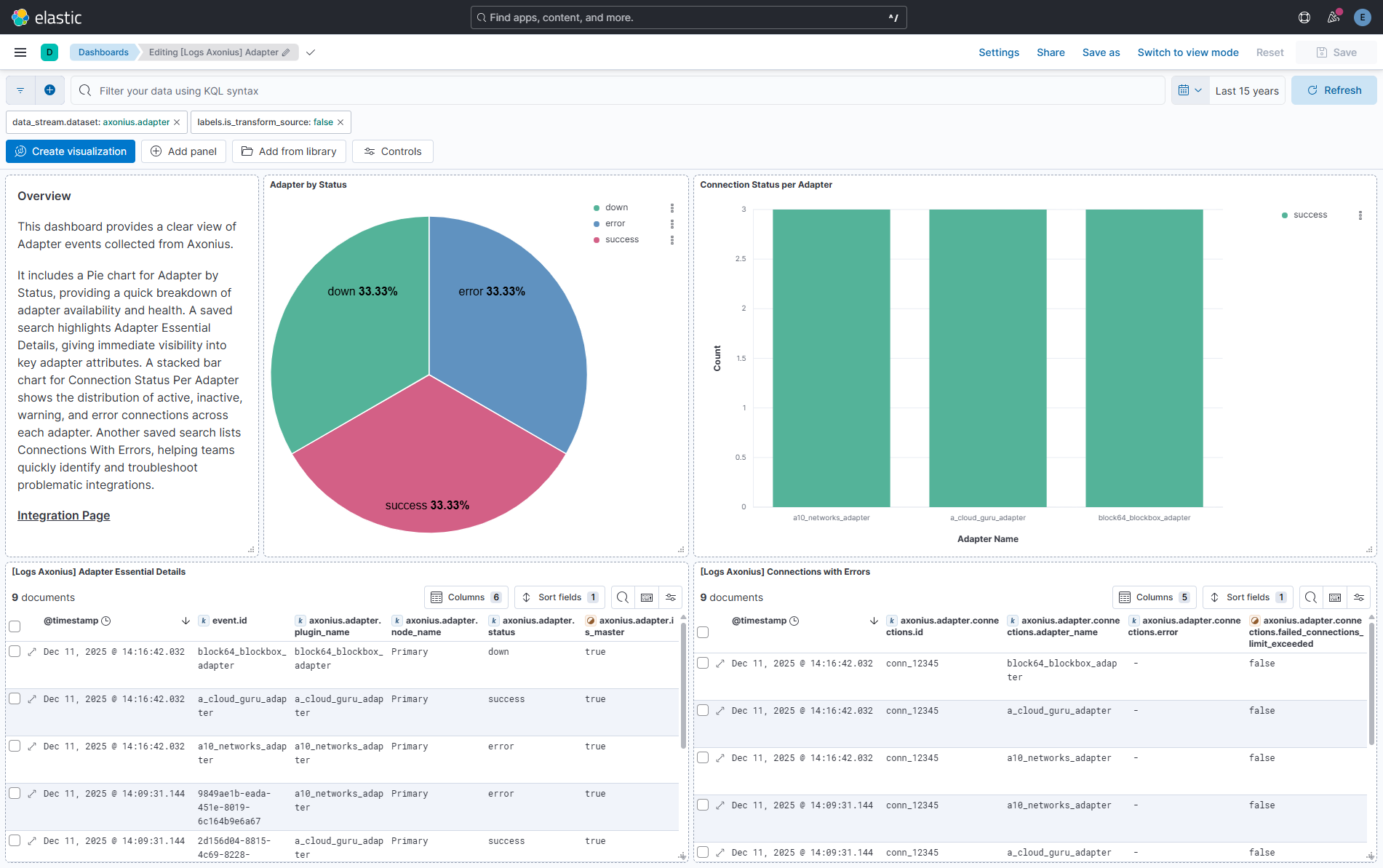
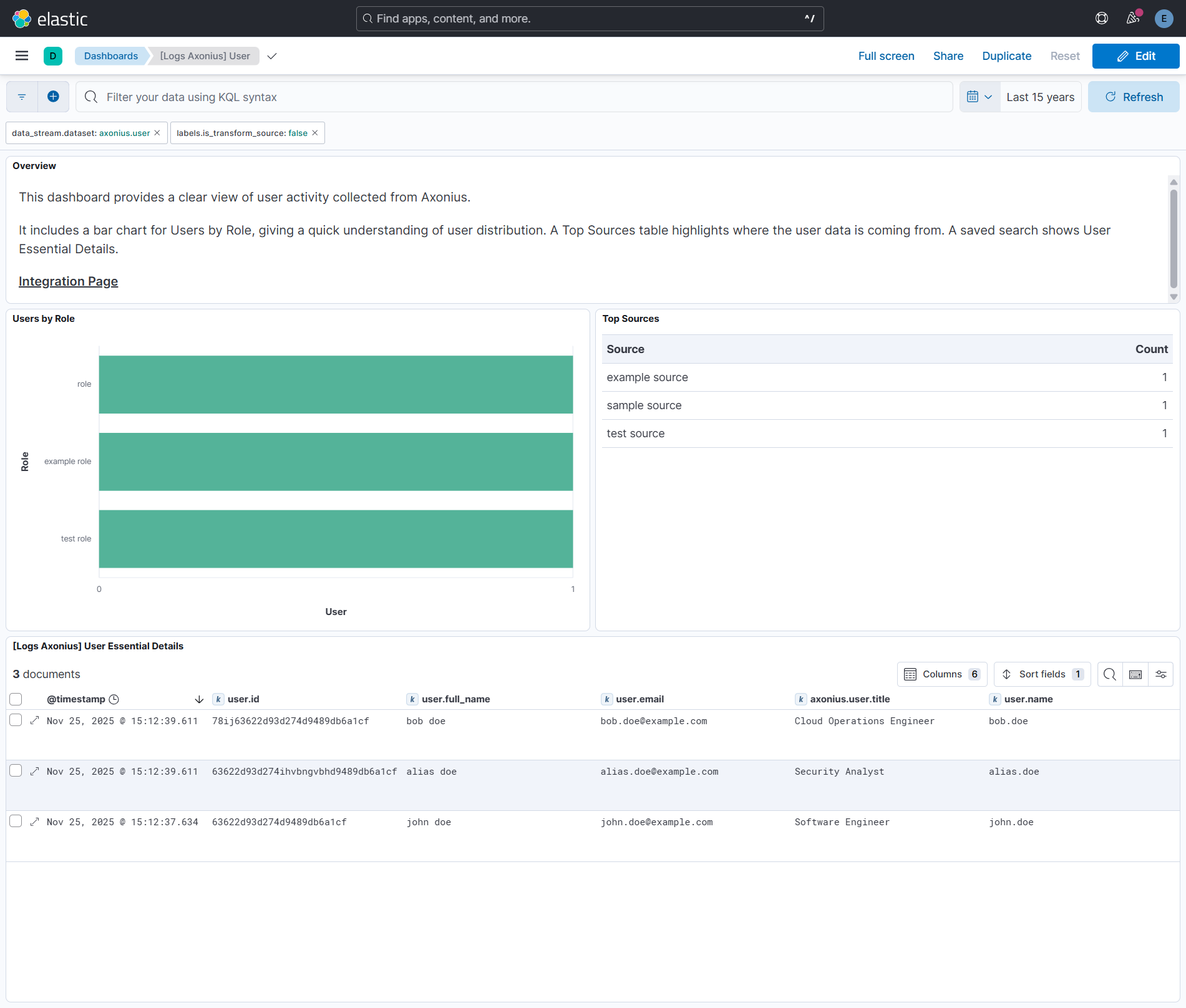
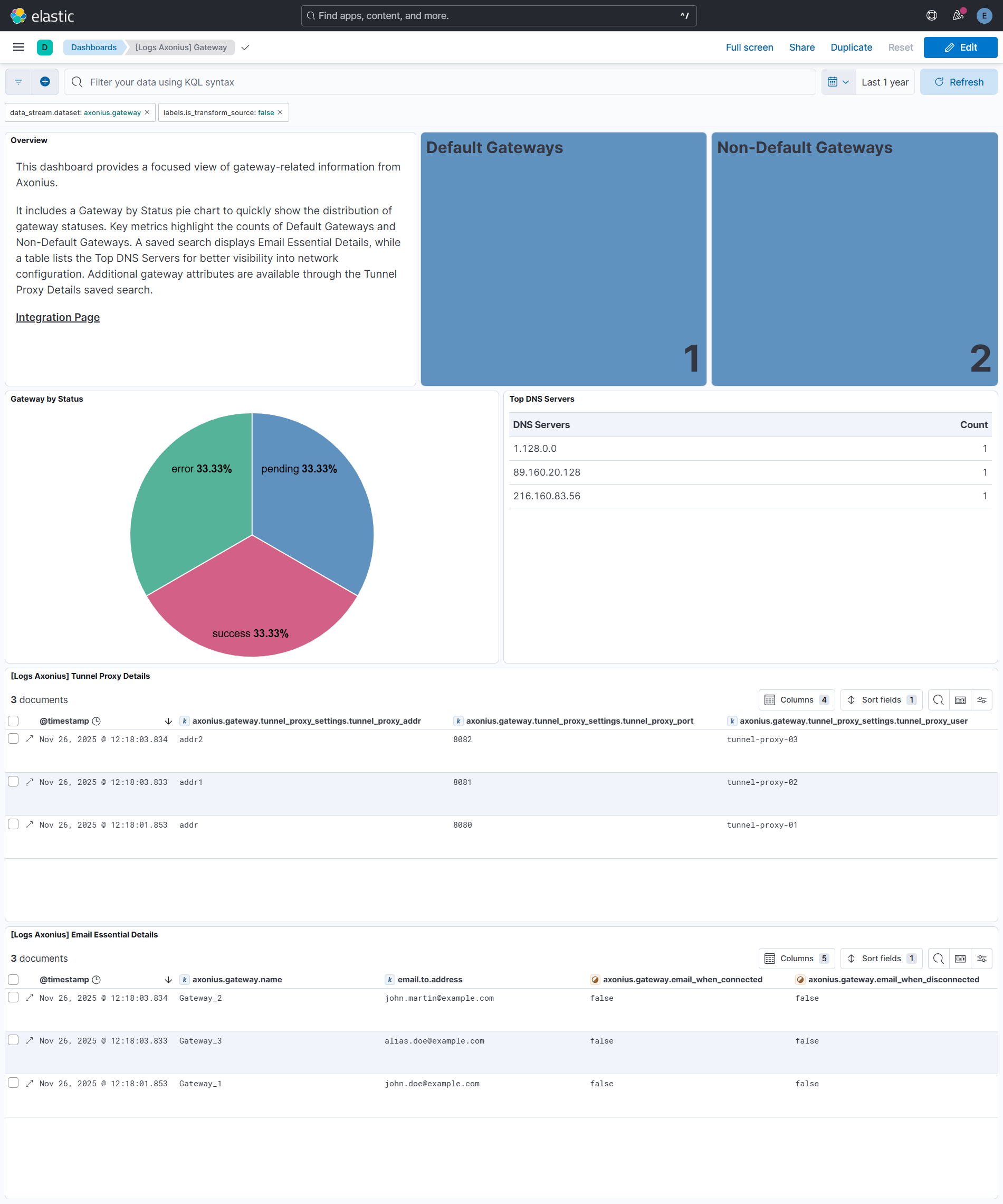
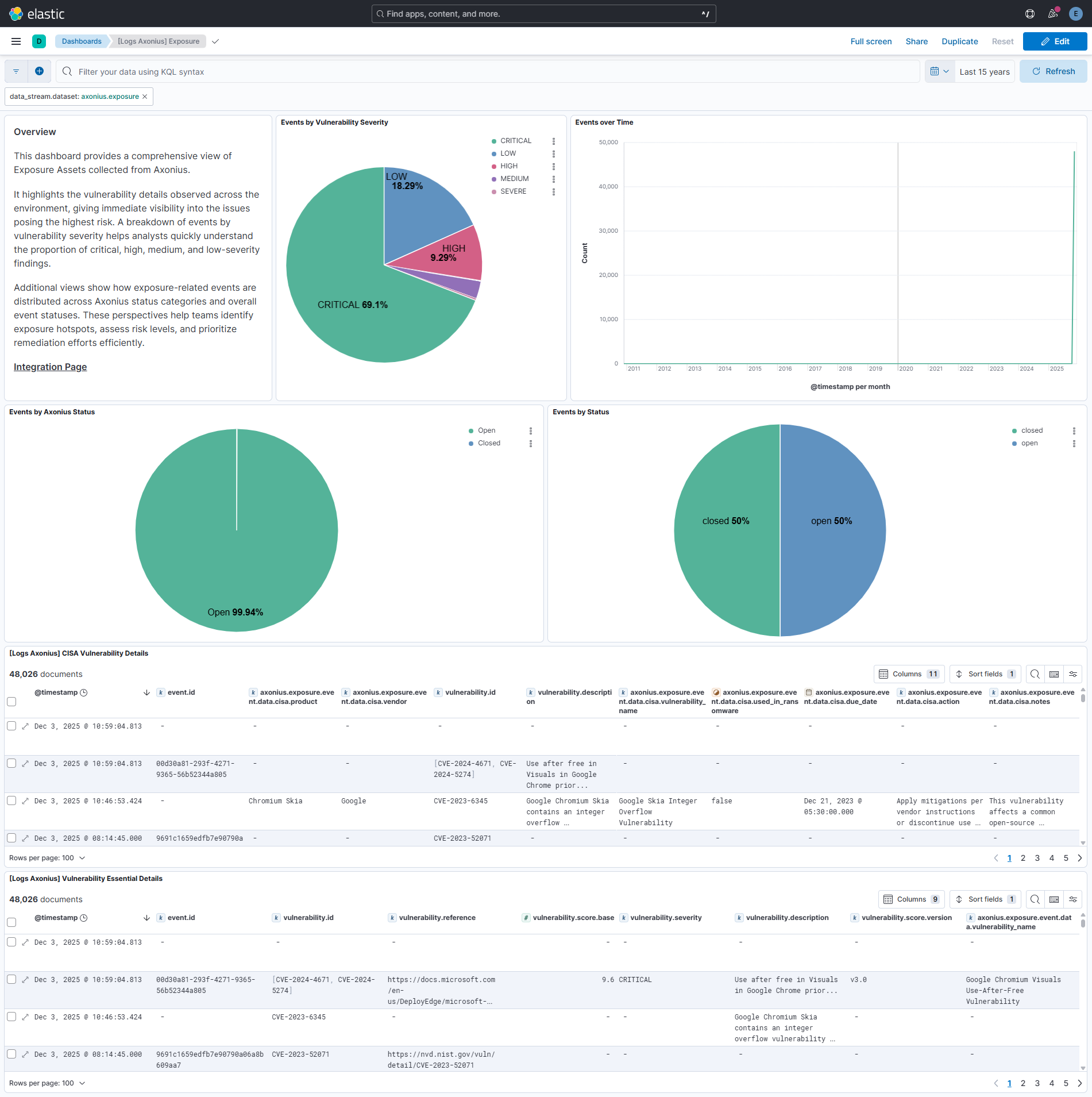
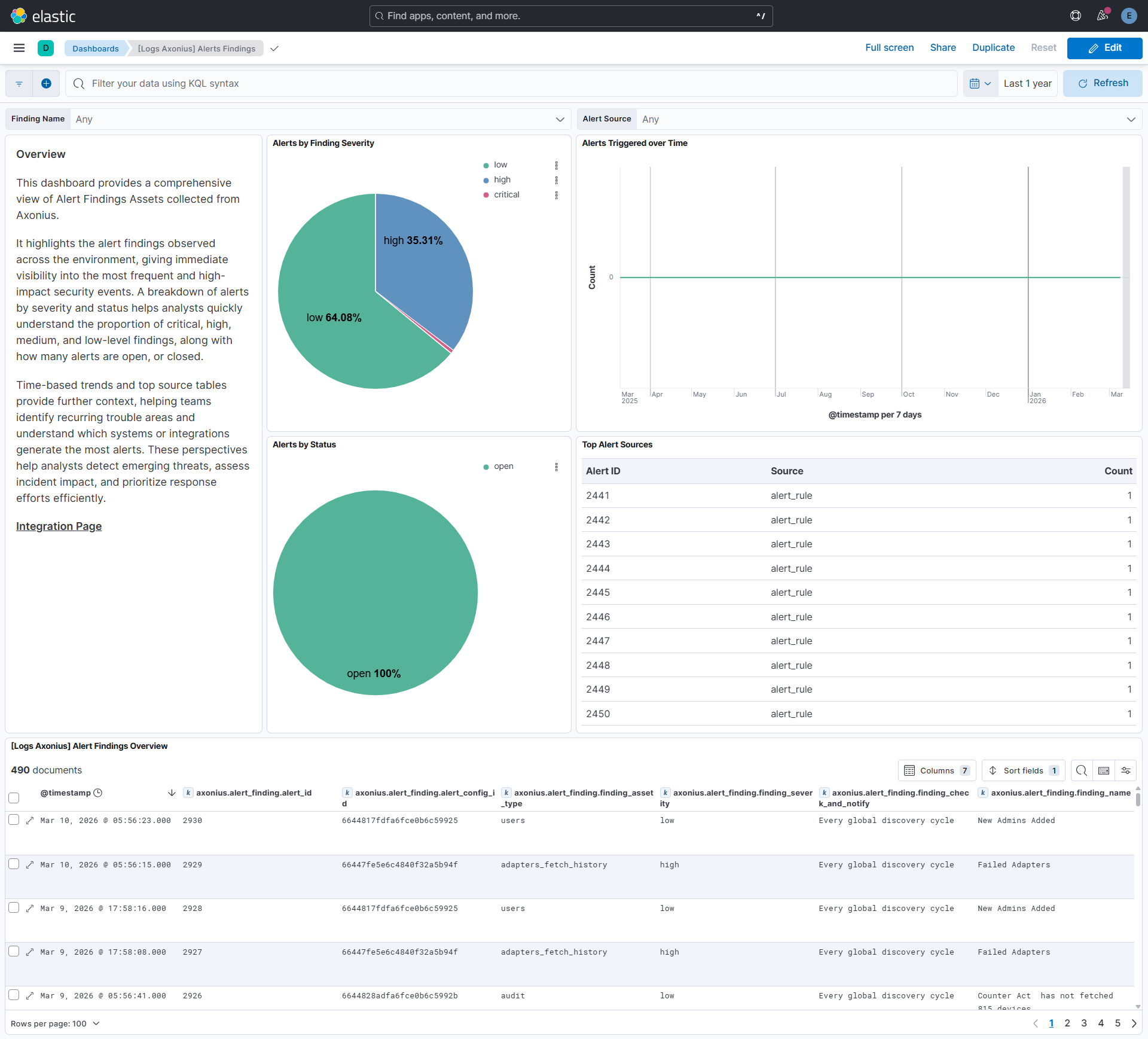
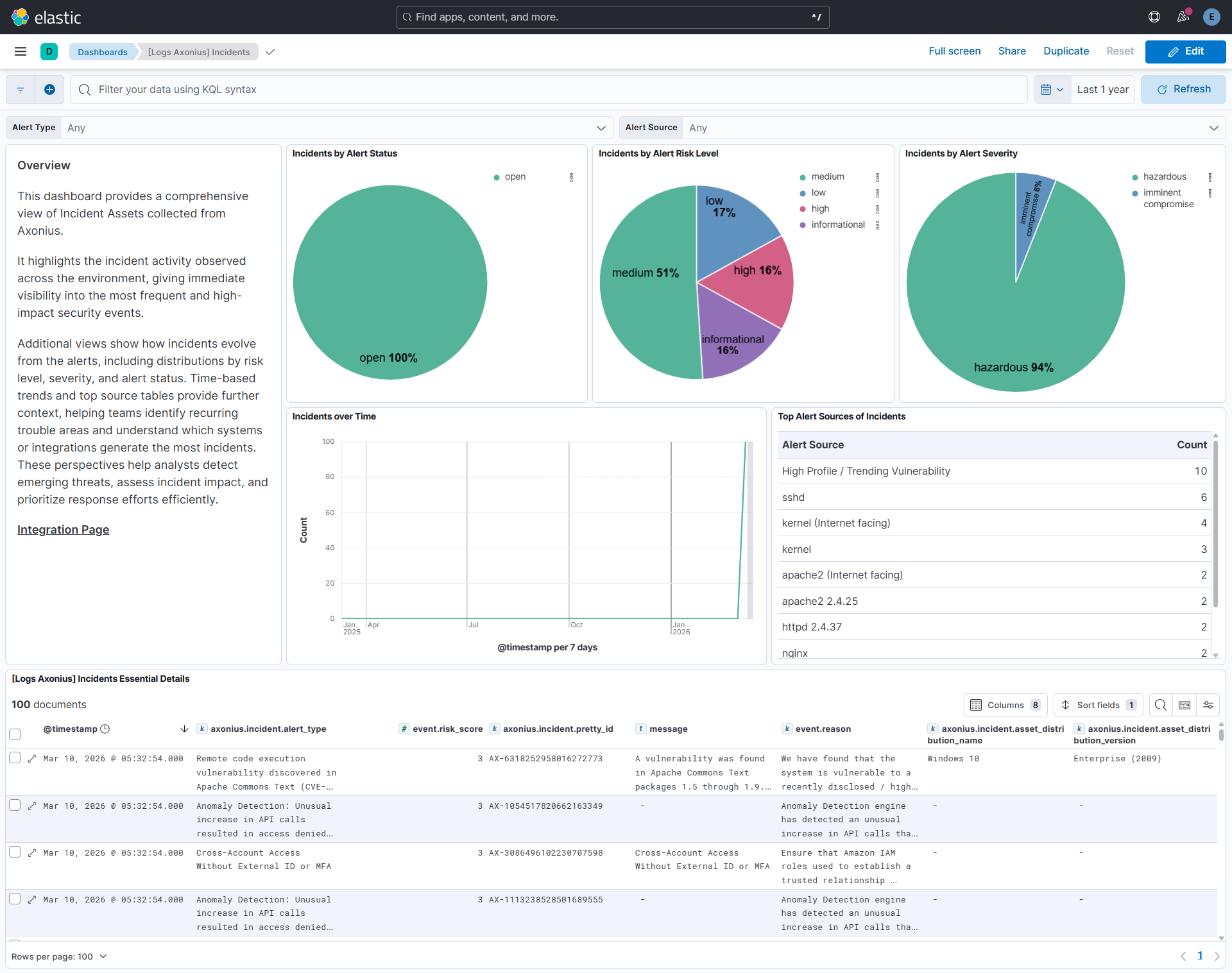
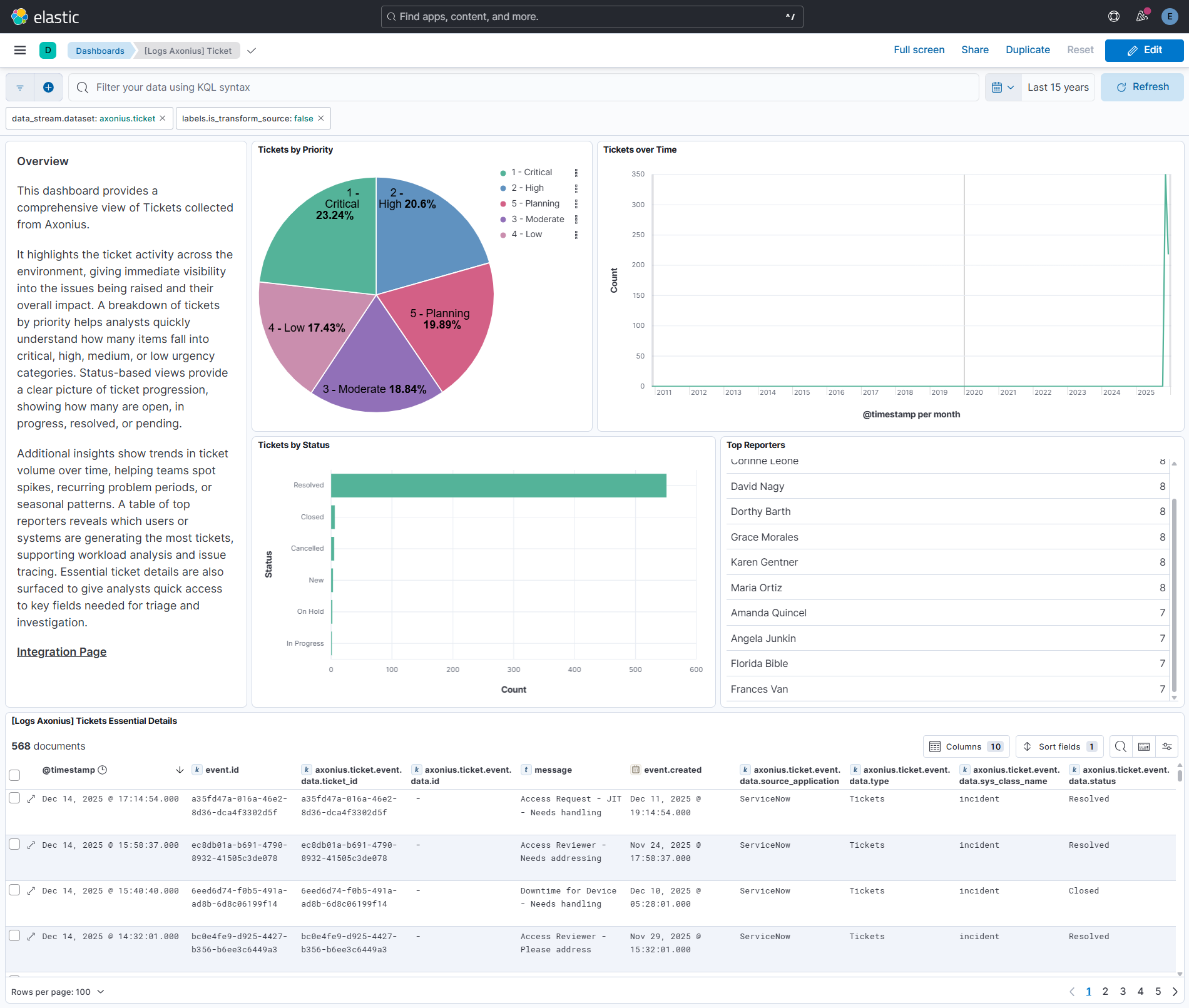
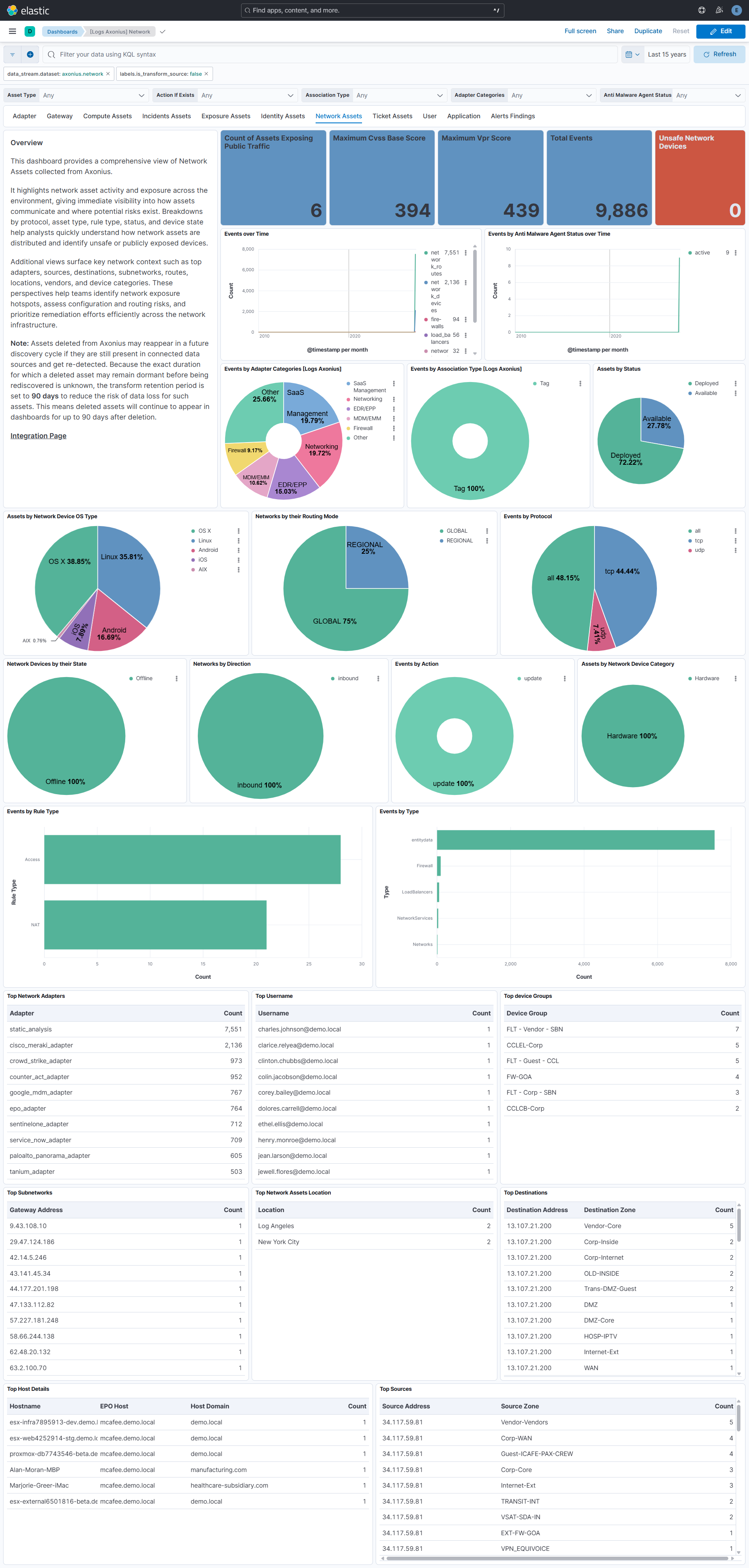
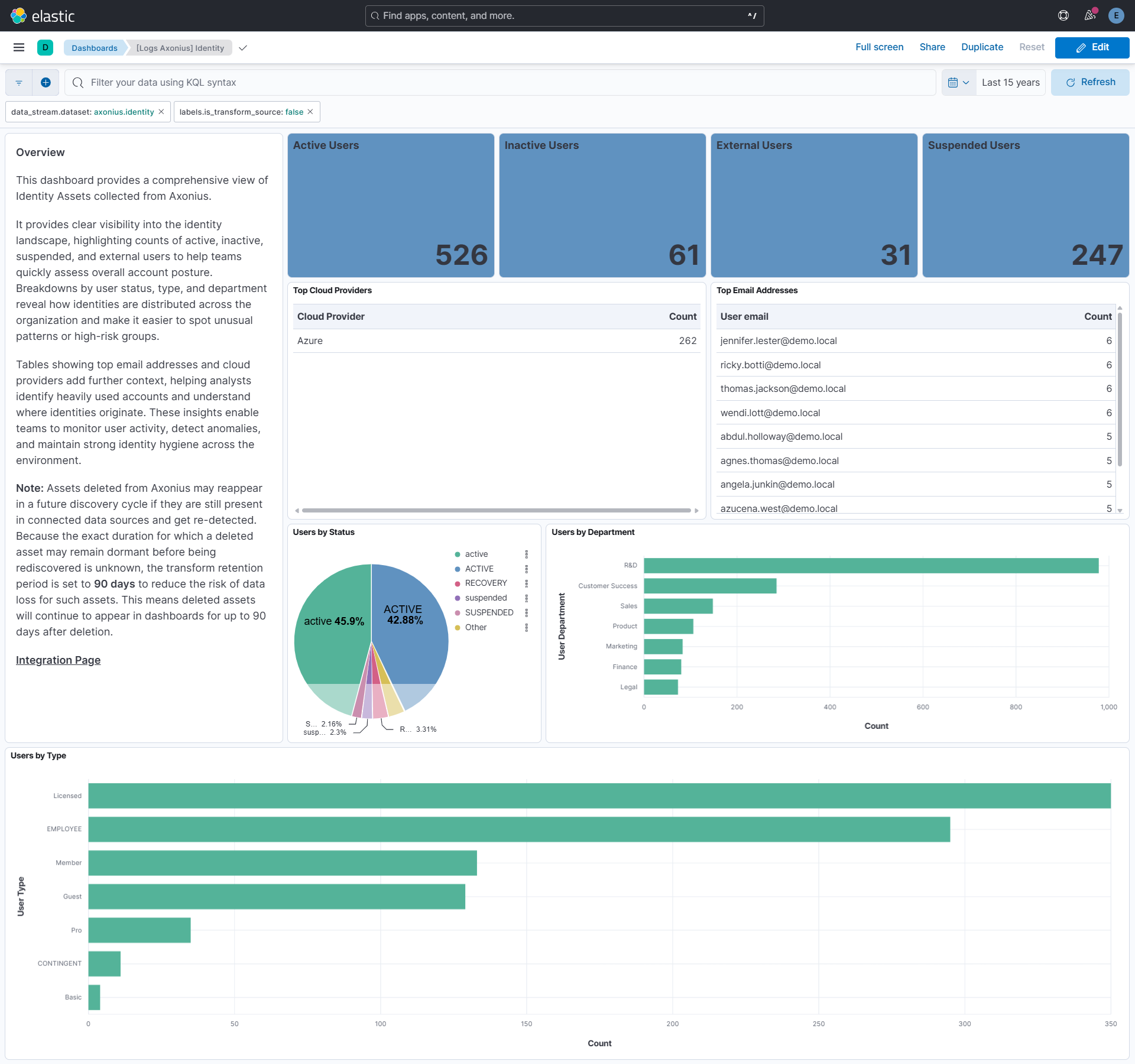
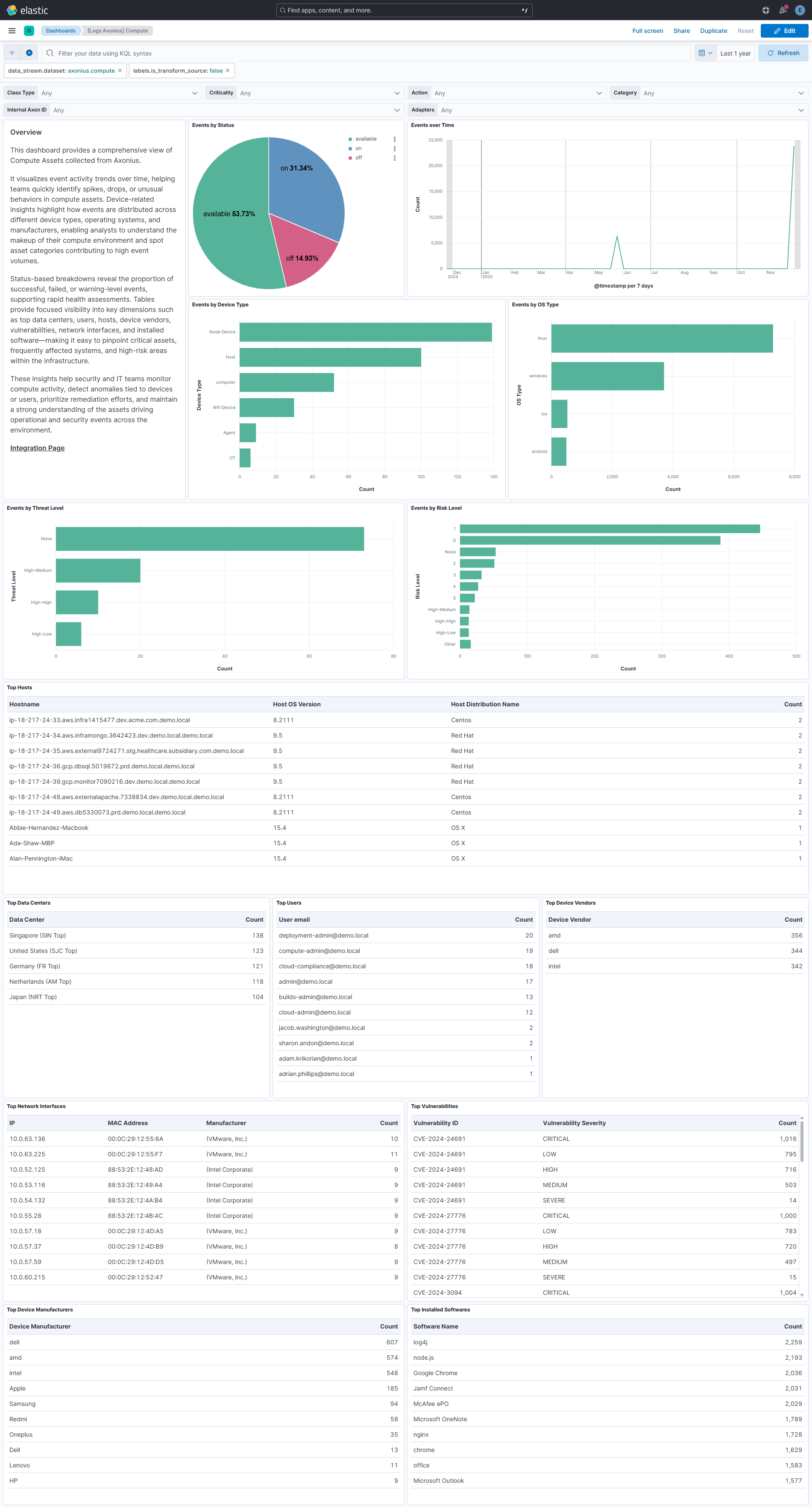
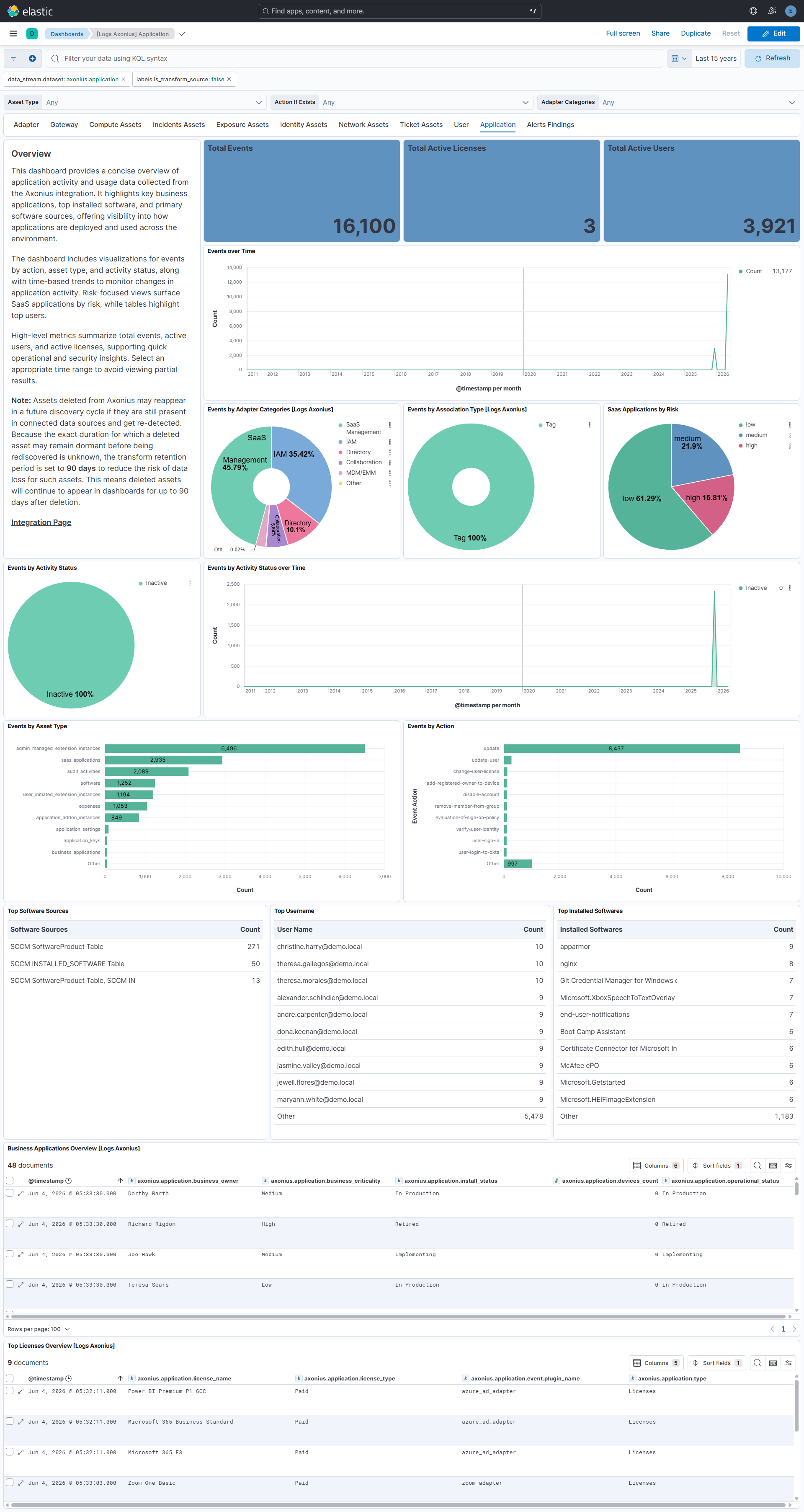
Changelog
| Version | Details | Minimum Kibana version |
|---|---|---|
| 0.3.1 | Bug fix (View pull request) Stop links panels forwarding dashboard-level filters so that navigating between dashboards does not combine conflicting filters. |
9.4.3 9.3.6 8.19.17 |
| 0.3.0 | Enhancement (View pull request) Add tags to ingest pipeline processors and add preserve_original_event to pipeline-level on_failure handlers. |
9.4.3 9.3.6 8.19.17 |
| 0.2.1 | Enhancement (View pull request) Set agentless deployment mode release field to ga. |
9.4.3 9.3.6 8.19.17 |
| 0.2.0 | Enhancement (View pull request) Publish Agentless to Elastic Managed integrations name change. |
9.4.3 9.3.6 8.19.17 |
| 0.1.2 | Enhancement (View pull request) Update in kibana version. |
9.4.3 9.3.6 8.19.17 |
| 0.1.1 | Bug fix (View pull request) Fix use of orValue on non-optional specific_data field access in asset CEL programs. |
9.3.1 9.2.4 9.1.10 8.19.10 |
| 0.1.0 | Enhancement (View pull request) Sync all datastreams to follow new best practices. Enhancement (View pull request) Add support for adapter data stream. Enhancement (View pull request) Add support for user data stream. Enhancement (View pull request) Add support for gateway data stream. Enhancement (View pull request) Add support for exposure data stream. Enhancement (View pull request) Add support for alert_finding and incident data stream. Enhancement (View pull request) Add support for storage data stream. Enhancement (View pull request) Add support for ticket data stream. Enhancement (View pull request) Add support for network data stream. Enhancement (View pull request) Add support for identity data stream. Enhancement (View pull request) Add support for compute data stream. Enhancement (View pull request) Add support for application data stream. |
9.3.1 9.2.4 9.1.10 8.19.10 |