MongoDB OpenTelemetry Assets
| Version | 0.3.1
|
| Subscription level What's this? |
Basic |
| Developed by What's this? |
Elastic |
| Minimum Kibana version(s) | 9.4.0 |
To use pre-release integrations, go to the Integrations page in Kibana, scroll down, and toggle on the Display beta integrations option.
MongoDB is a document-oriented NoSQL database that stores data as flexible JSON-like (BSON) documents. It is widely deployed for high-throughput, low-latency workloads and supports horizontal scaling through sharding and high availability through replica sets.
This content pack provides dashboards, alert rules, and SLO templates for MongoDB monitoring. The assets use metrics from the OpenTelemetry MongoDB receiver (mongodbreceiver) and cover operation throughput, latency, cache efficiency, connection utilization, memory, storage, cursor health, and session counts.
The MongoDB OpenTelemetry assets have been tested with:
- OpenTelemetry MongoDB receiver v0.146.1
- MongoDB 4.0, 5.0, 6.0, 7.0
You need Elasticsearch for storing and searching your data and Kibana for visualizing and managing it. You can use our hosted Elasticsearch Service on Elastic Cloud, which is recommended, or self-manage the Elastic Stack on your own hardware.
Before collecting data, you must configure MongoDB to allow the collector to connect and gather metrics. Create a dedicated user with the clusterMonitor role, which grants access to serverStatus and dbStats:
use admin
db.createUser({
  user: "otel_monitor",
  pwd: "your_password",
  roles: [ { role: "clusterMonitor", db: "admin" } ]
})
Configure the OpenTelemetry Collector (or Elastic OpenTelemetry Collector) to receive MongoDB metrics and export them to Elasticsearch. The following example uses the mongodbreceiver with the elasticsearch/otel exporter.
All metrics consumed by the dashboards, alerts, and SLOs are enabled by default in the receiver — no optional metrics need to be turned on.
Placeholders
| Placeholder | Description | Example |
|---|---|---|
<MONGODB_ENDPOINT> |
MongoDB server address and port | localhost:27017 |
<MONGODB_INSTANCE> |
Label shown in the dashboard Server control | mongodb:27017 |
<MONGODB_USER> |
MongoDB username for the collector | otel_monitor |
<ES_ENDPOINT> |
Elasticsearch ingest endpoint | https://my-deployment.es.us-central1.gcp.cloud.es.io:443 |
${env:MONGODB_PASSWORD} |
MongoDB password (use an environment variable) | — |
receivers:
  mongodb:
    hosts:
      - endpoint: <MONGODB_ENDPOINT>
    username: <MONGODB_USER>
    password: ${env:MONGODB_PASSWORD}
    collection_interval: 1m
    direct_connection: true

processors:
  attributes/mongodb:
    actions:
      - key: mongodb.instance
        value: <MONGODB_INSTANCE>
        action: upsert

exporters:
  elasticsearch/otel:
    endpoints: [<ES_ENDPOINT>]
    mapping:
      mode: otel

service:
  pipelines:
    metrics/mongodb:
      receivers: [mongodb]
      processors: [attributes/mongodb]
      exporters: [elasticsearch/otel]
The attributes/mongodb processor adds the mongodb.instance attribute used by the dashboard Server control. Set <MONGODB_INSTANCE> to the same host:port you use in <MONGODB_ENDPOINT>.
Note: direct_connection: true is required for standalone MongoDB instances; for replica sets, remove it and list all hosts. For unauthenticated local MongoDB, omit username and password. For production, configure Elasticsearch authentication and TLS as described in the Elasticsearch exporter documentation.
For the full list of settings exposed for the receiver, refer to the configuration section.
Refer to the OpenTelemetry MongoDB receiver's documentation for the complete list of metrics collected.
| Dashboard | Description |
|---|---|
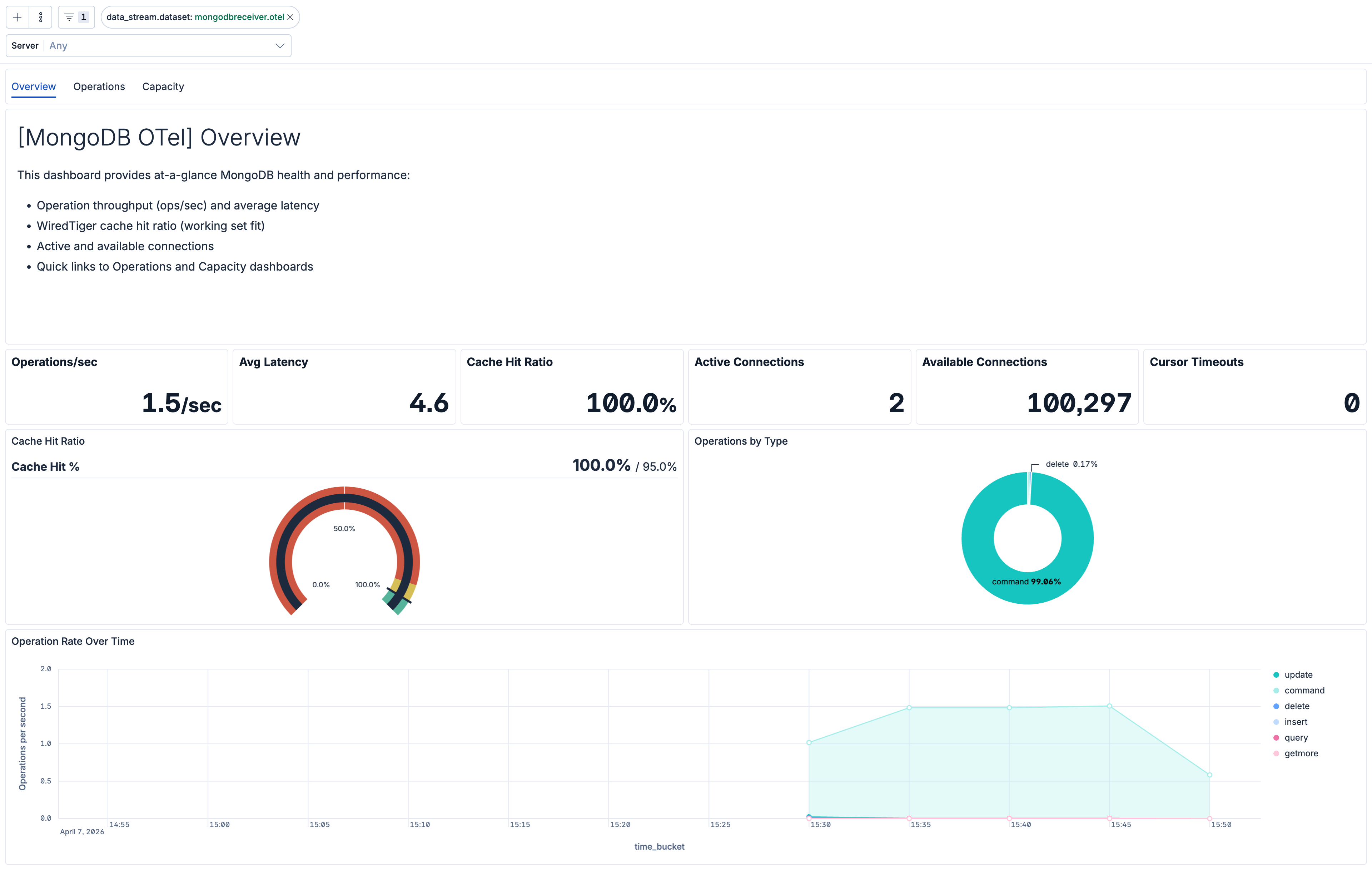
| [MongoDB OTel] Overview | Overview of MongoDB health and golden signals: operation throughput, average latency, WiredTiger cache hit ratio, and connection status. |
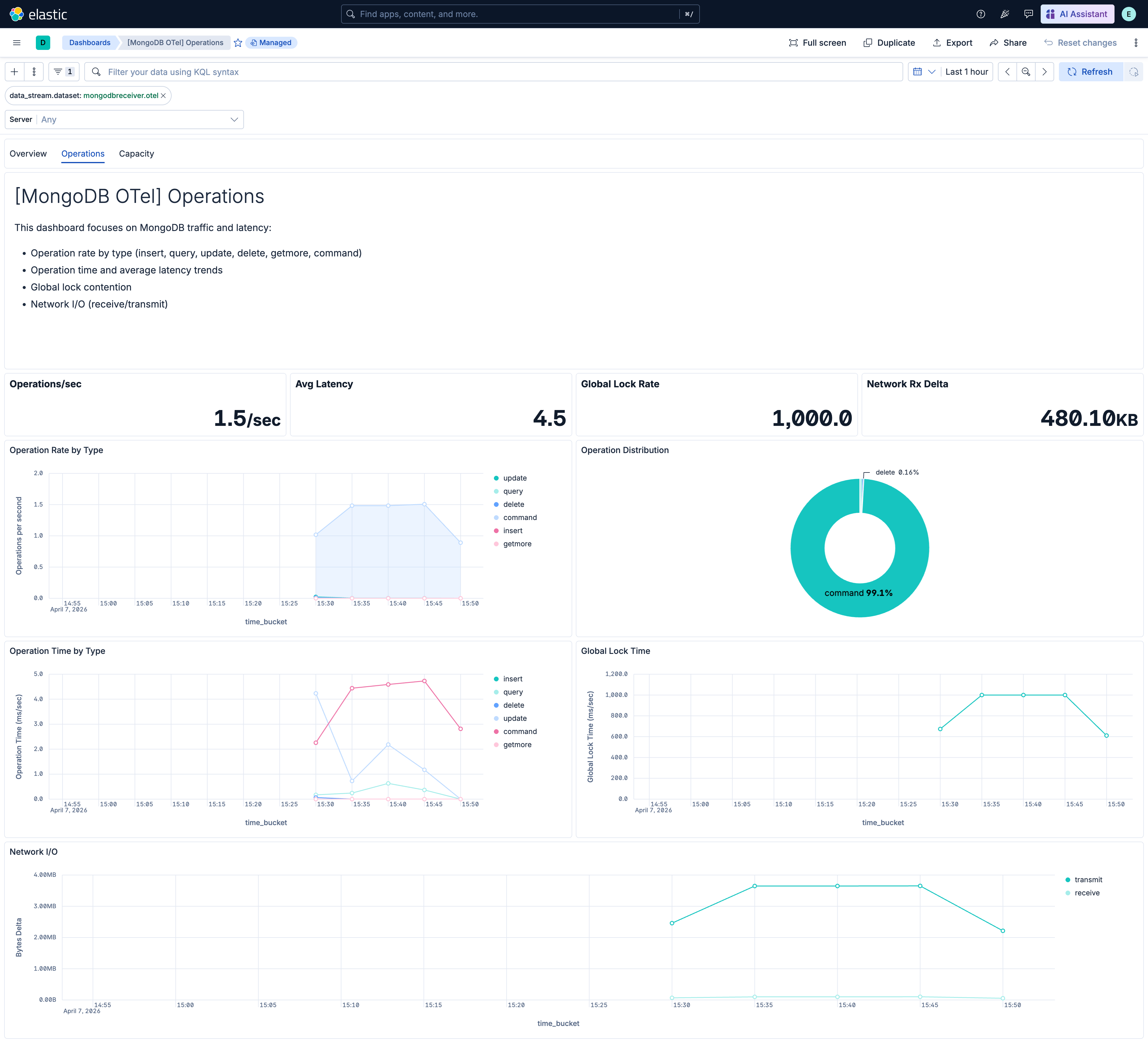
| [MongoDB OTel] Operations | Operation rate by type, operation time trends, global lock contention, and network I/O. |
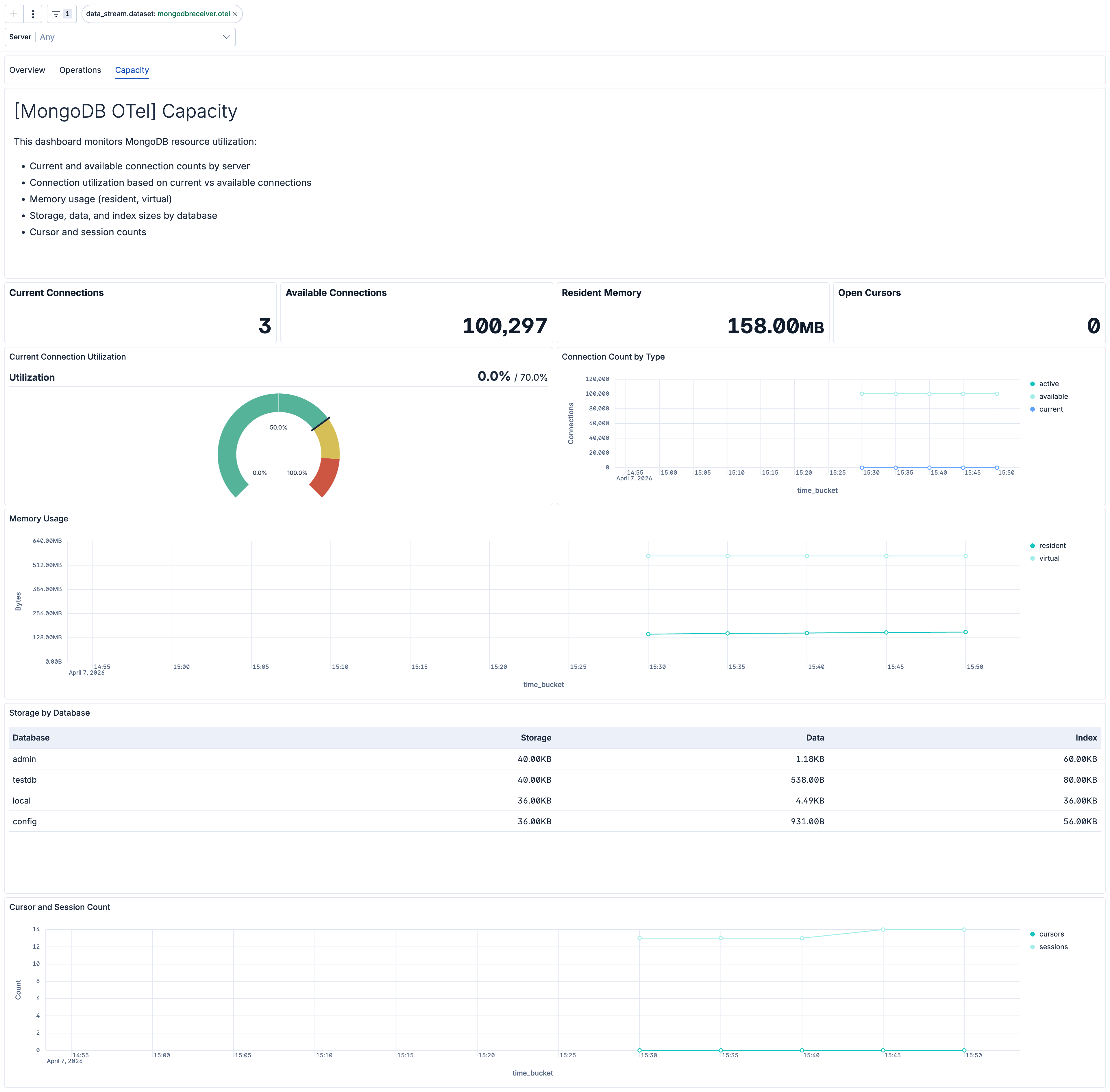
| [MongoDB OTel] Capacity | Connection utilization, memory usage (resident/virtual), storage and index sizes by database, and cursor/session counts. |
| Alert | Trigger | Severity |
|---|---|---|
| [MongoDB OTel] Connection exhaustion | Available connections drop below 10 for a server, using the lowest value observed across its database namespaces. | Critical |
| [MongoDB OTel] Cursor timeouts | Any increase in cursor timeout count per server. | High |
| [MongoDB OTel] Global lock contention | Global lock held more than 500 ms/sec on average per server. | High |
| [MongoDB OTel] High cache miss rate | WiredTiger cache miss rate exceeds 5% per server. | High |
| [MongoDB OTel] High cursor count | Open cursor count exceeds 1000 per server. | Medium |
| [MongoDB OTel] High memory usage | Resident memory exceeds 4 GB per server. | High |
| [MongoDB OTel] High operation latency | Average operation latency exceeds 100 ms per server and operation type. | High |
| [MongoDB OTel] High session count | Active session count exceeds 500 per server. | Medium |
SLO templates are available in Stack 9.4.0 and later. On Stack 9.3.x, the package can still be installed, but the SLO templates are not shown in the Assets UI.
| SLO | Target | Window | Description |
|---|---|---|---|
| [MongoDB OTel] Average operation latency 99.5% rolling 30 days | 99.5% | 30-day rolling | Average per-operation latency below 200 ms for 99.5% of 1-minute intervals to maintain responsive database performance. |
| [MongoDB OTel] Cache hit ratio 99.5% rolling 30 days | 99.5% | 30-day rolling | WiredTiger cache hit ratio above 95% for 99.5% of 1-minute intervals to maintain efficient memory utilization. |
| [MongoDB OTel] Connection availability 99.5% rolling 30 days | 99.5% | 30-day rolling | At least 10% of connections available for 99.5% of 1-minute intervals to prevent connection exhaustion. |
This integration includes one or more Kibana dashboards that visualizes the data collected by the integration. The screenshots below illustrate how the ingested data is displayed.
Changelog
| Version | Details | Minimum Kibana version |
|---|---|---|
| 0.3.1 | Bug fix (View pull request) Regenerate Kibana dashboards so ES|QL Lens panels include populated adHocDataViews, internalReferences, and per-layer index, fixing the broken "Explore in Discover" action on Kibana 9.3+. |
9.4.0 |
| 0.3.0 | Enhancement (View pull request) Add tags to Kibana assets |
9.4.0 |
| 0.2.0 | Enhancement (View pull request) Add description and artifact fields to alerting rule template. |
9.4.0 |
| 0.1.0 | Enhancement (View pull request) Initial release of the MongoDB OpenTelemetry content pack with dashboards, alert rules, and SLO templates |
9.3.0 |