Lumos Integration
| Version | 1.9.0 (View all) |
| Managed integration release status | GA |
| Subscription level What's this? |
Basic |
| Developed by What's this? |
Partner |
| Ingestion method(s) | API |
| Minimum Kibana version(s) | 9.1.4 9.0.7 8.19.4 |
You can use this integration as an Elastic Managed integration on Elastic Cloud Hosted deployments running this version or later.
The Lumos integration uses Lumos' API to retrieve Activity Logs and ingest them into Elasticsearch. This allows you to search, observe, and visualize the Activity Logs through Elasticsearch.
The Elastic agent running this integration interacts with Lumos' infrastructure using their APIs to retrieve Activity Logs for a Lumos tenant.
Agentless integrations allow you to collect data without having to manage Elastic Agent in your cloud. They make manual agent deployment unnecessary, so you can focus on your data instead of the agent that collects it. For more information, refer to Agentless integrations and the Agentless integrations FAQ. Agentless deployments are only supported in Elastic Serverless and Elastic Cloud environments. This functionality is in beta and is subject to change. Beta features are not subject to the support SLA of official GA features.
- In Kibana go to Management > Integrations
- In the "Search for integrations" search bar type Lumos.
- Click on "Lumos" integration from the search results.
- Click on Add Lumos button to add Lumos integration.
- In Lumos go to Settings > API Tokens
- Click on "Add API Token", enter a name and description
- Copy the key starting with
lsk_ - While adding Lumos integration in Elastic, paste your key into the
API Tokenfield
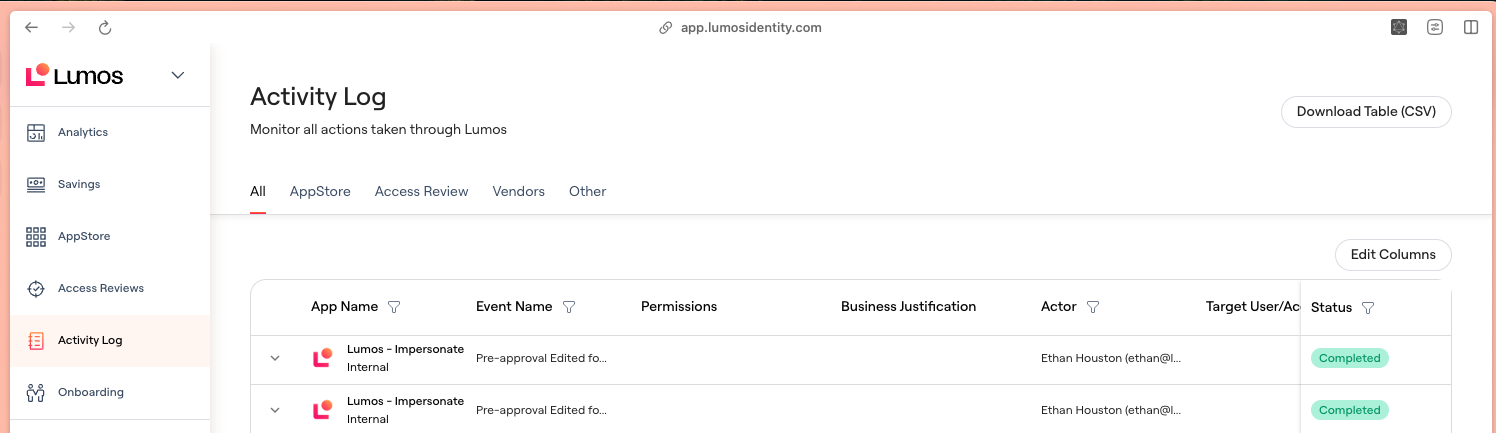
Activity Logs summarize the history of changes and events occurring within Lumos.
Exported fields
| Field | Description | Type |
|---|---|---|
| @timestamp | Event timestamp. | date |
| data_stream.dataset | Data stream dataset. | constant_keyword |
| data_stream.namespace | Data stream namespace. | constant_keyword |
| data_stream.type | Data stream type. | constant_keyword |
| event.module | Event module | constant_keyword |
| input.type | Input type | keyword |
| lumos.activity_logs.actor.actor_type | The type of actor | keyword |
| lumos.activity_logs.actor.email | The email of the actor | keyword |
| lumos.activity_logs.actor.family_name | The family name of the actor | keyword |
| lumos.activity_logs.actor.given_name | The given name of the actor | keyword |
| lumos.activity_logs.event_began_at | The time the event began | keyword |
| lumos.activity_logs.event_type_user_friendly | The user friendly type of the event | keyword |
| lumos.activity_logs.targets.name | keyword | |
| lumos.activity_logs.targets.target_type | keyword |
Example
{
    "@timestamp": "2026-07-23T05:57:08.315Z",
    "agent": {
        "ephemeral_id": "d5dfc28b-0d8d-4107-9a36-b03df5679780",
        "id": "635c6f7a-c6c2-427e-8b55-c817325bad18",
        "name": "elastic-agent-14892",
        "type": "filebeat",
        "version": "8.19.4"
    },
    "data_stream": {
        "dataset": "lumos.activity_logs",
        "namespace": "62571",
        "type": "logs"
    },
    "ecs": {
        "version": "8.11.0"
    },
    "elastic_agent": {
        "id": "635c6f7a-c6c2-427e-8b55-c817325bad18",
        "snapshot": false,
        "version": "8.19.4"
    },
    "event": {
        "action": "SOD_POLICY_DELETED",
        "agent_id_status": "verified",
        "created": "2026-07-23T05:57:08.315Z",
        "dataset": "lumos.activity_logs",
        "id": "1111111111111111111111111111111111111111111111111111111111111111",
        "ingested": "2026-07-23T05:57:11Z",
        "kind": "event",
        "outcome": "success",
        "type": [
            "info"
        ]
    },
    "host": {
        "architecture": "aarch64",
        "containerized": false,
        "hostname": "elastic-agent-14892",
        "ip": [
            "172.19.0.2",
            "172.18.0.4"
        ],
        "mac": [
            "2A-8B-8B-F3-CB-00",
            "36-8B-CE-62-2E-F4"
        ],
        "name": "elastic-agent-14892",
        "os": {
            "kernel": "6.12.76-linuxkit",
            "name": "Wolfi",
            "platform": "wolfi",
            "type": "linux",
            "version": "20230201"
        }
    },
    "input": {
        "type": "httpjson"
    },
    "lumos": {
        "activity_logs": {
            "actor": {
                "actor_type": "Lumos user",
                "email": "wile.e.coyote@example.com",
                "family_name": "Coyote",
                "given_name": "Wile E."
            },
            "event_began_at": "2024-03-12T16:09:14",
            "event_type_user_friendly": "A user deleted a SOD Policy",
            "targets": [
                {
                    "name": "Untitled Rule",
                    "target_type": "SOD Policy"
                }
            ]
        }
    },
    "message": "{\"actor\":{\"actor_type\":\"Lumos user\",\"email\":\"wile.e.coyote@example.com\",\"family_name\":\"Coyote\",\"given_name\":\"Wile E.\"},\"event_began_at\":\"2024-03-12T16:09:14\",\"event_hash\":\"1111111111111111111111111111111111111111111111111111111111111111\",\"event_metadata\":{},\"event_type\":\"SOD_POLICY_DELETED\",\"event_type_user_friendly\":\"A user deleted a SOD Policy\",\"outcome\":\"Succeeded\",\"targets\":[{\"name\":\"Untitled Rule\",\"target_type\":\"SOD Policy\"}]}"
}
This integration includes one or more Kibana dashboards that visualizes the data collected by the integration. The screenshots below illustrate how the ingested data is displayed.

Changelog
| Version | Details | Minimum Kibana version |
|---|---|---|
| 1.9.0 | Enhancement (View pull request) Add tags to ingest pipeline processors. |
9.1.4 9.0.7 8.19.4 |
| 1.8.2 | Enhancement (View pull request) Set agentless deployment mode release field to ga. |
9.1.4 9.0.7 8.19.4 |
| 1.8.1 | Bug fix (View pull request) Fix activity logs cursor so incremental collection filters requests by the stored timestamp instead of replaying the full history each interval. |
9.1.4 9.0.7 8.19.4 |
| 1.8.0 | Enhancement (View pull request) Use new release field for agentless deployment mode to establish as beta. |
9.1.4 9.0.7 8.19.4 |
| 1.7.0 | Enhancement (View pull request) Enable Agentless deployment. |
9.1.4 9.0.7 8.19.4 |
| 1.6.0 | Enhancement (View pull request) Prevent updating fleet health status to degraded. |
9.1.4 9.0.7 8.19.4 |
| 1.5.0 | Enhancement (View pull request) Update Kibana constraint to support 9.0.0. |
9.0.0 8.13.0 |
| 1.4.1 | Bug fix (View pull request) Fix broken links in Security Service integrations packages. |
8.13.0 |
| 1.4.0 | Enhancement (View pull request) Add "preserve_original_event" tag to documents with event.kind set to "pipeline_error". |
8.13.0 |
| 1.3.0 | Enhancement (View pull request) Update the kibana constraint to ^8.13.0. Modified the field definitions to remove ECS fields made redundant by the ecs@mappings component template. |
8.13.0 |
| 1.2.1 | Bug fix (View pull request) Fix sample event. |
8.12.1 |
| 1.2.0 | Enhancement (View pull request) Make event.type field conform to ECS field definition. |
8.12.1 |
| 1.1.0 | Enhancement (View pull request) Improve handling of empty responses. |
8.12.1 |
| 1.0.0 | Enhancement (View pull request) Release package as GA. |
8.12.1 |
| 0.1.0 | Enhancement (View pull request) Initial draft of the package |
8.12.1 |