Elastic Managed integrations
Elastic Managed integrations let you ingest data from cloud sources into Elastic without deploying or maintaining any collectors yourself. Elastic runs the collectors for you and writes the data directly to your cluster, so you can focus on the data rather than on the infrastructure that collects it. Elastic Managed integrations are available on Elastic Cloud Serverless and Elastic Cloud Hosted deployments.
To enable an Elastic Managed integration in Kibana, refer to Enable an Elastic Managed integration.
Elastic Managed integrations remove the operational overhead of running your own collectors:
- No infrastructure to manage: Elastic deploys, patches, upgrades, and scales the collectors for you.
- Quick to set up: Enable an integration in Kibana and data starts flowing within minutes, with nothing to install.
- Isolation by design: Each integration runs in its own dedicated collector, which keeps your data separate from other workloads while it's being collected.
- Data stays in your cluster: Collectors write directly to your project or deployment, so you keep full ownership and access control.
Elastic Managed integrations are a good fit whenever you need to pull data from a cloud service through an API at lower volumes, without setting up and running your own collectors. Some examples include:
- Identity and access logs: Collect audit and system logs from identity and access management providers to monitor authentication and access activity.
- Security and vulnerability findings: Ingest findings from security and vulnerability management tools to track risks alongside the rest of your data.
- SaaS and cloud provider audit trails: Centralize audit logs from cloud platforms and SaaS applications for security and compliance monitoring.
For the full list of integrations that can run as Elastic Managed integrations, refer to the Managed integrations quick reference. Elastic continually adds more.
Elastic Managed integrations aren't intended for high-throughput ingestion or for sources that push large volumes of events. For more information, refer to Limits and scaling.
When you enable an Elastic Managed integration, Elastic provisions a dedicated collector for it on Elastic-managed infrastructure. Each collector runs the integration package you'd deploy yourself for the equivalent agent-based integration, but Elastic provisions, updates, and operates it for you.
The collector pulls data from the source API and writes documents to your Elasticsearch cluster through the standard _bulk API. For most integrations, data flows through the integration's ingest pipelines and lands in the same data streams as it would for a self-managed integration. Elastic Managed integrations built on OpenTelemetry are an exception: their data bypasses ingest pipelines and lands in the integration's dedicated data streams (typically in .otel-* data streams).
A shared, stateless Controller orchestrates the lifecycle of these collectors. When you enable an integration in Kibana, the Controller creates and updates the collector, and it removes the collector when you delete the integration. The Controller doesn't store user data.
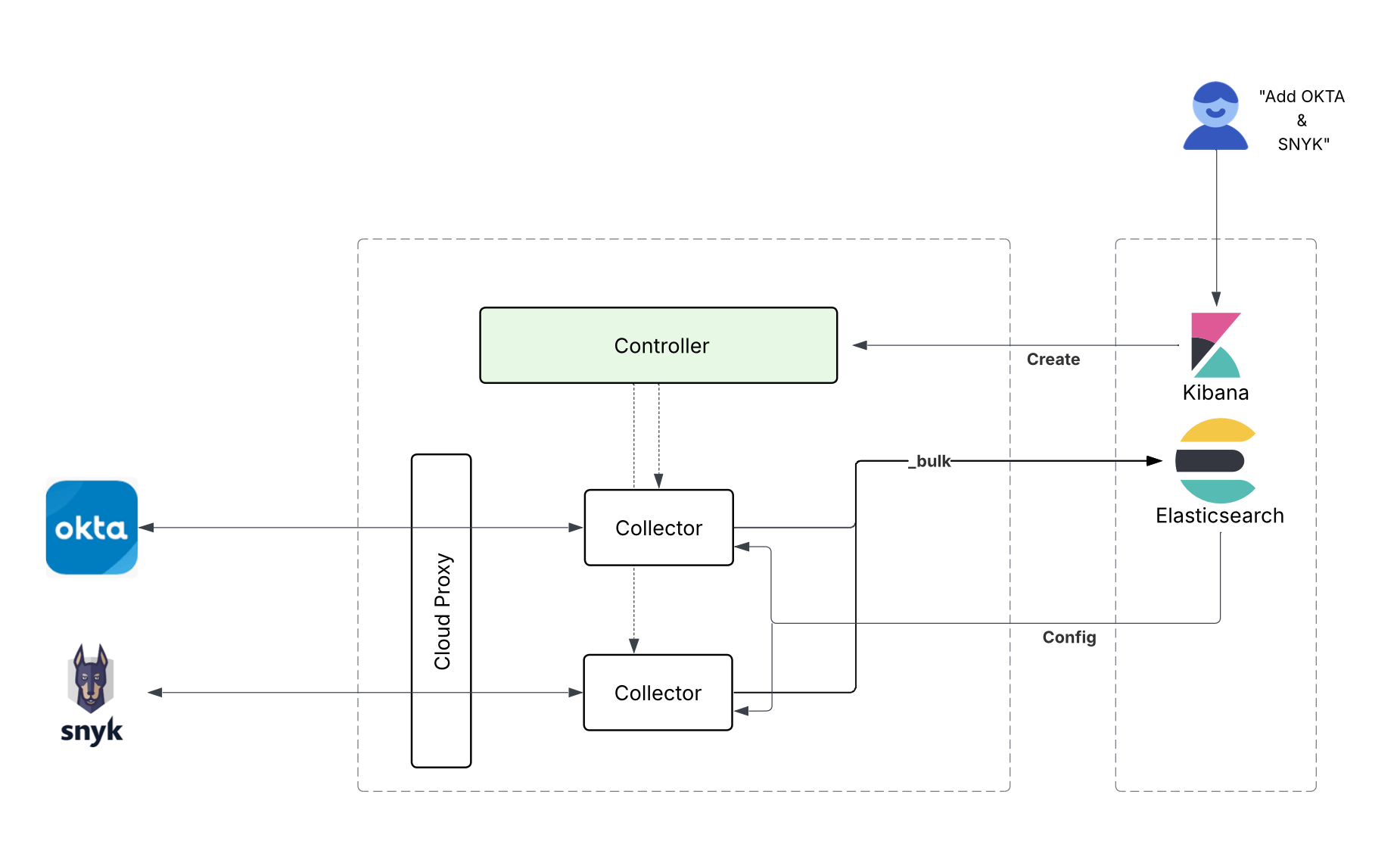
The following limits apply to Elastic Managed integrations:
- Maximum Elastic Managed integrations per Serverless project or Elastic Cloud Hosted deployment: 50.
- No horizontal scaling: Deploying multiple Elastic Managed integrations for the same source doesn't increase ingest throughput. For higher throughput, consider the Elastic OpenTelemetry Cloud Forwarder.
- Rate limiting: Integrations are rate-limited on Serverless and Elastic Cloud Hosted to preserve quality of service. Rate limiting uses back-pressure rather than dropping events, so collection slows down until it has caught up.
The collector for each Elastic Managed integration writes documents directly to your cluster. Data is stored in your project or deployment, and Elastic employees don't have access to it.
Data typically travels from Elastic-managed infrastructure to your cluster over Elastic's internal network. On an Elastic Cloud Hosted deployment in a region that isn't served by Elastic Cloud Serverless, data might traverse the public internet to reach your cluster. For more information, refer to Does my data travel over the public internet? in the FAQ.
Each collector is dedicated to a single Elastic Managed integration: no other workloads can be added to it.
Because Elastic operates the collectors on your behalf, they aren't visible in Fleet by default, and Elastic resolves service-level issues for you. You still keep visibility into the parts that matter to you — each integration's status is available in the Integrations app, and the ingested data lands in your cluster so you can query it, view it in dashboards, and set alerting rules on it as you would for any other integration.
For how Elastic Managed integrations behave during a service issue, refer to What happens to my data if there's a service issue? in the FAQ.
For service issues or to request diagnostics, contact Elastic Support.
- Enable an Elastic Managed integration in Kibana to start collecting data from a cloud source.
- Authenticate Elastic Managed integrations using a federated identity to avoid managing API keys directly.