Elastic Workflows
| Version | 0.1.0
|
| Subscription level What's this? |
Enterprise |
| Developed by What's this? |
Elastic |
| Minimum Kibana version(s) | 9.6.0 |
To use pre-release integrations, go to the Integrations page in Kibana, scroll down, and toggle on the Display beta integrations option.
Monitor your Elastic Workflows with out-of-the-box dashboards.
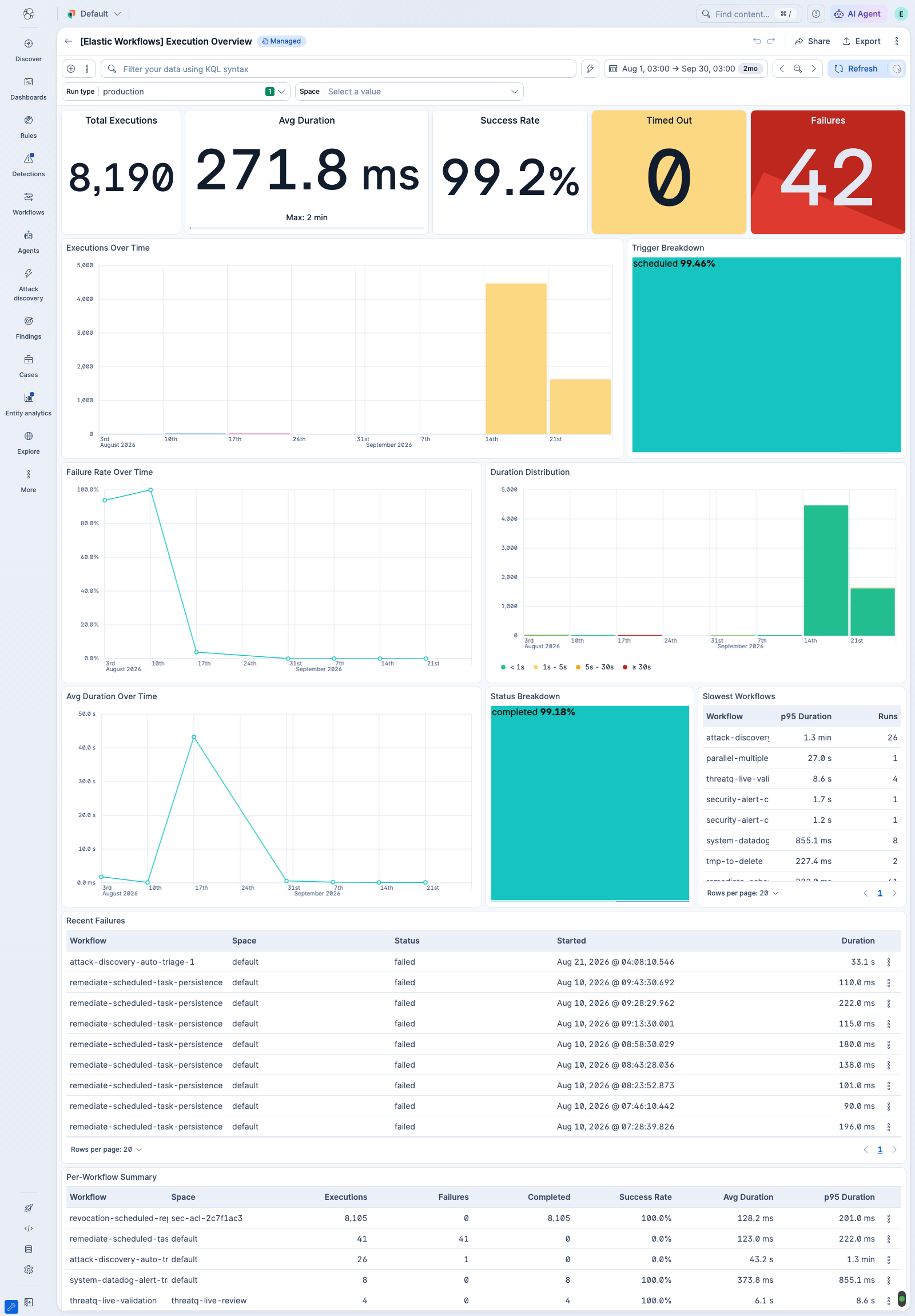
Provides a high-level view of workflow execution activity. All panels use ES|QL queries against the workflow execution index.
- KPI strip — Total Executions, Avg Duration (with the longest execution as a progress bar), Success Rate, Timed Out (with trendline), Failures (with trendline)
- Executions Over Time — stacked bar chart of runs per workflow
- Trigger Breakdown — treemap of execution trigger sources
- Failure Rate Over Time — overall failure rate trend
- Duration Distribution — execution counts bucketed by duration (< 1s, 1s–5s, 5s–30s, ≥ 30s)
- Avg Duration Over Time — overall average duration trend
- Status Breakdown — treemap of execution statuses
- Slowest Workflows — table of workflows ranked by p95 duration
- Recent Failures — table of failing workflows and their spaces, with drilldown to executions
- Per-Workflow Summary — table with space, executions, failures, success %, avg duration, and p95
Dashboard-level controls filter every panel by space and run type. The run type is production by default. Select test to include test runs.
This package includes dashboards that read from the following hidden Elasticsearch index created by the Workflows Execution Engine:
| Index | Description |
|---|---|
.workflows-executions |
Workflow-level execution records |
- Kibana 9.6.0 or later
- An Enterprise subscription
- Workflows must be available in your deployment
- Users must have the required Workflows feature privileges for their spaces
This integration includes one or more Kibana dashboards that visualizes the data collected by the integration. The screenshots below illustrate how the ingested data is displayed.
Changelog
| Version | Details | Minimum Kibana version |
|---|---|---|
| 0.1.0 | Enhancement (View pull request) Add an ES|QL workflow execution overview dashboard. |
9.6.0 |