Snowflake Integration for Elastic
| Version | 0.2.0
|
| Subscription level What's this? |
Basic |
| Developed by What's this? |
Elastic |
| Ingestion method(s) | API |
| Minimum Kibana version(s) | 9.1.0 8.19.0 |
To use pre-release integrations, go to the Integrations page in Kibana, scroll down, and toggle on the Display beta integrations option.
The Snowflake integration for Elastic collects security telemetry from Snowflake ACCOUNT_USAGE views using the SQL API. It covers object and column access, cross-cloud and cross-region data transfer, and stage lifecycle changes so you can monitor data access and possible exfiltration paths in Elasticsearch.
This integration queries Snowflake ACCOUNT_USAGE historical views through SQL API v2 (/api/v2/statements). Those views retain about one year of data and are delayed (about 45 minutes to 3 hours depending on the view). It is compatible with Snowflake accounts on AWS, Azure, and Google Cloud, including PrivateLink hosts. China region hosts (.snowflakecomputing.cn) are supported when the account URL is set accordingly. The access_history data stream requires Snowflake Enterprise Edition or later.
Elastic Agent submits SQL statements to POST /api/v2/statements and pages result partitions. If Snowflake returns HTTP 202, the agent polls the statement handle until results are ready. Each data stream queries one ACCOUNT_USAGE view and advances a timestamp watermark with lookback to cover view latency. When a statement returns a full batch_size page, the next request continues from the last returned ORDER BY key without the lag overlap until the backlog is drained.
Grants keep separate watermarks for CREATED_ON and DELETED_ON.
The Snowflake integration collects the following logs:
- access_history: Objects and columns read or written by each query from
SNOWFLAKE.ACCOUNT_USAGE.ACCESS_HISTORY(direct and base objects accessed, objects modified, DDL operations, policies referenced). Enterprise Edition or later. - data_transfer_history: Hourly byte-count windows of data moved between clouds and regions from
SNOWFLAKE.ACCOUNT_USAGE.DATA_TRANSFER_HISTORY, by transfer type. - stages: Stage create, alter, and drop activity from
SNOWFLAKE.ACCOUNT_USAGE.STAGES, including external stage locations (s3://,azure://,gcs://) and storage integrations. Watermarks areLAST_ALTEREDandDELETEDbecause rows update in place. - login_history: Login attempts from
SNOWFLAKE.ACCOUNT_USAGE.LOGIN_HISTORY(user, client IP, authentication factors, success or failure, malicious-IP protection details). - sessions: Session lifecycle from
SNOWFLAKE.ACCOUNT_USAGE.SESSIONS(open or closed sessions, last access time, closed reason). Watermark isACCESS_TIMEbecause session rows update until they close. - grants_to_users: Role grants and revokes from
SNOWFLAKE.ACCOUNT_USAGE.GRANTS_TO_USERS. Creates and revokes are queried separately so each watermark advances only alongCREATED_ONorDELETED_ON.
Use this integration to detect failed or suspicious logins, track session activity, audit privilege grants and revokes, monitor access to sensitive tables and columns, detect unusual outbound data transfers, and track the creation or alteration of external stages that could facilitate data exfiltration from Snowflake.
- An Elastic Stack deployment (self-managed or Elastic Cloud) that meets the package Kibana version condition.
- A Snowflake account and a virtual warehouse that can auto-resume.
- A Snowflake
TYPE=SERVICEuser with a role that can query the views and use the warehouse. - A programmatic access token for the service user. Username/password, OAuth access tokens, and key-pair JWT are not supported by this integration.
Elastic Agent must be installed. For more details, check the Elastic Agent installation instructions. You can install only one Elastic Agent per host.
Elastic Agent is required to stream data from the SQL API and ship the data to Elastic, where the events will then be processed via the integration's ingest pipelines.
- Create a role and a
TYPE=SERVICEuser, and grant the role to the user. - Grant
USAGEon a warehouse that can auto-resume. - Grant the
SNOWFLAKE.SECURITY_VIEWERdatabase role (orIMPORTED PRIVILEGES ON DATABASE SNOWFLAKE) so the user can read login history, sessions, and grants to users. - Grant the SNOWFLAKE database roles the data streams need (or
IMPORTED PRIVILEGES ON DATABASE SNOWFLAKE):SNOWFLAKE.GOVERNANCE_VIEWERforaccess_historySNOWFLAKE.USAGE_VIEWERfordata_transfer_historySNOWFLAKE.OBJECT_VIEWERforstagesSNOWFLAKE.SECURITY_VIEWERdatabase role orIMPORTED PRIVILEGES ON DATABASE SNOWFLAKEforlogin history,sessions, andgrants_to_users
- Create a programmatic access token for the service user.
- If a network policy is enabled, allow the Elastic Agent egress IP (or PrivateLink endpoint).
- SQL API introduction
- Authenticating to the SQL API
- Programmatic access tokens
- Account Usage
- SNOWFLAKE database roles
- In Kibana go to Management → Integrations.
- Search for Snowflake and add the integration.
- Set the account URL, role, and warehouse.
- Provide the programmatic access token for the service user. OAuth access tokens and key-pair JWT are not supported.
- Enable the data streams you want and save the policy.
In Discover, filter on event.dataset: snowflake.access_history, event.dataset: snowflake.data_transfer_history, event.dataset: snowflake.stages, event.dataset: snowflake.login_history, event.dataset: snowflake.sessions, or
event.dataset: snowflake.grants_to_users. Access history should contain event.category: database events. Data transfer should contain event.category: network events with network.bytes. Stages should contain event.category: configuration events with event.action of create, alter, or drop. Login history should contain
event.category: authentication events. Grants should contain IAM change events.
- No data is being collected: Confirm the warehouse can auto-resume, the role has the required SNOWFLAKE database role (or imported privileges), and the account URL is reachable on HTTPS 443. ACCOUNT_USAGE latency means new rows can take up to 2–3 hours to appear.
access_historyreturns an error: TheACCESS_HISTORYview exists only on Enterprise Edition or later. Turn off the data stream on lower editions.- Authentication failures: Service users cannot use passwords. Provide a programmatic access token. The integration always sends
X-Snowflake-Authorization-Token-Type: PROGRAMMATIC_ACCESS_TOKEN. - Network policy blocks the SQL API: Add the agent egress IP, or use a PrivateLink hostname from
SYSTEM$GET_PRIVATELINK_CONFIG(). - HTTP 429 (
390505): Reduce poll frequency. There is no documentedRetry-Aftercontract on the SQL API. - Duplicate rows: Each poll overlaps the previous watermark by the configured lag time so late-arriving rows are included. Documents use a fingerprint
_id, so re-delivered rows are usually dropped as duplicates, never overwritten, and a few duplicates can appear across index rollovers.
Each poll runs SQL on the configured warehouse and consumes Snowflake credits. ACCOUNT_USAGE latency is 45 minutes to 3 hours, so polling faster than the view latency does not make data fresher. Suggested starting intervals are 2h for login history, grants, data transfer history, and stages, and 3h for sessions and access history. Overlap the watermark by at least the view latency so late-arriving rows are included. ACCESS_HISTORY can be high volume on busy accounts. Keep batch_size at the default unless statements time out.
For more information on architectures that can be used for scaling this integration, check the Ingest Architectures documentation.
These inputs can be used with this integration:
cel
For more details about the CEL input settings, check the Filebeat documentation.
Before configuring the CEL input, make sure you have:
- Network connectivity to the target API endpoint
- Valid authentication credentials (API keys, tokens, or certificates as required)
- Appropriate permissions to read from the target data source
To configure the CEL input, you must specify the request.url value pointing to the API endpoint. The interval parameter controls how frequently requests are made and is the primary way to balance data freshness with API rate limits and costs. Authentication is often configured through the request.headers section using the appropriate method for the service.
To access the API service, make sure you have the necessary API credentials and that the Filebeat instance can reach the endpoint URL. Some services may require IP whitelisting or VPN access.
To collect logs via API endpoint, configure the following parameters:
- API Endpoint URL
- API credentials (tokens, keys, or username/password)
- Request interval (how often to fetch data)
These APIs are used with this integration:
- Submit SQL —
POST /api/v2/statements - Poll status and fetch partitions —
GET /api/v2/statements/{statementHandle}
- SQL API reference
- ACCESS_HISTORY view
- DATA_TRANSFER_HISTORY view
- STAGES view
- LOGIN_HISTORY view
- SESSIONS view
- GRANTS_TO_USERS view
The access_history data stream provides object and column access events from SNOWFLAKE.ACCOUNT_USAGE.ACCESS_HISTORY. Nested object lists are decoded from the view's JSON columns and kept as flattened fields. Object names and column names (which vary per query) are also extracted into keyword arrays for aggregation.
Exported fields
| Field | Description | Type |
|---|---|---|
| @timestamp | Date/time when the event originated. This is the date/time extracted from the event, typically representing when the event was generated by the source. If the event source has no original timestamp, this value is typically populated by the first time the event was received by the pipeline. Required field for all events. | date |
| data_stream.dataset | The field can contain anything that makes sense to signify the source of the data. Examples include nginx.access, prometheus, endpoint etc. For data streams that otherwise fit, but that do not have dataset set we use the value "generic" for the dataset value. event.dataset should have the same value as data_stream.dataset. Beyond the Elasticsearch data stream naming criteria noted above, the dataset value has additional restrictions: * Must not contain - * No longer than 100 characters |
constant_keyword |
| data_stream.namespace | A user defined namespace. Namespaces are useful to allow grouping of data. Many users already organize their indices this way, and the data stream naming scheme now provides this best practice as a default. Many users will populate this field with default. If no value is used, it falls back to default. Beyond the Elasticsearch index naming criteria noted above, namespace value has the additional restrictions: * Must not contain - * No longer than 100 characters |
constant_keyword |
| data_stream.type | An overarching type for the data stream. Currently allowed values are "logs" and "metrics". We expect to also add "traces" and "synthetics" in the near future. | constant_keyword |
| event.dataset | Name of the dataset. If an event source publishes more than one type of log or events (e.g. access log, error log), the dataset is used to specify which one the event comes from. It's recommended but not required to start the dataset name with the module name, followed by a dot, then the dataset name. | constant_keyword |
| event.module | Name of the module this data is coming from. If your monitoring agent supports the concept of modules or plugins to process events of a given source (e.g. Apache logs), event.module should contain the name of this module. |
constant_keyword |
| input.type | Type of filebeat input. | keyword |
| observer.product | The product name of the observer. | constant_keyword |
| observer.vendor | Vendor name of the observer. | constant_keyword |
| related.user | All the user names or other user identifiers seen on the event. | keyword |
| snowflake.access_history.additional_properties | Operational metadata for the source of the event. Decoded from the ADDITIONAL_PROPERTIES VARIANT. | flattened |
| snowflake.access_history.agents_info | Ordered list of invoking agents, from the nearest agent to the top-level agent (agentType, agentId, agentName). Decoded from the AGENTS_INFO JSON array. | flattened |
| snowflake.access_history.base_objects_accessed | All base data objects required to run the query. Decoded from the BASE_OBJECTS_ACCESSED JSON array. | flattened |
| snowflake.access_history.base_objects_accessed_columns | Distinct columnName values extracted from base_objects_accessed. Column names vary per query. | keyword |
| snowflake.access_history.base_objects_accessed_names | Fully qualified objectName values extracted from base_objects_accessed. | keyword |
| snowflake.access_history.direct_objects_accessed | Data objects (tables, views, columns, stages, UDFs, stored procedures) directly named in the query. Decoded from the DIRECT_OBJECTS_ACCESSED JSON array. | flattened |
| snowflake.access_history.direct_objects_accessed_columns | Distinct columnName values extracted from direct_objects_accessed. Column names vary per query. | keyword |
| snowflake.access_history.direct_objects_accessed_names | Fully qualified objectName values extracted from direct_objects_accessed. | keyword |
| snowflake.access_history.invoker_identity | Snowflake service that directly accessed the object. Deprecated by Snowflake (removed in the 2026_07 bundle). Decoded from the INVOKER_IDENTITY VARIANT. | flattened |
| snowflake.access_history.object_modified_by_ddl.object_domain | Type of the object defined or modified by the DDL operation. | keyword |
| snowflake.access_history.object_modified_by_ddl.object_id | Identifier of the object defined or modified by the DDL operation, unique within an account and domain. | keyword |
| snowflake.access_history.object_modified_by_ddl.object_name | Fully qualified name of the object defined or modified by the DDL operation. | keyword |
| snowflake.access_history.object_modified_by_ddl.operation_type | SQL keyword for the DDL operation, for example ALTER, CREATE, DROP, GRANT, or REVOKE. | keyword |
| snowflake.access_history.object_modified_by_ddl.properties | Object or column properties set by the DDL operation (atomic and compound properties). | flattened |
| snowflake.access_history.objects_modified | Objects associated with a write operation in the query, including column lineage (directSources/baseSources). Decoded from the OBJECTS_MODIFIED JSON array. | flattened |
| snowflake.access_history.objects_modified_columns | Distinct columnName values extracted from objects_modified. Column names vary per query. | keyword |
| snowflake.access_history.objects_modified_names | Fully qualified objectName values extracted from objects_modified. | keyword |
| snowflake.access_history.parent_query_id | Query ID of the parent job, or absent if the job has no parent. | keyword |
| snowflake.access_history.policies_referenced | Masking and row access policies enforced on the accessed objects and columns. Decoded from the POLICIES_REFERENCED JSON array. | flattened |
| snowflake.access_history.root_query_id | Query ID of the topmost job in the chain, or absent if the job has no parent. | keyword |
Example
{
    "@timestamp": "2020-06-15T08:00:00.123Z",
    "agent": {
        "ephemeral_id": "cf02fdc4-df7a-4f1b-a6ff-7d763d19695e",
        "id": "cb2cd5d9-c75e-4d1d-ac01-946cfd5aa107",
        "name": "elastic-agent-79554",
        "type": "filebeat",
        "version": "8.19.0"
    },
    "data_stream": {
        "dataset": "snowflake.access_history",
        "namespace": "75267",
        "type": "logs"
    },
    "ecs": {
        "version": "9.5.0"
    },
    "elastic_agent": {
        "id": "cb2cd5d9-c75e-4d1d-ac01-946cfd5aa107",
        "snapshot": false,
        "version": "8.19.0"
    },
    "event": {
        "agent_id_status": "verified",
        "category": [
            "database"
        ],
        "dataset": "snowflake.access_history",
        "id": "01b5a1c2-0000-1a2b-0000-000100000001",
        "ingested": "2026-10-08T05:56:42Z",
        "kind": "event",
        "original": "{\"ADDITIONAL_PROPERTIES\":null,\"AGENTS_INFO\":null,\"BASE_OBJECTS_ACCESSED\":\"[\\n  {\\n    \\\"columns\\\": [\\n      {\\n        \\\"columnId\\\": 68610,\\n        \\\"columnName\\\": \\\"CONTENT\\\"\\n      },\\n      {\\n        \\\"columnId\\\": 68611,\\n        \\\"columnName\\\": \\\"CREATED_AT\\\"\\n      }\\n    ],\\n    \\\"objectDomain\\\": \\\"Table\\\",\\n    \\\"objectId\\\": 66564,\\n    \\\"objectName\\\": \\\"EXAMPLE_DB.PUBLIC.ORDERS\\\"\\n  }\\n]\",\"DIRECT_OBJECTS_ACCESSED\":\"[\\n  {\\n    \\\"argumentSignature\\\": \\\"(NUM1 NUMBER, NUM2 NUMBER)\\\",\\n    \\\"dataType\\\": \\\"NUMBER(38,0)\\\",\\n    \\\"objectDomain\\\": \\\"Function\\\",\\n    \\\"objectId\\\": 2,\\n    \\\"objectName\\\": \\\"EXAMPLE_DB.FUNCTIONS.RETURN_SUM\\\"\\n  },\\n  {\\n    \\\"columns\\\": [\\n      {\\n        \\\"columnId\\\": 68610,\\n        \\\"columnName\\\": \\\"CONTENT\\\"\\n      },\\n      {\\n        \\\"columnId\\\": 68611,\\n        \\\"columnName\\\": \\\"CREATED_AT\\\"\\n      }\\n    ],\\n    \\\"objectDomain\\\": \\\"Table\\\",\\n    \\\"objectId\\\": 66564,\\n    \\\"objectName\\\": \\\"EXAMPLE_DB.PUBLIC.ORDERS\\\"\\n  }\\n]\",\"EVENT_SOURCE\":\"snowflake_sql\",\"INVOKER_IDENTITY\":null,\"OBJECTS_MODIFIED\":\"[]\",\"OBJECT_MODIFIED_BY_DDL\":null,\"PARENT_QUERY_ID\":null,\"POLICIES_REFERENCED\":\"[]\",\"QUERY_ID\":\"01b5a1c2-0000-1a2b-0000-000100000001\",\"QUERY_START_TIME\":\"2020-06-15 08:00:00.123 +0000\",\"ROOT_QUERY_ID\":null,\"USER_NAME\":\"alice.johnson\"}",
        "provider": "snowflake_sql",
        "start": "2020-06-15T08:00:00.123Z",
        "type": [
            "access"
        ]
    },
    "input": {
        "type": "cel"
    },
    "observer": {
        "product": "Snowflake",
        "vendor": "Snowflake"
    },
    "related": {
        "user": [
            "alice.johnson"
        ]
    },
    "snowflake": {
        "access_history": {
            "base_objects_accessed": [
                {
                    "columns": [
                        {
                            "columnId": 68610,
                            "columnName": "CONTENT"
                        },
                        {
                            "columnId": 68611,
                            "columnName": "CREATED_AT"
                        }
                    ],
                    "objectDomain": "Table",
                    "objectId": 66564,
                    "objectName": "EXAMPLE_DB.PUBLIC.ORDERS"
                }
            ],
            "base_objects_accessed_columns": [
                "CONTENT",
                "CREATED_AT"
            ],
            "base_objects_accessed_names": [
                "EXAMPLE_DB.PUBLIC.ORDERS"
            ],
            "direct_objects_accessed": [
                {
                    "argumentSignature": "(NUM1 NUMBER, NUM2 NUMBER)",
                    "dataType": "NUMBER(38,0)",
                    "objectDomain": "Function",
                    "objectId": 2,
                    "objectName": "EXAMPLE_DB.FUNCTIONS.RETURN_SUM"
                },
                {
                    "columns": [
                        {
                            "columnId": 68610,
                            "columnName": "CONTENT"
                        },
                        {
                            "columnId": 68611,
                            "columnName": "CREATED_AT"
                        }
                    ],
                    "objectDomain": "Table",
                    "objectId": 66564,
                    "objectName": "EXAMPLE_DB.PUBLIC.ORDERS"
                }
            ],
            "direct_objects_accessed_columns": [
                "CONTENT",
                "CREATED_AT"
            ],
            "direct_objects_accessed_names": [
                "EXAMPLE_DB.FUNCTIONS.RETURN_SUM",
                "EXAMPLE_DB.PUBLIC.ORDERS"
            ]
        }
    },
    "tags": [
        "preserve_original_event",
        "forwarded",
        "snowflake-access_history"
    ],
    "user": {
        "name": "alice.johnson"
    }
}
The data_transfer_history data stream provides hourly data transfer windows from SNOWFLAKE.ACCOUNT_USAGE.DATA_TRANSFER_HISTORY. Bytes transferred are mapped to network.bytes and the transfer type to event.action.
Exported fields
| Field | Description | Type |
|---|---|---|
| @timestamp | Date/time when the event originated. This is the date/time extracted from the event, typically representing when the event was generated by the source. If the event source has no original timestamp, this value is typically populated by the first time the event was received by the pipeline. Required field for all events. | date |
| cloud.origin.provider | Name of the cloud provider. Example values are aws, azure, gcp, or digitalocean. | keyword |
| cloud.origin.region | Region in which this host, resource, or service is located. | keyword |
| cloud.target.provider | Name of the cloud provider. Example values are aws, azure, gcp, or digitalocean. | keyword |
| cloud.target.region | Region in which this host, resource, or service is located. | keyword |
| data_stream.dataset | The field can contain anything that makes sense to signify the source of the data. Examples include nginx.access, prometheus, endpoint etc. For data streams that otherwise fit, but that do not have dataset set we use the value "generic" for the dataset value. event.dataset should have the same value as data_stream.dataset. Beyond the Elasticsearch data stream naming criteria noted above, the dataset value has additional restrictions: * Must not contain - * No longer than 100 characters |
constant_keyword |
| data_stream.namespace | A user defined namespace. Namespaces are useful to allow grouping of data. Many users already organize their indices this way, and the data stream naming scheme now provides this best practice as a default. Many users will populate this field with default. If no value is used, it falls back to default. Beyond the Elasticsearch index naming criteria noted above, namespace value has the additional restrictions: * Must not contain - * No longer than 100 characters |
constant_keyword |
| data_stream.type | An overarching type for the data stream. Currently allowed values are "logs" and "metrics". We expect to also add "traces" and "synthetics" in the near future. | constant_keyword |
| event.dataset | Name of the dataset. If an event source publishes more than one type of log or events (e.g. access log, error log), the dataset is used to specify which one the event comes from. It's recommended but not required to start the dataset name with the module name, followed by a dot, then the dataset name. | constant_keyword |
| event.module | Name of the module this data is coming from. If your monitoring agent supports the concept of modules or plugins to process events of a given source (e.g. Apache logs), event.module should contain the name of this module. |
constant_keyword |
| input.type | Type of filebeat input. | keyword |
| observer.product | The product name of the observer. | constant_keyword |
| observer.vendor | Vendor name of the observer. | constant_keyword |
| snowflake.data_transfer_history.source_cloud | Name of the cloud provider the data was transferred from, for example aws, azure, or gcp. | keyword |
| snowflake.data_transfer_history.source_region | Name of the cloud provider region the data was transferred from. | keyword |
| snowflake.data_transfer_history.target_cloud | Name of the cloud provider the data was transferred to, for example aws, azure, or gcp. | keyword |
| snowflake.data_transfer_history.target_region | Name of the cloud provider region the data was transferred to. | keyword |
| snowflake.data_transfer_history.transfer_type | Type of data transfer as reported by Snowflake, for example COPY, COPY_FILES, DATA_LAKE, EXTERNAL_ACCESS, EXTERNAL_FUNCTION, INTERNAL, POSTGRES, REPLICATION, or SNOWPARK_CONTAINER_SERVICES. | keyword |
Example
{
    "@timestamp": "2020-06-15T08:00:00.000Z",
    "agent": {
        "ephemeral_id": "2ad5e7e1-0f12-4b84-bac8-6f6674be71fd",
        "id": "b522240b-9d02-4649-9b4f-69f97f1e8603",
        "name": "elastic-agent-35610",
        "type": "filebeat",
        "version": "8.19.0"
    },
    "data_stream": {
        "dataset": "snowflake.data_transfer_history",
        "namespace": "67685",
        "type": "logs"
    },
    "cloud": {
        "origin": {
            "provider": "aws",
            "region": "us-west-2"
        },
        "target": {
            "provider": "azure",
            "region": "eastus2"
        }
    },
    "ecs": {
        "version": "9.5.0"
    },
    "elastic_agent": {
        "id": "b522240b-9d02-4649-9b4f-69f97f1e8603",
        "snapshot": false,
        "version": "8.19.0"
    },
    "event": {
        "action": "copy",
        "agent_id_status": "verified",
        "category": [
            "network"
        ],
        "dataset": "snowflake.data_transfer_history",
        "duration": 3600000000000,
        "end": "2020-06-15T09:00:00.000Z",
        "ingested": "2026-10-08T06:45:51Z",
        "kind": "event",
        "original": "{\"BYTES_TRANSFERRED\":\"104857600.0\",\"END_TIME\":\"2020-06-15 09:00:00.000 +0000\",\"SOURCE_CLOUD\":\"aws\",\"SOURCE_REGION\":\"us-west-2\",\"START_TIME\":\"2020-06-15 08:00:00.000 +0000\",\"TARGET_CLOUD\":\"azure\",\"TARGET_REGION\":\"eastus2\",\"TRANSFER_TYPE\":\"COPY\"}",
        "start": "2020-06-15T08:00:00.000Z",
        "type": [
            "info"
        ]
    },
    "input": {
        "type": "cel"
    },
    "network": {
        "bytes": 104857600
    },
    "observer": {
        "product": "Snowflake",
        "vendor": "Snowflake"
    },
    "snowflake": {
        "data_transfer_history": {
            "source_cloud": "aws",
            "source_region": "us-west-2",
            "target_cloud": "azure",
            "target_region": "eastus2",
            "transfer_type": "COPY"
        }
    },
    "tags": [
        "preserve_original_event",
        "forwarded",
        "snowflake-data_transfer_history"
    ]
}
The stages data stream provides stage lifecycle events from SNOWFLAKE.ACCOUNT_USAGE.STAGES. Rows update in place, so the collector watermarks on LAST_ALTERED and DELETED, and the pipeline derives create, alter, or drop from the timestamps.
Exported fields
| Field | Description | Type |
|---|---|---|
| @timestamp | Date/time when the event originated. This is the date/time extracted from the event, typically representing when the event was generated by the source. If the event source has no original timestamp, this value is typically populated by the first time the event was received by the pipeline. Required field for all events. | date |
| cloud.provider | Name of the cloud provider. Example values are aws, azure, gcp, or digitalocean. | keyword |
| cloud.region | Region in which this host, resource, or service is located. | keyword |
| data_stream.dataset | The field can contain anything that makes sense to signify the source of the data. Examples include nginx.access, prometheus, endpoint etc. For data streams that otherwise fit, but that do not have dataset set we use the value "generic" for the dataset value. event.dataset should have the same value as data_stream.dataset. Beyond the Elasticsearch data stream naming criteria noted above, the dataset value has additional restrictions: * Must not contain - * No longer than 100 characters |
constant_keyword |
| data_stream.namespace | A user defined namespace. Namespaces are useful to allow grouping of data. Many users already organize their indices this way, and the data stream naming scheme now provides this best practice as a default. Many users will populate this field with default. If no value is used, it falls back to default. Beyond the Elasticsearch index naming criteria noted above, namespace value has the additional restrictions: * Must not contain - * No longer than 100 characters |
constant_keyword |
| data_stream.type | An overarching type for the data stream. Currently allowed values are "logs" and "metrics". We expect to also add "traces" and "synthetics" in the near future. | constant_keyword |
| event.dataset | Name of the dataset. If an event source publishes more than one type of log or events (e.g. access log, error log), the dataset is used to specify which one the event comes from. It's recommended but not required to start the dataset name with the module name, followed by a dot, then the dataset name. | constant_keyword |
| event.module | Name of the module this data is coming from. If your monitoring agent supports the concept of modules or plugins to process events of a given source (e.g. Apache logs), event.module should contain the name of this module. |
constant_keyword |
| input.type | Type of filebeat input. | keyword |
| message | For log events the message field contains the log message, optimized for viewing in a log viewer. For structured logs without an original message field, other fields can be concatenated to form a human-readable summary of the event. If multiple messages exist, they can be combined into one message. | match_only_text |
| observer.product | The product name of the observer. | constant_keyword |
| observer.vendor | Vendor name of the observer. | constant_keyword |
| snowflake.stages.created | Date and time when the stage was created. | date |
| snowflake.stages.deleted | Date and time when the stage was dropped. | date |
| snowflake.stages.instance_id | Internal, Snowflake-generated identifier of the application instance that owns the stage, when the owner is an application. | keyword |
| snowflake.stages.last_altered | Date and time when the stage was last altered by a DDL statement. | date |
| snowflake.stages.owner_role_type | Type of the role that owns the stage, for example ROLE or APPLICATION. | keyword |
| snowflake.stages.stage_catalog | Database that the stage belongs to. | keyword |
| snowflake.stages.stage_catalog_id | Internal, Snowflake-generated identifier of the database that the stage belongs to. | keyword |
| snowflake.stages.stage_id | Internal, Snowflake-generated identifier for the stage. | keyword |
| snowflake.stages.stage_name | Name of the stage. | keyword |
| snowflake.stages.stage_owner | Name of the role that owns the stage. Null if the stage has been dropped. | keyword |
| snowflake.stages.stage_region | Region where the stage is located. | keyword |
| snowflake.stages.stage_schema | Schema that the stage belongs to. | keyword |
| snowflake.stages.stage_schema_id | Internal, Snowflake-generated identifier of the schema that the stage belongs to. | keyword |
| snowflake.stages.stage_type | Type of the stage, for example Internal Named or External Named. Null for stages owned by Snowflake applications. | keyword |
| snowflake.stages.storage_integration | Name of the storage integration associated with an external stage. | keyword |
Example
{
    "@timestamp": "2020-06-15T08:00:00.000Z",
    "agent": {
        "ephemeral_id": "e012d790-6839-46d0-a271-6eccbd6e63c7",
        "id": "6e17e3e6-08d3-40e6-a8a5-9f0095ebeef8",
        "name": "elastic-agent-19781",
        "type": "filebeat",
        "version": "8.19.0"
    },
    "data_stream": {
        "dataset": "snowflake.stages",
        "namespace": "50435",
        "type": "logs"
    },
    "cloud": {
        "provider": "aws",
        "region": "us-west-2"
    },
    "ecs": {
        "version": "9.5.0"
    },
    "elastic_agent": {
        "id": "6e17e3e6-08d3-40e6-a8a5-9f0095ebeef8",
        "snapshot": false,
        "version": "8.19.0"
    },
    "event": {
        "action": "create",
        "agent_id_status": "verified",
        "category": [
            "configuration"
        ],
        "dataset": "snowflake.stages",
        "ingested": "2026-10-08T08:42:23Z",
        "kind": "event",
        "original": "{\"COMMENT\":null,\"CREATED\":\"2020-06-15 08:00:00.000 +0000\",\"DELETED\":null,\"INSTANCE_ID\":null,\"LAST_ALTERED\":\"2020-06-15 08:00:00.000 +0000\",\"OWNER_ROLE_TYPE\":\"ROLE\",\"STAGE_CATALOG\":\"EXAMPLE_DB\",\"STAGE_CATALOG_ID\":\"2002\",\"STAGE_ID\":\"501234\",\"STAGE_NAME\":\"EXAMPLE_EXT_STAGE\",\"STAGE_OWNER\":\"SYSADMIN\",\"STAGE_REGION\":\"us-west-2\",\"STAGE_SCHEMA\":\"PUBLIC\",\"STAGE_SCHEMA_ID\":\"1001\",\"STAGE_TYPE\":\"External Named\",\"STAGE_URL\":\"s3://example-bucket/exports/\",\"STORAGE_INTEGRATION\":\"EXAMPLE_S3_INTEGRATION\"}",
        "start": "2020-06-15T08:00:00.000Z",
        "type": [
            "creation"
        ]
    },
    "input": {
        "type": "cel"
    },
    "observer": {
        "product": "Snowflake",
        "vendor": "Snowflake"
    },
    "snowflake": {
        "stages": {
            "created": "2020-06-15T08:00:00.000Z",
            "last_altered": "2020-06-15T08:00:00.000Z",
            "owner_role_type": "ROLE",
            "stage_catalog": "EXAMPLE_DB",
            "stage_catalog_id": "2002",
            "stage_id": "501234",
            "stage_name": "EXAMPLE_EXT_STAGE",
            "stage_owner": "SYSADMIN",
            "stage_region": "us-west-2",
            "stage_schema": "PUBLIC",
            "stage_schema_id": "1001",
            "stage_type": "External Named",
            "storage_integration": "EXAMPLE_S3_INTEGRATION"
        }
    },
    "tags": [
        "preserve_original_event",
        "forwarded",
        "snowflake-stages"
    ],
    "url": {
        "domain": "example-bucket",
        "original": "s3://example-bucket/exports/",
        "path": "/exports/",
        "scheme": "s3"
    }
}
The login_history data stream provides login attempt events from
SNOWFLAKE.ACCOUNT_USAGE.LOGIN_HISTORY.
Exported fields
| Field | Description | Type |
|---|---|---|
| @timestamp | Date/time when the event originated. This is the date/time extracted from the event, typically representing when the event was generated by the source. If the event source has no original timestamp, this value is typically populated by the first time the event was received by the pipeline. Required field for all events. | date |
| data_stream.dataset | The field can contain anything that makes sense to signify the source of the data. Examples include nginx.access, prometheus, endpoint etc. For data streams that otherwise fit, but that do not have dataset set we use the value "generic" for the dataset value. event.dataset should have the same value as data_stream.dataset. Beyond the Elasticsearch data stream naming criteria noted above, the dataset value has additional restrictions: * Must not contain - * No longer than 100 characters |
constant_keyword |
| data_stream.namespace | A user defined namespace. Namespaces are useful to allow grouping of data. Many users already organize their indices this way, and the data stream naming scheme now provides this best practice as a default. Many users will populate this field with default. If no value is used, it falls back to default. Beyond the Elasticsearch index naming criteria noted above, namespace value has the additional restrictions: * Must not contain - * No longer than 100 characters |
constant_keyword |
| data_stream.type | An overarching type for the data stream. Currently allowed values are "logs" and "metrics". We expect to also add "traces" and "synthetics" in the near future. | constant_keyword |
| event.dataset | Name of the dataset. If an event source publishes more than one type of log or events (e.g. access log, error log), the dataset is used to specify which one the event comes from. It's recommended but not required to start the dataset name with the module name, followed by a dot, then the dataset name. | constant_keyword |
| event.module | Name of the module this data is coming from. If your monitoring agent supports the concept of modules or plugins to process events of a given source (e.g. Apache logs), event.module should contain the name of this module. |
constant_keyword |
| input.type | Type of filebeat input. | keyword |
| observer.product | The product name of the observer. | constant_keyword |
| observer.vendor | Vendor name of the observer. | constant_keyword |
| snowflake.login_history.authorizing_integration_name | Security integration that authorized the login, when present. | keyword |
| snowflake.login_history.client_ip | Client IP address reported for the login attempt when the value is not a valid IP (for example INTERNAL_SNOWFLAKE_IP/0.0.0.0). | keyword |
| snowflake.login_history.client_private_link_id | Private connectivity endpoint identifier. | keyword |
| snowflake.login_history.connection | Client Redirect connection name, when present. | keyword |
| snowflake.login_history.first_authentication_factor | First authentication factor (for example PASSWORD or OAUTH_ACCESS_TOKEN). | keyword |
| snowflake.login_history.first_authentication_factor_id | Identifier of the first authentication factor credential. | keyword |
| snowflake.login_history.login_details.authn_validation_error | Validation errors from authn_validation_error when present (array of strings in Snowflake). | keyword |
| snowflake.login_history.login_details.malicious_ip_protection_info.categories | Threat categories (for example ANONYMOUS_VPN, TOR_EXITS). | keyword |
| snowflake.login_history.login_details.malicious_ip_protection_info.result | Malicious IP protection action, for example BLOCKED or OPTED_OUT. | keyword |
| snowflake.login_history.login_details.malicious_ip_protection_info.risk_classification | Risk level from riskClassification, for example HIGH or LOW. | keyword |
| snowflake.login_history.related_event_id | Reserved related event identifier from LOGIN_HISTORY.RELATED_EVENT_ID. | keyword |
| snowflake.login_history.reported_client_type | Client family reported by the caller (not authenticated). | keyword |
| snowflake.login_history.reported_client_version | Client version reported by the caller. | keyword |
| snowflake.login_history.second_authentication_factor | Second authentication factor when MFA was used (for example MFA_TOKEN). | keyword |
| snowflake.login_history.second_authentication_factor_id | Identifier of the second authentication factor credential. | keyword |
Example
{
    "@timestamp": "2020-06-15T08:00:00.123Z",
    "agent": {
        "ephemeral_id": "5516fff1-8ecf-4e14-b756-516f327c5883",
        "id": "2d0e0768-6742-4799-9f4d-ed051ff65975",
        "name": "elastic-agent-56427",
        "type": "filebeat",
        "version": "8.19.3"
    },
    "data_stream": {
        "dataset": "snowflake.login_history",
        "namespace": "44418",
        "type": "logs"
    },
    "ecs": {
        "version": "9.3.0"
    },
    "elastic_agent": {
        "id": "2d0e0768-6742-4799-9f4d-ed051ff65975",
        "snapshot": false,
        "version": "8.19.3"
    },
    "event": {
        "action": "LOGIN",
        "agent_id_status": "verified",
        "category": [
            "authentication"
        ],
        "dataset": "snowflake.login_history",
        "id": "1001",
        "ingested": "2026-09-29T09:48:15Z",
        "kind": "event",
        "original": "{\"AUTHORIZING_INTEGRATION_NAME\":null,\"CLIENT_IP\":\"198.51.100.10\",\"CLIENT_PRIVATE_LINK_ID\":null,\"CONNECTION\":null,\"ERROR_CODE\":null,\"ERROR_MESSAGE\":null,\"EVENT_ID\":\"1001\",\"EVENT_TIMESTAMP\":\"2020-06-15 08:00:00.123 +0000\",\"EVENT_TYPE\":\"LOGIN\",\"FIRST_AUTHENTICATION_FACTOR\":\"PASSWORD\",\"IS_SUCCESS\":\"YES\",\"LOGIN_DETAILS\":null,\"REPORTED_CLIENT_TYPE\":\"JDBC_DRIVER\",\"REPORTED_CLIENT_VERSION\":\"3.14.4\",\"SECOND_AUTHENTICATION_FACTOR\":\"MFA_TOKEN\",\"USER_NAME\":\"alice.johnson\"}",
        "outcome": "success",
        "type": [
            "start"
        ]
    },
    "input": {
        "type": "cel"
    },
    "observer": {
        "product": "Snowflake",
        "vendor": "Snowflake"
    },
    "related": {
        "ip": [
            "198.51.100.10"
        ],
        "user": [
            "alice.johnson"
        ]
    },
    "snowflake": {
        "login_history": {
            "first_authentication_factor": "PASSWORD",
            "reported_client_type": "JDBC_DRIVER",
            "reported_client_version": "3.14.4",
            "second_authentication_factor": "MFA_TOKEN"
        }
    },
    "source": {
        "as": {
            "number": 64501,
            "organization": {
                "name": "Documentation ASN"
            }
        },
        "geo": {
            "city_name": "Amsterdam",
            "continent_name": "Europe",
            "country_iso_code": "NL",
            "country_name": "Netherlands",
            "location": {
                "lat": 52.37404,
                "lon": 4.88969
            },
            "region_iso_code": "NL-NH",
            "region_name": "North Holland"
        },
        "ip": "198.51.100.10"
    },
    "tags": [
        "preserve_original_event",
        "forwarded",
        "snowflake-login_history"
    ],
    "user": {
        "name": "alice.johnson"
    }
}
The sessions data stream provides session lifecycle events from
SNOWFLAKE.ACCOUNT_USAGE.SESSIONS. Rows update until the session closes.
The collector watermarks on ACCESS_TIME.
Exported fields
| Field | Description | Type |
|---|---|---|
| @timestamp | Date/time when the event originated. This is the date/time extracted from the event, typically representing when the event was generated by the source. If the event source has no original timestamp, this value is typically populated by the first time the event was received by the pipeline. Required field for all events. | date |
| data_stream.dataset | The field can contain anything that makes sense to signify the source of the data. Examples include nginx.access, prometheus, endpoint etc. For data streams that otherwise fit, but that do not have dataset set we use the value "generic" for the dataset value. event.dataset should have the same value as data_stream.dataset. Beyond the Elasticsearch data stream naming criteria noted above, the dataset value has additional restrictions: * Must not contain - * No longer than 100 characters |
constant_keyword |
| data_stream.namespace | A user defined namespace. Namespaces are useful to allow grouping of data. Many users already organize their indices this way, and the data stream naming scheme now provides this best practice as a default. Many users will populate this field with default. If no value is used, it falls back to default. Beyond the Elasticsearch index naming criteria noted above, namespace value has the additional restrictions: * Must not contain - * No longer than 100 characters |
constant_keyword |
| data_stream.type | An overarching type for the data stream. Currently allowed values are "logs" and "metrics". We expect to also add "traces" and "synthetics" in the near future. | constant_keyword |
| event.dataset | Name of the dataset. If an event source publishes more than one type of log or events (e.g. access log, error log), the dataset is used to specify which one the event comes from. It's recommended but not required to start the dataset name with the module name, followed by a dot, then the dataset name. | constant_keyword |
| event.module | Name of the module this data is coming from. If your monitoring agent supports the concept of modules or plugins to process events of a given source (e.g. Apache logs), event.module should contain the name of this module. |
constant_keyword |
| input.type | Type of filebeat input. | keyword |
| observer.product | The product name of the observer. | constant_keyword |
| observer.vendor | Vendor name of the observer. | constant_keyword |
| snowflake.sessions.authentication_method | Authentication method used to create the session (for example PASSWORD or OAUTH_ACCESS_TOKEN). | keyword |
| snowflake.sessions.client_application_id | Client application identifier (for example JDBC 3.8.7). | keyword |
| snowflake.sessions.client_application_version | Client application version. | keyword |
| snowflake.sessions.client_build_id | Client build identifier from SESSIONS.CLIENT_BUILD_ID when present. | keyword |
| snowflake.sessions.client_environment | Parsed JSON from SESSIONS.CLIENT_ENVIRONMENT (operating system, OCSP mode, and similar client details). | flattened |
| snowflake.sessions.client_version | Client version from SESSIONS.CLIENT_VERSION when present. | keyword |
| snowflake.sessions.is_open | Whether the session is still open. | boolean |
| snowflake.sessions.login_event_id | LOGIN_HISTORY.EVENT_ID that opened this session. | keyword |
| snowflake.sessions.session_id | Snowflake session identifier from SESSIONS.SESSION_ID. | keyword |
Example
{
    "@timestamp": "2020-06-15T08:00:00.123Z",
    "agent": {
        "ephemeral_id": "be7fda63-20db-4c59-a13d-ccdb5d4b5087",
        "id": "9cfb7833-58bc-4efe-b8d2-c0d48761f01d",
        "name": "elastic-agent-94334",
        "type": "filebeat",
        "version": "8.19.3"
    },
    "data_stream": {
        "dataset": "snowflake.sessions",
        "namespace": "53326",
        "type": "logs"
    },
    "ecs": {
        "version": "9.3.0"
    },
    "elastic_agent": {
        "id": "9cfb7833-58bc-4efe-b8d2-c0d48761f01d",
        "snapshot": false,
        "version": "8.19.3"
    },
    "event": {
        "agent_id_status": "verified",
        "category": [
            "session",
            "authentication"
        ],
        "dataset": "snowflake.sessions",
        "ingested": "2026-09-30T05:44:24Z",
        "kind": "event",
        "original": "{\"ACCESS_TIME\":\"2020-06-15 08:00:00.123 +0000\",\"AUTHENTICATION_METHOD\":\"PASSWORD\",\"CLIENT_APPLICATION_ID\":\"JDBC 3.14.4\",\"CLIENT_APPLICATION_VERSION\":\"3.14.4\",\"CLIENT_ENVIRONMENT\":\"{\\\"OS\\\":\\\"Linux\\\",\\\"OCSP_MODE\\\":\\\"FAIL_OPEN\\\"}\",\"CLOSED_REASON\":\"LOGOUT\",\"CREATED_ON\":\"2020-06-15 07:50:00.000 +0000\",\"IS_OPEN\":\"false\",\"LOGIN_EVENT_ID\":\"1001\",\"SESSION_ID\":\"3001\",\"USER_NAME\":\"alice.johnson\"}",
        "reason": "LOGOUT",
        "start": "2020-06-15T07:50:00.000Z",
        "type": [
            "end"
        ]
    },
    "input": {
        "type": "cel"
    },
    "observer": {
        "product": "Snowflake",
        "vendor": "Snowflake"
    },
    "related": {
        "user": [
            "alice.johnson"
        ]
    },
    "snowflake": {
        "sessions": {
            "authentication_method": "PASSWORD",
            "client_application_id": "JDBC 3.14.4",
            "client_application_version": "3.14.4",
            "client_environment": {
                "OCSP_MODE": "FAIL_OPEN",
                "OS": "Linux"
            },
            "is_open": false,
            "login_event_id": "1001",
            "session_id": "3001"
        }
    },
    "tags": [
        "preserve_original_event",
        "forwarded",
        "snowflake-sessions"
    ],
    "user": {
        "name": "alice.johnson"
    }
}
The grants_to_users data stream provides role grant and revoke events from
SNOWFLAKE.ACCOUNT_USAGE.GRANTS_TO_USERS. Creates and revokes are collected
with separate statements so a revoke timestamp cannot skip unread grants.
Exported fields
| Field | Description | Type |
|---|---|---|
| @timestamp | Date/time when the event originated. This is the date/time extracted from the event, typically representing when the event was generated by the source. If the event source has no original timestamp, this value is typically populated by the first time the event was received by the pipeline. Required field for all events. | date |
| data_stream.dataset | The field can contain anything that makes sense to signify the source of the data. Examples include nginx.access, prometheus, endpoint etc. For data streams that otherwise fit, but that do not have dataset set we use the value "generic" for the dataset value. event.dataset should have the same value as data_stream.dataset. Beyond the Elasticsearch data stream naming criteria noted above, the dataset value has additional restrictions: * Must not contain - * No longer than 100 characters |
constant_keyword |
| data_stream.namespace | A user defined namespace. Namespaces are useful to allow grouping of data. Many users already organize their indices this way, and the data stream naming scheme now provides this best practice as a default. Many users will populate this field with default. If no value is used, it falls back to default. Beyond the Elasticsearch index naming criteria noted above, namespace value has the additional restrictions: * Must not contain - * No longer than 100 characters |
constant_keyword |
| data_stream.type | An overarching type for the data stream. Currently allowed values are "logs" and "metrics". We expect to also add "traces" and "synthetics" in the near future. | constant_keyword |
| event.dataset | Name of the dataset. If an event source publishes more than one type of log or events (e.g. access log, error log), the dataset is used to specify which one the event comes from. It's recommended but not required to start the dataset name with the module name, followed by a dot, then the dataset name. | constant_keyword |
| event.module | Name of the module this data is coming from. If your monitoring agent supports the concept of modules or plugins to process events of a given source (e.g. Apache logs), event.module should contain the name of this module. |
constant_keyword |
| input.type | Type of filebeat input. | keyword |
| observer.product | The product name of the observer. | constant_keyword |
| observer.vendor | Vendor name of the observer. | constant_keyword |
| snowflake.grants_to_users.granted_by | Role that performed the grant. | keyword |
| snowflake.grants_to_users.granted_to | Object type that received the grant. Always USER for this view. | keyword |
Example
{
    "@timestamp": "2020-06-15T08:00:00.123Z",
    "agent": {
        "ephemeral_id": "65f483fb-e78a-4d8e-8dc7-35c6479b7ad6",
        "id": "823fb7a6-0e9e-472a-af29-6457a68454a4",
        "name": "elastic-agent-67476",
        "type": "filebeat",
        "version": "8.19.3"
    },
    "data_stream": {
        "dataset": "snowflake.grants_to_users",
        "namespace": "66625",
        "type": "logs"
    },
    "ecs": {
        "version": "9.3.0"
    },
    "elastic_agent": {
        "id": "823fb7a6-0e9e-472a-af29-6457a68454a4",
        "snapshot": false,
        "version": "8.19.3"
    },
    "event": {
        "action": "role_granted",
        "agent_id_status": "verified",
        "category": [
            "iam"
        ],
        "dataset": "snowflake.grants_to_users",
        "id": "yEvZ1XzOTI5L8fEHIqJnGZ7jaRI=",
        "ingested": "2026-09-30T08:50:12Z",
        "kind": "event",
        "original": "{\"CREATED_ON\":\"2020-06-15 08:00:00.123 +0000\",\"DELETED_ON\":null,\"GRANTED_BY\":\"ACCOUNTADMIN\",\"GRANTED_TO\":\"USER\",\"GRANTEE_NAME\":\"alice.johnson\",\"ROLE\":\"SYSADMIN\"}",
        "start": "2020-06-15T08:00:00.123Z",
        "type": [
            "change",
            "user"
        ]
    },
    "input": {
        "type": "cel"
    },
    "observer": {
        "product": "Snowflake",
        "vendor": "Snowflake"
    },
    "related": {
        "user": [
            "alice.johnson"
        ]
    },
    "snowflake": {
        "grants_to_users": {
            "granted_by": "ACCOUNTADMIN",
            "granted_to": "USER"
        }
    },
    "tags": [
        "preserve_original_event",
        "forwarded",
        "snowflake-grants_to_users"
    ],
    "user": {
        "target": {
            "name": "alice.johnson",
            "roles": [
                "SYSADMIN"
            ]
        }
    }
}
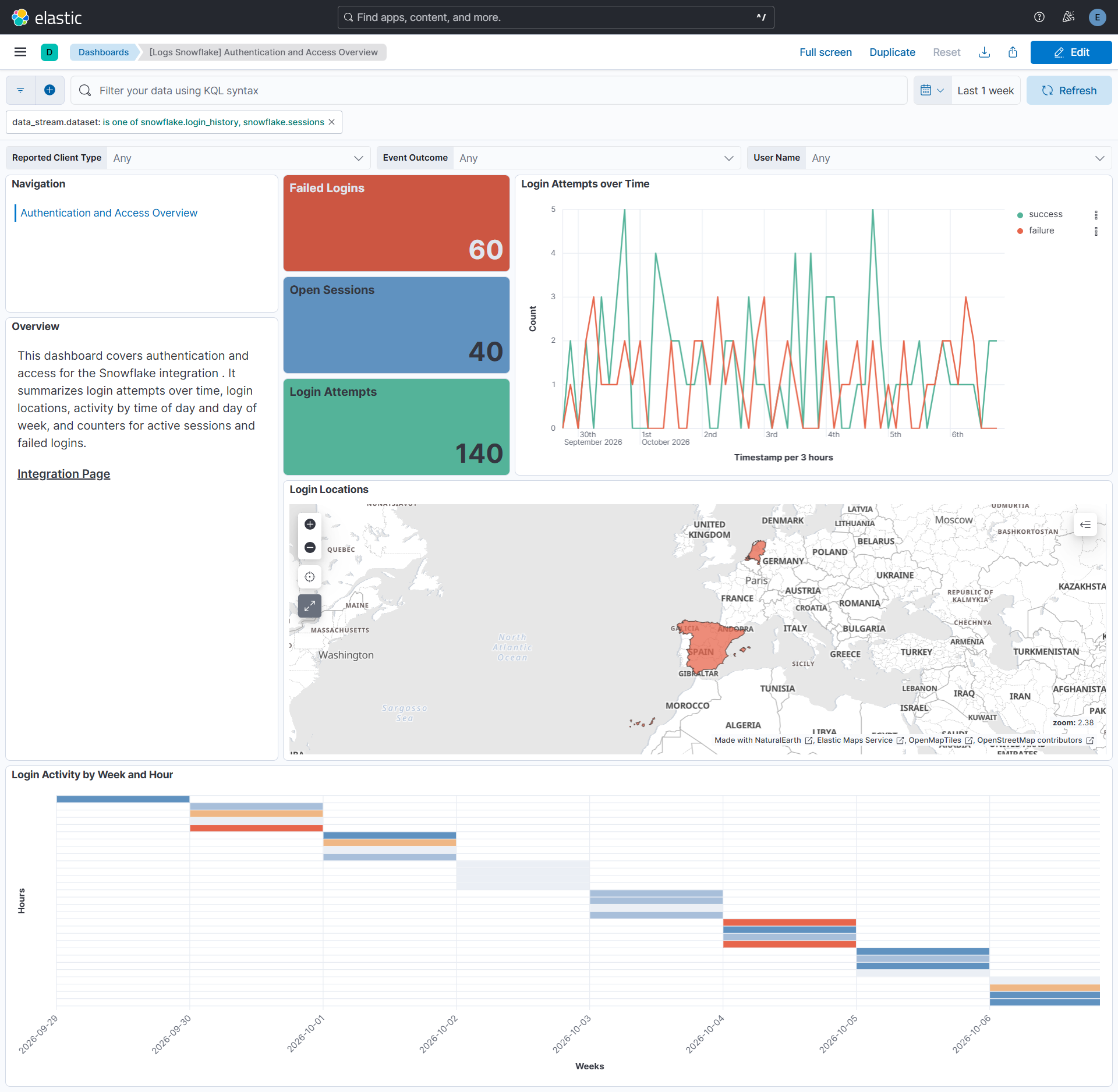
This integration includes one or more Kibana dashboards that visualizes the data collected by the integration. The screenshots below illustrate how the ingested data is displayed.
Changelog
| Version | Details | Minimum Kibana version |
|---|---|---|
| 0.2.0 | Enhancement (View pull request) Add support for login_history, sessions, and grants_to_users data streams. |
9.1.0 8.19.0 |
| 0.1.0 | Enhancement (View pull request) Initial release of the Snowflake integration with access_history, data_transfer_history, and stages data streams. |
9.1.0 8.19.0 |