Azure Application Gateway OpenTelemetry Assets
| Version | 0.2.0
|
| Subscription level What's this? |
Basic |
| Developed by What's this? |
Elastic |
| Minimum Kibana version(s) | 9.3.0 |
To use pre-release integrations, go to the Integrations page in Kibana, scroll down, and toggle on the Display beta integrations option.
Azure Application Gateway is a managed Layer 7 (HTTP/HTTPS) load balancer and reverse proxy that terminates client connections, evaluates routing rules, and forwards requests to backend pools, with an optional Web Application Firewall (WAF) capability.
These assets provide dashboards covering traffic, latency, errors, backend health, and WAF posture from ApplicationGatewayAccessLog and ApplicationGatewayFirewallLog records produced by the Azure encoding extension.
The Azure Application Gateway OpenTelemetry assets have been tested with the EDOT Cloud Forwarder for Azure.
Tested against an Azure Application Gateway v2 (WAF_v2) deployment. The dashboards should also work with Standard_v2 (non-WAF) gateways — the WAF dashboard will simply be empty. The v1 SKU and its ApplicationGatewayPerformanceLog category are not supported (see Azure Application Gateway v1 retirement).
You need Elasticsearch for storing and searching your data and Kibana for visualizing and managing it. You can use our hosted Elasticsearch Service on Elastic Cloud, which is recommended, or self-manage the Elastic Stack on your own hardware.
You must enable diagnostic settings on your Azure Application Gateway and route the ApplicationGatewayAccessLog and ApplicationGatewayFirewallLog categories to a destination (Event Hub) that your forwarder can consume.
The EDOT Cloud Forwarder for Azure decodes diagnostic log records into OpenTelemetry-native log records; no additional service-side configuration is required beyond enabling the diagnostic log categories.
These assets assume Application Gateway diagnostic logs reach Elasticsearch via the EDOT Cloud Forwarder for Azure. Follow the official setup instructions at EDOT Cloud Forwarder for Azure to deploy the forwarder (Bicep template, Function App, Event Hubs) and connect it to your Elastic Managed OTLP endpoint. Once the forwarder is running and the Application Gateway diagnostic categories listed above are routed to its Event Hub, records arrive on the logs-azure.application_gateway.otel-* data stream and these dashboards become populated.
Refer to the azureencodingextension documentation for details on the data produced by this encoding extension.
Records are written to the logs-azure.application_gateway.otel-* index pattern. Each record carries an attributes.azure.category discriminator (ApplicationGatewayAccessLog or ApplicationGatewayFirewallLog) which determines the available attribute set; queries should always filter by category before aggregating.
| Dashboard | Description |
|---|---|
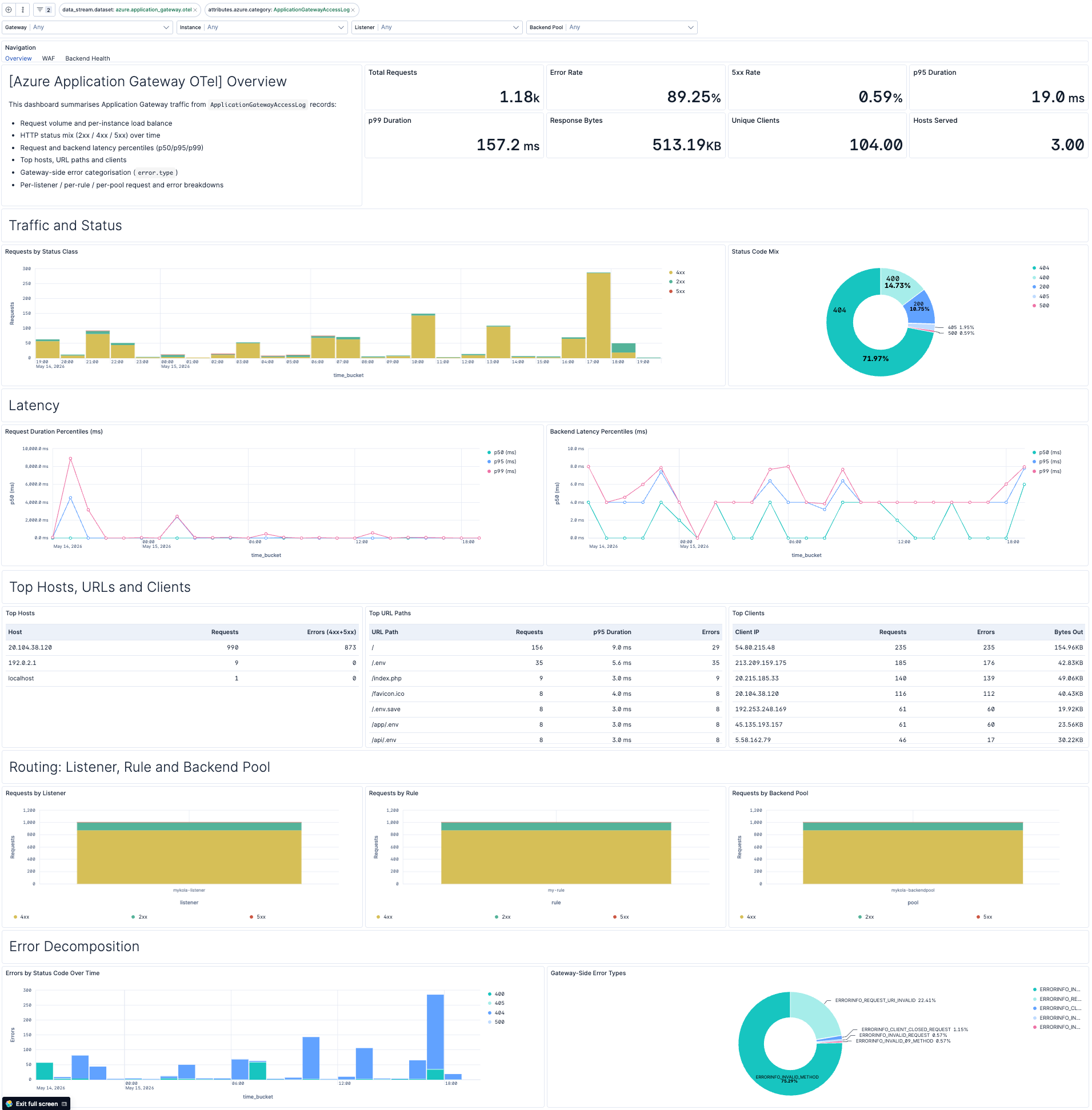
| [Azure Application Gateway OTel] Overview | Traffic, status, latency, and top entities for an Application Gateway from access log records. |
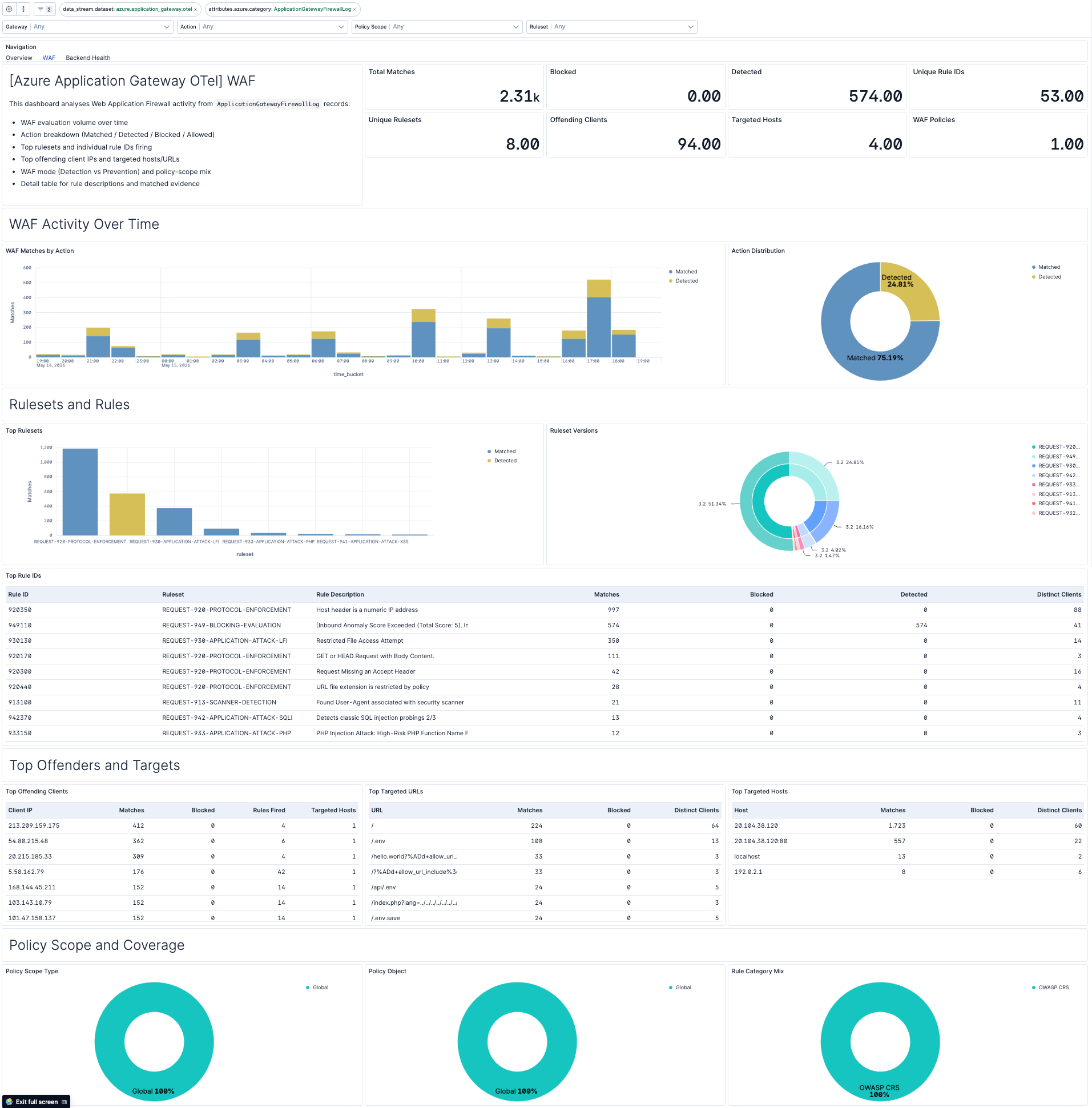
| [Azure Application Gateway OTel] WAF | WAF posture from firewall log records: match volume, action breakdown, top rulesets, rules, offenders, and policy scope. |
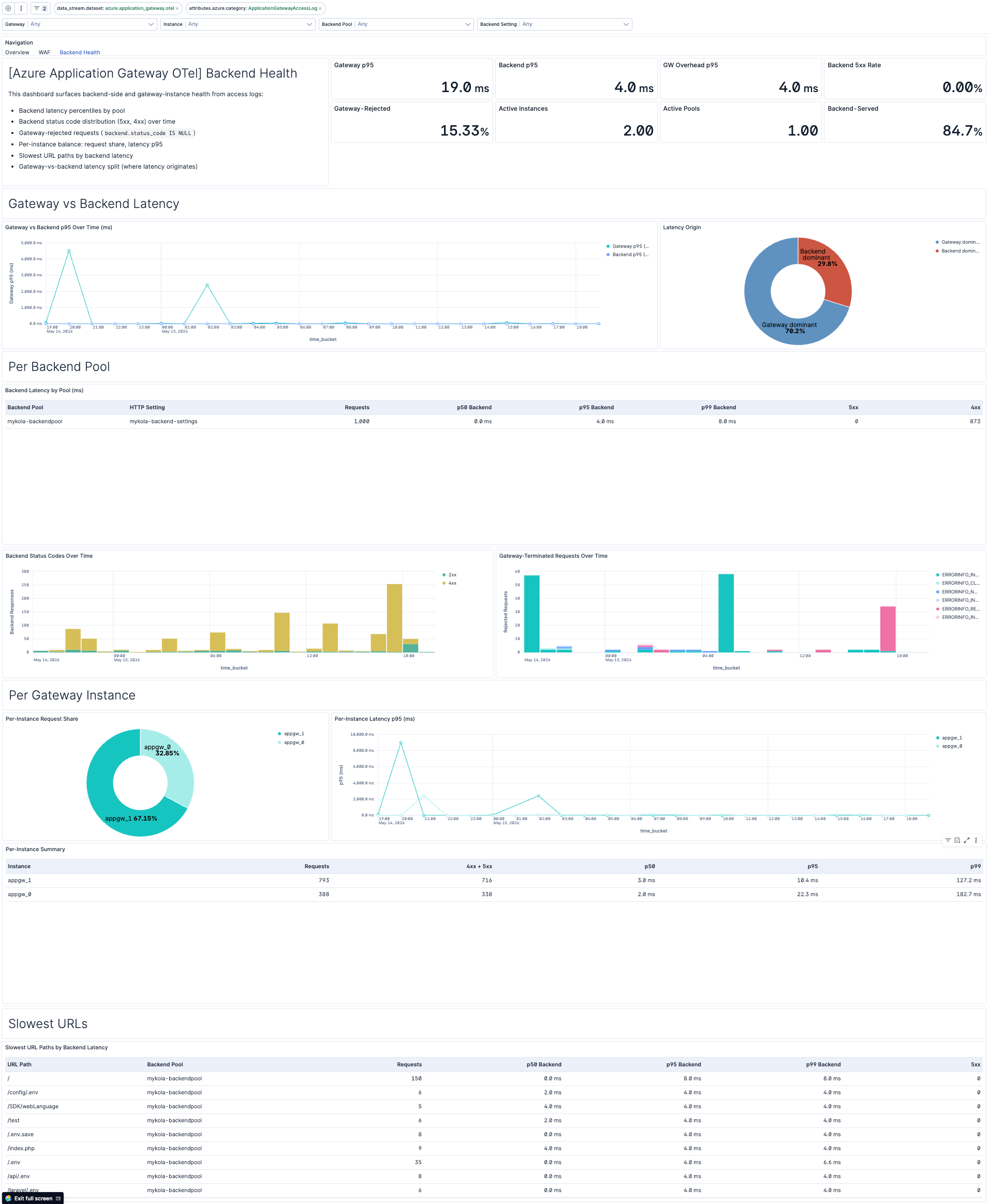
| [Azure Application Gateway OTel] Backend Health | Per-pool latency percentiles, backend status distribution, per-instance balance, and gateway-vs-backend latency split. |
This integration includes one or more Kibana dashboards that visualizes the data collected by the integration. The screenshots below illustrate how the ingested data is displayed.
Changelog
| Version | Details | Minimum Kibana version |
|---|---|---|
| 0.2.0 | Enhancement (View pull request) Add tags to Kibana assets |
9.3.0 |
| 0.1.0 | Enhancement (View pull request) Initial draft of the Azure Application Gateway OpenTelemetry Assets package |
9.3.0 |