PingDirectory Integration for Elastic
| Version | 0.2.0
|
| Managed integration release status |
|
| Subscription level What's this? |
Basic |
| Developed by What's this? |
Elastic |
| Ingestion method(s) | API, File, Network Protocol |
| Minimum Kibana version(s) | 9.5.4 9.4.6 8.19.21 |
You can use this integration as an Elastic Managed integration on Elastic Cloud Hosted deployments running this version or later.
To use pre-release integrations, go to the Integrations page in Kibana, scroll down, and toggle on the Display beta integrations option.
When using this integration as an Elastic Managed integration, only the following data streams are available: Group and User. These data streams use inputs compatible with the Elastic Managed deployment mode. Other data streams (Audit, HTTP Access, and LDAP Access) require Filestream or UDP inputs, which are not supported in the Elastic Managed deployment mode. To collect data from these data streams, use Elastic Agent.
PingDirectory is an enterprise-grade LDAP directory server and identity data store. It provides high-performance, scalable directory services for managing user identities, credentials, and access control across hybrid environments — combining authentication, authorization, and directory data management into a unified platform for critical identity infrastructure.
This integration collects data from PingDirectory log files using the Elastic Agent filestream input, or over the network using the Elastic Agent UDP input. It also collects user identity and group membership data from PingDirectory via the SCIM v2 API using the Elastic Agent CEL input. It provides visibility into HTTP access activity, directory change activity, identity lifecycle events, administrative operations, LDAP connection activity, and user accounts and groups managed within your PingDirectory environment.
The PingDirectory integration is compatible with PingDirectory version 11.0.0.2 and above.
This integration collects PingDirectory data from log files (or syslog over UDP) and from the SCIM v2 API for user identity and group membership records.
The integration uses the Elastic Agent filestream input to collect log files generated by PingDirectory on a configurable path, or the UDP input to receive logs forwarded by a PingDirectory Syslog Text Access Log Publisher. Each collection cycle:
- Reads log entries from the configured PingDirectory log files (HTTP detailed access log
http-detailed-access.log, Audit logaudit.log, and LDAP Access logaccess.log), or receives LDAP Access logs over UDP when syslog forwarding is used. - Parses each log line to extract fields — for HTTP access, a grok pattern yields the timestamp, HTTP method, URL, status code, client IP, request headers, and response headers; for audit, a grok pattern yields the header timestamp and timezone, and the remaining semicolon-delimited header pairs (connection ID, operation ID, instance name, thread ID, client IP, requester DN) are extracted as key/value pairs; for LDAP access, a grok pattern extracts fields such as timestamp, connection ID, operation type, instance name, client and server IP/port, requester DN, and result code.
- For audit records, extracts LDIF body fields from the multiline audit record, including the target DN, the change type, changed
ds-cfg-*configuration attributes, objectClass values, modifiers name, creators name, and entry UUID. Attribute-level detail for non-configuration entries, such as which user or group attributes amodifyoperation changed, is not extracted. For LDAP access, extracts operation-specific details including request type, search filters, response time, and result codes from the access log record. - Emits each log entry as an individual event for ingestion and enrichment via the built-in ingest pipeline.
The integration also uses the Elastic Agent CEL input to collect user and group data from the PingDirectory SCIM v2 API. Each collection cycle:
- Authenticates against the PingDirectory REST API (
/directory/v1/authenticate) using the configuredbind_dnandpasswordto obtain a short-lived access token. - Paginates through all users via the SCIM v2 Users endpoint (
/scim/v2/Users) and all groups via the SCIM v2 Groups endpoint (/scim/v2/Groups) using the configured batch size. - Emits each user or group record as an individual event for ingestion and enrichment via the built-in ingest pipeline.
- Caches the access token across collection cycles and re-authenticates automatically when the token expires.
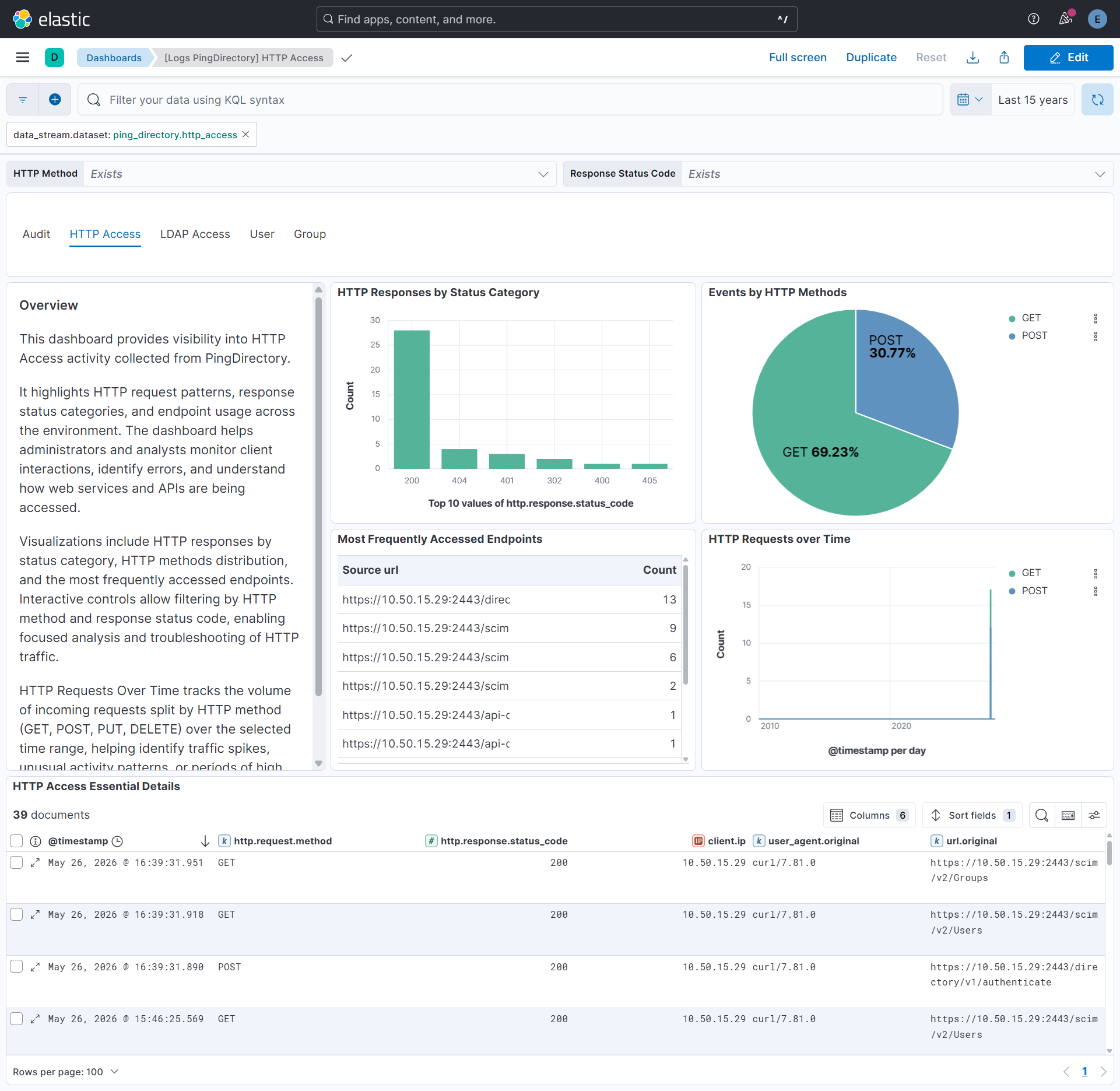
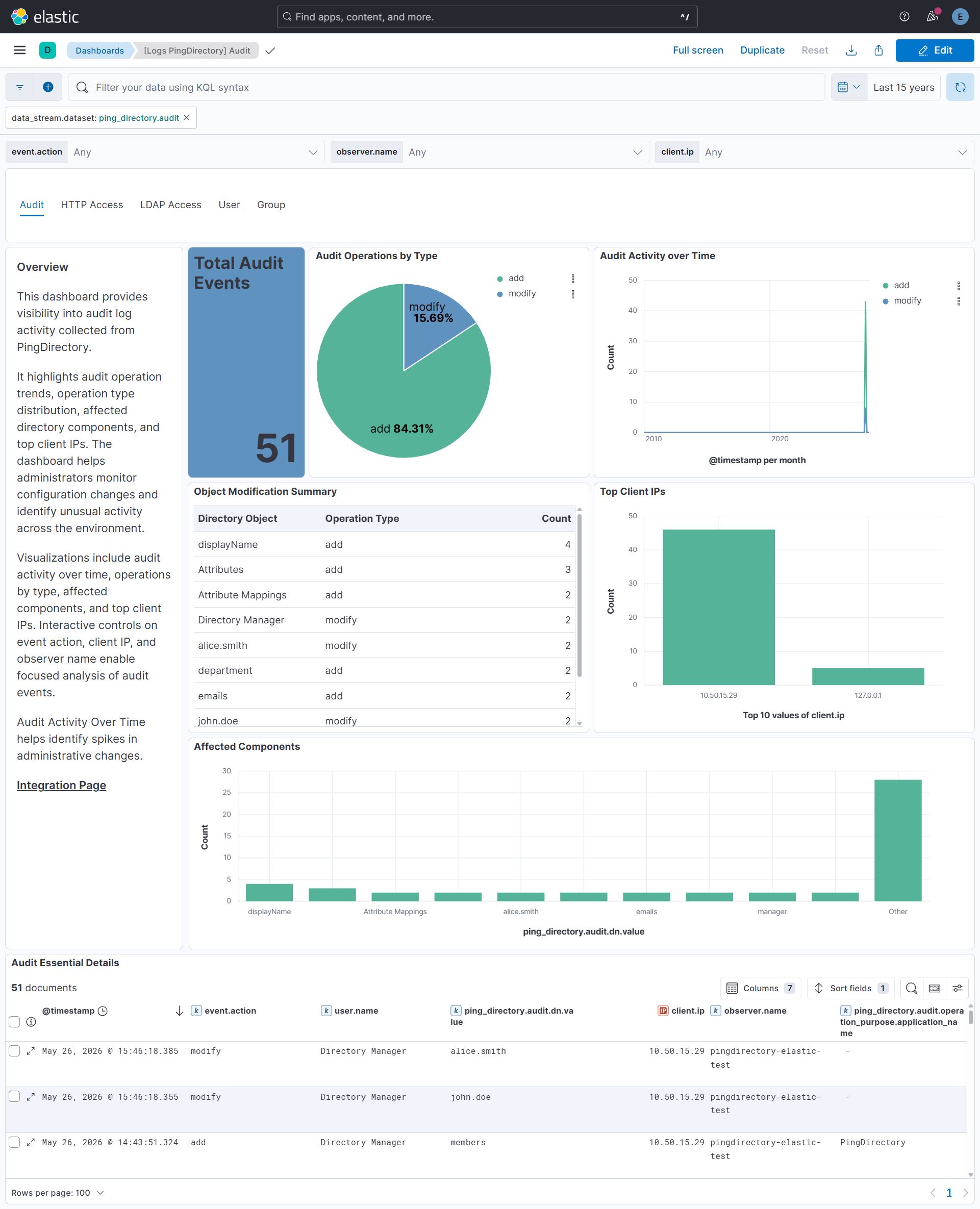
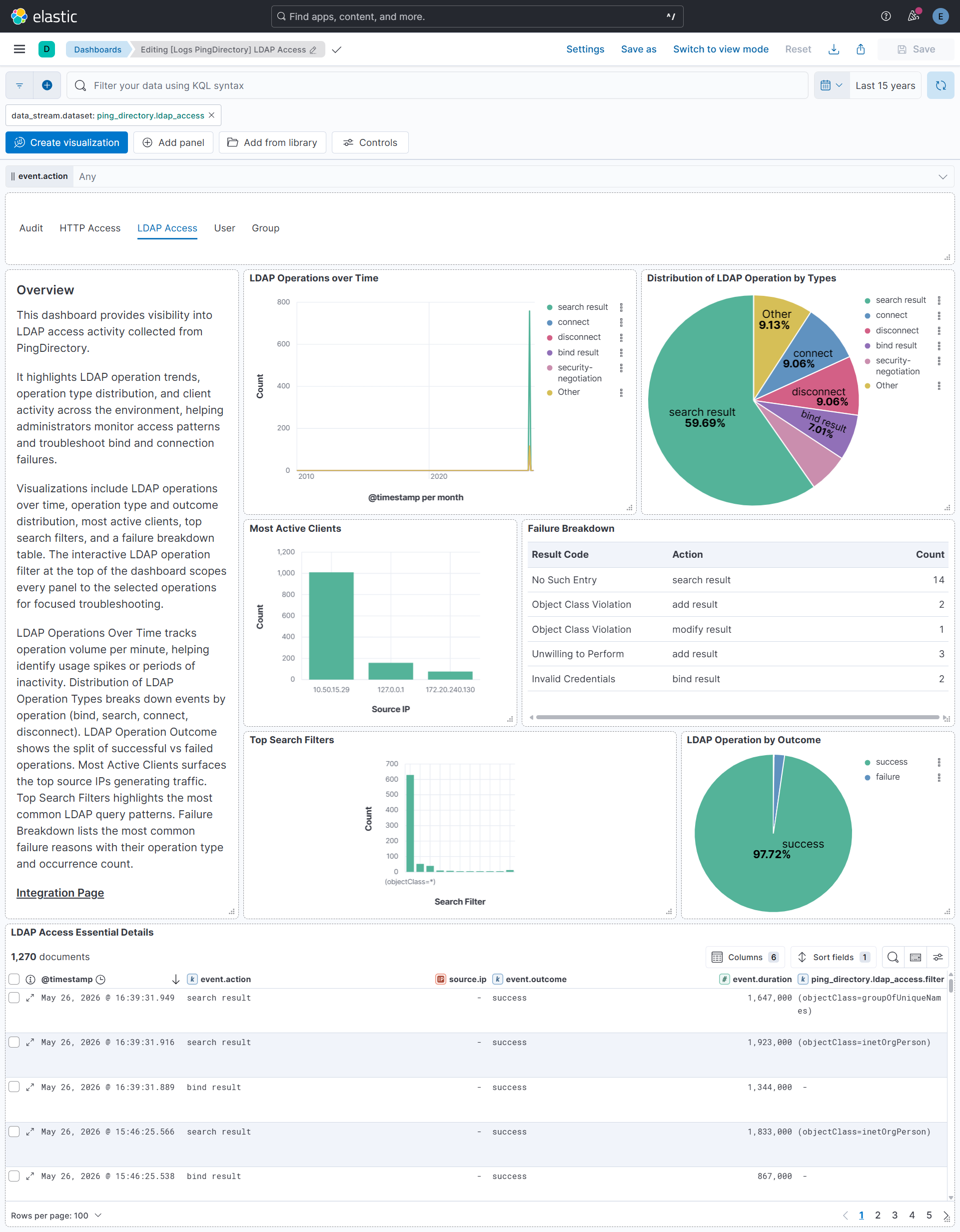
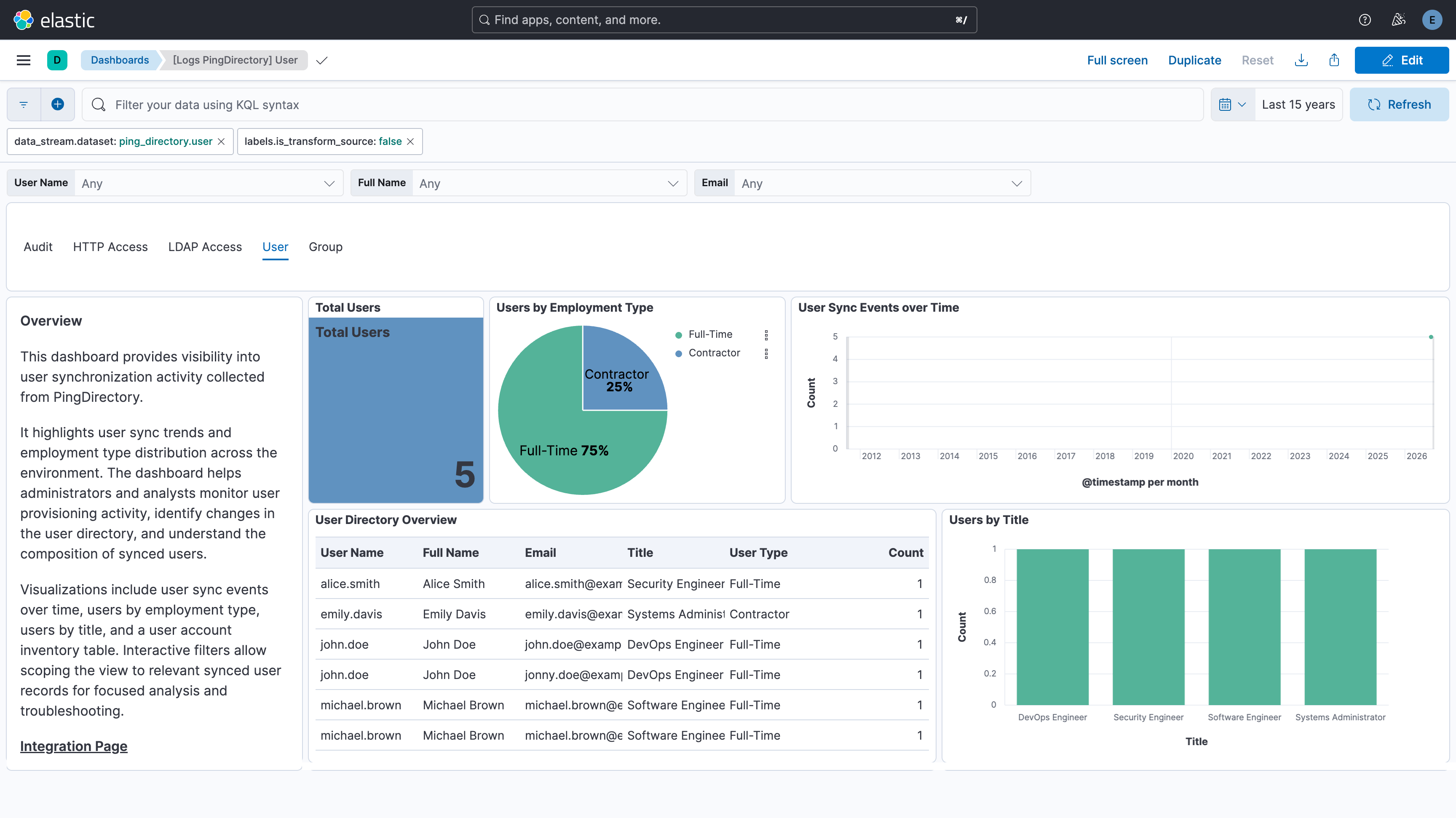
The PingDirectory integration collects the following types of data:
| Data stream | Description |
|---|---|
http_access |
HTTP access logs generated by PingDirectory, including request methods, URLs, client information, response status codes, response sizes, request/response headers, redirect destinations, and request processing times for monitoring web traffic and troubleshooting HTTP-based services. |
audit |
Audit logs generated by PingDirectory, including directory change operations (add, modify, delete, rename), target entry DNs, requester identities, client IP addresses, operation metadata, and timestamps for monitoring identity lifecycle events and administrative changes to directory entries. |
ldap_access |
LDAP access logs generated by PingDirectory, including connection and disconnection events, LDAP requests and results, security negotiation details, client and server addresses, requester identities, and response times for monitoring LDAP client activity across your directory environment. |
user |
User identity records retrieved from the PingDirectory SCIM v2 API (/scim/v2/Users), including usernames, email addresses, display names, names, titles, user types, and account metadata. |
group |
Group membership records retrieved from the PingDirectory SCIM v2 API (/scim/v2/Groups), including group names, display names, members, and group metadata. |
HTTP traffic monitoring: Track incoming HTTP requests, response status codes, request methods, and endpoint activity to gain visibility into web traffic patterns and service usage.
Identity change monitoring: Track add, modify, delete, and rename operations on directory entries to gain visibility into identity lifecycle events and administrative changes across your directory environment.
Operational troubleshooting and access analysis: Analyze failed requests, redirects, and response times for HTTP services, and investigate who made directory changes, from which client IP, using which application, and at what time — to troubleshoot issues, audit administrator activity, and support compliance reporting.
LDAP connection monitoring: Track connect, disconnect, and security negotiation events to gain visibility into client connection activity and TLS/cipher usage across your directory environment.
LDAP operational troubleshooting and access analysis: Analyze who performed which LDAP operations, from which client IP, with what result code, and at what response time to investigate failed binds, slow searches, and unauthorized access attempts.
User inventory and identity visibility: Track all user accounts managed in PingDirectory, including their attributes, email addresses, and account types.
Identity data enrichment: Correlate PingDirectory user records with other security and operational data in Elastic for unified identity context.
Group inventory and membership visibility: Track all groups managed in PingDirectory, including their members, display names, and group types.
This integration installs Elastic latest transforms. For more details, check the Transform setup and requirements.
- PingDirectory deployment: An active PingDirectory server configured to generate HTTP Access, Audit, and LDAP Access logs, with the SCIM v2 API enabled and accessible when collecting user identity and group membership data.
- HTTP Access logging enabled: The HTTP Access Logger must be enabled and configured to record HTTP request and response activity.
- Audit logging enabled: The File-Based Audit Logger must be enabled and configured to record directory change operations.
- LDAP Access logging enabled: The File-Based Access Logger must be enabled to record LDAP operations, or a Syslog Text Access Log Publisher must be configured to forward access logs over UDP. To configure the publisher: in the PingDirectory Administrative Console, go to Configuration → Log Publishers → New Log Publisher → Syslog Text Access Log Publisher, create a Syslog External Server with the Elastic Agent host and UDP port (must match the integration's Listen Port, default
9602), then enable and save the publisher. - Log access: Elastic Agent must have access to the HTTP Access, Audit, and LDAP Access log files on the PingDirectory host, or network access to receive the forwarded syslog UDP traffic.
- Service account credentials: A bind DN (
bind_dn) and password with sufficient permissions to authenticate via/directory/v1/authenticateand read users from/scim/v2/Usersand groups from/scim/v2/Groups. - Network access: Elastic Agent must be able to reach the PingDirectory HTTPS endpoint when collecting user identity and group membership data.
- SSL certificate: If PingDirectory uses a self-signed certificate, the certificate must be trusted by the Elastic Agent host.
- Elastic Agent: Version 8.19+ or 9.1.0+ with Fleet enrollment.
This integration supports both Elastic Agentless-based and Agent-based installations.
Elastic Agent must be installed. For more details, check the Elastic Agent installation instructions. You can install only one Elastic Agent per host.
Elastic Agent is required to stream data from the syslog or log file receiver, poll the PingDirectory SCIM v2 API, and ship the data to Elastic, where the events will then be processed via the integration's ingest pipelines.
Agentless deployments are only supported in Elastic Serverless and Elastic Cloud environments. Agentless deployments provide a means to ingest data while avoiding the orchestration, management, and maintenance needs associated with standard ingest infrastructure. Using an agentless deployment makes manual agent deployment unnecessary, allowing you to focus on your data instead of the agent that collects it.
For more information, refer to Agentless integrations and Agentless integrations FAQ
Before configuring the integration for user identity and group membership collection, ensure that a PingDirectory account is available for API authentication and retrieval.
Create or identify a service account in PingDirectory.
Grant the account permission to:
- Authenticate through the
/directory/v1/authenticateendpoint. - Read user records through the
/scim/v2/Usersendpoint. - Read group records through the
/scim/v2/Groupsendpoint.
- Authenticate through the
Record the account's bind DN and password. These values are required when configuring the integration in Kibana.
Verify that the SCIM v2 API is enabled and accessible from the Elastic Agent host.
If HTTPS is configured with a self-signed certificate, export the certificate so it can be trusted by Elastic Agent.
Refer to the PingDirectory documentation for configuring SCIM 2.0 and authentication requirements.
In Kibana, navigate to Fleet → Integrations and search for PingDirectory.
Click Add PingDirectory.
Configure the integration settings:
HTTP Access Logs Path: Specify the path to the PingDirectory HTTP Access log file(s), for example:
/opt/pingdirectory/logs/http-access*Audit Logs Path: Specify the path to the PingDirectory Audit log file(s), for example:
/opt/pingdirectory/logs/audit*To collect LDAP Access from a local log file, enable the filestream input and specify the Paths to the PingDirectory LDAP Access log file(s), for example:
/opt/pingdirectory/logs/access*To receive LDAP Access logs forwarded over the network, enable the UDP input and set the Listen Address and Listen Port to match the Syslog External Server configured on PingDirectory.
URL: The base URL of your PingDirectory instance, for example: https://pingdirectory.example.com:2443
Bind DN: The distinguished name used to authenticate, for example: cn=admin,dc=example,dc=com
Password: The password for the bind DN.
Batch Size: Number of user or group records to retrieve per API page (default:
500).Interval: How frequently to poll for new data (default:
24h).Configure any optional collection settings as required.
If using a self-signed SSL certificate for SCIM collection, configure the SSL settings under Advanced options.
Select Save and continue to save the integration.
Add the integration to an existing Agent policy or create a new one.
Verify that HTTP Access, Audit, LDAP Access, user identity, and group membership events are being ingested into Elasticsearch.
- In the top search bar in Kibana, search for Dashboards.
- In the search bar, type PingDirectory.
- Open the [Logs PingDirectory] HTTP Access dashboard and verify that the visualizations are populated with HTTP access data, including request methods, response status categories, and accessed endpoints.
- Open the [Logs PingDirectory] Audit dashboard and verify that the visualizations are populated with audit data, including change types, requester identities, target entries, and client IP addresses.
- Open the [Logs PingDirectory] LDAP Access dashboard and verify that the visualizations are populated with LDAP access data, including connection events, requester identities, result codes, and client IP addresses.
- Open the [Logs PingDirectory] User dashboard and verify that the visualizations are populated with user identity data, including usernames, email addresses, and account types.
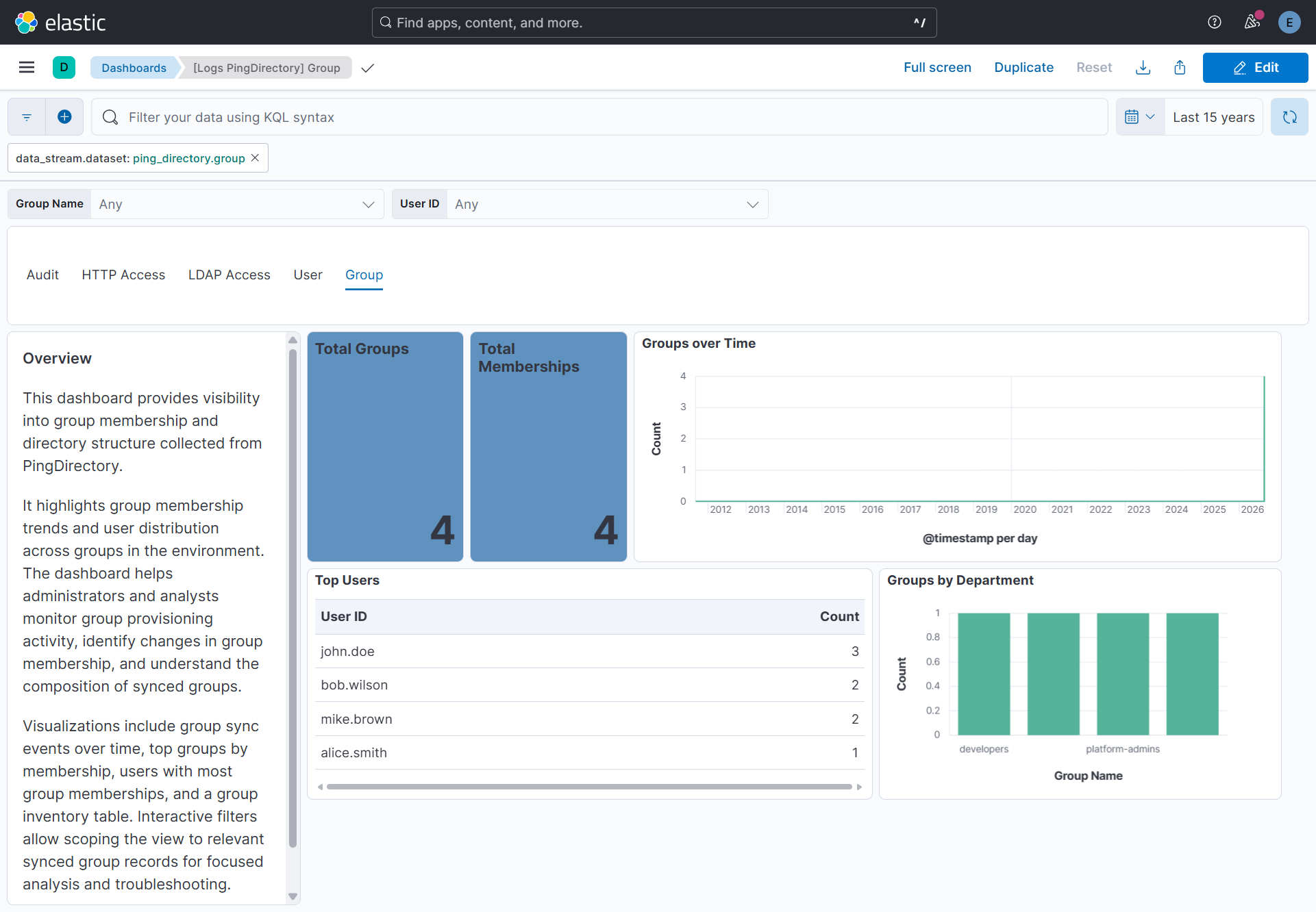
- Open the [Logs PingDirectory] Group dashboard and verify that the visualizations are populated with group membership data, including group names, members, and membership counts.
- In the top search bar in Kibana, search for Transforms.
- Select the Data / Transforms from the search results.
- In the search bar, type PingDirectory.
- All transforms from the search results should indicate Healthy under the Health column.
An Elastic Transform is created for the user data stream to provide a view of the most recent user identity data. Use the destination alias from the table below to access the latest data for dashboards, rules, and other Elastic features.
Destination indices are aliased to logs-ping_directory_latest.<data_stream_name>.
| Source Data Stream | Destination Index Pattern | Destination Alias |
|---|---|---|
logs-ping_directory.user-* |
logs-ping_directory_latest.dest_user-1 |
logs-ping_directory_latest.user |
For more information on architectures that can be used for scaling this integration, check the Ingest Architectures documentation.
- No data collected: Verify that the PingDirectory HTTP Access Logger, File-Based Audit Logger, and File-Based Access Logger are enabled and generating log entries, or that the Syslog Text Access Log Publisher is enabled and pointed at the correct Elastic Agent host and port. Confirm that the configured log file paths or UDP listener match the locations of the HTTP access, audit, and LDAP access logs. For user identity and group membership data, verify that the PingDirectory SCIM v2 API is enabled and reachable from the Elastic Agent host, and that the configured URL, bind DN, and password are correct.
- Authentication failures: Ensure the bind DN has permission to authenticate via
/directory/v1/authenticateand read from/scim/v2/Usersand/scim/v2/Groups. - SSL certificate errors: If PingDirectory uses a self-signed certificate, extract the certificate and configure it under the SSL settings of the integration, or add it to the Elastic Agent's trusted certificate store.
- Token expiry: The integration automatically re-authenticates when the access token expires. If repeated auth failures occur, verify the bind DN password has not changed.
For help with Elastic ingest tools, check Common problems.
- Configuring SCIM 2.0 on your server
- PingDirectory Directory REST API Getting Started
- PingDirectory REST API Authentication
- SCIM 2.0 Users API
- SCIM 2.0 Groups API
The http_access data stream provides HTTP access logs from PingDirectory.
Example
{
    "@timestamp": "2026-05-25T18:55:19.182+05:30",
    "agent": {
        "ephemeral_id": "a07c8138-0129-49f9-b05c-7725d1720ed7",
        "id": "b04e1dc9-89c5-4da0-9dbc-659908b590d6",
        "name": "elastic-agent-40539",
        "type": "filebeat",
        "version": "8.19.21"
    },
    "client": {
        "as": {
            "number": 64501,
            "organization": {
                "name": "Documentation ASN"
            }
        },
        "geo": {
            "city_name": "Amsterdam",
            "continent_name": "Europe",
            "country_iso_code": "NL",
            "country_name": "Netherlands",
            "location": {
                "lat": 52.37404,
                "lon": 4.88969
            },
            "region_iso_code": "NL-NH",
            "region_name": "North Holland"
        },
        "ip": "198.51.100.21",
        "port": 55188
    },
    "data_stream": {
        "dataset": "ping_directory.http_access",
        "namespace": "22681",
        "type": "logs"
    },
    "ecs": {
        "version": "9.5.0"
    },
    "elastic_agent": {
        "id": "b04e1dc9-89c5-4da0-9dbc-659908b590d6",
        "snapshot": false,
        "version": "8.19.21"
    },
    "event": {
        "action": "GET",
        "agent_id_status": "verified",
        "category": [
            "web"
        ],
        "dataset": "ping_directory.http_access",
        "duration": 124825000,
        "ingested": "2026-09-17T06:30:19Z",
        "kind": "event",
        "original": "[25/May/2026:18:55:19.182 +0530] RESULT instanceName=\"pingdirectory-elastic-test\" threadID=164 requestID=8 correlationID=\"7c0f360b-77f0-4951-9101-74d4f8358795\" from=\"198.51.100.21:55188\" method=\"GET\" url=\"https://203.0.113.10:2443/scim/v2\" requestHeader=\"Accept: text/html,application/xhtml+xml,application/xml;q=0.9,image/avif,image/webp,image/apng,*/*;q=0.8,application/signed-exchange;v=b3;q=0.7\" requestHeader=\"Connection: keep-alive\" requestHeader=\"User-Agent: Mozilla/5.0 (Windows NT 10.0; Win64; x64) AppleWebKit/537.36 (KHTML, like Gecko) Chrome/148.0.0.0 Safari/537.36\" requestHeader=\"Sec-Fetch-Site: none\" requestHeader=\"Sec-Fetch-Dest: document\" requestHeader=\"Host: 203.0.113.10:2443\" requestHeader=\"Accept-Encoding: gzip, deflate, br, zstd\" requestHeader=\"Sec-Fetch-Mode: navigate\" requestHeader=\"sec-ch-ua: 'Chromium';v='148', 'Google Chrome';v='148', 'Not/A)Brand';v='99'\" requestHeader=\"sec-ch-ua-mobile: ?0\" requestHeader=\"Upgrade-Insecure-Requests: 1\" requestHeader=\"sec-ch-ua-platform: 'Windows'\" requestHeader=\"Sec-Fetch-User: ?1\" requestHeader=\"Accept-Language: en-GB,en-US;q=0.9,en;q=0.8\" statusCode=401 etime=124.825 responseContentLength=118 responseHeader=\"X-Frame-Options: SAMEORIGIN\" responseHeader=\"Correlation-Id: 7c0f360b-77f0-4951-9101-74d4f8358795\" responseHeader=\"Date: Mon, 25 May 2026 13:25:19 GMT\" responseContentType=\"application/scim+json\"",
        "outcome": "failure",
        "timezone": "+0530",
        "type": [
            "access"
        ]
    },
    "http": {
        "request": {
            "id": "8",
            "method": "GET"
        },
        "response": {
            "bytes": 118,
            "mime_type": "application/scim+json",
            "status_code": 401
        }
    },
    "input": {
        "type": "filestream"
    },
    "log": {
        "file": {
            "device_id": "45",
            "inode": "342",
            "path": "/tmp/service_logs/test-http-access.log"
        },
        "offset": 723
    },
    "network": {
        "protocol": "https"
    },
    "observer": {
        "name": "pingdirectory-elastic-test"
    },
    "ping_directory": {
        "http_access": {
            "request_header": {
                "accept": "text/html,application/xhtml+xml,application/xml;q=0.9,image/avif,image/webp,image/apng,*/*;q=0.8,application/signed-exchange;v=b3;q=0.7",
                "accept_encoding": "gzip, deflate, br, zstd",
                "accept_language": "en-GB,en-US;q=0.9,en;q=0.8",
                "connection": "keep-alive",
                "sec_ch_ua": "'Chromium';v='148', 'Google Chrome';v='148', 'Not/A)Brand';v='99'",
                "sec_ch_ua_mobile": "?0",
                "sec_ch_ua_platform": "'Windows'",
                "sec_fetch_dest": "document",
                "sec_fetch_mode": "navigate",
                "sec_fetch_site": "none",
                "sec_fetch_user": "?1",
                "upgrade_insecure_requests": "1"
            },
            "response_header": {
                "date": "Mon, 25 May 2026 13:25:19 GMT",
                "x_frame_options": "SAMEORIGIN"
            },
            "thread_id": 164,
            "type": "RESULT"
        }
    },
    "related": {
        "ip": [
            "198.51.100.21"
        ]
    },
    "tags": [
        "preserve_original_event",
        "forwarded",
        "ping_directory-http_access"
    ],
    "trace": {
        "id": "7c0f360b-77f0-4951-9101-74d4f8358795"
    },
    "url": {
        "domain": "203.0.113.10",
        "original": "https://203.0.113.10:2443/scim/v2",
        "path": "/scim/v2",
        "port": 2443,
        "scheme": "https"
    },
    "user_agent": {
        "device": {
            "name": "Other"
        },
        "name": "Chrome",
        "original": "Mozilla/5.0 (Windows NT 10.0; Win64; x64) AppleWebKit/537.36 (KHTML, like Gecko) Chrome/148.0.0.0 Safari/537.36",
        "os": {
            "full": "Windows 10",
            "name": "Windows",
            "version": "10"
        },
        "version": "148.0.0.0"
    }
}
Exported fields
| Field | Description | Type |
|---|---|---|
| @timestamp | Date/time when the event originated. This is the date/time extracted from the event, typically representing when the event was generated by the source. If the event source has no original timestamp, this value is typically populated by the first time the event was received by the pipeline. Required field for all events. | date |
| data_stream.dataset | The field can contain anything that makes sense to signify the source of the data. Examples include nginx.access, prometheus, endpoint etc. For data streams that otherwise fit, but that do not have dataset set we use the value "generic" for the dataset value. event.dataset should have the same value as data_stream.dataset. Beyond the Elasticsearch data stream naming criteria noted above, the dataset value has additional restrictions: * Must not contain - * No longer than 100 characters |
constant_keyword |
| data_stream.namespace | A user defined namespace. Namespaces are useful to allow grouping of data. Many users already organize their indices this way, and the data stream naming scheme now provides this best practice as a default. Many users will populate this field with default. If no value is used, it falls back to default. Beyond the Elasticsearch index naming criteria noted above, namespace value has the additional restrictions: * Must not contain - * No longer than 100 characters |
constant_keyword |
| data_stream.type | An overarching type for the data stream. Currently allowed values are "logs" and "metrics". We expect to also add "traces" and "synthetics" in the near future. | constant_keyword |
| event.dataset | Name of the dataset. If an event source publishes more than one type of log or events (e.g. access log, error log), the dataset is used to specify which one the event comes from. It's recommended but not required to start the dataset name with the module name, followed by a dot, then the dataset name. | constant_keyword |
| event.module | Name of the module this data is coming from. If your monitoring agent supports the concept of modules or plugins to process events of a given source (e.g. Apache logs), event.module should contain the name of this module. |
constant_keyword |
| input.type | Type of filebeat input. | keyword |
| log.file.device_id | ID of the device containing the filesystem where the file resides. | keyword |
| log.file.fingerprint | The sha256 fingerprint identity of the file when fingerprinting is enabled. | keyword |
| log.file.idxhi | The high-order part of a unique identifier that is associated with a file. (Windows-only). | keyword |
| log.file.idxlo | The low-order part of a unique identifier that is associated with a file. (Windows-only). | keyword |
| log.file.inode | Inode number of the log file. | keyword |
| log.file.vol | The serial number of the volume that contains a file. (Windows-only). | keyword |
| log.offset | Log offset. | long |
| observer.product | The product name of the observer. | constant_keyword |
| observer.vendor | Vendor name of the observer. | constant_keyword |
| ping_directory.http_access.authorization_type | The authorization type used in the request (e.g. Bearer, Basic). | keyword |
| ping_directory.http_access.redirect_uri | The URI to which the client was redirected. | keyword |
| ping_directory.http_access.request_header.accept | The Accept request header. | keyword |
| ping_directory.http_access.request_header.accept_encoding | The Accept-Encoding request header. | keyword |
| ping_directory.http_access.request_header.accept_language | The Accept-Language request header. | keyword |
| ping_directory.http_access.request_header.cache_control | The Cache-Control request header. | keyword |
| ping_directory.http_access.request_header.connection | The Connection request header. | keyword |
| ping_directory.http_access.request_header.sec_ch_ua | The sec-ch-ua request header. | keyword |
| ping_directory.http_access.request_header.sec_ch_ua_mobile | The sec-ch-ua-mobile request header. | keyword |
| ping_directory.http_access.request_header.sec_ch_ua_platform | The sec-ch-ua-platform request header. | keyword |
| ping_directory.http_access.request_header.sec_fetch_dest | The Sec-Fetch-Dest request header. | keyword |
| ping_directory.http_access.request_header.sec_fetch_mode | The Sec-Fetch-Mode request header. | keyword |
| ping_directory.http_access.request_header.sec_fetch_site | The Sec-Fetch-Site request header. | keyword |
| ping_directory.http_access.request_header.sec_fetch_user | The Sec-Fetch-User request header. | keyword |
| ping_directory.http_access.request_header.upgrade_insecure_requests | The Upgrade-Insecure-Requests request header. | keyword |
| ping_directory.http_access.response_header.connection | The Connection response header. | keyword |
| ping_directory.http_access.response_header.date | The Date response header. | keyword |
| ping_directory.http_access.response_header.request_id | The Request-Id response header. | keyword |
| ping_directory.http_access.response_header.x_frame_options | The X-Frame-Options response header. | keyword |
| ping_directory.http_access.thread_id | ID of the server thread that processed the request. | long |
| ping_directory.http_access.type | Log record type. Always RESULT for HTTP detailed access log entries. | keyword |
The audit data stream provides audit logs from PingDirectory.
Example
{
    "@timestamp": "2026-05-25T18:48:06.786+05:30",
    "agent": {
        "ephemeral_id": "aafa0123-a87d-4bfd-b7b7-1164e674df60",
        "id": "3980604b-a6d3-4984-b0b4-f6436920bd8f",
        "name": "elastic-agent-50005",
        "type": "filebeat",
        "version": "8.19.21"
    },
    "client": {
        "as": {
            "number": 64502,
            "organization": {
                "name": "Documentation ASN"
            }
        },
        "geo": {
            "city_name": "Madrid",
            "continent_name": "Europe",
            "country_iso_code": "ES",
            "country_name": "Spain",
            "location": {
                "lat": 40.41639,
                "lon": -3.7025
            },
            "region_iso_code": "ES-M",
            "region_name": "Madrid"
        },
        "ip": "203.0.113.10"
    },
    "data_stream": {
        "dataset": "ping_directory.audit",
        "namespace": "45138",
        "type": "logs"
    },
    "ecs": {
        "version": "9.5.0"
    },
    "elastic_agent": {
        "id": "3980604b-a6d3-4984-b0b4-f6436920bd8f",
        "snapshot": false,
        "version": "8.19.21"
    },
    "event": {
        "action": "modify",
        "agent_id_status": "verified",
        "category": [
            "configuration"
        ],
        "dataset": "ping_directory.audit",
        "ingested": "2026-09-17T06:28:37Z",
        "kind": "event",
        "original": "# 25/May/2026:18:48:06.786 +0530; conn=13; op=28; instanceName=\"pingdirectory-elastic-test\"; threadID=29; clientIP=203.0.113.10; requesterDN=\"cn=Directory Manager,cn=Root DNs,cn=config\"; usingAdminSessionWorkerThread=true; operationPurpose={ \"applicationName\":\"PingDirectory\", \"applicationVersion\":\"11.0.0.2\", \"codeLocation\":\"DSConfig.getReason:2978 SetPropSubCommandHandler.modifyManagedObject:541 SetPropSubCommandHandler.run:1246 DSConfig.runSubCommand:2574 DSConfig.execute:1698\" }\ndn: cn=File-Based Audit Logger,cn=Loggers,cn=config\nchangetype: modify\nreplace: ds-cfg-enabled\nds-cfg-enabled: true\n-\nreplace: modifiersName\nmodifiersName: cn=Directory Manager,cn=Root DNs,cn=config\n-\nreplace: modifyTimestamp\nmodifyTimestamp: 20260525131806.681Z",
        "timezone": "+0530",
        "type": [
            "change"
        ]
    },
    "input": {
        "type": "filestream"
    },
    "log": {
        "file": {
            "device_id": "45",
            "inode": "323",
            "path": "/tmp/service_logs/test-audit.log"
        },
        "flags": [
            "multiline"
        ],
        "offset": 2400
    },
    "observer": {
        "name": "pingdirectory-elastic-test"
    },
    "ping_directory": {
        "audit": {
            "conn": 13,
            "dn": {
                "attribute": "cn",
                "meta": "cn=Loggers,cn=config",
                "value": "File-Based Audit Logger"
            },
            "ds_cfg": {
                "enabled": true
            },
            "modifiers_name": {
                "attribute": "cn",
                "meta": "cn=Root DNs,cn=config",
                "value": "Directory Manager"
            },
            "modify_timestamp": "2026-05-25T13:18:06.681Z",
            "op": 28,
            "operation_purpose": {
                "application_name": "PingDirectory",
                "application_version": "11.0.0.2",
                "code_location": "DSConfig.getReason:2978 SetPropSubCommandHandler.modifyManagedObject:541 SetPropSubCommandHandler.run:1246 DSConfig.runSubCommand:2574 DSConfig.execute:1698"
            },
            "requester_dn": {
                "attribute": "cn",
                "meta": "cn=Root DNs,cn=config",
                "value": "Directory Manager"
            },
            "thread_id": 29,
            "using_admin_session_worker_thread": true
        }
    },
    "related": {
        "ip": [
            "203.0.113.10"
        ],
        "user": [
            "Directory Manager"
        ]
    },
    "tags": [
        "preserve_original_event",
        "forwarded",
        "ping_directory-audit"
    ],
    "user": {
        "name": "Directory Manager"
    }
}
Exported fields
| Field | Description | Type |
|---|---|---|
| @timestamp | Date/time when the event originated. This is the date/time extracted from the event, typically representing when the event was generated by the source. If the event source has no original timestamp, this value is typically populated by the first time the event was received by the pipeline. Required field for all events. | date |
| data_stream.dataset | The field can contain anything that makes sense to signify the source of the data. Examples include nginx.access, prometheus, endpoint etc. For data streams that otherwise fit, but that do not have dataset set we use the value "generic" for the dataset value. event.dataset should have the same value as data_stream.dataset. Beyond the Elasticsearch data stream naming criteria noted above, the dataset value has additional restrictions: * Must not contain - * No longer than 100 characters |
constant_keyword |
| data_stream.namespace | A user defined namespace. Namespaces are useful to allow grouping of data. Many users already organize their indices this way, and the data stream naming scheme now provides this best practice as a default. Many users will populate this field with default. If no value is used, it falls back to default. Beyond the Elasticsearch index naming criteria noted above, namespace value has the additional restrictions: * Must not contain - * No longer than 100 characters |
constant_keyword |
| data_stream.type | An overarching type for the data stream. Currently allowed values are "logs" and "metrics". We expect to also add "traces" and "synthetics" in the near future. | constant_keyword |
| event.dataset | Name of the dataset. If an event source publishes more than one type of log or events (e.g. access log, error log), the dataset is used to specify which one the event comes from. It's recommended but not required to start the dataset name with the module name, followed by a dot, then the dataset name. | constant_keyword |
| event.module | Name of the module this data is coming from. If your monitoring agent supports the concept of modules or plugins to process events of a given source (e.g. Apache logs), event.module should contain the name of this module. |
constant_keyword |
| input.type | Type of filebeat input. | keyword |
| log.file.device_id | ID of the device containing the filesystem where the file resides. | keyword |
| log.file.fingerprint | The sha256 fingerprint identity of the file when fingerprinting is enabled. | keyword |
| log.file.idxhi | The high-order part of a unique identifier that is associated with a file. (Windows-only). | keyword |
| log.file.idxlo | The low-order part of a unique identifier that is associated with a file. (Windows-only). | keyword |
| log.file.inode | Inode number of the log file. | keyword |
| log.file.vol | The serial number of the volume that contains a file. (Windows-only). | keyword |
| log.flags | Flags set by the log collection layer. Contains 'multiline' when the event was assembled from multiple lines by the filestream multiline parser. | keyword |
| log.offset | Log offset. | long |
| observer.product | The product name of the observer that generated the event. | constant_keyword |
| observer.vendor | The vendor name of the observer that generated the event. | constant_keyword |
| ping_directory.audit.conn | Connection identifier associated with the operation. | long |
| ping_directory.audit.create_timestamp | Timestamp when the entry was created. | date |
| ping_directory.audit.creators_name.attribute | Attribute type of the first RDN of the creator Distinguished Name, for example cn or uid. | keyword |
| ping_directory.audit.creators_name.meta | Remaining path components of the creator Distinguished Name. | keyword |
| ping_directory.audit.creators_name.value | Value of the first (left-most) RDN of the creator Distinguished Name, regardless of its attribute type (cn, uid, ou, ...). | keyword |
| ping_directory.audit.delete_old_rdn | Indicates whether the old RDN attribute value was removed during the rename operation. | boolean |
| ping_directory.audit.dn.attribute | Attribute type of the first RDN of the target entry Distinguished Name, for example cn or uid. | keyword |
| ping_directory.audit.dn.meta | Remaining path components of the target entry Distinguished Name. | keyword |
| ping_directory.audit.dn.value | Value of the first (left-most) RDN of the target entry Distinguished Name, regardless of its attribute type (cn, uid, ou, ...). | keyword |
| ping_directory.audit.ds_cfg | Dynamic ds-cfg attributes extracted from PingDirectory audit records. | flattened |
| ping_directory.audit.entry_uuid | Unique identifier assigned to the LDAP entry. | keyword |
| ping_directory.audit.modifiers_name.attribute | Attribute type of the first RDN of the modifier Distinguished Name, for example cn or uid. | keyword |
| ping_directory.audit.modifiers_name.meta | Remaining path components of the modifier Distinguished Name. | keyword |
| ping_directory.audit.modifiers_name.value | Value of the first (left-most) RDN of the modifier Distinguished Name, regardless of its attribute type (cn, uid, ou, ...). | keyword |
| ping_directory.audit.modify_timestamp | Timestamp when the entry was last modified. | date |
| ping_directory.audit.new_rdn.attribute | Attribute type of the new relative Distinguished Name for rename operations, for example cn or uid. | keyword |
| ping_directory.audit.new_rdn.value | Value of the new relative Distinguished Name for rename operations, regardless of its attribute type (cn, uid, ou, ...). | keyword |
| ping_directory.audit.new_superior.attribute | Attribute type of the first RDN of the new parent Distinguished Name for move operations, for example cn or uid. | keyword |
| ping_directory.audit.new_superior.meta | Remaining path components of the new parent Distinguished Name. | keyword |
| ping_directory.audit.new_superior.value | Value of the first (left-most) RDN of the new parent Distinguished Name for move operations, regardless of its attribute type (cn, uid, ou, ...). | keyword |
| ping_directory.audit.object_classes | List of LDAP objectClass values associated with the entry. | keyword |
| ping_directory.audit.op | Operation identifier within the connection. | long |
| ping_directory.audit.operation_purpose.application_name | Name of the application initiating the operation. | keyword |
| ping_directory.audit.operation_purpose.application_version | Version of the application initiating the operation. | keyword |
| ping_directory.audit.operation_purpose.code_location | Server code path that initiated the operation, as reported by PingDirectory in the operationPurpose block. | keyword |
| ping_directory.audit.origin | Origin of the operation. | keyword |
| ping_directory.audit.requester_dn.attribute | Attribute type of the first RDN of the requester Distinguished Name, for example cn or uid. | keyword |
| ping_directory.audit.requester_dn.meta | Remaining path components of the requester Distinguished Name. | keyword |
| ping_directory.audit.requester_dn.value | Value of the first (left-most) RDN of the requester Distinguished Name, regardless of its attribute type (cn, uid, ou, ...). | keyword |
| ping_directory.audit.thread_id | Thread ID processing the operation. | long |
| ping_directory.audit.triggered_by_conn | Connection ID that triggered the operation. | long |
| ping_directory.audit.triggered_by_op | Operation ID that triggered the operation. | long |
| ping_directory.audit.using_admin_session_worker_thread | Indicates whether an admin session worker thread processed the operation. | boolean |
The ldap_access data stream provides LDAP access logs from ping_directory.
Example
{
    "@timestamp": "2026-05-25T18:30:48.688+05:30",
    "agent": {
        "ephemeral_id": "66e9b136-c3d6-4e60-8872-e6ee7d2bf004",
        "id": "2007f1a2-edc3-4fb3-acc8-3bebfc40e704",
        "name": "elastic-agent-16914",
        "type": "filebeat",
        "version": "8.19.21"
    },
    "data_stream": {
        "dataset": "ping_directory.ldap_access",
        "namespace": "60452",
        "type": "logs"
    },
    "ecs": {
        "version": "9.5.0"
    },
    "elastic_agent": {
        "id": "2007f1a2-edc3-4fb3-acc8-3bebfc40e704",
        "snapshot": false,
        "version": "8.19.21"
    },
    "event": {
        "action": "add result",
        "agent_id_status": "verified",
        "category": [
            "iam"
        ],
        "dataset": "ping_directory.ldap_access",
        "duration": 24567000,
        "ingested": "2026-09-17T06:32:03Z",
        "kind": "event",
        "original": "[25/May/2026:18:30:48.688 +0530] ADD RESULT instanceName=\"pingdirectory-elastic-test\" threadID=9 conn=4 op=1 msgID=2 requesterIP=\"127.0.0.1\" requesterDN=\"cn=Directory Manager,cn=Root DNs,cn=config\" dn=\"ou=People,dc=example,dc=com\" resultCode=0 resultCodeName=\"Success\" qtime=0 etime=24.567 usedPrivileges=\"bypass-acl\"",
        "outcome": "success",
        "timezone": "+0530",
        "type": [
            "creation"
        ]
    },
    "input": {
        "type": "udp"
    },
    "log": {
        "source": {
            "address": "172.19.0.3:36900"
        }
    },
    "observer": {
        "name": "pingdirectory-elastic-test"
    },
    "ping_directory": {
        "ldap_access": {
            "conn": 4,
            "dn": "ou=People,dc=example,dc=com",
            "msg_id": "2",
            "op": 1,
            "qtime": 0,
            "requester_dn": "cn=Directory Manager,cn=Root DNs,cn=config",
            "result_code": 0,
            "result_code_name": "Success",
            "thread_id": "9",
            "used_privileges": "bypass-acl"
        }
    },
    "related": {
        "hosts": [
            "pingdirectory-elastic-test"
        ],
        "ip": [
            "127.0.0.1"
        ],
        "user": [
            "Directory Manager"
        ]
    },
    "source": {
        "ip": "127.0.0.1"
    },
    "tags": [
        "preserve_original_event",
        "forwarded",
        "ping_directory-ldap_access"
    ],
    "user": {
        "id": "cn=Directory Manager,cn=Root DNs,cn=config",
        "name": "Directory Manager"
    }
}
Exported fields
| Field | Description | Type |
|---|---|---|
| @timestamp | Date and time when the event occurred. | date |
| data_stream.dataset | Dataset name associated with the data stream. | constant_keyword |
| data_stream.namespace | Namespace used to group related data streams. | constant_keyword |
| data_stream.type | Type of data stream, such as logs or metrics. | constant_keyword |
| event.dataset | Identifies the PingDirectory LDAP access log dataset. | constant_keyword |
| event.module | Module that generated the event. | constant_keyword |
| input.type | Type of filebeat input. | keyword |
| log.file.device_id | ID of the device containing the filesystem where the file resides. | keyword |
| log.file.fingerprint | The sha256 fingerprint identity of the file when fingerprinting is enabled. | keyword |
| log.file.idxhi | The high-order part of a unique identifier that is associated with a file. (Windows-only). | keyword |
| log.file.idxlo | The low-order part of a unique identifier that is associated with a file. (Windows-only). | keyword |
| log.file.inode | Inode number of the log file. | keyword |
| log.file.vol | The serial number of the volume that contains a file. (Windows-only). | keyword |
| log.offset | Log offset. | long |
| log.source.address | Source address from which the log event was read / sent from. | keyword |
| observer.product | The product name of the observer that generated the event. | constant_keyword |
| observer.vendor | The vendor name of the observer that generated the event. | constant_keyword |
| ping_directory.ldap_access.additional_info | Additional diagnostic information returned with the extended operation result. | keyword |
| ping_directory.ldap_access.attrs | Requested attributes in the search. Empty means all user attributes returned. | text |
| ping_directory.ldap_access.auth_dn | Fully-resolved DN of the authenticated user after bind. May differ from bind dn. | keyword |
| ping_directory.ldap_access.auth_failure_id | Identifier associated with the authentication failure. | keyword |
| ping_directory.ldap_access.auth_failure_name | Human-readable name of the authentication failure condition. | keyword |
| ping_directory.ldap_access.auth_type | Authentication mechanism used in the Bind request. | keyword |
| ping_directory.ldap_access.base | Base DN of the LDAP search operation. | keyword |
| ping_directory.ldap_access.client_connection_policy | Name of the client connection policy applied to this connection. | keyword |
| ping_directory.ldap_access.client_ip | Client IP value recorded by PingDirectory for the operation. | ip |
| ping_directory.ldap_access.client_server_handshake_time_millis | Total time in ms for the full client-server TLS handshake. | float |
| ping_directory.ldap_access.code_location | Internal code location where the operation or event originated. | keyword |
| ping_directory.ldap_access.conn | LDAP connection ID. Each TCP connection from a client gets a unique conn value. | long |
| ping_directory.ldap_access.dn | DN of the entry that was added or modified in the directory. | keyword |
| ping_directory.ldap_access.entries_returned | Number of LDAP entries returned in the search result. | long |
| ping_directory.ldap_access.filter | LDAP search filter expression used in the search request. | keyword |
| ping_directory.ldap_access.matched_dn | DN that matched the LDAP request during processing. | keyword |
| ping_directory.ldap_access.message | Message text from a DISCONNECT operation. | text |
| ping_directory.ldap_access.msg_id | LDAP message ID from the protocol request. Used to correlate request/response. | keyword |
| ping_directory.ldap_access.op | Operation number within the connection. Increments per operation on the same conn. | long |
| ping_directory.ldap_access.op_purpose | Application name, version, and code location that triggered the modify. | keyword |
| ping_directory.ldap_access.origin | Origin from which the request was initiated. | keyword |
| ping_directory.ldap_access.pre_auth_zused_privileges | Privileges used before authorization checks, such as admin session privileges. | keyword |
| ping_directory.ldap_access.product | Product name associated with the operation or certificate information. | keyword |
| ping_directory.ldap_access.qtime | Time in milliseconds the operation waited in the queue before being processed. | float |
| ping_directory.ldap_access.request_controls | OIDs of LDAP controls attached to the modify request. | keyword |
| ping_directory.ldap_access.request_id | Unique identifier assigned to the request. | keyword |
| ping_directory.ldap_access.request_oid | OID identifying the specific LDAP extended operation requested. | keyword |
| ping_directory.ldap_access.request_type | Human-readable name of the extended operation type derived from the OID. | keyword |
| ping_directory.ldap_access.requester_dn | Distinguished Name of the authenticated user making the request. | keyword |
| ping_directory.ldap_access.requester_ip_string | Raw value of the client identifier when it is not a valid IP address (e.g. "internal"). | keyword |
| ping_directory.ldap_access.result_code | LDAP result code numeric value. 0=Success. See RFC 4511 for full list. | long |
| ping_directory.ldap_access.result_code_name | Human-readable name of the LDAP result code (e.g., Success, NoSuchObject). | keyword |
| ping_directory.ldap_access.sasl_mechanism | SASL authentication mechanism used for the bind operation. | keyword |
| ping_directory.ldap_access.scope | LDAP search scope: 0=baseObject, 1=singleLevel, 2=wholeSubtree. | byte |
| ping_directory.ldap_access.server_only_handshake_time_millis | Time in ms for the server-only portion of the TLS handshake. | float |
| ping_directory.ldap_access.session_id | Identifier associated with the client session. | keyword |
| ping_directory.ldap_access.startup_id | Identifier associated with the server startup instance. | keyword |
| ping_directory.ldap_access.streamed_entries_from_index | Number of entries streamed directly from an index during search processing. | keyword |
| ping_directory.ldap_access.thread_id | ID of the server thread that handled the LDAP operation. | keyword |
| ping_directory.ldap_access.use_dedicated_thread_pool | Indicates whether a dedicated thread pool was used to process the operation. | boolean |
| ping_directory.ldap_access.used_privileges | Server privileges used to process the operation (e.g., bypass-acl, config-read). | keyword |
| ping_directory.ldap_access.using_admin_session_worker_thread | Whether the operation used a dedicated admin session worker thread. | boolean |
| ping_directory.ldap_access.version | LDAP protocol version used in the Bind request (always 3 for LDAPv3). | keyword |
| ping_directory.ldap_access.via_detail.app | Application name extracted from the via field. | keyword |
| ping_directory.ldap_access.via_detail.client_ip | Client IP extracted from the via field. | ip |
| ping_directory.ldap_access.via_detail.request_id | Request ID extracted from the via field. | keyword |
| ping_directory.ldap_access.via_detail.session_id | Session ID extracted from the via field. | keyword |
The user data stream provides user identity records collected from PingDirectory.
Example
{
    "@timestamp": "2026-09-17T06:32:47.099Z",
    "agent": {
        "ephemeral_id": "ccd40c6d-354c-436f-b908-01bb4d7a2b5c",
        "id": "6254bc82-574c-407a-8450-a352f91fb12a",
        "name": "elastic-agent-62357",
        "type": "filebeat",
        "version": "8.19.21"
    },
    "data_stream": {
        "dataset": "ping_directory.user",
        "namespace": "48630",
        "type": "logs"
    },
    "ecs": {
        "version": "9.5.0"
    },
    "elastic_agent": {
        "id": "6254bc82-574c-407a-8450-a352f91fb12a",
        "snapshot": false,
        "version": "8.19.21"
    },
    "entity": {
        "id": "c9bbce6c-7d77-4d93-b674-42b1e8a00606",
        "last_seen_timestamp": "2026-09-17T06:32:47.099Z",
        "name": "john.doe",
        "source": "ping_directory",
        "type": [
            "user"
        ]
    },
    "event": {
        "agent_id_status": "verified",
        "category": [
            "iam"
        ],
        "dataset": "ping_directory.user",
        "ingested": "2026-09-17T06:32:50Z",
        "kind": "asset",
        "original": "{\"displayName\":\"John Doe\",\"emails\":[\"john.doe@example.com\"],\"id\":\"c9bbce6c-7d77-4d93-b674-42b1e8a00606\",\"meta\":{\"location\":\"https://203.0.113.10:2443/scim/v2/Users/c9bbce6c-7d77-4d93-b674-42b1e8a00606\",\"resourceType\":\"User\"},\"name\":{\"familyName\":\"Doe\",\"formatted\":\"John Doe\",\"givenName\":\"John\"},\"schemas\":[\"urn:ietf:params:scim:schemas:core:2.0:User\",\"urn:ietf:params:scim:schemas:extension:enterprise:2.0:User\"],\"title\":\"DevOps Engineer\",\"userName\":\"john.doe\",\"userType\":\"Full-Time\"}",
        "type": [
            "user"
        ]
    },
    "input": {
        "type": "cel"
    },
    "ping_directory": {
        "user": {
            "display_name": "John Doe",
            "meta": {
                "location": "https://203.0.113.10:2443/scim/v2/Users/c9bbce6c-7d77-4d93-b674-42b1e8a00606",
                "resource_type": "User"
            },
            "name": {
                "family_name": "Doe",
                "given_name": "John"
            },
            "schemas": [
                "urn:ietf:params:scim:schemas:core:2.0:User",
                "urn:ietf:params:scim:schemas:extension:enterprise:2.0:User"
            ],
            "title": "DevOps Engineer",
            "user_type": "Full-Time"
        }
    },
    "related": {
        "user": [
            "John Doe",
            "c9bbce6c-7d77-4d93-b674-42b1e8a00606",
            "Doe",
            "John",
            "john.doe@example.com",
            "john.doe"
        ]
    },
    "tags": [
        "preserve_original_event",
        "forwarded",
        "ping_directory-user"
    ],
    "user": {
        "domain": "example.com",
        "email": "john.doe@example.com",
        "full_name": "John Doe",
        "id": "c9bbce6c-7d77-4d93-b674-42b1e8a00606",
        "name": "john.doe"
    }
}
Exported fields
| Field | Description | Type |
|---|---|---|
| @timestamp | Date/time when the event originated. This is the date/time extracted from the event, typically representing when the event was generated by the source. If the event source has no original timestamp, this value is typically populated by the first time the event was received by the pipeline. Required field for all events. | date |
| data_stream.dataset | The field can contain anything that makes sense to signify the source of the data. Examples include nginx.access, prometheus, endpoint etc. For data streams that otherwise fit, but that do not have dataset set we use the value "generic" for the dataset value. event.dataset should have the same value as data_stream.dataset. Beyond the Elasticsearch data stream naming criteria noted above, the dataset value has additional restrictions: * Must not contain - * No longer than 100 characters |
constant_keyword |
| data_stream.namespace | A user defined namespace. Namespaces are useful to allow grouping of data. Many users already organize their indices this way, and the data stream naming scheme now provides this best practice as a default. Many users will populate this field with default. If no value is used, it falls back to default. Beyond the Elasticsearch index naming criteria noted above, namespace value has the additional restrictions: * Must not contain - * No longer than 100 characters |
constant_keyword |
| data_stream.type | An overarching type for the data stream. Currently allowed values are "logs" and "metrics". We expect to also add "traces" and "synthetics" in the near future. | constant_keyword |
| entity.id | A unique identifier for the entity. When multiple identifiers exist, this should be the most stable and commonly used identifier that: 1) persists across the entity's lifecycle, 2) ensures uniqueness within its scope, 3) is commonly used for queries and correlation, and 4) is readily available in most observations (logs/events). For entities with dedicated field sets (for example, host, user), this value should match the corresponding *.id field. Alternative identifiers (for example, ARNs values in AWS, URLs) can be preserved in the raw field. | keyword |
| entity.last_seen_timestamp | Indicates the date/time when this entity was last "seen," usually based upon the last event/log that is initiated by this entity. | date |
| entity.name | The name of the entity. The keyword field enables exact matches for filtering and aggregations, while the text field enables full-text search. For entities with dedicated field sets (for example, host), this field should mirrors the corresponding *.name value. |
keyword |
| entity.name.text | Multi-field of entity.name. |
match_only_text |
| entity.source | The module or integration that provided this entity data (similar to event.module). | keyword |
| entity.type | A standardized high-level classification of the entity. This provides a normalized way to group similar entities across different providers or systems. Example values: bucket, database, container, function, queue, host, user, application, session, cloud, orchestrator, etc. If an entity is nested under a top-level namespace like host or cloud, or similar, its type array should include the matching value — for example, host or cloud. |
keyword |
| event.dataset | Name of the dataset. If an event source publishes more than one type of log or events (e.g. access log, error log), the dataset is used to specify which one the event comes from. It's recommended but not required to start the dataset name with the module name, followed by a dot, then the dataset name. | constant_keyword |
| event.module | Name of the module this data is coming from. If your monitoring agent supports the concept of modules or plugins to process events of a given source (e.g. Apache logs), event.module should contain the name of this module. |
constant_keyword |
| input.type | Type of filebeat input. | keyword |
| labels.is_transform_source | Distinguishes between documents that are a source for a transform and documents that are an output of a transform, to facilitate easier filtering. | constant_keyword |
| observer.product | The product name of the observer. | constant_keyword |
| observer.vendor | Vendor name of the observer. | constant_keyword |
| ping_directory.user.display_name | Display name of the user. Maps to LDAP cn. | keyword |
| ping_directory.user.email.primary | Indicates whether the SCIM email entry is marked as primary. | boolean |
| ping_directory.user.email.type | Type of the SCIM email entry, such as work or home. | keyword |
| ping_directory.user.meta.created | Timestamp when the user entry was created. | date |
| ping_directory.user.meta.last_modified | Timestamp when the user entry was last modified. | date |
| ping_directory.user.meta.location | Self-link URL of the user resource. | keyword |
| ping_directory.user.meta.resource_type | Always User. Identifies the SCIM resource type. | keyword |
| ping_directory.user.name.family_name | Last name. Maps to LDAP sn. | keyword |
| ping_directory.user.name.given_name | First name. Maps to LDAP givenName. | keyword |
| ping_directory.user.schemas | SCIM schema URNs for the user resource. | keyword |
| ping_directory.user.title | Job title. Maps to LDAP title. | keyword |
| ping_directory.user.user_type | Employment type. Maps to LDAP employeeType. | keyword |
The group data stream provides group membership records collected from PingDirectory.
Example
{
    "@timestamp": "2026-09-17T06:29:26.399Z",
    "agent": {
        "ephemeral_id": "45fb4001-40d4-46cc-916d-8732e1002239",
        "id": "45a7ca56-b018-4b53-a0fe-ad7a7bc147aa",
        "name": "elastic-agent-31694",
        "type": "filebeat",
        "version": "8.19.21"
    },
    "data_stream": {
        "dataset": "ping_directory.group",
        "namespace": "70968",
        "type": "logs"
    },
    "ecs": {
        "version": "9.5.0"
    },
    "elastic_agent": {
        "id": "45a7ca56-b018-4b53-a0fe-ad7a7bc147aa",
        "snapshot": false,
        "version": "8.19.21"
    },
    "entity": {
        "id": "a7631f14-c7eb-490f-8b94-724b78241e13",
        "last_seen_timestamp": "2026-09-17T06:29:26.399Z",
        "name": "security",
        "source": "ping_directory"
    },
    "event": {
        "agent_id_status": "verified",
        "category": [
            "iam"
        ],
        "dataset": "ping_directory.group",
        "ingested": "2026-09-17T06:29:29Z",
        "kind": "asset",
        "original": "{\"displayName\":\"security\",\"id\":\"a7631f14-c7eb-490f-8b94-724b78241e13\",\"members\":[\"uid=alice.smith,ou=People,dc=example,dc=com\"],\"meta\":{\"location\":\"https://203.0.113.10:2443/scim/v2/Groups/a7631f14-c7eb-490f-8b94-724b78241e13\",\"resourceType\":\"Group\"},\"schemas\":[\"urn:ietf:params:scim:schemas:core:2.0:Group\"]}",
        "type": [
            "group"
        ]
    },
    "group": {
        "id": "a7631f14-c7eb-490f-8b94-724b78241e13",
        "name": "security"
    },
    "input": {
        "type": "cel"
    },
    "ping_directory": {
        "group": {
            "members_metadata": "ou=People,dc=example,dc=com",
            "meta": {
                "location": "https://203.0.113.10:2443/scim/v2/Groups/a7631f14-c7eb-490f-8b94-724b78241e13",
                "resource_type": "Group"
            },
            "schemas": [
                "urn:ietf:params:scim:schemas:core:2.0:Group"
            ]
        }
    },
    "related": {
        "user": [
            "alice.smith"
        ]
    },
    "tags": [
        "preserve_original_event",
        "forwarded",
        "ping_directory-group"
    ],
    "user": {
        "name": "alice.smith"
    }
}
Exported fields
| Field | Description | Type |
|---|---|---|
| @timestamp | Date and time when the event occurred. | date |
| data_stream.dataset | Name of the dataset associated with the event. | constant_keyword |
| data_stream.namespace | Namespace for the data stream. | constant_keyword |
| data_stream.type | Type of data stream. | constant_keyword |
| entity.id | A unique identifier for the entity. When multiple identifiers exist, this should be the most stable and commonly used identifier that: 1) persists across the entity's lifecycle, 2) ensures uniqueness within its scope, 3) is commonly used for queries and correlation, and 4) is readily available in most observations (logs/events). For entities with dedicated field sets (for example, host, user), this value should match the corresponding *.id field. Alternative identifiers (for example, ARNs values in AWS, URLs) can be preserved in the raw field. | keyword |
| entity.last_seen_timestamp | Indicates the date/time when this entity was last "seen," usually based upon the last event/log that is initiated by this entity. | date |
| entity.name | The name of the entity. The keyword field enables exact matches for filtering and aggregations, while the text field enables full-text search. For entities with dedicated field sets (for example, host), this field should mirrors the corresponding *.name value. |
keyword |
| entity.name.text | Multi-field of entity.name. |
match_only_text |
| entity.source | The module or integration that provided this entity data (similar to event.module). | keyword |
| event.dataset | Dataset name for events collected from PingDirectory group records. | constant_keyword |
| event.module | Module name for PingDirectory events. | constant_keyword |
| input.type | Type of filebeat input. | keyword |
| observer.product | Product name of the observer that generated the event. | constant_keyword |
| observer.vendor | Vendor name of the observer that generated the event. | constant_keyword |
| ping_directory.group.members_metadata | Member DN metadata with uid removed (ou and dc components only). | keyword |
| ping_directory.group.meta.location | Self-link URL of the group resource. | keyword |
| ping_directory.group.meta.resource_type | Always Group. Identifies the SCIM resource type. | keyword |
| ping_directory.group.schemas | SCIM schema URN for the group resource. | keyword |
These inputs can be used with this integration:
cel
For more details about the CEL input settings, check the Filebeat documentation.
Before configuring the CEL input, make sure you have:
- Network connectivity to the target API endpoint
- Valid authentication credentials (API keys, tokens, or certificates as required)
- Appropriate permissions to read from the target data source
To configure the CEL input, you must specify the request.url value pointing to the API endpoint. The interval parameter controls how frequently requests are made and is the primary way to balance data freshness with API rate limits and costs. Authentication is often configured through the request.headers section using the appropriate method for the service.
To access the API service, make sure you have the necessary API credentials and that the Filebeat instance can reach the endpoint URL. Some services may require IP whitelisting or VPN access.
To collect logs via API endpoint, configure the following parameters:
- API Endpoint URL
- API credentials (tokens, keys, or username/password)
- Request interval (how often to fetch data)
filestream
For more details about the Filestream input settings, check the Filebeat documentation.
To collect logs via Filestream, select Collect logs via Filestream and configure the following parameters:
- Filestream paths: The full path to the related log file.
udp
For more details about the UDP input settings, check the Filebeat documentation.
To collect logs via UDP, select Collect logs via UDP and configure the following parameters:
Required Settings:
- Host
- Port
Common Optional Settings:
- Max Message Size - Maximum size of UDP packets to accept (default: 10KB, max: 64KB)
- Read Buffer - UDP socket read buffer size for handling bursts of messages
- Read Timeout - How long to wait for incoming packets before checking for shutdown
These PingDirectory REST API endpoints are used by this integration:
| Endpoint | Method | Data stream | Description |
|---|---|---|---|
/directory/v1/authenticate |
POST | user, group | Authenticate with bind DN and password to obtain an access token |
/scim/v2/Users |
GET | user | Retrieve paginated user identity records |
/scim/v2/Groups |
GET | group | Retrieve paginated group membership records |
The data streams below collect a full snapshot of PingDirectory user identities on every polling interval, so their backing indices hold one copy of each record per interval.
The package bounds the growth of these source data streams with a retention that depends on the deployment type:
| Data stream | Self-managed and Elastic Cloud Hosted (ILM policy) | Serverless (data stream lifecycle) |
|---|---|---|
logs-ping_directory.user-* |
logs-ping_directory.user-default_policy: roll over after 2d, delete 30d after rollover |
delete 30d after rollover |
On self-managed and Elastic Cloud Hosted deployments the ILM policy applies. The data stream lifecycle shipped with the package is not used there. ILM counts the delete age from the rollover of a backing index, so a document can remain for up to the rollover age plus the delete age. On Serverless, ILM is not available and the data stream lifecycle applies instead. It also works per backing index: Elasticsearch rolls the write index over automatically on age, size, or document count, and deletes a backing index once the retention has passed since it rolled over. A document therefore stays for the retention plus up to one rollover interval. The rollover age is derived from the retention and is an implementation detail that Elasticsearch may change. Where the package installs a transform, the transform's destination indices are not affected by either.
To keep data for a different period:
- Self-managed and Elastic Cloud Hosted: edit the ILM policy in Kibana under Stack Management → Index Lifecycle Policies, or with
PUT _ilm/policy/<policy name>. A package upgrade reinstalls the package's ILM policies, so check your change after upgrading. - Serverless: set the retention on the data stream, for example
PUT _data_stream/logs-ping_directory.user-default/_lifecyclewith the body{"data_retention": "90d"}. Replacedefaultwith your namespace.
This integration includes one or more Kibana dashboards that visualizes the data collected by the integration. The screenshots below illustrate how the ingested data is displayed.
Changelog
| Version | Details | Minimum Kibana version |
|---|---|---|
| 0.2.0 | Enhancement (View pull request) Document the retention applied to source data streams on stateful and Serverless deployments, and how to change it. |
9.5.4 9.4.6 8.19.21 |
| 0.1.1 | Bug fix (View pull request) Require Kibana 9.5.4 or later on the 9.5 line to pick up the Elasticsearch fix for the ILM policy delete step failure. |
9.5.4 9.4.6 8.19.21 |
| 0.1.0 | Enhancement (View pull request) Initial release of the PingDirectory integration. Enhancement (View pull request) Add support of user and group datastream. Enhancement (View pull request) Add support of ldap_access datastream. Enhancement (View pull request) Add support of http_access datastream. Enhancement (View pull request) Add support of Audit datastream. |
9.4.6 8.19.21 |