Get started with EDOT React Native
Set up the Elastic Distribution of OpenTelemetry React Native (EDOT React Native) in your bare React Native application and explore your app's data in Kibana. For an Expo application, see Set up an Expo app.
| Requirement | Minimum version |
|---|---|
| React Native | 0.80 |
| Android API level | 26, or 24 with Java 8 library desugaring |
| Android compile SDK | 36 |
| iOS | 15.1 |
| Expo SDK, in Expo apps | 57 |
The table lists the minimum versions the package supports. Below Android API
level 26 without Java 8 library desugaring,
the Android build stops with an EDOT React Native error that names the
variant and its minSdk and gives two choices: raise minSdk to 26, or
keep it at 24 or higher and enable desugaring. Below 24, the build fails
with a manifest merger error, even with desugaring enabled. Newer versions
are expected to work.
React Native's template sets minSdkVersion to 24. In a new bare app,
raise it to 26 in android/build.gradle or enable Java 8 library desugaring
in android/app/build.gradle.
You also need an OTLP endpoint to send telemetry to; see Export connectivity.
The package brings in EDOT Android and EDOT iOS, so you do not add either SDK to your project yourself.
From the consuming application's root, run:
npm install @elastic/otel-react-native
From the consuming application's root, run:
npx elastic-otel-react-native setup-android
With Yarn, pnpm, or Bun, use yarn, pnpm exec, or bunx in place of npx.
The command supports the React Native template's Groovy buildscript and
apply plugin layout and edits two files:
- In
android/build.gradle, it addsgradlePluginPortal()aftermavenCentral()in thebuildscriptrepositories, because the EDOT Android Gradle plugins are published on the Gradle Plugin Portal. It adds the agent, OkHttp, and crash pluginclasspathlines afterclasspath("com.android.tools.build:gradle"). - In
android/app/build.gradle, it applies the three plugins and the package's Gradle script afterapply plugin: "com.facebook.react". The script copieselastic-otel-config.jsonfrom the project root into the application assets at build time; see Configuration file. It also checks the Android API and desugaring requirements above.
The command skips lines that are already present, so running it again changes
nothing. If a file or one of those anchor lines is missing, it changes no file,
prints the lines to add by hand, and exits with an error; see
Manual host setup fallback. When it finishes,
review the changes with git diff.
The classpath lines read the EDOT Android version from the installed
package, so upgrading @elastic/otel-react-native needs no edit to your Gradle
files.
The command never edits MainApplication, credentials, endpoints, manifests,
network security, or host tool versions.
From the same application root, run:
npx elastic-otel-react-native setup-ios
The command checks that the project uses the stock React Native Podfile
structure and one Xcode project with one application target. It then adds
elastic-otel-config.json to the app target in
ios/<App>.xcodeproj/project.pbxproj. The entry references the file at the
project root, path ../elastic-otel-config.json, in the target's Copy Bundle
Resources build phase, so each build copies the current file into the app
bundle; see Configuration file.
If the project already references that path, the command changes nothing, so
running it again is safe. If the layout checks fail, the Xcode project cannot
be parsed, or the project does not have exactly one application target, it
changes no file, prints the manual step, and exits with an error; see
Manual host setup fallback. When it finishes,
review the change with git diff.
The command never edits AppDelegate, the Podfile, credentials, endpoints,
bundle identifiers, signing settings, or other Xcode project content.
Complete one more step by hand:
Install pods with dynamic frameworks:
cd ios
USE_FRAMEWORKS=dynamic pod install
cd ..
You can set
ENV['USE_FRAMEWORKS'] = 'dynamic'in the Podfile in place of the environment variable. The setup leaves React Native's choice between prebuilt and source-built core pods unchanged.
Expo apps that generate their native projects with npx expo prebuild use
the package's config plugin. During prebuild, the plugin makes the Android
Gradle edits that setup-android makes, adds the configuration file reference
that setup-ios adds, and adds the bootstrap code from
Bootstrap before React Native to
MainApplication.kt and AppDelegate.swift. Expo apps skip the setup
commands and do not add the native lines by hand.
Install the package and
expo-build-properties:npm install @elastic/otel-react-native npx expo install expo-build-propertiesCreate
elastic-otel-config.jsonat the project root, next topackage.json; see Configuration file.In
app.json, add"@elastic/otel-react-native"toexpo.plugins. Set the Android minimum SDK and iOS dynamic frameworks withexpo-build-properties:{ "expo": { "plugins": [ "@elastic/otel-react-native", [ "expo-build-properties", { "android": { "minSdkVersion": 26 }, "ios": { "useFrameworks": "dynamic" } } ] ] } }To record taps, install
babel-preset-expo; see Widget tap events for what each tap records:npx expo install babel-preset-expoIf your project has no
babel.config.js, generate it from the project root:npx expo customize babel.config.jsAdd a
pluginsarray containing'@elastic/otel-react-native/babel-plugin'to the generated file. The generated configuration with the plugin added is:module.exports = function (api) { api.cache(true); return { presets: ['babel-preset-expo'], plugins: ['@elastic/otel-react-native/babel-plugin'], }; };If
babel.config.jsalready exists, add'@elastic/otel-react-native/babel-plugin'to itspluginsarray, creating the array if needed. Keep all existing presets, includingbabel-preset-expo, and all other plugins.See the Expo Babel reference for details. Restart Metro with a cleared cache to apply the change:
npx expo start --clearGenerate the native projects:
npx expo prebuild
Expo's default minSdk is 24. Without the expo-build-properties
minSdkVersion: 26 setting, the Android build stops with the same EDOT React
Native error. If your app stays at 24 or 25, enable Java 8 library desugaring
in the generated android/app/build.gradle through your own config plugin.
Neither the package's config plugin nor expo-build-properties sets
desugaring.
Prebuild fails when elastic-otel-config.json is missing at the project root.
It also fails when MainApplication is not Kotlin, AppDelegate is not
Swift, or a generated file lacks a line that the plugin inserts after; the
error names the file and the line.
To remove the package from an Expo app, remove it from expo.plugins,
remove the @elastic/otel-react-native/babel-plugin entry from
babel.config.js if you added it, uninstall the package, and run
npx expo prebuild --clean.
For Android, add gradlePluginPortal() and the three EDOT Android classpath
lines to the root buildscript block in android/build.gradle. Keep the
version expression as shown; it reads the EDOT Android version from the
installed package:
buildscript {
    repositories {
        google()
        mavenCentral()
        gradlePluginPortal()
    }
    dependencies {
        classpath("com.android.tools.build:gradle")
        classpath("co.elastic.otel.android:agent-plugin:${findProject(':elastic_otel-react-native').properties['edotAndroidVersion']}")
        classpath("co.elastic.otel.android.instrumentation:okhttp-plugin:${findProject(':elastic_otel-react-native').properties['edotAndroidVersion']}")
        classpath("co.elastic.otel.android.instrumentation:crash-plugin:${findProject(':elastic_otel-react-native').properties['edotAndroidVersion']}")
        classpath("com.facebook.react:react-native-gradle-plugin")
        classpath("org.jetbrains.kotlin:kotlin-gradle-plugin")
    }
}
Apply all three plugins and the package's Gradle script in
android/app/build.gradle:
apply plugin: "co.elastic.otel.android.agent"
apply plugin: "co.elastic.otel.android.instrumentation.okhttp"
apply plugin: "co.elastic.otel.android.instrumentation.crash"
apply from: "../../node_modules/@elastic/otel-react-native/android/elastic-otel.gradle"
For iOS, add elastic-otel-config.json from the project root to the app
target in Xcode as a reference, without copying it into the ios directory.
Check that the file is listed in the target's Copy Bundle Resources build
phase. Then complete the manual step in Set up iOS.
Create elastic-otel-config.json at the project root, next to
package.json. One file configures both platforms;
Configuration file shows an example
and lists every key.
In MainApplication.kt, initialize after super.onCreate() and before
loadReactNative(this):
import co.elastic.otel.reactnative.ElasticOtelReactNative

override fun onCreate() {
    super.onCreate()
    ElasticOtelReactNative.initialize(this)
    loadReactNative(this)
}
In iOS AppDelegate.swift, import the autolinked module and initialize at the
start of application(_:didFinishLaunchingWithOptions:), before creating or
starting the React Native factory:
import ElasticOtelReactNative

do {
  try ElasticOtelReactNative.initialize()
} catch {
  fatalError("EDOT iOS bootstrap failed: \(error)")
}
Both calls read elastic-otel-config.json. For what happens when it is
missing or invalid, see
Initialization and errors. To
build the configuration in code, see
Configure in code.
The setup commands do not write bootstrap code or the configuration file, because configuration and credentials belong to your application. React Native autolinking registers the package on both platforms; do not register it manually.
With EDOT React Native initialized, your app sends telemetry to the OTLP endpoint in your configuration.
The following snippet creates a span with a correlated log through manual instrumentation:
import { emitLog, endSpan, startSpan } from '@elastic/otel-react-native';

const span = await startSpan('My span');
try {
  await emitLog('Inside my span', 'info', { spanHandle: span });
} finally {
  await endSpan(span);
}
- Starts a span that measures the work until
endSpanis called. - Emits a log that carries the span's trace and span IDs, so Kibana shows the log with the span.
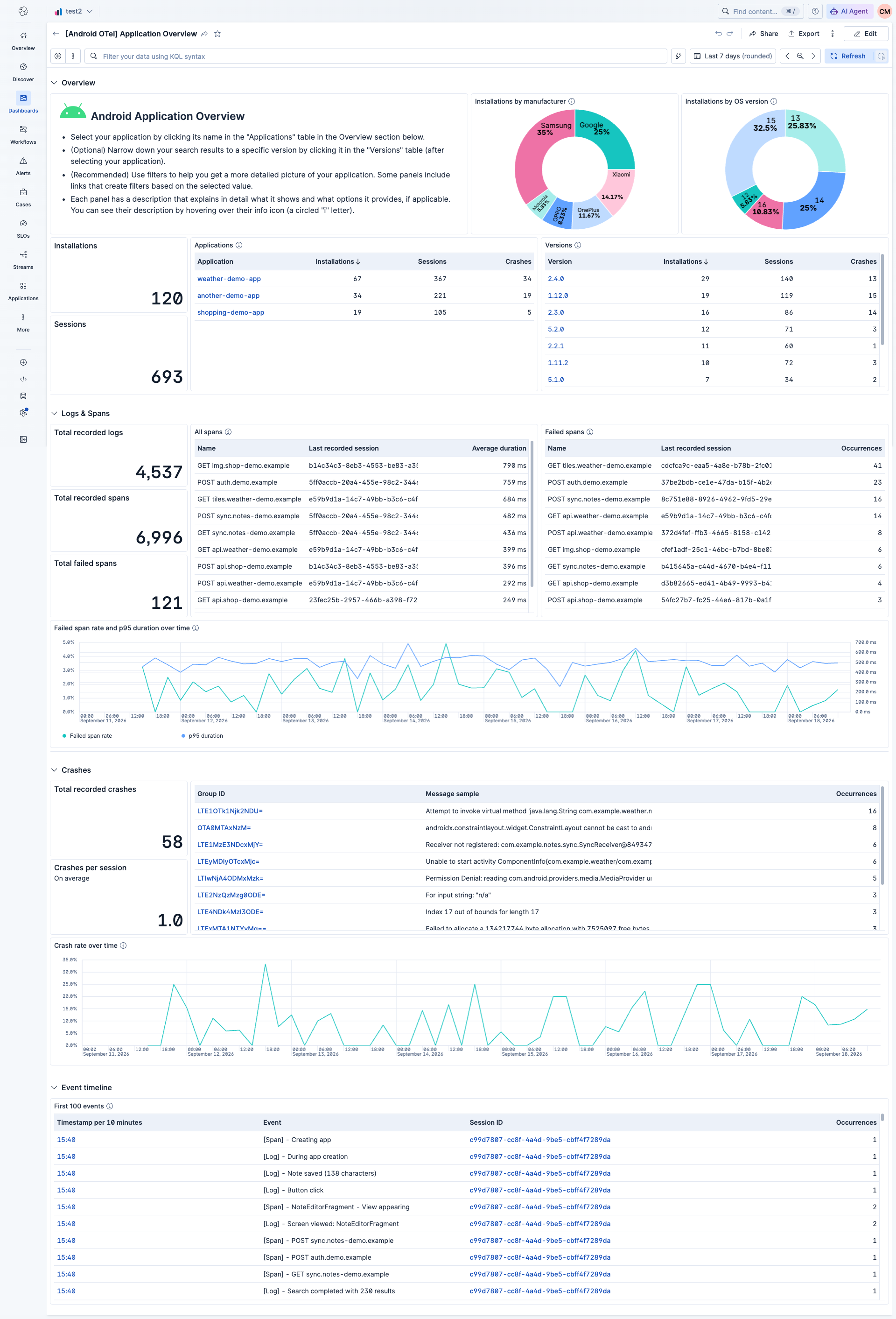
EDOT React Native sends telemetry through EDOT Android on Android and EDOT iOS on iOS, so each platform's data appears in that platform's Kibana dashboards. The Android OpenTelemetry Assets and iOS OpenTelemetry Assets integrations provide these dashboards. They give an overview of application health and dedicated views for spans, crashes, sessions, and other mobile telemetry.
After your app has sent telemetry data, either manually or automatically, install the content package for each platform your app runs on.
- In Kibana, search for Android OpenTelemetry Assets in the global search field for an Android app, or for iOS OpenTelemetry Assets for an iOS app.
- Open it and click Install to add its dashboards to your Kibana instance. Repeat for the other platform if your app runs on both.
Once a content package is installed, open its Application Overview dashboard:
- In Kibana, search for Dashboards in the global search field.
- Open [Android OTel] Application Overview for Android data or [iOS OTel] Application Overview for iOS data.
- Select your application by clicking its name in the Applications table of the Overview section.
The Android dashboard:
The iOS dashboard:
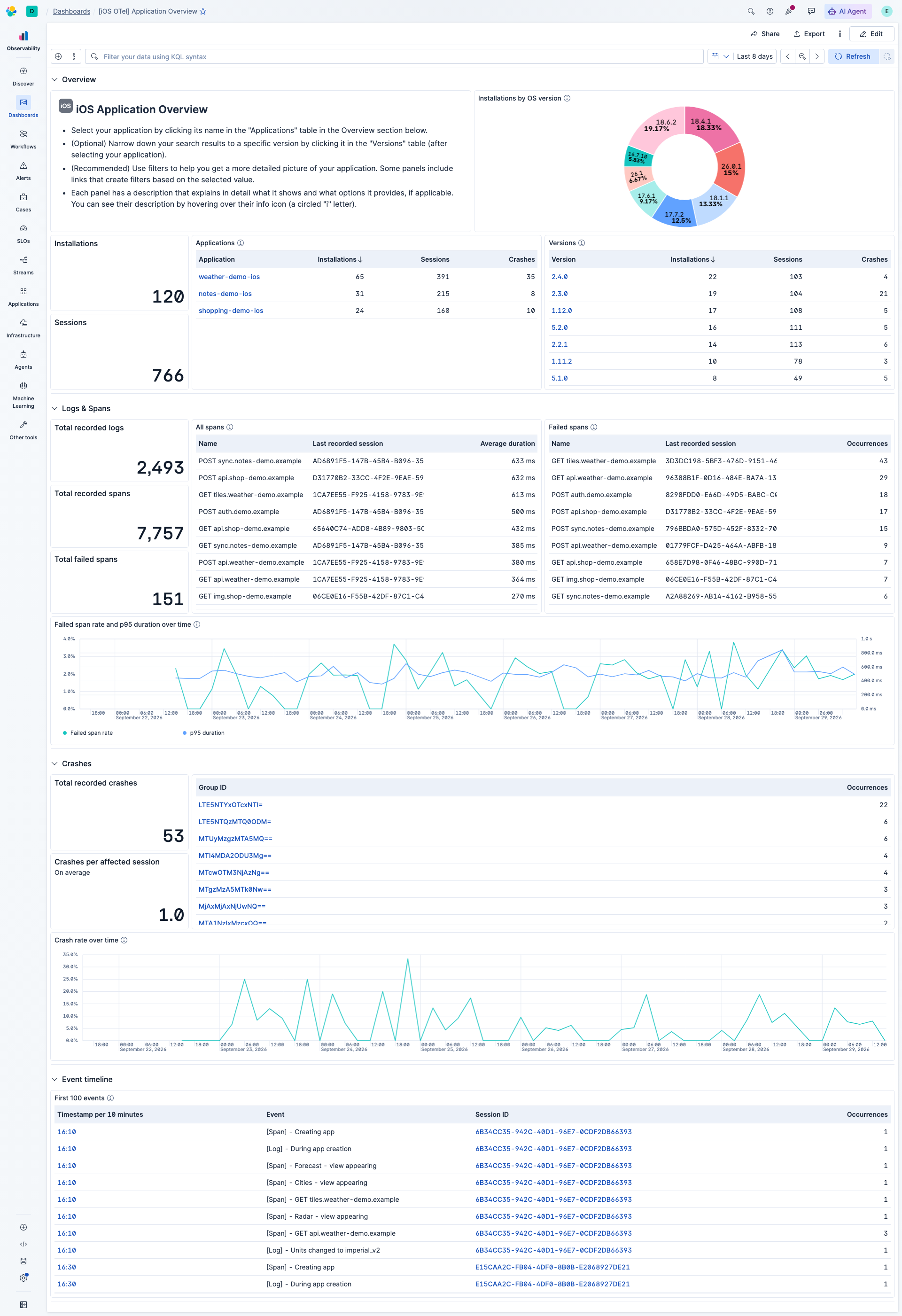
Each dashboard provides a high-level view of your app's health, including span performance, crash analysis, and session-level insights.
To inspect individual traces in detail, go to a dashboard panel that lists spans and click its Explore in Discover button. In Discover, expand the details of a span to open the trace waterfall, which shows the full span hierarchy and timing.
- View crash details for Android and iOS apps in the dashboards.
- Troubleshoot dashboard issues for Android and iOS.
- This guide uses the minimum configuration needed to initialize EDOT React Native. To explore what else you can set, see Configuration.
- EDOT React Native also creates telemetry without code, such as HTTP spans, crash reports, and widget tap events. See Automatic instrumentation.
- To create your own spans, logs, and widget click events, see Manual instrumentation.
- If telemetry does not appear, use the EDOT Android troubleshooting guide or the EDOT iOS troubleshooting guide.
- Remove both native bootstrap calls and imports.
- Remove the EDOT Android plugin applications and declarations, the
configuration Gradle script line, the
elastic-otel-config.jsonreference in the Xcode app target, andelastic-otel-config.json. - Remove the iOS Podfile line that forces dynamic frameworks only if no other dependency needs it.
- Remove the
@elastic/otel-react-native/babel-pluginentry frombabel.config.jsif you added it. - Uninstall
@elastic/otel-react-native. - Run
pod installand rebuild both native applications to refresh autolinking.