Chargeback
| Version | 0.6.0
|
| Subscription level What's this? |
Basic |
| Developed by What's this? |
Elastic |
| Ingestion method(s) | API |
| Minimum Kibana version(s) | 9.2.0 |
To use pre-release integrations, go to the Integrations page in Kibana, scroll down, and toggle on the Display beta integrations option.
Technical preview: This integration is being developed by Elastic's Customer Engineering team. Report any issues to the Elastician who shared this integration with you.
The Chargeback integration provides FinOps visibility into Elastic usage across tenants. Using built-in Elastic Agent CEL collection alongside optional data from the Elasticsearch Service Billing, On-Premises Billing, and Elasticsearch integrations, it determines the cost and workload share of each deployment, data tier, and data stream across an organization so Center of Excellence (CoE) teams can allocate costs back to the appropriate tenant.
FinOps is an operational framework and cultural practice aimed at maximizing the business value of cloud usage. It facilitates timely, data-driven decision-making and promotes financial accountability through collaboration among engineering, finance, and business teams.
The Chargeback integration assists organizations in addressing a crucial question:
"How is your organization consuming the Elastic solution, and to which tenants can you allocate these costs?"
The integration provides a breakdown of chargeable units (ECU or mERU) per deployment, data tier, data stream, and day.
Chargeback costs are presented based on a configured rate and unit, used to convert raw consumption (ECU for Elastic Cloud or mERU for On-Premises Billing) into your preferred currency (for example EUR at 0.85 per ECU or 0.00085 per mERU).
Monitoring cluster:
- Must be on Elasticsearch version 9.2.0+ due to the use of smart ES|QL LOOKUP JOIN (conditional joins) in dashboard queries, running on an Elastic Cloud Hosted (ECH) or self-managed monitoring cluster.
- Run a single Fleet-managed Elastic Agent on an agent policy with the Chargeback integration enabled (or install assets alongside existing billing and monitoring producers).
- When to use Chargeback versus Chargeback Serverless: Use Chargeback for ECH and On-Premises estates, including mixed Elastic Cloud organizations where you monitor Serverless projects alongside ECH or self-managed clusters from an ECH/self-managed monitoring cluster. For Serverless-only estates, or mixed estates where Chargeback itself is deployed onto a Serverless project, use the dedicated Chargeback Serverless integration instead.
Self-contained data collection, On-Premises billing prerequisite, and legacy coexistence:
- Chargeback collects Elastic Cloud billing, index/tier usage, and node utilization telemetry directly via Elastic Agent CEL inputs:
metrics-chargeback.billing-*: Elastic Cloud Hosted (ECH) and Serverless billing line items across all project types, deployment tags (chargeback_group:*), regions, configuration snapshots, and optional organization credit commitments (collect_ess_credits).metrics-chargeback.usage-*: 10-minute reset-aware per-index and per-tier usage metrics harvested via shard-level/_stats(level=shards),/_nodes, and/_settings(_tier_preference,creation_date, computedage) on ECH and self-managed clusters (primaries.store.total_data_set_size_in_bytes) and/_cat/indiceson Cloud Serverless projects, attributing timestamped counter intervals across UTC days, skipping indices affected by partial shard failures (_shards.failuresor reduced responding shard counts) to preserve prior counter baselines while emitting deltas from unaffected indices tagged withelasticsearch.index.partial_shard_stats: true(error.code: "partial_shard_stats"), and bounding stale cursor hold to 24h with explicitusage_observation_gapexpiry events.metrics-chargeback.node_stats-*: 15-minute/_nodes/data:true,data_hot:true,data_warm:true,data_cold:true,data_frozen:true,data_content:true/stats/jvm,fssamples across data-role nodes for realized capacity utilization scoring.
- Self-managed / On-Premises billing prerequisite: Because the native
chargeback.billingstream queries Elastic Cloud Billing APIs, self-managed / On-Premises deployments (including Hub-only policies whereorganization_idandcloud_api_keyare left empty) require On-Premises Billing (metrics-ess_billing.billing-onprem*) or a compatible billing producer writingess.billing.*(onprem_node) records intometrics-ess_billing.billing-*so deployment cost and realized-pool dashboards have billing inputs to allocate. - Existing collector coexistence: On-Premises Billing (
metrics-ess_billing.billing-onprem*), ESS Billing (metrics-ess_billing.billing-*), Elasticsearch (monitoring-indices*,metrics-elasticsearch.stack_monitoring.node_stats*,.monitoring-es-*, andmetricbeat-*), and Cross-Cluster Search (*:monitoring-indices*) are supported side by side. When both nativechargeback.*and legacy streams report the same deployment and UTC day, Chargeback transforms retain legacy rows until native samples cover the full day across contributing nodes and indices so totals are neither double-counted nor truncated during mid-day cutover.
Opt-in compatibility aliases for stock ESS Billing and Elasticsearch Consumption dashboards:
Chargeback populates compatibility fields on
chargeback_lookup.dest_billing_cluster_cost-1(aliased aschargeback_lookup.billing_cluster_cost),chargeback_lookup.dest_billing_credits-1(aliased aschargeback_lookup.billing_credits), andmetrics-chargeback.usage-*(doc_type: index_usage, 10-minute per-index samples) without automatically attaching index names owned byess_billingorelasticsearch(index_pivot).On standalone clusters that do not run separate
ess_billingorelasticsearch(index_pivot) policies, install the dashboard assets only under Management -> Integrations -> ESS Billing / Elasticsearch -> Assets -> Install assets, enable Collect ESS Credit Commitment Data (for stock ESS Billing Credits dashboard) (collect_ess_credits) if using the Credits dashboard, and attach the opt-in lookup and filtered data-stream aliases in Dev Tools:POST /_aliases { "actions": [ { "add": { "index": "chargeback_lookup.dest_billing_cluster_cost-*", "alias": "metrics-ess_billing.billing-chargeback" } }, { "add": { "index": "chargeback_lookup.dest_billing_credits-*", "alias": "metrics-ess_billing.credits-chargeback" } }, { "add": { "index": "metrics-chargeback.usage-*", "alias": "monitoring-indices", "filter": { "term": { "doc_type": "index_usage" } } } } ] }Attach
metrics-ess_billing.billing-chargebackandmetrics-ess_billing.credits-chargebackonly when nometrics-ess_billing.billing-*(includingmetrics-ess_billing.billing-onprem*) ormetrics-ess_billing.credits-*backing indices exist on the cluster. Because Chargeback transforms already roll up historicaless_billingrecords into the destination lookup indices usingdoubleandlongprecision, matching both legacy backing indices and the compatibility alias underFROM metrics-ess_billing.*duplicates historical rows and triggers ES|QL numeric type-ambiguity errors (float/integer/longversusdouble/long). If decommissioning an earlieress_billingpolicy, wait for its Chargeback rollup to finish and delete the retiredmetrics-ess_billing.*data streams before attaching the alias.
Data flow:
- Elastic Agent collects billing into
metrics-chargeback.billing-*, index/tier usage intometrics-chargeback.usage-*, and node stats intometrics-chargeback.node_stats-*(alongside On-Premises Billing or any existing monitoring streams). - Chargeback continuous transforms (
5mconfiguration sync and60mbilling, credit commitment, usage, and utilization rollups) aggregate and enrich this telemetry into ninelookup-mode indices. - Chargeback dashboards (and optional stock dashboards) query the lookup indices via ES|QL and Lens.
Credentials, currency settings, optional credit commitments, and cost/utilization weights are configured in Kibana under Management -> Fleet -> Agent Policies -> Chargeback and synced into chargeback_lookup.dest_chargeback_conf-1 (aliased as chargeback_lookup.chargeback_conf, _id: config for Elastic Cloud ECU and _id: config_onprem for On-Premises mERU) by the chargeback_conf_lookup continuous transform when sync_fleet_config is enabled.
Organization ID (
organization_id): Optional Elastic Cloud organization ID. Leave empty for On-Premises or local Hub-only collection (requires On-Premises Billing or a compatible billing producer for cost dashboards).Elastic Cloud API Key (
cloud_api_key): Optional API key with Billing Admin role and Cloud deployment or Serverless project read access. Leave empty for On-Premises or local Hub-only collection (requires On-Premises Billing or a compatible billing producer for cost dashboards).Local / Hub Elasticsearch URL (
hub_es_url) and Local / Hub Elasticsearch API Key (hub_es_api_key): Optional direct endpoint and API key for harvesting the local or self-managed Hub cluster.Target Deployment Elasticsearch API Keys (
deployment_api_keys): Optional comma-separated<deployment_id_or_name>:<encoded_api_key>entries for direct harvesting of remote ECH deployments or Serverless projects.Configuration Owner ID (Multi-Policy) (
config_owner_id): Optional identifier designating the single Chargeback policy authorized to write global rate and weight settings tochargeback_lookup.chargeback_confwhen multiple Chargeback policies write to the same cluster (default:""). Leave empty in single-policy deployments; when multiple policies share a cluster, enablesync_fleet_configon only one policy and assign it aconfig_owner_idso overlapping policies do not overwrite or mix global rate and weight settings.Sync Fleet Rate & Weight Settings to Configuration Lookup (
sync_fleet_config): Emits dailyconfig_snapshotevents intochargeback_lookup.chargeback_confacross whichever streams are enabled (default:true). Set tofalseto preserve manual edits or custom multi-period rows inchargeback_lookup.chargeback_conf. On assets-only installations without a Chargeback Agent policy,chargeback_lookup.chargeback_conf(chargeback_lookup.dest_chargeback_conf-1) is created automatically as an empty lookup index once any Chargeback or billing source index exists (or populated from any existing pre-0.6.0chargeback_conf_lookupindex) so dashboards apply configured or default rates and weights automatically. To create or update_id: configmanually viaPOST chargeback_lookup.chargeback_conf/_update/configwith"doc_as_upsert": true, placeconfig_join_key: "chargeback_config",conf_start_date, andconf_end_datedirectly inside"doc"using inclusive UTC millisecond bounds (00:00:00.000Zto23:59:59.999Zso adjacent historical rate periods do not overlap; use_id: config_onpremwithconfig_join_key: "chargeback_config_onprem"for a separate On-PremisesmERUrate, or, after installing the Chargeback integration assets so the managedlookup-mode index template forchargeback_lookup.dest_chargeback_conf-1is in place, runPUT chargeback_lookup.dest_chargeback_conf-1and alias it aschargeback_lookup.chargeback_confon an empty cluster before source indices arrive):POST chargeback_lookup.chargeback_conf/_update/config { "doc": { "config_join_key": "chargeback_config", "conf_chargeable_unit_rate": 0.85, "conf_chargeable_unit_rate_unit": "EUR", "conf_indexing_weight": 20, "conf_query_weight": 20, "conf_storage_weight": 40, "conf_utilization_memory_weight": 70, "conf_utilization_storage_weight": 30, "conf_utilization_floor": 0.10, "conf_start_date": 1262304000000, "conf_end_date": 2430518399999 }, "doc_as_upsert": true }
Elastic Cloud Daily Billing & Rate Settings (chargeback.billing):
- Billing Lookbehind Days (
lookbehind): Historical days backfilled on initial install (default:60). - Currency Unit (
currency_unit): Target display currency code, for example"EUR","USD","GBP","ZAR"(default:"EUR"). - Chargeable Unit Rate (Elastic Cloud ECU) (
unit_rate): Monetary value per Elastic Cloud Consumption Unit (ECU) (default:0.85). - On-Premises Unit Rate (per mERU) (
onprem_unit_rate): Optional monetary value per On-Premises milli-ERU (mERU) applied toonprem_nodebilling records alongside Elastic Cloud ECU billing (default:0.00085, equivalent to0.85per full ERU). Leave empty to deriveunit_rate / 1000permERU. - Configuration Effective Start Date (Optional) (
config_effective_from): Optional UTC day-boundary start date (YYYY-MM-DDorYYYY-MM-DDT00:00:00Z) applied to_id: configand_id: config_onpremwhen preserving earlier non-overlapping historical rate windows inchargeback_lookup.chargeback_conf. - Collect ESS Credit Commitment Data (for stock ESS Billing Credits dashboard) (
collect_ess_credits): Pulls daily organization credit commitment snapshots intometrics-chargeback.billing-*for the opt-in stock [Metrics ESS Billing] Credits dashboard alias (default:false).
Index & Tier Usage (chargeback.usage):
- Blended Indexing Weight (
indexing_weight): Non-negative weight for indexing operations in blended cost calculation (default:20, active when deployment indexing activity is non-zero). - Blended Query Weight (
query_weight): Non-negative weight for query operations in blended cost calculation (default:20, active when deployment query activity is non-zero). The sum ofquery_weightandstorage_weightmust be greater than zero. - Blended Storage Weight (
storage_weight): Non-negative weight for storage in blended cost calculation (default:40, active when deployment storage is non-zero). Blended cost normalizes across the deployment's active non-zero dimensions so tier and data stream shares sum to 100% of the chargeable pool. The sum ofquery_weightandstorage_weightmust be greater than zero.
Elastic Cloud Data Node Utilization (15m) (chargeback.node_stats):
- Utilization Memory (Heap p95) Weight (
utilization_memory_weight): Non-negative weight for JVM heap p95 in capacity utilization score (default:70). The sum ofutilization_memory_weightandutilization_storage_weightmust be greater than zero. - Utilization Storage (Disk p95) Weight (
utilization_storage_weight): Non-negative weight for disk p95 in capacity utilization score (default:30). The sum ofutilization_memory_weightandutilization_storage_weightmust be greater than zero. - Utilization Floor (
utilization_floor): Minimum utilization score (0.0to1.0) applied across realized-cost dashboard calculations (default:0.10). Prevents realized cost from reaching zero for idle clusters.
Realized cost answers: of the capacity I purchased, how much am I actually using, and what does that cost?
util_score      = GREATEST((mem_w x heap_p95 + disk_w x disk_p95) / (mem_w + disk_w), floor)
chargeable_pool = provisioned_ecu x util_score
realized_cost   = chargeable_pool x conf_chargeable_unit_rate
Where:
heap_p95= p95 heap usage across data nodes (0.0 to 1.0), sourced fromcluster_capacity_utilization_lookup. Defaults to 1.0 (100%) when monitoring data is absent.disk_p95= p95 disk usage across data nodes (0.0 to 1.0), same source.mem_w/disk_w=conf_utilization_memory_weight/conf_utilization_storage_weight(default 70 / 30)floor=conf_utilization_floor(default 0.10)
Why 70% memory / 30% storage? Elasticsearch is a memory-bound workload; heap exhaustion is the primary failure mode and directly impacts query performance. Disk is more manageable via ILM, compression, and tier movement. The 70/30 default reflects this operational reality.
Why p95? p95 captures the "reliably busy" signal: it accounts for peak hours without being distorted by brief maintenance spikes (which p99+ would amplify) or being washed out like daily averages.
Why a utilization floor? Without a floor, idle or unmonitored deployments produce zero realized cost; they appear to consume nothing even though they hold provisioned capacity. A floor of 10% (default) ensures every deployment contributes proportionally to the shared cost pool, even during quiet periods.
The integration creates nine transforms to aggregate cost and usage data:
Billing transforms:
billing_cluster_cost: aggregates daily chargeable units (ECU/ERU) per deployment and SKU intochargeback_lookup.dest_billing_cluster_cost-1(aliased aschargeback_lookup.billing_cluster_cost), addingcost_type,cost_category,is_allocatable, and ESS Billing compatibility fields.billing_realized_pool: aggregates daily allocatable data-tier capacity per deployment across ECH data tiers, Serverless workload and retained storage SKUs, and On-Premises nodes intochargeback_lookup.dest_billing_realized_pool-1(aliased aschargeback_lookup.billing_realized_pool).billing_credits: aggregates daily organization credit commitment snapshots intochargeback_lookup.dest_billing_credits-1(aliased aschargeback_lookup.billing_credits) for the opt-in stock [Metrics ESS Billing] Credits dashboard compatibility alias.chargeback_conf_lookup: syncsconfig_snapshotevents intochargeback_lookup.dest_chargeback_conf-1(aliased aschargeback_lookup.chargeback_conf,_id: configand_id: config_onprem) while carrying over any legacychargeback_conf_lookupcustom row or preserving manual configuration rows when Fleet sync is inactive.
Utilization transforms:
cluster_capacity_utilization: computes p95 heap and disk utilization across data-role nodes per deployment/day fromnode_statsusing equal-weighted 15-minute node slots.
Usage transforms (from metrics-chargeback.usage-* and monitoring-indices*):
cluster_deployment_contribution: indexing, querying, and storage metrics per deployment/day intochargeback_lookup.dest_cluster_deployment_contribution-1(aliased aschargeback_lookup.cluster_deployment_contribution).cluster_datastream_contribution: same metrics split by data stream intochargeback_lookup.dest_cluster_datastream_contribution-1(aliased aschargeback_lookup.cluster_datastream_contribution). The usage ingest pipeline also setsds_type(first-segment) andds_namespace(last-segment) from the data stream name, orotherwhen the name is non-conforming.cluster_tier_contribution: same metrics split by data tier intochargeback_lookup.dest_cluster_tier_contribution-1(aliased aschargeback_lookup.cluster_tier_contribution).cluster_tier_and_ds_contribution: same metrics split by both tier and data stream intochargeback_lookup.dest_cluster_tier_and_datastream_contribution-1(aliased aschargeback_lookup.cluster_tier_and_datastream_contribution), includingds_typeandds_namespace.
All transform destination documents include ECS event.ingested (when the lookup row was written).
These transforms produce lookup indices queried by the dashboards using ES|QL LOOKUP JOINs.
All Chargeback transforms start automatically when the integration is installed.
The cluster_capacity_utilization transform reads from broad monitoring source indices covering all deployment types. To avoid a heavy historical backfill that could impact cluster performance on first run, it is configured to process only the current and two preceding UTC calendar days (now-2d/d), building utilization from installation forward rather than historically. Utilization data from before installation is not backfilled. The 100% default applies until the transform has run for its first full day.
You can verify the transforms are running by navigating to Stack Management → Transforms and filtering for chargeback.
The integration includes a Transform Health Monitoring alert rule template that can be installed from the integration page. This rule monitors all Chargeback transforms and alerts when they encounter issues or failures.
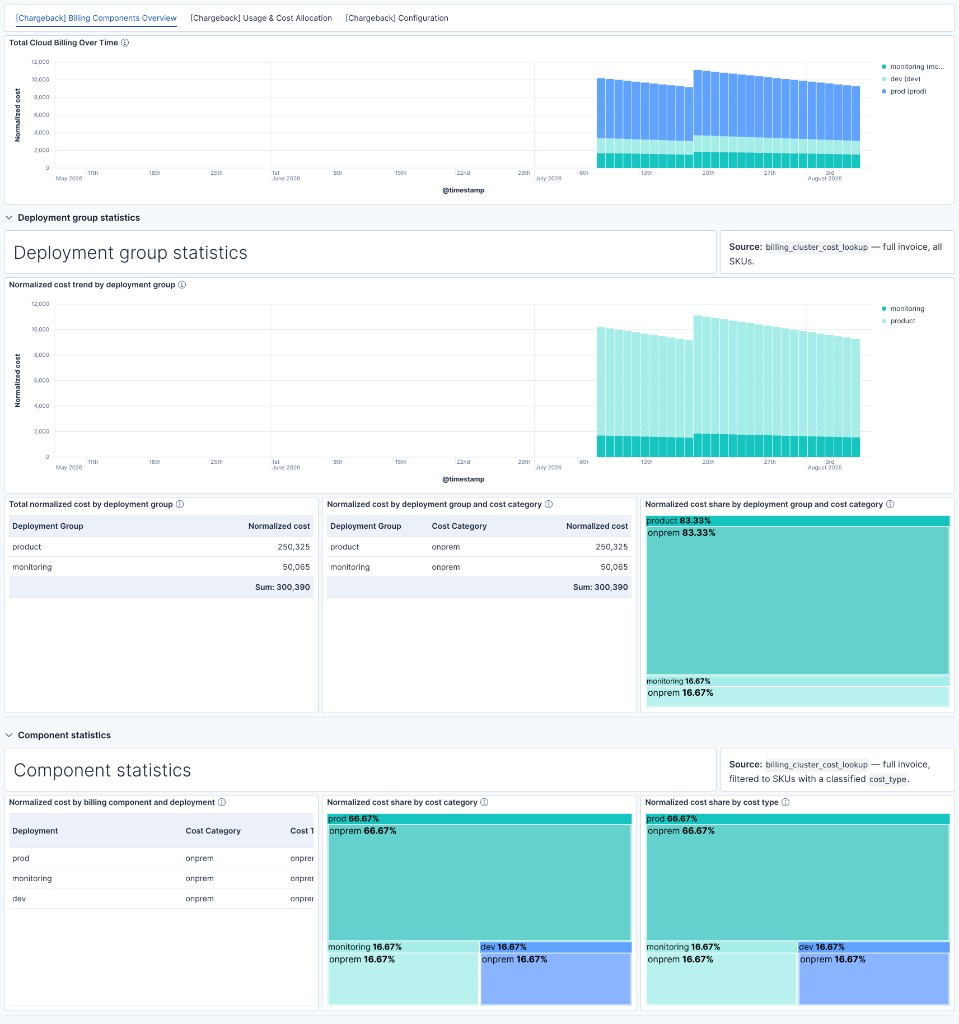
Chargeback ships three focused dashboards with a navigation bar linking between them.
Answers: what did we spend and where did it go?
Source: chargeback_lookup.billing_cluster_cost (full invoice, all SKUs). Totals in this dashboard equal the full Elastic invoice.
Sections:
- Deployment group statistics: total billing spend and trend per chargeback group. Use this for internal chargeback allocation by team or cost center.
- Component statistics: cost broken down by billing component (
cost_type: datahot/datacontent, datawarm, ml, kibana, snapshots, data-transfer, and others) and FinOps category (cost_category: data_tier, platform, transfer, snapshot, support, onprem, other).
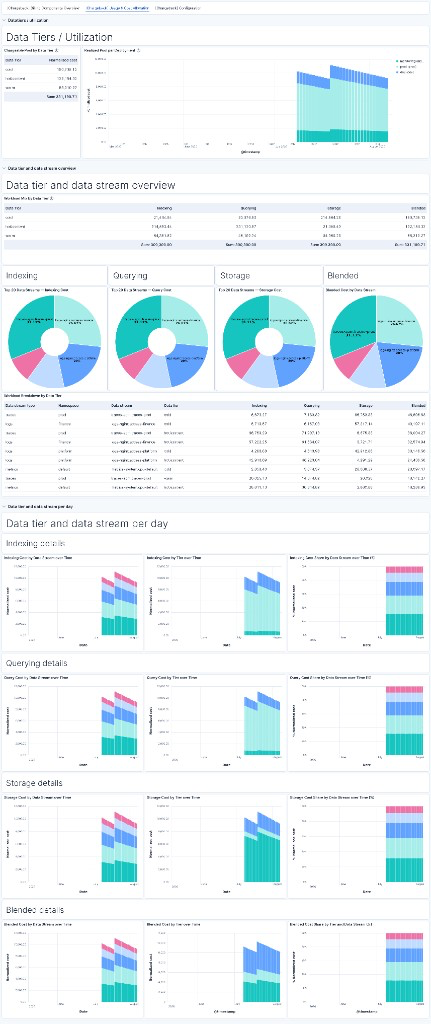
Answers: which data streams and tiers drive cost, and how efficiently are we using capacity?
Source: chargeback_lookup.billing_realized_pool joined with chargeback_lookup.cluster_tier_contribution, chargeback_lookup.cluster_tier_and_datastream_contribution, and related usage and utilization lookups. Totals reflect the chargeable pool (allocatable data-tier capacity weighted by utilization and clamped to conf_utilization_floor) and do not equal the full invoice. ML, Kibana, snapshots, support, and data transfer are excluded.
Sections:
- Deployment cost allocation (usage-based): normalized cost per deployment split by data tier (usage-weighted). Shows which deployments consume the most of their chargeable pool across tiers.
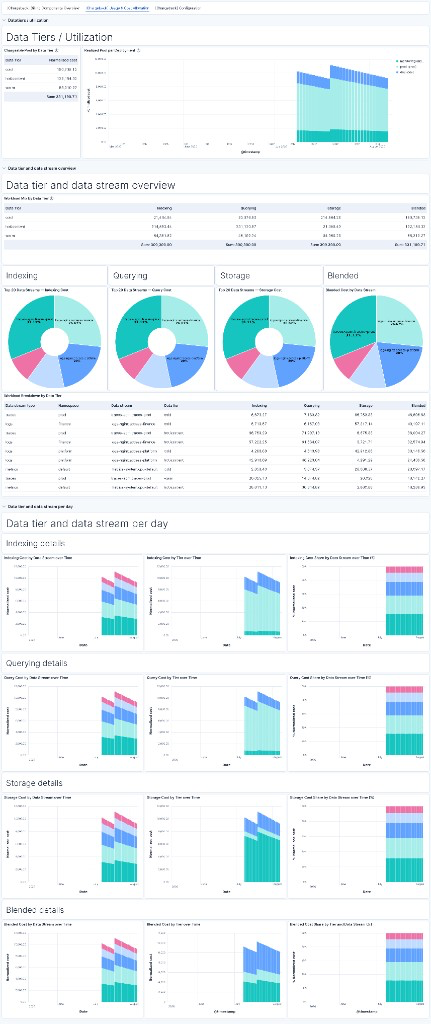
- Datatiers / utilization: provisioned capacity vs chargeable pool, utilization p95 per deployment.
- Data tier and data stream overview: top-20 data streams by indexing / query / storage cost, blended cost totals, and the Workload Breakdown by Data Tier table with columns Data stream type, Namespace, Data stream, Data tier, then indexing / querying / storage / blended cost.
- Data tier and data stream per day: time-series panels (indexing, querying, storage, blended) broken out by data stream and data tier (usage-based), including absolute cost and percentage share.
When several teams share one deployment, assign each team a unique Fleet namespace so their data lands in distinct data streams (<type>-<dataset>-<namespace>). Chargeback parses ds_namespace and ds_type from the full data stream name and shows them on the Workload Breakdown table. Interactive control-bar filters on those fields are not part of this release line. Use the table columns (or a KQL/ES|QL query) until a later package that ships ES|QL variable controls.
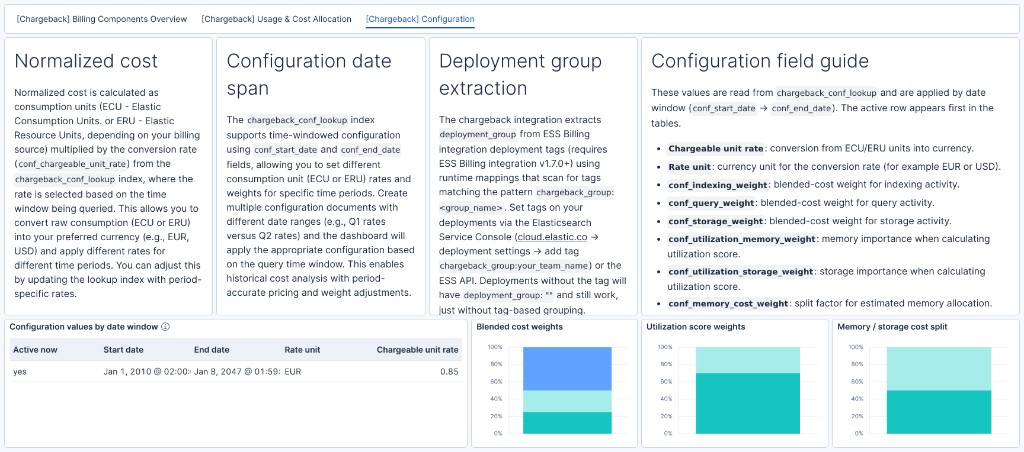
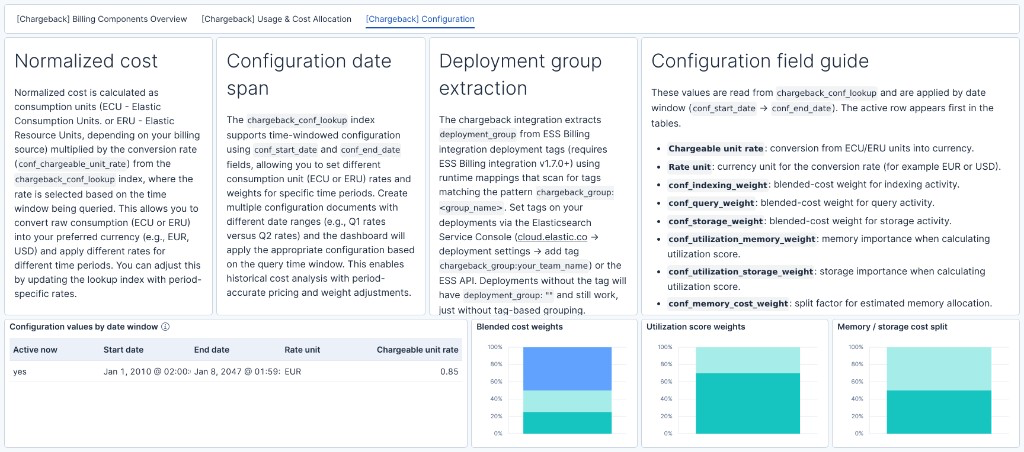
Fleet Data Stream health and deployment harvest registry showing freshness-based status (Active when telemetry arrived within the last 72 hours versus Stale or Missing) alongside separate historical coverage counts across chargeback.billing, chargeback.usage, and chargeback.node_stats, per-deployment ECH, Serverless, and On-Premises telemetry status, and a quick-reference Fleet UI setup guide.
Two distinct totals appear across the dashboards. Both are valid and intentionally different:
| Total | Source | Dashboard |
|---|---|---|
| Full deployment bill | SUM(total_chargeable_units) over all SKUs in chargeback_lookup.billing_cluster_cost |
Billing Components Overview |
| Chargeable pool | chargeback_lookup.billing_realized_pool capacity x utilization score |
Usage and Cost Allocation |
Do not expect the chargeable pool to equal the full deployment bill. Non-allocatable SKUs (ML, Kibana, transfer, snapshots) appear in the Billing Components Overview only. The utilization discount is not spread to tiers or data streams by design.
When node_stats is missing for a deployment/day, utilization defaults to 100%.
Chargeback billing and usage transforms aggregate on a calendar day (calendar_interval: 1d) with a sync delay (typically about one hour) and a periodic frequency. The ESS Billing dashboard can show near-real-time or partial-day totals for the current UTC day. Small differences for "today" or windows that cross midnight are expected. When you compare Chargeback to ESS Billing, use completed UTC days (or extend the billing time range across the day boundary) rather than an incomplete current day.
The integration supports organizing deployments into logical groups using the chargeback_group tag on ESS Billing deployments. This enables cost allocation and filtering by team, project, or any organizational structure.
To assign a deployment to a chargeback group, add a tag in the Elastic Cloud console in the format:
chargeback_group:<group-name>
For example: chargeback_group:team-search or chargeback_group:project-analytics.
The billing_cluster_cost transform automatically extracts these tags from the deployment_tags field in ESS Billing data. Each deployment should have only one chargeback_group tag. Multiple tags can produce unpredictable cost allocation.
Three alert rule templates are included and can be installed from the integration page. Alert rule templates require Elastic Stack version 9.2.0 or later.
[Chargeback] Deployment with chargeback group missing usage data: alerts when a deployment that has a chargeback group assigned is not sending usage data to the monitoring cluster. This prevents silent gaps in cost allocation.
[Chargeback] New chargeback group detected: notifies when a new chargeback_group tag appears on a deployment. Use this to ensure new teams or projects are accounted for in your chargeback model.
[Chargeback] Transform health monitoring: monitors all Chargeback transforms and alerts when they encounter failures or fall behind on processing. Requires all transforms to be running before activation.
For more information, refer to the Elastic documentation.
- Upgrade the Fleet package to 0.6.0. Kibana requirement remains
^9.2.0. - All eight versioned lookup transforms (
billing_cluster_cost,billing_realized_pool,billing_credits,chargeback_conf_lookup,cluster_deployment_contribution,cluster_tier_contribution,cluster_datastream_contribution, andcluster_tier_and_ds_contribution) now write tochargeback_lookup.dest_*-1aliased aschargeback_lookup.*(chargeback_lookup.billing_cluster_cost,chargeback_lookup.billing_realized_pool,chargeback_lookup.billing_credits,chargeback_lookup.chargeback_conf,chargeback_lookup.cluster_deployment_contribution,chargeback_lookup.cluster_tier_contribution,chargeback_lookup.cluster_datastream_contribution, andchargeback_lookup.cluster_tier_and_datastream_contribution) so in-place upgrades do not collide with concrete0.5.0lookup mappings or retain stalegroup_bydocument IDs. They backfill retained history frommetrics-ess_billing.billing-*,metrics-ess_billing.credits-*,monitoring-indices*, andmetrics-chargeback.*automatically. If raw billing or monitoring streams use shorter ILM retention than your0.5.0*_lookupindices, reindex older daily rows (before the earliest retained source timestamp) from the0.5.0lookup indices intochargeback_lookup.dest_*-1(routingbilling_cluster_cost_lookuprows through"pipeline": "logs-chargeback.lookup-0.6.0-billing"soess.billing.*andcloud.providerare populated, settingusage_sourceto"legacy"on migrated usage rows, and settingis_onpremtotrueon migrated On-PremisesmERUbilling and realized-pool rows). - On upgrade from
0.4.xor0.5.0,chargeback_conf_lookupautomatically carries over your existingchargeback_conf_lookupcustom rate, currency, weights, and date bounds intochargeback_lookup.chargeback_conf(_id: config) when no Fleetconfig_snapshotexists (no manual reindex required for single-row custom configs). Important post-upgrade cleanup: after verifying that your carried-over settings appear inchargeback_lookup.chargeback_conf(GET chargeback_lookup.chargeback_conf/_search), delete the legacychargeback_conf_lookup*source indices (DELETE chargeback_conf_lookup*). Otherwise, on assets-only or non-Fleet-synced installations where noconfig_snapshotexists, resetting the transform or reinstalling/upgrading the package recomputes the single bucket and silently overwrites manualPOST chargeback_lookup.chargeback_conf/_update/configedits with the stale legacy values. When nochargeback_config_onprem(_id: config_onprem) row matches a billing date, on-premisesmERUrows default to0.00085rather than inheriting the Elastic Cloud ECU rate from_id: config; if an assets-only installation previously customized_id: configwith a non-default on-premisesmERUrate, upsert_id: config_onpremonchargeback_lookup.chargeback_confwith"config_join_key": "chargeback_config_onprem". Before enablingsync_fleet_config: trueon an installation with customized rates or historical rate periods, copy your active rate and weights into the Fleet policy UI and set Configuration Effective Start Date (config_effective_from) to the start timestamp of your current open-ended period so earlier closed historical rows do not overlap, or setsync_fleet_config: falseto continue managingchargeback_lookup.chargeback_confmanually. Once allchargeback_lookup.*aliases are populated, also delete the remaining retired pre-0.6.0 concrete*_lookupindices (everything exceptcluster_capacity_utilization_lookup) to reclaim cluster shards. - Existing ESS Billing, On-Premises Billing, and Elasticsearch monitoring inputs continue to work alongside native
chargeback.*CEL streams. When both native and legacy sources exist for the same deployment and UTC day, usage and capacity utilization transforms merge non-overlapping observations per index, node, and interval so totals and p95 utilization are neither double-counted nor truncated during mid-day cutover. - Lookup destination ingest pipelines now call dedicated
@customhooks (logs-chargeback.lookup@customfor all lookup rows, pluslogs-chargeback.lookup-billing@custom,logs-chargeback.lookup-usage@custom,logs-chargeback.lookup-realized_pool@custom,logs-chargeback.lookup-credits@custom,logs-chargeback.lookup-capacity_utilization@custom, andlogs-chargeback.lookup-chargeback_conf@custom) because Fleet attachesglobal@custom,metrics@custom,metrics-chargeback.integration@custom,metrics-chargeback.billing@custom,metrics-chargeback.usage@custom, andmetrics-chargeback.node_stats@customto the raw self-collectedmetrics-chargeback.*CEL data streams. If you defined custom lookup processors onmetrics-chargeback.integration@custom,metrics-chargeback.billing@custom, ormetrics-chargeback.usage@customin0.5.0or earlier, migrate them tologs-chargeback.lookup@custom,logs-chargeback.lookup-billing@custom, orlogs-chargeback.lookup-usage@customand remove lookup-only logic frommetrics-chargeback.*@custombefore enabling native CEL streams.
- Upgrade the Fleet package to 0.4.5. Kibana requirement remains
^9.2.0. - This release bumps the affected transform asset versions so package upgrade deletes, reinstalls, and restarts the lookup transforms whose
composite_keymapping changed fromtexttokeyword. - No manual lookup-index deletion or transform reset is required for that mapping fix on upgrade to 0.4.5.
- Upgrade the Fleet package to 0.4.4. Kibana requirement remains
^9.2.0. - The bootstrap transform now writes the default configuration document with
_idconfig, soPOST chargeback_conf_lookup/_update/configworks as documented. - If you upgraded from 0.2.10-0.4.3 and already have a hashed-ID bootstrap row: after the package upgrade creates the new
_idconfigdocument, copy any customized field values onto it withPOST chargeback_conf_lookup/_update/config, then delete the hashed-ID document so LOOKUP JOIN does not match two overlapping date windows. Do not index a partial document to IDconfigwith the index API (_doc); that replaces the whole document and can drop required bootstrap fields such asconfig_join_key. Fresh 0.4.4 installs need no cleanup.
- Upgrade the Fleet package to 0.4.3. Kibana requirement remains
^9.2.0. - Re-import or replace Chargeback dashboard saved objects if Kibana did not refresh them on upgrade.
- Delete Chargeback
*_lookupdestination indices, then reset and start the Chargeback transforms socomposite_keyis remapped with a keyword multifield. In-place upgrades that leave dynamically mappedtextcomposite_keyfields cause LOOKUP JOIN errors (JOIN with right field [composite_key] of type [TEXT] is not supported). - If
chargeback_conf_lookupdocuments still contain@timestamp, delete that index and reset the conf transform as well. LOOKUP JOIN would otherwise overwrite billing@timestampand create null time buckets on Billing Components Overview.
- Upgrade the Fleet package to 0.4.2. Kibana requirement remains
^9.2.0. - This release updates managed dashboard ES|QL only. Re-import or replace Chargeback dashboard saved objects if Kibana did not refresh them on upgrade.
- No transform reset is required for these dashboard fixes.
- Upgrade the Fleet package to 0.4.1. Kibana requirement remains
^9.2.0. - Usage transforms rewrite lookup documents through the updated
usagepipeline so new rows includeds_type,ds_namespace, andevent.ingested. Reset usage transforms (or wait for incremental runs) if you need historical rows enriched. - Confirm ESS Billing (or On-Premises Billing) has produced backing indices before relying on
chargeback_conf_lookupafter a fresh install.
- Upgrade the Fleet package to 0.4.0.
- The two new transforms (
billing_realized_pool,cluster_capacity_utilization) are created and auto-started. - Reset the
billing_cluster_costtransform to backfillcost_type,cost_category, andis_allocatableinto existing lookup documents. Until backfill completes, the Component statistics panels will show no data. - Ensure the Elasticsearch integration collects
node_statsfrom data nodes. Without this, utilization defaults to 100%. - The old
[Chargeback] Cost and Consumption breakdowndashboard is replaced by three new dashboards. Delete the old dashboard from Stack Management -> Saved Objects if it is not removed automatically.
Lookup mappings were updated to include legacy ECU field aliases (total_ecu, conf_ecu_rate, conf_ecu_rate_unit) pointing to chargeable-unit fields. Existing 0.3.1 lookup indices retain old mappings. After upgrading:
- Delete each affected lookup index (
billing_cluster_cost_lookup,chargeback_conf_lookup) and reset the corresponding transform so the index is recreated with 0.3.2 mappings. - Start or schedule the
billing_cluster_costandchargeback_conf_lookuptransforms.
If the dashboard was not replaced on upgrade, re-import the Chargeback dashboard saved objects.
Field names changed from ECU to chargeable units: total_ecu to total_chargeable_units, conf_ecu_rate to conf_chargeable_unit_rate, conf_ecu_rate_unit to conf_chargeable_unit_rate_unit. Dashboard ES|QL uses the chargeable-unit field names (total_chargeable_units, conf_chargeable_unit_rate). ES|QL does not resolve mapping aliases, so panels must not reference the legacy names even inside COALESCE.
This integration includes one or more Kibana dashboards that visualizes the data collected by the integration. The screenshots below illustrate how the ingested data is displayed.
Changelog
| Version | Details | Minimum Kibana version |
|---|---|---|
| 0.6.0 | Enhancement (View pull request) Add self-contained Elastic Agent CEL data collection streams (billing, usage, node_stats) with actual shard-placement tier resolution, per-index/node/interval legacy collector coexistence, and simultaneous Elastic Cloud ECU and On-Premises mERU rate support (onprem_unit_rate), move currency/credit and allocation/utilization settings (including utilization floor and UTC effective start date) into Fleet UI controls, redesign the Configuration dashboard with freshness-based stream health and separate historical coverage, and add opt-in compatibility fields for stock ESS Billing and Elasticsearch Consumption dashboards. Breaking change (View pull request) Replace legacy _lookup destination names with versioned chargeback_lookup. aliases (chargeback_lookup.billing_cluster_cost, chargeback_lookup.billing_realized_pool, chargeback_lookup.billing_credits, chargeback_lookup.chargeback_conf, chargeback_lookup.cluster_deployment_contribution, chargeback_lookup.cluster_tier_contribution, chargeback_lookup.cluster_datastream_contribution, and chargeback_lookup.cluster_tier_and_datastream_contribution; automatically carrying over pre-0.6.0 chargeback_conf_lookup custom rates/dates when no Fleet config_snapshot exists) and move transform destination custom pipeline hooks to logs-chargeback.lookup-<name>@custom (separating them from raw metrics-chargeback.*@custom stream hooks). |
9.2.0 |
| 0.5.0 | Bug fix (View pull request) Fix tier preference fallback scripts: YAML folded scalars (>) collapsed newlines so // comments commented out the frozen/cold/warm/hot checks, leaving unknown-tier docs ungrouped. Use literal block scalars (|) and block comments. Enhancement (View pull request) Elastic Cloud Serverless support: billing_realized_pool also matches Serverless capacity SKUs (deployment_type elasticsearch with elasticsearch.-search-vcu_, elasticsearch.-ingest-vcu_, elasticsearch.retained_), so serverless projects get an allocatable capacity pool. Previously only ECH .es.data. node SKUs matched, leaving every serverless cost row is_allocatable false and billing_realized_pool_lookup empty for serverless projects, so no serverless cost could be attributed to a tier or data stream. ML VCU is deliberately excluded to match ECH semantics, where ML is cost_category platform. Enhancement (View pull request) Cloud Console Logs and metrics remain supported through the Elasticsearch integration index_pivot into monitoring-indices* (no Agent collector required when Cloud Console already writes .monitoring-es-). Usage transforms use monitoring-indices as the single canonical source so raw .monitoring-es-* rows are not double-counted with their pivoted copies. Keyword runtime fields fix Fielddata is disabled on elasticsearch.cluster.name when dynamic mapping produces text plus a .keyword subfield. Tier preference fallbacks now use frozen, cold, warm, then hot/content order to match monitoring_indices.yml. billing.yml marks Serverless search/ingest VCU and retained storage as allocatable data_tier (ML VCU stays platform) so classification matches billing_realized_pool. Bug fix (View pull request) Fix Fielddata is disabled on [elasticsearch.cluster.name] causing the transforms to retry forever. Where the .monitoring-es-mb index template is not governing the .monitoring-es-8-mb data stream, dynamic mapping produces text plus a .keyword subfield and a terms aggregation on the text field throws. elasticsearch.cluster.name, index.name, index.datastream, index.tier and index.tier_preference are now read through keyword runtime fields that prefer the .keyword subfield when the mapping has one and fall back to the field itself; both branches use doc values. Also affects cluster_capacity_utilization, which has sourced .monitoring-es-* since 0.4.0. |
— |
| 0.4.7 | Bug fix (View pull request) Move all ingest pipelines into a stub data_stream/lookup to satisfy Kibana Fleet upload validator (elastic/kibana#286094) which rejects top-level package pipelines. Update transform dest.pipeline refs to Fleet naming convention logs-chargeback.lookup-{version}-{name}. Bug fix (View pull request) Fix cluster_capacity_utilization transform failure on legacy .monitoring-es-8-mb-* indices where elasticsearch.cluster.name is TEXT. Add keyword runtime_mapping cluster_name_kw for the group_by terms aggregation. |
— |
| 0.4.6 | Bug fix (View pull request) Fix five Usage and Cost Allocation dashboard panels (Workload Mix by Data Tier, Indexing/Query/Storage/Blended Cost by Tier over Time) that failed with verification_exception JOIN with right field [composite_key] of type [TEXT] is not supported on installations where cluster_tier_contribution_lookup retained a pre-0.4.5 text mapping. Queries restructured to start FROM cluster_tier_contribution_lookup (left side, composite_key cast via ::keyword) and join billing_realized_pool, cluster_capacity_utilization, and cluster_deployment_contribution lookup tables as right-side joins, all of which carry keyword-typed composite_key. |
— |
| 0.4.5 | Bug fix (View pull request) Fix composite_key LOOKUP JOIN failures by mapping the lookup key as keyword, updating dashboard joins to use composite_key directly, and bumping the affected transform asset versions so package upgrade recreates lookup indices with the corrected mapping. |
— |
| 0.4.4 | Bug fix (View pull request) Force the chargeback_conf_lookup bootstrap transform to write destination document ID config so POST chargeback_conf_lookup/_update/config matches the documented configuration update path. Pivot transforms previously used a hash of group_by fields as _id. |
— |
| 0.4.3 | Bug fix (View pull request) Fix LOOKUP JOIN on composite_key when lookup indices were dynamically mapped as text (JOIN with right field [composite_key] of type [TEXT]). Dashboard ES|QL now joins on composite_key.keyword after casting a left-side ck key, and composite_key mappings use a keyword multifield. Drop composite_key between chained joins to avoid ambiguous references. Bug fix (View pull request) Fix Billing Components Overview time-series panels that showed null @timestamp buckets after LOOKUP JOIN chargeback_conf_lookup. Conf docs that include @timestamp (even null) overwrite the billing timestamp; STATS now groups by the preserved ts alias, and the conf ingest pipeline removes @timestamp. Bug fix (View pull request) Remove remaining legacy conf_ecu_rate and total_ecu references from Billing Components Overview and Usage and Cost Allocation dashboard ES|QL. ES|QL does not resolve mapping aliases, so COALESCE fallbacks to those columns failed verification and cascaded into Unknown column errors for derived fields such as storage, querying, and indexing. |
— |
| 0.4.2 | Bug fix (View pull request) Fix Configuration dashboard ES|QL that still referenced legacy conf_ecu_rate / conf_ecu_rate_unit columns, which failed verification when only conf_chargeable_unit_rate fields exist. Bug fix (View pull request) Fix ambiguous @timestamp in LOOKUP JOIN ON clauses on Billing Components Overview and Usage and Cost Allocation dashboards by aliasing with EVAL ts = @timestamp before joining chargeback_conf_lookup. |
— |
| 0.4.1 | Enhancement (View pull request) Update Billing Components Overview, Usage and Cost Allocation, and Configuration dashboard screenshots in package docs and Fleet screenshots. Enhancement (View pull request) Parse data stream names into ds_type (first segment) and ds_namespace (last segment) on the usage path, with other fallback for non-conforming names. Extend the Usage dashboard Workload Breakdown by Data Tier table with Data stream type and Namespace columns (no interactive control-bar filters). Document namespace-based ownership for shared deployments. Enhancement (View pull request) Add ECS event.ingested to all chargeback transform destination ingest pipelines and field definitions so lookup rows record when they were written. Enhancement (View pull request) Document chargeback_conf_lookup bootstrap install order (billing backing index must exist before Chargeback starts). Enhancement (View pull request) Document expected small deltas versus the ESS Billing dashboard for incomplete UTC days and transform sync delay; compare completed days when reconciling. Bug fix (View pull request) Fix empty Usage and Cost Allocation dashboard when billing sources lack a mapped event.ingested field (common with On-Prem Billing). billing_cluster_cost and billing_realized_pool now sync on @timestamp so billing_realized_pool_lookup populates and usage panels can render. |
— |
| 0.4.0 | Enhancement (View pull request) Split monolithic dashboard into three focused dashboards: '[Chargeback] Billing Components Overview' (full invoice by deployment group and billing component), '[Chargeback] Usage & Cost Allocation' (usage-based chargeable pool allocation by tier and data stream), and '[Chargeback] Configuration' (rate, weights, and date-window reference). Resolves elasticsearch-chargeback#8. Bug fix (View pull request) Dashboard: remove @timestamp:exists filter, set default timepicker to last 3 months. Panels now open with data visible without adjusting the time picker. Bug fix (View pull request) Dashboard panel fixes: rename 'Realized chargeable units per deployment' → 'Provisioned versus Realized Pool per Deployment' and fix adHocDataViews/column mismatch that caused 'column invalid: deployment_name' error. Rename 'Realized chargeable units' column in 'Chargeable pool by data tier' table to 'Normalized cost' (column is currency, not ECU). Remove misleading 'Provisioned capacity (ECU)' column from tier table (same value for every tier due to deployment-level lookup join). Enhancement (View pull request) Shorten verbose markdown section headers in 'Cost by component (SKU)' and 'Datatiers / utilization' sections to single-line summaries. Bug fix (View pull request) Fix dashboard ES|QL: correct LOOKUP JOIN direction for tier panels (swap source to cluster_tier_contribution_lookup so all tiers are returned, not only one), add COALESCE 1.0 rate fallback, fix vis column UUIDs, remove stale 0.4.0-*.yml versioned pipeline files that caused Fleet install to fail, bump transform fleet_transform_version and pipeline references to 0.4.0. Enhancement (View pull request) Realized cost (issue #8): data-tier capacity pool per deployment/day ( billing_realized_pool), cluster-wide utilization p95 (cluster_capacity_utilization), utilization-weighted chargeable_pool for tier/data-stream allocation, SKU cost_type/cost_category/onprem, datatiers dashboard section, and FinOps reconciliation docs. Tier/DS ES|QL uses realized pool instead of per-SKU ECU. New conf weights for utilization and allocated memory/storage display. Requires Elasticsearch node_stats on data nodes. Bump transforms to 0.4.0.Bug fix (View pull request) Fix dashboard ES|QL: remove duplicate cluster_tier_contribution_lookup joins in tier-based panels (panels were producing n-tier times inflated values), fix cartesian product between datastream and tier lookups in blended-cost panels 15 and 33 (now use cluster_tier_and_datastream_contribution_lookup for correct per-tier weighting), remove spurious joins in panel 16.Bug fix (View pull request) Fix billing.yml ingest pipeline: content-tier SKUs (*.es.datacontent.*) were not renamed to datahot/datacontent, causing them to appear as a separate cost_type from hot-tier nodes. Both hot and content nodes now show consistently as datahot/datacontent.Bug fix (View pull request) Fix 'Realized chargeable units per deployment' panel: it was showing realized_chargeable_units (which equals provisioned capacity) twice. Now shows provisioned ECU alongside the utilization-adjusted realized pool (chargeable_pool = provisioned × utilization_score).Bug fix (View pull request) Uncollapse 'Data tier and data stream overview' dashboard section: the key blended-cost-per-datastream panels (treemap, table, pie) were hidden by default. Bug fix (View pull request) Fix dashboard panel layout: 'Provisioned versus Realized pool per deployment' and 'Chargeable pool by data tier' panels in the Datatiers section were both placed at y=0, causing them to overlap with the section header. Repositioned to render below the header. Enhancement (View pull request) Rename auto-generated dashboard panel titles (for example 'agg_indexing over @timestamp', 'Bar vertical stacked', 'Treemap', 'Pie') to descriptive names so users can understand each panel without opening it. |
— |
| 0.3.2 | Bug fix (View pull request) Fix dashboard ES|QL verification errors on 0.3.1 ( Unknown column [total_ecu] / [conf_ecu_rate]) by adding legacy ECU field aliases in lookup mappings (total_ecu -> total_chargeable_units, conf_ecu_rate -> conf_chargeable_unit_rate, conf_ecu_rate_unit -> conf_chargeable_unit_rate_unit).Enhancement (View pull request) Read Elasticsearch index-pivot usage from index pattern monitoring-indices* (and *:monitoring-indices* for CCS) so custom pivot destination names remain compatible. Bump transform pipelines and fleet_transform_version to 0.3.2. See elasticsearch-chargeback#90. |
— |
| 0.3.1 | Enhancement (View pull request) Rename config and billing fields to chargeable-unit terminology (conf_chargeable_unit_rate, conf_chargeable_unit_rate_unit, total_chargeable_units). Fix billing_cluster_cost when ess.billing.deployment_tags is a string. Add dashboard @timestamp exists filter for package validation. Update dashboard ES|QL, ingest pipeline, and documentation. Bump transform pipeline and fleet_transform_version to 0.3.1. Dashboard ES|QL uses COALESCE so 0.3.0 lookup documents remain compatible after in-place upgrade. Bump package format_version to 3.5.0 so kibana/alerting_rule_template assets match package-spec; drop validation.yml SVR00002 override. Keep _dev/build/docs README in sync with rendered docs/README so elastic-package check passes in CI. |
— |
| 0.3.0 | Enhancement (View pull request) Chargeable units: dashboard and config wording support both ECU (Elastic Consumption Units) and ERU (Elastic Resource Units). Configuration Information section and consumption unit rates panel updated for ECU/ERU. |
— |
| 0.2.10 | Bug fix (View pull request) Fix visualizations not loading by adding TO_DOUBLE type conversion in ESQL queries to prevent integer division returning zero. Add automated chargeback_conf_lookup index creation via transform with default configuration values. Bump transform pipeline versions to 0.2.10. |
— |
| 0.2.9 | Enhancement (View pull request) Updating transforms for CSS support on monitoring data |
— |
| 0.2.8 | Enhancement (View pull request) Add Kibana alerting rule templates for transform health monitoring, detecting new chargeback groups, and identifying deployments with missing usage data. Templates can be installed directly from the package. All transforms now auto-start on installation. |
— |
| 0.2.7 | Enhancement (View pull request) Add observability alerting rule templates and documentation for monitoring new chargeback groups and missing usage data. Update Elasticsearch version requirement to 9.2.0+ for smart lookup join support. |
— |
| 0.2.6 | Bug fix (View pull request) Fixing bug around sku based cost allocation |
— |
| 0.2.5 | Enhancement (View pull request) Add deployment_group field extracted from ESS Billing deployment tags using runtime mappings to enable tag-based cost allocation and filtering. Fix transforms to use correct field type for elasticsearch.cluster.name. |
— |
| 0.2.4 | Enhancement (View pull request) Adding sku and cost_type to the billing_cluster_cost_lookup for future utilization |
— |
| 0.2.3 | Enhancement (View pull request) Adding deployment filter, dataview and moving config portion to bottom of dashboard for better usability. |
— |
| 0.2.2 | Enhancement (View pull request) Allow setting the Conversion Rate per time window in the configuration lookup index and adding collapsable sections in the dashboard for better usability. |
— |
| 0.2.1 | Enhancement (View pull request) Fixing the issue of visualization not displaying values due to integer value division in ESQL. Changed to use double values instead. |
— |
| 0.2.0 | Enhancement (View pull request) Use the new elastic-package version, which will create the lookup index automatically when installing the package. |
— |
| 0.1.7 | Enhancement (View pull request) Swap the use of deployment_id or deployment name to a concatenation of both, to make it easier to identify the deployment in the dashboard. |
— |
| 0.1.6 | Enhancement (View pull request) Remove the use of usage alias, and stick to using monitoring-indices as usage sorce. ES Integration transform should be run regardless of wether the ES integration has been installed on an agent or not. This fix will increase performance, when relying on Stack Monitoring data. Also, use metrics-ess_billing.billing-* to be able to use not only the default namespace. |
— |
| 0.1.5 | Enhancement (View pull request) Fixing the control error in the dashboard by adding a data view. |
— |
| 0.1.4 | Enhancement (View pull request) Consistent naming of datastream. Add \| LIMIT 5000 to ESQL top query to cater for large organisations. |
— |
| 0.1.3 | Enhancement (View pull request) Made sure the color palette is predictable by using the eui_amsterdam_color_blind palate. Add ECU rate to the dashboard. |
— |
| 0.1.2 | Enhancement (View pull request) Added the necessary fields to the billing_cluster_cost_lookup in the Elasticsearch transform to allow for correlation with the ES integration. |
— |
| 0.1.1 | Enhancement (View pull request) Fixed the dashboard chargeback timeframe calculation for cost and ECU utilization |
— |
| 0.1.0 | Enhancement (View pull request) Initial release of the chargeback integration. |
— |