Recorded Future Integration
| Version | 2.11.1 (View all) |
| Managed integration release status | GA |
| Subscription level What's this? |
Basic |
| Developed by What's this? |
Elastic |
| Ingestion method(s) | API, File |
| Minimum Kibana version(s) | 9.1.0 8.19.0 |
You can use this integration as an Elastic Managed integration on Elastic Cloud Hosted deployments running this version or later.
The Recorded Future integration has four data streams:
threat: Threat intelligence from the Recorded Future Connect API's risklist endpoints, or local CSV files of that data.playbook_alert: Playbook alerts data from Recorded Future's API for Playbook Alerts.triggered_alert: Triggered alerts data from the Recorded Future Connect API's alerts endpoint.identity_detection: Identity exposure detections (compromised credentials discovered in breach dumps and stealer malware logs) from Recorded Future's Identity Detections API.
For the identity_detection data stream, the Hash Password Cleartext and
Hash Cookie Values toggles are turned off by default. With both toggles off,
any leaked password cleartext
(recordedfuture.identity_detection.password.cleartext) and stolen cookie
values (recordedfuture.identity_detection.cookies.value) returned by the API
are stored in Elasticsearch as-is. To avoid storing these raw secret values,
turn on Hash Password Cleartext and/or Hash Cookie Values and set a
Hashing Key. When a toggle is on, the Elastic Agent replaces the corresponding
value with a keyed HMAC-SHA256 hash before the data reaches Elasticsearch, so
the raw value is never indexed. The same Hashing Key is applied to both, and a
stable key produces stable hashes, allowing correlation of the same leaked
credential across detections.
For the threat data stream, you need to define the entity and list to
fetch. The supported entities are domain, hash, ip, and url. Check the
Recorded Future documentation for the available lists for each entity or use the
default. To fetch indicators from multiple entities, you need to create a
separate integration policy for each.
Alternatively, the threat data stream can fetch a custom Fusion file by
supplying the URL to the CSV file as an advanced configuration option. The file
must use the same CSV format as the risklist endpoints:
| Column | Required | Notes |
|---|---|---|
Name |
Yes | The indicator value. Its type (IP, URL, domain, or file hash) is auto-detected from the value, independent of the configured entity. |
Risk |
Recommended | Risk score from 0 to 99. Mapped to event.risk_score. |
RiskString |
No | For example, 4/52. |
EvidenceDetails |
No | JSON-encoded evidence from Recorded Future. |
Algorithm |
No | Hash algorithm (for example SHA-256); marks the row as a file-hash indicator. |
Recorded Future's public VPN and proxy Fusion lists
(/public/vpn_proxy_lists/vpn_ips_list.csv and proxy_ips_list.csv) use the
columns ip, risk_score, and service instead. These files are supported
when fetched through the custom Fusion file URL option:
ip and risk_score are mapped onto Name and Risk, and service is kept
under recordedfuture.service. Any other Fusion file that uses a different
schema (no Name/ip column) is not supported; its documents are indexed with
event.kind: pipeline_error and an explanatory error.message. Additional
columns are preserved under recordedfuture.*.
The threat data stream will check whether the available data has changed
before actually downloading it. A short interval setting will mean that it
checks frequently, but each version of the data will only be ingested once.
The alerts data allows for streamlined alert management and improved security monitoring. By collecting both alert types, it provides deeper insights into potential threats.
The ingested IOCs expire after a certain duration. An
Elastic Transform
is created to facilitate making only active IOCs available to end users. This
transform creates a destination index named
logs-ti_recordedfuture_latest.threat-4 which only contains active and
unexpired IOCs. The destination index also has an alias
logs-ti_recordedfuture_latest.threat. When setting up indicator match rules,
use this latest destination index to avoid false positives from expired IOCs.
See Data retention for information on
how source indices are managed to prevent unbounded growth.
Threat indicators are re-collected across polling intervals, and the latest transform keeps the active, deduplicated view in its destination index. The source data streams therefore hold repeated copies of the same indicators.
The package bounds the growth of these source data streams with a retention that depends on the deployment type:
| Data stream | Self-managed and Elastic Cloud Hosted (ILM policy) | Serverless (data stream lifecycle) |
|---|---|---|
logs-ti_recordedfuture.threat-* |
logs-ti_recordedfuture.threat-default_policy: roll over after 2d, delete 3d after rollover |
delete 5d after rollover |
On self-managed and Elastic Cloud Hosted deployments the ILM policy applies. The data stream lifecycle shipped with the package is not used there. ILM counts the delete age from the rollover of a backing index, so a document can remain for up to the rollover age plus the delete age. On Serverless, ILM is not available and the data stream lifecycle applies instead. It also works per backing index: Elasticsearch rolls the write index over automatically on age, size, or document count, and deletes a backing index once the retention has passed since it rolled over. A document therefore stays for the retention plus up to one rollover interval. The rollover age is derived from the retention and is an implementation detail that Elasticsearch may change. Where the package installs a transform, the transform's destination indices are not affected by either.
To keep data for a different period:
- Self-managed and Elastic Cloud Hosted: edit the ILM policy in Kibana under Stack Management → Index Lifecycle Policies, or with
PUT _ilm/policy/<policy name>. A package upgrade reinstalls the package's ILM policies, so check your change after upgrading. - Serverless: set the retention on the data stream, for example
PUT _data_stream/logs-ti_recordedfuture.threat-default/_lifecyclewith the body{"data_retention": "90d"}. Replacedefaultwith your namespace.
For large risklist downloads, adjust the timeout setting so that the Agent has enough time to download and process the risklist.
Agentless integrations allow you to collect data without having to manage Elastic Agent in your cloud. They make manual agent deployment unnecessary, so you can focus on your data instead of the agent that collects it. For more information, refer to Agentless integrations and the Agentless integrations FAQ.
Agentless deployments are only supported in Elastic Serverless and Elastic Cloud environments. This functionality is in beta and is subject to change. Beta features are not subject to the support SLA of official GA features.
This is the threat dataset.
Example
{
    "@timestamp": "2025-06-11T14:51:44.624Z",
    "agent": {
        "ephemeral_id": "31a55f89-ff5e-4717-8343-51c1d35c3553",
        "id": "617b70a9-4ef5-4f90-aa80-29ffa16320eb",
        "name": "elastic-agent-91236",
        "type": "filebeat",
        "version": "8.18.0"
    },
    "data_stream": {
        "dataset": "ti_recordedfuture.threat",
        "namespace": "76002",
        "type": "logs"
    },
    "ecs": {
        "version": "8.17.0"
    },
    "elastic_agent": {
        "id": "617b70a9-4ef5-4f90-aa80-29ffa16320eb",
        "snapshot": false,
        "version": "8.18.0"
    },
    "event": {
        "agent_id_status": "verified",
        "category": [
            "threat"
        ],
        "dataset": "ti_recordedfuture.threat",
        "ingested": "2025-06-11T14:51:47Z",
        "kind": "enrichment",
        "original": "{\"EvidenceDetails\":\"{\\\"EvidenceDetails\\\": [{\\\"Name\\\": \\\"suspectedCncDnsName\\\", \\\"EvidenceString\\\": \\\"1 sighting on 1 source: ThreatFox Infrastructure Analysis. ThreatFox identified ubykou33.top as possible TA0011 (Command and Control) for CryptBot on December 26, 2023. Most recent link (Dec 26, 2023): https://threatfox.abuse.ch/ioc/1223634\\\", \\\"CriticalityLabel\\\": \\\"Unusual\\\", \\\"MitigationString\\\": \\\"\\\", \\\"Rule\\\": \\\"Historical Suspected C\\\\u0026C DNS Name\\\", \\\"SourcesCount\\\": 1.0, \\\"Sources\\\": [\\\"source:sIoEOQ\\\"], \\\"Timestamp\\\": \\\"2023-12-26T17:06:29.000Z\\\", \\\"SightingsCount\\\": 1.0, \\\"Criticality\\\": 1.0}, {\\\"Name\\\": \\\"malwareSiteDetected\\\", \\\"EvidenceString\\\": \\\"2 sightings on 2 sources: External Sensor Data Analysis, Bitdefender. ubykou33.top is observed to be a malware site domain that navigates to malicious content including executables, drive-by infection sites, malicious scripts, viruses, trojans, or code.\\\", \\\"CriticalityLabel\\\": \\\"Unusual\\\", \\\"MitigationString\\\": \\\"\\\", \\\"Rule\\\": \\\"Historically Detected Malware Operation\\\", \\\"SourcesCount\\\": 2.0, \\\"Sources\\\": [\\\"source:kBB1fk\\\", \\\"source:d3Awkm\\\"], \\\"Timestamp\\\": \\\"2024-01-26T00:00:00.000Z\\\", \\\"SightingsCount\\\": 2.0, \\\"Criticality\\\": 1.0}, {\\\"Name\\\": \\\"malwareSiteSuspected\\\", \\\"EvidenceString\\\": \\\"1 sighting on 1 source: Bitdefender. Detected malicious behavior from an endpoint agent via global telemetry. Last observed on Jan 26, 2024.\\\", \\\"CriticalityLabel\\\": \\\"Unusual\\\", \\\"MitigationString\\\": \\\"\\\", \\\"Rule\\\": \\\"Historically Suspected Malware Operation\\\", \\\"SourcesCount\\\": 1.0, \\\"Sources\\\": [\\\"source:d3Awkm\\\"], \\\"Timestamp\\\": \\\"2024-01-26T00:00:00.000Z\\\", \\\"SightingsCount\\\": 1.0, \\\"Criticality\\\": 1.0}, {\\\"Name\\\": \\\"recentMalwareSiteDetected\\\", \\\"EvidenceString\\\": \\\"1 sighting on 1 source: External Sensor Data Analysis. ubykou33.top is observed to be a malware site domain that navigates to malicious content including executables, drive-by infection sites, malicious scripts, viruses, trojans, or code.\\\", \\\"CriticalityLabel\\\": \\\"Malicious\\\", \\\"MitigationString\\\": \\\"\\\", \\\"Rule\\\": \\\"Recently Detected Malware Operation\\\", \\\"SourcesCount\\\": 1.0, \\\"Sources\\\": [\\\"source:kBB1fk\\\"], \\\"Timestamp\\\": \\\"2024-05-08T23:11:43.601Z\\\", \\\"SightingsCount\\\": 1.0, \\\"Criticality\\\": 3.0}]}\",\"Name\":\"ubykou33.top\",\"Risk\":\"67\",\"RiskString\":\"4/52\"}",
        "risk_score": 67,
        "type": [
            "indicator"
        ]
    },
    "input": {
        "type": "cel"
    },
    "recordedfuture": {
        "evidence_details": [
            {
                "criticality": 1,
                "criticality_label": "Unusual",
                "evidence_string": "1 sighting on 1 source: ThreatFox Infrastructure Analysis. ThreatFox identified ubykou33.top as possible TA0011 (Command and Control) for CryptBot on December 26, 2023. Most recent link (Dec 26, 2023): https://threatfox.abuse.ch/ioc/1223634",
                "mitigation_string": "",
                "name": "suspectedCncDnsName",
                "rule": "Historical Suspected C&C DNS Name",
                "sightings_count": 1,
                "sources": [
                    "source:sIoEOQ"
                ],
                "sources_count": 1,
                "timestamp": "2023-12-26T17:06:29.000Z"
            },
            {
                "criticality": 1,
                "criticality_label": "Unusual",
                "evidence_string": "2 sightings on 2 sources: External Sensor Data Analysis, Bitdefender. ubykou33.top is observed to be a malware site domain that navigates to malicious content including executables, drive-by infection sites, malicious scripts, viruses, trojans, or code.",
                "mitigation_string": "",
                "name": "malwareSiteDetected",
                "rule": "Historically Detected Malware Operation",
                "sightings_count": 2,
                "sources": [
                    "source:kBB1fk",
                    "source:d3Awkm"
                ],
                "sources_count": 2,
                "timestamp": "2024-01-26T00:00:00.000Z"
            },
            {
                "criticality": 1,
                "criticality_label": "Unusual",
                "evidence_string": "1 sighting on 1 source: Bitdefender. Detected malicious behavior from an endpoint agent via global telemetry. Last observed on Jan 26, 2024.",
                "mitigation_string": "",
                "name": "malwareSiteSuspected",
                "rule": "Historically Suspected Malware Operation",
                "sightings_count": 1,
                "sources": [
                    "source:d3Awkm"
                ],
                "sources_count": 1,
                "timestamp": "2024-01-26T00:00:00.000Z"
            },
            {
                "criticality": 3,
                "criticality_label": "Malicious",
                "evidence_string": "1 sighting on 1 source: External Sensor Data Analysis. ubykou33.top is observed to be a malware site domain that navigates to malicious content including executables, drive-by infection sites, malicious scripts, viruses, trojans, or code.",
                "mitigation_string": "",
                "name": "recentMalwareSiteDetected",
                "rule": "Recently Detected Malware Operation",
                "sightings_count": 1,
                "sources": [
                    "source:kBB1fk"
                ],
                "sources_count": 1,
                "timestamp": "2024-05-08T23:11:43.601Z"
            }
        ],
        "list": "test",
        "name": "ubykou33.top",
        "risk_string": "4/52"
    },
    "tags": [
        "preserve_original_event",
        "forwarded",
        "recordedfuture"
    ],
    "threat": {
        "feed": {
            "name": "Recorded Future"
        },
        "indicator": {
            "provider": [
                "ThreatFox Infrastructure Analysis",
                "External Sensor Data Analysis",
                "Bitdefender"
            ],
            "scanner_stats": 5,
            "sightings": 5,
            "type": "domain-name",
            "url": {
                "domain": "ubykou33.top"
            }
        }
    }
}
Exported fields
| Field | Description | Type |
|---|---|---|
| @timestamp | Event timestamp. | date |
| cloud.image.id | Image ID for the cloud instance. | keyword |
| data_stream.dataset | Data stream dataset name. | constant_keyword |
| data_stream.namespace | Data stream namespace. | constant_keyword |
| data_stream.type | Data stream type. | constant_keyword |
| event.dataset | Event dataset | constant_keyword |
| event.module | Event module | constant_keyword |
| host.containerized | If the host is a container. | boolean |
| host.os.build | OS build information. | keyword |
| host.os.codename | OS codename, if any. | keyword |
| input.type | Type of Filebeat input. | keyword |
| labels.is_ioc_transform_source | Indicates whether an IOC is in the raw source data stream, or the in latest destination index. | constant_keyword |
| log.flags | Flags for the log file. | keyword |
| log.offset | Offset of the entry in the log file. | long |
| recordedfuture.evidence_details.criticality | double | |
| recordedfuture.evidence_details.criticality_label | keyword | |
| recordedfuture.evidence_details.evidence_string | keyword | |
| recordedfuture.evidence_details.mitigation_string | keyword | |
| recordedfuture.evidence_details.name | keyword | |
| recordedfuture.evidence_details.rule | keyword | |
| recordedfuture.evidence_details.sightings_count | integer | |
| recordedfuture.evidence_details.sources | keyword | |
| recordedfuture.evidence_details.sources_count | integer | |
| recordedfuture.evidence_details.timestamp | date | |
| recordedfuture.list | User-configured risklist. | keyword |
| recordedfuture.name | Indicator value. | keyword |
| recordedfuture.risk_string | Details of risk rules observed. | keyword |
| recordedfuture.service | Service associated with the indicator in Recorded Future VPN/proxy Fusion lists (for example, the VPN or proxy provider name). | keyword |
| threat.feed.name | Display friendly feed name | constant_keyword |
| threat.indicator.first_seen | The date and time when intelligence source first reported sighting this indicator. | date |
| threat.indicator.last_seen | The date and time when intelligence source last reported sighting this indicator. | date |
| threat.indicator.modified_at | The date and time when intelligence source last modified information for this indicator. | date |
This is the triggered_alert dataset.
Example
{
    "@timestamp": "2499-03-31T04:03:56.425Z",
    "agent": {
        "ephemeral_id": "42c0fdbd-ad32-40b0-94e5-254f3d411918",
        "id": "fcd1547f-caa2-4468-a403-7a963922d26c",
        "name": "elastic-agent-28640",
        "type": "filebeat",
        "version": "8.18.0"
    },
    "data_stream": {
        "dataset": "ti_recordedfuture.triggered_alert",
        "namespace": "32054",
        "type": "logs"
    },
    "ecs": {
        "version": "8.17.0"
    },
    "elastic_agent": {
        "id": "fcd1547f-caa2-4468-a403-7a963922d26c",
        "snapshot": false,
        "version": "8.18.0"
    },
    "event": {
        "agent_id_status": "verified",
        "dataset": "ti_recordedfuture.triggered_alert",
        "id": "ABCD1234XYZ",
        "ingested": "2025-05-08T07:58:06Z",
        "kind": "alert",
        "original": "{\"ai_insights\":{\"comment\":\"The Recorded Future AI requires more references in order to produce a summary.\",\"text\":\"Text summary\"},\"analyst_note\":{\"id\":\"abcdef\",\"url\":{\"api\":\"https://api.recordedfuture.com/v2/analystnote/abcdef\",\"portal\":\"https://app.recordedfuture.com/portal/analyst-note/shared/true/doc:abcdef\"}},\"document\":{\"authors\":[],\"source\":{\"id\":\"source:VKz42X\",\"name\":\"Insikt Group\",\"type\":\"Source\"},\"title\":\"Morphing Meerkat PhaaS Platform Uses DNS MX Records and DoH Protocol to Deliver Targeted Phishing Campaign\",\"url\":\"https://example.com/abc/def\"},\"enriched_entities\":[],\"entities\":[{\"id\":\"ip:89.160.20.156\",\"name\":\"89.160.20.156\",\"type\":\"IpAddress\"},{\"id\":\"YOvb\",\"name\":\"Webmail\",\"type\":\"Product\"},{\"id\":\"url:https://carriertrucks.com\",\"name\":\"https://carriertrucks.com\",\"type\":\"URL\"}],\"fragment\":\"On March 27, 2025, Infoblox reported that the phishing-as-a-service (PhaaS) platform Morphing Meerkat uses DNS MX records and DNS-over-HTTPS (DoH) queries to deliver phishing pages tailored to victims’ email providers. Threat actors initiate campaigns using spoofed spam emails impersonating over 100 brands—including financial software providers. Embedded malicious links redirect users via compromised WordPress sites, public file-sharing platforms, or open redirect flaws on trusted domains like Google’s DoubleClick. The phishing kits dynamically serve one of over 114 localized HTML templates by mapping MX responses to specific login pages, defaulting to generic Webmail or Roundcube pages when unrecognized. Client -side JavaScript further customizes\",\"id\":\"ABCD1234XYZ\",\"language\":\"eng\",\"log\":{\"note_author\":null,\"note_date\":\"2025-03-31T04:03:56.425Z\",\"status_change_by\":\"admin\",\"status_date\":\"2025-03-31T04:03:56.425Z\",\"triggered\":\"2499-03-31T04:03:56.425Z\"},\"owner_organisation_details\":{\"enterprise_id\":\"uhash:abcd\",\"enterprise_name\":\"Elastic-Example\",\"organisations\":[{\"organisation_id\":\"abcd:abcd\",\"organisation_name\":\"Elastic-Example\"}]},\"primary_entity\":null,\"review\":{\"assignee\":\"John\",\"note\":\"note\",\"status\":\"no-action\",\"status_in_portal\":\"In Progress\"},\"rule\":{\"id\":\"ABC123\",\"name\":\"Analysis from Insikt Group\",\"url\":{\"portal\":\"https://app.recordedfuture.com/live/sc/ViewIdkobra_view_report_item_alert_editor?view_opts=%7B%22reportId%22%3A%abcd%22%2C%22bTitle%22%3Atrue%2C%22title%22%3A%22Analysis+from+Insikt+Group%22%7D\"},\"use_case_deprecation\":{\"description\":null}},\"title\":\"Analysis from Insikt Group - 1 reference\",\"type\":\"REFERENCE\",\"url\":{\"api\":\"https://api.recordedfuture.com/v3/alerts/ppd\",\"portal\":\"https://app.recordedfuture.com/live/sc/notification/?id=ppd\"}}"
    },
    "input": {
        "type": "cel"
    },
    "message": "On March 27, 2025, Infoblox reported that the phishing-as-a-service (PhaaS) platform Morphing Meerkat uses DNS MX records and DNS-over-HTTPS (DoH) queries to deliver phishing pages tailored to victims’ email providers. Threat actors initiate campaigns using spoofed spam emails impersonating over 100 brands—including financial software providers. Embedded malicious links redirect users via compromised WordPress sites, public file-sharing platforms, or open redirect flaws on trusted domains like Google’s DoubleClick. The phishing kits dynamically serve one of over 114 localized HTML templates by mapping MX responses to specific login pages, defaulting to generic Webmail or Roundcube pages when unrecognized. Client -side JavaScript further customizes",
    "recordedfuture": {
        "triggered_alert": {
            "ai_insights": {
                "comment": "The Recorded Future AI requires more references in order to produce a summary.",
                "text": "Text summary"
            },
            "analyst_note": {
                "id": "abcdef",
                "url": {
                    "api": "https://api.recordedfuture.com/v2/analystnote/abcdef",
                    "portal": "https://app.recordedfuture.com/portal/analyst-note/shared/true/doc:abcdef"
                }
            },
            "document": {
                "source": {
                    "id": "source:VKz42X",
                    "name": "Insikt Group",
                    "type": "Source"
                },
                "title": "Morphing Meerkat PhaaS Platform Uses DNS MX Records and DoH Protocol to Deliver Targeted Phishing Campaign",
                "url": "https://example.com/abc/def"
            },
            "entities": [
                {
                    "id": "ip:89.160.20.156",
                    "name": "89.160.20.156",
                    "type": "IpAddress"
                },
                {
                    "id": "YOvb",
                    "name": "Webmail",
                    "type": "Product"
                },
                {
                    "id": "url:https://carriertrucks.com",
                    "name": "https://carriertrucks.com",
                    "type": "URL"
                }
            ],
            "fragment": "On March 27, 2025, Infoblox reported that the phishing-as-a-service (PhaaS) platform Morphing Meerkat uses DNS MX records and DNS-over-HTTPS (DoH) queries to deliver phishing pages tailored to victims’ email providers. Threat actors initiate campaigns using spoofed spam emails impersonating over 100 brands—including financial software providers. Embedded malicious links redirect users via compromised WordPress sites, public file-sharing platforms, or open redirect flaws on trusted domains like Google’s DoubleClick. The phishing kits dynamically serve one of over 114 localized HTML templates by mapping MX responses to specific login pages, defaulting to generic Webmail or Roundcube pages when unrecognized. Client -side JavaScript further customizes",
            "id": "ABCD1234XYZ",
            "language": "eng",
            "log": {
                "note_date": "2025-03-31T04:03:56.425Z",
                "status_change_by": "admin",
                "status_date": "2025-03-31T04:03:56.425Z",
                "triggered": "2499-03-31T04:03:56.425Z"
            },
            "owner_organisation_details": {
                "enterprise_id": "uhash:abcd",
                "enterprise_name": "Elastic-Example",
                "organisations": [
                    {
                        "organisation_id": "abcd:abcd",
                        "organisation_name": "Elastic-Example"
                    }
                ]
            },
            "review": {
                "assignee": "John",
                "note": "note",
                "status": "no-action",
                "status_in_portal": "In Progress"
            },
            "rule": {
                "id": "ABC123",
                "name": "Analysis from Insikt Group",
                "url": {
                    "portal": "https://app.recordedfuture.com/live/sc/ViewIdkobra_view_report_item_alert_editor?view_opts=%7B%22reportId%22%3A%abcd%22%2C%22bTitle%22%3Atrue%2C%22title%22%3A%22Analysis+from+Insikt+Group%22%7D"
                }
            },
            "title": "Analysis from Insikt Group - 1 reference",
            "type": "REFERENCE",
            "url": {
                "api": "https://api.recordedfuture.com/v3/alerts/ppd",
                "portal": "https://app.recordedfuture.com/live/sc/notification/?id=ppd"
            }
        }
    },
    "related": {
        "ip": [
            "89.160.20.156"
        ],
        "user": [
            "admin",
            "John"
        ]
    },
    "rule": {
        "id": "ABC123",
        "name": "Analysis from Insikt Group"
    },
    "tags": [
        "preserve_original_event",
        "preserve_duplicate_custom_fields",
        "forwarded",
        "recordedfuture-triggered_alert"
    ],
    "url": {
        "domain": "example.com",
        "original": "https://example.com/abc/def",
        "path": "/abc/def",
        "scheme": "https"
    },
    "user": {
        "name": "admin"
    }
}
Exported fields
| Field | Description | Type |
|---|---|---|
| @timestamp | Event timestamp. | date |
| data_stream.dataset | Data stream dataset. | constant_keyword |
| data_stream.namespace | Data stream namespace. | constant_keyword |
| data_stream.type | Data stream type. | constant_keyword |
| event.dataset | Event dataset. | constant_keyword |
| event.module | Event module. | constant_keyword |
| input.type | Type of filebeat input. | keyword |
| log.offset | Log offset. | long |
| recordedfuture.triggered_alert.ai_insights.comment | keyword | |
| recordedfuture.triggered_alert.ai_insights.text | keyword | |
| recordedfuture.triggered_alert.analyst_note.id | keyword | |
| recordedfuture.triggered_alert.analyst_note.url.api | keyword | |
| recordedfuture.triggered_alert.analyst_note.url.portal | keyword | |
| recordedfuture.triggered_alert.document.source.id | keyword | |
| recordedfuture.triggered_alert.document.source.name | keyword | |
| recordedfuture.triggered_alert.document.source.type | keyword | |
| recordedfuture.triggered_alert.document.title | keyword | |
| recordedfuture.triggered_alert.document.url | keyword | |
| recordedfuture.triggered_alert.entities.id | keyword | |
| recordedfuture.triggered_alert.entities.name | keyword | |
| recordedfuture.triggered_alert.entities.type | keyword | |
| recordedfuture.triggered_alert.fragment | keyword | |
| recordedfuture.triggered_alert.id | keyword | |
| recordedfuture.triggered_alert.language | keyword | |
| recordedfuture.triggered_alert.log.note_author | keyword | |
| recordedfuture.triggered_alert.log.note_date | date | |
| recordedfuture.triggered_alert.log.status_change_by | keyword | |
| recordedfuture.triggered_alert.log.status_date | date | |
| recordedfuture.triggered_alert.log.triggered | date | |
| recordedfuture.triggered_alert.owner_organisation_details.enterprise_id | keyword | |
| recordedfuture.triggered_alert.owner_organisation_details.enterprise_name | keyword | |
| recordedfuture.triggered_alert.owner_organisation_details.organisations.organisation_id | keyword | |
| recordedfuture.triggered_alert.owner_organisation_details.organisations.organisation_name | keyword | |
| recordedfuture.triggered_alert.primary_entity.id | keyword | |
| recordedfuture.triggered_alert.primary_entity.name | keyword | |
| recordedfuture.triggered_alert.primary_entity.type | keyword | |
| recordedfuture.triggered_alert.review.assignee | keyword | |
| recordedfuture.triggered_alert.review.note | keyword | |
| recordedfuture.triggered_alert.review.status | keyword | |
| recordedfuture.triggered_alert.review.status_in_portal | keyword | |
| recordedfuture.triggered_alert.rule.id | keyword | |
| recordedfuture.triggered_alert.rule.name | keyword | |
| recordedfuture.triggered_alert.rule.url.portal | keyword | |
| recordedfuture.triggered_alert.rule.use_case_deprecation.description | keyword | |
| recordedfuture.triggered_alert.title | keyword | |
| recordedfuture.triggered_alert.type | keyword | |
| recordedfuture.triggered_alert.url.api | keyword | |
| recordedfuture.triggered_alert.url.portal | keyword |
This is the playbook_alert dataset.
Example
{
"@timestamp": "2023-07-21T17:32:28.000Z",
"agent": {
"ephemeral_id": "9dcfa256-9b0e-4d4a-ae8b-7881f2e176ce",
"id": "a3ca240b-87d5-45fe-9e28-6b08bdca9695",
"name": "elastic-agent-22535",
"type": "filebeat",
"version": "8.18.0"
},
"data_stream": {
"dataset": "ti_recordedfuture.playbook_alert",
"namespace": "39863",
"type": "logs"
},
"ecs": {
"version": "8.17.0"
},
"elastic_agent": {
"id": "a3ca240b-87d5-45fe-9e28-6b08bdca9695",
"snapshot": false,
"version": "8.18.0"
},
"event": {
"agent_id_status": "verified",
"created": "2023-07-21T17:32:28.000Z",
"dataset": "ti_recordedfuture.playbook_alert",
"id": "task:abc",
"ingested": "2025-05-08T07:56:56Z",
"kind": "alert",
"original": "{\"panel_action\":[{\"action\":\"Domain takedown request.\",\"assignee_id\":\"uhash:40wXmPVONA\",\"assignee_name\":\"Marty McFly\",\"description\":\"Initiate a takedown request...\",\"link\":\"takedownrequests.com\",\"status\":\"Resolved\",\"updated\":\"2023-07-21T17:32:28Z\"}],\"panel_evidence_dns\":{\"ip_list\":[{\"context_list\":[{\"context\":\"Active Mail Server\"}],\"criticality\":\"Low\",\"entity\":\"string\",\"record_type\":\"string\",\"risk_score\":99}],\"mx_list\":[{\"context_list\":[{\"context\":\"Active Mail Server\"}],\"criticality\":\"Low\",\"entity\":\"string\",\"record_type\":\"string\",\"risk_score\":99}],\"ns_list\":[{\"context_list\":[{\"context\":\"Active Mail Server\"}],\"criticality\":\"Low\",\"entity\":\"string\",\"record_type\":\"string\",\"risk_score\":99}]},\"panel_evidence_summary\":{\"explanation\":\"string\",\"keywords_in_domain_name\":{\"payment_keywords_in_domain_name\":[{\"domain\":\"idn:sso.bank.com\",\"word\":\"sso, bank\"}],\"security_keywords_in_domain_name\":[{\"domain\":\"idn:sso.bank.com\",\"word\":\"sso, bank\"}]},\"phishing_malicious_behavior\":{\"threatTypes\":[\"malware\"]},\"reregistration\":{\"expiration\":\"2023-07-21T17:32:28Z\",\"registrar\":\"string\",\"registrar_name\":\"string\"},\"resolved_record_list\":[{\"context_list\":[{\"context\":\"Active Mail Server\"}],\"criticality\":\"Low\",\"entity\":\"string\",\"record_type\":\"string\",\"risk_score\":99}],\"screenshot_mentions\":[{\"analyzed\":\"2023-07-21T17:32:28Z\",\"document\":\"doc:3tR0p\",\"mentioned_custom_keywords\":[{\"fragment\":\"string\",\"keyword\":\"string\",\"reference\":\"19GLiq\"}],\"mentioned_entities\":[{\"entity\":{\"id\":\"shq4H\",\"name\":\"My Test Product\",\"type\":\"Product\"},\"fragment\":\"string\",\"reference\":\"19GLiq\"}],\"screenshot\":\"img:27368c9c-5bf3-488a-8300-13657f38e37a\",\"url\":\"url:https://www.recordedfuture.com\"}],\"screenshots\":[{\"availability\":\"Available\",\"created\":\"2025-03-21T12:20:45.457Z\",\"description\":\"string\",\"image_id\":\"img:27368c9c-5bf3-488a-8300-13657f38e37a\",\"tag\":\"Parked / Ad hosting website\"}]},\"panel_evidence_whois\":{\"body\":[{\"added\":\"2025-03-21T12:20:45.457Z\",\"attribute\":\"attr:whois\",\"entity\":\"idn:mail.google.mail.pl\",\"provider\":\"whois\",\"removed\":\"2025-03-21T12:20:45.457Z\",\"value\":{\"contactEmail\":\"user@example.com\",\"createdDate\":\"2025-03-21T12:20:45.457Z\",\"expiresDate\":\"2025-03-21T12:20:45.457Z\",\"nameServers\":[\"idn:ns1.example.com\"],\"privateRegistration\":true,\"registrarName\":\"Example Domains, Inc.\",\"status\":\"string\",\"updatedDate\":\"2025-03-21T12:20:45.457Z\"}}]},\"panel_log_v2\":[{\"author_id\":\"uhash:40wXmPVONA\",\"author_name\":\"Marty McFly\",\"changes\":[{\"new\":{\"id\":\"uhash:Ds92mDX\",\"name\":\"Marty\"},\"old\":{\"id\":\"uhash:Ds92mDX\",\"name\":\"Marty\"},\"type\":\"assignee_change\"},{\"actions_taken\":[\"cyber_vulnerability.patched\",\"brand_mentions_on_code_repository.keys_rotated\",\"domain_abuse.takedown\",\"third_party_risk.vendor_mitigated_findings\",\"identity_novel_exposures.enforced_password_reset\"],\"new\":\"InProgress\",\"old\":\"New\",\"type\":\"status_change\"},{\"new\":\"High\",\"old\":\"Moderate\",\"type\":\"priority_change\"},{\"new\":\"Never\",\"old\":\"SignificantUpdates\",\"type\":\"reopen_strategy_change\"},{\"new\":\"string\",\"old\":\"string\",\"type\":\"title_change\"},{\"added\":[{\"id\":\"ip:19.158.255.26\",\"name\":\"19.158.255.26\",\"type\":\"IpAddress\"}],\"removed\":[{\"id\":\"ip:19.158.255.26\",\"name\":\"19.158.255.26\",\"type\":\"IpAddress\"}],\"type\":\"entities_change\"},{\"added\":[{\"id\":\"ip:19.158.255.26\",\"name\":\"19.158.255.26\",\"type\":\"IpAddress\"}],\"removed\":[{\"id\":\"ip:19.158.255.26\",\"name\":\"19.158.255.26\",\"type\":\"IpAddress\"}],\"type\":\"related_entities_change\"},{\"new\":\"string\",\"old\":\"string\",\"type\":\"description_change\"},{\"new\":\"string\",\"old\":\"string\",\"type\":\"external_id_change\"},{\"comment\":\"string\",\"type\":\"comment_change\"},{\"added\":[\"task:4d65b0f8-8254-402c-8178-4a9f97afc9b2\"],\"removed\":[\"task:4d65b0f8-8254-402c-8178-4a9f97afc9b2\"],\"type\":\"action_change\"},{\"added\":[\"C\\u0026C Server\"],\"removed\":[\"Active Mail Server\"],\"type\":\"assessment_ids_change\"},{\"removed_actions_taken\":[\"cyber_vulnerability.patched\",\"brand_mentions_on_code_repository.keys_rotated\",\"domain_abuse.takedown\",\"third_party_risk.vendor_mitigated_findings\",\"identity_novel_exposures.enforced_password_reset\"],\"type\":\"onward_actions_removed_change\"},{\"added_actions_taken\":[\"cyber_vulnerability.patched\",\"brand_mentions_on_code_repository.keys_rotated\",\"domain_abuse.takedown\",\"third_party_risk.vendor_mitigated_findings\",\"identity_novel_exposures.enforced_password_reset\"],\"type\":\"onward_actions_added_change\"},{\"added\":[{\"entity\":{\"id\":\"ip:19.158.255.26\",\"name\":\"19.158.255.26\",\"type\":\"IpAddress\"},\"type\":\"A\"}],\"domain\":\"mail.google.mail.pl\",\"removed\":[{\"entity\":{\"id\":\"ip:19.158.255.26\",\"name\":\"19.158.255.26\",\"type\":\"IpAddress\"},\"type\":\"A\"}],\"type\":\"dns_change\"},{\"added_contacts\":[{\"city\":\"string\",\"country\":\"string\",\"country_code\":\"string\",\"created\":\"2023-07-21T17:32:28Z\",\"email\":\"mail.google.mail.pl\",\"fax\":\"string\",\"name\":\"string\",\"organization\":\"string\",\"postal_code\":\"string\",\"state\":\"string\",\"street1\":\"string\",\"telephone\":\"string\",\"type\":\"string\"}],\"domain\":\"mail.google.mail.pl\",\"new_record\":{\"contact_email\":\"mail.google.mail.pl\",\"created\":\"2023-07-21T17:32:28Z\",\"name_servers\":[\"mail.google.mail.pl\"],\"private_registration\":true,\"registrar_name\":\"string\",\"status\":\"string\"},\"old_record\":{\"contact_email\":\"mail.google.mail.pl\",\"created\":\"2023-07-21T17:32:28Z\",\"name_servers\":[\"mail.google.mail.pl\"],\"private_registration\":true,\"registrar_name\":\"string\",\"status\":\"string\"},\"removed_contacts\":[{\"city\":\"string\",\"country\":\"string\",\"country_code\":\"string\",\"created\":\"2023-07-21T17:32:28Z\",\"email\":\"mail.google.mail.pl\",\"fax\":\"string\",\"name\":\"string\",\"organization\":\"string\",\"postal_code\":\"string\",\"state\":\"string\",\"street1\":\"string\",\"telephone\":\"string\",\"type\":\"string\"}],\"type\":\"whois_change\"},{\"added\":[{\"logotype_id\":\"U3QTi\",\"screenshot_id\":\"img:e8581823-7acd-402e-b863-daabda7db9d0\",\"url\":\"https://www.recordedfuture.com\"}],\"domain\":\"mail.google.mail.pl\",\"removed\":[{\"logotype_id\":\"U3QTi\",\"screenshot_id\":\"img:e8581823-7acd-402e-b863-daabda7db9d0\",\"url\":\"https://www.recordedfuture.com\"}],\"type\":\"logotype_in_screenshot_change\"},{\"added\":[{\"assessments\":[{\"id\":\"C\\u0026C Server\",\"level\":3,\"title\":\"string\"}],\"id\":\"ip:67.43.156.13\"}],\"domain\":\"mail.google.mail.pl\",\"removed\":[{\"assessments\":[{\"id\":\"C\\u0026C Server\",\"level\":3,\"title\":\"string\"}],\"id\":\"ip:67.43.156.13\"}],\"type\":\"malicious_dns_change\"},{\"added\":{\"expiration\":\"2026-07-21T00:00:00Z\",\"iana_id\":\"string\",\"registrar\":\"ip:67.43.156.13\",\"registrar_name\":\"NameCheap, Inc\"},\"domain\":\"mail.google.mail.pl\",\"removed\":{\"expiration\":\"2026-07-21T00:00:00Z\",\"iana_id\":\"string\",\"registrar\":\"ip:67.43.156.13\",\"registrar_name\":\"NameCheap, Inc\"},\"type\":\"reregistration_change\"},{\"added\":[{\"assessments\":[{\"id\":\"string\",\"level\":3,\"source\":{\"id\":\"string\",\"name\":\"string\"},\"title\":\"string\"}],\"url\":\"https://www.example.com\"}],\"domain\":\"recordedfuture.com\",\"removed\":[{\"assessments\":[{\"id\":\"string\",\"level\":3,\"source\":{\"id\":\"string\",\"name\":\"string\"},\"title\":\"string\"}],\"url\":\"https://www.example.com\"}],\"type\":\"malicious_url_change\"},{\"added\":[{\"analyzed\":\"2023-07-21T00:00:00Z\",\"document\":\"Ft6Qt\",\"mentioned_entities\":[{\"assessments\":[{\"id\":\"string\",\"level\":3,\"source\":{\"id\":\"string\",\"name\":\"string\"},\"title\":\"string\"}],\"entity\":{\"id\":\"ip:19.158.255.26\",\"name\":\"19.158.255.26\",\"type\":\"IpAddress\"},\"fragment\":\"string\",\"reference\":\"oIj2a\"}],\"mentioned_texts\":[{\"assessments\":[{\"id\":\"string\",\"level\":3,\"source\":{\"id\":\"string\",\"name\":\"string\"},\"title\":\"string\"}],\"fragment\":\"string\",\"reference\":\"string\",\"text\":\"string\"}],\"screenshot_id\":\"img:27368c9c-5bf3-488a-8300-13657f38e37a\",\"url\":\"https://www.example.com\"}],\"domain\":\"recordedfuture.com\",\"type\":\"screenshot_mentions_change\"},{\"added\":{\"threat_types\":[\"malware\"]},\"domain\":\"idn:mail.google.mail.pl\",\"removed\":{\"threat_types\":[\"malware\"]},\"type\":\"phishing_malicious_behavior_change\"},{\"added\":{\"id\":\"Exploit Likely\",\"level\":3,\"title\":\"string\"},\"removed\":{\"id\":\"Exploit Likely\",\"level\":3,\"title\":\"string\"},\"triggered_by_risk_rule\":{\"description\":\"Web Reporting Prior to NVD Disclosure\",\"evidence_string\":\"string\",\"id\":\"riskrule:dc2929d6-5157-43f5-ad4f-d96b7ecf7da9\",\"machine_name\":\"noCvssScore\",\"name\":\"c2929d6-5157-43f5-ad4f-d96b7ecf7da9\",\"timestamp\":\"2023-07-21T17:32:28Z\"},\"type\":\"lifecycle_in_cve_change\"},{\"added\":[{\"assessments\":[{\"entity\":{\"id\":\"ip:19.158.255.26\",\"name\":\"19.158.255.26\",\"type\":\"IpAddress\"},\"id\":\"attr:possibleKeyLeak\",\"level\":3,\"text_indicator\":\"credential\",\"title\":\"Possible Key Leak\"}],\"document\":{\"content\":\"string\",\"id\":\"doc:rprM_Q\",\"owner_id\":\"uhash:40wXmPVONA\",\"owner_name\":\"Marty\",\"published\":\"2023-07-21T17:32:28Z\"},\"target_entities\":[{\"id\":\"ip:19.158.255.26\",\"name\":\"19.158.255.26\",\"type\":\"IpAddress\"}],\"watch_lists\":[{\"id\":\"string\",\"name\":\"string\"}]}],\"type\":\"evidence_changes\"},{\"added\":{\"evidence_string\":\"string\",\"level\":3,\"timestamp\":\"2023-08-14T17:32:28Z\"},\"removed\":{\"evidence_string\":\"string\",\"level\":3,\"timestamp\":\"2023-08-14T17:32:28Z\"},\"risk_attribute\":\"Recent Attention on Ransomware Extortion Website\",\"type\":\"tpr_assessment_change\"}],\"created\":\"2023-07-21T17:32:28Z\",\"id\":\"uuid:a3c4f8f0-8dd8-4940-8b0a-75a59764d068\"}],\"panel_status\":{\"actions_taken\":[\"cyber_vulnerability.patched\",\"brand_mentions_on_code_repository.keys_rotated\",\"domain_abuse.takedown\",\"third_party_risk.vendor_mitigated_findings\",\"identity_novel_exposures.enforced_password_reset\"],\"assignee_id\":\"uhash:40wXmPVONA\",\"assignee_name\":\"Marty McFly\",\"case_rule_id\":\"string\",\"case_rule_label\":\"Domain Abuse\",\"context_list\":[{\"context\":\"Active Mail Server\"}],\"created\":\"2023-07-21T17:32:28Z\",\"creator_id\":\"uhash:40wXmPVONA\",\"creator_name\":\"Marty McFly\",\"entity_criticality\":\"Low\",\"entity_id\":\"idn:mail.google.mail.pl\",\"entity_name\":\"mail.google.mail.pl\",\"owner_organisation_details\":{\"enterprise_id\":\"uhash:1HX2qIn4Zy\",\"enterprise_name\":\"Recorded Future\",\"organisations\":[{\"organisation_id\":\"uhash:3HX3rIn4Kv\",\"organisation_name\":\"Recorded Future\"}]},\"priority\":\"High\",\"reopen\":\"Never\",\"risk_score\":99,\"status\":\"Resolved\",\"targets\":[\"idn:mail.google.mail.pl\"],\"updated\":\"2023-07-21T17:32:28Z\"},\"playbook_alert_id\":\"task:abc\"}",
"risk_score": 99,
"severity": 73
},
"input": {
"type": "cel"
},
"recordedfuture": {
"playbook_alert": {
"panel_action": [
{
"action": "Domain takedown request.",
"assignee_id": "uhash:40wXmPVONA",
"assignee_name": "Marty McFly",
"description": "Initiate a takedown request...",
"link": "takedownrequests.com",
"status": "Resolved",
"updated": "2023-07-21T17:32:28.000Z"
}
],
"panel_evidence_dns": {
"ip_list": [
{
"context_list": [
{
"context": "Active Mail Server"
}
],
"criticality": "Low",
"entity": "string",
"record_type": "string",
"risk_score": 99
}
],
"mx_list": [
{
"context_list": [
{
"context": "Active Mail Server"
}
],
"criticality": "Low",
"entity": "string",
"record_type": "string",
"risk_score": 99
}
],
"ns_list": [
{
"context_list": [
{
"context": "Active Mail Server"
}
],
"criticality": "Low",
"entity": "string",
"record_type": "string",
"risk_score": 99
}
]
},
"panel_evidence_summary": {
"explanation": "string",
"keywords_in_domain_name": {
"payment_keywords_in_domain_name": [
{
"domain": "idn:sso.bank.com",
"word": "sso, bank"
}
],
"security_keywords_in_domain_name": [
{
"domain": "idn:sso.bank.com",
"word": "sso, bank"
}
]
},
"phishing_malicious_behavior": {
"threatTypes": [
"malware"
]
},
"reregistration": {
"expiration": "2023-07-21T17:32:28.000Z",
"registrar": "string",
"registrar_name": "string"
},
"resolved_record_list": [
{
"context_list": [
{
"context": "Active Mail Server"
}
],
"criticality": "Low",
"entity": "string",
"record_type": "string",
"risk_score": 99
}
],
"screenshot_mentions": [
{
"analyzed": "2023-07-21T17:32:28.000Z",
"document": "doc:3tR0p",
"mentioned_custom_keywords": [
{
"fragment": "string",
"keyword": "string",
"reference": "19GLiq"
}
],
"mentioned_entities": [
{
"entity": {
"id": "shq4H",
"name": "My Test Product",
"type": "Product"
},
"fragment": "string",
"reference": "19GLiq"
}
],
"screenshot": "img:27368c9c-5bf3-488a-8300-13657f38e37a",
"url": "url:https://www.recordedfuture.com"
}
],
"screenshots": [
{
"availability": "Available",
"created": "2025-03-21T12:20:45.457Z",
"description": "string",
"image_id": "img:27368c9c-5bf3-488a-8300-13657f38e37a",
"tag": "Parked / Ad hosting website"
}
]
},
"panel_evidence_whois": {
"body": [
{
"added": "2025-03-21T12:20:45.457Z",
"attribute": "attr:whois",
"entity": "idn:mail.google.mail.pl",
"provider": "whois",
"removed": "2025-03-21T12:20:45.457Z",
"value": {
"contactEmail": "user@example.com",
"createdDate": "2025-03-21T12:20:45.457Z",
"expiresDate": "2025-03-21T12:20:45.457Z",
"nameServers": [
"idn:ns1.example.com"
],
"privateRegistration": true,
"registrarName": "Example Domains, Inc.",
"status": "string",
"updatedDate": "2025-03-21T12:20:45.457Z"
}
}
]
},
"panel_log_v2": [
{
"author_id": "uhash:40wXmPVONA",
"author_name": "Marty McFly",
"changes": [
{
"new": {
"id": "uhash:Ds92mDX",
"name": "Marty"
},
"old": {
"id": "uhash:Ds92mDX",
"name": "Marty"
},
"type": "assignee_change"
},
{
"actions_taken": [
"cyber_vulnerability.patched",
"brand_mentions_on_code_repository.keys_rotated",
"domain_abuse.takedown",
"third_party_risk.vendor_mitigated_findings",
"identity_novel_exposures.enforced_password_reset"
],
"new_str": "InProgress",
"old_str": "New",
"type": "status_change"
},
{
"new_str": "High",
"old_str": "Moderate",
"type": "priority_change"
},
{
"new_str": "Never",
"old_str": "SignificantUpdates",
"type": "reopen_strategy_change"
},
{
"new_str": "string",
"old_str": "string",
"type": "title_change"
},
{
"added": [
{
"id": "ip:19.158.255.26",
"name": "19.158.255.26",
"type": "IpAddress"
}
],
"removed": [
{
"id": "ip:19.158.255.26",
"name": "19.158.255.26",
"type": "IpAddress"
}
],
"type": "entities_change"
},
{
"added": [
{
"id": "ip:19.158.255.26",
"name": "19.158.255.26",
"type": "IpAddress"
}
],
"removed": [
{
"id": "ip:19.158.255.26",
"name": "19.158.255.26",
"type": "IpAddress"
}
],
"type": "related_entities_change"
},
{
"new_str": "string",
"old_str": "string",
"type": "description_change"
},
{
"new_str": "string",
"old_str": "string",
"type": "external_id_change"
},
{
"comment": "string",
"type": "comment_change"
},
{
"added_str": [
"task:4d65b0f8-8254-402c-8178-4a9f97afc9b2"
],
"removed_str": [
"task:4d65b0f8-8254-402c-8178-4a9f97afc9b2"
],
"type": "action_change"
},
{
"added_str": [
"C&C Server"
],
"removed_str": [
"Active Mail Server"
],
"type": "assessment_ids_change"
},
{
"removed_actions_taken": [
"cyber_vulnerability.patched",
"brand_mentions_on_code_repository.keys_rotated",
"domain_abuse.takedown",
"third_party_risk.vendor_mitigated_findings",
"identity_novel_exposures.enforced_password_reset"
],
"type": "onward_actions_removed_change"
},
{
"added_actions_taken": [
"cyber_vulnerability.patched",
"brand_mentions_on_code_repository.keys_rotated",
"domain_abuse.takedown",
"third_party_risk.vendor_mitigated_findings",
"identity_novel_exposures.enforced_password_reset"
],
"type": "onward_actions_added_change"
},
{
"added": [
{
"entity": {
"id": "ip:19.158.255.26",
"name": "19.158.255.26",
"type": "IpAddress"
},
"type": "A"
}
],
"domain": "mail.google.mail.pl",
"removed": [
{
"entity": {
"id": "ip:19.158.255.26",
"name": "19.158.255.26",
"type": "IpAddress"
},
"type": "A"
}
],
"type": "dns_change"
},
{
"added_contacts": [
{
"city": "string",
"country": "string",
"country_code": "string",
"created": "2023-07-21T17:32:28Z",
"email": "mail.google.mail.pl",
"fax": "string",
"name": "string",
"organization": "string",
"postal_code": "string",
"state": "string",
"street1": "string",
"telephone": "string",
"type": "string"
}
],
"domain": "mail.google.mail.pl",
"new_record": {
"contact_email": "mail.google.mail.pl",
"created": "2023-07-21T17:32:28Z",
"name_servers": [
"mail.google.mail.pl"
],
"private_registration": true,
"registrar_name": "string",
"status": "string"
},
"old_record": {
"contact_email": "mail.google.mail.pl",
"created": "2023-07-21T17:32:28Z",
"name_servers": [
"mail.google.mail.pl"
],
"private_registration": true,
"registrar_name": "string",
"status": "string"
},
"removed_contacts": [
{
"city": "string",
"country": "string",
"country_code": "string",
"created": "2023-07-21T17:32:28Z",
"email": "mail.google.mail.pl",
"fax": "string",
"name": "string",
"organization": "string",
"postal_code": "string",
"state": "string",
"street1": "string",
"telephone": "string",
"type": "string"
}
],
"type": "whois_change"
},
{
"added": [
{
"logotype_id": "U3QTi",
"screenshot_id": "img:e8581823-7acd-402e-b863-daabda7db9d0",
"url": "https://www.recordedfuture.com"
}
],
"domain": "mail.google.mail.pl",
"removed": [
{
"logotype_id": "U3QTi",
"screenshot_id": "img:e8581823-7acd-402e-b863-daabda7db9d0",
"url": "https://www.recordedfuture.com"
}
],
"type": "logotype_in_screenshot_change"
},
{
"added": [
{
"assessments": [
{
"id": "C&C Server",
"level": 3,
"title": "string"
}
],
"id": "ip:67.43.156.13"
}
],
"domain": "mail.google.mail.pl",
"removed": [
{
"assessments": [
{
"id": "C&C Server",
"level": 3,
"title": "string"
}
],
"id": "ip:67.43.156.13"
}
],
"type": "malicious_dns_change"
},
{
"added": {
"expiration": "2026-07-21T00:00:00Z",
"iana_id": "string",
"registrar": "ip:67.43.156.13",
"registrar_name": "NameCheap, Inc"
},
"domain": "mail.google.mail.pl",
"removed": {
"expiration": "2026-07-21T00:00:00Z",
"iana_id": "string",
"registrar": "ip:67.43.156.13",
"registrar_name": "NameCheap, Inc"
},
"type": "reregistration_change"
},
{
"added": [
{
"assessments": [
{
"id": "string",
"level": 3,
"source": {
"id": "string",
"name": "string"
},
"title": "string"
}
],
"url": "https://www.example.com"
}
],
"domain": "recordedfuture.com",
"removed": [
{
"assessments": [
{
"id": "string",
"level": 3,
"source": {
"id": "string",
"name": "string"
},
"title": "string"
}
],
"url": "https://www.example.com"
}
],
"type": "malicious_url_change"
},
{
"added": [
{
"analyzed": "2023-07-21T00:00:00Z",
"document": "Ft6Qt",
"mentioned_entities": [
{
"assessments": [
{
"id": "string",
"level": 3,
"source": {
"id": "string",
"name": "string"
},
"title": "string"
}
],
"entity": {
"id": "ip:19.158.255.26",
"name": "19.158.255.26",
"type": "IpAddress"
},
"fragment": "string",
"reference": "oIj2a"
}
],
"mentioned_texts": [
{
"assessments": [
{
"id": "string",
"level": 3,
"source": {
"id": "string",
"name": "string"
},
"title": "string"
}
],
"fragment": "string",
"reference": "string",
"text": "string"
}
],
"screenshot_id": "img:27368c9c-5bf3-488a-8300-13657f38e37a",
"url": "https://www.example.com"
}
],
"domain": "recordedfuture.com",
"type": "screenshot_mentions_change"
},
{
"added": {
"threat_types": [
"malware"
]
},
"domain": "idn:mail.google.mail.pl",
"removed": {
"threat_types": [
"malware"
]
},
"type": "phishing_malicious_behavior_change"
},
{
"added": {
"id": "Exploit Likely",
"level": 3,
"title": "string"
},
"removed": {
"id": "Exploit Likely",
"level": 3,
"title": "string"
},
"triggered_by_risk_rule": {
"description": "Web Reporting Prior to NVD Disclosure",
"evidence_string": "string",
"id": "riskrule:dc2929d6-5157-43f5-ad4f-d96b7ecf7da9",
"machine_name": "noCvssScore",
"name": "c2929d6-5157-43f5-ad4f-d96b7ecf7da9",
"timestamp": "2023-07-21T17:32:28Z"
},
"type": "lifecycle_in_cve_change"
},
{
"added": [
{
"assessments": [
{
"entity": {
"id": "ip:19.158.255.26",
"name": "19.158.255.26",
"type": "IpAddress"
},
"id": "attr:possibleKeyLeak",
"level": 3,
"text_indicator": "credential",
"title": "Possible Key Leak"
}
],
"document": {
"content": "string",
"id": "doc:rprM_Q",
"owner_id": "uhash:40wXmPVONA",
"owner_name": "Marty",
"published": "2023-07-21T17:32:28Z"
},
"target_entities": [
{
"id": "ip:19.158.255.26",
"name": "19.158.255.26",
"type": "IpAddress"
}
],
"watch_lists": [
{
"id": "string",
"name": "string"
}
]
}
],
"type": "evidence_changes"
},
{
"added": {
"evidence_string": "string",
"level": 3,
"timestamp": "2023-08-14T17:32:28Z"
},
"removed": {
"evidence_string": "string",
"level": 3,
"timestamp": "2023-08-14T17:32:28Z"
},
"risk_attribute": "Recent Attention on Ransomware Extortion Website",
"type": "tpr_assessment_change"
}
],
"created": "2023-07-21T17:32:28.000Z",
"id": "uuid:a3c4f8f0-8dd8-4940-8b0a-75a59764d068"
}
],
"panel_status": {
"actions_taken": [
"cyber_vulnerability.patched",
"brand_mentions_on_code_repository.keys_rotated",
"domain_abuse.takedown",
"third_party_risk.vendor_mitigated_findings",
"identity_novel_exposures.enforced_password_reset"
],
"assignee_id": "uhash:40wXmPVONA",
"assignee_name": "Marty McFly",
"case_rule_id": "string",
"case_rule_label": "Domain Abuse",
"context_list": [
{
"context": "Active Mail Server"
}
],
"created": "2023-07-21T17:32:28.000Z",
"creator_id": "uhash:40wXmPVONA",
"creator_name": "Marty McFly",
"entity_criticality": "Low",
"entity_id": "idn:mail.google.mail.pl",
"entity_name": "mail.google.mail.pl",
"owner_organisation_details": {
"enterprise_id": "uhash:1HX2qIn4Zy",
"enterprise_name": "Recorded Future",
"organisations": [
{
"organisation_id": "uhash:3HX3rIn4Kv",
"organisation_name": "Recorded Future"
}
]
},
"priority": "High",
"reopen": "Never",
"risk_score": 99,
"status": "Resolved",
"targets_str": [
"idn:mail.google.mail.pl"
],
"updated": "2023-07-21T17:32:28.000Z"
},
"playbook_alert_id": "task:abc"
}
},
"related": {
"user": [
"Marty McFly",
"mail.google.mail.pl",
"uhash:40wXmPVONA"
]
},
"rule": {
"id": "string"
},
"tags": [
"preserve_original_event",
"preserve_duplicate_custom_fields",
"forwarded",
"recordedfuture-playbook_alert"
],
"url": {
"full": [
"url:https://www.recordedfuture.com"
]
},
"user": {
"id": "uhash:40wXmPVONA",
"name": "Marty McFly"
}
}
Exported fields
| Field | Description | Type |
|---|---|---|
| @timestamp | Event timestamp. | date |
| data_stream.dataset | Data stream dataset. | constant_keyword |
| data_stream.namespace | Data stream namespace. | constant_keyword |
| data_stream.type | Data stream type. | constant_keyword |
| event.dataset | Event dataset. | constant_keyword |
| event.module | Event module. | constant_keyword |
| input.type | Type of filebeat input. | keyword |
| log.offset | Log offset. | long |
| recordedfuture.playbook_alert.panel_action.action | keyword | |
| recordedfuture.playbook_alert.panel_action.assignee_id | keyword | |
| recordedfuture.playbook_alert.panel_action.assignee_name | keyword | |
| recordedfuture.playbook_alert.panel_action.description | keyword | |
| recordedfuture.playbook_alert.panel_action.link | keyword | |
| recordedfuture.playbook_alert.panel_action.status | keyword | |
| recordedfuture.playbook_alert.panel_action.updated | date | |
| recordedfuture.playbook_alert.panel_evidence_dns.ip_list.context_list.context | keyword | |
| recordedfuture.playbook_alert.panel_evidence_dns.ip_list.criticality | keyword | |
| recordedfuture.playbook_alert.panel_evidence_dns.ip_list.entity | keyword | |
| recordedfuture.playbook_alert.panel_evidence_dns.ip_list.record_type | keyword | |
| recordedfuture.playbook_alert.panel_evidence_dns.ip_list.risk_score | long | |
| recordedfuture.playbook_alert.panel_evidence_dns.mx_list.context_list.context | keyword | |
| recordedfuture.playbook_alert.panel_evidence_dns.mx_list.criticality | keyword | |
| recordedfuture.playbook_alert.panel_evidence_dns.mx_list.entity | keyword | |
| recordedfuture.playbook_alert.panel_evidence_dns.mx_list.record_type | keyword | |
| recordedfuture.playbook_alert.panel_evidence_dns.mx_list.risk_score | long | |
| recordedfuture.playbook_alert.panel_evidence_dns.ns_list.context_list.context | keyword | |
| recordedfuture.playbook_alert.panel_evidence_dns.ns_list.criticality | keyword | |
| recordedfuture.playbook_alert.panel_evidence_dns.ns_list.entity | keyword | |
| recordedfuture.playbook_alert.panel_evidence_dns.ns_list.record_type | keyword | |
| recordedfuture.playbook_alert.panel_evidence_dns.ns_list.risk_score | long | |
| recordedfuture.playbook_alert.panel_evidence_summary.affected_products.name | keyword | |
| recordedfuture.playbook_alert.panel_evidence_summary.assessments.criticality | keyword | |
| recordedfuture.playbook_alert.panel_evidence_summary.assessments.name | keyword | |
| recordedfuture.playbook_alert.panel_evidence_summary.authorization_url | keyword | |
| recordedfuture.playbook_alert.panel_evidence_summary.compromised_host.antivirus | keyword | |
| recordedfuture.playbook_alert.panel_evidence_summary.compromised_host.computer_name | keyword | |
| recordedfuture.playbook_alert.panel_evidence_summary.compromised_host.exfiltration_date | date | |
| recordedfuture.playbook_alert.panel_evidence_summary.compromised_host.malware_file | keyword | |
| recordedfuture.playbook_alert.panel_evidence_summary.compromised_host.os | keyword | |
| recordedfuture.playbook_alert.panel_evidence_summary.compromised_host.os_username | keyword | |
| recordedfuture.playbook_alert.panel_evidence_summary.compromised_host.timezone | keyword | |
| recordedfuture.playbook_alert.panel_evidence_summary.compromised_host.uac | keyword | |
| recordedfuture.playbook_alert.panel_evidence_summary.dump.description | keyword | |
| recordedfuture.playbook_alert.panel_evidence_summary.dump.name | keyword | |
| recordedfuture.playbook_alert.panel_evidence_summary.evidence.assessments.id | keyword | |
| recordedfuture.playbook_alert.panel_evidence_summary.evidence.assessments.title | keyword | |
| recordedfuture.playbook_alert.panel_evidence_summary.evidence.assessments.value | keyword | |
| recordedfuture.playbook_alert.panel_evidence_summary.evidence.content | keyword | |
| recordedfuture.playbook_alert.panel_evidence_summary.evidence.published | date | |
| recordedfuture.playbook_alert.panel_evidence_summary.evidence.targets.name | keyword | |
| recordedfuture.playbook_alert.panel_evidence_summary.evidence.url | keyword | |
| recordedfuture.playbook_alert.panel_evidence_summary.explanation | keyword | |
| recordedfuture.playbook_alert.panel_evidence_summary.exposed_secret.details.clear_text_hint | keyword | |
| recordedfuture.playbook_alert.panel_evidence_summary.exposed_secret.details.clear_text_value | keyword | |
| recordedfuture.playbook_alert.panel_evidence_summary.exposed_secret.details.properties | keyword | |
| recordedfuture.playbook_alert.panel_evidence_summary.exposed_secret.details.rank | keyword | |
| recordedfuture.playbook_alert.panel_evidence_summary.exposed_secret.effectively_clear | boolean | |
| recordedfuture.playbook_alert.panel_evidence_summary.exposed_secret.hashes.algorithm | keyword | |
| recordedfuture.playbook_alert.panel_evidence_summary.exposed_secret.hashes.hash | keyword | |
| recordedfuture.playbook_alert.panel_evidence_summary.exposed_secret.hashes.hash_prefix | keyword | |
| recordedfuture.playbook_alert.panel_evidence_summary.exposed_secret.type | keyword | |
| recordedfuture.playbook_alert.panel_evidence_summary.infrastructure.ip | ip | |
| recordedfuture.playbook_alert.panel_evidence_summary.insikt_notes.fragment | keyword | |
| recordedfuture.playbook_alert.panel_evidence_summary.insikt_notes.id | keyword | |
| recordedfuture.playbook_alert.panel_evidence_summary.insikt_notes.published | date | |
| recordedfuture.playbook_alert.panel_evidence_summary.insikt_notes.title | keyword | |
| recordedfuture.playbook_alert.panel_evidence_summary.insikt_notes.topic | keyword | |
| recordedfuture.playbook_alert.panel_evidence_summary.keywords_in_domain_name.payment_keywords_in_domain_name.domain | keyword | |
| recordedfuture.playbook_alert.panel_evidence_summary.keywords_in_domain_name.payment_keywords_in_domain_name.word | keyword | |
| recordedfuture.playbook_alert.panel_evidence_summary.keywords_in_domain_name.security_keywords_in_domain_name | flattened | |
| recordedfuture.playbook_alert.panel_evidence_summary.malware_family.id | keyword | |
| recordedfuture.playbook_alert.panel_evidence_summary.malware_family.name | keyword | |
| recordedfuture.playbook_alert.panel_evidence_summary.phishing_malicious_behavior.threatTypes | keyword | |
| recordedfuture.playbook_alert.panel_evidence_summary.repository.id | keyword | |
| recordedfuture.playbook_alert.panel_evidence_summary.repository.name | keyword | |
| recordedfuture.playbook_alert.panel_evidence_summary.repository.owner.name | keyword | |
| recordedfuture.playbook_alert.panel_evidence_summary.reregistration.expiration | date | |
| recordedfuture.playbook_alert.panel_evidence_summary.reregistration.registrar | keyword | |
| recordedfuture.playbook_alert.panel_evidence_summary.reregistration.registrar_name | keyword | |
| recordedfuture.playbook_alert.panel_evidence_summary.resolved_record_list.context_list.context | keyword | |
| recordedfuture.playbook_alert.panel_evidence_summary.resolved_record_list.criticality | keyword | |
| recordedfuture.playbook_alert.panel_evidence_summary.resolved_record_list.entity | keyword | |
| recordedfuture.playbook_alert.panel_evidence_summary.resolved_record_list.record_type | keyword | |
| recordedfuture.playbook_alert.panel_evidence_summary.resolved_record_list.risk_score | long | |
| recordedfuture.playbook_alert.panel_evidence_summary.screenshot_mentions.analyzed | date | |
| recordedfuture.playbook_alert.panel_evidence_summary.screenshot_mentions.document | keyword | |
| recordedfuture.playbook_alert.panel_evidence_summary.screenshot_mentions.mentioned_custom_keywords.fragment | keyword | |
| recordedfuture.playbook_alert.panel_evidence_summary.screenshot_mentions.mentioned_custom_keywords.keyword | keyword | |
| recordedfuture.playbook_alert.panel_evidence_summary.screenshot_mentions.mentioned_custom_keywords.reference | keyword | |
| recordedfuture.playbook_alert.panel_evidence_summary.screenshot_mentions.mentioned_entities.entity.id | keyword | |
| recordedfuture.playbook_alert.panel_evidence_summary.screenshot_mentions.mentioned_entities.entity.name | keyword | |
| recordedfuture.playbook_alert.panel_evidence_summary.screenshot_mentions.mentioned_entities.entity.type | keyword | |
| recordedfuture.playbook_alert.panel_evidence_summary.screenshot_mentions.mentioned_entities.fragment | keyword | |
| recordedfuture.playbook_alert.panel_evidence_summary.screenshot_mentions.mentioned_entities.reference | keyword | |
| recordedfuture.playbook_alert.panel_evidence_summary.screenshot_mentions.screenshot | keyword | |
| recordedfuture.playbook_alert.panel_evidence_summary.screenshot_mentions.url | keyword | |
| recordedfuture.playbook_alert.panel_evidence_summary.screenshots.availability | keyword | |
| recordedfuture.playbook_alert.panel_evidence_summary.screenshots.created | date | |
| recordedfuture.playbook_alert.panel_evidence_summary.screenshots.description | keyword | |
| recordedfuture.playbook_alert.panel_evidence_summary.screenshots.image_id | keyword | |
| recordedfuture.playbook_alert.panel_evidence_summary.screenshots.tag | keyword | |
| recordedfuture.playbook_alert.panel_evidence_summary.subject | keyword | |
| recordedfuture.playbook_alert.panel_evidence_summary.summary.lifecycle_stage | keyword | |
| recordedfuture.playbook_alert.panel_evidence_summary.summary.risk_rules.description | keyword | |
| recordedfuture.playbook_alert.panel_evidence_summary.summary.risk_rules.rule | keyword | |
| recordedfuture.playbook_alert.panel_evidence_summary.summary.targets.name | keyword | |
| recordedfuture.playbook_alert.panel_evidence_summary.technologies.category | keyword | |
| recordedfuture.playbook_alert.panel_evidence_summary.technologies.id | keyword | |
| recordedfuture.playbook_alert.panel_evidence_summary.technologies.name | keyword | |
| recordedfuture.playbook_alert.panel_evidence_whois.body.added | date | |
| recordedfuture.playbook_alert.panel_evidence_whois.body.attribute | keyword | |
| recordedfuture.playbook_alert.panel_evidence_whois.body.entity | keyword | |
| recordedfuture.playbook_alert.panel_evidence_whois.body.provider | keyword | |
| recordedfuture.playbook_alert.panel_evidence_whois.body.removed | date | |
| recordedfuture.playbook_alert.panel_evidence_whois.body.value.contactEmail | keyword | |
| recordedfuture.playbook_alert.panel_evidence_whois.body.value.createdDate | date | |
| recordedfuture.playbook_alert.panel_evidence_whois.body.value.expiresDate | date | |
| recordedfuture.playbook_alert.panel_evidence_whois.body.value.nameServers | keyword | |
| recordedfuture.playbook_alert.panel_evidence_whois.body.value.privateRegistration | boolean | |
| recordedfuture.playbook_alert.panel_evidence_whois.body.value.registrarName | keyword | |
| recordedfuture.playbook_alert.panel_evidence_whois.body.value.status | keyword | |
| recordedfuture.playbook_alert.panel_evidence_whois.body.value.updatedDate | date | |
| recordedfuture.playbook_alert.panel_log_v2.author_id | keyword | |
| recordedfuture.playbook_alert.panel_log_v2.author_name | keyword | |
| recordedfuture.playbook_alert.panel_log_v2.changes.actions_taken | keyword | |
| recordedfuture.playbook_alert.panel_log_v2.changes.added | flattened | |
| recordedfuture.playbook_alert.panel_log_v2.changes.added_actions_taken | keyword | |
| recordedfuture.playbook_alert.panel_log_v2.changes.added_contacts.city | keyword | |
| recordedfuture.playbook_alert.panel_log_v2.changes.added_contacts.country | keyword | |
| recordedfuture.playbook_alert.panel_log_v2.changes.added_contacts.country_code | keyword | |
| recordedfuture.playbook_alert.panel_log_v2.changes.added_contacts.created | date | |
| recordedfuture.playbook_alert.panel_log_v2.changes.added_contacts.email | keyword | |
| recordedfuture.playbook_alert.panel_log_v2.changes.added_contacts.fax | keyword | |
| recordedfuture.playbook_alert.panel_log_v2.changes.added_contacts.name | keyword | |
| recordedfuture.playbook_alert.panel_log_v2.changes.added_contacts.organization | keyword | |
| recordedfuture.playbook_alert.panel_log_v2.changes.added_contacts.postal_code | keyword | |
| recordedfuture.playbook_alert.panel_log_v2.changes.added_contacts.state | keyword | |
| recordedfuture.playbook_alert.panel_log_v2.changes.added_contacts.street1 | keyword | |
| recordedfuture.playbook_alert.panel_log_v2.changes.added_contacts.telephone | keyword | |
| recordedfuture.playbook_alert.panel_log_v2.changes.added_contacts.type | keyword | |
| recordedfuture.playbook_alert.panel_log_v2.changes.added_str | keyword | |
| recordedfuture.playbook_alert.panel_log_v2.changes.comment | keyword | |
| recordedfuture.playbook_alert.panel_log_v2.changes.domain | keyword | |
| recordedfuture.playbook_alert.panel_log_v2.changes.new | flattened | |
| recordedfuture.playbook_alert.panel_log_v2.changes.new_record.contact_email | keyword | |
| recordedfuture.playbook_alert.panel_log_v2.changes.new_record.created | date | |
| recordedfuture.playbook_alert.panel_log_v2.changes.new_record.name_servers | keyword | |
| recordedfuture.playbook_alert.panel_log_v2.changes.new_record.private_registration | boolean | |
| recordedfuture.playbook_alert.panel_log_v2.changes.new_record.registrar_name | keyword | |
| recordedfuture.playbook_alert.panel_log_v2.changes.new_record.status | keyword | |
| recordedfuture.playbook_alert.panel_log_v2.changes.new_str | keyword | |
| recordedfuture.playbook_alert.panel_log_v2.changes.old | flattened | |
| recordedfuture.playbook_alert.panel_log_v2.changes.old_record.contact_email | keyword | |
| recordedfuture.playbook_alert.panel_log_v2.changes.old_record.created | date | |
| recordedfuture.playbook_alert.panel_log_v2.changes.old_record.name_servers | keyword | |
| recordedfuture.playbook_alert.panel_log_v2.changes.old_record.private_registration | boolean | |
| recordedfuture.playbook_alert.panel_log_v2.changes.old_record.registrar_name | keyword | |
| recordedfuture.playbook_alert.panel_log_v2.changes.old_record.status | keyword | |
| recordedfuture.playbook_alert.panel_log_v2.changes.old_str | keyword | |
| recordedfuture.playbook_alert.panel_log_v2.changes.removed | flattened | |
| recordedfuture.playbook_alert.panel_log_v2.changes.removed_actions_taken | keyword | |
| recordedfuture.playbook_alert.panel_log_v2.changes.removed_contacts.city | keyword | |
| recordedfuture.playbook_alert.panel_log_v2.changes.removed_contacts.country | keyword | |
| recordedfuture.playbook_alert.panel_log_v2.changes.removed_contacts.country_code | keyword | |
| recordedfuture.playbook_alert.panel_log_v2.changes.removed_contacts.created | date | |
| recordedfuture.playbook_alert.panel_log_v2.changes.removed_contacts.email | keyword | |
| recordedfuture.playbook_alert.panel_log_v2.changes.removed_contacts.fax | keyword | |
| recordedfuture.playbook_alert.panel_log_v2.changes.removed_contacts.name | keyword | |
| recordedfuture.playbook_alert.panel_log_v2.changes.removed_contacts.organization | keyword | |
| recordedfuture.playbook_alert.panel_log_v2.changes.removed_contacts.postal_code | keyword | |
| recordedfuture.playbook_alert.panel_log_v2.changes.removed_contacts.state | keyword | |
| recordedfuture.playbook_alert.panel_log_v2.changes.removed_contacts.street1 | keyword | |
| recordedfuture.playbook_alert.panel_log_v2.changes.removed_contacts.telephone | keyword | |
| recordedfuture.playbook_alert.panel_log_v2.changes.removed_contacts.type | keyword | |
| recordedfuture.playbook_alert.panel_log_v2.changes.removed_str | keyword | |
| recordedfuture.playbook_alert.panel_log_v2.changes.risk_attribute | keyword | |
| recordedfuture.playbook_alert.panel_log_v2.changes.triggered_by_risk_rule.description | keyword | |
| recordedfuture.playbook_alert.panel_log_v2.changes.triggered_by_risk_rule.evidence_string | keyword | |
| recordedfuture.playbook_alert.panel_log_v2.changes.triggered_by_risk_rule.id | keyword | |
| recordedfuture.playbook_alert.panel_log_v2.changes.triggered_by_risk_rule.machine_name | keyword | |
| recordedfuture.playbook_alert.panel_log_v2.changes.triggered_by_risk_rule.name | keyword | |
| recordedfuture.playbook_alert.panel_log_v2.changes.triggered_by_risk_rule.timestamp | date | |
| recordedfuture.playbook_alert.panel_log_v2.changes.type | keyword | |
| recordedfuture.playbook_alert.panel_log_v2.created | date | |
| recordedfuture.playbook_alert.panel_log_v2.id | keyword | |
| recordedfuture.playbook_alert.panel_status.actions_taken | keyword | |
| recordedfuture.playbook_alert.panel_status.alert_rule.id | keyword | |
| recordedfuture.playbook_alert.panel_status.alert_rule.label | keyword | |
| recordedfuture.playbook_alert.panel_status.alert_rule.name | keyword | |
| recordedfuture.playbook_alert.panel_status.assignee_id | keyword | |
| recordedfuture.playbook_alert.panel_status.assignee_name | keyword | |
| recordedfuture.playbook_alert.panel_status.case_rule_id | keyword | |
| recordedfuture.playbook_alert.panel_status.case_rule_label | keyword | |
| recordedfuture.playbook_alert.panel_status.context_list.context | keyword | |
| recordedfuture.playbook_alert.panel_status.created | date | |
| recordedfuture.playbook_alert.panel_status.creator_id | keyword | |
| recordedfuture.playbook_alert.panel_status.creator_name | keyword | |
| recordedfuture.playbook_alert.panel_status.entity_criticality | keyword | |
| recordedfuture.playbook_alert.panel_status.entity_id | keyword | |
| recordedfuture.playbook_alert.panel_status.entity_name | keyword | |
| recordedfuture.playbook_alert.panel_status.lifecycle_stage | keyword | |
| recordedfuture.playbook_alert.panel_status.organisation_id | keyword | |
| recordedfuture.playbook_alert.panel_status.organisation_name | keyword | |
| recordedfuture.playbook_alert.panel_status.owner_id | keyword | |
| recordedfuture.playbook_alert.panel_status.owner_name | keyword | |
| recordedfuture.playbook_alert.panel_status.owner_organisation_details.enterprise_id | keyword | |
| recordedfuture.playbook_alert.panel_status.owner_organisation_details.enterprise_name | keyword | |
| recordedfuture.playbook_alert.panel_status.owner_organisation_details.organisations.organisation_id | keyword | |
| recordedfuture.playbook_alert.panel_status.owner_organisation_details.organisations.organisation_name | keyword | |
| recordedfuture.playbook_alert.panel_status.priority | keyword | |
| recordedfuture.playbook_alert.panel_status.reopen | keyword | |
| recordedfuture.playbook_alert.panel_status.risk_score | double | |
| recordedfuture.playbook_alert.panel_status.status | keyword | |
| recordedfuture.playbook_alert.panel_status.targets | flattened | |
| recordedfuture.playbook_alert.panel_status.targets_str | keyword | |
| recordedfuture.playbook_alert.panel_status.updated | date | |
| recordedfuture.playbook_alert.playbook_alert_id | keyword |
This is the identity_detection dataset.
Example
{
    "@timestamp": "2026-06-02T15:45:19.097Z",
    "agent": {
        "ephemeral_id": "e22180ec-78bb-400c-808a-8619e2b36ede",
        "id": "4e6b7fd3-6a89-458e-91af-e575de3edb62",
        "name": "elastic-agent-94028",
        "type": "filebeat",
        "version": "8.18.0"
    },
    "data_stream": {
        "dataset": "ti_recordedfuture.identity_detection",
        "namespace": "17517",
        "type": "logs"
    },
    "ecs": {
        "version": "8.17.0"
    },
    "elastic_agent": {
        "id": "4e6b7fd3-6a89-458e-91af-e575de3edb62",
        "snapshot": false,
        "version": "8.18.0"
    },
    "event": {
        "agent_id_status": "verified",
        "category": [
            "threat",
            "malware"
        ],
        "created": "2026-06-02T15:45:19.097Z",
        "dataset": "ti_recordedfuture.identity_detection",
        "id": "6bfef2aafe63ba8ad9752f29e7fcfbb9",
        "ingested": "2026-07-07T07:28:41Z",
        "kind": "event",
        "original": "{\"authorization_service\":{\"domain\":\"norsegods.online\",\"fqdn\":\"norsegods.online\",\"protocols\":[\"https\"],\"technology\":[{\"id\":\"Ig409I\",\"name\":\"Virtual Desktop\"},{\"category\":\"Ig409I\",\"id\":\"ZNkiC2\",\"name\":\"Citrix Virtual Apps and Desktops\"}],\"url\":\"https://norsegods.online/DesktopWeb/\"},\"cookies\":[{\"dns\":\".norsegods.online\",\"expiration\":\"2026-08-25T09:57:39.000Z\",\"http\":true,\"name\":\"session_id\",\"secure\":true,\"value\":\"3a2d5f8b-9e4c-4a1d-b8f9-c6e7d8f9a0b1\"}],\"created\":\"2026-06-02T15:45:19.097Z\",\"dump\":{\"compromise\":{\"antivirus\":[\"Windows Defender\"],\"computer_name\":\"DEMO-ANNHDOFG\",\"exfiltration_date\":\"2026-06-02T12:45:00.000Z\",\"os\":\"Windows 10 Enterprise\",\"os_username\":\"demo_user_sxwxml\",\"timezone\":\"UTC+05:00\"},\"description\":\"This credential data was derived from stealer malware logs.\",\"downloaded\":\"2026-06-02T15:30:37.000Z\",\"infrastructure\":{\"ip\":\"198.51.100.137\"},\"location\":{\"country\":{\"alpha2Code\":\"FR\",\"alpha3Code\":\"FRA\",\"countryCode\":\"250\",\"displayName\":\"France\",\"name\":\"France\"}},\"name\":\"Stealer Malware Logs 2026-06-02\",\"source\":\"s3://rf-id-outbox/malware_logs/raw/2026-06-02/demo/vidar/9ab54b58.zip\"},\"id\":\"6bfef2aafe63ba8ad9752f29e7fcfbb9\",\"malware_family\":{\"id\":\"YuDlEm\",\"name\":\"Vidar\"},\"novel\":true,\"password\":{\"cleartext_hint\":\"ja\",\"hashes\":[{\"algorithm\":\"SHA256\",\"hash_prefix\":\"b82d246e\"},{\"algorithm\":\"NTLM\",\"hash\":\"0eda17a1607b2e519a7f2baf3884dfc6\"}],\"properties\":[\"Letter\",\"Number\",\"UpperCase\",\"LowerCase\",\"AtLeast12Characters\"],\"type\":\"clear\"},\"source_type\":\"MalwareLogs\",\"subject\":\"aegir.ymirsson@norsegods.online\",\"type\":\"External\"}",
        "type": [
            "indicator",
            "info"
        ]
    },
    "host": {
        "name": "DEMO-ANNHDOFG",
        "os": {
            "full": "Windows 10 Enterprise",
            "type": "windows"
        }
    },
    "input": {
        "type": "cel"
    },
    "recordedfuture": {
        "identity_detection": {
            "authorization_service": {
                "domain": "norsegods.online",
                "fqdn": "norsegods.online",
                "protocols": [
                    "https"
                ],
                "technology": [
                    {
                        "id": "Ig409I",
                        "name": "Virtual Desktop"
                    },
                    {
                        "category": "Ig409I",
                        "id": "ZNkiC2",
                        "name": "Citrix Virtual Apps and Desktops"
                    }
                ]
            },
            "cookies": [
                {
                    "dns": ".norsegods.online",
                    "expiration": "2026-08-25T09:57:39.000Z",
                    "http": true,
                    "name": "session_id",
                    "secure": true,
                    "value": "3a2d5f8b-9e4c-4a1d-b8f9-c6e7d8f9a0b1"
                }
            ],
            "detection_type": "External",
            "dump": {
                "compromise": {
                    "antivirus": [
                        "Windows Defender"
                    ],
                    "os_username": "demo_user_sxwxml",
                    "timezone": "UTC+05:00"
                },
                "description": "This credential data was derived from stealer malware logs.",
                "downloaded": "2026-06-02T15:30:37.000Z",
                "infrastructure": {
                    "ip": "198.51.100.137"
                },
                "location": {
                    "country": {
                        "alpha3Code": "FRA",
                        "countryCode": "250",
                        "name": "France"
                    }
                },
                "name": "Stealer Malware Logs 2026-06-02",
                "source": "s3://rf-id-outbox/malware_logs/raw/2026-06-02/demo/vidar/9ab54b58.zip"
            },
            "exfiltration_date": "2026-06-02T12:45:00.000Z",
            "novel": true,
            "password": {
                "cleartext_hint": "ja",
                "hashes": {
                    "ntlm": "0eda17a1607b2e519a7f2baf3884dfc6",
                    "sha256_prefix": "b82d246e"
                },
                "properties": [
                    "Letter",
                    "Number",
                    "UpperCase",
                    "LowerCase",
                    "AtLeast12Characters"
                ],
                "type": "clear"
            },
            "source_type": "MalwareLogs"
        }
    },
    "related": {
        "hash": [
            "0eda17a1607b2e519a7f2baf3884dfc6"
        ],
        "hosts": [
            "norsegods.online",
            "DEMO-ANNHDOFG"
        ],
        "ip": [
            "198.51.100.137"
        ],
        "user": [
            "aegir.ymirsson@norsegods.online",
            "demo_user_sxwxml"
        ]
    },
    "source": {
        "geo": {
            "country_iso_code": "FR",
            "country_name": "France"
        }
    },
    "tags": [
        "preserve_original_event",
        "forwarded",
        "recordedfuture-identity_detection"
    ],
    "threat": {
        "software": {
            "id": "YuDlEm",
            "name": "Vidar"
        }
    },
    "url": {
        "domain": "norsegods.online",
        "original": "https://norsegods.online/DesktopWeb/",
        "path": "/DesktopWeb/",
        "scheme": "https"
    },
    "user": {
        "email": "aegir.ymirsson@norsegods.online",
        "name": "aegir.ymirsson@norsegods.online"
    }
}
Exported fields
| Field | Description | Type |
|---|---|---|
| @timestamp | Date/time when the event originated. This is the date/time extracted from the event, typically representing when the event was generated by the source. If the event source has no original timestamp, this value is typically populated by the first time the event was received by the pipeline. Required field for all events. | date |
| data_stream.dataset | The field can contain anything that makes sense to signify the source of the data. Examples include nginx.access, prometheus, endpoint etc. For data streams that otherwise fit, but that do not have dataset set we use the value "generic" for the dataset value. event.dataset should have the same value as data_stream.dataset. Beyond the Elasticsearch data stream naming criteria noted above, the dataset value has additional restrictions: * Must not contain - * No longer than 100 characters |
constant_keyword |
| data_stream.namespace | A user defined namespace. Namespaces are useful to allow grouping of data. Many users already organize their indices this way, and the data stream naming scheme now provides this best practice as a default. Many users will populate this field with default. If no value is used, it falls back to default. Beyond the Elasticsearch index naming criteria noted above, namespace value has the additional restrictions: * Must not contain - * No longer than 100 characters |
constant_keyword |
| data_stream.type | An overarching type for the data stream. Currently allowed values are "logs" and "metrics". We expect to also add "traces" and "synthetics" in the near future. | constant_keyword |
| event.dataset | Name of the dataset. If an event source publishes more than one type of log or events (e.g. access log, error log), the dataset is used to specify which one the event comes from. It's recommended but not required to start the dataset name with the module name, followed by a dot, then the dataset name. | constant_keyword |
| event.module | Name of the module this data is coming from. If your monitoring agent supports the concept of modules or plugins to process events of a given source (e.g. Apache logs), event.module should contain the name of this module. |
constant_keyword |
| input.type | Type of filebeat input. | keyword |
| log.offset | Log offset. | long |
| recordedfuture.identity_detection.authorization_service.domain | keyword | |
| recordedfuture.identity_detection.authorization_service.fqdn | keyword | |
| recordedfuture.identity_detection.authorization_service.protocols | keyword | |
| recordedfuture.identity_detection.authorization_service.technology.category | keyword | |
| recordedfuture.identity_detection.authorization_service.technology.id | keyword | |
| recordedfuture.identity_detection.authorization_service.technology.name | keyword | |
| recordedfuture.identity_detection.authorization_service.url | keyword | |
| recordedfuture.identity_detection.authorization_technology | keyword | |
| recordedfuture.identity_detection.cookies.dns | keyword | |
| recordedfuture.identity_detection.cookies.expiration | date | |
| recordedfuture.identity_detection.cookies.http | boolean | |
| recordedfuture.identity_detection.cookies.name | keyword | |
| recordedfuture.identity_detection.cookies.secure | boolean | |
| recordedfuture.identity_detection.cookies.value | keyword | |
| recordedfuture.identity_detection.created | date | |
| recordedfuture.identity_detection.detection_type | keyword | |
| recordedfuture.identity_detection.dump.breaches.breached | date | |
| recordedfuture.identity_detection.dump.breaches.description | keyword | |
| recordedfuture.identity_detection.dump.breaches.domain | keyword | |
| recordedfuture.identity_detection.dump.breaches.name | keyword | |
| recordedfuture.identity_detection.dump.breaches.precision | keyword | |
| recordedfuture.identity_detection.dump.breaches.site_description | keyword | |
| recordedfuture.identity_detection.dump.breaches.start | date | |
| recordedfuture.identity_detection.dump.breaches.stop | date | |
| recordedfuture.identity_detection.dump.breaches.type | keyword | |
| recordedfuture.identity_detection.dump.compromise.antivirus | keyword | |
| recordedfuture.identity_detection.dump.compromise.computer_name | keyword | |
| recordedfuture.identity_detection.dump.compromise.exfiltration_date | date | |
| recordedfuture.identity_detection.dump.compromise.malware_file | keyword | |
| recordedfuture.identity_detection.dump.compromise.os | keyword | |
| recordedfuture.identity_detection.dump.compromise.os_username | keyword | |
| recordedfuture.identity_detection.dump.compromise.timezone | keyword | |
| recordedfuture.identity_detection.dump.compromise.uac | keyword | |
| recordedfuture.identity_detection.dump.description | keyword | |
| recordedfuture.identity_detection.dump.downloaded | date | |
| recordedfuture.identity_detection.dump.infrastructure.ip | ip | |
| recordedfuture.identity_detection.dump.location.address | keyword | |
| recordedfuture.identity_detection.dump.location.address1 | keyword | |
| recordedfuture.identity_detection.dump.location.address2 | keyword | |
| recordedfuture.identity_detection.dump.location.city | keyword | |
| recordedfuture.identity_detection.dump.location.country.alpha2Code | keyword | |
| recordedfuture.identity_detection.dump.location.country.alpha3Code | keyword | |
| recordedfuture.identity_detection.dump.location.country.countryCode | keyword | |
| recordedfuture.identity_detection.dump.location.country.displayName | keyword | |
| recordedfuture.identity_detection.dump.location.country.name | keyword | |
| recordedfuture.identity_detection.dump.location.postal_code | keyword | |
| recordedfuture.identity_detection.dump.location.state | keyword | |
| recordedfuture.identity_detection.dump.location.zip | keyword | |
| recordedfuture.identity_detection.dump.name | keyword | |
| recordedfuture.identity_detection.dump.source | keyword | |
| recordedfuture.identity_detection.dump.type | keyword | |
| recordedfuture.identity_detection.exfiltration_date | date | |
| recordedfuture.identity_detection.id | keyword | |
| recordedfuture.identity_detection.malware_family.id | keyword | |
| recordedfuture.identity_detection.malware_family.name | keyword | |
| recordedfuture.identity_detection.novel | boolean | |
| recordedfuture.identity_detection.organization_id | keyword | |
| recordedfuture.identity_detection.password.cleartext | keyword | |
| recordedfuture.identity_detection.password.cleartext_hint | keyword | |
| recordedfuture.identity_detection.password.hashes.md5 | keyword | |
| recordedfuture.identity_detection.password.hashes.md5_prefix | keyword | |
| recordedfuture.identity_detection.password.hashes.ntlm | keyword | |
| recordedfuture.identity_detection.password.hashes.ntlm_prefix | keyword | |
| recordedfuture.identity_detection.password.hashes.sha1 | keyword | |
| recordedfuture.identity_detection.password.hashes.sha1_prefix | keyword | |
| recordedfuture.identity_detection.password.hashes.sha256 | keyword | |
| recordedfuture.identity_detection.password.hashes.sha256_prefix | keyword | |
| recordedfuture.identity_detection.password.hashes.sha512 | keyword | |
| recordedfuture.identity_detection.password.hashes.sha512_prefix | keyword | |
| recordedfuture.identity_detection.password.properties | keyword | |
| recordedfuture.identity_detection.password.type | keyword | |
| recordedfuture.identity_detection.source_type | keyword | |
| recordedfuture.identity_detection.subject | keyword |
This integration includes one or more Kibana dashboards that visualizes the data collected by the integration. The screenshots below illustrate how the ingested data is displayed.
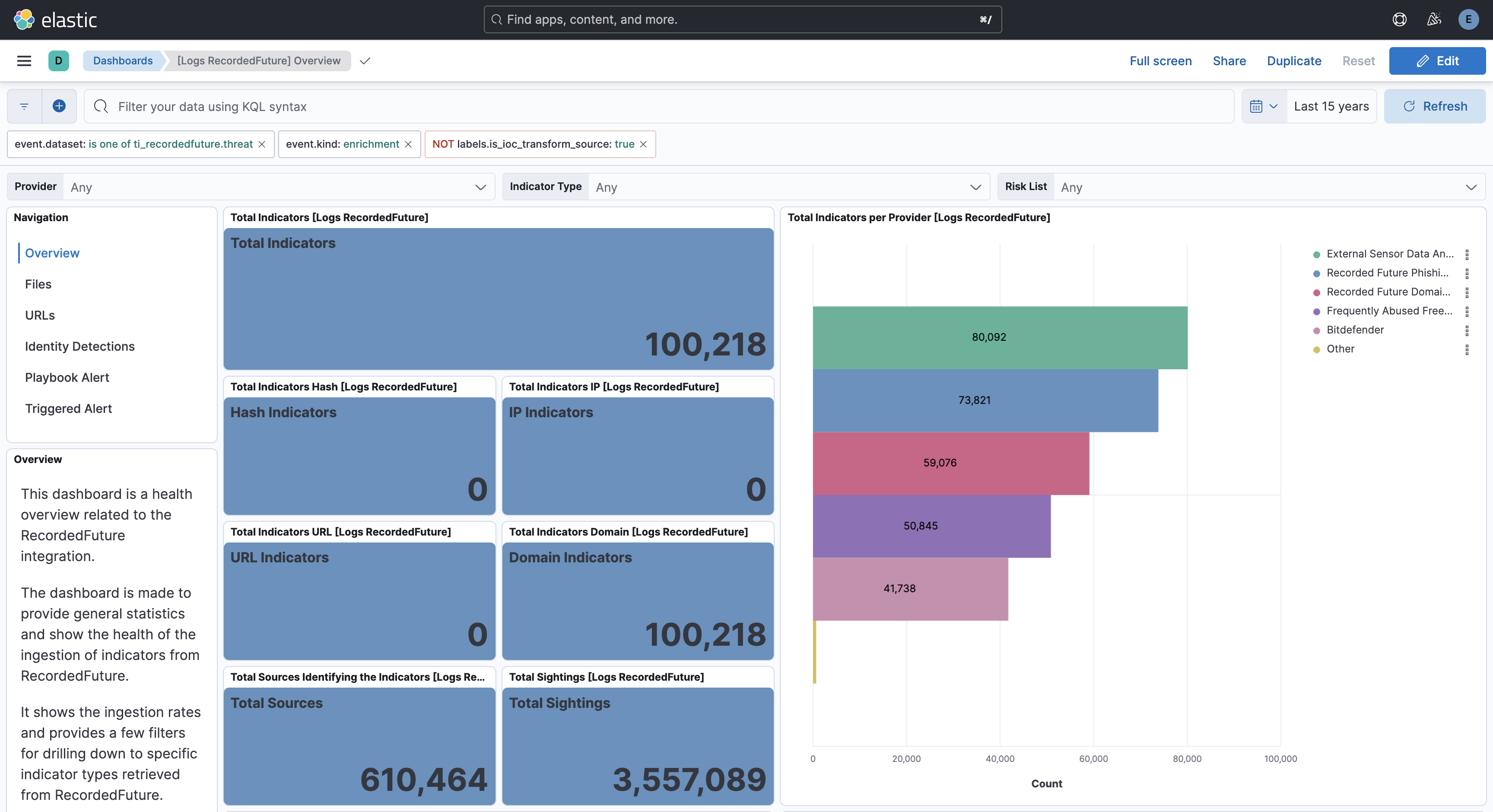
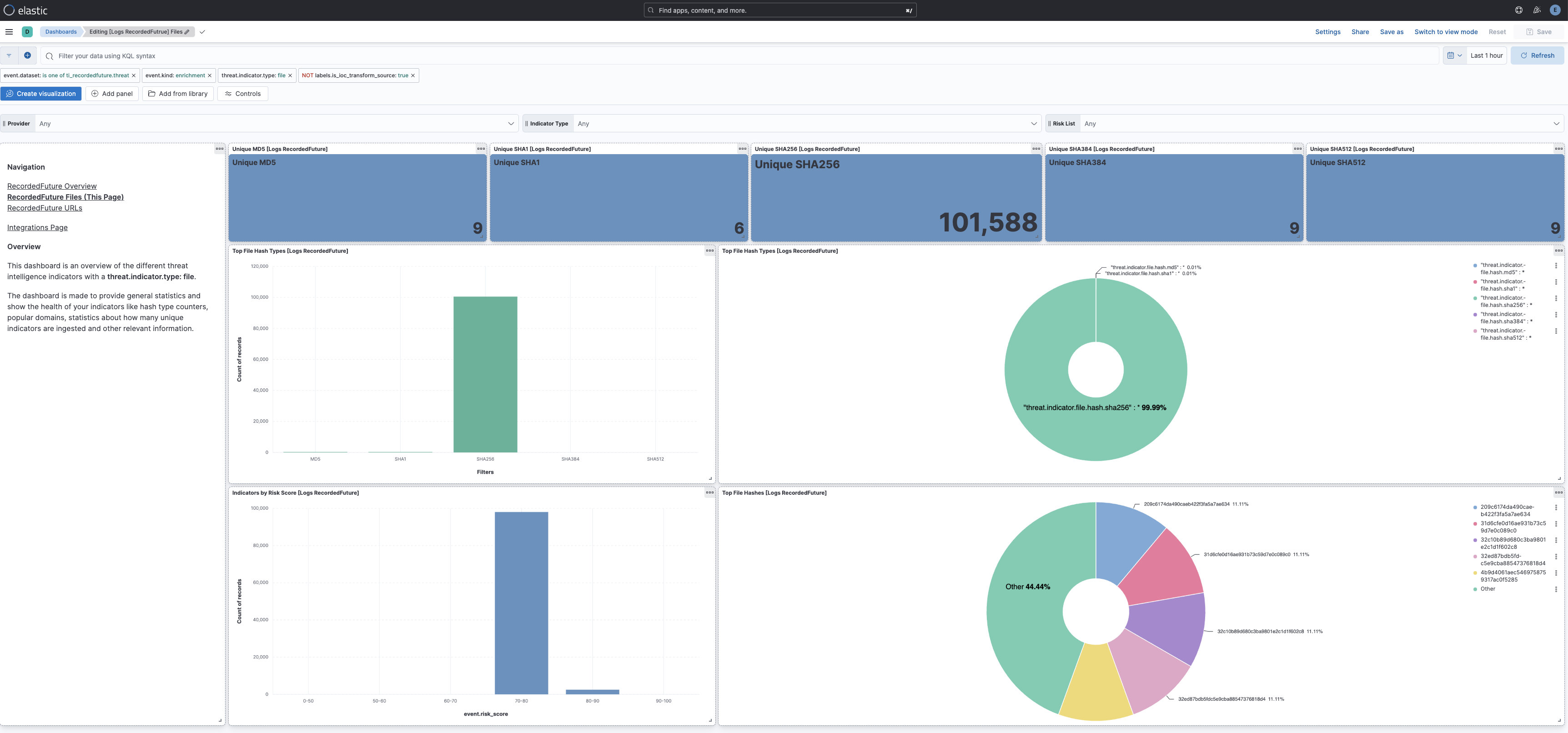
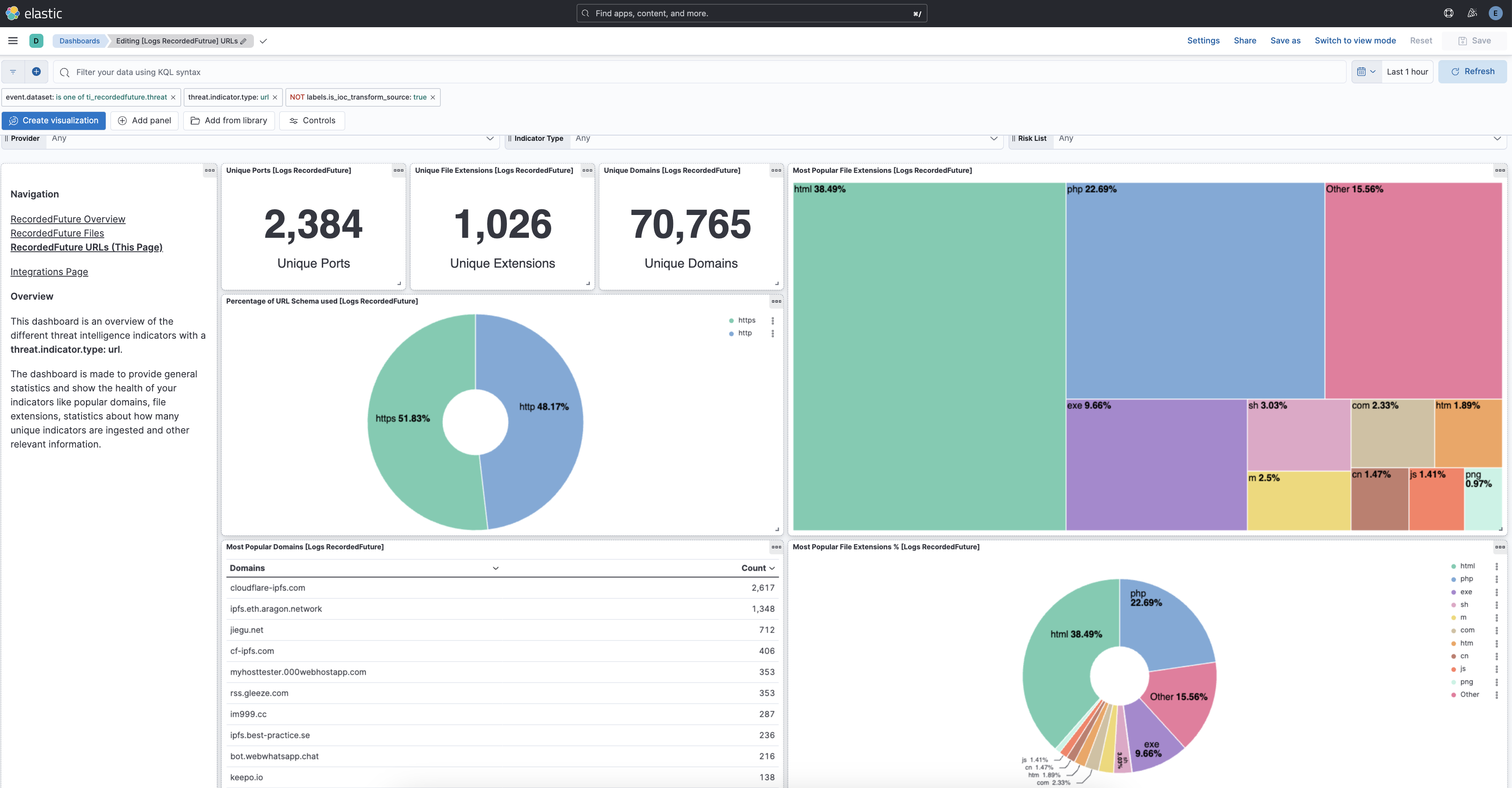
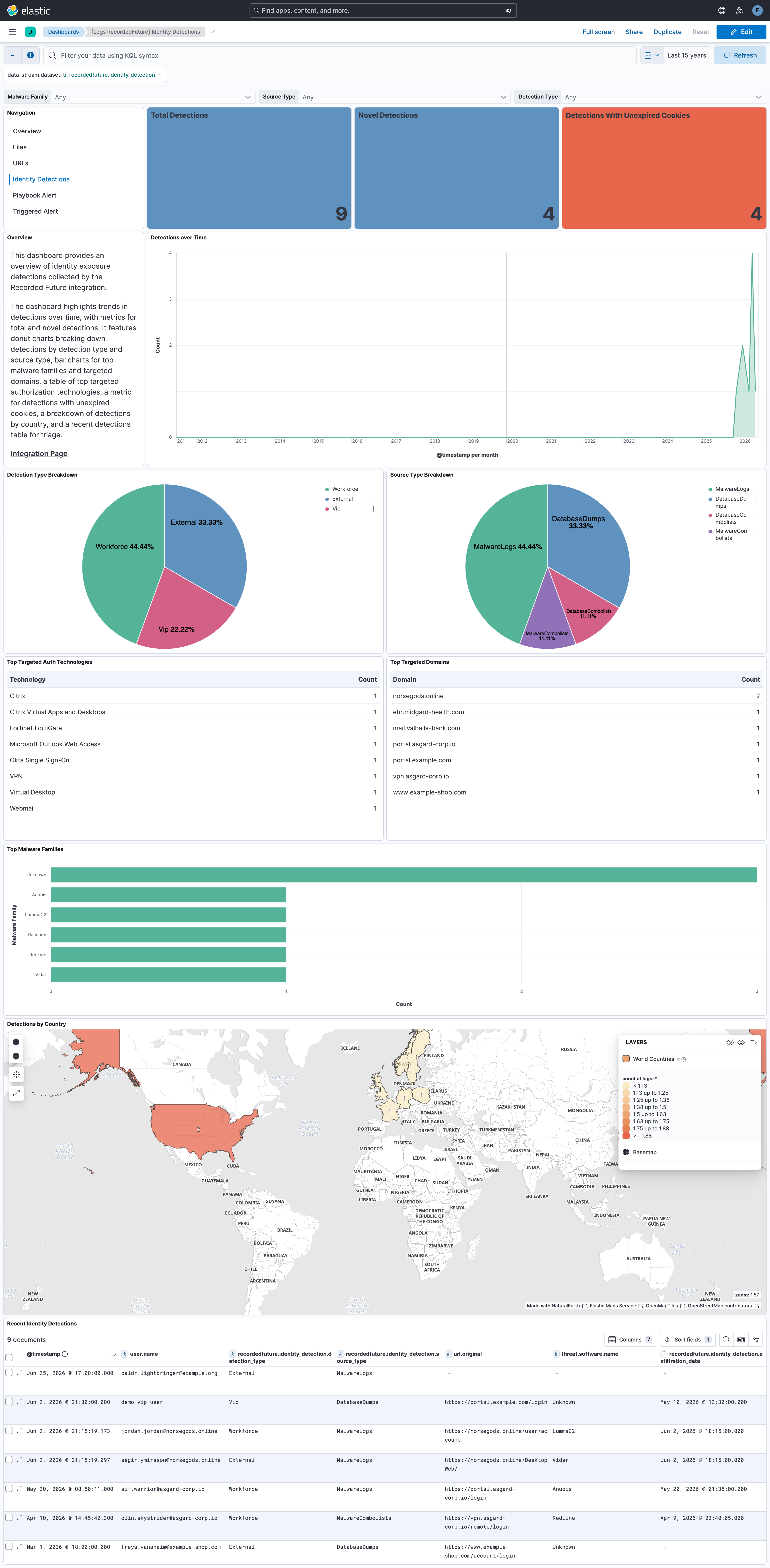
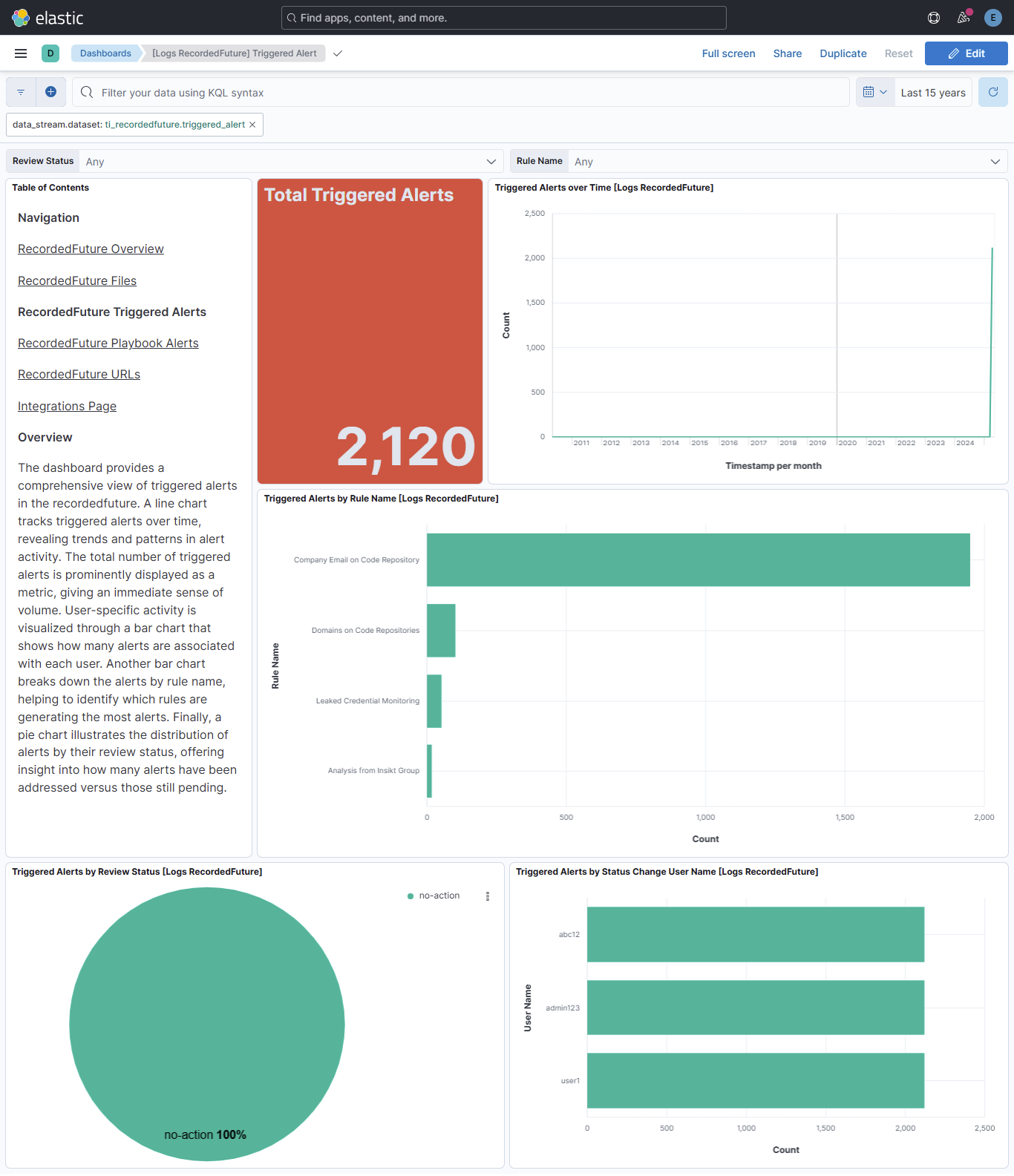
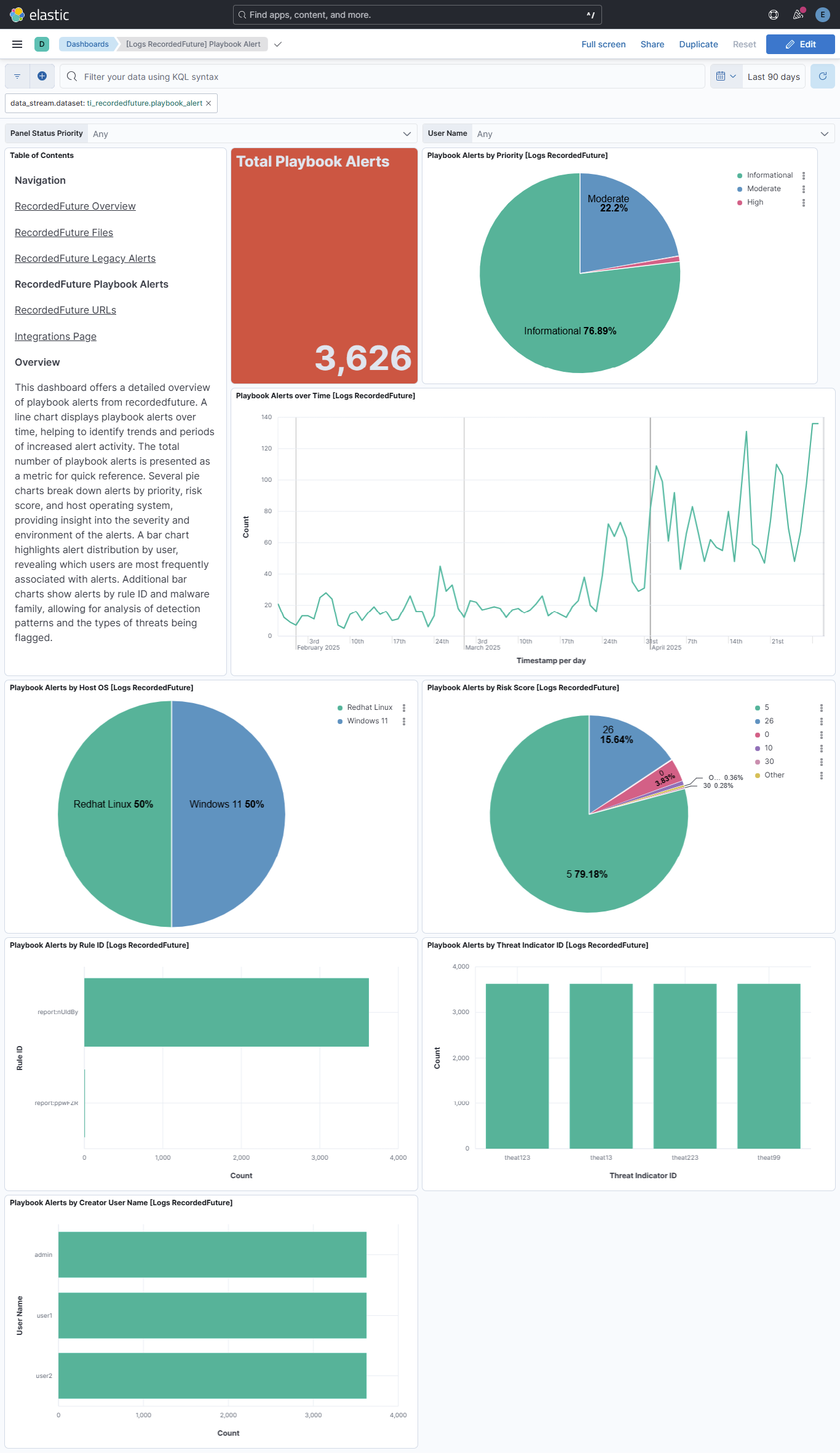
Changelog
| Version | Details | Minimum Kibana version |
|---|---|---|
| 2.11.1 | Bug fix (View pull request) Statically map event.ingested in transform destination indices so detection rules using it as the timestamp override do not report empty destination indices as missing the field. |
9.1.0 8.19.0 |
| 2.11.0 | Enhancement (View pull request) Document the retention applied to source data streams on stateful and Serverless deployments, and how to change it. |
9.1.0 8.19.0 |
| 2.10.2 | Bug fix (View pull request) Fix cannot access method/field [contains] from a null def reference pipeline error in the threat data stream when a custom Fusion file does not use the risklist Name column.Bug fix (View pull request) Support Recorded Future public VPN/proxy Fusion lists ( ip/risk_score/service columns) in the threat data stream, and fail with an actionable error for other unsupported Fusion file schemas. |
9.1.0 8.19.0 |
| 2.10.1 | Enhancement (View pull request) Link the latest IOC transform's agent fields to the threat data stream. The files differed only in whitespace. |
9.1.0 8.19.0 |
| 2.10.0 | Enhancement (View pull request) Remove redundant ECS field definitions and the catch-all dynamic template from the transforms, relying on the ecs@mappings component template. |
9.1.0 8.19.0 |
| 2.9.0 | Enhancement (View pull request) Add support for code repo leakage event in playbook alert data stream. Bug fix (View pull request) Fix event.severity mapping for Moderate priority across playbook alert categories. |
9.0.0 8.18.0 |
| 2.8.0 | Enhancement (View pull request) Add tags to ingest pipeline processors and add preserve_original_event to pipeline-level on_failure handlers. |
9.0.0 8.18.0 |
| 2.7.3 | Enhancement (View pull request) Set agentless deployment mode release field to ga. |
9.0.0 8.18.0 |
| 2.7.2 | Bug fix (View pull request) Drop the redundant [Logs RecordedFuture] suffix from dashboard panel titles.Bug fix (View pull request) Fix mismatched, duplicate, or misleading embedded visualization titles across dashboards. Bug fix (View pull request) Label the file-hash-type filters on the Files dashboard's donut chart. |
9.0.0 8.18.0 |
| 2.7.1 | Bug fix (View pull request) Fix Kibana dashboards that still referenced AbuseCH in embedded visualization titles and a stale abuse.ch data view reference, left over from when the integration was derived from the abuse.ch integration. |
9.0.0 8.18.0 |
| 2.7.0 | Enhancement (View pull request) Add identity_detection data stream to collect identity exposure detections from the Recorded Future Identity Detections API. |
9.0.0 8.18.0 |
| 2.6.1 | Bug fix (View pull request) Fix transform destination to use keyword for data_stream.namespace, allowing multi-namespace deployments. |
9.0.0 8.18.0 |
| 2.6.0 | Enhancement (View pull request) Use new release field for agentless deployment mode to establish as beta. |
9.0.0 8.18.0 |
| 2.5.2 | Bug fix (View pull request) Change page_size/batch_size variable type from text to integer for Fleet input validation. |
9.0.0 8.18.0 |
| 2.5.1 | Bug fix (View pull request) Fix triggered_alert cursor not advancing due to incorrect query parameter format for the Recorded Future v3 alerts API. |
9.0.0 8.18.0 |
| 2.5.0 | Enhancement (View pull request) Use num_failure_retries instead of unattended mode for transform failure recovery. |
9.0.0 8.18.0 |
| 2.4.2 | Bug fix (View pull request) Fix primary_entity and rule.use_case_deprecation mapping for the triggered alerts data stream by adding primary_entity.id, primary_entity.name, primary_entity.type and rule.use_case_deprecation.description fields. |
9.0.0 8.18.0 |
| 2.4.1 | Bug fix (View pull request) Remove duplicate security-solution-default tag references |
9.0.0 8.18.0 |
| 2.4.0 | Enhancement (View pull request) Allow transforms to run in unattended mode. |
9.0.0 8.18.0 |
| 2.3.1 | Bug fix (View pull request) Downgrade the format_version to the minimum version that supports all the necessary features for the package. |
9.0.0 8.18.0 |
| 2.3.0 | Enhancement (View pull request) Use terminate processor instead of fail processor to handle agent errors. |
9.0.0 8.18.0 |
| 2.2.0 | Enhancement (View pull request) Fingerprint triggered alert events to prevent duplicate document ingestion. |
9.0.0 8.18.0 |
| 2.1.0 | Enhancement (View pull request) Handle IP address entities that are CIDR blocks. |
9.0.0 8.18.0 |
| 2.0.2 | Bug fix (View pull request) Improve the README by fixing some grammatical issues. |
9.0.0 8.18.0 |
| 2.0.1 | Bug fix (View pull request) Add temporary processor to remove the fields added by the Agentless policy. |
9.0.0 8.18.0 |
| 2.0.0 | Enhancement (View pull request) Download threat intelligence in a compressed format, and only when new data is available. This update requires reactivation of the item "Collect Recorded Future data via API > Threat intelligence", and confirmation of its settings. |
9.0.0 8.18.0 |
| 1.30.0 | Enhancement (View pull request) Add support for Playbook and Triggered Alerts Data Stream. Enhancement (View pull request) Enable Agentless deployment. |
9.0.0 8.18.0 |
| 1.29.0 | Enhancement (View pull request) Update Kibana constraint to support 9.0.0. |
9.0.0 8.13.0 |
| 1.28.0 | Enhancement (View pull request) Do not remove event.original in main ingest pipeline. |
8.13.0 |
| 1.27.0 | Enhancement (View pull request) Add "preserve_original_event" tag to documents with event.kind set to "pipeline_error". |
8.13.0 |
| 1.26.3 | Bug fix (View pull request) Fix labels.is_ioc_transform_source values |
8.13.0 |
| 1.26.2 | Bug fix (View pull request) Add missing fields in transform |
8.13.0 |
| 1.26.1 | Bug fix (View pull request) Fix ECS date mapping on threat fields. |
8.13.0 |
| 1.26.0 | Enhancement (View pull request) Update the kibana constraint to ^8.13.0. Modified the field definitions to remove ECS fields made redundant by the ecs@mappings component template. |
8.13.0 |
| 1.25.1 | Bug fix (View pull request) Adjust field mappings for transform destination index. |
8.12.0 |
| 1.25.0 | Enhancement (View pull request) Decode Evidence_Details field. This is a breaking change since the mapping is changed. |
8.12.0 |
| 1.24.0 | Enhancement (View pull request) Add destination index alias and fix docs. |
8.12.0 |
| 1.23.0 | Enhancement (View pull request) Add dashboards and list field |
8.12.0 |
| 1.22.0 | Enhancement (View pull request) Set sensitive values as secret. |
8.12.0 |
| 1.21.0 | Enhancement (View pull request) Make threat.indicator.url.full available for rule detections. |
8.8.0 |
| 1.20.2 | Enhancement (View pull request) Changed owners |
8.8.0 |
| 1.20.1 | Bug fix (View pull request) Fix exclude_files pattern. |
8.8.0 |
| 1.20.0 | Enhancement (View pull request) Limit request tracer log count to five. |
8.8.0 |
| 1.19.0 | Enhancement (View pull request) ECS version updated to 8.11.0. |
8.8.0 |
| 1.18.1 | Bug fix (View pull request) Fix the parse of providers information. |
8.8.0 |
| 1.18.0 | Enhancement (View pull request) Improve 'event.original' check to avoid errors if set. |
8.8.0 |
| 1.17.0 | Enhancement (View pull request) ECS version updated to 8.10.0. |
8.8.0 |
| 1.16.0 | Enhancement (View pull request) Add DLM policy. Add owner.type to package manifest. Update format_version to 3.0.0 Enhancement (View pull request) Add tags.yml file so that integration's dashboards and saved searches are tagged with "Security Solution" and displayed in the Security Solution UI. |
8.8.0 |
| 1.15.1 | Bug fix (View pull request) Replace dotted YAML keys. |
— |
| 1.15.0 | Enhancement (View pull request) Update package-spec to 2.10.0. |
8.8.0 |
| 1.14.0 | Enhancement (View pull request) Update package to ECS 8.9.0. |
8.8.0 |
| 1.13.0 | Enhancement (View pull request) Document duration units. |
8.8.0 |
| 1.12.0 | Enhancement (View pull request) Ensure event.kind is correctly set for pipeline errors. |
8.8.0 |
| 1.11.0 | Enhancement (View pull request) Update package to ECS 8.8.0. |
8.8.0 |
| 1.10.0 | Enhancement (View pull request) Add IOC field to transform source to easily filter destination indices with unexpired indicators |
8.8.0 |
| 1.9.0 | Enhancement (View pull request) Support for IoC Expiration |
8.8.0 |
| 1.8.0 | Enhancement (View pull request) Add a new flag to enable request tracing |
8.7.1 |
| 1.7.0 | Enhancement (View pull request) Scrape provider details from evidence field. |
8.0.0 |
| 1.6.0 | Enhancement (View pull request) Update package to ECS 8.7.0. |
8.0.0 |
| 1.5.0 | Enhancement (View pull request) Update package to ECS 8.6.0. |
8.0.0 |
| 1.4.1 | Bug fix (View pull request) Use ECS definition for threat.indicator.geo.location. |
8.0.0 |
| 1.4.0 | Enhancement (View pull request) Update package to ECS 8.5.0. |
— |
| 1.3.0 | Enhancement (View pull request) Update package to ECS 8.4.0 |
8.0.0 |
| 1.2.1 | Bug fix (View pull request) Expose request timeout setting and increase it to 5m. Bug fix (View pull request) Do not fail on invalid URLs. |
8.0.0 |
| 1.2.0 | Enhancement (View pull request) Update categories to include threat_intel. |
8.0.0 |
| 1.1.0 | Enhancement (View pull request) Update package to ECS 8.3.0. |
8.0.0 |
| 1.0.1 | Enhancement (View pull request) update readme added link to recorded future API documentation |
8.0.0 |
| 1.0.0 | Enhancement (View pull request) Make GA |
8.0.0 |
| 0.1.3 | Enhancement (View pull request) Update package descriptions |
8.0.0 |
| 0.1.2 | Enhancement (View pull request) Add field mapping for event.created |
8.0.0 |
| 0.1.1 | Enhancement (View pull request) Add documentation for multi-fields |
8.0.0 |
| 0.1.0 | Enhancement (View pull request) Initial release |
8.0.0 |