Trellix ePO Cloud
| Version | 1.18.0 (View all) |
| Managed integration release status | GA |
| Subscription level What's this? |
Basic |
| Developed by What's this? |
Elastic |
| Ingestion method(s) | API |
| Minimum Kibana version(s) | 9.0.5 8.19.2 |
You can use this integration as an Elastic Managed integration on Elastic Cloud Hosted deployments running this version or later.
The Trellix ePO Cloud integration allows users to monitor devices, events and groups. Trellix ePolicy Orchestrator is centralized security management platform to orchestrate and manage all your endpoints.
Use the Trellix ePO integration to collect and parse data from ePO Cloud. This integration does not support on-premises installations of ePO. Then visualize that data from Trellix to identify threats through search, correlation and visualisation within Elastic Security.
Agentless integrations allow you to collect data without having to manage Elastic Agent in your cloud. They make manual agent deployment unnecessary, so you can focus on your data instead of the agent that collects it. For more information, refer to Agentless integrations and the Agentless integrations FAQ. Agentless deployments are only supported in Elastic Serverless and Elastic Cloud environments. This functionality is in beta and is subject to change. Beta features are not subject to the support SLA of official GA features.
The Trellix ePO Cloud integration collects three types of data: devices, events and groups.
Devices fetch all devices.
Events fetch all events.
Groups fetch all groups.
Reference for Rest APIs of Trellix ePO Cloud.
Elastic Agent must be installed. For more information, refer to the link here.
The minimum kibana.version required is 8.7.1.
This module has been tested against the Trellix ePO Cloud API Version v2.
Go to the Trellix Developer Portal and Login by entering an email address and password.
Go to Self Service → API Access Management.
Enter Client Type.
Select IAM Scopes as below:
APIs Method Types Devices GET Events GET Groups GET Click Request.
Copy Client ID, Client Secret and API Key.
Go to kibana and select integration -> Trellix ePO Cloud.
Click Add Trellix ePO Cloud.
Provide Client ID, Client Secret and API Key that we've copied from Trellix.
Note:
- The data retention period for events available via this API is 3 days.
This is the Device dataset.
Example
{
    "@timestamp": "2023-05-04T11:10:21.063Z",
    "agent": {
        "ephemeral_id": "4805b569-e5ef-4c14-a54b-ef2dfe988fa7",
        "id": "09aeef39-f21d-41e4-b3a6-c1551488d075",
        "name": "docker-fleet-agent",
        "type": "filebeat",
        "version": "8.7.1"
    },
    "data_stream": {
        "dataset": "trellix_epo_cloud.device",
        "namespace": "ep",
        "type": "logs"
    },
    "ecs": {
        "version": "8.11.0"
    },
    "elastic_agent": {
        "id": "09aeef39-f21d-41e4-b3a6-c1551488d075",
        "snapshot": true,
        "version": "8.7.1"
    },
    "event": {
        "agent_id_status": "verified",
        "category": [
            "host"
        ],
        "dataset": "trellix_epo_cloud.device",
        "ingested": "2023-05-04T11:10:25Z",
        "kind": "event",
        "original": "{\"attributes\":{\"agentGuid\":\"3AF594B1-00A0-AA00-87C6-005056833A00\",\"agentPlatform\":\"LINUX\",\"agentState\":0,\"agentVersion\":\"5.7.9.139\",\"computerName\":\"localhost\",\"cpuSpeed\":2100,\"cpuType\":\"Intel(R) Xeon(R) CPU E5-2620 v2 @ 2.10GHz\",\"domainName\":\"(none)\",\"excludedTags\":\"\",\"ipAddress\":\"1.128.0.0\",\"ipHostName\":\"localhost\",\"isPortable\":\"non-portable\",\"lastUpdate\":\"2023-04-17T07:38:35.563+00:00\",\"macAddress\":\"00005E005300\",\"managed\":\"1\",\"managedState\":1,\"name\":\"localhost\",\"nodeCreatedDate\":\"2023-03-29T12:06:05.877+00:00\",\"nodePath\":null,\"numOfCpu\":4,\"osBuildNumber\":0,\"osPlatform\":\"Server\",\"osType\":\"Linux\",\"osVersion\":\"3.10\",\"parentId\":123456,\"subnetAddress\":\"\",\"systemBootTime\":\"2023-03-24T16:54:27.000+00:00\",\"systemManufacturer\":\"VMware, Inc.\",\"systemModel\":\"VMware Virtual Platform\",\"systemRebootPending\":0,\"systemSerialNumber\":\"VMware-12 02 1a a1 1c 31 9c eb-0e a6 00 41 54 14 91 f5\",\"tags\":\"Deployment 2, Deployment, Server\",\"tenantId\":12345,\"totalPhysicalMemory\":12409634816,\"userName\":\"N/A\"},\"id\":\"123456\",\"links\":{\"self\":\"https://api.manage.trellix.com/epo/v2/devices/123456\"},\"relationships\":{\"installedProducts\":{\"links\":{\"related\":\"https://api.manage.trellix.com/epo/v2/devices/123456/installedProducts\",\"self\":\"https://api.manage.trellix.com/epo/v2/devices/123456/relationships/installedProducts\"}}},\"type\":\"devices\"}",
        "reference": "https://api.manage.trellix.com/epo/v2/devices/123456",
        "type": [
            "info"
        ]
    },
    "host": {
        "id": "123456",
        "ip": [
            "1.128.0.0"
        ],
        "mac": [
            "00-00-5E-00-53-00"
        ],
        "name": "localhost",
        "os": {
            "platform": "Server",
            "type": "linux",
            "version": "3.10"
        }
    },
    "input": {
        "type": "cel"
    },
    "observer": {
        "serial_number": "VMware-12 02 1a a1 1c 31 9c eb-0e a6 00 41 54 14 91 f5"
    },
    "related": {
        "hosts": [
            "123456",
            "localhost"
        ],
        "ip": [
            "1.128.0.0"
        ]
    },
    "tags": [
        "preserve_original_event",
        "preserve_duplicate_custom_fields",
        "forwarded",
        "trellix_epo_cloud-device"
    ],
    "trellix_epo_cloud": {
        "device": {
            "attributes": {
                "agent": {
                    "guid": "3AF594B1-00A0-AA00-87C6-005056833A00",
                    "platform": "LINUX",
                    "state": false,
                    "version": "5.7.9.139"
                },
                "computer_name": "localhost",
                "cpu": {
                    "speed": 2100,
                    "type": "Intel(R) Xeon(R) CPU E5-2620 v2 @ 2.10GHz"
                },
                "domain_name": "(none)",
                "ip_address": "1.128.0.0",
                "ip_host_name": "localhost",
                "is_portable": "non-portable",
                "last_update": "2023-04-17T07:38:35.563Z",
                "mac_address": "00-00-5E-00-53-00",
                "managed": "1",
                "managed_state": false,
                "name": "localhost",
                "node": {
                    "created_date": "2023-03-29T12:06:05.877Z"
                },
                "num_of_cpu": 4,
                "os": {
                    "build_number": 0,
                    "platform": "Server",
                    "type": "Linux",
                    "version": "3.10"
                },
                "parent": {
                    "id": "123456"
                },
                "system": {
                    "boot_time": "2023-03-24T16:54:27.000Z",
                    "manufacturer": "VMware, Inc.",
                    "model": "VMware Virtual Platform",
                    "reboot_pending": false,
                    "serial_number": "VMware-12 02 1a a1 1c 31 9c eb-0e a6 00 41 54 14 91 f5"
                },
                "tags": [
                    "Deployment 2",
                    "Deployment",
                    "Server"
                ],
                "tenant": {
                    "id": "12345"
                },
                "total_physical_memory": 12409634816,
                "user_name": "N/A"
            },
            "id": "123456",
            "links": {
                "self": "https://api.manage.trellix.com/epo/v2/devices/123456"
            },
            "relationships": {
                "installed_products": {
                    "links": {
                        "related": "https://api.manage.trellix.com/epo/v2/devices/123456/installedProducts",
                        "self": "https://api.manage.trellix.com/epo/v2/devices/123456/relationships/installedProducts"
                    }
                }
            }
        },
        "type": "devices"
    }
}
Exported fields
| Field | Description | Type |
|---|---|---|
| @timestamp | Event timestamp. | date |
| data_stream.dataset | Data stream dataset. | constant_keyword |
| data_stream.namespace | Data stream namespace. | constant_keyword |
| data_stream.type | Data stream type. | constant_keyword |
| event.dataset | Event dataset. | constant_keyword |
| event.module | Event module. | constant_keyword |
| input.type | Type of Filebeat input. | keyword |
| log.offset | Log offset. | long |
| trellix_epo_cloud.device.attributes.agent.guid | keyword | |
| trellix_epo_cloud.device.attributes.agent.platform | keyword | |
| trellix_epo_cloud.device.attributes.agent.state | boolean | |
| trellix_epo_cloud.device.attributes.agent.version | keyword | |
| trellix_epo_cloud.device.attributes.computer_name | keyword | |
| trellix_epo_cloud.device.attributes.cpu.speed | long | |
| trellix_epo_cloud.device.attributes.cpu.type | keyword | |
| trellix_epo_cloud.device.attributes.domain_name | keyword | |
| trellix_epo_cloud.device.attributes.excluded_tags | keyword | |
| trellix_epo_cloud.device.attributes.ip_address | ip | |
| trellix_epo_cloud.device.attributes.ip_host_name | keyword | |
| trellix_epo_cloud.device.attributes.is_portable | keyword | |
| trellix_epo_cloud.device.attributes.last_update | date | |
| trellix_epo_cloud.device.attributes.mac_address | keyword | |
| trellix_epo_cloud.device.attributes.managed | keyword | |
| trellix_epo_cloud.device.attributes.managed_state | boolean | |
| trellix_epo_cloud.device.attributes.name | keyword | |
| trellix_epo_cloud.device.attributes.node.created_date | date | |
| trellix_epo_cloud.device.attributes.node.path | keyword | |
| trellix_epo_cloud.device.attributes.num_of_cpu | long | |
| trellix_epo_cloud.device.attributes.os.build_number | long | |
| trellix_epo_cloud.device.attributes.os.platform | keyword | |
| trellix_epo_cloud.device.attributes.os.type | keyword | |
| trellix_epo_cloud.device.attributes.os.version | keyword | |
| trellix_epo_cloud.device.attributes.parent.id | keyword | |
| trellix_epo_cloud.device.attributes.subnet_address | keyword | |
| trellix_epo_cloud.device.attributes.system.boot_time | date | |
| trellix_epo_cloud.device.attributes.system.manufacturer | keyword | |
| trellix_epo_cloud.device.attributes.system.model | keyword | |
| trellix_epo_cloud.device.attributes.system.reboot_pending | boolean | |
| trellix_epo_cloud.device.attributes.system.serial_number | keyword | |
| trellix_epo_cloud.device.attributes.tags | keyword | |
| trellix_epo_cloud.device.attributes.tenant.id | keyword | |
| trellix_epo_cloud.device.attributes.total_physical_memory | long | |
| trellix_epo_cloud.device.attributes.user_name | keyword | |
| trellix_epo_cloud.device.id | keyword | |
| trellix_epo_cloud.device.links.self | keyword | |
| trellix_epo_cloud.device.relationships.devices.data.id | keyword | |
| trellix_epo_cloud.device.relationships.devices.data.type | keyword | |
| trellix_epo_cloud.device.relationships.devices.links.related | keyword | |
| trellix_epo_cloud.device.relationships.devices.links.self | keyword | |
| trellix_epo_cloud.device.relationships.installed_products.links.related | keyword | |
| trellix_epo_cloud.device.relationships.installed_products.links.self | keyword | |
| trellix_epo_cloud.type | keyword |
This is the Event dataset.
Example
{
    "@timestamp": "2023-04-06T23:36:14.041Z",
    "agent": {
        "ephemeral_id": "7dd32c2b-4f80-4ff8-9dd6-873cbbf02295",
        "id": "09aeef39-f21d-41e4-b3a6-c1551488d075",
        "name": "docker-fleet-agent",
        "type": "filebeat",
        "version": "8.7.1"
    },
    "data_stream": {
        "dataset": "trellix_epo_cloud.event",
        "namespace": "ep",
        "type": "logs"
    },
    "destination": {
        "ip": [
            "89.160.20.115",
            "2a02:cf40::3"
        ],
        "mac": "00-00-5E-00-53-00",
        "user": {
            "name": "root"
        }
    },
    "ecs": {
        "version": "8.11.0"
    },
    "elastic_agent": {
        "id": "09aeef39-f21d-41e4-b3a6-c1551488d075",
        "snapshot": true,
        "version": "8.7.1"
    },
    "event": {
        "agent_id_status": "verified",
        "category": [
            "threat"
        ],
        "dataset": "trellix_epo_cloud.event",
        "id": "0102be3a-41db-448c-9a68-bce7c480d443",
        "ingested": "2023-05-04T11:11:36Z",
        "kind": "alert",
        "original": "{\"attributes\":{\"agentguid\":\"8630b925-cbd2-ed11-1234-abcdefghijklmn\",\"analyzer\":\"ENDP_AM_1070LYNX\",\"analyzerdatversion\":\"5298.0\",\"analyzerdetectionmethod\":\"quick scan\",\"analyzerengineversion\":\"6600.9927\",\"analyzerhostname\":\"ub20\",\"analyzeripv4\":\"81.2.69.142\",\"analyzeripv6\":\"/2a02:cf40::1\",\"analyzermac\":\"00005E005300\",\"analyzername\":\"Trellix Endpoint Security\",\"analyzerversion\":\"10.7.14.38\",\"autoguid\":\"9fcf439b-82d7-425c-1234-abcdefghijklmn\",\"detectedutc\":\"1680823939000\",\"nodepath\":\"1\\\\854691\\\\901751\",\"receivedutc\":\"1680824174041\",\"sourcefilepath\":null,\"sourcehostname\":null,\"sourceipv4\":\"89.160.20.112\",\"sourceipv6\":\"/2a02:cf40::2\",\"sourcemac\":\"00005E005300\",\"sourceprocesshash\":null,\"sourceprocessname\":null,\"sourceprocesssigned\":null,\"sourceprocesssigner\":null,\"sourceurl\":\"https://example.com\",\"sourceusername\":null,\"targetfilename\":\"/var/log/secure\",\"targethash\":null,\"targethostname\":null,\"targetipv4\":\"89.160.20.115\",\"targetipv6\":\"/2a02:cf40::3\",\"targetmac\":\"00005E005300\",\"targetport\":null,\"targetprocessname\":\"/usr/sbin/logrotate\",\"targetprotocol\":null,\"targetusername\":\"root\",\"threatactiontaken\":\"IDS_ALERT_ACT_TAK_DEN\",\"threatcategory\":\"ops.update.end\",\"threateventid\":1119,\"threathandled\":true,\"threatname\":\"None\",\"threatseverity\":\"6\",\"threattype\":\"IDS_ALERT_DET_TYP_NOT\",\"timestamp\":\"2023-04-06T23:36:14.041Z\"},\"id\":\"0102be3a-41db-448c-9a68-bce7c480d443\",\"links\":{\"self\":\"/epo/v2/events/0102be3a-41db-448c-9a68-bce7c480d443\"},\"type\":\"MVEvents\"}",
        "reference": "/epo/v2/events/0102be3a-41db-448c-9a68-bce7c480d443",
        "severity": 6,
        "type": [
            "indicator"
        ]
    },
    "file": {
        "name": "/var/log/secure"
    },
    "input": {
        "type": "cel"
    },
    "related": {
        "hosts": [
            "https://example.com",
            "ub20"
        ],
        "ip": [
            "89.160.20.115",
            "2a02:cf40::3",
            "89.160.20.112",
            "2a02:cf40::2",
            "81.2.69.142",
            "2a02:cf40::1"
        ],
        "user": [
            "root"
        ]
    },
    "source": {
        "address": "https://example.com",
        "domain": "https://example.com",
        "ip": [
            "89.160.20.112",
            "2a02:cf40::2"
        ],
        "mac": "00-00-5E-00-53-00",
        "registered_domain": "https://example.com",
        "top_level_domain": "com"
    },
    "tags": [
        "preserve_original_event",
        "preserve_duplicate_custom_fields",
        "forwarded",
        "trellix_epo_cloud-event"
    ],
    "threat": {
        "indicator": {
            "description": "IDS_ALERT_ACT_TAK_DEN"
        }
    },
    "trellix_epo_cloud": {
        "event": {
            "attributes": {
                "agent": {
                    "guid": "8630b925-cbd2-ed11-1234-abcdefghijklmn"
                },
                "analyzer": {
                    "dat_version": "5298.0",
                    "detection_method": "quick scan",
                    "engine_version": "6600.9927",
                    "hostname": "ub20",
                    "ipv4": "81.2.69.142",
                    "ipv6": "2a02:cf40::1",
                    "mac": "00-00-5E-00-53-00",
                    "name": "Trellix Endpoint Security",
                    "value": "ENDP_AM_1070LYNX",
                    "version": "10.7.14.38"
                },
                "auto_guid": "9fcf439b-82d7-425c-1234-abcdefghijklmn",
                "detected_utc": "2023-04-06T23:32:19.000Z",
                "node": {
                    "path": "1\\854691\\901751"
                },
                "received_utc": "2023-04-06T23:36:14.041Z",
                "source": {
                    "ipv4": "89.160.20.112",
                    "ipv6": "2a02:cf40::2",
                    "mac": "00-00-5E-00-53-00",
                    "url": "https://example.com"
                },
                "target": {
                    "file_name": "/var/log/secure",
                    "ipv4": "89.160.20.115",
                    "ipv6": "2a02:cf40::3",
                    "mac": "00-00-5E-00-53-00",
                    "process_name": "/usr/sbin/logrotate",
                    "user_name": "root"
                },
                "threat": {
                    "action_taken": "IDS_ALERT_ACT_TAK_DEN",
                    "category": "ops.update.end",
                    "event": {
                        "id": "1119"
                    },
                    "handled": true,
                    "name": "None",
                    "severity": 6,
                    "type": "IDS_ALERT_DET_TYP_NOT"
                },
                "timestamp": "2023-04-06T23:36:14.041Z"
            },
            "id": "0102be3a-41db-448c-9a68-bce7c480d443",
            "links": {
                "self": "/epo/v2/events/0102be3a-41db-448c-9a68-bce7c480d443"
            }
        },
        "type": "MVEvents"
    }
}
Exported fields
| Field | Description | Type |
|---|---|---|
| @timestamp | Event timestamp. | date |
| data_stream.dataset | Data stream dataset. | constant_keyword |
| data_stream.namespace | Data stream namespace. | constant_keyword |
| data_stream.type | Data stream type. | constant_keyword |
| event.dataset | Event dataset. | constant_keyword |
| event.module | Event module. | constant_keyword |
| input.type | Type of Filebeat input. | keyword |
| log.offset | Log offset. | long |
| trellix_epo_cloud.event.attributes.agent.guid | keyword | |
| trellix_epo_cloud.event.attributes.analyzer.dat_version | keyword | |
| trellix_epo_cloud.event.attributes.analyzer.detection_method | keyword | |
| trellix_epo_cloud.event.attributes.analyzer.domain | keyword | |
| trellix_epo_cloud.event.attributes.analyzer.engine_version | keyword | |
| trellix_epo_cloud.event.attributes.analyzer.hostname | keyword | |
| trellix_epo_cloud.event.attributes.analyzer.ipv4 | ip | |
| trellix_epo_cloud.event.attributes.analyzer.ipv6 | ip | |
| trellix_epo_cloud.event.attributes.analyzer.mac | keyword | |
| trellix_epo_cloud.event.attributes.analyzer.name | keyword | |
| trellix_epo_cloud.event.attributes.analyzer.registered_domain | keyword | |
| trellix_epo_cloud.event.attributes.analyzer.subdomain | keyword | |
| trellix_epo_cloud.event.attributes.analyzer.top_level_domain | keyword | |
| trellix_epo_cloud.event.attributes.analyzer.value | keyword | |
| trellix_epo_cloud.event.attributes.analyzer.version | keyword | |
| trellix_epo_cloud.event.attributes.auto_guid | keyword | |
| trellix_epo_cloud.event.attributes.detected_utc | date | |
| trellix_epo_cloud.event.attributes.node.path | keyword | |
| trellix_epo_cloud.event.attributes.received_utc | date | |
| trellix_epo_cloud.event.attributes.source.file_path | keyword | |
| trellix_epo_cloud.event.attributes.source.hostname | keyword | |
| trellix_epo_cloud.event.attributes.source.ipv4 | ip | |
| trellix_epo_cloud.event.attributes.source.ipv6 | ip | |
| trellix_epo_cloud.event.attributes.source.mac | keyword | |
| trellix_epo_cloud.event.attributes.source.process.hash | keyword | |
| trellix_epo_cloud.event.attributes.source.process.name | keyword | |
| trellix_epo_cloud.event.attributes.source.process.signed | keyword | |
| trellix_epo_cloud.event.attributes.source.process.signer | keyword | |
| trellix_epo_cloud.event.attributes.source.url | keyword | |
| trellix_epo_cloud.event.attributes.source.user_name | keyword | |
| trellix_epo_cloud.event.attributes.target.file_name | keyword | |
| trellix_epo_cloud.event.attributes.target.hash | keyword | |
| trellix_epo_cloud.event.attributes.target.hostname | keyword | |
| trellix_epo_cloud.event.attributes.target.ipv4 | ip | |
| trellix_epo_cloud.event.attributes.target.ipv6 | ip | |
| trellix_epo_cloud.event.attributes.target.mac | keyword | |
| trellix_epo_cloud.event.attributes.target.port | long | |
| trellix_epo_cloud.event.attributes.target.process_name | keyword | |
| trellix_epo_cloud.event.attributes.target.protocol | keyword | |
| trellix_epo_cloud.event.attributes.target.user_name | keyword | |
| trellix_epo_cloud.event.attributes.threat.action_taken | keyword | |
| trellix_epo_cloud.event.attributes.threat.category | keyword | |
| trellix_epo_cloud.event.attributes.threat.event.id | keyword | |
| trellix_epo_cloud.event.attributes.threat.handled | boolean | |
| trellix_epo_cloud.event.attributes.threat.name | keyword | |
| trellix_epo_cloud.event.attributes.threat.severity | long | |
| trellix_epo_cloud.event.attributes.threat.type | keyword | |
| trellix_epo_cloud.event.attributes.timestamp | date | |
| trellix_epo_cloud.event.id | keyword | |
| trellix_epo_cloud.event.links.self | keyword | |
| trellix_epo_cloud.type | keyword |
This is the Group dataset.
Example
{
    "@timestamp": "2023-05-04T11:12:41.040Z",
    "agent": {
        "ephemeral_id": "5b5537a7-dc4b-40b1-b9a2-c7d322502909",
        "id": "09aeef39-f21d-41e4-b3a6-c1551488d075",
        "name": "docker-fleet-agent",
        "type": "filebeat",
        "version": "8.7.1"
    },
    "data_stream": {
        "dataset": "trellix_epo_cloud.group",
        "namespace": "ep",
        "type": "logs"
    },
    "ecs": {
        "version": "8.11.0"
    },
    "elastic_agent": {
        "id": "09aeef39-f21d-41e4-b3a6-c1551488d075",
        "snapshot": true,
        "version": "8.7.1"
    },
    "event": {
        "agent_id_status": "verified",
        "category": [
            "iam"
        ],
        "dataset": "trellix_epo_cloud.group",
        "ingested": "2023-05-04T11:12:44Z",
        "kind": "event",
        "original": "{\"attributes\":{\"groupTypeId\":7,\"l1ParentId\":null,\"l2ParentId\":null,\"name\":\"GlobalRoot\",\"nodePath\":\"1\",\"nodeTextPath\":\"GlobalRoot\",\"nodeTextPath2\":\"\\\\\",\"notes\":null,\"parentId\":0},\"id\":\"1\",\"links\":{\"self\":\"https://api.manage.trellix.com/epo/v2/groups/1\"},\"relationships\":{\"subGroups\":{\"links\":{\"related\":\"https://api.manage.trellix.com/epo/v2/groups/1/subGroups\",\"self\":\"https://api.manage.trellix.com/epo/v2/groups/1/relationships/subGroups\"}}},\"type\":\"groups\"}",
        "reference": "https://api.manage.trellix.com/epo/v2/groups/1",
        "type": [
            "group"
        ]
    },
    "group": {
        "id": "1",
        "name": "GlobalRoot"
    },
    "input": {
        "type": "cel"
    },
    "tags": [
        "preserve_original_event",
        "preserve_duplicate_custom_fields",
        "forwarded",
        "trellix_epo_cloud-group"
    ],
    "trellix_epo_cloud": {
        "group": {
            "attributes": {
                "group_type": {
                    "id": "7"
                },
                "name": "GlobalRoot",
                "node": {
                    "path": "1",
                    "text_path": "GlobalRoot",
                    "text_path2": "\\"
                },
                "parent": {
                    "id": "0"
                }
            },
            "id": "1",
            "links": {
                "self": "https://api.manage.trellix.com/epo/v2/groups/1"
            },
            "relationships": {
                "sub_groups": {
                    "links": {
                        "related": "https://api.manage.trellix.com/epo/v2/groups/1/subGroups",
                        "self": "https://api.manage.trellix.com/epo/v2/groups/1/relationships/subGroups"
                    }
                }
            }
        },
        "type": "groups"
    }
}
Exported fields
| Field | Description | Type |
|---|---|---|
| @timestamp | Event timestamp. | date |
| data_stream.dataset | Data stream dataset. | constant_keyword |
| data_stream.namespace | Data stream namespace. | constant_keyword |
| data_stream.type | Data stream type. | constant_keyword |
| event.dataset | Event dataset. | constant_keyword |
| event.module | Event module. | constant_keyword |
| input.type | Type of Filebeat input. | keyword |
| log.offset | Log offset. | long |
| trellix_epo_cloud.group.attributes.group_type.id | keyword | |
| trellix_epo_cloud.group.attributes.l1_parent.id | keyword | |
| trellix_epo_cloud.group.attributes.l2_parent.id | keyword | |
| trellix_epo_cloud.group.attributes.name | keyword | |
| trellix_epo_cloud.group.attributes.node.path | keyword | |
| trellix_epo_cloud.group.attributes.node.text_path | keyword | |
| trellix_epo_cloud.group.attributes.node.text_path2 | keyword | |
| trellix_epo_cloud.group.attributes.notes | keyword | |
| trellix_epo_cloud.group.attributes.parent.id | keyword | |
| trellix_epo_cloud.group.id | keyword | |
| trellix_epo_cloud.group.links.self | keyword | |
| trellix_epo_cloud.group.relationships.groups.data.id | keyword | |
| trellix_epo_cloud.group.relationships.groups.data.type | keyword | |
| trellix_epo_cloud.group.relationships.groups.links.related | keyword | |
| trellix_epo_cloud.group.relationships.groups.links.self | keyword | |
| trellix_epo_cloud.group.relationships.sub_groups.links.related | keyword | |
| trellix_epo_cloud.group.relationships.sub_groups.links.self | keyword | |
| trellix_epo_cloud.type | keyword |
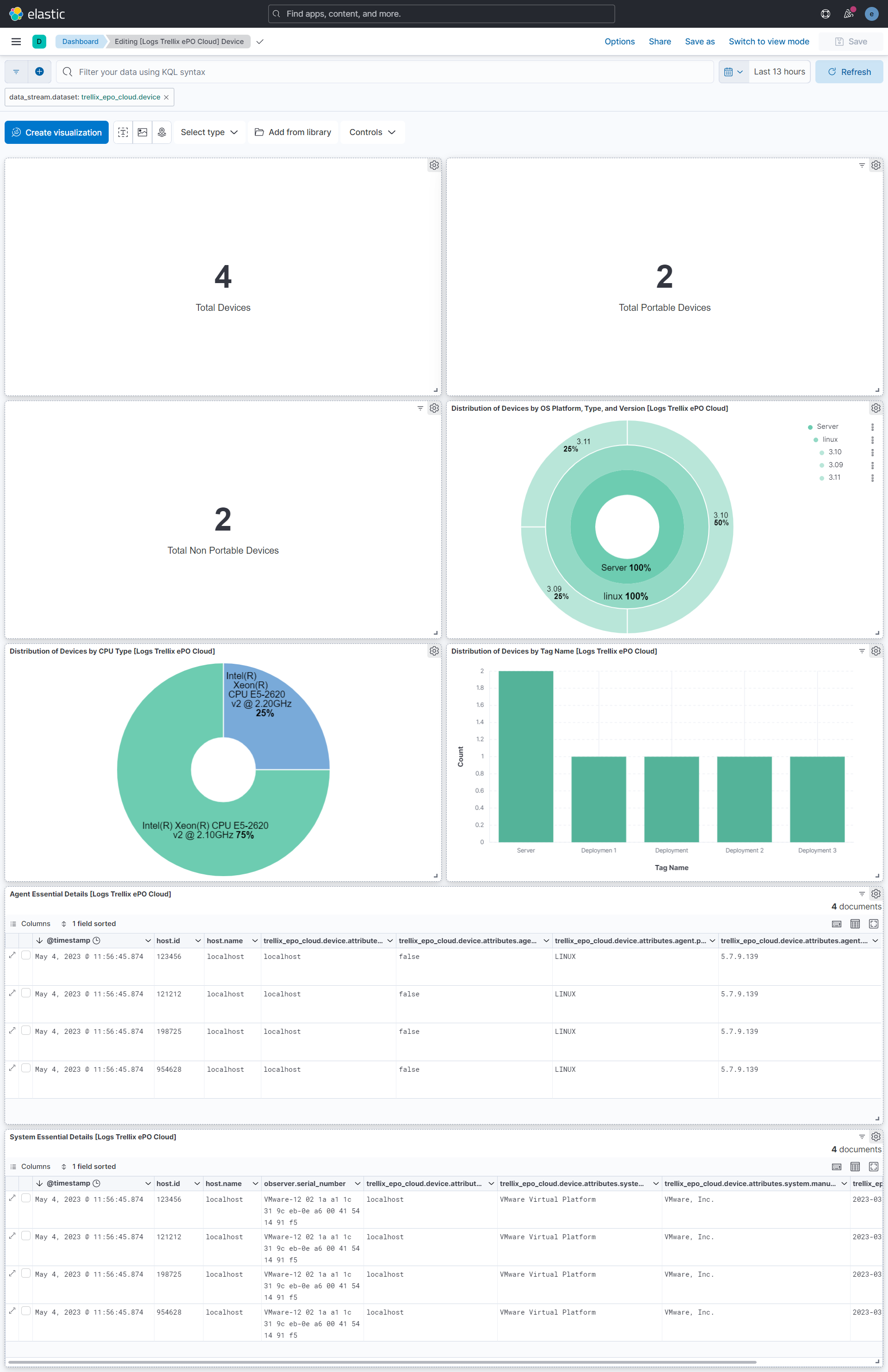
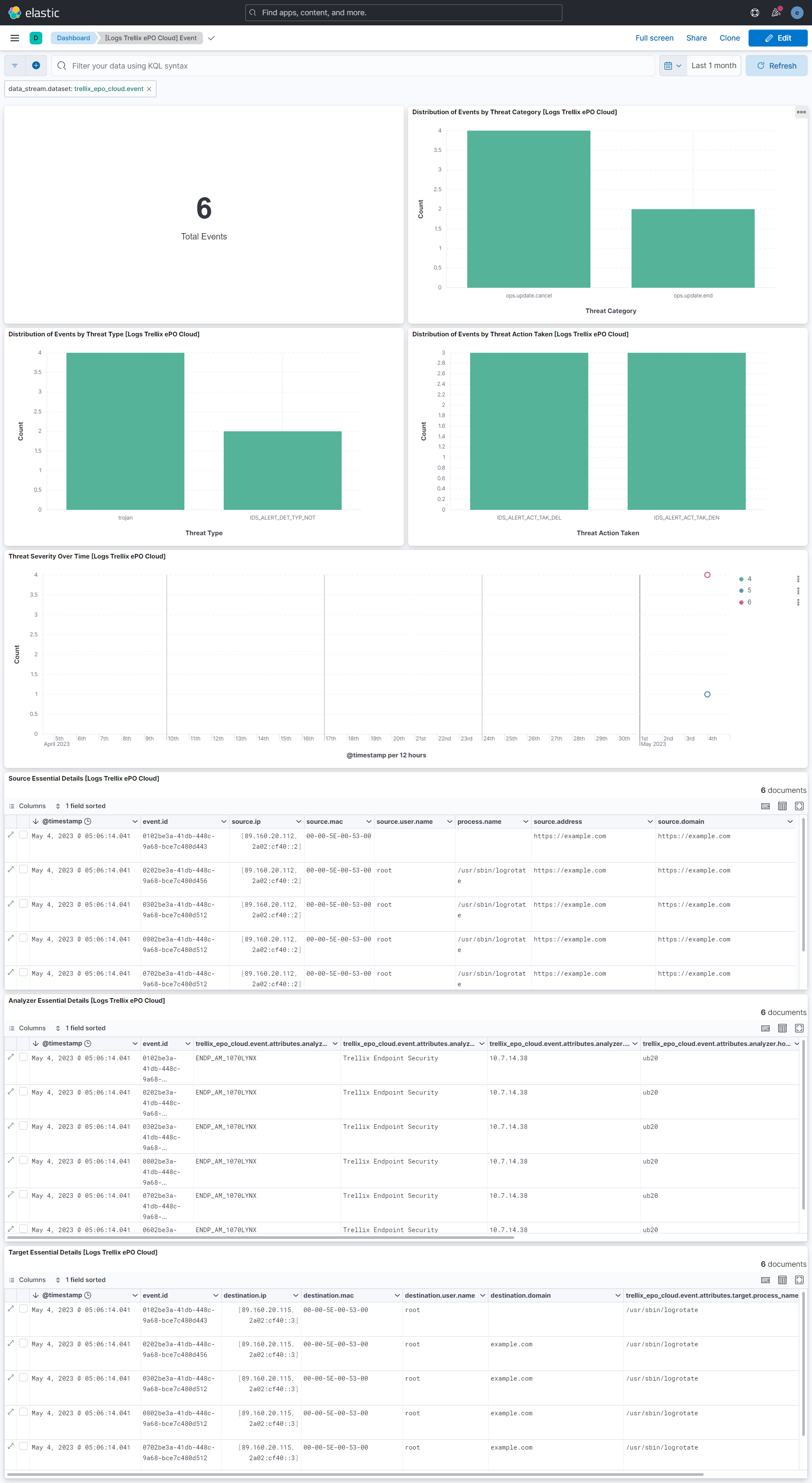
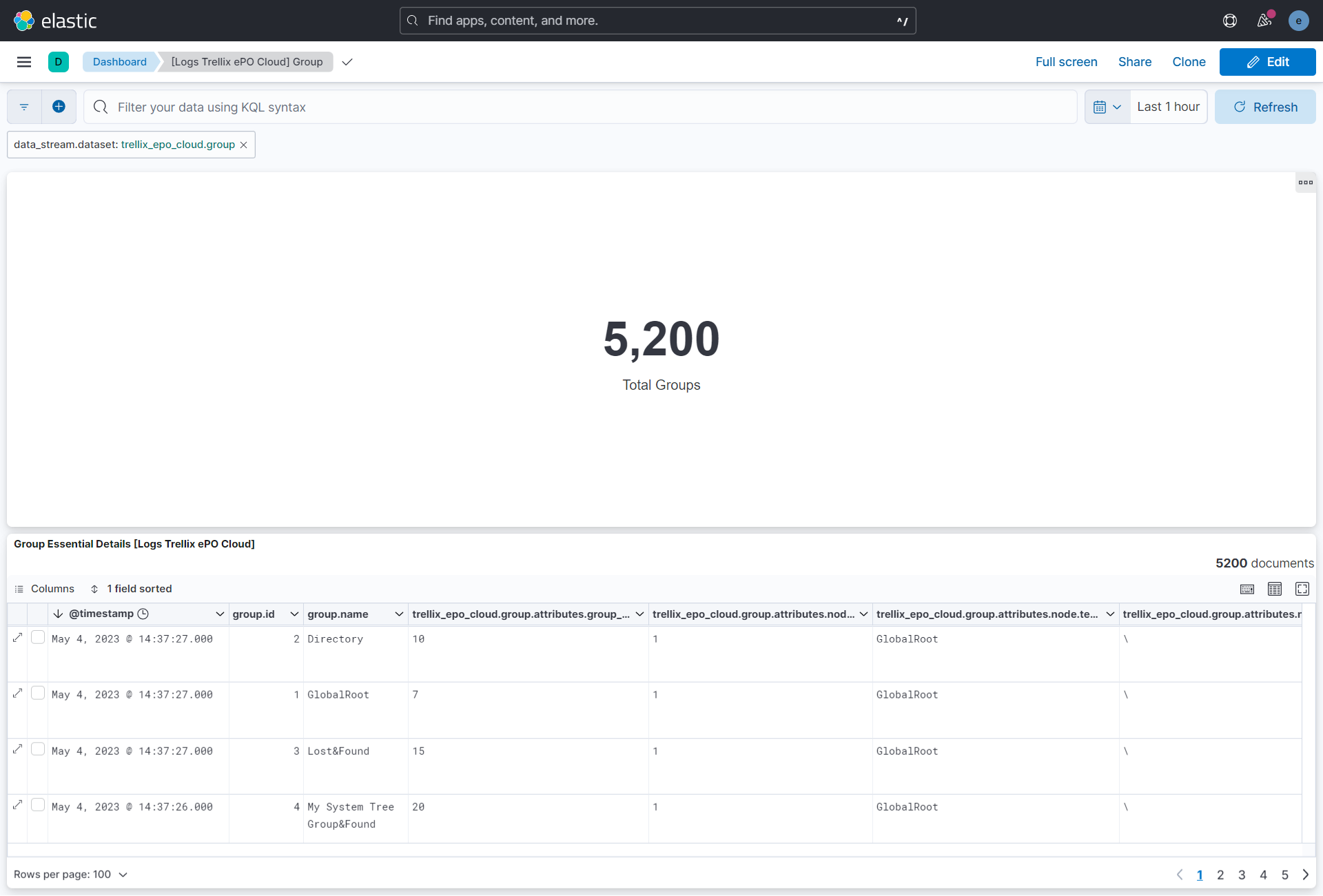
This integration includes one or more Kibana dashboards that visualizes the data collected by the integration. The screenshots below illustrate how the ingested data is displayed.
Changelog
| Version | Details | Minimum Kibana version |
|---|---|---|
| 1.18.0 | Enhancement (View pull request) Enable request trace log removal. |
9.0.5 8.19.2 |
| 1.17.0 | Enhancement (View pull request) Add tags to ingest pipeline processors and add preserve_original_event to pipeline-level on_failure handlers. |
9.0.5 8.19.2 |
| 1.16.1 | Enhancement (View pull request) Set agentless deployment mode release field to ga. |
9.0.5 8.19.2 |
| 1.16.0 | Enhancement (View pull request) Enable Agentless deployment. |
9.0.5 8.19.2 |
| 1.15.0 | Enhancement (View pull request) Update Kibana constraint to support 9.0.0. |
9.0.0 8.13.0 |
| 1.14.1 | Bug fix (View pull request) Updated SSL description in package manifest.yml to be uniform and to include links to documentation. |
8.13.0 |
| 1.14.0 | Enhancement (View pull request) Add "preserve_original_event" tag to documents with event.kind manually set to "pipeline_error". |
8.13.0 |
| 1.13.0 | Enhancement (View pull request) Do not remove event.original in main ingest pipeline. |
8.13.0 |
| 1.12.0 | Enhancement (View pull request) Add "preserve_original_event" tag to documents with event.kind set to "pipeline_error". |
8.13.0 |
| 1.11.0 | Enhancement (View pull request) Removed import_mappings. Update the kibana constraint to ^8.13.0. Modified the field definitions to remove ECS fields made redundant by the ecs@mappings component template. |
8.13.0 |
| 1.10.0 | Enhancement (View pull request) Set sensitive values as secret. |
8.12.0 |
| 1.9.1 | Enhancement (View pull request) Changed owners |
8.7.1 |
| 1.9.0 | Enhancement (View pull request) Limit request tracer log count to five. |
8.7.1 |
| 1.8.0 | Enhancement (View pull request) ECS version updated to 8.11.0. |
8.7.1 |
| 1.7.0 | Enhancement (View pull request) Improve 'event.original' check to avoid errors if set. |
8.7.1 |
| 1.6.0 | Enhancement (View pull request) ECS version updated to 8.10.0. |
8.7.1 |
| 1.5.0 | Enhancement (View pull request) The format_version in the package manifest changed from 2.11.0 to 3.0.0. Removed dotted YAML keys from package manifest. Added 'owner.type: elastic' to package manifest. |
8.7.1 |
| 1.4.0 | Enhancement (View pull request) Add tags.yml file so that integration's dashboards and saved searches are tagged with "Security Solution" and displayed in the Security Solution UI. |
8.7.1 |
| 1.3.0 | Enhancement (View pull request) Add support for HTTP request trace logs. |
8.7.1 |
| 1.2.0 | Enhancement (View pull request) Update package to ECS 8.9.0. |
8.7.1 |
| 1.1.0 | Enhancement (View pull request) Document duration units. |
8.7.1 |
| 1.0.2 | Bug fix (View pull request) Remove confusing error message tag prefix. |
8.7.1 |
| 1.0.1 | Bug fix (View pull request) Work around CEL now static global behaviour. |
8.7.1 |
| 1.0.0 | Enhancement (View pull request) Release Trellix ePO Cloud as GA. |
8.7.1 |
| 0.2.0 | Enhancement (View pull request) Update package to ECS 8.8.0. |
8.7.1 |
| 0.1.1 | Bug fix (View pull request) Ensure API key does not leak into debug logs. |
8.7.1 |
| 0.1.0 | Enhancement (View pull request) Initial release. |
8.7.1 |