JumpCloud
| Version | 1.24.0 (View all) |
| Managed integration release status | GA |
| Subscription level What's this? |
Basic |
| Developed by What's this? |
Elastic |
| Ingestion method(s) | API |
| Minimum Kibana version(s) | 9.0.5 8.19.2 |
You can use this integration as an Elastic Managed integration on Elastic Cloud Hosted deployments running this version or later.
The JumpCloud integration allows you to monitor events related to the JumpCloud Directory as a Service via the Directory Insights API.
You can find out more about JumpCloud and JumpCloud Directory Insights here
Agentless integrations allow you to collect data without having to manage Elastic Agent in your cloud. They make manual agent deployment unnecessary, so you can focus on your data instead of the agent that collects it. For more information, refer to Agentless integrations and the Agentless integrations FAQ. Agentless deployments are only supported in Elastic Serverless and Elastic Cloud environments. This functionality is in beta and is subject to change. Beta features are not subject to the support SLA of official GA features.
A single data stream named "jumpcloud.events" is used by this integration.
An Elastic Stack with an Elastic Agent is a fundamental requirement.
An established JumpCloud tenancy with active users is the the other requirement. Basic Directory Insights API access is available to all subscription levels.
The lowest level of subscription currently has retention limits, with access to Directory Insights events for the last 15 days at most. Other subscriptions levels provide 90 days or longer historical event access.
A JumpCloud API key is required, the JumpCloud documentation describing how to create one is here
This JumpCloud Directory Insights API is documented here
Ensure you have created a JumpCloud admin API key that you have access to, refer to the link above which provides instructions how to create one.
- In Kibana go to Management > Integrations
- In "Search for integrations" search bar type JumpCloud
- Click on "JumpCloud" integration from the search results.
- Click on Add JumpCloud button to add the JumpCloud integration.
- Configure the integration as appropriate
- Assign the integration to a new Elastic Agent host, or an existing Elastic Agent host

The integration collects events from JumpCloud's Directory Insights API. You can control which event categories are collected using the services setting. The default value is all, which collects events from every service.
The supported service values are:
| Service | Description |
|---|---|
all |
Events from all services. |
access_management |
Access management activity. |
aigw |
AI gateway activity. |
alert |
Alert service events. |
asset_management |
Asset management activity. |
di_events |
Generic Directory Insights events. |
directory |
Admin Portal and User Portal activity, including admin changes and authentications. |
genai |
Generative AI activity. |
ldap |
User authentications to LDAP, including LDAP Bind and Search events. |
mdm |
MDM command results. |
notifications |
Notification activity. |
object_storage |
Object storage activity. |
password_manager |
JumpCloud password manager activity. |
radius |
User authentications to RADIUS, used for Wi-Fi and VPNs. |
reports |
Report activity. |
software |
Application changes on macOS, Windows, and Linux devices. |
sso |
User authentications to SAML applications. |
systems |
User authentications to macOS, Windows, and Linux systems, including agent-related events. |
The JumpCloud events dataset provides events from JumpCloud Directory Insights events that have been received.
All JumpCloud Directory Insights events are available in the jumpcloud.events field group.
Exported fields
| Field | Description | Type |
|---|---|---|
| @timestamp | Event timestamp. | date |
| data_stream.dataset | Data stream dataset. | constant_keyword |
| data_stream.namespace | Data stream namespace. | constant_keyword |
| data_stream.type | Data stream type. | constant_keyword |
| input.type | keyword | |
| jumpcloud.event.application.display_label | keyword | |
| jumpcloud.event.application.display_name | keyword | |
| jumpcloud.event.application.id | keyword | |
| jumpcloud.event.application.name | keyword | |
| jumpcloud.event.application.package_manager | keyword | |
| jumpcloud.event.application.sso_type | keyword | |
| jumpcloud.event.application.sso_url | keyword | |
| jumpcloud.event.association.action_source | keyword | |
| jumpcloud.event.association.connection.from.name | keyword | |
| jumpcloud.event.association.connection.from.object_id | keyword | |
| jumpcloud.event.association.connection.from.type | keyword | |
| jumpcloud.event.association.connection.to.name | keyword | |
| jumpcloud.event.association.connection.to.object_id | keyword | |
| jumpcloud.event.association.connection.to.type | keyword | |
| jumpcloud.event.association.op | keyword | |
| jumpcloud.event.attr | keyword | |
| jumpcloud.event.auth_context.auth_methods.duo.success | boolean | |
| jumpcloud.event.auth_context.auth_methods.jumpcloud_go.success | boolean | |
| jumpcloud.event.auth_context.auth_methods.jumpcloud_go_uv.success | boolean | |
| jumpcloud.event.auth_context.auth_methods.jumpcloud_protect.success | boolean | |
| jumpcloud.event.auth_context.auth_methods.password.success | boolean | |
| jumpcloud.event.auth_context.auth_methods.totp.success | boolean | |
| jumpcloud.event.auth_context.auth_methods.webauthn.success | boolean | |
| jumpcloud.event.auth_context.jumpcloud_protect_device.app_version | keyword | |
| jumpcloud.event.auth_context.jumpcloud_protect_device.geoip.continent_code | keyword | |
| jumpcloud.event.auth_context.jumpcloud_protect_device.geoip.country_code | keyword | |
| jumpcloud.event.auth_context.jumpcloud_protect_device.geoip.latitude | float | |
| jumpcloud.event.auth_context.jumpcloud_protect_device.geoip.longitude | float | |
| jumpcloud.event.auth_context.jumpcloud_protect_device.geoip.region_code | keyword | |
| jumpcloud.event.auth_context.jumpcloud_protect_device.geoip.region_name | keyword | |
| jumpcloud.event.auth_context.jumpcloud_protect_device.geoip.timezone | keyword | |
| jumpcloud.event.auth_context.jumpcloud_protect_device.id | keyword | |
| jumpcloud.event.auth_context.jumpcloud_protect_device.ip | keyword | |
| jumpcloud.event.auth_context.jumpcloud_protect_device.make | keyword | |
| jumpcloud.event.auth_context.jumpcloud_protect_device.model | keyword | |
| jumpcloud.event.auth_context.jumpcloud_protect_device.os | keyword | |
| jumpcloud.event.auth_context.jumpcloud_protect_device.os_version | keyword | |
| jumpcloud.event.auth_context.jumpcloud_protect_device.user_id | keyword | |
| jumpcloud.event.auth_context.jumpcloud_protect_device.username | keyword | |
| jumpcloud.event.auth_context.policies_applied.id | keyword | |
| jumpcloud.event.auth_context.policies_applied.metadata.action | keyword | |
| jumpcloud.event.auth_context.policies_applied.metadata.resource_type | keyword | |
| jumpcloud.event.auth_context.policies_applied.name | keyword | |
| jumpcloud.event.auth_context.system.displayName | keyword | |
| jumpcloud.event.auth_context.system.hostname | keyword | |
| jumpcloud.event.auth_context.system.id | keyword | |
| jumpcloud.event.auth_context.system.os | keyword | |
| jumpcloud.event.auth_context.system.version | keyword | |
| jumpcloud.event.auth_meta.auth_methods.password.success | boolean | |
| jumpcloud.event.auth_method | keyword | |
| jumpcloud.event.available_os_updates.allows_install_later | boolean | |
| jumpcloud.event.available_os_updates.download_size | long | |
| jumpcloud.event.available_os_updates.human_readable_name | keyword | |
| jumpcloud.event.available_os_updates.human_readable_name_locale | keyword | |
| jumpcloud.event.available_os_updates.install_size | long | |
| jumpcloud.event.available_os_updates.is_config_data_update | boolean | |
| jumpcloud.event.available_os_updates.is_critical | boolean | |
| jumpcloud.event.available_os_updates.is_firmware_update | boolean | |
| jumpcloud.event.available_os_updates.is_major_os_update | boolean | |
| jumpcloud.event.available_os_updates.metadata_url | keyword | |
| jumpcloud.event.available_os_updates.product_key | keyword | |
| jumpcloud.event.available_os_updates.requires_bootstrap_token | boolean | |
| jumpcloud.event.available_os_updates.restart_required | boolean | |
| jumpcloud.event.available_os_updates.version | keyword | |
| jumpcloud.event.base | keyword | |
| jumpcloud.event.changes | flattened | |
| jumpcloud.event.client_ip | keyword | |
| jumpcloud.event.command.force | boolean | |
| jumpcloud.event.command.items | keyword | |
| jumpcloud.event.command.managed_apps_only | boolean | |
| jumpcloud.event.command.payload | keyword | |
| jumpcloud.event.command.queries | keyword | |
| jumpcloud.event.command.request_type | keyword | |
| jumpcloud.event.command_uuid | keyword | |
| jumpcloud.event.connection_id | keyword | |
| jumpcloud.event.deref | long | |
| jumpcloud.event.dn | keyword | |
| jumpcloud.event.error_code | long | |
| jumpcloud.event.error_message | keyword | |
| jumpcloud.event.event_type | keyword | |
| jumpcloud.event.filter | keyword | |
| jumpcloud.event.geoip.continent_code | keyword | |
| jumpcloud.event.geoip.country_code | keyword | |
| jumpcloud.event.geoip.latitude | float | |
| jumpcloud.event.geoip.longitude | float | |
| jumpcloud.event.geoip.region_code | keyword | |
| jumpcloud.event.geoip.region_name | keyword | |
| jumpcloud.event.geoip.timezone | keyword | |
| jumpcloud.event.id | keyword | |
| jumpcloud.event.idp_initiated | boolean | |
| jumpcloud.event.initiated_by.administrator | boolean | |
| jumpcloud.event.initiated_by.email | keyword | |
| jumpcloud.event.initiated_by.id | keyword | |
| jumpcloud.event.initiated_by.type | keyword | |
| jumpcloud.event.initiated_by.username | keyword | |
| jumpcloud.event.mdm_device_id | keyword | |
| jumpcloud.event.mdm_device_manager_id | keyword | |
| jumpcloud.event.mdm_type | keyword | |
| jumpcloud.event.mech | keyword | |
| jumpcloud.event.message | keyword | |
| jumpcloud.event.mfa | boolean | |
| jumpcloud.event.mfa_meta.type | keyword | |
| jumpcloud.event.number_of_results | long | |
| jumpcloud.event.operation_number | long | |
| jumpcloud.event.operation_type | keyword | |
| jumpcloud.event.organization | keyword | |
| jumpcloud.event.os_meta_family | keyword | |
| jumpcloud.event.payload_version | keyword | |
| jumpcloud.event.previous_state | keyword | |
| jumpcloud.event.process_name | keyword | |
| jumpcloud.event.profile_list.has_removal_passcode | boolean | |
| jumpcloud.event.profile_list.is_encrypted | boolean | |
| jumpcloud.event.profile_list.is_managed | boolean | |
| jumpcloud.event.profile_list.payload_content.payload_description | keyword | |
| jumpcloud.event.profile_list.payload_content.payload_display_name | keyword | |
| jumpcloud.event.profile_list.payload_content.payload_identifier | keyword | |
| jumpcloud.event.profile_list.payload_content.payload_organization | keyword | |
| jumpcloud.event.profile_list.payload_content.payload_type | keyword | |
| jumpcloud.event.profile_list.payload_content.payload_uuid | keyword | |
| jumpcloud.event.profile_list.payload_content.payload_version | float | |
| jumpcloud.event.profile_list.payload_description | keyword | |
| jumpcloud.event.profile_list.payload_display_name | keyword | |
| jumpcloud.event.profile_list.payload_identifier | keyword | |
| jumpcloud.event.profile_list.payload_organization | keyword | |
| jumpcloud.event.profile_list.payload_removal_disallowed | boolean | |
| jumpcloud.event.profile_list.payload_uuid | keyword | |
| jumpcloud.event.profile_list.payload_verion | float | |
| jumpcloud.event.profile_list.payload_version | float | |
| jumpcloud.event.profile_list.signer_certificates | keyword | |
| jumpcloud.event.provider | keyword | |
| jumpcloud.event.query_responses.available_device_capacity | long | |
| jumpcloud.event.query_responses.device_capacity | long | |
| jumpcloud.event.query_responses.device_name | keyword | |
| jumpcloud.event.query_responses.is_supervised | boolean | |
| jumpcloud.event.query_responses.model_name | keyword | |
| jumpcloud.event.query_responses.os_version | keyword | |
| jumpcloud.event.query_responses.product_name | keyword | |
| jumpcloud.event.query_responses.wifi_mac | keyword | |
| jumpcloud.event.repeat_count | long | |
| jumpcloud.event.request_type | keyword | |
| jumpcloud.event.resource.application_type | keyword | |
| jumpcloud.event.resource.displayLabel | keyword | |
| jumpcloud.event.resource.displayName | keyword | |
| jumpcloud.event.resource.display_name | keyword | |
| jumpcloud.event.resource.email_type | keyword | |
| jumpcloud.event.resource.enterprise_id | keyword | |
| jumpcloud.event.resource.hostname | keyword | |
| jumpcloud.event.resource.id | keyword | |
| jumpcloud.event.resource.install_type | keyword | |
| jumpcloud.event.resource.name | keyword | |
| jumpcloud.event.resource.package_manager | keyword | |
| jumpcloud.event.resource.policy_id | keyword | |
| jumpcloud.event.resource.policy_name | keyword | |
| jumpcloud.event.resource.policy_template_id | keyword | |
| jumpcloud.event.resource.policy_template_name | keyword | |
| jumpcloud.event.resource.recipient_email | keyword | |
| jumpcloud.event.resource.runtime_permissions | keyword | |
| jumpcloud.event.resource.type | keyword | |
| jumpcloud.event.resource.update_mode | keyword | |
| jumpcloud.event.resource.username | keyword | |
| jumpcloud.event.scan_initiated | boolean | |
| jumpcloud.event.scope | long | |
| jumpcloud.event.security_info.management_status.enrolled_via_dep | boolean | |
| jumpcloud.event.security_info.management_status.is_activation_lock_manageable | boolean | |
| jumpcloud.event.security_info.management_status.is_user_enrollment | boolean | |
| jumpcloud.event.security_info.management_status.user_approved_enrollment | boolean | |
| jumpcloud.event.security_info.secure_boot.secure_boot_level | keyword | |
| jumpcloud.event.service | keyword | |
| jumpcloud.event.src_ip | keyword | |
| jumpcloud.event.sso_token_success | boolean | |
| jumpcloud.event.start_tls | boolean | |
| jumpcloud.event.state | keyword | |
| jumpcloud.event.status | keyword | |
| jumpcloud.event.success | boolean | |
| jumpcloud.event.system.displayName | keyword | |
| jumpcloud.event.system.hostname | keyword | |
| jumpcloud.event.system.id | keyword | |
| jumpcloud.event.system_timestamp | keyword | |
| jumpcloud.event.target_resource.type | keyword | |
| jumpcloud.event.timestamp | keyword | |
| jumpcloud.event.tls_established | boolean | |
| jumpcloud.event.useragent.device | keyword | |
| jumpcloud.event.useragent.major | keyword | |
| jumpcloud.event.useragent.minor | keyword | |
| jumpcloud.event.useragent.name | keyword | |
| jumpcloud.event.useragent.os | keyword | |
| jumpcloud.event.useragent.os_full | keyword | |
| jumpcloud.event.useragent.os_major | keyword | |
| jumpcloud.event.useragent.os_minor | keyword | |
| jumpcloud.event.useragent.os_name | keyword | |
| jumpcloud.event.useragent.os_patch | keyword | |
| jumpcloud.event.useragent.os_version | keyword | |
| jumpcloud.event.useragent.patch | keyword | |
| jumpcloud.event.useragent.version | keyword | |
| jumpcloud.event.username | keyword | |
| jumpcloud.event.version | keyword |
Example
{
    "@timestamp": "2023-01-14T08:16:06.495Z",
    "agent": {
        "ephemeral_id": "998cb5b9-d3b3-40d3-b0ca-e50dbe12b16e",
        "id": "9245d47e-88bb-440c-b3b2-487e9f78fd43",
        "name": "elastic-agent-36319",
        "type": "filebeat",
        "version": "8.19.2"
    },
    "client": {
        "geo": {
            "city_name": "London",
            "continent_name": "Europe",
            "country_iso_code": "GB",
            "country_name": "United Kingdom",
            "location": {
                "lat": 51.5142,
                "lon": -0.0931
            },
            "region_iso_code": "GB-ENG",
            "region_name": "England"
        },
        "ip": "81.2.69.144"
    },
    "data_stream": {
        "dataset": "jumpcloud.events",
        "namespace": "48811",
        "type": "logs"
    },
    "ecs": {
        "version": "8.11.0"
    },
    "elastic_agent": {
        "id": "9245d47e-88bb-440c-b3b2-487e9f78fd43",
        "snapshot": false,
        "version": "8.19.2"
    },
    "event": {
        "action": "admin_login_attempt",
        "agent_id_status": "verified",
        "category": [
            "authentication"
        ],
        "created": "2026-07-30T12:43:37.636Z",
        "dataset": "jumpcloud.events",
        "id": "63c264c6c1bd55c1b7e901a4",
        "ingested": "2026-07-30T12:43:40Z",
        "module": "directory",
        "original": "{\"@version\":\"1\",\"changes\":[{\"field\":\"active\",\"to\":true},{\"field\":\"displayName\",\"to\":\"Willy Wonka\"},{\"field\":\"emails\",\"to\":[{\"primary\":true,\"type\":\"work\",\"value\":\"w.wonka@chocolate.biz\"}]},{\"field\":\"externalId\",\"to\":\"63ec9bba89a64e507ce0a4c2\"},{\"field\":\"schemas\",\"to\":[\"urn:ietf:params:scim:schemas:core:2.0:User\",\"urn:ietf:params:scim:schemas:extension:enterprise:2.0:User\"]}],\"client_ip\":\"81.2.69.144\",\"event_type\":\"admin_login_attempt\",\"geoip\":{\"continent_code\":\"OC\",\"country_code\":\"AU\",\"latitude\":-27.658,\"longitude\":152.8915,\"region_code\":\"QLD\",\"region_name\":\"Queensland\",\"timezone\":\"Australia/Brisbane\"},\"id\":\"63c264c6c1bd55c1b7e901a4\",\"initiated_by\":{\"email\":\"user.name@sub.domain.tld\",\"id\":\"123456789abcdef123456789\",\"type\":\"admin\"},\"mfa\":true,\"organization\":\"1234abcdef123456789abcde\",\"provider\":null,\"service\":\"directory\",\"success\":true,\"timestamp\":\"2023-01-14T08:16:06.495Z\",\"useragent\":{\"device\":\"Mac\",\"major\":\"109\",\"minor\":\"0\",\"name\":\"Chrome\",\"os\":\"Mac OS X\",\"os_full\":\"Mac OS X 10.15.7\",\"os_major\":\"10\",\"os_minor\":\"15\",\"os_name\":\"Mac OS X\",\"os_patch\":\"7\",\"os_version\":\"10.15.7\",\"patch\":\"0\",\"version\":\"109.0.0.0\"}}",
        "outcome": "success",
        "type": [
            "info"
        ]
    },
    "input": {
        "type": "httpjson"
    },
    "jumpcloud": {
        "event": {
            "changes": [
                {
                    "field": "active",
                    "to": true
                },
                {
                    "field": "displayName",
                    "to": "Willy Wonka"
                },
                {
                    "field": "emails",
                    "to": [
                        {
                            "primary": true,
                            "type": "work",
                            "value": "w.wonka@chocolate.biz"
                        }
                    ]
                },
                {
                    "field": "externalId",
                    "to": "63ec9bba89a64e507ce0a4c2"
                },
                {
                    "field": "schemas",
                    "to": [
                        "urn:ietf:params:scim:schemas:core:2.0:User",
                        "urn:ietf:params:scim:schemas:extension:enterprise:2.0:User"
                    ]
                }
            ],
            "client_ip": "81.2.69.144",
            "event_type": "admin_login_attempt",
            "geoip": {
                "continent_code": "OC",
                "country_code": "AU",
                "latitude": -27.658,
                "longitude": 152.8915,
                "region_code": "QLD",
                "region_name": "Queensland",
                "timezone": "Australia/Brisbane"
            },
            "id": "63c264c6c1bd55c1b7e901a4",
            "initiated_by": {
                "email": "user.name@sub.domain.tld",
                "id": "123456789abcdef123456789",
                "type": "admin"
            },
            "mfa": true,
            "organization": "1234abcdef123456789abcde",
            "service": "directory",
            "success": true,
            "timestamp": "2023-01-14T08:16:06.495Z",
            "useragent": {
                "device": "Mac",
                "major": "109",
                "minor": "0",
                "name": "Chrome",
                "os": "Mac OS X",
                "os_full": "Mac OS X 10.15.7",
                "os_major": "10",
                "os_minor": "15",
                "os_name": "Mac OS X",
                "os_patch": "7",
                "os_version": "10.15.7",
                "patch": "0",
                "version": "109.0.0.0"
            },
            "version": "1"
        }
    },
    "source": {
        "user": {
            "email": "user.name@sub.domain.tld",
            "id": "123456789abcdef123456789"
        }
    },
    "tags": [
        "preserve_original_event",
        "preserve_duplicate_custom_fields",
        "forwarded"
    ],
    "user_agent": {
        "device": {
            "name": "Mac"
        },
        "name": "Chrome",
        "os": {
            "full": "Mac OS X 10.15.7",
            "name": "Mac OS X",
            "version": "10.15.7"
        },
        "version": "109.0.0.0"
    }
}
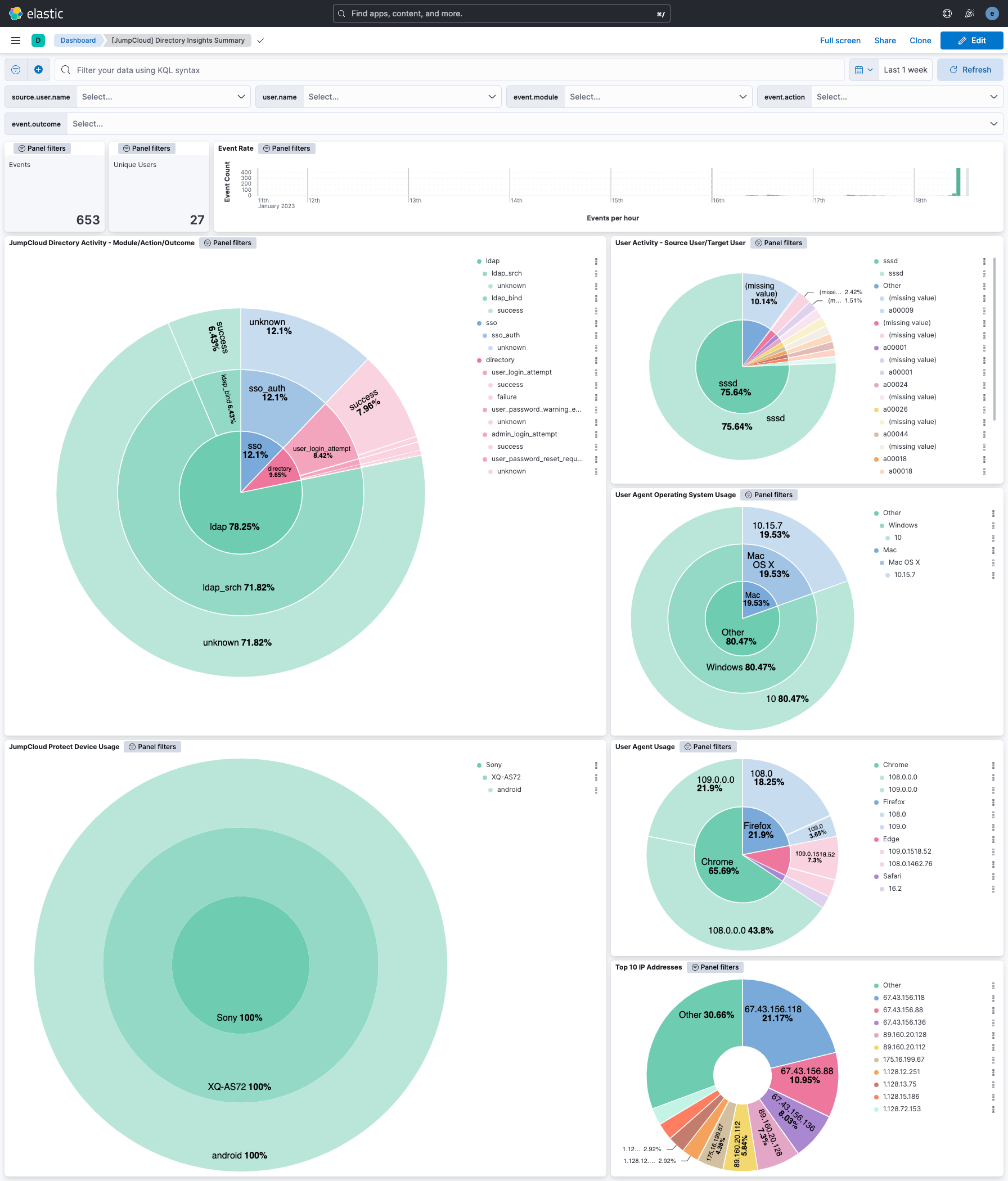
This integration includes one or more Kibana dashboards that visualizes the data collected by the integration. The screenshots below illustrate how the ingested data is displayed.
Changelog
| Version | Details | Minimum Kibana version |
|---|---|---|
| 1.24.0 | Enhancement (View pull request) Enable request trace log removal. |
9.0.5 8.19.2 |
| 1.23.0 | Enhancement (View pull request) Add tags to ingest pipeline processors. |
9.0.5 8.19.2 |
| 1.22.2 | Enhancement (View pull request) Set agentless deployment mode release field to ga. |
9.0.5 8.19.2 |
| 1.22.1 | Bug fix (View pull request) Fix ingestion failure when an event contains both @version and version fields by retaining both fields. |
9.0.5 8.19.2 |
| 1.22.0 | Enhancement (View pull request) Set 'elastic' owner type. |
9.0.5 8.19.2 |
| 1.21.0 | Enhancement (View pull request) Use new release field for agentless deployment mode to establish as beta. |
9.0.5 8.19.2 |
| 1.20.0 | Enhancement (View pull request) Enable Agentless deployment. |
9.0.5 8.19.2 |
| 1.19.0 | Enhancement (View pull request) Add description to the Starting point configuration option. |
9.0.0 8.13.0 |
| 1.18.0 | Enhancement (View pull request) Update services description with all supported Directory Insights service values. |
9.0.0 8.13.0 |
| 1.17.1 | Bug fix (View pull request) Fix start_time guard condition failing to parse JumpCloud's fractional-second timestamps by using a RFC3339 nanosecond-resolution fractional second layout.Bug fix (View pull request) Fix trailing newline in start_time when the guard condition fires. |
9.0.0 8.13.0 |
| 1.17.0 | Enhancement (View pull request) Add source_lag_time configuration option to set buffer time for handling delays in API events. |
9.0.0 8.13.0 |
| 1.16.0 | Enhancement (View pull request) Increase ignore_above to 4096 for jumpcloud.event.command.payload and jumpcloud.event.profile_list.signer_certificates.Enhancement (View pull request) Add new JumpCloud field definitions. |
9.0.0 8.13.0 |
| 1.15.0 | Enhancement (View pull request) Update Kibana constraint to support 9.0.0. |
9.0.0 8.13.0 |
| 1.14.1 | Bug fix (View pull request) Updated SSL description to be uniform and to include links to documentation. |
8.13.0 |
| 1.14.0 | Enhancement (View pull request) Do not remove event.original in main ingest pipeline. |
8.13.0 |
| 1.13.0 | Enhancement (View pull request) Add "preserve_original_event" tag to documents with event.kind set to "pipeline_error". |
8.13.0 |
| 1.12.1 | Bug fix (View pull request) Use triple-brace Mustache templating when referencing variables in ingest pipelines. |
8.13.0 |
| 1.12.0 | Enhancement (View pull request) Populate 'event.outcome' based on 'sso_token_success', when present |
8.13.0 |
| 1.11.0 | Enhancement (View pull request) Update the kibana constraint to ^8.13.0. Modified the field definitions to remove ECS fields made redundant by the ecs@mappings component template. |
8.13.0 |
| 1.10.0 | Enhancement (View pull request) Set sensitive values as secret. |
8.12.0 |
| 1.9.1 | Enhancement (View pull request) Changed owners |
8.7.1 |
| 1.9.0 | Enhancement (View pull request) Limit request tracer log count to five. |
8.7.1 |
| 1.8.0 | Enhancement (View pull request) ECS version updated to 8.11.0. |
8.7.1 |
| 1.7.1 | Bug fix (View pull request) Fix mapping for jumpcloud.event.changes. |
8.7.1 |
| 1.7.0 | Enhancement (View pull request) Improve 'event.original' check to avoid errors if set. |
8.7.1 |
| 1.6.0 | Enhancement (View pull request) Set 'community' owner type. |
8.7.1 |
| 1.5.0 | Enhancement (View pull request) ECS version updated to 8.10.0. |
8.7.1 |
| 1.4.0 | Enhancement (View pull request) The format_version in the package manifest changed from 2.11.0 to 3.0.0. Added 'owner.type: elastic' to package manifest. |
8.7.1 |
| 1.3.0 | Enhancement (View pull request) Add tags.yml file so that integration's dashboards and saved searches are tagged with "Security Solution" and displayed in the Security Solution UI. |
8.7.1 |
| 1.2.2 | Bug fix (View pull request) Remove version attribute from ingest node pipelines. |
8.7.1 |
| 1.2.1 | Bug fix (View pull request) Add missing field definitions for input.type and jumpcloud.event.version. |
8.7.1 |
| 1.2.0 | Enhancement (View pull request) Update package to ECS 8.9.0. |
8.7.1 |
| 1.1.0 | Enhancement (View pull request) Document valid duration units. |
8.7.1 |
| 1.0.0 | Enhancement (View pull request) Release JumpCloud as GA. |
8.7.1 |
| 0.5.0 | Enhancement (View pull request) Ensure event.kind is correctly set for pipeline errors. |
8.7.1 |
| 0.4.0 | Enhancement (View pull request) Update package to ECS 8.8.0. |
8.7.1 |
| 0.3.0 | Enhancement (View pull request) Update package-spec version to 2.7.0. |
8.7.1 |
| 0.2.0 | Enhancement (View pull request) Add a new flag to enable request tracing |
8.7.1 |
| 0.1.0 | Enhancement (View pull request) Update package to ECS 8.7.0. |
8.5.1 |
| 0.0.2 | Bug fix (View pull request) Fix img links in readme |
8.5.1 |
| 0.0.1 | Enhancement (View pull request) Initial draft of the package |
8.5.1 |