File Integrity Monitoring Integration
| Version | 1.18.1 (View all) |
| Subscription level What's this? |
Basic |
| Developed by What's this? |
Elastic |
| Required permissions | Root privileges |
| Minimum Kibana version(s) | 9.2.0 |
This integration sends events when a file is changed (created, updated, or deleted) on disk. The events contain file metadata and hashes.
The integration is implemented for Linux, macOS (Darwin), and Windows.
| ⚠️ This integration should not be used to monitor paths on network file systems. |
|---|
This integration uses features of the operating system to monitor file changes in realtime. When the integration starts it creates a subscription with the OS to receive notifications of changes to the specified files or directories. Upon receiving notification of a change the integration will read the file’s metadata and then compute a hash of the file’s contents.
At startup this integration will perform an initial scan of the configured files and directories to generate baseline data for the monitored paths and detect changes since the last time it was run. It uses locally persisted data in order to only send events for new or modified files.
The operating system features that power this feature are as follows:
- Linux - inotify is used, and therefore the kernel must have inotify support. Inotify was initially merged into the 2.6.13 Linux kernel.
- macOS (Darwin) - Uses the FSEvents API, present since macOS 10.5. This API coalesces multiple changes to a file into a single event. Auditbeat translates this coalesced changes into a meaningful sequence of actions. However, in rare situations the reported events may have a different ordering than what actually happened.
- Windows - ReadDirectoryChangesW is used.
Example
{
    "@timestamp": "2025-03-13T12:17:44.217Z",
    "agent": {
        "ephemeral_id": "a3670431-8505-4619-92b6-10c1ae66f027",
        "id": "09bea17f-617d-4342-8fa8-6021743dacc6",
        "name": "elastic-agent-67615",
        "type": "auditbeat",
        "version": "8.17.3"
    },
    "data_stream": {
        "dataset": "fim.event",
        "namespace": "55403",
        "type": "logs"
    },
    "ecs": {
        "version": "9.3.0"
    },
    "elastic_agent": {
        "id": "09bea17f-617d-4342-8fa8-6021743dacc6",
        "snapshot": false,
        "version": "8.17.3"
    },
    "event": {
        "action": [
            "created"
        ],
        "agent_id_status": "verified",
        "category": [
            "file"
        ],
        "dataset": "fim.event",
        "ingested": "2025-03-13T12:17:46Z",
        "kind": "event",
        "module": "file_integrity",
        "type": [
            "creation"
        ]
    },
    "file": {
        "ctime": "2025-03-13T12:17:44.208Z",
        "gid": "0",
        "group": "root",
        "hash": {
            "sha1": "22596363b3de40b06f981fb85d82312e8c0ed511"
        },
        "inode": "1096549",
        "mode": "0644",
        "mtime": "2025-03-13T12:17:44.208Z",
        "owner": "root",
        "path": "/tmp/service_logs/hello",
        "size": 12,
        "type": "file",
        "uid": "0"
    },
    "host": {
        "architecture": "x86_64",
        "containerized": true,
        "hostname": "elastic-agent-67615",
        "ip": [
            "172.20.0.2",
            "172.18.0.7"
        ],
        "mac": [
            "02-42-AC-12-00-07",
            "02-42-AC-14-00-02"
        ],
        "name": "elastic-agent-67615",
        "os": {
            "family": "",
            "kernel": "5.15.153.1-microsoft-standard-WSL2",
            "name": "Wolfi",
            "platform": "wolfi",
            "type": "linux",
            "version": "20230201"
        }
    },
    "service": {
        "type": "file_integrity"
    },
    "tags": [
        "fim-event"
    ]
}
Exported fields
| Field | Description | Type |
|---|---|---|
| @timestamp | Event timestamp. | date |
| cloud.account.id | The cloud account or organization id used to identify different entities in a multi-tenant environment. Examples: AWS account id, Google Cloud ORG Id, or other unique identifier. | keyword |
| cloud.availability_zone | Availability zone in which this host is running. | keyword |
| cloud.image.id | Image ID for the cloud instance. | keyword |
| cloud.instance.id | Instance ID of the host machine. | keyword |
| cloud.instance.name | Instance name of the host machine. | keyword |
| cloud.machine.type | Machine type of the host machine. | keyword |
| cloud.project.id | Name of the project in Google Cloud. | keyword |
| cloud.provider | Name of the cloud provider. Example values are aws, azure, gcp, or digitalocean. | keyword |
| cloud.region | Region in which this host is running. | keyword |
| container.id | Unique container id. | keyword |
| container.image.name | Name of the image the container was built on. | keyword |
| container.labels | Image labels. | object |
| container.name | Container name. | keyword |
| container.runtime | Runtime managing this container. | keyword |
| data_stream.dataset | Data stream dataset. | constant_keyword |
| data_stream.namespace | Data stream namespace. | constant_keyword |
| data_stream.type | Data stream type. | constant_keyword |
| destination.address | Some event destination addresses are defined ambiguously. The event will sometimes list an IP, a domain or a unix socket. You should always store the raw address in the .address field. Then it should be duplicated to .ip or .domain, depending on which one it is. |
keyword |
| ecs.version | ECS version this event conforms to. ecs.version is a required field and must exist in all events. When querying across multiple indices -- which may conform to slightly different ECS versions -- this field lets integrations adjust to the schema version of the events. |
keyword |
| error.message | Error message. | match_only_text |
| event.action | The action captured by the event. This describes the information in the event. It is more specific than event.category. Examples are group-add, process-started, file-created. The value is normally defined by the implementer. |
keyword |
| event.category | This is one of four ECS Categorization Fields, and indicates the second level in the ECS category hierarchy. event.category represents the "big buckets" of ECS categories. For example, filtering on event.category:process yields all events relating to process activity. This field is closely related to event.type, which is used as a subcategory. This field is an array. This will allow proper categorization of some events that fall in multiple categories. |
keyword |
| event.dataset | Event dataset | constant_keyword |
| event.ingested | Timestamp when an event arrived in the central data store. This is different from @timestamp, which is when the event originally occurred. It's also different from event.created, which is meant to capture the first time an agent saw the event. In normal conditions, assuming no tampering, the timestamps should chronologically look like this: @timestamp < event.created < event.ingested. |
date |
| event.kind | This is one of four ECS Categorization Fields, and indicates the highest level in the ECS category hierarchy. event.kind gives high-level information about what type of information the event contains, without being specific to the contents of the event. For example, values of this field distinguish alert events from metric events. The value of this field can be used to inform how these kinds of events should be handled. They may warrant different retention, different access control, it may also help understand whether the data is coming in at a regular interval or not. |
keyword |
| event.module | Event module | constant_keyword |
| event.outcome | This is one of four ECS Categorization Fields, and indicates the lowest level in the ECS category hierarchy. event.outcome simply denotes whether the event represents a success or a failure from the perspective of the entity that produced the event. Note that when a single transaction is described in multiple events, each event may populate different values of event.outcome, according to their perspective. Also note that in the case of a compound event (a single event that contains multiple logical events), this field should be populated with the value that best captures the overall success or failure from the perspective of the event producer. Further note that not all events will have an associated outcome. For example, this field is generally not populated for metric events, events with event.type:info, or any events for which an outcome does not make logical sense. |
keyword |
| event.type | This is one of four ECS Categorization Fields, and indicates the third level in the ECS category hierarchy. event.type represents a categorization "sub-bucket" that, when used along with the event.category field values, enables filtering events down to a level appropriate for single visualization. This field is an array. This will allow proper categorization of some events that fall in multiple event types. |
keyword |
| file.accessed | Last time the file was accessed. Note that not all filesystems keep track of access time. | date |
| file.attributes | Array of file attributes. Attributes names will vary by platform. Here's a non-exhaustive list of values that are expected in this field: archive, compressed, directory, encrypted, execute, hidden, read, readonly, system, write. | keyword |
| file.created | File creation time. Note that not all filesystems store the creation time. | date |
| file.ctime | Last time the file attributes or metadata changed. Note that changes to the file content will update mtime. This implies ctime will be adjusted at the same time, since mtime is an attribute of the file. |
date |
| file.drive_letter | Drive letter where the file is located. This field is only relevant on Windows. The value should be uppercase, and not include the colon. | keyword |
| file.extension | File extension, excluding the leading dot. Note that when the file name has multiple extensions (example.tar.gz), only the last one should be captured ("gz", not "tar.gz"). | keyword |
| file.fork_name | A fork is additional data associated with a filesystem object. On Linux, a resource fork is used to store additional data with a filesystem object. A file always has at least one fork for the data portion, and additional forks may exist. On NTFS, this is analogous to an Alternate Data Stream (ADS), and the default data stream for a file is just called $DATA. Zone.Identifier is commonly used by Windows to track contents downloaded from the Internet. An ADS is typically of the form: C:\path\to\filename.extension:some_fork_name, and some_fork_name is the value that should populate fork_name. filename.extension should populate file.name, and extension should populate file.extension. The full path, file.path, will include the fork name. |
keyword |
| file.gid | Primary group ID (GID) of the file. | keyword |
| file.group | Primary group name of the file. | keyword |
| file.hash.sha1 | SHA1 hash. | keyword |
| file.inode | Inode representing the file in the filesystem. | keyword |
| file.mime_type | MIME type should identify the format of the file or stream of bytes using IANA official types: https://www.iana.org/assignments/media-types/media-types.xhtml, where possible. When more than one type is applicable, the most specific type should be used. | keyword |
| file.mode | Mode of the file in octal representation. | keyword |
| file.mtime | Last time the file content was modified. | date |
| file.name | Name of the file including the extension, without the directory. | keyword |
| file.origin | An array of strings describing a possible external origin for this file. For example, the URL it was downloaded from. Only supported in macOS, via the kMDItemWhereFroms attribute. Omitted if origin information is not available. | keyword |
| file.origin.text | Multi-field of file.origin. |
text |
| file.owner | File owner's username. | keyword |
| file.path | Full path to the file, including the file name. It should include the drive letter, when appropriate. | keyword |
| file.path.text | Multi-field of file.path. |
match_only_text |
| file.setgid | Set if the file has the setgid bit set. Omitted otherwise. |
boolean |
| file.setuid | Set if the file has the setuid bit set. Omitted otherwise. |
boolean |
| file.size | File size in bytes. Only relevant when file.type is "file". |
long |
| file.target_path | Target path for symlinks. | keyword |
| file.target_path.text | Multi-field of file.target_path. |
match_only_text |
| file.type | File type (file, dir, or symlink). | keyword |
| file.uid | The user ID (UID) or security identifier (SID) of the file owner. | keyword |
| group.id | Unique identifier for the group on the system/platform. | keyword |
| group.name | Name of the group. | keyword |
| host.architecture | Operating system architecture. | keyword |
| host.containerized | If the host is a container. | boolean |
| host.domain | Name of the domain of which the host is a member. For example, on Windows this could be the host's Active Directory domain or NetBIOS domain name. For Linux this could be the domain of the host's LDAP provider. | keyword |
| host.hostname | Hostname of the host. It normally contains what the hostname command returns on the host machine. |
keyword |
| host.id | Unique host id. As hostname is not always unique, use values that are meaningful in your environment. Example: The current usage of beat.name. |
keyword |
| host.ip | Host ip addresses. | ip |
| host.mac | Host mac addresses. | keyword |
| host.name | Name of the host. It can contain what hostname returns on Unix systems, the fully qualified domain name, or a name specified by the user. The sender decides which value to use. |
keyword |
| host.os.build | OS build information. | keyword |
| host.os.codename | OS codename, if any. | keyword |
| host.os.family | OS family (such as redhat, debian, freebsd, windows). | keyword |
| host.os.kernel | Operating system kernel version as a raw string. | keyword |
| host.os.name | Operating system name, without the version. | keyword |
| host.os.name.text | Multi-field of host.os.name. |
text |
| host.os.platform | Operating system platform (such centos, ubuntu, windows). | keyword |
| host.os.version | Operating system version as a raw string. | keyword |
| host.type | Type of host. For Cloud providers this can be the machine type like t2.medium. If vm, this could be the container, for example, or other information meaningful in your environment. |
keyword |
| input.type | Input type | keyword |
| log.file.path | Full path to the log file this event came from, including the file name. It should include the drive letter, when appropriate. If the event wasn't read from a log file, do not populate this field. | keyword |
| log.offset | Log offset | long |
| message | For log events the message field contains the log message, optimized for viewing in a log viewer. For structured logs without an original message field, other fields can be concatenated to form a human-readable summary of the event. If multiple messages exist, they can be combined into one message. | match_only_text |
| network.direction | Direction of the network traffic. When mapping events from a host-based monitoring context, populate this field from the host's point of view, using the values "ingress" or "egress". When mapping events from a network or perimeter-based monitoring context, populate this field from the point of view of the network perimeter, using the values "inbound", "outbound", "internal" or "external". Note that "internal" is not crossing perimeter boundaries, and is meant to describe communication between two hosts within the perimeter. Note also that "external" is meant to describe traffic between two hosts that are external to the perimeter. This could for example be useful for ISPs or VPN service providers. | keyword |
| process.args | Array of process arguments, starting with the absolute path to the executable. May be filtered to protect sensitive information. | keyword |
| process.args_count | Length of the process.args array. This field can be useful for querying or performing bucket analysis on how many arguments were provided to start a process. More arguments may be an indication of suspicious activity. | long |
| process.executable | Absolute path to the process executable. | keyword |
| process.executable.text | Multi-field of process.executable. |
match_only_text |
| process.exit_code | The exit code of the process, if this is a termination event. The field should be absent if there is no exit code for the event (e.g. process start). | long |
| process.name | Process name. Sometimes called program name or similar. | keyword |
| process.name.text | Multi-field of process.name. |
match_only_text |
| process.parent.pid | Process id. | long |
| process.pid | Process id. | long |
| process.user.domain | Name of the directory the user is a member of (for example an LDAP or Active Directory domain). | keyword |
| process.user.id | Unique identifier of the user. | keyword |
| process.user.name | Short name or login of the user. | keyword |
| process.user.name.text | Multi-field of process.user.name. |
match_only_text |
| process.working_directory | The working directory of the process. | keyword |
| process.working_directory.text | Multi-field of process.working_directory. |
match_only_text |
| service.type | The type of the service data is collected from. The type can be used to group and correlate logs and metrics from one service type. Example: If logs or metrics are collected from Elasticsearch, service.type would be elasticsearch. |
keyword |
| source.address | Some event source addresses are defined ambiguously. The event will sometimes list an IP, a domain or a unix socket. You should always store the raw address in the .address field. Then it should be duplicated to .ip or .domain, depending on which one it is. |
keyword |
| source.as.number | Unique number allocated to the autonomous system. The autonomous system number (ASN) uniquely identifies each network on the Internet. | long |
| source.as.organization.name | Organization name. | keyword |
| source.as.organization.name.text | Multi-field of source.as.organization.name. |
match_only_text |
| source.geo.city_name | City name. | keyword |
| source.geo.continent_name | Name of the continent. | keyword |
| source.geo.country_iso_code | Country ISO code. | keyword |
| source.geo.country_name | Country name. | keyword |
| source.geo.location | Longitude and latitude. | geo_point |
| source.geo.region_iso_code | Region ISO code. | keyword |
| source.geo.region_name | Region name. | keyword |
| source.ip | IP address of the source (IPv4 or IPv6). | ip |
| tags | List of keywords used to tag each event. | keyword |
| user.effective.group.id | Unique identifier for the group on the system/platform. | keyword |
| user.effective.group.name | Name of the group. | keyword |
| user.effective.id | Unique identifier of the user. | keyword |
| user.effective.name | Short name or login of the user. | keyword |
| user.effective.name.text | Multi-field of user.effective.name. |
match_only_text |
| user.group.id | Unique identifier for the group on the system/platform. | keyword |
| user.id | Unique identifier of the user. | keyword |
| user.name | Short name or login of the user. | keyword |
| user.name.text | Multi-field of user.name. |
match_only_text |
| user.target.group.id | Unique identifier for the group on the system/platform. | keyword |
| user.target.group.name | Name of the group. | keyword |
| user.target.id | Unique identifier of the user. | keyword |
| user.target.name | Short name or login of the user. | keyword |
| user.target.name.text | Multi-field of user.target.name. |
match_only_text |
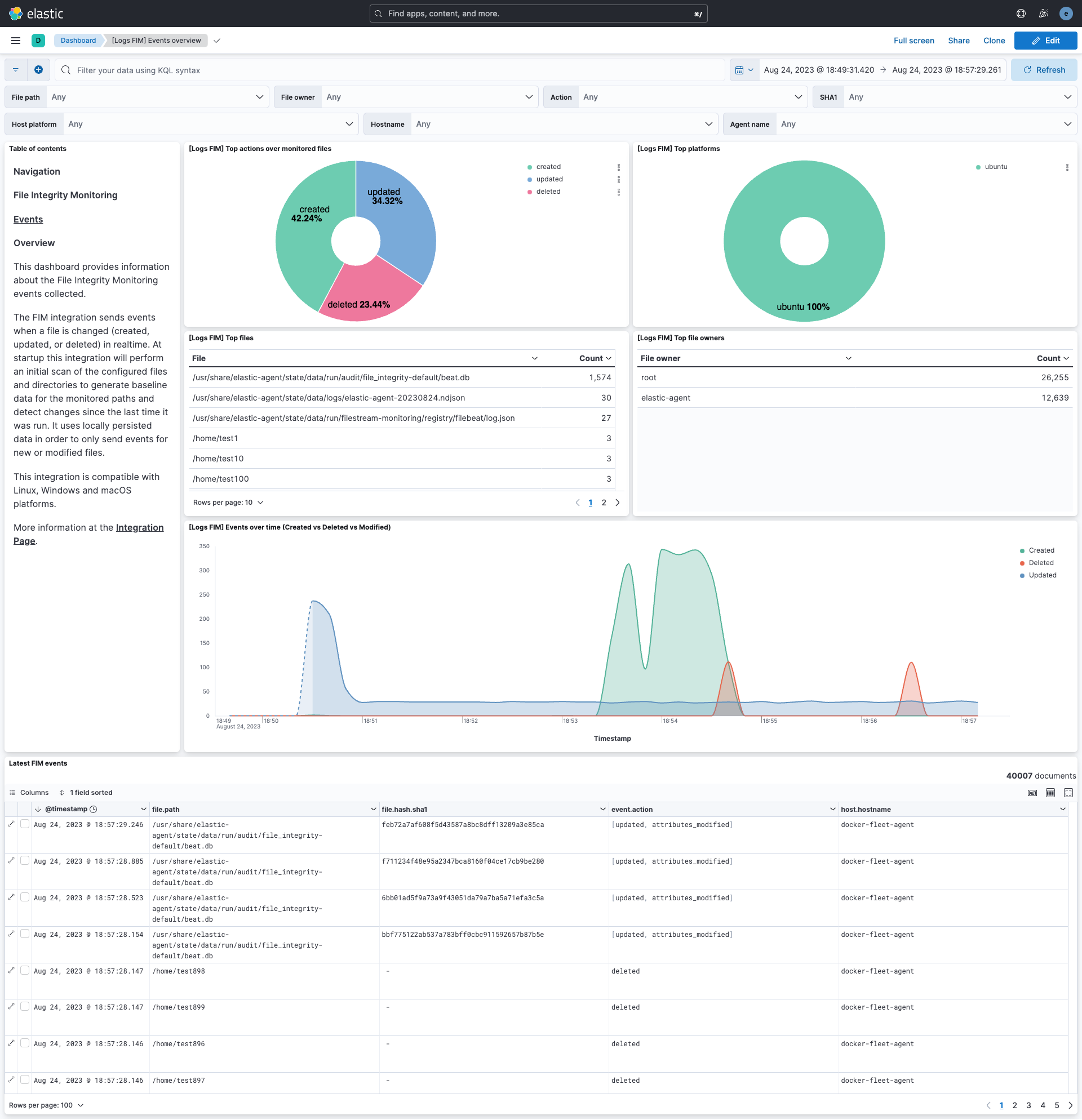
This integration includes one or more Kibana dashboards that visualizes the data collected by the integration. The screenshots below illustrate how the ingested data is displayed.
Changelog
| Version | Details | Minimum Kibana version |
|---|---|---|
| 1.18.1 | Enhancement (View pull request) Add dashboard-level data_stream.dataset filter. |
9.2.0 |
| 1.18.0 | Enhancement (View pull request) Use links panel in Dashboard. |
9.2.0 |
| 1.17.1 | Enhancement (View pull request) Transfer package ownership to elastic/security-service-integrations. |
9.2.0 |
| 1.17.0 | Enhancement (View pull request) Add 9.2.0 Kibana constraint for the etw backend; pin ECS definitions to 9.3.0 and set ingest ecs.version to 9.3.0. |
9.2.0 |
| 1.16.0 | Enhancement (View pull request) Add 9.0.0 constraint and update to ECS 8.17.0 |
9.0.0 8.7.1 |
| 1.15.1 | Bug fix (View pull request) Fix default backend to auto |
8.7.1 |
| 1.15.0 | Enhancement (View pull request) New event sourcing backends added |
8.7.1 |
| 1.14.2 | Enhancement (View pull request) capture root requirement |
8.7.1 |
| 1.14.1 | Enhancement (View pull request) Changed owners |
8.7.1 |
| 1.14.0 | Enhancement (View pull request) ECS version updated to 8.11.0. |
8.7.1 |
| 1.13.0 | Enhancement (View pull request) ECS version updated to 8.10.0. |
8.7.1 |
| 1.12.0 | Enhancement (View pull request) The format_version in the package manifest changed from 2.11.0 to 3.0.0. Removed dotted YAML keys from package manifest. Added 'owner.type: elastic' to package manifest. |
8.7.1 |
| 1.11.0 | Enhancement (View pull request) Add tags.yml file so that integration's dashboards and saved searches are tagged with "Security Solution" and displayed in the Security Solution UI. |
8.7.1 |
| 1.10.1 | Bug fix (View pull request) Exclude files that are regularly updated. |
8.7.1 |
| 1.10.0 | Enhancement (View pull request) Added dashboard for FIM events overview. |
8.7.1 |
| 1.9.0 | Enhancement (View pull request) Update package to ECS 8.9.0. |
8.2.0 |
| 1.8.0 | Enhancement (View pull request) Ensure event.kind is correctly set for pipeline errors. |
8.2.0 |
| 1.7.0 | Enhancement (View pull request) Update package to ECS 8.8.0. |
8.2.0 |
| 1.6.0 | Enhancement (View pull request) Update package-spec version to 2.7.0. |
8.2.0 |
| 1.5.0 | Enhancement (View pull request) Update package to ECS 8.7.0. |
8.2.0 |
| 1.4.3 | Enhancement (View pull request) Added categories and/or subcategories. |
8.2.0 |
| 1.4.2 | Bug fix (View pull request) fixed duplicate key issue in processors. |
8.2.0 |
| 1.4.1 | Enhancement (View pull request) Add host metadata |
8.2.0 |
| 1.4.0 | Enhancement (View pull request) Update package to ECS 8.6.0. |
8.2.0 |
| 1.3.0 | Enhancement (View pull request) Update package to ECS 8.5.0. |
8.2.0 |
| 1.2.3 | Bug fix (View pull request) Fix path configuration documentation. |
8.2.0 |
| 1.2.2 | Bug fix (View pull request) Remove duplicate fields. |
8.2.0 |
| 1.2.1 | Enhancement (View pull request) Use ECS geo.location definition. |
8.2.0 |
| 1.2.0 | Enhancement (View pull request) Update package to ECS 8.4.0 |
8.2.0 |
| 1.1.0 | Enhancement (View pull request) Update package to ECS 8.3.0. |
8.2.0 |
| 1.0.0 | Enhancement (View pull request) Make GA and compatible with 8.2 |
8.2.0 |
| 0.1.0 | Enhancement (View pull request) Initial version |
8.3.0 |