Anomali ThreatStream Integration
| Version | 2.10.0 (View all) |
| Managed integration release status | GA |
| Subscription level What's this? |
Basic |
| Developed by What's this? |
Elastic |
| Ingestion method(s) | API, Webhook |
| Minimum Kibana version(s) | 9.1.0 8.19.0 |
You can use this integration as an Elastic Managed integration on Elastic Cloud Hosted deployments running this version or later.
The Anomali ThreatStream integration allows you to monitor threat intelligence indicators from Anomali ThreatStream, a commercial Threat Intelligence service. When integrated with Elastic Security, this valuable threat intelligence data can be leveraged within Elastic for analyzing and detecting potential security threats.
Use the Anomali ThreatStream integration to collect and parse threat intelligence indicators from the Anomali ThreatStream API, and then visualize that data in Kibana.
The Anomali ThreatStream integration is compatible with Anomali ThreatStream REST API V2. This integration also supports Anomali ThreatStream Elastic Extension. But it is DEPRECATED and not recommended to use.
The integration periodically query the Anomali ThreatStream REST API V2 intelligence endpoint. It authenticates using your username and API key, then retrieves the latest threat indicators.
The Anomali ThreatStream API's intelligence endpoint is the preferred source of indicators. This data will be accessible using the alias logs-ti_anomali_latest.intelligence.
This integration collects log messages of the following types:
IntelligenceThreat Indicators retrieved from the Anomali ThreatStream API's intelligence endpoint.ThreatstreamDEPRECATED: Threat Indicators retrieved from the Anomali ThreatStream Elastic Extension.
Use this integration to collect and store threat intelligence indicators from Anomali ThreatStream, providing centralized access to threat data. Users can view and analyze threat intelligence data through pre-built Kibana dashboards to understand the threat landscape and identify indicator trends over time.
This integration uses Elastic latest transforms. For more details, check the Transform setup and requirements.
To collect data from Anomali ThreatStream API, you need to have following:
- Anomali ThreatStream username
- Anomali ThreatStream API key
This source of indicators is deprecated. New users should instead use the API source above. This source requires additional software, the Elastic Extension, to connect Anomali ThreatStream to this integration. It's available on the ThreatStream download page.
Refer to the documentation included with the extension for a detailed explanation on how to configure Anomali ThreatStream to send indicators to this integration.
This integration supports both Elastic Agentless-based and Agent-based installations.
Agentless integrations allow you to collect data without having to manage Elastic Agent in your cloud. They make manual agent deployment unnecessary, so you can focus on your data instead of the agent that collects it. For more information, refer to Agentless integrations and the Agentless integrations FAQ.
When using this integration as an Elastic Managed integration, only the Anomali ThreatStream (intelligence) data stream is available. This data stream uses inputs compatible with the Elastic Managed deployment mode. Other data streams (Anomali ThreatStream (threatstream)) require the HTTP Endpoint input, which is not supported in the Elastic Managed deployment mode. To collect data from these data streams, use Elastic Agent.
Agentless deployments are only supported in Elastic Serverless and Elastic Cloud environments. This functionality is in beta and is subject to change. Beta features are not subject to the support SLA of official GA features.
Elastic Agent must be installed. For more details, check the Elastic Agent installation instructions. You can install only one Elastic Agent per host.
- In the top search bar in Kibana, search for Integrations.
- In the search bar, type Anomali ThreatStream.
- Select the Anomali ThreatStream integration from the search results.
- Select Add Anomali ThreatStream to add the integration.
- Enable and configure only the collection methods which you will use.
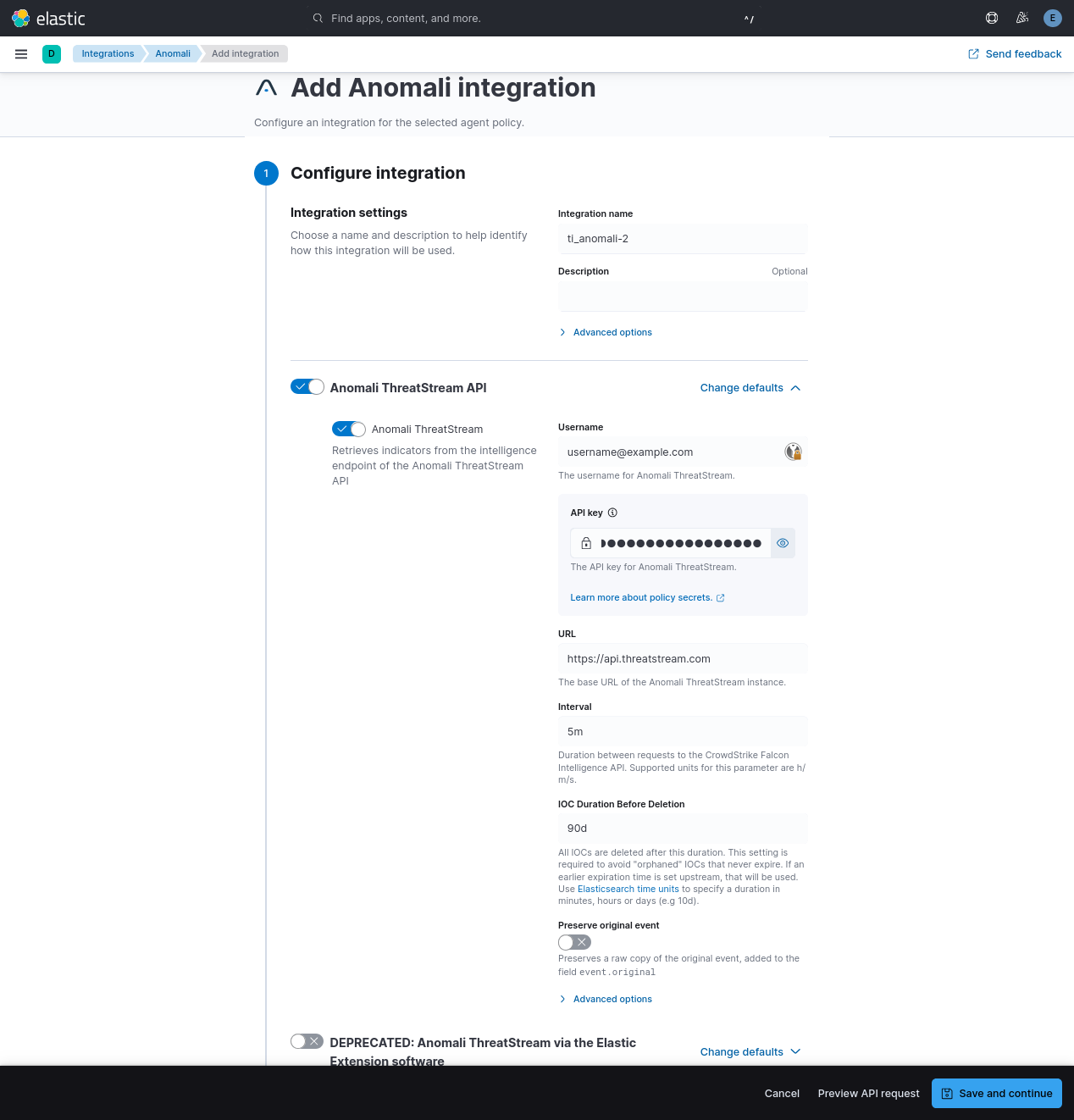
- To Collect Anomali events from ThreatStream API, you need to:
- Configure Username and API key.
- To Collect Anomali events from ThreatStream API, you need to:
- Select Save and continue to save the integration.
- In the top search bar in Kibana, search for Dashboards.
- In the search bar, type ti_anomali.
- Select a dashboard for the dataset you are collecting, and verify the dashboard information is populated.
Some dashboard panels use ES|QL queries. ES|QL returns at most 10,000 rows per query (1,000 by default, refer to ES|QL set size limits for details). These panels include LIMIT 10000 to request the maximum allowed, but if more rows match the query filters, results are silently truncated. Because the queries aggregate (stats) after the LIMIT, counts may be lower than the true total when more than 10,000 rows match.
- In the top search bar in Kibana, search for Transforms.
- Select the Data / Transforms from the search results.
- In the search bar, type ti_anomali.
- All transforms from the search results should indicate Healthy under the Health column.
An Elastic Transform is created to provide a view of active indicators for end users. The transform creates destination indices that are accessible using the alias of the form logs-ti_anomali_latest.<datastreamname>. When querying for active indicators or setting up indicator match rules, use the alias to avoid false positives from expired indicators. The dashboards show only the latest indicators.
Indicator data from Anomali ThreatStream can contain information about deletion or expiry times. However, some Anomali ThreatStream IOCs might never expire and will continue to stay in the latest destination index. To avoid any false positives from such orphaned IOCs, users are allowed to configure an "IOC Expiration Duration" or "IOC Duration Before Deletion" parameter while setting up a policy. The value set there will limit the time that indicators are retained before deletion, but indicators might be removed earlier based on information from Anomali ThreatStream.
The destination indices created by the transform are versioned with an integer suffix such as -1, -2, for example, logs-ti_anomali_latest.intelligence-1.
Due to schema changes in the destination index, its version number may be incremented.
When this happens, the transform does not have the functionality to auto-delete the old index, so users must delete this old index manually. This is to ensure that duplicates are not present when using wildcard queries such as logs-ti_anomali_latest.intelligence-*. To delete an old index, follow the steps below (either for intelligence as below, or for the older threatstream equivalents):
- After upgrading the integration to the latest version, check the current transform's destination index version by navigating to:
Stack Management -> Transforms -> logs-ti_anomali.latest_intelligence-default -> Details. Check thedestination_indexvalue. - Run
GET _cat/indices?vand check if any older versions exist. Such aslogs-ti_anomali_latest.intelligence-1 - Run
DELETE logs-ti_anomali_latest.intelligence-<OLDVERSION>to delete the old index.
The values used in event.severity are consistent with Elastic Detection Rules.
| Severity Name | event.severity |
|---|---|
| Low | 21 |
| Medium | 47 |
| High | 73 |
| Very High | 99 |
If the severity name is not available from the original document, it is determined from the numeric severity value according to the following table.
Anomali severity |
Severity Name | event.severity |
|---|---|---|
| 0 - 19 | info | 21 |
| 20 - 39 | low | 21 |
| 40 - 59 | medium | 47 |
| 60 - 79 | high | 73 |
| 80 - 100 | critical | 99 |
To prevent unbounded growth of the source data streams logs-ti_opencti.<datastreamname>-*, index lifecycle management (ILM) policies will deletes records 5 days after ingestion.
For more information on architectures that can be used for scaling this integration, check the Ingest Architectures documentation.
Exported fields
| Field | Description | Type |
|---|---|---|
| @timestamp | Date/time when the event originated. This is the date/time extracted from the event, typically representing when the event was generated by the source. If the event source has no original timestamp, this value is typically populated by the first time the event was received by the pipeline. Required field for all events. | date |
| anomali.threatstream.can_add_public_tags | Indicates whether a user can add public tags to a Threat Model entity. | boolean |
| anomali.threatstream.confidence | Level of certainty that an observable is of the reported indicator type. Confidence scores range from 0-100, in increasing order of confidence, and is assigned by ThreatStream based on several factors. | long |
| anomali.threatstream.deletion_scheduled_at | At this time the IOC will be deleted by the transform. | date |
| anomali.threatstream.expiration_ts | Time stamp of when intelligence will expire on ThreatStream, in UTC time. Note: expiration_ts can only be specified in an advanced search query. | date |
| anomali.threatstream.feed_id | Numeric ID of the threat feed that generated the indicator. feed_id = 0 for user-created indicators. | long |
| anomali.threatstream.id | Unique ID for the indicator. This identifier is assigned to the indicator when it is first created on ThreatStream. Unlike update_id, this identifier never changes as long as the indicator is available on ThreatStream. | keyword |
| anomali.threatstream.import_session_id | ID of import session in which the indicator was imported. import_session_id=0 if the indicator came in through a threat feed. | keyword |
| anomali.threatstream.is_anonymous | Whether the organization and user information is anonymized when the observable is accessed by users outside of the owner organization. | boolean |
| anomali.threatstream.is_editable | Indicates whether the imported entity can be updated by an intelligence source. This attribute is reserved for intelligence source providers and can be ignored. | boolean |
| anomali.threatstream.is_public | Visibility of the indicator—public or private. 0/False—if the indicator is private or belongs to a Trusted Circle 1/True—if the indicator is public Default: 0/False | boolean |
| anomali.threatstream.itype | Indicator type. | keyword |
| anomali.threatstream.meta.maltype | Tag that specifies the malware associated with an indicator. | keyword |
| anomali.threatstream.meta.registrant.address | Indicator domain WHOIS registrant address. | keyword |
| anomali.threatstream.meta.registrant.email | Indicator domain WHOIS registrant email. | keyword |
| anomali.threatstream.meta.registrant.name | Indicator domain WHOIS registrant name. | keyword |
| anomali.threatstream.meta.registrant.org | Indicator domain WHOIS registrant org. | keyword |
| anomali.threatstream.meta.registrant.phone | Indicator domain WHOIS registrant phone. | keyword |
| anomali.threatstream.meta.registration_created | Registration created. | date |
| anomali.threatstream.meta.registration_updated | Registration updated. | date |
| anomali.threatstream.meta.severity | Severity assigned to the indicator through machine-learning algorithms ThreatStream deploys. Possible values: low, medium, high, very-high | keyword |
| anomali.threatstream.owner_organization_id | ID of the (ThreatStream) organization that brought in the indicator, either through a threat feed or through the import process. | long |
| anomali.threatstream.rdns | Domain name (obtained through reverse domain name lookup) associated with the IP address that is associated with the indicator. | keyword |
| anomali.threatstream.retina_confidence | Confidence score assigned to the observable by Anomali machine learning algorithms. | long |
| anomali.threatstream.source_created | Time stamp of when the entity was created by its original source. | date |
| anomali.threatstream.source_modified | Time stamp of when the entity was last updated by its original source. | date |
| anomali.threatstream.source_reported_confidence | A risk score from 0 to 100, provided by the source of the indicator. | long |
| anomali.threatstream.status | Status assigned to the indicator. For example, active, inactive, falsepos. | keyword |
| anomali.threatstream.threat_type | Summarized threat type of the indicator. For example, malware, compromised, apt, c2, and so on. | keyword |
| anomali.threatstream.threatscore | Deprecated. | keyword |
| anomali.threatstream.trusted_circle_ids | IDs of the trusted circles with which the indicator is shared. | keyword |
| anomali.threatstream.type | Type of indicator—domain, email, ip, md5, string, url. | keyword |
| anomali.threatstream.update_id | An incrementing numeric identifier associated with each update to intelligence on ThreatStream. | keyword |
| anomali.threatstream.uuid | UUID (universally unique identifier) assigned to the observable for STIX compliance. | keyword |
| anomali.threatstream.value | Value of the observable. For example, 192.168.0.10 or http://www.google.com. | keyword |
| data_stream.dataset | The field can contain anything that makes sense to signify the source of the data. Examples include nginx.access, prometheus, endpoint etc. For data streams that otherwise fit, but that do not have dataset set we use the value "generic" for the dataset value. event.dataset should have the same value as data_stream.dataset. Beyond the Elasticsearch data stream naming criteria noted above, the dataset value has additional restrictions: * Must not contain - * No longer than 100 characters |
constant_keyword |
| data_stream.namespace | A user defined namespace. Namespaces are useful to allow grouping of data. Many users already organize their indices this way, and the data stream naming scheme now provides this best practice as a default. Many users will populate this field with default. If no value is used, it falls back to default. Beyond the Elasticsearch index naming criteria noted above, namespace value has the additional restrictions: * Must not contain - * No longer than 100 characters |
constant_keyword |
| data_stream.type | An overarching type for the data stream. Currently allowed values are "logs" and "metrics". We expect to also add "traces" and "synthetics" in the near future. | constant_keyword |
| event.dataset | Name of the dataset. If an event source publishes more than one type of log or events (e.g. access log, error log), the dataset is used to specify which one the event comes from. It's recommended but not required to start the dataset name with the module name, followed by a dot, then the dataset name. | constant_keyword |
| event.module | Name of the module this data is coming from. If your monitoring agent supports the concept of modules or plugins to process events of a given source (e.g. Apache logs), event.module should contain the name of this module. |
constant_keyword |
| input.type | Input type | keyword |
| labels.is_ioc_transform_source | Indicates whether an IOC is in the raw source data stream, or the in latest destination index. | constant_keyword |
| log.offset | Log offset | long |
| threat.feed.dashboard_id | The saved object ID of the dashboard belonging to the threat feed for displaying dashboard links to threat feeds in Kibana. | constant_keyword |
| threat.feed.name | The name of the threat feed in UI friendly format. | constant_keyword |
Exported fields
| Field | Description | Type |
|---|---|---|
| @timestamp | Date/time when the event originated. This is the date/time extracted from the event, typically representing when the event was generated by the source. If the event source has no original timestamp, this value is typically populated by the first time the event was received by the pipeline. Required field for all events. | date |
| anomali.threatstream.added_at | Date when IOC was added. | date |
| anomali.threatstream.classification | Indicates whether an indicator is private or from a public feed and available publicly. Possible values: private, public. | keyword |
| anomali.threatstream.confidence | The measure of the accuracy (from 0 to 100) assigned by ThreatStream's predictive analytics technology to indicators. | long |
| anomali.threatstream.deleted_at | Date when IOC was deleted/expired. | date |
| anomali.threatstream.detail2 | Detail text for indicator. | text |
| anomali.threatstream.id | The ID of the indicator. | keyword |
| anomali.threatstream.import_session_id | ID of the import session that created the indicator on ThreatStream. | keyword |
| anomali.threatstream.itype | Indicator type. Possible values: "apt_domain", "apt_email", "apt_ip", "apt_url", "bot_ip", "c2_domain", "c2_ip", "c2_url", "i2p_ip", "mal_domain", "mal_email", "mal_ip", "mal_md5", "mal_url", "parked_ip", "phish_email", "phish_ip", "phish_url", "scan_ip", "spam_domain", "ssh_ip", "suspicious_domain", "tor_ip" and "torrent_tracker_url". | keyword |
| anomali.threatstream.maltype | Information regarding a malware family, a CVE ID, or another attack or threat, associated with the indicator. | wildcard |
| anomali.threatstream.md5 | Hash for the indicator. | keyword |
| anomali.threatstream.resource_uri | Relative URI for the indicator details. | keyword |
| anomali.threatstream.severity | Criticality associated with the threat feed that supplied the indicator. Possible values: low, medium, high, very-high. | keyword |
| anomali.threatstream.source | Source for the indicator. | keyword |
| anomali.threatstream.source_feed_id | ID for the integrator source. | keyword |
| anomali.threatstream.state | State for this indicator. | keyword |
| anomali.threatstream.trusted_circle_ids | ID of the trusted circle that imported the indicator. | keyword |
| anomali.threatstream.update_id | Update ID. | keyword |
| anomali.threatstream.url | URL for the indicator. | keyword |
| anomali.threatstream.value_type | Data type of the indicator. Possible values: ip, domain, url, email, md5. | keyword |
| data_stream.dataset | The field can contain anything that makes sense to signify the source of the data. Examples include nginx.access, prometheus, endpoint etc. For data streams that otherwise fit, but that do not have dataset set we use the value "generic" for the dataset value. event.dataset should have the same value as data_stream.dataset. Beyond the Elasticsearch data stream naming criteria noted above, the dataset value has additional restrictions: * Must not contain - * No longer than 100 characters |
constant_keyword |
| data_stream.namespace | A user defined namespace. Namespaces are useful to allow grouping of data. Many users already organize their indices this way, and the data stream naming scheme now provides this best practice as a default. Many users will populate this field with default. If no value is used, it falls back to default. Beyond the Elasticsearch index naming criteria noted above, namespace value has the additional restrictions: * Must not contain - * No longer than 100 characters |
constant_keyword |
| data_stream.type | An overarching type for the data stream. Currently allowed values are "logs" and "metrics". We expect to also add "traces" and "synthetics" in the near future. | constant_keyword |
| event.dataset | Name of the dataset. If an event source publishes more than one type of log or events (e.g. access log, error log), the dataset is used to specify which one the event comes from. It's recommended but not required to start the dataset name with the module name, followed by a dot, then the dataset name. | constant_keyword |
| event.module | Name of the module this data is coming from. If your monitoring agent supports the concept of modules or plugins to process events of a given source (e.g. Apache logs), event.module should contain the name of this module. |
constant_keyword |
| input.type | Type of Filebeat input. | keyword |
| labels.is_ioc_transform_source | Indicates whether an IOC is in the raw source data stream, or the in latest destination index. | constant_keyword |
| log.flags | Flags for the log file. | keyword |
| log.offset | Offset of the entry in the log file. | long |
| threat.feed.dashboard_id | The saved object ID of the dashboard belonging to the threat feed for displaying dashboard links to threat feeds in Kibana. | constant_keyword |
| threat.feed.name | The name of the threat feed in UI friendly format. | constant_keyword |
Example
{
    "@timestamp": "2026-03-10T08:44:06.363174919Z",
    "agent": {
        "ephemeral_id": "2deb8b6a-3acf-422c-b39d-533abb347e46",
        "id": "f5a33b6a-f90f-4220-843c-be955830e205",
        "name": "elastic-agent-75961",
        "type": "filebeat",
        "version": "8.18.0"
    },
    "anomali": {
        "threatstream": {
            "can_add_public_tags": true,
            "confidence": 60,
            "deletion_scheduled_at": "2026-03-17T08:44:06.363174919Z",
            "expiration_ts": "9999-12-31T00:00:00.000Z",
            "feed_id": 0,
            "id": "232020126",
            "is_anonymous": false,
            "is_editable": false,
            "is_public": true,
            "itype": "apt_domain",
            "meta": {
                "severity": "very-high"
            },
            "owner_organization_id": 67,
            "retina_confidence": -1,
            "source_reported_confidence": 60,
            "status": "active",
            "threat_type": "apt",
            "type": "domain",
            "update_id": "100000001",
            "uuid": "0921be47-9cc2-4265-b896-c62a7cb91042",
            "value": "gen1xyz.com"
        }
    },
    "data_stream": {
        "dataset": "ti_anomali.intelligence",
        "namespace": "87769",
        "type": "logs"
    },
    "ecs": {
        "version": "9.3.0"
    },
    "elastic_agent": {
        "id": "f5a33b6a-f90f-4220-843c-be955830e205",
        "snapshot": false,
        "version": "8.18.0"
    },
    "event": {
        "agent_id_status": "verified",
        "category": [
            "threat"
        ],
        "created": "2021-04-06T09:56:22.915Z",
        "dataset": "ti_anomali.intelligence",
        "ingested": "2026-03-10T08:44:06Z",
        "kind": "enrichment",
        "original": "{\"asn\":\"\",\"can_add_public_tags\":true,\"confidence\":60,\"created_by\":null,\"created_ts\":\"2021-04-06T09:56:22.915Z\",\"description\":null,\"expiration_ts\":\"9999-12-31T00:00:00.000Z\",\"feed_id\":0,\"id\":232020126,\"is_anonymous\":false,\"is_editable\":false,\"is_public\":true,\"itype\":\"apt_domain\",\"locations\":[],\"meta\":{\"detail2\":\"imported by user 136\",\"severity\":\"very-high\"},\"modified_ts\":\"2021-04-06T09:56:22.915Z\",\"org\":\"\",\"owner_organization_id\":67,\"rdns\":null,\"resource_uri\":\"/api/v2/intelligence/232020126/\",\"retina_confidence\":-1,\"sort\":[455403032],\"source\":\"Analyst\",\"source_locations\":[],\"source_reported_confidence\":60,\"status\":\"active\",\"subtype\":null,\"tags\":null,\"target_industry\":[],\"threat_type\":\"apt\",\"threatscore\":54,\"tlp\":null,\"trusted_circle_ids\":null,\"type\":\"domain\",\"update_id\":100000001,\"uuid\":\"0921be47-9cc2-4265-b896-c62a7cb91042\",\"value\":\"gen1xyz.com\",\"workgroups\":[]}",
        "severity": 99,
        "type": [
            "indicator"
        ]
    },
    "input": {
        "type": "cel"
    },
    "related": {
        "hosts": [
            "gen1xyz.com"
        ]
    },
    "tags": [
        "preserve_original_event",
        "forwarded",
        "anomali-intelligence"
    ],
    "threat": {
        "indicator": {
            "confidence": "Medium",
            "marking": {
                "tlp": "WHITE"
            },
            "modified_at": "2021-04-06T09:56:22.915Z",
            "name": "gen1xyz.com",
            "provider": "Analyst",
            "type": "domain-name",
            "url": {
                "domain": "gen1xyz.com"
            }
        }
    }
}
Example
{
    "@timestamp": "2020-10-08T12:22:11.000Z",
    "agent": {
        "ephemeral_id": "1bf5098f-1c6f-4f02-9f33-d09915436b02",
        "id": "c9b5c6ac-df2a-4652-84a7-89652fa1aaeb",
        "name": "elastic-agent-25659",
        "type": "filebeat",
        "version": "8.18.0"
    },
    "anomali": {
        "threatstream": {
            "added_at": "2020-10-08T12:22:11.000Z",
            "classification": "public",
            "confidence": 20,
            "deleted_at": "2020-10-13T12:22:11.000Z",
            "detail2": "imported by user 184",
            "id": "3135167627",
            "import_session_id": "1400",
            "itype": "mal_domain",
            "resource_uri": "/api/v1/intelligence/P46279656657/",
            "severity": "high",
            "source_feed_id": "3143",
            "state": "active",
            "trusted_circle_ids": [
                "122"
            ],
            "update_id": "3786618776",
            "value_type": "domain"
        }
    },
    "data_stream": {
        "dataset": "ti_anomali.threatstream",
        "namespace": "16182",
        "type": "logs"
    },
    "ecs": {
        "version": "9.3.0"
    },
    "elastic_agent": {
        "id": "c9b5c6ac-df2a-4652-84a7-89652fa1aaeb",
        "snapshot": false,
        "version": "8.18.0"
    },
    "event": {
        "agent_id_status": "verified",
        "category": [
            "threat"
        ],
        "dataset": "ti_anomali.threatstream",
        "ingested": "2026-03-10T08:48:28Z",
        "kind": "enrichment",
        "original": "{\"added_at\":\"2020-10-08T12:22:11\",\"classification\":\"public\",\"confidence\":20,\"country\":\"FR\",\"date_first\":\"2020-10-08T12:21:50\",\"date_last\":\"2020-10-08T12:24:42\",\"detail2\":\"imported by user 184\",\"domain\":\"d4xgfj.example.net\",\"id\":3135167627,\"import_session_id\":1400,\"itype\":\"mal_domain\",\"lat\":-49.1,\"lon\":94.4,\"org\":\"OVH Hosting\",\"resource_uri\":\"/api/v1/intelligence/P46279656657/\",\"severity\":\"high\",\"source\":\"Default Organization\",\"source_feed_id\":3143,\"srcip\":\"89.160.20.156\",\"state\":\"active\",\"trusted_circle_ids\":\"122\",\"update_id\":3786618776,\"value_type\":\"domain\"}",
        "severity": 73,
        "type": [
            "indicator"
        ]
    },
    "input": {
        "type": "http_endpoint"
    },
    "related": {
        "ip": [
            "89.160.20.156"
        ]
    },
    "tags": [
        "preserve_original_event",
        "forwarded",
        "anomali-threatstream"
    ],
    "threat": {
        "indicator": {
            "as": {
                "organization": {
                    "name": "OVH Hosting"
                }
            },
            "confidence": "Low",
            "first_seen": "2020-10-08T12:21:50.000Z",
            "geo": {
                "city_name": "Linköping",
                "continent_name": "Europe",
                "country_iso_code": "SE",
                "country_name": "Sweden",
                "location": {
                    "lat": 58.4167,
                    "lon": 15.6167
                },
                "region_iso_code": "SE-E",
                "region_name": "Östergötland County"
            },
            "ip": "89.160.20.156",
            "last_seen": "2020-10-08T12:24:42.000Z",
            "marking": {
                "tlp": [
                    "WHITE"
                ]
            },
            "name": "d4xgfj.example.net",
            "provider": "Default Organization",
            "type": "domain-name",
            "url": {
                "domain": "d4xgfj.example.net"
            }
        }
    }
}
These inputs are used in this integration:
This integration dataset uses the following APIs:
- Anomali ThreatStream API
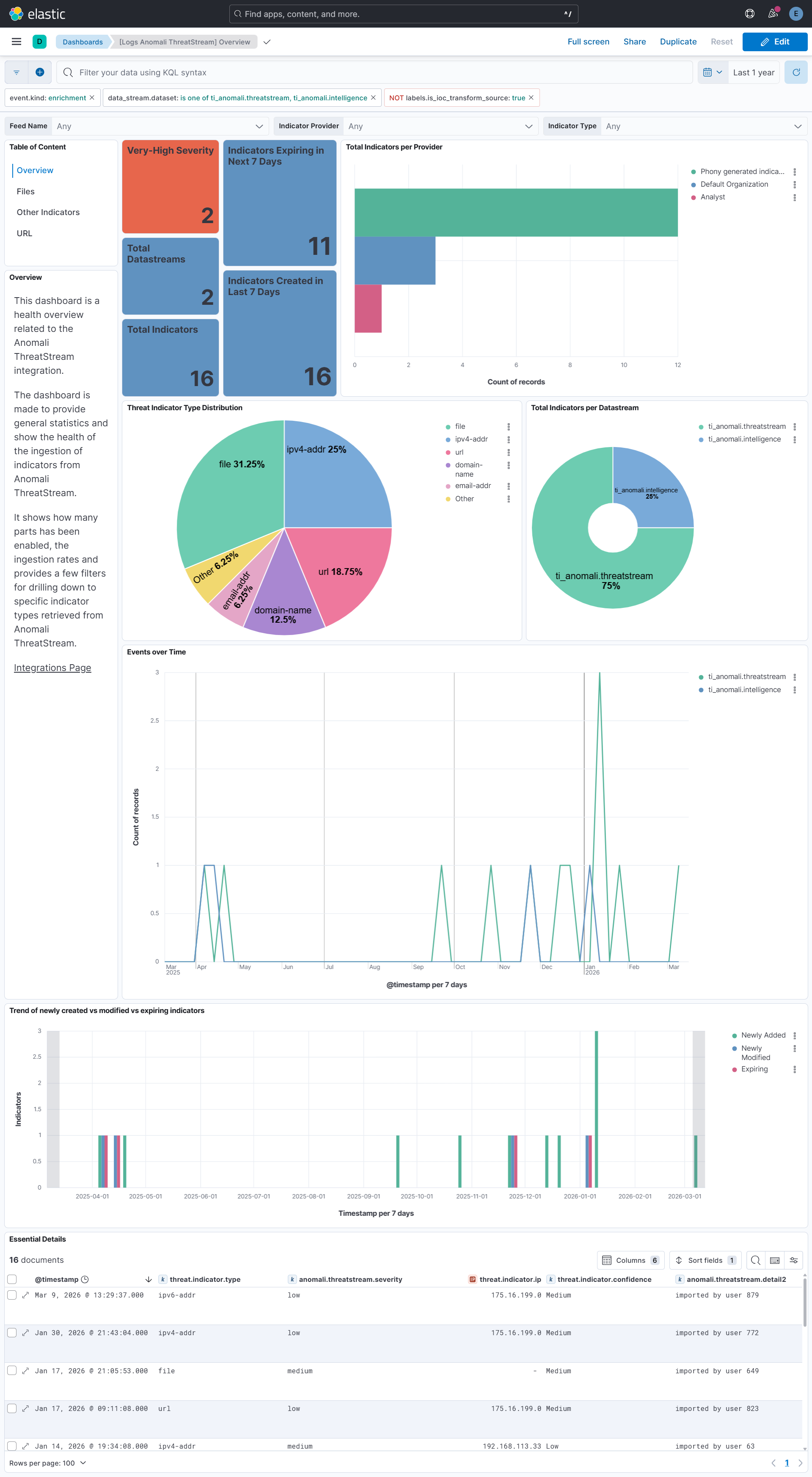
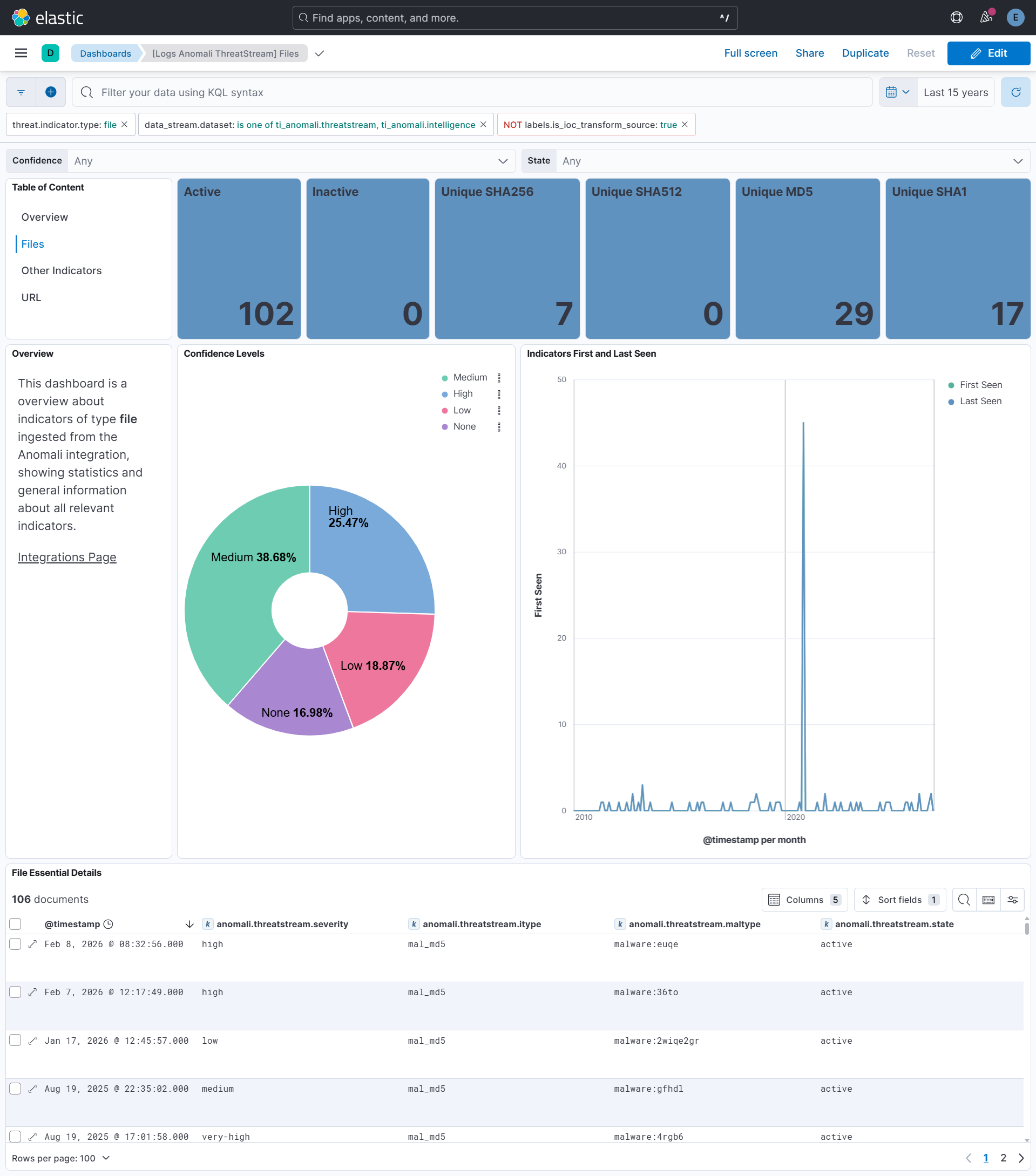
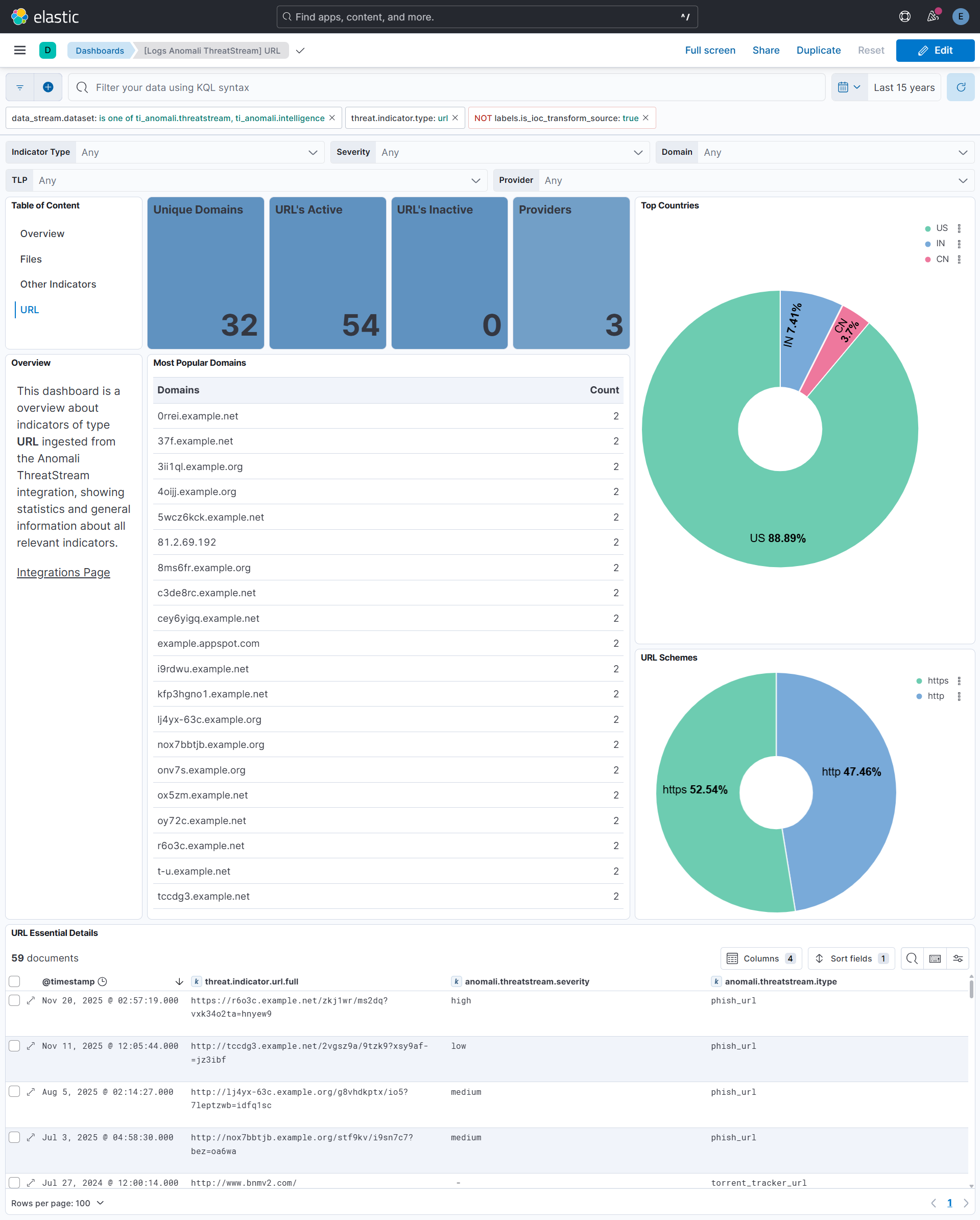
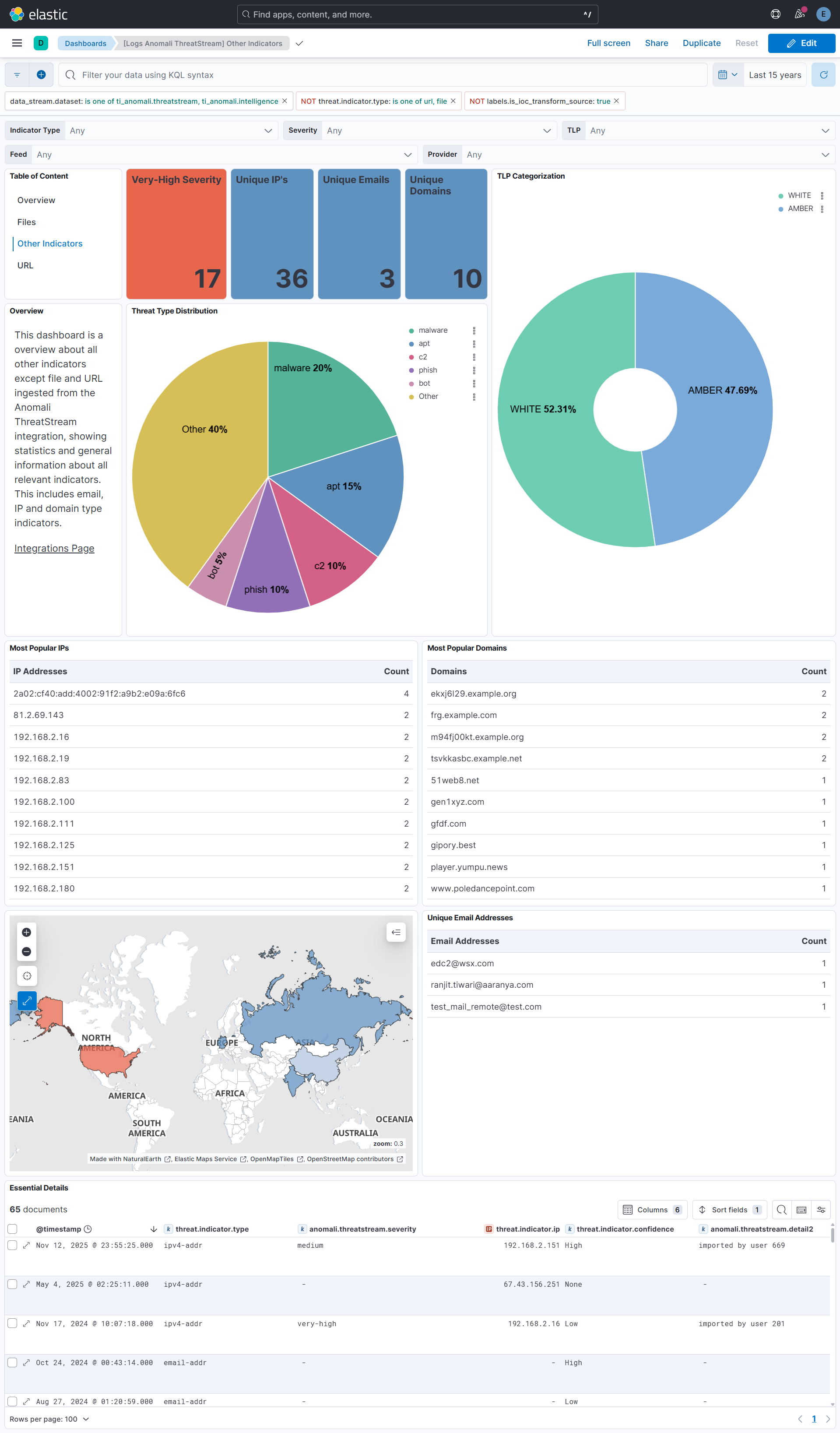
This integration includes one or more Kibana dashboards that visualizes the data collected by the integration. The screenshots below illustrate how the ingested data is displayed.
Changelog
| Version | Details | Minimum Kibana version |
|---|---|---|
| 2.10.0 | Enhancement (View pull request) Remove redundant ECS field definitions and the catch-all dynamic template from the transforms, relying on the ecs@mappings component template. |
9.1.0 8.19.0 |
| 2.9.0 | Enhancement (View pull request) Add tags to ingest pipeline processors and add preserve_original_event to pipeline-level on_failure handlers. |
9.0.0 8.18.0 |
| 2.8.3 | Enhancement (View pull request) Set agentless deployment mode release field to ga. |
9.0.0 8.18.0 |
| 2.8.2 | Bug fix (View pull request) Fix pagination when using an advanced search query. The integration now follows the API's next URL for pagination instead of reconstructing the request, which failed when the API used a different cursor format (e.g. search_after) with advanced queries. |
9.0.0 8.18.0 |
| 2.8.1 | Bug fix (View pull request) Fix transform destination to use keyword for data_stream.namespace, allowing multi-namespace deployments. |
9.0.0 8.18.0 |
| 2.8.0 | Enhancement (View pull request) Use new release field for agentless deployment mode to establish as beta. |
9.0.0 8.18.0 |
| 2.7.0 | Enhancement (View pull request) Use num_failure_retries instead of unattended mode for transform failure recovery. |
9.0.0 8.18.0 |
| 2.6.1 | Bug fix (View pull request) Add missing request trace enabled default option. |
9.0.0 8.18.0 |
| 2.6.0 | Enhancement (View pull request) Add navigation panel and refactor the dashboards. |
9.0.0 8.18.0 |
| 2.5.0 | Enhancement (View pull request) Add support for threat.indicator.name, threat.indicator.geo.*, and related.* ECS fields.Update ecs schema to 9.3.0. Add tags to ingest pipelines. Update error message format in ingest pipelines. Enhancement (View pull request) Change data type of threat.indicator.ip to ip. |
9.0.0 8.18.0 |
| 2.4.0 | Enhancement (View pull request) Rebrand integration to Anomali ThreatStream. This is a branding update only and does not affect existing functionalities. Enhancement (View pull request) Normalize event.severity values and improve documentation to align with new guidelines. |
9.0.0 8.18.0 |
| 2.3.1 | Bug fix (View pull request) Remove is_default from agentless deployment mode to ensure agent-based deployment is the default.Bug fix (View pull request) Remove organization field in ingest pipeline. Bug fix (View pull request) Downgrade the format_version to the minimum version that supports all the necessary features for the package.Bug fix (View pull request) Update Kibana constraint to 8.18.0 support agentless deployment. |
9.0.0 8.18.0 |
| 2.3.0 | Enhancement (View pull request) Allow transforms to run in unattended mode. |
9.0.0 8.13.0 |
| 2.2.0 | Enhancement (View pull request) Added Agentless deployment mode. |
9.0.0 8.13.0 |
| 2.1.0 | Enhancement (View pull request) Allow setting an advanced search query. |
9.0.0 8.13.0 |
| 2.0.0 | Breaking change (View pull request) Modify field type to eliminate field conflicts within the data streams. |
9.0.0 8.13.0 |
| 1.27.1 | Bug fix (View pull request) Add event.ingested ECS field definition in transform. |
9.0.0 8.13.0 |
| 1.27.0 | Enhancement (View pull request) Add support for proxy URL and SSL configuration parameters in intelligence data stream. |
9.0.0 8.13.0 |
| 1.26.2 | Bug fix (View pull request) Add initial_interval parameter to API ingestion. |
9.0.0 8.13.0 |
| 1.26.1 | Bug fix (View pull request) Fix lower bound query parameter in Threatstream API. |
9.0.0 8.13.0 |
| 1.26.0 | Enhancement (View pull request) Update Kibana constraint to support 9.0.0. |
9.0.0 8.13.0 |
| 1.25.2 | Bug fix (View pull request) Add missing ECS field in intelligence datastream. |
8.13.0 |
| 1.25.1 | Bug fix (View pull request) Updated SSL description to be uniform and to include links to documentation. |
8.13.0 |
| 1.25.0 | Enhancement (View pull request) Do not remove event.original in main ingest pipeline. |
8.13.0 |
| 1.24.0 | Enhancement (View pull request) Add "preserve_original_event" tag to documents with event.kind set to "pipeline_error". |
8.13.0 |
| 1.23.0 | Enhancement (View pull request) Support the ThreatStream API |
8.13.0 |
| 1.22.3 | Bug fix (View pull request) Fix labels.is_ioc_transform_source values |
8.13.0 |
| 1.22.2 | Bug fix (View pull request) Add missing fields in transform |
8.13.0 |
| 1.22.1 | Bug fix (View pull request) Fix ECS date mapping on threat fields. |
8.13.0 |
| 1.22.0 | Enhancement (View pull request) Update the kibana constraint to ^8.13.0. Modified the field definitions to remove ECS fields made redundant by the ecs@mappings component template. |
8.13.0 |
| 1.21.0 | Enhancement (View pull request) Add destination index alias and fix docs. |
8.12.0 |
| 1.20.0 | Enhancement (View pull request) Set sensitive values as secret. |
8.12.0 |
| 1.19.2 | Enhancement (View pull request) Changed owners |
8.8.0 |
| 1.19.1 | Bug fix (View pull request) Fix IOC expiration duration character casting. |
8.8.0 |
| 1.19.0 | Enhancement (View pull request) ECS version updated to 8.11.0. |
8.8.0 |
| 1.18.0 | Enhancement (View pull request) ECS version updated to 8.10.0. |
8.8.0 |
| 1.17.0 | Enhancement (View pull request) Add DLM policy. Add owner.type to package manifest. Update format_version to 3.0.0 Enhancement (View pull request) Add tags.yml file so that integration's dashboards and saved searches are tagged with "Security Solution" and displayed in the Security Solution UI. |
8.8.0 |
| 1.16.1 | Bug fix (View pull request) Remove dotted YAML keys. |
— |
| 1.16.0 | Enhancement (View pull request) Update package-spec to 2.10.0. |
8.8.0 |
| 1.15.1 | Bug fix (View pull request) Fix destination fields mapping. Note - Since transform's destination index version is changed, users must manually delete the old index. See https://docs.elastic.co/integrations/ti_anomali#logs for details on destination index versioning. |
8.8.0 |
| 1.15.0 | Enhancement (View pull request) Update package to ECS 8.9.0. |
8.8.0 |
| 1.14.1 | Bug fix (View pull request) Change sort order field in latest transform |
8.8.0 |
| 1.14.0 | Enhancement (View pull request) Ensure event.kind is correctly set for pipeline errors. |
8.8.0 |
| 1.13.0 | Enhancement (View pull request) Update package to ECS 8.8.0. |
8.8.0 |
| 1.12.0 | Enhancement (View pull request) Add IOC field to transform source to easily filter destination indices with unexpired indicators |
8.8.0 |
| 1.11.0 | Enhancement (View pull request) Support for IoC Expiration |
8.8.0 |
| 1.10.0 | Enhancement (View pull request) Update package to ECS 8.7.0. |
8.0.0 |
| 1.9.0 | Enhancement (View pull request) Update package to ECS 8.6.0. |
8.0.0 |
| 1.8.0 | Enhancement (View pull request) Update package to ECS 8.5.0. |
8.0.0 |
| 1.7.0 | Enhancement (View pull request) Deprecate EOL Limo datastream. See https://www.anomali.com/resources/limo. |
8.0.0 |
| 1.6.0 | Enhancement (View pull request) Update package to ECS 8.4.0 |
8.0.0 |
| 1.5.1 | Bug fix (View pull request) Fix proxy URL documentation rendering. |
8.0.0 |
| 1.5.0 | Enhancement (View pull request) Update categories to include threat_intel. |
8.0.0 |
| 1.4.0 | Enhancement (View pull request) Update package to ECS 8.3.0. |
8.0.0 |
| 1.3.3 | Enhancement (View pull request) added links to Anomoli documentation in readme |
8.0.0 |
| 1.3.2 | Bug fix (View pull request) Fix threatstream |
8.0.0 |
| 1.3.1 | Enhancement (View pull request) Update package descriptions |
8.0.0 |
| 1.3.0 | Enhancement (View pull request) Update to ECS 8.2 |
8.0.0 |
| 1.2.3 | Enhancement (View pull request) Add mapping for event.created |
8.0.0 |
| 1.2.2 | Enhancement (View pull request) Add documentation for multi-fields |
8.0.0 |
| 1.2.1 | Bug fix (View pull request) Adding first interval to Anomali Limo policy UI |
8.0.0 |
| 1.2.0 | Enhancement (View pull request) Update to ECS 8.0 |
8.0.0 |
| 1.1.3 | Bug fix (View pull request) Regenerate test files using the new GeoIP database |
8.0.0 |
| 1.1.2 | Bug fix (View pull request) Change test public IPs to the supported subset |
— |
| 1.1.1 | Enhancement (View pull request) Fixing typo in base-fields.yml |
— |
| 1.1.0 | Enhancement (View pull request) Adding dashboards and threat.feed ECS fields |
— |
| 1.0.2 | Enhancement (View pull request) Bump minimum version |
8.0.0 |
| 1.0.1 | Enhancement (View pull request) Update title and description. |
— |
| 1.0.0 | Enhancement (View pull request) Initial release |
— |