Tenable.sc
| Version | 2.6.0 (View all) |
| Managed integration release status | GA |
| Subscription level What's this? |
Basic |
| Developed by What's this? |
Elastic |
| Ingestion method(s) | API |
| Minimum Kibana version(s) | 9.1.4 9.0.7 8.19.4 |
You can use this integration as an Elastic Managed integration on Elastic Cloud Hosted deployments running this version or later.
The Tenable Security Center integration collects and parses data from the Tenable Security Center APIs.
Agentless integrations allow you to collect data without having to manage Elastic Agent in your cloud. They make manual agent deployment unnecessary, so you can focus on your data instead of the agent that collects it. For more information, refer to Agentless integrations and the Agentless integrations FAQ. Agentless deployments are only supported in Elastic Serverless and Elastic Cloud environments. This functionality is in beta and is subject to change. Beta features are not subject to the support SLA of official GA features.
This module has been tested against Tenable.sc version 5.23 and Tenable.sc version 6.4.0.
In order to ingest data from the Tenable.sc you must have the Access key and Secret Key.
Enable API keys to allow users to perform API key authentication.
See Tenable's documentation for more information on:
The default value is the recommended value for a batch size by Tenable. It can be found under Advanced Options and can be configured as per requirements. A very large value might not work as intended depending on the API and instance limitations.
This is the asset dataset.
Asset documents use a stable tenable_sc.asset.custom_hash (computed in the asset ingest pipeline from the export field values named in the Tenable export property uniqueness, stored as tenable_sc.asset.uniqueness) and an ingest _id derived from that identity, mutable scan state (scores, severity counts, MAC address, policy, plugin set, and scan timestamps), and the collection day. The asset input requests only assets whose Tenable lastSeen time falls after the previous poll, so an asset is indexed again only when Tenable reports it again. Repeat reports on the same day with unchanged state deduplicate on _id. A change in scan state indexes a new document. A later Tenable report on a new collection day also indexes a new document, even if the scan state has not changed. The package installs a latest transform that copies the newest document per asset into logs-tenable_sc_latest.asset, keyed on tenable_sc.asset.custom_hash and data_stream.namespace. The latest index removes a document when its @timestamp is older than 90 days, so assets that Tenable has not reported for 90 days drop out of logs-tenable_sc_latest.asset.
Upgrading to version 2.6.0 or later installs and starts this transform. Clusters need a transform node, transform privileges, and access to source and destination indices. Asset data is stored in both the source data stream and the latest destination index; plan storage accordingly. See Transform setup for details.
Example
{
    "@timestamp": "2025-10-06T13:37:55.913Z",
    "agent": {
        "ephemeral_id": "77699819-d18a-4aaa-94ec-f623ee5a4a35",
        "id": "37eb1402-bcaa-45c2-8cc6-4c13a4444037",
        "name": "elastic-agent-77998",
        "type": "filebeat",
        "version": "8.19.4"
    },
    "data_stream": {
        "dataset": "tenable_sc.asset",
        "namespace": "26660",
        "type": "logs"
    },
    "ecs": {
        "version": "8.11.0"
    },
    "elastic_agent": {
        "id": "37eb1402-bcaa-45c2-8cc6-4c13a4444037",
        "snapshot": false,
        "version": "8.19.4"
    },
    "event": {
        "agent_id_status": "verified",
        "category": [
            "host"
        ],
        "created": "2025-10-06T13:37:55.913Z",
        "dataset": "tenable_sc.asset",
        "ingested": "2025-10-06T13:37:58Z",
        "kind": "state",
        "original": "{\"biosGUID\":\"9e8c4d43-982b-4405-a76c-d56c1d6cf117\",\"dnsName\":\"rnkmigauv2l8zeyf.example\",\"hostUniqueness\":\"repositoryID,ip,dnsName\",\"ip\":\"0.0.228.153\",\"lastAuthRun\":\"\",\"lastUnauthRun\":\"\",\"macAddress\":\"00:00:00:47:05:0d\",\"mcafeeGUID\":\"\",\"netbiosName\":\"UNKNOWN\\\\RNKMIGAUV2L8ZEYF.EXAMPLE\",\"osCPE\":\"cpe:/o:microsoft:windows_10:::x64-home\",\"pluginSet\":\"201901281542\",\"policyName\":\"Basic Agent Scan\",\"repository\":{\"dataFormat\":\"IPv4\",\"description\":\"\",\"id\":\"2\",\"name\":\"Staged-Large\",\"sciID\":\"1\"},\"score\":\"307\",\"severityCritical\":\"6\",\"severityHigh\":\"4\",\"severityInfo\":\"131\",\"severityLow\":\"0\",\"severityMedium\":\"9\",\"total\":\"150\",\"tpmID\":\"\",\"uniqueness\":\"repositoryID,ip,dnsName\",\"uuid\":\"4add65d0-27fc-491c-91ba-3f498a61f49e\"}",
        "type": [
            "info"
        ]
    },
    "host": {
        "domain": "example",
        "hostname": "rnkmigauv2l8zeyf.example",
        "ip": [
            "0.0.228.153"
        ],
        "mac": [
            "00-00-00-47-05-0D"
        ],
        "name": "rnkmigauv2l8zeyf"
    },
    "input": {
        "type": "httpjson"
    },
    "related": {
        "hosts": [
            "rnkmigauv2l8zeyf.example",
            "rnkmigauv2l8zeyf",
            "UNKNOWN\\RNKMIGAUV2L8ZEYF.EXAMPLE"
        ],
        "ip": [
            "0.0.228.153"
        ]
    },
    "tags": [
        "preserve_original_event",
        "forwarded",
        "tenable_sc-asset"
    ],
    "tenable_sc": {
        "asset": {
            "bios": {
                "guid": "9e8c4d43-982b-4405-a76c-d56c1d6cf117"
            },
            "custom_hash": "ilZiksv+pbvyBkKXgFRLGuMuUovfGI0pjIX5yLMp+I8=",
            "dns": {
                "name": "rnkmigauv2l8zeyf.example"
            },
            "host_uniqueness": "repositoryID,ip,dnsName",
            "ip": "0.0.228.153",
            "mac": "00-00-00-47-05-0D",
            "netbios": {
                "name": "UNKNOWN\\RNKMIGAUV2L8ZEYF.EXAMPLE"
            },
            "os_cpe": "cpe:/o:microsoft:windows_10:::x64-home",
            "plugin_set": "201901281542",
            "policy": {
                "name": "Basic Agent Scan"
            },
            "repository": {
                "data_format": "IPv4",
                "id": "2",
                "name": "Staged-Large",
                "sci": {
                    "id": "1"
                }
            },
            "score": 307,
            "severity": {
                "critical": 6,
                "high": 4,
                "info": 131,
                "low": 0,
                "medium": 9
            },
            "total": 150,
            "uniqueness": "repositoryID,ip,dnsName",
            "uuid": "4add65d0-27fc-491c-91ba-3f498a61f49e"
        }
    }
}
Exported fields
| Field | Description | Type |
|---|---|---|
| @timestamp | Event timestamp. | date |
| cloud.image.id | Image ID for the cloud instance. | keyword |
| data_stream.dataset | Data stream dataset. | constant_keyword |
| data_stream.namespace | Data stream namespace. | constant_keyword |
| data_stream.type | Data stream type. | constant_keyword |
| event.dataset | Event dataset. | constant_keyword |
| event.module | Event module. | constant_keyword |
| host.containerized | If the host is a container. | boolean |
| host.os.build | OS build information. | keyword |
| host.os.codename | OS codename, if any. | keyword |
| input.type | Input type | keyword |
| log.offset | Log offset | long |
| tenable_sc.asset.bios.guid | GUID of bios. | keyword |
| tenable_sc.asset.custom_hash | Hash representing the values of the field names mentioned in uniqueness field in order to uniquely identify an asset. | keyword |
| tenable_sc.asset.dns.name | DNS name of the asset. | keyword |
| tenable_sc.asset.host_uniqueness | Host Uniqueness. | keyword |
| tenable_sc.asset.ip | The IPv4 address of the asset. | keyword |
| tenable_sc.asset.last_auth_run | The timestamp of last auth run. | keyword |
| tenable_sc.asset.last_unauth_run | The timestamp of last unauth run. | keyword |
| tenable_sc.asset.mac | The mac address of the asset. | keyword |
| tenable_sc.asset.mcafee.guid | GUID of McAfee. | keyword |
| tenable_sc.asset.netbios.name | Name of netbios of the asset. | keyword |
| tenable_sc.asset.os_cpe | OS CPE (Common Platform Enumeration is a standardized way to name software applications, operating systems, and hardware platforms). | keyword |
| tenable_sc.asset.plugin_set | The plugin set the asset fall in. | keyword |
| tenable_sc.asset.policy.name | The name of the policy that is assigned to the asset. | keyword |
| tenable_sc.asset.repository.data_format | Data format. | keyword |
| tenable_sc.asset.repository.description | Description of repository. | keyword |
| tenable_sc.asset.repository.id | ID of repository the asset belongs to. | keyword |
| tenable_sc.asset.repository.name | Name of repository the asset belongs to. | keyword |
| tenable_sc.asset.repository.sci.id | Sci ID. | keyword |
| tenable_sc.asset.score | The score of the asset. | long |
| tenable_sc.asset.severity.critical | Count of Critical-severity findings on the asset. | long |
| tenable_sc.asset.severity.high | Count of High-severity findings on the asset. | long |
| tenable_sc.asset.severity.info | Count of Info-severity findings on the asset. | long |
| tenable_sc.asset.severity.low | Count of Low-severity findings on the asset. | long |
| tenable_sc.asset.severity.medium | Count of Medium-severity findings on the asset. | long |
| tenable_sc.asset.total | Total number of findings on the asset. | long |
| tenable_sc.asset.tpm.id | The ID of TPM. | keyword |
| tenable_sc.asset.uniqueness | Uniqueness. | keyword |
| tenable_sc.asset.uuid | The uuid of the asset. | keyword |
This is the plugin dataset.
Example
{
    "@timestamp": "2021-09-27T01:33:53.000Z",
    "agent": {
        "ephemeral_id": "ad9b8348-5b15-45a3-967e-c24f69eed284",
        "id": "65054cc3-10c1-4c92-a72b-ca4b1cd3f337",
        "name": "elastic-agent-15688",
        "type": "filebeat",
        "version": "8.19.4"
    },
    "data_stream": {
        "dataset": "tenable_sc.plugin",
        "namespace": "57997",
        "type": "logs"
    },
    "ecs": {
        "version": "8.11.0"
    },
    "elastic_agent": {
        "id": "65054cc3-10c1-4c92-a72b-ca4b1cd3f337",
        "snapshot": false,
        "version": "8.19.4"
    },
    "event": {
        "agent_id_status": "verified",
        "created": "2025-10-07T10:42:09.255Z",
        "dataset": "tenable_sc.plugin",
        "ingested": "2025-10-07T10:42:12Z",
        "kind": "event",
        "original": "{\"baseScore\":\"7.8\",\"checkType\":\"remote\",\"copyright\":\"This script is Copyright (C) 2003-2020 John Lampe\",\"cpe\":\"\",\"cvssV3BaseScore\":null,\"cvssV3TemporalScore\":null,\"cvssV3Vector\":\"\",\"cvssV3VectorBF\":\"0\",\"cvssVector\":\"AV:N/AC:L/Au:N/C:N/I:N/A:C/E:U/RL:OF/RC:C\",\"cvssVectorBF\":\"2164920932\",\"dependencies\":\"find_service1.nasl,http_version.nasl,www_fingerprinting_hmap.nasl\",\"description\":\"Microsoft IIS, running Frontpage extensions, is vulnerable to a remote denial of service attack usually called the 'malformed web submission' vulnerability.  An attacker, exploiting this vulnerability, will be able to render the service unusable.\\n\\nIf this machine serves a business-critical function, there could be an impact to the business.\",\"dstPort\":null,\"exploitAvailable\":\"false\",\"exploitEase\":\"No known exploits are available\",\"exploitFrameworks\":\"\",\"family\":{\"id\":\"11\",\"name\":\"Web Servers\",\"type\":\"active\"},\"id\":\"10585\",\"md5\":\"38b2147401eb5c3a15af52182682f345\",\"modifiedTime\":\"1632706433\",\"name\":\"Microsoft IIS Frontpage Server Extensions (FPSE) Malformed Form DoS\",\"patchModDate\":\"-1\",\"patchPubDate\":\"-1\",\"pluginModDate\":\"1591963200\",\"pluginPubDate\":\"1058875200\",\"protocol\":\"\",\"requiredPorts\":\"\",\"requiredUDPPorts\":\"\",\"riskFactor\":\"High\",\"seeAlso\":\"https://docs.microsoft.com/en-us/security-updates/SecurityBulletins/2000/ms00-100\",\"solution\":\"Microsoft has released a set of patches for IIS 4.0 and 5.0.\",\"sourceFile\":\"IIS_frontpage_DOS_2.nasl\",\"srcPort\":null,\"stigSeverity\":null,\"synopsis\":\"The remote web server is vulnerable to a denial of service\",\"temporalScore\":\"5.8\",\"type\":\"active\",\"version\":\"1.28\",\"vprContext\":\"[{\\\"id\\\":\\\"age_of_vuln\\\",\\\"name\\\":\\\"Vulnerability Age\\\",\\\"type\\\":\\\"string\\\",\\\"value\\\":\\\"730 days +\\\"},{\\\"id\\\":\\\"cvssV3_impactScore\\\",\\\"name\\\":\\\"CVSS v3 Impact Score\\\",\\\"type\\\":\\\"number\\\",\\\"value\\\":3.6000000000000001},{\\\"id\\\":\\\"exploit_code_maturity\\\",\\\"name\\\":\\\"Exploit Code Maturity\\\",\\\"type\\\":\\\"string\\\",\\\"value\\\":\\\"Unproven\\\"},{\\\"id\\\":\\\"product_coverage\\\",\\\"name\\\":\\\"Product Coverage\\\",\\\"type\\\":\\\"string\\\",\\\"value\\\":\\\"Low\\\"},{\\\"id\\\":\\\"threat_intensity_last_28\\\",\\\"name\\\":\\\"Threat Intensity\\\",\\\"type\\\":\\\"string\\\",\\\"value\\\":\\\"Very Low\\\"},{\\\"id\\\":\\\"threat_recency\\\",\\\"name\\\":\\\"Threat Recency\\\",\\\"type\\\":\\\"string\\\",\\\"value\\\":\\\"\\u003e 365 days\\\"},{\\\"id\\\":\\\"threat_sources_last_28\\\",\\\"name\\\":\\\"Threat Sources\\\",\\\"type\\\":\\\"string\\\",\\\"value\\\":\\\"No recorded events\\\"}]\",\"vprScore\":\"4.4\",\"vulnPubDate\":\"977486400\",\"xrefs\":\"CVE:CVE-2001-0096, BID:2144, MSFT:MS00-100, MSKB:280322\"}",
        "type": [
            "info"
        ]
    },
    "input": {
        "type": "httpjson"
    },
    "related": {
        "hash": [
            "38b2147401eb5c3a15af52182682f345"
        ]
    },
    "tags": [
        "preserve_original_event",
        "forwarded",
        "tenable_sc-plugin"
    ],
    "tenable_sc": {
        "plugin": {
            "base_score": 7.8,
            "check_type": "remote",
            "copyright": "This script is Copyright (C) 2003-2020 John Lampe",
            "cvss_vector": "AV:N/AC:L/Au:N/C:N/I:N/A:C/E:U/RL:OF/RC:C",
            "cvss_vector_bf": "2164920932",
            "dependencies": [
                "find_service1.nasl",
                "http_version.nasl",
                "www_fingerprinting_hmap.nasl"
            ],
            "description": "Microsoft IIS, running Frontpage extensions, is vulnerable to a remote denial of service attack usually called the 'malformed web submission' vulnerability.  An attacker, exploiting this vulnerability, will be able to render the service unusable.\n\nIf this machine serves a business-critical function, there could be an impact to the business.",
            "exploit": {
                "ease": "No known exploits are available",
                "is_available": "false"
            },
            "family": {
                "id": "11",
                "name": "Web Servers",
                "type": "active"
            },
            "id": "10585",
            "is_patch_modified": false,
            "is_patch_published": false,
            "is_plugin_modified": true,
            "is_plugin_published": true,
            "is_vulnerability_published": true,
            "md5": "38b2147401eb5c3a15af52182682f345",
            "modified_time": "2021-09-27T01:33:53.000Z",
            "name": "Microsoft IIS Frontpage Server Extensions (FPSE) Malformed Form DoS",
            "plugin_mod_date": "2020-06-12T12:00:00.000Z",
            "plugin_pub_date": "2003-07-22T12:00:00.000Z",
            "risk_factor": "High",
            "see_also": [
                "https://docs.microsoft.com/en-us/security-updates/SecurityBulletins/2000/ms00-100"
            ],
            "solution": "Microsoft has released a set of patches for IIS 4.0 and 5.0.",
            "source_file": "IIS_frontpage_DOS_2.nasl",
            "synopsis": "The remote web server is vulnerable to a denial of service",
            "temporal_score": 5.8,
            "type": "active",
            "version": 1.28,
            "vpr": {
                "context": {
                    "_original": [
                        {
                            "id": "age_of_vuln",
                            "name": "Vulnerability Age",
                            "type": "string",
                            "value": "730 days +"
                        },
                        {
                            "id": "cvssV3_impactScore",
                            "name": "CVSS v3 Impact Score",
                            "type": "number",
                            "value": 3.6
                        },
                        {
                            "id": "exploit_code_maturity",
                            "name": "Exploit Code Maturity",
                            "type": "string",
                            "value": "Unproven"
                        },
                        {
                            "id": "product_coverage",
                            "name": "Product Coverage",
                            "type": "string",
                            "value": "Low"
                        },
                        {
                            "id": "threat_intensity_last_28",
                            "name": "Threat Intensity",
                            "type": "string",
                            "value": "Very Low"
                        },
                        {
                            "id": "threat_recency",
                            "name": "Threat Recency",
                            "type": "string",
                            "value": "> 365 days"
                        },
                        {
                            "id": "threat_sources_last_28",
                            "name": "Threat Sources",
                            "type": "string",
                            "value": "No recorded events"
                        }
                    ],
                    "age_of_vuln": "730 days +",
                    "cvssV3_impactScore": 3.6,
                    "exploit_code_maturity": "Unproven",
                    "product_coverage": "Low",
                    "threat_intensity_last_28": "Very Low",
                    "threat_recency": "> 365 days",
                    "threat_sources_last_28": "No recorded events"
                },
                "score": 4.4
            },
            "vuln_pub_date": "2000-12-22T12:00:00.000Z",
            "xrefs": [
                "CVE:CVE-2001-0096",
                "BID:2144",
                "MSFT:MS00-100",
                "MSKB:280322"
            ]
        }
    }
}
Exported fields
| Field | Description | Type |
|---|---|---|
| @timestamp | Event timestamp. | date |
| cloud.image.id | Image ID for the cloud instance. | keyword |
| data_stream.dataset | Data stream dataset. | constant_keyword |
| data_stream.namespace | Data stream namespace. | constant_keyword |
| data_stream.type | Data stream type. | constant_keyword |
| event.dataset | Event dataset. | constant_keyword |
| event.module | Event module. | constant_keyword |
| host.containerized | If the host is a container. | boolean |
| host.os.build | OS build information. | keyword |
| host.os.codename | OS codename, if any. | keyword |
| input.type | Input type | keyword |
| log.offset | Log offset | long |
| tenable_sc.plugin.base_score | The CVSSv2 base score (intrinsic and fundamental characteristics of a vulnerability that are constant over time and user environments). | double |
| tenable_sc.plugin.check_type | The type of the compliance check that detected the vulnerability. | keyword |
| tenable_sc.plugin.copyright | The copyright information related to the plugin. | keyword |
| tenable_sc.plugin.cpe | A list of plugin target systems identified by Common Platform Enumeration (CPE). | keyword |
| tenable_sc.plugin.cvss_vector | The raw CVSSv2 metrics for the vulnerability. For more information, see CVSSv2 documentation. | keyword |
| tenable_sc.plugin.cvss_vector_bf | N/A. | keyword |
| tenable_sc.plugin.cvssv3_base_score | The CVSSv3 base score (intrinsic and fundamental characteristics of a vulnerability that are constant over time and user environments). | double |
| tenable_sc.plugin.cvssv3_temporal_score | The CVSSv3 temporal metrics for the vulnerability. | double |
| tenable_sc.plugin.cvssv3_vector | The raw CVSSv3 metrics for the vulnerability. For more information, see CVSSv3 documentation. | keyword |
| tenable_sc.plugin.cvssv3_vector_bf | N/A. | keyword |
| tenable_sc.plugin.dependencies | N/A. | keyword |
| tenable_sc.plugin.description | The extended description of the plugin. | keyword |
| tenable_sc.plugin.dst_port | Destination port. | long |
| tenable_sc.plugin.exploit.ease | Description of how easy it is to exploit the vulnerability. | keyword |
| tenable_sc.plugin.exploit.frameworks | Frameworks used by the exploit. | keyword |
| tenable_sc.plugin.exploit.is_available | Indicates whether a known public exploit exists for the vulnerability. | boolean |
| tenable_sc.plugin.family.id | The ID of the plugin family. | keyword |
| tenable_sc.plugin.family.name | The name of the plugin family. | keyword |
| tenable_sc.plugin.family.type | The type of the plugin family. | keyword |
| tenable_sc.plugin.id | The ID of the plugin. | keyword |
| tenable_sc.plugin.is_patch_modified | Flag for if patch is modified. | boolean |
| tenable_sc.plugin.is_patch_published | Flag for if patch is published. | boolean |
| tenable_sc.plugin.is_plugin_modified | Flag for if plugin is modified. | boolean |
| tenable_sc.plugin.is_plugin_published | Flag for if plugin is published. | boolean |
| tenable_sc.plugin.is_vulnerability_published | Flag for if vulnerability is published. | boolean |
| tenable_sc.plugin.md5 | N/A. | keyword |
| tenable_sc.plugin.modified_time | Timestamp of last modification in plugin. | date |
| tenable_sc.plugin.name | The name of the plugin. | keyword |
| tenable_sc.plugin.patch_mod_date | The date when the vendor modified the patch for the vulnerability. | date |
| tenable_sc.plugin.patch_pub_date | The date when the vendor published a patch for the vulnerability. | date |
| tenable_sc.plugin.plugin_mod_date | The date when Tenable last updated the plugin. | date |
| tenable_sc.plugin.plugin_pub_date | The date when Tenable originally published the plugin. | date |
| tenable_sc.plugin.protocol | Protocol used by the vulnerability. | keyword |
| tenable_sc.plugin.required_ports | N/A. | keyword |
| tenable_sc.plugin.required_udp_ports | N/A. | keyword |
| tenable_sc.plugin.risk_factor | The risk factor associated with the plugin. | keyword |
| tenable_sc.plugin.see_also | Links to external websites that contain helpful information about the vulnerability. | keyword |
| tenable_sc.plugin.solution | Remediation information for the vulnerability. | keyword |
| tenable_sc.plugin.source | N/A. | keyword |
| tenable_sc.plugin.source_file | N/A. | keyword |
| tenable_sc.plugin.src_port | Source port. | long |
| tenable_sc.plugin.stig_severity | STIG severity code for the vulnarebility. | keyword |
| tenable_sc.plugin.synopsis | A brief summary of the vulnerability or vulnerabilities associated with the plugin. | keyword |
| tenable_sc.plugin.temporal_score | The raw CVSSv2 temporal metrics for the vulnerability. | double |
| tenable_sc.plugin.type | The type of the plugin. | keyword |
| tenable_sc.plugin.version | The version of the plugin. | version |
| tenable_sc.plugin.vpr.context | The matrix of Vulnerability Priority Rating (VPR) for the vulnerability. | flattened |
| tenable_sc.plugin.vpr.score | The Vulnerability Priority Rating (VPR) score for the vulnerability. | double |
| tenable_sc.plugin.vuln_pub_date | Vulnarebility publish date. | date |
| tenable_sc.plugin.xrefs | References to third-party information about the vulnerability, exploit, or update associated with the plugin presented as an array of objects. | keyword |
This is the vulnerability dataset.
Example
{
    "@timestamp": "2026-01-25T01:57:15.000Z",
    "agent": {
        "ephemeral_id": "2979cdbb-8413-43ce-a22a-59ea2f219485",
        "id": "fad3bc55-e747-4871-b235-66cb7e420f26",
        "name": "elastic-agent-96925",
        "type": "filebeat",
        "version": "8.19.4"
    },
    "data_stream": {
        "dataset": "tenable_sc.vulnerability",
        "namespace": "48530",
        "type": "logs"
    },
    "ecs": {
        "version": "8.11.0"
    },
    "elastic_agent": {
        "id": "fad3bc55-e747-4871-b235-66cb7e420f26",
        "snapshot": false,
        "version": "8.19.4"
    },
    "event": {
        "agent_id_status": "verified",
        "category": [
            "threat",
            "vulnerability"
        ],
        "created": "2026-04-08T09:39:30.457Z",
        "dataset": "tenable_sc.vulnerability",
        "ingested": "2026-04-08T09:39:31Z",
        "kind": "event",
        "original": "{\"acceptRisk\":\"0\",\"baseScore\":\"0.0\",\"bid\":\"\",\"checkType\":\"remote\",\"cpe\":\"\",\"cve\":\"CVE-1999-0524\",\"cvssV3BaseScore\":\"0.0\",\"cvssV3TemporalScore\":\"\",\"cvssV3Vector\":\"AV:L/AC:L/PR:N/UI:N/S:U/C:N/I:N/A:N\",\"cvssVector\":\"AV:L/AC:L/Au:N/C:N/I:N/A:N\",\"description\":\"The remote host answers to an ICMP timestamp request.  This allows an attacker to know the date that is set on the targeted machine, which may assist an unauthenticated, remote attacker in defeating time-based authentication protocols.\\n\\nTimestamps returned from machines running Windows Vista / 7 / 2008 / 2008 R2 are deliberately incorrect, but usually within 1000 seconds of the actual system time.\",\"dnsName\":\"_gateway.lxd\",\"exploitAvailable\":\"No\",\"exploitEase\":\"\",\"exploitFrameworks\":\"\",\"family\":{\"id\":\"30\",\"name\":\"General\",\"type\":\"active\"},\"firstSeen\":\"1551284872\",\"hasBeenMitigated\":\"0\",\"hostUniqueness\":\"repositoryID,ip,dnsName\",\"ip\":\"10.238.64.3\",\"ips\":\"10.238.64.3\",\"lastSeen\":\"1769306235\",\"macAddress\":\"00:16:3e:a1:12:f7\",\"netbiosName\":\"\",\"operatingSystem\":\"Linux Kernel 2.6\",\"patchPubDate\":\"-1\",\"pluginID\":\"10114\",\"pluginInfo\":\"10114 (0/1) ICMP Timestamp Request Remote Date Disclosure\",\"pluginModDate\":\"1570190400\",\"pluginName\":\"ICMP Timestamp Request Remote Date Disclosure\",\"pluginPubDate\":\"933508800\",\"pluginText\":\"\\u003cplugin_output\\u003eThe remote clock is synchronized with the local clock.\\n\\u003c/plugin_output\\u003e\",\"port\":\"0\",\"protocol\":\"ICMP\",\"recastRisk\":\"0\",\"repository\":{\"dataFormat\":\"IPv4\",\"description\":\"\",\"id\":\"1\",\"name\":\"Live\",\"sciID\":\"1\"},\"riskFactor\":\"None\",\"seeAlso\":\"\",\"severity\":{\"description\":\"Informative\",\"id\":\"0\",\"name\":\"Info\"},\"solution\":\"Filter out the ICMP timestamp requests (13), and the outgoing ICMP timestamp replies (14).\",\"stigSeverity\":\"\",\"synopsis\":\"It is possible to determine the exact time set on the remote host.\",\"temporalScore\":\"\",\"uniqueness\":\"repositoryID,ip,dnsName\",\"uuid\":\"\",\"version\":\"1.48\",\"vprContext\":\"[{\\\"id\\\":\\\"age_of_vuln\\\",\\\"name\\\":\\\"Vulnerability Age\\\",\\\"type\\\":\\\"string\\\",\\\"value\\\":\\\"730 days +\\\"},{\\\"id\\\":\\\"cvssV3_impactScore\\\",\\\"name\\\":\\\"CVSS v3 Impact Score\\\",\\\"type\\\":\\\"number\\\",\\\"value\\\":0},{\\\"id\\\":\\\"exploit_code_maturity\\\",\\\"name\\\":\\\"Exploit Code Maturity\\\",\\\"type\\\":\\\"string\\\",\\\"value\\\":\\\"Unproven\\\"},{\\\"id\\\":\\\"product_coverage\\\",\\\"name\\\":\\\"Product Coverage\\\",\\\"type\\\":\\\"string\\\",\\\"value\\\":\\\"Very High\\\"},{\\\"id\\\":\\\"threat_intensity_last_28\\\",\\\"name\\\":\\\"Threat Intensity\\\",\\\"type\\\":\\\"string\\\",\\\"value\\\":\\\"Very Low\\\"},{\\\"id\\\":\\\"threat_recency\\\",\\\"name\\\":\\\"Threat Recency\\\",\\\"type\\\":\\\"string\\\",\\\"value\\\":\\\"No recorded events\\\"},{\\\"id\\\":\\\"threat_sources_last_28\\\",\\\"name\\\":\\\"Threat Sources\\\",\\\"type\\\":\\\"string\\\",\\\"value\\\":\\\"No recorded events\\\"}]\",\"vprScore\":\"0.8\",\"vulnPubDate\":\"788961600\",\"xref\":\"CWE #200\"}",
        "type": [
            "info"
        ]
    },
    "host": {
        "domain": "lxd",
        "hostname": "_gateway.lxd",
        "ip": [
            "10.238.64.3"
        ],
        "mac": [
            "00-16-3E-A1-12-F7"
        ],
        "name": "_gateway",
        "os": {
            "full": "Linux Kernel 2.6"
        }
    },
    "input": {
        "type": "httpjson"
    },
    "network": {
        "transport": "icmp"
    },
    "related": {
        "hosts": [
            "_gateway.lxd",
            "_gateway"
        ],
        "ip": [
            "10.238.64.3"
        ]
    },
    "tags": [
        "preserve_original_event",
        "forwarded",
        "tenable_sc-vulnerability"
    ],
    "tenable_sc": {
        "vulnerability": {
            "accept_risk": "0",
            "age": 2523,
            "base_score": "0.0",
            "check_type": "remote",
            "custom_hash": "C+l0P7ZLuUAwlJ+6GEEFY/Es/7J78bpwTeG04ycaOG4=",
            "cvss_v3_base_score": 0,
            "cvss_v3_vector": "AV:L/AC:L/PR:N/UI:N/S:U/C:N/I:N/A:N",
            "cvss_vector": "AV:L/AC:L/Au:N/C:N/I:N/A:N",
            "dns": {
                "name": "_gateway.lxd"
            },
            "exploit": {
                "is_available": false
            },
            "family": {
                "id": "30",
                "name": "General",
                "type": "active"
            },
            "first_seen": "2019-02-27T16:27:52.000Z",
            "has_been_mitigated": false,
            "host_uniqueness": "repositoryID,ip,dnsName",
            "id": "1_10.238.64.3__gateway.lxd",
            "ip": "10.238.64.3",
            "ips": "10.238.64.3",
            "is_vulnerability_published": true,
            "last_seen": "2026-01-25T01:57:15.000Z",
            "mac": "00-16-3E-A1-12-F7",
            "operating_system": "Linux Kernel 2.6",
            "patch": {
                "is_published": false
            },
            "plugin": {
                "id": "10114",
                "info": "10114 (0/1) ICMP Timestamp Request Remote Date Disclosure",
                "is_modified": true,
                "is_published": true,
                "mod_date": "2019-10-04T12:00:00.000Z",
                "name": "ICMP Timestamp Request Remote Date Disclosure",
                "pub_date": "1999-08-01T12:00:00.000Z",
                "text": "<plugin_output>The remote clock is synchronized with the local clock.\n</plugin_output>"
            },
            "port": "0",
            "protocol": "ICMP",
            "recast_risk": "0",
            "repository": {
                "data_format": "IPv4",
                "id": "1",
                "name": "Live",
                "sci_id": "1"
            },
            "risk_factor": "None",
            "severity": {
                "description": "Informative",
                "id": "0"
            },
            "solution": "Filter out the ICMP timestamp requests (13), and the outgoing ICMP timestamp replies (14).",
            "synopsis": "It is possible to determine the exact time set on the remote host.",
            "uniqueness": "repositoryID,ip,dnsName",
            "version": "1.48",
            "vpr": {
                "context": {
                    "_original": [
                        {
                            "id": "age_of_vuln",
                            "name": "Vulnerability Age",
                            "type": "string",
                            "value": "730 days +"
                        },
                        {
                            "id": "cvssV3_impactScore",
                            "name": "CVSS v3 Impact Score",
                            "type": "number",
                            "value": 0
                        },
                        {
                            "id": "exploit_code_maturity",
                            "name": "Exploit Code Maturity",
                            "type": "string",
                            "value": "Unproven"
                        },
                        {
                            "id": "product_coverage",
                            "name": "Product Coverage",
                            "type": "string",
                            "value": "Very High"
                        },
                        {
                            "id": "threat_intensity_last_28",
                            "name": "Threat Intensity",
                            "type": "string",
                            "value": "Very Low"
                        },
                        {
                            "id": "threat_recency",
                            "name": "Threat Recency",
                            "type": "string",
                            "value": "No recorded events"
                        },
                        {
                            "id": "threat_sources_last_28",
                            "name": "Threat Sources",
                            "type": "string",
                            "value": "No recorded events"
                        }
                    ],
                    "age_of_vuln": "730 days +",
                    "cvssV3_impactScore": 0,
                    "exploit_code_maturity": "Unproven",
                    "product_coverage": "Very High",
                    "threat_intensity_last_28": "Very Low",
                    "threat_recency": "No recorded events",
                    "threat_sources_last_28": "No recorded events"
                },
                "score": 0.8
            },
            "vuln_pub_date": "1995-01-01T12:00:00.000Z",
            "xref": [
                "CWE #200"
            ]
        }
    },
    "vulnerability": {
        "category": [
            "General"
        ],
        "classification": "CVSS",
        "description": "The remote host answers to an ICMP timestamp request.  This allows an attacker to know the date that is set on the targeted machine, which may assist an unauthenticated, remote attacker in defeating time-based authentication protocols.\n\nTimestamps returned from machines running Windows Vista / 7 / 2008 / 2008 R2 are deliberately incorrect, but usually within 1000 seconds of the actual system time.",
        "enumeration": "CVE",
        "id": [
            "CVE-1999-0524"
        ],
        "reference": [
            "https://cve.mitre.org/cgi-bin/cvename.cgi?name=CVE-1999-0524"
        ],
        "scanner": {
            "vendor": "Tenable"
        },
        "score": {
            "base": 0,
            "version": "3.0"
        },
        "severity": "Info"
    }
}
Exported fields
| Field | Description | Type |
|---|---|---|
| @timestamp | Event timestamp. | date |
| cloud.image.id | Image ID for the cloud instance. | keyword |
| data_stream.dataset | Data stream dataset. | constant_keyword |
| data_stream.namespace | Data stream namespace. | constant_keyword |
| data_stream.type | Data stream type. | constant_keyword |
| event.dataset | Event dataset. | constant_keyword |
| event.module | Event module. | constant_keyword |
| host.containerized | If the host is a container. | boolean |
| host.os.build | OS build information. | keyword |
| host.os.codename | OS codename, if any. | keyword |
| input.type | Input type | keyword |
| log.offset | Log offset | long |
| tenable_sc.vulnerability.accept_risk | N/A. | keyword |
| tenable_sc.vulnerability.accept_risk_rule_comment | keyword | |
| tenable_sc.vulnerability.acr_score | double | |
| tenable_sc.vulnerability.age | The time in days between the first and last time the vulnerability was seen. | long |
| tenable_sc.vulnerability.asset_exposure_score | long | |
| tenable_sc.vulnerability.base_score | Intrinsic and fundamental characteristics of a vulnerability that are constant over time and user environments. | keyword |
| tenable_sc.vulnerability.bid | The Bugtraq ID. | keyword |
| tenable_sc.vulnerability.cgi_scan_enabled | keyword | |
| tenable_sc.vulnerability.check_type | The type of the compliance check that detected the vulnerability. | keyword |
| tenable_sc.vulnerability.cpe | The Common Platform Enumeration (CPE) number for the plugin. | keyword |
| tenable_sc.vulnerability.custom_hash | Hash of fields plugin_id, port, protocol, tenable_sc.vulnerability.id for uniqueidentifier of an vulnerability. | keyword |
| tenable_sc.vulnerability.cvss_v3_base_score | double | |
| tenable_sc.vulnerability.cvss_v3_temporal_score | double | |
| tenable_sc.vulnerability.cvss_v3_vector | keyword | |
| tenable_sc.vulnerability.cvss_v4_base_score | double | |
| tenable_sc.vulnerability.cvss_v4_supplemental | keyword | |
| tenable_sc.vulnerability.cvss_v4_threat_score | double | |
| tenable_sc.vulnerability.cvss_v4_threat_vector | keyword | |
| tenable_sc.vulnerability.cvss_v4_vector | keyword | |
| tenable_sc.vulnerability.cvss_vector | Additional CVSSv2 metrics for the vulnerability. | keyword |
| tenable_sc.vulnerability.dns.name | DNS name. | keyword |
| tenable_sc.vulnerability.epss_score | double | |
| tenable_sc.vulnerability.exploit.ease | Description of how easy it is to exploit the vulnerability. | keyword |
| tenable_sc.vulnerability.exploit.frameworks | Framework used by exploit. | keyword |
| tenable_sc.vulnerability.exploit.is_available | A value specifying whether a public exploit exists for the vulnerability. | boolean |
| tenable_sc.vulnerability.family.id | Family id of the vulnarebility. | keyword |
| tenable_sc.vulnerability.family.name | Family name of the vulnarebility. | keyword |
| tenable_sc.vulnerability.family.type | Family type of the vulnarebility. | keyword |
| tenable_sc.vulnerability.first_seen | The time and date when a scan first identified the vulnerability. | date |
| tenable_sc.vulnerability.has_been_mitigated | Indicates whether the vulnerability has been mitigated. | boolean |
| tenable_sc.vulnerability.host_uniqueness | Name of the fields used to determine the uniqueness of the host. | keyword |
| tenable_sc.vulnerability.host_uuid | keyword | |
| tenable_sc.vulnerability.id | String containing the values of the field names mentioned in uniqueness concatenated with '_'. | keyword |
| tenable_sc.vulnerability.ip | The ip address of the asset where a scan found the vulnerability. | keyword |
| tenable_sc.vulnerability.ips | ip | |
| tenable_sc.vulnerability.is_vulnerability_published | Flag for if vulnerablity is published. | boolean |
| tenable_sc.vulnerability.key_drivers | flattened | |
| tenable_sc.vulnerability.last_seen | The time and date when a scan most recently identified the vulnerability. | date |
| tenable_sc.vulnerability.mac | The MAC address of the asset where a scan found the vulnerability. | keyword |
| tenable_sc.vulnerability.netbios.name | NetBIOS name of the asset where a scan found the vulnerability. | keyword |
| tenable_sc.vulnerability.operating_system | The operating system of the asset where a scan found the vulnerability. | keyword |
| tenable_sc.vulnerability.paranoid_scan_enabled | keyword | |
| tenable_sc.vulnerability.patch.is_published | Flag for if vulnerablity is patched. | boolean |
| tenable_sc.vulnerability.patch.pub_date | The date on which the patch for the vulnerability was published. | date |
| tenable_sc.vulnerability.plugin.id | The ID of the plugin. | keyword |
| tenable_sc.vulnerability.plugin.info | Information regarding the plugin. | keyword |
| tenable_sc.vulnerability.plugin.is_modified | Flag for if plugin is modified. | boolean |
| tenable_sc.vulnerability.plugin.is_published | Flag for if plugin is published. | boolean |
| tenable_sc.vulnerability.plugin.mod_date | The date on which the vulnerability was modified. | date |
| tenable_sc.vulnerability.plugin.name | The name of the plugin. | keyword |
| tenable_sc.vulnerability.plugin.pub_date | The date on which the vulnerability was published. | date |
| tenable_sc.vulnerability.plugin.text | Text provided by plugin. (Usually plugin output text). | match_only_text |
| tenable_sc.vulnerability.port | The port the scanner used to communicate with the asset. | keyword |
| tenable_sc.vulnerability.protocol | The protocol the scanner used to communicate with the asset. | keyword |
| tenable_sc.vulnerability.recast_risk | Modified the severity risk measure of vulnerabilities using recast rules. | keyword |
| tenable_sc.vulnerability.recast_risk_rule_comment | keyword | |
| tenable_sc.vulnerability.repository.data_format | The data format of the repository. | keyword |
| tenable_sc.vulnerability.repository.description | The description of the repository. | keyword |
| tenable_sc.vulnerability.repository.id | The ID of the repository. | keyword |
| tenable_sc.vulnerability.repository.name | The name of the repository. | keyword |
| tenable_sc.vulnerability.repository.sci_id | N/A. | keyword |
| tenable_sc.vulnerability.risk_factor | The risk factor associated with the vulnerability. | keyword |
| tenable_sc.vulnerability.seol_date | date | |
| tenable_sc.vulnerability.severity.description | The description of the severity. | keyword |
| tenable_sc.vulnerability.severity.id | The code for the severity assigned when a user recasts the risk associated with the vulnerability. | keyword |
| tenable_sc.vulnerability.solution | Remediation information for the vulnerability. | keyword |
| tenable_sc.vulnerability.stig_severity | Security Technical Implementation Guide (STIG) severity code for the vulnerability. | keyword |
| tenable_sc.vulnerability.synopsis | Brief description of the vulnerability. | keyword |
| tenable_sc.vulnerability.temporal_score | Characteristics of a vulnerability that change over time but not among user environments. | keyword |
| tenable_sc.vulnerability.thorough_scan_enabled | keyword | |
| tenable_sc.vulnerability.uniqueness | Name of the fields used to determine the uniqueness of the vulnerability. | keyword |
| tenable_sc.vulnerability.uuid | N/A. | keyword |
| tenable_sc.vulnerability.version | The version of the vulnerability. | keyword |
| tenable_sc.vulnerability.vpr.context | The matrix of Vulnerability Priority Rating (VPR) for the vulnerability. | flattened |
| tenable_sc.vulnerability.vpr.score | The Vulnerability Priority Rating (VPR) score for the vulnerability. | double |
| tenable_sc.vulnerability.vuln_pub_date | The date on which the vulnerability was published. | date |
| tenable_sc.vulnerability.vuln_uniqueness | keyword | |
| tenable_sc.vulnerability.vuln_uuid | keyword | |
| tenable_sc.vulnerability.xref | References to third-party information about the vulnerability, exploit, or update associated with the plugin. | keyword |
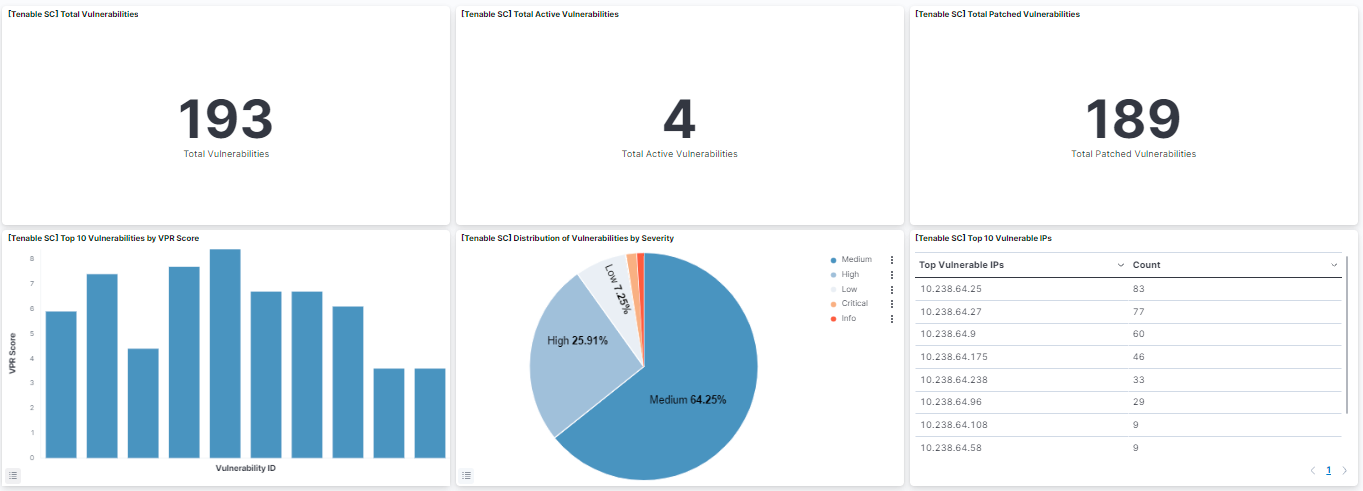
This integration includes one or more Kibana dashboards that visualizes the data collected by the integration. The screenshots below illustrate how the ingested data is displayed.
Changelog
| Version | Details | Minimum Kibana version |
|---|---|---|
| 2.6.0 | Bug fix (View pull request) Derive asset document _id from stable asset identity, mutable scan state, and the collection day so same-day polls deduplicate, state changes are indexed, and the latest transform refreshes active assets without waiting for index rollover.Enhancement (View pull request) Add latest_asset transform providing the most recent document per asset in logs-tenable_sc_latest.asset, and remove documents older than 90 days. |
9.1.4 9.0.7 8.19.4 |
| 2.5.0 | Enhancement (View pull request) Enable request trace log removal. |
9.1.4 9.0.7 8.19.4 |
| 2.4.0 | Enhancement (View pull request) Add tags to ingest pipeline processors and add preserve_original_event to pipeline-level on_failure handlers. |
9.1.4 9.0.7 8.19.4 |
| 2.3.1 | Enhancement (View pull request) Set agentless deployment mode release field to ga. |
9.1.4 9.0.7 8.19.4 |
| 2.3.0 | Enhancement (View pull request) Use new release field for agentless deployment mode to establish as beta. |
9.1.4 9.0.7 8.19.4 |
| 2.2.1 | Bug fix (View pull request) Change page_size/batch_size variable type from text to integer for Fleet input validation. |
9.1.4 9.0.7 8.19.4 |
| 2.2.0 | Enhancement (View pull request) Add support of new fields to vulnerability data stream. |
9.1.4 9.0.7 8.19.4 |
| 2.1.0 | Bug fix (View pull request) Fix API sorting in vulnerability data stream. Enhancement (View pull request) Add HTTP Client Timeout parameter to input templates. Enhancement (View pull request) Update default interval to 4 hours in vulnerability data streams to avoid frequent polls as recommended by Tenable. |
9.1.4 9.0.7 8.19.4 |
| 2.0.0 | Breaking change (View pull request) Update mapping of tenable_sc.vulnerability.plugin.text field from keywordto match_only_text. This could break custom Kibana dashboards or queries that rely on the tenable_sc.vulnerability.plugin.text field. |
9.1.4 9.0.7 8.19.4 |
| 1.32.1 | Bug fix (View pull request) Fix handling of vulnerablity documents that do not contain a seeAlso field. |
9.1.4 9.0.7 8.19.4 |
| 1.32.0 | Enhancement (View pull request) Prevent updating fleet health status to degraded. |
9.1.4 9.0.7 8.19.4 |
| 1.31.0 | Enhancement (View pull request) Enable Agentless deployment. |
9.0.0 8.18.0 |
| 1.30.0 | Enhancement (View pull request) Add support for "Accept Risk Status" filter in vulnerability data stream. |
9.0.0 8.13.0 |
| 1.29.0 | Enhancement (View pull request) Update Kibana constraint to support 9.0.0. |
9.0.0 8.13.0 |
| 1.28.2 | Bug fix (View pull request) Updated SSL description in package manifest.yml to be uniform and to include links to documentation. |
8.13.0 |
| 1.28.1 | Enhancement (View pull request) Add "vulnerability_management" category. |
8.13.0 |
| 1.28.0 | Enhancement (View pull request) Update lastSeen parameter format in vulnerablity data-stream. Bug fix (View pull request) Update request header.User-Agent versions in input files. |
8.13.0 |
| 1.27.0 | Enhancement (View pull request) Do not remove event.original in main ingest pipeline. |
8.13.0 |
| 1.26.0 | Enhancement (View pull request) Add "preserve_original_event" tag to documents with event.kind set to "pipeline_error". |
8.13.0 |
| 1.25.0 | Enhancement (View pull request) Rename connector to Tenable Security Center. |
8.13.0 |
| 1.24.0 | Enhancement (View pull request) Update tested versions note. Bug fix (View pull request) Conform agent user agent string to documented format requirement. |
8.13.0 |
| 1.23.0 | Enhancement (View pull request) Update the kibana constraint to ^8.13.0. Modified the field definitions to remove ECS fields made redundant by the ecs@mappings component template. |
8.13.0 |
| 1.22.0 | Enhancement (View pull request) Improve handling of empty responses. |
8.12.0 |
| 1.21.0 | Enhancement (View pull request) Set sensitive values as secret. |
8.12.0 |
| 1.20.2 | Bug fix (View pull request) Clean up null handling |
8.7.1 |
| 1.20.1 | Enhancement (View pull request) Changed owners |
8.7.1 |
| 1.20.0 | Enhancement (View pull request) Limit request tracer log count to five. |
8.7.1 |
| 1.19.0 | Enhancement (View pull request) ECS version updated to 8.11.0. |
8.7.1 |
| 1.18.0 | Enhancement (View pull request) Improve 'event.original' check to avoid errors if set. |
8.7.1 |
| 1.17.0 | Enhancement (View pull request) Update the package format_version to 3.0.0. |
8.7.1 |
| 1.16.0 | Enhancement (View pull request) Update package to ECS 8.10.0 and align ECS categorization fields. |
8.7.1 |
| 1.15.0 | Enhancement (View pull request) Add tags.yml file so that integration's dashboards and saved searches are tagged with "Security Solution" and displayed in the Security Solution UI. |
8.7.1 |
| 1.14.0 | Enhancement (View pull request) Update package-spec to 2.9.0. |
8.7.1 |
| 1.13.0 | Enhancement (View pull request) Add tenable_sc.vulnerability.age field.Bug fix (View pull request) Update User-Agent version sent to API. |
8.7.1 |
| 1.12.0 | Enhancement (View pull request) Update package to ECS 8.9.0. |
8.7.1 |
| 1.11.0 | Enhancement (View pull request) Ensure event.kind is correctly set for pipeline errors. |
8.7.1 |
| 1.10.0 | Enhancement (View pull request) Update package to ECS 8.8.0. |
8.7.1 |
| 1.9.0 | Enhancement (View pull request) Add a new flag to enable request tracing |
8.7.1 |
| 1.8.0 | Enhancement (View pull request) Update package to ECS 8.7.0. |
8.1.0 |
| 1.7.1 | Bug fix (View pull request) Drop empty event sets. |
8.1.0 |
| 1.7.0 | Enhancement (View pull request) Update package to ECS 8.6.0. |
8.1.0 |
| 1.6.2 | Bug fix (View pull request) Sync the build version in User-Agent header with package version. |
8.1.0 |
| 1.6.1 | Bug fix (View pull request) Adding more sanity checks to pipeline |
8.1.0 |
| 1.6.0 | Enhancement (View pull request) Update Aggregation visualizations to Lens, Add an on_failure processor to the convert and date processors, remove unnecessary white spaces, and convert double quotes to single quotes. |
8.1.0 |
| 1.5.0 | Enhancement (View pull request) Update package to ECS 8.5.0. |
8.1.0 |
| 1.4.1 | Bug fix (View pull request) Fix an indefinite pagination bug by adding explicit pagination termination conditions. In Agent versions >= 8.2.0 pagination termination was never happening. |
8.1.0 |
| 1.4.0 | Enhancement (View pull request) Update package to ECS 8.4.0 |
8.1.0 |
| 1.3.1 | Bug fix (View pull request) Fix proxy URL documentation rendering. |
8.1.0 |
| 1.3.0 | Enhancement (View pull request) Update package to ECS 8.3.0. |
8.1.0 |
| 1.2.2 | Enhancement (View pull request) Update readme - added links to tenable documentation and made the English clearer. |
8.1.0 |
| 1.2.1 | Bug fix (View pull request) Add mapping for event.created |
— |
| 1.2.0 | Enhancement (View pull request) Update to ECS 8.2 |
8.1.0 |
| 1.1.1 | Enhancement (View pull request) Add documentation for multi-fields |
8.1.0 |
| 1.1.0 | Enhancement (View pull request) Add custom User-Agent. Added configurable response size. Added filter in vulnerability dashboard to filter hostname and vulnerability cve id. Added unique identifier to asset. |
8.1.0 |
| 1.0.0 | Enhancement (View pull request) Promote to GA. |
8.0.0 7.16.0 |
| 0.2.0 | Enhancement (View pull request) Update to ECS 8.0 |
— |
| 0.1.0 | Enhancement (View pull request) initial release |
8.0.0 7.16.0 |