Custom Threat Intelligence integration
| Version | 1.11.0 (View all) |
| Managed integration release status | GA |
| Subscription level What's this? |
Basic |
| Developed by What's this? |
Elastic |
| Ingestion method(s) | API, File |
| Minimum Kibana version(s) | 9.3.5 8.19.16 |
You can use this integration as an Elastic Managed integration on Elastic Cloud Hosted deployments running this version or later.
The Custom Threat Intelligence package is an integration designed to ingest threat intelligence IOCs in the STIX 2.1 format and convert them into the Elastic Common Schema (ECS) for seamless ingestion into Elasticsearch. It has been delivered to ingest threat intelligence data for those APIs that do not currently have an existing integration.
The integration comes with a default pipeline that automatically maps standard STIX 2.1 data into ECS fields. However, it also offers the flexibility to handle custom STIX data by allowing users to add custom pipelines accordingly.
Agentless integrations allow you to collect data without having to manage Elastic Agent in your cloud. They make manual agent deployment unnecessary, so you can focus on your data instead of the agent that collects it. For more information, refer to Agentless integrations and the Agentless integrations FAQ. Agentless deployments are only supported in Elastic Serverless and Elastic Cloud environments. This functionality is in beta and is subject to change. Beta features are not subject to the support SLA of official GA features.
RESTful API:
- Connects to public or private RESTful APIs that provide threat intelligence in STIX 2.1 format.
- Supports standard HTTP methods for data retrieval, including GET and POST.
TAXII 2.1 Protocol:
- Acts as a TAXII client to connect to TAXII 2.x servers, enabling the collection of threat intelligence feeds in STIX format.
- It only supports collection models for TAXII data retrieval.
Log files:
- Ingests threat intelligence indicators provided in logfile, for air-gapped environments.
Indicators are categorized based on their type and stored for further processing. Currently, the supported IOCs types are:
- Autonomous System
- Domain Name
- File
- IPv4
- IPv6
- URL
- Windows Registry
- x509 Certificates
The default pipeline is able to ingest other types of indicators, although they are not 100% mapped into ECS.
Due to the lack of standards from some TI providers, it is possible that some extra configuration is required for certain use cases.
When connecting to STIX APIs, by default, the integration provides a native way of acting as a TAXII client. Therefore, for collecting data from TAXII 2.x servers no extra configuration is needed apart from providing the server URL, and authentication credentials when needed.
However, for APIs that don't follow a specific communication protocol. The correct ingestion of STIX data would require:
- Add a CEL program where API specifications are met. Pay special attention to HTTP headers, query parameters, pagination, and the processing of the payload.
- Add a initial state to be provided to the program. Generally, it would include the API URL, authentication parameters and intervals. More information can be found in the documentation.
By default the integration only supports STIX 2.1 indicators. This means that to process IOCs in other formats, the Restrict STIX 2.1 format option must be disabled, and a custom pipeline added to map the indicators correctly.
The Custom Threat Intelligence integration allows you to connect to and pull threat indicators from any server supporting the TAXII protocol. This makes this integration the perfect fit for retrieving structured threat intelligence from Information Sharing and Analysis Centers (ISACs), such as MS-ISAC, FS-ISAC, H-ISAC, and others. These ISACs provide STIX-formatted threat data through TAXII servers.
To configure the integration to pull threat intelligence from an ISAC feed, follow these steps:
Ensure ISAC Membership: Confirm that you are a member of the desired ISAC (e.g., MS-ISAC, FS-ISAC) and have access to its TAXII server credentials. Some ISACs require registration and approval before providing TAXII feed access.
Obtain the following information from your ISAC:
- Server URL: The endpoint for the ISAC’s TAXII server (for example,
https://example.org/taxii/). - Collection Name: The specific collection containing the threat intelligence you want to retrieve.
- Authentication Credentials: Username, password, API Key, or client certificate, as required by the ISAC.
- Server URL: The endpoint for the ISAC’s TAXII server (for example,
Set up the integration:
- The server URL and collection name should be used to build the URL as follows:
https://{base_url}/{api-root}/collections/{name}/objects/ - Provide the username/password, API Key or upload a client certificate, depending on the ISAC’s requirements.
- Set how often the integration should pull updates (e.g. every hour). You can also set the time range to search for indicators when the agent runs for the first time with the Initial Interval.
- The server URL and collection name should be used to build the URL as follows:
Once the integration is running and pulling data, it automatically maps threat indicator fields from STIX to ECS. Verify that the imported indicators (e.g. IPs, domains, hashes) align with your detection rules.
Some TAXII 2.1 servers issue an API key and secret instead of a username and password, and expect them to be sent as HTTP Basic credentials rather than as a bearer token. The steps below use IsMalicious as an example, but apply to any server with the same model.
Obtain the API key and secret from your provider account, and confirm the account has feed access.
Call the server's TAXII discovery endpoint (for example
https://api.ismalicious.com/taxii) to find the API root, then list its collections (https://api.ismalicious.com/taxii/api-root/collections). Authenticate with HTTP Basic using the key as username and the secret as password. Note the ID of each collection you can read.Add the Custom Threat Intelligence integration in Fleet, enable the RESTful API stream, and configure:
Setting Value URL API endpoint https://<server>/<api-root>/collections/<COLLECTION_ID>/objects/Enable TAXII 2.1 Enabled Basic Auth Username Your API key Basic Auth Password Your API secret API Key / API Key Type Leave unset Leave Accept header value and Content-Type header value at their defaults. Configure one stream per collection. For example, the
malicious-ipscollection on IsMalicious useshttps://api.ismalicious.com/taxii/api-root/collections/malicious-ips/objects/.Set Initial Interval and Interval according to collection size. Pagination follows the server's
nexttoken automatically. Use Limit to bound the page size, and raise Maximum Pages Per Interval if a large initial import hits the CEL execution limit.Verify indicators arrive with the expected values, types and timestamps, and use the
logs-ti_custom_latest.indicatoralias for indicator match rules. See Expiration of Indicators of Compromise for howvalid_until,revokedand theIOC Expiration Durationfail-safe are applied.
The Custom Threat Intelligence integration supports IOC expiration. The ingested IOCs expire after certain duration. Based on the STIX 2.1 reference, the following options are available to determine the expiration of indicators:
- The
valid_untilfield that indicates the time at which this Indicator should no longer be considered a valid indicator - The
revokedfield that means that the indicator is no longer considered valid by the object creator. - When missing
valid_untilandrevoked, the indicator expires according to the default expiration set byIOC Expiration Durationconfiguration parameter. For more details, see Handling Orphaned IOCs.
The field stix.ioc_expiration_reason indicates which among the 3 methods stated above is the reason for indicator expiration.
An Elastic Transform is created to faciliate only active IOCs be available to the end users. This transform creates destination indices named logs-ti_custom_latest.dest_indicator-* which only contains active and unexpired IOCs. The latest destination index also has an alias named logs-ti_custom_latest.indicator. When querying for active indicators or setting up indicator match rules, only use the latest destination indices or the alias to avoid false positives from expired IOCs.
Some IOCs may never expire and will continue to stay in the latest destination indices logs-ti_custom_latest.dest_indicator-*. To avoid any false positives from such orphaned IOCs, users are allowed to configure IOC Expiration Duration parameter while setting up the integration. This parameter deletes any indicator ingested into destination indices logs-ti_custom_latest.dest_indicator-* after this specified duration is reached, defaults to 90d from source's @timestamp field. Note that IOC Expiration Duration parameter only exists to add a fail-safe default expiration in case IOCs never expire.
Threat indicators are re-collected across polling intervals, and the latest transform keeps the active, deduplicated view in its destination index. The source data streams therefore hold repeated copies of the same indicators.
The package bounds the growth of these source data streams with a retention that depends on the deployment type:
| Data stream | Self-managed and Elastic Cloud Hosted (ILM policy) | Serverless (data stream lifecycle) |
|---|---|---|
logs-ti_custom.indicator-* |
logs-ti_custom.indicator-default_policy: roll over after 1d, delete 2d after rollover |
delete 5d after rollover |
On self-managed and Elastic Cloud Hosted deployments the ILM policy applies. The data stream lifecycle shipped with the package is not used there. ILM counts the delete age from the rollover of a backing index, so a document can remain for up to the rollover age plus the delete age. On Serverless, ILM is not available and the data stream lifecycle applies instead. It also works per backing index: Elasticsearch rolls the write index over automatically on age, size, or document count, and deletes a backing index once the retention has passed since it rolled over. A document therefore stays for the retention plus up to one rollover interval. The rollover age is derived from the retention and is an implementation detail that Elasticsearch may change. Where the package installs a transform, the transform's destination indices are not affected by either.
To keep data for a different period:
- Self-managed and Elastic Cloud Hosted: edit the ILM policy in Kibana under Stack Management → Index Lifecycle Policies, or with
PUT _ilm/policy/<policy name>. A package upgrade reinstalls the package's ILM policies, so check your change after upgrading. - Serverless: set the retention on the data stream, for example
PUT _data_stream/logs-ti_custom.indicator-default/_lifecyclewith the body{"data_retention": "90d"}. Replacedefaultwith your namespace.
The CEL input limits how many pages it fetches during a single polling interval. The default is 1000. High-volume TAXII feeds with large collections may exceed this limit, causing the integration to enter a DEGRADED state with this message.
To resolve this, increase Maximum Pages Per Interval in the integration's advanced settings. The value must be a positive integer and should be large enough to allow the agent to paginate through the full result set within one interval. Alternatively, reduce the polling interval so each run has fewer pages to fetch.
The indicator dataset stores STIX 2.1 indicators processed into ECS.
Example
{
    "@timestamp": "2020-03-24T14:31:50.000Z",
    "agent": {
        "ephemeral_id": "43af6da1-b18c-4817-8688-f525c200d434",
        "id": "8257fe94-2ac6-48cf-bd18-2ded67e2c463",
        "name": "elastic-agent-58386",
        "type": "filebeat",
        "version": "8.16.0"
    },
    "data_stream": {
        "dataset": "ti_custom.indicator",
        "namespace": "43369",
        "type": "logs"
    },
    "ecs": {
        "version": "8.17.0"
    },
    "elastic_agent": {
        "id": "8257fe94-2ac6-48cf-bd18-2ded67e2c463",
        "snapshot": false,
        "version": "8.16.0"
    },
    "event": {
        "agent_id_status": "verified",
        "category": [
            "threat"
        ],
        "dataset": "ti_custom.indicator",
        "ingested": "2025-07-09T06:39:52Z",
        "kind": "enrichment",
        "original": "{\"confidence\":20,\"created\":\"2020-03-24T14:31:50.000Z\",\"created_by_ref\":\"identity--4f347cc9-4658-59ee-9707-134f434f9d1c\",\"description\":\"RiskIQ expansion\",\"id\":\"indicator--33041420-b509-504c-b30d-9a8ec505d7ea\",\"labels\":[\"certainty-50\",\"perpetual\",\"osint\"],\"lang\":\"en\",\"modified\":\"2023-10-18T07:51:59.171Z\",\"name\":\"abbbe10e3c6e5ed480a0743c540dbaba62ecaaf6\",\"object_marking_refs\":[\"marking-definition--613f2e26-407d-48c7-9eca-b8e91df99dc9\"],\"pattern\":\"[file:hashes.'SHA-1' = 'abbbe10e3c6e5ed480a0743c540dbaba62ecaaf6']\",\"pattern_type\":\"stix\",\"pattern_version\":\"2.1\",\"revoked\":true,\"spec_version\":\"2.1\",\"type\":\"indicator\",\"valid_from\":\"2020-03-24T14:31:50.000Z\",\"valid_until\":\"2021-03-24T14:31:50.000Z\"}",
        "type": [
            "indicator"
        ]
    },
    "input": {
        "type": "cel"
    },
    "related": {
        "hash": [
            "abbbe10e3c6e5ed480a0743c540dbaba62ecaaf6"
        ]
    },
    "stix": {
        "confidence": 20,
        "created": "2020-03-24T14:31:50.000Z",
        "created_by_ref": "identity--4f347cc9-4658-59ee-9707-134f434f9d1c",
        "id": "indicator--33041420-b509-504c-b30d-9a8ec505d7ea",
        "ioc_expiration_date": "2021-03-24T14:31:50.000Z",
        "ioc_expiration_duration": "5d",
        "ioc_expiration_reason": "Expiration set from valid_until field",
        "lang": "en",
        "modified": "2023-10-18T07:51:59.171Z",
        "object_marking_refs": [
            "marking-definition--613f2e26-407d-48c7-9eca-b8e91df99dc9"
        ],
        "pattern": "[file:hashes.'SHA-1' = 'abbbe10e3c6e5ed480a0743c540dbaba62ecaaf6']",
        "pattern_type": "stix",
        "pattern_version": "2.1",
        "revoked": true,
        "spec_version": "2.1",
        "type": "indicator",
        "valid_from": "2020-03-24T14:31:50.000Z",
        "valid_until": "2021-03-24T14:31:50.000Z"
    },
    "tags": [
        "preserve_original_event",
        "forwarded",
        "ti_custom-indicator",
        "certainty-50",
        "perpetual",
        "osint"
    ],
    "threat": {
        "feed": {
            "name": "STIX Provider",
            "reference": "https://stix-example.com"
        },
        "indicator": {
            "confidence": "Low",
            "description": "RiskIQ expansion",
            "file": {
                "hash": {
                    "sha1": [
                        "abbbe10e3c6e5ed480a0743c540dbaba62ecaaf6"
                    ]
                }
            },
            "first_seen": "2020-03-24T14:31:50.000Z",
            "last_seen": "2023-10-18T07:51:59.171Z",
            "modified_at": "2023-10-18T07:51:59.171Z",
            "name": "abbbe10e3c6e5ed480a0743c540dbaba62ecaaf6",
            "type": "file"
        }
    }
}
Exported fields
| Field | Description | Type |
|---|---|---|
| @timestamp | Event timestamp. | date |
| data_stream.dataset | Data stream dataset. | constant_keyword |
| data_stream.namespace | Data stream namespace. | constant_keyword |
| data_stream.type | Data stream type. | constant_keyword |
| event.dataset | Event dataset | constant_keyword |
| event.module | Event module | constant_keyword |
| input.type | Input type | keyword |
| labels.is_ioc_transform_source | Indicates whether an IOC is in the raw source data stream, or the in latest destination index. | constant_keyword |
| log.file.device_id | ID of the device containing the filesystem where the file resides. | keyword |
| log.file.fingerprint | The sha256 fingerprint identity of the file when fingerprinting is enabled. | keyword |
| log.file.inode | Inode number of the log file. | keyword |
| log.file.path | Path to the log file. | keyword |
| log.flags | Flags for the log file. | keyword |
| log.offset | Offset of the entry in the log file. | long |
| stix.confidence | The confidence property identifies the confidence that the creator has in the correctness of their data. The confidence value MUST be a number in the range of 0-100. | integer |
| stix.created | The time at which the STIX Indicator Object was originally created | date |
| stix.created_by_ref | The created_by_ref property specifies the id property of the identity object that describes the entity that created this object. | keyword |
| stix.extensions | Specifies any extensions of the object, as a dictionary. | flattened |
| stix.external_references | The external_references property specifies a list of external references which refers to non-STIX information. This property is used to provide one or more URLs, descriptions, or IDs to records in other systems. | flattened |
| stix.id | The ID of the indicator. | keyword |
| stix.indicator_types | keyword | |
| stix.ioc_expiration_date | The expiration date of the indicator. It can be defined from the source event, by the revoked or valid_until fields, or from the integration configuration by ioc_expiration_duration. | date |
| stix.ioc_expiration_duration | The configured expiration duration for the indicator. | keyword |
| stix.ioc_expiration_reason | Reason why the indicator is expired. Defined by the integration in the ingest pipeline. | keyword |
| stix.kill_chain_phases | Describes the various phases of the kill chain that the attacker undertakes. | flattened |
| stix.lang | Feed language. | keyword |
| stix.modified | Date of the last modification. | date |
| stix.object_marking_refs | The object_marking_refs property specifies a list of id properties of marking-definition objects that apply to this object. | keyword |
| stix.pattern | The detection pattern for the indicator. | keyword |
| stix.pattern_type | The pattern language used in this indicator, which is always "stix". | keyword |
| stix.pattern_version | The version of the pattern language that is used in this indicator. | keyword |
| stix.revoked | The revoked property is only used by STIX Objects that support versioning and indicates whether the object has been revoked. Revoked objects are no longer considered valid by the object creator. Revoking an object is permanent; future versions of the object with this id must not be created. | boolean |
| stix.spec_version | The version of the STIX specification used to represent this object. The value of this property must be 2.1. | keyword |
| stix.type | Type of the STIX Object. | keyword |
| stix.valid_from | The time from which the indicator is considered a valid indicator. | date |
| stix.valid_until | The time at which the indicator should no longer be considered a valid indicator. | date |
| threat.indicator.first_seen | The date and time when intelligence source first reported sighting this indicator. | date |
| threat.indicator.last_seen | The date and time when intelligence source last reported sighting this indicator. | date |
| threat.indicator.modified_at | The date and time when intelligence source last modified information for this indicator. | date |
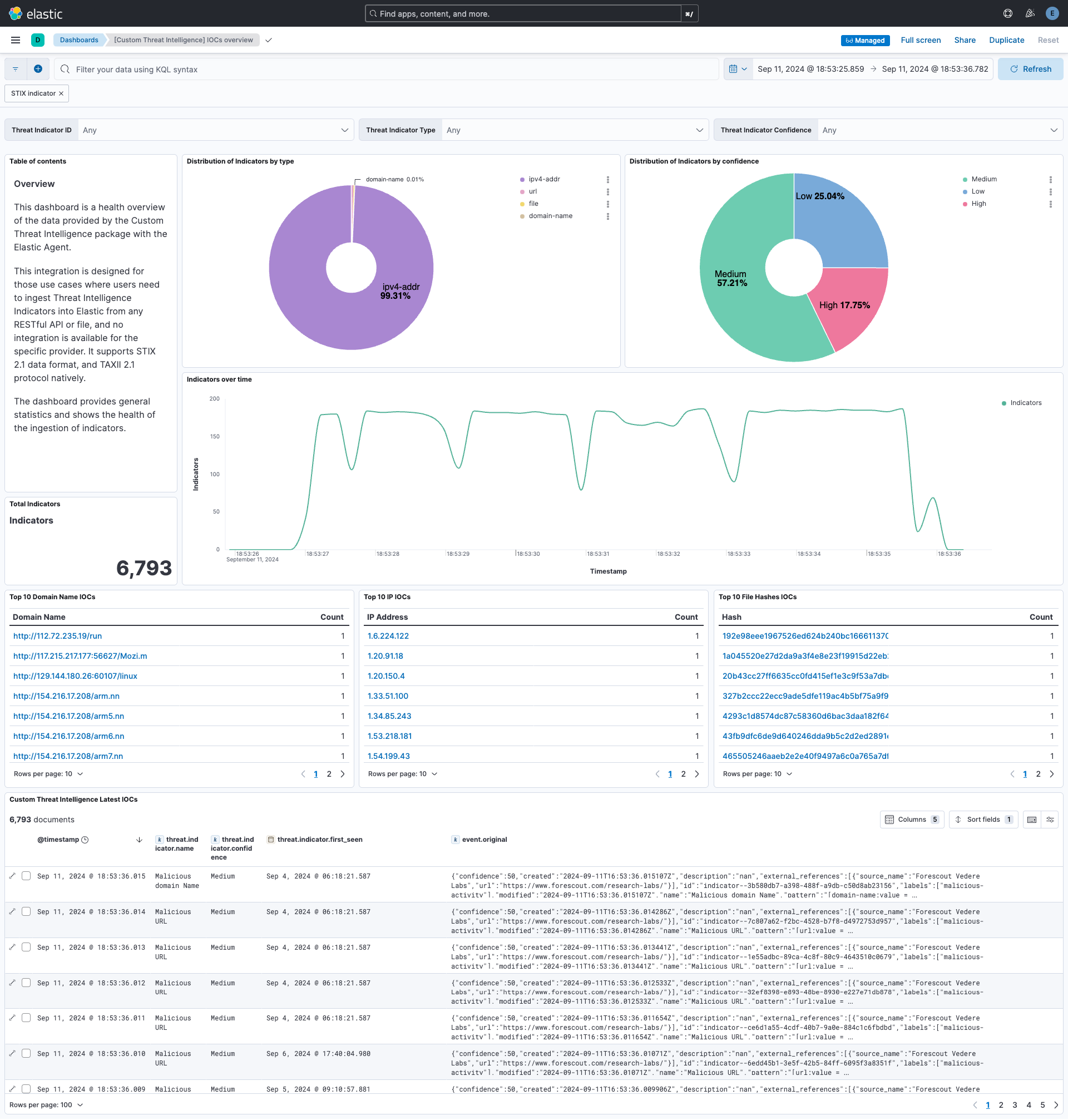
This integration includes one or more Kibana dashboards that visualizes the data collected by the integration. The screenshots below illustrate how the ingested data is displayed.
Changelog
| Version | Details | Minimum Kibana version |
|---|---|---|
| 1.11.0 | Enhancement (View pull request) Document the retention applied to source data streams on stateful and Serverless deployments, and how to change it. |
9.3.5 8.19.16 |
| 1.10.1 | Enhancement (View pull request) Document TAXII discovery and API key/secret Basic authentication. |
9.3.5 8.19.16 |
| 1.10.0 | Enhancement (View pull request) Remove redundant ECS field definitions and the catch-all dynamic template from the transforms, relying on the ecs@mappings component template. |
9.3.5 8.19.16 |
| 1.9.0 | Enhancement (View pull request) Add tags to ingest pipeline processors and add preserve_original_event to pipeline-level on_failure handlers. |
9.3.5 8.19.16 |
| 1.8.3 | Enhancement (View pull request) Set agentless deployment mode release field to ga. |
9.3.5 8.19.16 |
| 1.8.2 | Bug fix (View pull request) Preserve added_after with next when paginating TAXII 2.1 requests. |
9.3.5 8.19.16 |
| 1.8.1 | Bug fix (View pull request) Fix transform destination to use keyword for data_stream.namespace, allowing multi-namespace deployments. |
9.3.5 8.19.16 |
| 1.8.0 | Enhancement (View pull request) Enable Agentless deployment. |
9.3.5 8.19.16 |
| 1.7.2 | Bug fix (View pull request) Fix TAXII response handling when the objects key is omitted. |
9.0.0 8.16.0 |
| 1.7.1 | Bug fix (View pull request) Fix TAXII initial interval requests to use microsecond precision in the added_after timestamp. |
9.0.0 8.16.0 |
| 1.7.0 | Enhancement (View pull request) Use num_failure_retries instead of unattended mode for transform failure recovery. |
9.0.0 8.16.0 |
| 1.6.0 | Enhancement (View pull request) Document max_executions setting and add troubleshooting guidance for the "exceeding maximum number of CEL executions" error. |
9.0.0 8.16.0 |
| 1.5.0 | Enhancement (View pull request) Expose max_executions as an optional advanced parameter so users can raise the cap for high-volume feeds. |
9.0.0 8.16.0 |
| 1.4.0 | Enhancement (View pull request) Enable request trace log removal. |
9.0.0 8.16.0 |
| 1.3.1 | Bug fix (View pull request) Remove duplicate security-solution-default tag references |
9.0.0 8.16.0 |
| 1.3.0 | Enhancement (View pull request) Allow transforms to run in unattended mode. |
9.0.0 8.16.0 |
| 1.2.3 | Bug fix (View pull request) Remove duplicated field definitions in transform. |
9.0.0 8.16.0 |
| 1.2.2 | Bug fix (View pull request) Downgrade the format_version to the minimum version that supports all the necessary features for the package. |
9.0.0 8.16.0 |
| 1.2.1 | Bug fix (View pull request) Add filter for transform's destination index in dashboard. |
9.0.0 8.16.0 |
| 1.2.0 | Enhancement (View pull request) Use terminate processor instead of fail processor to handle agent errors. |
9.0.0 8.16.0 |
| 1.1.0 | Enhancement (View pull request) Add support for alternative token authorization types. |
9.0.0 8.14.0 |
| 1.0.0 | Enhancement (View pull request) Release package as GA. Enhancement (View pull request) ECS version updated to 8.17.0. |
9.0.0 8.14.0 |
| 0.10.0 | Enhancement (View pull request) Add user-configurable HTTP Client Timeout parameter. |
9.0.0 8.14.0 |
| 0.9.0 | Enhancement (View pull request) Make Accept and Content-Type headers configurable for the TAXII client. |
9.0.0 8.14.0 |
| 0.8.1 | Bug fix (View pull request) Add mapping for threat.indicator.url.original in transform. |
9.0.0 8.14.0 |
| 0.8.0 | Enhancement (View pull request) Update Kibana constraint to support 9.0.0. |
9.0.0 8.14.0 |
| 0.7.1 | Bug fix (View pull request) Updated SSL description to be uniform and to include links to documentation. |
8.14.0 |
| 0.7.0 | Enhancement (View pull request) Add mapping for log file fingerprint. |
8.14.0 |
| 0.6.0 | Enhancement (View pull request) Support for limit parameter in API requests. Enhancement (View pull request) Use the header X-Taxii-Date-Added-Last to avoid duplicates in successive requests. |
8.14.0 |
| 0.5.0 | Enhancement (View pull request) Improve documentation on how to proceed with ISAC feeds. |
8.14.0 |
| 0.4.0 | Enhancement (View pull request) Add "preserve_original_event" tag to documents with event.kind set to "pipeline_error". |
8.14.0 |
| 0.3.0 | Enhancement (View pull request) Support for SSL and Proxy settings. Enhancement (View pull request) Add feed name and feed reference options for API section. Bug fix (View pull request) Fix CEL program to follow TAXII 2.1 specifications. |
8.14.0 |
| 0.2.0 | Enhancement (View pull request) Add support for basic authentication. Enhancement (View pull request) Add fingerprint to avoid ingesting duplicated indicators. |
8.14.0 |
| 0.1.3 | Bug fix (View pull request) Use triple-brace Mustache templating when referencing variables in ingest pipelines. |
8.14.0 |
| 0.1.2 | Bug fix (View pull request) Use triple-brace Mustache templating when referencing variables in ingest pipelines. |
8.14.0 |
| 0.1.1 | Bug fix (View pull request) Fix labels.is_ioc_transform_source values |
8.14.0 |
| 0.1.0 | Enhancement (View pull request) Initial release of Custom Threat Intelligence package |
8.14.0 |