Azure Frontdoor Logs Integration
| Version | 2.6.0 (View all) |
| Subscription level What's this? |
Basic |
| Developed by What's this? |
Elastic |
| Ingestion method(s) | Azure Event Hub |
| Minimum Kibana version(s) | 9.3.0 9.2.4 9.1.10 8.19.10 |
Azure Front Door provides different logging to help you track, monitor, and debug your Front Door.
- Access logs have detailed information about every request that AFD receives and help you analyze and monitor access patterns, and debug issues.
- Activity logs provide visibility into the operations done on Azure resources.
- Health Probe logs provides the logs for every failed probe to your origin.
- Web Application Firewall (WAF) logs provide detailed information of requests that gets logged through either detection or prevention mode of an Azure Front Door endpoint. A custom domain that gets configured with WAF can also be viewed through these logs.
The Azure Frontdoor logs integration retrieves the following types of log data from AFD:
- Access Logs: Logs categorized as
FrontDoorAccessLog. - Web Application Firewall (WAF) Logs: Logs categorized as
FrontDoorWebApplicationFirewallLog. - Health Probe Logs: Logs categorized as
FrontDoorHealthProbeLog.
Currently, the integration does not support Activity Logs.
This integration collects three types of data streams:
- access log
- waf logs
- health probe logs
The integration supports two authentication methods: connection string (shared access key) and client secret (Microsoft Entra ID). The same method is used for both Event Hub and Storage Account.
The Elastic Agent can use a connection string to access the event hub and fetch the exported logs. The connection string contains details about the event hub and the credentials required to access it.
To get the connection string for your Event Hubs namespace:
- Visit the Event Hubs namespace you created in a previous step.
- Select Settings > Shared access policies.
Create a new Shared Access Policy (SAS):
- Select Add to open the creation panel.
- Add a Policy name (for example, "ElasticAgent").
- Select the Listen claim.
- Click Create.
When the SAS Policy is ready, select it to display the information panel.
Take note of the Connection string–primary key, which you will use later when specifying a connection_string in the integration settings.
Instead of a connection string, you can authenticate using a Microsoft Entra ID app registration (service principal) with a client secret. This uses Azure RBAC and is useful when you want to avoid shared keys or enforce role-based access.
Prerequisites: An Event Hub, a Storage Account, and a Microsoft Entra ID app registration with a client secret.
Steps:
Register an app in Microsoft Entra ID
In the Azure Portal, go to Microsoft Entra ID > App registrations > New registration. Note the Application (client) ID and Directory (tenant) ID.Create a client secret
In the app, go to Certificates & secrets > New client secret. Copy the secret value; you will need it in the integration (for exampleclient_secret). It is shown only once.Assign required permissions to the app
The service principal needs the following Azure RBAC permissions (see the Filebeat azure-eventhub input reference for the same requirements):For Azure Event Hubs:
- Azure Event Hubs Data Receiver role on the Event Hubs namespace or Event Hub, or
- A custom role with:
Microsoft.EventHub/namespaces/eventhubs/read,Microsoft.EventHub/namespaces/eventhubs/consumergroups/read
For Azure Storage Account:
- Storage Blob Data Contributor role on the Storage Account or container, or
- A custom role with:
Microsoft.Storage/storageAccounts/blobServices/containers/read,Microsoft.Storage/storageAccounts/blobServices/containers/write,Microsoft.Storage/storageAccounts/blobServices/containers/delete,Microsoft.Storage/storageAccounts/blobServices/generateUserDelegationKey/action
For detailed setup, see the Microsoft documentation: Create an Azure service principal with Azure CLI, Create an Azure AD app registration using the Azure portal, Assign Azure roles using Azure CLI, Azure Event Hubs authentication and authorization, Authorize access to blobs using Azure Active Directory.
Configure the integration
Set Authentication type to Client Secret. Provide Tenant ID, Client ID, Client Secret, and the fully qualified Event Hub namespace (for exampleyournamespace.servicebus.windows.net). Use the same Storage Account and container as for connection string authentication; the integration will use the client secret to access both Event Hubs and Storage.
auth_type :
string
Authentication method for Event Hub and Storage Account. Connection String (default): use connection_string and storage_account_key. Client Secret: use Microsoft Entra ID with tenant_id, client_id, client_secret, and eventhub_namespace (RBAC); no connection string or storage key needed.
eventhub :
string
Is the fully managed, real-time data ingestion service.
consumer_group :
string
The publish/subscribe mechanism of Event Hubs is enabled through consumer groups. A consumer group is a view (state, position, or offset) of an entire event hub. Consumer groups enable multiple consuming applications to each have a separate view of the event stream, and to read the stream independently at their own pace and with their own offsets.
Default value: $Default
connection_string :
string
(Required when auth_type is Connection String.) The connection string required to communicate with Event Hubs. See Get an Event Hubs connection string.
storage_account :
string
The name of the storage account where the state/offsets will be stored and updated.
storage_account_key :
string
(Required when auth_type is Connection String.) The storage account key used to authorize access to checkpoint data. Not used when auth_type is Client Secret; the integration uses the same client secret for Storage.
eventhub_namespace :
string
(Required when auth_type is Client Secret.) The fully qualified Event Hubs namespace (for example yournamespace.servicebus.windows.net). Do not use the short namespace name.
tenant_id :
string
(Required when auth_type is Client Secret.) Microsoft Entra ID (directory) tenant ID where the app is registered.
client_id :
string
(Required when auth_type is Client Secret.) Microsoft Entra ID application (client) ID. The app's service principal must have Azure Event Hubs Data Receiver on the Event Hub and Storage Blob Data Contributor on the Storage Account.
client_secret :
string
(Required when auth_type is Client Secret.) Microsoft Entra ID application client secret from the app's Certificates & secrets.
authority_host :
string
(Optional, for client secret authentication.) Microsoft Entra ID authority endpoint. Defaults to https://login.microsoftonline.com (Azure Public Cloud). Use a different endpoint for other clouds (for example Azure Government, China, Germany).
resource_manager_endpoint :
string
Optional, by default we are using the azure public environment, to override, users can provide a specific resource manager endpoint in order to use a different azure environment.
Ex:
https://management.chinacloudapi.cn/ for azure ChinaCloud
https://management.microsoftazure.de/ for azure GermanCloud
https://management.azure.com/ for azure PublicCloud
https://management.usgovcloudapi.net/ for azure USGovernmentCloud
Users can also use this in case of a Hybrid Cloud model, where one may define their own endpoints.
Exported fields
| Field | Description | Type |
|---|---|---|
| @timestamp | Event timestamp. | date |
| azure.frontdoor.access.backend_hostname | The host name in the request from client. If you enable custom domains and have wildcard domain (*.contoso.com), hostname is a.contoso.com. if you use Azure Front Door domain (contoso.azurefd.net), hostname is contoso.azurefd.net. | keyword |
| azure.frontdoor.access.cache_status | Provides the status code of how the request gets handled by the CDN service when it comes to caching. | keyword |
| azure.frontdoor.access.error_info | This field provides detailed info of the error token for each response. | keyword |
| azure.frontdoor.access.identity.authorization.action | Action | keyword |
| azure.frontdoor.access.identity.authorization.evidence.principal_id | Principal ID | keyword |
| azure.frontdoor.access.identity.authorization.evidence.principal_type | Principal type | keyword |
| azure.frontdoor.access.identity.authorization.evidence.role | Role | keyword |
| azure.frontdoor.access.identity.authorization.evidence.role_assignment_id | Role assignment ID | keyword |
| azure.frontdoor.access.identity.authorization.evidence.role_assignment_scope | Role assignment scope | keyword |
| azure.frontdoor.access.identity.authorization.evidence.role_definition_id | Role definition ID | keyword |
| azure.frontdoor.access.identity.authorization.scope | Scope | keyword |
| azure.frontdoor.access.identity.claims.* | Claims | object |
| azure.frontdoor.access.identity.claims_initiated_by_user.fullname | Fullname | keyword |
| azure.frontdoor.access.identity.claims_initiated_by_user.givenname | Givenname | keyword |
| azure.frontdoor.access.identity.claims_initiated_by_user.name | Name | keyword |
| azure.frontdoor.access.identity.claims_initiated_by_user.schema | Schema | keyword |
| azure.frontdoor.access.identity.claims_initiated_by_user.surname | Surname | keyword |
| azure.frontdoor.access.identity_name | identity name | keyword |
| azure.frontdoor.access.is_received_from_client | Boolean value. | boolean |
| azure.frontdoor.access.pop | The edge pop, which responded to the user request. | keyword |
| azure.frontdoor.access.routing_rule_name | The name of the route that the request matched. | keyword |
| azure.frontdoor.access.rules_engine_match_names | The names of the rules that were processed. | keyword |
| azure.frontdoor.access.time_taken | The length of time from the time AFD edge server receives a client's request to the time that AFD sends the last byte of response to client, in milliseconds. This field doesn't take into account network latency and TCP buffering. | double |
| azure.frontdoor.access.time_to_first_byte | The length of time in milliseconds from AFD receives the request to the time the first byte gets sent to client, as measured on Azure Front Door. This property doesn't measure the client data. | double |
| azure.frontdoor.category | Azure frontdoor category name. | keyword |
| azure.frontdoor.operation_name | Azure operation name. | keyword |
| azure.frontdoor.resource_id | Azure Resource ID. | keyword |
| azure.frontdoor.tracking_reference | The unique reference string that identifies a request served by AFD, also sent as X-Azure-Ref header to the client. Required for searching details in the access logs for a specific request. | keyword |
| cloud.image.id | Image ID for the cloud instance. | keyword |
| data_stream.dataset | Data stream dataset. | constant_keyword |
| data_stream.namespace | Data stream namespace. | constant_keyword |
| data_stream.type | Data stream type. | constant_keyword |
| host.containerized | If the host is a container. | boolean |
| host.os.build | OS build information. | keyword |
| host.os.codename | OS codename, if any. | keyword |
| input.type | Input type. | keyword |
| log.offset | Log offset. | long |
Exported fields
| Field | Description | Type |
|---|---|---|
| @timestamp | Event timestamp. | date |
| azure.frontdoor.category | Azure frontdoor category name. | keyword |
| azure.frontdoor.operation_name | Azure operation name. | keyword |
| azure.frontdoor.resource_id | Azure Resource ID. | keyword |
| azure.frontdoor.tracking_reference | The unique reference string that identifies a request served by AFD, also sent as X-Azure-Ref header to the client. Required for searching details in the access logs for a specific request. | keyword |
| azure.frontdoor.waf.details.data | Detail data. | keyword |
| azure.frontdoor.waf.details.msg | Detail msg. | keyword |
| azure.frontdoor.waf.identity.authorization.action | Action | keyword |
| azure.frontdoor.waf.identity.authorization.evidence.principal_id | Principal ID | keyword |
| azure.frontdoor.waf.identity.authorization.evidence.principal_type | Principal type | keyword |
| azure.frontdoor.waf.identity.authorization.evidence.role | Role | keyword |
| azure.frontdoor.waf.identity.authorization.evidence.role_assignment_id | Role assignment ID | keyword |
| azure.frontdoor.waf.identity.authorization.evidence.role_assignment_scope | Role assignment scope | keyword |
| azure.frontdoor.waf.identity.authorization.evidence.role_definition_id | Role definition ID | keyword |
| azure.frontdoor.waf.identity.authorization.scope | Scope | keyword |
| azure.frontdoor.waf.identity.claims.* | Claims | object |
| azure.frontdoor.waf.identity.claims_initiated_by_user.fullname | Fullname | keyword |
| azure.frontdoor.waf.identity.claims_initiated_by_user.givenname | Givenname | keyword |
| azure.frontdoor.waf.identity.claims_initiated_by_user.name | Name | keyword |
| azure.frontdoor.waf.identity.claims_initiated_by_user.schema | Schema | keyword |
| azure.frontdoor.waf.identity.claims_initiated_by_user.surname | Surname | keyword |
| azure.frontdoor.waf.identity_name | identity name | keyword |
| azure.frontdoor.waf.policy | WAF policy name. | keyword |
| azure.frontdoor.waf.policy_mode | WAF policy mode. | keyword |
| cloud.image.id | Image ID for the cloud instance. | keyword |
| data_stream.dataset | Data stream dataset. | constant_keyword |
| data_stream.namespace | Data stream namespace. | constant_keyword |
| data_stream.type | Data stream type. | constant_keyword |
| host.containerized | If the host is a container. | boolean |
| host.os.build | OS build information. | keyword |
| host.os.codename | OS codename, if any. | keyword |
| input.type | Input type. | keyword |
| log.offset | Log offset. | long |
Exported fields
| Field | Description | Type |
|---|---|---|
| @timestamp | Event timestamp. | date |
| azure.frontdoor.category | Azure Frontdoor category name. | keyword |
| azure.frontdoor.health_probe.connection_latency_milliseconds | TCP connection latency of the health probe in milliseconds. | long |
| azure.frontdoor.health_probe.dns_latency_microseconds | DNS resolution latency of the health probe in microseconds. | long |
| azure.frontdoor.health_probe.health_probe_id | Unique identifier for the health probe request. | keyword |
| azure.frontdoor.health_probe.origin_name | The hostname of the origin that was probed. | keyword |
| azure.frontdoor.health_probe.pop | The edge PoP (Point of Presence) that issued the health probe. | keyword |
| azure.frontdoor.health_probe.result | Result of the health probe (examples: OriginError, Success). | keyword |
| azure.frontdoor.health_probe.total_latency_milliseconds | Total latency of the health probe in milliseconds. | long |
| azure.frontdoor.operation_name | Azure operation name. | keyword |
| azure.frontdoor.resource_id | Azure Resource ID. | keyword |
| cloud.image.id | Image ID for the cloud instance. | keyword |
| data_stream.dataset | Data stream dataset. | constant_keyword |
| data_stream.namespace | Data stream namespace. | constant_keyword |
| data_stream.type | Data stream type. | constant_keyword |
| host.containerized | If the host is a container. | boolean |
| host.os.build | OS build information. | keyword |
| host.os.codename | OS codename, if any. | keyword |
| input.type | Input type. | keyword |
| log.offset | Log offset. | long |
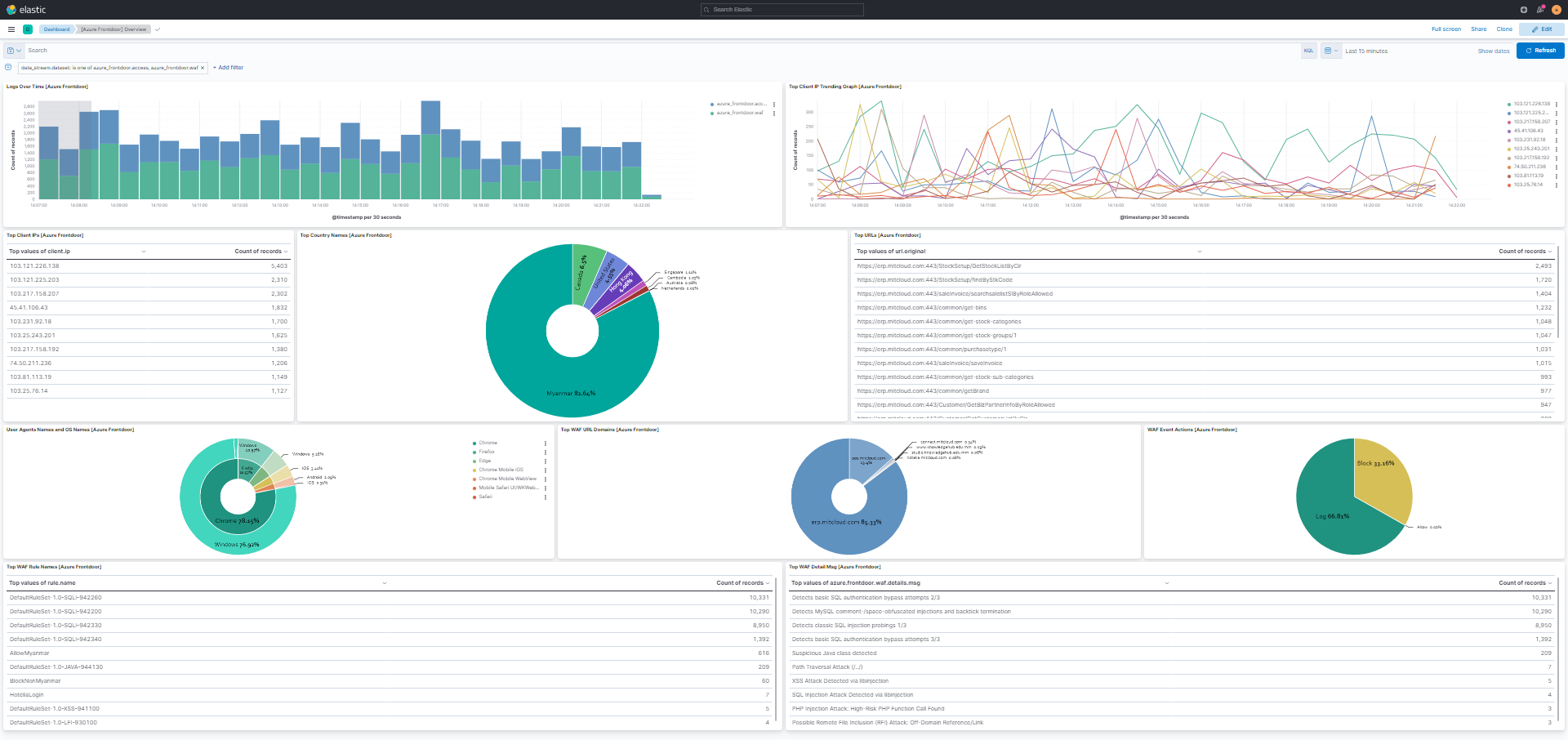
This integration includes one or more Kibana dashboards that visualizes the data collected by the integration. The screenshots below illustrate how the ingested data is displayed.
Changelog
| Version | Details | Minimum Kibana version |
|---|---|---|
| 2.6.0 | Enhancement (View pull request) Add tags to ingest pipeline processors. |
9.3.0 9.2.4 9.1.10 8.19.10 |
| 2.5.0 | Enhancement (View pull request) Set 'elastic' owner type. |
9.3.0 9.2.4 9.1.10 8.19.10 |
| 2.4.0 | Enhancement (View pull request) Add Health Probe dataset |
9.3.0 9.2.4 9.1.10 8.19.10 |
| 2.3.0 | Enhancement (View pull request) Add client secret authentication support for Azure Event Hub with RBAC. |
9.3.0 9.2.4 9.1.10 8.19.10 |
| 2.2.2 | Bug fix (View pull request) Fix processing of events with "N/A" values. |
9.0.0 8.13.0 |
| 2.2.1 | Bug fix (View pull request) Update README to provide clearer information on supported log types. |
9.0.0 8.13.0 |
| 2.2.0 | Enhancement (View pull request) Update Kibana constraint to support 9.0.0. |
9.0.0 8.13.0 |
| 2.1.3 | Enhancement (View pull request) Add missing category. |
8.13.0 |
| 2.1.2 | Bug fix (View pull request) Add storage_account_container variables. |
8.13.0 |
| 2.1.1 | Bug fix (View pull request) Change connection_string to be a secret |
8.13.0 |
| 2.1.0 | Enhancement (View pull request) Add "preserve_original_event" tag to documents with event.kind set to "pipeline_error". |
8.13.0 |
| 2.0.1 | Bug fix (View pull request) Use triple-brace Mustache templating when referencing variables in ingest pipelines. |
8.13.0 |
| 2.0.0 | Breaking change (View pull request) Changed keyword field type to double in time_to_first_byte, time_taken fields and to date in time fields |
8.13.0 |
| 1.10.0 | Enhancement (View pull request) Allow @custom pipeline access to event.original without setting preserve_original_event. |
8.13.0 |
| 1.9.0 | Enhancement (View pull request) Add new field identity. |
8.13.0 |
| 1.8.0 | Enhancement (View pull request) Update the kibana constraint to ^8.13.0. Modified the field definitions to remove ECS fields made redundant by the ecs@mappings component template. |
8.13.0 |
| 1.7.0 | Enhancement (View pull request) Set sensitive values as secret. |
8.12.0 |
| 1.6.1 | Enhancement (View pull request) Changed owners |
8.6.0 |
| 1.6.0 | Enhancement (View pull request) ECS version updated to 8.11.0. |
8.6.0 |
| 1.5.1 | Bug fix (View pull request) Fix Preserve Original Event for both Access and WAF data streams |
8.6.0 |
| 1.5.0 | Enhancement (View pull request) Set 'community' owner type. |
8.6.0 |
| 1.4.0 | Enhancement (View pull request) Update the package format_version to 3.0.0. |
8.6.0 |
| 1.3.2 | Bug fix (View pull request) Removing unused ECS field declarations. |
8.6.0 |
| 1.3.1 | Bug fix (View pull request) Add null checks and ignore_missing checks to the rename processor |
8.6.0 |
| 1.3.0 | Enhancement (View pull request) ECS version updated to 8.10.0. |
8.6.0 |
| 1.2.0 | Enhancement (View pull request) Add tags.yml file so that integration's dashboards and saved searches are tagged with "Security Solution" and displayed in the Security Solution UI. |
8.6.0 |
| 1.1.0 | Enhancement (View pull request) Update package to ECS 8.9.0. |
8.6.0 |
| 1.0.0 | Enhancement (View pull request) Release Azure Frontdoor as GA. |
8.6.0 |
| 0.4.0 | Enhancement (View pull request) Ensure event.kind is correctly set for pipeline errors. |
8.6.0 |
| 0.3.0 | Enhancement (View pull request) Update package to ECS 8.8.0. |
8.6.0 |
| 0.2.0 | Enhancement (View pull request) Update package to ECS 8.7.0. |
8.6.0 |
| 0.1.0 | Enhancement (View pull request) Update package to ECS 8.7.0. |
— |
| 0.0.2 | Bug fix (View pull request) Modify default storage container name to avoid collisions |
— |
| 0.0.1 | Enhancement (View pull request) Initial draft of the package |
— |