Reference architecture
Elastic nightshift always runs in an Elastic Observability Serverless project. What it can do depends on where your data lives. Use this page to check what works with your setup before you start.
Elastic nightshift has two engines that reach your data in different ways:
- Detection watches your data through sources. A source is an ES|QL query, so detection only reads data that the project can query meaning data in the project itself, or in projects linked by cross-project search.
- Investigation queries your data through Elasticsearch connectors. A connector can point to any Elasticsearch cluster that Elastic nightshift can reach over the network with an API key. Refer to Connect your data and tools.
| Where your data lives | Detection | Investigation | How investigations reach the data |
|---|---|---|---|
| A single serverless project | Yes | Yes | Local Elasticsearch connector, created for you |
| Serverless projects linked by cross-project search | Yes | Yes | External Elasticsearch connector to the Elastic nightshift project, with an Elastic Cloud API key that has connected cluster access |
| An Elastic Cloud Hosted deployment | No | Yes | External Elasticsearch connector with an API key |
| A self-managed cluster | No | Possible, with care | External Elasticsearch connector to a public, secured endpoint |
For the best results, keep your data in Serverless, either in the Elastic nightshift project or in projects linked to it. Then detection and investigation both work. For linked projects, you create one API key.
The simplest setup is having your logs, metrics, and traces in the same Elastic Observability Serverless project as Elastic nightshift.
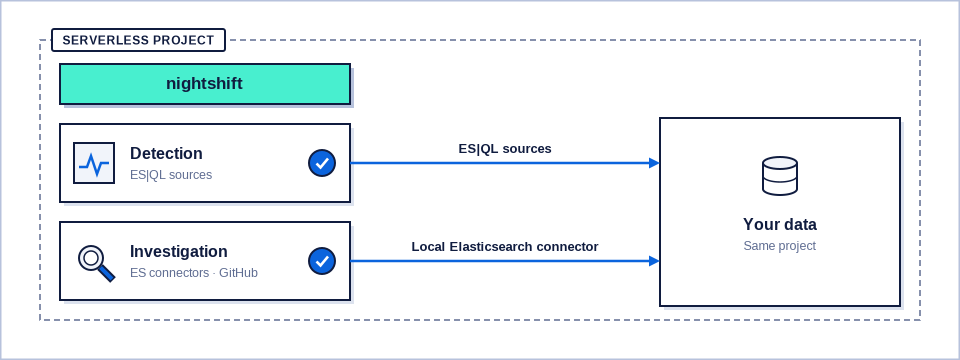
- Detection: Add a source such as All logs and select Enable detection. Refer to Manage what detection monitors.
- Investigation: When you enable Elastic nightshift, it creates a Local Elasticsearch connector for the project. You don't set up anything else.
Your data is spread across several Serverless projects, for example one project per team or per region, and the Elastic nightshift project is linked to them with cross-project search.
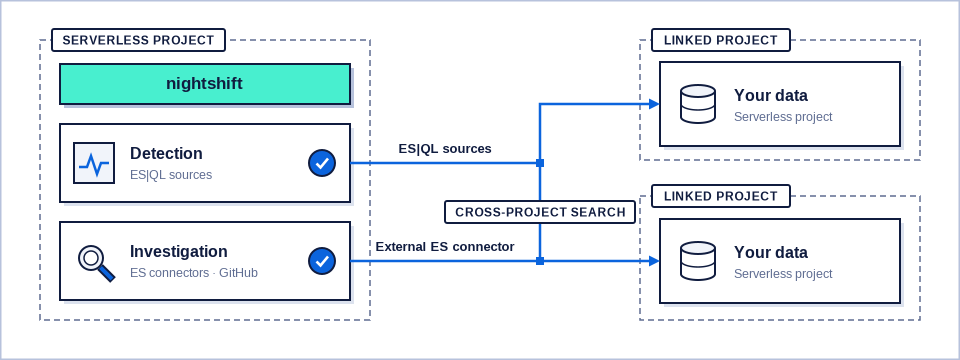
- Detection: Works across the linked projects. A source query reads the linked projects in the same way as the local one.
- Investigation: The Local Elasticsearch connector searches only the Elastic nightshift project. To search the linked projects, add an External Elasticsearch connector that points to the Elastic nightshift project, with an API key that you create in the Elastic Cloud console and that has connected cluster access. Refer to Search projects linked through cross-project search.
This is the recommended setup when your data lives in more than one place. Link the projects once, and add one connector, and Elastic nightshift sees all of them.
Your data is in an Elastic Cloud Hosted deployment, and Elastic nightshift runs in a separate Serverless project.
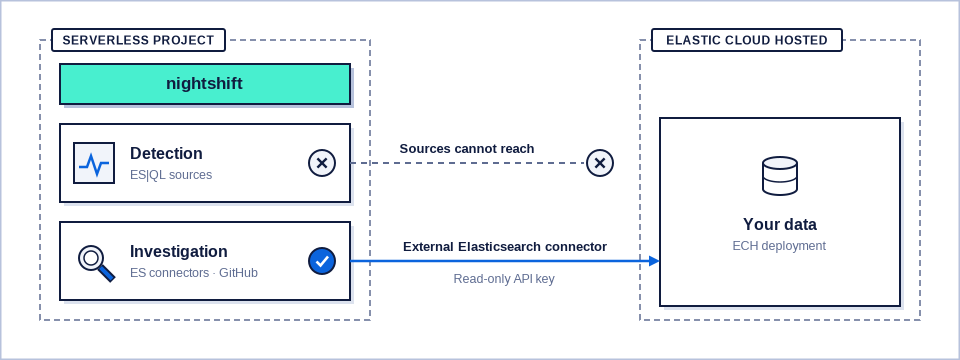
- Detection: Sources can't read data in an Elastic Cloud Hosted deployment.
- Investigation: Add an External Elasticsearch connector that points to the deployment's Elasticsearch endpoint and uses a read-only API key. Refer to Add data for the API key request and where to find the endpoint.
Automations start from alerts in the Elastic nightshift project. To investigate alerts that fire in the Elastic Cloud Hosted deployment automatically, send them to a Slack channel or to a webhook in the Elastic nightshift project. Refer to Investigate alerts from your other tools.
Your data is in an Elasticsearch cluster that you run yourself, on premises or in your own cloud account.
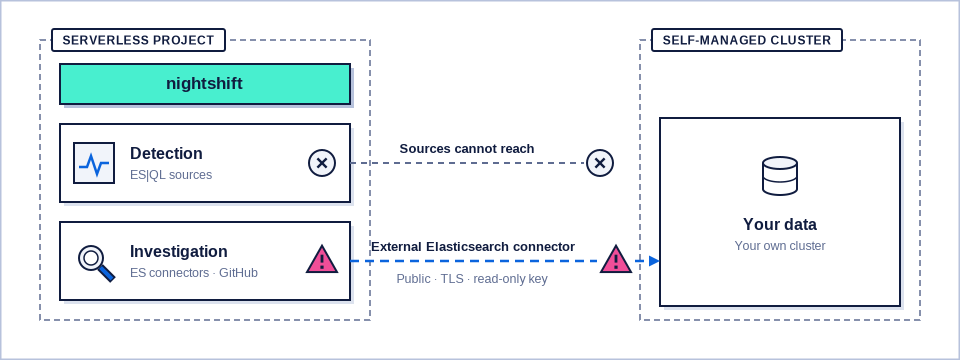
- Detection: Sources can't read data in a self-managed cluster.
- Investigation: Only possible if Elastic nightshift can reach your cluster's Elasticsearch endpoint over the internet. An External Elasticsearch connector runs in Elastic Cloud, so it can't reach a cluster that is only on a private network. Mutual TLS (mTLS) and private connectivity, such as AWS PrivateLink, aren't supported.
Exposing a cluster to the internet is a security decision for your team. If you do it, secure the endpoint before you connect it:
- Use TLS with a trusted certificate. Refer to Secure cluster communications.
- Use a dedicated API key that can only read the indices that investigations need. Refer to Elasticsearch API keys.
- Restrict who can connect, for example with IP filtering or a reverse proxy in front of the cluster. Refer to IP filtering.
If you can't expose the cluster, consider sending the data you want Elastic nightshift to investigate to a Serverless project instead, for example with OpenTelemetry or Elastic Agent. Refer to Get started with Elastic Observability Serverless.
- Get started: Enable Elastic nightshift and connect your data
- Connect your data and tools: Set up Local and External Elasticsearch connectors, GitHub, and Slack
- How detection works: Learn what detection needs from your data
- Limitations: Check the Tech Preview limitations