Security use cases for Elastic Agent Builder
This page shows example conversations with the Elastic AI Agent for common Elastic Security use cases. Each section names the built-in Security skill (or skills) to enable for that use case and gives example prompts. For what each skill does, refer to the Built-in skills reference. For how agents, skills, and tools fit together, start with Elastic AI Agent, skills, and tools in Elastic Security.
Skills can be activated three ways: the agent selects one automatically from your prompt, you invoke one explicitly with a slash command (for example, /threat-hunting), or you attach context (such as an alert from the alert flyout) that activates the matching skill. These examples assume the agent is selecting automatically unless otherwise noted.
Enable: alert-analysis (optionally combine with entity-analytics for deeper entity context)
Use this skill to triage a specific alert or work through an alert queue. The agent fetches the alert, finds related alerts that share entities, correlates with Elastic Security Labs threat intelligence, and recommends a disposition (true positive, benign true positive, false positive, or needs more data). For a multi-skill flow that chains this into a tracking dashboard, refer to Combining skills across use cases.
| Example prompt | What the agent can do |
|---|---|
| What's the context on this critical alert? | Pull alert details, find alerts that share host, user, or IP entities within a time window, and correlate with threat intelligence. |
| Find alerts related to this one over the last 7 days | Search for alerts sharing host.name, user.name, source.ip, or destination.ip with the source alert. |
| Should we escalate this alert? | Summarize evidence, check entity risk scores for involved hosts and users, and recommend a disposition with supporting reasoning. |
You can also trigger this skill by attaching an alert from the alert flyout — the agent activates alert-analysis automatically based on the attachment.
Enable: entity-analytics
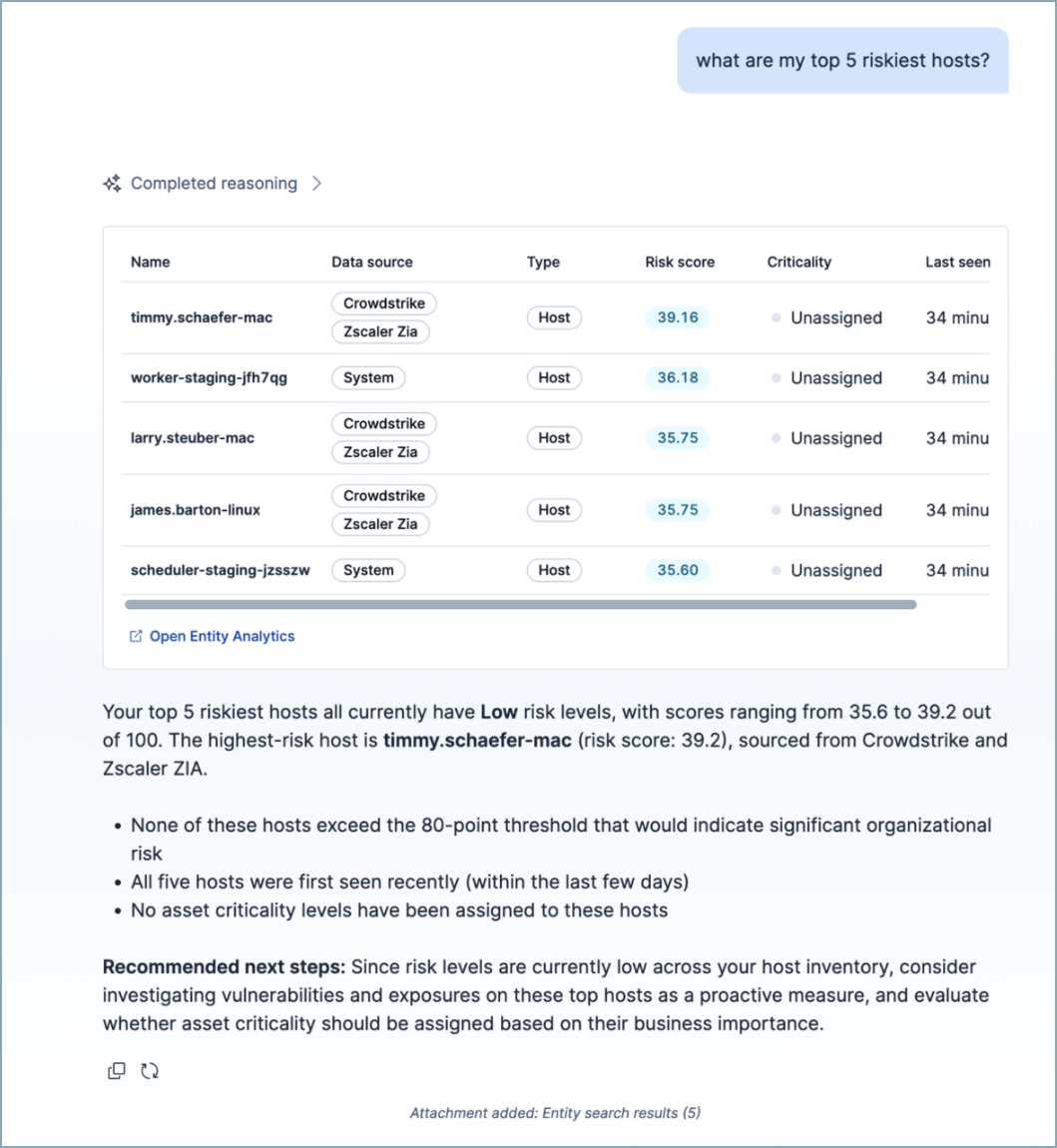
Use this skill to find risky entities or profile specific hosts, users, services, or generic entities. The agent returns normalized risk scores (0-100), risk levels, asset criticality, watchlists, and behavioral history, and can analyze changes over time. The skill draws on Security Machine Learning anomaly detection jobs as part of its entity analysis. For deeper anomaly investigation, combine it with the find-security-ml-jobs skill.
| Example prompt | What the agent can do |
|---|---|
| Which users have the highest risk scores? | Return top N users sorted by normalized risk score, with risk level and asset criticality. |
Has host-12's risk score changed significantly in the last 90 days? |
Compare current and historical risk scores, flag changes greater than 20 points as significant, and summarize what drove the change. |
| What are the riskiest hosts that are high-impact assets? | Filter for entities with criticality high_impact or extreme_impact and sort by risk score. |
Set host-12's asset criticality to high impact
|
Update the entity's asset criticality and recalculate its risk score. |
Enable: manage-watchlists
Use this skill to manage entity watchlists — groups of important entities — directly from chat. The agent can list, create, update, and delete watchlists, and add or remove entities.
| Example prompt | What the agent can do |
|---|---|
| List all watchlists | Return existing watchlists, and search them by name when you specify one. |
| Create a watchlist called Executives for high-profile users | Create a new watchlist, then use it in risk scoring. |
Add user-42 and user-99 to the Executives watchlist |
Resolve the watchlist by name and add the entities. |
Remove host-9 from the Critical Infrastructure watchlist |
Remove the entity from the named watchlist. |
| Delete the Contractors watchlist | Delete the named watchlist. |
The manage-watchlists skill only covers watchlist changes. To also profile entities or filter them by watchlist, combine it with entity-analytics.
Enable: entity-analytics-leads
Use this skill to work with AI-generated threat hunting leads. The agent can list current leads, generate new ones, and dismiss those that aren't relevant.
| Example prompt | What the agent can do |
|---|---|
| Show me the current threat hunting leads | List AI-generated leads so you can review them. |
| Generate new threat hunting leads | Generate new leads. |
| Dismiss this lead, it's a false positive | Dismiss the specified lead. |
Enable: threat-hunting (optionally combine with entity-analytics and find-security-ml-jobs)
Use this skill for hypothesis-driven hunts. The agent runs iterative ES|QL queries, establishes baselines, searches for IOCs, and flags anomalies. It ships with query templates for lateral movement, C2 beaconing, brute force, and rare process starts. For multi-skill flows that pivot from a hunt finding into an entity profile or into rule validation, refer to Combining skills across use cases.
| Example prompt | What the agent can do |
|---|---|
Hunt for lateral movement from srv-01 in the last 7 days |
Run ES|QL queries across process, authentication, and network data, identify pivots, and enrich with threat intelligence. |
Sweep for file hash abc123... across recent events |
Search relevant indices for IOCs, summarize matches, and suggest next pivots. |
| Look for C2 beaconing from hosts in the DMZ | Apply the C2 beaconing template — periodic connection analysis, rare DNS queries — over a 7-day window. |
Enable: find-security-ml-jobs
Use this skill to investigate anomalies surfaced by Security Machine Learning jobs: atypical access patterns, lateral movement, unexpected logins from new geographies, suspicious external domain activity, and large data transfers. The agent identifies relevant active jobs, queries .ml-anomalies-*, and summarizes findings.
| Example prompt | What the agent can do |
|---|---|
| Any unusual logins or access patterns in the last 24 hours? | Find relevant active Machine Learning jobs, query for anomalies that exceed the configured score threshold, and summarize with entity context. |
| Show users who downloaded unusually large amounts of data | Use data exfiltration-related jobs (for example, high_sent_bytes_destination_ip, high_bytes_written_to_external_device), query anomaly records, and present results in a table. |
| Which Machine Learning jobs should I turn on for lateral movement detection? | Recommend relevant jobs that aren't currently running for the requested investigation. |
Enable: detection-rule-edit
Use this skill to create or edit detection rules. The skill supports ES|QL rules only. It drafts rules from natural language and edits fields such as severity, tags, MITRE ATT&CK mappings, schedule, and query. The agent describes its proposed changes and applies them to a rule attachment in the conversation. You then click Apply to creation or Update rule in the chat to apply the change to the rule creation or edit form.
| Example prompt | What the agent can do |
|---|---|
| Create an ES|QL rule that detects PowerShell downloading from external URLs | Draft the rule with query, severity, risk score, and MITRE ATT&CK mappings, then render it as an attachment. |
| Raise the severity on this rule to critical and add the T1059 tag | Update the attached rule's severity, risk_score, and tags fields and re-render the attachment. |
| Add the Execution tactic (TA0002) and technique T1059.001 to this rule | Append entries to the rule's threat array with correct tactic, technique, and subtechnique IDs. |
detection-rule-edit operates on a rule attachment. The skill activates when a rule attachment is present in the conversation. You can start a rule attachment from the rule creation form, the rule details page, or by asking the agent to "create a detection rule" directly in chat — the skill creates the attachment and renders an Apply to creation button so you can save the rule from the chat.
Enable: automatic_troubleshooting
Use this skill to diagnose Elastic Defend configuration issues: endpoints not reporting, policy response failures, agent enrollment problems, or incompatible antivirus software. The agent queries endpoint data, inspects Elastic Defend package configuration, and produces structured findings with specific endpoint IDs and remediation steps.
| Example prompt | What the agent can do |
|---|---|
| Why isn't this endpoint showing up in the endpoint list? | Query agent and endpoint indices for enrollment and check-in evidence, then flag the root cause and remediation. |
| Which endpoints are reporting policy response failures? | Search for policy response errors or warnings across endpoints and summarize affected endpoint IDs. |
| Is there any incompatible antivirus software on the managed hosts? | Inspect endpoint data for known antivirus conflicts and recommend resolution steps. |
Enable: attack-discovery-generator (requires securitySolution:enableAttackDiscoveryWorkflows)
Use this skill when you are investigating in chat and want Elastic Agent Builder to run Attack Discovery as part of answering you. The skill gathers and cross-checks evidence from other Security skills, then runs the same Attack Discovery analysis used by manual, scheduled, and workflow triggers. Chat runs stay in the current conversation. For the full conversational flow, including in-chat reports, detection gap closure, and privacy, refer to Run Attack Discovery from Elastic Agent Builder.
Related Attack Discovery skills in the Skills library:
attack-discovery-alert-retrieval-builder: Powers Edit with AI when you refine an ES|QL or custom query in Attack Discovery settings.attack-discovery-workflow-troubleshooting: Powers AI troubleshooting for failed runs on the Attacks view.
Those skills diagnose or refine configuration. They do not replace attack-discovery-generator.
| Example prompt | What the agent can do |
|---|---|
Investigate lateral movement involving host-12 over the last 24 hours. |
Gather related alerts and entity context, run Attack Discovery, and return a narrative report with supporting evidence. |
What's the status of Attack Discovery run <execution-id>? |
Report progress for that run without starting a new one. |
| The skill proposed a detection rule for a gap. Create it. | Create the proposed rule only after you explicitly approve it in the chat. |
The Elastic AI Agent can use a variety of skills in one conversation. As your questions shift across domains, the agent activates the matching skill — you don't need to start over or switch agents. The following examples show common multi-skill flows and the skills each turn activates.
Start from a critical alert and end with a tracking dashboard. The alert-analysis skill enriches the alert with related alerts, entity risk, and threat intelligence. The dashboard-management platform skill then creates a Kibana dashboard to track similar activity going forward.
- You: What's the context on this critical alert? →
alert-analysisactivates, pulls related alerts sharing entities, checks entity risk scores, and correlates with Elastic Security Labs. - You: Create a dashboard to track alerts like this going forward. →
dashboard-managementactivates and composes a dashboard with filters matching the alert's rule, entities, and severity.
Pivot from a hunt finding to a deeper profile of the implicated entities. The threat-hunting skill surfaces suspicious activity, and the entity-analytics skill then profiles the users and hosts involved.
- You: Hunt for lateral movement from
srv-01in the last 7 days. →threat-huntingactivates, runs iterative ES|QL queries, and flags suspicious authentication and process activity tied to a specific user. - You: Which other users and hosts are connected to that account, and what are their risk scores? →
entity-analyticsactivates, returns normalized risk scores and asset criticality, and surfaces related entities from the entity store.
Draft a new detection rule, then validate it against historical data before enabling it. The detection-rule-edit skill creates the rule, and the threat-hunting skill re-runs its query to preview how noisy the rule would have been.
- You: Create an ES|QL rule that detects PowerShell downloading from external URLs. →
detection-rule-editactivates and drafts the rule as a rule attachment with severity, risk score, and MITRE ATT&CK mappings. - You: How many historical alerts would this rule have generated in the last 30 days? →
threat-huntingactivates, adapts the rule's query for a retrospective search, and summarizes matches so you can tune thresholds before saving the rule.