Install Elastic prebuilt rules
Elastic provides hundreds of prebuilt detection rules that cover common attack techniques across multiple platforms. This page explains how to install and enable prebuilt rules so they start generating alerts.
For deployments without internet access, refer to Prebuilt rules in air-gapped environments.
Your subscription determines which prebuilt rule features are available:
| Capability | Elastic Stack Basic–Platinum | Elastic Stack Enterprise | Serverless Essentials | Serverless Complete |
|---|---|---|---|---|
| Install and enable rules | ✓ | ✓ | ✓ | ✓ |
| View prerequisites and tags | ✓ | ✓ | ✓ | ✓ |
| Add exceptions | ✓ | ✓ | ✓ | ✓ |
| Configure rule actions | ✓ | ✓ | ✓ | ✓ |
| Update rules (accept Elastic version) | ✓ | ✓ | ✓ | ✓ |
| Duplicate and customize | ✓ | ✓ | ✓ | ✓ |
| Edit prebuilt rules directly | — | ✓ | — | ✓ |
| Review field-level update changes | — | ✓ | — | ✓ |
| Resolve update conflicts | — | ✓ | — | ✓ |
| Revert to Elastic version | — | ✓ (9.1+) | — | ✓ |
With over 1,000 prebuilt rules available, enabling them all at once can lead to alert fatigue. Use this framework to start with a manageable set of high-value rules, then expand coverage over time.
-
Confirm what data you have
Rules can only fire if the telemetry they need is actually flowing into your environment. Before enabling any rules, list every data source currently indexed, not what you plan to add later.
In the Rules table, filter by the
Data Sourcetag matching each of your active integrations. This instantly cuts the rule list down to only what's executable in your environment.TipReading rule logic backwards to understand which fields the rule queries is one of the fastest ways to learn which log fields matter for detection.
-
Exclude building block rules
Building block rules (BBRs) feed signals into higher-order correlation rules. They are not meant to appear in your alert queue for triage. Enabling them early is the most common cause of alert floods for new deployments.
In the Rules table, look for rules tagged as
Rule Type: BBRand exclude them from your first wave. Focus on standard query, threshold, and EQL rules that produce direct alerts.TipBBRs still have value. They elevate risk scores and feed correlation rules. Return to them once your baseline detection is stable.
-
Filter to Critical and High severity only
Elastic's severity ratings reflect the team's confidence that a match indicates genuinely suspicious or malicious behavior. Filter the rules list to show only Critical and High severity rules. Medium and Low severity rules are often useful but produce more noise. Leave them for later once you have a tuning workflow established.
TipFor most environments, this combination brings the list from 1,000+ rules down to a manageable 30–80. That's a set you can actually review and understand before enabling.
Alternatively, filter by the
Profile: Recommendedtag instead of by severity. Elastic assigns this tag based on severity, alert volume, query cost, and threat coverage, so it includes some Medium severity rules that a severity filter excludes. Refer to Operational profile tags. -
Pick 2–3 MITRE tactics relevant to your environment
Don't try to cover the full MITRE ATT&CK matrix from day one. Anchor your first wave around the techniques that matter most given your environment, data sources, and any past incidents. Common starting choices include Execution, Persistence, Credential Access, Initial Access, and Defense Evasion.
Use the MITRE ATT&CK coverage view to visualize where your enabled rules provide coverage and where gaps remain.
TipIf you've had a past incident, those tactics and techniques are almost always worth enabling first. They reflect real attacker behavior in your specific environment.
After your initial rules have been running for at least two weeks and you have a tuning workflow established, consider these additional actions. They can be done in any order.
Tune with exceptions, not by disabling
When a rule fires on legitimate activity, such as a specific admin user, a known scanner, or an authorized process, add an exception rather than disabling the rule. Exceptions persist through prebuilt rule updates. Disabling the rule means you lose detection coverage entirely.
For rules that fire legitimately but repeatedly, use alert suppression to group duplicate alerts within a time window.
If a rule fires on behavior that's real but low-urgency, consider duplicating it and reducing the risk score rather than disabling it. Lower-scored alerts stay out of priority workflows but are still searchable and auditable.
Disable a rule only as a last resort. When it has zero applicability to your environment and no tuning approach makes it useful. Document every disabled rule and revisit quarterly.
Add Medium severity rules
Once your Critical and High rules are tuned and your triage workflow is stable, add Medium severity rules one tactic at a time using the same data source and tactic filter approach from the steps above.
Enable building block rules
BBRs elevate entity risk scores and feed into correlation rules you build to detect multi-stage attack patterns that no single rule would catch. Enable them once you understand what signals matter in your environment.
Use hunting queries for noisy behaviors
For behaviors that are too noisy to alert on reliably, run the equivalent hunting query periodically instead of enabling the rule. Elastic's detection-rules repository includes a hunting library organized by data source and tactic.
Consider Detections as Code for scale
When you have multiple environments, team-based rule management, or a need for peer review and version control, Elastic's DaC framework lets you manage rules like software with CI/CD, rollback, and auditability.
A rule you understand, have data for, and have tuned is worth far more than 100 rules enabled blindly. Start narrow, run for two weeks, tune what fires, then expand. Alert fatigue from over-enablement is harder to recover from than starting small.
Most prebuilt rules don't start running by default. Use Install and enable to start rules immediately, or install first and enable later.
Find Detection rules (SIEM) in the navigation menu or by using the global search field, then go to the Rules table.
The badge next to Add Elastic rules shows the number of prebuilt rules available for installation.

Select Add Elastic rules.
TipTo examine the details of a rule before you install it, select the rule name. This opens the rule details flyout.
Do one of the following:
- Install all available rules: Select Install all at the top of the page. This installs the rules but doesn't enable them—you still need to enable them manually.
- Install a single rule: In the rules table, either select Install to install a rule without enabling it, or select , then Install and enable to start running the rule once it's installed.
- Install multiple rules: Select the rules, and then at the top of the page either select Install x selected rule(s) to install without enabling the rules, or select > Install and enable to install and start running the rules.
TipUse the search bar and Tags filter to find the rules you want to install. For example, filter by
OS: Windowsif your environment only includes Windows endpoints. For more on tag categories, refer to Prebuilt rule tags.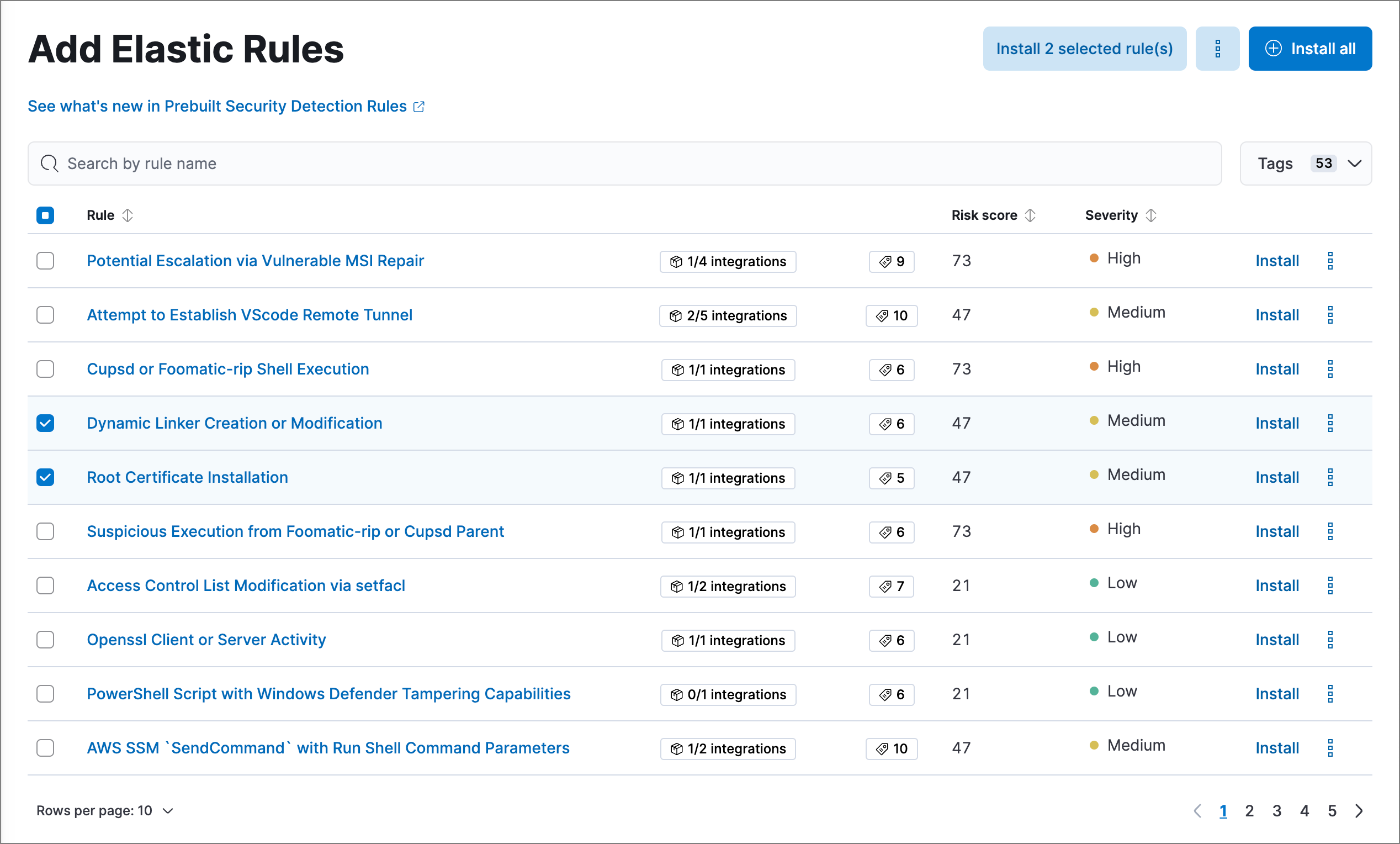
For any rules you haven't already enabled, go back to the Detection rules (SIEM) page, search or filter for the rules you want to run, and do either of the following:
- Enable a single rule: Turn on the rule's Enabled switch.
- Enable multiple rules: Select the rules, then select Bulk actions > Enable.
Once you enable a rule, it starts running on its configured schedule. To confirm that it's running successfully, check its Last response status in the rules table, or open the rule's details page and check the Execution results tab.
Some prebuilt rules serve special purposes: Endpoint protection rules generate alerts from Elastic Defend's threat monitoring and prevention, while the External Alerts rule creates alerts for incoming third-party system alerts (for example, Suricata alerts).
After installing prebuilt rules:
- Keep rules current: Elastic regularly updates prebuilt rules to detect new threats. Refer to Update Elastic prebuilt rules to learn how to apply updates.
- Customize rules: Adapt prebuilt rules to your environment by editing them directly (Enterprise) or duplicating and modifying copies. Refer to Customize Elastic prebuilt rules.
- Build custom rules: Create detection logic tailored to your infrastructure. Refer to Author rules.