Context
Each investigation starts from what Elastic nightshift has learned previously. While a model brings general troubleshooting skills, it doesn't have knowledge about your services, where their telemetry lives, or how previous issues were resolved. Elastic nightshift context fills that gap, so investigations spend their time on the problem instead of trying to understand your system.
This page explains where that knowledge comes from, and how to check and correct it.
Knowledge builds up in layers, from your raw telemetry to what Elastic nightshift learned from its own work.
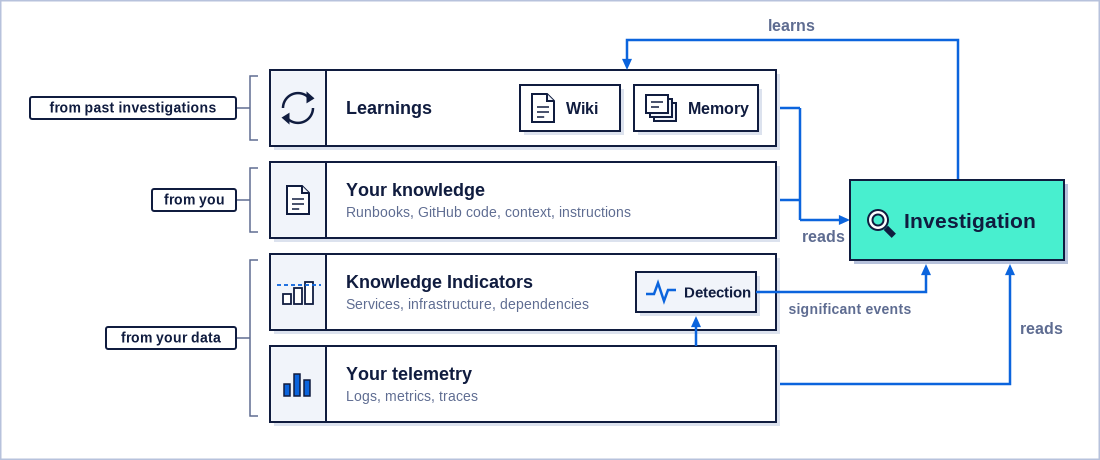
When detection is on, it extracts Knowledge Indicators (KIs) from your data ahead of time. You add what your data can't tell Elastic nightshift, such as team conventions and where your runbooks and code live. After each investigation, Elastic nightshift saves what it learned. Every investigation reads the Wiki, recalls the memories that match the problem, and follows your instructions, so the next investigation starts further ahead.
For example, after its first investigation of a slow service, Elastic nightshift can save a memory about where that service's telemetry lives, and Wiki pages for the service and its database. The next investigation of that service reads them first and doesn't have to search for the right indices again.
| What it is | Who writes it | When it's used | |
|---|---|---|---|
| Knowledge Indicators | Facts and queries that detection extracts from your data, such as services, dependencies, and known failure patterns | Elastic nightshift, from your detection sources | When detection creates rules and finds significant events. Investigations get KIs only through significant events. |
| Wiki | Short pages about your services, integrations, runbooks, and queries | Elastic nightshift, after each investigation | Read at the start of every investigation |
| Memory | Lessons from past investigations | Elastic nightshift, after each investigation | Searched by meaning, and recalled when an investigation looks similar |
| Custom context | Notes about your environment and conventions | You | Added to every investigation and chat in the space |
| Decision trees | Troubleshooting paths for alerts that Elastic nightshift has investigated before | Elastic nightshift, after investigations | Followed when the same alert fires again |
The Knowledge page shows everything that Elastic nightshift has learned.
- Open Elastic nightshift: select nightshift in the navigation menu.
- On the home page, open the menu and select Knowledge.
The page has a tab for each type of context: Knowledge Indicators, Wiki, and Memory. With developer mode on, it also has a Decision Trees tab.
To view the Knowledge page, or to archive, restore, or delete entries, you need the privileges listed in Grant access.
Elastic nightshift manages the Wiki and Memory itself, so you can't edit them. When an entry is wrong or out of date, archive it. Investigations stop using it, and you can restore it later.
- To archive a Wiki page, refer to Archive or restore a Wiki page.
- To archive or delete a memory, refer to Archive, restore, or delete a memory.
- To stop detection from using a Knowledge Indicator, exclude it. Refer to Knowledge Indicators.
- You can't edit or archive decision trees. Refer to Review decision trees.
Then tell Elastic nightshift what's right, with custom context or in your automation instructions.
To remove everything learned after a point in time, use Purge knowledge in developer mode.
Some things Elastic nightshift can't learn from your data: who owns a service, which checks your team always runs first, or how you name things. Tell it in one of two ways.
| To give context to | Use | Where |
|---|---|---|
| Every investigation and chat in the space | Custom context | Settings → Investigations |
| The investigations that one automation starts | Automation instructions | The automation's Additional Instructions or Instructions field |
In Tech Preview, you can't tell Elastic nightshift to remember something, or write to the Wiki or Memory directly. Custom context is the way to give it knowledge that every investigation uses. To add, edit, or remove snippets, and for more examples, including how to describe an API behind an HTTP connector, refer to Add custom context.
Instructions can say what to check, for example "For latency alerts, compare the p95 latency before and after the last deploy," or point to where your knowledge lives, such as a runbook in a GitHub repository. The investigation reads it when it runs, and what it learns can end up in the Wiki and Memory. Refer to Automation Instructions.
- Wiki: Read the pages that Elastic nightshift loads before each investigation.
- Memory: Check which lessons Elastic nightshift recalls, and how useful they were.
- Knowledge Indicators: Understand what detection learns from your data.
- Cost and models: Find out where this knowledge is stored and who can read it.