Kibana privileges
Kibana privileges grant users access to features within Kibana. Roles have privileges to determine whether users have write or read access.
To learn how to assign privileges to a role, refer to Defining roles.
Assigning a base privilege applies the same access level across all feature groups instead of setting a level for each feature.
Some features and sub-feature privileges are excluded from base privileges and must be granted individually.
- All: Grants full read-write access.
- Read: Grants read-only access.
- Customize: Allows you to set the access level for each feature separately.
From the role management screen:
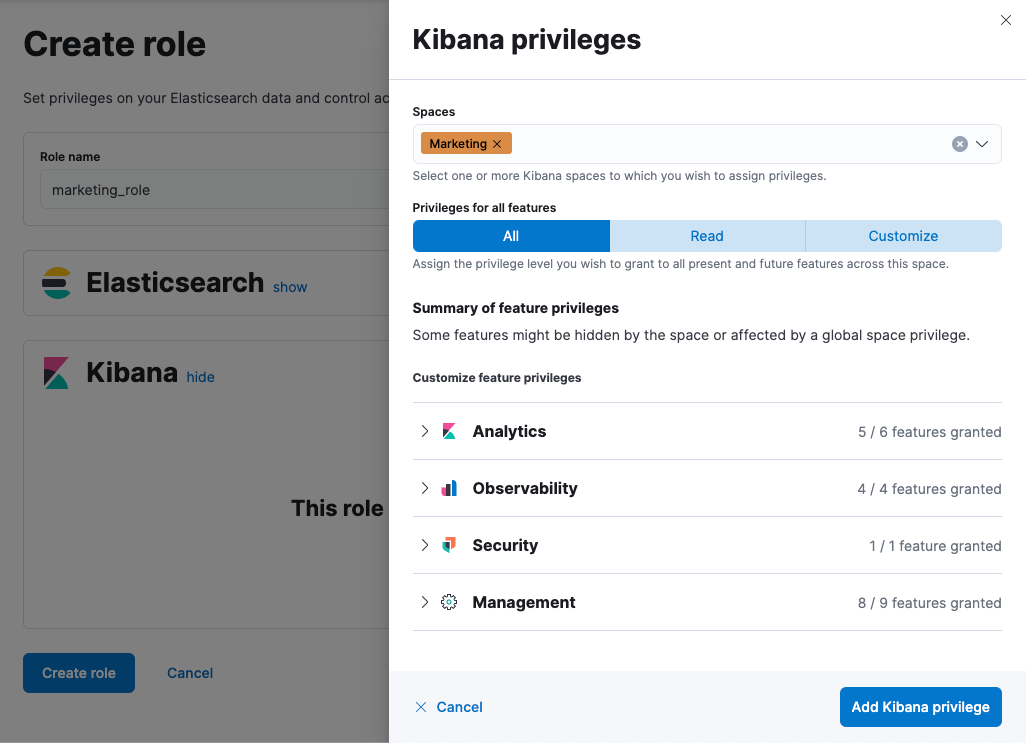
Using the role APIs:
PUT /api/security/role/my_kibana_role
{
  "elasticsearch": {
    "cluster" : [ ],
    "indices" : [ ]
  },
  "kibana": [
    {
      "base": ["all"],
      "feature": {},
      "spaces": ["marketing"]
    }
  ]
}
Assigning a feature privilege grants access to a specific feature. For each feature, select the type of access you want to allow:
- All: Users have full access to the feature, which includes performing all available actions and managing configuration.
- Read: Users can view the feature, but can't perform any actions or manage configuration.
- None: Users can't access or view the feature.
Some features don't have a Read privilege.
In role management, features are organized into the following groups.
| Group | What it contains |
|---|---|
| Analytics | Privileges for the features you use to explore and visualize data. Refer to Privileges in the Analytics group. |
| Alerting V2
|
Privileges for the experimental alerting system. Refer to Configure access to the experimental alerting system. |
| Elasticsearch | Privileges for Elasticsearch features. |
| Observability | Privileges for Elastic Observability features. Refer to Observability Kibana privileges. |
| Security | Privileges for Elastic Security features. Refer to Security Kibana privileges. |
| Management | Privileges for the features you use to administer Kibana and your data. Refer to Privileges in the Management group. |
Some features allow for finer access control than the All and Read privileges. This additional level of control is a subscription feature.
From the role management screen:
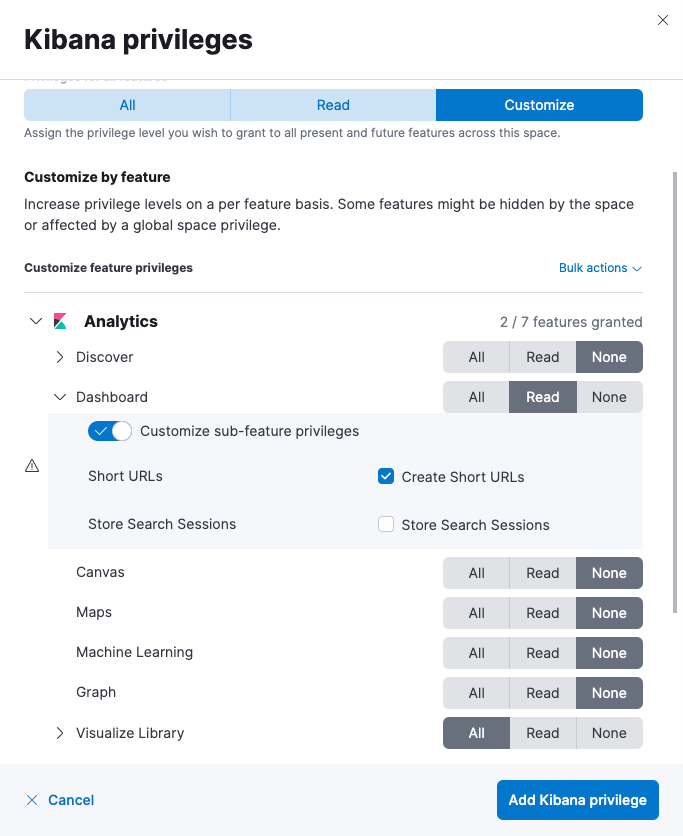
Using the role APIs:
PUT /api/security/role/my_kibana_role
{
  "elasticsearch": {
    "cluster" : [ ],
    "indices" : [ ]
  },
  "kibana": [
    {
      "base": [],
      "feature": {
        "visualize_v2": ["all"],
        "dashboard_v2": ["read", "url_create"]
      },
      "spaces": ["marketing"]
    }
  ]
}
Each of the following privileges controls access to a different feature.
| Privilege | What it allows |
|---|---|
| Discover | Access Discover, and save and manage Discover sessions. Turn on Customize sub-feature privileges to grant individual Discover privileges. For the full list, refer to Discover sub-feature privileges. |
| Dashboard | Access dashboards, and create and edit them. To add new visualizations or maps to a dashboard, users also need the Visualize library or Maps privilege. Turn on Customize sub-feature privileges to grant individual dashboard privileges. For the full list, refer to Dashboard sub-feature privileges. |
| Canvas | Access Canvas, and create and edit workpads. Turn on Customize sub-feature privileges to grant the reporting privilege. For details, refer to Canvas sub-feature privileges. |
| Maps | Access Maps, create and edit maps, and add maps to dashboards. |
| Machine Learning | Access machine learning, and create and manage jobs and trained models. This privilege grants the same access level to data views, dashboards, Discover sessions, and visualizations. |
| Graph | Access Graph, and create and edit graphs. |
| Visualize library | Access the Visualize library, create and edit visualizations, and add visualizations to dashboards. Turn on Customize sub-feature privileges to grant individual Visualize library privileges. For the full list, refer to Visualize library sub-feature privileges. |
| Agent Builder
|
Access Elastic Agent Builder, including agents, tools, and conversations. |
| Agent Builder - Semantic Metadata Layer (SML)
|
Access the semantic metadata that Elastic Agent Builder uses to interpret your data. |
| Workflows
|
Access Workflows, and create, edit, and run workflows. Turn on Customize sub-feature privileges to grant individual workflow privileges. For the full list, refer to Workflows sub-feature privileges. |
These privileges control specific actions in Discover. Selecting All includes everything in the following table.
| Privilege | What it allows |
|---|---|
| Create Short URLs | Create short URLs for Discover sessions, so that they can be shared. |
| Store Background search | Save the results of a long-running search, so that they can be viewed again without rerunning the search. |
| Generate CSV reports | Export the results of a Discover session as a CSV file. |
These privileges control specific actions on dashboards. Selecting All includes everything in the following table.
| Privilege | What it allows |
|---|---|
| Create Short URLs | Create short URLs for dashboards, so that they can be shared. |
| Store Background search | Save the results of a long-running search, so that they can be viewed again without rerunning the search. |
| Generate PDF or PNG reports | Export a dashboard as a PDF or PNG file. |
| Generate CSV reports from Discover session panels | Export the data behind a Discover session panel as a CSV file. |
This privilege controls a specific action in Canvas. Selecting All includes everything in the following table.
| Privilege | What it allows |
|---|---|
| Generate PDF reports | Export a workpad as a PDF file. |
These privileges control specific actions in the Visualize library. Selecting All includes everything in the following table.
| Privilege | What it allows |
|---|---|
| Create Short URLs | Create short URLs for visualizations, so that they can be shared. |
| Generate PDF or PNG reports | Export a visualization as a PDF or PNG file. |
These privileges control specific actions on workflows. Selecting All includes every privilege in the following table except Update managed workflows, which you grant separately.
| Privilege | What it allows |
|---|---|
| Create | Create workflows. |
| Update | Edit existing workflows. |
| Delete | Delete workflows. |
| Execute | Run workflows. |
| Read | View workflows. |
| Read Workflow Execution | View the results of a workflow run, including its logs. |
| Cancel Workflow Execution | Stop a workflow that's currently running. |
| Read managed workflows
|
View the workflows that Elastic provides. |
| Read managed workflow execution
|
View the results of a managed workflow run. |
| Update managed workflows
|
Edit the workflows that Elastic provides. |
Each of the following privileges controls access to a different feature.
| Privilege | What it allows |
|---|---|
| Streams
|
Access Streams, and change stream processing, retention, and routing. |
| AI Anonymization
|
Change the anonymization rules that control which field values are masked before they're sent to a large language model. |
| Dev Tools | Access Console, Search Profiler, and Grok Debugger. Users also need the matching Elasticsearch cluster and index privileges for the requests they run. |
| Advanced Settings | Change the settings that control how Kibana behaves in a space, such as the default index pattern and date format. |
| Data View Management | Create and edit data views. |
| Files Management | Manage the files that other features store in Kibana. |
| Shared images | Upload and manage the images that other features reuse, such as dashboard panel images. |
| Saved Objects Management | Manage saved objects, including importing, exporting, and copying them between spaces. |
| Saved Query Management | Save and manage queries across all features that use them. |
| Tag Management | Create and edit tags, and apply them to saved objects. |
| Stack Rules | Create and manage Elastic Stack rules, such as index threshold and Elasticsearch query rules. |
| Stack Alerts
|
View and manage the alerts that Elastic Stack rules generate, without granting access to the rules themselves. |
| Osquery | Access Osquery, and run and save queries. Turn on Customize sub-feature privileges to grant individual Osquery privileges. For the full list, refer to Osquery sub-feature privileges. |
| Actions and Connectors | Create and manage connectors, and run the actions that rules and cases trigger. Turn on Customize sub-feature privileges to grant the endpoint security privilege. For details, refer to Actions and Connectors sub-feature privileges. |
| Cases | Access cases, and create and edit them. Turn on Customize sub-feature privileges to grant individual case privileges. For the full list, refer to Customize sub-feature privileges for cases. |
| Inference Endpoints | Create and manage inference endpoints. |
| Cloud Connect
|
Connect a cluster to Elastic Cloud services. This privilege appears on Elastic Cloud Enterprise and self-managed clusters, but not on Elastic Cloud Hosted. |
| Automatic Import
|
Access Automatic Import, and create custom integrations from sample data. |
| Data Set Quality | Access the Data Set Quality page. Turn on Customize sub-feature privileges to grant individual data set quality privileges. For the full list, refer to Data Set Quality sub-feature privileges. |
| Fleet | Access Fleet, and manage agents and agent policies. Turn on Customize sub-feature privileges to grant individual Fleet privileges. For the full list, refer to Fleet privileges and available actions. |
| Integrations | Browse and install integrations. |
| Maintenance Windows | Create and manage maintenance windows, which suppress rule notifications for a scheduled period. |
| Manage Scheduled Reports
|
View and manage the scheduled reports of every user in the space. |
| Query activity
|
Access Query activity, and cancel long-running queries. |
| Rules Settings | Change the settings that apply to all rules in a space. Turn on Customize sub-feature privileges to grant individual rule settings privileges. For the full list, refer to Rules Settings sub-feature privileges. |
| Stack Monitoring | Access Elastic Stack monitoring. This privilege has no access levels to select: to grant access, assign the monitoring_user role. |
| AI Assistant
|
Change which AI Assistants are available, from the AI Assistant settings in Elastic Stack Management. |
| Setup guides
|
Access the getting-started page that helps you ingest data and start using Search, Observability, or Security. |
| Entity Manager
|
Access the Elastic Entity Model of hosts, containers, and services in Observability. |
These privileges control specific parts of Osquery. Selecting All includes everything in the following table.
| Privilege | What it allows |
|---|---|
| Live queries | Run live queries against hosts, and view the results. Read allows viewing the results of queries that other users ran. Select Run Saved queries within this privilege to also allow running saved queries without being able to change them. |
| Saved queries | Create, edit, and delete saved queries. |
| Packs | Create, edit, and delete query packs, and schedule them to run against agent policies. |
This privilege controls a specific action on connectors. Selecting All includes everything in the following table.
| Privilege | What it allows |
|---|---|
| Execute | Run the endpoint security connectors, which include SentinelOne, CrowdStrike, and Microsoft Defender for Endpoint. |
These privileges control specific actions on the Data Set Quality page. Selecting All includes everything in the following table.
| Privilege | What it allows |
|---|---|
| Manage rules | Create and edit the rules that alert on degraded documents. |
| Manage alerts | View and manage the alerts that those rules generate. |
These privileges control the settings that apply to all rules in a space. Selecting All includes everything in the following table.
| Privilege | What it allows |
|---|---|
| Flapping detection | Change the settings that control when an alert is treated as flapping between states. |
| Alert deletion
|
Change how long alerts are kept before they're deleted, and delete them on demand. |