Select and switch Kibana spaces
Switch between the spaces your roles allow. Switching spaces does not change your permissions.
You can also set whether Kibana opens your last space when you log in.
You can open only the spaces that your roles grant access to.
Open the space selector from the global header. Where you find it depends on your deployment type and version:
-
Select the name of your project in the global header, then select your current space to open My spaces. -
In spaces that use a solution view, select the name of your deployment in the global header, then select your current space to open My spaces. When the global header shows the name of your current space instead of a deployment name, selecting it opens My spaces directly. - In all other cases, select the avatar of your current space in the global header to open the Spaces menu.
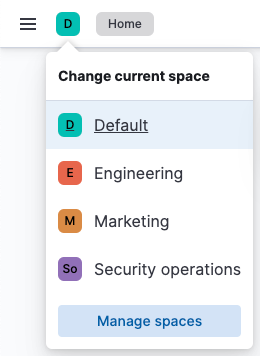
-
Select the space you want to open.
The selected space opens.
If you can access only one space, Kibana opens it.
If you can access more than one space, Kibana does one of the following:
-
Kibana can remember the space you last used and open it. If Kibana has no remembered space, or you no longer have access to it, Kibana asks you to select a space. A direct link to a Kibana app or object opens that destination. It does not send you to the remembered space. -
The behavior depends on your deployment type: - On self-managed deployments, Elastic Cloud Enterprise, and Elastic Cloud on Kubernetes, Kibana can remember the space you last used and open it. If Kibana has no remembered space, or you no longer have access to it, Kibana asks you to select a space. A direct link to a Kibana app or object opens that destination. It does not send you to the remembered space.
- On Elastic Cloud Hosted, Kibana asks you to select a space. It does not persist your last space. The Spaces preferences user menu item is not available.
-
Kibana asks you to select a space.
This preference is available on:
-
Elastic Cloud Serverless projects -
Self-managed deployments, Elastic Cloud Enterprise, Elastic Cloud on Kubernetes, and Elastic Cloud Hosted -
Self-managed deployments, Elastic Cloud Enterprise, and Elastic Cloud on Kubernetes. It is not available on Elastic Cloud Hosted.
This personal preference is on by default. It controls whether Kibana opens your last space when you log in.
Open the user menu from the header.
Open the space preference settings. The menu item depends on how you sign in:
- If you sign in with your Elastic Cloud account, select Spaces preferences.
- If you sign in any other way, for example with a username and password or on a self-managed deployment, select Edit profile.
Turn Remember last selected space on or off.
Save your changes.
The next time you log in, Kibana follows this preference. If the preference is off and you can access more than one space, Kibana shows the space selector.