Backfill time series data in Elasticsearch: Load months of historical metrics through the bulk API
Elasticsearch works out the time boundaries and creates the past backing indices as the documents land, so a historical data migration runs on your normal ingest path.
Check out the different ways to ingest data into Elasticsearch and dive into practical examples to try something new.
Elasticsearch is packed with new features to help you build the best search solutions for your use case. Start a free cloud trial or try Elastic on your local machine now.
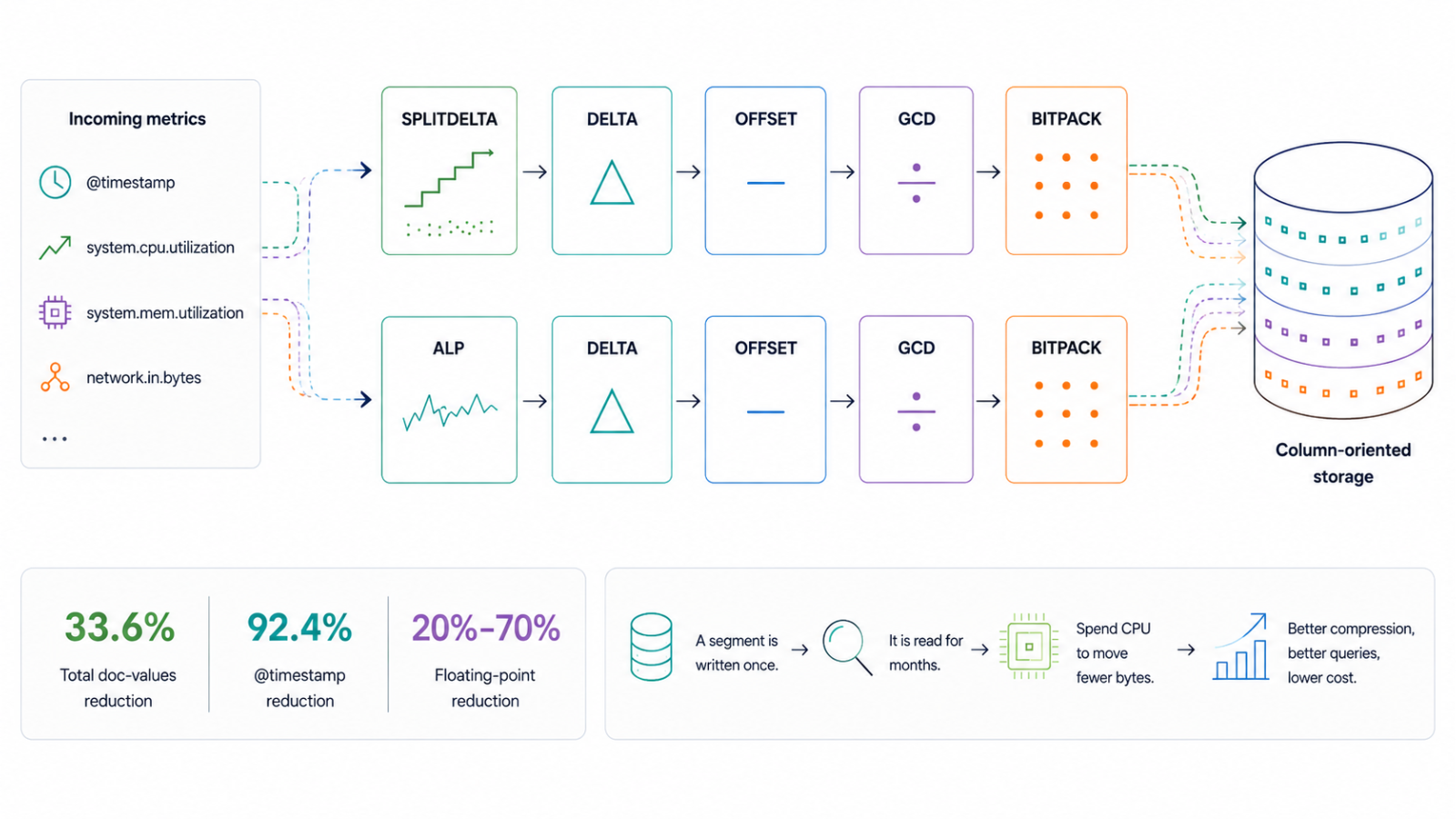
You can now write documents with past timestamps straight into Elasticsearch time series data streams (TSDB). Send months of historical metrics through the bulk API, the OpenTelemetry Protocol (OTLP) endpoint, or the Prometheus remote write endpoint. Elasticsearch creates the past backing indices as the documents arrive, computing each index's time boundaries and attaching it to the data stream. Backfilled documents are stored exactly like live ones, with columnar storage and write-time deduplication, along with up to 70% storage savings. Time series data backfill ships in Elasticsearch 9.5, disabled by default, and turns on with one cluster setting. How far back you can write depends on your lifecycle configuration, since backfill doesn’t apply to indices that are already read-only as a result of downsampling or a searchable snapshot.
How historical metrics were loaded before backfill
Even if loading historical metrics isn’t a very common use case, it’s an important step when teams are adopting TSDB. Two scenarios have been the most prominent: bootstrapping a new time series data stream and migrating data from a different system or data stream to a time series one.
Bootstrapping a new time series data stream
You want to start a new time series data stream with a week of historical data so you have something meaningful to query from the start. With existing tooling, you had to set index.look_back_time to the seven-day maximum in the index template, and all historical data would land in a single backing index. For anything beyond seven days, you needed to create past backing indices manually.
Migrating metrics from another system
You have months worth of metrics stored on a different system and want to move your full dataset to TSDB. You need to load months of metrics history alongside live ingestion. The workaround was to manually create all the necessary past backing indices with the right time_series.start_time and time_series.end_time and to index into it directly using the index name. You then attached it to the data stream via the modify data stream API. It worked, but it required understanding the index time semantics and repeating the steps for each time window, along with coordinating that process around ongoing writes.
We wanted both scenarios to feel as close to normal bulk indexing as possible.
What time series data backfill changes
In 9.5, Elasticsearch can create backing indices covering past time ranges, which extends the eligible write window backward.
The eligible write window is the range of @timestamp values that a time series data stream accepts for new documents.
In the past, the eligible write window was determined only by the existing writable backing indices at the moment the request was received by Elasticsearch.
In 9.5, Elasticsearch can expand the eligible write window in the past by creating backing indices. This converts the eligible write window to a sliding window extending from the present back to the first read-only or destructive lifecycle action. Common examples of these actions, which are typically defined within your lifecycle configuration, are downsampling or searchable snapshots. Examples also include retention configurations.
So, given that loading historical data is enabled in a cluster, the eligible write window of the data stream with the following lifecycle configuration is determined by the downsampling action, because it’s the first action that makes backing indices read-only. So, for this data stream Elasticsearch accepts documents whose @timestamp is no older than three months.
GET _data_stream/metrics/_lifecycle
{
  "enabled": true,
  "downsampling": [{ "after": "90d", "fixed_interval": "10m" }],
  "data_retention": "365d"
}
Why loading historical data into TSDB is hard
TSDB consists of data streams optimized for timestamped measurements. It uses a columnar storage layout and enforces immutable dimensions. It also organizes data into time-bound backing indices; each index covers a specific time range and accepts only documents whose @timestamp falls within it.
As time passes, rollover creates new backing indices to cover upcoming ranges. Until this release, there was no corresponding mechanism for the past. Creating indices in the past is tricky because historical data might span over a long period of time and can arrive at Elasticsearch out of order. Consequently, Elasticsearch cannot determine the write timeframe that its backing index should cover. Our solution to this is to use a preconfigured interval and lazily create past backing indices.
How Elasticsearch creates past backing indices
When a document is detected whose timestamp isn't covered by any existing backing index, Elasticsearch determines the time boundaries for the missing indices and creates them. It then adds them to the data stream in a single atomic operation.
Lazily creating the indices ensures that a single request in the past won’t overwhelm the cluster by requiring the creation of 300 indices all at once. It also doesn’t create indices before there are docs to write into them.
Proactive vs. reactive: How we chose the index creation approach
We explored two ways to detect when a past backing index needs to be created.
The first is proactive. Inspect each incoming document's timestamp before routing, and create any missing past backing indices up front. This keeps the write path clean. By the time a document is routed, the index it needs already exists. It does require the data stream to already exist with at least one time series backing index, since that's what we inspect to determine the eligible write window and the time boundaries of the new index. The downside is that it adds work to every bulk request targeting a time series data stream, even requests that contain no past timestamps and need no backfill at all.
The second is reactive. Let the document fail the normal indexing, intercept that failure, create the missing index, and retry. This avoids any overhead on the common case, since the extra work only happens when a mismatch actually occurs. The tradeoff is more complexity in the failure handling path and a retry on every backfill document.
We ran performance tests on the proactive approach against bulk requests with no past timestamps and found no measurable regression. The overhead of inspecting timestamps turned out to be negligible. That settled it. Proactive creation is simpler and consistent with how index auto-creation already works in Elasticsearch. Plus, it adds no measurable cost to the workloads that don't use backfill.
How Elasticsearch determines past index boundaries
Each new past backing index has three properties to compute: its duration, its start time, and its end time.
Property | How it's set | Constraint |
Duration | Defaults to one day, configurable via the cluster setting | Minimum one hour. If the triggering timestamp falls in a gap up to 1.3 times the configured duration, Elasticsearch collapses it into a single bridging index rather than creating many tiny ones. |
Start time | Anchored to the start of the next existing backing index, working backward in multiples of the configured duration | Increased to match the end time of the previous neighboring index, where they would otherwise overlap. |
End time | Start time plus the configured duration | Reduced to match the start time of the next index, where they would otherwise overlap. |
Handling concurrent writes
In a distributed setup, multiple nodes can receive bulk requests with overlapping past timestamps at the same time. Each node collects the timestamps that aren’t matching any of the existing indices and sends a request to the master node.
The master node executes a cluster update that sorts them and then, one by one, checks whether the timestamp is covered by an existing or newly created index. Otherwise, it issues a new create index request with the time boundaries calculated as described above. The cluster updates are always sequential and guaranteed to produce valid cluster states, so new indices are guaranteed to not overlap with existing indices.
How lifecycle age works for backfilled indices
Past backing indices hold old data but are new indices. Without an adjustment, lifecycle features would apply downsampling and retention based on when the index was created rather than when the data is from. We account for this by using the index.time_series.end_time as the index.lifecycle.origination_date. As a result, the age of the index as perceived by both data stream lifecycle and index lifecycle management (ILM) is based on the age of its data and not its creation time.
How to use time series data backfill
How to enable time series data backfill
Backfill support ships disabled by default. Enable it at the cluster level:
PUT _cluster/settings
{
"persistent": {
"data_stream.past_tsdb_index_creation_enabled": true
	}
}
Bootstrapping with historical metrics
To load historical data into a new time series data stream:
Initialize your data stream. (This is an important step because an existing data stream is a requirement for creating past backing indices.)
Start indexing.
Past backing indices are created automatically as documents with historical timestamps arrive, each covering one day of data by default. No additional configuration is needed.
Data migration into an existing data stream
Migrating data within the eligible write window
For data that falls within the eligible write window of your data stream, point your migration pipeline at the data stream and let Elasticsearch manage the rest.
Migrating data beyond a read-only action
For data older than the write window (for example, you're migrating 18 months of metrics but downsampling kicks in after seven days), you need a separate data stream without read-only lifecycle actions. Retention isn’t an issue since the data would be deleted anyway. The pattern is:
1. Create an index template for the historical data stream, using the same mappings as the original but without a lifecycle:
PUT _index_template/my-metrics-historical
{
  "index_patterns": ["metrics-historical-*"],
  "data_stream": {},
  "template": {
    "settings": { "index.mode": "time_series" },
    "mappings": {
      "properties": {
        "sensor_id": { "type": "keyword", "time_series_dimension": true },
        "temperature": { "type": "half_float", "time_series_metric": "gauge" },
        "@timestamp": { "type": "date" }
      }
    }
  }
}
2. Create the historical data stream. If this step isn’t executed, the first indexing request might fail. During the first indexing request, Elasticsearch can create the data stream but it cannot yet create any past backing indices, so indexing a historical document might fail. Creating the data stream explicitly ensures that all indexing requests will be accepted:
PUT _data_stream/metrics-historical-20243. Index historical data into the historical data stream while current data continues flowing into the original.
4. When the load is complete, add lifecycle. This is only supported by data stream lifecycle since this feature functions on a data stream level:
PUT _data_stream/metrics-historical-2024/_lifecycle
{
"enabled": true,
"downsampling": [{ "after": "7d", "fixed_interval": "10m" }]
}
5. Query across both data streams with a wildcard pattern (my-metrics*) or a data stream alias.
6. If retention is configured, delete the historical data streams when their data expires. Data stream lifecycle will delete the data but it won't clean up the data stream itself.
As you see, the historical data needs to fit on the target tier as a whole because lifecycle will be enabled after the data is loaded. If you have a large historical import, you might choose to split it into batches. Make sure each batch can fit on the target tier as a whole at the time of indexing, to avoid running your cluster out of disk space. Lifecycle will start processing the batch's indices as soon as it's enabled, but it will need time to process the whole backlog.
Protecting the cluster during large migrations: Downsampling floodgate
When data stream lifecycle runs against a data stream with many indices that all qualify for downsampling, it queues them simultaneously. Downsampling is CPU and I/O intensive; it reads and rewrites all data in an index. Queuing dozens of operations at once can overwhelm the master node with persistent task updates while it coordinates them.
The downsampling floodgate scenario could occur before backfill support (for example, when adding a lifecycle policy to an existing data stream with months of accumulated data). Backfill makes it more likely by design.
In 9.5 and serverless, we added flood protection to data stream lifecycle. It now tracks how many indices per data stream are actively being downsampled. If that count reaches a threshold, data stream lifecycle pauses queuing further operations for that data stream until the count drops. The threshold is configurable via the cluster setting data_streams.lifecycle.downsampling.max_indices_in_progress. Other data streams aren't affected.
Limitations and prerequisites of time series data backfill
Backfill doesn’t apply to read-only indices. If downsampling or a searchable snapshot transition has already run on a time period, documents for that period are still rejected.
The feature requires a preexisting time series data stream with at least one time series backing index.
System data streams are excluded.
Replicated data streams rely on the leader data stream, so no direct backfilling is possible.
Scaling remains your responsibility. Loading months of data can trigger significant storage usage, force merge operations, and lifecycle activity in parallel. Check that your cluster has the headroom to manage it before starting.
Conclusion
Prior to the Elasticsearch 9.5 release, loading historical data into TSDB was a manual process. By automating the generation and management of past backing indices, we aim to transform historical data migration to a native capability of your standard ingest pipelines. The inherent complexity of managing time-bound indices remains, but it has transitioned from a user responsibility into an internal Elasticsearch function. Whether you’re bootstrapping a fresh data stream or migrating extensive historical datasets, the platform now handles the heavy lifting, allowing you to focus on analyzing your metrics. We look forward to seeing how these improvements streamline your adoption of TSDB.
Frequently Asked Questions
What is TSDB backfill in Elasticsearch?
TSDB backfill is a feature available in Elasticsearch 9.5 that lets you write documents with past timestamps into a time series data stream. Elasticsearch automatically creates the past backing indices needed to store them. You use the same endpoints that you use for live data; no separate tooling or manual index management is required.
How do I enable TSDB backfill?
Backfill ships disabled by default. Enable it with a single cluster setting, `PUT _cluster/settings`, and set `data_stream.past_tsdb_index_creation_enabled` to `true`. No other configuration is needed for most use cases. In serverless, a way to enable this feature will be available soon.
What’s the eligible write window for TSDB backfill?
The eligible write window is the range of past timestamps that TSDB will accept. It extends from the present back to the first lifecycle action that makes a backing index read-only (such as downsampling or a searchable snapshot transition) or to the configured retention period, whichever comes first. If neither is configured, the window extends back indefinitely.
Can I load data older than my eligible write window using TSDB backfill?
No. You cannot do this directly into the same data stream. Data older than the eligible write window (for example, data from 18 months ago when downsampling kicks in after seven days) must be loaded into a separate time series data stream without a lifecycle policy. You can then query both streams together with a wildcard pattern or a data stream alias.
Does TSDB backfill preserve write-time deduplication?
Yes. The past backing indices created are time series indices and provide the same guarantees. If a duplicate document arrives, Elasticsearch rejects it immediately with a `409 Conflict`.
How does Elasticsearch prevent conflicts when multiple nodes backfill the same time range?
The boundary is determined within a cluster state update which is run sequentially by the master node. If two nodes submit a request to cover two timestamps that are very close to each other, the first cluster update creates the index and the second either detects that it’s already covered and skips creating an index or it creates an index neighboring the previous one.
What are the limitations of TSDB backfill?
Backfill doesn’t apply to read-only indices. If downsampling or a searchable snapshot has already run on a time period, documents for that period are still rejected. The feature requires a preexisting time series data stream with at least one backing index and doesn’t apply to system data streams or replicated data streams.
How helpful was this content?
Related Content

GPU-accelerated vector indexing in Elasticsearch with NVIDIA cuVS: 138M vectors in under 10 minutes

Agentic workflows in Elasticsearch: pause an AI agent for human approval, resume 72 hours later

One field, one copy: How Elasticsearch columnar storage drops the inverted index
ES95: Adaptive Compression for Elasticsearch Time-Series Metrics
